Oracle
R
Applications
Developer’s Guide
RELEASE 11i
VOLUME 1
April 2001
Oracle Applications Developer’s Guide, RELEASE 11i VOLUME 1
The part number for this volume is A83705–03.
To reorder this book, please use the set part number, A75545–03.
Copyright E 1995, 2001 Oracle Corporation. All rights reserved.
Contributing Authors: Anne Carlson, Emily Nordhagen, Lisa Nordhagen, Dana Spradley,
Martin Taylor, Peter Wallack, Millie Wang, Sara Woodhull
Contributors: Ram Bhoopalam, Eric Bing, Steven Carter, Cliff Godwin, Mark Fisher, Michael
Konopik, Michael Mast, Tom Morrow, Robert Nix, Gursat Olgun, Susan Stratton, Leslie
Studdard, Venkata Vengala, Maxine Zasowski
The Programs (which include both the software and documentation) contain proprietary information of
Oracle Corporation; they are provided under a license agreement containing restrictions on use and
disclosure and are also protected by copyright, patent and other intellectual property law. Reverse
engineering of the Programs is prohibited. No part of this document may be reproduced or transmitted in
any form or by any means, electronic or mechanical, for any purpose, without the express written
permission of Oracle Corporation.
Program Documentation is licensed for use solely to support the deployment of the Programs and not for
any other purpose.
The information contained in this document is subject to change without notice. If you find any problems
in the documentation, please report them to us in writing. Oracle Corporation does not warrant that this
document is error free. Except as may be expressly permitted in your license agreement for these
Programs, no part of these Programs may be reproduced or transmitted in any form or by any means,
electronic or mechanical, for any purpose, without the express written permission of Oracle Corporation.
If the Programs are delivered to the U.S. Government or anyone licensing or using the Programs on behalf
of the U.S. Government, the following notice is applicable:
RESTRICTED RIGHTS LEGEND
Programs delivered subject to the DOD FAR Supplement are ’commercial computer software’ and use,
duplication and disclosure of the Programs including documentation, shall be subject to the licensing
restrictions set forth in the applicable Oracle license agreement. Otherwise, Programs delivered subject to
the Federal Acquisition Regulations are ’restricted computer software’ and use, duplication and disclosure
of the Programs shall be subject to the restrictions in FAR 52.227–19, Commercial Computer Software –
Restricted Rights (June, 1987). Oracle Corporation, 500 Oracle Parkway, Redwood City, CA 94065.
The Programs are not intended for use in any nuclear, aviation, mass transit, medical, or other inherently
dangerous applications. It shall be licensee’s responsibility to take all appropriate fail–safe, back up,
redundancy and other measures to ensure the safe use of such applications if the Programs are used for
such purposes, and Oracle disclaims liability for any damages caused by such use of the Programs.
Oracle is a registered trademark and Oracle7, Oracle8, Oracle Application Object Library, Oracle Applica-
tions, Oracle Alert, Oracle Financials, Oracle Workflow, SQL*Forms, SQL*Plus, SQL*Report, Oracle Data
Browser, Oracle Forms, Oracle General Ledger, Oracle Human Resources, Oracle Manufacturing, Oracle
Reports, PL/SQL, Pro*C and SmartClient are trademarks or registered trademarks of Oracle Corporation.
All other company or product names are mentioned for identification purposes only, and may be trademarks
of their respective owners.
iContents
Contents
Volume 1VOLUME 1 i. . . . . . . . . . . . . . . . . . . . . . . . .
Preface i. . . . . . . . . . . . . . . . . . . . . . . . . . . . . . . . . . . . . . . . . . . . . . . . .
Audience for This Guide ii. . . . . . . . . . . . . . . . . . . . . . . . . . . . . .
Other Information Sources ii. . . . . . . . . . . . . . . . . . . . . . . . . . . . .
Do Not Use Database Tools to Modify Oracle
Applications Data vi. . . . . . . . . . . . . . . . . . . . . . . . . . . . . . . . . . . .
Typographic Conventions vii. . . . . . . . . . . . . . . . . . . . . . . . . . . . .
About Oracle ix. . . . . . . . . . . . . . . . . . . . . . . . . . . . . . . . . . . . . . . .
Your Feedback ix. . . . . . . . . . . . . . . . . . . . . . . . . . . . . . . . . . . . . . .
Chapter 1 Overview of Coding Standards 1 – 1. . . . . . . . . . . . . . . . . . . . . . . . . . .
Overview of Coding Standards 1 – 2. . . . . . . . . . . . . . . . . . . . . . . . . . . .
Importance of these Standards 1 – 2. . . . . . . . . . . . . . . . . . . . . . . . .
Coding Principles 1 – 2. . . . . . . . . . . . . . . . . . . . . . . . . . . . . . . . . . . .
Coding With Handlers 1 – 3. . . . . . . . . . . . . . . . . . . . . . . . . . . . . . . .
Libraries 1 – 4. . . . . . . . . . . . . . . . . . . . . . . . . . . . . . . . . . . . . . . . . . . .
Performance 1 – 5. . . . . . . . . . . . . . . . . . . . . . . . . . . . . . . . . . . . . . . . .
Coding for Web Compatibility 1 – 6. . . . . . . . . . . . . . . . . . . . . . . . .
The Standard Development Environment 1 – 7. . . . . . . . . . . . . . . . . . .
Oracle Application Object Library for Release 11i 1 – 9. . . . . . . . .
Setting Object Characteristics 1 – 9. . . . . . . . . . . . . . . . . . . . . . . . . .
Shared Objects 1 – 10. . . . . . . . . . . . . . . . . . . . . . . . . . . . . . . . . . . . . . .
Standard Libraries 1 – 11. . . . . . . . . . . . . . . . . . . . . . . . . . . . . . . . . . . .
ii Oracle Applications Developer’s Guide
Property Classes 1 – 13. . . . . . . . . . . . . . . . . . . . . . . . . . . . . . . . . . . . .
Visual Attributes 1 – 14. . . . . . . . . . . . . . . . . . . . . . . . . . . . . . . . . . . . .
Overview of Building an Application 1 – 15. . . . . . . . . . . . . . . . . . . . . . .
Overall Design Issues to Consider 1 – 15. . . . . . . . . . . . . . . . . . . . . .
Overview of Application Development Steps 1 – 16. . . . . . . . . . . .
Overview of Form Development Steps 1 – 17. . . . . . . . . . . . . . . . . .
Chapter 2 Setting Up Your Application Framework 2 – 1. . . . . . . . . . . . . . . . . . .
Overview of Setting Up Your Application Framework 2 – 2. . . . . . . .
Definitions 2 – 2. . . . . . . . . . . . . . . . . . . . . . . . . . . . . . . . . . . . . . . . . .
Set Up Your Application Directory Structures 2 – 3. . . . . . . . . . . .
Register Your Application 2 – 3. . . . . . . . . . . . . . . . . . . . . . . . . . . . .
Modify Your Environment Files 2 – 4. . . . . . . . . . . . . . . . . . . . . . . .
Set Up and Register Your Oracle Schema 2 – 4. . . . . . . . . . . . . . . .
Create Database Objects and Integrate with APPS Schema 2 – 5.
Add Your Application to a Data Group 2 – 5. . . . . . . . . . . . . . . . . .
Set Up Concurrent Managers 2 – 5. . . . . . . . . . . . . . . . . . . . . . . . . .
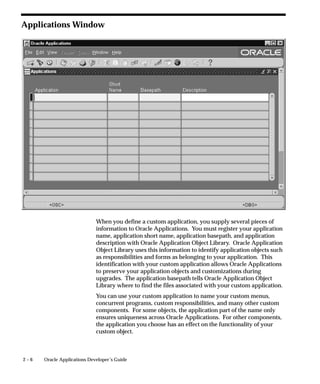
Applications Window 2 – 6. . . . . . . . . . . . . . . . . . . . . . . . . . . . . . . . . . . .
Prerequisites 2 – 7. . . . . . . . . . . . . . . . . . . . . . . . . . . . . . . . . . . . . . . . .
Applications Block 2 – 7. . . . . . . . . . . . . . . . . . . . . . . . . . . . . . . . . . .
Chapter 3 Building Your Database Objects 3 – 1. . . . . . . . . . . . . . . . . . . . . . . . . .
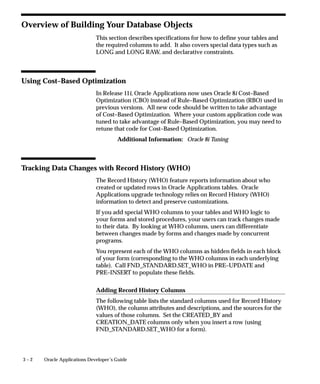
Overview of Building Your Database Objects 3 – 2. . . . . . . . . . . . . . . .
Using Cost–Based Optimization 3 – 2. . . . . . . . . . . . . . . . . . . . . . . .
Tracking Data Changes with Record History (WHO) 3 – 2. . . . . .
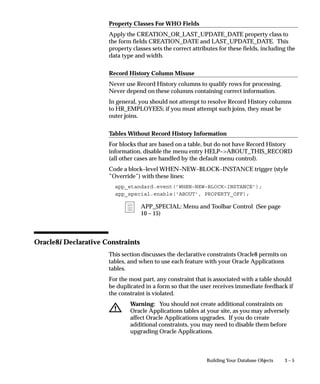
Oracle8i Declarative Constraints 3 – 5. . . . . . . . . . . . . . . . . . . . . . .
LONG, LONG RAW and RAW Datatypes 3 – 7. . . . . . . . . . . . . . .
Columns Using a Reserved Word 3 – 7. . . . . . . . . . . . . . . . . . . . . . .
Views 3 – 7. . . . . . . . . . . . . . . . . . . . . . . . . . . . . . . . . . . . . . . . . . . . . . .
Sequences 3 – 10. . . . . . . . . . . . . . . . . . . . . . . . . . . . . . . . . . . . . . . . . . .
Table Registration API 3 – 11. . . . . . . . . . . . . . . . . . . . . . . . . . . . . . . . . . . .
Chapter 4 Using PL/SQL in Oracle Applications 4 – 1. . . . . . . . . . . . . . . . . . . . .
Overview of Using PL/SQL in Applications 4 – 2. . . . . . . . . . . . . . . . .
Definitions 4 – 3. . . . . . . . . . . . . . . . . . . . . . . . . . . . . . . . . . . . . . . . . .
General PL/SQL Coding Standards 4 – 3. . . . . . . . . . . . . . . . . . . . .
Database Server Side versus Client Side 4 – 6. . . . . . . . . . . . . . . . .
Formatting PL/SQL Code 4 – 7. . . . . . . . . . . . . . . . . . . . . . . . . . . . .
Exception Handling 4 – 9. . . . . . . . . . . . . . . . . . . . . . . . . . . . . . . . . .
iiiContents
SQL Coding Guidelines 4 – 11. . . . . . . . . . . . . . . . . . . . . . . . . . . . . . .
Triggers in Forms 4 – 11. . . . . . . . . . . . . . . . . . . . . . . . . . . . . . . . . . . . .
Resources 4 – 12. . . . . . . . . . . . . . . . . . . . . . . . . . . . . . . . . . . . . . . . . . .
Replacements for Oracle Forms Built–ins 4 – 14. . . . . . . . . . . . . . . . . . . .
Coding Item, Event and Table Handlers 4 – 17. . . . . . . . . . . . . . . . . . . . .
Coding Item Handlers 4 – 17. . . . . . . . . . . . . . . . . . . . . . . . . . . . . . . .
Coding Event Handlers 4 – 19. . . . . . . . . . . . . . . . . . . . . . . . . . . . . . .
Coding Table Handlers 4 – 20. . . . . . . . . . . . . . . . . . . . . . . . . . . . . . . .
Example Client–Side Table Handler 4 – 21. . . . . . . . . . . . . . . . . . . . .
Example Server–Side Table Handler 4 – 24. . . . . . . . . . . . . . . . . . . .
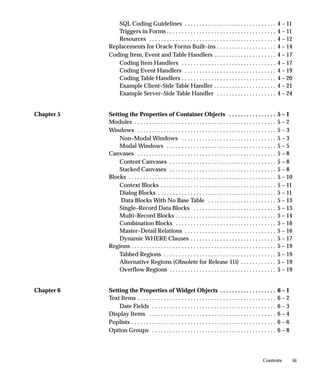
Chapter 5 Setting the Properties of Container Objects 5 – 1. . . . . . . . . . . . . . . .
Modules 5 – 2. . . . . . . . . . . . . . . . . . . . . . . . . . . . . . . . . . . . . . . . . . . . . . . .
Windows 5 – 3. . . . . . . . . . . . . . . . . . . . . . . . . . . . . . . . . . . . . . . . . . . . . . .
Non–Modal Windows 5 – 3. . . . . . . . . . . . . . . . . . . . . . . . . . . . . . . .
Modal Windows 5 – 5. . . . . . . . . . . . . . . . . . . . . . . . . . . . . . . . . . . . .
Canvases 5 – 8. . . . . . . . . . . . . . . . . . . . . . . . . . . . . . . . . . . . . . . . . . . . . . .
Content Canvases 5 – 8. . . . . . . . . . . . . . . . . . . . . . . . . . . . . . . . . . . .
Stacked Canvases 5 – 8. . . . . . . . . . . . . . . . . . . . . . . . . . . . . . . . . . . .
Blocks 5 – 10. . . . . . . . . . . . . . . . . . . . . . . . . . . . . . . . . . . . . . . . . . . . . . . . . .
Context Blocks 5 – 11. . . . . . . . . . . . . . . . . . . . . . . . . . . . . . . . . . . . . . .
Dialog Blocks 5 – 11. . . . . . . . . . . . . . . . . . . . . . . . . . . . . . . . . . . . . . . .
Data Blocks With No Base Table 5 – 13. . . . . . . . . . . . . . . . . . . . . . .
Single–Record Data Blocks 5 – 13. . . . . . . . . . . . . . . . . . . . . . . . . . . .
Multi–Record Blocks 5 – 14. . . . . . . . . . . . . . . . . . . . . . . . . . . . . . . . . .
Combination Blocks 5 – 16. . . . . . . . . . . . . . . . . . . . . . . . . . . . . . . . . .
Master–Detail Relations 5 – 16. . . . . . . . . . . . . . . . . . . . . . . . . . . . . . .
Dynamic WHERE Clauses 5 – 17. . . . . . . . . . . . . . . . . . . . . . . . . . . . .
Regions 5 – 19. . . . . . . . . . . . . . . . . . . . . . . . . . . . . . . . . . . . . . . . . . . . . . . . .
Tabbed Regions 5 – 19. . . . . . . . . . . . . . . . . . . . . . . . . . . . . . . . . . . . . .
Alternative Regions (Obsolete for Release 11i) 5 – 19. . . . . . . . . . . .
Overflow Regions 5 – 19. . . . . . . . . . . . . . . . . . . . . . . . . . . . . . . . . . . .
Chapter 6 Setting the Properties of Widget Objects 6 – 1. . . . . . . . . . . . . . . . . . .
Text Items 6 – 2. . . . . . . . . . . . . . . . . . . . . . . . . . . . . . . . . . . . . . . . . . . . . . .
Date Fields 6 – 3. . . . . . . . . . . . . . . . . . . . . . . . . . . . . . . . . . . . . . . . . .
Display Items 6 – 4. . . . . . . . . . . . . . . . . . . . . . . . . . . . . . . . . . . . . . . . . . .
Poplists 6 – 6. . . . . . . . . . . . . . . . . . . . . . . . . . . . . . . . . . . . . . . . . . . . . . . . .
Option Groups 6 – 8. . . . . . . . . . . . . . . . . . . . . . . . . . . . . . . . . . . . . . . . . .
iv Oracle Applications Developer’s Guide
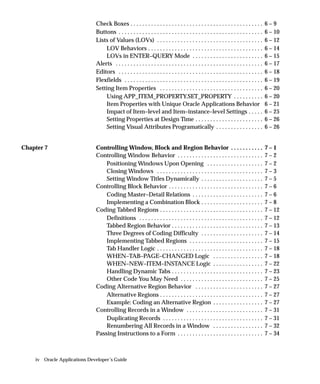
Check Boxes 6 – 9. . . . . . . . . . . . . . . . . . . . . . . . . . . . . . . . . . . . . . . . . . . . .
Buttons 6 – 10. . . . . . . . . . . . . . . . . . . . . . . . . . . . . . . . . . . . . . . . . . . . . . . . .
Lists of Values (LOVs) 6 – 12. . . . . . . . . . . . . . . . . . . . . . . . . . . . . . . . . . . .
LOV Behaviors 6 – 14. . . . . . . . . . . . . . . . . . . . . . . . . . . . . . . . . . . . . . .
LOVs in ENTER–QUERY Mode 6 – 15. . . . . . . . . . . . . . . . . . . . . . . .
Alerts 6 – 17. . . . . . . . . . . . . . . . . . . . . . . . . . . . . . . . . . . . . . . . . . . . . . . . . .
Editors 6 – 18. . . . . . . . . . . . . . . . . . . . . . . . . . . . . . . . . . . . . . . . . . . . . . . . .
Flexfields 6 – 19. . . . . . . . . . . . . . . . . . . . . . . . . . . . . . . . . . . . . . . . . . . . . . .
Setting Item Properties 6 – 20. . . . . . . . . . . . . . . . . . . . . . . . . . . . . . . . . . .
Using APP_ITEM_PROPERTY.SET_PROPERTY 6 – 20. . . . . . . . . .
Item Properties with Unique Oracle Applications Behavior 6 – 21
Impact of Item–level and Item–instance–level Settings 6 – 25. . . . .
Setting Properties at Design Time 6 – 26. . . . . . . . . . . . . . . . . . . . . . .
Setting Visual Attributes Programatically 6 – 26. . . . . . . . . . . . . . . .
Chapter 7 Controlling Window, Block and Region Behavior 7 – 1. . . . . . . . . . .
Controlling Window Behavior 7 – 2. . . . . . . . . . . . . . . . . . . . . . . . . . . . .
Positioning Windows Upon Opening 7 – 2. . . . . . . . . . . . . . . . . . .
Closing Windows 7 – 3. . . . . . . . . . . . . . . . . . . . . . . . . . . . . . . . . . . .
Setting Window Titles Dynamically 7 – 5. . . . . . . . . . . . . . . . . . . . .
Controlling Block Behavior 7 – 6. . . . . . . . . . . . . . . . . . . . . . . . . . . . . . . .
Coding Master–Detail Relations 7 – 6. . . . . . . . . . . . . . . . . . . . . . . .
Implementing a Combination Block 7 – 8. . . . . . . . . . . . . . . . . . . . .
Coding Tabbed Regions 7 – 12. . . . . . . . . . . . . . . . . . . . . . . . . . . . . . . . . . .
Definitions 7 – 12. . . . . . . . . . . . . . . . . . . . . . . . . . . . . . . . . . . . . . . . . .
Tabbed Region Behavior 7 – 13. . . . . . . . . . . . . . . . . . . . . . . . . . . . . . .
Three Degrees of Coding Difficulty 7 – 14. . . . . . . . . . . . . . . . . . . . .
Implementing Tabbed Regions 7 – 15. . . . . . . . . . . . . . . . . . . . . . . . .
Tab Handler Logic 7 – 18. . . . . . . . . . . . . . . . . . . . . . . . . . . . . . . . . . . .
WHEN–TAB–PAGE–CHANGED Logic 7 – 18. . . . . . . . . . . . . . . . .
WHEN–NEW–ITEM–INSTANCE Logic 7 – 22. . . . . . . . . . . . . . . . .
Handling Dynamic Tabs 7 – 23. . . . . . . . . . . . . . . . . . . . . . . . . . . . . . .
Other Code You May Need 7 – 25. . . . . . . . . . . . . . . . . . . . . . . . . . . .
Coding Alternative Region Behavior 7 – 27. . . . . . . . . . . . . . . . . . . . . . .
Alternative Regions 7 – 27. . . . . . . . . . . . . . . . . . . . . . . . . . . . . . . . . . .
Example: Coding an Alternative Region 7 – 27. . . . . . . . . . . . . . . . .
Controlling Records in a Window 7 – 31. . . . . . . . . . . . . . . . . . . . . . . . . .
Duplicating Records 7 – 31. . . . . . . . . . . . . . . . . . . . . . . . . . . . . . . . . .
Renumbering All Records in a Window 7 – 32. . . . . . . . . . . . . . . . .
Passing Instructions to a Form 7 – 34. . . . . . . . . . . . . . . . . . . . . . . . . . . . .
vContents
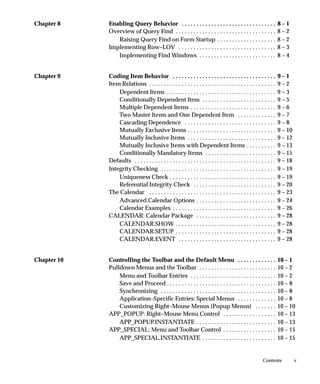
Chapter 8 Enabling Query Behavior 8 – 1. . . . . . . . . . . . . . . . . . . . . . . . . . . . . . . .
Overview of Query Find 8 – 2. . . . . . . . . . . . . . . . . . . . . . . . . . . . . . . . . .
Raising Query Find on Form Startup 8 – 2. . . . . . . . . . . . . . . . . . . .
Implementing Row–LOV 8 – 3. . . . . . . . . . . . . . . . . . . . . . . . . . . . . . . . .
Implementing Find Windows 8 – 4. . . . . . . . . . . . . . . . . . . . . . . . . .
Chapter 9 Coding Item Behavior 9 – 1. . . . . . . . . . . . . . . . . . . . . . . . . . . . . . . . . . .
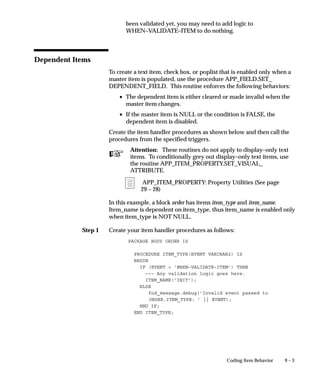
Item Relations 9 – 2. . . . . . . . . . . . . . . . . . . . . . . . . . . . . . . . . . . . . . . . . . .
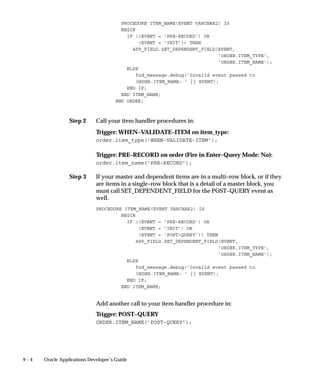
Dependent Items 9 – 3. . . . . . . . . . . . . . . . . . . . . . . . . . . . . . . . . . . . .
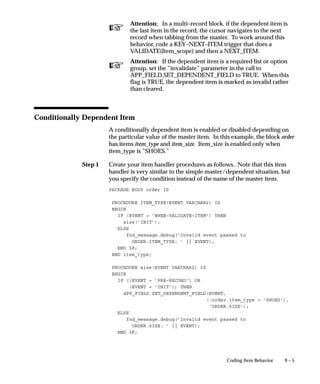
Conditionally Dependent Item 9 – 5. . . . . . . . . . . . . . . . . . . . . . . . .
Multiple Dependent Items 9 – 6. . . . . . . . . . . . . . . . . . . . . . . . . . . . .
Two Master Items and One Dependent Item 9 – 7. . . . . . . . . . . . .
Cascading Dependence 9 – 8. . . . . . . . . . . . . . . . . . . . . . . . . . . . . . .
Mutually Exclusive Items 9 – 10. . . . . . . . . . . . . . . . . . . . . . . . . . . . . .
Mutually Inclusive Items 9 – 12. . . . . . . . . . . . . . . . . . . . . . . . . . . . . .
Mutually Inclusive Items with Dependent Items 9 – 13. . . . . . . . . .
Conditionally Mandatory Items 9 – 15. . . . . . . . . . . . . . . . . . . . . . . .
Defaults 9 – 18. . . . . . . . . . . . . . . . . . . . . . . . . . . . . . . . . . . . . . . . . . . . . . . .
Integrity Checking 9 – 19. . . . . . . . . . . . . . . . . . . . . . . . . . . . . . . . . . . . . . .
Uniqueness Check 9 – 19. . . . . . . . . . . . . . . . . . . . . . . . . . . . . . . . . . . .
Referential Integrity Check 9 – 20. . . . . . . . . . . . . . . . . . . . . . . . . . . .
The Calendar 9 – 23. . . . . . . . . . . . . . . . . . . . . . . . . . . . . . . . . . . . . . . . . . .
Advanced Calendar Options 9 – 24. . . . . . . . . . . . . . . . . . . . . . . . . . .
Calendar Examples 9 – 26. . . . . . . . . . . . . . . . . . . . . . . . . . . . . . . . . . .
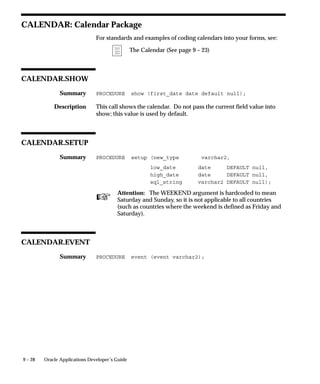
CALENDAR: Calendar Package 9 – 28. . . . . . . . . . . . . . . . . . . . . . . . . . .
CALENDAR.SHOW 9 – 28. . . . . . . . . . . . . . . . . . . . . . . . . . . . . . . . . .
CALENDAR.SETUP 9 – 28. . . . . . . . . . . . . . . . . . . . . . . . . . . . . . . . . .
CALENDAR.EVENT 9 – 28. . . . . . . . . . . . . . . . . . . . . . . . . . . . . . . . .
Chapter 10 Controlling the Toolbar and the Default Menu 10 – 1. . . . . . . . . . . . .
Pulldown Menus and the Toolbar 10 – 2. . . . . . . . . . . . . . . . . . . . . . . . . .
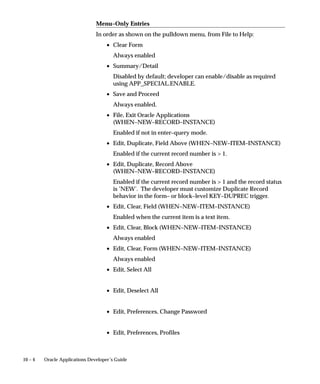
Menu and Toolbar Entries 10 – 2. . . . . . . . . . . . . . . . . . . . . . . . . . . . .
Save and Proceed 10 – 8. . . . . . . . . . . . . . . . . . . . . . . . . . . . . . . . . . . . .
Synchronizing 10 – 8. . . . . . . . . . . . . . . . . . . . . . . . . . . . . . . . . . . . . . .
Application–Specific Entries: Special Menus 10 – 8. . . . . . . . . . . . .
Customizing Right–Mouse Menus (Popup Menus) 10 – 10. . . . . . .
APP_POPUP: Right–Mouse Menu Control 10 – 13. . . . . . . . . . . . . . . . . .
APP_POPUP.INSTANTIATE 10 – 13. . . . . . . . . . . . . . . . . . . . . . . . . . .
APP_SPECIAL: Menu and Toolbar Control 10 – 15. . . . . . . . . . . . . . . . . .
APP_SPECIAL.INSTANTIATE 10 – 15. . . . . . . . . . . . . . . . . . . . . . . . .
vi Oracle Applications Developer’s Guide
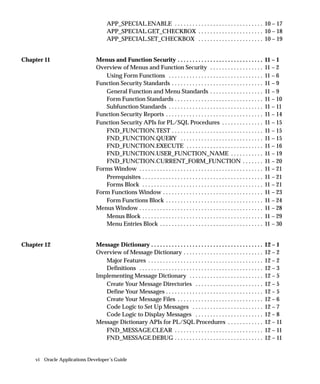
APP_SPECIAL.ENABLE 10 – 17. . . . . . . . . . . . . . . . . . . . . . . . . . . . . .
APP_SPECIAL.GET_CHECKBOX 10 – 18. . . . . . . . . . . . . . . . . . . . . .
APP_SPECIAL.SET_CHECKBOX 10 – 19. . . . . . . . . . . . . . . . . . . . . .
Chapter 11 Menus and Function Security 11 – 1. . . . . . . . . . . . . . . . . . . . . . . . . . . . .
Overview of Menus and Function Security 11 – 2. . . . . . . . . . . . . . . . . .
Using Form Functions 11 – 6. . . . . . . . . . . . . . . . . . . . . . . . . . . . . . . .
Function Security Standards 11 – 9. . . . . . . . . . . . . . . . . . . . . . . . . . . . . . .
General Function and Menu Standards 11 – 9. . . . . . . . . . . . . . . . . .
Form Function Standards 11 – 10. . . . . . . . . . . . . . . . . . . . . . . . . . . . . .
Subfunction Standards 11 – 11. . . . . . . . . . . . . . . . . . . . . . . . . . . . . . . .
Function Security Reports 11 – 14. . . . . . . . . . . . . . . . . . . . . . . . . . . . . . . . .
Function Security APIs for PL/SQL Procedures 11 – 15. . . . . . . . . . . . . .
FND_FUNCTION.TEST 11 – 15. . . . . . . . . . . . . . . . . . . . . . . . . . . . . . .
FND_FUNCTION.QUERY 11 – 15. . . . . . . . . . . . . . . . . . . . . . . . . . . .
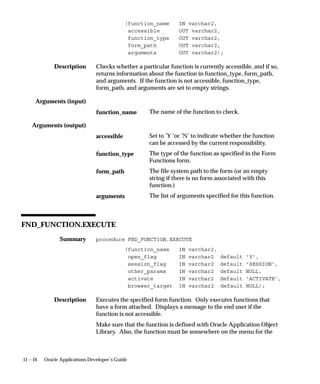
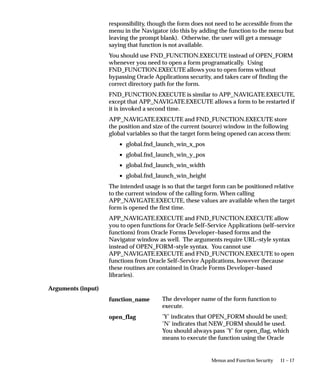
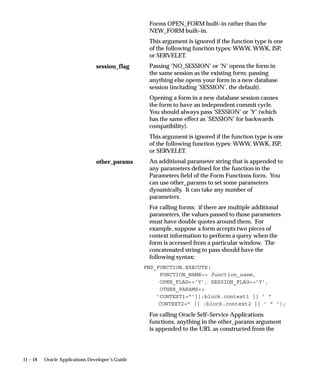
FND_FUNCTION.EXECUTE 11 – 16. . . . . . . . . . . . . . . . . . . . . . . . . .
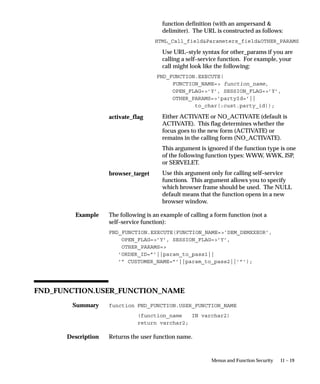
FND_FUNCTION.USER_FUNCTION_NAME 11 – 19. . . . . . . . . . .
FND_FUNCTION.CURRENT_FORM_FUNCTION 11 – 20. . . . . . .
Forms Window 11 – 21. . . . . . . . . . . . . . . . . . . . . . . . . . . . . . . . . . . . . . . . . .
Prerequisites 11 – 21. . . . . . . . . . . . . . . . . . . . . . . . . . . . . . . . . . . . . . . . .
Forms Block 11 – 21. . . . . . . . . . . . . . . . . . . . . . . . . . . . . . . . . . . . . . . . .
Form Functions Window 11 – 23. . . . . . . . . . . . . . . . . . . . . . . . . . . . . . . . . .
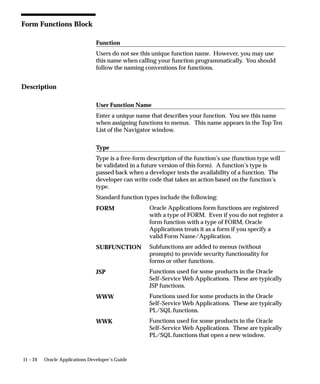
Form Functions Block 11 – 24. . . . . . . . . . . . . . . . . . . . . . . . . . . . . . . . .
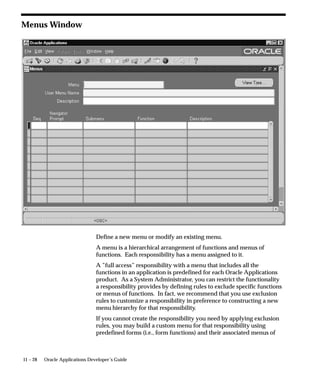
Menus Window 11 – 28. . . . . . . . . . . . . . . . . . . . . . . . . . . . . . . . . . . . . . . . . .
Menus Block 11 – 29. . . . . . . . . . . . . . . . . . . . . . . . . . . . . . . . . . . . . . . . .
Menu Entries Block 11 – 30. . . . . . . . . . . . . . . . . . . . . . . . . . . . . . . . . . .
Chapter 12 Message Dictionary 12 – 1. . . . . . . . . . . . . . . . . . . . . . . . . . . . . . . . . . . . . .
Overview of Message Dictionary 12 – 2. . . . . . . . . . . . . . . . . . . . . . . . . . .
Major Features 12 – 2. . . . . . . . . . . . . . . . . . . . . . . . . . . . . . . . . . . . . . .
Definitions 12 – 3. . . . . . . . . . . . . . . . . . . . . . . . . . . . . . . . . . . . . . . . . .
Implementing Message Dictionary 12 – 5. . . . . . . . . . . . . . . . . . . . . . . . .
Create Your Message Directories 12 – 5. . . . . . . . . . . . . . . . . . . . . . .
Define Your Messages 12 – 5. . . . . . . . . . . . . . . . . . . . . . . . . . . . . . . . .
Create Your Message Files 12 – 6. . . . . . . . . . . . . . . . . . . . . . . . . . . . .
Code Logic to Set Up Messages 12 – 7. . . . . . . . . . . . . . . . . . . . . . . .
Code Logic to Display Messages 12 – 8. . . . . . . . . . . . . . . . . . . . . . .
Message Dictionary APIs for PL/SQL Procedures 12 – 11. . . . . . . . . . . .
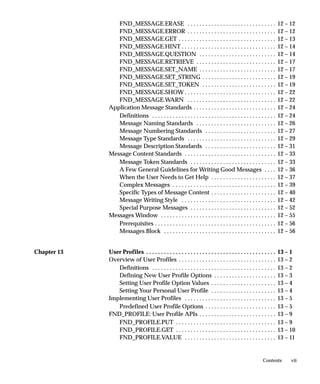
FND_MESSAGE.CLEAR 12 – 11. . . . . . . . . . . . . . . . . . . . . . . . . . . . . .
FND_MESSAGE.DEBUG 12 – 11. . . . . . . . . . . . . . . . . . . . . . . . . . . . . .
viiContents
FND_MESSAGE.ERASE 12 – 12. . . . . . . . . . . . . . . . . . . . . . . . . . . . . .
FND_MESSAGE.ERROR 12 – 12. . . . . . . . . . . . . . . . . . . . . . . . . . . . . .
FND_MESSAGE.GET 12 – 13. . . . . . . . . . . . . . . . . . . . . . . . . . . . . . . . .
FND_MESSAGE.HINT 12 – 14. . . . . . . . . . . . . . . . . . . . . . . . . . . . . . . .
FND_MESSAGE.QUESTION 12 – 14. . . . . . . . . . . . . . . . . . . . . . . . . .
FND_MESSAGE.RETRIEVE 12 – 17. . . . . . . . . . . . . . . . . . . . . . . . . . .
FND_MESSAGE.SET_NAME 12 – 17. . . . . . . . . . . . . . . . . . . . . . . . . .
FND_MESSAGE.SET_STRING 12 – 19. . . . . . . . . . . . . . . . . . . . . . . . .
FND_MESSAGE.SET_TOKEN 12 – 19. . . . . . . . . . . . . . . . . . . . . . . . .
FND_MESSAGE.SHOW 12 – 22. . . . . . . . . . . . . . . . . . . . . . . . . . . . . . .
FND_MESSAGE.WARN 12 – 22. . . . . . . . . . . . . . . . . . . . . . . . . . . . . .
Application Message Standards 12 – 24. . . . . . . . . . . . . . . . . . . . . . . . . . . .
Definitions 12 – 24. . . . . . . . . . . . . . . . . . . . . . . . . . . . . . . . . . . . . . . . . .
Message Naming Standards 12 – 26. . . . . . . . . . . . . . . . . . . . . . . . . . .
Message Numbering Standards 12 – 27. . . . . . . . . . . . . . . . . . . . . . . .
Message Type Standards 12 – 29. . . . . . . . . . . . . . . . . . . . . . . . . . . . . .
Message Description Standards 12 – 31. . . . . . . . . . . . . . . . . . . . . . . .
Message Content Standards 12 – 33. . . . . . . . . . . . . . . . . . . . . . . . . . . . . . .
Message Token Standards 12 – 33. . . . . . . . . . . . . . . . . . . . . . . . . . . . .
A Few General Guidelines for Writing Good Messages 12 – 36. . . .
When the User Needs to Get Help 12 – 37. . . . . . . . . . . . . . . . . . . . . .
Complex Messages 12 – 39. . . . . . . . . . . . . . . . . . . . . . . . . . . . . . . . . . .
Specific Types of Message Content 12 – 40. . . . . . . . . . . . . . . . . . . . . .
Message Writing Style 12 – 42. . . . . . . . . . . . . . . . . . . . . . . . . . . . . . . .
Special Purpose Messages 12 – 52. . . . . . . . . . . . . . . . . . . . . . . . . . . . .
Messages Window 12 – 55. . . . . . . . . . . . . . . . . . . . . . . . . . . . . . . . . . . . . . .
Prerequisites 12 – 56. . . . . . . . . . . . . . . . . . . . . . . . . . . . . . . . . . . . . . . . .
Messages Block 12 – 56. . . . . . . . . . . . . . . . . . . . . . . . . . . . . . . . . . . . . .
Chapter 13 User Profiles 13 – 1. . . . . . . . . . . . . . . . . . . . . . . . . . . . . . . . . . . . . . . . . . . .
Overview of User Profiles 13 – 2. . . . . . . . . . . . . . . . . . . . . . . . . . . . . . . . .
Definitions 13 – 2. . . . . . . . . . . . . . . . . . . . . . . . . . . . . . . . . . . . . . . . . .
Defining New User Profile Options 13 – 3. . . . . . . . . . . . . . . . . . . . .
Setting User Profile Option Values 13 – 4. . . . . . . . . . . . . . . . . . . . . .
Setting Your Personal User Profile 13 – 4. . . . . . . . . . . . . . . . . . . . . .
Implementing User Profiles 13 – 5. . . . . . . . . . . . . . . . . . . . . . . . . . . . . . .
Predefined User Profile Options 13 – 5. . . . . . . . . . . . . . . . . . . . . . . .
FND_PROFILE: User Profile APIs 13 – 9. . . . . . . . . . . . . . . . . . . . . . . . . .
FND_PROFILE.PUT 13 – 9. . . . . . . . . . . . . . . . . . . . . . . . . . . . . . . . . .
FND_PROFILE.GET 13 – 10. . . . . . . . . . . . . . . . . . . . . . . . . . . . . . . . . .
FND_PROFILE.VALUE 13 – 11. . . . . . . . . . . . . . . . . . . . . . . . . . . . . . .
viii Oracle Applications Developer’s Guide
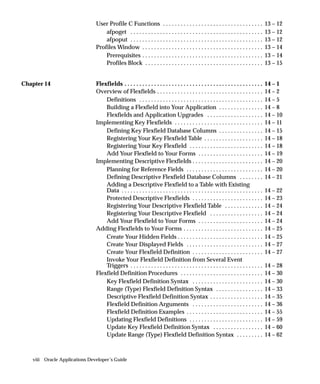
User Profile C Functions 13 – 12. . . . . . . . . . . . . . . . . . . . . . . . . . . . . . . . . .
afpoget 13 – 12. . . . . . . . . . . . . . . . . . . . . . . . . . . . . . . . . . . . . . . . . . . . .
afpoput 13 – 12. . . . . . . . . . . . . . . . . . . . . . . . . . . . . . . . . . . . . . . . . . . . .
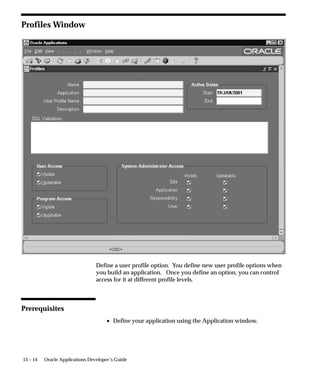
Profiles Window 13 – 14. . . . . . . . . . . . . . . . . . . . . . . . . . . . . . . . . . . . . . . . .
Prerequisites 13 – 14. . . . . . . . . . . . . . . . . . . . . . . . . . . . . . . . . . . . . . . . .
Profiles Block 13 – 15. . . . . . . . . . . . . . . . . . . . . . . . . . . . . . . . . . . . . . . .
Chapter 14 Flexfields 14 – 1. . . . . . . . . . . . . . . . . . . . . . . . . . . . . . . . . . . . . . . . . . . . . . .
Overview of Flexfields 14 – 2. . . . . . . . . . . . . . . . . . . . . . . . . . . . . . . . . . . .
Definitions 14 – 5. . . . . . . . . . . . . . . . . . . . . . . . . . . . . . . . . . . . . . . . . .
Building a Flexfield into Your Application 14 – 8. . . . . . . . . . . . . . .
Flexfields and Application Upgrades 14 – 10. . . . . . . . . . . . . . . . . . .
Implementing Key Flexfields 14 – 11. . . . . . . . . . . . . . . . . . . . . . . . . . . . . .
Defining Key Flexfield Database Columns 14 – 15. . . . . . . . . . . . . . .
Registering Your Key Flexfield Table 14 – 18. . . . . . . . . . . . . . . . . . . .
Registering Your Key Flexfield 14 – 18. . . . . . . . . . . . . . . . . . . . . . . . .
Add Your Flexfield to Your Forms 14 – 19. . . . . . . . . . . . . . . . . . . . . .
Implementing Descriptive Flexfields 14 – 20. . . . . . . . . . . . . . . . . . . . . . . .
Planning for Reference Fields 14 – 20. . . . . . . . . . . . . . . . . . . . . . . . . .
Defining Descriptive Flexfield Database Columns 14 – 21. . . . . . . .
Adding a Descriptive Flexfield to a Table with Existing
Data 14 – 22. . . . . . . . . . . . . . . . . . . . . . . . . . . . . . . . . . . . . . . . . . . . . . . .
Protected Descriptive Flexfields 14 – 23. . . . . . . . . . . . . . . . . . . . . . . .
Registering Your Descriptive Flexfield Table 14 – 24. . . . . . . . . . . . .
Registering Your Descriptive Flexfield 14 – 24. . . . . . . . . . . . . . . . . .
Add Your Flexfield to Your Forms 14 – 24. . . . . . . . . . . . . . . . . . . . . .
Adding Flexfields to Your Forms 14 – 25. . . . . . . . . . . . . . . . . . . . . . . . . . .
Create Your Hidden Fields 14 – 25. . . . . . . . . . . . . . . . . . . . . . . . . . . . .
Create Your Displayed Fields 14 – 27. . . . . . . . . . . . . . . . . . . . . . . . . .
Create Your Flexfield Definition 14 – 27. . . . . . . . . . . . . . . . . . . . . . . .
Invoke Your Flexfield Definition from Several Event
Triggers 14 – 28. . . . . . . . . . . . . . . . . . . . . . . . . . . . . . . . . . . . . . . . . . . . .
Flexfield Definition Procedures 14 – 30. . . . . . . . . . . . . . . . . . . . . . . . . . . .
Key Flexfield Definition Syntax 14 – 30. . . . . . . . . . . . . . . . . . . . . . . .
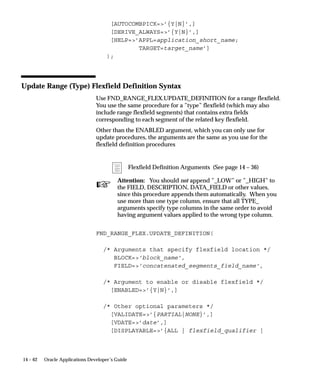
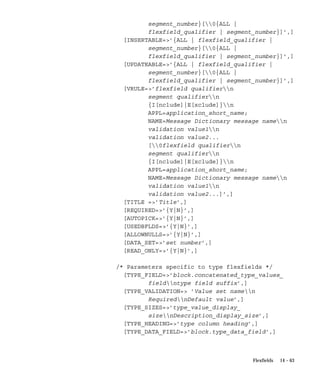
Range (Type) Flexfield Definition Syntax 14 – 33. . . . . . . . . . . . . . . .
Descriptive Flexfield Definition Syntax 14 – 35. . . . . . . . . . . . . . . . . .
Flexfield Definition Arguments 14 – 36. . . . . . . . . . . . . . . . . . . . . . . .
Flexfield Definition Examples 14 – 55. . . . . . . . . . . . . . . . . . . . . . . . . .
Updating Flexfield Definitions 14 – 59. . . . . . . . . . . . . . . . . . . . . . . . .
Update Key Flexfield Definition Syntax 14 – 60. . . . . . . . . . . . . . . . .
Update Range (Type) Flexfield Definition Syntax 14 – 62. . . . . . . . .
ixContents
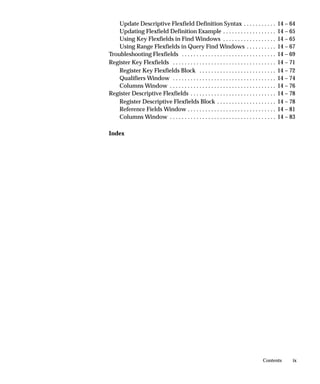
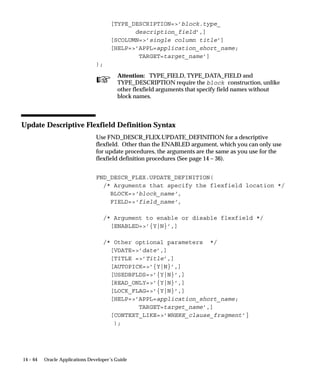
Update Descriptive Flexfield Definition Syntax 14 – 64. . . . . . . . . . .
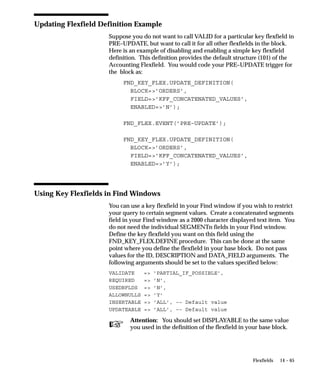
Updating Flexfield Definition Example 14 – 65. . . . . . . . . . . . . . . . . .
Using Key Flexfields in Find Windows 14 – 65. . . . . . . . . . . . . . . . . .
Using Range Flexfields in Query Find Windows 14 – 67. . . . . . . . . .
Troubleshooting Flexfields 14 – 69. . . . . . . . . . . . . . . . . . . . . . . . . . . . . . . .
Register Key Flexfields 14 – 71. . . . . . . . . . . . . . . . . . . . . . . . . . . . . . . . . . .
Register Key Flexfields Block 14 – 72. . . . . . . . . . . . . . . . . . . . . . . . . .
Qualifiers Window 14 – 74. . . . . . . . . . . . . . . . . . . . . . . . . . . . . . . . . . .
Columns Window 14 – 76. . . . . . . . . . . . . . . . . . . . . . . . . . . . . . . . . . . .
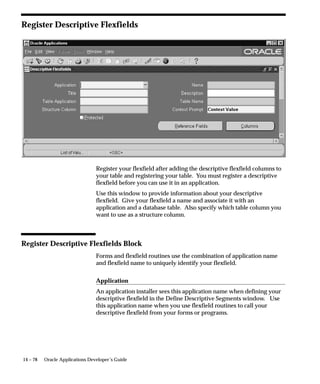
Register Descriptive Flexfields 14 – 78. . . . . . . . . . . . . . . . . . . . . . . . . . . . .
Register Descriptive Flexfields Block 14 – 78. . . . . . . . . . . . . . . . . . . .
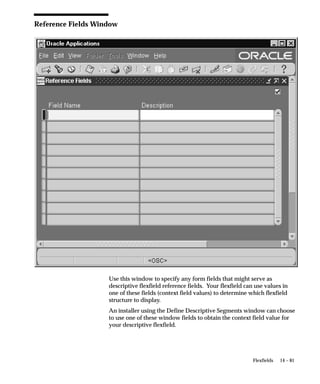
Reference Fields Window 14 – 81. . . . . . . . . . . . . . . . . . . . . . . . . . . . . .
Columns Window 14 – 83. . . . . . . . . . . . . . . . . . . . . . . . . . . . . . . . . . . .
Index
x Oracle Applications Developer’s Guide
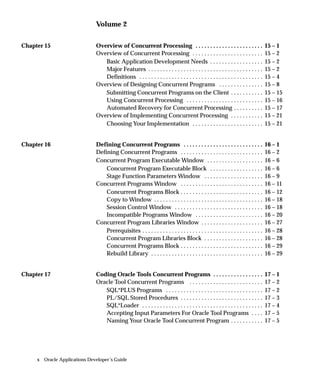
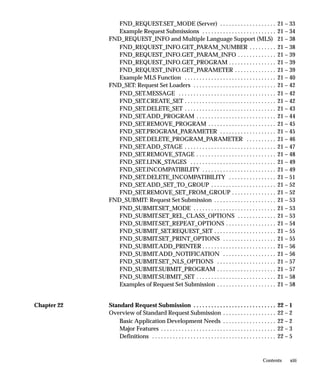
Volume 2VOLUME 1 14– 1. . . . . . . . . . . . . . . . . . . . . . . . .
Chapter 15 Overview of Concurrent Processing 15 – 1. . . . . . . . . . . . . . . . . . . . . . .
Overview of Concurrent Processing 15 – 2. . . . . . . . . . . . . . . . . . . . . . . .
Basic Application Development Needs 15 – 2. . . . . . . . . . . . . . . . . .
Major Features 15 – 2. . . . . . . . . . . . . . . . . . . . . . . . . . . . . . . . . . . . . . .
Definitions 15 – 4. . . . . . . . . . . . . . . . . . . . . . . . . . . . . . . . . . . . . . . . . .
Overview of Designing Concurrent Programs 15 – 8. . . . . . . . . . . . . . .
Submitting Concurrent Programs on the Client 15 – 15. . . . . . . . . . .
Using Concurrent Processing 15 – 16. . . . . . . . . . . . . . . . . . . . . . . . . .
Automated Recovery for Concurrent Processing 15 – 17. . . . . . . . . .
Overview of Implementing Concurrent Processing 15 – 21. . . . . . . . . . .
Choosing Your Implementation 15 – 21. . . . . . . . . . . . . . . . . . . . . . . .
Chapter 16 Defining Concurrent Programs 16 – 1. . . . . . . . . . . . . . . . . . . . . . . . . . .
Defining Concurrent Programs 16 – 2. . . . . . . . . . . . . . . . . . . . . . . . . . . .
Concurrent Program Executable Window 16 – 6. . . . . . . . . . . . . . . . . . .
Concurrent Program Executable Block 16 – 6. . . . . . . . . . . . . . . . . .
Stage Function Parameters Window 16 – 9. . . . . . . . . . . . . . . . . . . .
Concurrent Programs Window 16 – 11. . . . . . . . . . . . . . . . . . . . . . . . . . . .
Concurrent Programs Block 16 – 12. . . . . . . . . . . . . . . . . . . . . . . . . . . .
Copy to Window 16 – 18. . . . . . . . . . . . . . . . . . . . . . . . . . . . . . . . . . . . .
Session Control Window 16 – 18. . . . . . . . . . . . . . . . . . . . . . . . . . . . . .
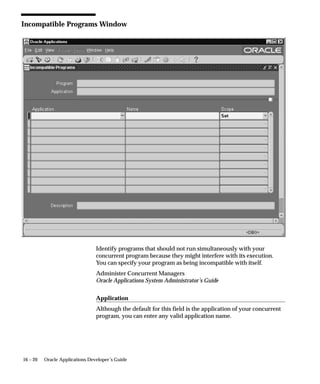
Incompatible Programs Window 16 – 20. . . . . . . . . . . . . . . . . . . . . . .
Concurrent Program Libraries Window 16 – 27. . . . . . . . . . . . . . . . . . . . .
Prerequisites 16 – 28. . . . . . . . . . . . . . . . . . . . . . . . . . . . . . . . . . . . . . . . .
Concurrent Program Libraries Block 16 – 28. . . . . . . . . . . . . . . . . . . .
Concurrent Programs Block 16 – 29. . . . . . . . . . . . . . . . . . . . . . . . . . . .
Rebuild Library 16 – 29. . . . . . . . . . . . . . . . . . . . . . . . . . . . . . . . . . . . . .
Chapter 17 Coding Oracle Tools Concurrent Programs 17 – 1. . . . . . . . . . . . . . . . .
Oracle Tool Concurrent Programs 17 – 2. . . . . . . . . . . . . . . . . . . . . . . . .
SQL*PLUS Programs 17 – 2. . . . . . . . . . . . . . . . . . . . . . . . . . . . . . . . .
PL/SQL Stored Procedures 17 – 3. . . . . . . . . . . . . . . . . . . . . . . . . . . .
SQL*Loader 17 – 4. . . . . . . . . . . . . . . . . . . . . . . . . . . . . . . . . . . . . . . . .
Accepting Input Parameters For Oracle Tool Programs 17 – 5. . . .
Naming Your Oracle Tool Concurrent Program 17 – 5. . . . . . . . . . .
xiContents
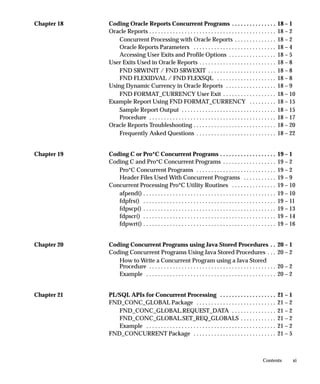
Chapter 18 Coding Oracle Reports Concurrent Programs 18 – 1. . . . . . . . . . . . . . .
Oracle Reports 18 – 2. . . . . . . . . . . . . . . . . . . . . . . . . . . . . . . . . . . . . . . . . . .
Concurrent Processing with Oracle Reports 18 – 2. . . . . . . . . . . . . .
Oracle Reports Parameters 18 – 4. . . . . . . . . . . . . . . . . . . . . . . . . . . .
Accessing User Exits and Profile Options 18 – 5. . . . . . . . . . . . . . . .
User Exits Used in Oracle Reports 18 – 8. . . . . . . . . . . . . . . . . . . . . . . . . .
FND SRWINIT / FND SRWEXIT 18 – 8. . . . . . . . . . . . . . . . . . . . . . .
FND FLEXIDVAL / FND FLEXSQL 18 – 8. . . . . . . . . . . . . . . . . . . .
Using Dynamic Currency in Oracle Reports 18 – 9. . . . . . . . . . . . . . . . .
FND FORMAT_CURRENCY User Exit 18 – 10. . . . . . . . . . . . . . . . . .
Example Report Using FND FORMAT_CURRENCY 18 – 15. . . . . . . . .
Sample Report Output 18 – 15. . . . . . . . . . . . . . . . . . . . . . . . . . . . . . . .
Procedure 18 – 17. . . . . . . . . . . . . . . . . . . . . . . . . . . . . . . . . . . . . . . . . . .
Oracle Reports Troubleshooting 18 – 20. . . . . . . . . . . . . . . . . . . . . . . . . . . .
Frequently Asked Questions 18 – 22. . . . . . . . . . . . . . . . . . . . . . . . . . .
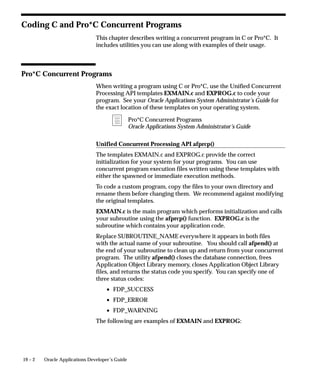
Chapter 19 Coding C or Pro*C Concurrent Programs 19 – 1. . . . . . . . . . . . . . . . . . .
Coding C and Pro*C Concurrent Programs 19 – 2. . . . . . . . . . . . . . . . . .
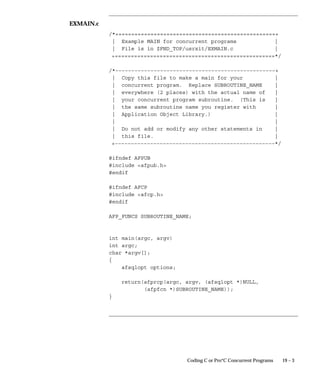
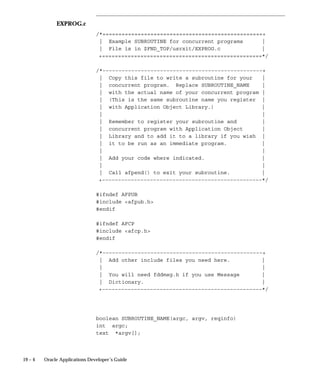
Pro*C Concurrent Programs 19 – 2. . . . . . . . . . . . . . . . . . . . . . . . . . .
Header Files Used With Concurrent Programs 19 – 9. . . . . . . . . . .
Concurrent Processing Pro*C Utility Routines 19 – 10. . . . . . . . . . . . . . .
afpend() 19 – 10. . . . . . . . . . . . . . . . . . . . . . . . . . . . . . . . . . . . . . . . . . . . .
fdpfrs() 19 – 11. . . . . . . . . . . . . . . . . . . . . . . . . . . . . . . . . . . . . . . . . . . . .
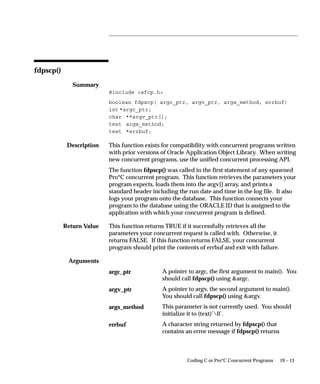
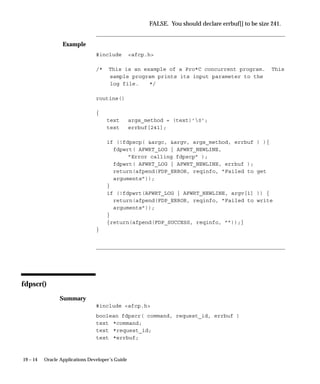
fdpscp() 19 – 13. . . . . . . . . . . . . . . . . . . . . . . . . . . . . . . . . . . . . . . . . . . . .
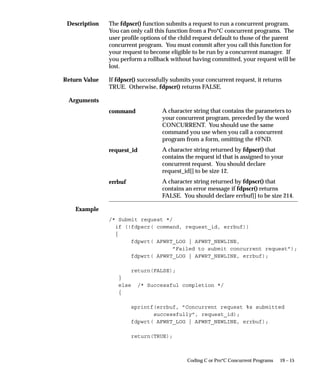
fdpscr() 19 – 14. . . . . . . . . . . . . . . . . . . . . . . . . . . . . . . . . . . . . . . . . . . . .
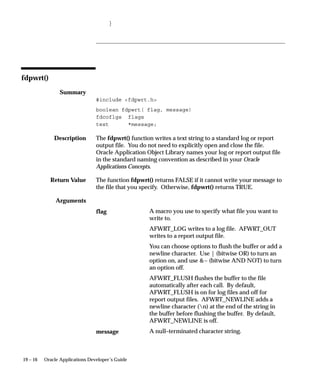
fdpwrt() 19 – 16. . . . . . . . . . . . . . . . . . . . . . . . . . . . . . . . . . . . . . . . . . . . .
Chapter 20 Coding Concurrent Programs using Java Stored Procedures 20 – 1. .
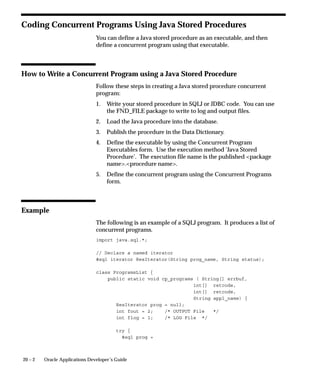
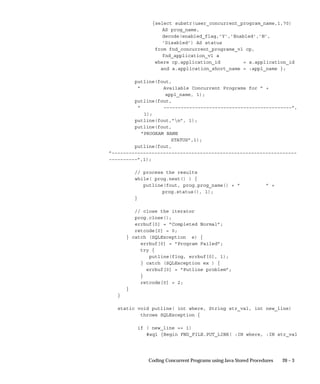
Coding Concurrent Programs Using Java Stored Procedures 20 – 2. . .
How to Write a Concurrent Program using a Java Stored
Procedure 20 – 2. . . . . . . . . . . . . . . . . . . . . . . . . . . . . . . . . . . . . . . . . . .
Example 20 – 2. . . . . . . . . . . . . . . . . . . . . . . . . . . . . . . . . . . . . . . . . . . .
Chapter 21 PL/SQL APIs for Concurrent Processing 21 – 1. . . . . . . . . . . . . . . . . . .
FND_CONC_GLOBAL Package 21 – 2. . . . . . . . . . . . . . . . . . . . . . . . . . .
FND_CONC_GLOBAL.REQUEST_DATA 21 – 2. . . . . . . . . . . . . . .
FND_CONC_GLOBAL.SET_REQ_GLOBALS 21 – 2. . . . . . . . . . . .
Example 21 – 2. . . . . . . . . . . . . . . . . . . . . . . . . . . . . . . . . . . . . . . . . . . .
FND_CONCURRENT Package 21 – 5. . . . . . . . . . . . . . . . . . . . . . . . . . . .
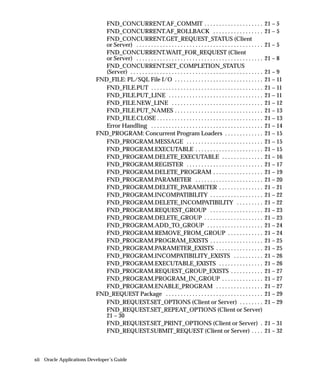
xii Oracle Applications Developer’s Guide
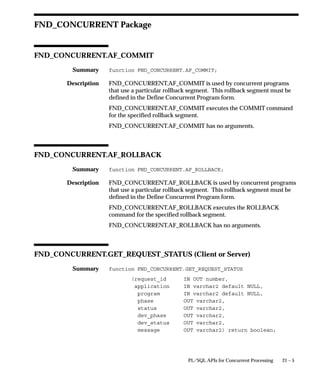
FND_CONCURRENT.AF_COMMIT 21 – 5. . . . . . . . . . . . . . . . . . . .
FND_CONCURRENT.AF_ROLLBACK 21 – 5. . . . . . . . . . . . . . . . .
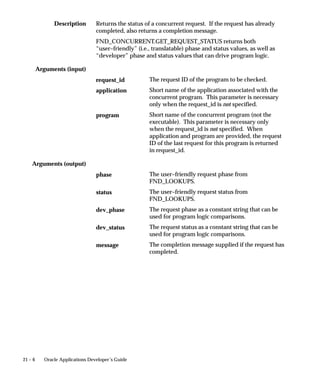
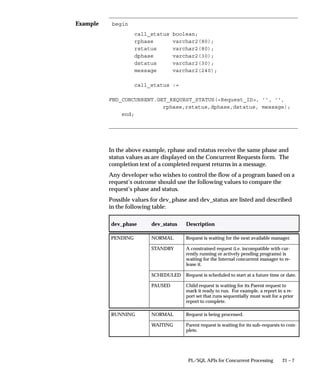
FND_CONCURRENT.GET_REQUEST_STATUS (Client
or Server) 21 – 5. . . . . . . . . . . . . . . . . . . . . . . . . . . . . . . . . . . . . . . . . . .
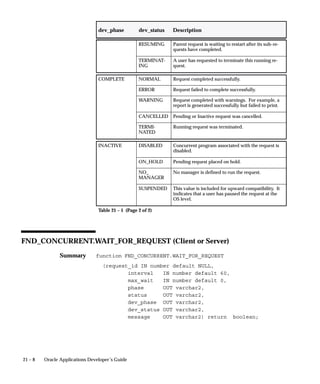
FND_CONCURRENT.WAIT_FOR_REQUEST (Client
or Server) 21 – 8. . . . . . . . . . . . . . . . . . . . . . . . . . . . . . . . . . . . . . . . . . .
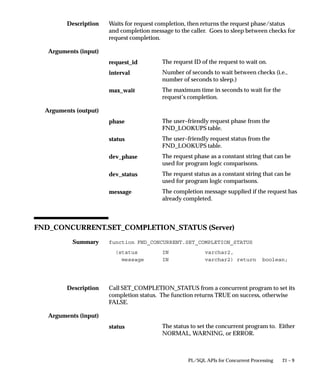
FND_CONCURRENT.SET_COMPLETION_STATUS
(Server) 21 – 9. . . . . . . . . . . . . . . . . . . . . . . . . . . . . . . . . . . . . . . . . . . . .
FND_FILE: PL/SQL File I/O 21 – 11. . . . . . . . . . . . . . . . . . . . . . . . . . . . . .
FND_FILE.PUT 21 – 11. . . . . . . . . . . . . . . . . . . . . . . . . . . . . . . . . . . . . .
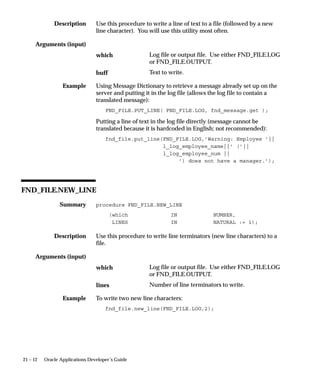
FND_FILE.PUT_LINE 21 – 11. . . . . . . . . . . . . . . . . . . . . . . . . . . . . . . .
FND_FILE.NEW_LINE 21 – 12. . . . . . . . . . . . . . . . . . . . . . . . . . . . . . .
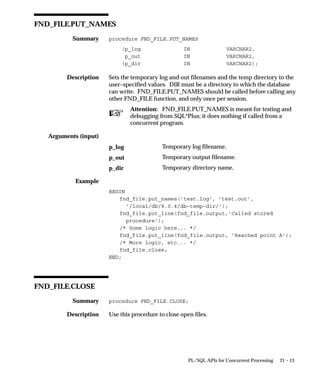
FND_FILE.PUT_NAMES 21 – 13. . . . . . . . . . . . . . . . . . . . . . . . . . . . . .
FND_FILE.CLOSE 21 – 13. . . . . . . . . . . . . . . . . . . . . . . . . . . . . . . . . . . .
Error Handling 21 – 14. . . . . . . . . . . . . . . . . . . . . . . . . . . . . . . . . . . . . .
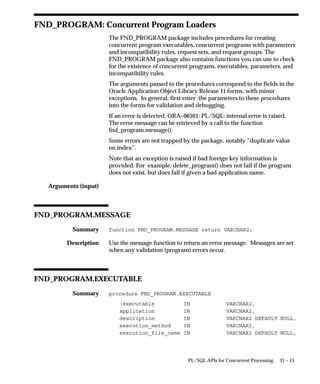
FND_PROGRAM: Concurrent Program Loaders 21 – 15. . . . . . . . . . . . .
FND_PROGRAM.MESSAGE 21 – 15. . . . . . . . . . . . . . . . . . . . . . . . . .
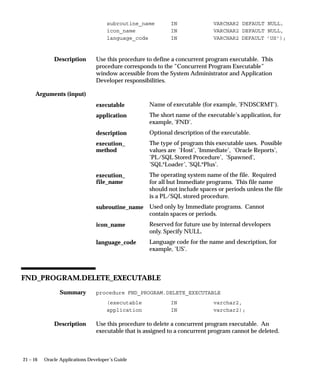
FND_PROGRAM.EXECUTABLE 21 – 15. . . . . . . . . . . . . . . . . . . . . . .
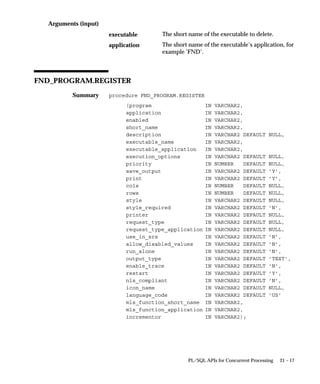
FND_PROGRAM.DELETE_EXECUTABLE 21 – 16. . . . . . . . . . . . . .
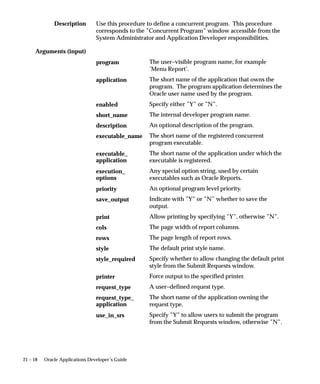
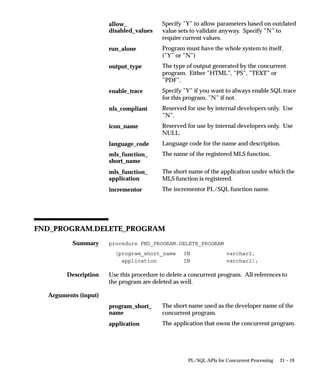
FND_PROGRAM.REGISTER 21 – 17. . . . . . . . . . . . . . . . . . . . . . . . . .
FND_PROGRAM.DELETE_PROGRAM 21 – 19. . . . . . . . . . . . . . . . .
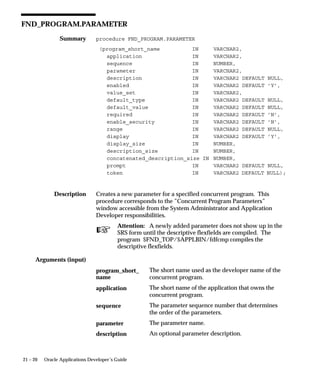
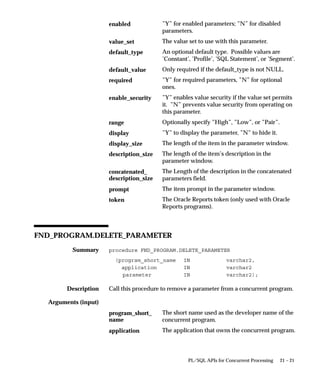
FND_PROGRAM.PARAMETER 21 – 20. . . . . . . . . . . . . . . . . . . . . . .
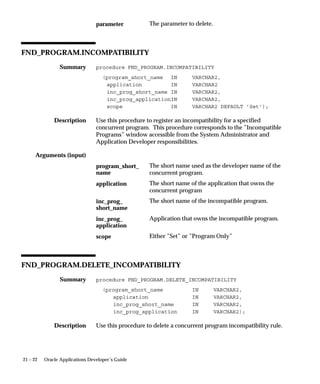
FND_PROGRAM.DELETE_PARAMETER 21 – 21. . . . . . . . . . . . . . .
FND_PROGRAM.INCOMPATIBILITY 21 – 22. . . . . . . . . . . . . . . . . .
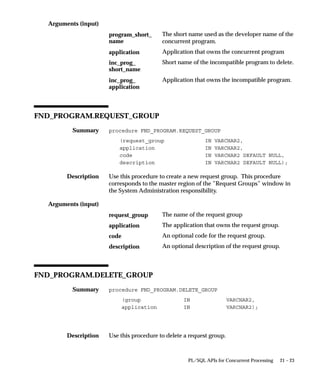
FND_PROGRAM.DELETE_INCOMPATIBILITY 21 – 22. . . . . . . . .
FND_PROGRAM.REQUEST_GROUP 21 – 23. . . . . . . . . . . . . . . . . .
FND_PROGRAM.DELETE_GROUP 21 – 23. . . . . . . . . . . . . . . . . . . .
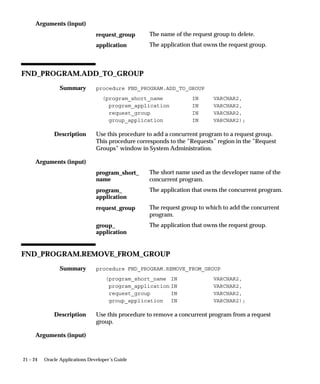
FND_PROGRAM.ADD_TO_GROUP 21 – 24. . . . . . . . . . . . . . . . . . .
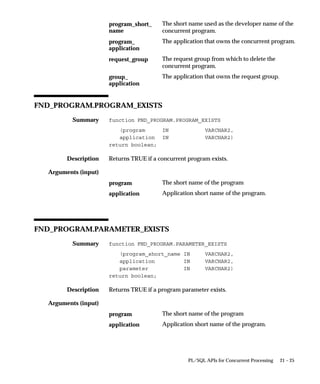
FND_PROGRAM.REMOVE_FROM_GROUP 21 – 24. . . . . . . . . . . .
FND_PROGRAM.PROGRAM_EXISTS 21 – 25. . . . . . . . . . . . . . . . . .
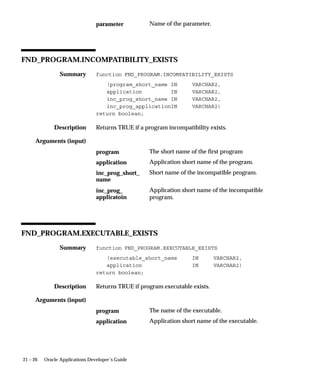
FND_PROGRAM.PARAMETER_EXISTS 21 – 25. . . . . . . . . . . . . . . .
FND_PROGRAM.INCOMPATIBILITY_EXISTS 21 – 26. . . . . . . . . .
FND_PROGRAM.EXECUTABLE_EXISTS 21 – 26. . . . . . . . . . . . . . .
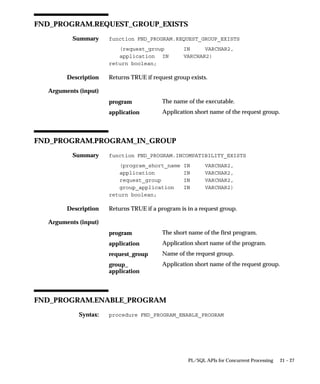
FND_PROGRAM.REQUEST_GROUP_EXISTS 21 – 27. . . . . . . . . . .
FND_PROGRAM.PROGRAM_IN_GROUP 21 – 27. . . . . . . . . . . . . .
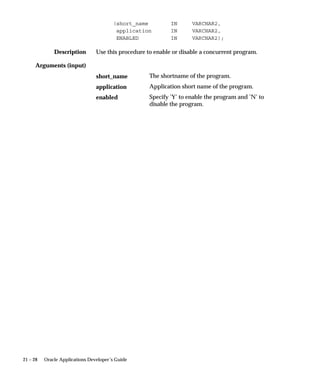
FND_PROGRAM.ENABLE_PROGRAM 21 – 27. . . . . . . . . . . . . . . .
FND_REQUEST Package 21 – 29. . . . . . . . . . . . . . . . . . . . . . . . . . . . . . . . .
FND_REQUEST.SET_OPTIONS (Client or Server) 21 – 29. . . . . . . .
FND_REQUEST.SET_REPEAT_OPTIONS (Client or Server)
21 – 30
FND_REQUEST.SET_PRINT_OPTIONS (Client or Server) 21 – 31.
FND_REQUEST.SUBMIT_REQUEST (Client or Server) 21 – 32. . . .
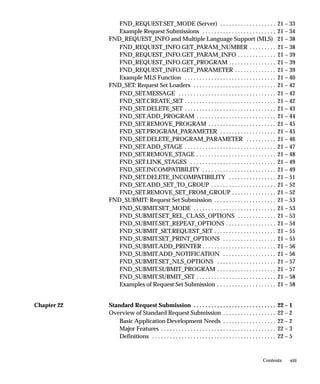
xiiiContents
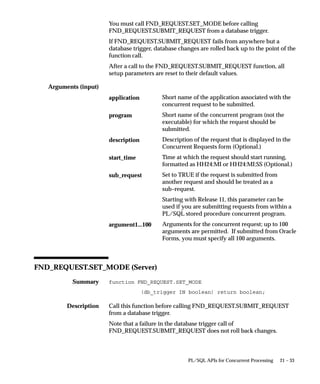
FND_REQUEST.SET_MODE (Server) 21 – 33. . . . . . . . . . . . . . . . . . .
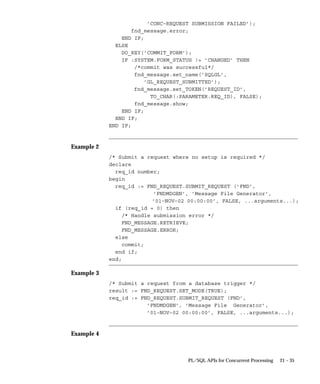
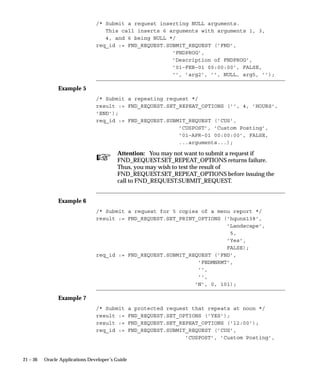
Example Request Submissions 21 – 34. . . . . . . . . . . . . . . . . . . . . . . . .
FND_REQUEST_INFO and Multiple Language Support (MLS) 21 – 38
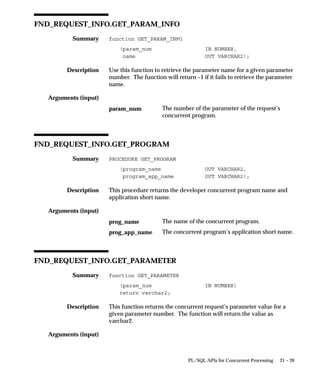
FND_REQUEST_INFO.GET_PARAM_NUMBER 21 – 38. . . . . . . . .
FND_REQUEST_INFO.GET_PARAM_INFO 21 – 39. . . . . . . . . . . . .
FND_REQUEST_INFO.GET_PROGRAM 21 – 39. . . . . . . . . . . . . . . .
FND_REQUEST_INFO.GET_PARAMETER 21 – 39. . . . . . . . . . . . . .
Example MLS Function 21 – 40. . . . . . . . . . . . . . . . . . . . . . . . . . . . . . .
FND_SET: Request Set Loaders 21 – 42. . . . . . . . . . . . . . . . . . . . . . . . . . . .
FND_SET.MESSAGE 21 – 42. . . . . . . . . . . . . . . . . . . . . . . . . . . . . . . . .
FND_SET.CREATE_SET 21 – 42. . . . . . . . . . . . . . . . . . . . . . . . . . . . . . .
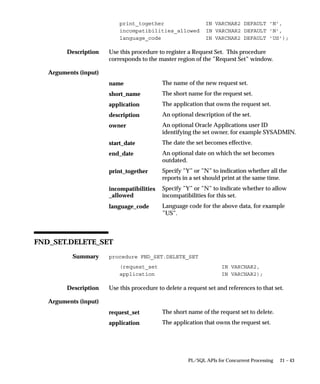
FND_SET.DELETE_SET 21 – 43. . . . . . . . . . . . . . . . . . . . . . . . . . . . . . .
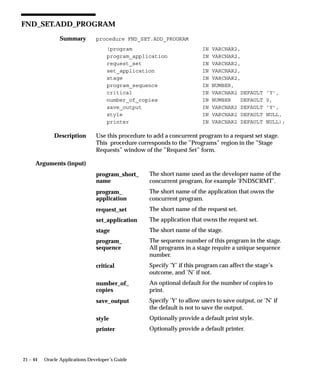
FND_SET.ADD_PROGRAM 21 – 44. . . . . . . . . . . . . . . . . . . . . . . . . . .
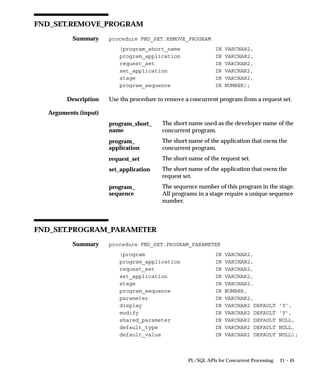
FND_SET.REMOVE_PROGRAM 21 – 45. . . . . . . . . . . . . . . . . . . . . . .
FND_SET.PROGRAM_PARAMETER 21 – 45. . . . . . . . . . . . . . . . . . .
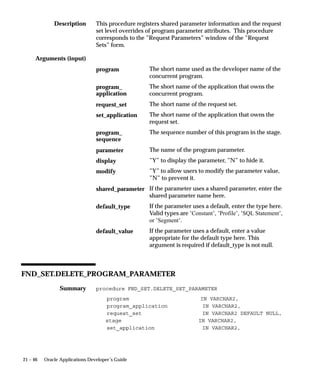
FND_SET.DELETE_PROGRAM_PARAMETER 21 – 46. . . . . . . . . .
FND_SET.ADD_STAGE 21 – 47. . . . . . . . . . . . . . . . . . . . . . . . . . . . . . .
FND_SET.REMOVE_STAGE 21 – 48. . . . . . . . . . . . . . . . . . . . . . . . . . .
FND_SET.LINK_STAGES 21 – 49. . . . . . . . . . . . . . . . . . . . . . . . . . . . .
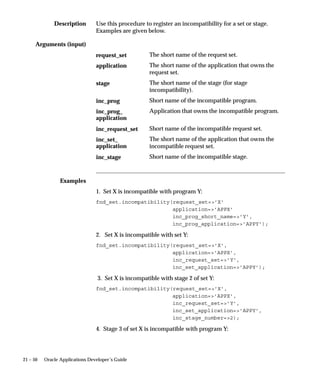
FND_SET.INCOMPATIBILITY 21 – 49. . . . . . . . . . . . . . . . . . . . . . . . .
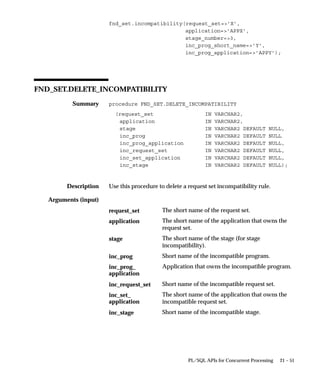
FND_SET.DELETE_INCOMPATIBILITY 21 – 51. . . . . . . . . . . . . . . .
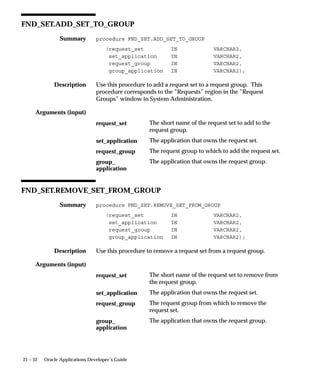
FND_SET.ADD_SET_TO_GROUP 21 – 52. . . . . . . . . . . . . . . . . . . . . .
FND_SET.REMOVE_SET_FROM_GROUP 21 – 52. . . . . . . . . . . . . . .
FND_SUBMIT: Request Set Submission 21 – 53. . . . . . . . . . . . . . . . . . . . .
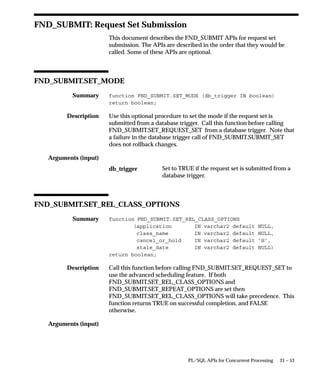
FND_SUBMIT.SET_MODE 21 – 53. . . . . . . . . . . . . . . . . . . . . . . . . . . .
FND_SUBMIT.SET_REL_CLASS_OPTIONS 21 – 53. . . . . . . . . . . . .
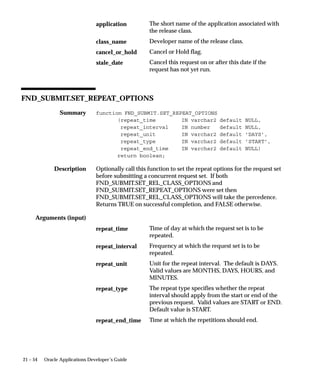
FND_SUBMIT.SET_REPEAT_OPTIONS 21 – 54. . . . . . . . . . . . . . . . .
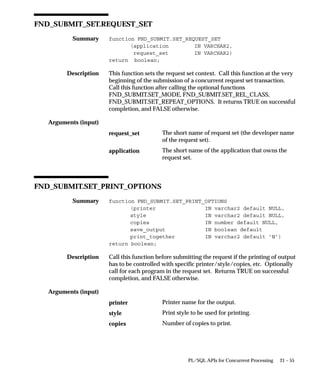
FND_SUBMIT_SET.REQUEST_SET 21 – 55. . . . . . . . . . . . . . . . . . . . .
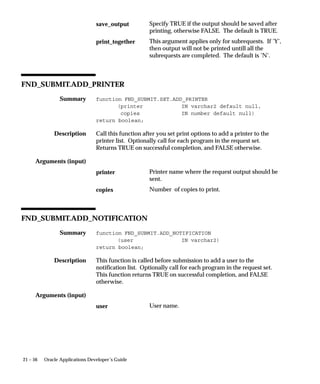
FND_SUBMIT.SET_PRINT_OPTIONS 21 – 55. . . . . . . . . . . . . . . . . .
FND_SUBMIT.ADD_PRINTER 21 – 56. . . . . . . . . . . . . . . . . . . . . . . . .
FND_SUBMIT.ADD_NOTIFICATION 21 – 56. . . . . . . . . . . . . . . . . .
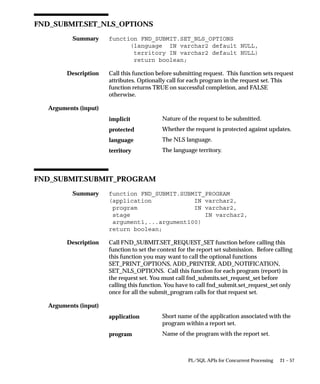
FND_SUBMIT.SET_NLS_OPTIONS 21 – 57. . . . . . . . . . . . . . . . . . . .
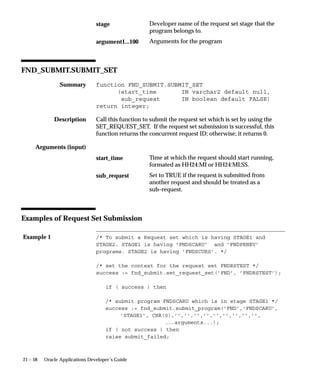
FND_SUBMIT.SUBMIT_PROGRAM 21 – 57. . . . . . . . . . . . . . . . . . . .
FND_SUBMIT.SUBMIT_SET 21 – 58. . . . . . . . . . . . . . . . . . . . . . . . . . .
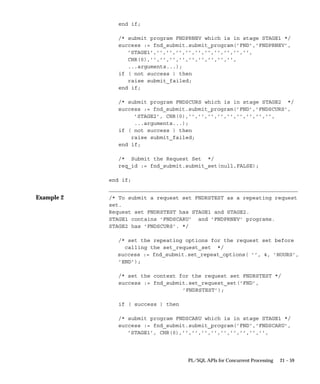
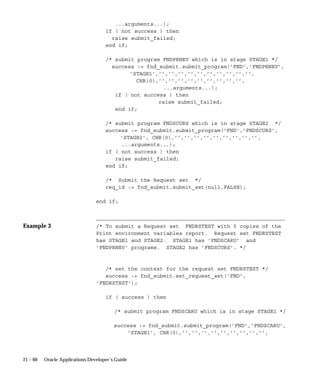
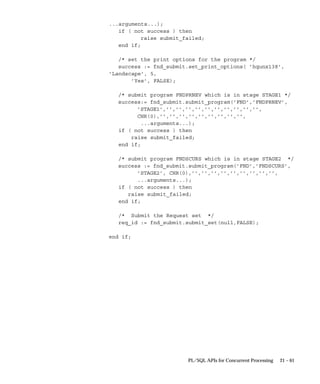
Examples of Request Set Submission 21 – 58. . . . . . . . . . . . . . . . . . . .
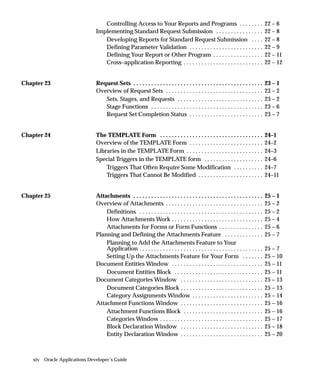
Chapter 22 Standard Request Submission 22 – 1. . . . . . . . . . . . . . . . . . . . . . . . . . . .
Overview of Standard Request Submission 22 – 2. . . . . . . . . . . . . . . . . .
Basic Application Development Needs 22 – 2. . . . . . . . . . . . . . . . . .
Major Features 22 – 3. . . . . . . . . . . . . . . . . . . . . . . . . . . . . . . . . . . . . . .
Definitions 22 – 5. . . . . . . . . . . . . . . . . . . . . . . . . . . . . . . . . . . . . . . . . .
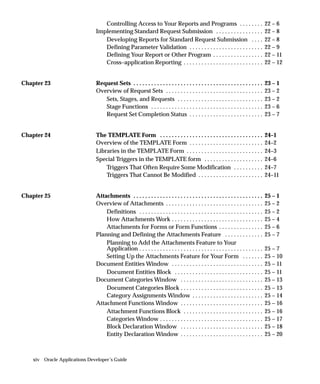
xiv Oracle Applications Developer’s Guide
Controlling Access to Your Reports and Programs 22 – 6. . . . . . . .
Implementing Standard Request Submission 22 – 8. . . . . . . . . . . . . . . .
Developing Reports for Standard Request Submission 22 – 8. . . .
Defining Parameter Validation 22 – 9. . . . . . . . . . . . . . . . . . . . . . . . .
Defining Your Report or Other Program 22 – 11. . . . . . . . . . . . . . . . .
Cross–application Reporting 22 – 12. . . . . . . . . . . . . . . . . . . . . . . . . . .
Chapter 23 Request Sets 23 – 1. . . . . . . . . . . . . . . . . . . . . . . . . . . . . . . . . . . . . . . . . . . .
Overview of Request Sets 23 – 2. . . . . . . . . . . . . . . . . . . . . . . . . . . . . . . . .
Sets, Stages, and Requests 23 – 2. . . . . . . . . . . . . . . . . . . . . . . . . . . . .
Stage Functions 23 – 6. . . . . . . . . . . . . . . . . . . . . . . . . . . . . . . . . . . . . .
Request Set Completion Status 23 – 7. . . . . . . . . . . . . . . . . . . . . . . . .
Chapter 24 The TEMPLATE Form 24–1. . . . . . . . . . . . . . . . . . . . . . . . . . . . . . . . . . .
Overview of the TEMPLATE Form 24–2. . . . . . . . . . . . . . . . . . . . . . . . .
Libraries in the TEMPLATE Form 24–3. . . . . . . . . . . . . . . . . . . . . . . . . .
Special Triggers in the TEMPLATE form 24–6. . . . . . . . . . . . . . . . . . . .
Triggers That Often Require Some Modification 24–7. . . . . . . . . .
Triggers That Cannot Be Modified 24–11. . . . . . . . . . . . . . . . . . . . . .
Chapter 25 Attachments 25 – 1. . . . . . . . . . . . . . . . . . . . . . . . . . . . . . . . . . . . . . . . . . . .
Overview of Attachments 25 – 2. . . . . . . . . . . . . . . . . . . . . . . . . . . . . . . . .
Definitions 25 – 2. . . . . . . . . . . . . . . . . . . . . . . . . . . . . . . . . . . . . . . . . .
How Attachments Work 25 – 4. . . . . . . . . . . . . . . . . . . . . . . . . . . . . . .
Attachments for Forms or Form Functions 25 – 6. . . . . . . . . . . . . . .
Planning and Defining the Attachments Feature 25 – 7. . . . . . . . . . . . .
Planning to Add the Attachments Feature to Your
Application 25 – 7. . . . . . . . . . . . . . . . . . . . . . . . . . . . . . . . . . . . . . . . . .
Setting Up the Attachments Feature for Your Form 25 – 10. . . . . . .
Document Entities Window 25 – 11. . . . . . . . . . . . . . . . . . . . . . . . . . . . . . .
Document Entities Block 25 – 11. . . . . . . . . . . . . . . . . . . . . . . . . . . . . .
Document Categories Window 25 – 13. . . . . . . . . . . . . . . . . . . . . . . . . . . .
Document Categories Block 25 – 13. . . . . . . . . . . . . . . . . . . . . . . . . . . .
Category Assignments Window 25 – 14. . . . . . . . . . . . . . . . . . . . . . . .
Attachment Functions Window 25 – 16. . . . . . . . . . . . . . . . . . . . . . . . . . . .
Attachment Functions Block 25 – 16. . . . . . . . . . . . . . . . . . . . . . . . . . .
Categories Window 25 – 17. . . . . . . . . . . . . . . . . . . . . . . . . . . . . . . . . . .
Block Declaration Window 25 – 18. . . . . . . . . . . . . . . . . . . . . . . . . . . .
Entity Declaration Window 25 – 20. . . . . . . . . . . . . . . . . . . . . . . . . . . .
xvContents
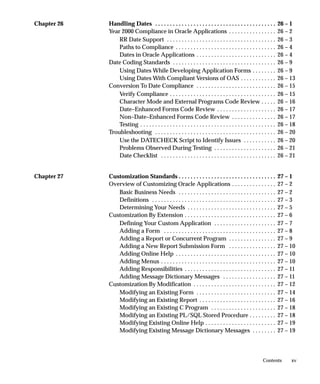
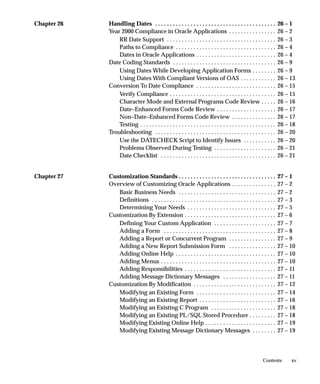
Chapter 26 Handling Dates 26 – 1. . . . . . . . . . . . . . . . . . . . . . . . . . . . . . . . . . . . . . . . .
Year 2000 Compliance in Oracle Applications 26 – 2. . . . . . . . . . . . . . . .
RR Date Support 26 – 3. . . . . . . . . . . . . . . . . . . . . . . . . . . . . . . . . . . . .
Paths to Compliance 26 – 4. . . . . . . . . . . . . . . . . . . . . . . . . . . . . . . . . .
Dates in Oracle Applications 26 – 4. . . . . . . . . . . . . . . . . . . . . . . . . . .
Date Coding Standards 26 – 9. . . . . . . . . . . . . . . . . . . . . . . . . . . . . . . . . . .
Using Dates While Developing Application Forms 26 – 9. . . . . . . .
Using Dates With Compliant Versions of OAS 26 – 13. . . . . . . . . . . .
Conversion To Date Compliance 26 – 15. . . . . . . . . . . . . . . . . . . . . . . . . . .
Verify Compliance 26 – 15. . . . . . . . . . . . . . . . . . . . . . . . . . . . . . . . . . . .
Character Mode and External Programs Code Review 26 – 16. . . . .
Date–Enhanced Forms Code Review 26 – 17. . . . . . . . . . . . . . . . . . . .
Non–Date–Enhanced Forms Code Review 26 – 17. . . . . . . . . . . . . . .
Testing 26 – 18. . . . . . . . . . . . . . . . . . . . . . . . . . . . . . . . . . . . . . . . . . . . . .
Troubleshooting 26 – 20. . . . . . . . . . . . . . . . . . . . . . . . . . . . . . . . . . . . . . . . .
Use the DATECHECK Script to Identify Issues 26 – 20. . . . . . . . . . .
Problems Observed During Testing 26 – 21. . . . . . . . . . . . . . . . . . . . .
Date Checklist 26 – 21. . . . . . . . . . . . . . . . . . . . . . . . . . . . . . . . . . . . . . .
Chapter 27 Customization Standards 27 – 1. . . . . . . . . . . . . . . . . . . . . . . . . . . . . . . . .
Overview of Customizing Oracle Applications 27 – 2. . . . . . . . . . . . . . .
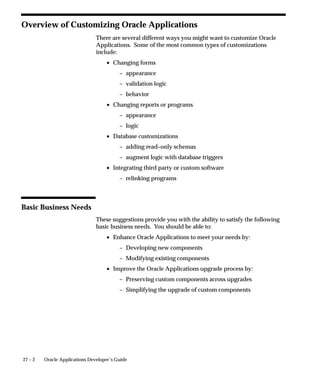
Basic Business Needs 27 – 2. . . . . . . . . . . . . . . . . . . . . . . . . . . . . . . . .
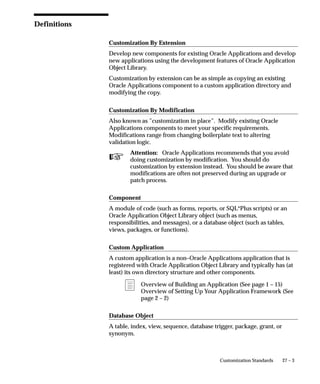
Definitions 27 – 3. . . . . . . . . . . . . . . . . . . . . . . . . . . . . . . . . . . . . . . . . .
Determining Your Needs 27 – 5. . . . . . . . . . . . . . . . . . . . . . . . . . . . . .
Customization By Extension 27 – 6. . . . . . . . . . . . . . . . . . . . . . . . . . . . . . .
Defining Your Custom Application 27 – 7. . . . . . . . . . . . . . . . . . . . .
Adding a Form 27 – 8. . . . . . . . . . . . . . . . . . . . . . . . . . . . . . . . . . . . . .
Adding a Report or Concurrent Program 27 – 9. . . . . . . . . . . . . . . .
Adding a New Report Submission Form 27 – 10. . . . . . . . . . . . . . . .
Adding Online Help 27 – 10. . . . . . . . . . . . . . . . . . . . . . . . . . . . . . . . . .
Adding Menus 27 – 10. . . . . . . . . . . . . . . . . . . . . . . . . . . . . . . . . . . . . . .
Adding Responsibilities 27 – 11. . . . . . . . . . . . . . . . . . . . . . . . . . . . . . .
Adding Message Dictionary Messages 27 – 11. . . . . . . . . . . . . . . . . .
Customization By Modification 27 – 12. . . . . . . . . . . . . . . . . . . . . . . . . . . .
Modifying an Existing Form 27 – 14. . . . . . . . . . . . . . . . . . . . . . . . . . .
Modifying an Existing Report 27 – 16. . . . . . . . . . . . . . . . . . . . . . . . . .
Modifying an Existing C Program 27 – 18. . . . . . . . . . . . . . . . . . . . . .
Modifying an Existing PL/SQL Stored Procedure 27 – 18. . . . . . . . .
Modifying Existing Online Help 27 – 19. . . . . . . . . . . . . . . . . . . . . . . .
Modifying Existing Message Dictionary Messages 27 – 19. . . . . . . .
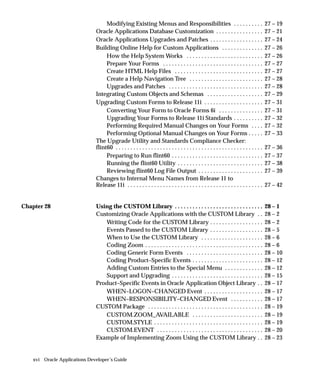
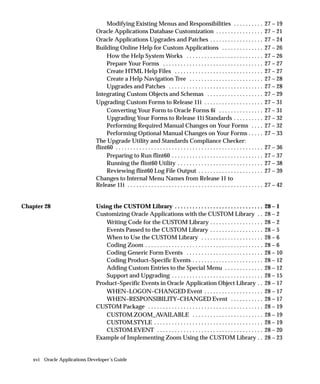
xvi Oracle Applications Developer’s Guide
Modifying Existing Menus and Responsibilities 27 – 19. . . . . . . . . .
Oracle Applications Database Customization 27 – 21. . . . . . . . . . . . . . . .
Oracle Applications Upgrades and Patches 27 – 24. . . . . . . . . . . . . . . . . .
Building Online Help for Custom Applications 27 – 26. . . . . . . . . . . . . .
How the Help System Works 27 – 26. . . . . . . . . . . . . . . . . . . . . . . . . .
Prepare Your Forms 27 – 27. . . . . . . . . . . . . . . . . . . . . . . . . . . . . . . . . .
Create HTML Help Files 27 – 27. . . . . . . . . . . . . . . . . . . . . . . . . . . . . .
Create a Help Navigation Tree 27 – 28. . . . . . . . . . . . . . . . . . . . . . . . .
Upgrades and Patches 27 – 28. . . . . . . . . . . . . . . . . . . . . . . . . . . . . . . .
Integrating Custom Objects and Schemas 27 – 29. . . . . . . . . . . . . . . . . . .
Upgrading Custom Forms to Release 11i 27 – 31. . . . . . . . . . . . . . . . . . . .
Converting Your Form to Oracle Forms 6i 27 – 31. . . . . . . . . . . . . . .
Upgrading Your Forms to Release 11i Standards 27 – 32. . . . . . . . . .
Performing Required Manual Changes on Your Forms 27 – 32. . . .
Performing Optional Manual Changes on Your Forms 27 – 33. . . . .
The Upgrade Utility and Standards Compliance Checker:
flint60 27 – 36. . . . . . . . . . . . . . . . . . . . . . . . . . . . . . . . . . . . . . . . . . . . . . . . . .
Preparing to Run flint60 27 – 37. . . . . . . . . . . . . . . . . . . . . . . . . . . . . . .
Running the flint60 Utility 27 – 38. . . . . . . . . . . . . . . . . . . . . . . . . . . . .
Reviewing flint60 Log File Output 27 – 39. . . . . . . . . . . . . . . . . . . . . .
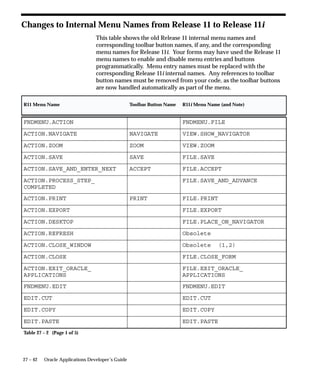
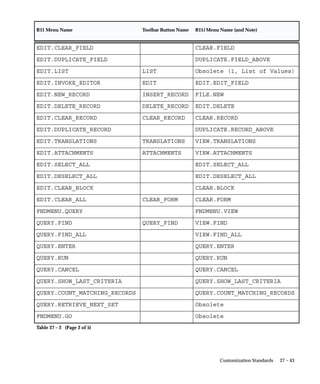
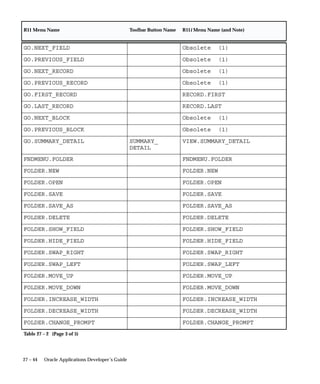
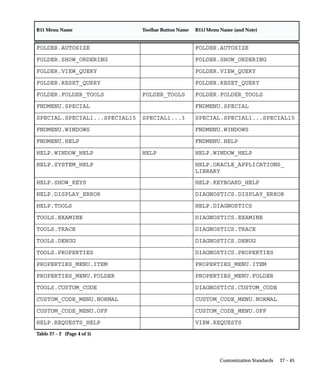
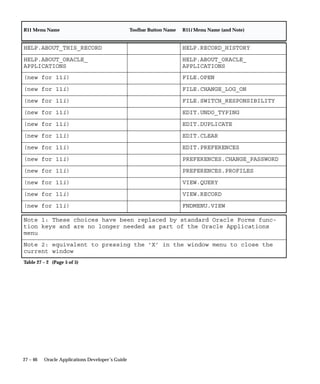
Changes to Internal Menu Names from Release 11 to
Release 11i 27 – 42. . . . . . . . . . . . . . . . . . . . . . . . . . . . . . . . . . . . . . . . . . . . . .
Chapter 28 Using the CUSTOM Library 28 – 1. . . . . . . . . . . . . . . . . . . . . . . . . . . . . .
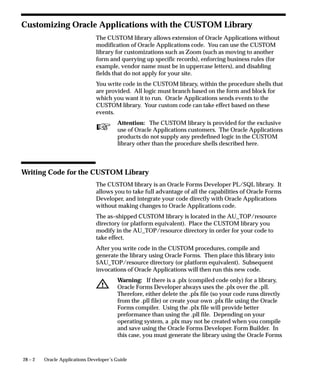
Customizing Oracle Applications with the CUSTOM Library 28 – 2. .
Writing Code for the CUSTOM Library 28 – 2. . . . . . . . . . . . . . . . . .
Events Passed to the CUSTOM Library 28 – 5. . . . . . . . . . . . . . . . . .
When to Use the CUSTOM Library 28 – 6. . . . . . . . . . . . . . . . . . . . .
Coding Zoom 28 – 6. . . . . . . . . . . . . . . . . . . . . . . . . . . . . . . . . . . . . . . .
Coding Generic Form Events 28 – 10. . . . . . . . . . . . . . . . . . . . . . . . . .
Coding Product–Specific Events 28 – 12. . . . . . . . . . . . . . . . . . . . . . . .
Adding Custom Entries to the Special Menu 28 – 12. . . . . . . . . . . . .
Support and Upgrading 28 – 15. . . . . . . . . . . . . . . . . . . . . . . . . . . . . . .
Product–Specific Events in Oracle Application Object Library 28 – 17. .
WHEN–LOGON–CHANGED Event 28 – 17. . . . . . . . . . . . . . . . . . . .
WHEN–RESPONSIBILITY–CHANGED Event 28 – 17. . . . . . . . . . .
CUSTOM Package 28 – 19. . . . . . . . . . . . . . . . . . . . . . . . . . . . . . . . . . . . . . .
CUSTOM.ZOOM_AVAILABLE 28 – 19. . . . . . . . . . . . . . . . . . . . . . . .
CUSTOM.STYLE 28 – 19. . . . . . . . . . . . . . . . . . . . . . . . . . . . . . . . . . . . .
CUSTOM.EVENT 28 – 20. . . . . . . . . . . . . . . . . . . . . . . . . . . . . . . . . . . .
Example of Implementing Zoom Using the CUSTOM Library 28 – 23. .
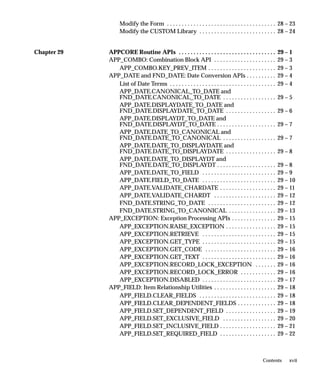
xviiContents
Modify the Form 28 – 23. . . . . . . . . . . . . . . . . . . . . . . . . . . . . . . . . . . . .
Modify the CUSTOM Library 28 – 24. . . . . . . . . . . . . . . . . . . . . . . . . .
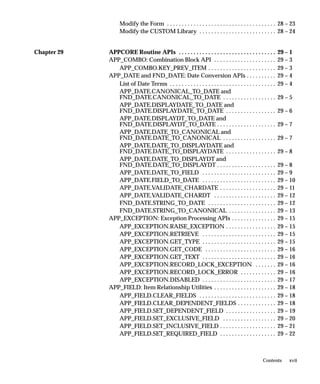
Chapter 29 APPCORE Routine APIs 29 – 1. . . . . . . . . . . . . . . . . . . . . . . . . . . . . . . . .
APP_COMBO: Combination Block API 29 – 3. . . . . . . . . . . . . . . . . . . . .
APP_COMBO.KEY_PREV_ITEM 29 – 3. . . . . . . . . . . . . . . . . . . . . . .
APP_DATE and FND_DATE: Date Conversion APIs 29 – 4. . . . . . . . . .
List of Date Terms 29 – 4. . . . . . . . . . . . . . . . . . . . . . . . . . . . . . . . . . . .
APP_DATE.CANONICAL_TO_DATE and
FND_DATE.CANONICAL_TO_DATE 29 – 5. . . . . . . . . . . . . . . . . .
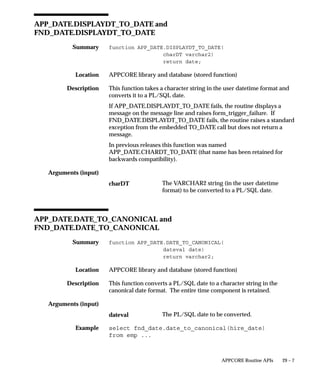
APP_DATE.DISPLAYDATE_TO_DATE and
FND_DATE.DISPLAYDATE_TO_DATE 29 – 6. . . . . . . . . . . . . . . . .
APP_DATE.DISPLAYDT_TO_DATE and
FND_DATE.DISPLAYDT_TO_DATE 29 – 7. . . . . . . . . . . . . . . . . . . .
APP_DATE.DATE_TO_CANONICAL and
FND_DATE.DATE_TO_CANONICAL 29 – 7. . . . . . . . . . . . . . . . . .
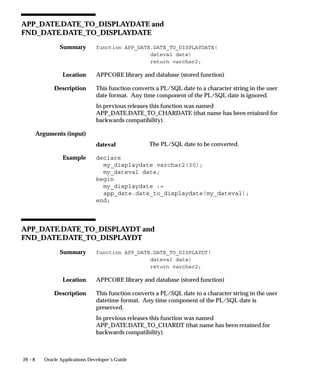
APP_DATE.DATE_TO_DISPLAYDATE and
FND_DATE.DATE_TO_DISPLAYDATE 29 – 8. . . . . . . . . . . . . . . . .
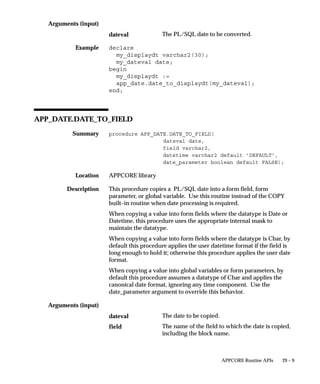
APP_DATE.DATE_TO_DISPLAYDT and
FND_DATE.DATE_TO_DISPLAYDT 29 – 8. . . . . . . . . . . . . . . . . . . .
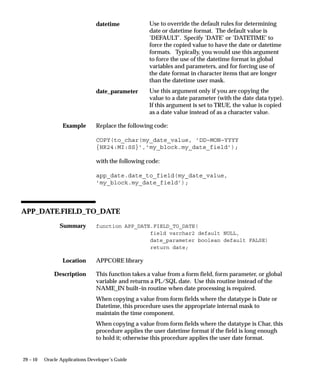
APP_DATE.DATE_TO_FIELD 29 – 9. . . . . . . . . . . . . . . . . . . . . . . . .
APP_DATE.FIELD_TO_DATE 29 – 10. . . . . . . . . . . . . . . . . . . . . . . . .
APP_DATE.VALIDATE_CHARDATE 29 – 11. . . . . . . . . . . . . . . . . . .
APP_DATE.VALIDATE_CHARDT 29 – 12. . . . . . . . . . . . . . . . . . . . .
FND_DATE.STRING_TO_DATE 29 – 12. . . . . . . . . . . . . . . . . . . . . . .
FND_DATE.STRING_TO_CANONICAL 29 – 13. . . . . . . . . . . . . . . .
APP_EXCEPTION: Exception Processing APIs 29 – 15. . . . . . . . . . . . . . .
APP_EXCEPTION.RAISE_EXCEPTION 29 – 15. . . . . . . . . . . . . . . . .
APP_EXCEPTION.RETRIEVE 29 – 15. . . . . . . . . . . . . . . . . . . . . . . . .
APP_EXCEPTION.GET_TYPE 29 – 15. . . . . . . . . . . . . . . . . . . . . . . . .
APP_EXCEPTION.GET_CODE 29 – 16. . . . . . . . . . . . . . . . . . . . . . . .
APP_EXCEPTION.GET_TEXT 29 – 16. . . . . . . . . . . . . . . . . . . . . . . . .
APP_EXCEPTION.RECORD_LOCK_EXCEPTION 29 – 16. . . . . . .
APP_EXCEPTION.RECORD_LOCK_ERROR 29 – 16. . . . . . . . . . . .
APP_EXCEPTION.DISABLED 29 – 17. . . . . . . . . . . . . . . . . . . . . . . . .
APP_FIELD: Item Relationship Utilities 29 – 18. . . . . . . . . . . . . . . . . . . . .
APP_FIELD.CLEAR_FIELDS 29 – 18. . . . . . . . . . . . . . . . . . . . . . . . . .
APP_FIELD.CLEAR_DEPENDENT_FIELDS 29 – 18. . . . . . . . . . . . .
APP_FIELD.SET_DEPENDENT_FIELD 29 – 19. . . . . . . . . . . . . . . . .
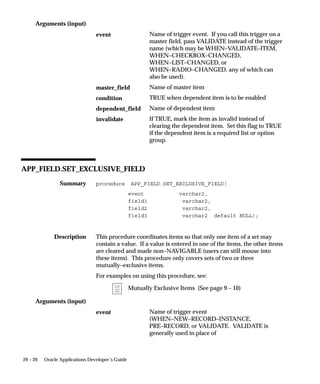
APP_FIELD.SET_EXCLUSIVE_FIELD 29 – 20. . . . . . . . . . . . . . . . . .
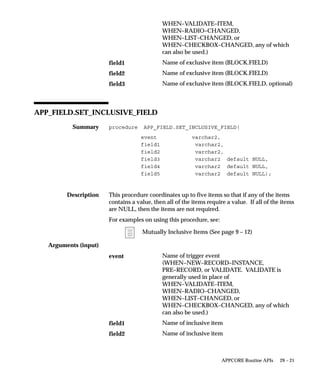
APP_FIELD.SET_INCLUSIVE_FIELD 29 – 21. . . . . . . . . . . . . . . . . . .
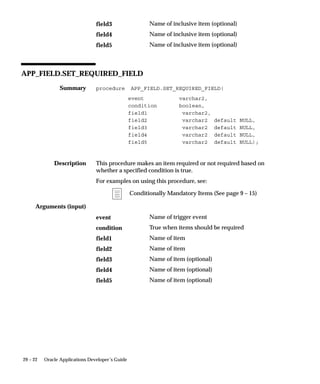
APP_FIELD.SET_REQUIRED_FIELD 29 – 22. . . . . . . . . . . . . . . . . . .
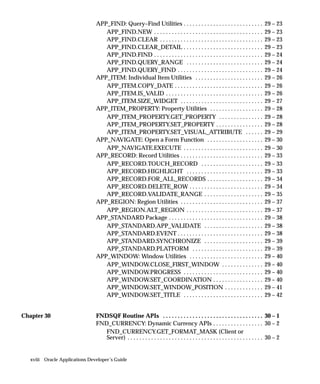
xviii Oracle Applications Developer’s Guide
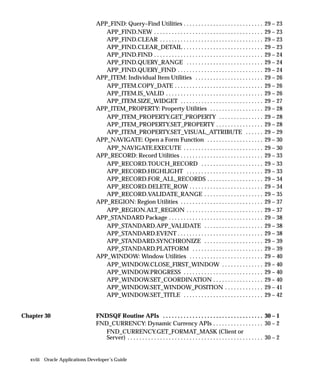
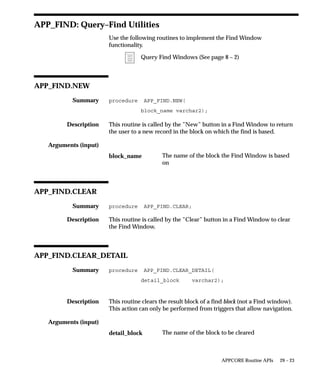
APP_FIND: Query–Find Utilities 29 – 23. . . . . . . . . . . . . . . . . . . . . . . . . . .
APP_FIND.NEW 29 – 23. . . . . . . . . . . . . . . . . . . . . . . . . . . . . . . . . . . . .
APP_FIND.CLEAR 29 – 23. . . . . . . . . . . . . . . . . . . . . . . . . . . . . . . . . . .
APP_FIND.CLEAR_DETAIL 29 – 23. . . . . . . . . . . . . . . . . . . . . . . . . . .
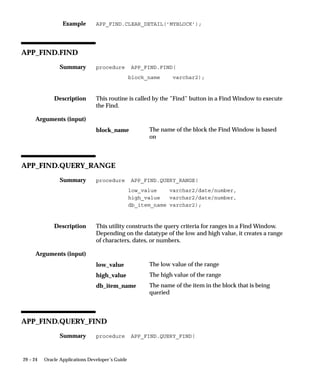
APP_FIND.FIND 29 – 24. . . . . . . . . . . . . . . . . . . . . . . . . . . . . . . . . . . . .
APP_FIND.QUERY_RANGE 29 – 24. . . . . . . . . . . . . . . . . . . . . . . . . .
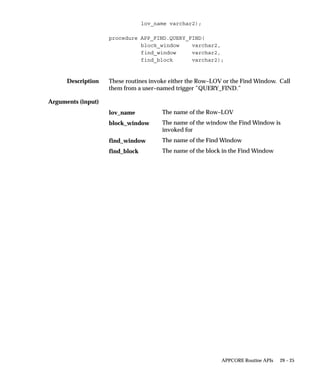
APP_FIND.QUERY_FIND 29 – 24. . . . . . . . . . . . . . . . . . . . . . . . . . . . .
APP_ITEM: Individual Item Utilities 29 – 26. . . . . . . . . . . . . . . . . . . . . . .
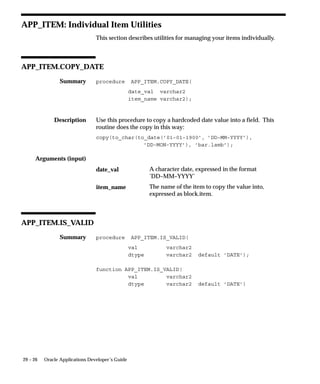
APP_ITEM.COPY_DATE 29 – 26. . . . . . . . . . . . . . . . . . . . . . . . . . . . . .
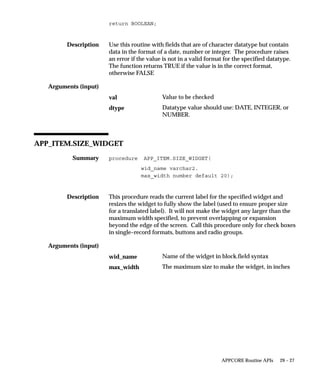
APP_ITEM.IS_VALID 29 – 26. . . . . . . . . . . . . . . . . . . . . . . . . . . . . . . . .
APP_ITEM.SIZE_WIDGET 29 – 27. . . . . . . . . . . . . . . . . . . . . . . . . . . .
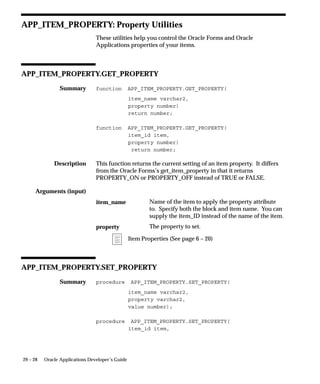
APP_ITEM_PROPERTY: Property Utilities 29 – 28. . . . . . . . . . . . . . . . . .
APP_ITEM_PROPERTY.GET_PROPERTY 29 – 28. . . . . . . . . . . . . . .
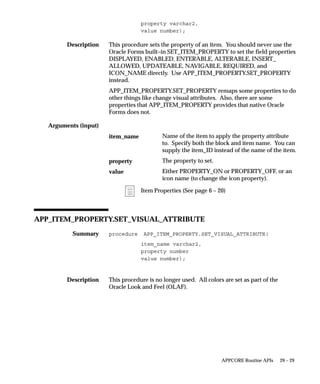
APP_ITEM_PROPERTY.SET_PROPERTY 29 – 28. . . . . . . . . . . . . . . .
APP_ITEM_PROPERTY.SET_VISUAL_ATTRIBUTE 29 – 29. . . . . .
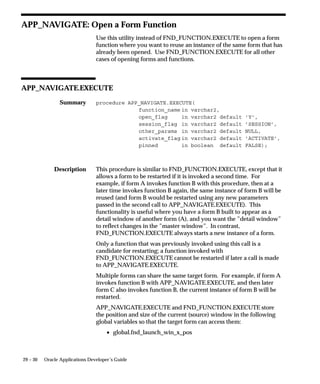
APP_NAVIGATE: Open a Form Function 29 – 30. . . . . . . . . . . . . . . . . . .
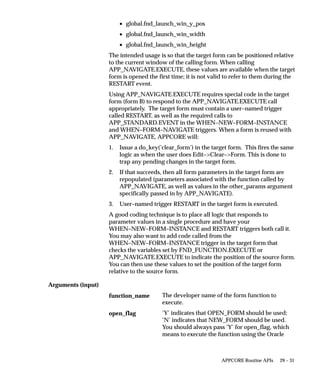
APP_NAVIGATE.EXECUTE 29 – 30. . . . . . . . . . . . . . . . . . . . . . . . . . .
APP_RECORD: Record Utilities 29 – 33. . . . . . . . . . . . . . . . . . . . . . . . . . . .
APP_RECORD.TOUCH_RECORD 29 – 33. . . . . . . . . . . . . . . . . . . . .
APP_RECORD.HIGHLIGHT 29 – 33. . . . . . . . . . . . . . . . . . . . . . . . . .
APP_RECORD.FOR_ALL_RECORDS 29 – 34. . . . . . . . . . . . . . . . . . .
APP_RECORD.DELETE_ROW 29 – 34. . . . . . . . . . . . . . . . . . . . . . . . .
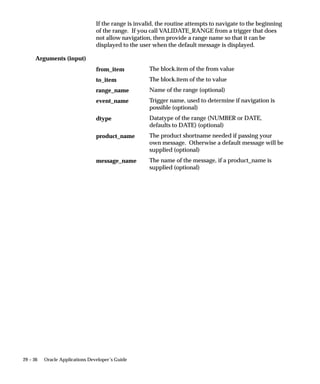
APP_RECORD.VALIDATE_RANGE 29 – 35. . . . . . . . . . . . . . . . . . . .
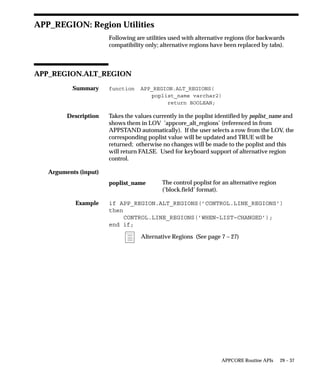
APP_REGION: Region Utilities 29 – 37. . . . . . . . . . . . . . . . . . . . . . . . . . . .
APP_REGION.ALT_REGION 29 – 37. . . . . . . . . . . . . . . . . . . . . . . . . .
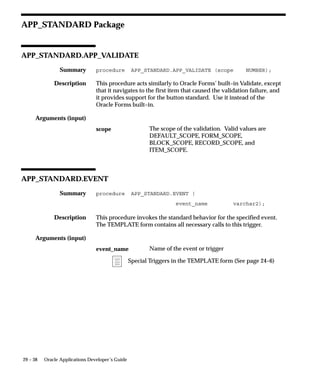
APP_STANDARD Package 29 – 38. . . . . . . . . . . . . . . . . . . . . . . . . . . . . . . .
APP_STANDARD.APP_VALIDATE 29 – 38. . . . . . . . . . . . . . . . . . . .
APP_STANDARD.EVENT 29 – 38. . . . . . . . . . . . . . . . . . . . . . . . . . . . .
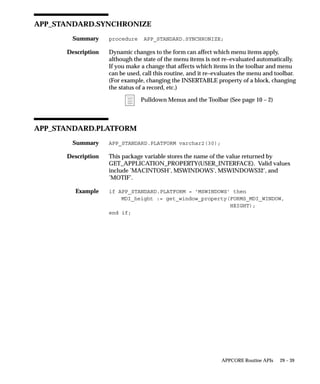
APP_STANDARD.SYNCHRONIZE 29 – 39. . . . . . . . . . . . . . . . . . . .
APP_STANDARD.PLATFORM 29 – 39. . . . . . . . . . . . . . . . . . . . . . . .
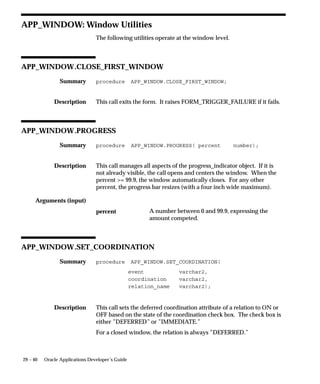
APP_WINDOW: Window Utilities 29 – 40. . . . . . . . . . . . . . . . . . . . . . . . .
APP_WINDOW.CLOSE_FIRST_WINDOW 29 – 40. . . . . . . . . . . . . .
APP_WINDOW.PROGRESS 29 – 40. . . . . . . . . . . . . . . . . . . . . . . . . . .
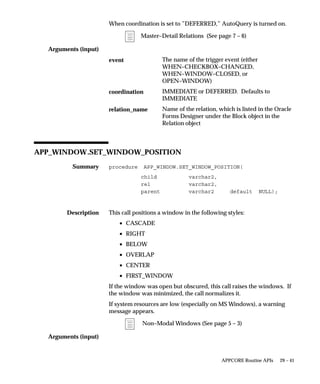
APP_WINDOW.SET_COORDINATION 29 – 40. . . . . . . . . . . . . . . . .
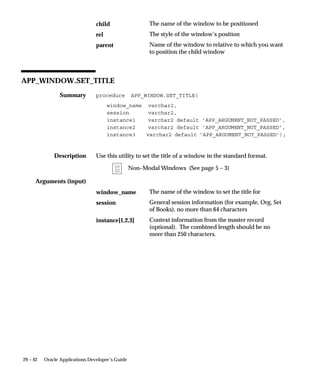
APP_WINDOW.SET_WINDOW_POSITION 29 – 41. . . . . . . . . . . . .
APP_WINDOW.SET_TITLE 29 – 42. . . . . . . . . . . . . . . . . . . . . . . . . . .
Chapter 30 FNDSQF Routine APIs 30 – 1. . . . . . . . . . . . . . . . . . . . . . . . . . . . . . . . . .
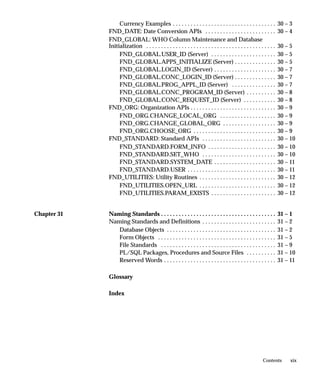
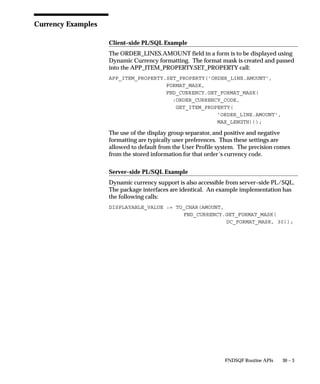
FND_CURRENCY: Dynamic Currency APIs 30 – 2. . . . . . . . . . . . . . . . .
FND_CURRENCY.GET_FORMAT_MASK (Client or
Server) 30 – 2. . . . . . . . . . . . . . . . . . . . . . . . . . . . . . . . . . . . . . . . . . . . . .
xixContents
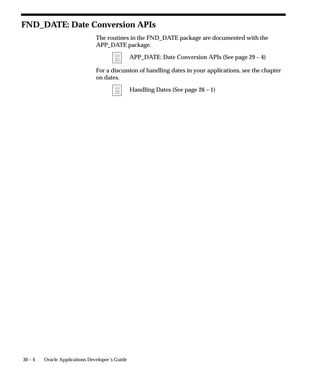
Currency Examples 30 – 3. . . . . . . . . . . . . . . . . . . . . . . . . . . . . . . . . . .
FND_DATE: Date Conversion APIs 30 – 4. . . . . . . . . . . . . . . . . . . . . . . .
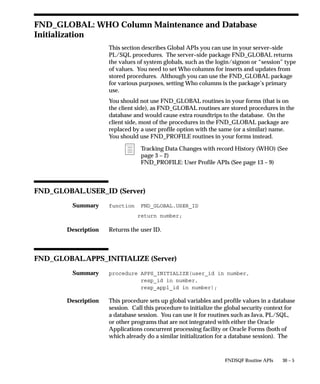
FND_GLOBAL: WHO Column Maintenance and Database
Initialization 30 – 5. . . . . . . . . . . . . . . . . . . . . . . . . . . . . . . . . . . . . . . . . . . .
FND_GLOBAL.USER_ID (Server) 30 – 5. . . . . . . . . . . . . . . . . . . . . .
FND_GLOBAL.APPS_INITIALIZE (Server) 30 – 5. . . . . . . . . . . . . .
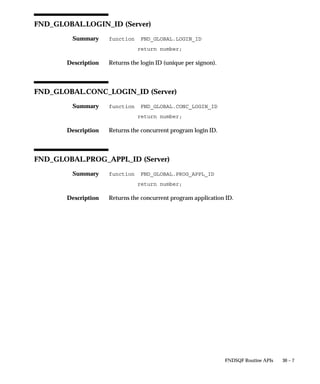
FND_GLOBAL.LOGIN_ID (Server) 30 – 7. . . . . . . . . . . . . . . . . . . . .
FND_GLOBAL.CONC_LOGIN_ID (Server) 30 – 7. . . . . . . . . . . . . .
FND_GLOBAL.PROG_APPL_ID (Server) 30 – 7. . . . . . . . . . . . . . .
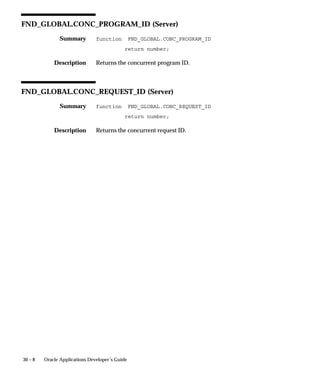
FND_GLOBAL.CONC_PROGRAM_ID (Server) 30 – 8. . . . . . . . . .
FND_GLOBAL.CONC_REQUEST_ID (Server) 30 – 8. . . . . . . . . . .
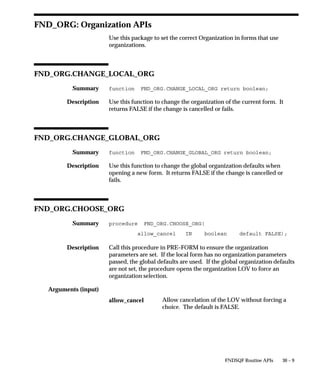
FND_ORG: Organization APIs 30 – 9. . . . . . . . . . . . . . . . . . . . . . . . . . . . .
FND_ORG.CHANGE_LOCAL_ORG 30 – 9. . . . . . . . . . . . . . . . . . .
FND_ORG.CHANGE_GLOBAL_ORG 30 – 9. . . . . . . . . . . . . . . . . .
FND_ORG.CHOOSE_ORG 30 – 9. . . . . . . . . . . . . . . . . . . . . . . . . . . .
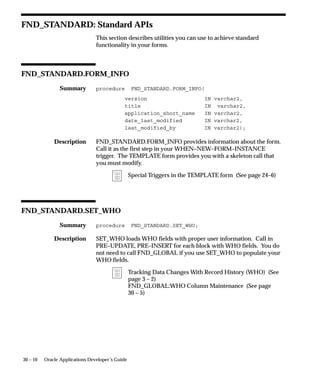
FND_STANDARD: Standard APIs 30 – 10. . . . . . . . . . . . . . . . . . . . . . . . .
FND_STANDARD.FORM_INFO 30 – 10. . . . . . . . . . . . . . . . . . . . . . .
FND_STANDARD.SET_WHO 30 – 10. . . . . . . . . . . . . . . . . . . . . . . . .
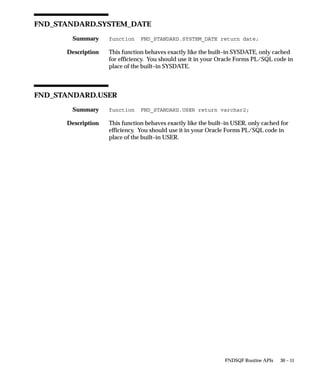
FND_STANDARD.SYSTEM_DATE 30 – 11. . . . . . . . . . . . . . . . . . . . .
FND_STANDARD.USER 30 – 11. . . . . . . . . . . . . . . . . . . . . . . . . . . . . .
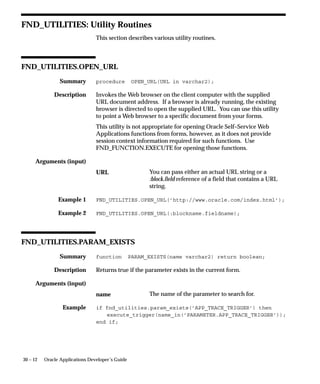
FND_UTILITIES: Utility Routines 30 – 12. . . . . . . . . . . . . . . . . . . . . . . . . .
FND_UTILITIES.OPEN_URL 30 – 12. . . . . . . . . . . . . . . . . . . . . . . . . .
FND_UTILITIES.PARAM_EXISTS 30 – 12. . . . . . . . . . . . . . . . . . . . . .
Chapter 31 Naming Standards 31 – 1. . . . . . . . . . . . . . . . . . . . . . . . . . . . . . . . . . . . . . .
Naming Standards and Definitions 31 – 2. . . . . . . . . . . . . . . . . . . . . . . . .
Database Objects 31 – 2. . . . . . . . . . . . . . . . . . . . . . . . . . . . . . . . . . . . .
Form Objects 31 – 5. . . . . . . . . . . . . . . . . . . . . . . . . . . . . . . . . . . . . . . .
File Standards 31 – 9. . . . . . . . . . . . . . . . . . . . . . . . . . . . . . . . . . . . . . .
PL/SQL Packages, Procedures and Source Files 31 – 10. . . . . . . . . .
Reserved Words 31 – 11. . . . . . . . . . . . . . . . . . . . . . . . . . . . . . . . . . . . . .
Glossary
Index
xx Oracle Applications Developer’s Guide
T
iPreface
Preface
his manual contains the coding standards followed by the Oracle
Applications development staff. It describes the code needed to
implement the Oracle Applications user interface described in the
Oracle Applications User Interface Standards for Forms–Based Products. It
also provides information necessary to help you integrate your Oracle
Forms Developer 6i forms with Oracle Applications. This preface
includes the following topics:
• Audience for this Guide
• Other Information Sources
• Do Not Use Database Tools to Modify Oracle Applications Data
• Typographic Conventions
• Your Feedback
ii Oracle Applications Developer’s Guide
Audience for This Guide
This guide is written for the application developer and assumes
assumes you have a working knowledge of the following:
• Oracle Forms Developer 6i
If you have never used Oracle Forms Developer, we suggest you
attend one or more of the relevant training classes available
through Oracle University.
• PL/SQL 8 and Oracle8i
If you have never used Oracle8i or PL/SQL, we suggest you
attend one or more of the relevant training classes available
through Oracle University.
• The Oracle Applications graphical user interface.
To learn more about the Oracle Applications graphical user
interface, read the Oracle Applications User Guide.
See Other Information Sources for more information about Oracle
Applications product information.
Other Information Sources
You can choose from many sources of information, including online
documentation, training, and support services, to increase your
knowledge and understanding of Oracle Application Object Library.
If this guide refers you to other Oracle Applications documentation,
use only the Release 11i versions of those guides unless we specify
otherwise.
Online Documentation
Most Oracle Applications documentation is available online (HTML
and/or PDF). The technical reference guides are available in paper
format only. Note that the HTML documentation is translated into
over twenty languages.
The HTML version of this guide is optimized for onscreen reading, and
you can use it to follow hypertext links for easy access to other HTML
guides in the library. When you have an HTML window open, you can
use the features on the left side of the window to navigate freely
throughout all Oracle Applications documentation.
iiiPreface
• You can use the Search feature to search by words or phrases.
• You can use the expandable menu to search for topics in the
menu structure we provide. The Library option on the menu
expands to show all Oracle Applications HTML documentation.
You can view HTML help in the following ways:
• From an application window, use the help icon or the help menu
to open a new Web browser and display help about that window.
• Use the documentation CD.
• Use a URL provided by your system administrator.
Your HTML help may contain information that was not available when
this guide was printed.
Related User Guides
You can read Oracle Applications products user guides online by
choosing Library from the expandable menu on your HTML help
window, by reading from the Oracle Applications Document Library
CD included in your media pack, or by using a Web browser with a
URL that your system administrator provides.
If you require printed guides, you can purchase them from the Oracle
store at http://oraclestore.oracle.com.
User Guides Related to All Products
Oracle Applications User Guide
This guide explains how to navigate the system, enter data, and query
information, and introduces other basic features of the GUI available
with this release of Oracle Application Object Library (and any other
Oracle Applications product).
You can also access this user guide online by choosing “Getting Started
and Using Oracle Applications” from the Oracle Applications help
system.
Oracle Alert User Guide
Use this guide to define periodic and event alerts that monitor the
status of your Oracle Applications data.
iv Oracle Applications Developer’s Guide
Oracle Applications Implementation Wizard User Guide
If you are implementing more than one Oracle product, you can use the
Oracle Applications Implementation Wizard to coordinate your setup
activities. This guide describes how to use the wizard.
Oracle Applications User Interface Standards
This guide, Oracle Applications User Interface Standards for Forms–Based
Products, contains the user interface (UI) standards followed by the
Oracle Applications development staff. It describes the UI for the
Oracle Applications products and how to apply this UI to the design of
an application built by using Oracle Forms.
Oracle Applications Flexfields Guide
This guide provides flexfields planning, setup, and reference
information for the Oracle Applications implementation team, as well
as for users responsible for the ongoing maintenance of Oracle
Applications product data. This guide also provides information on
creating custom reports on flexfields data.
Installation and System Administration Guides
Oracle Applications Concepts
This guide provides an introduction to the concepts, features,
technology stack, architecture, and terminology for Oracle Applications
Release 11i. It provides a useful first book to read before an installation
of Oracle Applications. This guide also introduces the concepts behind,
and major issues, for Applications–wide features such as Business
Intelligence (BIS), languages and character sets, and self–service
applications.
Installing Oracle Applications
This guide provides instructions for managing the installation of Oracle
Applications products. In Release 11i, much of the installation process
is handled using Oracle One–Hour Install, which minimizes the time it
takes to install Oracle Applications and the Oracle 8i Server technology
stack by automating many of the required steps. This guide contains
instructions for using Oracle One–Hour Install and lists the tasks you
need to perform to finish your installation. You should use this guide
in conjunction with individual product user guides and
implementation guides.
vPreface
Upgrading Oracle Applications
Refer to this guide if you are upgrading your Oracle Applications
Release 10.7 or Release 11.0 products to Release 11i. This guide
describes the upgrade process in general and lists database upgrade
and product–specific upgrade tasks. You must be at either Release 10.7
(NCA, SmartClient, or character mode) or Release 11.0 to upgrade to
Release 11i. You cannot upgrade to Release 11i directly from releases
prior to 10.7.
Using the AD Utilities
Use this guide to help you run the various AD utilities, such as
AutoInstall, AutoPatch, AD Administration, AD Controller, Relink,
and others. It contains how–to steps, screenshots, and other
information that you need to run the AD utilities.
Oracle Applications Product Update Notes
Use this guide as a reference if you are responsible for upgrading an
installation of Oracle Applications. It provides a history of the changes
to individual Oracle Applications products between Release 11.0 and
Release 11i. It includes new features and enhancements and changes
made to database objects, profile options, and seed data for this
interval.
Oracle Applications System Administrator’s Guide
This guide provides planning and reference information for the Oracle
Applications System Administrator. It contains information on how to
define security, customize menus and online help, and manage
processing.
Oracle Applications Technical Reference Guides
These reference guides contain database diagrams and a detailed
description of database tables, forms, reports, and programs for Oracle
Applications products. This information helps you convert data from
your existing applications, integrate Oracle Applications products with
non–Oracle applications, and write custom reports for Oracle
Applications products.
You can order a technical reference guide for any product you have
licensed. Technical reference guides are available in paper format only.
vi Oracle Applications Developer’s Guide
Oracle Workflow Guide
This guide explains how to define new workflow business processes as
well as customize existing Oracle Applications–embedded workflow
processes. You also use this guide to complete the setup steps
necessary for any Oracle Applications product that includes
workflow–enabled processes.
Training and Support
Training
We offer a complete set of training courses to help you and your staff
master Oracle Applications. We can help you develop a training plan
that provides thorough training for both your project team and your
end users. We will work with you to organize courses appropriate to
your job or area of responsibility.
Training professionals can show you how to plan your training
throughout the implementation process so that the right amount of
information is delivered to key people when they need it the most. You
can attend courses at any one of our many Educational Centers, or you
can arrange for our trainers to teach at your facility. We also offer Net
classes, where training is delivered over the Internet, and many
multimedia–based courses on CD. In addition, we can tailor standard
courses or develop custom courses to meet your needs.
Support
From on–site support to central support, our team of experienced
professionals provides the help and information you need to keep
Oracle Applications products working for you. This team includes
your Technical Representative, Account Manager, and Oracle’s large
staff of consultants and support specialists with expertise in your
business area, managing an Oracle server, and your hardware and
software environment.
Do Not Use Database Tools to Modify Oracle Applications Data
We STRONGLY RECOMMEND that you never use SQL*Plus, Oracle
Data Browser, database triggers, or any other tool to modify Oracle
Applications tables, unless we tell you to do so in our guides.
Syntax:
Example:
viiPreface
Oracle provides powerful tools you can use to create, store, change,
retrieve, and maintain information in an Oracle database. But if you
use Oracle tools such as SQL*Plus to modify Oracle Applications data,
you risk destroying the integrity of your data and you lose the ability to
audit changes to your data.
Because Oracle Applications tables are interrelated, any change you
make using an Oracle Applications form can update many tables at
once. But when you modify Oracle Applications data using anything
other than Oracle Applications forms, you might change a row in one
table without making corresponding changes in related tables. If your
tables get out of synchronization with each other, you risk retrieving
erroneous information and you risk unpredictable results throughout
Oracle Applications.
When you use Oracle Applications forms to modify your data, Oracle
Applications automatically checks that your changes are valid. Oracle
Applications also keeps track of who changes information. But, if you
enter information into database tables using database tools, you may
store invalid information. You also lose the ability to track who has
changed your information because SQL*Plus and other database tools
do not keep a record of changes.
Typographic Conventions
This manual uses the following typographic conventions to distinguish
important elements from the body of the manual.
Function Keys
Forms function keys are represented by the key name enclosed in
square brackets: [Next Item].
For key mappings for your particular keyboard type, refer to the
following sources:
• Online help Show Keys screen (for most keyboards, [Ctrl–K] or
Help–>Keyboard Help from within Oracle Applications)
Command and Example Syntax
Commands and examples appear in a monotype font, as follows:
SET_CANVAS_PROPERTY(canvas_name, property, value);
/*
Syntax:
viii Oracle Applications Developer’s Guide
** Built–in: SET_CANVAS_PROPERTY
** Example: Change the ”background color” by setting the
** canvas color dynamically at runtime to the name
** of a visual attribute you created.
*/
BEGIN
Set_Canvas_Property(’my_main_cnv’,VISUAL_ATTRIBUTE,’blue_text’);
END;
Command and example syntax adhere to the following conventions:
Explanation
Used for code fragments and examples.
Indicates user–supplied items such as variables,
exceptions, and actual parameters.
Indicates a default parameter. If you indicate no
parameter in a parameter set, Forms applies the
default parameter.
An ellipsis shows that statements or clauses were
left out. The ellipsis can appear horizontally as
shown, or in vertical format.
A slash and asterisk begin a C–style comment.
An asterisk and slash end a C–style comment.
Two consecutive hyphens begin an ANSI–style
comment, which extends to the end of the line.
Indentation helps show structure within code
examples, but is not required.
Case Sensitivity
Although neither PL/SQL nor Forms commands are case sensitive
(that is, you can enter text in upper or lower case without restriction),
in the documentation both upper and lower case are used for ease in
reading.
In syntax examples, built–in names are usually shown in all caps;
user–defined values are usually shown in lower case.
SET_CANVAS_PROPERTY(canvas_name, property, value);
Convention
plain monotype
italic monotype
underlined
monotype
...
/*
*/
––
indentation
Example Syntax:
With Values:
Example Syntax:
With Values:
ixPreface
Syntax Examples
This example illustrates first how the syntax is presented in this
manual, followed by an example of how you actually enter a built–in
procedure into your triggers.
SET_FORM_PROPERTY(formmodule_name, property, value);
Set_Form_Property(’my_form’, savepoint_mode, PROPERTY_ON);
SET_TIMER(timer_name, milliseconds, iterate);
Set_Timer(’my_timer’, 12000, REPEAT);
About Oracle
Oracle Corporation develops and markets an integrated line of
software products for database management, applications
development, decision support and office automation, as well as Oracle
Applications. Oracle Applications provides the E–business Suite, a
fully integrated suite of more than 70 software modules for financial
management, Internet procurement, business intelligence, supply chain
management, manufacturing, project systems, human resources and
sales and service management.
Oracle products are available for mainframes, minicomputers, personal
computers, network computers, and personal digital assistants,
enabling organizations to integrate different computers, different
operating systems, different networks, and even different database
management systems, into a single, unified computing and information
resource.
Oracle is the world’s leading supplier of software for information
management, and the world’s second largest software company. Oracle
offers its database, tools, and application products, along with related
consulting, education and support services, in over 145 countries
around the world.
Your Feedback
Thank you for using Oracle Application Object Library and this guide.
We value your comments and feedback. This guide contains a
Reader’s Comment Form you can use to explain what you like or
dislike about Oracle Application Object Library or this guide. Mail
x Oracle Applications Developer’s Guide
your comments to the following address or call us directly at (650)
506–7000.
Oracle Applications Documentation Manager
Oracle Corporation
500 Oracle Parkway
Redwood Shores, CA 94065
U.S.A.
Or, send electronic mail to appsdoc@us.oracle.com.
C H A P T E R
1
T
1 – 1Overview of Coding Standards
Overview of Coding
Standards
his chapter describes the general principles on which the Oracle
Applications Coding Standards are based, and introduces basic coding
standards that apply to all forms.
The following topics are covered:
• Importance of these Standards
• Coding Principles
• Coding with Handlers
• Performance
• The Standard Development Environment
• Shared Objects
• Libraries
• Property Classes
• Visual Attributes
• Overview of Building an Application
• Overall Design Issues to Consider
• Overview of Application Development Steps
• Overview of Form Development Steps
1 – 2 Oracle Applications Developer’s Guide
Overview of Coding Standards
Importance of these Standards
The coding standards described in this manual, together with the user
interface standards described in the Oracle Applications User Interface
Standards for Forms–Based Products, are used by Oracle Corporation
developers to build Oracle Applications. If you want to build custom
application code that integrates with and has the same look and feel as
Oracle Applications, you must follow these standards. If you do not
follow these standards exactly as they are presented, you may not
achieve an acceptable result.
This manual makes no attempt to analyze the consequences of
deviating from the standards in particular cases. The libraries and
procedures that are packaged with Oracle Applications all assume
adherence to these standards. In fact, since the behavior of Oracle
Forms, the Oracle Applications standard libraries, and the standards
are so tightly linked, a deviation from standards that appears to be
minor may in fact have far–reaching and unpredictable results.
Therefore, we recommend that when you develop custom application
code, you follow the standards exactly as they are described in this
manual and in the Oracle Applications User Interface Standards for
Forms–Based Products.
Coding Principles
Oracle Applications coding standards are guided by the following
principles:
• Code must be readable to be maintained
• Tools such as Oracle Forms and PL/SQL are used whenever
possible (avoid complex user exits using other coding languages)
• Fast performance over the World Wide Web (the web) is critical
• Platform–specific code should be avoided except where
absolutely necessary
• Reusable objects should be employed wherever possible
1 – 3Overview of Coding Standards
Coding With Handlers
Oracle Applications uses groups of packaged procedures, called
handlers, to organize PL/SQL code in forms so that it is easier to
develop, maintain, and debug.
In Oracle Forms, code is placed in triggers, which execute the code
when that trigger event occurs. Implementing complex logic may
require scattering its code across multiple triggers. Because code in
triggers is not located in one place, it cannot be written or reviewed
comprehensively, making development, maintenance, and debugging
more difficult. To determine what code and events affect a particular
item, a developer must scan many triggers throughout the form. Code
that affects multiple items can be extremely difficult to trace.
To centralize the code so it is easier to develop, maintain, and debug,
place the code in packaged procedures and call those procedures from
the triggers. Pass the name of the trigger as an argument for the
procedure to process. This scheme allows the code for a single
business rule to be associated with multiple trigger points, but to reside
in a single location.
There are different kinds of procedures for the different kinds of code
you write: item handlers, event handlers, table handlers, and business
rules. Code resides in these procedures; do not put any code in the
triggers other than calls to the procedures.
Handlers may reside in program units in the form itself, in form
libraries, or in stored packages in the database as appropriate.
Item Handlers
An item handler is a PL/SQL procedure that encapsulates all of the
code that acts upon an item. Most of the validation, defaulting, and
behavior logic for an item is typically in an item handler.
Coding Item Handlers (See page 4 – 17)
Event Handlers
An event handler is a PL/SQL procedure that encapsulates all of the
code that acts upon an event. Usually event handlers exist to satisfy
requirements of either Oracle Forms or the Oracle Applications User
Interface Standards for Forms–Based Products, as opposed to particular
business requirements for a product.
Coding Event Handlers (See page 4 – 19)
1 – 4 Oracle Applications Developer’s Guide
Table Handlers
A table handler encapsulates all of the code that manages interactions
between a block and its base table. When an updatable block is based
on a view, you must supply procedures to manage the insert, update,
lock and delete. Referential integrity checks often require additional
procedures. Table handlers may reside on either the forms server or
the database, depending on their size and the amount of interaction
with the database, but they typically reside in the database.
Coding Table Handlers (See page 4 – 20)
Server side versus Client side (See page 4 – 6)
Business Rules
A business rule describes complex data behavior. For example, one
business rule is: ”A discount cannot be greater than 10% if the current
credit rating of the buyer is less than ’Good’.” Another business rule is:
”A Need–By Date is required if a requisition is made for an inventory
item.”
A business rule procedure encapsulates all of the code to implement
one business rule when the business rule is complex or affects more
than one item or event. The business rule procedure is then called by
the item or event handlers that are involved in the business rule. If the
business rule is simple and affects only one item or event, implement
the business rule directly in the item or event handler.
Libraries
Libraries contain reusable client–side code. They support these form
coding standards by allowing the same code to be used by all forms to
enforce specific validation, navigation and cosmetic behaviors and
appearances.
Libraries allow code to be written once and used by multiple forms.
Additionally, because the executables attach at runtime, they facilitate
development and maintenance without being invasive to a form.
Every form requires several standard triggers and procedures to link
the form with a library. Many of these triggers and procedures have a
default behavior that a developer overrides for specific items or blocks.
Special Triggers in the TEMPLATE form (See page 24–6)
1 – 5Overview of Coding Standards
Application–Specific Libraries
Each application is strongly encouraged to create its own libraries.
Typically, each application creates a central library that governs
behaviors of objects found throughout many of its forms. Additional
libraries should be created for each major transaction form to facilitate
the following:
• Multiple developers can work on a single module, with some
developers coding the actual form and others coding the
supporting libraries.
• Shipment and installation of patches to code is vastly simplified
if the correction is isolated in a library. Libraries do not require
any porting or translation.
All libraries should reside in the $AU_TOP/resource directory (or its
equivalent).
Attaching Libraries
Sometimes library attachments can be lost on platforms that have
case–sensitive filenames. By Oracle Applications standards, library
names must be in all uppercase letters (except for the file extension).
However, for forms developed using Microsoft Windows, the library
filename may be attached using mixed case letters, making the
attachment invalid on case–sensitive platforms such as Unix. If you
attach a library to a form in the Oracle Forms Developer on Microsoft
Windows, you should avoid using the Browse mechanism to locate the
file. Instead, type in just the filename, in uppercase only, with no file
extension (for example, CUSTOM). Oracle Forms will then preserve
the attachment exactly as you typed it. Note that your attachment
should never include a directory path; your FORMS60_PATH should
include the directory that holds all your libraries.
Performance
Performance is a critical issue in any application. Applications must
avoid overloading the network that connects desktop client, server, and
database server computers, since often it is network performance that
most influences users’ perceptions of application performance.
Oracle Applications are designed to minimize network traffic on all
tiers. For example, they try to limit network round trips to one per
user–distinguishable event by employing the following coding
standards:
1 – 6 Oracle Applications Developer’s Guide
• Use database stored procedures when extensive SQL is required
• Code all non–SQL logic on the client side where possible
• Cache data on the client side where practical
• Base blocks on views that denormalize foreign key information
where practical
Views (See page 3 – 7)
Server Side versus Client Side (See page 4 – 6)
Coding for Web Compatibility
Following Oracle Applications standards carefully will help ensure that
your forms can be deployed on the Web.
You should avoid using the following features in your forms, as they
are not applicable in this architecture:
• ActiveX, VBX, OCX, OLE, DDE (Microsoft Windows–specific
features that would not be available for a browser running on a
Macintosh, for example, and cannot be displayed to users from
within the browser)
• Timers other than one–millisecond timers (one–millisecond
timers are treated as timers that fire immediately)
• WHEN–MOUSE–MOVE, WHEN–MOUSE–ENTER/LEAVE and
WHEN–WINDOW–ACTIVATED/DEACTIVATED triggers
• Open File dialog box
– It would open a file on the applications server, rather than
on the client machine (where the browser is) as a user might
expect
• Combo boxes
– Our standards do not use combo boxes anyhow
• Text_IO and HOST built–in routines
– These would take place on the applications server, rather
than on the client machine (where the browser is) as a user
might expect
1 – 7Overview of Coding Standards
The Standard Development Environment
These coding standards assume that you are developing code in the
appropriate Oracle Applications development environment, which
includes compatible versions of several products. You can ensure that
you have all the correct versions of the Oracle Applications and other
Oracle products by installing all products from one set of Oracle
Applications Release 11i CDs.
• Oracle Forms Developer 6i
• Oracle Reports Developer 6i
• Oracle Application Object Library Release 11i
• Oracle8i
• JInitiator
While you can develop forms using the standard Oracle Forms
Developer, you cannot run your Oracle Applications–based forms from
the Oracle Forms Developer. Running such forms requires additional
Oracle Application Object Library user exits referred to by the libraries,
as well as settings and runtime code that can only be seen when
running forms through a browser with JInitiator. Both the libraries and
the user exits also assume a full installation of the Oracle Application
Object Library database schema, as they reference tables, views, and
packages contained therein.
Mandatory Settings for Running Oracle Applications
The html file used to launch Oracle Applications must include several
specific settings for Oracle Applications to function properly. The
following table contains the required parameters and their required
values:
Name Value
colorScheme blue
lookAndFeel oracle
separateFrame true
darkLook true
readOnlyBackground automatic
Table 1 – 1 (Page 1 of 2)
1 – 8 Oracle Applications Developer’s Guide
ValueName
dontTruncateTabs true
background no
Table 1 – 1 (Page 2 of 2)
Additionally, the file OracleApplications.dat must contain the
following lines:
app.ui.requiredFieldVABGColor=255,242,203
app.ui.lovButtons=true
app.ui.requiredFieldVA=true
There are several variables that must be set correctly, either as Unix
environment variables or NT Registry settings, before starting up your
Forms Server for running Oracle Applications. These variables include
NLS_DATE_FORMAT. NLS_DATE_FORMAT must be set to
DD–MON–RR.
Additional Information: Installing Oracle Applications
Mandatory Settings for Form Generation
At form generation time, make sure you designate the character set
designed for your language in the NLS_LANG variable in your
Windows NT registry or environment file (for Unix). You must ensure
that the character set you specify is the character set being used for
your Oracle Applications installation.
You must also set the value of your FORMS60_PATH environment
variable in your environment file (or platform equivalent such as
Windows NT registry) to include any directory that contains forms,
files, or libraries you use to develop and generate your forms.
Specifically, you must include a path to the <$AU_TOP>/forms/US
directory to be able to find all referenced forms, and a path to the
<$AU_TOP>/resource directory to be able to find the Oracle
Applications library files you need (where <$AU_TOP> is the
appropriate directory path, not the variable).
Recommended Setting for Form Development
Oracle Forms Developer allows referenced objects to be overridden in
the local form. Oracle Forms Developer also does not normally
provide any indication that an object is referenced unless you set a
special environment variable (Registry setting for NT). Set the
1 – 9Overview of Coding Standards
environment variable (Registry setting) ORACLE_APPLICATIONS to
TRUE before starting Oracle Forms Developer. This setting allows you
to see the reference markers (little flags with an ”R” in them) on
referenced objects so you can avoid changing referenced objects
unintentionally. Any object referenced from the APPSTAND form must
never be changed.
Warning: Oracle Forms Developer allows referenced objects
to be overridden in the local form. Any object referenced from
the APPSTAND form must never be changed.
Oracle Application Object Library for Release 11i
Oracle Application Object Library (AOL) for Release 11i includes
(partial list):
• Starting forms
– Template form with standard triggers (TEMPLATE)
– Form containing standard property classes for your runtime
platform (APPSTAND)
• PL/SQL libraries
– Routines for Flexfields, Function security, User Profiles,
Message Dictionary (FNDSQF)
– Standard user interface routines (APPCORE, APPCORE2)
– Routines for Calendar widget (APPDAYPK)
• Development standards
– Oracle Applications User Interface Standards for Forms–Based
Products
– Oracle Applications Developer’s Guide (this manual)
Setting Object Characteristics
The characteristics of most form objects, including modules, windows,
canvases, blocks, regions, and items may be set in the following ways:
• Inherited through property classes, which cause certain
properties to be identical in all forms (such as canvas visual
attributes)
1 – 10 Oracle Applications Developer’s Guide
• At the discretion of the developer during form design (such as
window sizes)
• At runtime, by calling standard library routines (such as window
positions)
Shared Objects
These standards rely extensively on the object referencing capabilities
of Oracle Forms. These capabilities allow objects to be reused across
multiple forms, with changes to the master instance automatically
inherited by forms that share the object. Additionally, these shared
objects provide flexibility for cross–platform support, allowing Oracle
Applications to adhere to the look and feel conventions of the platform
they run on.
APPSTAND Form
The APPSTAND form contains the master copy of the shared objects.
It contains the following:
• Object group STANDARD_PC_AND_VA, which contains the
Visual Attributes and Property Classes required to implement
much of the user interface described in the Oracle Applications
User Interface Standards for Forms–Based Products. A property
class exists for almost every item and situation needed for
development.
Property Classes (See page 1 – 13)
Setting the Properties of Container Objects: page 5 – 1
Setting the Properties of Widget Objects: page 6 – 1
• Object group STANDARD_TOOLBAR, which contains the
windows, canvasses, blocks, and items of the Applications
Toolbar. This group also contains other items which are required
in all forms but are not necessarily part of the Toolbar.
Pulldown Menus and the Toolbar (See page 10 – 2)
• Object group STANDARD_CALENDAR, which contains the
windows, canvasses, blocks, and items of the Applications
Calendar.
The Calendar (See page 9 – 23)
1 – 11Overview of Coding Standards
• Object group QUERY_FIND, which contains a window, canvas,
block, and items used as a starting point for coding a Find
Window. This object group is copied into each form, rather than
referenced, so that it can be modified.
Query Find Windows (See page 8 – 2)
Warning: Additional objects in the APPSTAND form are for
internal use by Oracle Applications only, and their use is not
supported. Specifically, the object group STANDARD_
FOLDER is not supported.
Warning: Oracle Forms Developer allows referenced objects
to be overridden in the local form. Any object referenced from
the APPSTAND form must never be changed.
TEMPLATE Form
The TEMPLATE form is the required starting point for all development
of new forms. It includes references to many APPSTAND objects,
several attached libraries, required triggers, and other objects.
Start developing each new form by copying this file, located in
$AU_TOP/forms/US (or your language and platform equivalent), to a
local directory and renaming it as appropriate. Be sure to rename the
filename, the internal module name, and the name listed in the call to
FND_STANDARD.FORM_INFO found in the form–level PRE–FORM
trigger.
Overview of the TEMPLATE Form (See page 24–2)
FNDMENU
The Oracle Applications default menu (with menu entries common to
all forms, such as File, Edit, View, Help, and so on) is contained in the
$AU_TOP/resource/US directory (or its equivalent) as the file
FNDMENU. You should never modify this file, nor should you create
your own menu for your forms.
Standard Libraries
Application Object Library contains several libraries that support the
Oracle Applications User Interface Standards for Forms–Based Products:
1 – 12 Oracle Applications Developer’s Guide
• FNDSQF contains packages and procedures for Message
Dictionary, flexfields, profiles, and concurrent processing. It also
has various other utilities for navigation, multicurrency, WHO,
etc.
• APPCORE and APPCORE2 contain the packages and procedures
that are required of all forms to support the menu, Toolbar, and
other required standard behaviors. APPCORE2 is a
near–duplicate of APPCORE intended for use with the CUSTOM
library.
Oracle Applications APIs (See page 29 – 1)
• APPDAYPK contains the packages that control the Applications
Calendar.
The Calendar (See page 9 – 23)
• APPFLDR contains all of the packages that enable folder blocks.
Warning: Oracle Applications does not support use of the
APPFLDR library for custom development.
• VERT, GLOBE, PSAC, PQH_GEN, GHR, JA, JE, and JL exist to
support globalization and vertical markets. These libraries are
for Oracle Applications use only and may not be attached to
custom forms. However, they appear to be attached to most
forms based on the TEMPLATE form because they are attached
to the APPCORE library or other standard libraries.
• CUSTOM contains stub calls that may be modified to provide
custom code for Oracle Applications forms without modifying
the Oracle Applications forms directly.
Customizing Oracle Applications with the CUSTOM
Library (See page 28 – 2)
The TEMPLATE form includes attachments to the FNDSQF, APPCORE
and APPDAYPK libraries. Other standard Oracle Applications libraries
are attached to those libraries and may appear to be attached to the
TEMPLATE form.
Libraries in the TEMPLATE Form (See page 24–3)
Any code you write within a form that is based on the TEMPLATE
form may call any (public) procedure that exists in these libraries. If
you code your own library, you will need to attach the necessary
libraries to it.
1 – 13Overview of Coding Standards
Property Classes
Property classes are sets of attributes that can be applied to almost any
Oracle Forms object. The TEMPLATE form automatically contains
property classes, via references to APPSTAND, that enforce standard
cosmetic appearances and behaviors for all widgets and containers as
described in the Oracle Applications User Interface Standards for
Forms–Based Products.
Property Classes
Oracle Applications User Interface Standards for Forms–Based
Products
Rules for attaching the property classes to specific objects are discussed
in Chapters 5 and 6.
Setting the Properties of Container Objects (See page 5 – 1)
Setting the Properties of Widget Objects (See page 6 – 1)
Do not override any attribute set by a property class unless this manual
explicitly states that it is acceptable, or there is a compelling reason to
do so. Overriding an inherited attribute is very rarely required.
Application–specific Property Classes, Object Groups and Objects
Each application should take advantage of the referencing capabilities
of Oracle Forms to help implement standards for their particular
application in the same manner as APPSTAND.
For example, the General Ledger application might have specified
standard widths and behaviors for ”Total” fields throughout the
application. A GL_TOTAL Property Class, referenced into each form,
could set properties such as width, format mask, etc. A General
Ledger developer, after referencing in this set of property classes, can
then simply apply the GL_TOTAL property class to each item in the
form that is a Total field and it inherits its standard appearance and
behavior automatically. Entire items or blocks can also be reused.
Further, property classes can be based on other property classes, so the
GL_TOTAL class could be based on the standard TEXT_ITEM_
DISPLAY_ONLY class in APPSTAND. Such subclassing allows the
application–specific object to inherit changes made within APPSTAND
automatically.
Most Oracle Applications products also have a ”standard” form
(typically called [Application short name]STAND, such as GLSTAND
or BOMSTAND) in the same directory if you install the development
1 – 14 Oracle Applications Developer’s Guide
versions of those products. These files are used for storing
application–specific object groups, property classes, and other objects
that are referenced into Oracle Applications forms.
Visual Attributes
All of the visual attributes described in the Oracle Applications User
Interface Standards for Forms–Based Products are automatically included
in the TEMPLATE form via references to APPSTAND. Each visual
attribute is associated with a property class or is applied at runtime by
APPCORE routines.
For detailed information about the specific color palettes and effects of
the visual attributes, see the Oracle Applications User Interface Standards
for Forms–Based Products.
1 – 15Overview of Coding Standards
Overview of Building an Application
An application that integrates with Oracle Applications consists of
many pieces, including but not limited to forms, concurrent programs
and reports, database tables and objects, messages, menus,
responsibilities, flexfield definitions, online help, and so on.
Building an application also requires that you consider many overall
design issues, such as what platforms and languages your application
will run on, what other applications you will integrate with,
maintenance issues, and so on.
Overall Design Issues to Consider
When designing your application, you should keep in mind that many
Oracle Applications features affect various facets of your application
including database objects, forms, concurrent programs, and so on, and
including these features should be considered from the beginning of
your application design process. These features include but are not
limited to:
• Flexfields
• User profiles
• Multiple organizations
• Oracle Workflow integration
• Multiple platform support
• National language support
• Flexible date formats
• Multiple currency support
• Year 2000 support
• CUSTOM library support
• Object naming standards
1 – 16 Oracle Applications Developer’s Guide
Overview of Application Development Steps
This is the general process of creating an application that integrates
with Oracle Applications.
1. Register your application. See: Applications Window: page 2 – 6.
2. Set up your application directory structures. See: Overview of
Setting Up Your Application Framework: page 2 – 2.
3. Modify the appropriate environment files. See: Oracle Applications
Concepts manual.
4. Register your custom Oracle schema. See: Oracle Applications
System Administrator’s Guide.
5. Include your custom application and Oracle schema in data
groups. See: Oracle Applications System Administrator’s Guide.
6. Create your application tables and views. See: Tables: page 3 – 2.
See: Views: page 3 – 7.
7. Integrate your tables and views with the Oracle Applications APPS
schema. See: Integrating Custom Objects and Schemas: page
27 – 29.
8. Register your flexfields tables. See: Table Registration API: page
3 – 11.
9. Build your application libraries and forms. See: Overview of Form
Development Steps: page 1 – 17.
10. Build your application functions and menus. See: Overview of
Menus and Function Security: page 11 – 2.
11. Build your application responsibilities. See: Oracle Applications
System Administrator’s Guide.
12. Build concurrent programs and reports. See: Overview of
Concurrent Processing: page 15 – 2.
13. Customize Oracle Applications forms if necessary using the
CUSTOM library. See: Customizing Oracle Applications with the
CUSTOM Library: page 28 – 2.
1 – 17Overview of Coding Standards
Overview of Form Development Steps
This is the general process of building a form that integrates with
Oracle Applications.
1. Copy the form TEMPLATE and rename it. See: Overview of the
TEMPLATE Form: page 24–2.
2. Attach any necessary libraries to your copy of TEMPLATE.
TEMPLATE comes with several libraries already attached. See:
Overview of the TEMPLATE Form: page 24–2.
3. Create your form blocks, items, LOVs, and other objects and apply
appropriate property classes. See: Setting Properties of Container
Objects: page 5 – 1. See: Setting Properties of Widget Objects: page
6 – 1.
4. Create your window layout in adherence with the Oracle
Applications User Interface Standards for Forms–Based Products.
5. Add table handler logic. See: Coding Table Handlers: page 4 – 20.
6. Code logic for window and alternative region control. See:
Controlling Window Behavior: page 7 – 2.
7. Add Find windows and/or Row–LOVs and enable Query Find.
See: Overview of Query Find: page 8 – 2.
8. Code logic for item relations such as dependent fields. See: Item
Relations: page 9 – 2.
9. Code any messages to use Message Dictionary. See: Overview of
Message Dictionary: page 12 – 2.
10. Add flexfields logic if necessary. See: Overview of Flexfields: page
14 – 2.
11. Add choices to the Special menu and add logic to modify the
default menu and toolbar behavior if necessary. See: Pulldown
Menus and the Toolbar: page 10 – 2.
12. Code any other appropriate logic.
13. Test your form by itself.
14. Register your form with Oracle Application Object Library. See:
Forms Window: page 11 – 21.
15. Create a form function for your form and register any subfunctions.
See: Overview of Menus and Function Security: page 11 – 2.
16. Add your form function to a menu, or create a custom menu. See:
Overview of Menus and Function Security: page 11 – 2.
1 – 18 Oracle Applications Developer’s Guide
17. Assign your menu to a responsibility and assign your responsibility
to a user. See: Oracle Applications System Administrator’s Guide.
18. Test your form from within Oracle Applications (especially if it
uses features such as user profiles or function security).
C H A P T E R
2
T
2 – 1Setting Up Your Application Framework
Setting Up Your
Application Framework
his chapter describes what you need to do to set up your
application framework, including creating directory structures,
registering your application, registering your Oracle schema, and so on.
The following topics are covered:
• Application Directory Structures
• Registering Your Application
• Registering Your Oracle Schema
• Setting Up Your Application and Integrating It with Oracle
Applications
• Applications window
2 – 2 Oracle Applications Developer’s Guide
Overview of Setting Up Your Application Framework
Oracle Applications and custom applications that integrate with Oracle
Applications rely on having their components arranged in a predictable
structure. This includes particular directory structures where you
place reports, forms, programs and other objects, as well as
environment variables and application names that allow Oracle
Application Object Library to find your application components.
Definitions
Application
An application, such as Oracle General Ledger or Oracle Inventory, is a
functional grouping of forms, programs, menus, libraries, reports, and
other objects. Custom applications group together site–specific
components such as custom menus, forms, or concurrent programs.
Application Short Name
The application short name is an abbreviated form of your application
name used to identify your application in directory and file names and
in application code such as PL/SQL routines.
Oracle Schema
Database username used by applications to access the database. Also
known as Oracle ID (includes password) or Oracle user.
Environment Variable
An operating system variable that describes an aspect of the
environment in which your application runs. For example, you can
define an environment variable to specify a directory path.
• $APPL_TOP: An environment variable that denotes the
installation directory for Oracle Application Object Library and
your other Oracle applications. $APPL_TOP is usually one
directory level above each of the product directories (which are
often referred to as $PROD_TOP or $PRODUCT_TOP or
$<prod>_TOP)
2 – 3Setting Up Your Application Framework
Note that environment variables may be documented with or without
the $ sign. For Windows NT environments, most environment
variables correspond to Registry settings (without the $ sign), although
some variables may be located in .cmd files instead of in the Registry.
Application Basepath
An environment variable that denotes the directory path to your
application–level subdirectories. You include your application
basepath in your application environment files and register it with
Oracle Application Object Library when you register your application
name. Corresponds to the $PRODUCT_TOP directory.
Set Up Your Application Directory Structures
When you develop your application components, you must place them
in the appropriate directories on the appropriate machines so that
Oracle Application Object Library can find them. For example, reports
written using Oracle Reports are typically placed in a subdirectory
called reports on the concurrent processing server machine, while
forms belong in separate subdirectories, depending on their territory
and language (such as US for American English, D for German, and so
on), on the forms server machine.
The directory structure you use for your application depends on the
computer and operating system platform you are using, as well as the
configuration of Oracle Applications at your site. For example, you
may be using a configuration that includes a Unix database server a
separate Unix concurrent processing server, a Microsoft Windows NT
forms server, and Web browsers on PCs, or you may be using a
configuration that has the database and forms server on the same Unix
machine with Web browsers on PCs. These configurations would have
different directory setups. See your Oracle Applications Concepts manual
for directory setup information for your particular platforms and
configuration. For a description of the contents and purpose of each of
the subdirectories, see your Oracle Applications Concepts manual.
Register Your Application
You must register your application name, application short name,
application basepath, and application description with Oracle
Application Object Library. Oracle Application Object Library uses this
2 – 4 Oracle Applications Developer’s Guide
information to identify application objects such as responsibilities and
forms as belonging to your application.
This identification with your custom application allows Oracle
Applications to preserve your application objects and customizations
during upgrades. When you register your application, your
application receives a unique application ID number that is included in
Oracle Application Object Library tables that contain application
objects such as responsibilities. This application ID number is not
visible in any Oracle Applications form fields.
To reduce the risk that your custom application short name could
conflict with a future Oracle Applications short name, we recommend
that your custom application short name begins with ”XX”. Such a
conflict will not affect application data that is stored using the
application ID number (which would never conflict with application
IDs used by Oracle Applications products). However, a short name
conflict may affect your application code where you use your
application short name to identify objects such as messages and
concurrent programs (you include the application short name in the
code instead of the application ID).
Applications Window (See page 2 – 6)
Modify Your Environment Files
You must add your application basepath variable to the appropriate
Oracle Applications environment files (or Windows NT Registry). The
format and location of these files depends on your operating system
and Oracle Applications configuration. See your Oracle Applications
Concepts manual for information about your environment files.
Set Up and Register Your Oracle Schema
When you build custom forms based on custom tables, typically you
place your tables in a custom Oracle schema in the database. You must
register your custom schema with Oracle Application Object Library.
See your Oracle Applications System Administrator’s Guide.
2 – 5Setting Up Your Application Framework
Create Database Objects and Integrate with APPS Schema
To integrate your application tables with Oracle Applications, you must
create the appropriate grants and synonyms in the APPS schema. See
Integrating Custom Objects and Schemas: page 27 – 29 for information
about integrating with the APPS schema.
Add Your Application to a Data Group
Oracle Applications products are installed as part of the Standard data
group. If you are building a custom application, you should use the
Data Groups window to make a copy of the Standard data group and
add your application–Oracle ID pair to your new data group. Note
that if you have integrated your application tables with the APPS
schema, then you would specify APPS as the Oracle ID in the
application–Oracle ID pair (instead of the name of your custom
schema). See your Oracle Applications System Administrator’s Guide.
Set Up Concurrent Managers
If your site does not already have a concurrent manager setup
appropriate to support your custom application, you may need to have
your system administrator set up additional concurrent managers. See
your Oracle Applications System Administrator’s Guide.
2 – 6 Oracle Applications Developer’s Guide
Applications Window
When you define a custom application, you supply several pieces of
information to Oracle Applications. You must register your application
name, application short name, application basepath, and application
description with Oracle Application Object Library. Oracle Application
Object Library uses this information to identify application objects such
as responsibilities and forms as belonging to your application. This
identification with your custom application allows Oracle Applications
to preserve your application objects and customizations during
upgrades. The application basepath tells Oracle Application Object
Library where to find the files associated with your custom application.
You can use your custom application to name your custom menus,
concurrent programs, custom responsibilities, and many other custom
components. For some objects, the application part of the name only
ensures uniqueness across Oracle Applications. For other components,
the application you choose has an effect on the functionality of your
custom object.
2 – 7Setting Up Your Application Framework
Prerequisites
❑ Define an environment variable that translates to your application’s
basepath (see Oracle Applications Concepts for your operating
system).
❑ Set up a directory structure for your application (see Oracle
Applications Concepts for your operating system)
❑ If your application resides in a database other than the database
where Oracle Alert resides, you must create a database link.
Applications Block
When you register a custom application, you provide the information
Oracle uses to identify it whenever you reference it. Although you can
change the name of an application, doing so may cause a change in the
application code where you hardcode your application name. For
example, if you pass program arguments through the menu that have
application name hardcoded, you will also have to update them.
Attention: You should not change the name of any application
that you did not develop, as you cannot be sure of the
consequences. You should never change the name of any
Oracle Applications application, because these applications
may contain hardcoded references to the application name.
Application
This user–friendly name appears in lists seen by application users.
Short Name
Oracle Applications use the application short name when identifying
forms, menus, concurrent programs and other application components.
The short name is stored in hidden fields while the name displays for
users.
Your short name should not include spaces. You use an application
short name when you request a concurrent process from a form, and
when you invoke a subroutine from a menu.
Suggestion: Although your short name can be up to 50
characters, we recommend that you use only four or five
characters for ease in maintaining your application and in
calling routines that use your short name. To reduce the risk
2 – 8 Oracle Applications Developer’s Guide
that your custom application short name could conflict with a
future Oracle Applications short name, we recommend that
your custom application short name begins with ”XX”.
Basepath
Enter the name of an environment variable that represents the top
directory of your application’s directory tree. Oracle Applications
search specific directories beneath the basepath for your application’s
executable files and scripts when defining actions that reside in
external files.
In general, your application’s basepath should be unique so that
separate applications do not write to the same directories.
However, you may define custom applications that will be used only
for naming your custom responsibilities, menus and other components.
In this case, you can use the basepath of the Oracle application that
uses the same forms as your application. For example, if you are
defining a Custom_GL application, you could use the GL_TOP
basepath for your custom application.
See: Development Environment (Oracle Applications Concepts)
C H A P T E R
3
T
3 – 1Building Your Database Objects
Building Your Database
Objects
his chapter provides you with information you need to build
tables, views, and sequences.
The following topics are covered:
• Tracking Data Changes with WHO
• Oracle8 Declarative Constraints
• LONG, LONG RAW, and RAW Datatypes
• Views
• Sequences
• Table Registration API
3 – 2 Oracle Applications Developer’s Guide
Overview of Building Your Database Objects
This section describes specifications for how to define your tables and
the required columns to add. It also covers special data types such as
LONG and LONG RAW, and declarative constraints.
Using Cost–Based Optimization
In Release 11i, Oracle Applications now uses Oracle 8i Cost–Based
Optimization (CBO) instead of Rule–Based Optimization (RBO) used in
previous versions. All new code should be written to take advantage
of Cost–Based Optimization. Where your custom application code was
tuned to take advantage of Rule–Based Optimization, you may need to
retune that code for Cost–Based Optimization.
Additional Information: Oracle 8i Tuning
Tracking Data Changes with Record History (WHO)
The Record History (WHO) feature reports information about who
created or updated rows in Oracle Applications tables. Oracle
Applications upgrade technology relies on Record History (WHO)
information to detect and preserve customizations.
If you add special WHO columns to your tables and WHO logic to
your forms and stored procedures, your users can track changes made
to their data. By looking at WHO columns, users can differentiate
between changes made by forms and changes made by concurrent
programs.
You represent each of the WHO columns as hidden fields in each block
of your form (corresponding to the WHO columns in each underlying
table). Call FND_STANDARD.SET_WHO in PRE–UPDATE and
PRE–INSERT to populate these fields.
Adding Record History Columns
The following table lists the standard columns used for Record History
(WHO), the column attributes and descriptions, and the sources for the
values of those columns. Set the CREATED_BY and
CREATION_DATE columns only when you insert a row (using
FND_STANDARD.SET_WHO for a form).
3 – 3Building Your Database Objects
Column Name Type Null?
Foreign
Key? Description Value
CREATED_BY NUMBER(15) NOT
NULL
FND_
USER
Keeps track of
which user
created each
row
TO_NUMBER
(FND_
PROFILE.
VALUE
(’USER_ID’))
CREATION_
DATE
DATE NOT
NULL
Stores the date
on which each
row was
created
SYSDATE
LAST_
UPDATED_BY
NUMBER(15) NOT
NULL
FND_
USER
Keeps track of
who last up-
dated each row
TO_NUMBER
(FND_
PROFILE.
VALUE
(’USER_ID’))
LAST_UPDATE_
DATE
DATE NOT
NULL
Stores the date
on which each
row was last
updated
SYSDATE
LAST_UPDATE_
LOGIN
NUMBER(15) FND_
LOGINS
Provides
access to
information
about the oper-
ating system
login of the
user who last
updated each
row
TO_NUMBER
(FND_
PROFILE.
VALUE
(’LOGIN_
ID’))
Table 3 – 1 (Page 1 of 1)
Any table that may be updated by a concurrent program also needs
additional columns. The following table lists the concurrent processing
columns used for Record History, the column attributes and
descriptions, and the sources for the values of those columns.
3 – 4 Oracle Applications Developer’s Guide
Concurrent Program WHO Columns
Column Name Type Null?
Foreign Key to
Table? Description
REQUEST_ID NUMBER(15) FND_
CONCURRENT_
REQUESTS
Keeps track of the
concurrent request
during which this
row was created or
updated
PROGRAM_
APPLICATION_
ID
NUMBER(15) FND_
CONCURRENT_
PROGRAMS
With PROGRAM_ID,
keeps track of which
concurrent program
created or updated
each row
PROGRAM_ID NUMBER(15) FND_
CONCURRENT_
PROGRAMS
With PROGRAM_
APPLICATION_ID,
keeps track of which
concurrent program
created or updated
each row
PROGRAM_
UPDATE_DATE
DATE PROGRAM_
UPDATE_
DATE
Stores the date on
which the concurrent
program created or
updated the row
Table 3 – 2 (Page 1 of 1)
Use Event Handlers to Code Record History in Your Forms
Some operations that must be done at commit time do not seem
designed for a table handler. For example, event handlers are preferred
to table handlers for setting Record History information for a record, or
determining a sequential number. The logic for these operations may
be stored in a PRE_INSERT and/or PRE_UPDATE event handler,
which is called from PRE–INSERT and PRE–UPDATE block–level
triggers during inserts or updates.
FND_STANDARD: Standard APIs (See page 30 – 10)
3 – 5Building Your Database Objects
Property Classes For WHO Fields
Apply the CREATION_OR_LAST_UPDATE_DATE property class to
the form fields CREATION_DATE and LAST_UPDATE_DATE. This
property classes sets the correct attributes for these fields, including the
data type and width.
Record History Column Misuse
Never use Record History columns to qualify rows for processing.
Never depend on these columns containing correct information.
In general, you should not attempt to resolve Record History columns
to HR_EMPLOYEES; if you must attempt such joins, they must be
outer joins.
Tables Without Record History Information
For blocks that are based on a table, but do not have Record History
information, disable the menu entry HELP–>ABOUT_THIS_RECORD
(all other cases are handled by the default menu control).
Code a block–level WHEN–NEW–BLOCK–INSTANCE trigger (style
”Override”) with these lines:
app_standard.event(’WHEN–NEW–BLOCK–INSTANCE’);
app_special.enable(’ABOUT’, PROPERTY_OFF);
APP_SPECIAL: Menu and Toolbar Control (See page
10 – 15)
Oracle8i Declarative Constraints
This section discusses the declarative constraints Oracle8 permits on
tables, and when to use each feature with your Oracle Applications
tables.
For the most part, any constraint that is associated with a table should
be duplicated in a form so that the user receives immediate feedback if
the constraint is violated.
Warning: You should not create additional constraints on
Oracle Applications tables at your site, as you may adversely
affect Oracle Applications upgrades. If you do create
additional constraints, you may need to disable them before
upgrading Oracle Applications.
3 – 6 Oracle Applications Developer’s Guide
NOT NULL
Use wherever appropriate. Declare the corresponding fields within
Oracle Forms as ”Required” = True.
DEFAULT
In general, do not use this feature due to potential locking problems
with Oracle Forms. You may be able to use this feature with tables that
are not used by forms (for example, those used by batch programs), or
tables that contain columns that are not maintained by forms. For
example, defaulting column values can make batch programs simpler.
Possible default values are SYSDATE, USER, UID, USERENV(), or any
constant value.
UNIQUE
Use wherever appropriate. A unique key may contain NULLs, but the
key is still required to be unique. The one exception is that you may
have any number of rows with NULLS in all of the key columns.
In addition, to implement a uniqueness check in a form, create a
PL/SQL stored procedure which takes ROWID and the table unique
key(s) as its arguments and raises an exception if the key is not unique.
Only fields that the user can enter should have a uniqueness check
within the form; system–generated unique values should be derived
from sequences which are guaranteed to be unique.
Uniqueness Check (See page 9 – 19)
CHECK
Use this feature to check if a column value is valid only in simple cases
when the list of valid values is static and short (i.e., ’Y’ or ’N’).
CHECK provides largely duplicate functionality to database triggers
but without the flexibility to call PL/SQL procedures. By using
triggers which call PL/SQL procedures instead, you can share
constraints with forms and coordinate validation to avoid redundancy.
CHECK does provide the assurance that all rows in the table will pass
the constraint successfully, whereas database triggers only validate
rows that are inserted/updated/deleted while the trigger is enabled.
This is not usually a concern, since Oracle Applications database
triggers should rarely be disabled. Some triggers (such as Alert events)
are disabled before an upgrade and re–enabled at the end of the
upgrade.
3 – 7Building Your Database Objects
We strongly advise against the use of database triggers.
PRIMARY KEY
Define a Primary Key for all tables.
Cascade Delete and Foreign Key Constraint
Do not use the Declarative Cascade Delete or the Foreign Key
Constraint when defining tables. Cascade Delete does not work across
distributed databases, so you should program cascade delete logic
everywhere it is needed.
To implement a referential integrity check, create a PL/SQL stored
procedure which takes the table unique key(s) as its argument(s) and
raises an exception if deleting the row would cause a referential
integrity error.
Integrity Checking (See page 9 – 19)
LONG, LONG RAW and RAW Datatypes
Avoid creating tables with the LONG, LONG RAW, or RAW datatypes.
Within Oracle Forms, you cannot search using wildcards on any
column of these types. Use VARCHAR2(2000) columns instead.
Columns Using a Reserved Word
If a table contains a column named with a PL/SQL or an Oracle Forms
reserved word, you must create a view over that table that aliases the
offending column to a different name. Since this view does not join to
other tables, you can still INSERT, UPDATE, and DELETE through it.
Views
In general, complex blocks are based on views while simple setup
blocks are based on tables. The advantages to using views include:
• Network traffic is minimized because all foreign keys are
denormalized on the server
3 – 8 Oracle Applications Developer’s Guide
• You do not need to code any POST–QUERY logic to populate
non–database fields
• You do not need to code PRE–QUERY logic to implement
query–by–example for non–database fields
You should also base your Lists of Values (LOVs) on views. This
allows you to centralize and share LOV definitions. An LOV view is
usually simpler than a block view, since it includes fewer denormalized
columns, and contains only valid rows of data.
Example LOV (See page 6 – 14)
Define Views To Improve Performance
Whenever performance is an issue and your table has foreign keys, you
should define a view to improve performance. Views allow a single
SQL statement to process the foreign keys, reducing parses by the
server, and reducing network traffic.
Define Views to Promote Modularity
Any object available in the database promotes modularity and reuse
because all client or server side code can access it. Views are extremely
desirable because:
• They speed development, as developers can build on logic they
already encapsulated
• They modularize code, often meaning that a correction or
enhancement can be made in a single location
• They reduce network traffic
• They are often useful for reporting or other activities
• They can be easily and centrally patched at a customer site
When Not to Create A View
Avoid creating views that are used by only one SQL statement.
Creating a view that is only used by a single procedure increases
maintenance load because both the code containing the SQL statement
and the view must be maintained.
ROW_ID Is the First Column
The first column your view should select is the ROWID
pseudo–column for the root table, and the view should alias it to
3 – 9Building Your Database Objects
ROW_ID. Your view should then include all of the columns in the root
table, including the WHO columns, and denormalized foreign key
information.
Suggestion: You only need to include the ROWID column if
an Oracle Forms block is based on this view. The Oracle Forms
field corresponding to the ROW_ID pseudo–column should
use the ROW_ID property class.
Change Block Key Mode
In Oracle Forms, you need to change the block Key Mode property to
Non–Updatable to turn off Oracle Forms default ROWID references for
blocks based on views. Specify the primary keys for your view by
setting the item level property Primary Key to True.
For example, a view based on the EMP table has the columns ROW_ID,
EMPNO, ENAME, DEPTNO, and DNAME. Set the Key Mode
property of block EMP_V to Non–Updatable, and set the Primary Key
property of EMPNO to True.
If your block is based on a table, the block Key Mode should be
Unique.
Code Triggers for Inserting, Updating, Deleting and Locking
When basing a block on a view, you must code ON–INSERT,
ON–UPDATE, ON–DELETE, and ON–LOCK triggers to insert, update,
delete, and lock the root table instead of the view.
Coding Table Handlers (See page 4 – 20)
Single Table Views
Single table views do not require triggers for inserting, updating,
deleting and locking. Set the block Key Mode to Unique. Single table
views do not require a ROW_ID column.
Special Characters
Do not use the CHR() function (used to define a character by its ASCII
number) on the server side. This causes problems with server–side
platforms that use EBCDIC, such as MVS. You should not need to
embed tabs or returns in view definitions.
3 – 10 Oracle Applications Developer’s Guide
Sequences
This section discusses standards for creating and using sequences.
Create Single Use Sequences
Use each sequence to supply unique ID values for one column of one
table.
Do Not Limit the Range of Your Sequences
Do not create sequences that wrap using the CYCLE option or that
have a specified MAXVALUE. The total range of sequences is so great
that the upper limits realistically are never encountered.
In general, do not design sequences that wrap or have limited ranges.
Use Number Datatypes to Store Sequence Values
Use a NUMBER datatype to store sequence values within PL/SQL.
If you need to handle a sequence generate a sequence value in your C
code, do not assume that a sequence–generated value will fit inside a C
long variable. The maximum value for an ascending sequence is 10^27,
whereas the maximum value for a C signed long integer is 10^9. If
10^9 is not a reasonable limit for your sequence, you may use a double
instead of a long integer. Remember that by using a double for your
sequence, you may lose some precision on fractional values. If you do
not need to do arithmetic, and simply need to fetch your sequence
either to print it or store it back, consider retrieving your sequence in a
character string.
Do Not Use the FND_UNIQUE_IDENTIFIER_CONTROL Table
Do not rely on the FND_UNIQUE_IDENTIFIER_CONTROL table to
supply sequential values. Use a sequence or the sequential numbering
package instead. The FND_UNIQUE_IDENTIFIER_CONTROL table is
obsolete and should not have any rows for objects in your product.
Additionally, do not create application–specific versions of the FND
table to replace the FND_UNIQUE_IDENTIFIER_CONTROL table.
3 – 11Building Your Database Objects
Table Registration API
You register your custom application tables using a PL/SQL routine in
the AD_DD package.
Flexfields and Oracle Alert are the only features or products that
depend on this information. Therefore you only need to register those
tables (and all of their columns) that will be used with flexfields or
Oracle Alert. You can also use the AD_DD API to delete the
registrations of tables and columns from Oracle Application Object
Library tables should you later modify your tables.
If you alter the table later, then you may need to include revised or new
calls to the table registration routines. To alter a registration you
should first delete the registration, then reregister the table or column.
You should delete the column registration first, then the table
registration.
You should include calls to the table registration routines in a PL/SQL
script. Though you create your tables in your own application schema,
you should run the AD_DD procedures against the APPS schema. You
must commit your changes for them to take effect.
The AD_DD API does not check for the existence of the registered table
or column in the database schema, but only updates the required AOL
tables. You must ensure that the tables and columns registered actually
exist and have the same format as that defined using the AD_DD API.
You need not register views.
Procedures in the AD_DD Package
procedure register_table (p_appl_short_name in varchar2,
p_tab_name in varchar2,
p_tab_type in varchar2,
p_next_extent in number default 512,
p_pct_free in number default 10,
p_pct_used in number default 70);
procedure register_column (p_appl_short_name in varchar2,
p_tab_name in varchar2,
p_col_name in varchar2,
p_col_seq in number,
p_col_type in varchar2,
p_col_width in number,
p_nullable in varchar2,
p_translate in varchar2,
3 – 12 Oracle Applications Developer’s Guide
p_precision in number default null,
p_scale in number default null);
procedure delete_table (p_appl_short_name in varchar2,
p_tab_name in varchar2);
procedure delete_column (p_appl_short_name in varchar2,
p_tab_name in varchar2,
p_col_name in varchar2);
The application short name of the application that
owns the table (usually your custom application).
The name of the table (in uppercase letters).
Use ’T’ if it is a transaction table (almost all
application tables), or ’S’ for a ”seed data” table
(used only by Oracle Applications products).
The percentage of space in each of the table’s
blocks reserved for future updates to the table
(1–99). The sum of p_pct_free and p_pct_used
must be less than 100.
Minimum percentage of used space in each data
block of the table (1–99). The sum of p_pct_free
and p_pct_used must be less than 100.
The name of the column (in uppercase letters).
The sequence number of the column in the table
(the order in which the column appears in the table
definition).
The column type (’NUMBER’, ’VARCHAR2’,
’DATE’, etc.).
The column size (a number). Use 9 for DATE
columns, 38 for NUMBER columns (unless it has a
specific width).
Use ’N’ if the column is mandatory or ’Y’ if the
column allows null values.
Use ’Y’ if the column values will be translated for
an Oracle Applications product release (used only
by Oracle Applications products) or ’N’ if the
values are not translated (most application
columns).
p_appl_short_
name
p_tab_name
p_tab_type
p_pct_free
p_pct_used
p_col_name
p_col_seq
p_col_type
p_col_width
p_nullable
p_translate
3 – 13Building Your Database Objects
The next extent size, in kilobytes. Do not include
the ’K’.
The total number of digits in a number.
The number of digits to the right of the decimal
point in a number.
Example of Using the AD_DD Package
Here is an example of using the AD_DD package to register a flexfield
table and its columns:
EXECUTE ad_dd.register_table(’FND’, ’CUST_FLEX_TEST’, ’T’,
8, 10, 90);
EXECUTE ad_dd.register_column(’FND’, ’CUST_FLEX_TEST’,
’APPLICATION_ID’, 1, ’NUMBER’, 38, ’N’, ’N’);
EXECUTE ad_dd.register_column(’FND’, ’CUST_FLEX_TEST’,
’ID_FLEX_CODE’, 2, ’VARCHAR2’, 30, ’N’, ’N’);
EXECUTE ad_dd.register_column(’FND’, ’CUST_FLEX_TEST’,
’LAST_UPDATE_DATE’, 3, ’DATE’, 9, ’N’, ’N’);
EXECUTE ad_dd.register_column(’FND’, ’CUST_FLEX_TEST’,
’LAST_UPDATED_BY’, 4, ’NUMBER’, 38, ’N’, ’N’);
EXECUTE ad_dd.register_column(’FND’, ’CUST_FLEX_TEST’,
’UNIQUE_ID_COLUMN’, 5, ’NUMBER’, 38, ’N’, ’N’);
EXECUTE ad_dd.register_column(’FND’, ’CUST_FLEX_TEST’,
’UNIQUE_ID_COLUMN2’, 6, ’NUMBER’, 38, ’N’, ’N’);
EXECUTE ad_dd.register_column(’FND’, ’CUST_FLEX_TEST’,
’SET_DEFINING_COLUMN’, 7, ’NUMBER’, 38, ’N’, ’N’);
EXECUTE ad_dd.register_column(’FND’, ’CUST_FLEX_TEST’,
’SUMMARY_FLAG’, 8, ’VARCHAR2’, 1, ’N’, ’N’);
EXECUTE ad_dd.register_column(’FND’, ’CUST_FLEX_TEST’,
’ENABLED_FLAG’, 9, ’VARCHAR2’, 1, ’N’, ’N’);
EXECUTE ad_dd.register_column(’FND’, ’CUST_FLEX_TEST’,
’START_DATE_ACTIVE’, 10, ’DATE’, 9, ’N’, ’N’);
EXECUTE ad_dd.register_column(’FND’, ’CUST_FLEX_TEST’,
’END_DATE_ACTIVE’, 11, ’DATE’, 9, ’N’, ’N’);
EXECUTE ad_dd.register_column(’FND’, ’CUST_FLEX_TEST’,
’SEGMENT1’, 12, ’VARCHAR2’, 60, ’Y’, ’N’);
EXECUTE ad_dd.register_column(’FND’, ’CUST_FLEX_TEST’,
’SEGMENT2’, 13, ’VARCHAR2’, 60, ’Y’, ’N’);
EXECUTE ad_dd.register_column(’FND’, ’CUST_FLEX_TEST’,
’SEGMENT3’, 14, ’VARCHAR2’, 60, ’Y’, ’N’);
EXECUTE ad_dd.register_column(’FND’, ’CUST_FLEX_TEST’,
p_next_extent
p_precision
p_scale
3 – 14 Oracle Applications Developer’s Guide
’SEGMENT4’, 15, ’VARCHAR2’, 60, ’Y’, ’N’);
EXECUTE ad_dd.register_column(’FND’, ’CUST_FLEX_TEST’,
’SEGMENT5’, 16, ’VARCHAR2’, 60, ’Y’, ’N’);
C H A P T E R
4
T
4 – 1Using PL/SQL in Oracle Applications
Using PL/SQL in
Oracle Applications
his chapter provides you with information you need to build a
PL/SQL procedure to use with Oracle Applications. It explains the
standards you should follow to develop a PL/SQL procedure, where to
locate your code, and how to handle exceptions.
The following topics are covered:
• Overview of Building a PL/SQL Procedure
• PL/SQL Procedure Coding Standards
• Replacements for Oracle Forms Built-ins
• Resources
• Triggers
4 – 2 Oracle Applications Developer’s Guide
Overview of Using PL/SQL in Applications
You can use PL/SQL procedures as part of an application that you
build around Oracle Applications. By following the coding standards,
you can create a PL/SQL procedure that integrates seamlessly with
your application and with Oracle Applications.
You use PL/SQL to:
• Develop procedural extensions to your forms and reports
quickly and easily
• Modularize your application code to speed development and
improve maintainability
• Optimize your application code to reduce network traffic and
improve overall performance
You can use PL/SQL, Oracle’s procedural language extension to SQL,
to develop procedural extensions to custom forms and reports you
create with Oracle tools.
For example, to develop a form that follows Oracle Applications
standards, you organize your form code into PL/SQL business rule
procedures, item handlers, event handlers, and table handlers. You put
very little PL/SQL code directly into form triggers because those
triggers do not represent a logical model; they are simply event points
that Oracle Forms provides for invoking procedural code. If you put
most of your code in packaged PL/SQL procedures, and then call those
procedures from your triggers, you will have modular form code that
is easy to develop and maintain.
You may write any PL/SQL procedure that helps you modularize your
form code. For example, an item handler, event handler, or business
rule procedure may actually consist of several smaller procedures. Be
sure to group these smaller procedures into logical packages so their
purpose is clear. (There is no special name for these smaller
procedures. They are simply PL/SQL procedures.)
You can also use PL/SQL to develop concurrent programs or stored
procedures that are called from concurrent programs. Generally, any
concurrent program you would have developed as an immediate
concurrent program in past releases of Oracle Applications could be
developed as a PL/SQL concurrent program. Or, you may develop the
main body of your concurrent program in C, but encapsulate any SQL
statements issued by your concurrent program in PL/SQL stored
procedures.
PL/SQL Stored Procedures (See page 17 – 3)
4 – 3Using PL/SQL in Oracle Applications
Definitions
Server–side
Server–side is a term used to describe PL/SQL procedures that are
stored in an Oracle database (on the database server). Procedures and
functions stored in the database are also referred to as stored
procedures and functions, and may also be referred to as being
database server–side procedures.
Client–side
Client–side is a term used to describe PL/SQL procedures that run in
programs that are clients of the Oracle database, such as Oracle Forms,
Oracle Reports, and libraries.
The term ”client–side” in this manual usually refers to the forms server
(where the forms reside). ”Client–side” in this manual does not
typically refer to the ”desktop client”, which is usually a PC or other
desktop machine running a Web browser.
General PL/SQL Coding Standards
Always Use Packages
PL/SQL procedures should always be defined within packages. Create
a package for each block of a form, or other logical grouping of code.
Package Sizes
A client–side (Oracle Forms) PL/SQL program unit’s source code and
compiled code together must be less than 64K. (A program unit is a
package specification or body or stand–alone procedure.) This implies
that the source code for a program unit cannot exceed 10K.
If a package exceeds the 10K limit, you can reduce the size of the
package by putting private variables and procedures in one or more
”private packages.” By standard, only the original package should
access variables and procedures in a private package. If an individual
procedure exceeds the size limit, you should separate the code into two
or more procedures.
When an Oracle Forms PL/SQL procedure exceeds the 64K limit,
Oracle Forms raises an error at generate time.
4 – 4 Oracle Applications Developer’s Guide
Server–side packages and procedures do not have a size limit, but
when Oracle Forms refers to a server–side package or procedure, it
creates a local stub, which does have a size limit. The size of a package
stub depends on the number of procedures in the package and the
number and types of arguments each procedure has. Keep the number
of procedures in a package less than 25 to avoid exceeding the 10K
limit.
Adding New Procedures to Existing Packages
When you add new procedures or functions to existing packages
(either stored in the database or in Oracle Forms libraries), you should
usually add them to the end of the package (and package specification).
If you add new procedures to the middle of the package specification
and package, you must regenerate every form that references the
package, or those forms may get ORA–4062 errors.
Using Field Names in Client–Side PL/SQL Packages
Always specify field names completely by including the block name
(that is, BLOCK.FIELD_NAME instead of just FIELD_NAME). If you
specify just the field name, Oracle Forms must scan through the entire
list of fields for each block in the form to locate your field and check if
its name is ambiguous, potentially degrading your form perfomance. If
you include the block name, Oracle Forms searches only the fields in
that block and stops when it finds a match. Moreover, if you ever add
more blocks, your existing code continues to work since you specified
your field names unambiguously.
Field Names in Procedure Parameters
Pass field names to procedures and use COPY to update field values
instead of using IN OUT or OUT parameters. This method prevents a
field from being marked as changed whether or not you actually
modify it in your procedure. Any parameter declared as OUT is
always written to when the procedure exits normally.
For example, declare a procedure as test(my_var VARCHAR2 IN)
and call it as test(’block.field’) instead of declaring the
procedure as test(my_var VARCHAR2 IN OUT) and calling it as
test(:block.field).
Explicitly associate the parameter name and value with => when the
parameter list is long to improve readability and ensure that you are
not ”off” by a parameter.
4 – 5Using PL/SQL in Oracle Applications
Using DEFAULT
Use DEFAULT instead of ”:=” when declaring default values for your
parameters. DEFAULT is more precise because you are defaulting the
values; the calling procedure can override the values.
Conversely, use ”:=” instead of DEFAULT when declaring values for
your constant variables. Using ”:=” is more precise because you are
assigning the values, not defaulting them; the values cannot be
overridden.
Use Object IDs
Any code that changes multiple properties of an object using the
SET_<OBJECT>_PROPERTY built–in (or the Oracle Application Object
Library equivalent) should use object IDs. First use the appropriate
FIND_<OBJECT> built–in to get the ID, then pass the ID to the
SET_<OBJECT>_PROPERTY built–in.
You should also consider storing the ID in a package global so that you
retrieve it only once while the form is running.
Handling NULL Value Equivalence
Use caution when handling NULL values in PL/SQL. For example, if
a := NULL and b := NULL, the expression (a = b) evaluates to
FALSE. In any ”=” expression where one of the terms is NULL, the
whole expression will resolve to FALSE.
For this reason, to check if a value is equal to NULL, you must use the
operator ”is” instead. If you’re comparing two values where either of
the values could be equal to NULL, you should write the expression
like this: ((a = b) or ((a is null) and (b is null))
Global Variables
Oracle Forms Developer and PL/SQL support different types of global
variables:
• Oracle Forms Global: a variable in the ”global” pseudo–block of
a form
• PL/SQL Package Global: a global defined in the specification of
a package
• Oracle Forms Parameter: a variable created within the Oracle
Forms Designer as a Parameter
4 – 6 Oracle Applications Developer’s Guide
See the Oracle Forms Reference Manual for a complete description of
these variable types. The following table lists the characteristics of each
type of variable, and enables you to select the type most appropriate
for your code.
Behavior
Oracle
Forms
Global
PL/SQL
Package
Global
Oracle
Forms
Parameter
Can be created at Design time Y Y
Can be created at runtime Y
Accessible across all forms Y
Accessible from attached libraries Y (1) Y
Support specific datatypes (2) Y Y
Have declarative defaults Y
Can be referenced indirectly Y Y
Can be specified on command line Y
Must be erased to recover memory Y
Can be used in any Oracle Forms code Y Y
Table 4 – 1 (Page 1 of 1)
(1) A package variable defined in a form is not visible to any attached
library; a variable defined in an attached library is visible to the form.
(An Oracle Forms Global is visible to an attached library)
(2) Always CHAR(255).
Database Server Side versus Client Side
Performance is a critical aspect of any application. Because network
round trips are very costly in a typical client–server environment,
minimizing the number of round trips is key to ensuring good
performance.
You should decide whether your PL/SQL procedures reside on the
server or on the client based on whichever results in the fewest number
of network round trips. Here are some guidelines:
• Procedures that call Oracle Forms built–ins (more generally,
client built–ins) must reside on the client.
4 – 7Using PL/SQL in Oracle Applications
• Procedures that reference fields directly, either as :block.field or
via NAME_IN/COPY, must reside on the client. You can avoid
referencing fields directly by accepting field values or names as
parameters to your PL/SQL procedures, which also improves
your code’s modularity.
• If a procedure contains three or more SQL statements, or
becomes very complicated, the procedure usually belongs on the
server.
• Procedures that perform no SQL and that need no database
access should reside wherever they are needed.
If a procedure is called from the server, it must reside on the server. If a
procedure is called from both client and server, it should be defined in
both places, unless the procedure is very complicated and double
maintenance is too costly. In the latter case, the procedure should
reside on the server.
Formatting PL/SQL Code
This section contains recommendations for formatting PL/SQL code.
• Within a package, define private variables first, then private
procedures, and finally public procedures.
• Always end procedures and packages by following the ”end”
statement with the procedure or package name to help delineate
procedures.
• Indent code logically. Using increments of two spaces provides
an easy way to track your nested cases.
• Indent SQL statements as follows:
Example
DECLARE
CURSOR employees IS
SELECT empno
FROM emp
WHERE deptno = 10
AND ename IN (’WASHINGTON’, ’MONROE’)
AND mgr = 2701;
4 – 8 Oracle Applications Developer’s Guide
• Use ”– –” to start comments so that you can easily comment out
large portions of code during debugging with ”/* ... */”.
• Indent comments to align with the code being commented.
• When commenting out code, start the comment delimiter in the
leftmost column. When the code is clearly no longer needed,
remove it entirely.
• Use uppercase and lowercase to improve the readability of your
code (PL/SQL is case–insensitive). As a guideline, use
uppercase for reserved words and lowercase for everything else.
• Avoid deeply nested IF–THEN–ELSE condition control. Use
IF–THEN–ELSIF instead.
Example of Bad Style
IF ... THEN ... ELSE
END IF
END IF
END IF;
Example of Good Style
IF ... THEN ...
ELSIF ... THEN ...
ELSIF ... THEN ...
ELSIF ... THEN ...
ELSE ...
END IF;
• Only create nested PL/SQL blocks (BEGIN/END pairs) within a
procedure when there is specific exception handling you need to
trap.
4 – 9Using PL/SQL in Oracle Applications
Exception Handling
Errors in Oracle Forms PL/SQL
If a failure occurs in Oracle Forms PL/SQL and you want to stop
further processing, use FND_MESSAGE to display an error message,
then RAISE FORM_TRIGGER_FAILURE to stop processing:
IF (error_condition) THEN
fnd_message.set_name(appl_short_name,
message_name);
fnd_message.error;
RAISE FORM_TRIGGER_FAILURE;
END IF;
Note that RAISE FORM_TRIGGER_FAILURE causes processing to stop
quietly. Since there is no error notification, you must display any
messages yourself using FND_MESSAGE before raising the exception.
Message Dictionary APIs for PL/SQL Procedures (See
page 12 – 11)
Errors in Stored Procedures
If a failure occurs in a stored procedure and you want to stop further
processing, use the package procedures FND_MESSAGE.SET_NAME
to set a message, and APP_EXCEPTION.RAISE_EXCEPTION to stop
processing:
IF (error_condition) THEN
fnd_message.set_name(appl_short_name,
message_name);
APP_EXCEPTION.RAISE_EXCEPTION;
END IF;
The calling procedure in the form does not need to do anything to
handle this stored procedure error. The code in the ON–ERROR trigger
of the form automatically detects the stored procedure error and
retrieves and displays the message.
Attention: For performance reasons, server side packages
should return a return_code for all expected returns, such as
4 – 10 Oracle Applications Developer’s Guide
no_rows. Only unexpected exceptions should be processed
with an exception handler.
Message Dictionary APIs for PL/SQL Procedures (See
page 12 – 11)
Special Triggers in the TEMPLATE form (See page 24–6)
APP_EXCEPTION: Exception Processing APIs (See page
29 – 15)
Testing FORM_SUCCESS, FORM_FAILURE and FORM_FATAL
When testing FORM_SUCCESS, FORM_FAILURE, or FORM_FATAL
be aware that their values may be changed by a built–in in another
trigger that is fired as a result of your built–in. For example, consider
the following code:
GO_ITEM(’emp.empno’);
IF FORM_FAILURE THEN
RAISE FORM_TRIGGER_FAILURE;
END IF;
The GO_ITEM causes other triggers to fire, such as
WHEN–NEW–ITEM–INSTANCE. Although the GO_ITEM may fail,
the last trigger to fire may succeed, meaning that FORM_FAILURE is
false. The following example avoids this problem.
GO_ITEM(’EMP.EMPNO’);
IF :SYSTEM.CURSOR_ITEM != ’EMP.EMPNO’ THEN
–– No need to show an error, because Oracle Forms
–– must have already reported an error due to
–– some other condition that caused the GO_ITEM
–– to fail.
RAISE FORM_TRIGGER_FAILURE;
END IF;
See the Oracle Forms Reference Manual for other techniques
to trap the failure of each built–in.
Avoid RAISE_APPLICATION_ERROR
Do not use RAISE_APPLICATION_ERROR. It conflicts with the
scheme used to process server side exceptions.
Message Dictionary APIs for PL/SQL Procedures (See
page 12 – 11)
4 – 11Using PL/SQL in Oracle Applications
SQL Coding Guidelines
Follow these guidelines for all SQL that you code:
• Use ”select from DUAL” instead of ”select from SYS.DUAL”.
Do not use SYSTEM.DUAL.
• All SELECT statements should use an explicit cursor. Implicit
SELECT statements actually cause 2 fetches to execute: one to get
the data, and one to check for the TOO_MANY_ROWS
exception. You can avoid this by FETCHing just a single record
from an explicit cursor.
• If you want to SELECT into a procedure parameter, declare the
parameter as IN OUT, whether or not you reference the
parameter value, unless the parameter is a field.
• A single–row SELECT that returns no rows raises the exception
NO_DATA_FOUND. An INSERT, UPDATE, or DELETE that
affects no rows does not raise an exception. You need to
explicitly check the value of SQL%NOTFOUND if no rows is an
error.
• To handle NO_DATA_FOUND exceptions, write an exception
handler. Do not code COUNT statements to detect the existence
of rows unless that is your only concern.
• When checking the value of a field or PL/SQL variable against a
literal, do the check in PL/SQL code, not in a WHERE clause.
You may be able to avoid doing the SQL altogether.
• Do not check for errors due to database integrity problems. For
example, if a correct database would have a table SYS.DUAL
with exactly one row in it, you do not need to check if
SYS.DUAL has zero or more than one row or if SYS.DUAL
exists.
Triggers in Forms
Follow these general rules for triggers in your forms.
Execution Style
The ’Execution Style’ for all block or field level triggers should either be
Override or Before. In general, use style Before, since usually the
form–level version of the trigger should also fire. The exception is if
you have a flexfield call in the form–level POST–QUERY trigger, but
4 – 12 Oracle Applications Developer’s Guide
you reset the query status of the block in the block level POST–QUERY.
In that case, the block–level POST–QUERY should use Execution Style
After.
Special Triggers in the TEMPLATE form (See page 24–6)
KEY– Trigger Properties
Set the ”Show Keys” property to True for all KEY– triggers you code,
except those that you are disabling (which should have ”Show Keys”
set to False). Always set the ”Show Keys Description” property to
NULL.
WHEN–CREATE–RECORD in Dynamic Query–Only Mode
The WHEN–CREATE–RECORD trigger fires even when the block does
not allow inserts. You may need to check if the block allows insert if
you have logic in this trigger and your block may dynamically have
insert–allowed ”FALSE”:
IF GET_ITEM_PROPERTY(’<BLOCK>’, INSERT_ALLOWED) = FALSE THEN
null;
ELSE
<your logic here>;
END IF;
Resources
On the PC there is a limit to the number of real widgets available
simultaneously (text items and display items are not real Windows
widgets, as Oracle Forms creates these items). Every check box, list
item, and object group in your form consumes these resources.
If a real widget is on a hidden canvas, the resources it consumes are
freed. You can free resources by explicitly hiding a canvas that does
not appear on the screen. Also, any canvas set with a display property
of FALSE in the Oracle Forms Designer does not consume resources for
itself or its widgets until the canvas is visited or the canvas is
programmatically displayed.
Remember that Oracle Forms navigates to the first enterable item at
startup time, which creates the canvas and all its widgets for the First
Navigation Block.
4 – 13Using PL/SQL in Oracle Applications
Checking Resource Availability
To check the availability of MS Windows resources before performing
some action, use the following utility:
if get_application_property(USER_INTERFACE) =
’MSWINDOWS’ then
if (FND_UTILITIES.RESOURCES_LOW) then
FND_MESSAGE.SET_NAME(’FND’, ’RESOURCES_LOW’);
if (FND_MESSAGE.QUESTION(’Do Not Open’, ’Open’,
’’, 1) =1) then
raise FORM_TRIGGER_FAILURE;
end if;
end if;
end if;
4 – 14 Oracle Applications Developer’s Guide
Replacements for Oracle Forms Built–ins
These standards require that certain built–ins be avoided entirely, or
”wrapper” routines be called in their place. For many built–ins, there
are multiple methods of invocation. You can call the built–in directly,
giving you the standard forms behavior. For some built–ins, there are
standard Oracle Applications behaviors, which you invoke by calling
APP_STANDARD.EVENT.
Many of these built–ins have a key and a KEY– trigger associated with
them. If there is any additional logic which has been added to the
KEY– trigger that you want to take advantage of, you can invoke the
trigger by using the DO_KEY built–in. This is the same result you
would get if the user pressed the associated key.
You should routinely use the DO_KEY built–in. The only reason to
bypass the KEY– trigger is if you need to avoid the additional code that
would fire.
Do Not Use CALL_FORM
Do not use this Oracle Forms built–in:
This built–in is incompatible with OPEN_FORM,
which is used by Oracle Applications routines.
You should use FND_FUNCTION.EXECUTE
instead of either CALL_FORM or OPEN_FORM
whenever you need to open a form
programatically. Using
FND_FUNCTION.EXECUTE allows you to open
forms without bypassing Oracle Applications
security, and takes care of finding the correct
directory path for the form.
Function Security APIs for PL/SQL Procedures (See page
11 – 15)
Oracle Forms Built–In With APPCORE Replacements
These Oracle Forms built–ins have equivalent APPCORE routines that
provide additional functionality:
The Oracle Applications forms have special exit
processing. Do not call EXIT_FORM directly;
always call do_key(’EXIT_FORM’).
CALL_FORM
EXIT_FORM
4 – 15Using PL/SQL in Oracle Applications
To exit the entire Oracle Applications suite, first
call:
copy(’Y’,’GLOBAL.APPCORE_EXIT_FLAG’);
Then call:
do_key(’exit_form’);
Replace with APP_ITEM_PROPERTY.SET_
PROPERTY and APP_ITEM_PROPERTY.SET_
VISUAL_ATTRIBUTE. These APPCORE routines
set the properties in the Oracle Applications
standard way and change the propagation
behavior. Some properties use the native Oracle
Forms SET_ITEM_PROPERTY. For a complete list
of properties that APP_ITEM_PROPERTY.SET_
PROPERTY covers, see the documentation for that
routine.
APP_ITEM_PROPERTY: Individual Property Utilities (See
page 29 – 28)
Use APP_ITEM_PROPERTY.GET_PROPERTY
when getting Oracle Applications specific
properties. Use the Oracle Forms built–in when
setting or getting other properties.
Use FND_FUNCTION.EXECUTE. This routine is
necessary for function security.
Both OPEN_FORM and FND_
FUNCTION.EXECUTE cause the POST–RECORD
and POST–BLOCK triggers to fire.
Use do_key(’clear_form’). This routine raises
the exception FORM_TRIGGER_FAILURE if there
is an invalid record.
You may use this built–in without ”do_key” to
avoid the additional functionality that comes from
going through the trigger.
Use do_key(’commit_form’). This routine
raises the exception FORM_TRIGGER_FAILURE if
there is an invalid record.
You may use this built–in without ”do_key” to
avoid the additional functionality that comes from
going through the trigger.
SET_ITEM_
PROPERTY
GET_ITEM_
PROPERTY
OPEN_FORM
CLEAR_FORM
COMMIT
4 – 16 Oracle Applications Developer’s Guide
Use do_key(’edit_field’). This routine
raises the calendar when the current item is a date.
You may use this built–in without ”do_key” to
avoid the additional functionality that comes from
going through the trigger.
Use APP_STANDARD.APP_VALIDATE instead.
This routine navigates to any item that causes
navigation failure.
You may use this built–in without ”do_key” to
avoid the additional functionality that comes from
going through the trigger.
Warning: APP_STANDARD.APP_VALIDATE requires that
you follow the button coding standards.
APP_STANDARD Package (See page 29 – 38)
Buttons (See page 6 – 10)
EDIT_FIELD/
EDIT_
TEXTITEM
VALIDATE
4 – 17Using PL/SQL in Oracle Applications
Coding Item, Event and Table Handlers
Developers call handlers from triggers to execute all the code necessary
to validate an item or to ensure the correct behavior in a particular
situation.
Handlers serve to centralize the code so it is easier to read and work
with. A typical form has a package for each block, and a package for
the form itself. Place code in procedures within these packages and call
the procedures (handlers) from the associated triggers. When a
handler involves multiple blocks or responds to form–level triggers,
place it in the form package.
There are different kinds of procedures for the different kinds of code,
such as item handlers, event handlers, and table handlers. Most code
resides in these procedures, and other than calls to them, you should
keep code in the triggers to a minimum.
Coding Item Handlers
Item handlers are procedures that contain all the logic used for
validating a particular item. An item handler package contains all the
procedures for validating the items in a block or form.
The packages are usually named after their block or form, while the
procedures are named after their particular item. For example, the
block EMP includes the items EMPNO, ENAME, and JOB. The
corresponding package EMP contains procedures named EMPNO,
ENAME, and JOB, making it easy to locate the code associated with a
particular item.
An item handler always takes one parameter named EVENT, type
VARCHAR2, which is usually the name of the trigger calling the item
handler.
Common EVENT Arguments for Item Handlers
The common event points and associated logic are:
Reset item attributes for the new record. Typically
used for APPCORE routines that enable and
disable dependent fields. You can use
WHEN–NEW–RECORD–INSTANCE for some
cases where you need to use restricted Oracle
Forms built–in routines or perform navigation or
commits.
PRE–RECORD
4 – 18 Oracle Applications Developer’s Guide
Initialize the item.
Validate the item and set dynamic item attributes.
The INIT Event
INIT is short for ”Initialize” and is a directive to the item handler to
initialize the item. INIT tells the item handler to examine current
conditions in the form and reset its item’s default value and dynamic
attributes as necessary. This event is passed by other handlers and is
expected by many APPCORE routines.
The most common case is when an item depends on another item.
Whenever the master item changes – in WHEN–VALIDATE–ITEM in
the master’s item handler – the dependent’s item handler is called with
the INIT event.
When a condition for a master item changes, you typically must
cascade the event INIT down to other dependent items.
The VALIDATE Event
This pseudo–event is used with many APPCORE routines where the
item should be validated. Use this event instead of
WHEN–VALIDATE–ITEM, WHEN–CHECKBOX–
CHANGED, WHEN–LIST–CHANGED, or WHEN–RADIO–
CHANGED (any of which could also be used). You can write your
own item handler routines to expect either the VALIDATE event or the
trigger names.
Item Handler Format
A typical item handler looks like this:
procedure ITEM_NAME(event VARCHAR2) IS
IF (event = ’WHEN–VALIDATE–ITEM’) THEN
–– validate the item
ELSIF (event = ’INIT’) THEN
–– initialize this dependent item
ELSIF (event in (’PRE–RECORD’, ’POST–QUERY’)) THEN
–– etc.
ELSE fnd_message.debug(’Invalid event passed to item_name: ’ ||
EVENT);
END IF;
END ITEM_NAME;
Suggestion: Remember that writing an item handler is not the
whole process; you also must code a trigger for each event that
INIT
VALIDATE
4 – 19Using PL/SQL in Oracle Applications
the procedure handles and call the item handler. If what you
coded is not happening, the first thing to check is whether you
coded the trigger to call your new item handler.
Coding Event Handlers
Event handlers encapsulate logic that pertains to multiple items where
it is easier to centralize the code around an event rather than around
individual item behavior. You, the developer, determine when an event
handler is easier to read than a set of item handlers.
Very complex cross–item behaviors belong in the event handler, while
very simple single item behaviors belong in the item handlers. You can
call item handlers from event handlers.
For example, you may code an event handler to populate many items
on POST–QUERY. Rather than writing item handlers for each of the
items, you could encapsulate all of the logic in a single event handler.
Since an event handler handles only one event, it does not need an
EVENT parameter. In fact, it should not take any parameters.
Event handlers are named after the triggers, replacing dashes with
underscores (for example, the PRE–QUERY event handler is
PRE_QUERY).
Common Event Handlers
Populates items with values needed to retrieve the
appropriate records.
Populates non–base table items.
Populates default values (when using the default
value property is insufficient)
Validates complex inter–item relationships
PRE_QUERY
POST_QUERY
WHEN_CREATE
_RECORD
WHEN_
VALIDATE_
RECORD
4 – 20 Oracle Applications Developer’s Guide
Coding Table Handlers
A table handler is a server–side or client–side package that provides an
API to a table. Table handlers are used to insert, update, delete, or lock
a record, or to check if a record in another table references a record in
this table.
Since most of the forms in Oracle Applications are based on views,
these table handlers are necessary to handle interactions with the tables
underneath the views.
Warning: Change the block Key Mode from the default value
”Unique Key” to ”Non–Updatable Key” when the block is
based on a multi–table view. Specify your primary key items
by setting ”Primary Key” to True in the items’ property sheets.
Table handlers contain some or all of the following procedures:
Check for duplicate values on unique columns.
Check for referential integrity
Insert a row in the table
Update a row in the table
Delete a row from the table
Lock a row in the table
INSERT_ROW, UPDATE_ROW, DELETE_ROW, and LOCK_ROW are
commonly used to replace default Oracle Forms transaction processing
in the ON–INSERT, ON–UPDATE, ON–DELETE, and ON–LOCK
triggers.
In the INSERT_ROW table handler procedure, if a primary key column
is allowed to be NULL, remember to add ”OR (primary_key IS NULL
AND X_col IS NULL)” to the SELECT ROWID statement’s WHERE
clause.
In the LOCK_ROW table handler procedure, if a column is not allowed
to be NULL, remove the ”OR (RECINFO.col IS NULL AND X_col IS
NULL)” condition from the IF statement.
Also, since Oracle Forms strips trailing spaces from queried field
values, normal row locking strips trailing spaces from the database
values before comparison. Since the example LOCK_ROW stored
CHECK_
UNIQUE
CHECK_
REFERENCES
INSERT_ROW
UPDATE_ROW
DELETE_ROW
LOCK_ROW
4 – 21Using PL/SQL in Oracle Applications
procedure does not strip trailing spaces, comparison for this (rare) case
always fails. You may use RTRIM to strip trailing spaces if necessary.
Example Client–Side Table Handler (See page 4 – 21)
Example Server–Side Table Handler (See page 4 – 24)
Acting on a Second Table
To perform an action on another table, call that table’s appropriate
handler procedure rather than performing the action directly.
For example, to perform a cascade DELETE, call the detail table’s
DELETE_ROWS table handler (which accepts the master primary key
as a parameter) instead of performing the DELETE directly in the
master table’s DELETE_ROW table handler.
Example Client–Side Table Handler
The following is an example of a client–side table handler that provides
INSERT_ROW, UPDATE_ROW, DELETE_ROW, and LOCK_ROW
procedures for the EMP table. You code the client–side table handler
directly into your form.
Package spec you would code for your EMP block
PACKAGE EMP IS
PROCEDURE Insert_Row;
PROCEDURE Lock_Row;
PROCEDURE Update_Row;
PROCEDURE Delete_Row;
END EMP;
Package body you would code for your EMP block
PACKAGE BODY EMP IS
PROCEDURE Insert_Row IS
CURSOR C IS SELECT rowid FROM EMP
WHERE empno = :EMP.Empno;
BEGIN
INSERT INTO EMP(
empno,
ename,
job,
4 – 22 Oracle Applications Developer’s Guide
mgr,
hiredate,
sal,
comm,
deptno
) VALUES (
:EMP.Empno,
:EMP.Ename,
:EMP.Job,
:EMP.Mgr,
:EMP.Hiredate,
:EMP.Sal,
:EMP.Comm,
:EMP.Deptno
);
OPEN C;
FETCH C INTO :EMP.Row_Id;
if (C%NOTFOUND) then
CLOSE C;
Raise NO_DATA_FOUND;
end if;
CLOSE C;
END Insert_Row;
PROCEDURE Lock_Row IS
Counter NUMBER;
CURSOR C IS
SELECT empno,
ename,
job,
mgr,
hiredate,
sal,
comm,
deptno
FROM EMP
WHERE rowid = :EMP.Row_Id
FOR UPDATE of Empno NOWAIT;
Recinfo C%ROWTYPE;
BEGIN
Counter := 0;
LOOP
BEGIN
Counter := Counter + 1;
4 – 23Using PL/SQL in Oracle Applications
OPEN C;
FETCH C INTO Recinfo;
if (C%NOTFOUND) then
CLOSE C;
FND_MESSAGE.Set_Name(’FND’,
’FORM_RECORD_DELETED’);
FND_MESSAGE.Error;
Raise FORM_TRIGGER_FAILURE;
end if;
CLOSE C;
if (
(Recinfo.empno = :EMP.Empno)
AND ( (Recinfo.ename = :EMP.Ename)
OR ( (Recinfo.ename IS NULL)
AND (:EMP.Ename IS NULL)))
AND ( (Recinfo.job = :EMP.Job)
OR ( (Recinfo.job IS NULL)
AND (:EMP.Job IS NULL)))
AND ( (Recinfo.mgr = :EMP.Mgr)
OR ( (Recinfo.mgr IS NULL)
AND (:EMP.Mgr IS NULL)))
AND ( (Recinfo.hiredate = :EMP.Hiredate)
OR ( (Recinfo.hiredate IS NULL)
AND (:EMP.Hiredate IS NULL)))
AND ( (Recinfo.sal = :EMP.Sal)
OR ( (Recinfo.sal IS NULL)
AND (:EMP.Sal IS NULL)))
AND ( (Recinfo.comm = :EMP.Comm)
OR ( (Recinfo.comm IS NULL)
AND (:EMP.Comm IS NULL)))
AND (Recinfo.deptno = :EMP.Deptno)
) then
return;
else
FND_MESSAGE.Set_Name(’FND’,
’FORM_RECORD_CHANGED’);
FND_MESSAGE.Error;
Raise FORM_TRIGGER_FAILURE;
end if;
EXCEPTION
When APP_EXCEPTIONS.RECORD_LOCK_EXCEPTION then
IF (C% ISOPEN) THEN
close C;
END IF;
4 – 24 Oracle Applications Developer’s Guide
APP_EXCEPTION.Record_Lock_Error(Counter);
END;
end LOOP;
END Lock_Row;
PROCEDURE Update_Row IS
BEGIN
UPDATE EMP
SET
empno = :EMP.Empno,
ename = :EMP.Ename,
job = :EMP.Job,
mgr = :EMP.Mgr,
hiredate = :EMP.Hiredate,
sal = :EMP.Sal,
comm = :EMP.Comm,
deptno = :EMP.Deptno
WHERE rowid = :EMP.Row_Id;
if (SQL%NOTFOUND) then
Raise NO_DATA_FOUND;
end if;
END Update_Row;
PROCEDURE Delete_Row IS
BEGIN
DELETE FROM EMP
WHERE rowid = :EMP.Row_Id;
if (SQL%NOTFOUND) then
Raise NO_DATA_FOUND;
end if;
END Delete_Row;
END EMP;
Example Server–Side Table Handler
The following is an example of a server–side table handler that
provides INSERT_ROW, UPDATE_ROW, DELETE_ROW, and
LOCK_ROW procedures for the EMP table. Your handler consists of a
package in your form and a server–side package in the database. The
package in your form calls the server–side package and passes all of the
field values as arguments.
4 – 25Using PL/SQL in Oracle Applications
Package spec you would code in your form for your EMP block
PACKAGE EMP IS
PROCEDURE Insert_Row;
PROCEDURE Update_Row;
PROCEDURE Lock_Row;
PROCEDURE Delete_Row;
END EMP;
Package body you would code in your form for your EMP block
PACKAGE BODY EMP IS
PROCEDURE Insert_Row IS
BEGIN
EMP_PKG.Insert_Row(
X_Rowid => :EMP.Row_Id,
X_Empno => :EMP.Empno,
X_Ename => :EMP.Ename,
X_Job => :EMP.Job,
X_Mgr => :EMP.Mgr,
X_Hiredate => :EMP.Hiredate,
X_Sal => :EMP.Sal,
X_Comm => :EMP.Comm,
X_Deptno => :EMP.Deptno);
END Insert_Row;
PROCEDURE Update_Row IS
BEGIN
EMP_PKG.Update_Row(
X_Rowid => :EMP.Row_Id,
X_Empno => :EMP.Empno,
X_Ename => :EMP.Ename,
X_Job => :EMP.Job,
X_Mgr => :EMP.Mgr,
X_Hiredate => :EMP.Hiredate,
X_Sal => :EMP.Sal,
X_Comm => :EMP.Comm,
X_Deptno => :EMP.Deptno);
END Update_Row;
PROCEDURE Delete_Row IS
BEGIN
EMP_PKG.Delete_Row(:EMP.Row_Id);
4 – 26 Oracle Applications Developer’s Guide
END Delete_Row;
PROCEDURE Lock_Row IS
Counter Number;
BEGIN
Counter := 0;
LOOP
BEGIN
Counter := Counter + 1;
EMP_PKG.Lock_Row(
X_Rowid => :EMP.Row_Id,
X_Empno => :EMP.Empno,
X_Ename => :EMP.Ename,
X_Job => :EMP.Job,
X_Mgr => :EMP.Mgr,
X_Hiredate => :EMP.Hiredate,
X_Sal => :EMP.Sal,
X_Comm => :EMP.Comm,
X_Deptno => :EMP.Deptno);
return;
EXCEPTION
When APP_EXCEPTIONS.RECORD_LOCK_EXCEPTION then
APP_EXCEPTION.Record_Lock_Error(Counter);
END;
end LOOP;
END Lock_Row;
END EMP;
Package spec for the server–side table handler (SQL script)
SET VERIFY OFF
DEFINE PACKAGE_NAME=”EMP_PKG”
WHENEVER SQLERROR EXIT FAILURE ROLLBACK;
CREATE or REPLACE PACKAGE &PACKAGE_NAME as
/* Put any header information (such as $Header$) here.
It must be written within the package definition so that the
header information will be available in the package itself.
This makes it easier to identify package versions during
upgrades. */
PROCEDURE Insert_Row(X_Rowid IN OUT VARCHAR2,
X_Empno NUMBER,
X_Ename VARCHAR2,
4 – 27Using PL/SQL in Oracle Applications
X_Job VARCHAR2,
X_Mgr NUMBER,
X_Hiredate DATE,
X_Sal NUMBER,
X_Comm NUMBER,
X_Deptno NUMBER
);
PROCEDURE Lock_Row(X_Rowid VARCHAR2,
X_Empno NUMBER,
X_Ename VARCHAR2,
X_Job VARCHAR2,
X_Mgr NUMBER,
X_Hiredate DATE,
X_Sal NUMBER,
X_Comm NUMBER,
X_Deptno NUMBER
);
PROCEDURE Update_Row(X_Rowid VARCHAR2,
X_Empno NUMBER,
X_Ename VARCHAR2,
X_Job VARCHAR2,
X_Mgr NUMBER,
X_Hiredate DATE,
X_Sal NUMBER,
X_Comm NUMBER,
X_Deptno NUMBER
);
PROCEDURE Delete_Row(X_Rowid VARCHAR2);
END &PACKAGE_NAME;
/
show errors package &PACKAGE_NAME
SELECT to_date(’SQLERROR’) FROM user_errors
WHERE name = ’&PACKAGE_NAME’
AND type = ’PACKAGE’
/
commit;
exit;
4 – 28 Oracle Applications Developer’s Guide
Package body for the server–side table handler (SQL script)
SET VERIFY OFF
DEFINE PACKAGE_NAME=”EMP_PKG”
WHENEVER SQLERROR EXIT FAILURE ROLLBACK;
CREATE or REPLACE PACKAGE BODY &PACKAGE_NAME as
/* Put any header information (such as $Header$) here.
It must be written within the package definition so the
header information is available in the package itself.
This makes it easier to identify package versions during
upgrades. */
PROCEDURE Insert_Row(X_Rowid IN OUT VARCHAR2,
X_Empno NUMBER,
X_Ename VARCHAR2,
X_Job VARCHAR2,
X_Mgr NUMBER,
X_Hiredate DATE,
X_Sal NUMBER,
X_Comm NUMBER,
X_Deptno NUMBER
) IS
CURSOR C IS SELECT rowid FROM emp
WHERE empno = X_Empno;
BEGIN
INSERT INTO emp(
empno,
ename,
job,
mgr,
hiredate,
sal,
comm,
deptno
) VALUES (
X_Empno,
X_Ename,
X_Job,
X_Mgr,
X_Hiredate,
X_Sal,
X_Comm,
4 – 29Using PL/SQL in Oracle Applications
X_Deptno
);
OPEN C;
FETCH C INTO X_Rowid;
if (C%NOTFOUND) then
CLOSE C;
Raise NO_DATA_FOUND;
end if;
CLOSE C;
END Insert_Row;
PROCEDURE Lock_Row(X_Rowid VARCHAR2,
X_Empno NUMBER,
X_Ename VARCHAR2,
X_Job VARCHAR2,
X_Mgr NUMBER,
X_Hiredate DATE,
X_Sal NUMBER,
X_Comm NUMBER,
X_Deptno NUMBER
) IS
CURSOR C IS
SELECT *
FROM emp
WHERE rowid = X_Rowid
FOR UPDATE of Empno NOWAIT;
Recinfo C%ROWTYPE;
BEGIN
OPEN C;
FETCH C INTO Recinfo;
if (C%NOTFOUND) then
CLOSE C;
FND_MESSAGE.Set_Name(’FND’, ’FORM_RECORD_DELETED’);
APP_EXCEPTION.Raise_Exception;
end if;
CLOSE C;
if (
(Recinfo.empno = X_Empno)
AND ( (Recinfo.ename = X_Ename)
OR ( (Recinfo.ename IS NULL)
AND (X_Ename IS NULL)))
AND ( (Recinfo.job = X_Job)
OR ( (Recinfo.job IS NULL)
AND (X_Job IS NULL)))
4 – 30 Oracle Applications Developer’s Guide
AND ( (Recinfo.mgr = X_Mgr)
OR ( (Recinfo.mgr IS NULL)
AND (X_Mgr IS NULL)))
AND ( (Recinfo.hiredate = X_Hiredate)
OR ( (Recinfo.hiredate IS NULL)
AND (X_Hiredate IS NULL)))
AND ( (Recinfo.sal = X_Sal)
OR ( (Recinfo.sal IS NULL)
AND (X_Sal IS NULL)))
AND ( (Recinfo.comm = X_Comm)
OR ( (Recinfo.comm IS NULL)
AND (X_Comm IS NULL)))
AND (Recinfo.deptno = X_Deptno)
) then
return;
else
FND_MESSAGE.Set_Name(’FND’, ’FORM_RECORD_CHANGED’);
APP_EXCEPTION.Raise_Exception;
end if;
END Lock_Row;
PROCEDURE Update_Row(X_Rowid VARCHAR2,
X_Empno NUMBER,
X_Ename VARCHAR2,
X_Job VARCHAR2,
X_Mgr NUMBER,
X_Hiredate DATE,
X_Sal NUMBER,
X_Comm NUMBER,
X_Deptno NUMBER
) IS
BEGIN
UPDATE emp
SET
empno = X_Empno,
ename = X_Ename,
job = X_Job,
mgr = X_Mgr,
hiredate = X_Hiredate,
sal = X_Sal,
comm = X_Comm,
deptno = X_Deptno
WHERE rowid = X_Rowid;
if (SQL%NOTFOUND) then
4 – 31Using PL/SQL in Oracle Applications
Raise NO_DATA_FOUND;
end if;
END Update_Row;
PROCEDURE Delete_Row(X_Rowid VARCHAR2) IS
BEGIN
DELETE FROM emp
WHERE rowid = X_Rowid;
if (SQL%NOTFOUND) then
Raise NO_DATA_FOUND;
end if;
END Delete_Row;
END &PACKAGE_NAME;
/
show errors package body &PACKAGE_NAME
SELECT to_date(’SQLERROR’) FROM user_errors
WHERE name = ’&PACKAGE_NAME’
AND type = ’PACKAGE BODY’
/
commit;
exit;
4 – 32 Oracle Applications Developer’s Guide
C H A P T E R
5
T
5 – 1Setting the Properties of Container Objects
Setting the Properties of
Container Objects
his section describes the standard properties and behaviors for
Modules, Windows, Canvases, Blocks, and Regions.
The following container objects are discussed in this chapter:
• Modules
• Windows, including standards for modal and non–modal
windows
• Canvases, including standards for content and stacked canvases
• Blocks
• Regions
5 – 2 Oracle Applications Developer’s Guide
Modules
Module properties establish an overall framework for the look and feel
of each form.
For more information, see the Oracle Applications User Interface Standards
for Forms–Based Products.
Modules
Oracle Applications User Interface Standards for Forms–Based
Products
Property Class
The TEMPLATE form automatically applies the MODULE property
class to the module. The settings of this class vary on each GUI
platform.
Warning: Do not change any values set by the MODULE
property class.
Module Names
Make sure that in each of your forms, the Module Name matches the
file name. For example, if a form is called POXPOMPO.fmb, make sure
the Module Name (visible in Oracle Forms Developer) is POXPOMPO.
This is especially important if you reference objects from your form.
Zoom also relies on the Module Name being correct.
First Navigation Data Block
Set this property to the name of the first block that users visit when a
form is run. Do not set to a WORLD or CONTROL block.
This property also controls where the cursor goes after a
CLEAR_FORM, as well as the default ”Action–>Save and Proceed”
behavior.
5 – 3Setting the Properties of Container Objects
Windows
From the APPSTAND form, windows automatically inherit the proper
look and feel of the GUI platform on which they are running, such as
characteristics of the frame, title bar fonts, and window manager
buttons. This section describes features common to all Oracle
Applications windows, as well as behaviors for modal and non–modal
windows.
ROOT_WINDOW
The ROOT_WINDOW is a special Oracle Forms window that behaves
differently from other windows. Do not use the ROOT_WINDOW,
because it interferes with the proper functioning of the toolbar and
other standard Oracle Applications objects.
For more information, see the Oracle Applications User Interface Standards
for Forms–Based Products.
Windows
Oracle Applications User Interface Standards for Forms–Based
Products
Non–Modal Windows
A non–modal window (a ”regular window”) allows the user to interact
with any other window, as well as the toolbar and the menu.
Non–modal windows are used for the display of most application
entities.
For more information, see the Oracle Applications User Interface Standards
for Forms–Based Products.
Non–Modal Windows
Oracle Applications User Interface Standards for Forms–Based
Products
Property Class
Apply the WINDOW property class to all non–modal windows.
Primary Canvas
Always enter the name of the content canvas associated with the
window.
5 – 4 Oracle Applications Developer’s Guide
Positioning (X, Y)
Non–modal windows can be positioned in a variety of styles. Code all
the logic that positions windows in the APP_CUSTOM.OPEN_
WINDOW procedure, and any event that would cause a window to
open must call that procedure (for example, pressing a Drill–down
Record Indicator, pressing the Open button of a combination block, or
pressing a button that leads to a child entity in a different window).
The first window(s) of a form that appears when the form is invoked
must also be programmatically positioned.
Positioning Windows Upon Opening (See page 7 – 2)
Title
The Oracle Applications User Interface Standards for Forms–Based Products
describes how to title your non–modal windows, including rules for
showing context information.
Non–Modal Window Title
Oracle Applications User Interface Standards for Forms–Based
Products
Some window titles include context information that changes according
to the data displayed. Usually, the main entity window title does not
change, but titles of detail windows do change to show context
information. For these detail windows, you use an APPCORE window
titling routine. For all windows, you also set the Title property of the
window to the base title you want.
Setting Window Titles Dynamically (See page 7 – 5)
Size (Width, Height)
The maximum allowed window size is 7.8 inches wide and 5 inches
high. Any size smaller than this is allowed, down to a minimum of
approximately two inches by two inches. If you do not need the
maximum size for your window items, you should make the window
smaller to leave the user with extra space for other windows on the
screen.
Closing
You must explicitly code the closing behavior for your windows to
ensure that windows do not close while in Enter Query mode, closing
the first window of a form closes the entire form, and other standard
5 – 5Setting the Properties of Container Objects
behaviors. You code the closing behavior in the
APP_CUSTOM.CLOSE_WINDOW procedure.
Closing Windows (See page 7 – 3)
Window Opening
If you have logic that must occur when a window opens, place the logic
in APP_CUSTOM.OPEN_WINDOW. You must add logic to control
block coordination and to position windows.
Master–Detail Relations (See page 7 – 6)
Suggestion: You do not need to explicitly show a window. A
GO_BLOCK to a block within a window opens the window
automatically.
Disabling Specific Menu Entries
If for certain windows you want to disable some menu entries, use the
APP_SPECIAL routines to do so. Enable and disable SAVE to control
the ”File–>Save” and ”File–>Save and Enter Next” menu entries. Save
is automatically disabled when you call APP_FORM.QUERY_ONLY
MODE.
APP_SPECIAL: Menu and Toolbar Control
(See page 10 – 15)
Modal Windows
Modal windows force users to work within a single window, and then
to either accept or cancel the changes they have made. Modal
windows have the menu associated with them, but the user cannot
have access to it. There are a few legacy screens that allow limited
access to the toolbar and menu (modal windows with menu), but no
new instances should be designed or coded.
For more information, see the Oracle Applications User Interface Standards
for Forms–Based Products.
Modal Windows
Oracle Applications User Interface Standards for Forms–Based
Products
5 – 6 Oracle Applications Developer’s Guide
Property Class
Use the WINDOW_DIALOG property class to create a modal window.
The WINDOW_DIALOG_WITH_MENU property class exists for
backwards compatibility only, and should not be used for any new
windows.
Primary Canvas
Always enter the name of the content canvas associated with the
window.
Position
Modal windows are always opened centered on the screen. They are
re–centered each time they are opened.
Include the following call in the code that opens your modal window:
app_window.set_window_position(’<window_name>’,’CENTER’);
Positioning Windows Upon Opening (See page 7 – 2)
Closing
Modal windows can be closed with the native GUI window close
mechanism. You can also explicitly close the window in your code,
typically with the following buttons:
Closes the window. In some cases, it may perform
a commit as well.
Suggestion: A specific verb can be substituted in place of
”OK.” For instance, in a window designed to record additional
information before posting, buttons of ”Post” and ”Cancel” are
clearer to the user than just ”OK” and ”Cancel.”
Clears the data without asking for confirmation,
and closes the window.
Processes the changes made in the window, but
does not close it.
Performs the same action as the ”Cancel” button.
You must move the cursor to a block in a different window before
closing the modal window.
OK
Cancel
Apply
Window Close
Box
Example
5 – 7Setting the Properties of Container Objects
Trigger: WHEN–BUTTON–PRESSED on item CANCEL:
go_block(’LINES’);
hide_window(’APPROVE_LINES’);
Processing KEY– Triggers
See Dialog Blocks for information on trapping specific KEY– triggers
within a modal window.
Dialog Blocks (See page 5 – 11)
5 – 8 Oracle Applications Developer’s Guide
Canvases
This section describes the settings for content and stacked canvases.
For more information about the use and behavior of canvases, see the
Oracle Applications User Interface Standards for Forms–Based Products.
Canvases
Oracle Applications User Interface Standards for Forms–Based
Products
Window
Always enter the name of the window the canvas is shown in.
Content Canvases
Property Class
You should apply the CANVAS property class to all content canvases.
Size (Width, Height)
You should size the content canvas the same as the window it is shown
in.
Stacked Canvases
One or more stacked canvases may be rendered in front of the content
canvas of a particular window. If needed, a stacked canvas may fully
occupy a window.
See ”Alternative Regions” for a full description of stacked canvas
behavior with regions.
Alternative Regions (See page 7 – 27)
For more information, see the Oracle Applications User Interface Standards
for Forms–Based Products.
Stacked Canvases
Oracle Applications User Interface Standards for Forms–Based
Products
5 – 9Setting the Properties of Container Objects
Property Class
Stacked canvases should use the CANVAS_STACKED property class to
enforce the correct behavior.
Display Characteristics
Stacked canvases should adhere to these display characteristics:
• Only the one stacked canvas that is to be shown when its
window is first opened should be set to Visible.
• Stacked canvases always have Raise on Entry set to Yes.
• Canvases stacked on top of each other (as in alternative regions)
should all be the same size.
The content canvas should be blank in the area that would be covered
by the stacked canvases.
Sequence
When multiple stacked canvases occupy the same window, and may
overlap, the sequence must be set so that the proper canvases, or
portions of canvases, are displayed.
Whenever possible you should explicitly hide a stacked canvas that is
not visible to a user. This reduces the resources that the widgets on it
may consume.
5 – 10 Oracle Applications Developer’s Guide
Blocks
This section discusses the general settings for all blocks, as well as how
to set up blocks for the following situations:
• Context Blocks
• Dialog Blocks
• Blocks With No Base Table
• Multi–Record Blocks
• Single–Record Blocks
• Combination Blocks
• Master–Detail Relations
• Dynamic WHERE Clauses
For more information, see the Oracle Applications User Interface Standards
for Forms–Based Products.
Blocks
Oracle Applications User Interface Standards for Forms–Based
Products
Property Class
Use the BLOCK property class for all non–modal blocks; use
BLOCK_DIALOG for blocks displayed within modal windows.
Never override the Visual Attribute Group property of this class; it
varies on each platform.
Key–Mode
If the block is based on a table or a single–table view, set Key–Mode to
Unique. If the block is based on a join view, set Update Allowed to No.
Ensure that at least one item in the block is marked as a primary key
(set Primary Key at the item level to Yes for each item that makes up
the primary key of the data block).
Views (See page 3 – 7)
Delete Allowed
To prevent deletes in a block, set the Delete Allowed property for the
block to No (do not code a DELREC trigger to prevent deletes).
5 – 11Setting the Properties of Container Objects
Next and Previous Navigation Data Block
Set these properties for every navigable block. These settings affect
next block and previous block navigation sequence and should not be
set to CONTROL or WORLD blocks.
For the first block, set the Previous Navigation Data Block to be itself.
For the last block, set the Next Navigation Data Block to be itself.
If the Next Navigation Data Block changes dynamically at runtime, you
must still set the property to something logical. You decide the most
logical flow of your next and previous blocks.
Context Blocks
Context blocks are shown in detail windows to provide context, and
replicate fields that are shown in master windows. To create a context
block, make display items that are part of the same block as the master
and synchronize the context field with the master field.
Dialog Blocks
Dialog blocks are the blocks presented in modal windows. They
require the user to interact with them before proceeding to other
windows of the application.
Modal Windows (See page 5 – 5)
Processing KEY– Triggers
Most standard Oracle Forms functions, such as Save, Next Block, and
Clear All, do not apply in a dialog block. Although the Oracle
Applications menu and toolbar may not be accessible, Oracle Forms
functions can still be invoked from the keyboard unless you disable
them. You should disable all KEY– triggers for the block by coding a
KEY–OTHERS trigger that calls APP_EXCEPTION.DISABLED, which
will cause a beep when the user attempts a disabled function. You then
specifically enable some functions for the block by coding the
additional KEY– triggers as listed in the following table:
5 – 12 Oracle Applications Developer’s Guide
KEY– Trigger Code
KEY–OTHERS app_exception.disabled; (1)
KEY–NEXT–ITEM next_item;
KEY–PREVIOUS–ITEM previous_item;
KEY–CLRREC clear_record
KEY–EDIT app_standard.event(’KEY–EDIT’);
KEY–LISTVAL app_standard.event(’KEY–LISTVAL’);
KEY–ENTER enter;
KEY–HELP app_standard.event(’KEY–HELP’);
KEY–PRINT print;
Table 5 – 1 (Page 1 of 1)
(1) This disables every KEY– function in the block that does not have a
specific KEY– trigger coded for it.
If the dialog block allows multiple records, then additional KEY–
triggers should also be enabled as listed in the following table:
KEY– Trigger Code
KEY–CREREC create_record;
KEY–NXTREC next_record;
KEY–PREVREC previous_record;
KEY–UP up;
KEY–DOWN down;
Table 5 – 2 (Page 1 of 1)
Other functions may be enabled if appropriate for the specific dialog
block.
In cases where most functions are enabled, just disable those that do
not apply by calling APP_EXCEPTION.DISABLED in the KEY–
triggers for those specific functions that you want to disable.
5 – 13Setting the Properties of Container Objects
Navigation
Navigation to items outside a dialog block must be prevented while the
modal window is open. [Tab] must be restricted to fields within that
window. The following guidelines prevent the user from navigating
out of a dialog block:
• The Navigation Style of the block is usually Same Record. It
should never be Change Data Block.
• The Next and Previous Navigation Data Blocks should be the
same as the data block itself.
• Set Next and Previous Navigation Item properties as necessary
to keep the user inside the dialog block.
Data Blocks With No Base Table
You may need to implement blocks that have no base table or view.
Use transactional triggers (ON–INSERT, ON–LOCK, etc.) if such a
block must process commits.
Do not base the block on a dummy table such as FND_DUAL.
For example, the ”Move Inventory Items” form submits a concurrent
request to process the data entered on the screen. Code an
ON–INSERT trigger to call the concurrent process submission routine.
Concurrent Processing (See page 15 – 2)
Single–Record Data Blocks
Single–record blocks allow the user to see as many items of an entity as
possible, at the tradeoff of only seeing one record at a time.
Navigation Styles
If the block has no detail blocks, or it has detail blocks but they are in
different windows, the Navigation Style should be Same Record;
otherwise it is Change Data Block.
5 – 14 Oracle Applications Developer’s Guide
Data Blocks With Only One Record Available
For data blocks with only one record of data, you may want to disable
the first record, last record, previous record, and next record options on
the Go menu.
To do this, code a block–level WHEN–NEW–RECORD–INSTANCE
trigger (Execution Hierarchy: Override) with these lines:
app_standard.event(’WHEN–NEW–RECORD–INSTANCE’);
app_special.enable(’SINGLE’, PROPERTY_OFF);
To prevent the user from using a key to perform functions incompatible
with one record blocks, code block–level KEY–DOWN, KEY–CREREC,
and KEY–NXTREC triggers (Execution Hierarchy: Override)
containing:
app_exception.disabled;
APP_SPECIAL: Menu and Toolbar Control (See page
10 – 15)
Multi–Record Blocks
Multi–record blocks allow the user to see as many records of an entity
as possible, usually at the tradeoff of seeing fewer attributes of each
record simultaneously.
For more information, see the Oracle Applications User Interface Standards
for Forms–Based Products.
Multi–Record Blocks
Oracle Applications User Interface Standards for Forms–Based
Products
You must provide either a current record indicator or a drill–down
indicator for each multi–record block, depending on whether the block
supports drill–down.
Navigation Style
Set the Navigation Style to Change Record for all multi–record blocks.
Current Record Indicator
If the block does not have any detail blocks (and therefore does not
support drilldown), create a current record indicator for the block as
5 – 15Setting the Properties of Container Objects
follows: Create a text item in the multi–record block. Give the text
item the name ”CURRENT_RECORD_INDICATOR” and apply the
property class ”CURRENT_RECORD_INDICATOR”.
Single–clicking on the indicator moves the cursor to the first navigable
field of the appropriate record. Do this by creating an item–level
WHEN–NEW–ITEM–INSTANCE trigger (Execution Hierarchy:
Override) on the record indicator item, and issue a GO_ITEM to the
first field of the block. For example:
GO_ITEM(’lines.order_line_num’);
For more information, see the Oracle Applications User Interface Standards
for Forms–Based Products.
Current Record Indicator
Oracle Applications User Interface Standards for Forms–Based
Products
Drill–down Indicator
If the multi–record block supports drill–down to one or more detail
blocks, create a drill–down indicator as follows: Create a text item in
the multi–record block. Name it
”DRILLDOWN_RECORD_INDICATOR”, and apply the property class
”DRILLDOWN_RECORD_INDICATOR”.
Add an item–level WHEN–NEW–ITEM–INSTANCE trigger (Execution
Hierarchy: Override) to the drill–down indicator item. Call the same
logic as the button that corresponds to the drill–down block. For
Combination blocks, this should move to the Detail window. In other
blocks, if there are one or more child blocks, drill–down moves you to
one of them.
Combination Blocks (See page 7 – 8)
You should account for situations where movement to the drill–down
block is currently not allowed and the corresponding button is
disabled. Check for this condition in the WHEN–NEW–ITEM–
INSTANCE trigger before doing the drill–down. If the drill–down is
not enabled, issue a call to APP_EXCEPTION.DISABLED and navigate
to the first item in the current block.
5 – 16 Oracle Applications Developer’s Guide
For more information, see the Oracle Applications User Interface Standards
for Forms–Based Products.
Current Record Indicator
Oracle Applications User Interface Standards for Forms–Based
Products
Combination Blocks
Combination blocks are hybrid formats, where fields are presented in
both multi–record (Summary) and single–record (Detail) formats. The
Summary and Detail formats are each presented in their own window,
but all of the fields of both formats are part of a single block.
Attention: Do not confuse the Detail of Summary–Detail with
the Detail of Master–Detail.
For more information, see the Oracle Applications User Interface Standards
for Forms–Based Products.
Combination Blocks
Oracle Applications User Interface Standards for Forms–Based
Products
Implementing a Combination Block (See page 7 – 8)
Master–Detail Relations
For more information on the look and feel of master–detail relations,
see the Oracle Applications User Interface Standards for Forms–Based
Products.
Master–Detail Characteristics
Oracle Applications User Interface Standards for Forms–Based
Products
Coding Master–Detail Relations (See page 7 – 6)
Prevent Masterless Operations
A user cannot enter or query detail records except in the context of a
master record. Always set the Coordination property to Prevent
Masterless Operation.
5 – 17Setting the Properties of Container Objects
Prevent Deletion of Detail Records
Because your form should be built using underlying views instead of
actual tables, you should not allow the normal Oracle Forms deletion of
detail records. Instead, set the Master Deletes property of the relation
to Isolated. Then, delete your detail records as part of your
Delete_Row procedure in the table handler for the master table.
Other Behaviors
• When a detail block is in a different window than its master, but
the detail window is modal, the detail block should only query
upon navigation to the block. Set Coordination to Deferred and
AutoQuery for the relation. Do not code any logic for this
relation in the OPEN_WINDOW or CLOSE_WINDOW
procedure.
• The first master block of a form does not autoquery unless
– only a very small number of records will be returned
– the query will be fast
– most likely the user will operate on one or more of the
queried records
To autoquery the first block of a form, code the following:
Trigger: WHEN–NEW–FORM–INSTANCE
do_key(’execute_query’);
• Do not code anything specific to windows being iconified, even
though iconifying a window that contains a master block may
make it difficult to operate with a detail block.
• Do not use Master–Detail cascade delete because it is an
inefficient operation on the client side. It also generates triggers
with hardcoded messages.
Dynamic WHERE Clauses
You may modify the default WHERE clause of a block at runtime for
these cases:
• Any query run within the block must adhere to the new criteria
• Complex sub–selects of other SQL are required to query rows
requested by a user.
5 – 18 Oracle Applications Developer’s Guide
All other cases should just populate values in the PRE–QUERY trigger.
5 – 19Setting the Properties of Container Objects
Regions
Regions are groups of fields. Most regions are purely cosmetic, where a
frame (box) surrounds a group of related fields or a frame (line)
appears above a group of related fields. In these cases, there is no code
impact other than making sure that once the cursor is in a region, the
block tabbing order goes through all the items in one region before
proceeding to other regions or fields in the block.
Tabbed Regions
Some regions, called tabbed regions, appear only at selected times and
are displayed on tab canvases.
Coding Tabbed Regions (See page 7 – 12)
Alternative Regions (Obsolete for Release 11i)
Some regions, called alternative regions, appear only at selected times
and are displayed on stacked canvases. For Oracle Applications
Release 11i, alternative regions are replaced by tabbed regions.
Alternative regions still work, and they are still documented for
backwards compatibility, but you should implement tabbed regions for
all new code.
Coding Alternative Region Behavior (See page 7 – 27)
For more information about the look and feel of regions, see the Oracle
Applications User Interface Standards for Forms–Based Products.
Regions
Oracle Applications User Interface Standards for Forms–Based
Products
Overflow Regions
Overflow regions show additional fields of a multi–record block in a
single–record format immediately below the multi–record fields.
Simply create these fields within the block of interest, and set the
Number of Items Displayed property to 1.
5 – 20 Oracle Applications Developer’s Guide
C H A P T E R
6
T
6 – 1Setting the Properties of Widget Objects
Setting the Properties of
Widget Objects
his section describes the standard properties for the various form
widgets that a user interacts with. It also describes the coding
techniques for implementing these widgets.
The following topics are covered:
• Text Items
• Display Items
• Poplists
• Option Groups
• Check boxes
• Buttons
• Lists of Values (LOV)
• Alerts
• Editors
• Flexfields
• Setting Item Properties
6 – 2 Oracle Applications Developer’s Guide
Text Items
For more information about the general look and feel of widgets, see
the Oracle Applications User Interface Standards for Forms–Based Products.
General Properties
Oracle Applications User Interface Standards for Forms–Based
Products
The following information applies to all text items.
Property Classes
In general, most text items use the TEXT_ITEM property class.
Use the TEXT_ITEM_DISPLAY_ONLY property class on fields that do
not allow a user to type, but must support scrolling and or querying.
Some date fields use this property class. In cases where the user must
tab to display–only fields located on a part of the canvas that is not
immediately visible, you may override the Keyboard Navigable
property inherited from the property class.
Use the TEXT_ITEM_MULTILINE property class on all multiline text
items.
Use TEXT_ITEM_DATE for date fields unless the item is display only.
Apply the CREATION_OR_LAST_UPDATE property class to the items
containing the WHO date information, CREATION_DATE and
LAST_UPDATE_DATE.
Query Length for Text Items
Set the maximum query length to 255 to allow for complex query
criteria.
WHEN–VALIDATE–ITEM
This trigger fires when the field value changes. Also, a Required field
is not enforced until record–level validation. Therefore you may need
to write logic that specifically accounts for a NULL value.
Justification
To support bidirectional languages such as Arabic, do not use Left or
Right justification (numeric text items can use Right justification). Use
Start and End instead. You may use Center where appropriate.
6 – 3Setting the Properties of Widget Objects
Generally the property class sets the correct justification, unless you
need to specify Right or Center.
Date Fields
Date fields that the user enters should use the Calendar.
The Calendar (See page 9 – 23)
Data Type
For date fields, use the DATE data type unless the user needs to enter
time. Use the DATETIME data type to require the user to enter time.
To default a form field to the current date without the time, use
$$DBDATE$$. To default a form field to the current date and time, use
$DBDATETIME$$.
Date Field Maximum Length
Create date fields as 11 characters without time, or 20 characters with
time.
You do not need to specify a format mask in the item. Oracle Forms
defaults the format correctly for each language from the environment
variable NLS_DATE_FORMAT.
Oracle Applications currently requires an NLS_DATE_FORMAT
setting of DD–MON–RR. Forms date fields that are 11 or 20 characters
long will display a four–character year (DD–MON–YYYY)
automatically.
Date Field Validation
In general, validate your date fields at the record level rather than at
the item level.
Record level validation allows the user to correct errors more easily,
especially in a From Date/To Date situation. After entering an
incorrect date (last year instead of next year), the user should not need
to change first the To Date before correcting the From Date.
6 – 4 Oracle Applications Developer’s Guide
Display Items
Display items do not allow any user interaction – they merely display
data and never accept cursor focus.
Use a display item for the following situations:
• Null–canvas fields
• Context fields
• Fields that act as titles or prompts
If a field must accept cursor focus, either to allow scrolling or querying,
it must be a text item, not a display item.
Text Items (See page 6 – 2)
For more information, see the Oracle Applications User Interface Standards
for Forms–Based Products.
Display Items
Oracle Applications User Interface Standards for Forms–Based
Products
Property Class
If an item is used to hold a dynamic title, use DYNAMIC_TITLE; if an
item holds a prompt, use DYNAMIC_PROMPT. Both of these property
classes provide a ”canvas” colored background (gray). Otherwise, you
should apply the DISPLAY_ITEM property class to your display items
(provides a white background with no bevel).
Justification
To support bidirectional languages such as Arabic, do not use Left or
Right justification. Use Start instead of Left, and generally use End in
place of Right. Use Right only with numeric fields. You may use
Center where appropriate.
Generally, applying the correct property class sets justification correctly.
Width
Always make sure that the width (length) of the display item is large
enough to accommodate translated values without truncating them.
Items using either DYNAMIC_TITLE or DYNAMIC_PROMPT inherit
a maximum length of 80 (which you should not change). Typically, the
6 – 5Setting the Properties of Widget Objects
largest value you could accommodate in English would be about 60
characters (which, if expanded about 30 percent, fills an
80–character–wide field).
6 – 6 Oracle Applications Developer’s Guide
Poplists
Poplists are used for two distinct purposes in Oracle Applications: to
hold data in a small list of possible values, and to set the displayed
region for a set of alternative regions (for backwards compatibility
only).
For information about the look and feel of poplists, see the Oracle
Applications User Interface Standards for Forms–Based Products.
Poplists
Oracle Applications User Interface Standards for Forms–Based
Products
Property Class
Poplists holding data use the LIST property class. Poplists that serve as
control elements for alternative regions use the
LIST_REGION_CONTROL property class (for backwards compatibility
only).
Coding Alternative Region Behavior (See page 7 – 27)
Limits
The maximum width of a list element is 30 characters. Your longest
value in English for a 30–character–wide poplist should be no longer
than 23 characters to account for expansion of values for some
languages.
Dynamic List Elements
You may need to populate a list at runtime. If so, be aware of the
following issues:
• Never use a list item if you expect more than fifteen elements
• Do not change a list on a per–record basis
• Make sure each populated list has a value that matches the
default value. You can dynamically change the default by
specifying it as a reference to another field, as opposed to a
hardcoded value.
Setting the Value
Always set a poplist based on its value, not its label. The value never
gets translated, but the label may. When you set the Default Value
6 – 7Setting the Properties of Widget Objects
property, Oracle Forms will actually accept the label value (for
example, Good), but you should always use the hidden value (for
example, G) instead.
6 – 8 Oracle Applications Developer’s Guide
Option Groups
For information about the look and feel of option groups, see the Oracle
Applications User Interface Standards for Forms–Based Products.
Option Groups
Oracle Applications User Interface Standards for Forms–Based
Products
Property Classes
Apply the RADIO_GROUP property class to the option group.
Apply the RADIO_BUTTON property class to each button of an option
group.
Access Keys
An option group that serves to place the form in a mode (as opposed to
holding data) should have Access Keys specified for each of the
buttons.
6 – 9Setting the Properties of Widget Objects
Check Boxes
For information about the look and feel of check boxes, see the Oracle
Applications User Interface Standards for Forms–Based Products.
Check Boxes
Oracle Applications User Interface Standards for Forms–Based
Products
Master–Detail Relations (Blocks) (See page 7 – 6)
Property Class
Apply the CHECKBOX property class to each normal check box (used
for data entry). Apply the CHECKBOX_COORDINATION property
class to each coordination check box.
Coding Window Behavior (See page 7 – 2)
6 – 10 Oracle Applications Developer’s Guide
Buttons
Buttons can either be textual or iconic; that is, they display either words
or a picture.
Buttons should be items in the block they act upon or appear to be part
of (not in a control block). For example, create an ”Accept” button as a
non–database object in the block on which it performs the accept. If
you navigate to a LINES block from a HEADER block using a ”Lines”
button, make the button part of the HEADER block.
For information about the look and feel of buttons, see the Oracle
Applications User Interface Standards for Forms–Based Products.
Buttons
Oracle Applications User Interface Standards for Forms–Based
Products
Property Class
Textual buttons use the BUTTON property class. Iconic buttons use the
BUTTON_ICONIC property class and typically appear only in the
toolbar or in folder forms.
Warning: Never override the height specified by the BUTTON
property class.
Keyboard Navigable and Mouse Navigate Properties
Single record block buttons are Keyboard Navigable Yes. Multi–record
block buttons are Keyboard Navigable No. The exception is Clear
buttons, which should always use Keyboard Navigable No. This is to
prevent users from accidentally clearing records when they expect to
fire the default button.
All buttons are Mouse Navigate No.
Iconic Buttons and Keyboard Only Operation
Iconic buttons cannot be operated from the keyboard. If your form is
intended to used for heads–down data entry (keyboard only), this
implies the functionality they add must either be non–essential or have
a a secondary invocation method, such as the menu.
6 – 11Setting the Properties of Widget Objects
Enter–Query Mode
Most buttons do not apply in Enter–Query mode. Users cannot leave
the current record while in this mode. You do not need to explicitly
disable a button while in Enter–Query mode; instead set the trigger
property ”Fire in Enter–Query mode” for the WHEN–BUTTON–
PRESSED trigger to No.
Call APP_STANDARD.APP_VALIDATE
Buttons should call APP_STANDARD.APP_VALIDATE and pass a
scope before performing their action. This ensures that your records
are valid before performing an action, and that the button acts on the
expected block.
6 – 12 Oracle Applications Developer’s Guide
Lists of Values (LOVs)
Use Lists of Values to provide validation on a text item when you
expect to have more than fifteen values.
For more information, see the Oracle Applications User Interface Standards
for Forms–Based Products.
List of Values (LOV)
Oracle Applications User Interface Standards for Forms–Based
Products
Property Class
Apply the LOV property class to all LOVs.
Suggestion: You may override the List Type and Automatic
Refresh properties as needed.
Base LOVs on Views
You should base your LOVs on views. This denormalizes any foreign
key references and provides the same performance advantages as
basing your blocks on views.
An LOV view is usually simpler than a form view, since it does not
include all denormalized columns. The LOV view does need to join to
foreign key tables to get meanings associated with list and radio group
values, whereas in a form view the meanings are hardcoded into the
boilerplate text or the widget.
Views (See page 3 – 7)
When Not To Use a View
If the view is very simple or, conversely, overly–complicated because
the bind variables are not in the SELECT list, then you may code the
entire SQL needed by the LOV directly into the form.
Rules
• The title of an LOV is the name of the object in the LOV, and is
plural.
• The prompt of the first column is related to, or matches
identically, the prompt of the item that invoked it.
6 – 13Setting the Properties of Widget Objects
• The width of each column should be wide enough to show most
values (just like the width of fields on a canvas). Make the LOV
wide enough to show all included columns, up to a maximum of
7.8”.
• Always specify the default value by the value, not the label. This
ensures that the default is translated correctly.
• Use your judgement when deciding which columns to bring over
for the LOV. Sometimes you only need to bring over a primary
key and its display name, if the rest of the data would take too
long to fetch. After the row is selected, use the
WHEN–VALIDATE–ITEM trigger to bring over any other
necessary columns. VARCHAR(2000) columns should not be
part of an LOV.
Show Only Valid Values
A LOV should show only those rows that currently can be selected,
unless the LOV is in a Find Window (Find Window LOV’s show all
rows that have ever been valid).
EXCEPTION: Validation can be performed after–the–fact if any of the
following apply:
• The validation clause cannot be written in SQL.
• The validation clause is too costly to evaluate in SQL.
• The reason for exclusion from the list is obscure to the user.
In such cases, after the value is selected, show an error message
indicating exactly why the value could not be selected.
Row–LOV
For more information on how to code Row–LOVs in response to
”View–>Find,” see:
Query Find Windows (See page 8 – 2)
Assigning Values in POST–QUERY
If your item has a List of Values, the Validate from List property is set
to Yes, and you assign a value to the field in the POST–QUERY trigger,
the item is marked as changed because the LOV fires. To avoid this
complication, set the RECORD_STATUS back to QUERY at the end of
the POST–QUERY trigger.
6 – 14 Oracle Applications Developer’s Guide
LOV Behaviors
You may alter the properties on your LOV to create the following
behavior:
Automatic Refresh
If the values displayed by the LOV are static during a session and the
number of rows is not excessive, turn Automatic Refresh off (No) to
cache the LOV values for the session. Caching the values avoids
database hits and network round trips for subsequent invocations of
the LOV, and eliminating unnecessary round trips is a key factor in
producing a product that can run on a wide area network. However,
the caching consumes memory that is not recovered until the form is
closed.
Filter Before Display
If an LOV may show more than one hundred rows, then the user must
be prompted to reduce the list of valid values first (Filter Before
Display:Yes).
Never have Filter Before Display set to Yes, and Automatic Refresh set
to No, on an LOV. This combination would cause only the reduced set
of rows to be cached if the user enters something in the reduction
criteria window. With Automatic Refresh off, there is no way of
returning to the full set of rows. Typically it is not wise to cache an
LOV that returns more than 100 rows.
Example LOV
The EMP table contains the following columns: EMPNO, ENAME, JOB,
MGR, HIREDATE, SAL, COMM AND DEPTNO. DEPTNO is a
foreign key to the table DEPT, which contains the columns DEPTNO,
DNAME, and LOC.
A form view of the EMP table would contain all columns in EMP,
denormalize EMP.DEPTNO, and include the column DEPT.DNAME,
as well. It might also include DEPT.LOCATION and other DEPT
columns, and contain records for all past and present employees:
CREATE VIEW EMP_V AS
SELECT EMP.EMPNO, EMP.ENAME, EMP.JOB, EMP.MGR,
EMP.HIREDATE, EMP.SAL, EMP.COMM,
EMP.DEPTNO, DEPT.DNAME, DEPT.LOCATION
Example
6 – 15Setting the Properties of Widget Objects
FROM EMP, DEPT
WHERE DEPT.DEPTNO = EMP.DEPTNO;
By contrast, an LOV view of EMP would only include columns
EMP.EMPNO and EMP.ENAME. DEPT information would be
included only if necessary to help select an employee.
Decoding Y/N Values
For Y/N values, decode ”Y” to ”*” and ”N” to null to avoid a join to
FND_LOOKUPS.
A table T has columns ID, NAME, and ENABLED_FLAG.
ENABLED_FLAG contains Y/N values. Create your view as follows:
CREATE VIEW T_V AS
SELECT ID, NAME,
DECODE(ENABLED_FLAG, ’Y’, ’*’, NULL)
FROM T;
Dependent Fields
An LOV on a dependent field should use the value in the master field
to reduce the list.
For example, if NAME is dependent on TYPE, the entry LOV for
NAME’s WHERE clause would include the condition:
WHERE TYPE = :MY_BLOCK.TYPE
LOVs in ENTER–QUERY Mode
LOVs in ENTER–QUERY mode should be used sparingly, as Query
Find is the preferred method for a user to locate records.
Query Find Windows (See page 8 – 2)
You should only code them where they dramatically improve the
usability of ENTER–QUERY mode, and you expect this mode to be
used regularly despite Query Find.
An LOV in ENTER–QUERY mode should display all values that the
user can query, not just currently valid values.
EXAMPLE: An LOV for vendors in a purchase order form in
enter–query mode shows all vendors that could ever be placed
6 – 16 Oracle Applications Developer’s Guide
on a PO, not just the set of vendors that currently are allowed to
be placed on a PO.
Do not reuse the entry LOV in ENTER_QUERY mode unless it
provides the correct set of data for both modes.
Attention: WHEN–VALIDATE–ITEM does not fire in
ENTER–QUERY mode. Therefore, you cannot depend on the
WHEN–VALIDATE–ITEM trigger to clear hidden fields when
selecting from an ENTER–QUERY LOV.
Implementation
To enable LOVs in ENTER–QUERY mode on an item, create an
item–level KEY–LISTVAL trigger as follows:
Trigger: KEY–LISTVAL
IF (:SYSTEM.MODE != ’ENTER–QUERY’) THEN LIST_VALUES;
ELSE SHOW_LOV(’query lov’);
END IF;
Return into the LOV Item Only
When implementing LOVs in ENTER–QUERY mode, do not return
values into any field other than the field from which the LOV is
invoked. If the LOV selects into a hidden field, there is no way to clear
the hidden field. Clearing or typing over the displayed field will not
clear the hidden field. Users must select another value from the LOV
or cancel their query and start over.
6 – 17Setting the Properties of Widget Objects
Alerts
Oracle Applications does not use the native Oracle Forms alert object.
The Oracle Application Object Library Message Dictionary feature is
used instead, as it provides full translation capabilities and handles text
larger than 80 characters.
Message Dictionary APIs for PL/SQL Procedures (See page
12 – 11)
6 – 18 Oracle Applications Developer’s Guide
Editors
Do not write special code for the editor. Rely on native Oracle Forms
behavior.
6 – 19Setting the Properties of Widget Objects
Flexfields
For more information on visual standards for descriptive flexfields, see
the Oracle Applications User Interface Standards for Forms–Based Products.
Descriptive Flexfields
Oracle Applications User Interface Standards for Forms–Based
Products
For more information on visual standards for key flexfields, see the
Oracle Applications User Interface Standards.
Key Flexfields
Oracle Applications User Interface Standards for Forms–Based
Products
For information on building flexfields into your tables, see the Oracle
Application Object Library Reference Manual, Release 10.
There is a PL/SQL API for building flexfields into your forms.
Flexfield APIs (See page 14 – 25)
Usage
All entities should provide a descriptive flexfield to allow
customization.
Avoid using the same descriptive flexfield definition in more than one
form. Because a customer can reference any field in their flexfield
definition, they may reference a field that exists in one form but not the
others.
Key flexfields should use the ”ENABLE_LIST_LAMP” LOV, with the
Use Validate from List property set to No. Descriptive flexfields do not
use an LOV.
6 – 20 Oracle Applications Developer’s Guide
Setting Item Properties
This section describes item properties Oracle Applications uses to
control how the user interacts with items when they are in specific
states. Oracle Applications provides a cover routine to the Oracle
Forms built–in routine SET_ITEM_PROPERTY. This cover routine,
APP_ITEM_PROPERTY.SET_PROPERTY, modifies or augments the
native Oracle Forms behaviors for specific properties.
Using APP_ITEM_PROPERTY.SET_PROPERTY helps your forms
adhere to the Oracle Applications user interface standards and helps
simplify coding. Using this routine also helps to protect your form
from future changes in the native Oracle Forms SET_ITEM_PROPERTY
built–in routine.
Using APP_ITEM_PROPERTY.SET_PROPERTY
The APP_ITEM_PROPERTY.SET_PROPERTY cover routine modifies
the following properties:
• ALTERABLE
• ALTERABLE_PLUS
• ENTERABLE
• DISPLAYED
• ENABLED
• REQUIRED
All other properties are processed with the native Oracle Forms
functionality. Oracle Corporation recommends that you call this cover
routine even for properties that do not currently have special behaviors
in case they change in the future.
Note that calling APP_ITEM_PROPERTY.SET_PROPERTY and
specifying a property that is not valid for the indicated item will give
the same error as the native Forms built–in routine
SET_ITEM_PROPERTY, except where certain conditions are masked as
noted below.
6 – 21Setting the Properties of Widget Objects
Item Properties with Unique Oracle Applications Behavior
ALTERABLE
The ALTERABLE property is intended to allow or disallow changes to
a specific instance (one row) of an item regardless of whether the
record is a new or queried record. The item remains keyboard
navigable even if changes are not allowed.
The following code:
app_item_property.set_property(itemid, ALTERABLE,
PROPERTY_ON);
is equivalent to:
set_item_instance_property(itemid, CURRENT_RECORD,
INSERT_ALLOWED, PROPERTY_ON);
set_item_instance_property(itemid, CURRENT_RECORD,
UPDATEABLE, PROPERTY_ON);
set_item_property(itemid, INSERT_ALLOWED, PROPERTY_ON);
set_item_property(itemid, UPDATEABLE, PROPERTY_ON);
If the item is currently hidden, no action is taken.
Item and item–instance values are both set to make sure the effect of
both of them produces the desired result.
The following code:
app_item_property.set_property(itemid, ALTERABLE,
PROPERTY_OFF);
is equivalent to:
set_item_instance_property(itemid, CURRENT_RECORD,
INSERT_ALLOWED, PROPERTY_OFF);
set_item_instance_property(itemid, CURRENT_RECORD,
UPDATEABLE, PROPERTY_OFF);
If the item is currently hidden, no action is taken.
ALTERABLE_PLUS
The ALTERABLE_PLUS property is intended to allow or disallow
changes to all instances of an item (all rows of the block). Setting the
property to PROPERTY_OFF prevents the user from making a change
to that item on any row, regardless of whether each record is a new or
queried record. The item remains keyboard navigable even if changes
are not allowed.
6 – 22 Oracle Applications Developer’s Guide
The following code:
app_item_property.set_property(itemid, ALTERABLE_PLUS,
PROPERTY_ON);
is equivalent to:
set_item_property(itemid, INSERT_ALLOWED, PROPERTY_ON);
set_item_property(itemid, UPDATEABLE, PROPERTY_ON);
If the item is currently hidden, no action is taken.
The following code:
app_item_property.set_property(itemid, ALTERABLE_PLUS,
PROPERTY_OFF);
is equivalent to:
set_item_property(itemid, INSERT_ALLOWED, PROPERTY_OFF);
set_item_property(itemid, UPDATEABLE, PROPERTY_OFF);
If the item is currently hidden, no action is taken.
ENTERABLE
The ENTERABLE property is designed to simulate disabling a
particular instance of an item (one row). It extends the ALTERABLE
property by also controlling the NAVIGABLE property; however, there
is no way to prevent the user from clicking into the item.
The following code:
app_item_property.set_property(itemid, ENTERABLE,
PROPERTY_ON);
is equivalent to:
set_item_instance_property(itemid, CURRENT_RECORD,
INSERT_ALLOWED, PROPERTY_ON);
set_item_instance_property(itemid, CURRENT_RECORD,
UPDATEABLE, PROPERTY_ON);
set_item_instance_property(itemid, CURRENT_RECORD,
NAVIGABLE, PROPERTY_ON);
set_item_property(itemid, INSERT_ALLOWED, PROPERTY_ON);
set_item_property(itemid, UPDATEABLE, PROPERTY_ON);
set_item_property(itemid, NAVIGABLE, PROPERTY_ON);
If the item is currently hidden, no action is taken.
Item and item–instance values are both set to make sure the effect of
both of them produces the desired result.
6 – 23Setting the Properties of Widget Objects
The following code:
app_item_property.set_property(itemid, ENTERABLE,
PROPERTY_OFF);
is equivalent to:
set_item_instance_property(itemid, CURRENT_RECORD,
INSERT_ALLOWED, PROPERTY_OFF);
set_item_instance_property(itemid, CURRENT_RECORD,
UPDATEABLE, PROPERTY_OFF);
set_item_instance_property(itemid, CURRENT_RECORD,
NAVIGABLE, PROPERTY_Off);
If the item is currently hidden, no action is taken.
DISPLAYED
The DISPLAYED property handles displaying and hiding items as well
as resetting certain properties that Oracle Forms automatically sets
when an item is hidden.
The following code:
app_item_property.set_property(itemid, DISPLAYED,
PROPERTY_ON);
is equivalent to:
set_item_property(itemid, DISPLAYED, PROPERTY_ON);
If the item is not a display item then also set:
set_item_property(itemid, ENABLED, PROPERTY_ON);
set_item_property(itemid, NAVIGABLE, PROPERTY_ON);
If the item is neither a display item nor a button then also set:
set_item_property(itemid, QUERYABLE, PROPERTY_ON);
set_item_property(itemid, INSERT_ALLOWED, PROPERTY_ON);
set_item_property(itemid, UPDATEABLE, PROPERTY_ON);
The following code:
app_item_property.set_property(itemid, DISPLAYED,
PROPERTY_OFF);
is equivalent to:
set_item_property(itemid, DISPLAYED, PROPERTY_OFF);
6 – 24 Oracle Applications Developer’s Guide
ENABLED
The ENABLED property is primarily intended to disable an item that
will never apply during the entire session of the form. It differs from
the native Oracle Forms behavior in that when items are re–enabled
certain properties that Oracle Forms set automatically are reset.
The following code:
app_item_property.set_property(itemid, ENABLED,
PROPERTY_ON);
is equivalent to (for a text item or a list item):
set_item_property(itemid, INSERT_ALLOWED, PROPERTY_ON);
set_item_property(itemid, UPDATEABLE, PROPERTY_ON);
set_item_property(itemid, NAVIGABLE, PROPERTY_ON);
If the item is a button, then the
APP_ITEM_PROPERTY.SET_PROPERTY call is equivalent to:
set_item_property(itemid, ENABLED, PROPERTY_ON);
If the item is not a text item, list, or button, then the
APP_ITEM_PROPERTY.SET_PROPERTY call is equivalent to:
set_item_property(itemid, ENABLED, PROPERTY_ON);
set_item_property(itemid, INSERT_ALLOWED, PROPERTY_ON);
set_item_property(itemid, UPDATEABLE, PROPERTY_ON);
If the item is a display item or is currently hidden, then no action is
taken.
The following code:
app_item_property.set_property(itemid, ENABLED,
PROPERTY_ON);
is equivalent to (for a text item or list item):
set_item_property(itemid, INSERT_ALLOWED, PROPERTY_OFF);
set_item_property(itemid, UPDATEABLE, PROPERTY_OFF);
set_item_property(itemid, NAVIGABLE, PROPERTY_OFF);
If the item is neither a text item nor a list then:
set_item_property(itemid, ENABLED, PROPERTY_OFF);
If the item is a display item or is currently hidden, then no action is
taken.
6 – 25Setting the Properties of Widget Objects
REQUIRED
The REQUIRED property sets whether an item is required or not, while
adjusting for whether the field is currently hidden. The REQUIRED
property is an item–level property (affects all rows of the block). If the
REQUIRED property must change on a per–record basis, you must
reset the property as the cursor moves between the rows (typically in
the WHEN–NEW–RECORD–INSTANCE trigger). Alternatively, you
may prefer to call the native Oracle Forms built–in routine
SET_ITEM_INSTANCE_PROPERTY to set the REQUIRED property on
a row–by–row basis. Oracle Applications does not currently provide a
cover routine for SET_ITEM_INSTANCE_PROPERTY.
The following code:
app_item_property.set_property(itemid, REQUIRED,
PROPERTY_ON);
is equivalent to:
set_item_property(itemid, REQUIRED, PROPERTY_ON);
If the item is currently hidden, no action is taken.
The following code:
app_item_property.set_property(itemid, REQUIRED,
PROPERTY_OFF);
is equivalent to:
set_item_property(itemid, REQUIRED, PROPERTY_OFF);
Impact of Item–level and Item–instance–level Settings
Oracle Forms supports setting properties such as INSERT_ALLOWED,
UPDATEABLE and NAVIGABLE at both the item level (all records)
and item–instance level (just a particular row). A precedence is applied
between these two levels to determine the net effect to the user. Thus,
if a setting is OFF at the item–level, but ON at the item–instance level,
the net effect is that it is OFF. For this reason, exercise caution when
setting properties that involve multiple levels. For example, mixing
ALTERABLE and ENABLED calls on the same widget may not
produce the desired effect.
6 – 26 Oracle Applications Developer’s Guide
Setting Properties at Design Time
While working in the Form Builder be aware that setting the Enabled
property to No on a text item or list item does not automatically exhibit
the same behaviors as the runtime equivalent set through
APP_ITEM_PROPERTY.SET_PROPERTY. Instead, you must set the
Insert Allowed, Update Allowed, and Keyboard Navigable properties
of the item to No, and keep the Enabled property set to Yes.
Behaviors such as ALTERABLE and ENTERABLE can only be achieved
at runtime because they rely on item–instance properties that can only
be set programatically.
Setting Visual Attributes Programatically
Unlike most Oracle Applications visual attributes that are applied as
part of a property class or are applied automatically by APPCORE
routines, the following visual attributes must be applied
programatically by the developer.
DATA_DRILLDOWN
The DATA_DRILLDOWN visual attribute makes the contents of a text
item appear in green with an underline. Applied programatically, this
visual attribute can be used to simulate a hypertext link for
”drilldown” purposes. It only changes the appearance of the text; it
does not perform any linking logic.
DATA_SPECIAL
DATA_SPECIAL applies the color red on white to a field that needs
special emphasis because it contains a value that violates a business
rule or requires the user’s close attention. For example, negative values
in financial forms should be red on white. This visual attribute is
ordinarily only applied at runtime.
Warning: Any use of color coding should augment an
indicator that functions in a monochrome environment.
DATA_REQUIRED
Oracle Applications do not use the DATA_REQUIRED visual attribute.
C H A P T E R
7
T
7 – 1Controlling Window, Block and Region Behavior
Controlling Window,
Block and Region
Behavior
his section describes coding standard behaviors for windows and
alternative regions.
The following topics are covered:
• Controlling Window Behavior
• Controlling Data Block Behavior
• Coding Master–Detail Relations
• Implementing a Combination Block
• Coding Tabbed Regions
• Coding Alternative Region Behavior
• Controlling Records in a Window
• Duplicating Records
• Renumbering All Records in a Window
• Passing Instructions to a Form
Example
Step 1
Step 2
7 – 2 Oracle Applications Developer’s Guide
Controlling Window Behavior
Controlling window behavior includes coding logic that positions
windows upon opening, controlling which windows close under
various conditions, providing context–sensitive titles for detail
windows, and so on. If you have master–detail relationships between
blocks in separate windows, you must also code logic for that situation.
Coding Master–Detail Relations (See page 7 – 6)
Positioning Windows Upon Opening
The Purchase Order header window contains a button labeled ”Lines”
that leads to the LINES block in a different window.
Add or modify the following triggers:
Trigger: PRE–FORM
app_window.set_window_position(’HEADER’,’FIRST_WINDOW’);
Trigger: WHEN–BUTTON–PRESSED on the LINES button
app_custom.open_window(’LINES’);
Modify APP_CUSTOM.OPEN_WINDOW as follows:
IF wnd = ’LINES’ THEN
APP_WINDOW.SET_WINDOW_POSITION(’LINES’,
’CASCADE’,’HEADER’);
go_block(’LINES’);
END IF;
The styles available are:
• CASCADE: Child window overlaps the parent window, offset to
the right and down by 0.3” from the current position of the
parent window. Usually used for detail windows.
• RIGHT, BELOW: Child window opens to the right of, or below,
the parent window without obscuring it.
• OVERLAP: Detail window overlaps the parent window, aligned
with its left edge, but offset down by 0.3”.
• CENTER: Window opens centered relative to another window.
Usually used for modal windows.
Example
7 – 3Controlling Window, Block and Region Behavior
• FIRST_WINDOW: Position the window immediately below the
toolbar. Usually used for the main entity window.
Closing Windows
The window close events for all non–modal windows (but no modal
windows) get passed to APP_CUSTOM.CLOSE_WINDOW. The
default code provided in the TEMPLATE form does the following:
• If the form is in enter–query mode, APP_CUSTOM calls
APP_EXCEPTION.DISABLED
• Otherwise, if the cursor is currently in the window to be closed,
APP_CUSTOM issues a do_key(’PREVIOUS_BLOCK’) to
attempt to move the cursor out of the current window
• Finally, APP_CUSTOM hides the window with a call to
HIDE_WINDOW(’<window_name>’).
You need to modify this procedure to account for any other behaviors
you require. Specifically, modify it to handle block coordination issues
and detail windows.
Remember that you must move the cursor out of the window before
closing it, otherwise the window reopens automatically.
To close the first window of a form, which is equivalent to ”File–>Close
Form” call APP_WINDOW.CLOSE_FIRST_WINDOW.
In a form with windows ”Header,” ”Lines,” and ”Shipments,” where
Lines is a detail of Header, and Shipments is a detail of Lines, the logic
to close the windows is as follows:
PROCEDURE close_window (wnd VARCHAR2) IS
IF wnd = ’HEADER’ THEN
––
–– Exit the form
––
app_window.close_first_window;
ELSIF wnd = ’LINES’ THEN
––
–– Close detail windows (Shipments)
––
app_custom.close_window(’SHIPMENTS’);
––
–– If cursor is in this window,
7 – 4 Oracle Applications Developer’s Guide
–– move it to the HEADER block
––
IF (wnd = GET_VIEW_PROPERTY(GET_ITEM_PROPERTY(
:SYSTEM.CURSOR_ITEM,ITEM_CANVAS),
WINDOW_NAME)) THEN
GO_BLOCK(’HEADER’);
END IF;
ELSIF wnd = ’SHIPMENTS’ THEN
––
–– If cursor is in this window,
–– move it to the LINES block
––
IF (wnd = GET_VIEW_PROPERTY(GET_ITEM_PROPERTY(
:SYSTEM.CURSOR_ITEM, ITEM_CANVAS),
WINDOW_NAME)) THEN
GO_BLOCK(’LINES’);
END IF;
END IF;
––
–– THIS CODE MUST REMAIN HERE. It ensures
–– the cursor is not in the window that will
–– be closed by moving it to the previous block.
––
IF (wnd = GET_VIEW_PROPERTY(GET_ITEM_PROPERTY(
:SYSTEM.CURSOR_ITEM, ITEM_CANVAS),
WINDOW_NAME)) THEN
DO_KEY(’PREVIOUS_BLOCK’);
END IF;
––
–– Now actually close the designated window
––
HIDE_WINDOW(wnd);
END close_window;
Master–Detail Relations (See page 7 – 6)
Warning: You must leave the default clause that attempts to
move the cursor and close the window name passed to this
procedure.
Dynamic Title
Example
Step 1
Step 2
Step 3
7 – 5Controlling Window, Block and Region Behavior
Setting Window Titles Dynamically
In the Enter Journal form, show the current Set of Books and Journal
name in the Journal Lines window.
Set the Lines window title to ”Journal Lines” in the Oracle Forms
Developer.
Code the PRE–RECORD trigger of the Journal block:
app_window.set_title(’LINES’, name_in(’Journal.SOB’),
:journal.name);
Code the WHEN–VALIDATE–ITEM trigger of the journal.names field:
app_window.set_title(’LINES’, name_in(’Journal.SOB’),
:journal.name);
If you need to change the base title of a window, call SET_WINDOW_
PROPERTY(...TITLE...). Any future calls to APP_WINDOW.SET_
TITLE preserve your new base title.
Warning: Do not include parentheses or colons (the characters
” ( ” or ” : ”) in any of your window titles. These characters
get added by the APPCORE window titling routine when you
need to dynamically change the title to show context. Your
base window titles should never include these characters. If
you use a hyphen ( – ), do not surround it with spaces. In other
words, do not both precede and follow your hyphen with
spaces.
Step 1
Step 2
Step 3
7 – 6 Oracle Applications Developer’s Guide
Controlling Block Behavior
Coding Master–Detail Relations
Coordination Between Windows
When a detail block is in a different window than its master, and each
window is non–modal, then the detail block must provide a mechanism
for the user to toggle between immediate and deferred coordination.
This allows a user to keep a block visible, but control the performance
cost of coordinating detail records when the master record is changed.
When a detail block is not visible, its coordination should always be
deferred. Use the procedure APP_WINDOW.SET_COORDINATION
to coordinate master–detail blocks in different windows.
APP_WINDOW: Window Utilities (See page 29 – 40)
The sample code below uses the following objects:
• Master block ORDERS, in window ORDERS
• Detail Block LINES, in window LINES
• Relation ORDERS_LINES
• Coordination check box CONTROL.ORDERS_LINES
• Button to navigate to the LINES block CONTROL.LINES
Create a button to navigate to the detail block.
Create a coordination check box in a control block in the detail window
to specify the user’s preference of immediate or deferred coordination
when the window is open. The check box should have the
CHECKBOX_COORDINATION property class, which provides a value
of ”IMMEDIATE” when checked and ”DEFERRED” when unchecked.
The check box value should default to checked (IMMEDIATE).
Create your item handler procedures as follows:
PACKAGE BODY control IS
PROCEDURE lines(EVENT VARCHAR2) IS
BEGIN
IF (EVENT = ’WHEN–BUTTON–PRESSED’) THEN
app_custom.open_window(’LINES’);
Step 4
Step 5
7 – 7Controlling Window, Block and Region Behavior
END IF;
END lines;
PROCEDURE orders_lines(EVENT VARCHAR2) IS
BEGIN
IF (EVENT = ’WHEN–CHECKBOX–CHANGED’) THEN
APP_WINDOW.SET_COORDINATION(EVENT,
:control.orders_lines,
’ORDERS_LINES’);
END IF;
END orders_lines;
END control;
Customize the APP_CUSTOM template package as follows:
In the OPEN_WINDOW procedure, add:
IF (WND = ’LINES’) THEN
APP_WINDOW.SET_COORDINATION(’OPEN–WINDOW’,
:control.orders_lines,
’ORDERS_LINES’);
GO_BLOCK(’LINES’);
END IF;
In the CLOSE_WINDOW procedure, add:
IF (WND = ’LINES’) THEN
APP_WINDOW.SET_COORDINATION(’WHEN–WINDOW–CLOSED’,
:control.orders_lines,
’ORDERS_LINES’);
END IF;
Call your field and event handler procedures in:
Trigger: WHEN–BUTTON–PRESSED on control.lines:
control.lines(’WHEN–BUTTON–PRESSED’);
Trigger: KEY–NXTBLK on ORDER:
control.lines(’WHEN–BUTTON–PRESSED’);
Trigger: WHEN–CHECKBOX–CHANGED on
control.order_lines:
control.orders_lines(’WHEN–CHECKBOX–CHANGED’);
Step 1
Step 2
7 – 8 Oracle Applications Developer’s Guide
Implementing a Combination Block
Each item in a block can have its own Number of Items Displayed
property, so you can have a single block in which some items are
single–record (Detail) and some are multi–record (Summary). When
you implement a combination block, most items appear twice, so
coordination of the values in these items must be managed. The
Synchronize with Item property does this automatically. You control
which portion of the block is navigated to in different situations using a
field called Switcher. The Switcher field is the first navigable item in
the block. When the cursor enters the Switcher, it is immediately
moved to the first item in either the Detail or Summary portion of the
block.
Setting up the combination block
Create two windows and canvases to hold the different portions of
your block. Use the non–mirror items in your block for the Summary
portion. Duplicate the items to create the Detail portion. The Detail
portion of your combination block should be sequenced first. Thus,
when the user does not fill in a required item and tries to commit the
block, Oracle Forms positions the cursor in that item in the Detail
block.
Setting the item properties
For the mirror items, change the item names to reflect the real item that
they are mirroring (for example, name the mirror item of ”status” to
”status_mir”). Set the Synchronize with Item property, and make sure
the Database Item property is set to Yes (if the synchronized items are a
base table item).
Set the block–level Number of Records Displayed property for your
Summary portion. This will get picked up by the items so long as you
do not explicitly set the Number of Items Displayed property. So that
your Detail portion items do not get the same value, explicitly set their
Number of Items Displayed property to 1.
To prevent the user from tabbing out of the Detail and into the
Summary, set the Previous Navigation Item property for the first Detail
item, and the Next Navigation Item property for the last Detail item.
To enforce the standard multi–record block navigation behavior of
Change Record, call APP_COMBO.KEY_PREV_ITEM in the
KEY–PREV–ITEM (Fire in ENTER–QUERY mode: No) trigger of the
first navigable item of the Summary portion, and call next_record in
Step 3
Step 4
Step 5
7 – 9Controlling Window, Block and Region Behavior
the KEY–NEXT–ITEM trigger (Fire in ENTER–QUERY mode: No) of
the last navigable item of the Summary portion.
APP_COMBO: Combination Block API (See page 29 – 3)
If you are converting an existing block into a combination block, do not
forget to change references in any existing triggers to recognize that
there are now two instances of every field.
The Drilldown Record Indicator
Add a Drilldown Record Indicator that does an
execute_trigger(’SUMMARY_DETAIL’).
The Record Count Parameter
Create a parameter to store the record count for the portion of the block
you are currently in. Name the parameter <block>_RECORD_COUNT,
where <block> is the name of the combination block. The APPCORE
code depends on this naming standard. This information is used to
determine which portion of the block to navigate to. The parameter
should have a Data Type of NUMBER and a default value of 2, so that
the cursor is initially in the Summary portion. (If you want the cursor
to start in the Detail portion, set the default value to 1).
Create a block level WHEN–NEW–ITEM–INSTANCE trigger
(Execution Hierarchy: Before) that contains the following code:
:PARAMETER.<block>_RECORD_COUNT :=
GET_ITEM_PROPERTY(:SYSTEM.CURSOR_ITEM,
RECORDS_DISPLAYED);
The Switcher
Create a text item and assign it the property class SWITCHER. It needs
to be the lowest sequenced item in the block. Place it at (0,0) on the
toolbar canvas (the switcher belongs on the toolbar canvas because
whatever canvas it is on paints). Create an item–level
WHEN–NEW–ITEM–INSTANCE trigger (Execution Hierarchy:
Override) that contains the following code:
IF(:PARAMETER.<block>_RECORD_COUNT > 1) THEN
GO_ITEM(’<first Summary field>’);
ELSE
APP_WINDOW.SET_WINDOW_POSITION(’<Detail window>’,
’OVERLAP’,
’<Summary window>’);
Step 6
Step 7
7 – 10 Oracle Applications Developer’s Guide
GO_ITEM(’<first Detail field>’);
END IF;
The Summary/Detail Menu Item
Create a block–level SUMMARY_DETAIL trigger (Execution
Hierarchy: Override) that contains the following code:
IF GET_ITEM_PROPERTY(:SYSTEM.CURSOR_ITEM,
RECORDS_DISPLAYED) > 1 THEN
:PARAMETER.<block>_RECORD_COUNT := 1;
ELSE
:PARAMETER.<block>_RECORD_COUNT := 2;
END IF;
GO_ITEM(’<block>.Switcher’);
This code changes the value in the RECORDS_DISPLAYED parameter
so that the Switcher sends the cursor into the opposite portion of the
block. It will fire whenever the user chooses ”Go –> Summary/Detail.”
Create a block–level PRE–BLOCK trigger (Execution Hierarchy:
Override) that contains the following code:
APP_SPECIAL.ENABLE(’SUMMARY_DETAIL’, PROPERTY_ON);
Finally, create a form–level PRE–BLOCK trigger (Execution Hierarchy:
Override) that contains the code:
APP_SPECIAL.ENABLE(’SUMMARY_DETAIL’, PROPERTY_OFF);
If all blocks are combination blocks, you can turn on
SUMMARY_DETAIL at the form–level and ignore the PRE–BLOCK
trigger. If most blocks are combination blocks, you can turn
SUMMARY_DETAIL on at the form–level, and disable it at the
block–level for those blocks that are not combination blocks.
Initial navigation and window operations
If your combination block is the first block in the form, position the two
windows in the PRE–FORM trigger with the following calls:
APP_WINDOW.SET_WINDOW_POSITION(’<Summary window>’,
’FIRST_WINDOW’);
APP_WINDOW.SET_WINDOW_POSITION(’<Detail window>’,
’OVERLAP’,
’<Summary window>’);
Usually, the Summary is entered first, but there are cases where it is
dynamically determined that the Detail should be entered first. If you
7 – 11Controlling Window, Block and Region Behavior
need to dynamically decide this, set the parameter
<block>_RECORD_COUNT in the PRE–FORM trigger (1 to send it to
the Detail, 2 to send it to the Summary).
7 – 12 Oracle Applications Developer’s Guide
Coding Tabbed Regions
Definitions
Tabbed Region
A tabbed region is the area of the window that contains a group of
related tabs. The group of related tabs and their corresponding tab
pages are considered to make up the tabbed region. In Forms
Developer, this is called a tab canvas. Each tab canvas consists of one
or more tab pages.
Tab Page
A tab page is the area of a window and related group of fields (items)
that appears when a user clicks on a particular ”tab” graphic element.
The term ”tab” is often used interchangeably with the term ”tab page”.
In Form Builder, a tab page is the surface you draw on. Form Builder
sizes it automatically within the tab canvas viewport.
Topmost Tab Page
The topmost tab page is the tab page that is currently ”on top”; that is,
the currently–selected and displayed tab page.
Fixed Fields
Fixed fields are fields or items that appear in several or all tab pages of
a particular tabbed region. Fixed fields may include context fields
and/or primary key fields, the block scrollbar, a current record
indicator or drilldown indicator, and descriptive flexfields.
Alternative Region Fields
Alternative region fields (unique tab page fields) are fields that are
unique to a particular tab page and therefore do not appear on other
tab pages of a particular tabbed region. Alternative region fields are
the opposite of fixed fields, which appear on several or all tab pages of
a particular tabbed region.
7 – 13Controlling Window, Block and Region Behavior
Controls
”Controls” is another term for fields, items, or widgets. Includes text
items, display items, check boxes, scroll bars, buttons, tabs, option
groups, and so on.
Tabbed Region Behavior
The desired Oracle Applications behavior for tabbed regions is to show
the tab page and move focus to the appropriate field depending on
which tab is clicked. You must write code to achieve this behavior,
because the standard behavior in Oracle Forms is to put the focus in the
tab widget itself when the user clicks on a tab.
In Oracle Forms, ”cursor focus” is the same thing as ”mouse focus,”
thus the term is simply ”focus.”
Keyboard–only Operation
Users can access a tab directly via the keyboard using a definable hot
key to access a list of available tabs (the [F2] key by default).
In addition, as the user presses Next Field or Previous Field, navigation
cycles through all the fields of the block, and across tab pages as
appropriate. The selected tab must always be synchronized with the
current group of fields that is being displayed. Because many tabbed
regions use stacked canvases to hold the fields, rather than placing the
fields directly on tab pages, the code needs to keep the tabs
synchronized with the stacked canvases.
Dynamic Tab Layouts
Hide a tab at startup if it will not apply for the duration of the form
session. Do not hide and show tabs within a form session. It is
acceptable, though not ideal, to have only one tab remaining visible.
Dynamically disable and enable a tab if its state is determined by data
within each record.
Other Behaviors
Tabs should operate in enter–query mode. The field that a go_item call
goes to in enter–query mode must be queryable. Some forms also
require canvas scrolling within a tab page.
7 – 14 Oracle Applications Developer’s Guide
These desired behaviors result in the specific ways of coding handlers
for tabbed regions described in the following sections.
Three Degrees of Coding Difficulty
The three degrees of difficulty require different types of layout methods
and coding methods.
• Simple: no scrolling or fixed fields
• Medium: scrolling but no fixed fields
• Difficult: fixed fields with or without scrolling
The layout method differences include using stacked canvases or not,
and how many of them. The coding method differences include extra
code that is required for handling the behavior of tabs with stacked
canvases.
Simple case: no scrolling or fixed fields
The simple case includes single–row tab pages where no fields are
repeated on different pages. These are typically separate blocks of the
form.
If you have a form with multiple separate multi–row blocks
represented as one tabbed region (one block per tab page, and separate
block scrollbars for each, but no horizontal scrolling of fields), that can
also be coded as the simple case. For example, the Users window on
the System Administration responsibility fits the simple case.
In the simple case, you place items directly onto the tab pages. The
simple case does not require any stacked canvases.
Medium case: scrolling but no fixed fields
The medium case covers single–row tab pages where no fields are
repeated on different pages, but scrollbars are required to allow access
to all fields within a tab page. These tab pages are typically each
separate blocks of the form.
If you have a form with multiple separate multi–row blocks
represented as one tabbed region (one block per tab page, separate
block scrollbars for each, and horizontal scrolling of fields), that can
also be coded as the medium case. ”Fixed” (but not shared) objects
such as block scrollbars and buttons can be placed directly on the tab
page in this case.
Step 1
Step 2
7 – 15Controlling Window, Block and Region Behavior
In the medium case, you place items onto stacked canvases, in front of
the tab pages, to facilitate scrolling of fields.
Difficult case: fixed fields with or without scrolling
The difficult case covers the presence of fixed fields shared across
different tab pages. This case includes any multi–row blocks spread
across multiple tab pages. Fixed fields usually include context fields,
current or drilldown record indicator, descriptive flexfields, and the
block scrollbar.
For the fixed field case, you place items onto stacked canvases, in front
of the tab pages, to facilitate scrolling of fields. An extra stacked
canvas is required for the fixed fields, and additional code is required
in the tab handler.
Implementing Tabbed Regions
Implementing tabbed regions essentially consists of two main phases:
• Creating the layout in Forms Developer
• Coding the tab handler
The following steps describe how to implement tabbed regions to
follow Oracle Applications standards. These steps apply to all three
cases (simple, medium, difficult), with any differences noted in the step
description.
Creating the Layout in Forms Developer
Create the tab canvas. Name the tab canvas following the standard
TAB_ENTITY_REGIONS (where ENTITY is your entity such as LINES)
or similar. For example, the tab canvas name could be something like
TAB_LINES_REGIONS. Apply the TAB_CANVAS property class.
Set the Window property of the tab canvas so the tab canvas appears in
the correct window. If you do not set the Window property of the tab
canvas to be the correct window, you will not be able to use the View
–> Stacked Views menu choice in Form Builder to display your tab
canvas on the content canvas.
Adjust the tab canvas. Sequence the canvas after the content canvas,
and before any stacked canvases that will appear in front of it. Adjust
Step 3
Step 4
Step 5
Step 6
Step 7
Step 8
7 – 16 Oracle Applications Developer’s Guide
its viewport in the Layout Editor. Show the content canvas at the same
time so you can position the tab canvas well.
Create the tab pages.
For the medium and difficult cases, the names of the tab pages must
match the names of the ”alternative region” stacked canvases they
correspond to.
Adjust the tab pages. Apply the property class TAB_PAGE to each tab
page. Set the tab page labels. Sequence your tab pages in the Object
Navigator to match your item tabbing sequence.
For the difficult case only, create the fixed field stacked canvas. Name
it (tab_canvas)_FIXED. Sequence it after the tab canvas but before any
”alternative region” stacked canvases that you will create for the
difficult case. Apply the property class
CANVAS_STACKED_FIXED_FIELD. Set the fixed field canvas
viewport just inside the tab canvas viewport.
For the medium and difficult cases only, create the ”alternative region”
stacked canvases. These canvases must all have the same viewport size
and position. Check the Visible property for your alternative region
stacked canvases; only the first one to be displayed should be set to
Yes.
For the difficult case, these ”alternative region” canvases will obscure
part, but not all, of the fixed field canvas. Make sure their viewport
positions and sizes land in the appropriate place relative to the fixed
field canvas.
Place your items on the appropriate tab pages or stacked canvases.
Position the block scrollbar, if any, on the right edge of the canvas.
If you are using stacked canvases, be sure that the stacked canvases do
not overlap fields that are placed directly on the tab pages. Similarly,
the sure that any ”alternative region” stacked canvases do not overlap
any items on the fixed field stacked canvas.
Adjust your layout. Set the field prompts as properties of your fields
as appropriate.
Note on arranging your tabbed region layout: the primary standard for
arranging the layout of fields and other elements in your tabbed region
is to create an aesthetically pleasing appearance. This includes leaving
sufficient space around the inside and outside of the actual tab pages so
Step 9
Step 10
7 – 17Controlling Window, Block and Region Behavior
that the layout does not appear overly crowded. There is no single set
of required layout settings to achieve this goal. For example, a
multi–row check box at the end of a tabbed region may require more
white space between it and the edge of the tab page than is needed to
make a text item look good in the same position.
For more information, see the Oracle Applications User Interface Standards
for Forms–Based Products.
Tabbed Regions
Oracle Applications User Interface Standards for Forms–Based
Products
Note also that the Forms Developer Layout Editor does not render tabs
and stacked canvases with the Oracle Look and Feel. You will see the
Oracle Look and Feel only at runtime. You need to rely on the numeric
value of viewports, rather than what you see at design time.
Coding Your Tab Handler
Code your tab handler. Oracle provides two template files to make
writing the handler easy:
• FNDTABS.txt for the simple and medium cases
• FNDTABFF.txt for the fixed field case
The location of FNDTABS.txt and FNDTABFF.txt is under
FND_TOP/resource (the file names may be lowercase). Choose the
appropriate tab handler template file (FNDTABS.txt or FNDTABFF.txt).
Import the handler text into your form (typically in the block package
or the control package) or library and modify it to fit your form.
Modify it as appropriate to fit your form object names and to account
for any special behavior required. The file includes extensive comments
that help you modify the correct parts of the file.
Call your tab handler from triggers. Add a form–level
WHEN–TAB–PAGE–CHANGED trigger and make it call your new
handler. The trigger should pass the WHEN–TAB–PAGE–CHANGED
event to the handler. For example:
MY_PACKAGE.TAB_MY_ENTITY_REGIONS(’WHEN–TAB–PAGE–CHANGED’);
Code the WHEN–NEW–ITEM–INSTANCE trigger to call your new
handler. You typically code this trigger at the block level (Execution
Hierarchy Style: Before). For example:
7 – 18 Oracle Applications Developer’s Guide
MY_PACKAGE.TAB_MY_ENTITY_REGIONS(’WHEN–NEW–ITEM–INSTANCE’);
Tab Handler Logic
Your tab handler typically accepts calls from the following triggers
(events):
• WHEN–TAB–PAGE–CHANGED
• WHEN–NEW–ITEM–INSTANCE
• others as appropriate, such as KEY–CLRFRM
The tab handler has a branch for each of these events.
WHEN–TAB–PAGE–CHANGED Logic
When the user presses a tab, your WHEN–TAB–PAGE–CHANGED
logic:
• validates the current field
• moves the cursor to the appropriate field
• explicitly displays a stacked canvas if necessary
The WHEN–TAB–PAGE–CHANGED trigger fires only when user
clicks on a tab. It cannot be fired programmatically, and it can only
exist at the form level.
Text of FNDTABS.txt WHEN–TAB–PAGE–CHANGED Branch
Here is the WHEN–TAB–PAGE–CHANGED branch of FNDTABS.txt
file (simple and medium cases):
IF (event = ’WHEN–TAB–PAGE–CHANGED’) THEN
if name_in(’system.cursor_block’) = ’MY_BLOCKNAME’ then
validate(item_scope);
if not form_success then
–– Revert tab to prior value and exit
set_canvas_property(’TAB_ENTITY_REGIONS’,
topmost_tab_page,
name_in(’system.tab_previous_page’));
return;
end if;
–– Move to first item on each tab
7 – 19Controlling Window, Block and Region Behavior
if target_canvas_name = ’MY_FIRST_TAB_PAGE’ then
go_item(’MY_BLOCKNAME.FIRST_TAB_PAGE_FIRST_FIELD’);
elsif target_canvas_name = ’MY_SECOND_TAB_PAGE’ then
go_item(’MY_BLOCKNAME.SECOND_TAB_PAGE_FIRST_FIELD’);
elsif target_canvas_name = ’MY_THIRD_TAB_PAGE’ then
go_item(’MY_BLOCKNAME.THIRD_TAB_PAGE_FIRST_FIELD’);
end if;
else
show_view(target_canvas_name);
end if;
Text of FNDTABFF.txt WHEN–TAB–PAGE–CHANGED Branch
Here is the WHEN–TAB–PAGE–CHANGED branch of FNDTABFF.txt
file (fixed field case):
IF (event = ’WHEN–TAB–PAGE–CHANGED’) THEN
if name_in(’system.cursor_block’) = ’MY_BLOCKNAME’
then
–– Process the ’First’ tab specially. If the
–– cursor is already on a field on the
–– ’Fixed’ canvas then we merely show the other
–– stacked canvas; otherwise, we move the cursor
–– to the first item on it.
if target_canvas_name =
’MY_FIRST_ALT_REG_CANVAS’ then
if curr_canvas_name =
’TAB_ENTITY_REGIONS_FIXED’ then
show_view(target_canvas_name);
go_item(name_in(’system.cursor_item’);
–– move focus off the tab itself
else
validate(item_scope);
if not form_success then
–– Revert tab to prior value and exit
set_canvas_property(’TAB_ENTITY_REGIONS’,
topmost_tab_page,
name_in(’system.tab_previous_page’));
return;
end if;
show_view(’MY_FIRST_ALT_REG_CANVAS’);
–– display first stacked canvas
go_item(
’MY_BLOCKNAME.FIRST_ALT_REG_FIRST_FIELD’);
7 – 20 Oracle Applications Developer’s Guide
–– go to first item on that stacked canvas
end if;
else
validate(item_scope);
if not form_success then
–– Revert tab to prior value and exit
set_canvas_property(’TAB_ENTITY_REGIONS’,
topmost_tab_page,
name_in(’system.tab_previous_page’));
return;
end if;
––
–– Move to first item on each additional
–– (non–first) tab
––
if target_canvas_name =
’MY_SECOND_ALT_REG_CANVAS’ then
go_item(
’MY_BLOCKNAME.SECOND_ALT_REG_FIRST_FIELD’);
elsif target_canvas_name =
’MY_THIRD_ALT_REG_CANVAS’ then
go_item(
’MY_BLOCKNAME.THIRD_ALT_REG_FIRST_FIELD’);
end if;
end if;
else
show_view(target_canvas_name);
end if;
Variables for the WHEN–TAB–PAGE–CHANGED Trigger
The following variables are only valid within a
WHEN–TAB–PAGE–CHANGED trigger (or code that is called from it):
• :SYSTEM.TAB_NEW_PAGE is the name of tab page the user
clicked on.
• :SYSTEM.EVENT_CANVAS is the name of canvas that owns the
newly–selected tab page.
• :SYSTEM.TAB_PREVIOUS_PAGE is the name of tab page that
was topmost before the user clicked on the new tab.
Validation Checking in WHEN–TAB–PAGE–CHANGED Logic
The validation check is the part of the handler that contains the line:
7 – 21Controlling Window, Block and Region Behavior
validate(item_scope);
followed by code that resets the tab to its original value if the
validation fails.
The validate routine is called to force validation of the current field as if
the user were tabbing out of the field. That validation includes
checking that the field contains a valid value (data type, range of value,
and so on) and firing any applicable WHEN–VALIDATE–ITEM logic
for the item. The validation check is necessary because the
WHEN–TAB–PAGE–CHANGED trigger fires immediately when the
user clicks on the tab (any WHEN–VALIDATE–ITEM trigger on the
field the user was in before clicking the tab does not get a chance to fire
before the WHEN–TAB–PAGE–CHANGED).
If the form is for inquiry only, the validation check is not needed, and
you may remove it from the tab handler.
WHEN–TAB–PAGE–CHANGED Variation for Enter–Query Mode
If some fields in your tab region are not queryable, you may need to
adjust your logic to allow operation in enter–query mode. All go_item
calls must move to Queryable fields, so you would need to test
whether the user is in enter–query mode and move to the appropriate
field.
Testing for enter–query mode:
IF :system.mode = ’ENTER–QUERY’ THEN ...
Form–level WHEN–TAB–PAGE–CHANGED Trigger
If you only have one set of tabs in your form, call the tab handler from
the form–level WHEN–TAB–PAGE–CHANGED trigger and pass the
WHEN–TAB–PAGE–CHANGED event:
my_package.tab_my_entity_regions(’WHEN–TAB–PAGE–CHANGED’);
If you have multiple sets of tabs (multiple tabbed regions), you must
have separate tab handlers for each tabbed region. In this case, your
form–level WHEN–TAB–PAGE–CHANGED trigger must branch on
the current canvas name and call the appropriate tab handler. This
branching is only needed if your form has more than one tab canvas.
For example:
declare
the_canvas varchar2(30) := :system.event_canvas;
begin
if the_canvas = ’FIRST_TAB_REGIONS’ then
7 – 22 Oracle Applications Developer’s Guide
control.first_tab_regions(’WHEN–TAB–PAGE–CHANGED’);
elsif the_canvas = ’SECOND_TAB_REGIONS’ then
control.second_tab_regions(’WHEN–TAB–PAGE–CHANGED’);
end if;
end;
Caution About WHEN–TAB–PAGE–CHANGED Event Logic:
Your WHEN–TAB–PAGE–CHANGED code assumes it was called as a
result of the user selecting a tab. Tab–related SYSTEM variables are
only valid in this mode. If you want to programmatically fire this code,
you need to pass a different event and adjust the logic so it does not
refer to the tab–related system variables.
WHEN–NEW–ITEM–INSTANCE Logic
The WHEN–NEW–ITEM–INSTANCE branch of the tab handler
handles the behavior for a user ”tabbing” through all the fields of the
block or when Oracle Forms moves the cursor automatically (for
example, when a required field is null).
As the cursor moves to a field in a tabbed region with stacked
canvases, the stacked canvases raise automatically, but the
corresponding tab pages do not. Logic in the
WHEN–NEW–ITEM–INSTANCE branch of your tab handler keeps the
”topmost” tab page in sync with the current stacked canvas and the
current item.
The WHEN–NEW–ITEM–INSTANCE branch is not required for the
simple case (items placed directly on the tab pages instead of on
stacked canvases). Because the fields are directly on the tab pages,
there is no need to programmatically synchronize the tab with the
current field. The WHEN–NEW–ITEM–INSTANCE branch is required
in all cases where you have stacked canvases (medium and difficult
cases). No extra code is required to specifically handle the fixed field
canvas.
Text of FNDTABFF.txt WHEN–NEW–ITEM–INSTANCE Branch
Here is the WHEN–NEW–ITEM–INSTANCE branch of the tab handler
in the FNDTABFF.txt file:
ELSIF (event = ’WHEN–NEW–ITEM–INSTANCE’) THEN
if ((curr_canvas_name in (’MY_FIRST_ALT_REG_CANVAS’,
7 – 23Controlling Window, Block and Region Behavior
’MY_SECOND_ALT_REG_CANVAS’,
’MY_THIRD_ALT_REG_CANVAS’)) and
(curr_canvas_name != current_tab)) then
set_canvas_property(’TAB_ENTITY_REGIONS’,
topmost_tab_page,
curr_canvas_name);
end if;
This code relies on the alternative region stacked canvases having
exactly the same names as their corresponding tab pages. This code
changes the topmost tab using:
set_canvas_property(...TOPMOST_TAB_PAGE...)
The default topmost tab page is the leftmost tab as it appears in the
Layout Editor.
Handling Dynamic Tabs
There are two main cases of ”dynamic tabs” used in Oracle
Applications:
• Showing or hiding tabs at form startup time
• Enabling or disabling (but still showing) tabs during a form
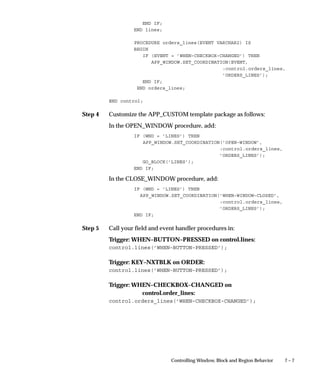
session
You can dynamically hide tabs at form startup using
Set_Tab_Page_Property(...VISIBLE...).
You can dynamically enable or disable tabs during a form session using
Set_Tab_Page_Property(...ENABLED...). You typically add code
elsewhere in your form that enables or disables tabs based on some
condition.
Use Get_Tab_Page_Property for testing whether a tab is enabled or
disabled:
DECLARE
my_tab_page_id TAB_PAGE;
my_tab_enabled VARCHAR2(32);
BEGIN
my_tab_page_id := FIND_TAB_PAGE(’my_tab_page_1’);
my_tab_enabled := GET_TAB_PAGE_PROPERTY (my_tab_page_id,
ENABLED)
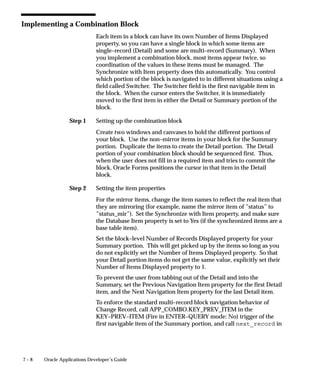
IF my_tab_enabled= ’TRUE’ THEN ...
7 – 24 Oracle Applications Developer’s Guide
Note that you cannot hide or disable a tab page if it is currently the
topmost page.
Dynamic Tabs with a ”Master” Field
The case of a ”master” field, whose value controls enabling and
disabling of tabs, requires special logic. The logic must account for
user clicking onto the tab that should now be disabled. In this case, the
UI should act as if tab really was disabled.
How the situation occurs: suppose you have a field (either on a tab
page or not) where, based on the value of the field, a tab is enabled or
disabled. If the master field is a poplist, check box, or option group,
the enable/disable logic should be in the WHEN–LIST–CHANGED or
equivalent trigger.
There is a corner case that must be addressed differently: when your
master field is a text item. In this situation the user changes the value
of the master field such that the tab would be disabled, but then clicks
on that (still–enabled) tab before the field’s WHEN–VALIDATE–ITEM
logic would fire (that is, the user clicks on the tab instead of tabbing out
of the field, which would ordinarily fire the WHEN–VALIDATE–ITEM
logic).
Because the WHEN–VALIDATE–ITEM logic has not yet fired when the
user clicks on the tab, the tab is still enabled. However, the behavior
for the end user should be as if the tab was disabled and as if the user
never clicked on the disabled tab (the tab should not become the
topmost tab). Because tabs get focus immediately upon clicking, the
should–be–disabled tab immediately becomes the topmost tab, at
which point it must be programmatically disabled and the tabbed
region returned to its previous state upon validation of the master field.
However, the tab cannot be disabled while it is the topmost tab and has
focus.
The validate(item_scope) logic in the WHEN–TAB–PAGE–CHANGED
part of the tab handler fires the WHEN–VALIDATE–ITEM logic of the
field. The WHEN–VALIDATE–ITEM logic cannot access the
:system.tab_previous_page variable needed to revert the tab page to
the previous page (before the user clicked). The tab handler must
therefore contain code to store the topmost tab page information in a
package variable or form parameter at the end of each successful tab
page change. This stored value can then be used to revert the topmost
tab in case of a failed tab page change (where the failure is the result of
the WHEN–VALIDATE–ITEM logic). The tab handler must be
modified to do nothing (after the validate call) if the clicked–on tab is
disabled.
7 – 25Controlling Window, Block and Region Behavior
Other Code You May Need
You may need to add tab–related code for the following triggers:
• KEY–CLRFRM
• WHEN–NEW–FORM–INSTANCE or PRE–FORM
KEY–CLRFRM
Depending on the desired form behavior, you may want to reset the tab
pages to their initial state after a KEY–CLRFRM. You would add a
branch for KEY–CLRFRM to your handler and include something like
the following code:
set_canvas_property(’TAB_ENTITY_REGIONS’, topmost_tab_page,
’MY_FIRST_ALT_REG_CANVAS’);
–– reset the tabs after KEY–CLRFRM
show_view(’MY_FIRST_ALT_REG_CANVAS’);
–– display the first stacked canvas
WHEN–NEW–FORM–INSTANCE or PRE–FORM
You may also have branches for WHEN–NEW–FORM–INSTANCE or
PRE–FORM that initialize the tabbed region such as by doing a
show_view.
Oracle Forms does not guarantee canvas sequencing. You may need to
include extra show_view() commands at form startup or elsewhere in
your form to get proper canvas sequencing.
Testing Tab Page Properties
The Oracle Forms Set/Get_tab_page_property (canvas.tabpage...)
built–in routines use these properties:
• ENABLED
• LABEL
• VISIBLE
Use the Get_Tab_Page_Property routine for testing whether a tab is
enabled or disabled:
DECLARE
my_tab_page_id TAB_PAGE;
my_tab_enabled VARCHAR2(32);
BEGIN
7 – 26 Oracle Applications Developer’s Guide
my_tab_page_id := FIND_TAB_PAGE(’my_tab_page_1’);
my_tab_enabled := GET_TAB_PAGE_PROPERTY (my_tab_page_id,
ENABLED)
IF my_tab_enabled= ’TRUE’ THEN ...
Setting and Getting Topmost Tab Pages
This example sets the topmost tab page (that is, the displayed tab page)
of the TAB_ENTITY_REGIONS tab canvas to be the
MY_SECOND_TAB_PAGE tab page:
set_canvas_property(’TAB_ENTITY_REGIONS’, topmost_tab_page,
’MY_SECOND_TAB_PAGE’);
You can also retrieve the name of the current tab page:
current_tab VARCHAR2(30) :=
get_canvas_property(’TAB_ENTITY_REGIONS’,
topmost_tab_page);
7 – 27Controlling Window, Block and Region Behavior
Coding Alternative Region Behavior
For Oracle Applications Release 11i, alternative regions are replaced by
tabbed regions. Alternative regions still work, and they are still
documented for backwards compatibility, but you should implement
tabbed regions for all new code.
Alternative Regions
A block with multiple regions that cannot be rendered simultaneously
uses a series of stacked canvases to display each region, one at a time,
within a single region boundary. These stacked regions are called
”Alternative Regions”.
For more information, see the Oracle Applications User Interface Standards
for Forms–Based Products.
Alternative Regions
Oracle Applications User Interface Standards for Forms–Based
Products
Each alternative region has a poplist control element containing all
possible regions for that block.
Behavior of the Alternative Region Poplist
Alternative region poplists should behave according to the following
standards:
• The Alternative Region poplist should have the Query Allowed
attribute set to Yes, so that it can be used while the block is in
ENTER–QUERY mode.
• KEY–MENU invokes an LOV that allows the user to select from
the same list of choices as in the control poplist. The title of this
LOV is ”Regions.” You need this function for keyboard
compatibility because the control poplist is not otherwise
accessible except via the mouse.
Example: Coding an Alternative Region
Block LINES has some fields on a content canvas ORDER. The last of
these fields is ITEM.
Step 1
Step 2
Step 3
7 – 28 Oracle Applications Developer’s Guide
LINES has alternative regions on canvases LINES_PRICE and
LINES_ITEM. The regions are accessible only if LINES.ITEM is not
null. The first item of LINES_PRICE is LIST_PRICE. The first item of
LINES_ITEM is DESCRIPTION.
Create a poplist in a control block to select the current region. The
poplist should be queryable and non–navigable. The poplist should
display a friendly name for each region with a corresponding value
equal to the region’s canvas name.
The block CONTROL has a queryable, non–navigable poplist named
LINES_REGIONS (block name plus _REGIONS) that contains the
following values, with the internal value following the displayed value:
Price Information (LINES_PRICE), Item Information (LINES_ITEM).
Visit the CONTROL block:
At form startup, you must visit the block containing the control poplist
to instantiate it:
• Create a text item called DUMMY as the first item in the
CONTROL block. Make the text item Visible, Enabled and
Keyboard Navigable, Position 0,0, WD=0, HT=0, and
+–Length=1. Place it on the first canvas to be displayed.
• In WHEN–NEW–FORM–INSTANCE, make two GO_BLOCK()
calls, one to the CONTROL block and another to the First
Navigation Block.
• Make sure you do similar GO_BLOCK calls in the code where
you handle KEY–CLRFRM.
Setting the First Displayed Region:
Within Oracle Forms Designer, designate the first stacked canvas of the
set of alternative regions to show as displayed; make all other canvases
in the set not displayed to improve startup performance.
You must sequence the stacked canvases carefully by ordering the
canvases within the list in the Oracle Forms Object Navigator (the first
stacked canvas in the list is the first stacked canvas displayed). In
addition, you must sequence your items to have the correct order when
a user tabs through the fields on the alternative regions.
Suggestion: When stacked canvases are referenced, their
sequence may be unpredictable. In this case, issue a
SHOW_VIEW at form startup, or whenever the window is first
displayed, to force the proper canvas to render.
Step 4
7 – 29Controlling Window, Block and Region Behavior
Make sure your stacked canvas views are all exactly the same size and
occupy exactly the same space on the content canvas.
Create your item handler procedures to control which region displays
as in the following example. Remember, in our example form, we want
to disallow access to the regions unless the field LINES.ITEM is not
null:
PACKAGE BODY control IS
g_canvas_name VARCHAR2(30) := null;
PROCEDURE lines_regions(event varchar2) IS
target_canvas_name VARCHAR2(30);
curr_canvas_name VARCHAR2(30) :=
get_item_property(:system.cursor_item,
ITEM_CANVAS);
BEGIN
IF (event = ’WHEN–NEW–ITEM–INSTANCE’) THEN
–– Check if the poplist and the canvas are out of synch
–– to prevent flashing if they are not.
IF ((curr_canvas_name in (’LINES_PRICE’, ’LINES_ITEM’)) AND
(curr_canvas_name != :control.lines_regions)) THEN
:control.lines_regions := curr_canvas_name;
g_canvas_name := curr_canvas_name;
END IF;
ELSIF (event = ’WHEN–LIST–CHANGED’) THEN
target_canvas_name := :control.lines_regions;
–– The following is optional code to disallow access
–– to certain regions under certain conditions
–– Check that the region is accessible. Always allow access
–– during queries.
IF (:SYSTEM.MODE = ’ENTER–QUERY’) THEN
null;
ELSE
IF (:lines.item is null) THEN
FND_MESSAGE.SET_NAME(’OE’, ’OE_ENTER_ITEM_FIRST’);
FND_MESSAGE.ERROR;
:control.lines_regions := g_canvas_name;
RAISE FORM_TRIGGER_FAILURE;
END IF;
–– End of optional code
END IF;
–– Display the region. If in the same block, go to the
–– first item in the region.
IF curr_canvas_name in (’LINES_PRICE’, ’LINES_ITEM’) THEN
hide_view(curr_canvas_name);
Step 5
7 – 30 Oracle Applications Developer’s Guide
END IF;
show_view(target_canvas_name);
IF (:system.cursor_block = ’LINES’) THEN
IF (target_canvas_name = ’LINES_PRICE’) THEN
–– Go to the first item in the canvas LINES_PRICE
go_item(’lines.list_price’);
ELSIF (target_canvas_name = ’LINES_ITEM’) THEN
–– Go to the first item in the canvas LINES_ITEM
go_item(’lines.description’);
END IF;
END IF;
g_canvas_name := target_canvas_name;
ELSE
fnd_message.debug(’Invalid event passed to
control.lines_regions’);
END IF;
END lines_regions;
END control;
After the user displays the LOV via KEY–MENU and chooses a value
from the list, the WHEN–LIST–CHANGED handler switches the
regions.
Call the following triggers:
Trigger: Block–level WHEN–NEW–ITEM–INSTANCE on the LINES
block:
CONTROL.LINES_REGIONS(’WHEN–NEW–ITEM–INSTANCE’);
Trigger: Block–level KEY–MENU on the LINES block (Execution
Hierarchy: Override):
IF APP_REGION.ALT_REGIONS(’CONTROL.LINES_REGIONS’) THEN
CONTROL.LINES_REGIONS(’WHEN–LIST–CHANGED’);
END IF;
Trigger: Item–level WHEN–LIST–CHANGED on
CONTROL.LINES_REGIONS.
CONTROL.LINES_REGIONS(’WHEN–LIST–CHANGED’);
These triggers should fire in ENTER–QUERY mode.
7 – 31Controlling Window, Block and Region Behavior
Controlling Records in a Window
This section discusses
• Duplicating Records
• Renumbering All Records in a Window
Duplicating Records
Why Duplicate Record is Disabled by Default
By default, duplicate record is disabled at the form level. There are
several reasons for this:
• The special column ROW_ID is duplicated and must be
manually exempted if it exists
• The record is marked as valid even through the items may
contain time–sensitive data that is no longer valid
• Defaults are overridden
• In many blocks, Duplicate Record makes no sense (modal
dialogs, find blocks, etc.)
For any block where you want to enable Duplicate Record, you must
write code. You must process unique keys, possibly reapply defaults,
and confirm that copied data is still valid. None of this is done by
default, and this can lead to errors or data corruption.
In general, duplicate all item values, even if the item value must be
unique. The user may wish to create a unique value very similar to the
previous value.
Do not override a default if
• The item cannot be modified by the user
• The item must contain a specific value for a new record
• The item is a sequential number and the default is the correct
value most of the time
Example
A block order has items order_number and order_date which are defaulted
from the sequence order_S and from SYSDATE respectively, and which
cannot be modified by the user. The item status should contain ”Open”
Step 1
Step 2
7 – 32 Oracle Applications Developer’s Guide
for a new order, but the user can change the Status to ”Book” at any
time to book the order.
Create your event handler procedures as follows:
PACKAGE BODY order IS
PROCEDURE KEY_DUPREC IS
CURSOR new_order_number IS SELECT order_S.nextval
FROM sys.dual;
BEGIN
DUPLICATE_RECORD;
open new_order_number;
fetch new_order_number into :order.order_number;
close new_order_number;
:order.status : = ’Open’;
:order.order_date := FND_STANDARD.SYSTEM_DATE;
:order.row_id := null;
END KEY_DUPREC;
END order;
Call your event handler procedures in:
Trigger: KEY–DUPREC on order:
order.KEY_DUPREC;
Renumbering All Records in a Window
To renumber an item sequentially for all records on the block, create a
user–named trigger to increment the sequence variable and set the
sequence item. Use the procedure APP_RECORD.FOR_ALL_
RECORDS to fire the trigger once for each record.
To number an item sequentially as records are created, create a variable
or item to contain the sequence number. Create a WHEN–CREATE–
RECORD trigger to increment the sequence variable and default the
sequence item. However, if you want to renumber all the records in a
window, use the procedure APP_RECORD.FOR_ALL_RECORDS.
If you are renumbering your items after a query or commit, you may
wish to reset the record status so that the record is not marked as
changed.
Step 1
Step 2
Step 3
7 – 33Controlling Window, Block and Region Behavior
Example
A block lines has item line_number. When a record is deleted,
line_number must be renumbered.
Create your item handler procedures as follows:
PACKAGE BODY lines IS
line_number_seq number := 0;
PROCEDURE delete_row IS
BEGIN
line_number_seq := 0;
APP_RECORD.FOR_ALL_RECORDS(’reseq_line_number’);
END delete_row;
END lines;
Create a user–defined trigger RESEQ_LINE_NUMBER as follows:
lines.line_number_seq := lines.line_number_seq + 1;
:lines.line_number := lines.line_number_seq;
Call your item handler procedures in:
Trigger: KEY–DELETE:
lines.line_number(’KEY–DELETE’);
Warning: Be aware of the consequences of this type of
processing. Specifically, consider the following points:
If a very large number of records are queried in a block,
looping through them one at a time can be very slow.
Not all the records that could be in the block may be in the
current query set if you allow the user to enter the query.
If you are changing a value that is part of a unique key, you
may get errors at commit time because the record currently
being committed may conflict with another already in the
database, even though that record has also been changed in the
block.
7 – 34 Oracle Applications Developer’s Guide
Passing Instructions to a Form
To pass information when navigating from one form to another when
both forms are already open, use the WHEN–FORM–NAVIGATE
trigger. You do not code this trigger directly; instead pass the
information through global variables.
To use this trigger, populate a global variable called
GLOBAL.WHEN_FORM_NAVIGATE with the name of a user–named
trigger. When a form is navigated to, this trigger fires.
The WHEN–FORM–NAVIGATE trigger fires upon programmatically
navigating to a form using the GO_FORM built–in. Accordingly, this
trigger is referenced into all forms.
Querying an Item
It often makes sense to navigate to a form and query on a specific item.
For example, suppose you have an Order Entry form ORDERS and a
Catalog form CATALOGS. You want to navigate from the ORDERS
form to CATALOGS and query up a specific part number.
• In the ORDERS form, create a global variable called
GLOBAL.PART_NUMBER, and populate it with the value you
want to query.
• In the ORDERS form, create a global variable called
GLOBAL.WHEN_FORM_NAVIGATE. Populate this variable
with the string ”QUERY_PART_NUMBER”.
• Create a user–named trigger in the CATALOGS form,
”QUERY_PART_NUMBER”. In this trigger, enter query mode
by calling EXECUTE_QUERY.
• Create a PRE–QUERY trigger in the CATALOGS form that calls
copy(’GLOBAL.PART_NUMBER, ’PARTS_BLOCK.PART_
NUMBER’). Then call copy(’’,’GLOBAL.PART_NUMBER’).
When there is a value in GLOBAL.PART_NUMBER, it becomes
part of the query criteria.
C H A P T E R
8
T
8 – 1Enabling Query Behavior
Enabling Query
Behavior
his section describes how you build Row–LOVs and Find
windows and enable Query Find functionality for your form.
The following topics are covered:
• Implementing Row–LOVs
• Implementing Find Windows
8 – 2 Oracle Applications Developer’s Guide
Overview of Query Find
There are two implementations for Query Find. One implementation
shows a Row–LOV that shows the available rows and allows you to
choose one. The other implementation opens a Find window, which
shows you the fields the user is likely to want to use for selecting data.
Use only one implementation for a given block. All queryable blocks
within your form should support Query Find. The Oracle Applications
User Interface Standards for Forms–Based Products describe what
situations are better served by the two implementations.
APP_FIND: Query Find APIs (See page 29 – 23)
Query Find
Oracle Applications User Interface Standards for Forms–Based
Products
Raising Query Find on Form Startup
If you want a Row–LOV or Find window to raise immediately upon
entering the form, at the end of your WHEN–NEW–FORM–
INSTANCE trigger, call:
EXECUTE_TRIGGER(’QUERY_FIND’);
This will simulate the user invoking the function while in the first block
of the form.
Step 1
Step 2
Step 3
8 – 3Enabling Query Behavior
Implementing Row–LOV
To implement a Row–LOV, create an LOV that selects the primary key
of the row the user wants into a form parameter, and then copy that
value into the primary key field in the results block right before
executing a query.
This example uses the DEPT block, which is based on the DEPT table,
and consists of the three columns DEPTNO, DNAME and LOC. This
table contains a row for each department in a company.
Create a Parameter for Your Primary Key
Create a form parameter(s) to hold the primary key(s) for the LOV. If
the Row–LOV is for a detail block, you do not need a parameter for the
foreign key to the master block (the join column(s)), as you should
include that column in the WHERE clause of your record group in a
later step. Set the datatype and length appropriately.
For example, for the DEPT block, create a parameter called
DEPTNO_QF.
Create an LOV
Create an LOV that includes the columns your user needs to identify
the desired row. If the Row–LOV is for a detail block, you should
include the foreign key to the master block (the join column(s)) in the
WHERE clause of your record group. Return the primary key for the
row into the parameter.
For our example, create an LOV, DEPT_QF, that contains the columns
DEPTNO and DNAME. Set the return item for DEPTNO into
parameter DEPTNO_QF. Although the user sees DNAME , it is not
returned into any field.
Create a PRE–QUERY Trigger
Create a block–level PRE–QUERY trigger (Execution Hierarchy: Before)
that contains:
IF :parameter.G_query_find = ’TRUE’ THEN
<Primary Key> := :parameter.<Your parameter>;
:parameter.G_query_find := ’FALSE’;
END IF;
For multi–part keys, you need multiple assignments for the primary
key.
Step 4
8 – 4 Oracle Applications Developer’s Guide
The parameter G_query_find exists in the TEMPLATE form.
For the Dept example, your PRE–QUERY trigger contains:
IF :parameter.G_query_find = ’TRUE’ THEN
:DEPT.DEPTNO := :parameter.DEPTNO_QF
:parameter.G_query_find := ’FALSE’;
END IF;
Create a QUERY_FIND Trigger
Finally, create a block–level user–named trigger QUERY_FIND on the
results block (Execution Hierarchy: Override) that contains:
APP_FIND.QUERY_FIND(’<Your LOV Name>’);
For DEPT:
APP_FIND.QUERY_FIND(’DEPT_QF’);
Implementing Find Windows
To implement a Find window, create an additional window that
contains the fields a user is most likely to search by when they initiate
the search and copy all the item values from that block into the results
block just before executing a query.
In this example, there is a block based on the EMP table. This is
referred to as the results block. The primary key for this table is
EMPNO. This block also contains the date field HIREDATE. The Find
window is designed to locate records by EMPNO or a range of
HIREDATES.
For more information on the look and feel of Find windows, see the
Oracle Applications User Interface Standards for Forms–Based Products.
Find Windows
Field Ranges (From/To Field Pairs)
Oracle Applications User Interface Standards for Forms–Based
Products
Flexfields in Find windows require special treatment.
Using Key Flexfields in Find Windows (See page 14 – 65)
To code a Find window, follow the steps below.
Step 1
Step 2
Step 3
Step 4
8 – 5Enabling Query Behavior
Copy the QUERY_FIND Object Group from APPSTAND
Copy the QUERY_FIND object group from the APPSTAND form to
your form. It contains a window, a block and a canvas from which to
start building your Find window.
After you copy it, delete the object group. This leaves the window,
canvas and block, but allows you to copy the object group again if you
need another Find window.
Warning: DO NOT REFERENCE THIS OBJECT GROUP; you
need to customize it.
Rename the Block, Canvas and Window
Rename the Find Block, Canvas, and Window. Set the queryable
property of the block to No.
For this example, rename the block, canvas and window to EMP_QF,
EMP_QF_CANVAS, and EMP_QF_WINDOW, respectively.
Edit the NEW Button’s Trigger
Edit the WHEN–BUTTON–PRESSED trigger for the NEW button in the
Find window block so that it passes the Results block name as the
argument. This information allows Oracle Applications to navigate to
your block and place you on a new record. This button is included
because when you first enter a form, the Find window may
automatically come up; users who want to immediately start entering a
new record can press this button.
app_find.new(’<Your results blockname here>’);
becomes
app_find.new(’EMP’);
Edit the FIND Button’s Trigger
Edit the WHEN–BUTTON–PRESSED trigger for the FIND button so
that it passes the Results block name. This information allows Oracle
Applications to navigate to your block and execute a query.
app_find.find(’<Your results blockname here>’);
becomes
app_find.find(’EMP’)
Step 5
Step 6
Step 7
Step 8
8 – 6 Oracle Applications Developer’s Guide
If you need to do further validation of items in the Find window, place
your code before the call to APP_FIND.FIND. Specifically, you should
validate that any low/high range fields are correct. You may also give
a warning if no criteria has been entered at all, or if the criteria entered
may take a very long time to process.
Set Navigation Data Block Properties
Set the Previous Navigation Data Block property of the Find block to be
the results block. This allows the user to leave the Find window
without executing a query.
From the results block, next and previous data block only move up and
down the hierarchy of objects; they never take you to the Find window.
Edit the KEY–NXTBLK Trigger
Edit the KEY–NXTBLK trigger on the Find block so that it has the exact
same functionality as the FIND button. If the user selects ”Go–>Next
Block,” the behavior should mimic pressing the FIND button.
Change the Find Window Title
Change the title of the Find window.
The EMP example uses ”Find Employees”.
Create Necessary Items
Create the items that the user can query on in the Find window block.
You may find it convenient to copy items from the Results block to the
Find window block.
Follow these guidelines for items in the Find window:
• Set the Required property to No
• Set the default value to NULL
• If you copied the items from the Results block, ensure that your
new items all have Database Item set to No, and remove all
triggers associated with them (especially validation triggers). If
for some reason you decide you need to keep a particular trigger,
remember to change the fields it references to point to the Find
block.
• Typically, an item in the Find window block has an LOV
associated with it, because users should usually be able to select
Step 9
Step 10
8 – 7Enabling Query Behavior
exactly one valid value for the item. The LOV should show all
values that have ever been valid, not just those values that are
currently valid. Date fields may use the Calendar and the
related KEY–LISTVAL trigger.
• If you have an item that has a displayed value and an associated
ID field, the Find window block should have both as well. The
ID field should be used to drive the query to improve
performance.
• Items that are check boxes or option groups in the Results block
should be poplists in the Find window block. When they are
NULL, no restriction is imposed on the query.
Fit the Find Window to Your Form
Adjust your Find window for your specific case: resize the window,
position, fields, and so on.
Create a PRE–QUERY Trigger
Create a block–level Pre–Query trigger in the Results block (Execution
Hierarchy: Before) that copies query criteria from the Find window
block to the Results block (where the query actually occurs).
You can use the Oracle Forms COPY built–in to copy character data.
For other data types, you can assign the values directly using :=, but
this method does not allow the user to use wildcards. However, most
of your Find window items use LOVs to provide a unique value, so
wildcards would not be necessary.
IF :parameter.G_query_find = ’TRUE’ THEN
COPY (<find Window field>,’<results field>’);
:parameter.G_query_find := ’FALSE’;
END IF;
A commonly used ’special criteria’ example is to query on ranges of
numbers, dates, or characters. The APP_FIND.QUERY_RANGE
procedure is defined to take care of the query logic for you. Pass in the
low and high values as the first two arguments, and the name of the
database field actually being queried on as the third argument.
In our EMP example,
IF :parameter.G_query_find = ’TRUE’ THEN
COPY(:EMP_QF.EMPNO, ’EMP.EMPNO’);
APP_FIND.QUERY_RANGE(:EMP_QF.Hiredate_from,
:EMP_QF.Hiredate_to,
Step 11
8 – 8 Oracle Applications Developer’s Guide
’EMP.Hiredate’);
:parameter.G_query_find := ’FALSE’;
END IF;
• Your base table field query length (in the Results block) must be
long enough to contain the query criteria. If it is not, you get an
error that the value is too long for your field. All fields should
have a minimum query length of 255.
• If you have radio groups, list items, or check boxes based on
database fields in your Results block, you should only copy
those values from the Find window if they are not NULL.
Create a QUERY_FIND Trigger
Create a block–level user–named trigger ”QUERY_FIND” (Execution
Hierarchy: Override) on the Results block that contains:
APP_FIND.QUERY_FIND(’<results block window>’,
’<Find window>’,
’<Find window block>’);
In our EMP example:
APP_FIND.QUERY_FIND(’EMP_WINDOW’, ’EMP_QF_WINDOW’,
’EMP_QF’);
C H A P T E R
9
T
9 – 1Coding Item Behavior
Coding Item Behavior
his section describes the following topics:
• Item Relations
• Defaults
• Integrity Checking
• The Calendar
• CALENDAR: Calendar Package
9 – 2 Oracle Applications Developer’s Guide
Item Relations
There are many behaviors in complex forms that must be enforced
dynamically at runtime, either to adhere to the field–level validation
model of Oracle Applications, or to enforce specific business rules.
• Dependent Items
• Conditionally Dependent Items
• Multiple Dependent Items
• Two Master Items and One Dependent Item
• Cascading Dependence
• Mutually Exclusive Items
• Mutually Inclusive Items
• Mutually Inclusive Items with Dependents
• Conditionally Mandatory Items
You should model your form’s item and event handlers after these
examples.
Disabled Items and WHEN–VALIDATE–ITEM Trigger
In most of the item relations you are dynamically disabling and
enabling items. For your disabled items, note these Oracle Forms
coding issues:
• WHEN–VALIDATE–ITEM always fires the first time a user Tabs
through each field on a brand new record, even if they do not
make a change. Internally Oracle Forms notes that the value
changes from unknown to null, therefore it fires
WHEN–VALIDATE–ITEM. Also, WHEN–VALIDATE–ITEM
fires when a user changes a field from a non–null value to null.
Furthermore, a user can leave a required field null at any time; it
is only trapped at record level. Therefore, all WHEN–
VALIDATE–ITEM triggers must account for the value of the field
being null, and act accordingly. Since you cannot distinguish
between the user changing the value to null, or Oracle Forms
setting the value to null the first time, both must behave as if the
user changed the value.
• Most of the time, a disabled item has a null value. Since you
account for nulls because of the previous issue, this is not a
problem. In those rare cases that a disabled field has a value,
and that value got set while it was disabled and the field has not
Step 1
9 – 3Coding Item Behavior
been validated yet, you may need to add logic to
WHEN–VALIDATE–ITEM to do nothing.
Dependent Items
To create a text item, check box, or poplist that is enabled only when a
master item is populated, use the procedure APP_FIELD.SET_
DEPENDENT_FIELD. This routine enforces the following behaviors:
• The dependent item is either cleared or made invalid when the
master item changes.
• If the master item is NULL or the condition is FALSE, the
dependent item is disabled.
Create the item handler procedures as shown below and then call the
procedures from the specified triggers.
Attention: These routines do not apply to display–only text
items. To conditionally grey out display–only text items, use
the routine APP_ITEM_PROPERTY.SET_VISUAL_
ATTRIBUTE.
APP_ITEM_PROPERTY: Property Utilities (See page
29 – 28)
In this example, a block order has items item_type and item_name.
Item_name is dependent on item_type, thus item_name is enabled only
when item_type is NOT NULL.
Create your item handler procedures as follows:
PACKAGE BODY ORDER IS
PROCEDURE ITEM_TYPE(EVENT VARCHAR2) IS
BEGIN
IF (EVENT = ’WHEN–VALIDATE–ITEM’) THEN
––– Any validation logic goes here.
ITEM_NAME(’INIT’);
ELSE
fnd_message.debug(’Invalid event passed to
ORDER.ITEM_TYPE: ’ || EVENT);
END IF;
END ITEM_TYPE;
Step 2
Step 3
9 – 4 Oracle Applications Developer’s Guide
PROCEDURE ITEM_NAME(EVENT VARCHAR2) IS
BEGIN
IF ((EVENT = ’PRE–RECORD’) OR
(EVENT = ’INIT’)) THEN
APP_FIELD.SET_DEPENDENT_FIELD(EVENT,
’ORDER.ITEM_TYPE’,
’ORDER.ITEM_NAME’);
ELSE
fnd_message.debug(’Invalid event passed to
ORDER.ITEM_NAME: ’ || EVENT);
END IF;
END ITEM_NAME;
END ORDER;
Call your item handler procedures in:
Trigger: WHEN–VALIDATE–ITEM on item_type:
order.item_type(’WHEN–VALIDATE–ITEM’);
Trigger: PRE–RECORD on order (Fire in Enter–Query Mode: No):
order.item_name(’PRE–RECORD’);
If your master and dependent items are in a multi–row block, or if they
are items in a single–row block that is a detail of a master block, you
must call SET_DEPENDENT_FIELD for the POST–QUERY event as
well.
PROCEDURE ITEM_NAME(EVENT VARCHAR2) IS
BEGIN
IF ((EVENT = ’PRE–RECORD’) OR
(EVENT = ’INIT’) OR
(EVENT = ’POST–QUERY’)) THEN
APP_FIELD.SET_DEPENDENT_FIELD(EVENT,
’ORDER.ITEM_TYPE’,
’ORDER.ITEM_NAME’);
ELSE
fnd_message.debug(’Invalid event passed to
ORDER.ITEM_NAME: ’ || EVENT);
END IF;
END ITEM_NAME;
Add another call to your item handler procedure in:
Trigger: POST–QUERY
ORDER.ITEM_NAME(’POST–QUERY’);
Step 1
9 – 5Coding Item Behavior
Attention: In a multi–record block, if the dependent item is
the last item in the record, the cursor navigates to the next
record when tabbing from the master. To work around this
behavior, code a KEY–NEXT–ITEM trigger that does a
VALIDATE(Item_scope) and then a NEXT_ITEM.
Attention: If the dependent item is a required list or option
group, set the ”invalidate” parameter in the call to
APP_FIELD.SET_DEPENDENT_FIELD to TRUE. When this
flag is TRUE, the dependent item is marked as invalid rather
than cleared.
Conditionally Dependent Item
A conditionally dependent item is enabled or disabled depending on
the particular value of the master item. In this example, the block order
has items item_type and item_size. Item_size is enabled only when
item_type is ”SHOES.”
Create your item handler procedures as follows. Note that this item
handler is very similar to the simple master/dependent situation, but
you specify the condition instead of the name of the master item.
PACKAGE BODY order IS
PROCEDURE ITEM_TYPE(EVENT VARCHAR2) IS
BEGIN
IF (EVENT = ’WHEN–VALIDATE–ITEM’) THEN
size(’INIT’);
ELSE
fnd_message.debug(’Invalid event passed to
ORDER.ITEM_TYPE: ’ || EVENT);
END IF;
END item_type;
PROCEDURE size(EVENT VARCHAR2) IS
BEGIN
IF ((EVENT = ’PRE–RECORD’) OR
(EVENT = ’INIT’)) THEN
APP_FIELD.SET_DEPENDENT_FIELD(EVENT,
(:order.item_type = ’SHOES’),
’ORDER.SIZE’);
ELSE
fnd_message.debug(’Invalid event passed to
ORDER.SIZE: ’ || EVENT);
END IF;
Step 2
Step 1
9 – 6 Oracle Applications Developer’s Guide
END size;
END order;
Call your item handler procedures in:
Trigger: PRE–RECORD on order (Fire in Enter–Query Mode: No):
order.item_size(’PRE–RECORD’);
Trigger: WHEN–VALIDATE–ITEM on item_type:
order.item_type(’WHEN–VALIDATE–ITEM’);
Multiple Dependent Items
There are cases where multiple items are dependent on a single master
item. For example, only certain item_types can specify a color and size.
Therefore, the color and size fields are dependent on the master field
item_type, and they are enabled only when item_type is ”RAINCOAT.”
Create your item handler procedures as follows:
PACKAGE BODY order IS
PROCEDURE item_type(EVENT VARCHAR2) IS
BEGIN
IF (EVENT = ’WHEN–VALIDATE–ITEM’) THEN
color(’INIT’);
size(’INIT’);
ELSE
fnd_message.debug(’Invalid event passed to
ORDER.ITEM_TYPE: ’ || EVENT);
END IF;
END item_type;
PROCEDURE color(EVENT VARCHAR2) IS
BEGIN
IF (EVENT = ’PRE–RECORD’) OR
(EVENT = ’INIT’) THEN
APP_FIELD.SET_DEPENDENT_FIELD(EVENT,
(:order.item_type = ’RAINCOAT’),
’ORDER.COLOR’);
ELSE
fnd_message.debug(’Invalid event passed to
ORDER.COLOR: ’ || EVENT);
END IF;
END color;
Step 2
Step 1
9 – 7Coding Item Behavior
PROCEDURE size(EVENT VARCHAR2) IS
BEGIN
IF (EVENT = ’PRE–RECORD’) OR
(EVENT = ’INIT’) THEN
APP_FIELD.SET_DEPENDENT_FIELD(EVENT,
(:order.item_type = ’RAINCOAT’),
’ORDER.SIZE’);
ELSE
fnd_message.debug(’Invalid event passed to
ORDER.SIZE: ’ || EVENT);
END IF;
END size;
END order;
Call your item handler procedures in:
Trigger: WHEN–VALIDATE–ITEM on order.item_type:
order.item_type(’WHEN–VALIDATE–ITEM’);
Trigger: PRE–RECORD (Fire in Enter–Query Mode: No):
order.color(’PRE–RECORD’);
order.size(’PRE–RECORD’);
Two Master Items and One Dependent Item
There may also be cases where an item is dependent on two master
items. Suppose that different sizes of sweaters come in different colors.
You cannot fill in the color of the sweater until you have filled in both
item_type and size. The validation of block.dependent is controlled by
the content of both master_1 and master_2.
Create your item handler procedures as follows:
PACKAGE BODY order IS
PROCEDURE item_type(EVENT VARCHAR2) IS
BEGIN
IF (EVENT = ’WHEN–VALIDATE–ITEM’) THEN
color(’INIT’):
ELSE
fnd_message.debug(’Invalid event passed to
ORDER.ITEM_TYPE: ’ || EVENT);
END IF;
END item_type;
Step 2
9 – 8 Oracle Applications Developer’s Guide
PROCEDURE size(EVENT VARCHAR2) IS
BEGIN
IF (EVENT = ’WHEN–VALIDATE–ITEM’) THEN
color(’INIT’);
ELSE
fnd_message.debug(’Invalid event passed to
ORDER.SIZE: ’ || EVENT);
END IF;
END size;
PROCEDURE color(EVENT VARCHAR2) IS
BEGIN
IF (EVENT = ’PRE–RECORD’) OR
(EVENT = ’INIT’) THEN
APP_FIELD.SET_DEPENDENT_FIELD(EVENT,
((:order.item_type IS NOT NULL) AND
(:order.size IS NOT NULL)),
’ORDER.COLOR’);
ELSE
fnd_message.debug(’Invalid event passed to
ORDER.COLOR: ’ || EVENT);
END IF;
END color;
END order;
Call your item handler procedures in:
Trigger: WHEN–VALIDATE–ITEM on order.item_type:
order.item_type(’WHEN–VALIDATE–ITEM’);
Trigger: WHEN–VALIDATE–ITEM on order.size:
order.size(’WHEN–VALIDATE–ITEM’);
Trigger: PRE–RECORD (Fire in Enter–Query Mode: No):
order.color(’PRE–RECORD’);
Cascading Dependence
With cascading dependence, item_3 depends on item_2, which in turn
depends on item_1. Usually all items are in the same block.
For example, the block order contains the items vendor, site, and contact.
The list of valid sites depends on the current vendor.
Step 1
9 – 9Coding Item Behavior
• Whenever vendor is changed, site is cleared.
• Whenever vendor is null, site is disabled.
The list of valid contacts depends on the current site.
• Whenever site is changed, contact is cleared.
• Whenever site is null, contact is disabled.
To code the correct behavior for these dependent items, follow these
steps.
Create your item handler procedures as follows:
PACKAGE BODY order IS
PROCEDURE vendor(EVENT VARCHAR2) IS
BEGIN
IF (EVENT = ’WHEN–VALIDATE–ITEM’) THEN
SITE(’INIT’);
ELSE
fnd_message.debug(’Invalid event passed to
ORDER.VENDOR: ’ || EVENT);
END IF;
END VENDOR;
PROCEDURE SITE(EVENT VARCHAR2) IS
BEGIN
IF (EVENT = ’WHEN–VALIDATE–ITEM’) THEN
CONTACT(’INIT’);
ELSIF (EVENT = ’PRE–RECORD’) OR
(EVENT = ’INIT’) THEN
APP_FIELD.SET_DEPENDENT_FIELD(EVENT,
’ORDER.VENDOR’,
’ORDER.SITE’);
CONTACT(EVENT);
ELSE
fnd_message.debug(’Invalid event passed to
ORDER.SITE: ’ || EVENT);
END IF;
END SITE;
PROCEDURE CONTACT(EVENT VARCHAR2) IS
BEGIN
IF (EVENT = ’PRE–RECORD’) OR
(EVENT = ’INIT’) THEN
APP_FIELD.SET_DEPENDENT_FIELD(EVENT,
’ORDER.SITE’,
’ORDER.CONTACT’);
ELSE
Step 2
9 – 10 Oracle Applications Developer’s Guide
fnd_message.debug(’Invalid event passed to
ORDER.CONTACT: ’ || EVENT);
END IF;
END CONTACT;
END ORDER;
Call your item handler procedures in:
Trigger: WHEN–VALIDATE–ITEM on vendor:
order.vendor(’WHEN–VALIDATE–ITEM’);
Trigger: WHEN–VALIDATE–ITEM on site:
order.site(’WHEN–VALIDATE–ITEM’);
Trigger: PRE–RECORD on order (Fire in Enter–Query Mode: No):
order.site(’PRE–RECORD’);
order.contact(’PRE–RECORD’);
Remember that the following chain of events occurs whenever the
VENDOR field is validated:
• VENDOR is validated, which calls SITE (’INIT’).
• SITE (’INIT’) causes the state of SITE to change and calls
CONTACT (’INIT’).
• CONTACT (’INIT’) causes the state of CONTACT to change.
Mutually Exclusive Items
Use the procedure APP_FIELD.SET_EXCLUSIVE_FIELD to code two
items where only one item is valid at a time.
The key to coding an item handler procedure for mutually exclusive
items is to realize that mutually exclusive items are logically one item.
Whenever one of a pair of mutually exclusive items is dependent on or
depended upon by another item, they both are. Their relationship to
other items is always identical. Therefore, code a single item handler
procedure for the single logical item.
If both mutually exclusive items are NULL, then both items are
navigable. If one item is populated, then the other item is unnavigable
(you can still click there), and any value in that item is cleared.
Step 1
Step 2
9 – 11Coding Item Behavior
If one item must be not null, set the REQUIRED property of both items
to be Yes in the Oracle Forms Developer. If both items may be null, set
the REQUIRED property of both items to be No. APP_FIELD.SET_
EXCLUSIVE_FIELD reads the initial REQUIRED property and
dynamically manages the REQUIRED properties of both items.
You can also use the procedure APP_FIELD.SET_EXCLUSIVE_FIELD
for a set of three mutually exclusive items. For more than three items,
you must write your own custom logic.
Attention: Mutually exclusive check boxes and required lists
require mouse operations.
For example, a block lines has mutually exclusive items credit and debit.
Create your item handler procedures as follows:
PACKAGE BODY lines IS
PROCEDURE credit_debit(EVENT VARCHAR2) IS
BEGIN
IF ((EVENT = ’WHEN–VALIDATE–ITEM’) OR
(EVENT = ’PRE–RECORD’)) THEN
APP_FIELD.SET_EXCLUSIVE_FIELD(EVENT,
’LINES.CREDIT’,
’LINES.DEBIT’);
ELSIF (EVENT = ’WHEN–CREATE–RECORD’) THEN
SET_ITEM_PROPERTY(’lines.credit’, ITEM_IS_VALID,
PROPERTY_TRUE);
SET_ITEM_PROPERTY(’lines.debit’, ITEM_IS_VALID,
PROPERTY_TRUE);
ELSE
fnd_message.debug(’Invalid event passed to
Lines.credit_debit: ’ || EVENT);
END IF;
END credit_debit;
END lines;
Call your item handler procedures in:
Trigger: WHEN–VALIDATE–ITEM on credit:
lines.credit_debit(’WHEN–VALIDATE–ITEM’);
Trigger: WHEN–VALIDATE–ITEM on debit:
lines.credit_debit(’WHEN–VALIDATE–ITEM’);
Trigger: PRE–RECORD on lines (Fire in Enter–Query Mode: No):
Step 1
9 – 12 Oracle Applications Developer’s Guide
lines.credit_debit(’PRE–RECORD’);
Trigger: WHEN–CREATE–RECORD on lines:
lines.credit_debit(’WHEN–CREATE–RECORD’);
You only need the WHEN–CREATE–RECORD trigger if the resulting
one of your mutually–exclusive fields is required. This trigger initially
sets all the mutually–exclusive fields of the set to be required. The
fields are then reset appropriately once a user enters a value in one of
them.
Mutually Inclusive Items
Use APP_FIELD.SET_INCLUSIVE_FIELD to code a set of items where,
if any of the items is not null, all of the items are required.
The item values may be entered in any order. If all of the items are
null, then the items are optional.
You can use the procedure APP_FIELD.SET_INCLUSIVE_FIELD for up
to five mutually inclusive items. For more than five items, you must
write your own custom logic.
This example shows a block payment_info with mutually inclusive items
payment_type and amount.
Create your item handler procedures as follows:
PACKAGE BODY payment_info IS
PROCEDURE payment_type_amount(EVENT VARCHAR2) IS
BEGIN
IF ((EVENT = ’WHEN–VALIDATE–ITEM’) OR
(EVENT = ’PRE–RECORD’)) THEN
APP_FIELD.SET_INCLUSIVE_FIELD(EVENT,
’PAYMENT_INFO.PAYMENT_TYPE’,
’PAYMENT_INFO.AMOUNT’);
ELSE
fnd_message.debug(’Invalid event to
payment_info.payment_type_ amount: ’ || EVENT);
END IF;
END payment_type_amount;
END payment_info;
Step 2
Step 1
9 – 13Coding Item Behavior
Call your item handler procedures in:
Trigger: WHEN–VALIDATE–ITEM on payment_info.payment_type:
payment_info.payment_type_amount(’WHEN–VALIDATE–ITEM’);
Trigger: WHEN–VALIDATE–ITEM on payment_info.amount:
payment_info.payment_type_amount(’WHEN–VALIDATE–ITEM’);
Trigger: PRE–RECORD on payment_info (Fire in Enter–Query Mode:
No):
payment_info.payment_type_amount(’PRE–RECORD’);
Mutually Inclusive Items with Dependent Items
There are cases where items are dependent on master items, where the
master items are mutually inclusive.
Item Relations (See page 9 – 2)
This example shows a block payment_info with mutually inclusive items
payment_type and amount, just as in the previous example. The block
also contains two regions, one for check information and one for credit
card information. Check Information has a single item, check_number.
Credit Card Information has five items: credit_type, card_holder, number,
expiration_date, and approval_code.
Payment Type can be Cash, Check, or Credit.
• When Payment Type is Check, the Check Information region is
enabled.
• When Payment Type is Credit, the Credit Card Information
region is enabled.
Create your item handler procedures as follows:
PACKAGE BODY payment_info IS
PROCEDURE payment_type_amount(EVENT VARCHAR2) IS
BEGIN
IF (EVENT = ’WHEN–VALIDATE–ITEM’) THEN
APP_FIELD.SET_INCLUSIVE_FIELD(EVENT,
’PAYMENT_INFO.PAYMENT_TYPE’,
’PAYMENT_INFO.AMOUNT’);
IF (:SYSTEM.CURSOR_ITEM =
’payment_info.payment_type’) THEN
9 – 14 Oracle Applications Developer’s Guide
check_info(’INIT’);
credit_info(’INIT’);
END IF;
ELSIF (EVENT = ’PRE–RECORD’) THEN
APP_FIELD.SET_INCLUSIVE_FIELD(EVENT,
’PAYMENT_INFO.PAYMENT_TYPE’,
’PAYMENT_INFO.AMOUNT’);
ELSE
fnd_message.debug(’Invalid event in
payment_info.payment_type_amount: ’ || EVENT);
END IF;
END payment_type_amount;
PROCEDURE check_info IS
BEGIN
IF ((EVENT = ’PRE–RECORD’) OR
(EVENT = ’INIT’)) THEN
APP_FIELD.SET_DEPENDENT_FIELD(EVENT,
(:payment_info.payment_type = ’Check’),
’PAYMENT_INFO.CHECK_NUMBER’);
ELSE
fnd_message.debug(’Invalid event in
payment_info.check_info: ’ || EVENT);
END IF;
END check_info;
PROCEDURE credit_info IS
CONDITION BOOLEAN;
BEGIN
IF ((EVENT = ’PRE–RECORD’) OR
(EVENT = ’INIT’)) THEN
CONDITION := (:payment_info.payment_type = ’Credit’);
APP_FIELD.SET_DEPENDENT_FIELD(EVENT,
CONDITION,
’PAYMENT_INFO.CREDIT_TYPE’);
APP_FIELD.SET_DEPENDENT_FIELD(EVENT,
CONDITION,
’PAYMENT_INFO.NUMBER’);
APP_FIELD.SET_DEPENDENT_FIELD(EVENT,
CONDITION,
’PAYMENT_INFO.CARD_HOLDER’);
APP_FIELD.SET_DEPENDENT_FIELD(EVENT,
CONDITION,
’PAYMENT_INFO.EXPIRATION_DATE’);
APP_FIELD.SET_DEPENDENT_FIELD(EVENT,
CONDITION,
’PAYMENT_INFO.APPROVAL_CODE’);
Step 2
Step 1
9 – 15Coding Item Behavior
ELSE
fnd_message.debug(’Invalid event in
payment_info.credit_info: ’ || EVENT);
END IF;
END credit_info;
END payment_info;
Call your item handler procedures in:
Trigger: WHEN–VALIDATE–ITEM on payment_info.payment_type:
payment_info.payment_type_amount(’WHEN–VALIDATE–ITEM’);
Trigger: WHEN–VALIDATE–ITEM on payment_info.amount:
payment_info.payment_type_amount(’WHEN–VALIDATE–ITEM’);
Trigger: PRE–RECORD on payment_info (Fire in Enter–Query Mode:
No):
payment_info.payment_type_amount(’PRE–RECORD’);
payment_info.check_info(’PRE–RECORD’);
payment_info.credit_info(’PRE–RECORD’);
Conditionally Mandatory Items
Use the procedure APP_FIELD.SET_REQUIRED_FIELD to code an
item that is only mandatory when a certain condition is met. If the
condition is FALSE, the dependent item is optional. Any value in the
dependent item is not cleared. If an item is both conditionally required
and dependent, call APP_FIELD.SET_DEPENDENT_FIELD before
calling APP_FIELD.SET_REQUIRED_FIELD.
An example demonstrates using APP_FIELD.SET_REQUIRED_FIELD.
A block purchase_order has items total and vp_approval. Vp_approval is
required when total is more than $10,000. (Note: quantity * unit_price =
total).
Create your item handler procedures as follows:
Step 2
9 – 16 Oracle Applications Developer’s Guide
PACKAGE BODY purchase_order IS
PROCEDURE vp_approval(EVENT VARCHAR2) IS
BEGIN
IF ((EVENT = ’PRE–RECORD’) OR
(EVENT = ’INIT’)) THEN
APP_FIELD.SET_REQUIRED_FIELD(EVENT,
(:purchase_order.total > 10000),
’PURCHASE_ORDER.VP_APPROVAL’);
ELSE
fnd_message.debug(’Invalid event in
purchase_order.vp_approval: ’ || EVENT);
END IF;
END vp_approval;
PROCEDURE total(EVENT VARCHAR2) IS
BEGIN
IF (EVENT = ’INIT’) THEN
:purchase_order.total := :purchase_order.quantity *
:purchase_order.unit_price;
vp_approval(’INIT’);
ELSE
fnd_message.debug(’Invalid event in purchase_order.total:
’ || EVENT);
END total;
PROCEDURE quantity(EVENT VARCHAR2) IS
BEGIN
IF (EVENT = ’WHEN–VALIDATE–ITEM’) THEN
total(’INIT’);
ELSE
fnd_message.debug(’Invalid event in
purchase_order.quantity: ’ || EVENT);
END IF;
END quantity;
PROCEDURE unit_price(EVENT VARCHAR2) IS
BEGIN
IF (EVENT = ’WHEN–VALIDATE–ITEM’) THEN
total(’INIT’);
ELSE
fnd_message.debug(’Invalid event in
purchase_order.unit_price: ’ || EVENT);
END IF;
END unit_price;
END purchase_order;
Call your item handler procedures in:
9 – 17Coding Item Behavior
Trigger: PRE–RECORD on purchase_order (Fire in Enter–Query
Mode: No):
purchase_order.vp_approval(’PRE–RECORD’);
Trigger: WHEN–VALIDATE–ITEM on quantity:
purchase_order.quantity(’WHEN–VALIDATE–ITEM’);
Trigger: WHEN–VALIDATE–ITEM on unit_price:
purchase_order.unit_price(’WHEN–VALIDATE–ITEM’);
Step 1
Step 2
9 – 18 Oracle Applications Developer’s Guide
Defaults
Defaults on a New Record
To default values when the user first creates a new record, use the
Default values property in the Oracle Forms Designer. For more
complex defaulting behavior, follow the example below.
Create your event handler procedure as follows:
PACKAGE block IS
PROCEDURE WHEN_CREATE_RECORD IS
BEGIN
:block.item1 := default_value1;
:block.item2 := default_value2;
...
END WHEN_CREATE_RECORD;
END block;
Call your event handler procedures in:
Trigger: WHEN–CREATE–RECORD:
block.WHEN_CREATE_RECORD;
Applying Defaults While Entering a Record
When you want to set a default for an item whose validation depends
on another item (for example, to apply the default when the master
value changes), set the default values in the dependent item’s INIT
event.
9 – 19Coding Item Behavior
Integrity Checking
This section discusses how to handle:
• Uniqueness Checks
• Referential Integrity Checks
Uniqueness Check
To do a uniqueness check for a key, use a select statement that is
invoked by the WHEN–VALIDATE–ITEM event.
Note that a uniqueness check done in WHEN–VALIDATE–ITEM does
not catch duplicates residing in uncommitted rows (for instance, a user
enters uncommitted, duplicate rows in a detail block). The database
constraints will catch this situation, as well as the situation where an
identical key is committed by someone else between the time that the
WHEN–VALIDATE–ITEM fired and your record is committed. For
this reason, you do not need to write a uniqueness check in
PRE–UPDATE or PRE–INSERT.
• If there is a single unique key field, always call the
CHECK_UNIQUE package from WHEN–VALIDATE–ITEM for
that field.
• If the unique combination is comprised of multiple fields, call the
CHECK_UNIQUE package from the WHEN–VALIDATE–
RECORD trigger.
Example:
PROCEDURE CHECK_UNIQUE(X_ROWID VARCHAR2,
pkey1 type1, pkey2 type2, ...) IS
DUMMY NUMBER;
BEGIN
SELECT COUNT(1)
INTO DUMMY
FROM table
WHERE pkeycol1 = pkey1
AND pkeycol2 = pkey2
...
AND ((X_ROWID IS NULL) OR (ROWID != X_ROWID));
IF (DUMMY >= 1) then
FND_MESSAGE.SET_NAME(’prod’, ’message_name’);
APP_EXCEPTION.RAISE_EXCEPTION;
9 – 20 Oracle Applications Developer’s Guide
END IF;
END CHECK_UNIQUE;
Create your item handler procedure as follows:
PACKAGE BODY block IS
PROCEDURE item(EVENT VARCHAR2) IS
BEGIN
IF (EVENT = ’WHEN–VALIDATE–ITEM’) THEN
table_PKG.CHECK_UNIQUE(:block.row_id,
:block.pkey1, :block.pkey2, ...);
ELSE
message(’Invalid event in block.item’);
END IF
END item;
END block;
Referential Integrity Check
When deleting a record, you must be concerned about the existence of
other records that may be referencing that record. For example, if an
item has already been placed on a Purchase Order, what should occur
when you attempt to delete the item? Three possible answers are:
• Don’t allow the item to be deleted.
• Also delete the Purchase Order.
• Allow the item to be deleted, and null out the reference to it on
the Purchase Order.
Most of the time, the first solution is both the most practical and
sensible. To do this, create a procedure that detects these referenced
cases, and raise an exception.
Giving Warning Before Deleting Details
To give a warning when detail records will be deleted, create
CHECK_REFERENCES as a function which returns FALSE if detail
records exist (CHECK_REFERENCES should still raise an exception if
deleting the row would cause a referential integrity error).
If a table contains subtypes, you must decide whether you need one
CHECK_REFERENCES procedure or one CHECK_REFERENCES
procedure per subtype.
Step 1
Step 2
9 – 21Coding Item Behavior
If the subtypes share most of the foreign key references with some
subtype–specific foreign key references, then create just one
CHECK_REFERENCES procedure with the first parameter a subtype
discriminator.
If the subtypes are orthogonal, then create a
CHECK_subtype_REFERENCES procedure for each subtype.
Example Referential Integrity Check
Create your table handler procedures as follows:
CREATE OR REPLACE PACKAGE BODY table_PKG AS
PROCEDURE CHECK_REFERENCES(pkey1 type1, pkey2 type2, ...)
IS
MESSAGE_NAME VARCHAR2(80);
DUMMY credit;
BEGIN
MESSAGE_NAME := ’message_name1’;
SELECT 1 INTO DUMMY FROM DUAL WHERE NOT EXISTS
(SELECT 1 FROM referencing_table1
WHERE ref_key1 = pkey1
AND ref_key2 = pkey2
...
);
MESSAGE_NAME := ’message_name2’;
SELECT 1 INTO DUMMY FROM DUAL WHERE NOT EXISTS
(SELECT 1 FROM referencing_table2
WHERE ref_key1 = pkey1
AND ref_key2 = pkey2
...
);
...
EXCEPTION
WHEN NO_DATA_FOUND THEN
FND_MESSAGE.SET_NAME(’prod’, MESSAGE_NAME);
APP_EXCEPTION.RAISE_EXCEPTION;
END CHECK_REFERENCES;
END table_PKG;
Create your event handler procedures as follows:
PACKAGE BODY block IS
PROCEDURE key_delete IS
BEGIN
Step 3
9 – 22 Oracle Applications Developer’s Guide
––
–– First make sure its possible to delete this record.
–– An exception will be raised if its not.
––
table_PKG.CHECK_REFRENCES(pkey1, pkey2, ...);
––
–– Since it is possible to delete the row, ask the
–– user if they really want to,
–– and delete it if they respond with ’OK’.
––
app_record.delete_row;
END key_delete;
END block;
Call the event handler:
Trigger: KEY–DELETE:
block.dey_delete;
Suggestion: You should do similar steps again with the
ON–DELETE trigger. It is possible that between the time a
user requested the delete, and actually saved the transaction, a
record was entered elsewhere that will cause referential
integrity problems. Remember that KEY–DELETE fires in
response to the user initiating a delete, but it does not actually
perform the delete; it just flags the record to be deleted and
clears it from the screen. The ON–DELETE trigger fires at
commit time and actually performs the delete.
9 – 23Coding Item Behavior
The Calendar
The Calendar is a standard object that allows selection of date and time
values from a Calendar. It also allows the developer to specify
validation rules ensuring that only valid dates can be selected. Both
the List and Edit functions should invoke the Calendar on any date
field.
For each date field within a form, you should provide the code
necessary for the user to call the Calendar feature. However, the
calendar is not a replacement for validating the data in the field.
The Calendar is automatically included in the TEMPLATE form.
For more information on the user interface standards for the Calendar,
see the Oracle Applications User Interface Standards for Forms–Based
Products.
Calendar
Oracle Applications User Interface Standards for Forms–Based
Products
LOV for Date and Datetime Fields
Date and datetime fields should enable the List lamp. When the user
invokes List on these fields, the form opens the Calendar window.
Date fields should use the ENABLE_LIST_LAMP LOV, which is
included in the TEMPLATE form. This setting enables the menu and
Toolbar List of Values entries for your date fields. Set ’”Validate from
List” to No on fields that use this LOV. If you leave ”Validate from
List” set to Yes, you will see an LOV that has no columns.
Required Calls
Each date field within a form needs to have the following code:
Trigger: KEY–LISTVAL:
calendar.show([first_date]);
By default, the Calendar shows the month of the value in the date field
(if a value exists) upon first opening. If no specific date is supplied, the
Calendar shows the current month.
Do not pass the current field into CALENDAR.SHOW as a parameter,
as this forces validation of the field. The current field is used as a
default. Generally, the code in KEY–LISTVAL should be:
calendar.show;
9 – 24 Oracle Applications Developer’s Guide
Attention: Never pass the value of the current date field as
the argument to CALENDAR.SHOW. Because the calendar
actually disables all Oracle Forms validation momentarily, if
the user has entered an invalid date then immediately invokes
the calendar, a PL/SQL error occurs. SHOW automatically
handles this case when no argument is passed to it.
The KEY–LISTVAL trigger must have Execution Hierarchy ”Override,”
and should not fire in enter–query mode.
CALENDAR: Calendar Package (See page 9 – 28)
Display Only Mode
The entire calendar can be run in a display–only mode, where it is used
to show one or more dates as Selected, rather than allowing the user to
select a particular date. For example, it can be used to show all dates
on which an employee was absent.
In this mode, characteristics of the field the cursor is on are ignored.
All the user can do is change the month and year shown, and press
’OK’ to close the window (no value is ever written back to the form).
To invoke this mode, the following calls are required in addition to
those listed above:
Trigger: KEY–LISTVAL:
calendar.setup(’DISPLAY’);
calendar.setup(’TITLE’, null, null,
’<translated text for window title>’);
Additional CALENDAR.SETUP calls are required after these two calls
to establish those dates that should be shown as selected.
Advanced Calendar Options
You can incorporate optional features into your Calendar call. If you
use any of the optional calls, they must be placed before the mandatory
calendar.show call.
The following examples customize the Calendar to show or disable
specific dates.
9 – 25Coding Item Behavior
Disable Weekends in the Calendar Window
To disable weekends (where the weekend is defined as Saturday and
Sunday):
calendar.setup(’WEEKEND’);
Disable Specific Date Ranges
To disable specific date ranges where the dates are either hard–coded
or references to other fields on the form:
calendar.setup(<30 char identifying name>, <low_date>,
<high_date>);
This call can be repeated as many times as needed. A null LOW_DATE
is treated as the beginning of time; a null HIGH_DATE is treated as the
end of time.
Disable Specific Date Ranges From a Table
To disable specific date ranges where the dates are contained in a table:
calendar.setup(<30 char identifying name>, null, null,
<SQL>);
This call may be made only once per field, but may return multiple
rows. A null LOW_DATE is treated as the beginning of time; a null
HIGH_DATE is treated as the end of time. Use NVL in your SQL
statement if this is not the desired behavior.
Restrictions from several tables can be performed by using UNION
SQL statements. The selected columns must be aliased to LOW_DATE
and HIGH_DATE.
Suggestion: Ordering on the LOW_DATE column may
improve performance. Restricting the dates returned to a small
range near the anticipated selected value also improves
performance.
Calling the Calendar from non–DATE fields
If you need to be able to activate the Calendar from a field that is not
explicitly declared as a DATE or DATETIME field (such as a CHAR
text item that serves multiple purposes depending on context), write
the Calendar calls as normal. The Calendar acts as if invoked from a
DATE field, and when the user selects a value the date is written back
to the field in the format ”DD–MON–YYYY.”
9 – 26 Oracle Applications Developer’s Guide
Then user–named trigger CALENDAR_WROTE_DATE fires. Create
that trigger at the item level, and add any code you need to process the
value (typically you need to apply a mask to it).
Calendar Examples
Example – Weekdays Only
In this example, you want to open the Calendar to show either the date
currently displayed in the DATE item, or the current month if no date
is displayed. Additionally, you want to disable weekends (Saturdays
and Sundays).
Trigger: KEY–LISTVAL:
calendar.setup(’WEEKEND’);
calendar.show;
Example – Only Include Workdays
In a form with the field SHIP_BY_DATE, you want to open the
Calendar and customize it to:
• Disable all holidays defined in the ORG_HOLIDAYS table
• Disable weekends
• Show the month corresponding to the date in field
”LINES.NEED_BY_DATE” when the Calendar is opened
The code to implement this is:
Trigger: KEY–LISTVAL:
calendar.setup(’WEEKEND’);
calendar.setup(’Manufacturing Holidays’, null, null,
’select action_date LOW_DATE,
action_date HIGH_DATE ’||
’from org_holidays where
date_type = ’’HOLIDAY’’’);
calendar.show(:lines.need_by_date);
Example – Range of Days Enabled
In a form with a field NEED_BY_DATE, you want the Calendar to
show the month corresponding to the date in the field
9 – 27Coding Item Behavior
LINES.CREATED_DATE + 30 days. You also want to disable all dates
before and including: LINES.CREATED_DATE.
The code to implement this is:
Trigger: KEY–LISTVAL:
calendar.setup(’After created date’, null,
lines.created_date);
calendar.show(:lines.need_by_date + 30);
Example – Display Only Calendar
A form uses a button called ”Holidays” to show all Manufacturing
holidays. The current month displays initially, and the calendar finds
the selected dates in the ORG_DATES table.
The code to implement this is:
Trigger: WHEN–BUTTON–PRESSED on HOLIDAYS:
calendar.setup(’TITLE’, null, null,
’<translated text for ”Manufacturing Holidays”>’);
calendar.setup(’Manufacturing Holidays’, null, null,
’select action_date LOW_DATE, action_date HIGH_DATE ’||
’from org_dates where date_type = ’’HOLIDAY’’’);
calendar.show;
Summary
Description
Summary
Summary
9 – 28 Oracle Applications Developer’s Guide
CALENDAR: Calendar Package
For standards and examples of coding calendars into your forms, see:
The Calendar (See page 9 – 23)
CALENDAR.SHOW
PROCEDURE show (first_date date default null);
This call shows the calendar. Do not pass the current field value into
show; this value is used by default.
CALENDAR.SETUP
PROCEDURE setup (new_type varchar2,
low_date date DEFAULT null,
high_date date DEFAULT null,
sql_string varchar2 DEFAULT null);
Attention: The WEEKEND argument is hardcoded to mean
Saturday and Sunday, so it is not applicable to all countries
(such as countries where the weekend is defined as Friday and
Saturday).
CALENDAR.EVENT
PROCEDURE event (event varchar2);
C H A P T E R
10
T
10 – 1Controlling the Toolbar and the Default Menu
Controlling the Toolbar
and the Default Menu
his chapter provides you with information you need to modify the
Oracle Applications default menu (also known as the pulldown menus)
and the toolbar. It also covers customizing right–mouse menus (also
known as popup menus).
The following topics are covered:
• Pulldown Menus and the Toolbar
• Application–Specific Entries: Special Menus
• Customizing Right–Mouse Menus (Popup Menus)
• APP_POPUP: Right–Mouse Menu Control
• APP_SPECIAL: Menu and Toolbar Control
10 – 2 Oracle Applications Developer’s Guide
Pulldown Menus and the Toolbar
The Oracle Applications pulldown menus (the default menu) allow the
user to invoke standard Oracle Forms functions, such as ”Clear
Record” as well as application–specific functions.
For detailed listings of each pulldown menu, see the Oracle Applications
User Interface Standards for Forms–Based Products.
Pulldown Menus
Oracle Applications User Interface Standards for Forms–Based
Products
For a detailed list of each iconic button on the Toolbar, see the Oracle
Applications User Interface Standards.
Toolbar
Oracle Applications User Interface Standards for Forms–Based
Products
Both the menu and the toolbar are included in the TEMPLATE form.
Entries on the menu and the toolbar are disabled and enabled
automatically based on the current context.
Menu and Toolbar Entries
Your menu and toolbar should react consistently to changes within
your forms. Unless specified otherwise, the following behaviors come
automatically from the form–level triggers embedded in your forms.
The triggers that control the behavior appear with each entry (if
applicable).
Both Menu and Toolbar Entries
In order as they appear on the toolbar:
• New (Record) (WHEN–NEW–BLOCK–INSTANCE)
Enabled if the block allows inserts.
• Find... (WHEN–NEW–RECORD–INSTANCE)
Enabled if the block allows querying and is not already in
enter–query mode.
• Show Navigator (WHEN–NEW–RECORD–INSTANCE)
Enabled except in called forms.
10 – 3Controlling the Toolbar and the Default Menu
• Save
Always enabled.
• Next Step
• Print...
Always enabled.
• Close Form
• Cut/Copy/Paste
These menu and toolbar items are processed by Oracle Forms
• Clear Record
Always enabled.
• Delete Record (corresponds to Edit, Delete on menu)
(WHEN–NEW–RECORD–INSTANCE)
Enabled if the block allows deletes.
• Edit Field... (WHEN–NEW–ITEM–INSTANCE)
Enabled when the current item is a text item.
• Zoom (WHEN–NEW–BLOCK–INSTANCE)
Enabled if the customer defines a zoom for the current block
• Translations
Disabled by default; developer can enable/disable as required
using APP_SPECIAL.ENABLE.
• Attachments (WHEN–NEW–RECORD–INSTANCE and
WHEN–NEW–BLOCK–INSTANCE)
The icon is set, and attachment entry is enabled or disabled
based on the existence of attachment definitions and actual
attachments.
• Folder Tools
Enabled if the cursor is in a folder block; developer must provide
code in a combination folder block.
• Window Help
Always enabled.
10 – 4 Oracle Applications Developer’s Guide
Menu–Only Entries
In order as shown on the pulldown menu, from File to Help:
• Clear Form
Always enabled
• Summary/Detail
Disabled by default; developer can enable/disable as required
using APP_SPECIAL.ENABLE.
• Save and Proceed
Always enabled.
• File, Exit Oracle Applications
(WHEN–NEW–RECORD–INSTANCE)
Enabled if not in enter–query mode.
• Edit, Duplicate, Field Above (WHEN–NEW–ITEM–INSTANCE)
Enabled if the current record number is > 1.
• Edit, Duplicate, Record Above
(WHEN–NEW–RECORD–INSTANCE)
Enabled if the current record number is > 1 and the record status
is ’NEW’. The developer must customize Duplicate Record
behavior in the form– or block–level KEY–DUPREC trigger.
• Edit, Clear, Field (WHEN–NEW–ITEM–INSTANCE)
Enabled when the current item is a text item.
• Edit, Clear, Block (WHEN–NEW–ITEM–INSTANCE)
Always enabled
• Edit, Clear, Form (WHEN–NEW–ITEM–INSTANCE)
Always enabled
• Edit, Select All
• Edit, Deselect All
• Edit, Preferences, Change Password
• Edit, Preferences, Profiles
10 – 5Controlling the Toolbar and the Default Menu
• View, Find All (WHEN–NEW–RECORD–INSTANCE)
Enabled if the block allows querying, and not already in
enter–query mode.
• View, Query by Example, Enter
(WHEN–NEW–BLOCK–INSTANCE)
Enabled if the block allows querying.
• View, Query by Example, Run
(WHEN–NEW–BLOCK–INSTANCE)
Enabled if the block allows querying.
• View, Query by Example, Cancel
(WHEN–NEW–RECORD–INSTANCE)
Enabled if in enter–query mode.
• View, Query by Example, Show Last Criteria
(WHEN–NEW–RECORD–INSTANCE)
Enabled if in enter–query mode.
• View, Query by Example, Count Matching Records
(WHEN–NEW–RECORD–INSTANCE)
Enabled if the block allows querying.
• View, Record, First
Enabled if the current record number is > 1.
• View, Record, Last
Enabled if the current record number is > 1.
• View, Requests
• Window, Cascade
• Window, Tile Horizontally
• Window, Tile Vertically
• Help, Oracle Applications Library
• Help, Keyboard Help
• Help, Diagnostics
The entire Diagnostics menu can be controlled using the profile
option:
10 – 6 Oracle Applications Developer’s Guide
• Help, Diagnostics, Display Database Error
• Help, Diagnostics, Examine
• Help, Diagnostics, Test Web Agent
• Help, Diagnostics, Trace
• Help, Diagnostics, Debug
• Help, Diagnostics, Properties, Item
• Help, Diagnostics, Properties, Folder
• Help, Diagnostics, Custom Code, Normal
• Help, Diagnostics, Custom Code, Off
• Help, Record History
Enabled if the current block has a base table or view. Disable this
menu option if the underlying table has no WHO columns.
• Help, About Oracle Applications
Dynamic Menu Control
You can use the APP_SPECIAL.ENABLE procedure to dynamically
control menu items, if the behavior you need is not provided
automatically. First, determine if the default menu control handles the
menu item in question, and ensure that there really is a need to
override the default behaviors.
If the menu item is not controlled by the default menu control, use any
appropriate trigger (typically PRE–BLOCK or
WHEN–NEW–BLOCK–INSTANCE), adding the code:
app_special.enable(’the menu item’, PROPERTY_OFF|ON);
Turn the menu item back on when you leave (typically POST–BLOCK)
by calling:
app_special.enable(’the menu item’, PROPERTY_ON|OFF);
Include the full name of the menu item in this call, for example:
app_special.enable(’CLEAR.FIELD’, PROPERTY_OFF);
You can determine the full names of the menu items by copying
FNDMENU from the AU_TOP/resource/<language> area and opening
10 – 7Controlling the Toolbar and the Default Menu
the copy to examine the menu items, or see ”Changes to Internal Menu
Names from Release 11 to Release 11i” (See page 27 – 42).
If the menu item is controlled by the default menu control and you
want to modify its behavior (enable or disable it), create the field– or
block–level trigger listed (either WHEN–NEW–BLOCK–INSTANCE,
WHEN–NEW–RECORD– INSTANCE, or WHEN–NEW–ITEM–
INSTANCE). Set the trigger Execution Hierarchy to ”Override” and
add the following code:
app_standard.event(’TRIGGER_NAME’);
app_special.enable(’Menu_item’, PROPERTY_OFF|ON);
The item will be correctly reset in other blocks by the default menu
control, so it is not necessary to reset it when leaving the block, record,
or item.
APP_SPECIAL: Menu and Toolbar Control (See page
10 – 15)
Common Coding Mistakes That Affect the Menu
The most common sources of problems with menu include the
following coding mistakes:
• A trigger at the item or block level that has the Execution
Hierarchy set to Before but whose logic is then reset by the
form–level APP_STANDARD.EVENT( ) call
• A trigger at the item or block level that has the Execution
Hierarchy set to Override but that does not include the
APP_STANDARD.EVENT( ) call before the additional logic
• Incorrect settings for the block–level properties Query Allowed,
Delete Allowed, Insert Allowed, and so on. If at any time you
need to change a property and need to force a refresh of the
menu (because the appropriate WHEN– trigger will not fire after
the change you made), call APP_STANDARD.SYNCHRONIZE.
• Control blocks that list a Base Table (instead of no table as the
base table)
Blocks Where Only One Record Is Possible
You may want to disable some menu options for blocks in which only
one record is possible. The Single Record Blocks section discusses
when and how to do this.
Single Record Blocks (See page 5 – 13)
10 – 8 Oracle Applications Developer’s Guide
Save and Proceed
By default, this function performs a Save, then moves to the First
Navigation Data Block of the form and proceeds to the next record.
You can override this behavior.
Replace the code within the form–level ACCEPT trigger, or create a
block–level ACCEPT trigger with Execution Hierarchy set to Override
that calls any of the following:
• APP_STANDARD.EVENT(’ACCEPT’) to get the default
behavior
• APP_STANDARD.EVENT(’ACCEPT:0’) to get the default
behavior, except that the cursor does not change blocks
• APP_STANDARD.EVENT(’ACCEPT:<blockname>’) to get
default behavior except the cursor moves to the specified block
• or any other code that is appropriate for your form
Synchronizing
The toolbar and menu are automatically updated by the standard
form–level WHEN–NEW–RECORD–INSTANCE, WHEN–NEW–
BLOCK–INSTANCE, and WHEN–NEW–ITEM–INSTANCE triggers.
If you change a property of a block or an item, the menu and toolbar do
not reflect this change until the appropriate trigger fires.
For example, if you turn the block property Insert Allowed off on a
block while the cursor is already in that block, you must explicitly call
the routine below to synchronize the menu and the toolbar:
APP_STANDARD.SYNCHRONIZE;
APP_STANDARD Package (See page 29 – 38)
Application–Specific Entries: Special Menus
You can customize the menu to display application–specific values.
The menu supports up to forty–five application–specific entries under
three top–level special menu entries (usually called Tools, Reports, and
Step 1
Step 2
Step 3
Step 4
10 – 9Controlling the Toolbar and the Default Menu
Actions). The toolbar supports corresponding iconic buttons for any of
the forty–five special menu entries.
APP_SPECIAL: Menu and Toolbar Control (See page
10 – 15)
Example Special Menu Entry
Suppose you have a special function called ’Book Order’ that you want
to add to the menu and the toolbar. To add ’Book Order’ as the first
entry on the first special menu (Tools) and as an icon on the toolbar,
such that they are only available in the ’Header’ block of a form, do the
following:
Modify the form level PRE–FORM trigger:
PRE–FORM
app_special.instantiate(’SPECIAL1’, ’&Book Order’, ’bkord’);
If you plan to translate your form, you should use Message Dictionary,
a parameter, or a static record group cell to store the Special Menu
entry. You then retrieve the value (which is translated when the
application is translated) into a variable and pass the variable to the
APP_SPECIAL routine. For example:
app_special.instantiate(’SPECIAL1’, my_menu_entry, ’bkord’);
Add a form–level PRE–BLOCK trigger:
PRE–BLOCK
app_special.enable(’SPECIAL1’,PROPERTY_OFF);
Add a block level PRE–BLOCK trigger to the block in which you want
to enable your special menu entries:
PRE–BLOCK in HEADER block
app_special.enable(’SPECIAL1’,PROPERTY_ON);
Add a block level SPECIAL1 user–named trigger that contains code to
actually perform your ’Book Order’ function. It executes when the
user chooses this menu entry.
Custom Toolbar Icons for Custom Forms
For custom forms, custom icon files must be separate standard .gif files
located in the directory designated by the OA_MEDIA virtual directory
(see your web server administrator for this information). Note that
10 – 10 Oracle Applications Developer’s Guide
retrieving the icon file for a custom icon requires a round trip to the
forms server, so you should limit the number of icons you retrieve if
performance becomes an issue.
Disabling the Special Menu
To disable all special menu entries (for example, when entering
query–mode), call APP_SPECIAL.ENABLE(’SPECIAL’,
PROPERTY_OFF);
Customizing Right–Mouse Menus (Popup Menus)
Oracle Applications provides default right–mouse menu functionality
for all text items. When a user presses the right mouse button (or
equivalent ”secondary” button) while holding the mouse pointer over
the text item that currently has cursor focus, Oracle Applications
displays a context–sensitive popup menu. The default menu entries
are:
Cut
Copy
Paste
––––––
Folder
––––––
Help
You can customize the right–mouse menus to display
application–specific entries in addition to the default entries. The
right–mouse menu supports up to ten application–specific entries.
Application–specific entries appear between the Folder and Help
Entries (and separator lines). You can include separator lines among
your entries. For example:
Cut
Copy
Paste
––––––––––––
Folder
––––––––––––
First Entry
Second Entry
Step 1
10 – 11Controlling the Toolbar and the Default Menu
––––––––––––
Third Entry
––––––––––––
Help
APP_POPUP: Right–Mouse Menu Control (See page
10 – 10)
Adding Entries to Right–Mouse Menus
Adding entries to right–mouse menus requires at least two triggers in
your form for each entry. The first trigger is the PRE–POPUP–MENU,
which can be at block or item level depending on the desired behavior.
The PRE–POPUP–MENU trigger calls the APP_POPUP.INSTANTIATE
routine to set up the menu entry. This call includes the name, POPUP1
through POPUP10, of the menu entry function. Set the Execution
Hierarchy of your trigger to After so your trigger fires after the
form–level PRE–POPUP–MENU trigger (which must fire first to check
that the user clicked over the field that currently has focus and to set
the menu to its default state).
The second trigger is a corresponding user–named trigger called
POPUP1 through POPUP10, typically at the block or item level, that
contains the functionality you want to execute when a user selects your
menu entry. Note that the popup menu entries appear, and if chosen
will execute, even if the field is currently disabled, so if your logic
should not execute when the field is disabled, you must test for that in
your code.
Example Right–Mouse Menu Entry
Suppose you have a special function called ”Approve” that you want to
add to the right–mouse menu. To add Approve as the first custom
entry on the right–mouse menu, such that it is only available in the
Requisition Number field of a form, do the following:
Modify the item–level PRE–POPUP–MENU trigger on the Requisition
Number field. Be sure to set the trigger Execution Hierarchy to After.
app_popup.instantiate(’POPUP1’, ’Approve’);
If you plan to translate your form, you should use Message Dictionary,
a parameter, or a static record group cell to store the Special Menu
entry. You then retrieve the value (which is translated when the
application is translated) into a variable and pass the variable to the
APP_SPECIAL routine. For example:
Step 2
10 – 12 Oracle Applications Developer’s Guide
app_special.instantiate(’POPUP1’, my_menu_entry);
Add a field level POPUP1 user–named trigger that contains code to
actually perform your ”Approve” function. It executes when the user
chooses this menu entry.
Summary
Description
Arguments (input)
10 – 13Controlling the Toolbar and the Default Menu
APP_POPUP: Right–Mouse Menu Control
Use the APP_POPUP package to add entries on the right–mouse
menus. Entries you add using this package appear between the Folder
and the Help entries of the default right–mouse menu for text items.
Customizing Right–Mouse Menus (Popup Menus)
(See page 10 – 10)
APP_POPUP.INSTANTIATE
procedure APP_POPUP.INSTANTIATE(
option_name varchar2,
txt varchar2,
initially_enabled boolean default true,
separator varchar2 default null);
This procedure allows you to add up to 10 custom entries to the default
right–mouse menu on a text item.
Call this procedure in a block– or item–level PRE–POPUP–MENU
trigger. Set the Execution Hierarchy of the trigger to After so your
trigger fires after the form–level PRE–POPUP–MENU trigger (which
must fire first to check that the user clicked over the field that currently
has focus and to set the menu to its default state).
POPUP1 to POPUP10, where POPUP1 is the
topmost entry of the ten customizable entries (just
below the Folder entry), and POPUP10 is at the
bottom (just above the Help entry).
Your menu item label. Pass a translated string (if
your form is to be translated, you should define a
message in Message Dictionary, retrieve the
message first, and pass the retrieved message
string to APP_POPUP).
A boolean value that lets you set the status of the
menu item. If you do not want to enable the item,
pass FALSE.
Pass ’LINE’ to display a menu separator line above
your menu entry. Note that the separator line
option_name
txt
initially_enabled
separator
Example
10 – 14 Oracle Applications Developer’s Guide
above the first custom entry (just below the Folder
entry) is displayed automatically.
APP_POPUP.INSTANTIATE(’POPUP1’,’First Entry’);
APP_POPUP.INSTANTIATE(’POPUP2’,’Second Entry’, TRUE,
’LINE’);
APP_POPUP.INSTANTIATE(’POPUP3’,’Third Entry’, FALSE);
results in a menu that looks like the following:
––––––––––––
Cut
Copy
Paste
––––––––––––
Folder
––––––––––––
First Entry
––––––––––––
Second Entry
Third Entry (disabled, so greyed out)
––––––––––––
Help
––––––––––––
Summary
Description
Arguments (input)
10 – 15Controlling the Toolbar and the Default Menu
APP_SPECIAL: Menu and Toolbar Control
Use the APP_SPECIAL package to enable and customize menu entries
and buttons on the toolbar.
Application–Specific Entries: Special Menus
(See page 10 – 8)
APP_SPECIAL.INSTANTIATE
procedure APP_SPECIAL.INSTANTIATE(
option_name varchar2,
hint varchar2 default null,
icon varchar2 default null,
initially_enabled boolean default true,
separator varchar2 default null);
This call constructs the special menu according to your specifications.
Call this function in the PRE–FORM trigger, after the call to
APP_STANDARD.EVENT(’PRE–FORM’). When the user chooses an
entry on the special menus or presses a corresponding toolbar button, a
user–named trigger with the same name as the function is executed.
Pass SPECIAL1 to SPECIAL45 to indicate the slot
on the special menus in which you want to put
your function. SPECIAL1 is at the top of the first
of the three special menus, and SPECIAL15 is at
the bottom of the first special menu. SPECIAL16 is
at the top of the second of the three special menus,
and SPECIAL30 is at the bottom of the second
special menu. SPECIAL31 is at the top of the third
of the three special menus, and SPECIAL45 is at
the bottom of the third special menu. When you
instantiate any menu entry, the top level menu for
the corresponding special menu is enabled.
Check boxes are available on the first special menu
only. The check box entries provide a menu entry
that includes a check box. Pass
SPECIAL1_CHECKBOX to
SPECIAL15_CHECKBOX (instead of the
corresponding SPECIALn entry) to indicate the slot
option_name
10 – 16 Oracle Applications Developer’s Guide
on the special menu in which you want to put your
function. If you use the check box entries, you
must also use the APP_SPECIAL.SET_CHECKBOX
routine to set the initial value of the check box for
the corresponding menu entry.
Pass SPECIAL, SPECIAL_B, or SPECIAL_C to
explicitly control one of the three top–level special
menus. SPECIAL is at the top of the first of the
three special menus, SPECIAL_B is at the top of the
second special menu, and SPECIAL_C is at the top
of the third special menu. This is typically used to
explicitly enable or disable a top–level entry.
Your menu item label. Pass a translated string (if
your form is to be translated, you should define a
message in Message Dictionary, retrieve the
message first, and pass the retrieved message
string to APP_SPECIAL). Include an ’&’ in the
string to define which character becomes the
shortcut key for that item (this is the same as the
behavior in the Oracle Forms Form Builder. For
example, ’&Book Orders’). You can change the
label for SPECIAL_B (Reports) or SPECIAL_C
(Actions), but you cannot change the label of the
SPECIAL menu (Tools). In addition, you cannot
specify an access key for SPECIAL_B or
SPECIAL_C.
If you want to include an iconic button on the
toolbar for the function, give the name of the icon.
Any of the SPECIAL1 through SPECIAL45
functions can include a corresponding toolbar
button (though you should limit the number of
extra icons on the toolbar for aesthetic reasons). If
there is no corresponding toolbar button, pass
NULL. SPECIALn_CHECKBOX entries cannot
have icons on the toolbar.
For custom forms, the icon file must be a .gif file
located in the directory designated by the
OA_MEDIA virtual directory (see your web server
administrator for this information). Note that
retrieving the icon file for a custom icon requires a
round trip to the forms server, so you should limit
the number of icons you retrieve if performance
becomes an issue.
hint
icon
Example 1
Example 2
Summary
Description
10 – 17Controlling the Toolbar and the Default Menu
For Oracle Applications products, icon files are
included in a .jar file included in the Oracle
Applications installation.
A boolean value that lets you set the initial status
of the menu item. If you do not want to enable the
item when your application starts, pass FALSE.
The default value is TRUE.
Pass ’LINE’ to display a menu separator line above
your menu entry. The LINE argument is ignored
for SPECIAL1(_CHECKBOX), SPECIAL16, or
SPECIAL31. The default is no line.
APP_SPECIAL.INSTANTIATE(’SPECIAL3’,’&Book Order’, ’POBKORD’,
TRUE, ’LINE’);
app_special.instantiate(’SPECIAL12_CHECKBOX’,
’Specia&l 12 Check Box with Line’,
separator=>’LINE’);
app_special.set_checkbox(’SPECIAL12_CHECKBOX’,’TRUE’);
results in a menu entry that looks like the following:
––––––––––––––––––––––––––––––––––
[x] Special 12 Check Box with Line
APP_SPECIAL.ENABLE
procedure APP_SPECIAL.ENABLE(
option_name varchar2,
state number);
This call controls the enabling and disabling of the items in the menu,
including the Special menu (and their corresponding toolbar buttons),
allowing you to customize your menus for each block.
Menu and Toolbar Entries (See page 10 – 2)
If a special function is available for most of the blocks in a form, create
a form level PRE–BLOCK trigger that enables the function. For any
block where this is not a valid function, code a block level PRE–BLOCK
trigger with Execution Hierarchy set to Override that disables the
function.
initially_enabled
separator
Arguments (input)
Example
Summary
10 – 18 Oracle Applications Developer’s Guide
Enable and disable SAVE to control the ’File–>Save’ and ’File–>Save
and Enter Next’ menu entries. Save is automatically disabled when
you call APP_FORM.QUERY_ONLY MODE.
Before entering a modal window that allows access to the menu, call
APP_SPECIAL.ENABLE(’MODAL’, PROPERTY_OFF). When you
leave the block, call ENABLE again with PROPERTY_ON.
PROPERTY_OFF disables the menu items that are disallowed in a
modal block.
You can control the availability of the ATTACHMENTS,
TRANSLATION, SUMMARY/DETAIL, and SELECT_ALL menu
entries.
Use the SINGLE option to disable the first record, last record, previous
record, and next record options on the Go menu in a block with only
one available record.
Single Record Blocks (See page 5 – 13)
Use the ABOUT option to disable the Help–>Record History menu
option.
The name of the option to be enabled. Possible
values include: ABOUT, ATTACHMENTS,
MODAL, SAVE, SELECT_ALL, SINGLE,
SPECIAL1, ...through SPECIAL45 (or
SPECIALn_CHECKBOX entries), SPECIAL,
SPECIAL_B, SPECIAL_C, SUMMARY/DETAIL,
TRANSLATION, or the full name of any menu
item. Setting SPECIAL to PROPERTY_OFF
disables all special menu items.
Either PROPERTY_ON or PROPERTY_OFF
APP_SPECIAL.ENABLE(’SPECIAL3’,PROPERTY_ON);
APP_SPECIAL.GET_CHECKBOX
function APP_SPECIAL.GET_CHECKBOX
(option_name varchar2)
RETURN varchar2;
option_name
state
Description
Arguments (input)
Example
Summary
Description
Arguments (input)
Example
10 – 19Controlling the Toolbar and the Default Menu
Use this procedure to get the current value of a check box in one of the
special menus. Call this procedure within the trigger that gets executed
by the check box entry on the first special menu. This function returns
the state of the checkbox menu item as either the string ’TRUE’ if the
check box is checked or ’FALSE’ if the check box is not checked. This
call will result in an error if the menu entry does not exist.
Pass SPECIAL1_CHECKBOX to
SPECIAL45_CHECKBOX to indicate the special
menu entry for which you want to get the value.
if (app_special.get_checkbox(’SPECIAL3_CHECKBOX’)
=’TRUE’) then
fnd_message.debug(’Special 3 is True!’);
else
fnd_message.debug(’Special 3 is False!’);
end if;
APP_SPECIAL.SET_CHECKBOX
procedure APP_SPECIAL.SET_CHECKBOX(
option_name varchar2,
new_value varchar2);
Use this procedure to set the initial value of a check box in one of the
special menus. Call this procedure after instantiating the
corresponding check box menu entry on a special menu.
Pass SPECIAL1_CHECKBOX to
SPECIAL15_CHECKBOX to indicate the special
menu entry for which you want to set the value.
Pass the character string ’TRUE’ to set the check
box to checked or ’FALSE’ to set the check box to
unchecked.
app_special.instantiate(’SPECIAL3_CHECKBOX’,
’Spe&cial 3 Box with Line’,
’’,TRUE,’LINE’);
app_special.set_checkbox(’SPECIAL3_CHECKBOX’,’TRUE’);
option_name
option_name
new_value
10 – 20 Oracle Applications Developer’s Guide
app_special.instantiate(’SPECIAL4_CHECKBOX’,
’Special &4 Box’);
app_special.set_checkbox(’SPECIAL4_CHECKBOX’,’TRUE’);
C H A P T E R
11
T
11 – 1Menus and Function Security
Menus and Function
Security
his chapter provides you with information you need to implement
Function Security and application menus in the Navigator. This
chapter also provides you with Function Security APIs you can use in
your client–side PL/SQL procedures.
The following topics are covered:
• Overview of Menus and Function Security
• Function Security Standards
• Function Security APIs for PL/SQL Procedures
11 – 2 Oracle Applications Developer’s Guide
Overview of Menus and Function Security
Function security lets you restrict application functionality to
authorized users.
Application developers register functions when they develop forms. A
System Administrator administers function security by creating
responsibilities that include or exclude particular functions.
Basic Function Security
• Group the forms and functionality of an application into logical
menu structures that will appear in the Navigator
• Assign a menu to one or more responsibilities
• Assign one or more responsibilities to one or more users
Advanced Function Security
• Oracle Applications GUI–based architecture aggregates several
related business functions into a single form
• Not all users should have access to every business function in a
form
• Oracle Applications provides the ability to identify pieces of
application logic as functions
• Functions can be secured on a responsibility basis (that is,
included or excluded from a responsibility)
Terms
Function
A function is a part of an application’s functionality that is registered
under a unique name for the purpose of assigning it to, or excluding it
from, a menu (and by extension, a responsibility).
There are several types of functions: form functions, subfunctions, and
non–form functions. We often refer to a form function simply as a form.
11 – 3Menus and Function Security
Form (Form Function)
A form function (form) invokes an Oracle Forms Developer form. Form
functions have the unique property that you may navigate to them
using the Navigator window.
Subfunction
A subfunction is a securable subset of a form’s functionality: in other
words, a function executed from within a form.
A developer can write a form to test the availability of a particular
subfunction, and then take some action based on whether the
subfunction is available in the current responsibility.
Subfunctions are frequently associated with buttons or other graphical
elements on forms. For example, when a subfunction is enabled, the
corresponding button is enabled.
However, a subfunction may be tested and executed at any time during
a form’s operation, and it need not have an explicit user interface
impact. For example, if a subfunction corresponds to a form procedure
not associated with a graphical element, its availability is not obvious
to the form’s user.
Self–Service Function (Non–form Function)
Some functions provide a way to include other types of code, such as
HTML pages or Java Server Pages (JSPs) on a menu and responsibility.
These functions are typically used as part of the Oracle Self–Service
Web Applications. These functions include other information such as
URLs that point to the appropriate files or functionality.
Menu
A menu is a hierarchical arrangement of functions and menus of
functions that appears in the Navigator. Each responsibility has a
menu assigned to it.
The Oracle Applications default menu appears as the pulldown menu
across the top of a window and is not generally controlled using
Function Security.
Pulldown Menus and the Toolbar (See page 10 – 2)
11 – 4 Oracle Applications Developer’s Guide
Menu Entry
A menu entry is a menu component that identifies a function or a menu
of functions. In some cases, both a function and a menu of functions
correspond to the same menu entry. For example, both a form and its
menu of subfunctions can occupy the same menu entry.
Responsibility
A responsibility defines an application user’s current privileges while
working with Oracle Applications. When an application user signs on,
they select a responsibility that grants certain privileges, specifically:
• The functions that the user may access. Functions are
determined by the menu assigned to the responsibility.
• The concurrent programs, such as reports, that the user may run
(request security group).
• The application database accounts that forms, concurrent
programs, and reports connect to (data group).
Forms and Subfunctions
A form is a special class of function that differs from a subfunction in
two ways:
• Forms appear in the Navigator window and can be navigated to.
Subfunctions do not appear in the Navigator window and
cannot be navigated to.
• Forms can exist on their own. Subfunctions can only be called by
logic embodied within a form; they cannot exist on their own.
A form as a whole, including all of its program logic, is always
designated as a function. Subsets of a form’s program logic can
optionally be designated as subfunctions if there is a need to secure
those subsets.
For example, suppose that a form contains three windows. The entire
form is designated as a function that can be secured (included or
excluded from a responsibility.) Each of the form’s three windows can
be also be designated as functions (subfunctions), which means they
can be individually secured. Thus, while different responsibilities may
include this form, certain of the form’s windows may not be accessible
from each of those responsibilities, depending on how function security
rules are applied.
11 – 5Menus and Function Security
How Function Security Works
Developers Register Functions
Developers can require parts of their Oracle Forms code to look up a
unique function name, and then take some action based on whether the
function is available in the current responsibility.
Developers register functions. They can also register parameters that
pass values to a function. For example, a form may support data entry
only when a function parameter is passed to it.
Register your functions and subfunctions on the Form Functions
window.
Developers Create Menus
Typically, developers define a menu including all the functions
available in an application (that is, all the forms and their securable
subfunctions). For some applications, developers may define
additional menus that restrict the application’s functionality by
omitting specific forms and subfunctions.
When developers define menus of functions, they typically group the
subfunctions of a form on a subfunction menu they associate with the
form.
When you create a menu, you typically include each form, each
subfunction, and each submenu on a separate line of the menu.
Generally, each form and each submenu should have a prompt so it
will show up as a separate item in the Navigator window.
Attention: Usually you should not include a prompt for
subfunctions, as you usually do not want them to be visible to
the user on the Navigator. This also applies for form functions
that you may open using the CUSTOM library and Zoom, but
that you do not want the user to navigate to explicitly (that is,
you should include the form function on the menu so it will be
available to the responsibility, but you should not give it a
prompt).
Coding Zoom (See page 28 – 6)
System Administrators Exclude Functions
Each Oracle Applications product is delivered with one or more
predefined menu hierarchies. System Administrators can assign a
predefined menu hierarchy to a responsibility. To tailor a responsibility,
11 – 6 Oracle Applications Developer’s Guide
System Administrators exclude functions or menus of functions from
that responsibility using exclusion rules.
When a menu is excluded, all of its menu entries, that is, all the
functions and menus of functions that it selects, are excluded.
When you exclude a function from a responsibility, all occurrences of
that function throughout the responsibility’s menu structure are
excluded.
Available Functions Depend on the Current Responsibility
When a user first selects or changes their responsibility, a list of
functions obtained from the responsibility’s menu structure is cached in
memory.
Functions a system administrator has excluded from the current
responsibility are marked as unavailable.
Form functions in the function hierarchy (that is, the menu hierarchy)
are displayed in the Navigator window. Available subfunctions are
accessed by working with the application’s forms.
Using Form Functions
To call a form from the Navigator window menu, you define a form
function that consists of your form with any arguments you need to
pass. You then define a menu that calls your form function.
You should use FND_FUNCTION.EXECUTE instead of OPEN_FORM
whenever you need to open a form programatically. Using
FND_FUNCTION.EXECUTE allows you to open forms without
bypassing Oracle Applications security, and takes care of finding the
correct directory path for the form. If you need to open a form
programmatically and then restart the same instance of the form (for
example, with different parameters), use APP_NAVIGATE.EXECUTE
instead of FND_FUNCTION.EXECUTE.
Query–Only Forms
When you define a form function in the Form Functions window or call
an existing form function using FND_FUNCTION.EXECUTE or
APP_NAVIGATE.EXECUTE, you can add the string:
QUERY_ONLY=YES
11 – 7Menus and Function Security
to the string in the Parameters field or in the arguments string (using
the other_params argument). This argument causes the form to be
called in query–only mode. The FND_FUNCTION.EXECUTE
procedure (which is also used by the Oracle Application Object Library
Navigator) sets the QUERY_ONLY flag that sets all database blocks to
non–insertable, non–updatable, and non–deletable.
To dynamically determine when to call a form in query–only mode,
add the string to the other_params argument of the call to
FND_FUNCTION.EXECUTE.
Disable or remove all functionality that does not apply when the form
is run in Query–Only mode, such as ’New’ buttons in Find Windows.
Entries on the menu (other than Special) are handled automatically.
Turn off any logic that defaults values into new records when the form
is in Query–Only mode (this logic is usually called from the
WHEN–CREATE–RECORD triggers). Check for this mode by checking
the parameter query_only:
IF name_in(’parameter.query_only’) != ’YES’ THEN
<defaulting logic here>
END IF;
Attention: Use query–only forms only when the user does not
have update privileges on the form; not when the primary
purpose of the form is viewing values.
Do not limit a form to query only because the primary need is viewing
values. If the user has update privileges on a form, you should not
create a separate query–only form function, even when calling the form
from a special menu for the purpose of querying information. Forcing
users to use the Navigator to reopen a form in an updatable mode if
they need to make a change is a clear violation of our user interface
standards.
There may be rare cases where technical limitations force you to limit
the user to query mode on particular calls to a form. In general,
however, update privileges should remain constant within a
responsibility, regardless of how the user accesses the form (from a
branch of the Navigator menu, or from a special menu in another
form).
Form Window Name Changes
Some forms (such as the Submit Requests form) accept arguments that
change the form window name. With the Submit Requests form, you
use the parameter TITLE to specify the name of a message in the
Message Dictionary. That message becomes the window title.
11 – 8 Oracle Applications Developer’s Guide
The syntax to use is:
TITLE=”<appl_short_name>:<message_name>”
If the message REP_ROUTING contained (in English) the text ”Report
Routing”, you use the argument
TITLE=”MFG:REP_ROUTING”
to open the Submit Request window with the title Report Routing.
See the Oracle Applications System Administrator’s Guide for more
information on customizing the Submit Requests form.
Help Target Changes
When a user selects the help button in Oracle Applications, the
applications try to open the correct help file at a help target consisting
of the form name and the window name: form_name_window_name.
You can override the form name portion (and optionally the application
short name of the help file) of this target by passing the parameter
HELP_TARGET=”Application_short_name/Alternate_Form_name”
For example, to use Oracle Receivables help for the Submit Requests
form, you could define your form function for the FNDRSRUN form
name with the following parameter:
HELP_TARGET=”AR/FNDRSRUN”
You can pass the HELP_TARGET parameter either when calling the
form function using FND_FUNCTION.EXECUTE or
APP_NAVIGATE.EXECUTE (using the other_params argument) or
when you define the function in the Form Functions window.
See the Oracle Applications System Administrator’s Guide for more
information on help targets in Oracle Applications.
11 – 9Menus and Function Security
Function Security Standards
The section contains the function security standards followed by Oracle
Corporation developers.
General Function and Menu Standards
The Oracle Applications menu structure includes two types of items:
functions, and menus of functions. Generally, functions are either
forms (form functions) or subfunctions within those forms (non–form
functions).
There may be some cases of functions that are neither forms nor
subfunctions, but those cases should be rare, and thus are not
addressed by these standards.
A ”full access” responsibility with a menu that includes all the
functions in an application is predefined for each Oracle Applications
product and shipped to customers. This menu includes one link to
each of the product’s forms.
Menus are Object–based
A standard Oracle Applications menu structure is object–based (as
opposed to the type of action taken on an object). It has as many levels
of categorical grouping as necessary until eventually getting to a menu
entry for a single object, such as Purchase Orders. All Purchase Order
forms are grouped together, including transaction forms, maintenance
forms, inquiry forms, and any other form that works with Purchase
Orders.
Menu Categories
At the top level of a menu, two general categories should always exist:
Setup and Report. The setup forms are grouped separately, since they
are primarily used at installation time, and after that would be ”in the
way” if they were mixed with other forms. The report forms are
grouped separately for users whose sole task is to run reports. Report
forms are easy to secure using such a structure; moreover, reports
frequently do not group purely by single object. Thus, all reports
should be grouped under the Report top–level menu entry, not under
other category areas or other branches.
Here is a simplified example of a product’s top–level menu, with the
Purchase Orders entry decomposed to a second menu level:
11 – 10 Oracle Applications Developer’s Guide
Purchase Orders
Purchase Orders (<–Purchase Orders Gateway)
View Expiring Purchase Orders
Mass Delete Purchase Orders
Quotes
Suppliers
Setup
Reports
Reports versus Processes
If you create separate instances of the Submit Requests form to launch
specific processes (programs) or groups of processes, place that form
function under the appropriate object–based name in your menu. (A
process is a program that manipulates data, rather than a report that
only sorts or displays the data.)
In the above example, the ”Mass Delete Purchase Orders” menu entry
might open a specialized Submit Request window to launch the Mass
Delete Purchase Order standard request submission program. Since
this process deletes data, it appears under the Purchase Order menu
entry rather than the Reports menu entry.
Multi–row and Single–row Displays
When you have both a multi–row and a single row display of data in a
form (usually in a combination block), title the multi–row window and
associated menu entry using the plural of the entity name followed by
”Summary”, for example: ”Purchase Orders Summary”. Title the
single–row window (and the associated menu entry, if there is one)
with the plural of the entity name, for example: ”Purchase Orders”. If
you have only a single–row version of a form, the form name and
associated menu entry are simply the plural of the entity name, for
example: ”Purchase Orders”.
Form Function Standards
Function Names and User Function Names
The user function name (which is defined using the Form Functions
form, and which is the selection value in the LOV on the Menus form)
is simply the form name, for example: ”Purchase Orders”. It is
11 – 11Menus and Function Security
important to follow these user function naming standards, since end
users see user function names in the Navigator window’s Top Ten List.
Create function names (not user function names) as:
<APPLICATION_SHORTNAME>_<FORMNAME>_<MODE>.
<MODE> is optional; use it if there are several functions that reference
the same form. If you create a function that references a form in
another product, use your products shortname as the application
shortname. For example, WIP_FNDRSRUN_AUTOCREATE.
Never begin a user function name with a number, such as ”2–Tier
Pricing Structure”, since the number would conflict visually with the
Top Ten List in the Navigator window. Menu entry prompts should
not have numbers anywhere in them, because the numbers would
conflict with the keyboard accelerators for the Top Ten List in the
Navigator.
When the same form is used for multiple functions, differing only in
the parameters passed to it, make the user function name the logical
name for the function, for example, ”View Purchase Orders”.
Internally, use a function like ”PO_POXPOMPO_VIEW”, for example,
if you want to show this is the version of the form used only for
viewing purchase orders. Do not use separator characters other than
underscores.
Subfunction Standards
Hide Unavailable Functions
If a subfunction determines whether a button, field, menu choice or
other form item is available, code the subfunction to hide the item if the
user does not have access to that function. Hide anything not enabled
while the user is in the form (as opposed to item that are
enabled/disabled based on actions taken in the form).
Subfunction Menus
A form may have subfunctions within it whose availability to the user
is determined by responsibility. To accomplish this, a menu of these
subfunctions is placed in the menu hierarchy below the level of the
form. A menu of subfunctions always assumes the name of the form
entry with ”_MENU” appended, for example:
”PO_POXPOMPO_MENU”. The user menu name should be the <form
name>: Subfunctions, for example: ”Purchase Orders: Subfunctions”.
11 – 12 Oracle Applications Developer’s Guide
Subfunctions are tied directly to forms in the shipped menu to make it
easier for the System Administrator to understand which subfunctions
are part of which forms. In other words, there is one hierarchy
combining the menu structure with the security structure, as opposed
to separate menu and security structures following different
hierarchies.
Subfunction Names
All subfunctions for each form are predefined by the developer, and are
named <form>_<subfunction>, for example: ”PO_POXPOMPO_
DELETE”. The user function name should be <form name>:
<subfunction>, for example: ”Purchase Orders: Delete”. This naming
standard is important because it enables the System Administrator to
find all the available functions to include or exclude from a
responsibility by using Autoreduction in the LOV in the
Responsibilities form. For example, the System Administrator can
enter ”Purchase Orders”, and then see the Purchase Orders form itself,
the subfunctions menu(s) for that form, and all the restrictable
subfunctions. Without this naming standard, it would be difficult to
find all the subfunctions of a form.
Grouping Subfunctions into Categories
Where there are many restrictable subfunctions for a particular form,
and those subfunctions group well into categories (Approvals, for
example), group the subfunctions according to their category, creating
for example, ”PO_POXPOMPO_APPROVALS_MENU”, linking all the
approval subfunctions below it. Grouping all Approval subfunctions
into a single category allows the System Administrator to restrict
access to all Approval subfunctions with one menu exclusion for that
responsibility.
Grouping subfunctions by category should be done only when multiple
subfunction categories exist, but not when all subfunctions of a form
belong to a single category. The user names for these subfunction
menus and the subfunctions under them follows the standard
described above for subfunctions, for example: ”Purchase Orders:
Approvals”, ”Purchase Orders: Approvals: Batch Approval”. Note that
the word ”Menu” is not included in the subfunction menu names to
help clarify that while subfunctions are stored like menus, they are not
really menus in the user presentation. Instead, plurality indicates
multiple subfunctions, as in ”Approvals” instead of ”Approval”.
11 – 13Menus and Function Security
Forms Appearing Multiple Times in a Menu
To add a form somewhere else in the menu, the System Administrator
links the form into the additional location. There is no need to create a
second copy of the subfunction menu since only one is applicable per
form. However, the System Administrator is free to copy what existed
elsewhere, linking both the subfunction menu and form onto the new
location. (The results would be the same.) It is not possible to have the
same form appear with access to different subfunctions in different
places on the menu.
Some forms appear several times in a menu under different function
names (for example, the QuickCodes form or the Submit Request
form). Do not combine subfunctions for these forms into subfunction
categories. Each subfunction should exist as a separate menu entry on
the form’s _menu rather than on a lower level subfunction menu.
For this special case, the standard ensures that System Administrators
explicitly exclude by subfunction rather than by menu. Since the form
window names may change, it is not always obvious that the form
appears more than once in a menu. If System Administrators try to
exclude a subfunction menu, they may not realize that the menu
includes another copy of that subfunction menu under a separate
occurrence of the form.
Including a subfunction anywhere in a menu permits the use of that
subfunction wherever it is called in the menu. Excluding a subfunction
for a responsibility restricts the use of that subfunction throughout the
menu.
11 – 14 Oracle Applications Developer’s Guide
Function Security Reports
Use the function security reports to document the structure of your
Navigator menus. You can use these reports as hardcopy to document
your customized menu structures before upgrading your Oracle
Applications software.
The function security reports consist of the Function Security Functions
Report, the Function Security Menu Report, and the Function Security
Navigator Report.
These reports are available through the Function Security Menu
Reports request set in the System Administrator responsibility. For
each report, specify the responsibility whose function security you
want to review.
Function Security Function Report
Specify a responsibility when submitting the report. The report output
lists the functions accessible by the specified responsibility.
The report does not include items excluded by function security rules.
Function Security Menu Report
Specify a responsibility when submitting the report. The report output
lists the complete menu of the responsibility, including all submenus
and functions.
The report indicates any excluded menu items with the rule that
excluded it.
Function Security Navigator Report
Specify a responsibility when submitting the report. The report output
lists the menu as it appears in the navigator for the responsibility
specified.
This report does not include items excluded by function security rules,
or non–form functions that do not appear in the Navigator.
Summary
Description
Arguments (input)
Example
Summary
11 – 15Menus and Function Security
Function Security APIs for PL/SQL Procedures
This section describes function security APIs you can use in your
client–side PL/SQL procedures.
FND_FUNCTION.TEST and FND_FUNCTION_QUERY indicate
whether a particular function is currently accessible. You can construct
your code to test the availability of a particular function, and then take
some action based on whether the function is available or not.
You can use FND_FUNCTION.EXECUTE to execute a particular form
function or self–service function.
FND_FUNCTION.TEST
function FND_FUNCTION.TEST
(function_name IN varchar2) return boolean;
Tests whether a particular function is currently accessible. Typically
you would test for a function’s availability at form startup (for
example, to prevent certain buttons from being displayed or certain
windows from being accessible).
The name of the function to test.
IF (FND_FUNCTION.TEST(’DEM_DEMXXEOR_PRINT_ORDER’)) THEN
/* Put Print Order on the Special menu */
app_special.instantiate(’SPECIAL1’,’&Print Order’);
ELSE
/* hide the corresponding button on the form
(and the special menu is not instantiated) */
app_item_property.set_property(’orders.print_order’,
DISPLAYED, PROPERTY_OFF);
END IF;
FND_FUNCTION.QUERY
procedure FND_FUNCTION.QUERY
function_name
Description
Arguments (input)
Arguments (output)
Summary
Description
11 – 16 Oracle Applications Developer’s Guide
(function_name IN varchar2,
accessible OUT varchar2,
function_type OUT varchar2,
form_path OUT varchar2,
arguments OUT varchar2);
Checks whether a particular function is currently accessible, and if so,
returns information about the function in function_type, form_path,
and arguments. If the function is not accessible, function_type,
form_path, and arguments are set to empty strings.
The name of the function to check.
Set to ’Y ’or ’N’ to indicate whether the function
can be accessed by the current responsibility.
The type of the function as specified in the Form
Functions form.
The file system path to the form (or an empty
string if there is no form associated with this
function.)
The list of arguments specified for this function.
FND_FUNCTION.EXECUTE
procedure FND_FUNCTION.EXECUTE
(function_name IN varchar2,
open_flag IN varchar2 default ’Y’,
session_flag IN varchar2 default ’SESSION’,
other_params IN varchar2 default NULL,
activate IN varchar2 default ’ACTIVATE’,
browser_target IN varchar2 default NULL);
Executes the specified form function. Only executes functions that
have a form attached. Displays a message to the end user if the
function is not accessible.
Make sure that the function is defined with Oracle Application Object
Library. Also, the function must be somewhere on the menu for the
function_name
accessible
function_type
form_path
arguments
Arguments (input)
11 – 17Menus and Function Security
responsibility, though the form does not need to be accessible from the
menu in the Navigator (do this by adding the function to the menu but
leaving the prompt blank). Otherwise, the user will get a message
saying that function is not available.
You should use FND_FUNCTION.EXECUTE instead of OPEN_FORM
whenever you need to open a form programatically. Using
FND_FUNCTION.EXECUTE allows you to open forms without
bypassing Oracle Applications security, and takes care of finding the
correct directory path for the form.
FND_FUNCTION.EXECUTE is similar to APP_NAVIGATE.EXECUTE,
except that APP_NAVIGATE.EXECUTE allows a form to be restarted if
it is invoked a second time.
APP_NAVIGATE.EXECUTE and FND_FUNCTION.EXECUTE store
the position and size of the current (source) window in the following
global variables so that the target form being opened can access them:
• global.fnd_launch_win_x_pos
• global.fnd_launch_win_y_pos
• global.fnd_launch_win_width
• global.fnd_launch_win_height
The intended usage is so that the target form can be positioned relative
to the current window of the calling form. When calling
APP_NAVIGATE.EXECUTE, these values are available when the target
form is opened the first time.
APP_NAVIGATE.EXECUTE and FND_FUNCTION.EXECUTE allow
you to open functions for Oracle Self–Service Applications (self–service
functions) from Oracle Forms Developer–based forms and the
Navigator window as well. The arguments require URL–style syntax
instead of OPEN_FORM–style syntax. You cannot use
APP_NAVIGATE.EXECUTE and FND_FUNCTION.EXECUTE to open
functions from Oracle Self–Service Applications, however (because
these routines are contained in Oracle Forms Developer–based
libraries).
The developer name of the form function to
execute.
’Y’ indicates that OPEN_FORM should be used;
’N’ indicates that NEW_FORM should be used.
You should always pass ’Y’ for open_flag, which
means to execute the function using the Oracle
function_name
open_flag
11 – 18 Oracle Applications Developer’s Guide
Forms OPEN_FORM built–in rather than the
NEW_FORM built–in.
This argument is ignored if the function type is one
of the following function types: WWW, WWK, JSP,
or SERVELET.
Passing ’NO_SESSION’ or ’N’ opens the form in
the same session as the existing form; passing
anything else opens your form in a new database
session (including ’SESSION’, the default).
Opening a form in a new database session causes
the form to have an independent commit cycle.
You should always pass ’SESSION’ or ’Y’ (which
has the same effect as ’SESSION’ for backwards
compatibility).
This argument is ignored if the function type is one
of the following function types: WWW, WWK, JSP,
or SERVELET.
An additional parameter string that is appended to
any parameters defined for the function in the
Parameters field of the Form Functions form. You
can use other_params to set some parameters
dynamically. It can take any number of
parameters.
For calling forms: if there are multiple additional
parameters, the values passed to those parameters
must have double quotes around them. For
example, suppose a form accepts two pieces of
context information to perform a query when the
form is accessed from a particular window. The
concatenated string to pass should have the
following syntax:
FND_FUNCTION.EXECUTE(
FUNCTION_NAME=> function_name,
OPEN_FLAG=>’Y’, SESSION_FLAG=>’Y’,
OTHER_PARAMS=>
’CONTEXT1=”’||:block.context1 || ’ ”
CONTEXT2=” || :block.context2 || ’ ” ’);
For calling Oracle Self–Service Applications
functions, anything in the other_params argument
is appended to the URL as constructed from the
session_flag
other_params
Example
Summary
Description
11 – 19Menus and Function Security
function definition (with an ampersand &
delimiter). The URL is constructed as follows:
HTML_Call_field&Parameters_field&OTHER_PARAMS
Use URL–style syntax for other_params if you are
calling a self–service function. For example, your
call might look like the following:
FND_FUNCTION.EXECUTE(
FUNCTION_NAME=> function_name,
OPEN_FLAG=>’Y’, SESSION_FLAG=>’Y’,
OTHER_PARAMS=>’partyId=’||
to_char(:cust.party_id));
Either ACTIVATE or NO_ACTIVATE (default is
ACTIVATE). This flag determines whether the
focus goes to the new form (ACTIVATE) or
remains in the calling form (NO_ACTIVATE).
This argument is ignored if the function type is one
of the following function types: WWW, WWK, JSP,
or SERVELET.
Use this argument only for calling self–service
functions. This argument allows you to specify
which browser frame should be used. The NULL
default means that the function opens in a new
browser window.
The following is an example of calling a form function (not a
self–service function):
FND_FUNCTION.EXECUTE(FUNCTION_NAME=>’DEM_DEMXXEOR’,
OPEN_FLAG=>’Y’, SESSION_FLAG=>’Y’,
OTHER_PARAMS=>
’ORDER_ID=”’||param_to_pass1||
’” CUSTOMER_NAME=”’||param_to_pass2||’”’);
FND_FUNCTION.USER_FUNCTION_NAME
function FND_FUNCTION.USER_FUNCTION_NAME
(function_name IN varchar2)
return varchar2;
Returns the user function name.
activate_flag
browser_target
Arguments (input)
Summary
Description
11 – 20 Oracle Applications Developer’s Guide
The developer name of the function.
FND_FUNCTION.CURRENT_FORM_FUNCTION
function FND_FUNCTION.CURRENT_FORM_FUNCTION return varchar2;
Returns the function name with which the current form was called.
function_name
11 – 21Menus and Function Security
Forms Window
Register an application form with Oracle Applications.
You must register a form before you can call it from a menu or a
responsibility.
Prerequisites
• Register your application with Oracle Application Object Library
using the Applications window.
Forms Block
The combination of application name and form name uniquely
identifies your form.
11 – 22 Oracle Applications Developer’s Guide
Form
Enter the filename of your form (without an extension). Your form
filename must be all uppercase, and its .fmx file must be located in the
forms/<language> subdirectory of your application directory
structure.
Application
This is the application that owns your form. You can define an
application by using the Applications window.
Applications: page 2 – 6
Oracle Applications looks for your form in the appropriate language
directory of your forms directory, based on the application owning
your form.
For example, if you are using American English on a Unix platform,
Oracle Applications expects to find your form files in the directory
/<Your application top directory>/forms/US.
User Form Name
This is the form name you see when selecting a form using the
Functions window.
11 – 23Menus and Function Security
Form Functions Window
Define new functions. A function is a part of an application’s
functionality that is registered under a unique name for the purpose of
assigning it to, or excluding it from, a responsibility.
There are two types of functions: form functions, and non–form
functions.
For clarity, we refer to a form function as a form, and a non–form
function as a subfunction, even though both are just instances of
functions in the database.
11 – 24 Oracle Applications Developer’s Guide
Form Functions Block
Function
Users do not see this unique function name. However, you may use
this name when calling your function programmatically. You should
follow the naming conventions for functions.
Description
User Function Name
Enter a unique name that describes your function. You see this name
when assigning functions to menus. This name appears in the Top Ten
List of the Navigator window.
Type
Type is a free-form description of the function’s use (function type will
be validated in a future version of this form). A function’s type is
passed back when a developer tests the availability of a function. The
developer can write code that takes an action based on the function’s
type.
Standard function types include the following:
Oracle Applications form functions are registered
with a type of FORM. Even if you do not register a
form function with a type of FORM, Oracle
Applications treats it as a form if you specify a
valid Form Name/Application.
Subfunctions are added to menus (without
prompts) to provide security functionality for
forms or other functions.
Functions used for some products in the Oracle
Self–Service Web Applications. These are typically
JSP functions.
Functions used for some products in the Oracle
Self–Service Web Applications. These are typically
PL/SQL functions.
Functions used for some products in the Oracle
Self–Service Web Applications. These are typically
PL/SQL functions that open a new window.
FORM
SUBFUNCTION
JSP
WWW
WWK
11 – 25Menus and Function Security
Functions used for some products in the Oracle
Self–Service Web Applications.
Functions used for some products in the Oracle
Self–Service Web Applications.
Form
Form /Application
If you are defining a form function, select the name and application of
your form.
Parameters
Enter the parameters you wish to pass to your function. Separate
parameters with a space.
For a form function, if you specify the parameter QUERY_ONLY=YES,
the form opens in query–only mode. Oracle Application Object Library
removes this parameter from the list of form parameters before
opening the form in query–only mode.
You can also specify a differnt form name to use when searching for
help for a form in the appropriate help file. The syntax to use is:
HELP_TARGET = ”alternative_form_name”
Your form name overrides the name of the form.
Some Oracle Applications forms are coded to accept particular form
parameters. For example, the Submit Requests form accepts a TITLE
parameter you can use to change the Submit Requests window title.
The syntax you should use is:
TITLE=”appl_short_name:message_name”
where appl_shortname:message_name is the application short name and
message name of a Message Dictionary message. See: Customizing the
Submit Requests Window using Codes in the Oracle Applications System
Administrator’s Guide.
Warning: In general, System Administrators should not
modify parameters passed to functions that are predefined as
part of the Oracle Applications products. The few cases where
function parameters may be modified by a System
Administrator are documented in the relevant technical
reference manual or product update notes.
WWC
WWR or WWL
11 – 26 Oracle Applications Developer’s Guide
Web HTML and Web Host
The fields in the Web HTML and Web Host are only required if your
function will be accessed from Oracle Self–Service Web Applications.
You do not need to enter any of these fields for functions based on
Oracle Forms Developer forms.
HTML Call
The last section of your function URL is the HTML Call. The HTML
Call is used to activate your function. The function may be either a
static web page or a procedure.
For functions used with Mobile Application Server, enter the full name
of your your java class file, including <package name>.<class name>.
The class name and package name are case sensitive. Mobile
Application Server will try to load this class from the classpath as it is.
For example, ’oracle.apps.mwa.demo.hello.HelloWorld’.
Secured
Secured is only required when your function is accessed by Oracle
Workflow. Checking Secured enables recipients of a workflow E–Mail
notification to respond using E–Mail.
Encrypt Parameters
Checking Encrypt Parameters adds a layer of security to your function
to ensure that a user cannot access your function by altering the URL in
their browser window. You must define Encryption Parameters when
you define your function to take advantage of this feature.
Host Name
The URL (universal resource locator) or address required for your
function consists of three sections: the Host Name, Agent Name, and
the HTML Call. The Host name is the IP address or alias of the
machine where the Webserver is running.
Agent Name
The second section of your function URL is the Oracle Web Agent. The
Oracle Web Agent determines which database is used when running
your function. Defaults to the last agent used.
11 – 27Menus and Function Security
Icon
Enter the name of the icon used for this function.
Regions
The fields on this page are for future use.
11 – 28 Oracle Applications Developer’s Guide
Menus Window
Define a new menu or modify an existing menu.
A menu is a hierarchical arrangement of functions and menus of
functions. Each responsibility has a menu assigned to it.
A ”full access” responsibility with a menu that includes all the
functions in an application is predefined for each Oracle Applications
product. As a System Administrator, you can restrict the functionality
a responsibility provides by defining rules to exclude specific functions
or menus of functions. In fact, we recommend that you use exclusion
rules to customize a responsibility in preference to constructing a new
menu hierarchy for that responsibility.
If you cannot create the responsibility you need by applying exclusion
rules, you may build a custom menu for that responsibility using
predefined forms (i.e., form functions) and their associated menus of
11 – 29Menus and Function Security
subfunctions. However, we recommend that you do not disassociate a
form from its developer–defined menus of subfunctions.
See:
Overview of Function Security
Implementing Function Security
Oracle Applications System Administrator’s Guide
Prerequisites
• Register your application with Oracle Application Object Library
using the Applications window.
• Define any menus that you intend to call from your menu.
Define the lowest–level submenus first. A submenu must be
defined before it can be called by another menu.
Suggestion: By calling submenus from your menu, you can
group related windows together under a single heading on
your menu. You can reuse your menu on other menus.
Menus Block
Menu entries detail the options available from your menu.
Menu
Choose a name that describes the purpose of the menu. Users do not
see this menu name.
View Tree...
Once you have defined a menu, you can see its hierarchical structure
using the ”View Tree...” button.
User Menu Name
You use the user menu name when a responsibility calls a menu or
when one menu calls another.
11 – 30 Oracle Applications Developer’s Guide
Menu Entries Block
Sequence
Enter a sequence number to specify where a menu entry appears
relative to other menu entries in a menu. The default value for this
field is the next whole sequence number.
A menu entry with a lower sequence number appears before a menu
entry with a higher sequence number.
Attention: Use integers only as your sequence numbers.
Attention: If you change sequence numbers or frequently
insert and delete menu entries, carefully check the default
value. This value may be a duplicate sequence number or an
out of sequence number.
Suggestion: You cannot replace a menu entry sequence
number with another sequence number that already exists. If
you want to add menu entries to a menu entry sequence,
carefully renumber your menu entries to a sequence range well
outside the sequence range you want, ensuring that you do not
use existing sequence numbers.
Once you save this work, you can go back and renumber each
entry to have the final sequence number you want.
Navigator Prompt
Enter a user–friendly, intuitive prompt your menu displays for this
menu entry. You see this menu prompt in the hierarchy list of the
Navigator window.
Suggestion: Enter menu prompts that have unique first letters
so that power users can type the first letter of the menu prompt
to choose a menu entry.
Submenu
Call another menu and allow your user to select menu entries from that
menu.
Function
Call a function you wish to include in the menu. A form function
(form) appears in the Navigate window and allows access to that form.
11 – 31Menus and Function Security
Other non–form functions (subfunctions) allow access to a particular
subset of form functionality from this menu.
Description
Descriptions appear in a field at the top of the Navigate window when
a menu entry is highlighted.
Function Security Reports: page 11 – 14
11 – 32 Oracle Applications Developer’s Guide
C H A P T E R
12
T
12 – 1Message Dictionary
Message Dictionary
his chapter provides you with information you need to implement
Message Dictionary in your application.
• Overview of Message Dictionary
• Implementing Message Dictionary
• Message Dictionary APIs for PL/SQL Procedures
• Messages Window
12 – 2 Oracle Applications Developer’s Guide
Overview of Message Dictionary
Message Dictionary lets you catalog messages for display from your
application without hardcoding them into your forms and programs.
Using Message Dictionary, you can:
• Define standard messages you can use in all your applications
• Provide a consistent look and feel for messages within and
across all your applications
• Define flexible messages that can include context–sensitive
variable text
• Change or translate the text of your messages without
regenerating or recompiling your application code
Major Features
Modifiable Message Text
Message Dictionary makes it easy for you to modify your messages.
All your message text is available from one simple form, and you do
not need to regenerate your forms or recompile your programs if you
change your message text.
Message Dictionary displays your application messages in a format
you choose. For example, you can display your messages in a dialog
box or on the message line. You can also display messages without
codes, such as warnings that have an intuitive remedy or do not need
one.
Easy Translation
Message Dictionary facilitates translation of your messages by allowing
you to easily modify your messages and by allowing you to define
message notes for each message. Message Dictionary saves you time
because you do not need to regenerate your forms or recompile your
programs after translation of message text.
Standardized Messages
Message Dictionary lets you create standardized messages you can use
in your application. Message Dictionary reduces redundant
programming of standard messages by storing all of your messages as
12 – 3Message Dictionary
entries in Message Dictionary. Once you define your messages in the
Message Dictionary, you can refer to them in your forms, concurrent
programs, and other application modules using a simple message name
you define. You can call the same message many times, from anywhere
in your application. If you need to change your message, you only
need to change it in one place.
Dynamic Message Text
Message Dictionary lets you include information in your message that
Oracle Application Object Library derives at runtime. You can define
your messages to accept variable text such as field values or module
names. You specify the values of the variable message parts when you
call Message Dictionary from a form or other application module.
Message Dictionary inserts these values in the message before it returns
the message to you. You can also include a field reference in your
message call from a form, displaying the field’s value in the message
your user sees.
Definitions
Message Name
A non–updatable internal identifier for a message in your application.
A message name can be up to 30 characters of text. A message name,
together with your application name and language name, uniquely
identifies your message text. You specify the message name when you
call Message Dictionary from a form or program module.
Message
Text your application displays or prints to an output file. You can
define your message to be up to about 1800 characters long (about 1260
in English to allow for translation into longer languages such as
German).
Message Number
A number that appears with your message. If you define a non–zero
message number for your message, Message Dictionary automatically
prepends your message with the prefix APP– (or its translated
equivalent).
12 – 4 Oracle Applications Developer’s Guide
Variable Token
A keyword you create to represent a value when you define a message.
You specify the same variable token, along with its current value, when
you call Message Dictionary from your form or program module.
Message Dictionary replaces each variable token in your message with
the current value you specify and then displays the message.
12 – 5Message Dictionary
Implementing Message Dictionary
There are several steps to implementing Message Dictionary in your
application:
1. Create your message directories: page 12 – 5
2. Define your messages: page 12 – 5
3. Create your message files: page 12 – 6
4. Code logic to set up messages: page 12 – 7
5. Code logic to display messages: page 12 – 8
Create Your Message Directories
On most operating systems, you should create a special subdirectory to
hold your Message Dictionary files for your application. You must
create your message directory (or some other location for your
messages if your operating system does not support directories) before
you define your messages so Oracle Application Object Library can
store your message files. In general, name your subdirectory mesg,
and create it directly under your application’s base directory (exactly
how you create a location for your Message Dictionary files depends on
your operating system). You should have a mesg directory for your
application on each machine where you have a directory structure for
your application (concurrent processing servers, forms server
machines).
Setting Up Your Application Framework: page 2 – 1
Define Your Messages
Use the Messages window to define your message information. You
can include variable tokens in your message text when you define your
messages. Message Dictionary inserts your values in the message
automatically when it displays your message.
You can modify your messages at any time using the Messages
window. If you want to change your message text, you need only
change it once, instead of the many times your application may call it.
Step 1
Step 2
Step 3
Step 4
Step 5
Step 6
Step 7
12 – 6 Oracle Applications Developer’s Guide
You do not need to regenerate your forms or recompile your programs
when you change your messages.
Message Standards (See page 12 – 24)
Messages Window (See page 12 – 55)
Create Your Message Files
Use the Generate Messages concurrent program to generate your
runtime message files, such as US.msb.
To use the program to generate your message files:
Using the Application Developer responsibility, navigate to the Submit
Requests window.
Select the Generate Messages concurrent program in the Name field.
In the Parameters window, select the language code for the language
file you want to generate (for example, US for American English).
Provide the appropriate application name for the message file you wish
to create. Each application must have its own message file.
Select the mode for the program. To generate your runtime message
file, choose DB_TO_RUNTIME.
To generate human–readable text files that can be edited and loaded
back into the database (or into different databases), you must use the
FNDLOAD utility with the configuration file FNDMDMSG.lct.
Loaders
Oracle Applications System Administrator’s Guide
Leave the Filename parameter blank, as the message generator will
create a file with a standard name (such as US.msb) in the mesg
directory for your application on the server side (or an equivalent
location for your platform).
Make a copy of the resulting file (which is on the server side), and
transfer the copy to the appropriate mesg directory for your application
on other machines as needed (concurrent processing servers, forms
server machines). The file should have the same name (such as
US.msb) in each location.
12 – 7Message Dictionary
Command Line Interface
On UNIX systems, you can also use a command line interface to
generate your message files (such as US.msb):
FNDMDGEN <Oracle ID> 0 Y <language codename> <application
shortname> DB_TO_RUNTIME
where Oracle ID is the username and password of the APPS schema
and language codename is a language code such as US.
To generate human–readable text files that can be edited and loaded
back into the database (or into different databases), you must use the
FNDLOAD utility with the configuration file FNDMDMSG.lct.
Loaders
Oracle Applications System Administrator’s Guide
Code Logic to Set Up Messages
Generating a message and showing it to a user is a two–step process:
first you must set up the message (on the client side) or retrieve it from
the server side, and then you must display it to the user (or write it to a
file for a concurrent program). This section covers the setup part of the
process.
When your application calls Message Dictionary, Message Dictionary
finds the message associated with your application and the message
name you specify, and replaces any variable tokens with your
substitute text. If a concurrent process generates the message,
depending on which routine it calls, Message Dictionary either writes
the message to the concurrent program log or out file, or returns your
message to your concurrent program so your program can write it to
the log or out file. You can call Message Dictionary from any form or C
concurrent program.
Client–side APIs for Retrieving and Setting up Messages
The following routines in the FND_MESSAGE package are used in
client–side (that is, Oracle Forms) PL/SQL procedures to retrieve and
set up messages for subsequent display.
Retrieves your message from Message Dictionary
and sets it on the message stack.
Takes an input string and sets it on the message
stack.
SET_NAME
SET_STRING
12 – 8 Oracle Applications Developer’s Guide
Substitutes a message token with a value you
specify.
Retrieves a message from the server–side message
buffer, translates and substitutes tokens, and sets
the message on the message stack.
Retrieves a message from the message stack and
returns a VARCHAR2.
Clears the message stack.
Server–side APIs for Messaging
The following server–side routines are used to buffer a message (and if
necessary, token/value pairs) so that a client–side PL/SQL Procedure
(that is, one called from Oracle Forms) can retrieve and display it.
Only one message can be buffered on the server.
Sets a message name in the global area without
actually retrieving the message from Message
Dictionary.
Adds a token/value pair to the global area without
actually doing the substitution.
Clears the message stack.
Code Logic to Display Messages
Once you have set up or retrieved the message and substituted any
tokens, you can then display it to a user (on the forms server side; that
is, in forms) or write it to a file (on the database server side for a
concurrent program).
Forms Server–side APIs for Displaying Messages
The following routines are used in PL/SQL procedures in forms and
libraries to display messages. Each of these routines displays the
message placed on the message stack by the most recent
FND_MESSAGE.SET_NAME or FND_MESSAGE.RETRIEVE call in
your program.
The FND_MESSAGE.ERROR, FND_MESSAGE.SHOW,
FND_MESSAGE.WARN, and FND_MESSAGE.QUESTION routines
each display a message in a forms modal window (on the client side).
The primary difference between these routines is the icon they display
SET_TOKEN
RETRIEVE
GET (function)
CLEAR
SET_NAME
SET_TOKEN
CLEAR
12 – 9Message Dictionary
next to the message in a forms modal window. For each routine, the
icon is designed to convey a particular meaning. You should choose
which routine to use based on the type of message you wish to display.
For example, you should use the FND_MESSAGE.ERROR routine to
display error messages, the FND_MESSAGE.SHOW routine to display
informational messages, and so on.
Note that the look of the icons that the FND_MESSAGE.ERROR,
FND_MESSAGE.SHOW, FND_MESSAGE.WARN, and
FND_MESSAGE.QUESTION routines display is platform–dependent.
Displays an error message in a forms modal
window or a concurrent program log file.
(Example: “Invalid value entered.”)
Displays an informational message in a forms
modal window or a concurrent program log file.
(Example: “To complete this function, please enter
the following... ”)
Displays a warning message in a forms modal
window and allows the user to either accept or
cancel the current operation. (Example: “Do you
wish to proceed with the current operation?”)
Displays a message and up to three buttons in a
forms modal window. (Example: “Please choose
one of the following actions.”)
Displays a message in the forms status line.
Clears the forms status line.
Methods for Database Server–side Messaging
Database server–side PL/SQL currently has no I/O abilities by itself.
Therefore, it relies on the environment that called the server–side
routine to output the message.
There are three distinct, non–interchangeable methods for displaying
messages that were set on the server:
Method 1: Set an error message on the server, to be displayed by the
forms client that called the server procedure.
On the server, use FND_MESSAGE.SET_NAME and
FND_MESSAGE.SET_TOKEN to set the message. Then call
APP_EXCEPTION.RAISE_EXCEPTION (an APPCORE routine) to raise
the application error PL/SQL exception. This exception is trapped
when the server procedure is exited and control resumes on the client
ERROR
SHOW
WARN
QUESTION
HINT
ERASE
12 – 10 Oracle Applications Developer’s Guide
side in the standard Oracle Forms ON_ERROR trigger. The
ON–ERROR trigger retrieves the message from the server and displays
it.
Attention: All forms built to integrate with Oracle
Applications should have a form–level ON–ERROR trigger that
calls APP_STANDARD.EVENT(’ON–ERROR’).
APP_STANDARD.EVENT(’ON–ERROR’) in the ON–ERROR
trigger automatically detects application errors raised on the
server and retrieves and displays those error messages in a
forms alert box.
Method 2: Set a message on the server, to be retrieved on the client
side.
On the server, use FND_MESSAGE.SET_NAME and
FND_MESSAGE.SET_TOKEN to set the message. Return a result code
to the calling client code to indicate that a message is waiting. If there
is a message waiting, the client calls FND_MESSAGE.RETRIEVE to
pull the message from the server to the client, placing the message on
the client’s message stack. The client calls FND_MESSAGE.ERROR,
FND_MESSAGE.SHOW, FND_MESSAGE.HINT, or
FND_MESSAGE.WARN to display the message, or
FND_MESSAGE.GET to retrieve the message to a buffer.
Method 3: Get a message into a buffer on the server
Use the FND_MESSAGE.SET_NAME, FND_MESSAGE.SET_TOKEN,
and FND_MESSAGE.GET routines to get the message into a buffer. Or,
use FND_MESSAGE.GET_STRING to get a single message into a
string.
Calling Message Dictionary From Concurrent Programs
If you call Message Dictionary routines from your concurrent
programs, the messages are treated differently according to the routine
you use, as shown in the following table:
Routine
Output
Destination
Message
Numbers
Messages
Displayed
SHOW out file Not printed One; top of stack
ERROR log file Printed if
nonzero
One; top of stack
Table 12 – 1 (Page 1 of 1)
Summary
Location
Description
Summary
Location
Description
12 – 11Message Dictionary
Message Dictionary APIs for PL/SQL Procedures
This section describes Message Dictionary APIs you can use in your
PL/SQL procedures. This section also includes examples of PL/SQL
procedure code using these Message Dictionary APIs.
Some of these PL/SQL procedures have C code analogs that you can
use for concurrent programs written in C. The syntax for the C code
API is included at the end of the PL/SQL API routine description. All
of the Message Dictionary C routines require the use of the fddutl.h
header file.
FND_MESSAGE.CLEAR
procedure FND_MESSAGE.CLEAR;
FNDSQF library and database (stored procedure)
Clears the message stack of all messages.
FND_MESSAGE.DEBUG
procedure FND_MESSAGE.DEBUG
(value IN varchar2);
FNDSQF library
Immediately show a string. This procedure is normally used to show
debugging messages only, not messages seen by an end user. The
string does not need to be defined in the Messages window. These
strings may be hardcoded into the form and are not translated like
messages defined in Message Dictionary.
The string to display.value
Example
Summary
Location
Description
Summary
Location
Description
Example
12 – 12 Oracle Applications Developer’s Guide
/* as the last part of an item handler */
ELSE
fnd_message.debug(’Invalid event passed to
ORDER.ITEM_NAME: ’ || EVENT);
END IF;
FND_MESSAGE.ERASE
procedure FND_MESSAGE.ERASE;
FNDSQF library
Clears the Oracle Forms status line.
Suggestion: Due to the way that Oracle Forms handles I/O to
the status line, changes made to the status line with HINT or
ERASE may not appear immediately if the call is made in the
middle of some PL/SQL routine that does not involve user
input. In such cases it may be necessary to use the forms
Synchronize built–in to force the message to get displayed on
the status line.
FND_MESSAGE.ERROR
procedure FND_MESSAGE.ERROR;
FNDSQF library
Displays an error message in an Oracle Forms modal window or a
concurrent program log file. (Example: “Invalid value entered.”)
FND_MESSAGE.ERROR takes its message from the stack, displays the
message, and then clears all the messages from the message stack.
/* Display an error message with a translated token */
FND_MESSAGE.SET_NAME (’FND’, ’FLEX_COMPILE_ERROR’);
FND_MESSAGE.SET_TOKEN (’PROCEDURE’, ’TRANS_PROC_NAME’,
TRUE);
C Code API
Summary
Location
Description
12 – 13Message Dictionary
FND_MESSAGE.ERROR;
/* Then either raise FORM_TRIGGER_FAILURE, or exit
routine*/
boolean afderror(/*_ void _*/);
Requires the fddutl.h header file.
FND_MESSAGE.GET
function FND_MESSAGE.GET
return varchar2;
FNDSQF library and database (stored function)
Retrieves a translated and token–substituted message from the
message stack and then clears that message from the message stack.
This could be used for getting a translated message for a forms built–in
or other function. Assumes you have already called
FND_MESSAGE.SET_NAME and, if necessary,
FND_MESSAGE.SET_TOKEN. GET returns up to 2000 bytes of
message.
If this function is called from a stored procedure on the database server
side, the message is retrieved from the Message Dictionary table. If the
function is called from a form or forms library, the message is retrieved
from the messages file on the forms server.
If you are trying to get a message from a stored procedure on the
database server side to a form, you should use
FND_MESSAGE.SET_NAME and, if necessary,
FND_MESSAGE.SET_TOKEN in the stored procedure. The form
should use Method 1 or Method 2 (See page 12 – 9) to obtain the
message from the stored procedure. You should not use
FND_MESSAGE.GET in the stored procedure for this case.
Example
C Code API
Summary
Location
Description
Summary
12 – 14 Oracle Applications Developer’s Guide
/* Get translated string from message file */
declare
msg varchar2(2000);
begin
FND_MESSAGE.SET_NAME (’FND’, ’A_2000_BYTE_MSG’);
msg := FND_MESSAGE.GET;
end;
/* We now have a translated value in the msg variable
for forms built–in or other function */
Pass this function a buffer and tell it the size, up to 2001 bytes
(including the null terminator), of the buffer in bytes.
boolean afdget(/*_text *msg_buf, size_t buf_size _*/);
Requires the fddutl.h header file.
FND_MESSAGE.HINT
procedure FND_MESSAGE.HINT;
FNDSQF library
Displays a message in the Oracle Forms status line.
FND_MESSAGE.HINT takes its message from the stack, displays the
message, and then clears that message from the message stack.
The user may still need to acknowledge the message if another message
immediately comes onto the message line.
FND_MESSAGE.QUESTION
function FND_MESSAGE.QUESTION
(button1 IN varchar2 default ’YES’,
button2 IN varchar2 default ’NO’,
button3 IN varchar2 default ’CANCEL’,
default_btn IN number default 1,
cancel_btn IN number default 3,
Location
Description
Arguments (input)
12 – 15Message Dictionary
icon IN varchar2 default ’question’
) return number;
FNDSQF library
Displays a message and up to three buttons in an Oracle Forms modal
window. (Example: “Please choose one of the following actions: ”)
FND_MESSAGE.QUESTION takes its message from the stack, and
clears that message. After the user selects a button,
FND_MESSAGE.QUESTION returns the number of the button
selected.
For each button, you must define or use an existing message in
Message Dictionary (under the Oracle Application Object Library
application) that contains the text of the button. This routine looks for
your button name message in the Oracle Application Object Library
messages, so when you define your message, you must associate it
with Oracle Application Object Library (the “FND” application) instead
of your application.
Specify the message name that identifies the text
for your rightmost button. This name is identical
to the message name you use when you define
your button text using the Messages form.
Specify the message name that identifies the text
for your middle button. This name is identical to
the message name you use when you define your
button text using the Messages form.
Specify the message name that identifies the text
for your leftmost button. This name is identical to
the message name you use when you define your
button text using the Messages form.
Attention: Specifying no buttons produces a
“Cancel/No/Yes” three–button display. Specifying one button
displays that button as the first button, and defaults the second
button to “Cancel”. Button one appears on the lower right of
the window, button2 to the left of button1, and button3 to the
left of button2.
button3 button2 button1
button1
button2
button3
Example 1
Example 2
Example 3
12 – 16 Oracle Applications Developer’s Guide
To specify two buttons without a cancel button, pass in
arguments of ’<FIRST_OPTION>’, ’<SECOND_OPTION>’,
and NULL.
Specify the number of the button that will be
pressed when the user presses the ”default”
keyboard accelerator (usually the return or enter
key). Passing NULL makes button 1 be the default.
Specify the number of the button that will be
pressed when the user presses the ”cancel”
keyboard accelerator (usually the escape key).
Passing NULL makes no buttons get pressed by the
”cancel” keyboard button.
Specify the icon to display in the decision point
box. If you do not specify an icon, a standard
FND_MESSAGE.QUESTION icon is displayed.
Standard icons you can use include STOP,
CAUTION, QUESTION, NOTE, and FILE. In
addition, you can use any icon in the
AU_TOP/resource directory on your platform.
/* Display a message with two buttons in a modal window */
FND_MESSAGE.SET_NAME(’INV’, ’MY_PRINT_MESSAGE’);
FND_MESSAGE.SET_TOKEN(’PRINTER’, ’hqunx138’);
FND_MESSAGE.QUESTION(’PRINT–BUTTON’);
/* If ’PRINT–BUTTON’ is defined with the value “Print”,
the user sees two buttons: “Print”, and “Cancel”. */
/* Display a message with three buttons in a modal window.
Use the Caution icon for the window. */
FND_MESSAGE.SET_NAME(’FND’, ’DELETE_EVERYTHING’);
FND_MESSAGE.QUESTION(’DELETE’, NULL, ’CANCEL’, 1, 3,
’caution’);
/* Display a message with two buttons in a modal window.
”Yes” and ”No” */
default_btn
cancel_btn
icon
Summary
Location
Description
Example
Summary
Location
Description (Forms)
Description
(Database Server)
Arguments (input)
12 – 17Message Dictionary
FND_MESSAGE.SET_NAME(’FND’, ’REALLY’);
FND_MESSAGE.QUESTION(’YES’, ’NO’, NULL);
FND_MESSAGE.RETRIEVE
procedure FND_MESSAGE.RETRIEVE;
FNDSQF library
Retrieves a message from the database server, translates and
substitutes tokens, and sets the message on the message stack.
/* Retrieve an expected message from the server side,
then show it to the user */
FND_MESSAGE.RETRIEVE;
FND_MESSAGE.ERROR;
/* Then either raise FORM_TRIGGER_FAILURE, or exit
routine*/
FND_MESSAGE.SET_NAME
procedure FND_MESSAGE.SET_NAME
(application IN varchar2,
name IN varchar2);
FNDSQF library and database (stored procedure)
Retrieves your message from Message Dictionary and sets it on the
message stack. You call FND_MESSAGE.SET_NAME once for each
message you use in your client–side PL/SQL procedure. You must call
FND_MESSAGE.SET_NAME before you call
FND_MESSAGE.SET_TOKEN.
Sets a message name in the global area without actually retrieving the
message from Message Dictionary.
The short name of the application this message is
associated with. This short name references the
application
Example 1
Example 2
Example 3
Example 4
C Code API
12 – 18 Oracle Applications Developer’s Guide
application you associate with your message when
you define it using the Messages form.
The message name that identifies your message.
This name is identical to the name you use when
you define your message using the Messages form.
Message Dictionary names are not case sensitive
(for example, MESSAGE_NAME is the same name
as message_name).
/* Display a warning, asking OK/Cancel question */
FND_MESSAGE.SET_NAME (’FND’, ’WANT_TO_CONTINUE’);
FND_MESSAGE.SET_TOKEN (’PROCEDURE’, ’Compiling this
flexfield’);
if (FND_MESSAGE.WARN) then
/* User selected OK, so add appropriate logic ... */
/* Display a warning, asking OK/Cancel question */
FND_MESSAGE.SET_NAME (’FND’, ’WANT_TO_CONTINUE’);
FND_MESSAGE.SET_TOKEN (’PROCEDURE’, translated_text_vbl);
if (FND_MESSAGE.WARN) then
/* User selected OK, so add appropriate logic ... */
/* Show an informational message */
FND_MESSAGE.SET_NAME (’FND’, ’COMPILE_CANCELLED’);
FND_MESSAGE.SHOW;
/* This code is on the server. It sets up a message and
then raises an error so the client will retrieve the
message and display it to the user */
FND_MESSAGE.SET_NAME (’FND’, ’FLEX_COMPILE_ERROR’);
FND_MESSAGE.SET_TOKEN (’PROCEDURE’, ’My Procedure’);
APP_EXCEPTION.RAISE_EXCEPTION;
boolean afdname(/*_ text *applsname, text *msg_name _*/);
name
Summary
Location
Description
Arguments (input)
Example 1
Example 2
Summary
12 – 19Message Dictionary
Requires the fddutl.h header file.
FND_MESSAGE.SET_STRING
procedure FND_MESSAGE.SET_STRING
(value IN varchar2);
FNDSQF library
Takes an input string and sets it directly on the message stack. The
string does not need to be defined in the Messages window. These
strings may be hardcoded into the form and are not translated like
messages defined in Message Dictionary.
Indicate the text you wish to place on the message
stack.
/* Set up a specific string (from a variable) and show it */
FND_MESSAGE.SET_STRING (sql_error_message);
FND_MESSAGE.ERROR;
/* Set up a specific string and show it */
FND_MESSAGE.SET_STRING (’Hello World’);
FND_MESSAGE.SHOW;
FND_MESSAGE.SET_TOKEN
procedure FND_MESSAGE.SET_TOKEN
(token IN varchar2,
value IN varchar2,
translate IN boolean default FALSE);
value
Location
Description (Forms)
Description
(Database Server)
Arguments (input)
Example 1
12 – 20 Oracle Applications Developer’s Guide
FNDSQF library and database (stored function)
Substitutes a message token with a value you specify. You call
FND_MESSAGE.SET_TOKEN once for each token/value pair in a
message. The optional translate parameter can be set to TRUE to
indicate that the value should be translated before substitution. (The
value should be translated if it is, itself, a Message Dictionary message
name.)
Same behavior as for client–side FND_MESSAGE.SET_TOKEN, except
that adds a token/value pair to the global area without actually doing
the substitution.
Specify the name of the token you want to
substitute. This token name is identical to the
token name you use when you define your
message using the Messages form. Though you
specify & before each of your variable tokens when
you define messages, you should not include the &
in your Message Dictionary calls.
Indicate your substitute text. You can include as
much substitute text as necessary for the message
you call.
You can specify a message name instead of actual
substitute text. You must also specify TRUE for the
translate argument in this case. If you are passing
a Message Dictionary message this way, Message
Dictionary looks for the message under the
application specified in the preceding call to
FND_MESSAGE.SET_NAME.
Indicates whether the value is itself a Message
Dictionary message. If TRUE, the value is
”translated” before substitution; that is, the value is
replaced with the actual Message Dictionary
message text. Note that if the ”token message” in
turn contains a token, that token will not be
substituted (that is, you cannot have ”cascading
substitution”).
/* Display a warning, asking OK/Cancel question */
FND_MESSAGE.SET_NAME (’FND’, ’WANT_TO_CONTINUE’);
token
value
translate
Example 2
Example 3
C Code API
12 – 21Message Dictionary
FND_MESSAGE.SET_TOKEN (’PROCEDURE’, ’Compiling this
flexfield’);
if (FND_MESSAGE.WARN) then
/* User selected OK ... */
/* Display a warning, asking OK/Cancel question */
FND_MESSAGE.SET_NAME (’FND’, ’WANT_TO_CONTINUE’);
FND_MESSAGE.SET_TOKEN (’PROCEDURE’, translated_text_vbl);
if (FND_MESSAGE.WARN) then
/* User selected OK ... */
/* Display an error message with a translated token */
FND_MESSAGE.SET_NAME (’FND’, ’FLEX_COMPILE_ERROR’);
FND_MESSAGE.SET_TOKEN (’PROCEDURE’, ’TRANS_PROC_NAME’,
TRUE);
FND_MESSAGE.ERROR;
/* Then either raise FORM_TRIGGER_FAILURE, or exit
routine*/
The C code equivalent to SET_TOKEN(token_name, token_value,
FALSE) is:
boolean afdtoken(/*_ text *token_name,
text *token_value _*/);
The C code equivalent to SET_TOKEN(token_name, token_value,
TRUE) is:
boolean afdtrans(/*_ text *token_name,
text *token_value _*/);
The C code equivalent to SET_TOKEN(token_name, token_value,
FALSE for number val* is:
boolean afdtkint(/*_ text *token_name, sb4 token_value _*/);
Requires the fddutl.h header file.
Summary
Location
Description
Example
C Code API
Summary
Location
Description
Example
12 – 22 Oracle Applications Developer’s Guide
FND_MESSAGE.SHOW
procedure FND_MESSAGE.SHOW;
FNDSQF library
Displays an informational message in an Oracle Forms modal window
or a concurrent program log file. (Example: “To complete this function,
please enter the following... ”)
FND_MESSAGE.SHOW takes its message from the stack, displays the
message, and then clears only that message from the message stack.
/* Show an informational message */
FND_MESSAGE.SET_NAME (’FND’, ’COMPILE_CANCELLED’);
FND_MESSAGE.SHOW;
boolean afdshow(/*_ void _*/);
Requires the fddutl.h header file.
FND_MESSAGE.WARN
function FND_MESSAGE.WARN
return boolean;
FNDSQF library
Displays a warning message in an Oracle Forms modal window and
allows the user to either accept or cancel the current operation.
(Example: “Do you wish to proceed with the current operation?”)
FND_MESSAGE.WARN returns TRUE if the user accepts the message
(that is, clicks OK), or FALSE if the user cancels.
FND_MESSAGE.WARN takes its message from the stack, displays the
message, and clears that message from the message stack.
/* Display a warning, asking OK/Cancel question */
FND_MESSAGE.SET_NAME (’FND’, ’WANT TO CONTINUE’);
FND_MESSAGE.SET_TOKEN (’PROCEDURE’, ’Compiling this
flexfield’);
12 – 23Message Dictionary
IF (FND_MESSAGE.WARN) THEN
/* User selected OK, so add appropriate logic ... */
ELSE
/* User selected Cancel, so add appropriate logic ... */
END IF;
12 – 24 Oracle Applications Developer’s Guide
Application Message Standards
Oracle Applications use messages to communicate with users. Typical
messages include warnings and error messages, brief instructions, and
informative messages that advise your user about the progress of
concurrent requests, work done, and anything else of interest or helpful
to users. Forms–based applications display messages on the user’s
screen; applications also print messages to output and log files.
Messages are part of the product, and should be treated with the same
amount of care and attention to the user interface as a form. These
message standards help you write messages that are brief, clear, and
informative. When you follow these standards and use Message
Dictionary, your application provides messages that are easy to
understand, document, edit, and translate into other languages,
resulting in an application that is easy to support and enhance.
Definitions
Message Type
A message type classifies your message as an Error, Prompt, and so on.
Generally speaking, error messages display information about
problems, while hint messages display helpful information that appears
during the normal use of your form.
Error Message
An error message contains substantive information about your
application that a user should consider and acknowledge. An error
message does not always indicate a malfunction or user mistake. It may
simply be a warning.
Most commonly, an error message informs your user of an invalid
entry or action, or it reports a function that is not operating correctly.
Message Name
A message name is an internal identifier for a message in your
application. A message name can be up to 30 characters long.
A message name, together with your application name and language
name, uniquely identifies your message. You specify the message
12 – 25Message Dictionary
name when you call Message Dictionary from a form or program
module.
Message Prefix
A message prefix is a short code that automatically precedes your
message number and text for those messages that have numbers. The
standard message prefix is APP:<application short name> for Release
11i and higher.
Message Number
A message number is a number that precedes your message when your
message is displayed to users. A message number is not changed by
translators. The message number also helps your user determine
which application generates a message, and helps your user to locate a
message in the documentation.
If you define a message number for your message, Message Dictionary
automatically precedes your message with the Oracle message
standard ”APP:<application short name>–nnnnn”, where APP is a
standard message prefix for Oracle Applications and nnnnn is your
message number. Your message number may be up to 5 digits long.
For example, your user might see ”APP:SQLGL–0032 Please enter ...”
for an Oracle General Ledger message.
Message Description
The Description field in the Messages form describes your message for
other developers and translators. You can enter up to 230 characters of
text in your message description. Typically this field contains
information for translators about the context of your message.
Variable Token
A variable token, also called a substitute token, acts as a placeholder
when you define message text. When Message Dictionary displays a
message, it substitutes a developer–specified value for each variable
token, allowing you to create dynamic messages.
Boilerplate
Boilerplate is any fixed text contained in a form. Boilerplate includes
form titles, zone titles, region titles, and field prompts.
12 – 26 Oracle Applications Developer’s Guide
Message Naming Standards
The following suggested standards provide a consistent naming
convention for message names.
• Message names are hardcoded into forms and programs and
should never change.
• Use descriptive words and make your message names
meaningful to other developers. Your name should clearly
summarize the content or purpose of the message.
• Message names can contain no more than 30 characters.
• Make message names all uppercase. Although message names
are case insensitive, this provides consistency so that messages
can be searched for easily.
• Do not use spaces in message names; use underscore characters
instead to separate words.
• Message names should not contain message numbers (or
prefixes), because message numbers may change over time.
• Include your two–to–three–character application short name or
abbreviation as the first word in each message name (optional).
Use a group identifier as the second word in each message name
Include a group identifier that indicates the functional area or
organizational function that your message addresses. Your group
identifier should correspond to the group identifier you use in your
form names, which helps break your set of messages into smaller,
manageable chunks.
FND_FLEX_SEGMENT_NOT_REGISTERED
[group identifier is FLEX, for Flexfields]
FND_MD_MESSAGE_NOT_FOUND
[group identifier is MD, for Message Dictionary]
FND_MESSAGE_NOT_FOUND
Some examples of message names are:
• INV_UOM_REQUIRED
• AP_MATCH_BAD_SEGMENT
• SPEC_INFO_IN_USE
• MAND_PARAMETER_NULL
Right:
Right:
Wrong:
12 – 27Message Dictionary
• ZOOM_BAD_FIELD
• AFDICT_HISTORY_BUTTON
Message Numbering Standards
Oracle Applications products all have assigned message number
ranges. These ranges, and messages that have non–zero numbers
appear in the Oracle Applications Messages Manual. Messages without
numbers are not included.
• Use a number for all errors and warnings, but not hints, notes or
questions.
– All errors and warnings now have message numbers to help
developers trace a message if the problem comes from an
installation running in a language other than English.
• Message Dictionary displays message numbers with the message
prefix. The message prefix is APP– for Release 11 and lower, and
APP:<application short name>– for Release 11i.
– The application short name has been added for Release 11i
to make messages easier to trace, especially after messages
have been translated
• If your message number is less than 1000, Message Dictionary
extends your number to four places with leading zeros.
• A zero (0) message number is equivalent to a null (blank)
message number and does not display (the prefix does not
display either).
– Messages with a null message number that have been
loaded into Message Dictionary from a file will have the
message number changed to zero.
• Do not put the message prefix or a message number in your
message text.
Here are some guidelines to help you decide whether to use a number.
Messages That Require Numbers
If the answers to any of the following questions are yes, the message
probably needs a number:
• Is this a message that someone such as a support representative
might want to look up in a manual (for example, a user might
12 – 28 Oracle Applications Developer’s Guide
call a support representative, say ”I got an APP–12345 error”,
and expect the representative to know what the message
means)?
• Is this a message that requires someone to get assistance (from a
system administrator, for example) to solve the problem?
• Is this a message where correcting the problem may require
reading the message more than once or writing the message
down?
Messages That Should Not Have Numbers
If the answers to any of the following questions are yes, the message
probably does not need a number:
• Is this a text fragment such as a token translation?
• Is the message merely explanatory and informative (for example,
”Your concurrent request number is 86477”)?
Custom Applications and Other Products
For custom applications and third–party products not included in the
published message number ranges, we recommend that you avoid
using message numbers 0–2999. Those are Oracle Application Object
Library messages that appear in cross–product features such as
flexfields and concurrent processing, and they may appear in your own
applications.
In general, it may be useful to avoid duplicating any numbers that
appear in Oracle Applications products even though there is no
technical requirement to avoid duplication. Keeping your custom
messages numerically separate from Oracle Applications messages
may help users distinguish whether a problem stems from an Oracle
Applications product or a custom application, and help them decide
where they should seek assistance for problems.
If you want to avoid clashing with numbers that Oracle Applications
products use or may use in the foreseeable future, we recommend that
you number messages using 400000 (400,000) and up (the largest
possible message number is about 2 billion).
12 – 29Message Dictionary
Message Type Standards
Message type is used primarily for translation purposes. The correct
message type (Error, Title, and so on) allows translators to distinguish
between text that can be translated without worrying about length
expansion, such as error messages, and text that has strict expansion
limits, such as field prompts for a form. Note that for Oracle
Applications Release 11i messages in English, one character is
equivalent to one byte, but in other languages one character may
require more than one byte.
Type is ERROR in script file. Use for error and
warning messages. Messages with the Error type
can be up to 1260 characters long in English and
allow a translation length expansion up to a
maximum length of 1800 bytes (at least 30%
allowed expansion). Messages with the Error type
should have a message number.
Type is NOTE in script file. Use for informational
or instructional messages (typically messages
displayed using FND_MESSAGE.SHOW).
Messages with the Note type can be up to 1260
characters long in English and allow a translation
length expansion up to a maximum length of 1800
bytes (at least 30% allowed expansion). Messages
with the Note type should usually not have a
message number.
Type is HINT in script file. Use for informational
or instructional messages (typically messages
displayed using FND_MESSAGE.HINT).
Messages with the Hint type can be up to 190
characters long in English and allow a translation
length expansion up to a maximum length of 250
bytes (at least 30% allowed expansion).
Type is TITLE in script file. Use for window titles,
report titles, report group titles, graph titles, and so
on. Messages with the Title type can be up to 61
characters long in English and allow a translation
length expansion up to a maximum length of 80
bytes (at least 30% allowed expansion).
Type is 30_PCT_EXPANSION_PROMPT in script
file. Use for field prompts, report column labels,
graph labels, and so on, where space has been
allowed for up to 30% expansion during translation
Error
Note
Hint
Title
30% Expansion
Prompt
12 – 30 Oracle Applications Developer’s Guide
(allowing for a mimimum of 10 bytes after
translation, except for approved phrases and
abbreviations). For example, a 23–character field
prompt in English would be allowed to expand to
30 bytes when translated. Most prompts and
boilerplate should use this type. However, if you
have more expansion space available on your form
or layout, use the appropriate type (50% or 100%
Expansion Prompt), especially for short prompts.
Type is 50_PCT_EXPANSION_PROMPT in script
file. Use for field prompts, report column labels,
graph labels, and so on, where space has been
allowed for up to 50% expansion during translation
(allowing for a mimimum of 10 bytes after
translation). For example, a 10–character field
prompt in English would be allowed to expand to
15 bytes when translated.
Type is 100_PCT_EXPANSION_PROMPT in script
file. Use for field prompts, report column labels,
graph labels, and so on, where space has been
allowed for up to 100% expansion during
translation (allowing for a mimimum of 10 bytes
after translation). For example, a 6–character field
prompt in English would be allowed to expand to
12 bytes when translated.
Type is MENU in script file. Use for menu entries,
such as choices on the Special menu, especially
where such entries have accelerator keys (keyboard
equivalents) denoted by a double ampersand (&&).
Ideally, menu entries should be less than about 25
characters long in English (for aesthetic reasons).
The maximum length for a menu entry message is
46 bytes in English (60 bytes after translation).
Type is TOKEN in script file. Use for messages
that are used as token values in other messages.
This type is for backwards compatibility only, and
should not be used for new messages (new
messages should not use tokens that require
translation). You must include a message
description that contains the name of the message
that uses the token and any translation length
restrictions.
50% Expansion
Prompt
100% Expansion
Prompt
Menu Entry
Token
12 – 31Message Dictionary
Type is OTHER in script file. Use for text not
covered by any other type. You must include a
message description explaining the message and its
translation requirements (for example, if the
message should not be translated or has a specific
maximum length).
Message Description Standards
Use the description field to tell translators and other developers the
purpose of the message, where it is used, and how it is used. For
example, if you define a message to use as a label for a Special menu
entry, you should mention that in the description field for your
message. The message description is especially important for short
pieces of text that will be translated, so that translators have some idea
of how the text would appear.
Even if your message is unambiguous, translators may need to know
where it occurs so that they can match their translations of your
message to their translations of other text in related areas of your
application.
Include a message description for any of the following cases:
• Table and column names in the message
• Uppercase or lowercase values in the message (indicating
whether values should be translated)
• Any uppercase words in the message, or if the entire message is
uppercase
• Any words other than tokens that contain underscores ( _ )
• Tokens that represent sentence fragments
– include what text is expected to replace the token.
• If your message contains a nonobvious variable token name, use
your notes field to tell translators what your token represents.
• Very short messages or text fragments
– include where and how the message is used (button label,
form message, boilerplate, etc.). If it is a text fragment used
to build another message (as a token value), include the text
defined for the target message and the target message name
so the translator can see the expected context of the
fragment.
Other
12 – 32 Oracle Applications Developer’s Guide
• Ampersands ( & ) other than those preceding tokens (for
example, for menu accelerator keys, especially where the
ampersand is in the middle of a word)
• Messages where the text must match the translated text in some
other part of the application, such as field names, profile option
names, menu paths, and so on
• Messages defined as Oracle Application Object Library messages
that do not belong to Oracle Application Object Library
– include name of product using the message, where and how
the message is used (button label, forms message, menu
entry, boilerplate, etc.).
Enter your message notes using the following format:
This message appears context.
where context is when and where your message appears. (You can use
any format to explain token names, as long as your notes are clear and
well–written).
This message appears only when making new
entries in the Enter Journals form.
This message appears in the Invoice Register report
to indicate division by zero.
Example:
Example:
12 – 33Message Dictionary
Message Content Standards
Following content standards makes your application more pleasant to
use and easier to translate.
Messages should never exceed about 1260 characters in English. This
allows space for the messages to be translated to ”longer” languages
such as German.
Message Token Standards
Using tokens to include values at runtime can make the message more
flexible, but use them sparingly.
Always make tokens in your message uppercase so they are easy to
identify in a messages manual or in a message file being translated.
Use tokens only if different values for a token do not require different
translations for surrounding text. Avoid using tokens for text where
the value of the token must be translated. In general, you can use
tokens to represent the following types of values:
• Monetary
• Numerical
• Date (must use conversion routine)
• Proper names
• User names (such as from a profile option)
• File names
• Some field values
Avoid using tokens to substitute for words or phrases in a sentence.
These are nearly impossible to translate, because different token values
may require different translations for the surrounding text. For
example:
This &ENTITY must be &ACTION.
This bad example is impossible to translate because the noun, ENTITY,
could be either masculine or feminine, and singular or plural, all of
which may affect translation of both the pronoun ”This” and the verb
”must” (for example, singular or plural, or masculine or feminine). The
message would be better written as one or more messages without
Wrong:
12 – 34 Oracle Applications Developer’s Guide
tokens at all (assuming the user seeing the message can approve the
purchase order):
Please approve this purchase order.
Some phrases that appear contiguously in an English sentence may be
dispersed across the sentence when it is translated into another
language. Dispersion can even be a problem for single words if they
translate into multiple words. For example, the expression ”not”
occupies one location in English sentences, but it may appear in a
French sentence as two separated words, ”ne” and ”pas.”
The sentence ”Terminal is operational”, for instance, translates into
”Terminal est operationnel.” The negative form of this sentence,
however, translates from ”Terminal is not operational” to ”Terminal
n’est pas operationnel.” Therefore, while you could represent the
expression ”not” with a single token in English, you would need two
tokens placed in different locations to make a French translation.
You should make sure that any substitutable text does not include
phrases that depend on word order, as word order and sentence
structure may change when translators translate a message.
Avoid hardcoding text into your code
You should also avoid hardcoding substitute text into your forms, since
this would prevent you from updating or translating your message text
later using the Messages window (and you would have to regenerate
your form if you needed to change your message). If you must have
text fragments in your message, you should use the TRANSLATE
token with Message Dictionary routines for substitute text that may
require translation.
Use descriptive variable token names
Avoid cryptic variable tokens. Make token names clear and readable so
that the message makes sense to a reader even before substitution takes
place. Messages containing descriptive variable tokens are easier to
use and debug. You can use underscores in your token names to
separate words.
&PURCHASE_ORDER_NUMBER
&USER_NAME
&ROUTINE_NAME
Right:
Right:
Right:
Right:
12 – 35Message Dictionary
&ENTITY1
&TOKEN
&NUMBER
&NAME
&TYPE
The &ROUTINE_NAME token, for instance, might be used in a
message as follows:
APP–0123 Could not run routine &ROUTINE_NAME.
Even a descriptive token name can contain ambiguities, so use the
notes field to clarify the purpose of your token if translators might not
know exactly what your token represents. This information is
important to translators, since your token often provides critical
information about the purpose and context of your message.
Attention: Do not change or remove an existing token name
without also changing the code that calls the message.
Use two messages to distinguish singular and plural token values
Do not use the same message for both singular and plural token
values. Simply placing an ”(s)” after your token is not acceptable, since
your message may be translated into a language that does not specify
plural forms with a trailing ”s”, or any other trailing letter or letters.
For example:
One row updated.
&NUMBER_OF_ROWS rows updated.
[Two distinct messages]
&NUMBER_OF_ROWS row(s) updated.
&NUMBER_OF_ROWS rows updated.
[No singular message defined]
Converting a Date or Date–Time Value
If you pass dates in tokens, use a conversion routine to make the date
appear in the correct format. Otherwise, they will show up as
DD–MON–YY format no matter what the NLS_DATE_FORMAT is set
to.
Wrong:
Wrong:
Wrong:
Wrong:
Wrong:
Right:
Wrong:
Wrong:
12 – 36 Oracle Applications Developer’s Guide
FND_MESSAGE.SET_TOKEN(’ORDER_DATE’,
app_date.date_to_chardate(:ORDERS.DATE_ORDERED),
FALSE);
FND_MESSAGE.SET_TOKEN(’ORDER_DATE_TIME’,
app_date.date_to_chardt(:ORDERS.DATE_ORDERED),
FALSE);
A Few General Guidelines for Writing Good Messages
Address the Correct Person (Do Not Accuse the Innocent Bystander)
Always keep in mind who is the person most likely to encounter your
message, and write your message for that audience. In most cases, the
person seeing the message is the end user of the application, not the
developer, system administrator, or support representative.
Just the Important Information
In general, end users (and other users) want to know the minimum
information necessary to correct a problem and get on with their work.
End users do not necessarily want to know information such as the
routine name of the routine that generated the error, or other technical
information, unless it helps them solve the problem.
Give Users Actions They Can Accomplish
Think about what access the user is likely to have to application
functions. A clerk is unlikely to have sufficient authority to go into
application setup forms to change the default value for a flexfield
segment, for example. Similarly, the clerk probably does not have the
access or ability to go and modify the code of a form that a developer
coded improperly.
Write your explanation with the expectation that your end user will
encounter it, even if your message is intended only for developers and
debugging. Label technical actions that are intended for system
administration, development, or support personnel so that your end
user knows what to do.
Example
12 – 37Message Dictionary
If the Problem Is Not the User’s Fault, Say So Immediately
Optionally use the convention ”Program error: ” at the start of a
message if the problem is not something the user did or can do
something about. This is especially important for ”developer–error”
problems where an error traps for something that the developer or
installer should have caught during system testing.
APP:FND–1514 Program error: Invalid
arguments specified for the flexfield
user exits.
Avoid including the routine name in the message unnecessarily
In many cases, a routine name (especially delivered by a token) is both
unnecessary and unduly intimidating.
Do not change existing message text unnecessarily
Each change usually requires the combined efforts of a number of
people. When you change the text of a message, translators must also
revise existing translations of your message to prevent mismatches
between versions of your application in different languages.
Never write ”temporary” messages
Prevent embarrassing errors from appearing in your messages; always
assume that the message you define is ”the real thing”, even if you
expect someone else to check it. Similarly, give your error and warning
messages a ”real” message number immediately.
APP–8402 Account number does not exist.
APP–9999 John, we need a message here.
Spell–check your messages
Prevent embarrassing errors from appearing in your messages; pass
them through a spell–checking program.
When the User Needs to Get Help
When a user needs to get someone else to help solve the problem, use
one of the following phrases. If the content of the message includes
Right:
Wrong:
12 – 38 Oracle Applications Developer’s Guide
tokens whose values are important to know to solve the problem, use
the version of the phrase containing ”that:”, implying to the user that
writing down the entire message is important for getting help. If there
are no tokens, and a support representative or other person could look
up the entire message given only the message number, then use the
”Please contact your...” version.
Please inform your support representative that: (then
blank line)
Please inform your system administrator or support
representative that: (then blank line)
Please inform your system administrator that: (then
blank line)
Please contact your support representative.
Please contact your system administrator.
Please contact your system administrator or support
representative.
APP:FND–1591 Program error: Invalid arguments
to the flexfield routines. Please inform your
support representative that:
The argument &ARGUMENT_NAME was spelled
incorrectly.
If a problem can be resolved by a system administrator, use the same
heading, but substitute ”system administrator” for ”support
representative”.
APP:FND–1591 Flexfield validation table
&TABLE_NAME was not found.
The flexfield validation table associated with a
value set was not found, so the default value for
the segment using that value set could not be
validated.
Please contact your system administrator.
If a problem cannot be resolved by most system administrators (or if
what you really want to say is ”call support and log a bug”), use one of
the standard phrases above that includes the phrase ”support
representative”. The support representative should be able to
determine whether a bug should in fact be reported.
Example:
Example:
12 – 39Message Dictionary
You should never specifically ask users to contact Oracle, Oracle
Support or Worldwide Support (or anything similar), or Oracle
Consulting in your message. End users at many customer sites usually
must contact someone at their site who in turn may contact someone at
Oracle or elsewhere (or visit a Web site) so the term ”your support
representative” is appropriate for those cases. In addition, the name of
the support organization at Oracle has changed several times, and
some customers may contact different parts of the support organization
that have different names.
You can also use the following optional phrases (including punctuation
and spacing) where appropriate in your messages. Using standard
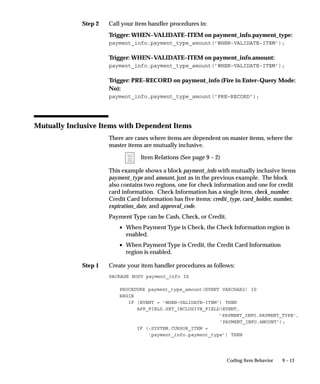
phrases helps contain translation costs because a standard translation
can be reused cheaply.
Program error: (1 space, then init cap)
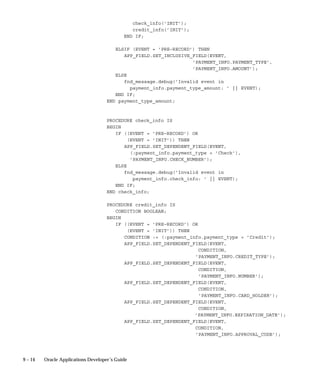
Possible causes: (then blank line)
Additional information for support representative:
(then blank line)
APP:FND–01234 Unable to execute &TRIGGER
trigger.
Please contact your support representative.
Additional information for support representative:
Check that the trigger exists in the form.
Note: Omit the sentence ”Additional information...” if you do not
include further technical information.
Complex Messages
Many messages require more explanation than will fit in a short simple
message. In these cases, you need to provide all the necessary
information while still keeping the message as brief as possible.
First, provide a short version of the message so the user can get the
sense of the problem quickly without needing to read through the
entire message. Add a blank line, then provide further information to
help the user result the problem.
If the problem has several possible causes, list them by number and
include the remedy with the description of the cause.
Example:
Example
12 – 40 Oracle Applications Developer’s Guide
APP:FND–1518 Program error: Invalid arguments
specified for the flexfield user exits.
Flexfield cannot find the segment qualifier name for
your value validation rule.
Possible causes:
1. The flexfield user exits #FND LOADID, #FND POPID,
or #FND VALID are specified incorrectly. Check the
syntax and spelling of the user exit arguments.
2. The VRULE= parameter may be incorrect. Make sure
the value is in quotes, the n’s are in lower case,
there are no spaces around the n’s, and all the
information is provided.
Specific Types of Message Content
UPPERCASE, Mixed Case, and lowercase
Translators use case as an indicator of what should be translated. The
general rule for messages is that all uppercase words are not translated
(they are assumed to be objects such as table or column names, or to be
literal values). Mixed–case words are translated.
Messages that are completely in lowercase usually cause confusion as
to how they should be translated, because they may be fragments of
other messages. For example, ”enter a value” could be interpreted as a
complete but incorrect message, or it could be interpreted as a
fragment of another message (such as ”Please &ACTION for the
&FIELD field.”) Message descriptions are required for clarification in
these cases.
Substitute tokens must always be completely in uppercase, as in
&REQUEST_ID. Tokens are never translated (translation would cause
the substitution to fail at runtime because the token is embedded in the
code).
Table and Column Names
Avoid having table or column names in messages because they are not
generally considered user–friendly. For forms, typically the user will
not have direct access to tables and columns anyhow and may not be
able to carry out the instructions in the message, so table and column
names in form messages are especially inappropriate.
12 – 41Message Dictionary
If you must have table or column names in your message, they should
be all uppercase, not lowercase or mixed case, to indicate that they
should not be translated. If appropriate, include the words table or
column in the message to make it clear to the user as well, for example,
”... the table FND_CONCURRENT_REQUESTS has been...”. You must
also include a description for the message to tell the translator not to
translate the table or column name (include the table or column name
in the description just to be clear).
Navigation or Menu Paths in Messages
Never use a navigation path (what a user chooses from the Navigator
window) to a form or function in a message, because the navigation
path is very likely to change at a customer site (customers can redefine
menus), so your message would then be incorrect.
Avoid using menu paths (the default or pulldown menu) in messages if
possible. Translators would need to know the entire corresponding
menu path in the target language to translate the path correctly. If you
must use a menu path for a choice on the default menu, use –> as the
delimiter between menu entries. For example, Help–>Tools–>Custom
Code–>Off. Indicate that this is a default menu path in your message
description so translators can figure out the corresponding translated
menu path.
Field Names
Avoid using field names in messages. Field names written directly in
the message may not match the actual field name once both the form
and the message are translated. Field names may also change over
time, rendering the message obsolete or requiring extra maintenance of
the message to keep the message correct.
If you must have a field name in a message, the preferred method is to:
• Use a token for the displayed field name (such as
&FIELD_NAME, not &NAME)
• Put the field name itself in the form using a parameter default
value or static record group cell, where it will be translated with
the rest of the form
• Substitute the field name into the message at runtime
12 – 42 Oracle Applications Developer’s Guide
Avoid Listing Values in Messages
Avoid listing values in messages. A typical type of message where you
might expect to list values in the message would be: ”Please enter one
of the following values: Blanket, Standard.” However, in general, you
should not list values in messages at all. Valid values are likely to
change over time, rendering messages obsolete or requiring extra
maintenance of the message to keep the message correct. Further, users
can usually get a list of valid values using the LOV on the field (if
available) or, if the field is a poplist, from the field itself. Duplicating
the value list in the message is unnecessary.
Suggestion: If a field requires a message like ”Choose A for
Amount or R for Rate”, because there is no list of values
available, the field itself should probably be changed. The field
could have a list of values added, or be reimplemented as a
poplist or option group as appropriate. File an enhancement
request for the affected form.
Where it is absolutely necessary to list values, list the values exactly as
the user should type them. Typically that would be in mixed case
instead of uppercase or lowercase, depending on the field
requirements. You do not need to put quotes around your values
unless the values contain spaces, in which case you should put double
quotes around each of the values in the list (as in ”My first value”, ”My
second value”, ”Third”).
If you must have values in your message, you must include a
description for the message that tells translators whether they should
translate the values. For example, in a message like ”Choose A for
Amount or R for Rate.”, the translator would not know whether (or
how) to translate ”A”, ”R”, ”Amount”, or ”Rate”.
Message Writing Style
Preferred Word Choices
Using preferred word choices and spellings help messages appear
consistent across applications. In general, prefer American English
spelling of words. The following table contains words you should
avoid using and their preferred alternatives.
12 – 43Message Dictionary
Situation Avoid Prefer
General username user name
filename file name
commit save
ID (unless part of a column or field name)
Id (never use this)
number
e.g. such as, for example
i.e. that is
Dates less than before
greater than after
Table 12 – 2 (Page 1 of 1)
Colloquialisms and Informal Expressions
Avoid colloquial or informal expressions, because these often are
difficult to translate.
Contractions
Avoid using contractions wherever possible. Contractions reflect
informal speech and writing and are not always translated correctly.
Spell out words that you might present as contractions in less formal
writing, such as it’s (it is), don’t, can’t (cannot is the accepted spelling),
you’ve, and so on.
Special Characters: Quotes
Limit the use of quotation marks in messages. They make messages
choppy and difficult to read. However, quotes are useful for setting off
phrases such as complex values from the rest of the message (such as
when the complex values contain spaces).
Please assign a value to the ”JLBR Interest Debit
Memo Batch Source” profile option.
Please assign a value to the JLBR Interest Debit
Memo Batch Source profile option.
In many cases, the careful use of capitalization and descriptive words
may be sufficient to set apart a value or field name.
Right:
Wrong:
12 – 44 Oracle Applications Developer’s Guide
Please enter a positive numeric value in the Interest
Amount field.
Please enter a positive ”Interest Amount”.
Please enter a positive numeric value in the
”Amount” field.
Prefer to use double quotes (”double quotes”) instead of single quotes
(’single quotes’). In American English, single quotes are typically used
as apostrophes indicating possession and contractions (as in ”Don’t
forget Sara’s lecture.”).
Special Characters: Underscores
Avoid having words with underscores in your messages other than
tokens. Translators assume that words containing underscores are
code or table or column names that should not be translated. If you
have words with underscores, include a description that tells
translators what to do with them.
Special Characters: Ampersands, At–signs
Avoid using ampersands (&) other than for tokens (or accelerator keys
if you also include a note in the description) in your messages. They
will be confusing to translators, and your message may be translated
incorrectly. Use the word ”and” instead if that is what you mean.
You should also avoid using at–signs (@) in your messages. In early
versions of Message Dictionary, at–signs were used to indicate
formatting information (such as @PARAGRAPHEND). Such
formatting information should no longer be present in any messages.
Industry Jargon
Keep extremely industry–specific jargon to a minimum. While users
and support personnel may know many industry–specific terms,
messages are likely to be easier to read and translate if they use simpler
language.
Standard Capitalization
Use standard capitalization for feature names and terms. For example,
use the following capitalizations for these phrases:
• system administrator (not capitalized)
• support representative (not capitalized)
Right:
Wrong:
Wrong:
12 – 45Message Dictionary
• flexfields (usually not capitalized unless referring to a specific
flexfield, such as the Accounting Flexfield)
• descriptive flexfields (not capitalized)
• Message Dictionary
Formatting Messages (Multiple Paragraphs, etc.)
Keep message formatting simple. Where you need to have multiple
sections or paragraphs in the message, use a blank line to separate
them.
APP:FND–01234 Unable to execute [Trigger]
trigger.
Please contact your support representative.
Additional information for support representative:
Check that the trigger exists in the form.
Avoid using tab characters or spaces for formatting, because these are
difficult to see and are hard to maintain or translate. Avoid using
complex formatting in Message Dictionary.
Emphasis
Do not use uppercase, mixed case, exclamation marks ( ! ), multiple
punctuation marks (such as ”Do you want to quit???” or ”Do you want
to quit?!”), or anything else for emphasis. Emphasis is not translatable.
The fact that the user has just gotten a message in a dialog box should
be enough to make the user pay attention. Ensure that the message is
called using the correct routine for the situation (error, warning, etc.).
Terminal Punctuation
Use terminal punctuation (period, question mark) at the end of your
message if it is a complete sentence. If there is no terminal
punctuation, users and translators may wonder if the message was
accidentally truncated.
Please enter a value.
Please enter a value between 1 and 9.
Please enter a value
Do you want to quit?
Example:
Right:
Right:
Wrong:
Right:
12 – 46 Oracle Applications Developer’s Guide
Do you want to quit
Do not use exclamation marks, because they seem to indicate that you
are ”shouting” at the user.
Be precise and concise
Treat message text as formal written prose. Use powerful and succinct
language that can be easily translated. Omit unnecessary words.
APP:SQLAP–14039 You cannot add lines to a
completed requisition.
APP:SQLAP–14039 You cannot affix any more new
lines to a requisition that has already been
completed.
Avoid ambiguous words
Try to use words that have only one meaning. Avoid words with data
processing connotations unless you are referring to a specific
application function.
Say please wherever possible
Be polite. When a message contains instructions, and the message is
short enough to fit in the message field with room to spare, use please.
APP–2201 Please enter an amount greater than 1.
APP–2201 Enter an amount greater than 1.
Use vocabulary consistent with form boilerplate
Refer to a form field by its correct name. If a field is labelled Sales
Representative, do not use the message ”Please enter a different
salesperson.”
Address the user as you
Talk to the user, not about the user. Users prefer friendly messages that
address them directly and make them feel they control the application.
”You” is also more concise and more forceful than ”The user ...”
APP–0842 You cannot delete this row.
APP–0842 The user cannot delete this row.
Wrong:
Right:
Wrong:
Right:
Wrong:
Right:
Wrong:
12 – 47Message Dictionary
Avoid nonspecific future tense
Use future tense only when your message refers to a specific time or
event in the future. In other cases, ”will” is usually ambiguous.
Checks will print on Tuesday.
APP–10491 Please select an invoice to cancel.
APP–10491 Please select an invoice that you
will cancel.
Use active voice
Avoid passive voice. If a message refers to a specific person (such as
the user, the system administrator, another user), the message should
mention that person.
APP–4194 You have cancelled this process.
APP–4194 This process has been cancelled.
APP–4194 This process has been cancelled by
you.
APP–0513 You cannot delete a row in this
zone.
APP–0513 Rows in this zone cannot be
deleted.
[Who cannot delete rows in this zone?]
APP–4882 Your password has expired. Please
contact your system administrator.
APP–4882 Your password has expired. It
must be changed.
Avoid accusatory messages
Do not insinuate that the user is at fault. Do not mention a user’s
mistake unless it pertains to the problem’s solution.
APP–11394 Check number does not exist for
this account. Please enter another.
APP–11394 You entered an illegal check
number
APP–11394 Please enter another check number
APP–11394 You made a mistake. Enter the
right check number.
Right:
Right:
Wrong:
Right:
Wrong:
Wrong:
Right:
Wrong:
Right:
Wrong:
Right:
Wrong:
Wrong:
Wrong:
12 – 48 Oracle Applications Developer’s Guide
APP–17503 Please enter a deliver–to person.
APP–17503 You did not enter a deliver–to
person. Enter a deliver–to person.
Use imperative voice
Sentences containing auxiliary verbs imply uncertainty. Prefer
imperative voice.
In many cases, you can transform sentences containing auxiliary verbs
into imperatives.
APP–17493 Please enter a commission plan.
APP–17493 You can enter a commission plan.
[or you can go to lunch, or ...]
Avoid conditionals
Prefer positive, imperative statements over statements containing
conditionals.
APP–14583 Save your screen to submit this
requisition for approval.
APP–14583 If you save your screen, the
requisition will be submitted for
approval.
Use ”can” to indicate either capability or permission
Auxiliaries such as ”could”, ”may”, and ”might” are ambiguous and
imply more uncertainty than ”can”. Limit the range of uncertainty by
using ”can”, which always implies capability or permission but does
not imply chance or luck.
The person you named cannot approve requisitions
online.
The person you named may not approve
requisitions online.
[The person may not approve a requisition because
of a foul mood or capriciousness or ...]
You cannot delete a printed release.
You may not delete a printed release.
[and it may not rain tomorrow, if you’re lucky.]
Right:
Wrong:
Right:
Wrong:
Right:
Wrong:
Right:
Wrong:
Right:
Wrong:
12 – 49Message Dictionary
Refer to menu paths, not power–user or terminal–specific keys
Do not force your user to remember which key performs a function.
Also remember also that your user may not have the same kind of
terminal as you do.
APP–0457 Please use the list of values to see
values for this segment.
APP–0457 Please press [QuickPick] to see
values for this segment.
APP–0457 Please press [Do] to save your
changes.
When you must refer to keys, use the standard key names listed below:
[Next Field]
[Previous Field]
[Insert/Replace]
[Enter Query]
[Execute Query]
[Exit/Cancel]
[Save]
If you use a key name in your message, you must include a note in the
message description indicating that it is a key name. Key names are
translated for most languages other than Arabic (key names are in
English in the English/Arabic keyboard), so translators specifically
need to know if the message contains key names.
Use consistent vocabulary to describe application functions
When you write a message that advises your user to perform some
other application function, use the same terminology as the application
forms do.
APP–16934 Please define a sales
representative.
[where the form is the Sales Representatives form]
APP–16934 You have not entered any sales
people.
[where the form is the Sales Representatives form]
Right:
Wrong:
Wrong:
Right:
Wrong:
12 – 50 Oracle Applications Developer’s Guide
Use only abbreviations that match forms and reports
Keep abbreviations to a minimum, because they often make messages
harder to read and translate. Use only abbreviations that match those
used in your application forms. If the forms that use a message do not
abbreviate a term, do not abbreviate that term in a message.
If your form or report abbreviates a word or phrase simply because of
space constraints (that is, if there were room on the form, the full
phrase would be used), your message should use the full word or
phrase.
APP–24943 Please close your MRP cycle.
APP–24943 You are not authorized to complete
this TRXN.
When a term is not used in any application forms, or when a term is
abbreviated inconsistently, use the following criteria to decide whether
to abbreviate a term:
• The abbreviation is commonly accepted in the industry
• The abbreviation is used in trade journal articles
• Industry professionals commonly spell or pronounce the
abbreviation in everyday conversation
Do not use feature names as verbs
Do not use feature names as verbs.
APP–8402 You cannot use DateTrack to
change this record.
APP–8402 You cannot DateTrack this record.
Use friendly, simple, non–technical language in your message
Do not confront your user with technical or database jargon. Use your
end user’s vocabulary. Prefer to use the simplest words possible that
will get your meaning across.
APP–8402 Account number does not exist.
APP–8402 Account ID does not exist.
APP–0127 No records exist.
APP–0127 Application located no rows
matching specified relationship.
Right:
Wrong:
Right:
Wrong:
Right:
Wrong:
Right:
Wrong:
12 – 51Message Dictionary
Begin messages with a capital letter
Capitalize the first character of a message. Do not capitalize every
word.
At last zone.
at last zone
At Last Zone
Prefer solution–oriented messages
When there is a simple error that your user can easily correct (for
example, a field without a value in it or a field containing an illegal
value), give directions for fixing the problem in your short message.
Do not describe the problem; tell how to fix it.
APP–17403 Please enter a shipper.
APP–17403 Shipper is missing.
Explain why your user cannot perform a function
When a user tries to do something that does not make sense in the
current context, tell why it cannot be done.
APP–14420 You cannot update this invoice
because it is selected for payment.
APP–14420 Invalid action
APP–12483 You have already cleared this
exception.
APP–12483 You cannot clear this exception.
Differentiate between similar messages
If your form has several closely–related error conditions, use messages
that distinguish between them.
APP–17403 Vendor cannot accept new
purchase orders. Choose another
vendor.
APP–17408 Vendor cannot ship item in
requested quantity. Choose
another vendor.
Right:
Wrong:
Wrong:
Right:
Wrong:
Right:
Wrong:
Right:
Wrong:
Right:
12 – 52 Oracle Applications Developer’s Guide
APP–17403 Vendor cannot accept this purchase
order. Choose another vendor.
APP–17408 Vendor cannot accept this purchase
order. Choose another vendor.
Use precise, descriptive, and unambiguous language
Make sure that a translator, as well as your user, can easily understand
your message. Your message is easier to translate if you do not use
abbreviated, obscure, ambiguous, or context–sensitive language.
Special Purpose Messages
Messages to Be Used as Boilerplate, Titles, Button Text, Labels
Avoid storing text to be used as boilerplate, prompts, titles, button text,
labels, report titles, or HTML in Message Dictionary. Such pieces of
text are extremely difficult to translate out of context. In particular, text
with HTML markup requires translators to use a separate toolset for
translation and should not be stored in Message Dictionary.
The preferred method for storing such text is to put the text in the form
using a parameter default value or static record group cell, where it
will be translated with the rest of the form.
If you must store such text in Message Dictionary, provide a complete
message description indicating exactly how and where the text is to be
used, and the maximum length to which it can be allowed to expand.
Do not give these messages message numbers.
Messages to Be Used as Menu Choices
Indicate that this is a menu entry in your message description. If there
is an ampersand (&) in the menu entry to enable an accelerator key,
indicate that in your message description so the translator does not
assume that you have simply misplaced the ampersand for a token.
Typically, the translator would eliminate ampersands in the translated
menu entry, but the translator must be careful not to eliminate
ampersands used for tokens. You may also use a double ampersand
(&&) in your menu entry, but you must still have an appropriate
message description.
Wrong:
Example
12 – 53Message Dictionary
Usage Messages
Provide usage information when a developer or user incorrectly
specifies arguments for a routine. You make it easier for support
personnel to resolve customer problems with your concurrent
programs if you include an action containing usage information for
your routine. You also help developers to implement your routines
more easily. Include the following information in your usage action:
• The syntax for your routine, including all applicable arguments
• An example of correct usage
• A description of each argument that you listed in the syntax
statement for your routine
Follow the example below when providing usage information:
APP:FND–0490 Please enter the correct arguments for
FNDMDCTM as follows.
Syntax: FNDMDCTM <ORACLE ID> <Request ID> <OS Flag>
<Source Language Short Name> <Destination Language
Short Name> [<Application Name>]
Example: FNDMDCTM APPLSYS/FND 0 Y usaeng gerger
’Oracle General Ledger’
ORACLE ID: Enter the username and password of the
applsys ORACLE ID. Enter the username and password
without any spaces and separated by a slash (”/”).
Request ID: This argument is no longer used and is
present for backward compatibility only. Enter 0.
OS Flag: This argument is no longer used and is
present for backward compatibility only. Enter Y.
Source Language Short Name: Enter the short name of
the language from which you wish to copy messages.
Destination Language Short Name: Enter the short
name of the language to which you wish to copy
messages.
Application Name: Enter the name of the application
for the messages you wish to copy. This argument is
optional.
Be sure to include a message description that tells translators what
parts, if any, of your message to translate (or not).
12 – 54 Oracle Applications Developer’s Guide
Debugging Messages
Many debugging messages are hardcoded directly into forms in
English and are never translated or defined in Message Dictionary.
These are typically messages embedded in PL/SQL code that act as the
last branch in a handler. For example:
ELSE
fnd_message.debug(’Invalid event passed to
control.orders_lines: ’ || EVENT);
END IF;
These messages should never be seen by an end user.
Another type of debugging message can appear to a user (typically
support personnel) when an application is being run in ”debug mode”
(supported by some applications, such as Oracle Receivables). These
messages typically appear in a log file, and they are defined in Message
Dictionary. These messages should be translated, and should follow all
appropriate message standards.
12 – 55Message Dictionary
Messages Window
Define your application messages before your routines can call them
from a form and before your users can request detailed messages from
a form. You should define your messages according to the Oracle
Applications message standards.
Define Your Messages: page 12 – 5
Application Message Standards: page 12 – 24
Once you leave the Messages window, after you make and save your
changes, you should submit a concurrent request for the Generate
Messages program to build your message file. Your new messages take
12 – 56 Oracle Applications Developer’s Guide
effect as soon as your concurrent request finishes successfully and you
have placed the new file in the appropriate directories.
Create Your Message Files: page 12 – 6
When you upgrade, any customizations you make to Oracle
Applications messages will be overwritten. However, an upgrade does
not overwrite messages you define using your own application.
Prerequisites
• Register your application.
• Create a mesg directory (or some other location if your operating
system does not support directories) directly under your
application’s base directory where Oracle Application Object
Library can store your message files. You need a mesg directory
on both the Forms Server machine(s) and the concurrent
processing server machine(s).
Create Your Message Directories: page 12 – 5
Messages Block
Application name, message name, and language uniquely identify your
message.
Name
Your message name can be any combination of letters, numbers,
hyphens (–), underscores (_) and spaces, up to 30 characters in length.
Message Dictionary names are not case sensitive (for example,
MESSAGENAME is the same name as messagename).
You use this message name in your forms or concurrent programs
when you invoke the Message Dictionary.
Define Your Messages: page 12 – 5
Language
Enter the language code for this message. Oracle Applications displays
the message in the correct language based on the user’s current
language.
12 – 57Message Dictionary
Application
Enter the name of the application for which you wish to define message
text.
When you upgrade, any customizations to Oracle Applications
messages will be overwritten. However, an upgrade does not
overwrite messages you define using your own application name.
Number
Enter a message number, if appropriate. If you define a non–zero
message number for your message, Message Dictionary automatically
prepends your message with the prefix APP:<application short name>–
(or its translated equivalent). Message Dictionary treats 0 and null as
the same (and does not display the APP:<application short name>– or
the message number).
Type
Use the message type to classify your messages. The message type
does not affect how your messages can be called in your code.
In Oracle Applications, the message type is used to help translators
translate messages within length expansion constraints that vary by
message type. For certain message types, this form enforces message
byte length limits smaller than 1800. The message length limits (in
bytes) are 60 for Menu Entry, 250 for Hint, and 80 for Title (note that
these limits are for translated messages, so messages in English should
be 30% shorter if they will be translated).
Application Message Standards: page 12 – 24
Maximum Length
In Oracle Applications, the maximum length (in bytes) is used to help
translators translate messages within length expansion constraints
imposed by the form or program that uses the message. Specifying a
maximum length is particularly important where the expansion
constraint is tighter than would otherwise be expected for a particular
type of message. If your message is in English, the maximum length
you specify should be at least 30% longer than your actual English
message to allow for expansion during translation.
You may optionally specify a maximum length for messages of type
Error, Note, Token, Other, or for messages with no message type. If
you do specify a maximum length, it must be between 10 and 1800
12 – 58 Oracle Applications Developer’s Guide
(inclusive), and it must be equal to or greater than the actual (byte)
length of the message text you specify.
Application Message Standards: page 12 – 24
Description
You should enter information in this field that would help explain the
context of this message to translators. This field is required if the
message is of type Token or Other.
Current Message Text
Enter a message that describes the problem and its resolution. You can
include variable tokens (in uppercase) preceded by an ampersand (&)
to indicate the location of substitute text. You supply the substitute text
or field references in your form’s message calls. For example, you
could define an explanation for a message you call ”Value Less Than Or
Equal” like this:
Please enter a value that is less than or equal to &VALUE.
Your user sees the message explanation as:
Please enter a value that is less than or equal to $30.00.
You can specify your own variable tokens using numbers, uppercase
letters, and underscores (_). Your variable tokens can be up to 30
characters long. You can use the same token more than once in your
defined messages to repeat your substitute text.
Some uses of messages (such as entries for the Special menu)use an
ampersand character to indicate an access, power, or accelerator key.
In these cases, you should use a double ampersand (&&) to indicate the
letter for the key. Message Dictionary returns only a single ampersand
to the calling routine. Words with embedded double ampersands
should be mixed case or lowercase (to distinguish them further from
tokens).
Application Message Standards: page 12 – 24
Define Your Messages: page 12 – 5
C H A P T E R
13
T
13 – 1User Profiles
User Profiles
his chapter provides you with everything you need to know about
Oracle Application Object Library user profiles. It includes an
overview of using user profiles in your application, instructions on
how to implement them, and detailed descriptions of the Oracle
Application Object Library forms you use to implement user profiles.
The following topics are covered:
• Overview of User Profiles
• Implementing User Profiles
• FND_PROFILE: User Profile APIs
• User Profile C Functions
• Profiles Window
13 – 2 Oracle Applications Developer’s Guide
Overview of User Profiles
A user profile is a set of changeable options that affects the way your
applications run. Oracle Application Object Library establishes a value
for each option in a user’s profile when the user logs on or changes
responsibility. Your user can change the value of profile options at any
time. Oracle Application Object Library provides many options that
your users can set to alter the user interface of your applications to
satisfy their individual preferences. For a complete list of all
predefined user profile options, see the appendix in the Oracle
Applications System Administrator’s Guide.
Profile Options Appendix
Oracle Applications System Administrator’s Guide
You, as a developer, can define even more profile options that affect
your Oracle Application Object Library–based applications. And,
because you may not want your users to be able to override values for
each of your options, you can define options at one or more of four
levels: Site, Application, Responsibility and User. You can choose at
which of these levels you want your system administrator to be able to
see and update option values. You also decide which profile options
defined at the User level you want your users to be able to see and
update.
For example, you can define a user profile option to determine which
subset of the organization’s data your end user sees. From the point of
view of a system administrator or end user, user profile options you
define are indistinguishable from those Oracle Application Object
Library provides.
Definitions
User Profile Levels
User profile options exist at Site, Application, Responsibility and User
levels. Oracle Application Object Library treats user profile levels as a
hierarchy, where User is the highest level of the hierarchy, followed by
Responsibility, Application and at the lowest level, Site. Higher–level
option values override lower–level option values.
Each user profile option ordinarily exists at each level. For example,
Oracle Application Object Library provides a site–level Printer option,
an application–level Printer option, and so on. Oracle Application
13 – 3User Profiles
Object Library enforces the level hierarchy to ensure that higher–level
option values override lower–level values. As a result, if your
Site–level Printer value is ”New York”, but your User–level Printer
value is ”Boston”, your reports print on the Boston printer.
Site Level
Site is the lowest user profile level. Site–level option values affect the
way all applications run at a given installation.
Application Level
Application is the user profile level immediately above Site.
Application–level option values affect the way a particular application
runs.
Responsibility Level
Responsibility is the user profile level immediately above Application.
Responsibility–level option values affect the way applications run for
all users of a responsibility.
User Level
User is the highest user profile level and is immediately above
Responsibility. User–level option values affect the way applications
run for an application user.
Defining New User Profile Options
When you develop a new application, you can define user profile
options that affect the way your application runs. For example, you
might define a user profile option to determine which subset of the
organization’s data your end user sees. When you define a new option,
you specify criteria to describe valid values for that option. You can
also specify whether your end users can change the value of an option.
Profiles Window (See page 13 – 14)
You can obtain the value of a user profile option using Oracle
Application Object Library routines. You can construct your
application to react to the value of a profile option as you choose.
Implementing User Profiles (See page 13 – 5)
13 – 4 Oracle Applications Developer’s Guide
Setting User Profile Option Values
A system administrator can set values for user profile options at each
profile level. You can set default values for your new profile options by
using the System Administrator responsibility. Typically, a system
administrator sets site–level option values after installing Oracle
Application Object Library–based applications at a site. These
site–level option values then work as the defaults until the system
administrator or end user sets them at higher levels.
Oracle Application Object Library derives run–time values for each
user’s profile options based on values the system administrator sets at
each level. An option’s run–time value is the highest–level setting for
that option. For example, for a given end user, assume the Printer
option is set only at the Site and Responsibility levels. When the end
user logs on, the Printer option assumes the value set at the
Responsibility level, since it is the highest–level setting for the option.
If the default value of a user profile option at any level is inappropriate,
the system administrator can change it at any time. This change takes
effect as soon as end users log on again or change responsibilities.
Update System Profile Options
Oracle Applications System Administrator’s Guide
Setting Your Personal User Profile
Oracle Application Object Library establishes values for user profile
options when you log on or change responsibilities. You can change
the value of your own user–changeable options at any time.
You change an option value using the Update Personal Profile Options
form. Using this form, you can display all your options and review the
values your system administrator has set for them. You can also
change those that are updatable if you like. Any change you make to a
User–level profile option has an immediate effect on the way your
applications run for that session. And, when you log on again, changes
you made to your User–level options in a previous session are still in
force.
If you never set your own User–level option values, your user profile
options assume the Site–, Application–, Responsibility–, or User–level
values your system administrator has set for them. Only the system
administrator can set some profile options.
13 – 5User Profiles
Implementing User Profiles
You should define user profile options whenever you want your
application to react in different ways for different users, depending on
specific user attributes.
To provide maximum flexibility, user profiles exist at Site, Application,
Responsibility and User levels. When you define a profile option you
decide whether your system administrator can set values for your
option at each of these levels. You also decide whether your end users
can view and update options you define at the User level. For
example, you could define a VIEW_SECURE_INFORMATION option
to be visible and updatable at all levels, so a system administrator
could set values at any level, including values for individual users.
You would also define the option such that your end users could not
see or change its value.
Oracle Application Object Library provides many options that your
users can set according to their needs. You can use these options, and
profile options you define, in your application forms and concurrent
programs.
Profiles Window (See page 13 – 14)
Predefined User Profile Options
Database Profile Options
Oracle Application Object Library provides many user profile options
that the Oracle System Administrator or the users can see and update.
The Oracle System Administration Reference Manual contains a
complete list of predefined profile options.
Additional Information: Profile Options Appendix
Oracle Applications System Administrator’s Guide
Internally Generated Profile Options
Oracle Application Object Library also provides a set of profile options
that you can access via the user profile routines. You can retrieve
values for these profile options in your forms and programs; however,
except for the profiles CONC_PRINT_OUTPUT and
CONC_PRINT_STYLE, you cannot change their values. System
administrators and end users cannot see the values for, nor change the
values of, these profile options.
13 – 6 Oracle Applications Developer’s Guide
Your user’s current Oracle Application Object
Library username.
Your user’s current Oracle Application Object
Library user ID.
Your user’s current responsibility ID.
The short name of the application connected to
your user’s current responsibility.
The application ID of the application connected to
your user’s current responsibility.
The name of the current form. Not available for
concurrent programs.
The form ID of the current form. Not available for
concurrent programs.
The name of the application for which the current
form is registered. Not available for concurrent
programs.
The application ID of the application for which the
current form is registered. Not available for
concurrent programs.
Your user’s logon date for the current session.
Your user’s logon date for the previous session.
Your user’s Sign–On Audit login ID in Oracle
Application Object Library.
The request ID associated with a particular
instance of your running current program. You can
only use this profile option in a concurrent
program. You use this profile option to fill the
REQUEST_ID Who column.
Implementing Concurrent Processing (See page 15 – 21)
Tracking Data Changes with Record History (WHO) (See
page 3 – 2)
The program ID associated with a running current
program. You can only use this profile option in a
USERNAME
USER_ID
RESP_ID
APPL_SHRT_
NAME
RESP_APPL_ID
FORM_NAME
FORM_ID
FORM_APPL_
NAME
FORM_APPL_ID
LOGON_DATE
LAST_LOGON_
DATE
LOGIN_ID
CONC_
REQUEST_ID
CONC_
PROGRAM_ID
13 – 7User Profiles
concurrent program. You use this profile option to
fill the PROGRAM_ID Who column.
Implementing Concurrent Processing (See page 15 – 21)
Tracking Data Changes with Record History (WHO) (See
page 3 – 2)
The application ID associated with a running
current program. You can only use this profile
option in a concurrent program. You use this
profile option to fill the
PROGRAM_APPLICATION_ID Who column.
Implementing Concurrent Processing (See page 15 – 21)
Tracking Data Changes with Record History (WHO) (See
page 3 – 2)
The login ID associated with a running concurrent
program. You can only use this profile option in a
concurrent program. You can use this profile
option to fill the LAST_UPDATE_LOGIN Who
column.
Implementing Concurrent Processing (See page 15 – 21)
Tracking Data Changes with Record History (WHO) (See
page 3 – 2)
The value Yes or No that you enter in the Print
Output field when you register a concurrent
program. You can use the routine afpoput() from
your concurrent programs to change the value of
this profile option for a particular instance of your
running concurrent program. This profile option
determines whether the concurrent managers print
the concurrent program’s output to the printer.
Implementing Concurrent Processing (See page 15 – 21)
Define Concurrent Program (See page 16 – 11)
The print style of your concurrent program’s
output that you enter in the Print Style field when
you register a concurrent program. You can use
the routine afpoput() from your concurrent
programs to change the value of this profile option
CONC_
PROGRAM_
APPLICATION_
ID
CONC_LOGIN_
ID
CONC_PRINT_
OUTPUT
CONC_PRINT_
STYLE
13 – 8 Oracle Applications Developer’s Guide
for a particular instance of your running
concurrent program.
Implementing Concurrent Processing (See page 15 – 21)
Implementing User Profiles (See page 13 – 5)
Define Concurrent Program (See page 16 – 11)
Summary
Location
Description
13 – 9User Profiles
FND_PROFILE: User Profile APIs
This section describes user profile APIs you can use in your PL/SQL
procedures. You can use these user profile routines to manipulate the
option values stored in client and server user profile caches.
On the client, a single user profile cache is shared by multiple form
sessions. Thus, when Form A and Form B are both running on a single
client, any changes Form A makes to the client’s user profile cache
affect Form B’s run–time environment, and vice versa.
On the server, each form session has its own user profile cache. Thus,
even if Form A and Form B are running on the same client, they have
separate server profile caches. Server profile values changed from
Form A’s session do not affect Form B’s session, and vice versa.
Similarly, profile caches on the server side for concurrent programs are
separate. Also, note that the server–side profile cache accessed by
these PL/SQL routines is not synchronized with the C–code cache. If
you put a value using the PL/SQL routines, it will not be readable with
the C–code routines.
Any changes you make to profile option values using these routines
affect only the run–time environment. The effect of these settings ends
when the program ends, because the database session (which holds the
profile cache) is terminated. To change the default profile option values
stored in the database, you must use the User Profiles form.
FND_PROFILE.PUT
procedure FND_PROFILE.PUT
(name IN varchar2,
value IN varchar2);
FNDSQF library and database (stored procedure)
Puts a value to the specified user profile option. If the option does not
exist, you can also create it with PUT.
All PUT operations are localin other words, a PUT on the server
affects only the server–side profile cache, and a PUT on the client
affects only the client–side cache. By using PUT, you destroy the
synchrony between server–side and client–side profile caches. As a
result, we do not recommend widespread use of PUT.
Arguments (input)
Summary
Location
Description
Arguments (input)
Arguments (output)
Example
13 – 10 Oracle Applications Developer’s Guide
The (developer) name of the profile option you
want to set.
The value to set in the specified profile option.
FND_PROFILE.GET
procedure FND_PROFILE.GET
(name IN varchar2,
value OUT varchar2);
FNDSQF library and database (stored procedure)
Gets the current value of the specified user profile option, or NULL if
the profile does not exist. All GET operations are satisfied locallyin
other words, a GET on the server is satisfied from the server–side
cache, and a GET on the client is satisfied from the client–side cache.
The server–side PL/SQL package FND_GLOBAL returns the values
you need to set Who columns for inserts and updates from stored
procedures. You should use FND_GLOBAL to obtain Who values from
stored procedures rather than using GET, which you may have used in
prior releases of Oracle Applications.
Global APIs for PL/SQL Procedures (See page 30 – 5)
The (developer) name of the profile optionwhose
value you want to retrieve.
The current value of the specified user profile
option as last set by PUT or as defaulted in the
current user’s profile.
FND_PROFILE.GET (’USER_ID’, user_id);
name
value
name
value
Summary
Location
Description
Arguments (input)
13 – 11User Profiles
FND_PROFILE.VALUE
function FND_PROFILE.VALUE
(name IN varchar2) return varchar2;
FNDSQF library and database (stored function)
VALUE works exactly like GET, except it returns the value of the
specified profile option as a function result.
The (developer) name of the profile option whose
value you want to retrieve.
name
Syntax
13 – 12 Oracle Applications Developer’s Guide
User Profile C Functions
Oracle Application Object Library provides you with two functions you
can call from concurrent programs you write in the C programming
language. You can use these functions to store and retrieve profile
option values.
Attention: fdpgov and fdppov are not valid for Release 11
and later. You should use afpoget and afpoput instead, and
you should convert any old C code that uses fdpgov and
fdppov to use afpoget and afpoput instead.
afpoget
Get the current value of a profile option. Returns TRUE if successful,
FALSE if it cannot find the profile option value. Returns FALSE when
retrieving a profile that exists but has no value. You must include the
file fdpopt.h in your C code file (#include <fdpopt.h>) to use this C
function. For concurrent programs, the current user is the user who
submitted the concurrent request, and afpoget() reads the value at the
time the request runs, not the time the user submitted the request.
When the function afpoget() returns successfully, it sets option_value to
the value of your requested user profile option. If you are not sure of
the length of the value afpoget() will return, you should define
option_value[] to be at least 241 characters long.
boolean afpoget(option_name, option_value)
text *option_name;
text *option_value;
the name of the profile option.
the profile option value returned by the function.
afpoput
Change the value of a profile option for the current session. Create a
profile option. Returns TRUE if successful, FALSE if it tries to change
the value of a profile option for which the WRITE flag is set to No, or if
it tries to create a profile option for which the ENABLE_CREATE flag is
not set. You must include the file fdpopt.h in your C code file
(#include <fdpopt.h>) to use this C function.
option_name
option_value
Syntax
13 – 13User Profiles
Use ENABLE_CREATE if you afpoput() to create an option if the
option does not exist. This new option only exists within the current
concurrent process, and it is not available to other processes. You can
use the | (bitwise OR) operator to combine ENABLE_CREATE with
the options ENABLE_WRITE and/or ENABLE_READ. You cannot use
ENABLE_WRITE or ENABLE_READ to reset the privileges of an
existing profile option. Use ENABLE_WRITE if you want to allow
subsequent calls to afpoput() to change the value. Use ENABLE_READ
if you want to allow subsequent calls to afpoput() to read the value.
boolean afpoput(option_name, option_value)
text *option_name;
text *option_value;
the name of the profile option.
The value to which you wish to change the profile
option for the current session. All values are
stored as text. The value may be at most 240
characters.
option_name
option_value
13 – 14 Oracle Applications Developer’s Guide
Profiles Window
Define a user profile option. You define new user profile options when
you build an application. Once you define an option, you can control
access for it at different profile levels.
Prerequisites
• Define your application using the Application window.
13 – 15User Profiles
Profiles Block
You identify a profile option by application name and profile option
name.
Name
The profile option name must be unique so that different profile
options do not conflict. This is the name you use when you access your
profile option using the Oracle Application Object Library profile
option routines.
Application
Normally, you enter the name of the application you are building.
User Profile Name
This is the name your users see as their profile option, so it should be
short but descriptive.
Description
Provide a better explanation of the content or purpose of this profile
option. This description appears in a window with User Profile Name
when a user or system administrator chooses profile options to set
values.
Active Dates
Start Date/End Date
Enter the dates on which the profile option becomes active/inactive.
The start date defaults to the current date, and if the end date is not
entered, the option will be effective indefinitely. You cannot delete a
user profile option, but you can disable it. Enter the current date if you
want to disable the user profile option. If you wish to reactivate a
disabled profile option, change the End Date to a date after the current
date.
Syntax
13 – 16 Oracle Applications Developer’s Guide
SQL Validation
If you want your profile option to provide a list of values (LOV) when
the system administrator or user sets profile options, you must use the
following syntax in the SQL Validation field.
To validate your user profile option, select the profile option value into
the fields :PROFILE_OPTION_VALUE and
:VISIBLE_OPTION_VALUE. The Profile Values form uses these fields
to ensure that your user enters valid values for your profile option.
SQL=”SQL select statement”
COLUMN=”column1(length), column2(length),...”
[TITLE=”{title text|*application shortname:message name}”]
[HEADING=”{heading1(length), heading2(length),...
|*application shortname:message name|N}”]
A SELECT statement that selects the rows to
display in your LOV. In the SQL statement you can
specify column aliases, use an INTO clause to put
values into form fields, display database values
without selecting them into form fields (by
selecting values INTO NULL), and mix values to
put into form fields with display only values in the
same INTO clause.
If you specify more than one column in your
COLUMN option, the LOV displays the columns in
the order you specify in your COLUMN statement.
Suggestion: Column aliases cannot be longer than 30
characters. Larger identifiers will cause errors.
The HEADING option overrides the COLUMN
lengths and aliases.
This SQL statement differs from a normal SQL
statement in some ways. First, if you want to
include spaces in your column aliases, you must
put a backslash and double quotes before and after
the column alias, so that the LOV routine
recognizes the double quotes as real double quotes,
rather than the end of your parameter. For
example, your SQL option might look like the
following example:
SQL
13 – 17User Profiles
SQL=”SELECT SALES_REPRESENTATIVE_ID,
SALES_REPRESENTATIVE_NAME
INTO :PROFILE_OPTION_VALUE,
:VISIBLE_OPTION_VALUE
FROM OE_SALES_REPRESENTATIVES
ORDER BY SALES_REPRESENTATIVE_NAME”
We recommend that you provide aliases for your
column headings in the HEADING options below.
You can use GROUP BY or HAVING clauses in
your SQL statement, but only in your main query;
you cannot use them in sub–queries. You can use
DISTINCT and ORDER BY clauses as you would
normally.
Set functions such as MIN(), MAX(), SUM(), and
COUNT() can be used in the SELECT or HAVING
clause, but you cannot use them on the columns
that you select into the PROFILE_OPTION_VALUE
or VISIBLE_OPTION_VALUE fields.
Though you can use a fairly complex WHERE
clause and/or an ORDER BY clause in your SQL
definition, you cannot use UNION, INTERSECT, or
MINUS in your main query. If you need a UNION,
INTERSECT, or MINUS to select the proper values,
you should create a view on your tables, then select
from the view, or include these operators as part of
a sub–query.
In addition, you cannot use a CONNECT BY or
any other operation that would come after the
WHERE clause of a SELECT statement.
Finally, if you use OR clauses, you should enclose
them in parentheses.
We recommend that you put parentheses around
complex columns in your SQL SELECT statements.
For example, your SQL option could look like this:
SQL=”SELECT (DEPTNO ||’:’ ||DEPT_NAME)
Department, LOCATION INTO
:DEPT.DEPTNAME, :DEPT.LOCATION
FROM DEPARTMENT”
Lists the names of columns (or column aliases) you
want to display in your LOV window, the order in
COLUMN
13 – 18 Oracle Applications Developer’s Guide
which to display them, and their display widths. If
you specify more than one column in your
COLUMN option, your LOV displays the columns
in the order you list them. This order can differ
from the column order in your SQL statement. You
must specify column widths in the COLUMN=
”...” parameter, although any column widths you
specify in the HEADING=”...” option below
override these values.
You can specify static or dynamic column widths in
your COLUMN option. Specify a static column
width by following the column name with the
desired width. Specify a dynamic width column
by placing an asterisk instead of a number in the
parentheses following the column name. When
you specify dynamic width for a column, the LOV
adjusts the size of the displayed column to
accommodate the longest value in the list. Note
that a dynamic column width may vary based on
the subset of data queried. The following example
shows a possible COLUMN option corresponding
to the department and location example, and
illustrates the use of static and dynamic column
widths.
COLUMN=”Department(20), LOCATION(*)”
If you do not use the HEADING option to supply
column heading or suppress headings, then the
LOV uses the names and widths from your
COLUMN option to display the column headings.
If you specify a column alias in your SQL
statement and you want that column to appear in
your QuickPick window, you must use that column
alias in COLUMN. The column headings appear in
the QuickPick window with the same upper– and
lowercase letters as you define here. If your
column alias has two words, you must put a
backslash and double quotes on both sides of the
alias. Column aliases cannot be longer than 30
characters. Using the first example from the SQL
option, your COLUMN option would look like
this:
COLUMN=””Sales Representative”(30)”
13 – 19User Profiles
If your display width is smaller than your column
name or column alias, the LOV uses the length of
the column name or alias, even if you suppress
headings in your LOV window (see the HEADING
option). For your values to display properly, you
must specify a number for the column width.
Text you want to display centered and highlighted
on the top line of your QuickPick window. The
default is no title.
You can specify a Message Dictionary token in
your LOV definition by providing the application
short name and the message name. Any title
starting with ”*” is treated as a Message Dictionary
name, and the message contents are substituted for
the title. For example:
TITLE=”*FND:MY_MESG_NAME”
Lets you specify a list of column headings and
column widths, separated by spaces or commas.
There should be one heading in the
HEADING=”...” parameter for each column in the
COLUMN=”...” parameter. Specify column widths
as numbers in parentheses following the column
name, or as an asterisk in parenthesis for a
dynamic column width.
Column widths you specify in the HEADING
=”...” parameter override columns widths you
specify in the COLUMN=”...” parameter. We
recommend setting the widths in the COLUMN
option to * (dynamic width) when using the
HEADING and COLUMN options together.
You can suppress headings in your LOV window
altogether by setting HEADING=”N”.
You can specify a Message Dictionary token in
your LOV definition by providing the application
short name and the message name. Any heading
starting with ”*” is treated as a Message Dictionary
name, and the message contents are substituted for
the heading. For example:
HEADING=”*FND:MY_MESG_NAME(*)”
TITLE
HEADING
13 – 20 Oracle Applications Developer’s Guide
If you do not provide an explicit TITLE and HEADING in your SQL
validation, your profile has TITLE=”user_profile_option_name” and
HEADING=”N” appended to the definition at runtime. This appended
title overrides any heading defined in a COLUMN token or aliases in
the SQL statement.
For example, suppose you have an option called SECURITY_LEVEL
that uses the codes 1 and 2 to represent the values High and Low
respectively. You should select the code column into
:PROFILE_OPTION_VALUE and the meaning column into
:VISIBLE_OPTION_VALUE. Then, if you want to change the meaning
of your codes, you do not have to change your program or form logic.
If the value of your profile option is user–defined, you can select the
value into both fields. For example, suppose you have a table and form
where you maintain equipment information, and you have a profile
option called EQUIPMENT. You can select the same value into both
:PROFILE_OPTION_VALUE and :VISIBLE_OPTION_VALUE.
Here is an example of a definition for a new profile option called
SET_OF_BOOKS_NAME.
SQL=”SELECT SET_OF_BOOKS_NAME, SET_OF_BOOKS_NAME ”Set of
Books” ’
INTO :PROFILE_OPTION_VALUE, :VISIBLE_OPTION_VALUE,
FROM SETS_OF_BOOKS”
COLUMN=””Set of Books”(30)”
If you do not enter validation criteria in this field, your user or system
administrator can set any value for your profile option, if you allow
them to update it.
If Oracle Application Object Library cannot successfully perform your
validation, it does not display your profile option the user queries
profiles options. If the profile option Utilities:Diagnostics is No, then
no error messages appear either. For example, if a user cannot access
the table you reference in your validation statement, Oracle Application
Object Library does not display the profile option when the user
queries profile options on the Profile Values window, and does not
display any error message if Utilities:Diagnostics is set to No.
13 – 21User Profiles
User Access
Visible
Indicate whether your end users can see and query this profile option
in their personal profiles. Otherwise, they cannot query or update
values for this option.
Updatable
Indicate whether your end users can change the value of this profile
option using their Profile Values window. Otherwise, your system
administrator must set values for this profile option.
Program Access Block
Visible
Indicate whether you can read the value of your profile option from a
user exit or concurrent program.
If you enter Yes, you can construct your application to read the value of
a user profile option using the Oracle Application Object Library
profiles routines.
Updatable
Indicate whether you can change the value of this profile option using
Oracle Application Object Library profiles routines.
System Administrator Access Block
Define the characteristics of your profile option at each profile level
that the system administrator uses to define profile values. You can
define the characteristics at the Site, Application, Responsibility and
User levels.
Suggestion: You should specify Site–level characteristics of
every user profile option you create so that the system
administrator can assign a Site–level value for every profile
option.
You should provide access to each option at the Site level. You can also
provide access for any of the other three levels, Application,
Responsibility, and User.
13 – 22 Oracle Applications Developer’s Guide
Profile option values set at the User profile level override values set at
the Responsibility profile level, which override values set at the
Application profile level. If no values are set at these three levels, then
the value defaults to the value set at the Site profile level if the Site level
value has been set.
If you want your end user to be able to update profile option values in
the Profile Values window, that is, you chose Updatable in the User
Access region, you must provide user visible and updatable access at
the User level here.
Visible
Indicate whether your system administrator can see your profile option
while setting user profile option values for the specified profile level.
Updatable
Indicate whether your system administrator can change the value of
your profile option while setting user profile option values for the
profile level you select.
C H A P T E R
14
T
14 – 1Flexfields
Flexfields
his chapter describes Oracle Application Object Library flexfields.
It includes a conceptual overview that contains a summary of
flexfields, definitions of key concepts, and an outline of the steps
necessary to add flexfields to your application. This chapter also
includes implementation sections that provide technical details of
adding flexfields to your forms, and form descriptions that provide
information about each form available to help you implement
flexfields.
The following topics are covered:
• Overview of Flexfields
• Implementing Key Flexfields
• Implementing Descriptive Flexfields
• Adding Flexfields to Your Forms
• Flexfield Definition Procedures
• Key Flexfields Window
• Descriptive Flexfields Window
14 – 2 Oracle Applications Developer’s Guide
Overview of Flexfields
A flexfield is a field made up of segments. Each segment has a name
you or your end users assign, and a set of valid values. There are two
types of flexfields: key flexfields and descriptive flexfields.
For an explanation of flexfields features and concepts, as well as
information on setting up flexfields in Oracle Applications, see the
Oracle Applications Flexfields Guide. For information on entering and
querying data using flexfields, see the Oracle Applications User’s Guide.
Overview of Flexfield Concepts
Additional Terms and Concepts for Key Flexfields
Descriptive Flexfield Concepts
Overview of Setting Up Flexfields
Oracle Applications Flexfields Guide
Key Flexfields
Most businesses use codes made up of meaningful segments
(intelligent keys) to identify accounts, part numbers, and other business
entities. For example, a company might have a part number
”PAD–NR–YEL–8 1/2x14” indicating a notepad, narrow–ruled, yellow,
and 14” by 8 1/2”. A key flexfield lets you provide your users with a
flexible ”code” data structure that users can set up however they like
using key flexfield segments. Key flexfields let your users customize
your application to show their ”codes” any way they want them. For
example, a different company might have a different code for the same
notepad, such as ”8x14–PD–Y–NR”, and they can easily customize
your application to meet that different need. Key flexfields let you
satisfy different customers without having to reprogram your
application.
In another example, Oracle General Ledger uses a key flexfield called
the Accounting Flexfield to uniquely identify a general ledger account.
At Oracle, we have customized this Accounting Flexfield to include six
segments: company code, cost center, account, product, product line,
and sub–account. We have also defined valid values for each segment,
as well as cross–validation rules to describe valid segment
combinations. However, other companies might structure their general
ledger account fields differently. By including the Accounting Flexfield
key flexfield, Oracle General Ledger can accommodate the needs of
different companies. One company can customize the Accounting
Flexfield to include six segments, while another company includes
twelve segments, all without programming.
14 – 3Flexfields
A key flexfield represents an intelligent key that uniquely identifies an
application entity. Each key flexfield segment has a name you assign,
and a set of valid values you specify. Each value has a meaning you
also specify. Oracle General Ledger’s Accounting Flexfield is an
example of a key flexfield used to uniquely identify a general ledger
account.
You can use key flexfields in many applications. For example, you
could use a Part Flexfield in an inventory application to uniquely
identify parts. Your Part Flexfield could contain such segments as
product class, product code, size, color and packaging code. You could
define valid values for the color segment, for example, to range from 01
to 10, where 01 means red, 02 means blue, and so on. You could even
specify cross–validation rules to describe valid combinations of
segment values. For example, products with a specific product code
may only be available in certain colors.
Overview of Flexfield Concepts
Oracle Applications Flexfields Guide
Descriptive Flexfields
Descriptive flexfields let you satisfy different groups of users without
having to reprogram your application, by letting you provide
customizable ”expansion space” on your forms. For example, suppose
you have a retail application that keeps track of customers. Your
Customers form would normally include fields such as Name,
Address, State, Customer Number, and so on. However, your form
might not include extra fields to keep track of customer clothing size
and color preferences, or regular salesperson, since these are attributes
of the customer entity that depend on how your users use your
application. For example, if your retail application is used for a tool
company, a field for clothing size would be undesirable. Even if you
initially provide all the fields your users need, your users might later
identify even more customer attributes that they want to keep track of.
You add a descriptive flexfield to your form so that your users have the
desired expansion space. Your users can also take advantage of the fact
that descriptive flexfields can be context sensitive, where the
information your application stores depends on other values your users
enter in other parts of the form.
A descriptive flexfield describes an application entity, providing form
and database expansion space that you can customize. Each
descriptive segment has a name you assign. You can specify valid
segment values or set up criteria to validate the entry of any value.
14 – 4 Oracle Applications Developer’s Guide
Oracle General Ledger includes a descriptive flexfield in its journal
entry form to allow end users to add information of their own
choosing. For example, end users might want to capture additional
information about each journal entry, such as source document number
or the name of the person who prepared the entry.
You could use a descriptive flexfield in a fixed assets application you
build to allow further description of a fixed asset. You could let the
structure of your assets flexfield depend on the value of an asset type
field. For example, if asset type were ”desk”, your descriptive flexfield
could prompt for style, size and wood type. If asset type were
”computer”, your descriptive flexfield could prompt for CPU chip and
memory size.
Overview of Flexfield Concepts
Oracle Applications Flexfields Guide
Easy Customization
Flexibility is important. There is no way for you to anticipate all the
form and database fields your end users might want, nor how each
field should look as end user needs change. Using key and descriptive
flexfields, you give end users the ability to customize your application
to match their business needs, without programming. You should
build a flexfield into your application whenever you need a flexible
data structure.
Customizing a flexfield means specifying the prompt, length and data
type of each flexfield segment. It also includes specifying valid values
for each segment, and the meaning of each value to your application.
You or your end users can even define cross–validation rules to specify
valid combinations of segment values.
Ordinarily, your end users customize flexfields during application
installation. However, you, as a developer, can customize flexfields
while you are developing your application. Even if end users never
change a flexfield once you have customized it, they can take
advantage of useful flexfield features such as automatic segment
validation, automatic segment cross–validation, multiple segment
structures, and more.
Overview of Flexfield Concepts
Oracle Applications Flexfields Guide
14 – 5Flexfields
Multiple Structures for a Single Flexfield
In some applications, different users need different segment structures
for the same flexfield. Or, you might want different segments in a
flexfield depending on, for example, the value of another form or
database field.
Flexfields lets you define multiple segment structures for the same
flexfield. Your flexfield can display different prompts and fields for
different end users based on a data condition in your form or
application data.
Oracle General Ledger, for example, provides different Accounting
Flexfield structures for users of different sets of books. Oracle General
Ledger determines which flexfield structure to use based on the value
of a Set of Books user profile option.
Standard Request Submission Parameters
Most of the features used with your flexfield segments also apply to
your parameter window for Standard Request Submission programs.
For example, you can define security rules and special value sets for
your report parameters.
Overview of Flexfields and Standard Request Submission
Oracle Applications Flexfields Guide
Definitions
For more explanation of flexfields features and concepts, see the Oracle
Applications Flexfields Guide.
Overview of Flexfield Concepts
Additional Terms and Concepts for Key Flexfields
Descriptive Flexfield Concepts
Oracle Applications Flexfields Guide
Segment
For a key flexfield, a segment is a single piece of the complete code.
For a descriptive flexfield, a segment is a single field or a single
attribute of the entity. A segment is represented by a single column in a
table.
14 – 6 Oracle Applications Developer’s Guide
Combination
For a key flexfield, a combination of segment values that make up the
complete code or key. You can define valid combinations with simple
cross–validation rules when you customize your key flexfield. Groups
of valid combinations can be expressed as ranges.
Structure
A flexfield structure is a particular arrangement of flexfield segments.
The maximum size of the structure depends on the individual flexfield.
A flexfield may have one or more structures. Both key and descriptive
flexfields can have more than one structure. Users can tailor structures
for specific needs.
Combinations Table
For a key flexfield, a database table you include in your application to
store valid combinations of key flexfield segment values. Each key
flexfield must have a combinations table. It contains columns for each
flexfield segment, as well as other columns. This is the same table you
use as your entity table.
Combinations Form
For a key flexfield, a combinations form is the form whose base table
(or view) is the combinations table. The only purpose of the
combinations form is to maintain the combinations table. Most key
flexfields have one combinations form, although some key flexfields do
not have a combinations form. Key flexfields without combinations
forms are maintained from other forms using dynamic insertion.
Dynamic Insertion
Dynamic insertion is the insertion of a new valid combination into a
key flexfield combinations table from a form other than the
combinations form.
For key flexfields whose combinations table does not contain any
mandatory columns other than flexfield and WHO columns, you can
choose to allow dynamic inserts when you set up your key flexfield. If
you allow dynamic inserts, your user can enter new combinations of
segment values using the flexfield window from a form other than the
combinations form. If your end user enters a new combination that
satisfies cross–validation rules, your flexfield dynamically inserts it into
the combinations table. Otherwise, a message appears and the user is
14 – 7Flexfields
required to correct the segment values that violate the cross–validation
rules.
If you create your key flexfield using a combinations table that contains
mandatory columns other than flexfield or WHO columns, you cannot
allow dynamic inserts, and your end user cannot enter new
combinations through the flexfield window from any form other than
the combinations form.
Flexfield Qualifier
A flexfield qualifier identifies a segment your end user should define
when customizing your key flexfield. By specifying flexfield qualifiers
when you build your application, you ensure your end user customizes
your flexfield to include key segments that your application needs.
For example, suppose you build a general ledger accounting
application that uses a key flexfield to uniquely identify accounts. Your
application requires that one key segment be an account segment, and
one be a balancing segment. You ensure your end user defines these
key segments by defining two flexfield qualifiers, account and
balancing. When customizing your accounting flexfield, your end user
ties the account and balancing flexfield qualifiers to particular key
segments. You, as the developer, need not know which key segment
becomes the account or balancing segment, because the key flexfield
takes care of returning account and balancing information to your
application at run–time.
Segment Qualifier
A segment qualifier describes characteristics of key segment values.
You use segment qualifiers to obtain information about segment values
your end user enters while using your application.
For example, suppose your end user enters a value in the account
segment of a flexfield that uniquely identifies general ledger accounts.
Since you, as the developer, do not know which segment represents
account, your application cannot reference the account value directly.
However, you can construct your application so that each account
value has an associated segment qualifier called ”Account type” that
your application can easily reference.
Assume that account value 1000 (which means ”Cash”) has an account
type of ”Asset”. Your application can reference this account type
because your key flexfield returns it to a column you designate in your
generic combinations table. Your application can contain logic that is
conditional on account type.
14 – 8 Oracle Applications Developer’s Guide
You can define segment qualifiers when you define flexfield qualifiers.
You can assign one or more segment qualifiers to each flexfield
qualifier.
Structure Defining Column
A column you include in a combinations table or entity table so the
flexfield can support multiple segment structures. You can construct
your application so that it places a value in a structure defining column
to determine the flexfield segment structure your end user sees.
For example, Oracle General Ledger places a ”Chart of Accounts”
identifier in the structure defining column of the combinations table for
the Accounting Flexfield. As a result, Oracle General Ledger can
provide different Accounting Flexfield structures (different charts of
accounts) for different users.
Building a Flexfield into Your Application
To include a flexfield in an application you are building, you perform
the following steps.
First, you decide which application entities require key or descriptive
flexfields. You use a key flexfield to uniquely identify an entity that
needs an intelligent key.
Attention: We provide key flexfield information such as
combinations table structure and form syntax so you can
convert any existing non–Oracle Applications combinations
forms you may have from SQL*Forms 2.3 to Oracle Forms 6i.
You may also use this information to integrate your custom
forms and applications with key flexfields that Oracle
Applications provides. For example, you may build foreign
key forms that call Oracle Applications key flexfields.
However, the API for key flexfields may change in future
versions of Oracle Applications, so we recommend that you do
not create any new key flexfields that are not provided by
Oracle Applications.
You use a descriptive flexfield to provide context–sensitive expansion
space for carrying additional information about an entity. To maximize
your user’s flexibility, you should consider defining a descriptive
flexfield for every entity in your application.
After deciding that an application entity requires a flexfield, you design
the flexfield into your applications database. You register the flexfield
14 – 9Flexfields
with Oracle Application Object Library, and if you like, assign flexfield
and segment qualifiers for your key flexfields. Then, you develop
application forms that include your flexfield and call Oracle
Application Object Library routines to activate it.
After you are done defining a flexfield, you or your end user can
customize it to include a specific set of segments.
Designing Flexfields into Your Application Database
You include flexfield columns in the database table that represents the
application entity for which you are defining a flexfield. You include
one column for each flexfield segment you or your end user might wish
to customize. You need at least as many columns as the maximum
number of segments a user would ever want in a single flexfield
structure. If you have more segments than can fit on your screen when
the flexfield window is open, you can scroll through them vertically.
For a key flexfield, a combinations table represents the application
entity. A combinations table includes flexfield segment columns as
well as other columns a key flexfield requires. Key flexfields provided
by Oracle Applications already have combinations tables defined.
To permit the use of flexfield combinations from different application
forms, you must include foreign key references to your combination
table’s unique ID column in other application tables. That way, you can
display or enter valid combinations using forms not based on your
combinations table. When you build a custom application that uses
Oracle Applications key flexfields, you would include foreign key
references in your custom application tables wherever you reference
the flexfield.
To define a descriptive flexfield, you include descriptive segment
columns in the application table you choose. You also include a
structure defining column (sometimes called a context column), in case
your end user wants to define multiple segment structures.
Implementing Key Flexfields (See page 14 – 11)
Implementing Descriptive Flexfields (See page 14 – 20)
Registering a Flexfield
You register a flexfield with Oracle Application Object Library after
you design it into your database. By registering a flexfield, you notify
Object Library that your flexfield exists in the database, and provide
some basic information about it.
14 – 10 Oracle Applications Developer’s Guide
When you register a flexfield, you give it a name that end users see
when they open your flexfield pop–up window (for example,
”Accounting Flexfield” or ”Vendor Flexfield”). End users can change
the flexfield name you provide when they customize your flexfield.
Key Flexfields Window (See page 14 – 71)
Descriptive Flexfields Window (See page 14 – 78)
Building a Flexfield into a Form
To add a flexfield to a form, you define hidden form fields to represent
the flexfield columns you defined in your application table (that is,
unique ID, structure defining, segment, and other columns). You also
define a visible form field to hold the concatenated segment value
string that appears on your form after your end user enters segment
values. You can optionally include a visible form field to hold a
concatenated string of the meanings of each segment.
To activate your flexfield, you call Oracle Application Object Library
routines from your form’s triggers.
Implementing Key Flexfields (See page 14 – 11)
Implementing Descriptive Flexfields (See page 14 – 20)
Flexfields and Application Upgrades
Application upgrades do not affect the flexfields you have defined or
customized. However, you may have to recompile your flexfields for
some application upgrades. You recompile your key flexfields using
the Key Flexfield Segments form, and you use the Descriptive Flexfield
Segments form to recompile descriptive flexfields. Simply scroll
through and save each row that defines your flexfield, and the form
automatically recompiles your flexfield.
You can also recompile all of your frozen flexfields in one step from the
operating system. See your installation manual for more information
about compiling all your flexfields in one step after an application
upgrade.
Implementing Key Flexfields (See page 14 – 11)
Key Flexfield Segments Window
Descriptive Flexfield Segments Window
Oracle Applications Flexfields Guide
14 – 11Flexfields
Implementing Key Flexfields
To implement a key flexfield you must:
• Define key flexfield columns in your database
• Register your table with Oracle Application Object Library
• Register your key flexfield with Oracle Application Object
Library
• Create key flexfield fields in your forms
• Add key flexfield routines to your forms
Key flexfields can be implemented for the following three types of
forms, which are each implemented differently:
• Combinations form – The only purpose of a combinations form
is to create and maintain code combinations. The combinations
table (or a view of it) is the base table of this form and contains
all the key flexfield segment columns. The combinations table
also contains a unique ID column. This type of form is also
known as a maintenance form for code combinations. You
would have only one combinations form for a given key flexfield
(though you might not have one at all). You cannot implement
shorthand flexfield entry for a combinations form.
• Form with foreign key reference – The base table (or view) of the
form contains a foreign key reference to a combinations table that
contains the actual flexfield segment columns. You create a form
with a foreign key reference if you want to use your form to
manipulate rows containing combination IDs. The primary
purpose of foreign key forms is generally unrelated to the fact
that some fields may be key flexfields. That is, the purpose of
the form is to do whatever business function is required (such as
entering orders, receiving parts, and so on). You might have
many foreign key forms that use a given key flexfield. You can
choose to implement shorthand flexfield entry only for a form
with a foreign key reference.
• Form with key flexfield range – The base table is a special
”combinations table” that contains two columns for each key
flexfield segment so it can support both low and high values for
each segment of your key flexfield. This type of form is rare.
For many applications, you would have one combinations form that
maintains the key flexfield, where the key flexfield is the representation
of an entity in your application. Then, you would also have one or
more forms with foreign key references to the same key flexfield. For
14 – 12 Oracle Applications Developer’s Guide
example, in an Order Entry/Inventory application, you might have a
combinations form where you define new parts with a key flexfield for
the part numbers. You would also have a form with foreign key
reference where you enter orders for parts, using the key flexfield to
indicate what parts make up the order.
The following diagram shows the relationship between a combinations
form and the flexfield field on the form. It also shows the relationship
of flexfield segments with the SEGMENTn columns of the underlying
combinations table.
The following diagram shows the relationship between a form with a
foreign key reference and the flexfield field on the form. It also shows
the relationship of the flexfield with a column of the underlying table
14 – 13Flexfields
with a foreign key reference, where that column is a foreign key to the
primary key column of the associated combinations table.
The following diagram shows the relationship between a form with a
range flexfield and the two flexfield fields on the form. It also shows
the relationship of flexfield segments, contained in two separate
flexfield segment groups, with the SEGMENTn_LOW and
SEGMENTn_HIGH columns of the underlying range table.
14 – 14 Oracle Applications Developer’s Guide
Further, you can have another form, a form with a key flexfield range,
that you use to manipulate ranges of your part numbers. This range
flexfield form refers to the same key flexfield as both your
combinations forms and your foreign key forms, though the ranges of
segment values (a low value and a high value for each segment) are
stored in the special range flexfield table that serves as the range form’s
base table.
Key Flexfield Range
A special kind of key flexfield you can include in your application to
support low and high values for each key segment rather than just
single values. Ordinarily, a key flexfield range appears on your form as
14 – 15Flexfields
two adjacent flexfields, where the leftmost flexfield contains the low
values for a range, and the rightmost flexfield contains the high values.
In Oracle Application Object Library, we use a key flexfield range to
help you specify cross–validation rules for valid combinations.
Defining Key Flexfield Database Columns
For each key flexfield you design into your application, you must create
a combinations table to store the flexfield combinations that your users
enter. You can build a special form to let them define valid
combinations (the combinations form), or you can let Oracle
Application Object Library dynamically create the combinations when
users attempt to use a new one (from a form with a foreign key
reference). You must have the combinations table even if you do not
build a combinations form to maintain it. Key flexfields provided by
Oracle Applications already have combinations tables defined.
In addition to the combinations table for your key flexfield, you may
also have one or more tables for forms with foreign key references and
for forms with key flexfield ranges.
Combinations table
Key flexfields support a maximum of 70 segment columns in a
combinations table. For example, a combinations table includes a
column for the unique ID that your key flexfield assigns to each valid
combination. It also includes a structure defining column, in case your
end user wants to define multiple structures. If you want to use
segment qualifiers in your application, your table should include a
derived column for each segment qualifier you define.
To create a key flexfield combinations table for your application entity,
you must:
• Define an ID column to uniquely identify a row in your database
table (type NUMBER, length 38, NOT NULL). You should name
this column XXX_ID, where XXX is the name of your entity (for
example, PART_ID). This column holds the unique ID number
of a particular combination of segment values (also known as a
code combination). The unique ID number is also known as a
code combination ID, or CCID. Note that even though this
column is a NUMBER(38) column, Oracle Application Object
Library only supports code combination IDs up to two billion
(2,000,000,000).
14 – 16 Oracle Applications Developer’s Guide
• Define a column for each key segment, SEGMENT1 through
SEGMENTn, where n is the number of segments you want for
your key flexfield (type VARCHAR2, length 1 to 60, all columns
the same length, NULL ALLOWED). As a rule of thumb, you
should create about twice as many segment columns as you
think your users might ever need for a single key flexfield
structure. The maximum number of key flexfield segment
columns that Oracle Application Object Library supports in a
combinations table is 70. However, for a combinations table that
you want to use with a form with a foreign key reference, the
number of segments is also limited by the maximum size of the
field that holds the concatenated segment values and segment
separators. That field is normally 2000 characters, so if you have
40 segments and 40 separators, each segment could only have an
average width of about 49 characters. Having more segment
columns than you need does not significantly impact either space
requirements or performance. In fact, since you cannot add
more segment columns to a flexfield combinations table once
you have registered your flexfield, you should add at least a few
”extra” segment columns to your combinations table initially to
allow for future needs.
• Define SUMMARY_FLAG and ENABLED_FLAG (type
VARCHAR2, length 1, NOT NULL).
• Define START_DATE_ACTIVE and END_DATE_ACTIVE (type
DATE, NULL).
• Define a structure defining column (structure ID column) to
allow multiple structures (type NUMBER, length 38, NOT
NULL). You should name this column XXX_STRUCTURE_ID,
where XXX is the name of your entity (for example,
PART_STRUCTURE_ID). This column is optional but strongly
recommended.
• Define a unique index on the unique ID column.
• Create an ORACLE sequence for your column with the same
grants and synonyms as your combinations table (for insert
privileges). Name your sequence YOUR_TABLE_NAME_S.
• Define the Who columns, LAST_UPDATE_DATE (type DATE,
NOT NULL) and LAST_UPDATED_BY (type NUMBER, length
15, NOT NULL). All other Who columns should have NULL
ALLOWED.
If you want your application to allow dynamic insertion of new valid
combinations from a form with a foreign key reference, you must not
14 – 17Flexfields
include any mandatory application–specific columns in your
combinations table. Your combinations table contains only the columns
you need to define a key flexfield, such as unique ID, structure
defining, and segment columns. It can, however, include
non–mandatory application–specific columns and columns for derived
segment qualifier values. If you include mandatory
application–specific columns in your combinations table, you cannot
allow dynamic insertion of new valid combinations from a form with a
foreign key reference. If your table does not allow dynamic insertion,
you must create a combinations form, based on your combinations
table, for your users to create their valid combinations.
If you do not ever want to allow dynamic insertion of new valid
combinations, you should develop a single form that allows your end
user to directly display, enter, or maintain valid combinations in your
combinations table (a combinations form). You can set up your key
flexfield to not allow dynamic inserts (on a structure–by–structure
basis) even if dynamic inserts are possible.
Warning: You should never insert records into a code
combinations table through any mechanism other than Oracle
Application Object Library flexfield routines. Doing so could
lead to serious data corruption problems and compromise your
applications.
Table with a foreign key reference
For each table you use as a base table for a form with a foreign key
reference (to a combinations table’s unique ID column), define one
database column with the same name as the unique ID column in the
corresponding combinations table (type NUMBER, length 38, and
NULL or NOT NULL depending on your application’s needs).
If you have a structure column in your combinations table, you also
need to include a structure column in your foreign key table (with a
corresponding form field), or provide some other method for passing
the structure ID number to the NUM parameter in your calls to key
flexfield routines. For example, you could store the structure number
in a profile option and use the option value in the NUM parameter.
You do not need any SEGMENTn columns or other key flexfield
columns for this type of table.
Table for a form with a key flexfield range
To create a table that supports a key flexfield range instead of a foreign
key reference to a single combination, define SEGMENTn_LOW and
14 – 18 Oracle Applications Developer’s Guide
SEGMENTn_HIGH columns, one pair for each SEGMENTn column in
your combinations table (type VARCHAR2, length 1 to 60, all columns
the same length, NULL).
If you have a structure column in your combinations table, you also
need to include a structure column in your range table (with a
corresponding form field), or provide some other method for passing
the structure ID number to the NUM parameter in your calls to key
flexfield routines. For example, you could store the structure number
in a profile option and use the option value in the NUM parameter.
You do not need any other flexfield columns for this table.
Registering Your Key Flexfield Table
After you create your combinations table, you must register your table
with Oracle Application Object Library using the Table Registration
API.
Table Registration API (See page 3 – 11)
Key Flexfields Window (See page 14 – 71)
Registering Your Key Flexfield
Once your table is successfully registered, you register your key
flexfield with Oracle Application Object Library. You register your key
flexfield using the Key Flexfields window.
When you register a key flexfield, you identify the combinations table
in which it resides, as well as the names of the unique ID and structure
defining columns. Key flexfields provided by Oracle Applications are
already registered.
Defining Qualifiers for Key Flexfields
When you register a key flexfield, you can define flexfield and segment
qualifiers for it.
You should define flexfield qualifiers if you want to ensure your end
user customizes your key flexfield to include segments your
application needs. For example, Oracle General Ledger defines
account and balancing flexfield qualifiers in the Accounting Flexfield to
ensure that end users would define account and balancing segments.
14 – 19Flexfields
You should define segment qualifiers if your application needs to know
semantic characteristics of key segment values your end user enters.
You assign one or more segment qualifiers to each flexfield qualifier.
For example, Oracle General Ledger assigns a segment qualifier of
”account type” to the flexfield qualifier ”account” in the Accounting
Flexfield. As a result, end users can define account value 1000 to mean
”Cash,” and assign it a segment qualifier value of ”Asset.”
Note that flexfield qualifiers can be unique or global, and required or not.
You describe a flexfield qualifier as unique if you want your end user to
tie it to one segment only. You describe a flexfield qualifier as global if
you want it to apply to all segments. You can use a global flexfield
qualifier as a convenient means for assigning a standard set of segment
qualifiers to each of your flexfield’s segments. You describe a flexfield
qualifier as required if you want your end user to tie it to at least one
segment.
In Oracle General Ledger’s Accounting Flexfield, the ”Account”
flexfield qualifier is required and unique because Oracle General
Ledger requires one and only one account segment. Oracle General
Ledger defines a flexfield qualifier as ”global” so the segment qualifiers
”detailed posting allowed” and ”detailed budgeting allowed” apply to
each Accounting Flexfield segment.
Key Flexfield Segments Window
Segment Values Window
Value Sets Window
Oracle Applications Flexfields Guide
Derived Column
A column you include in a combinations table into which your flexfield
derives a segment qualifier value. You specify the name of a derived
column when you define a segment qualifier.
Add Your Flexfield to Your Forms
Once you have the appropriate table columns and your flexfield is
registered, you can build your flexfield into your application forms.
Adding Flexfields to Your Forms (See page 14 – 25)
14 – 20 Oracle Applications Developer’s Guide
Implementing Descriptive Flexfields
You add a descriptive flexfield to provide customizable ”expansion
space” for your entity. For example, suppose you have a retail
application that keeps track of customer entities. Your entity table,
CUSTOMERS, would normally include columns such as Name,
Address, State, Sex, Customer Number, and so on. However, your
table might not include extra columns to keep track of a customer’s
size and color preferences, or regular salesperson, since these are
attributes of the customer entity that depend on how your users use
your application. In fact, your users might later identify even more
customer attributes that they want to keep track of. You add
descriptive flexfield columns to your entity table (CUSTOMERS) so
that your users have the desired expansion space. Your users can also
take advantage of the fact that descriptive flexfields can be context
sensitive, where the information your application stores depends on
other values your users enter in the Customers form.
To implement a descriptive flexfield you must:
• Define descriptive flexfield columns in your database
• Register your table with Oracle Application Object Library
• Register your descriptive flexfield with Oracle Application
Object Library
• Create descriptive flexfield fields in your forms
• Add descriptive flexfield routines to your forms
Planning for Reference Fields
Reference fields are fields from which a descriptive flexfield can get a
context field value (optional, but recommended). Reference fields must
be separate fields from the structure defining field (typically
ATTRIBUTE_CATEGORY). Frequently, most of the existing
(non–flexfield) fields in your form can also serve as reference fields. In
general, fields that make good reference fields are those that have a
short, fairly static list of possible values. You specify fields as reference
fields when you register your descriptive flexfield in the Register
Descriptive Flexfield form. Your users then have the option of using a
reference field or not when they set up your flexfield.
For example, suppose you have a retail application that keeps track of
”customer” entities. Your Customers form would normally include
fields such as Name, Address, State, Sex, Customer Number, and so
14 – 21Flexfields
on. Your end users may want to make the descriptive flexfield
context–sensitive depending on what a user enters in the State field (if
the state is Colorado, for example, you may want to keep track of
customer preferences in ski–wear, while if the state is Florida, you may
want to keep track of preferences in warm–weather–wear).
Alternatively, your end users may want to make the descriptive
flexfield context–sensitive depending on what a user enters in the Sex
field (if the customer is female, for example, you may want to keep
track of her size preferences using standard women’s sizes, while if the
customer is male, you may want to keep track of size preferences using
standard men’s sizes). By specifying both the State field and the Sex
field as reference fields when you register your descriptive flexfield in
the Register Descriptive Flexfield form, you give your users the option
to set up the flexfield either way.
Suggestion: A descriptive flexfield can use only one form
field as a reference field. You may derive the context field
value for a descriptive flexfield based on more than one field
by concatenating values in multiple fields into one form field
and using this concatenated form field as the reference field.
Descriptive Flexfields Window (See page 14 – 78)
Descriptive Flexfield Segments Window
Oracle Applications Flexfields Guide
Defining Descriptive Flexfield Database Columns
To make your application very flexible, you should add descriptive
flexfield columns to all of your entity tables.
Oracle Application Object Library reserves table names that contain the
string ”_SRS_” for the Standard Request Submission feature, so you
should not give your descriptive flexfield table a name that includes
this string.
To add descriptive flexfield columns into your database table, you:
• Define a column for each descriptive segment, ATTRIBUTE1
through ATTRIBUTEn (type VARCHAR2, length 1 to 150, all
columns the same length, NULL ALLOWED).
• Define a structure defining column (context column) to identify
your descriptive flexfield structures (type VARCHAR2, length
30, NULL ALLOWED). Although you can name this column
14 – 22 Oracle Applications Developer’s Guide
anything you wish, we recommend that you name it
ATTRIBUTE_CATEGORY.
You should ensure you initially add enough segment columns to cover
any future uses for your descriptive flexfield, since you cannot add
extra segment columns to your flexfield later.
You determine the maximum number of segments you can have within
a single structure when you define your ATTRIBUTEn columns in your
table. You can define a maximum of 200 ATTRIBUTEn columns in one
table. As a rule of thumb, you should create about twice as many
segment columns as you think your users might ever need for a single
descriptive flexfield structure.
Adding a Descriptive Flexfield to a Table with Existing Data
You can add flexfield columns to a table that has never had any flexfield
columns but already contains data. However, you must be very careful
not to create data inconsistencies in your application when you do so.
To add your flexfield, you add columns, form fields, and invoke
descriptive flexfield routines exactly the same as if you were creating a
descriptive flexfield from the beginning. However, when you define
your flexfield using the Descriptive Flexfield Segments form, you must
consider whether any of the segments should use value sets that require
values. If none of your new segments requires a value, your users will
simply see an empty descriptive flexfield when they query up existing
records. For this case, no further action is necessary.
For the case where one or more of your segments require values, you
need to perform extra steps to prevent data inconsistencies. The
simplest way to do this is to define your segment structures completely,
navigate to your form with the new descriptive flexfield, query up each
record in your table, and enter values in the descriptive flexfield for
each record. Save your changes for each record. This method, while
tedious, ensures that all values go into the correct columns in your
entity table, including the structure defining (context) column.
For very large tables, you can add the values to your table directly
using SQL*Plus. You need to update each row in your table to include
a context field value (the structure defining column) as well as segment
values, so you must first determine the segment/column
correspondences for your structures. Your context (structure) values
must exactly match your context field values in the Descriptive
Flexfield Segments form. For example, if your context field value is
mixed case, what you put in the structure column must match the
14 – 23Flexfields
mixed case. If you put an invalid context value into the structure
column, a purely context–sensitive flexfield does not pop up at all for
that record. If you have global segments enabled, the flexfield window
will open. If Override Allowed is set to Yes, you will see the bad
context field value in the context field of the window.
Note that you should never use SQL*Plus to modify data in Oracle
Application Object Library tables.
Protected Descriptive Flexfields
In some cases, you may want to create a descriptive flexfield that
cannot be inadvertently changed by an installer or user. This type of
flexfield is called a protected descriptive flexfield. You build a
protected descriptive flexfield the same way you build a normal
descriptive flexfield. The main difference is that you check the
Protected check box in the Descriptive Flexfields form after defining
your segment structures. Once a descriptive flexfield is protected, you
cannot query or change its definition using the Descriptive Flexfield
Segments form. You should define your descriptive flexfield segments
before you check the Protected check box in the Descriptive Flexfields
form.
Descriptive Flexfields WIndow (See page 14 – 78)
In a case where your database table already includes a descriptive
flexfield, you need to define segment columns that have names other
than ATTRIBUTEn. For special purpose flexfields such as protected
descriptive flexfields, you can name your columns anything you want.
You explicitly enable these columns as descriptive flexfield segment
columns when you register your descriptive flexfield. Note that you
must also create a structure–defining column for your second flexfield.
Flexfields cannot share a structure column.
If your database table contains segment columns with names other than
ATTRIBUTEn, you create hidden fields corresponding to those
columns instead.
14 – 24 Oracle Applications Developer’s Guide
Registering Your Descriptive Flexfield Table
After you add descriptive flexfield columns to your table, you must
register your table with Oracle Application Object Library using the
Table Registration API.
Table Registration API (See page 3 – 11)
Registering Your Descriptive Flexfield
You must register your descriptive flexfield with Oracle Application
Object Library. You register your descriptive flexfield using the
Register Descriptive Flexfield form. When you register a descriptive
flexfield, you identify the application table in which it resides and the
name of the structure defining column. If you have created reference
fields in your form, you should enter their names as ”context fields”
when you register your flexfield.
Descriptive Flexfields Window (See page 14 – 78)
Add Your Flexfield to Your Forms
Once you have the appropriate table columns and your flexfield is
registered, you can build your flexfield into your application forms.
Adding Flexfields to Your Forms (See page 14 – 25)
14 – 25Flexfields
Adding Flexfields to Your Forms
There are four basic parts to calling a flexfield from an Oracle Forms
window. These steps assume that your flexfield is already registered
and defined in Oracle Application Object Library and that the flexfield
table and columns already exist. These steps apply to both key and
descriptive flexfields.
" To code a flexfield into your form:
• Create your hidden fields
• Create your displayed fields
• Create your flexfield definition
• Invoke your flexfield definition from several event triggers
Create Your Hidden Fields
In general, you create your hidden flexfield fields as part of creating
your default form block from the database table (or view). Set the
canvas property of the flexfield fields to null (so they do not appear on
a canvas).
Your hidden ID (for key flexfields only), structure field, and segment or
attribute fields must be text items on the null canvas. Note that these
must be text items rather than display items, and that they should use
the TEXT_ITEM property class. Set the field query lengths to 255 for
most fields, with a query length of 2000 for hidden ID fields.
Attention: You should never create logic that writes values to
the hidden fields directly. Since the flexfield keeps track of
whether a record is being inserted, updated, etc., putting
values in these fields by any method other than the flexfield
itself (or a query from the database) may cause errors and data
corruption.
In some foreign key forms for key flexfields, you may need to create
extra non–database fields that represent the segment columns
(SEGMENT1 through SEGMENTn) in your combinations table. Put
your SEGMENT1 through SEGMENTn fields on the null canvas (field
length the same as your SEGMENTn columns). These fields help
Oracle Application Object Library to create new code combinations
from your form with a foreign key reference (using dynamic insertion).
14 – 26 Oracle Applications Developer’s Guide
Normally, Oracle Application Object Library can create new code
combinations (dynamic insertion) from your form with a foreign key
reference using only the concatenated segment values field. However,
if you expect the concatenated length of your flexfield to be defined to
be larger than 2000 (the sum of the defined segments’ value set
maximum sizes plus segment separators), then you should create these
non–database fields to support the dynamic creation of new
combinations from your form.
If you do not have these fields and your users define a long flexfield (>
2000 characters), your users can experience truncation of key flexfield
data when trying to create new combinations.
If your key flexfield is registered with Dynamic Inserts Feasible set to
No, you do not need to add these fields, though they are
recommended. If you do not create these fields, and your users define
a long flexfield, your users may see empty flexfield segments upon
entering the flexfield pop–up window after a query. These blank
segments do not adversely affect the underlying data, nor do they
adversely affect flexfield changes if your user updates those segments
after querying.
If you use these fields and you have more than one key flexfield in the
same row (in a block) of your form, you should also create one extra set
of non–database segment fields per flexfield. So, if you have three
foreign–key–reference flexfields in your block, you should have four
sets of segment fields (for example, SEGMENT1 to SEGMENTn as the
main set; and SEGMENT1_A to SEGMENTn_A, SEGMENT1_B to
SEGMENTn_B, and SEGMENT1_C to SEGMENTn_C as the extra sets).
In addition, you should use the USEDBFLDS=”Y” argument for your
flexfield definition routine calls. When you do so, you must write
trigger logic to explicitly copy the appropriate values into or out of
these fields before your flexfield routine calls. You must copy your
values into the main set from the appropriate extra set before the
WHEN–NEW–ITEM–INSTANCE and the PRE–INSERT and
PRE–UPDATE flexfield event calls. You must copy your values out of
the main set into the appropriate extra set after the POST–QUERY,
WHEN–NEW–ITEM–INSTANCE, WHEN–VALIDATE–ITEM,
PRE–INSERT, or PRE–UPDATE calls.
For a descriptive flexfield, it is possible (though not recommended) to
create your form such that the table containing the descriptive flexfield
columns is not the base table (or included in the base view) of the form.
To do this, you create all the hidden fields (the ATTRIBUTEn fields and
the structure defining field) as non–database fields on the null canvas.
Then, code trigger and table handler logic that keeps the data in the
two tables synchronized. For example, when your form updates your
14 – 27Flexfields
base table, your ON_UPDATE table handler should update the
ATTRIBUTEn and structure defining columns in the descriptive
flexfield table. Likewise, when your form inserts new records, you
should have logic in your ON_INSERT table handler that inserts into
the descriptive flexfield table. Descriptive flexfields never write
directly to a table (base table or otherwise); they always write to the
hidden segment fields.
Create Your Displayed Fields
Create your concatenated segments field as a 2000 character displayed,
non–database text item for either key or descriptive flexfields. For a
range flexfield, you create two non–database fields with the same name
but with the suffixes _LOW and _HIGH.
Use the TEXT_ITEM property class for your key and range flexfields.
For a descriptive flexfield, use the property class
TEXT_ITEM_DESC_FLEX and name the field DESC_FLEX.
You must attach the dummy LOV from the TEMPLATE form,
ENABLE_LIST_LAMP, to the displayed key or descriptive flexfield
field. Make sure that ”Validate from List” property (formerly ”Use
LOV for Validation”) is set to No. This ensures that the List lamp
works properly for your flexfield.
If you experience strange LOV behavior (where the LOV provides
”null” as the only valid choice) or messages that the flexfield cannot be
updated and/or has invalid values, check that ”Validate from List” is
set to No.
Create Your Flexfield Definition
Call a flexfield definition procedure from your
WHEN–NEW–FORM–INSTANCE trigger to set up your flexfield.
Using this procedure, you specify the block and fields for your flexfield
and its related fields, the flexfield you want, and other arguments. See:
Flexfield Definition Procedures: page 14 – 30.
You may need to enable, disable, or modify your flexfield definition
depending on conditions in the form. For example, you may want to
have a flexfield be updatable under some conditions but not under
other conditions. In this case you should also call an
14 – 28 Oracle Applications Developer’s Guide
UPDATE_DEFINITION procedure after calling the appropriate
DEFINE procedure. See: Updating Flexfield Definitions: page 14 – 59.
Invoke Your Flexfield Definition from Several Event Triggers
Code handlers for special procedures into several form level triggers.
These procedures fire your flexfield at certain events such as WHEN–
NEW–ITEM–INSTANCE, WHEN–VALIDATE–ITEM, and
PRE–INSERT.
You call your flexfields from form level triggers using the
FND_FLEX.EVENT(EVENT) procedure. You can also call your
flexfields using this procedure from within your own procedures. This
procedure takes the event name as its argument. Call
FND_FLEX.EVENT and pass the trigger name from the triggers listed
in the following table:
Trigger Procedure
PRE–QUERY FND_FLEX.EVENT(’PRE–QUERY’);
POST–QUERY FND_FLEX.EVENT(’POST–QUERY’);
PRE–INSERT FND_FLEX.EVENT(’PRE–INSERT’);
PRE–UPDATE FND_FLEX.EVENT(’PRE–UPDATE’);
WHEN–VALIDATE–
RECORD
FND_FLEX.EVENT(’WHEN–VALIDATE–
RECORD’);
WHEN–NEW–ITEM–
INSTANCE
FND_FLEX.EVENT(’WHEN–NEW–ITEM–INSTANCE’);
WHEN–VALIDATE–
ITEM
FND_FLEX.EVENT(’WHEN–VALIDATE–ITEM’);
Table 14 – 1 (Page 1 of 1)
These calls should usually be coded into your form as form–level
triggers. If you define any of these triggers at the block or field level,
you need to make sure the block or field level triggers have execution
style set to ”Before” so the form–level flexfield calls still execute, or you
should include these procedure calls in those triggers as well.
While we recommend you code all the flexfields triggers at the form
level for convenience and consistency, having the triggers at form level
may cause performance problems for very large or complicated forms.
In that case, you may code the PRE–QUERY, POST–QUERY,
14 – 29Flexfields
PRE–INSERT, PRE–UPDATE, and WHEN–VALIDATE–RECORD
triggers at the block level on all blocks that have flexfields (key or
descriptive). You would then code the WHEN–NEW–ITEM–
INSTANCE and WHEN–VALIDATE–ITEM at the item level for items
on which the flexfields are defined.
You only need to code one set of these triggers regardless of how many
flexfields you have in your form (assuming these triggers are at the
form level).
Three form–level triggers in the TEMPLATE form, KEY–EDIT,
KEY–LISTVAL, and POST–FORM, already have the appropriate
FND_FLEX.EVENT calls performed through the
APP_STANDARD.EVENT(’trigger_name’) routines as part of the
APPCORE library. You must ensure that these
APP_STANDARD.EVENT calls are not overridden by triggers at the
block or item levels.
Attention: If you have a block or item level POST–QUERY
trigger that resets the query status of a record, you must set the
Execution Style of that block or item level POST–QUERY
trigger to After. Because the flexfield POST–QUERY logic
updates field values for your flexfield, the record must be reset
to query status after that logic has fired.
Opening a Flexfield Window Automatically
By default, descriptive flexfields open automatically without any
special code so long as the profile option Flexfields:Open Descr
Window is not set to No.
Normally, key flexfields do not open automatically. However, users
can set the profile option, Flexfields:Open Key Window, to Yes to
automatically open all key flexfields. You must not code any code in
your form to open the window automatically, because the window
would then be forced to open a second time.
You should remove any existing code that opens a key flexfield
automatically. Such code would probably be in your
WHEN–NEW–ITEM–INSTANCE trigger at the field level, instead of
the form level, on the field that contains the flexfield. You should
remove any ”FND_FLEX.EVENT(’KEY–EDIT’);” call that opens the
flexfield automatically.
14 – 30 Oracle Applications Developer’s Guide
Flexfield Definition Procedures
Flexfields packages and procedures are included in the FNDSQF
library. Call item handlers from your
WHEN–NEW–FORM–INSTANCE trigger to define key, range or
descriptive flexfields.
• To define a key flexfield, use the procedure
FND_KEY_FLEX.DEFINE
• To define a range or type flexfield, use the procedure
FND_RANGE_FLEX.DEFINE
• To define a descriptive flexfield, use the procedure
FND_DESCR_FLEX.DEFINE
When you call these procedures, you specify three types of arguments:
• location(s) of the flexfield (block and fields, including the
concatenated values field, the ID field if any, and any description
or related fields)
• specific registered flexfield you want (application, flexfield, and
structure if necessary)
• any additional arguments
If you have more than one flexfield, you call a complete flexfield
definition procedure for each of your flexfields from handlers in the
same WHEN–NEW–FORM–INSTANCE trigger.
Key Flexfield Definition Syntax
Use FND_KEY_FLEX.DEFINE for a key flexfield on a foreign key or
combinations form.
Attention: We provide combinations form syntax so you can
convert any existing non–Oracle Applications combinations
forms you may have from SQL*Forms 2.3 to Oracle Forms 4.5.
However, the API for key flexfields may change in future
versions of Oracle Applications, so we recommend that you do
not create any new key flexfields that are not provided by
Oracle Applications.
14 – 31Flexfields
FND_KEY_FLEX.DEFINE(
/* Arguments that specify flexfield location */
BLOCK=>’block_name’,
FIELD=>’concatenated_segments_field_name’,
[DESCRIPTION=>’description_field_name’,]
[ID=>’Unique_ID_field’,]
[DATA_FIELD=>’concatenated_hidden_IDs_field’,]
/* Arguments that specify the flexfield */
APPL_SHORT_NAME=>’application_short_name’,
CODE=>’key_flexfield_code’,
NUM=>’structure_number’,
/* Other optional parameters */
[VALIDATE=>’{FOR_INSERT|FULL|PARTIAL|NONE|
PARTIAL_IF_POSSIBLE}’,]
[VDATE=>’date’,]
[DISPLAYABLE=>’{ALL | flexfield_qualifier |
segment_number}[0{ALL |
flexfield_qualifier | segment_number}]’,]
[INSERTABLE=>’{ALL | flexfield_qualifier |
segment_number}[0{ALL |
flexfield_qualifier | segment_number}]’,]
[UPDATEABLE=>’{ALL | flexfield_qualifier |
segment_number}[0{ALL |
flexfield_qualifier | segment_number}]’,]
[VRULE=>’flexfield qualifiern
segment qualifiern
{I[nclude]|E[xclude]}n
APPL=application_short_name;
NAME=Message Dictionary message namen
validation value1n
validation value2...
[0flexfield qualifiern
segment qualifiern
{I[nclude]|E[xclude]}n
APPL=application_short_name;
14 – 32 Oracle Applications Developer’s Guide
NAME=Message Dictionary message namen
validation value1n
validation value2...]’,]
[COPY=>’block.fieldn{ALL | flexfield
qualifier | segment_number}
[0block.fieldn{ALL | flexfield
qualifier | segment_number}]’,]
[DERIVED=>’block.fieldnSegment qualifier’,]
[DERIVE_ALWAYS=>’{Y|N}’,]
[DINSERT=>’{Y|N}’,]
[VALATT=>’block.fieldn
flexfield qualifiern
segment qualifier’,]
[TITLE =>’Title’,]
[REQUIRED=>’{Y|N}’,]
[AUTOPICK=>’{Y|N}’,]
[USEDBFLDS=>’{Y|N}’,]
[ALLOWNULLS=>’{Y|N}’,]
[DATA_SET=>’set number’,]
[COLUMN=>’{column1(n) | column1 alias(n)
[, column2(n), ...] [INTO block.field]}’,]
[WHERE_CLAUSE=>’where clause’,]
[COMBQP_WHERE=>’{where clause|NONE}’,]
[WHERE_CLAUSE_MSG=>’APPL=application_short_
name;NAME=message_name’,]
[QUERY_SECURITY=>’{Y|N|}’,]
[QBE_IN=>’{Y|N}’,]
[READ_ONLY=>’{Y|N}’,]
[LONGLIST=>’{Y|N}’,]
[NO_COMBMSG=>’APPL=application_short_
name;NAME=message_name’,]
[AUTOCOMBPICK=>’{Y|N}’,]
[LOCK_FLAG=>’{Y|N}’,]
[HELP=>’APPL=application_short_name;
TARGET=target_name’]
);
You should not use a colon ( : ) in block.field references for the
VALATT, COPY, or DERIVED arguments. The arguments for these
14 – 33Flexfields
routines go to an Oracle Application Object Library cover routine and
are not directly interpreted in PL/SQL.
Range (Type) Flexfield Definition Syntax
Use FND_RANGE_FLEX.DEFINE for a range flexfield. You use the
same procedure for a ”type” flexfield (which may also include range
flexfield segments) that contains extra fields corresponding to each
segment of the related key flexfield. For example, a type flexfield for
the Accounting Flexfield might contain one field for each Accounting
Flexfield segment, but you might enter only the values Yes or No in
those fields, instead of normal segment values. The Assign Function
Parameters form uses a type flexfield for its segment usage field (you
enter ”Yes” for any segment whose value you want to use). You may
build a type flexfield that contains more than one ”type column” (a
”column” of fields in the flexfield pop–up window that correspond to
the actual segment fields). If you do, you can specify your TYPE_
argument values multiple times, using 0 to separate the values.
Attention: You should not append ”_LOW” or ”_HIGH” to
the FIELD, DESCRIPTION, DATA_FIELD or other values,
since this procedure appends them automatically. When you
use more than one type column, ensure that all TYPE_
arguments specify type columns in the same order to avoid
having argument values applied to the wrong type column.
FND_RANGE_FLEX.DEFINE(
/* Arguments that specify flexfield location */
BLOCK=>’block_name’,
FIELD=>’concatenated_segments_field_name’,
[DESCRIPTION=>’description_field_name’,]
[DATA_FIELD=>’concatenated_hidden_IDs_field’,]
/* Arguments that specify the flexfield */
APPL_SHORT_NAME=>’application_short_name’,
CODE=>’key_flexfield_code’,
NUM=>’structure_number’,
14 – 34 Oracle Applications Developer’s Guide
/* Other optional parameters */
[VALIDATE=>’{PARTIAL|NONE}’,]
[VDATE=>’date’,]
[DISPLAYABLE=>’{ALL | flexfield_qualifier |
segment_number}[0{ALL |
flexfield_qualifier | segment_number}]’,]
[INSERTABLE=>’{ALL | flexfield_qualifier |
segment_number}[0{ALL |
flexfield_qualifier | segment_number}]’,]
[UPDATEABLE=>’{ALL | flexfield_qualifier |
segment_number}[0{ALL |
flexfield_qualifier | segment_number}]’,]
[VRULE=>’flexfield qualifiern
segment qualifiern
{I[nclude]|E[xclude]}n
APPL=application_short_name;
NAME=Message Dictionary message namen
validation value1n
validation value2...
[0flexfield qualifiern
segment qualifiern
{I[nclude]|E[xclude]}n
APPL=application_short_name;
NAME=Message Dictionary message namen
validation value1n
validation value2...]’,]
[TITLE =>’Title’,]
[REQUIRED=>’{Y|N}’,]
[AUTOPICK=>’{Y|N}’,]
[USEDBFLDS=>’{Y|N}’,]
[ALLOWNULLS=>’{Y|N}’,]
[DATA_SET=>’set number’,]
[READ_ONLY=>’{Y|N}’,]
/* Parameters specific to type flexfields */
[TYPE_FIELD=>’block.concatenated_type_values_
fieldntype field suffix’,]
[TYPE_VALIDATION=> ’Value set namen
RequirednDefault value’,]
14 – 35Flexfields
[TYPE_SIZES=>’type_value_display_
sizenDescription_display_size’,]
[TYPE_HEADING=>’type column heading’,]
[TYPE_DATA_FIELD=>’block.type_data_field’,]
[TYPE_DESCRIPTION=>’block.type_
description_field’,]
[SCOLUMN=>’single column title’,]
[HELP=>’APPL=application_short_name;
TARGET=target_name’]
);
Attention: TYPE_FIELD, TYPE_DATA_FIELD and
TYPE_DESCRIPTION require the block.fieldname
construction, unlike other flexfield arguments that specify field
names without block names.
Descriptive Flexfield Definition Syntax
Use FND_DESCR_FLEX.DEFINE for a descriptive flexfield.
FND_DESCR_FLEX.DEFINE(
/* Arguments that specify the flexfield location */
BLOCK=>’block_name’,
FIELD=>’field_name’,
[DESCRIPTION=>’description_field_name’,]
[DATA_FIELD=>’concatenated_hidden_IDs_field’,]
/* Arguments that specify the flexfield */
APPL_SHORT_NAME=>’application_short_name’,
DESC_FLEX_NAME=>’descriptive flexfield_name’
/* Other optional parameters */
[VDATE=>’date’,]
[TITLE =>’Title’,]
[AUTOPICK=>’{Y|N}’,]
[USEDBFLDS=>’{Y|N}’,]
[READ_ONLY=>’{Y|N}’,]
[LOCK_FLAG=>’{Y|N}’,]
[HELP=>’APPL=application_short_name;
14 – 36 Oracle Applications Developer’s Guide
TARGET=target_name’,]
[CONTEXT_LIKE=>’WHERE_clause_fragment’}
);
Flexfield Definition Arguments
The following arguments apply to all types of flexfields unless noted
otherwise. For those arguments that you would want to specify more
than once, you separate the multiple argument values using 0 (as
noted).
Arguments that Specify the Flexfield Location
Name of the block that contains your flexfield.
Your value field, ID field (if any), and description
field (if any) must all be in the same block.
Name of the field where you want to put your
flexfield. This is a displayed, non–database form
field that contains your concatenated segment
values plus delimiters.
Description field for your flexfield. This is a
displayed, non–database, non–enterable field that
contains concatenated descriptions of your
segment values. If you do not specify the
DESCRIPTION parameter, your form does not
display concatenated segment descriptions.
For a key flexfield only. Specify the field, if any,
that contains the unique ID (CCID) for your key
flexfield.
The concatenated hidden IDs field is a
non–displayed form field that contains the
concatenated segment hidden IDs.
Arguments that Specify which Flexfield to Use
Shortname of the application with which your
flexfield is registered.
Key or range flexfields only. The short code that
identifies your flexfield. This is the flexfield code
BLOCK
FIELD
DESCRIPTION
ID
DATA_FIELD
APPL_SHORT_
NAME
CODE
14 – 37Flexfields
specified in the Key Flexfields form. This code
must match the registered code, such as GL# for
the Accounting Flexfield in Oracle Applications.
Key or range flexfields only. The structure number
(or the :block.field reference containing the
structure number) that identifies your key flexfield
structure.
You can specify the non–displayed database
:block.field that holds the identification number of
your flexfield structure. You may also specify
:$PROFILES$.your_profile_option_name to retrieve a
value you set in a user profile option. You can
”hardcode” a structure number, such as 101, into
this parameter instead of providing a field
reference, but such a number prevents you from
using multiple structures for your flexfield. You
must use this option if you are using multiple
structures.
You can use the following SQL statement to
retrieve the structure identification numbers for
your flexfield:
SELECT ID_FLEX_NUM, ID_FLEX_STRUCTURE_NAME
FROM FND_ID_FLEX_STRUCTURES
WHERE ID_FLEX_CODE = ’flexfield code’;
where flexfield code is the code you specify when
you register your flexfield.
The default value for NUM is 101.
Descriptive flexfields only. The registered name
that identifies your descriptive flexfield.
Other Optional Arguments
If you do not specify a particular optional argument, the flexfield
routine uses the usual default value for the argument.
Key or range flexfields only. For a key flexfield,
you typically use FOR_INSERT for a combinations
form and FULL for a foreign key form. For a
range flexfield, you typically use NONE to allow
users to enter any value into a segment or
PARTIAL to ensure that users enter valid
NUM
DESC_FLEX_
NAME
VALIDATE
14 – 38 Oracle Applications Developer’s Guide
individual segment values that do not necessarily
make up an actual valid combination.
Use a validation type of FULL for a foreign key
form to validate all segment values and generate a
new code combination and dynamically insert it
into the combinations table when necessary. If you
specify FULL, your flexfield checks the values your
user enters against the existing code combinations
in the code combinations table. If the combination
exists, your flexfield retrieves the code combination
ID. If the combination does not exist, your flexfield
creates the code combination ID and inserts the
combination into the combinations table. If you (or
an installer) define the flexfield structure with
Dynamic Inserts Allowed set to ”No”, then your
flexfield issues an error message when a user
enters a combination that does not already exist. In
this case, your flexfield does not create the new
code combination. FULL is the usual argument for
a form with a foreign key reference.
Use PARTIAL for a form where you want to
validate each individual segment value but not
create a new valid combination or check the
combinations table for an existing combination.
You would use PARTIAL when you want to have
application logic that requires flexfield segment
values but does not require an actual code
combination. For example, the Oracle Applications
Shorthand Aliases form requires that a user enters
valid values for each segment, but does not require
(or check) that the actual code combination already
exists in the combinations table. The Shorthand
Aliases form does not create the combination,
either. PARTIAL_IF_POSSIBLE is a special case of
PARTIAL. If you have dependent segments in
your flexfield (with independent segments),
PARTIAL does not provide a list of values on the
dependent segment if the user has not entered a
value for the associated independent segment.
PARTIAL_IF_POSSIBLE, however, will attempt to
provide a list of values on the dependent segment.
That list of values contains all dependent values for
all values of the associated independent segment
14 – 39Flexfields
(so, you would see multiple values 000 if that were
your default dependent value).
Use NONE if you wish no validation at all.
The default value for a key flexfield is FULL. The
default value for a range flexfield is NONE.
date is the validation date against which the Start
Date and End Date of individual segment values is
checked. You enter a Start Date and End Date for
each segment value you define using the Segment
Values form.
For example, if you want to check values against a
date that has already passed (say, the closing date
of an accounting period), you might specify that
date as VDATE using a field reference
(VDATE=>’:block.field’) and compare your segment
values against that date.
The default value is the current date (SYSDATE).
Key flexfields only. Use DINSERT to turn dynamic
inserts off or on for this form.
The default value is Y (the form can do dynamic
inserts).
Key or range flexfields only. The DISPLAYABLE
parameter allows you to display segments that
represent specified flexfield qualifiers or specified
segment numbers, where segment numbers are the
order in which the segments appear in the flexfield
window, not the segment number specified in the
Key Flexfield Segments form. For example, if you
specify that you want to display only segment
number 1, your flexfield displays only the first
segment that would normally appear in the
pop–up window (for the structure you specify in
NUM).
The default value for DISPLAYABLE is ALL, which
makes your flexfield display all segments.
Alternatively, you can specify a flexfield qualifier
name or a segment number.
You can use DISPLAYABLE as a toggle switch by
specifying more than one value, separated by 0
delimiters. For example, if you want your flexfield
VDATE
DINSERT
DISPLAYABLE
14 – 40 Oracle Applications Developer’s Guide
to display all but the first segment, you would
specify:
DISPLAYABLE=>’ALL01’
Note that 0 separates 1 from ALL.
If you do not display all your segments, but you
use default values to fill in your non–displayed
segments, you must also have hidden SEGMENT1
through SEGMENTn fields in your form. You need
these hidden fields because your flexfield writes
the values for all displayed fields to the
concatenated values field, but does not write the
values for the non–displayed defaulted fields.
Since your flexfield normally uses the values in the
concatenated values field to update and insert to
the database, the default values for the
non–displayed fields are not committed. However,
if you have the extra hidden fields (similar to a
combinations form), your flexfield writes flexfield
values to those fields as well as to the concatenated
segment values field. The non–displayed values
are written only to the hidden fields, but are used
to update and insert to the database.
Key or range flexfields only. The UPDATEABLE /
INSERTABLE parameters determine whether your
users can update or insert segments that represent
specified unique flexfield qualifiers or segment
numbers, where segment numbers are the order in
which the segments appear in the flexfield window,
not the segment number specified in the Key
Flexfield Segments form.
The default value for each is ALL, which allows
your user to update/insert all segments.
Alternatively, you can specify a flexfield qualifier
name or a segment number. You can enter
UPDATEABLE=>’’ or INSERTABLE=>’’ (two
single quotes) to prevent your user from updating
or inserting values for any segments.
You can use these parameters as toggle switches by
specifying more than one value, separated by 0
delimiters. For example, if you want your user to
be able to update all but the first segment, you
would specify:
UPDATEABLE
INSERTABLE
14 – 41Flexfields
UPDATEABLE=>’ALL01’
Note that 0 separates 1 from ALL.
If you use INSERTABLE=>’’ to prevent your user
from inserting values for any segments, Shorthand
Flexfield Entry is disabled for that form.
Specify the window title you want to appear at the
top of the pop–up window. The default value for a
key flexfield is the Structure Name you specify
when you set up this flexfield using the Key
Flexfield Segments form. For a descriptive
flexfield, the default value is the flexfield title you
specify when you set up this flexfield using the
Descriptive Flexfield Segments form.
Key or range flexfields only. Specify whether your
user can exit the flexfield window without entering
segment values.
The default value is Y.
If you specify Y, then your flexfield prevents your
user from leaving any required segment (a segment
whose value set has Value Required set to Yes)
without entering a valid value for that segment.
Also, if your user tries to save a row without ever
entering the flexfield pop–up window, your
flexfield attempts to use default values to fill in any
required segments and issues an error message if
not all required segments can be filled.
If you specify Y and VALIDATE as FULL, then
when your user queries up a row with no
associated flexfield (the foreign key flexfield ID
column contains NULL), your flexfield issues an
error message to warn the user that a NULL ID has
been returned for a required flexfield.
If you specify N, your flexfield allows your user to
save a row without ever entering the flexfield
pop–up window. If you specify N, your user can
navigate (without stopping) through a flexfield
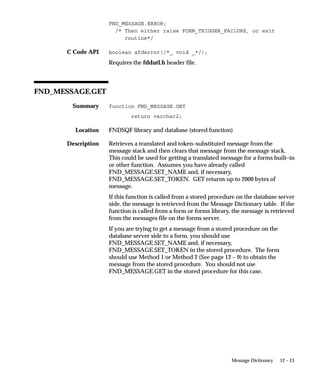
window without entering or changing any values.
However, if a user enters or changes any segment
value in the flexfield, the user cannot leave the
flexfield window until all required segments
contain valid values. If you specify N and a user
TITLE
REQUIRED
14 – 42 Oracle Applications Developer’s Guide
does not open or enter values in the window, the
user can save the row regardless of whether the
flexfield has required segments. In this case, your
flexfield does not save default values as segment
values for the required segments, and it does not
issue an error message.
If you specify N and VALIDATE as FULL, then
when your user queries up a row with no
associated flexfield (the foreign key flexfield ID
column contains NULL), your flexfield validates
the individual segment values returned by the
query. Specify N if you want to query up
non–required flexfields without getting an error
message.
Note that even if REQUIRED is set to N, a user
who starts entering segment values for this
flexfield must either fill out the flexfield in full, or
abandon the flexfield.
Determines whether a list of values window
appears when your user enters an invalid segment
value. The default value is Y.
Key flexfields only. Copies a non–null value from
block.field into the segment representing the
specified flexfield qualifier or segment number before
the flexfield window pops up. Alternatively, if you
specify ALL, COPY copies a set of non–null,
concatenated set of segment values (and their
segment separators) that you have in block.field into
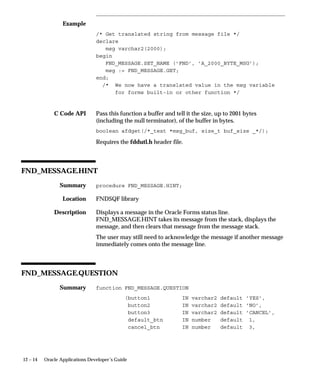
all of your segments. For example, if you have a
three–segment flexfield, and your block.field
contains 001.ABC.05, COPY puts 001 into the first
segment, ABC into the second segment, and 05 into
the third segment.
The value you COPY into a segment must be a
valid value for that segment. The value you COPY
overrides any default value you set for your
segment(s) using the Key Flexfield Segments form.
However, shorthand flexfield entry values override
COPY values. COPY does not copy a NULL value
over an existing (default) value. However, if the
value you copy is not a valid value for that
segment, it gives the appearance of overriding a
AUTOPICK
COPY
14 – 43Flexfields
default value with a NULL value: the invalid
value overrides the default value, but your
flexfield then erases the copied value because it is
invalid. You should ensure that the field you copy
from contains valid values.
When the flexfield window closes, your flexfield
automatically copies the value in the segment
representing the specified flexfield qualifier or
segment number into block.field. Alternatively, if you
specify ALL, your flexfield automatically copies
the concatenated values of all your segments into
block.field.
You can specify one or more COPY parameter
values, separated by 0 delimiters. Later COPY
values override earlier COPY values. For example,
assume you have a field that holds concatenated
flexfield values, called Concatenated_field, and it
holds the string 01–ABC–680. You also have a
field, Value_field, that holds a single value that you
want to copy into your second segment, and it
holds the value XYZ. You specify:
COPY=>’block.Concatenated_fieldnALL0
block.Value_fieldn2’
Note that 0 separates the different parameter
values.
When your user opens the flexfield window, Oracle
Application Object Library executes the two COPY
parameters in order, and your user sees the values
in the window as:
01
XYZ
680
After the flexfield window closes, your flexfield
copies the values back into the two fields as
01–XYZ–680 and XYZ respectively. Note that XYZ
overrides ABC in this case.
Key flexfields only. Use DERIVED to get the
derived value of segment qualifiers for a
combination that a user types in. Use block.field to
specify the block and field you want your flexfield
to load the derived value into. Use Segment
DERIVED
14 – 44 Oracle Applications Developer’s Guide
qualifier to specify the segment qualifier name you
want. Note: do not put spaces around n, and
n must be lowercase.
Your flexfield uses the following rules to get the
derived qualifier value from the individual
segment qualifier values: if the segment qualifier is
unique, the derived value is the segment qualifier
value; for non–unique segment qualifiers, if any
segment’s qualifier value = N, then the derived
value is N, otherwise, the derived value is Y. The
only exception to this rule is for the internal
SUMMARY_FLAG segment qualifier; the rule for
this is if any segment value is a parent, then the
derived value of SUMMARY_FLAG is Y. Your
flexfield loads derived values into the
combinations table qualifier column that you
specify when you define your qualifier.
You can specify one or more groups of DERIVED
parameters separated by 0.
Key flexfields only. Use with the DERIVED
parameter. If you specify Y, the derived values are
computed even if the user navigates through the
flexfield without changing any values (choosing
the same value that is already in a segment does
mark the flexfield as having changed).
The default value is N, where the derived values
are calculated only if the flexfield is modified.
Key or range flexfields only. Use VRULE to put
extra restrictions on what values a user can enter in
a flexfield segment based on the values of segment
qualifiers (which are attached to individual
segment values). You can specify the name of a
flexfield qualifier and a segment qualifier, whether to
Include or Exclude the validation values, and the
Message Dictionary application short name and
message name for the message your flexfield
displays if the user enters an improper value. The
delimiter n must be lowercase, and you separate
the application name from the message name using
a semicolon.
For example, suppose you build a form where you
want to prevent your users from entering segment
DERIVE_
ALWAYS
VRULE
14 – 45Flexfields
values for which detail posting is not allowed into
all segments of Oracle General Ledger’s
Accounting Flexfield.
DETAIL_POSTING_ALLOWED is the segment
qualifier, based on the global flexfield qualifier
GL_GLOBAL, that you want to use in your rule.
You want to exclude all values where the value of
DETAIL_POSTING_ALLOWED is N (No). Your
message name is ”GL Detail Posting Not
Allowed”, and it corresponds to a message that
says ”you cannot use values for which detail
posting is not allowed.” You would specify your
rule as:
VRULE=’GL_GLOBALnDETAIL_POSTING_ALLOWEDnE
nAPPL=SQLGL;
NAME=GL Detail Posting Not AllowednN’
Do not use line breaks (newline characters) in your
VRULE argument. The previous example includes
them for clarity, but in your code it should all be
one line. If it cannot fit on one line, use the
following format:
vrule => ’first line’ ||
’second line’;
When your user enters an excluded value in one of
the segments affected by this qualifier, your user
gets the message you specify. In addition, the
excluded values do not appear in the list of values
on your segments. All other values, not being
specifically excluded, are included.
You can specify one or more groups of VRULE
parameters separated by 0 (zero). Oracle
Application Object Library checks multiple VRULE
parameters bottom–up relative to the order you list
them. You should order your rules carefully so
that your user sees the most useful error message
first.
Key flexfields only. VALATT copies the segment
qualifier value of the segment representing the
unique flexfield qualifier into block.field when the
flexfield window closes. The delimiter n must
be lowercase.
VALATT
14 – 46 Oracle Applications Developer’s Guide
For a combinations form, specify this parameter
only if your combinations table contains both a full
set of key flexfield columns (the primary flexfield)
and a column that is a foreign key reference to
another key flexfield (with a different combinations
table). You set this parameter to N to keep the
foreign key flexfield from using the database
segment fields belonging to the primary flexfield
(that your combinations form maintains).
For a foreign key form, specify this parameter if
your form is based on a table that has foreign key
references to two or more flexfields, and if you
have non–database SEGMENT1 through N fields
on your form (where N is the number of segments
in your combinations table). If such fields exist,
your flexfield by default will load values into them
that correspond to the combination of segment
values in the current flexfield. If you set this
parameter to N, your flexfield will not load the
segment fields for the current flexfield. If you have
more than one flexfield on your form, use this
parameter to specify which one should use the
segment fields (specify Y for one flexfield’s routine
calls, and specify N for other flexfields’ routine
calls).
For a descriptive flexfield, specify N for this
parameter to prevent the descriptive flexfield from
using hidden segment fields (such as
ATTRIBUTEn).
The default value is Y.
Key flexfields only. Use COLUMN to display
other columns from the combinations table in
addition to the current segment columns, where n
is the display width of the column. You can place
the values of the other columns into fields on the
current form. The value is automatically copied
into the field when the user selects an existing
flexfield combination.
For example, to display a description column
called SEG_DESC and an error message from
E_FLAG with the column headings DESCRIPTION
and ERROR FLAG, you could set
USEDBFLDS
COLUMN
14 – 47Flexfields
COLUMN=>’SEG_DESC DESCRIPTION(15),
E_FLAG ”ERROR_FLAG”(*)’
The (*) sets a dynamic column width, with the size
determined by the value selected.
If you wanted to place the description into the field
block_1.field_1 and the error message into
block_1.field_2, you would set
COLUMN=>’SEG_DESC DESCRIPTION(15)
INTO BLOCK_1.FIELD_1,
E_FLAG ”ERROR_FLAG” (*)
into BLOCK1_FIELD_2’
You may only use 32 distinct INTO columns in
your COLUMN= clause. Your maximum width for
additional columns is 240 characters.
Key flexfields only. Specify a WHERE clause to
restrict which code combinations to display in the
list of values window. This argument also prevents
a user from entering a combination that does not fit
the WHERE clause. This argument should not
normally be used for a flexfield on the
combinations form, since you would usually want
to display all combinations on the combinations
form.
Do not specify the word ”WHERE” in this WHERE
clause argument. You should use this token with
flexfields that do not allow dynamic inserts, either
using DINSERTS as N or preventing dynamic
inserts at the structure level.
You should not use the WHERE_CLAUSE
argument for a flexfield that allows dynamic
inserts.
Use the WHERE_CLAUSE_MSG argument to
specify an appropriate message to display to the
user when a combination violates your WHERE
clause.
Key flexfields only. The primary use of this
argument is to disable the combination list of
values for your flexfield on this form. Specify
NONE to disable the combination list of values.
WHERE_
CLAUSE
COMBQP_
WHERE
14 – 48 Oracle Applications Developer’s Guide
Alternatively, you could use this argument to
specify any additional WHERE clause to further
restrict which code combinations to display in the
list of values window. This WHERE clause is
appended to your WHERE_CLAUSE argument
using an AND expression. It affects only the
combination list of values however, and does not
affect a combination that a user enters manually.
Do not specify the word ”WHERE” in this WHERE
clause argument.
Key flexfields only. Use with the
WHERE_CLAUSE argument. If you wish to
display your own message when a user enters an
invalid combination restricted by your WHERE
clause, specify the applications short name and
message name here. Otherwise flexfields uses the
standard Oracle Applications message that
displays the entire WHERE clause to the user (not
recommended).
Key or range flexfields only. Specify the :block.field
that holds the set identifier for your flexfield.
DATA_SET specifies which set of code
combinations to use for this flexfield. For each
flexfield structure, you can divide code
combinations in your combinations table into sets
(for example, parts with high prices, medium
prices, and low prices).
You can only use DATA_SET if you implement a
structure defining column (that is, you must specify
NUM). The default for DATA_SET is your
structure number (as specified in NUM). If you
use DATA_SET, your application must maintain a
separate table that contains the correspondences
between sets and key flexfield structures. For
example, your correspondences table could contain
values such as:
Structure Set Set Description
101 1 Low priced truck parts
101 2 Medium priced truck parts
101 3 High priced truck parts
102 4 Low priced car parts
102 5 High priced car parts
WHERE_
CLAUSE_MSG
DATA_SET
14 – 49Flexfields
103 6 Low priced motorcycle parts
103 7 High priced motorcycle parts
If you use DATA_SET, your flexfield stores the set
number in the structure defining column instead of
the structure number. Note that you cannot have
duplicate set numbers in your correspondences
table, though you can have more than one set
number for a given structure number. You must
derive DATA_SET and NUM from different
:block.fields (or profile options, or ”hardcoded”
numbers) since they are distinctly different
numbers.
Determines whether NULLs should be allowed
into any segment. ALLOWNULLS only overrides
the segment definition (Value Required is Yes) for
each segment if you specify PARTIAL or NONE for
the VALIDATE parameter.
Key flexfields only. Determines whether flexfield
value security applies to queries as well as inserts
and updates. If you specify Y, your users cannot
query up existing code combinations that contain
restricted values. If you specify N, your users can
query and look at code combinations containing
restricted values, but they cannot update the
restricted values. The default value is N. This
option has no effect unless your users have enabled
and defined flexfield value security for your
flexfield’s value sets.
Key flexfields only. Controls the type of subquery
your flexfield uses to select the desired rows in
flexfield query–by–example.
The default value is N.
If you specify N, your flexfield generates a
correlated subquery. This query is effectively
processed once for each row returned by the main
query (generated by the rest of the form), and it
uses the code combination ID as a unique index.
Choose N if you expect your main query to return
a small number of rows and you expect your
flexfield query–by–example to return many rows.
ALLOWNULLS
QUERY_
SECURITY
QBE_IN
14 – 50 Oracle Applications Developer’s Guide
If you specify Y, your flexfield generates a
non–correlated subquery using the ”IN” SQL
clause. Your query is processed only once, but
returns all the rows in your combinations table that
match your flexfield query–by–example criteria.
Choose Y when you expect your main query to
return many rows and you expect your flexfield
query–by–example to return a small number of
rows (less than about 100). Such a condition
usually corresponds to a small number of rows in
the combinations table and many rows in the
application table. For example, assume you have a
Part Flexfield, where your company handles only a
limited number of parts (say, 75), but you have
thousands of orders for your parts (and a
correspondingly large Orders table). For this case,
choosing Y would greatly improve your
application performance on flexfield
queries–by–example.
Key flexfields only. Specify Y or N to allow or
disallow using LongList with this flexfield.
LongList allows users to specify a partial value
when querying a flexfield combination using
Combination QuickPick.
Key or range flexfields only. If you wish to display
your own message when a user enters an invalid
combination, specify the message name here.
Otherwise flexfields uses the standard Oracle
Applications message.
If you use the WHERE_CLAUSE argument, use the
WHERE_CLAUSE_MSG argument instead of
NO_COMBMSG to specify an appropriate message
to display to the user when a combination violates
your WHERE clause.
Specify Y to prevent any updating of your flexfield
segment values, whether by shorthand alias, copy,
or any other method.
Key flexfields only. Determines the behavior of the
combination list of values for direct entry flexfields
with no dynamic inserts allowed when the user
enters a non–existing code combination. If you
specify Y, the combination list of values appears if
LONGLIST
NO_COMBMSG
READ_ONLY
AUTO–
COMBPICK
14 – 51Flexfields
the user enters an incorrect value in a single
segment flexfield, or if there are non–constant
values (%) or null segments in a multi–segment
flexfield. If you specify N, the combination list of
values does not appear, and the error message
”This combination does not exist...” is generated.
The default value is Y.
Normally, when a user types a character into a
flexfield segment, that action locks the base table of
the form. However, in some cases you might want
to avoid locking the table; for example, you might
have several inquiry forms that use the same base
table, and you do not want other users to have to
wait until the table is unlocked. The default value
is Y. Specify N to turn off the locking behavior, or
specify D to lock the table only if the
flexfield–related field is a database field.
Use the HELP argument to specify a target name
for online help specific to this instance of this
flexfield. You specify the application short name
for the application that owns the help file (not
necessarily the same application that owns the
flexfield or the form). You also specify the target
name in your help file where the help resides. If
the corresponding help target is not found, the user
may receive an error message. If the HELP
argument is not specified, the online help displays
generic flexfields help. For example, to show
specific help for the Accounting Flexfield from the
Oracle General Ledger help file, you would specify
the following:
HELP=>’APPL=SQLGL;TARGET=FLEX.GL#’
Descriptive flexfields only. Specify a fragment of a
WHERE clause to restrict which context codes to
display in the list of values window of the context
field. This argument also prevents a user from
entering a context that does not fit the WHERE
clause. The resulting WHERE clause for the LOV
of the context field is like the following:
WHERE ...
AND DESCRIPTIVE_FLEX_CONTEXT_CODE LIKE
<CONTEXT_LIKE>...
LOCK_FLAG
HELP
CONTEXT_LIKE
14 – 52 Oracle Applications Developer’s Guide
The default value is ’%’. If this argument is used to
restrict context values then the Override Allowed
(Display Context) should be turned on (checked) in
the descriptive flexfield definition.
Flexfields do not use this constraint in the
POST–QUERY event. Therefore, a user can query
up existing data that would now be invalid under
the CONTEXT_LIKE part of the WHERE clause.
However, as in all flexfields where the user queries
up now–invalid flexfield data, if the user presses
OK (with or without changing flexfield values), the
flexfield is marked as changed and the invalid
value must be corrected. If the user presses the
Cancel button, the data is unaffected and does not
need to be corrected (even if the user changes
other non–flexfield parts of the record).
Note that, as always, any reference field for the
descriptive flexfield is only evaluated the first time
the descriptive flexfield is opened (or validated
upon commit if the user does not open the
flexfield before committing) for a new record. If
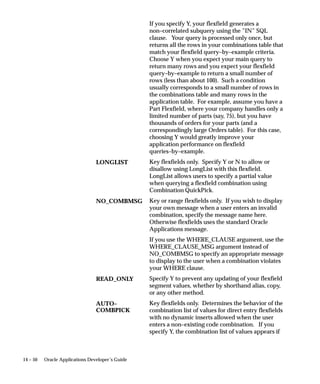
the user opens the flexfield, the context field is
populated with the value of the reference field. If
the user presses OK to exit the flexfield window,
then returns to the reference field and changes its
value, the context field value does not change to
reflect the new value in the reference field. Further,
the existing context field value is not re–evaluated
according to the value of the CONTEXT_LIKE
argument at that time. To avoid creating
apparently–inconsistent behavior, you should
avoid modifying the CONTEXT_LIKE argument at
any time after initially setting it in the flexfield
definition at form startup (for example, do not base
its value on the value of a field the user can
modify).
For example, this argument can be used to restrict
country–specific contexts in a given country.
Key flexfields only. Flexfields use code
combination table names to create select statements
for validation and lists of values. If your key
flexfield code combination table is the base table
(_B table) of a translated entity and if you want to
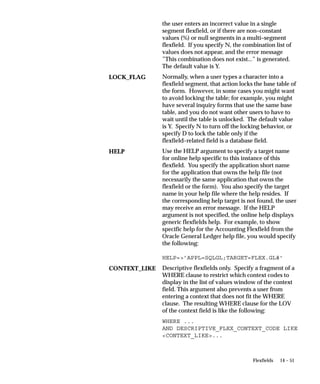
SELECT_COMB_
FROM_VIEW
14 – 53Flexfields
get additional columns from the translated table
(_TL table) by using the COLUMN token, then use
the SELECT_COMB_FROM_VIEW token to specify
the translated view name (the _VL view).
If the value specified in
SELECT_COMB_FROM_VIEW is different from
the key flexfield’s code combination table name
then dynamic inserts will be turned off
automatically.
Additional Optional Arguments for Type Flexfields
If you are building a type flexfield, you use these arguments in addition
to other optional and required arguments. If you do not specify a
particular optional argument, the flexfield routine uses the usual
default value for the argument. You may build a type flexfield that
contains more than one ”type column” (a ”column” of fields in the
flexfield pop–up window that correspond to the actual segment fields).
If you do, you can specify your TYPE_ argument values multiple times,
using 0 to separate the values. SCOLUMN can have only one value,
however.
Range (type) flexfields only. Name of the field
where you want to put your ”type” flexfield. This
is a displayed, non–database form field that
contains your concatenated segment type values
plus delimiters.
You can include a suffix for all the fields related to
your type field. If you include a suffix, such as
TYPE1, your flexfield appends that suffix to all
field names automatically. If you specify a suffix,
you should not include the suffix in any of the
type–related field names for your
FND_RANGE_FLEX.DEFINE call. Note that if
you specify a suffix, your flexfield expects to store
each type value in a form field (one type field for
each segment), so you should specify a suffix if you
use those fields, but you should not specify a suffix
if you use only the concatenated fields.
If you specify TYPE_FIELD, you must also specify
TYPE_HEADING, TYPE_VALIDATION, and
TYPE_SIZES. TYPE_DESCRIPTION and other
type arguments are optional.
TYPE_FIELD
14 – 54 Oracle Applications Developer’s Guide
You can specify more than one type field and
suffix. Each field and suffix must be unique so that
the different types do not share the same
underlying fields and columns. Separate your first
field and suffix from your second field and suffix
(and so on) using 0.
Range (type) flexfields only. Description field for
your type flexfield. This is a displayed,
non–database, non–enterable field that contains
concatenated descriptions of your type segment
values. If you do not specify this parameter, your
form does not display concatenated type segment
descriptions. If you specified a suffix for
TYPE_FIELD, do not include it for
TYPE_DESCRIPTION.
Range (type) flexfields only. Name of the
non–displayed form field that contains the
concatenated type segment hidden IDs. If you
specified a suffix for TYPE_FIELD, do not include
it for this argument.
Range (type) flexfields only. Specify the name of a
value set, such as Yes_No, that you want to use for
your type column (for all fields in the type
column). You also specify Y if the user is required
to enter a value for each field in the type column;
specify N if values are not required. Finally,
specify a single default value for all fields in your
type column. This default value appears in each of
the type fields when the pop–up window opens.
You may use either a hardcoded constant value or
a field reference (:block.field) for your default value.
If you have more than one type column, specify
subsequent groups of values separated by 0
delimiters.
Range (type) flexfields only. Specify the maximum
display size for the value set your type field uses,
as well as the maximum display size for the value
description. The value display size must be at least
1 and not larger than the maximum size of the
corresponding value set (whose maximum size
must not be greater than the size of the underlying
TYPE_
DESCRIPTION
TYPE_DATA_
FIELD
TYPE_
VALIDATION
TYPE_SIZES
14 – 55Flexfields
database column). The description display size
may be 0 or larger.
If you have more than one type column, you
specify sizes for each pair of values and
descriptions, separated by the 0 delimiter.
Range (type) flexfields only. Specify a title that you
want to appear above the type segments in the
flexfield pop–up window.
If you have more than one type column, specify
additional headings separated by the 0 delimiter.
Range (type) flexfields only. The presence of the
SCOLUMN argument indicates that this is a
”single column type flexfield” (a flexfield that uses
only SEGMENTn_LOW and one or more type
columns, but does not use SEGMENTn_HIGH).
Specify a title for the SEGMENTn_LOW fields that
you want to display in the flexfield pop–up
window. The flexfield still assumes that the _LOW
suffix applies to each SEGMENTn field and related
concatenated fields, regardless of the title you
specify.
Flexfield Definition Examples
Simple Key Flexfield Example
Here is an example of a simple key flexfield definition. This definition
provides the default structure (101) of the Accounting Flexfield.
FND_KEY_FLEX.DEFINE(
BLOCK=>’ORDERS’,
FIELD=>’KFF_CONCATENATED_VALUES’,
APPL_SHORT_NAME=>’SQLGL’,
CODE=>’GL#’,
NUM=>’101’);
TYPE_HEADING
SCOLUMN
14 – 56 Oracle Applications Developer’s Guide
Key Flexfield Example with Additional Arguments
Here is an example of a more complex key flexfield definition. This
definition provides the default structure (101) of the Accounting
Flexfield.
FND_KEY_FLEX.DEFINE(
BLOCK=>’ORDERS’,
FIELD=>’KFF_CONCATENATED_VALUES’,
APPL_SHORT_NAME=>’SQLGL’,
CODE=>’GL#’,
NUM=>’101’,
DISPLAYABLE=>’ALL’
INSERTABLE=>’ALL’
UPDATEABLE=>’’);
Key Flexfield Example with Variable Arguments
Here is an example from the Shorthand Aliases form, which overrides
several of the arguments and uses :block.field references to pass field
values to the procedure. Note that this example also provides three
fields related to the flexfield (FIELD, DESCRIPTION, and
DATA_FIELD):
FND_KEY_FLEX.DEFINE(
BLOCK=>’ALIASES’,
FIELD=>’SEGMENTS’,
DESCRIPTION=>’SEGMENT_DESCRIPTIONS’,
DATA_FIELD=>’CONCATENATED_SEGMENTS’,
APPL_SHORT_NAME=>’:FLEX.APPLICATION_SHORT_NAME’,
CODE=>’:FLEX.ID_FLEX_CODE’,
NUM=>’:FLEX.ID_FLEX_NUM’,
REQUIRED=>’Y’,
USEDBFLDS=>’N’,
VALIDATE=>’PARTIAL’,
ALLOWNULLS=>’Y’);
In this example you override the default values for the arguments
REQUIRED, USEDBFLDS, VALIDATE and ALLOWNULLS.
14 – 57Flexfields
Descriptive Flexfield Example
Here is an example of a simple descriptive flexfield definition. This
definition provides the descriptive flexfield on the Shorthand Aliases
form in the Oracle Applications.
FND_DESCR_FLEX.DEFINE(
BLOCK=>’ALIASES’,
FIELD=>’DF’,
APPL_SHORT_NAME=>’FND’,
DESC_FLEX_NAME=>’FND_SHORTHAND_FLEX_ALIASES’);
Range Flexfield Example
Here is an example of a simple range flexfield definition.
FND_RANGE_FLEX.DEFINE(
BLOCK=>’RANGES’,
FIELD=>’SEGMENTS’,
DESCRIPTION=>’DESCRIPTIONS’
APPL_SHORT_NAME=>’SQLGL’,
CODE=>’GL#’,
NUM=>’101’,
VALIDATE=>’PARTIAL’);
Note that the actual form fields corresponding to FIELD and
DESCRIPTION are SEGMENTS_LOW, SEGMENTS_HIGH,
DESCRIPTIONS_LOW and DESCRIPTIONS_HIGH.
Range with Types Flexfield Example
The following example uses the Accounting Flexfield with two type
fields.
FND_RANGE_FLEX.DEFINE(
BLOCK=>’RANGES’,
FIELD=>’SEGMENTS’,
DESCRIPTION=>’DESCRIPTIONS’,
APPL_SHORT_NAME=>’SQLGL’,
14 – 58 Oracle Applications Developer’s Guide
CODE=>’GL#’,
NUM=>’101’,
VALIDATE=>’PARTIAL’,
TYPE_FIELD=>’RANGES.SEGMENTSn_TYPE10
RANGES.SEGMENTSn_TYPE2’,
TYPE_DATA_FIELD=>’RANGES.TYPE_DATA0
RANGES.TYPE_DATA’,
TYPE_DESCRIPTION=>’RANGES.TYPE_DESC0
RANGES.TYPE_DESC’,
TYPE_HEADING=>’Type 10Type 2’,
TYPE_VALIDATION=>’Yes_NonNnYes0
Yes_NonNnNo’,
TYPE_SIZES=>’4n404n4’);
Single Range Column with Types Flexfield Example
The SCOLUMN argument is used to define a ”Single Column
Flexfield”. If SCOLUMN has a value, instead of having the ”Low”,
”High” and ”Type” columns this flexfield will have only the ”Low” and
”Type” columns. Since the title ”Low” is not appropriate here (since
we don’t have a ”High” column), the value passed in through the
SCOLUMN argument is used as the column title. The range flexfield
still writes to the underlying segments appended with the suffix
”_LOW”, and assumes that the ”_LOW” suffix is appended to the
concatenated segments, description and data_field fields.
The same flexfield as above but when only one column is used.
FND_RANGE_FLEX.DEFINE(
BLOCK=>’RANGES’,
FIELD=>’SEGMENTS’,
DESCRIPTION=>’DESCRIPTIONS’,
APPL_SHORT_NAME=>’SQLGL’,
CODE=>’GL#’,
NUM=>’101’,
VALIDATE=>’PARTIAL’,
SCOLUMN=>’Accounting Flexfield’,
14 – 59Flexfields
TYPE_FIELD=>’RANGES.SEGMENTSn_TYPE10
RANGES.SEGMENTSn_TYPE2’,
TYPE_DATA_FIELD=>’RANGES.TYPE_DATA0
RANGES.TYPE_DATA’,
TYPE_DESCRIPTION=>’RANGES.TYPE_DESC0
RANGES.TYPE_DESC’,
TYPE_HEADING=>’Type 10Type 2’,
TYPE_VALIDATION=>’Yes_NonNnYes0
Yes_NonNnNo’,
TYPE_SIZES=>’4n404n4’);
Updating Flexfield Definitions
Normally you define a flexfield only once in your form, usually at the
form startup event. However, sometimes you need to change this
definition later. For example, you may want to make the flexfield
non–updatable and non–insertable. Instead of redefining the entire
flexfield with UPDATEABLE=>’’ and INSERTABLE=>’’ and all the
other arguments the same as before, you can use the following update
procedures to change only the arguments that need to be modified.
You can use the update procedures to control any of the ”other optional
arguments” that you specify in your flexfield definition procedures.
You cannot use these procedures to change arguments such as which
fields your flexfield uses, since those arguments essentially identify the
flexfield rather than modify it. For example, you may specify new
values for the VALIDATE argument, but you may not specify new
values for the DESCRIPTION or DATA_FIELD arguments.
Enabling or Disabling a Flexfield
Once a flexfield has been defined in your form, whenever the
FND_FLEX.EVENT calls occur at various block or form level triggers,
these events apply to all flexfields defined in the block or form. This
makes it difficult to handle situations where you want to make
FND_FLEX.EVENT calls for some flexfields but not others. For
example, you may not want to call VALID for a particular key flexfield
in PRE–UPDATE, but want to call it for all other flexfields in the block.
Using the update procedures you can enable and disable a flexfield
definition so that the FND_FLEX.EVENT calls do not apply to disabled
flexfield definitions.
14 – 60 Oracle Applications Developer’s Guide
The update procedures provide a special argument, ENABLED, in
addition to the optional arguments you can specify. You specify N for
this argument to disable the flexfield, and you specify Y to enable the
flexfield. You cannot use ENABLED in your normal flexfield definition
procedure calls (which automatically enable the flexfield).
Update Key Flexfield Definition Syntax
Use FND_KEY_FLEX.UPDATE_DEFINITION to update the definition
for a key flexfield on a foreign key or combinations form. Other than
the ENABLED argument, which you can only use for update
procedures, the arguments are the same as you use for the flexfield
definition procedures (See page 14 – 36).
FND_KEY_FLEX.UPDATE_DEFINITION(
/* Arguments that specify flexfield location and
thus identify the flexfield */
BLOCK=>’block_name’,
FIELD=>’concatenated_segments_field_name’,
/* Argument to enable or disable flexfield */
[ENABLED=>’{Y|N}’,]
/* Other optional parameters */
[VALIDATE=>’{FOR_INSERT|FULL|PARTIAL|NONE|
PARTIAL_IF_POSSIBLE}’,]
[VDATE=>’date’,]
[DISPLAYABLE=>’{ALL | flexfield_qualifier |
segment_number}[0{ALL |
flexfield_qualifier | segment_number}]’,]
[INSERTABLE=>’{ALL | flexfield_qualifier |
segment_number}[0{ALL |
flexfield_qualifier | segment_number}]’,]
[UPDATEABLE=>’{ALL | flexfield_qualifier |
segment_number}[0{ALL |
flexfield_qualifier | segment_number}]’,]
[VRULE=>’flexfield qualifiern
segment qualifiern
14 – 61Flexfields
{I[nclude]|E[xclude]}n
APPL=application_short_name;
NAME=Message Dictionary message namen
validation value1n
validation value2...
[0flexfield qualifiern
segment qualifiern
{I[nclude]|E[xclude]}n
APPL=application_short_name;
NAME=Message Dictionary message namen
validation value1n
validation value2...]’,]
[COPY=>’block.fieldn{ALL | flexfield
qualifier | segment_number}
[0block.fieldn{ALL | flexfield
qualifier | segment_number}]’,]
[DERIVED=>’block.fieldnSegment qualifier’,]
[DINSERT=>’{Y|N}’,]
[VALATT=>’block.fieldn
flexfield qualifiern
segment qualifier’,]
[TITLE =>’Title’,]
[REQUIRED=>’{Y|N}’,]
[AUTOPICK=>’{Y|N}’,]
[USEDBFLDS=>’{Y|N}’,]
[ALLOWNULLS=>’{Y|N}’,]
[DATA_SET=>’set number’,]
[COLUMN=>’{column1(n) | column1 alias(n)
[, column2(n), ...]}’,]
[WHERE_CLAUSE=>’where clause’,]
[COMBQP_WHERE=>’{Y|N}’,]
[WHERE_CLAUSE_MSG=>’APPL=application_short_
name;NAME=message_name’,]
[QUERY_SECURITY=>’{Y|N}’,]
[QBE_IN=>’{Y|N}’,]
[READ_ONLY=>’{Y|N}’,]
[LONGLIST=>’{Y|N}’,]
[NO_COMBMSG=>’{Y|N}’,]
[LOCK_FLAG=>’{Y|N}’,]
14 – 62 Oracle Applications Developer’s Guide
[AUTOCOMBPICK=>’{Y|N}’,]
[DERIVE_ALWAYS=>’{Y|N}’,]
[HELP=>’APPL=application_short_name;
TARGET=target_name’]
);
Update Range (Type) Flexfield Definition Syntax
Use FND_RANGE_FLEX.UPDATE_DEFINITION for a range flexfield.
You use the same procedure for a ”type” flexfield (which may also
include range flexfield segments) that contains extra fields
corresponding to each segment of the related key flexfield.
Other than the ENABLED argument, which you can only use for
update procedures, the arguments are the same as you use for the
flexfield definition procedures
Flexfield Definition Arguments (See page 14 – 36)
Attention: You should not append ”_LOW” or ”_HIGH” to
the FIELD, DESCRIPTION, DATA_FIELD or other values,
since this procedure appends them automatically. When you
use more than one type column, ensure that all TYPE_
arguments specify type columns in the same order to avoid
having argument values applied to the wrong type column.
FND_RANGE_FLEX.UPDATE_DEFINITION(
/* Arguments that specify flexfield location */
BLOCK=>’block_name’,
FIELD=>’concatenated_segments_field_name’,
/* Argument to enable or disable flexfield */
[ENABLED=>’{Y|N}’,]
/* Other optional parameters */
[VALIDATE=>’{PARTIAL|NONE}’,]
[VDATE=>’date’,]
[DISPLAYABLE=>’{ALL | flexfield_qualifier |
14 – 63Flexfields
segment_number}[0{ALL |
flexfield_qualifier | segment_number}]’,]
[INSERTABLE=>’{ALL | flexfield_qualifier |
segment_number}[0{ALL |
flexfield_qualifier | segment_number}]’,]
[UPDATEABLE=>’{ALL | flexfield_qualifier |
segment_number}[0{ALL |
flexfield_qualifier | segment_number}]’,]
[VRULE=>’flexfield qualifiern
segment qualifiern
{I[nclude]|E[xclude]}n
APPL=application_short_name;
NAME=Message Dictionary message namen
validation value1n
validation value2...
[0flexfield qualifiern
segment qualifiern
{I[nclude]|E[xclude]}n
APPL=application_short_name;
NAME=Message Dictionary message namen
validation value1n
validation value2...]’,]
[TITLE =>’Title’,]
[REQUIRED=>’{Y|N}’,]
[AUTOPICK=>’{Y|N}’,]
[USEDBFLDS=>’{Y|N}’,]
[ALLOWNULLS=>’{Y|N}’,]
[DATA_SET=>’set number’,]
[READ_ONLY=>’{Y|N}’,]
/* Parameters specific to type flexfields */
[TYPE_FIELD=>’block.concatenated_type_values_
fieldntype field suffix’,]
[TYPE_VALIDATION=> ’Value set namen
RequirednDefault value’,]
[TYPE_SIZES=>’type_value_display_
sizenDescription_display_size’,]
[TYPE_HEADING=>’type column heading’,]
[TYPE_DATA_FIELD=>’block.type_data_field’,]
14 – 64 Oracle Applications Developer’s Guide
[TYPE_DESCRIPTION=>’block.type_
description_field’,]
[SCOLUMN=>’single column title’]
[HELP=>’APPL=application_short_name;
TARGET=target_name’]
);
Attention: TYPE_FIELD, TYPE_DATA_FIELD and
TYPE_DESCRIPTION require the block construction, unlike
other flexfield arguments that specify field names without
block names.
Update Descriptive Flexfield Definition Syntax
Use FND_DESCR_FLEX.UPDATE_DEFINITION for a descriptive
flexfield. Other than the ENABLED argument, which you can only use
for update procedures, the arguments are the same as you use for the
flexfield definition procedures (See page 14 – 36).
FND_DESCR_FLEX.UPDATE_DEFINITION(
/* Arguments that specify the flexfield location */
BLOCK=>’block_name’,
FIELD=>’field_name’,
/* Argument to enable or disable flexfield */
[ENABLED=>’{Y|N}’,]
/* Other optional parameters */
[VDATE=>’date’,]
[TITLE =>’Title’,]
[AUTOPICK=>’{Y|N}’,]
[USEDBFLDS=>’{Y|N}’,]
[READ_ONLY=>’{Y|N}’,]
[LOCK_FLAG=>’{Y|N}’,]
[HELP=>’APPL=application_short_name;
TARGET=target_name’,]
[CONTEXT_LIKE=>’WHERE_clause_fragment’}
);
14 – 65Flexfields
Updating Flexfield Definition Example
Suppose you do not want to call VALID for a particular key flexfield in
PRE–UPDATE, but want to call it for all other flexfields in the block.
Here is an example of disabling and enabling a simple key flexfield
definition. This definition provides the default structure (101) of the
Accounting Flexfield. You would code your PRE–UPDATE trigger for
the block as:
FND_KEY_FLEX.UPDATE_DEFINITION(
BLOCK=>’ORDERS’,
FIELD=>’KFF_CONCATENATED_VALUES’,
ENABLED=>’N’);
FND_FLEX.EVENT(’PRE–UPDATE’);
FND_KEY_FLEX.UPDATE_DEFINITION(
BLOCK=>’ORDERS’,
FIELD=>’KFF_CONCATENATED_VALUES’,
ENABLED=>’Y’);
Using Key Flexfields in Find Windows
You can use a key flexfield in your Find window if you wish to restrict
your query to certain segment values. Create a concatenated segments
field in your Find window as a 2000 character displayed text item. You
do not need the individual SEGMENTn fields in your Find window.
Define the key flexfield you want on this field using the
FND_KEY_FLEX.DEFINE procedure. This can be done at the same
point where you define the flexfield in your base block. Do not pass
values for the ID, DESCRIPTION and DATA_FIELD arguments. The
following arguments should be set to the values specified below:
VALIDATE => ’PARTIAL_IF_POSSIBLE’,
REQUIRED => ’N’,
USEDBFLDS => ’N’,
ALLOWNULLS => ’Y’
INSERTABLE => ’ALL’, –– Default value
UPDATEABLE => ’ALL’, –– Default value
Attention: You should set DISPLAYABLE to the same value
you used in the definition of the flexfield in your base block.
14 – 66 Oracle Applications Developer’s Guide
The above definition allows users to choose values for some segments
and leave other segments blank.
Follow the steps described for coding Find windows. In the
PRE–QUERY trigger of your base block call the procedure
FND_FLEX_FIND.QUERY_KFLEX. The arguments to this function are
the application short name, the flexfield code, the structure number, the
concatenated segment values and the name of the concatenated
segments field in your base block. The procedure specification is given
below.
PROCEDURE query_kflex(appl_short_name VARCHAR2,
code VARCHAR2,
num NUMBER,
segments VARCHAR2,
segments_field VARCHAR2);
Attention: The call to FND_FLEX.EVENT(’PRE–QUERY’)
must be made after the FND_FLEX_FIND.QUERY_KFLEX
procedure is called.
Query Find Window Example Using Key Flexfields
The following example shows how the Accounting Flexfield can be
used in a Find window.
FND_KEY_FLEX.DEFINE(
BLOCK => ’MY_BLOCK_QF’,
FIELD => ’SEGMENTS’,
APPL_SHORT_NAME => ’SQLGL’,
CODE => ’GL#’,
NUM => 101,
VALIDATE => ’PARTIAL_IF_POSSIBLE’,
REQUIRED => ’N’,
USEDBFLDS => ’N’,
ALLOWNULLS => ’Y’);
The PRE–QUERY trigger on MY_BLOCK will be:
...
IF (:parameter.G_query_find = ’TRUE’) THEN
...
fND_FLEX_FIND.QUERY_KFLEX(’SQLGL’, ’GL#’, 101,
:MY_BLOCK_QF.SEGMENTS,
’MY_BLOCK.SEGMENTS’);
...
:parameter.G_query_find = ’FALSE’;
14 – 67Flexfields
END IF;
...
FND_FLEX.EVENT(’PRE–QUERY’);
Using Range Flexfields in Query Find Windows
It is often useful to code a range flexfield in your Find window so that
users can specify a value range for the flexfield segments instead of a
single value. Create two concatenated segments fields (for low and
high values) in your Find window as 2000 character displayed text
items. The field names should be of the form XXXX_LOW and
XXXX_HIGH. You do not need the individual SEGMENTn fields in
your Find window. Define the range flexfield you want on this field
using the FND_RANGE_FLEX.DEFINE procedure. This can be done at
the same point where you define the flexfield in your base block. Do
not pass values for the ID, DESCRIPTION and DATA_FIELD
arguments. The following arguments to the define call should be set to
the values specified below:
VALIDATE => ’NONE’,
REQUIRED => ’N’,
USEDBFLDS => ’N’,
ALLOWNULLS => ’Y’
INSERTABLE => ’ALL’, –– Default value
UPDATEABLE => ’ALL’, –– Default value
Attention: You should set DISPLAYABLE to the same value
you used in the definition of the flexfield in your base block.
The value for the VALIDATE argument can be ’PARTIAL’ if you want
users to enter valid segment values as the upper and lower limit of the
ranges they want to query on.
The above definition will allow users to choose values for some
segments and leave other segments blank. They can also leave either
the high or the low segment value blank to set either the lower limit or
the upper limit on the segment values. They can enter the same value
for both the low and high fields to query on a specific segment value.
Follow the steps for coding Find windows. In the PRE–QUERY trigger
of you base block call the procedure FND_FLEX_FIND.QUERY_
KFLEX_RANGE. The arguments to this function are the application
short name, the flexfield code, the structure number, the concatenated
low segment values, the concatenated high segment values and the
14 – 68 Oracle Applications Developer’s Guide
name of the concatenated segments field in your base block. The
procedure specification is given below.
PROCEDURE query_kflex_range(appl_short_name VARCHAR2,
code VARCHAR2,
num NUMBER,
low_segments VARCHAR2,
high_segments VARCHAR2,
segments_field VARCHAR2);
Attention: The call to FND_FLEX.EVENT(’PRE–QUERY’)
must be made after the FND_FLEX_FIND.QUERY
_KFLEX_RANGE procedure is called.
Query Find Window Example Using Range Flexfields
If you choose to use a range flexfield instead of a key flexfield in the
preceding example the flexfield definition and the PRE–QUERY trigger
will be:
FND_RANGE_FLEX.DEFINE(
BLOCK => ’MY_BLOCK_QF’,
FIELD => ’SEGMENTS’,
APPL_SHORT_NAME => ’SQLGL’,
CODE => ’GL#’,
NUM => 101,
VALIDATE => ’NONE’,
REQUIRED => ’N’,
USEDBFLDS => ’N’,
ALLOWNULLS => ’Y’);
The PRE–QUERY trigger on MY_BLOCK will be:
...
IF (:parameter.G_query_find = ’TRUE’) THEN
...
FND_FLEX_FIND.QUERY_KFLEX_RANGE(’SQLGL’, ’GL#’, 101,
:MY_BLOCK_QF.SEGMENTS_LOW,
:MY_BLOCK_QF.SEGMENTS_HIGH,
’MY_BLOCK.SEGMENTS’);
...
:parameter.G_query_find = ’FALSE’;
END IF;
...
FND_FLEX.EVENT(’PRE–QUERY’);
14 – 69Flexfields
Troubleshooting Flexfields
Incorrect Behavior of Flexfields
If you are experiencing strange behavior of your flexfields, the first
thing to check is that each of the flexfield triggers pass the correct event
name to the flexfields routines. The flexfields routines perform
different behavior for different event arguments, and incorrect
arguments can cause unusual and unpredictable results.
For example, your FND_FLEX.EVENT call in the
WHEN–NEW–ITEM–INSTANCE trigger must pass
’WHEN–NEW–ITEM–INSTANCE’ to the flexfield routine. But if you
were to pass the ’POST–QUERY’ argument in the
WHEN–NEW–ITEM–INSTANCE or
WHEN–NEW–RECORD–INSTANCE trigger, the segment value
defaulting behavior would not work. Always pass the correct event
names in your flexfield triggers.
Flexfield Fails to Pop Open
It is the standard behavior of flexfields to not pop open automatically
when the user places the cursor in the field (unless the profile options
Flexfields:Open Descr Window and Flexfields:Open Key Window are
set to do so), so there is not necessarily a coding problem for this
behavior. However, if the flexfield fails to open when the user chooses
the Edit button on the toolbar or the list of values button, you should
verify that you have the correct APP_STANDARD.EVENT code in the
following two triggers and that the two triggers are not being
overridden by a lower–level trigger:
• KEY–EDIT
• KEY–LISTVAL
Flexfields FNDSQF Debugger
The global variable GLOBAL.FND_FLEX_FNDSQF_DEBUG takes one
of the following values: ’OFF’, ’EXCEPTION’, ’FAILURE’, ’DEBUG’.
You set GLOBAL.FND_FLEX_FNDSQF_DEBUG through the Examine
window before you open your form.
1. From the Help menu, navigate to Diagnostics > Examine.
14 – 70 Oracle Applications Developer’s Guide
2. Enter GLOBAL for Block, and FND_FLEX_FNDSQF_DEBUG for
Field. Tab to Value field. (If you get a ”variable doesn’t exist” error,
ignore it.) Enter one of the values below and click OK.
The following are valid values for
GLOBAL.FND_FLEX_FNDSQF_DEBUG:
• OFF – The default value. The debugger is turned off. Debug
messages will not be displayed.
• EXCEPTION – Only exception debug messages will be
displayed. These messages come from ’EXCEPTION WHEN
OTHERS THEN’ parts of the code. Flexfields will still RAISE the
exceptions, that is, these exceptions will not be handled by the
flexfields code.)
• FAILURE – Failure and exception debug messages will be
displayed. In general, these messages are from IF (NOT
FORM_SUCCESS) THEN parts of the code.
• DEBUG – All debug messages will be displayed.
14 – 71Flexfields
Register Key Flexfields
Register a key flexfield after defining the flexfield combinations table in
the database, and after registering your table using the table
registration API.
Attention: Do not modify the registration of any key flexfield
supplied with Oracle Applications. Doing so can cause serious
application errors. To enable an Oracle Applications key
flexfield, define and freeze it using the Key Flexfield Segments
window.
Attention: Do not attempt to make a copy of an Oracle
Applications key flexfield (using the same table, same title, or
same flexfield code), since the duplicates may cause errors in
forms that call these flexfields.
If you are using segment qualifiers with your flexfield, you should
define the QuickCode values for your segment types using the
Lookups window.
You name your flexfield and associate it with an application and a
database table. You also specify which table column you want to use as
a unique ID column and which table column you want to use as a
structure column.
See:
Table Registration API: page 3 – 11
14 – 72 Oracle Applications Developer’s Guide
Register Key Flexfields Block
Application
An application installer sees this application name when defining your
flexfield segments in the Define Key Segments window. Forms and
flexfield routines use the combination of application and flexfield name
to uniquely identify your flexfield. You use this application name when
you use flexfield routines to call your key flexfield from your forms or
programs.
Code
You use this short, unique code to invoke a key flexfield from a form
trigger.
Title
An installer may modify the user–friendly title of your flexfield using
the Define Key Segments form. You see this title whenever you choose
this flexfield in a flexfield window.
Table Application
Enter the name of the application with which your flexfield
combinations table is registered.
Table Name
Enter the name of your combinations table. Your combinations table
must already exist in the database, and it must have the appropriate
flexfield columns.
You must register your combinations table with Oracle Applications
before you can use it in this field.
Unique ID Column
Enter the name of the column in your combinations table that contains
the unique ID for this flexfield. Other tables which reference this
flexfield should use this column as a foreign key.
14 – 73Flexfields
Structure Column
Enter the name of the column in your combinations table that your
flexfield can use to differentiate among flexfield structures. If you enter
a column in this field you must also use the NUM= parameter in all of
the flexfield calls in your forms.
Dynamic Inserts Feasible
Indicate whether dynamic inserts are feasible for this key flexfield.
Dynamic inserts are feasible only if your combinations table contains
no mandatory, non–flexfield columns.
Dynamic inserts cannot be feasible if your application requires special
validation of new segment combinations.
Allow ID Value Sets
Indicate whether to allow values sets that use a hidden ID in your
flexfield.
Detail Buttons
Choose this button to open the Qualifies window
where you define flexfield and segment qualifiers.
Choose this button to open the Columns window
where you enable the columns to use with your
flexfield segments
Qualifiers
Columns
14 – 74 Oracle Applications Developer’s Guide
Qualifiers Window
Define flexfield and segment qualifiers. A flexfield qualifier applies to
specific segments your user define, and a segment qualifies applies to
specific values in your flexfield segments. You must define a flexfield
qualifier before you can define segment qualifiers.
Qualifier Name
Use this unique name to reference key flexfield structure information.
Prompt
When you set up your key segments this prompt asks you for the
qualifiers information for your key flexfield. Since flexfield qualifiers
use check boxes in the Define Key Segments form, you should specify
your prompt so it makes sense as the prompt of a Yes/No field.
When you set up your key segments this prompt asks you for the
qualifiers information for your key flexfield. Since flexfield qualifiers
use check boxes in the Define Key Segments form, you should specify
your prompt so it makes sense as the prompt of a check box.
14 – 75Flexfields
Global
Global flexfield qualifiers apply to all segments, and provide a
convenient mechanism for assigning a group of segment qualifiers to
all segments.
Required
Required flexfield qualifiers must apply to at least one but possibly
more segments.
Unique
Unique flexfield qualifiers apply to one segment only.
Segment Qualifiers
A segment qualifier applies to specific values your end user defines
using the Define Key Segment Values window. Segment qualifiers
expect QuickCodes values.
Name
Use this unique name to reference key segment value information in
flexfield routine calls and your application logic.
Prompt
The Segment Values window displays this prompt to ask you for
information about each segment value when you define key segment
values. Since segment qualifiers receive QuickCode values in the
Segment Values window, you should specify your prompt so it makes
sense to your end user.
Derived Column
Enter the name of a database column in your combinations table that
holds the derived value of this segment qualifier. Flexfields
automatically derives a value for your segment qualifier into this
column whenever your end user enters a new valid combination.
QuickCode Type
Enter a Special QuickCode type for this segment qualifier. A Special
QuickCode type defines the group of values you wish to allow for this
14 – 76 Oracle Applications Developer’s Guide
segment qualifier. For example, if you have a segment qualifier called
”Account Type” you might want a Special QuickCode type called
”ACCOUNT_TYPE” that has several codes and meanings. You define
Special QuickCode values using the Define Special QuickCodes form.
Default Value
A default value must be one of the defined Special QuickCode values
for the Special QuickCode type you choose in the QuickCode Type
field.
Columns Window
14 – 77Flexfields
Specify the columns your key flexfield can use as segment columns.
This window automatically queries up most of the columns you
registered when you registered your table. If you have recently added
columns to your table, you should reregister your table to ensure you
see all your columns. The table columns you specify as your unique ID
column or your structure column in the Key Flexfield zone do not
appear.
If your table contains columns with names of the form SEGMENT1,
SEGMENT2, SEGMENT3, and so on, those columns are automatically
Enabled for your flexfield. You must enable any other column you
want to use for your segment columns by changing the value of the
Enabled check box.
For example, if you have more than one key flexfield, your second key
flexfield may have different segment column names such as TAX1,
TAX2, TAX3 and TAX4. In this case, you would enable TAX1, TAX2,
TAX3 and TAX4 and disable SEGMENT1, SEGMENT2, SEGMENT3,
and so on for your second key flexfield.
Warning: If you are redefining the Accounting
Flexfield for Oracle General Ledger (this key flexfield is
used by most of the Oracle Applications products), you
must not use any columns other than those named
SEGMENT1 through SEGMENT30. Since the names of
these columns are embedded in the Oracle
Applications products, using other columns may
adversely affect your application features such as
summarization.
Enabled
Indicate whether this column can be used as a segment column for
your key flexfield. If you enable a column as a segment column for a
key flexfield, you should not enable the same column for another key
flexfield that uses the same table.
14 – 78 Oracle Applications Developer’s Guide
Register Descriptive Flexfields
Register your flexfield after adding the descriptive flexfield columns to
your table and registering your table. You must register a descriptive
flexfield before you can use it in an application.
Use this window to provide information about your descriptive
flexfield. Give your flexfield a name and associate it with an
application and a database table. Also specify which table column you
want to use as a structure column.
Register Descriptive Flexfields Block
Forms and flexfield routines use the combination of application name
and flexfield name to uniquely identify your flexfield.
Application
An application installer sees this application name when defining your
descriptive flexfield in the Define Descriptive Segments window. Use
this application name when you use flexfield routines to call your
descriptive flexfield from your forms or programs.
14 – 79Flexfields
Name
Use this name when you use flexfield routines to call your descriptive
flexfield from your forms or programs.
Title
Flexfields displays this unique title at the top of the flexfield window
when your users enter your descriptive flexfield. An application
installer can modify this title using the Define Descriptive Segments
window.
Table Name
Enter the name of the table that contains your descriptive flexfield
columns. Your table must already exist in the database, and it should
already have columns for your descriptive flexfield segments, as well
as a structure column. These segment columns are usually called
ATTRIBUTE1, ATTRIBUTE2, ..., ATTRIBUTEn.
You must register your table with Oracle Applications before you can
use it in this field.
Structure Column
Enter the name of the column, such as ATTRIBUTE_CATEGORY, in
your table that your flexfield uses to differentiate among descriptive
flexfield structures. Your descriptive flexfield uses this column to let
your users see different descriptive flexfield structures based on data
supplied by the form or the user. You must have a structure column
even if you only intend to use one descriptive flexfield structure.
Context Prompt
Enter a default context field prompt that asks your user which
descriptive flexfield structure to display. Depending upon how your
application installer defines your descriptive flexfield, your user may
or may not see a context field as part of the descriptive flexfield
pop–up window. Descriptive flexfield windows display this context
field prompt if the installer allows the end user to override the default
context field value.
If your application installer defines it, the context field appears to the
user as if it were simply another flexfield segment (with the prompt
you specify here). Your user enters a value in the context field, and
other descriptive flexfield segments pop up based on that value. The
14 – 80 Oracle Applications Developer’s Guide
installer can modify the context field prompt using the Define
Descriptive Segments window.
Protected
In some cases, you may want to create a descriptive flexfield that
cannot be inadvertently changed by an installer or user. This type of
flexfield is called a protected descriptive flexfield. You build a
protected descriptive flexfield the same way you build a normal
descriptive flexfield. The main difference is that you check the
Protected check box after defining your segment structures. Once a
descriptive flexfield is protected, you cannot query or change its
definition using the Descriptive Flexfield Segments window. You
should define your descriptive flexfield segments before you change
the Protected check box.
Descriptive Flexfield Segments Window
Oracle Applications Flexfields Guide
Detail Buttons
Choose this button to open the Reference Fields
window where you select possible reference fields
for your descriptive flexfield.
Choose this button to open the Columns window
where you enable table columns for your
descriptive flexfield segments.
Reference Fields
Columns
14 – 81Flexfields
Reference Fields Window
Use this window to specify any form fields that might serve as
descriptive flexfield reference fields. Your flexfield can use values in
one of these fields (context field values) to determine which flexfield
structure to display.
An installer using the Define Descriptive Segments window can choose
to use one of these window fields to obtain the context field value for
your descriptive flexfield.
14 – 82 Oracle Applications Developer’s Guide
You should specify all form fields that contain information an installer
might use to obtain a context field value. For example, the descriptive
flexfield in an application form may be used to capture different
information based on which country is specified in a field on that form,
or based on a name specified in another field. In this case, both the
country field and the name field should be listed as potential reference
fields, and the installer can decide which reference field to use (or
neither).
An installer typically defines different structures of descriptive flexfield
segments for each value that the reference field would contain. Though
the installer does not necessarily define a structure for all the values the
reference field could contain, a field that has thousands of possible
values may not be a good reference field. In general, you should only
list fields that will contain a relatively short, static list of possible
values, such as a field that offers a list of countries.
A good reference field usually has a defined List of Values. You should
not list fields that could contain an infinite number of unique values,
such as a PO Number field. Often the business uses of the particular
form dictate which fields, if any, are acceptable reference fields.
You may specify additional fields to be available as reference fields
even after you have registered your flexfield.
Attention: This zone will not be included in a future release of
the Oracle Applications. An installer will be able to use any
field of the form (that contains the flexfield) as a reference field.
Field Name
Enter the name of a reference field your flexfield can use to obtain
context field values.
Enter the actual (hidden) Oracle Forms name of the field, rather than
the boilerplate name of the field (the field prompt). Do not include the
block name. The Define Descriptive Segments window displays this
field name in a list an installer sees when defining descriptive flexfield
segments.
This field must exist in the same block as the descriptive flexfield. In
addition, if you call your descriptive flexfield from several different
forms or zones, the same field must exist in all form blocks that contain
this descriptive flexfield.
14 – 83Flexfields
Description
Since the actual Oracle Forms field names often do not match the
boilerplate prompts for your fields, we recommend that you enter the
visible field prompt as part of your description of your context
reference field so an installer can easily tell which field to define as the
reference field for your descriptive flexfield.
Columns Window
Use this window to specify the columns your descriptive flexfield can
use as segment columns. When you navigate into this block, this
14 – 84 Oracle Applications Developer’s Guide
window automatically queries up most of the columns you registered
when you registered your table.
If you have recently added columns to your table, you should reregister
your table to ensure you see all your columns in this zone. This
window does not display the table column you specify as your
structure column in the Descriptive Flexfield zone.
If your table contains columns with names ATTRIBUTE1, ATTRIBUTE
2, ATTRIBUTE3, and so on, those columns are automatically Enabled.
To use other columns for your flexfield segments, you must set
explicitly enable them.
For example, if you have more than one descriptive flexfield, your
second descriptive flexfield may be a protected descriptive flexfield
with different segment column names such as TAX1, TAX2, TAX3 and
TAX4. In this case, you would enable TAX1, TAX2, TAX3 and TAX4
and disable ATTRIBUTE1, ATTRIBUTE 2, ATTRIBUTE3, and so on for
your protected descriptive flexfield.
Enabled
Indicate whether this column can be used as a segment column for
your descriptive flexfield. If you enable a column as a segment column
for a descriptive flexfield, you should not enable the same column for
another descriptive flexfield that uses the same table.
Any columns you enable here appear when an installer defines
segments using the Define Descriptive Segments window.
Index – 1
Index
A
ACCEPT trigger, 24-7
Accounting Flexfield. See Key flexfields
AD_DD package, 3 - 11, 3 - 13
afderror(), 12 - 13
afdget(), 12 - 14, 19 - 7
afdname(), 12 - 18, 19 - 7
afdshow(), 12 - 22
afdtkint(), 12 - 21
afdtoken(), 12 - 21
afdtrans(), 12 - 21
afpend(), 19 - 2, 19 - 7, 19 - 10
afprcp(), 15 - 4, 15 - 11, 19 - 2
Alerts, 6 - 17
ALTERABLE property, 6 - 21
ALTERABLE_PLUS property, 6 - 21
Alternative regions, 7 - 27
See also Tabbed regions
APP_REGION utility, 29 - 37
behavior, 7 - 27
coding example, 7 - 27
converting to tabbed regions, 27 - 33
KEY-MENU trigger, 24-8
naming, 31 - 7, 31 - 8
APP_COMBO, KEY_PREV_ITEM, 7 - 8,
29 - 3
APP_CUSTOM
CLOSE_WINDOW, 7 - 3, 7 - 7
OPEN_WINDOW, 5 - 4, 5 - 5, 7 - 7
APP_DATE, 26 - 11, 29 - 4
CANONICAL_TO_DATE, 29 - 5
CHARDATE_TO_DATE, 29 - 6
CHARDT_TO_DATE, 29 - 7
DATE_TO_CANONICAL, 29 - 7
DATE_TO_CHARDATE, 29 - 8
DATE_TO_CHARDT, 29 - 8
DATE_TO_FIELD, 29 - 9
FIELD_TO_DATE, 29 - 10
VALIDATE_CHARDATE, 29 - 11
VALIDATE_CHARDT, 29 - 12
APP_DATE2, 28 - 3
See also APP_DATE
package, 29 - 4
APP_EXCEPTION, 29 - 15
DISABLED, 29 - 17
GET_CODE, 29 - 16
GET_TEXT, 29 - 16
GET_TYPE, 29 - 15
RAISE_EXCEPTION, 29 - 15
RECORD_LOCK_ERROR, 29 - 16
RECORD_LOCK_EXCEPTION, 29 - 16
RETRIEVE, 29 - 15
APP_FIELD
CLEAR_DEPENDENT_FIELDS, 29 - 18
CLEAR_FIELDS, 29 - 18
SET_DEPENDENT_FIELD, 29 - 19
SET_EXCLUSIVE_FIELD, 29 - 20
SET_INCLUSIVE_FIELD, 9 - 12, 29 - 21
SET_REQUIRED_FIELD, 9 - 15, 29 - 22
Index – 2 Oracle Applications Developer’s Guide
APP_FIND
CLEAR, 29 - 23
CLEAR_DETAIL, 29 - 23
FIND, 29 - 24
NEW, 29 - 23
QUERY_FIND, 29 - 24
QUERY_RANGE, 29 - 24
APP_ITEM
COPY_DATE, 26 - 12, 29 - 26
IS_VALID, 29 - 26
SIZE_WIDGET, 29 - 27
APP_ITEM_PROPERTY
GET_PROPERTY, 29 - 28
SET_PROPERTY, 29 - 28
SET_VISUAL_ATTRIBUTE, 29 - 29
APP_ITEM_PROPERTY2, 28 - 3
See also APP_ITEM_PROPERTY
APP_NAVIGATE, EXECUTE, 11 - 17,
29 - 30
See also FND_FUNCTION
APP_POPUP, INSTANTIATE, 10 - 13
APP_RECORD
DELETE_ROW, 29 - 34
FOR_ALL_RECORDS, 29 - 34
HIGHLIGHT, 29 - 33
TOUCH_RECORD, 29 - 33
VALIDATE_RANGE, 29 - 35
APP_REGION, ALT_REGIONS, 29 - 37
APP_SPECIAL, 10 - 9, 10 - 11
ENABLE, 10 - 17
GET_CHECKBOX, 10 - 18
INSTANTIATE, 10 - 15
SET_CHECKBOX, 10 - 19
APP_SPECIAL2, 28 - 3
See also APP_SPECIAL
APP_STANDARD
APP_VALIDATE, 6 - 11, 29 - 38
EVENT, 29 - 38
PLATFORM, 29 - 39
SYNCHRONIZE, 29 - 39
APP_WINDOW
CLOSE_FIRST_WINDOW, 29 - 40
PROGRESS, 29 - 40
SET_COORDINATION, 29 - 40
SET_TITLE, 29 - 42
SET_WINDOW_POSITION, 29 - 41
APPCORE library, 1 - 4, 1 - 12, 24-3, 29 - 1
APPCORE2 library, 1 - 12, 28 - 3, 29 - 4
APPDAYPK library, 1 - 4, 24-3
APPFLDR library, 1 - 4
applcust.txt file, 27 - 7, 27 - 12
Application, registering, 2 - 6
Application basepath, 2 - 7, 2 - 8
Application development steps, 1 - 16
Application environment variable, 2 - 8
Application short name
and online help, 24-9, 27 - 27
for custom applications, 2 - 4
APPSTAND form, 1 - 10, 24-2
Attaching libraries, 1 - 5
Attachment Functions form, 25 - 16
Attachments, 25 - 2
document categories, 25 - 13
document entities, 25 - 11
functions, 25 - 16
setting up, 25 - 10
Attributes, visual, 1 - 14
B
Block key mode, views, 3 - 9
Blocks, 5 - 10
combination, 5 - 16, 7 - 8
context, 5 - 11
dialog, 5 - 11
dynamic queries, 5 - 17
master-detail relations, 5 - 16, 7 - 6
multi-record, 5 - 14
single-record, 5 - 13
Index – 3
with no base table, 5 - 13
bool (obsolete), 19 - 9
boolean, 19 - 9
Built-ins, replacements for, 4 - 14
Buttons, 6 - 10
APP_VALIDATE, 6 - 11
enter-query mode, 6 - 11
C
CALENDAR
EVENT, 9 - 28
SETUP, 9 - 25, 9 - 28
SHOW, 9 - 28
Calendar, 9 - 23
display-only mode, 9 - 24
in date fields, 6 - 3
CALL_FORM, 4 - 14
and function security, 4 - 14
Canonical date format, 26 - 5
Canvasses, 5 - 8
stacked, 5 - 8
Cascade Delete, 3 - 7
Cascading dependence, 9 - 8
Check boxes, 6 - 9
Client-server issues, 4 - 6
Client-side, definition, 4 - 3
CLOSE_THIS_WINDOW trigger, 24-11
Combination blocks, 5 - 16, 7 - 8
Combinations of values, 14 - 6
See also Key flexfields
Combinations table, 14 - 11, 14 - 15
Command syntax, vii
Compiling flexfields, 14 - 10
Concurrent Manager, 15 - 3
Concurrent processing, 4 - 2
abnormal termination, 15 - 18
automated recovery, 15 - 17
changing run options, 15 - 16
child request, 15 - 7
database connect method, 22 - 12
logical database, 15 - 7
parent request, 15 - 7
profile options, 15 - 3, 15 - 16
programs, 16 - 11
queuing, 15 - 4, 15 - 8
reports, 15 - 3
request types, 15 - 6
requests, 15 - 2, 15 - 17
sub-request, 15 - 7
testing, 15 - 13
unified concurrent processing API, 19 - 2
utility routines, 19 - 10
viewing incompatible tasks, 16 - 11
when to use, 15 - 8
Concurrent programs, 15 - 4
See also Concurrent processing
calling from program, 15 - 14
client side submission, 15 - 15
database session control, 16 - 18
developing, 15 - 8, 15 - 21
disabling, 16 - 11
execution method, 16 - 8, 16 - 11
file naming conventions, 16 - 3, 19 - 7,
19 - 9
FNDLIBR, 16 - 5
handling system failure, 15 - 10
host language, 15 - 22
immediate, 15 - 6, 15 - 22, 16 - 4
incompatible, 15 - 9, 16 - 11, 16 - 20
library of, 15 - 6, 16 - 4, 16 - 27, 19 - 9
loader routines, 21 - 15
log files, 15 - 23
multiple language support, 16 - 8, 16 - 14,
21 - 38, 21 - 40
Oracle Reports, 17 - 2, 18 - 2, 18 - 4
output files, 15 - 23
parameter conventions, 17 - 5, 18 - 4, 19 - 6
parameter restrictions, 15 - 10
parameter sequence, 16 - 23
Index – 4 Oracle Applications Developer’s Guide
PL/SQL, 15 - 21, 17 - 2, 17 - 5
return codes, 19 - 6, 19 - 7
running alone, 16 - 11, 16 - 15
spawned, 15 - 6, 15 - 11, 15 - 21, 19 - 2
SQL*Loader, 15 - 21, 17 - 2, 17 - 5
SQL*Plus, 15 - 21, 17 - 2, 17 - 5
SQL*Report, 15 - 21, 17 - 2, 17 - 5
subroutines, 16 - 9
types of, 15 - 9, 15 - 21
utility routines, 19 - 10, 21 - 1
viewing, 16 - 11
WHO columns, 3 - 2, 15 - 24
writing to files, 15 - 23
Concurrent request
options, 15 - 16
request type, 15 - 6
status of, 15 - 17
Conditionally dependent items, 9 - 5
Conditionally mandatory items, 9 - 15
Content canvas
property class, 5 - 8
sizing, 5 - 8
window, 5 - 8
Context blocks, 5 - 11
Coordination
check box, 7 - 6
master-detail, 7 - 6
Cost-Based Optimizer (CBO), 3 - 2, 27 - 35
Cross-application reporting
custom application, 22 - 13
ORACLE ID, 22 - 12
parameter validation, 22 - 12
profile options, 22 - 13
program application, 22 - 6
responsibility application, 22 - 6
Currency
examples, 30 - 3
FND_CURRENCY package, 30 - 2
Current record indicator, 5 - 14
CUSTOM
EVENT, 28 - 20
STYLE, 28 - 19
ZOOM_AVAILABLE, 28 - 19
CUSTOM library, 24-4, 28 - 2
APPCORE library and, 28 - 3
APPCORE2 library and, 28 - 3
architecture, 28 - 2
changing item properties, 28 - 6, 28 - 10
coding standards and, 28 - 4
disabling, 28 - 15
events passed, 28 - 5, 28 - 20
example, 28 - 23
FNDSQF library and, 28 - 4
location of, 28 - 2
procedures, 28 - 19
product-specific events, 28 - 12, 28 - 17
restrictions, 28 - 3
Special menu logic, 28 - 6, 28 - 12, 28 - 13
upgrading, 28 - 16
when to use, 24-4, 28 - 2, 28 - 6
Zoom, 28 - 6, 28 - 7
Zoom LOV, 28 - 8
Customizing Oracle Applications, 28 - 1
D
DATA_DRILLDOWN, 6 - 26
DATA_REQUIRED, 6 - 26
DATA_SPECIAL, 6 - 26
DATE data type, 6 - 3
Date fields
Calendar, 6 - 3
copying values, 26 - 12
formats, 6 - 3
PL/SQL variables, 26 - 6
Date formats, 6 - 3
canonical, 26 - 5
explicit, 26 - 6, 26 - 12
flexible, 26 - 7
implicit, 26 - 7, 26 - 12
Date parameters, 26 - 12
Index – 5
Dates
and NLS_DATE_FORMAT, 26 - 10
canonical date format, 26 - 5
coding standards, 26 - 9
conversion routines, 29 - 4
format masks, 26 - 5
handling, 26 - 2
in Oracle Applications, 26 - 4
Julian, 26 - 5
Oracle dates (OraDates), 26 - 5
troubleshooting, 26 - 20
Year 2000 compliance, 26 - 2, 26 - 15,
26 - 20
DATETIME data type, 6 - 3
Declarative constraints, Oracle 7, 3 - 5
Default values, overriding, 14 - 42
Defaults, 9 - 18
DELETE_GROUP, 21 - 23
Deletes, preventing, 5 - 10
Dependent Items, 9 - 3
Descriptive flexfields, 6 - 19
See also Flexfields
adding to existing tables, 14 - 22
adding to form, 14 - 10
changing existing, 14 - 22
columns, 14 - 9, 14 - 21
compiling, 14 - 10
context column, 14 - 9, 14 - 21, 14 - 79
context prompt, 14 - 79
context references, 14 - 81
database design for, 14 - 9, 14 - 21
defining, 14 - 9
description, 14 - 3
implementing, 14 - 20
MultiFlex, 14 - 8
MultiFlex column, 14 - 21
reference fields, 14 - 81
registering, 14 - 10, 14 - 24, 14 - 78
segments, number of, 14 - 22
setting up, 14 - 78
structure defining column, 14 - 9, 14 - 21,
14 - 79
table columns, 14 - 21
when to use, 14 - 8
Dialog blocks, 5 - 11
Disabled Items, WHEN-VALIDATE-ITEM
Trigger, 9 - 2
Display items, 6 - 4
DISPLAYED property, 6 - 23
Document Categories form, 25 - 13
Document Entities window, 25 - 11
Drilldown indicator, 5 - 15
Duplicating records, 7 - 31
Dynamic Currency
See also Currency
sample report, 18 - 15
with Oracle Reports, 18 - 9
Dynamic queries, 5 - 17
Dynamic title, Submit Requests form, 11 - 7
E
Editors, 6 - 18
ENABLED property, 6 - 24
ENTERABLE property, 6 - 22
Environment variable, 2 - 7
Event handlers, 4 - 19
naming, 31 - 8
Events, product-specific
in CUSTOM library, 28 - 12, 28 - 17
in Oracle Application Object Library, 28 - 17
EXMAIN.c, 19 - 2
EXPROG.c, example, 19 - 4
EXPROG.c , 19 - 2
External program, concurrent program, 15 - 22
F
fddutl.h , 12 - 11
Index – 6 Oracle Applications Developer’s Guide
fdpfrs(), 19 - 11
fdpgov(), 13 - 12
fdppov(), 13 - 12
fdpscp(), 19 - 13
fdpscr(), 19 - 14
fdpwrt(), 15 - 23
fdumsg(), 19 - 16
Find Window, 8 - 4
Fixed fields, 7 - 12
See also Tabbed regions
Flexfield qualifiers, 14 - 7
See also Key flexfields
Flexfields
See also Descriptive flexfields; Key flexfields
application upgrades, 14 - 10
columns, 14 - 9
compiling, 14 - 10
database design for, 14 - 9
defining, 14 - 8
descriptive, 6 - 19
FND_DESCR_FLEX procedures, 14 - 30, 14
- 35, 14 - 36
FND_FLEX.EVENT, 14 - 28
FND_KEY_FLEX procedures, 14 - 30, 14 -
36
FND_RANGE_FLEX procedures, 14 - 30,
14 - 33, 14 - 36
implementing, 14 - 11
in Find windows, 14 - 66
key, 6 - 19
multiple descriptive flexfields in table, 14 - 23
opening automatically, 14 - 29
querying on, 14 - 65
recompiling, 14 - 10
registering, 14 - 9
registering tables for, 3 - 11
structure, 14 - 5, 14 - 6
structure defining column, 14 - 8
upgrades, 14 - 10
flint60, 27 - 32, 27 - 36
command line syntax, 27 - 38
flint60.ora configuration file, 27 - 37
FND FORMAT_CURRENCY, 18 - 10
FND SRWEXIT, 18 - 8
FND SRWINIT, 18 - 8
FND_CONC_GLOBAL, 21 - 2
REQUEST_DATA, 21 - 2
SET_REQ_GLOBALS, 21 - 2
FND_CONCURRENT
AF_COMMIT, 21 - 5
AF_ROLLBACK, 21 - 5
GET_REQUEST_STATUS, 21 - 5
SET_COMPLETION_STATUS, 21 - 9
WAIT_FOR_REQUEST, 21 - 8
FND_CURRENCY
examples, 30 - 3
GET_FORMAT_MASK, 30 - 2
FND_DATE, 29 - 4
See also APP_DATE
CANONICAL_TO_DATE, 29 - 5
DATE_TO_CANONICAL, 29 - 7
DATE_TO_DISPLAYDATE, 29 - 8
DATE_TO_DISPLAYDT, 29 - 8
DISPLAYDATE_TO_DATE, 29 - 6
DISPLAYDT_TO_DATE, 29 - 7
STRING_TO_CANONICAL, 29 - 13
STRING_TO_DATE, 29 - 12
FND_DESCR_FLEX
DEFINE, 14 - 35
examples, 14 - 57
UPDATE_DEFINITION, 14 - 64
FND_FILE
CLOSE, 21 - 13
NEW_LINE, 21 - 12
PUT, 21 - 11
PUT_LINE, 21 - 11
PUT_NAME, 21 - 13
FND_FLEX, EVENT, 14 - 25, 14 - 28
FND_FUNCTION
EXECUTE, 11 - 16
See also APP_NAVIGATE
and APP_NAVIGATE.EXECUTE, 29 - 30
QUERY, 11 - 15
Index – 7
TEST, 11 - 15
USER_FUNCTION_NAME, 11 - 19,
11 - 20
FND_FUNCTION.EXECUTE, used with
Zoom, 28 - 26
FND_GLOBAL
CONC_LOGIN_ID, 30 - 7
CONC_PROGRAM_ID, 30 - 8
CONC_REQUEST_ID, 30 - 8
LOGIN_ID, 30 - 7
PROG_APPL_ID, 30 - 7
USER_ID, 30 - 5
FND_KEY_FLEX
DEFINE, 14 - 30
examples, 14 - 55, 14 - 65
UPDATE_DEFINITION, 14 - 60
FND_MESSAGE
CLEAR, 12 - 11
DEBUG, 12 - 11
ERASE, 12 - 12
ERROR, 12 - 12
GET, 12 - 13
HINT, 12 - 14
QUESTION, 12 - 14
RETRIEVE, 12 - 17
SET_NAME, 12 - 17
SET_STRING, 12 - 19
SET_TOKEN, 12 - 19
SHOW, 12 - 22
WARN, 12 - 22
FND_ORG
CHANGE_GLOBAL_ORG, 30 - 9
CHANGE_LOCAL_ORG, 30 - 9
CHOOSE_ORG, 30 - 9
FND_PROFILE
GET, 13 - 10
PUT, 13 - 9
VALUE, 13 - 11
FND_PROGRAM
ADD_TO_GROUP, 21 - 24
DELETE_EXECUTABLE, 21 - 16
DELETE_GROUP, 21 - 23
DELETE_INCOMPATIBILITY, 21 - 22
DELETE_PARAMETER, 21 - 21
DELETE_PROGRAM, 21 - 19
EXECUTABLE, 21 - 15
INCOMPATIBILITY, 21 - 22
MESSAGE, 21 - 15
PARAMETER, 21 - 20
REGISTER, 21 - 17
REMOVE_FROM_GROUP, 21 - 24
REQUEST_GROUP, 21 - 23
FND_RANGE_FLEX
DEFINE, 14 - 33
example, 14 - 57
UPDATE_DEFINITION, 14 - 62
FND_REQUEST
examples, 21 - 34
SET_MODE, 21 - 33
SET_OPTIONS, 21 - 29
SET_PRINT_OPTIONS, 21 - 31
SET_REPEAT_OPTIONS, 21 - 30
SUBMIT_REQUEST, 21 - 32
FND_REQUEST_INFO
GET_PARAM_INFO, 21 - 39
GET_PARAM_NUMBER, 21 - 38
GET_PARAMETER, 21 - 39
GET_PROGRAM, 21 - 39
FND_SET
ADD_PROGRAM, 21 - 44
ADD_SET_TO_GROUP, 21 - 52
ADD_STAGE, 21 - 47
CREATE_SET, 21 - 42
DELETE_INCOMPATIBILITY, 21 - 51
DELETE_PROGRAM_PARAMETER,
21 - 46
DELETE_SET, 21 - 43
INCOMPATIBILITY, 21 - 49
LINK_STAGES, 21 - 49
MESSAGE, 21 - 42
PROGRAM_PARAMETER, 21 - 45
REMOVE_PROGRAM, 21 - 45
REMOVE_SET_FROM_GROUP, 21 - 52
REMOVE_STAGE, 21 - 48
FND_STANDARD
FORM_INFO, 24-9, 27 - 27, 30 - 10
Index – 8 Oracle Applications Developer’s Guide
SET_WHO, 3 - 2, 30 - 10
SYSTEM_DATE, 30 - 11
USER, 30 - 11
FND_SUBMIT
ADD_NOTIFICATION, 21 - 56
ADD_PRINTER, 21 - 56
REQUEST_SET, 21 - 55
SET_MODE, 21 - 53
SET_NLS_OPTIONS, 21 - 57
SET_PRINT_OPTIONS, 21 - 55
SET_REL_CLASS_OPTIONS, 21 - 53
SET_REPEAT_OPTIONS, 21 - 54
SUBMIT_PROGRAM, 21 - 57
SUBMIT_SET, 21 - 58
FND_UNIQUE_IDENTIFIER_CONTROL
Table, 3 - 10
FND_UTILITIES
OPEN_URL, 30 - 12
PARAM_EXISTS, 30 - 12
FNDLOAD, using to load messages, 12 - 6,
12 - 7
FNDSQF library, 1 - 4, 24-3, 30 - 1
CUSTOM library and, 28 - 4
FOLDER_RETURN_ACTION trigger, 24-7
Foreign Key Constraint, 3 - 7
Form function, HELP_TARGET parameter,
11 - 8
Form functions, 11 - 8
Form upgrade utility: flint60, 27 - 36
Format masks
dates, 26 - 5
explicit, 26 - 6
Forms, 5 - 2
Applications, 2 - 6
Define Menu, 11 - 23, 11 - 28
development process, 1 - 17
registering, 11 - 21
FORMS60_PATH, 1 - 8
Function keys
preventing use of, 5 - 11, 5 - 14
typographic conventions, vii
Function security, 11 - 1
FND_FUNCTION.CURRENT_FORM_
FUNCTION, 11 - 20
FND_FUNCTION.EXECUTE, 11 - 16
FND_FUNCTION.QUERY, 11 - 15
FND_FUNCTION.TEST, 11 - 15
FND_FUNCTION.USER_FUNCTION_
NAME, 11 - 19
form function, 11 - 3, 11 - 4, 11 - 6
reports on, 11 - 14
routines, 11 - 15
standards, 11 - 9
Function Security Function Report, 11 - 14
Function Security Menu Report, 11 - 14
Function Security Navigator Report, 11 - 14
G
Generate Messages program, 12 - 6
GET_REQUEST_STATUS,
FND_CONCURRENT, 21 - 5
Global values
See also User profiles
user exits, 13 - 5
GLOBE library, 24-4
H
Handlers, 1 - 3, 4 - 17
event, 4 - 19
item, 4 - 17
table, 4 - 20
Help. See Online help
Help Targets, changing the form name, 11 - 8
I
Immediate concurrent programs, 15 - 6,
15 - 22
Index – 9
Intelligent keys. See Key flexfields
Item handlers, 4 - 17
format, 4 - 18
INIT event, 4 - 18
naming, 31 - 9
Item properties, 6 - 20
ALTERABLE, 6 - 20, 6 - 21
ALTERABLE_PLUS, 6 - 20, 6 - 21
APP_ITEM_PROPERTY, 29 - 28
changing in CUSTOM library, 28 - 10
DISPLAYED, 6 - 20, 6 - 23
ENABLED, 6 - 20, 6 - 24
ENTERABLE, 6 - 20, 6 - 22
item and instance levels, 6 - 25
REQUIRED, 6 - 20, 6 - 25
setting, 6 - 20, 29 - 28
Items
display, 6 - 4
text, 9 - 2
J
JA library, 24-5
JE library, 24-5
JL library, 24-5
Julian dates, 26 - 4, 26 - 5
K
Key flexfields, 6 - 19
See also Flexfields
adding to form, 14 - 10
CCID, 14 - 15
code combinations, 14 - 15
columns, 14 - 9, 14 - 15
combinations, 14 - 6
combinations form, 14 - 11
combinations table, 14 - 6, 14 - 9, 14 - 11,
14 - 15
compiling, 14 - 10
database design for, 14 - 9, 14 - 15
default precedence, 14 - 42
derived column, 14 - 19
description, 14 - 3
dynamic inserts, 14 - 6, 14 - 9, 14 - 16
flexfield qualifiers, 14 - 7, 14 - 18, 14 - 74
foreign tables, 14 - 11, 14 - 17
generic tables, 14 - 6, 14 - 9
implementing, 14 - 11
number of segments, 14 - 16
qualifiers, 14 - 7, 14 - 18
ranges of values, 14 - 11, 14 - 14, 14 - 17
registering, 14 - 10, 14 - 18, 14 - 71
segment qualifiers, 14 - 7, 14 - 18, 14 - 75
segments, number of, 14 - 15, 14 - 16
shorthand entry, 14 - 42
specific tables, 14 - 6, 14 - 16
valid combinations, 14 - 6
when to use, 14 - 8, 14 - 11
KEY- triggers, 4 - 12
KEY-CLRFRM trigger, 24-8
KEY-DUPREC trigger, 24-7
KEY-LISTVAL trigger, 24-8
KEY-MENU trigger, 24-8
Keys, function, preventing use of, 5 - 11, 5 - 14
L
Language character set, 1 - 8
Languages. See Multiple Language Support
(MLS)
LASTRECORD trigger, 24-13
Libraries, 1 - 4
APPCORE, 1 - 12, 24-3, 29 - 1
APPCORE2, 1 - 12, 28 - 3, 29 - 4
APPDAYPK, 1 - 12, 24-3
APPFLDR, 1 - 12
application-specific, 1 - 5
attached to TEMPLATE form, 1 - 12, 24-3
attaching, 1 - 5
CALENDAR, 9 - 28
CUSTOM, 24-4, 28 - 19
FNDSQF, 1 - 12, 24-3, 30 - 1
Index – 10 Oracle Applications Developer’s Guide
GLOBE, 24-4
in TEMPLATE form, 24-2
JA, 24-5
JE, 24-5
JL, 24-5
location of files, 1 - 5
order of calls from APPCORE, 24-3
standard, 1 - 11
VERT, 24-4
List of Values (LOV), 6 - 12
in ENTER-QUERY mode, 6 - 15
naming, 31 - 7, 31 - 8
Lists, poplists, 6 - 6
Logical database, 15 - 7
LONG Datatype, 3 - 7
LONG RAW Datatype, 3 - 7
LOV, KEY-LISTVAL trigger, 24-8
LOV View name, 6 - 15
M
Master and Dependent Items, 9 - 3
Master-detail relationships, 5 - 16, 7 - 6
coordination, 7 - 6
other behaviors, 5 - 17
Menu
application-specific entries, 10 - 8
right-mouse menus, 10 - 10
Save and Proceed, 10 - 8
Menus, 10 - 2
See also Function security
changes from Release 11, 27 - 42
defining, 11 - 23 to 11 - 28,
11 - 28 to 11 - 33
defining a menu entry, 11 - 29
entering arguments, 11 - 25
menu prompts, 11 - 30
sequence numbers, 11 - 30
Message Dictionary, 12 - 2
afdget, 12 - 14
afdname, 12 - 18
afdshow, 12 - 22
afdtkint, 12 - 21
afdtoken, 12 - 21
afdtrans, 12 - 21
defining messages, 12 - 5
directory structure for, 12 - 5
FND_MESSAGE routines, 12 - 11
naming standards, 12 - 26
server-side messaging, 12 - 9
variable token, 12 - 4
Message files, creating, 12 - 6
Message numbering standards, 12 - 27
Message token standards, 12 - 33
Mirror Items, 31 - 6
MLS function, 16 - 8, 16 - 14, 21 - 38
example, 21 - 40
Modal window with Menu, 5 - 5
Modal windows, 5 - 5
See also Dialog blocks
closing, 5 - 6
position, 5 - 6
Modules, 5 - 2
Multi-language function (MLS function),
16 - 8, 16 - 14, 21 - 38
example, 21 - 40
Multi-record blocks, 5 - 14
current record indicator, 5 - 14
drilldown record indicator, 5 - 15
Multiple Dependent Items, 9 - 6
Multiple Language Support (MLS), MLS
function, 21 - 38, 21 - 40
Mutually Exclusive Items, 9 - 10
Mutually Inclusive Items, 9 - 12
N
NAME_IN, 26 - 6
Index – 11
Naming standards, 31 - 1
alternative regions, 31 - 7, 31 - 8
blocks, 31 - 6
canvasses, 31 - 7
database objects, 31 - 2
files, 31 - 9
form objects, 31 - 5
forms, 31 - 5
general, 31 - 2
items, 31 - 6, 31 - 8
LOVs, 31 - 7, 31 - 8
messages, 12 - 26
modules, 31 - 5
packages, 31 - 4, 31 - 8, 31 - 10
procedures, 31 - 4, 31 - 5, 31 - 8
record groups, 31 - 6, 31 - 8
relations, 31 - 8
table handlers, 31 - 4
tables, 31 - 2
variables, 31 - 5, 31 - 6
views, 31 - 3
windows, 31 - 7
Next Block property, 5 - 11
NLS_DATE_FORMAT variable, 26 - 7, 26 - 9,
26 - 10
NLS_LANG variable, 1 - 8
Non-modal windows, 5 - 3
closing, 5 - 4
dynamic title, 7 - 5
opening, 5 - 5
title, 5 - 4
width and height, 5 - 4
Null values, handling in PL/SQL, 4 - 5
O
ON-ERROR trigger, 24-8
Online help
application short name, 24-9, 27 - 27
building help for custom applications, 27 - 26
creating html files, 27 - 27
how the help system works, 27 - 26
navigation trees, 27 - 28
preparing your forms, 27 - 27
upgrading, 27 - 28
OPEN_FORM, and function security, 4 - 14,
11 - 6, 11 - 17
Option groups, 6 - 8
Options. See User profiles
Oracle Applications, customizing, 28 - 1
Oracle dates, 26 - 5
Oracle Look and Feel, not visible at design time,
7 - 17
Oracle Reports
available user exits, 18 - 8
bitmapped, 16 - 13, 18 - 3
concurrent processing, 18 - 2
integration, 18 - 2
PL/SQL libraries, 18 - 3
program arguments, 18 - 4
testing, 18 - 6
troubleshooting, 18 - 20
user exits, 18 - 5
Oracle Self-Service Web Applications
functions, 11 - 3
opening functions, 11 - 17, 11 - 18, 30 - 12
Oracle Tools, 15 - 5
ORACLE_APPLICATIONS variable, 1 - 9
Overflow regions, 5 - 19
P
Packages
APP_COMBO, 29 - 3
APP_DATE, 29 - 4
APP_DATE2, 28 - 3, 29 - 4
APP_EXCEPTION, 29 - 15
APP_FIELD, 29 - 18
APP_FIND, 29 - 23
APP_ITEM, 29 - 26
APP_ITEM_PROPERTY, 29 - 28
Index – 12 Oracle Applications Developer’s Guide
APP_ITEM_PROPERTY2, 28 - 3
APP_NAVIGATE, 29 - 30
APP_RECORD, 29 - 33
APP_REGION, 29 - 37
APP_SPECIAL, 10 - 15
APP_SPECIAL2, 28 - 3
APP_STANDARD, 29 - 38
APP_WINDOW, 29 - 40
CALENDAR, 9 - 28
CUSTOM, 28 - 19
defining, 4 - 3
FND_CONCURRENT, 21 - 1
FND_CURRENCY, 30 - 2
FND_FILE, 21 - 11
FND_FUNCTION, 11 - 15
FND_GLOBAL, 30 - 5
FND_MESSAGE, 12 - 11
FND_ORG, 30 - 9
FND_PROFILE, 13 - 9, 30 - 10
FND_PROGRAM, 21 - 15
FND_REQUEST, 21 - 1
FND_REQUEST_INFO, 21 - 38
FND_SET, 21 - 42
FND_SUBMIT, 21 - 53
FND_UTILITIES, 30 - 12
sizing, 4 - 3
Parameter
default value, 22 - 11
definition, 22 - 5
P_CONC_REQUEST_ID, 18 - 5
parameter window, 22 - 9
validation, 22 - 12
value set, 22 - 9
Performance, 1 - 5
using views, 1 - 5
PL/SQL, general coding issues, 4 - 3
PL/SQL stored procedures, 17 - 3
Poplists, 6 - 6
Position, modal windows, 5 - 6
POST-FORM trigger, 24-9
PRE-FORM trigger, 24-9
Previous Block property, 5 - 11
Pro*C Concurrent Programs, testing, 19 - 8
Pro*C concurrent programs, 19 - 2
Procedures
defining, 4 - 2
errors, 4 - 9
location, 4 - 6
Product-specific events
coding in CUSTOM library, 28 - 12
in Oracle Application Object Library, 28 - 17
Profile options
See also User profiles
Cross-application Reporting, 22 - 13
fdpgov(), 13 - 12
fdppov(), 13 - 12
in Oracle Reports, 18 - 5
internally generated, 13 - 5, 13 - 6
predefined options, 13 - 5
validating, 13 - 16
Profiles. See User profiles
Properties. See Item properties
Property classes, 1 - 13
Pulldown menus, 10 - 2
Q
Qualifiers, 14 - 7
See also Key flexfields
derived column, 14 - 19
flexfield, 14 - 7
segment, 14 - 7
Query Find, 8 - 2
Query-Only forms, 11 - 6
QUERY_FIND trigger, 24-10
QuickPick
adding to form, 13 - 16, 13 - 17
triggers, 13 - 16, 13 - 17
Index – 13
R
Radio groups. See Option groups
RAW Datatypes, 3 - 7
Record History (WHO), 3 - 2
Record indicator, 5 - 14, 5 - 15
Referenced objects, viewing marker for, 1 - 8
Referenced triggers, 24-13
Referential Integrity, 9 - 20
Regions, 5 - 19
alternative, 7 - 27
overflow, 5 - 19
tabbed, 7 - 12
Register
application, 2 - 6
concurrent program, 16 - 11
concurrent program library, 16 - 4, 16 - 27
form, 11 - 21
Registering tables, 3 - 11
Renumbering Records, 7 - 32
Report sets
See also Request sets
resubmission, 22 - 3
security, 22 - 6
Reports
parameter window, 22 - 9
parameters, 22 - 5
resubmission, 22 - 3
security, 22 - 6
validation, 22 - 12
value set, 22 - 9
Request sets, 23 - 2
definition, 22 - 4
FND_SUBMIT package, 21 - 53
stage functions, 23 - 6
stages, 23 - 2
standard stage function, 23 - 7
REQUIRED property, 6 - 25
Reserved words, 31 - 11
in table columns, 3 - 7
Resource checking, 4 - 13
Right-mouse (popup) menu, and upgrading
custom forms, 27 - 34
Right-mouse menus (popup menus), 10 - 10
Row-LOV, 8 - 3
ROWID, views, 3 - 8
Rule-Based Optimizer (RBO), 3 - 2, 27 - 35
S
Save and Proceed, 10 - 8
Security. See Function security
Segment qualifiers, 14 - 7
See also Key flexfields
Segments, descriptive flexfield columns, 14 - 21
Self-Service Applications, opening functions,
11 - 3, 11 - 17, 11 - 18, 30 - 12
Self-service functions, 11 - 3, 11 - 17
Sequences, 3 - 10
storing values, 3 - 10
Server-side, definition, 4 - 3
SET_COMPLETION_STATUS,
FND_CONCURRENT, 21 - 9
Show Keys Description property, 4 - 12
Show Keys property, 4 - 12
Single table views, 3 - 9
Single-record blocks, 5 - 13
Spawned concurrent programs, 15 - 6, 15 - 11,
15 - 21
Special menu, 10 - 8, 10 - 15
and upgrading custom forms, 27 - 34
in CUSTOM library, 28 - 6, 28 - 12, 28 - 13
SQL*Loader, 17 - 4
SQL*PLUS Programs, 17 - 2
Stacked canvasses, 5 - 8
Index – 14 Oracle Applications Developer’s Guide
Stacked regions. See Alternative regions; Tabbed
regions
Standard Report Submission
child request, 22 - 5
parent request, 22 - 5
Standard Report Submission (SRS)
See also Standard Request Submission (SRS)
automatic resubmission, 22 - 3
cross-application reporting, 22 - 4, 22 - 12
database connect method, 22 - 12
implementing, 22 - 8
parameter window, 22 - 9
predefined value sets, 22 - 10
program application, 22 - 6
responsibility application, 22 - 6
Standard Request Submission (SRS)
See also Report
cross-application reporting, 22 - 4
Standards compliance checker: flint60, 27 - 36
Startcp, 15 - 15
Structure defining column, descriptive flexfields,
14 - 21
Subfunctions, hiding from user, 11 - 11
Synchronizing, 10 - 8
SYSDATE, 26 - 12
T
Tab handler, 7 - 17
Tab page, 7 - 12
Tabbed regions
alternative region fields, 7 - 12
behavior, 7 - 13
coding, 7 - 12, 7 - 14
step-by-step, 7 - 15
converting from alternative regions, 27 - 33
definitions, 7 - 12
dynamic tabs, 7 - 23
layout standards, 7 - 16
multiple sets of tabs, 7 - 21
tab handler, 7 - 17, 7 - 18
Table columns
descriptive flexfield, 14 - 21
key flexfield, 14 - 15
Table handlers, 4 - 20
client side example, 4 - 21
server side example, 4 - 24
Table registration API, 3 - 11
AD_DD procedures, 3 - 11, 3 - 13
Tables, registering, 3 - 11
Tabs. See Tabbed regions
TEMPLATE form, 1 - 11, 24-2
libraries, 24-3
special triggers, 24-6
Text Item, query length, 6 - 2
Text items, 6 - 2
Third-party program, concurrent program,
15 - 22
Titles
dynamic window, 7 - 5
non-modal windows, 5 - 4
Toolbar, 10 - 2
application-specific entries, 10 - 8
changes from Release 11, 27 - 42
controlling, 10 - 15
Triggers
in single-record blocks, 5 - 14
KEY triggers in dialog blocks, 5 - 11
Tuning, 27 - 35
Typographic conventions, vii
U
Unified concurrent processing, 19 - 2
Uniqueness Check, 9 - 19
Upgrade utility, flint60, 27 - 32, 27 - 36
Upgrading custom forms, 27 - 31
Index – 15
User exits
in Oracle Reports, 18 - 5
Oracle Reports, 18 - 5
User exits, precoded
FLEXIDVAL, 18 - 6, 18 - 8
FLEXSQL, 18 - 6, 18 - 8
FORMAT_CURRENCY, 18 - 6, 18 - 8
GETGLOBAL, 13 - 5
GETPROFILE, 13 - 5
global values, 13 - 5
SRWEXIT, 18 - 5
SRWINIT, 18 - 5
user profiles, 13 - 5
User exits, writing
change profile, 13 - 12
fdpgov(), 13 - 12
fdppov(), 13 - 12
get profile, 13 - 12
User profiles, 13 - 2
See also Profile options
concurrent processing options, 15 - 16
defining options, 13 - 3, 13 - 14
definition, 13 - 2
fdpgov(), 13 - 12
fdppov(), 13 - 12
GETPROFILE, 13 - 5
hierarchy, 13 - 21
levels, 13 - 21
personal profile, 13 - 4
setting option values, 13 - 4
user exits, 13 - 5
validation, 13 - 16
USER_NLS_LANG variable, avoiding, 1 - 8
Utility routines. See User profiles
V
Valid combinations, 14 - 6
See also Key flexfields
tables, 14 - 6
VERT library, 24-4
Views, 3 - 7
block Key Mode, 3 - 9
coding triggers, 3 - 9
performance of, 3 - 8
reasons for creating, 3 - 7
ROW_ID in, 3 - 8
single table, 3 - 9
Visual attributes, 1 - 14
W
WAIT_FOR_REQUEST,
FND_CONCURRENT, 21 - 8
Web, coding for compatibility, 1 - 6
WHEN-CREATE-RECORD, Dynamic
query-only mode, 4 - 12
WHEN-FORM-NAVIGATE trigger, 24-13
WHEN-LOGON-CHANGED Event, 28 - 17
WHEN-NEW-BLOCK-INSTANCE trigger,
24-11
WHEN-NEW-FORM-INSTANCE trigger,
24-10
WHEN-NEW-ITEM-INSTANCE trigger,
24-11
WHEN-NEW-RECORD-INSTANCE
trigger, 24-11
WHEN-RESPONSIBILITY-CHANGED
Event, 28 - 17
WHEN-VALIDATE-ITEM Trigger, Disabled
items, 9 - 2
WHO
concurrent programs, 15 - 24
FND_GLOBAL, 30 - 5
server side values, 30 - 5
setting WHO information, 3 - 4, 30 - 5
WHO (Record History)
concurrent programs, 3 - 2
FND_STANDARD.SET_WHO, 3 - 2
Windows, 5 - 3
closing, 5 - 4, 5 - 6
Index – 16 Oracle Applications Developer’s Guide
modal, 5 - 5
naming standards, 31 - 7
non-modal, 5 - 3
opening, 5 - 5
Y
Year 2000 compliance, 26 - 2, 26 - 15, 26 - 20
Z
Zoom, 28 - 6
See also CUSTOM.EVENT
coding in CUSTOM library, 28 - 6
event. See CUSTOM.EVENT
example, 28 - 19, 28 - 21, 28 - 23
LOV for CUSTOM library, 28 - 8
Reader’s Comment Form
OracleR Applications Developer’s Guide VOLUME 1
Part No. A83705–03
Oracle Corporation welcomes your comments and suggestions on the quality and usefulness
of this publication. Your input is an important part of the information used for revision.
• Did you find any errors?
• Is the information clearly presented?
• Do you need more information? If so, where?
• Are the examples correct? Do you need more examples?
• What features did you like most about this manual?
If you find any errors or have any other suggestions for improvement, please indicate the topic, chapter,
and page number below:
Please send your comments to:
Oracle Applications Documentation Manager
Oracle Corporation
500 Oracle Parkway
Redwood City, CA 94065 U.S.A.
If you would like a reply, please give your name, address, and telephone number below:
Thank you for helping us improve our documentation.
Oracle
R
Applications
Developer’s Guide
RELEASE 11i
VOLUME 2
April 2001
Oracle Applications Developer’s Guide, RELEASE 11i VOLUME 2
The part number for this volume is A83704–03.
To reorder this book, please use the set part number, A75545–03.
Copyright E 1995, 2001 Oracle Corporation. All rights reserved.
Contributing Authors: Anne Carlson, Emily Nordhagen, Lisa Nordhagen, Dana Spradley,
Martin Taylor, Peter Wallack, Millie Wang, Sara Woodhull
Contributors: Ram Bhoopalam, Eric Bing, Steven Carter, Cliff Godwin, Mark Fisher, Michael
Konopik, Michael Mast, Tom Morrow, Robert Nix, Gursat Olgun, Susan Stratton, Leslie
Studdard, Venkata Vengala, Maxine Zasowski
The Programs (which include both the software and documentation) contain proprietary information of
Oracle Corporation; they are provided under a license agreement containing restrictions on use and
disclosure and are also protected by copyright, patent and other intellectual property law. Reverse
engineering of the Programs is prohibited. No part of this document may be reproduced or transmitted in
any form or by any means, electronic or mechanical, for any purpose, without the express written
permission of Oracle Corporation.
Program Documentation is licensed for use solely to support the deployment of the Programs and not for
any other purpose.
The information contained in this document is subject to change without notice. If you find any problems
in the documentation, please report them to us in writing. Oracle Corporation does not warrant that this
document is error free. Except as may be expressly permitted in your license agreement for these
Programs, no part of these Programs may be reproduced or transmitted in any form or by any means,
electronic or mechanical, for any purpose, without the express written permission of Oracle Corporation.
If the Programs are delivered to the U.S. Government or anyone licensing or using the Programs on behalf
of the U.S. Government, the following notice is applicable:
RESTRICTED RIGHTS LEGEND
Programs delivered subject to the DOD FAR Supplement are ’commercial computer software’ and use,
duplication and disclosure of the Programs including documentation, shall be subject to the licensing
restrictions set forth in the applicable Oracle license agreement. Otherwise, Programs delivered subject to
the Federal Acquisition Regulations are ’restricted computer software’ and use, duplication and disclosure
of the Programs shall be subject to the restrictions in FAR 52.227–19, Commercial Computer Software –
Restricted Rights (June, 1987). Oracle Corporation, 500 Oracle Parkway, Redwood City, CA 94065.
The Programs are not intended for use in any nuclear, aviation, mass transit, medical, or other inherently
dangerous applications. It shall be licensee’s responsibility to take all appropriate fail–safe, back up,
redundancy and other measures to ensure the safe use of such applications if the Programs are used for
such purposes, and Oracle disclaims liability for any damages caused by such use of the Programs.
Oracle is a registered trademark and Oracle7, Oracle8, Oracle Application Object Library, Oracle Applica-
tions, Oracle Alert, Oracle Financials, Oracle Workflow, SQL*Forms, SQL*Plus, SQL*Report, Oracle Data
Browser, Oracle Forms, Oracle General Ledger, Oracle Human Resources, Oracle Manufacturing, Oracle
Reports, PL/SQL, Pro*C and SmartClient are trademarks or registered trademarks of Oracle Corporation.
All other company or product names are mentioned for identification purposes only, and may be trademarks
of their respective owners.
iContents
Contents
Volume 1VOLUME 1 i. . . . . . . . . . . . . . . . . . . . . . . . .
Preface i. . . . . . . . . . . . . . . . . . . . . . . . . . . . . . . . . . . . . . . . . . . . . . . . .
Audience for This Guide ii. . . . . . . . . . . . . . . . . . . . . . . . . . . . . .
Other Information Sources ii. . . . . . . . . . . . . . . . . . . . . . . . . . . . .
Do Not Use Database Tools to Modify Oracle
Applications Data vi. . . . . . . . . . . . . . . . . . . . . . . . . . . . . . . . . . . .
Typographic Conventions vii. . . . . . . . . . . . . . . . . . . . . . . . . . . . .
About Oracle ix. . . . . . . . . . . . . . . . . . . . . . . . . . . . . . . . . . . . . . . .
Your Feedback ix. . . . . . . . . . . . . . . . . . . . . . . . . . . . . . . . . . . . . . .
Chapter 1 Overview of Coding Standards 1 – 1. . . . . . . . . . . . . . . . . . . . . . . . . . .
Overview of Coding Standards 1 – 2. . . . . . . . . . . . . . . . . . . . . . . . . . . .
Importance of these Standards 1 – 2. . . . . . . . . . . . . . . . . . . . . . . . .
Coding Principles 1 – 2. . . . . . . . . . . . . . . . . . . . . . . . . . . . . . . . . . . .
Coding With Handlers 1 – 3. . . . . . . . . . . . . . . . . . . . . . . . . . . . . . . .
Libraries 1 – 4. . . . . . . . . . . . . . . . . . . . . . . . . . . . . . . . . . . . . . . . . . . .
Performance 1 – 5. . . . . . . . . . . . . . . . . . . . . . . . . . . . . . . . . . . . . . . . .
Coding for Web Compatibility 1 – 6. . . . . . . . . . . . . . . . . . . . . . . . .
The Standard Development Environment 1 – 7. . . . . . . . . . . . . . . . . . .
Oracle Application Object Library for Release 11i 1 – 9. . . . . . . . .
Setting Object Characteristics 1 – 9. . . . . . . . . . . . . . . . . . . . . . . . . .
Shared Objects 1 – 10. . . . . . . . . . . . . . . . . . . . . . . . . . . . . . . . . . . . . . .
Standard Libraries 1 – 11. . . . . . . . . . . . . . . . . . . . . . . . . . . . . . . . . . . .
ii Oracle Applications Developer’s Guide
Property Classes 1 – 13. . . . . . . . . . . . . . . . . . . . . . . . . . . . . . . . . . . . .
Visual Attributes 1 – 14. . . . . . . . . . . . . . . . . . . . . . . . . . . . . . . . . . . . .
Overview of Building an Application 1 – 15. . . . . . . . . . . . . . . . . . . . . . .
Overall Design Issues to Consider 1 – 15. . . . . . . . . . . . . . . . . . . . . .
Overview of Application Development Steps 1 – 16. . . . . . . . . . . .
Overview of Form Development Steps 1 – 17. . . . . . . . . . . . . . . . . .
Chapter 2 Setting Up Your Application Framework 2 – 1. . . . . . . . . . . . . . . . . . .
Overview of Setting Up Your Application Framework 2 – 2. . . . . . . .
Definitions 2 – 2. . . . . . . . . . . . . . . . . . . . . . . . . . . . . . . . . . . . . . . . . .
Set Up Your Application Directory Structures 2 – 3. . . . . . . . . . . .
Register Your Application 2 – 3. . . . . . . . . . . . . . . . . . . . . . . . . . . . .
Modify Your Environment Files 2 – 4. . . . . . . . . . . . . . . . . . . . . . . .
Set Up and Register Your Oracle Schema 2 – 4. . . . . . . . . . . . . . . .
Create Database Objects and Integrate with APPS Schema 2 – 5.
Add Your Application to a Data Group 2 – 5. . . . . . . . . . . . . . . . . .
Set Up Concurrent Managers 2 – 5. . . . . . . . . . . . . . . . . . . . . . . . . .
Applications Window 2 – 6. . . . . . . . . . . . . . . . . . . . . . . . . . . . . . . . . . . .
Prerequisites 2 – 7. . . . . . . . . . . . . . . . . . . . . . . . . . . . . . . . . . . . . . . . .
Applications Block 2 – 7. . . . . . . . . . . . . . . . . . . . . . . . . . . . . . . . . . .
Chapter 3 Building Your Database Objects 3 – 1. . . . . . . . . . . . . . . . . . . . . . . . . .
Overview of Building Your Database Objects 3 – 2. . . . . . . . . . . . . . . .
Using Cost–Based Optimization 3 – 2. . . . . . . . . . . . . . . . . . . . . . . .
Tracking Data Changes with Record History (WHO) 3 – 2. . . . . .
Oracle8i Declarative Constraints 3 – 5. . . . . . . . . . . . . . . . . . . . . . .
LONG, LONG RAW and RAW Datatypes 3 – 7. . . . . . . . . . . . . . .
Columns Using a Reserved Word 3 – 7. . . . . . . . . . . . . . . . . . . . . . .
Views 3 – 7. . . . . . . . . . . . . . . . . . . . . . . . . . . . . . . . . . . . . . . . . . . . . . .
Sequences 3 – 10. . . . . . . . . . . . . . . . . . . . . . . . . . . . . . . . . . . . . . . . . . .
Table Registration API 3 – 11. . . . . . . . . . . . . . . . . . . . . . . . . . . . . . . . . . . .
Chapter 4 Using PL/SQL in Oracle Applications 4 – 1. . . . . . . . . . . . . . . . . . . . .
Overview of Using PL/SQL in Applications 4 – 2. . . . . . . . . . . . . . . . .
Definitions 4 – 3. . . . . . . . . . . . . . . . . . . . . . . . . . . . . . . . . . . . . . . . . .
General PL/SQL Coding Standards 4 – 3. . . . . . . . . . . . . . . . . . . . .
Database Server Side versus Client Side 4 – 6. . . . . . . . . . . . . . . . .
Formatting PL/SQL Code 4 – 7. . . . . . . . . . . . . . . . . . . . . . . . . . . . .
Exception Handling 4 – 9. . . . . . . . . . . . . . . . . . . . . . . . . . . . . . . . . .
iiiContents
SQL Coding Guidelines 4 – 11. . . . . . . . . . . . . . . . . . . . . . . . . . . . . . .
Triggers in Forms 4 – 11. . . . . . . . . . . . . . . . . . . . . . . . . . . . . . . . . . . . .
Resources 4 – 12. . . . . . . . . . . . . . . . . . . . . . . . . . . . . . . . . . . . . . . . . . .
Replacements for Oracle Forms Built–ins 4 – 14. . . . . . . . . . . . . . . . . . . .
Coding Item, Event and Table Handlers 4 – 17. . . . . . . . . . . . . . . . . . . . .
Coding Item Handlers 4 – 17. . . . . . . . . . . . . . . . . . . . . . . . . . . . . . . .
Coding Event Handlers 4 – 19. . . . . . . . . . . . . . . . . . . . . . . . . . . . . . .
Coding Table Handlers 4 – 20. . . . . . . . . . . . . . . . . . . . . . . . . . . . . . . .
Example Client–Side Table Handler 4 – 21. . . . . . . . . . . . . . . . . . . . .
Example Server–Side Table Handler 4 – 24. . . . . . . . . . . . . . . . . . . .
Chapter 5 Setting the Properties of Container Objects 5 – 1. . . . . . . . . . . . . . . .
Modules 5 – 2. . . . . . . . . . . . . . . . . . . . . . . . . . . . . . . . . . . . . . . . . . . . . . . .
Windows 5 – 3. . . . . . . . . . . . . . . . . . . . . . . . . . . . . . . . . . . . . . . . . . . . . . .
Non–Modal Windows 5 – 3. . . . . . . . . . . . . . . . . . . . . . . . . . . . . . . .
Modal Windows 5 – 5. . . . . . . . . . . . . . . . . . . . . . . . . . . . . . . . . . . . .
Canvases 5 – 8. . . . . . . . . . . . . . . . . . . . . . . . . . . . . . . . . . . . . . . . . . . . . . .
Content Canvases 5 – 8. . . . . . . . . . . . . . . . . . . . . . . . . . . . . . . . . . . .
Stacked Canvases 5 – 8. . . . . . . . . . . . . . . . . . . . . . . . . . . . . . . . . . . .
Blocks 5 – 10. . . . . . . . . . . . . . . . . . . . . . . . . . . . . . . . . . . . . . . . . . . . . . . . . .
Context Blocks 5 – 11. . . . . . . . . . . . . . . . . . . . . . . . . . . . . . . . . . . . . . .
Dialog Blocks 5 – 11. . . . . . . . . . . . . . . . . . . . . . . . . . . . . . . . . . . . . . . .
Data Blocks With No Base Table 5 – 13. . . . . . . . . . . . . . . . . . . . . . .
Single–Record Data Blocks 5 – 13. . . . . . . . . . . . . . . . . . . . . . . . . . . .
Multi–Record Blocks 5 – 14. . . . . . . . . . . . . . . . . . . . . . . . . . . . . . . . . .
Combination Blocks 5 – 16. . . . . . . . . . . . . . . . . . . . . . . . . . . . . . . . . .
Master–Detail Relations 5 – 16. . . . . . . . . . . . . . . . . . . . . . . . . . . . . . .
Dynamic WHERE Clauses 5 – 17. . . . . . . . . . . . . . . . . . . . . . . . . . . . .
Regions 5 – 19. . . . . . . . . . . . . . . . . . . . . . . . . . . . . . . . . . . . . . . . . . . . . . . . .
Tabbed Regions 5 – 19. . . . . . . . . . . . . . . . . . . . . . . . . . . . . . . . . . . . . .
Alternative Regions (Obsolete for Release 11i) 5 – 19. . . . . . . . . . . .
Overflow Regions 5 – 19. . . . . . . . . . . . . . . . . . . . . . . . . . . . . . . . . . . .
Chapter 6 Setting the Properties of Widget Objects 6 – 1. . . . . . . . . . . . . . . . . . .
Text Items 6 – 2. . . . . . . . . . . . . . . . . . . . . . . . . . . . . . . . . . . . . . . . . . . . . . .
Date Fields 6 – 3. . . . . . . . . . . . . . . . . . . . . . . . . . . . . . . . . . . . . . . . . .
Display Items 6 – 4. . . . . . . . . . . . . . . . . . . . . . . . . . . . . . . . . . . . . . . . . . .
Poplists 6 – 6. . . . . . . . . . . . . . . . . . . . . . . . . . . . . . . . . . . . . . . . . . . . . . . . .
Option Groups 6 – 8. . . . . . . . . . . . . . . . . . . . . . . . . . . . . . . . . . . . . . . . . .
iv Oracle Applications Developer’s Guide
Check Boxes 6 – 9. . . . . . . . . . . . . . . . . . . . . . . . . . . . . . . . . . . . . . . . . . . . .
Buttons 6 – 10. . . . . . . . . . . . . . . . . . . . . . . . . . . . . . . . . . . . . . . . . . . . . . . . .
Lists of Values (LOVs) 6 – 12. . . . . . . . . . . . . . . . . . . . . . . . . . . . . . . . . . . .
LOV Behaviors 6 – 14. . . . . . . . . . . . . . . . . . . . . . . . . . . . . . . . . . . . . . .
LOVs in ENTER–QUERY Mode 6 – 15. . . . . . . . . . . . . . . . . . . . . . . .
Alerts 6 – 17. . . . . . . . . . . . . . . . . . . . . . . . . . . . . . . . . . . . . . . . . . . . . . . . . .
Editors 6 – 18. . . . . . . . . . . . . . . . . . . . . . . . . . . . . . . . . . . . . . . . . . . . . . . . .
Flexfields 6 – 19. . . . . . . . . . . . . . . . . . . . . . . . . . . . . . . . . . . . . . . . . . . . . . .
Setting Item Properties 6 – 20. . . . . . . . . . . . . . . . . . . . . . . . . . . . . . . . . . .
Using APP_ITEM_PROPERTY.SET_PROPERTY 6 – 20. . . . . . . . . .
Item Properties with Unique Oracle Applications Behavior 6 – 21
Impact of Item–level and Item–instance–level Settings 6 – 25. . . . .
Setting Properties at Design Time 6 – 26. . . . . . . . . . . . . . . . . . . . . . .
Setting Visual Attributes Programatically 6 – 26. . . . . . . . . . . . . . . .
Chapter 7 Controlling Window, Block and Region Behavior 7 – 1. . . . . . . . . . .
Controlling Window Behavior 7 – 2. . . . . . . . . . . . . . . . . . . . . . . . . . . . .
Positioning Windows Upon Opening 7 – 2. . . . . . . . . . . . . . . . . . .
Closing Windows 7 – 3. . . . . . . . . . . . . . . . . . . . . . . . . . . . . . . . . . . .
Setting Window Titles Dynamically 7 – 5. . . . . . . . . . . . . . . . . . . . .
Controlling Block Behavior 7 – 6. . . . . . . . . . . . . . . . . . . . . . . . . . . . . . . .
Coding Master–Detail Relations 7 – 6. . . . . . . . . . . . . . . . . . . . . . . .
Implementing a Combination Block 7 – 8. . . . . . . . . . . . . . . . . . . . .
Coding Tabbed Regions 7 – 12. . . . . . . . . . . . . . . . . . . . . . . . . . . . . . . . . . .
Definitions 7 – 12. . . . . . . . . . . . . . . . . . . . . . . . . . . . . . . . . . . . . . . . . .
Tabbed Region Behavior 7 – 13. . . . . . . . . . . . . . . . . . . . . . . . . . . . . . .
Three Degrees of Coding Difficulty 7 – 14. . . . . . . . . . . . . . . . . . . . .
Implementing Tabbed Regions 7 – 15. . . . . . . . . . . . . . . . . . . . . . . . .
Tab Handler Logic 7 – 18. . . . . . . . . . . . . . . . . . . . . . . . . . . . . . . . . . . .
WHEN–TAB–PAGE–CHANGED Logic 7 – 18. . . . . . . . . . . . . . . . .
WHEN–NEW–ITEM–INSTANCE Logic 7 – 22. . . . . . . . . . . . . . . . .
Handling Dynamic Tabs 7 – 23. . . . . . . . . . . . . . . . . . . . . . . . . . . . . . .
Other Code You May Need 7 – 25. . . . . . . . . . . . . . . . . . . . . . . . . . . .
Coding Alternative Region Behavior 7 – 27. . . . . . . . . . . . . . . . . . . . . . .
Alternative Regions 7 – 27. . . . . . . . . . . . . . . . . . . . . . . . . . . . . . . . . . .
Example: Coding an Alternative Region 7 – 27. . . . . . . . . . . . . . . . .
Controlling Records in a Window 7 – 31. . . . . . . . . . . . . . . . . . . . . . . . . .
Duplicating Records 7 – 31. . . . . . . . . . . . . . . . . . . . . . . . . . . . . . . . . .
Renumbering All Records in a Window 7 – 32. . . . . . . . . . . . . . . . .
Passing Instructions to a Form 7 – 34. . . . . . . . . . . . . . . . . . . . . . . . . . . . .
vContents
Chapter 8 Enabling Query Behavior 8 – 1. . . . . . . . . . . . . . . . . . . . . . . . . . . . . . . .
Overview of Query Find 8 – 2. . . . . . . . . . . . . . . . . . . . . . . . . . . . . . . . . .
Raising Query Find on Form Startup 8 – 2. . . . . . . . . . . . . . . . . . . .
Implementing Row–LOV 8 – 3. . . . . . . . . . . . . . . . . . . . . . . . . . . . . . . . .
Implementing Find Windows 8 – 4. . . . . . . . . . . . . . . . . . . . . . . . . .
Chapter 9 Coding Item Behavior 9 – 1. . . . . . . . . . . . . . . . . . . . . . . . . . . . . . . . . . .
Item Relations 9 – 2. . . . . . . . . . . . . . . . . . . . . . . . . . . . . . . . . . . . . . . . . . .
Dependent Items 9 – 3. . . . . . . . . . . . . . . . . . . . . . . . . . . . . . . . . . . . .
Conditionally Dependent Item 9 – 5. . . . . . . . . . . . . . . . . . . . . . . . .
Multiple Dependent Items 9 – 6. . . . . . . . . . . . . . . . . . . . . . . . . . . . .
Two Master Items and One Dependent Item 9 – 7. . . . . . . . . . . . .
Cascading Dependence 9 – 8. . . . . . . . . . . . . . . . . . . . . . . . . . . . . . .
Mutually Exclusive Items 9 – 10. . . . . . . . . . . . . . . . . . . . . . . . . . . . . .
Mutually Inclusive Items 9 – 12. . . . . . . . . . . . . . . . . . . . . . . . . . . . . .
Mutually Inclusive Items with Dependent Items 9 – 13. . . . . . . . . .
Conditionally Mandatory Items 9 – 15. . . . . . . . . . . . . . . . . . . . . . . .
Defaults 9 – 18. . . . . . . . . . . . . . . . . . . . . . . . . . . . . . . . . . . . . . . . . . . . . . . .
Integrity Checking 9 – 19. . . . . . . . . . . . . . . . . . . . . . . . . . . . . . . . . . . . . . .
Uniqueness Check 9 – 19. . . . . . . . . . . . . . . . . . . . . . . . . . . . . . . . . . . .
Referential Integrity Check 9 – 20. . . . . . . . . . . . . . . . . . . . . . . . . . . .
The Calendar 9 – 23. . . . . . . . . . . . . . . . . . . . . . . . . . . . . . . . . . . . . . . . . . .
Advanced Calendar Options 9 – 24. . . . . . . . . . . . . . . . . . . . . . . . . . .
Calendar Examples 9 – 26. . . . . . . . . . . . . . . . . . . . . . . . . . . . . . . . . . .
CALENDAR: Calendar Package 9 – 28. . . . . . . . . . . . . . . . . . . . . . . . . . .
CALENDAR.SHOW 9 – 28. . . . . . . . . . . . . . . . . . . . . . . . . . . . . . . . . .
CALENDAR.SETUP 9 – 28. . . . . . . . . . . . . . . . . . . . . . . . . . . . . . . . . .
CALENDAR.EVENT 9 – 28. . . . . . . . . . . . . . . . . . . . . . . . . . . . . . . . .
Chapter 10 Controlling the Toolbar and the Default Menu 10 – 1. . . . . . . . . . . . .
Pulldown Menus and the Toolbar 10 – 2. . . . . . . . . . . . . . . . . . . . . . . . . .
Menu and Toolbar Entries 10 – 2. . . . . . . . . . . . . . . . . . . . . . . . . . . . .
Save and Proceed 10 – 8. . . . . . . . . . . . . . . . . . . . . . . . . . . . . . . . . . . . .
Synchronizing 10 – 8. . . . . . . . . . . . . . . . . . . . . . . . . . . . . . . . . . . . . . .
Application–Specific Entries: Special Menus 10 – 8. . . . . . . . . . . . .
Customizing Right–Mouse Menus (Popup Menus) 10 – 10. . . . . . .
APP_POPUP: Right–Mouse Menu Control 10 – 13. . . . . . . . . . . . . . . . . .
APP_POPUP.INSTANTIATE 10 – 13. . . . . . . . . . . . . . . . . . . . . . . . . . .
APP_SPECIAL: Menu and Toolbar Control 10 – 15. . . . . . . . . . . . . . . . . .
APP_SPECIAL.INSTANTIATE 10 – 15. . . . . . . . . . . . . . . . . . . . . . . . .
vi Oracle Applications Developer’s Guide
APP_SPECIAL.ENABLE 10 – 17. . . . . . . . . . . . . . . . . . . . . . . . . . . . . .
APP_SPECIAL.GET_CHECKBOX 10 – 18. . . . . . . . . . . . . . . . . . . . . .
APP_SPECIAL.SET_CHECKBOX 10 – 19. . . . . . . . . . . . . . . . . . . . . .
Chapter 11 Menus and Function Security 11 – 1. . . . . . . . . . . . . . . . . . . . . . . . . . . . .
Overview of Menus and Function Security 11 – 2. . . . . . . . . . . . . . . . . .
Using Form Functions 11 – 6. . . . . . . . . . . . . . . . . . . . . . . . . . . . . . . .
Function Security Standards 11 – 9. . . . . . . . . . . . . . . . . . . . . . . . . . . . . . .
General Function and Menu Standards 11 – 9. . . . . . . . . . . . . . . . . .
Form Function Standards 11 – 10. . . . . . . . . . . . . . . . . . . . . . . . . . . . . .
Subfunction Standards 11 – 11. . . . . . . . . . . . . . . . . . . . . . . . . . . . . . . .
Function Security Reports 11 – 14. . . . . . . . . . . . . . . . . . . . . . . . . . . . . . . . .
Function Security APIs for PL/SQL Procedures 11 – 15. . . . . . . . . . . . . .
FND_FUNCTION.TEST 11 – 15. . . . . . . . . . . . . . . . . . . . . . . . . . . . . . .
FND_FUNCTION.QUERY 11 – 15. . . . . . . . . . . . . . . . . . . . . . . . . . . .
FND_FUNCTION.EXECUTE 11 – 16. . . . . . . . . . . . . . . . . . . . . . . . . .
FND_FUNCTION.USER_FUNCTION_NAME 11 – 19. . . . . . . . . . .
FND_FUNCTION.CURRENT_FORM_FUNCTION 11 – 20. . . . . . .
Forms Window 11 – 21. . . . . . . . . . . . . . . . . . . . . . . . . . . . . . . . . . . . . . . . . .
Prerequisites 11 – 21. . . . . . . . . . . . . . . . . . . . . . . . . . . . . . . . . . . . . . . . .
Forms Block 11 – 21. . . . . . . . . . . . . . . . . . . . . . . . . . . . . . . . . . . . . . . . .
Form Functions Window 11 – 23. . . . . . . . . . . . . . . . . . . . . . . . . . . . . . . . . .
Form Functions Block 11 – 24. . . . . . . . . . . . . . . . . . . . . . . . . . . . . . . . .
Menus Window 11 – 28. . . . . . . . . . . . . . . . . . . . . . . . . . . . . . . . . . . . . . . . . .
Menus Block 11 – 29. . . . . . . . . . . . . . . . . . . . . . . . . . . . . . . . . . . . . . . . .
Menu Entries Block 11 – 30. . . . . . . . . . . . . . . . . . . . . . . . . . . . . . . . . . .
Chapter 12 Message Dictionary 12 – 1. . . . . . . . . . . . . . . . . . . . . . . . . . . . . . . . . . . . . .
Overview of Message Dictionary 12 – 2. . . . . . . . . . . . . . . . . . . . . . . . . . .
Major Features 12 – 2. . . . . . . . . . . . . . . . . . . . . . . . . . . . . . . . . . . . . . .
Definitions 12 – 3. . . . . . . . . . . . . . . . . . . . . . . . . . . . . . . . . . . . . . . . . .
Implementing Message Dictionary 12 – 5. . . . . . . . . . . . . . . . . . . . . . . . .
Create Your Message Directories 12 – 5. . . . . . . . . . . . . . . . . . . . . . .
Define Your Messages 12 – 5. . . . . . . . . . . . . . . . . . . . . . . . . . . . . . . . .
Create Your Message Files 12 – 6. . . . . . . . . . . . . . . . . . . . . . . . . . . . .
Code Logic to Set Up Messages 12 – 7. . . . . . . . . . . . . . . . . . . . . . . .
Code Logic to Display Messages 12 – 8. . . . . . . . . . . . . . . . . . . . . . .
Message Dictionary APIs for PL/SQL Procedures 12 – 11. . . . . . . . . . . .
FND_MESSAGE.CLEAR 12 – 11. . . . . . . . . . . . . . . . . . . . . . . . . . . . . .
FND_MESSAGE.DEBUG 12 – 11. . . . . . . . . . . . . . . . . . . . . . . . . . . . . .
viiContents
FND_MESSAGE.ERASE 12 – 12. . . . . . . . . . . . . . . . . . . . . . . . . . . . . .
FND_MESSAGE.ERROR 12 – 12. . . . . . . . . . . . . . . . . . . . . . . . . . . . . .
FND_MESSAGE.GET 12 – 13. . . . . . . . . . . . . . . . . . . . . . . . . . . . . . . . .
FND_MESSAGE.HINT 12 – 14. . . . . . . . . . . . . . . . . . . . . . . . . . . . . . . .
FND_MESSAGE.QUESTION 12 – 14. . . . . . . . . . . . . . . . . . . . . . . . . .
FND_MESSAGE.RETRIEVE 12 – 17. . . . . . . . . . . . . . . . . . . . . . . . . . .
FND_MESSAGE.SET_NAME 12 – 17. . . . . . . . . . . . . . . . . . . . . . . . . .
FND_MESSAGE.SET_STRING 12 – 19. . . . . . . . . . . . . . . . . . . . . . . . .
FND_MESSAGE.SET_TOKEN 12 – 19. . . . . . . . . . . . . . . . . . . . . . . . .
FND_MESSAGE.SHOW 12 – 22. . . . . . . . . . . . . . . . . . . . . . . . . . . . . . .
FND_MESSAGE.WARN 12 – 22. . . . . . . . . . . . . . . . . . . . . . . . . . . . . .
Application Message Standards 12 – 24. . . . . . . . . . . . . . . . . . . . . . . . . . . .
Definitions 12 – 24. . . . . . . . . . . . . . . . . . . . . . . . . . . . . . . . . . . . . . . . . .
Message Naming Standards 12 – 26. . . . . . . . . . . . . . . . . . . . . . . . . . .
Message Numbering Standards 12 – 27. . . . . . . . . . . . . . . . . . . . . . . .
Message Type Standards 12 – 29. . . . . . . . . . . . . . . . . . . . . . . . . . . . . .
Message Description Standards 12 – 31. . . . . . . . . . . . . . . . . . . . . . . .
Message Content Standards 12 – 33. . . . . . . . . . . . . . . . . . . . . . . . . . . . . . .
Message Token Standards 12 – 33. . . . . . . . . . . . . . . . . . . . . . . . . . . . .
A Few General Guidelines for Writing Good Messages 12 – 36. . . .
When the User Needs to Get Help 12 – 37. . . . . . . . . . . . . . . . . . . . . .
Complex Messages 12 – 39. . . . . . . . . . . . . . . . . . . . . . . . . . . . . . . . . . .
Specific Types of Message Content 12 – 40. . . . . . . . . . . . . . . . . . . . . .
Message Writing Style 12 – 42. . . . . . . . . . . . . . . . . . . . . . . . . . . . . . . .
Special Purpose Messages 12 – 52. . . . . . . . . . . . . . . . . . . . . . . . . . . . .
Messages Window 12 – 55. . . . . . . . . . . . . . . . . . . . . . . . . . . . . . . . . . . . . . .
Prerequisites 12 – 56. . . . . . . . . . . . . . . . . . . . . . . . . . . . . . . . . . . . . . . . .
Messages Block 12 – 56. . . . . . . . . . . . . . . . . . . . . . . . . . . . . . . . . . . . . .
Chapter 13 User Profiles 13 – 1. . . . . . . . . . . . . . . . . . . . . . . . . . . . . . . . . . . . . . . . . . . .
Overview of User Profiles 13 – 2. . . . . . . . . . . . . . . . . . . . . . . . . . . . . . . . .
Definitions 13 – 2. . . . . . . . . . . . . . . . . . . . . . . . . . . . . . . . . . . . . . . . . .
Defining New User Profile Options 13 – 3. . . . . . . . . . . . . . . . . . . . .
Setting User Profile Option Values 13 – 4. . . . . . . . . . . . . . . . . . . . . .
Setting Your Personal User Profile 13 – 4. . . . . . . . . . . . . . . . . . . . . .
Implementing User Profiles 13 – 5. . . . . . . . . . . . . . . . . . . . . . . . . . . . . . .
Predefined User Profile Options 13 – 5. . . . . . . . . . . . . . . . . . . . . . . .
FND_PROFILE: User Profile APIs 13 – 9. . . . . . . . . . . . . . . . . . . . . . . . . .
FND_PROFILE.PUT 13 – 9. . . . . . . . . . . . . . . . . . . . . . . . . . . . . . . . . .
FND_PROFILE.GET 13 – 10. . . . . . . . . . . . . . . . . . . . . . . . . . . . . . . . . .
FND_PROFILE.VALUE 13 – 11. . . . . . . . . . . . . . . . . . . . . . . . . . . . . . .
viii Oracle Applications Developer’s Guide
User Profile C Functions 13 – 12. . . . . . . . . . . . . . . . . . . . . . . . . . . . . . . . . .
afpoget 13 – 12. . . . . . . . . . . . . . . . . . . . . . . . . . . . . . . . . . . . . . . . . . . . .
afpoput 13 – 12. . . . . . . . . . . . . . . . . . . . . . . . . . . . . . . . . . . . . . . . . . . . .
Profiles Window 13 – 14. . . . . . . . . . . . . . . . . . . . . . . . . . . . . . . . . . . . . . . . .
Prerequisites 13 – 14. . . . . . . . . . . . . . . . . . . . . . . . . . . . . . . . . . . . . . . . .
Profiles Block 13 – 15. . . . . . . . . . . . . . . . . . . . . . . . . . . . . . . . . . . . . . . .
Chapter 14 Flexfields 14 – 1. . . . . . . . . . . . . . . . . . . . . . . . . . . . . . . . . . . . . . . . . . . . . . .
Overview of Flexfields 14 – 2. . . . . . . . . . . . . . . . . . . . . . . . . . . . . . . . . . . .
Definitions 14 – 5. . . . . . . . . . . . . . . . . . . . . . . . . . . . . . . . . . . . . . . . . .
Building a Flexfield into Your Application 14 – 8. . . . . . . . . . . . . . .
Flexfields and Application Upgrades 14 – 10. . . . . . . . . . . . . . . . . . .
Implementing Key Flexfields 14 – 11. . . . . . . . . . . . . . . . . . . . . . . . . . . . . .
Defining Key Flexfield Database Columns 14 – 15. . . . . . . . . . . . . . .
Registering Your Key Flexfield Table 14 – 18. . . . . . . . . . . . . . . . . . . .
Registering Your Key Flexfield 14 – 18. . . . . . . . . . . . . . . . . . . . . . . . .
Add Your Flexfield to Your Forms 14 – 19. . . . . . . . . . . . . . . . . . . . . .
Implementing Descriptive Flexfields 14 – 20. . . . . . . . . . . . . . . . . . . . . . . .
Planning for Reference Fields 14 – 20. . . . . . . . . . . . . . . . . . . . . . . . . .
Defining Descriptive Flexfield Database Columns 14 – 21. . . . . . . .
Adding a Descriptive Flexfield to a Table with Existing
Data 14 – 22. . . . . . . . . . . . . . . . . . . . . . . . . . . . . . . . . . . . . . . . . . . . . . . .
Protected Descriptive Flexfields 14 – 23. . . . . . . . . . . . . . . . . . . . . . . .
Registering Your Descriptive Flexfield Table 14 – 24. . . . . . . . . . . . .
Registering Your Descriptive Flexfield 14 – 24. . . . . . . . . . . . . . . . . .
Add Your Flexfield to Your Forms 14 – 24. . . . . . . . . . . . . . . . . . . . . .
Adding Flexfields to Your Forms 14 – 25. . . . . . . . . . . . . . . . . . . . . . . . . . .
Create Your Hidden Fields 14 – 25. . . . . . . . . . . . . . . . . . . . . . . . . . . . .
Create Your Displayed Fields 14 – 27. . . . . . . . . . . . . . . . . . . . . . . . . .
Create Your Flexfield Definition 14 – 27. . . . . . . . . . . . . . . . . . . . . . . .
Invoke Your Flexfield Definition from Several Event
Triggers 14 – 28. . . . . . . . . . . . . . . . . . . . . . . . . . . . . . . . . . . . . . . . . . . . .
Flexfield Definition Procedures 14 – 30. . . . . . . . . . . . . . . . . . . . . . . . . . . .
Key Flexfield Definition Syntax 14 – 30. . . . . . . . . . . . . . . . . . . . . . . .
Range (Type) Flexfield Definition Syntax 14 – 33. . . . . . . . . . . . . . . .
Descriptive Flexfield Definition Syntax 14 – 35. . . . . . . . . . . . . . . . . .
Flexfield Definition Arguments 14 – 36. . . . . . . . . . . . . . . . . . . . . . . .
Flexfield Definition Examples 14 – 55. . . . . . . . . . . . . . . . . . . . . . . . . .
Updating Flexfield Definitions 14 – 59. . . . . . . . . . . . . . . . . . . . . . . . .
Update Key Flexfield Definition Syntax 14 – 60. . . . . . . . . . . . . . . . .
Update Range (Type) Flexfield Definition Syntax 14 – 62. . . . . . . . .
ixContents
Update Descriptive Flexfield Definition Syntax 14 – 64. . . . . . . . . . .
Updating Flexfield Definition Example 14 – 65. . . . . . . . . . . . . . . . . .
Using Key Flexfields in Find Windows 14 – 65. . . . . . . . . . . . . . . . . .
Using Range Flexfields in Query Find Windows 14 – 67. . . . . . . . . .
Troubleshooting Flexfields 14 – 69. . . . . . . . . . . . . . . . . . . . . . . . . . . . . . . .
Register Key Flexfields 14 – 71. . . . . . . . . . . . . . . . . . . . . . . . . . . . . . . . . . .
Register Key Flexfields Block 14 – 72. . . . . . . . . . . . . . . . . . . . . . . . . .
Qualifiers Window 14 – 74. . . . . . . . . . . . . . . . . . . . . . . . . . . . . . . . . . .
Columns Window 14 – 76. . . . . . . . . . . . . . . . . . . . . . . . . . . . . . . . . . . .
Register Descriptive Flexfields 14 – 78. . . . . . . . . . . . . . . . . . . . . . . . . . . . .
Register Descriptive Flexfields Block 14 – 78. . . . . . . . . . . . . . . . . . . .
Reference Fields Window 14 – 81. . . . . . . . . . . . . . . . . . . . . . . . . . . . . .
Columns Window 14 – 83. . . . . . . . . . . . . . . . . . . . . . . . . . . . . . . . . . . .
Index
x Oracle Applications Developer’s Guide
Volume 2VOLUME 1 14– 1. . . . . . . . . . . . . . . . . . . . . . . . .
Chapter 15 Overview of Concurrent Processing 15 – 1. . . . . . . . . . . . . . . . . . . . . . .
Overview of Concurrent Processing 15 – 2. . . . . . . . . . . . . . . . . . . . . . . .
Basic Application Development Needs 15 – 2. . . . . . . . . . . . . . . . . .
Major Features 15 – 2. . . . . . . . . . . . . . . . . . . . . . . . . . . . . . . . . . . . . . .
Definitions 15 – 4. . . . . . . . . . . . . . . . . . . . . . . . . . . . . . . . . . . . . . . . . .
Overview of Designing Concurrent Programs 15 – 8. . . . . . . . . . . . . . .
Submitting Concurrent Programs on the Client 15 – 15. . . . . . . . . . .
Using Concurrent Processing 15 – 16. . . . . . . . . . . . . . . . . . . . . . . . . .
Automated Recovery for Concurrent Processing 15 – 17. . . . . . . . . .
Overview of Implementing Concurrent Processing 15 – 21. . . . . . . . . . .
Choosing Your Implementation 15 – 21. . . . . . . . . . . . . . . . . . . . . . . .
Chapter 16 Defining Concurrent Programs 16 – 1. . . . . . . . . . . . . . . . . . . . . . . . . . .
Defining Concurrent Programs 16 – 2. . . . . . . . . . . . . . . . . . . . . . . . . . . .
Concurrent Program Executable Window 16 – 6. . . . . . . . . . . . . . . . . . .
Concurrent Program Executable Block 16 – 6. . . . . . . . . . . . . . . . . .
Stage Function Parameters Window 16 – 9. . . . . . . . . . . . . . . . . . . .
Concurrent Programs Window 16 – 11. . . . . . . . . . . . . . . . . . . . . . . . . . . .
Concurrent Programs Block 16 – 12. . . . . . . . . . . . . . . . . . . . . . . . . . . .
Copy to Window 16 – 18. . . . . . . . . . . . . . . . . . . . . . . . . . . . . . . . . . . . .
Session Control Window 16 – 18. . . . . . . . . . . . . . . . . . . . . . . . . . . . . .
Incompatible Programs Window 16 – 20. . . . . . . . . . . . . . . . . . . . . . .
Concurrent Program Libraries Window 16 – 27. . . . . . . . . . . . . . . . . . . . .
Prerequisites 16 – 28. . . . . . . . . . . . . . . . . . . . . . . . . . . . . . . . . . . . . . . . .
Concurrent Program Libraries Block 16 – 28. . . . . . . . . . . . . . . . . . . .
Concurrent Programs Block 16 – 29. . . . . . . . . . . . . . . . . . . . . . . . . . . .
Rebuild Library 16 – 29. . . . . . . . . . . . . . . . . . . . . . . . . . . . . . . . . . . . . .
Chapter 17 Coding Oracle Tools Concurrent Programs 17 – 1. . . . . . . . . . . . . . . . .
Oracle Tool Concurrent Programs 17 – 2. . . . . . . . . . . . . . . . . . . . . . . . .
SQL*PLUS Programs 17 – 2. . . . . . . . . . . . . . . . . . . . . . . . . . . . . . . . .
PL/SQL Stored Procedures 17 – 3. . . . . . . . . . . . . . . . . . . . . . . . . . . .
SQL*Loader 17 – 4. . . . . . . . . . . . . . . . . . . . . . . . . . . . . . . . . . . . . . . . .
Accepting Input Parameters For Oracle Tool Programs 17 – 5. . . .
Naming Your Oracle Tool Concurrent Program 17 – 5. . . . . . . . . . .
xiContents
Chapter 18 Coding Oracle Reports Concurrent Programs 18 – 1. . . . . . . . . . . . . . .
Oracle Reports 18 – 2. . . . . . . . . . . . . . . . . . . . . . . . . . . . . . . . . . . . . . . . . . .
Concurrent Processing with Oracle Reports 18 – 2. . . . . . . . . . . . . .
Oracle Reports Parameters 18 – 4. . . . . . . . . . . . . . . . . . . . . . . . . . . .
Accessing User Exits and Profile Options 18 – 5. . . . . . . . . . . . . . . .
User Exits Used in Oracle Reports 18 – 8. . . . . . . . . . . . . . . . . . . . . . . . . .
FND SRWINIT / FND SRWEXIT 18 – 8. . . . . . . . . . . . . . . . . . . . . . .
FND FLEXIDVAL / FND FLEXSQL 18 – 8. . . . . . . . . . . . . . . . . . . .
Using Dynamic Currency in Oracle Reports 18 – 9. . . . . . . . . . . . . . . . .
FND FORMAT_CURRENCY User Exit 18 – 10. . . . . . . . . . . . . . . . . .
Example Report Using FND FORMAT_CURRENCY 18 – 15. . . . . . . . .
Sample Report Output 18 – 15. . . . . . . . . . . . . . . . . . . . . . . . . . . . . . . .
Procedure 18 – 17. . . . . . . . . . . . . . . . . . . . . . . . . . . . . . . . . . . . . . . . . . .
Oracle Reports Troubleshooting 18 – 20. . . . . . . . . . . . . . . . . . . . . . . . . . . .
Frequently Asked Questions 18 – 22. . . . . . . . . . . . . . . . . . . . . . . . . . .
Chapter 19 Coding C or Pro*C Concurrent Programs 19 – 1. . . . . . . . . . . . . . . . . . .
Coding C and Pro*C Concurrent Programs 19 – 2. . . . . . . . . . . . . . . . . .
Pro*C Concurrent Programs 19 – 2. . . . . . . . . . . . . . . . . . . . . . . . . . .
Header Files Used With Concurrent Programs 19 – 9. . . . . . . . . . .
Concurrent Processing Pro*C Utility Routines 19 – 10. . . . . . . . . . . . . . .
afpend() 19 – 10. . . . . . . . . . . . . . . . . . . . . . . . . . . . . . . . . . . . . . . . . . . . .
fdpfrs() 19 – 11. . . . . . . . . . . . . . . . . . . . . . . . . . . . . . . . . . . . . . . . . . . . .
fdpscp() 19 – 13. . . . . . . . . . . . . . . . . . . . . . . . . . . . . . . . . . . . . . . . . . . . .
fdpscr() 19 – 14. . . . . . . . . . . . . . . . . . . . . . . . . . . . . . . . . . . . . . . . . . . . .
fdpwrt() 19 – 16. . . . . . . . . . . . . . . . . . . . . . . . . . . . . . . . . . . . . . . . . . . . .
Chapter 20 Coding Concurrent Programs using Java Stored Procedures 20 – 1. .
Coding Concurrent Programs Using Java Stored Procedures 20 – 2. . .
How to Write a Concurrent Program using a Java Stored
Procedure 20 – 2. . . . . . . . . . . . . . . . . . . . . . . . . . . . . . . . . . . . . . . . . . .
Example 20 – 2. . . . . . . . . . . . . . . . . . . . . . . . . . . . . . . . . . . . . . . . . . . .
Chapter 21 PL/SQL APIs for Concurrent Processing 21 – 1. . . . . . . . . . . . . . . . . . .
FND_CONC_GLOBAL Package 21 – 2. . . . . . . . . . . . . . . . . . . . . . . . . . .
FND_CONC_GLOBAL.REQUEST_DATA 21 – 2. . . . . . . . . . . . . . .
FND_CONC_GLOBAL.SET_REQ_GLOBALS 21 – 2. . . . . . . . . . . .
Example 21 – 2. . . . . . . . . . . . . . . . . . . . . . . . . . . . . . . . . . . . . . . . . . . .
FND_CONCURRENT Package 21 – 5. . . . . . . . . . . . . . . . . . . . . . . . . . . .
xii Oracle Applications Developer’s Guide
FND_CONCURRENT.AF_COMMIT 21 – 5. . . . . . . . . . . . . . . . . . . .
FND_CONCURRENT.AF_ROLLBACK 21 – 5. . . . . . . . . . . . . . . . .
FND_CONCURRENT.GET_REQUEST_STATUS (Client
or Server) 21 – 5. . . . . . . . . . . . . . . . . . . . . . . . . . . . . . . . . . . . . . . . . . .
FND_CONCURRENT.WAIT_FOR_REQUEST (Client
or Server) 21 – 8. . . . . . . . . . . . . . . . . . . . . . . . . . . . . . . . . . . . . . . . . . .
FND_CONCURRENT.SET_COMPLETION_STATUS
(Server) 21 – 9. . . . . . . . . . . . . . . . . . . . . . . . . . . . . . . . . . . . . . . . . . . . .
FND_FILE: PL/SQL File I/O 21 – 11. . . . . . . . . . . . . . . . . . . . . . . . . . . . . .
FND_FILE.PUT 21 – 11. . . . . . . . . . . . . . . . . . . . . . . . . . . . . . . . . . . . . .
FND_FILE.PUT_LINE 21 – 11. . . . . . . . . . . . . . . . . . . . . . . . . . . . . . . .
FND_FILE.NEW_LINE 21 – 12. . . . . . . . . . . . . . . . . . . . . . . . . . . . . . .
FND_FILE.PUT_NAMES 21 – 13. . . . . . . . . . . . . . . . . . . . . . . . . . . . . .
FND_FILE.CLOSE 21 – 13. . . . . . . . . . . . . . . . . . . . . . . . . . . . . . . . . . . .
Error Handling 21 – 14. . . . . . . . . . . . . . . . . . . . . . . . . . . . . . . . . . . . . .
FND_PROGRAM: Concurrent Program Loaders 21 – 15. . . . . . . . . . . . .
FND_PROGRAM.MESSAGE 21 – 15. . . . . . . . . . . . . . . . . . . . . . . . . .
FND_PROGRAM.EXECUTABLE 21 – 15. . . . . . . . . . . . . . . . . . . . . . .
FND_PROGRAM.DELETE_EXECUTABLE 21 – 16. . . . . . . . . . . . . .
FND_PROGRAM.REGISTER 21 – 17. . . . . . . . . . . . . . . . . . . . . . . . . .
FND_PROGRAM.DELETE_PROGRAM 21 – 19. . . . . . . . . . . . . . . . .
FND_PROGRAM.PARAMETER 21 – 20. . . . . . . . . . . . . . . . . . . . . . .
FND_PROGRAM.DELETE_PARAMETER 21 – 21. . . . . . . . . . . . . . .
FND_PROGRAM.INCOMPATIBILITY 21 – 22. . . . . . . . . . . . . . . . . .
FND_PROGRAM.DELETE_INCOMPATIBILITY 21 – 22. . . . . . . . .
FND_PROGRAM.REQUEST_GROUP 21 – 23. . . . . . . . . . . . . . . . . .
FND_PROGRAM.DELETE_GROUP 21 – 23. . . . . . . . . . . . . . . . . . . .
FND_PROGRAM.ADD_TO_GROUP 21 – 24. . . . . . . . . . . . . . . . . . .
FND_PROGRAM.REMOVE_FROM_GROUP 21 – 24. . . . . . . . . . . .
FND_PROGRAM.PROGRAM_EXISTS 21 – 25. . . . . . . . . . . . . . . . . .
FND_PROGRAM.PARAMETER_EXISTS 21 – 25. . . . . . . . . . . . . . . .
FND_PROGRAM.INCOMPATIBILITY_EXISTS 21 – 26. . . . . . . . . .
FND_PROGRAM.EXECUTABLE_EXISTS 21 – 26. . . . . . . . . . . . . . .
FND_PROGRAM.REQUEST_GROUP_EXISTS 21 – 27. . . . . . . . . . .
FND_PROGRAM.PROGRAM_IN_GROUP 21 – 27. . . . . . . . . . . . . .
FND_PROGRAM.ENABLE_PROGRAM 21 – 27. . . . . . . . . . . . . . . .
FND_REQUEST Package 21 – 29. . . . . . . . . . . . . . . . . . . . . . . . . . . . . . . . .
FND_REQUEST.SET_OPTIONS (Client or Server) 21 – 29. . . . . . . .
FND_REQUEST.SET_REPEAT_OPTIONS (Client or Server)
21 – 30
FND_REQUEST.SET_PRINT_OPTIONS (Client or Server) 21 – 31.
FND_REQUEST.SUBMIT_REQUEST (Client or Server) 21 – 32. . . .
xiiiContents
FND_REQUEST.SET_MODE (Server) 21 – 33. . . . . . . . . . . . . . . . . . .
Example Request Submissions 21 – 34. . . . . . . . . . . . . . . . . . . . . . . . .
FND_REQUEST_INFO and Multiple Language Support (MLS) 21 – 38
FND_REQUEST_INFO.GET_PARAM_NUMBER 21 – 38. . . . . . . . .
FND_REQUEST_INFO.GET_PARAM_INFO 21 – 39. . . . . . . . . . . . .
FND_REQUEST_INFO.GET_PROGRAM 21 – 39. . . . . . . . . . . . . . . .
FND_REQUEST_INFO.GET_PARAMETER 21 – 39. . . . . . . . . . . . . .
Example MLS Function 21 – 40. . . . . . . . . . . . . . . . . . . . . . . . . . . . . . .
FND_SET: Request Set Loaders 21 – 42. . . . . . . . . . . . . . . . . . . . . . . . . . . .
FND_SET.MESSAGE 21 – 42. . . . . . . . . . . . . . . . . . . . . . . . . . . . . . . . .
FND_SET.CREATE_SET 21 – 42. . . . . . . . . . . . . . . . . . . . . . . . . . . . . . .
FND_SET.DELETE_SET 21 – 43. . . . . . . . . . . . . . . . . . . . . . . . . . . . . . .
FND_SET.ADD_PROGRAM 21 – 44. . . . . . . . . . . . . . . . . . . . . . . . . . .
FND_SET.REMOVE_PROGRAM 21 – 45. . . . . . . . . . . . . . . . . . . . . . .
FND_SET.PROGRAM_PARAMETER 21 – 45. . . . . . . . . . . . . . . . . . .
FND_SET.DELETE_PROGRAM_PARAMETER 21 – 46. . . . . . . . . .
FND_SET.ADD_STAGE 21 – 47. . . . . . . . . . . . . . . . . . . . . . . . . . . . . . .
FND_SET.REMOVE_STAGE 21 – 48. . . . . . . . . . . . . . . . . . . . . . . . . . .
FND_SET.LINK_STAGES 21 – 49. . . . . . . . . . . . . . . . . . . . . . . . . . . . .
FND_SET.INCOMPATIBILITY 21 – 49. . . . . . . . . . . . . . . . . . . . . . . . .
FND_SET.DELETE_INCOMPATIBILITY 21 – 51. . . . . . . . . . . . . . . .
FND_SET.ADD_SET_TO_GROUP 21 – 52. . . . . . . . . . . . . . . . . . . . . .
FND_SET.REMOVE_SET_FROM_GROUP 21 – 52. . . . . . . . . . . . . . .
FND_SUBMIT: Request Set Submission 21 – 53. . . . . . . . . . . . . . . . . . . . .
FND_SUBMIT.SET_MODE 21 – 53. . . . . . . . . . . . . . . . . . . . . . . . . . . .
FND_SUBMIT.SET_REL_CLASS_OPTIONS 21 – 53. . . . . . . . . . . . .
FND_SUBMIT.SET_REPEAT_OPTIONS 21 – 54. . . . . . . . . . . . . . . . .
FND_SUBMIT_SET.REQUEST_SET 21 – 55. . . . . . . . . . . . . . . . . . . . .
FND_SUBMIT.SET_PRINT_OPTIONS 21 – 55. . . . . . . . . . . . . . . . . .
FND_SUBMIT.ADD_PRINTER 21 – 56. . . . . . . . . . . . . . . . . . . . . . . . .
FND_SUBMIT.ADD_NOTIFICATION 21 – 56. . . . . . . . . . . . . . . . . .
FND_SUBMIT.SET_NLS_OPTIONS 21 – 57. . . . . . . . . . . . . . . . . . . .
FND_SUBMIT.SUBMIT_PROGRAM 21 – 57. . . . . . . . . . . . . . . . . . . .
FND_SUBMIT.SUBMIT_SET 21 – 58. . . . . . . . . . . . . . . . . . . . . . . . . . .
Examples of Request Set Submission 21 – 58. . . . . . . . . . . . . . . . . . . .
Chapter 22 Standard Request Submission 22 – 1. . . . . . . . . . . . . . . . . . . . . . . . . . . .
Overview of Standard Request Submission 22 – 2. . . . . . . . . . . . . . . . . .
Basic Application Development Needs 22 – 2. . . . . . . . . . . . . . . . . .
Major Features 22 – 3. . . . . . . . . . . . . . . . . . . . . . . . . . . . . . . . . . . . . . .
Definitions 22 – 5. . . . . . . . . . . . . . . . . . . . . . . . . . . . . . . . . . . . . . . . . .
xiv Oracle Applications Developer’s Guide
Controlling Access to Your Reports and Programs 22 – 6. . . . . . . .
Implementing Standard Request Submission 22 – 8. . . . . . . . . . . . . . . .
Developing Reports for Standard Request Submission 22 – 8. . . .
Defining Parameter Validation 22 – 9. . . . . . . . . . . . . . . . . . . . . . . . .
Defining Your Report or Other Program 22 – 11. . . . . . . . . . . . . . . . .
Cross–application Reporting 22 – 12. . . . . . . . . . . . . . . . . . . . . . . . . . .
Chapter 23 Request Sets 23 – 1. . . . . . . . . . . . . . . . . . . . . . . . . . . . . . . . . . . . . . . . . . . .
Overview of Request Sets 23 – 2. . . . . . . . . . . . . . . . . . . . . . . . . . . . . . . . .
Sets, Stages, and Requests 23 – 2. . . . . . . . . . . . . . . . . . . . . . . . . . . . .
Stage Functions 23 – 6. . . . . . . . . . . . . . . . . . . . . . . . . . . . . . . . . . . . . .
Request Set Completion Status 23 – 7. . . . . . . . . . . . . . . . . . . . . . . . .
Chapter 24 The TEMPLATE Form 24–1. . . . . . . . . . . . . . . . . . . . . . . . . . . . . . . . . . .
Overview of the TEMPLATE Form 24–2. . . . . . . . . . . . . . . . . . . . . . . . .
Libraries in the TEMPLATE Form 24–3. . . . . . . . . . . . . . . . . . . . . . . . . .
Special Triggers in the TEMPLATE form 24–6. . . . . . . . . . . . . . . . . . . .
Triggers That Often Require Some Modification 24–7. . . . . . . . . .
Triggers That Cannot Be Modified 24–11. . . . . . . . . . . . . . . . . . . . . .
Chapter 25 Attachments 25 – 1. . . . . . . . . . . . . . . . . . . . . . . . . . . . . . . . . . . . . . . . . . . .
Overview of Attachments 25 – 2. . . . . . . . . . . . . . . . . . . . . . . . . . . . . . . . .
Definitions 25 – 2. . . . . . . . . . . . . . . . . . . . . . . . . . . . . . . . . . . . . . . . . .
How Attachments Work 25 – 4. . . . . . . . . . . . . . . . . . . . . . . . . . . . . . .
Attachments for Forms or Form Functions 25 – 6. . . . . . . . . . . . . . .
Planning and Defining the Attachments Feature 25 – 7. . . . . . . . . . . . .
Planning to Add the Attachments Feature to Your
Application 25 – 7. . . . . . . . . . . . . . . . . . . . . . . . . . . . . . . . . . . . . . . . . .
Setting Up the Attachments Feature for Your Form 25 – 10. . . . . . .
Document Entities Window 25 – 11. . . . . . . . . . . . . . . . . . . . . . . . . . . . . . .
Document Entities Block 25 – 11. . . . . . . . . . . . . . . . . . . . . . . . . . . . . .
Document Categories Window 25 – 13. . . . . . . . . . . . . . . . . . . . . . . . . . . .
Document Categories Block 25 – 13. . . . . . . . . . . . . . . . . . . . . . . . . . . .
Category Assignments Window 25 – 14. . . . . . . . . . . . . . . . . . . . . . . .
Attachment Functions Window 25 – 16. . . . . . . . . . . . . . . . . . . . . . . . . . . .
Attachment Functions Block 25 – 16. . . . . . . . . . . . . . . . . . . . . . . . . . .
Categories Window 25 – 17. . . . . . . . . . . . . . . . . . . . . . . . . . . . . . . . . . .
Block Declaration Window 25 – 18. . . . . . . . . . . . . . . . . . . . . . . . . . . .
Entity Declaration Window 25 – 20. . . . . . . . . . . . . . . . . . . . . . . . . . . .
xvContents
Chapter 26 Handling Dates 26 – 1. . . . . . . . . . . . . . . . . . . . . . . . . . . . . . . . . . . . . . . . .
Year 2000 Compliance in Oracle Applications 26 – 2. . . . . . . . . . . . . . . .
RR Date Support 26 – 3. . . . . . . . . . . . . . . . . . . . . . . . . . . . . . . . . . . . .
Paths to Compliance 26 – 4. . . . . . . . . . . . . . . . . . . . . . . . . . . . . . . . . .
Dates in Oracle Applications 26 – 4. . . . . . . . . . . . . . . . . . . . . . . . . . .
Date Coding Standards 26 – 9. . . . . . . . . . . . . . . . . . . . . . . . . . . . . . . . . . .
Using Dates While Developing Application Forms 26 – 9. . . . . . . .
Using Dates With Compliant Versions of OAS 26 – 13. . . . . . . . . . . .
Conversion To Date Compliance 26 – 15. . . . . . . . . . . . . . . . . . . . . . . . . . .
Verify Compliance 26 – 15. . . . . . . . . . . . . . . . . . . . . . . . . . . . . . . . . . . .
Character Mode and External Programs Code Review 26 – 16. . . . .
Date–Enhanced Forms Code Review 26 – 17. . . . . . . . . . . . . . . . . . . .
Non–Date–Enhanced Forms Code Review 26 – 17. . . . . . . . . . . . . . .
Testing 26 – 18. . . . . . . . . . . . . . . . . . . . . . . . . . . . . . . . . . . . . . . . . . . . . .
Troubleshooting 26 – 20. . . . . . . . . . . . . . . . . . . . . . . . . . . . . . . . . . . . . . . . .
Use the DATECHECK Script to Identify Issues 26 – 20. . . . . . . . . . .
Problems Observed During Testing 26 – 21. . . . . . . . . . . . . . . . . . . . .
Date Checklist 26 – 21. . . . . . . . . . . . . . . . . . . . . . . . . . . . . . . . . . . . . . .
Chapter 27 Customization Standards 27 – 1. . . . . . . . . . . . . . . . . . . . . . . . . . . . . . . . .
Overview of Customizing Oracle Applications 27 – 2. . . . . . . . . . . . . . .
Basic Business Needs 27 – 2. . . . . . . . . . . . . . . . . . . . . . . . . . . . . . . . .
Definitions 27 – 3. . . . . . . . . . . . . . . . . . . . . . . . . . . . . . . . . . . . . . . . . .
Determining Your Needs 27 – 5. . . . . . . . . . . . . . . . . . . . . . . . . . . . . .
Customization By Extension 27 – 6. . . . . . . . . . . . . . . . . . . . . . . . . . . . . . .
Defining Your Custom Application 27 – 7. . . . . . . . . . . . . . . . . . . . .
Adding a Form 27 – 8. . . . . . . . . . . . . . . . . . . . . . . . . . . . . . . . . . . . . .
Adding a Report or Concurrent Program 27 – 9. . . . . . . . . . . . . . . .
Adding a New Report Submission Form 27 – 10. . . . . . . . . . . . . . . .
Adding Online Help 27 – 10. . . . . . . . . . . . . . . . . . . . . . . . . . . . . . . . . .
Adding Menus 27 – 10. . . . . . . . . . . . . . . . . . . . . . . . . . . . . . . . . . . . . . .
Adding Responsibilities 27 – 11. . . . . . . . . . . . . . . . . . . . . . . . . . . . . . .
Adding Message Dictionary Messages 27 – 11. . . . . . . . . . . . . . . . . .
Customization By Modification 27 – 12. . . . . . . . . . . . . . . . . . . . . . . . . . . .
Modifying an Existing Form 27 – 14. . . . . . . . . . . . . . . . . . . . . . . . . . .
Modifying an Existing Report 27 – 16. . . . . . . . . . . . . . . . . . . . . . . . . .
Modifying an Existing C Program 27 – 18. . . . . . . . . . . . . . . . . . . . . .
Modifying an Existing PL/SQL Stored Procedure 27 – 18. . . . . . . . .
Modifying Existing Online Help 27 – 19. . . . . . . . . . . . . . . . . . . . . . . .
Modifying Existing Message Dictionary Messages 27 – 19. . . . . . . .
xvi Oracle Applications Developer’s Guide
Modifying Existing Menus and Responsibilities 27 – 19. . . . . . . . . .
Oracle Applications Database Customization 27 – 21. . . . . . . . . . . . . . . .
Oracle Applications Upgrades and Patches 27 – 24. . . . . . . . . . . . . . . . . .
Building Online Help for Custom Applications 27 – 26. . . . . . . . . . . . . .
How the Help System Works 27 – 26. . . . . . . . . . . . . . . . . . . . . . . . . .
Prepare Your Forms 27 – 27. . . . . . . . . . . . . . . . . . . . . . . . . . . . . . . . . .
Create HTML Help Files 27 – 27. . . . . . . . . . . . . . . . . . . . . . . . . . . . . .
Create a Help Navigation Tree 27 – 28. . . . . . . . . . . . . . . . . . . . . . . . .
Upgrades and Patches 27 – 28. . . . . . . . . . . . . . . . . . . . . . . . . . . . . . . .
Integrating Custom Objects and Schemas 27 – 29. . . . . . . . . . . . . . . . . . .
Upgrading Custom Forms to Release 11i 27 – 31. . . . . . . . . . . . . . . . . . . .
Converting Your Form to Oracle Forms 6i 27 – 31. . . . . . . . . . . . . . .
Upgrading Your Forms to Release 11i Standards 27 – 32. . . . . . . . . .
Performing Required Manual Changes on Your Forms 27 – 32. . . .
Performing Optional Manual Changes on Your Forms 27 – 33. . . . .
The Upgrade Utility and Standards Compliance Checker:
flint60 27 – 36. . . . . . . . . . . . . . . . . . . . . . . . . . . . . . . . . . . . . . . . . . . . . . . . . .
Preparing to Run flint60 27 – 37. . . . . . . . . . . . . . . . . . . . . . . . . . . . . . .
Running the flint60 Utility 27 – 38. . . . . . . . . . . . . . . . . . . . . . . . . . . . .
Reviewing flint60 Log File Output 27 – 39. . . . . . . . . . . . . . . . . . . . . .
Changes to Internal Menu Names from Release 11 to
Release 11i 27 – 42. . . . . . . . . . . . . . . . . . . . . . . . . . . . . . . . . . . . . . . . . . . . . .
Chapter 28 Using the CUSTOM Library 28 – 1. . . . . . . . . . . . . . . . . . . . . . . . . . . . . .
Customizing Oracle Applications with the CUSTOM Library 28 – 2. .
Writing Code for the CUSTOM Library 28 – 2. . . . . . . . . . . . . . . . . .
Events Passed to the CUSTOM Library 28 – 5. . . . . . . . . . . . . . . . . .
When to Use the CUSTOM Library 28 – 6. . . . . . . . . . . . . . . . . . . . .
Coding Zoom 28 – 6. . . . . . . . . . . . . . . . . . . . . . . . . . . . . . . . . . . . . . . .
Coding Generic Form Events 28 – 10. . . . . . . . . . . . . . . . . . . . . . . . . .
Coding Product–Specific Events 28 – 12. . . . . . . . . . . . . . . . . . . . . . . .
Adding Custom Entries to the Special Menu 28 – 12. . . . . . . . . . . . .
Support and Upgrading 28 – 15. . . . . . . . . . . . . . . . . . . . . . . . . . . . . . .
Product–Specific Events in Oracle Application Object Library 28 – 17. .
WHEN–LOGON–CHANGED Event 28 – 17. . . . . . . . . . . . . . . . . . . .
WHEN–RESPONSIBILITY–CHANGED Event 28 – 17. . . . . . . . . . .
CUSTOM Package 28 – 19. . . . . . . . . . . . . . . . . . . . . . . . . . . . . . . . . . . . . . .
CUSTOM.ZOOM_AVAILABLE 28 – 19. . . . . . . . . . . . . . . . . . . . . . . .
CUSTOM.STYLE 28 – 19. . . . . . . . . . . . . . . . . . . . . . . . . . . . . . . . . . . . .
CUSTOM.EVENT 28 – 20. . . . . . . . . . . . . . . . . . . . . . . . . . . . . . . . . . . .
Example of Implementing Zoom Using the CUSTOM Library 28 – 23. .
xviiContents
Modify the Form 28 – 23. . . . . . . . . . . . . . . . . . . . . . . . . . . . . . . . . . . . .
Modify the CUSTOM Library 28 – 24. . . . . . . . . . . . . . . . . . . . . . . . . .
Chapter 29 APPCORE Routine APIs 29 – 1. . . . . . . . . . . . . . . . . . . . . . . . . . . . . . . . .
APP_COMBO: Combination Block API 29 – 3. . . . . . . . . . . . . . . . . . . . .
APP_COMBO.KEY_PREV_ITEM 29 – 3. . . . . . . . . . . . . . . . . . . . . . .
APP_DATE and FND_DATE: Date Conversion APIs 29 – 4. . . . . . . . . .
List of Date Terms 29 – 4. . . . . . . . . . . . . . . . . . . . . . . . . . . . . . . . . . . .
APP_DATE.CANONICAL_TO_DATE and
FND_DATE.CANONICAL_TO_DATE 29 – 5. . . . . . . . . . . . . . . . . .
APP_DATE.DISPLAYDATE_TO_DATE and
FND_DATE.DISPLAYDATE_TO_DATE 29 – 6. . . . . . . . . . . . . . . . .
APP_DATE.DISPLAYDT_TO_DATE and
FND_DATE.DISPLAYDT_TO_DATE 29 – 7. . . . . . . . . . . . . . . . . . . .
APP_DATE.DATE_TO_CANONICAL and
FND_DATE.DATE_TO_CANONICAL 29 – 7. . . . . . . . . . . . . . . . . .
APP_DATE.DATE_TO_DISPLAYDATE and
FND_DATE.DATE_TO_DISPLAYDATE 29 – 8. . . . . . . . . . . . . . . . .
APP_DATE.DATE_TO_DISPLAYDT and
FND_DATE.DATE_TO_DISPLAYDT 29 – 8. . . . . . . . . . . . . . . . . . . .
APP_DATE.DATE_TO_FIELD 29 – 9. . . . . . . . . . . . . . . . . . . . . . . . .
APP_DATE.FIELD_TO_DATE 29 – 10. . . . . . . . . . . . . . . . . . . . . . . . .
APP_DATE.VALIDATE_CHARDATE 29 – 11. . . . . . . . . . . . . . . . . . .
APP_DATE.VALIDATE_CHARDT 29 – 12. . . . . . . . . . . . . . . . . . . . .
FND_DATE.STRING_TO_DATE 29 – 12. . . . . . . . . . . . . . . . . . . . . . .
FND_DATE.STRING_TO_CANONICAL 29 – 13. . . . . . . . . . . . . . . .
APP_EXCEPTION: Exception Processing APIs 29 – 15. . . . . . . . . . . . . . .
APP_EXCEPTION.RAISE_EXCEPTION 29 – 15. . . . . . . . . . . . . . . . .
APP_EXCEPTION.RETRIEVE 29 – 15. . . . . . . . . . . . . . . . . . . . . . . . .
APP_EXCEPTION.GET_TYPE 29 – 15. . . . . . . . . . . . . . . . . . . . . . . . .
APP_EXCEPTION.GET_CODE 29 – 16. . . . . . . . . . . . . . . . . . . . . . . .
APP_EXCEPTION.GET_TEXT 29 – 16. . . . . . . . . . . . . . . . . . . . . . . . .
APP_EXCEPTION.RECORD_LOCK_EXCEPTION 29 – 16. . . . . . .
APP_EXCEPTION.RECORD_LOCK_ERROR 29 – 16. . . . . . . . . . . .
APP_EXCEPTION.DISABLED 29 – 17. . . . . . . . . . . . . . . . . . . . . . . . .
APP_FIELD: Item Relationship Utilities 29 – 18. . . . . . . . . . . . . . . . . . . . .
APP_FIELD.CLEAR_FIELDS 29 – 18. . . . . . . . . . . . . . . . . . . . . . . . . .
APP_FIELD.CLEAR_DEPENDENT_FIELDS 29 – 18. . . . . . . . . . . . .
APP_FIELD.SET_DEPENDENT_FIELD 29 – 19. . . . . . . . . . . . . . . . .
APP_FIELD.SET_EXCLUSIVE_FIELD 29 – 20. . . . . . . . . . . . . . . . . .
APP_FIELD.SET_INCLUSIVE_FIELD 29 – 21. . . . . . . . . . . . . . . . . . .
APP_FIELD.SET_REQUIRED_FIELD 29 – 22. . . . . . . . . . . . . . . . . . .
xviii Oracle Applications Developer’s Guide
APP_FIND: Query–Find Utilities 29 – 23. . . . . . . . . . . . . . . . . . . . . . . . . . .
APP_FIND.NEW 29 – 23. . . . . . . . . . . . . . . . . . . . . . . . . . . . . . . . . . . . .
APP_FIND.CLEAR 29 – 23. . . . . . . . . . . . . . . . . . . . . . . . . . . . . . . . . . .
APP_FIND.CLEAR_DETAIL 29 – 23. . . . . . . . . . . . . . . . . . . . . . . . . . .
APP_FIND.FIND 29 – 24. . . . . . . . . . . . . . . . . . . . . . . . . . . . . . . . . . . . .
APP_FIND.QUERY_RANGE 29 – 24. . . . . . . . . . . . . . . . . . . . . . . . . .
APP_FIND.QUERY_FIND 29 – 24. . . . . . . . . . . . . . . . . . . . . . . . . . . . .
APP_ITEM: Individual Item Utilities 29 – 26. . . . . . . . . . . . . . . . . . . . . . .
APP_ITEM.COPY_DATE 29 – 26. . . . . . . . . . . . . . . . . . . . . . . . . . . . . .
APP_ITEM.IS_VALID 29 – 26. . . . . . . . . . . . . . . . . . . . . . . . . . . . . . . . .
APP_ITEM.SIZE_WIDGET 29 – 27. . . . . . . . . . . . . . . . . . . . . . . . . . . .
APP_ITEM_PROPERTY: Property Utilities 29 – 28. . . . . . . . . . . . . . . . . .
APP_ITEM_PROPERTY.GET_PROPERTY 29 – 28. . . . . . . . . . . . . . .
APP_ITEM_PROPERTY.SET_PROPERTY 29 – 28. . . . . . . . . . . . . . . .
APP_ITEM_PROPERTY.SET_VISUAL_ATTRIBUTE 29 – 29. . . . . .
APP_NAVIGATE: Open a Form Function 29 – 30. . . . . . . . . . . . . . . . . . .
APP_NAVIGATE.EXECUTE 29 – 30. . . . . . . . . . . . . . . . . . . . . . . . . . .
APP_RECORD: Record Utilities 29 – 33. . . . . . . . . . . . . . . . . . . . . . . . . . . .
APP_RECORD.TOUCH_RECORD 29 – 33. . . . . . . . . . . . . . . . . . . . .
APP_RECORD.HIGHLIGHT 29 – 33. . . . . . . . . . . . . . . . . . . . . . . . . .
APP_RECORD.FOR_ALL_RECORDS 29 – 34. . . . . . . . . . . . . . . . . . .
APP_RECORD.DELETE_ROW 29 – 34. . . . . . . . . . . . . . . . . . . . . . . . .
APP_RECORD.VALIDATE_RANGE 29 – 35. . . . . . . . . . . . . . . . . . . .
APP_REGION: Region Utilities 29 – 37. . . . . . . . . . . . . . . . . . . . . . . . . . . .
APP_REGION.ALT_REGION 29 – 37. . . . . . . . . . . . . . . . . . . . . . . . . .
APP_STANDARD Package 29 – 38. . . . . . . . . . . . . . . . . . . . . . . . . . . . . . . .
APP_STANDARD.APP_VALIDATE 29 – 38. . . . . . . . . . . . . . . . . . . .
APP_STANDARD.EVENT 29 – 38. . . . . . . . . . . . . . . . . . . . . . . . . . . . .
APP_STANDARD.SYNCHRONIZE 29 – 39. . . . . . . . . . . . . . . . . . . .
APP_STANDARD.PLATFORM 29 – 39. . . . . . . . . . . . . . . . . . . . . . . .
APP_WINDOW: Window Utilities 29 – 40. . . . . . . . . . . . . . . . . . . . . . . . .
APP_WINDOW.CLOSE_FIRST_WINDOW 29 – 40. . . . . . . . . . . . . .
APP_WINDOW.PROGRESS 29 – 40. . . . . . . . . . . . . . . . . . . . . . . . . . .
APP_WINDOW.SET_COORDINATION 29 – 40. . . . . . . . . . . . . . . . .
APP_WINDOW.SET_WINDOW_POSITION 29 – 41. . . . . . . . . . . . .
APP_WINDOW.SET_TITLE 29 – 42. . . . . . . . . . . . . . . . . . . . . . . . . . .
Chapter 30 FNDSQF Routine APIs 30 – 1. . . . . . . . . . . . . . . . . . . . . . . . . . . . . . . . . .
FND_CURRENCY: Dynamic Currency APIs 30 – 2. . . . . . . . . . . . . . . . .
FND_CURRENCY.GET_FORMAT_MASK (Client or
Server) 30 – 2. . . . . . . . . . . . . . . . . . . . . . . . . . . . . . . . . . . . . . . . . . . . . .
xixContents
Currency Examples 30 – 3. . . . . . . . . . . . . . . . . . . . . . . . . . . . . . . . . . .
FND_DATE: Date Conversion APIs 30 – 4. . . . . . . . . . . . . . . . . . . . . . . .
FND_GLOBAL: WHO Column Maintenance and Database
Initialization 30 – 5. . . . . . . . . . . . . . . . . . . . . . . . . . . . . . . . . . . . . . . . . . . .
FND_GLOBAL.USER_ID (Server) 30 – 5. . . . . . . . . . . . . . . . . . . . . .
FND_GLOBAL.APPS_INITIALIZE (Server) 30 – 5. . . . . . . . . . . . . .
FND_GLOBAL.LOGIN_ID (Server) 30 – 7. . . . . . . . . . . . . . . . . . . . .
FND_GLOBAL.CONC_LOGIN_ID (Server) 30 – 7. . . . . . . . . . . . . .
FND_GLOBAL.PROG_APPL_ID (Server) 30 – 7. . . . . . . . . . . . . . .
FND_GLOBAL.CONC_PROGRAM_ID (Server) 30 – 8. . . . . . . . . .
FND_GLOBAL.CONC_REQUEST_ID (Server) 30 – 8. . . . . . . . . . .
FND_ORG: Organization APIs 30 – 9. . . . . . . . . . . . . . . . . . . . . . . . . . . . .
FND_ORG.CHANGE_LOCAL_ORG 30 – 9. . . . . . . . . . . . . . . . . . .
FND_ORG.CHANGE_GLOBAL_ORG 30 – 9. . . . . . . . . . . . . . . . . .
FND_ORG.CHOOSE_ORG 30 – 9. . . . . . . . . . . . . . . . . . . . . . . . . . . .
FND_STANDARD: Standard APIs 30 – 10. . . . . . . . . . . . . . . . . . . . . . . . .
FND_STANDARD.FORM_INFO 30 – 10. . . . . . . . . . . . . . . . . . . . . . .
FND_STANDARD.SET_WHO 30 – 10. . . . . . . . . . . . . . . . . . . . . . . . .
FND_STANDARD.SYSTEM_DATE 30 – 11. . . . . . . . . . . . . . . . . . . . .
FND_STANDARD.USER 30 – 11. . . . . . . . . . . . . . . . . . . . . . . . . . . . . .
FND_UTILITIES: Utility Routines 30 – 12. . . . . . . . . . . . . . . . . . . . . . . . . .
FND_UTILITIES.OPEN_URL 30 – 12. . . . . . . . . . . . . . . . . . . . . . . . . .
FND_UTILITIES.PARAM_EXISTS 30 – 12. . . . . . . . . . . . . . . . . . . . . .
Chapter 31 Naming Standards 31 – 1. . . . . . . . . . . . . . . . . . . . . . . . . . . . . . . . . . . . . . .
Naming Standards and Definitions 31 – 2. . . . . . . . . . . . . . . . . . . . . . . . .
Database Objects 31 – 2. . . . . . . . . . . . . . . . . . . . . . . . . . . . . . . . . . . . .
Form Objects 31 – 5. . . . . . . . . . . . . . . . . . . . . . . . . . . . . . . . . . . . . . . .
File Standards 31 – 9. . . . . . . . . . . . . . . . . . . . . . . . . . . . . . . . . . . . . . .
PL/SQL Packages, Procedures and Source Files 31 – 10. . . . . . . . . .
Reserved Words 31 – 11. . . . . . . . . . . . . . . . . . . . . . . . . . . . . . . . . . . . . .
Glossary
Index
xx Oracle Applications Developer’s Guide
C H A P T E R
15
T
15 – 1Overview of Concurrent Processing
Overview of
Concurrent Processing
his chapter provides an overview of Concurrent Processing in
Oracle Application Object Library. It includes a summary of
Concurrent Processing features, definitions of key concepts and an
outline of the steps necessary to add Concurrent Processing to your
application. The implementation section provides you with the
technical details of adding Concurrent Processing to your application.
• Overview of Concurrent Processing
• Overview of Designing Concurrent Programs
• Overview of Implementing Concurrent Programs
15 – 2 Oracle Applications Developer’s Guide
Overview of Concurrent Processing
In Oracle Applications, concurrent processing simultaneously executes
programs running in the background with online operations to fully
utilize your hardware capacity. You can write a program (called a
”concurrent program”) that runs as a concurrent process. Typically,
you create concurrent programs for long–running, data–intensive tasks,
such as posting a journal or generating a report.
For more information on concurrent processing from a user’s
viewpoint, see the Oracle Applications User’s Guide and the Oracle
Applications System Administrator’s Guide.
You can use PL/SQL to create a stored procedure concurrent program.
In addition, any PL/SQL procedure you develop—whether it runs on
the client, or on the server as a stored procedure or a database
trigger—can submit a concurrent request to run a concurrent program.
PL/SQL APIs for Concurrent Processing (See page 21 – 1)
Basic Application Development Needs
Oracle Application Object Library Concurrent Processing provides you
with all the features you need to satisfy the following application
development needs:
• Ensure consistent response time, regardless of the variability of
data your applications process
• Allow end users to keep working at their terminals while
long–running processes run concurrently
• Allow you to fully use all the capacity of your hardware by
executing many application tasks at once
Major Features
Online Requests
You and your end users can submit requests from forms to start any
concurrent program. Once your request has been submitted, the
concurrent managers immediately take over and complete the task
with no further online involvement.
15 – 3Overview of Concurrent Processing
Automatic Scheduling
Oracle Application Object Library automatically schedules requests
based on when they were submitted, their priority, and their
compatibility with programs that are already running. As a developer,
you can define which programs in your application should not run
simultaneously. A request for a program that is incompatible with a
currently running program does not start until the incompatible
program completes.
Concurrent Processing Options
You and your end users can control certain runtime options for each of
your concurrent requests. Profile options allow you to determine
printing decisions such as which printer to use and how many copies to
print.
Online Request Review
Your end users can review the progress of their concurrent requests
online. Once the request completes, they can view the report output
and log files from their concurrent requests. They can see the status of
a concurrent request without printing out the entire report by selecting
Requests from the default help menu.
Concurrent Managers
Concurrent managers are components of Concurrent Processing that
monitor and run time–consuming, non–interactive tasks without tying
up your terminal. Whenever you or your users submit a request to run
a task, a concurrent manager processes that request and does the work
in the background, giving you the ability to run multiple tasks
simultaneously.
Oracle Application Object Library predefines the Internal Concurrent
manager, which functions as the ”boss” of all other managers. The
Internal Concurrent Manager starts up, verifies the status of, resets,
and shuts down the individual managers. It also enforces program
incompatibility rules by comparing program definitions for requested
programs with those programs already running in an Oracle username
designated as a logical database.
After installation, the system administrator can create and tailor the
concurrent managers as needed. The system administrator chooses the
number of requests that each concurrent manager can process
simultaneously and what types of requests it can process. Concurrent
15 – 4 Oracle Applications Developer’s Guide
managers provide total control over the job mix and throughput in
your application.
Simultaneous Queuing
Simultaneous Queuing lets requests wait in many queues at once to
ensure that the first available concurrent manager starts your request.
Use Oracle System Administration to set up Concurrent Processing so
that requests can be run by more than one concurrent manager. When
the first available concurrent manager starts a request, it automatically
removes the request from all the other queues.
Multiple Concurrent Program For Each Executable
Concurrent program executables allow you to use the same execution
file for multiple concurrent programs. To create specialized versions of
a concurrent program, either define a new concurrent program using
the same executable, or copy the concurrent program. You can
specialize a concurrent program by required printers, specialization
rules, or application name so that the concurrent programs run using
the same execution file but with different parameters.
Unified C API
The Unified C API afprcp() function allows you to write C or Pro*C
programs using a standard format and use your programs with either
the spawned or immediate execution method. The same execution file
can run both as a spawned process or as a subroutine of the concurrent
manager.
Definitions
Concurrent Program
A concurrent program is an instance of an execution file, along with
parameter definitions and incompatibilities. Concurrent programs use
concurrent program executables to locate the correct execution file.
Several concurrent programs may use the same execution file to
perform their specific tasks, each having different parameter defaults
and incompatibilities.
15 – 5Overview of Concurrent Processing
Concurrent Program Executable
A concurrent program executable links an execution file or and the
method used to execute it with a defined concurrent program. Under
Concurrent Processing, an execution method may be a program written
in a standard language, a reporting tool, or an operating system
language.
An execution method can be a PL/SQL Stored Procedure, an Oracle
Tool such as Oracle Reports or SQL*Plus, a spawned process, or an
operating system host language.
Concurrent Program Execution File
A concurrent program execution file is an operating system file or
database stored procedure which contains your application logic and
can be executed by either invoking it directly on the command line or
by invoking a program which acts upon it. For example, you run a
Pro*C program by invoking it on the command line. You run a SQL
script by running SQL*Plus and passing the name of the SQL script
without the .sql extension.
Concurrent Program Subroutine
A concurrent program subroutine is a Pro*C routine which contains
your application logic and is linked in with the Concurrent Manager
code.
Execution Method
The execution method identifies the concurrent program executable
type and the method Oracle Application Object Library uses to execute
it.
An execution method can be a PL/SQL Stored Procedure, an Oracle
Tool such as Oracle Reports or SQL*Plus, a spawned process, or an
operating system host language.
Oracle Tool Concurrent Program
A concurrent program written in Oracle Reports, PL/SQL,
SQL*Loader, or SQL*Plus.
Attention: Starting with Release 11, SQL*Report (RPT) is no
longer supported.
15 – 6 Oracle Applications Developer’s Guide
Spawned Concurrent Program
A concurrent program that runs in a separate process (on most
operating systems) than that of the concurrent manager that starts it.
You write spawned concurrent programs as C or Pro*C stand–alone
executable files. On some operating systems, you can also write
spawned concurrent programs in your operating system language.
Spawned concurrent programs are the recommended execution
method for new C or Pro*C execution files.
Immediate Concurrent Program
A concurrent program that runs in the same process as the concurrent
manager that starts it. You write immediate concurrent programs as C
or Pro*C subroutines and link them in with a concurrent manager.
Attention: The immediate concurrent program functionality is
provided for backward compatibility only. You should not be
creating new immediate concurrent programs.
Program Library
A program library is a set of linked immediate concurrent programs
that are assigned to concurrent managers. A concurrent manager can
run any spawned or Oracle Tool concurrent programs, but only
immediate concurrent programs in its own program library. Use
Oracle System Administration to further restrict what concurrent
programs a concurrent manager can run when defining a concurrent
manager with specialization rules.
You register your program library with Oracle Application Object
Library. List the short names of the immediate concurrent programs in
your program library. Then, use Oracle System Administration to
assign program libraries to concurrent managers.
You can include an immediate concurrent program in different
libraries. Each concurrent manager that runs immediate concurrent
programs must have a program library, although several managers can
share the same library.
Request Type
A request type groups similar concurrent programs to save time in
defining and maintaining concurrent managers.
Grouping Programs As Request Types
Oracle Applications System Administrator’s Guide
15 – 7Overview of Concurrent Processing
Parent Request
A parent request is a concurrent request that submits another
concurrent request. In the case of Standard Request Submission, a
report set is a parent. When you submit a report set, the report set
submits the reports or programs that you have included in the report
set. A parent request may be sequential or parallel which determines
whether the requests it submits run one at a time or all at once.
Child Request (Sub–request)
A child request is a concurrent request submitted by another
concurrent request. When you submit a concurrent request to run a
report set, the report set submits the reports in the set for concurrent
processing. The requests submitted by the report set are child requests.
Logical Database
A logical database is a set of logically related data stored in one or
more ORACLE IDs. Concurrent managers use logical databases to
determine the scope of concurrent program compatibilities.
When you define a concurrent program, you specify what programs are
incompatible with this program and cannot run together with this
program in the same logical database. A user in a logical database
submits a concurrent request to run a concurrent program. If a
concurrent manager that can process your request finds that there are
no incompatible programs currently running in the user’s logical
database, then the concurrent manager processes the concurrent
request. Concurrent managers use logical databases to ensure that
incompatible programs do not run together.
15 – 8 Oracle Applications Developer’s Guide
Overview of Designing Concurrent Programs
Any program or any portion of a form that can be separately
constructed to be non–interactive could potentially be run as a
concurrent process. Generally, you should consider making any
application function that could tie up your end user’s terminal into a
concurrent program. Among the functions that best take advantage of
concurrent processing are reports and functions that perform many
database operations.
You should design your concurrent program to use the features and
specifications of concurrent processing most efficiently. Your program
should expect values to be passed as concurrent program parameters,
and should handle failure gracefully, allowing the concurrent manager
to restart your program without creating data integrity problems. If
you want to generate error messages and output, you should instruct
your program to write to separate log and output files. This makes
diagnosing any problems much easier. If you are writing programs
under a custom application, include that custom application in the
datagroups for the responsibilities with access to your program.
Finally, if your program access custom tables you build, implement
your tables to accept Who column values.
Users submit concurrent requests using Standard Request Submission
or from a form by performing an action that initiates a trigger step in
the form. If you want your users to submit your program through
Standard Request Submission, you must check the ”Use in SRS” check
box” and register your program parameters when you define your
concurrent program. To let your users submit a concurrent request for
your program from a form, you call an Oracle Application Object
Library user exit from a trigger step and specify the name of your
program and its arguments. Typically, your program takes arguments
from fields on your form. You can also submit a concurrent request
from within a program. Oracle Application Object Library provides a
standard interface between the calling form or program and your
concurrent program that is independent of the operating system you
are using.
When a user submits a concurrent request, the request waits in the
queue of each concurrent manager defined to be able to run the user’s
concurrent request. Use Oracle System Administration to set the
priority of requests that a user submits and change the priority of
individual requests. The request’s priority affects the request’s position
in the queues.
The first available concurrent manager that can process the user’s
request looks at predefined or system administrator–defined data
15 – 9Overview of Concurrent Processing
groups in Oracle Application Object Library tables. The data group
assigned the user’s responsibility contains a list of application names
and their corresponding ORACLE IDs. The concurrent manager
automatically uses the ORACLE ID associated with the concurrent
program’s application to run the program. Use Oracle System
Administration to set up data groups for each responsibility.
Define Data Group
Oracle Applications System Administrator’s Guide
When you write and define your concurrent program, you define what
programs are incompatible to run with your program in the same
logical database.
Implementing Standard Request Submission (See page
22 – 8)
If no concurrent manager is currently running an incompatible
program in the same logical database as the user’s concurrent request,
the concurrent manager removes the user’s concurrent request from
any other queues and runs your concurrent program. Your concurrent
program writes to a report output file and a log file. The concurrent
manager automatically prints the report output if you defined your
program to print output. The system administrator or user can specify
printing information such as the printer destination and the number of
copies using user profiles, in this case ”Printer” and
”Concurrent:Report Copies”. If the program is submitted using
Standard Request Submission, the user can specify printing and
submission information at runtime.
You can write different types of concurrent programs: Oracle Tool
programs written in SQL*Plus, PL/SQL, SQL*Loader, or Oracle
Reports; programs written in C or Pro*C, or host language programs.
Attention: Starting with Release 11, SQL*Report (RPT) is no
longer supported.
Creating Concurrent Programs
The basic process of creating a concurrent program is the same
regardless of the execution method. The steps you take include:
• Write your program execution file and place it in the appropriate
location for your operating system.
• Define the concurrent program executable with Oracle
Application Object Library to specify an execution file and an
execution method for your program.
15 – 10 Oracle Applications Developer’s Guide
• Define the concurrent program with Oracle Application Object
Library, define program parameters if necessary, and define any
incompatibilities with other concurrent programs
• Request your program from the Run Reports form, from a
trigger step in an application form, or from an Pro*C concurrent
program.
Define Concurrent Program Executable (See page 16 – 6)
Define Concurrent Program (See page 16 – 11)
Implementing Concurrent Processing (See page 15 – 21)
Implementing Standard Request Submission (See page
22 – 8)
Concurrent Program Parameters
The concurrent manager processes up to 100 arguments for a
concurrent program. Each argument can be no longer than 240
characters. For spawned Pro*C concurrent programs, the concurrent
manager can process arguments that are longer than 240 characters if
you use extended syntax to submit your program. When using
extended syntax, the concurrent manager can process a total argument
string (the length of all your arguments combined) of up to 24,000
characters.
Handling System Failures
If a concurrent manager terminates abnormally while it is processing
requests (for example, if your system crashes), it remembers the
requests that are running at the time of the failure. When you restart
the concurrent managers, they automatically restart those requests. To
ensure that your concurrent program handles system failures properly,
you should design your program so that a concurrent manager can
restart it from the beginning without your program creating data
inconsistencies or receiving errors such as ”duplicate key in index”
errors.
The simplest way to do this is to avoid committing transactions until
the last step in your program. If this is not feasible due to the amount
of data your program could potentially process, you have several
alternatives.
You can commit intermediate transactions to temporary tables, and
then perform one final transaction at the end of your program to
transfer data from your temporary tables to your main tables. When
15 – 11Overview of Concurrent Processing
your program starts, it should delete any data from the temporary
tables that might have resulted from a previous system crash.
Another alternative is to include a special status column in your tables
that you update in your program to indicate the rows that are ”being
processed.” You can then set the column to ”done” in the last
transaction in your program. You should ensure that your other
application programs ignore rows with the value ”being processed” in
the status column.
Writing Concurrent Programs
You can write concurrent programs using a variety of execution
methods. For example, you can use Oracle Tools, programming
languages such as Pro*C, or PL/SQL procedures to create the execution
files that your concurrent programs invoke.
This section concentrates on using PL/SQL procedures as execution
files and on calling your concurrent programs from PL/SQL
procedures.
For detailed information on writing concurrent programs using other
execution methods, see the following chapters:
Coding Oracle Reports Concurrent Programs (See page
18 – 2)
Coding C or Pro*C Concurrent Programs (See page 22 – 8)
Coding Oracle Tools Concurrent Programs (See page
17 – 2)
C and Pro*C Concurrent Programs Implementation
Spawned and immediate concurrent programs are programs written in
C or Pro*C. On some operating systems, you can write your spawned
concurrent programs in your operating system command language.
While spawned concurrent programs run in an independent spawned
process, immediate programs run as a subroutine of the concurrent
manager’s process. If you use the Unified C API afprcp(), you can use
the same execution file with both the spawned and immediate
execution methods.
If you use the immediate execution method, you must complete extra
steps before submitting your concurrent request.
• Create or modify a program library that includes your
immediate concurrent programs.
15 – 12 Oracle Applications Developer’s Guide
• Rebuild your program library with Oracle Application Object
Library and then link it.
• Assign new program libraries to concurrent managers using
Oracle System Administration.
Register Concurrent Program Library (See page 16 – 27)
Define Concurrent Manager
(Oracle Applications System Administrator’s Guide)
Stored Procedure Concurrent Programs
You can implement your concurrent program as a stored procedure.
Beginning with Release 11, file I/O operations are supported for stored
procedures.
A benefit of developing your concurrent program as a stored procedure
is that it runs as part of the concurrent manager’s database connection
and does not cause an additional process to be spawned, as do other
concurrent processing execution methods. Therefore, the “Stored
Procedure” execution method is appropriate for frequently–executed
concurrent programs (including those you develop to replace
immediate concurrent programs from prior releases of Oracle
Applications).
Stored procedure concurrent programs accept input parameters only,
and are submitted with the FND_REQUEST package. Following is an
example specification of a PL/SQL procedure you could create to run
as a concurrent program:
REM /* Beginning of SQL Script */
REM
CREATE PROCEDURE FND60.SAMPLE_PROC (ERRBUF OUT VARCHAR2,
RETCODE OUT VARCHAR2,
ARGUMENT1 IN VARCHAR2,
ARGUMENT2 IN VARCHAR2,
ARGUMENT3 IN VARCHAR2,
.
.
.
.
ARGUMENT100 IN VARCHAR2,
)
15 – 13Overview of Concurrent Processing
Your stored procedure concurrent program is restricted to 100
parameters in addition to the first two parameters, which are required
and must be specified exactly as indicated in the example above. (You
must take these two parameters into account when you create your
stored procedure.) Use errbuf to return any error messages, and retcode
to return completion status. The parameter retcode returns 0 for
success, 1 for success with warnings, and 2 for error. After your
concurrent program runs, the concurrent manager writes the contents
of both errbuf and retcode to the log file associated with your concurrent
request.
Attention: You should restart your concurrent managers
whenever you create or reinstall a stored procedure concurrent
program.
PL/SQL Stored Procedures (See page 17 – 3)
Testing Concurrent Programs
The easiest way to test your concurrent program is to submit the
program for concurrent processing using the CONCSUB utility. You
also have the option to submit the request from the Submit Request
form if you are developing your concurrent program for Standard
Request Submission. Another way to test your program is to use the
form that submits it. Monitor the progress of the request until it
completes, then check its completion message and output. If your
process completes abnormally, the log file can give you the information
you need to take corrective action.
From the operating system, use CONCSUB to submit a concurrent
program. By using the WAIT token, the utility checks the request
status every 60 seconds and returns you to the operating system
prompt upon completion of the request. Your concurrent manager
does not abort, shut down, or start up until the concurrent request
completes.
If your concurrent program is compatible with itself, you can check it
for data integrity and deadlocks by submitting it many times so that it
runs concurrently with itself.
Implementing Concurrent Processing (See page 15 – 21)
Implementing Standard Request Submission (See page
22 – 8)
15 – 14 Oracle Applications Developer’s Guide
Submitting a Concurrent Request
Your PL/SQL procedures can submit a request to run a program as a
concurrent process by calling FND_REQUEST.SUBMIT_REQUEST.
Before submitting a request, your procedure can optionally call three
functions to set concurrent request attributes that determine printing
and resubmission behavior:
• FND_REQUEST.SET_OPTIONS
• FND_REQUEST.SET_REPEAT_OPTIONS
• FND_REQUEST.SET_PRINT_OPTIONS
If any of these functions should fail, all setup function parameters are
reset to their default values.
In addition, before you call FND_REQUEST.SUBMIT_REQUEST from
a database trigger, you must call FND_REQUEST.SET_MODE.
When you call FND_REQUEST.SUBMIT_REQUEST, you pass any
arguments required by the concurrent program you are requesting.
FND_REQUEST.SUBMIT_REQUEST returns the ID of the submitted
request if successful, and 0 otherwise.
Upon completion of the FND_REQUEST.SUBMIT_REQUEST function,
all the setup function parameters are reset to their default values. It is
up to the caller to perform a commit to complete the request
submission.
The FND_REQUEST functions are fully described in the Concurrent
Processing APIs for PL/SQL Procedures section of this chapter.
PL/SQL APIs for Concurrent Processing (See page 21 – 1)
Concurrent requests do not submit until they are committed. It is
sometimes desirable to immediately commit the requests, bet be aware
that there is no way to commit the request without committing all other
changes in the form. Do not attempt to commit just the server side,
because this releases any locks the user has. To avoid getting a ”no
changes to commit” message when the user doesn’t have any changes
(check SYSTEM.FORM_STATUS), use the APP_FORM.QUIET_
COMMIT routine.
Checking Request Status
Your PL/SQL procedure can check the status of a concurrent request
by calling FND_CONCURRENT.GET_REQUEST_STATUS.
Step 1
Step 2
Step 3
Step 4
15 – 15Overview of Concurrent Processing
FND_CONCURRENT.GET_REQUEST_STATUS returns the current
status of a concurrent request. If the request has already completed,
FND_CONCURRENT.GET_REQUEST_STATUS also returns the
completion message associated with the request.
The FND_CONCURRENT.WAIT_FOR_REQUEST function waits for
request completion, and then returns the request’s phase/status and
completion message to the caller. This function sleeps for a
developer–specified interval between checks for request completion.
The FND_CONCURRENT functions are fully described in the PL/SQL
APIs for Concurrent Processing section.
PL/SQL APIs for Concurrent Processing (See page 21 – 1)
Submitting Concurrent Programs on the Client
Oracle Application Object Library for Windows comes with a user
interface program which can be used to start and view the results of
concurrent programs. The interface for ”Start Concurrent Programs” is
modelled on the Run dialog in the Program Manager.
The dialog contains fields for the path to a concurrent program, a
database connect string and optional arguments. There is also a combo
box which lists concurrent programs which have been installed. To use
the program:
Select a concurrent program to run, either by typing a path into the
Path field, using the Browse button to select a program, or by selecting
one of the concurrent programs listed in the Program combo box.
Enter a valid database connect string including username and
password in the Connect String field.
Click on the Run button. A ”Working...” message should appear in the
bottom left corner of the dialog. When the program finishes, a Done
message will appear. At this point you may view the log and output
files (if any) for the concurrent program by pressing the View Log or
View Output buttons.
If you type an invalid connect string, an alert will appear saying
ABNORMAL PROGRAM TERMINATION. Click on Close, fix the
connect string and try again.
15 – 16 Oracle Applications Developer’s Guide
Attention: The program for Start Concurrent Program
(startcp.exe) and the associated program item are installed only
if you install the development Application Object Library.
Using Concurrent Processing
You can construct your application so that your end user is unaware of
concurrent processing. Even after a user or form submits a concurrent
request, your end user can keep working at the terminal without
interruption. However, your end user can modify a request’s
concurrent processing options up until it starts running. For example,
your user can change which printer prints a report.
Your end user can monitor the progress of a concurrent request using
the Requests window. For example, your end user can see when a
request starts running and then view the completion status and a
completion message for a concurrent request.
Concurrent Processing Options
Oracle Application Object Library uses the values of user profile
options as default values to apply to all concurrent requests that a user
submits.
• Number of report copies to print of a report
• Save report output to a file in your operating system
• Printer on which to print a report
• Start date and time for a concurrent request
• Run requests sequentially
• Hold a request temporarily
• Priority of a concurrent request
• Who can view the report
Users can set some of these options for an entire login session using
user profiles, and they can change some of these values at any time. If
the request is submitted through Standard Request Submission, they
can change printing and submission information when submitting the
request. After users submit a concurrent request, they or your system
administrator can modify these processing options for a concurrent
request up until the time it starts running. Use the Requests form to
modify the request’s concurrent options. During runtime, you can use
15 – 17Overview of Concurrent Processing
the Oracle Application Object Library utility afpoput (See page 13 – 12)
in your Pro*C concurrent programs to change user profile options.
This change is only effective during the runtime of your concurrent
programs.
Viewing the Status of Concurrent Requests
Your end user can check on a request to find out whether it is running,
waiting to be started, has completed successfully, or has terminated
with an error. You can build your concurrent programs so that if they
fail to complete successfully, the concurrent manager displays an error
message indicating the problem. If a request is pending normally, your
user can determine how soon it will start by reviewing the request’s
position in the queues of the various concurrent managers that can run
that particular request.
Automated Recovery for Concurrent Processing
Concurrent processing is an important component for your day to day
operation of Oracle Applications. You can operate your Oracle
Applications smoothly if you understand how concurrent managers
react to different kinds of unforeseen situations. Your concurrent
manager can detect concurrent programs or concurrent processes that
terminate abnormally. It is also capable of automatically recovering
from abnormal situations like operating system or internal failures such
as segmentation faults. This section describes the actions the
concurrent manager takes to recover from typical system problems.
Aborting Concurrent Programs
After you or your user submit a concurrent request, there may be
situations where you want to terminate the running request. You can
terminate a running request by changing the status to Completed in the
Requests form. You should always terminate running requests from
these forms whenever possible so that your concurrent manager can
update the status of these requests accordingly.
The Requests form only allows you to cancel programs that you
submitted and that are in your report security group. Use the
privileged System Administration form Concurrent Requests Summary
to cancel other requests as necessary.
If a concurrent request process is interrupted by a system signal or
segmentation fault, your concurrent manager detects the disruption of
15 – 18 Oracle Applications Developer’s Guide
the running request and updates the request phase/status to
Completed/Error. Your concurrent manager then goes on to process
other pending concurrent requests. If the disrupted request is a
sub–request, your concurrent manager updates its status to Error and
restarts the parent request. The parent request then communicates
with your concurrent manager whether to abort or continue processing
its remaining sub–requests. No other recovery procedures are required
to resume concurrent processing.
Concurrent Manager Process Terminations
When you start up your concurrent processing facility, the internal
concurrent manager starts up all the concurrent manager processes
defined. The internal concurrent manager monitors the operation of
these concurrent manager processes to make sure they function as
defined. If any of these processes exits abnormally, the internal
concurrent manager starts up a new process to ensure the correct
number of concurrent manager processes are running. This monitoring
process is completely invisible to you or your users.
Typically, if a concurrent manager process terminates abnormally while
running a request, the request then completes with a phase/status of
Complete/Error. If the running request is a sub–request (such as a
member of a report set), the request completes with an Error status.
When the parent request (such as a report set) restarts and detects the
failure of the report, it notifies the concurrent manager process whether
to abort or continue processing other sub–requests. If the running
request is a parent request (such as a report set), the request completes
with an Error status and the status of its sub–requests are all updated
to Error.
If the failing concurrent manager process is an internal concurrent
manager process, all you need to do is to restart your concurrent
processing facility. Although the internal concurrent manager
terminates abnormally, other concurrent manager processes continue to
operate and newly submitted concurrent requests keep going into other
available concurrent manager queues.
The only concurrent requests affected by a failure of the internal
concurrent manager process are run alone concurrent programs and
concurrent programs that have incompatibilities. If these concurrent
requests are submitted after the internal concurrent manager exits
abnormally, they remain in pending status until you restart the internal
concurrent manager process. If these concurrent requests are
submitted before the internal concurrent manager’s abnormal exit, they
remain pending and hold up all other concurrent requests belonging to
15 – 19Overview of Concurrent Processing
the same logical database unless you put these affected requests on
hold. Once your internal concurrent manager is running again, it
resumes the duty of monitoring other concurrent manager processes
and coordinating the processing of concurrent programs that are run
alone or have incompatibilities.
Administer Concurrent Managers
Oracle Applications System Administrator’s Guide
Shutdowns of Operating System and Database
Unusual operating system exits and abnormal database shutdowns are
two common reasons that cause concurrent manager processes to fail.
In these situations, all the concurrent manager processes are terminated
without any notice and the phase and status of your concurrent
requests remain as they are. All you have to do to resume normal
concurrent processing is restart your concurrent processing facility.
Once you restart your concurrent processing facility, your concurrent
managers rerun all the requests that were running at the time the
concurrent manager processes failed. After processing the previously
running requests, the concurrent managers then process other pending
concurrent requests.
Printer Support
Oracle Application Object Library provides printer drivers that
correspond to print styles for concurrent program output. These
drivers provide the four print styles for a variety of printers.
• L (Landscape)
• P (Portrait)
• A (A4)
• W (Landwide)
First the concurrent manager looks for a printer driver you can define
with the name of printer type concatenated with the print style. The
printer type is associated with the printer. The print style is associated
with the concurrent program. For Oracle Reports, every printer driver
is associated with an Oracle Reports driver of the form (L.prt). These
Oracle Reports drivers contain printer specific formatting characters
such as bold, italic, underline and new page markers.
When you review your reports on line, reports that use the Oracle
Application Object Library printer drivers display correctly. Reports
15 – 20 Oracle Applications Developer’s Guide
that use custom printer drivers may not display correctly on certain
terminals.
15 – 21Overview of Concurrent Processing
Overview of Implementing Concurrent Processing
To build applications that take advantage of concurrent processing, you
should understand aspects common to all types of concurrent
programs as well as how to implement each type.
Choosing Your Implementation
Oracle Application Object Library provides several different
implementation methods for concurrent programs:
• Oracle Tool concurrent programs
• Pro*C concurrent programs
• Host language concurrent programs
Before you begin writing your program, you should weigh the
advantages of each method and choose the one that best fits your
needs.
Oracle Tool Concurrent Programs
Oracle Reports, PL/SQL, SQL*Loader, and SQL*Plus programs are the
simplest to write and integrate with Oracle Application Object Library.
You can also write PL/SQL stored procedures as concurrent programs.
Attention: Starting with Release 11, SQL*Report (RPT) is no
longer supported.
Concurrent Processing with Oracle Reports (See page
18 – 2)
Pro*C Concurrent Programs
You can write either spawned or immediate concurrent programs in C
and Pro*C. Spawned concurrent programs are stand–alone programs
that run in a separate process. (On some operating systems, you can
also write spawned concurrent programs in your operating system
command language. See your Oracle Applications System Administrator’s
Guide for specific details.) Immediate concurrent programs run as
subroutines of a concurrent manager.
Spawned concurrent programs are not linked with a concurrent
manager. On most operating systems, concurrent managers start
spawned concurrent programs in a separate operating system process
15 – 22 Oracle Applications Developer’s Guide
than the concurrent manager. Spawned concurrent programs therefore
require more system resources. In a spawned concurrent program,
your SQL statements do not remain parsed between separate
invocations of the program.
Immediate concurrent programs run as subroutines in C or Pro*C. You
build a program library of immediate concurrent programs and assign
the program library to concurrent managers. To call an immediate
concurrent program, a concurrent manager invokes a subroutine call.
Immediate concurrent programs execute in the same operating system
process as the concurrent manager on most operating systems. Since
the concurrent manager is already connected to the database, your
program does not have to explicitly connect. Additionally, because the
process does not end when your program ends, the SQL statements in
your program can remain parsed after the first invocation of the
program. Subsequent invocations of the same program can run faster
because the database does not have to parse the SQL statements.
However, immediate programs are also harder to maintain and
support. Since they run as a subroutine of the concurrent manager,
failures can sometimes affect the manager itself. We recommend
implementing new Pro*C concurrent programs as spawned. In future
releases, we will only support Pro*C programs as spawned, as PL/SQL
stored procedures provide a mechanism for running concurrent
programs in the same process as the concurrent manager.
Attention: The immediate concurrent program functionality is
provided for backward compatibility only. You should not
create new immediate concurrent programs.
Host Language Concurrent Programs
Depending on which operating system you are using, you implement
host language concurrent programs in different ways.
You can use host language programs to integrate an external program
or package with Oracle Applications. For example, on some platforms
you can create a shell script as a host language program. Your script
can call a third–party program and then determine whether that
program completes successfully. The host program then passes this
information back to the concurrent manager.
Oracle Applications System Administrator’s Guide
15 – 23Overview of Concurrent Processing
Writing to Log and Output Files
Since your concurrent programs run non–interactively, they must print
output to files. Your Pro*C program should write report output to the
an out file and debugging or other technical messages to a log file. See
the Oracle Applications System Administrator’s Guide for details on where
these files are located for your platform.
Oracle Applications System Administrator’s Guide
Suggestion: Writing error messages to a log file rather than to
an output file makes it easier for users and system
administrators to find reports and diagnostic information, and
does not confuse novice users who may be unprepared to see
technical error messages when they review their reports online.
There are several methods to write to a standard log file or report
output file.
The first method is the easiest method. It is also the only portable
method across platforms. You call an Oracle Application Object
Library utility routine from your C or Pro*C concurrent program:
Writes a message to a standard log or report output
file. Oracle Application Object Library names this
file in the standard naming convention.
We highly recommend this method as the simplest to support and the
most robust across platform and release changes.
The second method is to use standard C functions such as fopen() or
fclose() to write to files. If you use this method, you must use the
Oracle Application Object Library standard naming convention for
your file names. Oracle Application Object Library uses the standard
naming convention to find your report and log files to display online in
the View Requests form and to automatically print your report output.
See the Reviewing Requests, Request Log Files, and Report Output
Files in your Oracle Applications System Administrator’s Guide for the
location of the log and out directories and the standard naming
conventions for these files on your operating system. The Oracle
Applications System Administrator’s Guide also contains information on
how to change the default file protection on your report output and log
files.
This second method exists for compatibility with concurrent programs
written with prior versions of Oracle Application Object Library. When
writing new concurrent programs, choose the first method and use the
fdpwrt() utility routine.
fdpwrt()
15 – 24 Oracle Applications Developer’s Guide
Printing Report Output Files
When you define your concurrent program, you can specify whether
the report output prints automatically and the maximum and
minimum row and columns it needs. You can also specify a
recommended or mandatory print style. The concurrent manager uses
the values of user profile options to send copies of report output to a
specific printer. Reports submitted through Standard Request
Submission have printing and submission options specified at
submission time.
A user can change the printer, number of report copies, and the print
style when requesting a reprint of report output in the Detail zone of
the Submit Requests form.
Implementing User Profiles (See page 13 – 5)
Define Concurrent Program (See page 16 – 11)
Data Groups
If you want users of another application to be able to run your
program, your application must be included in the appropriate data
groups. Please read the Cross–application Reporting section in the
Standard Request Submission chapter for more details.
Managing Concurrent Programs and Reports
Oracle Applications System Administrator’s Guide
Tracking Data Changes With WHO
If you add special WHO columns to your tables, your application users
can track changes made to their data. Oracle Application Object
Library lets users differentiate between changes they make using forms
and changes they make using concurrent programs. Columns that tell
you information about the creation and the last update of a row are:
• LAST_UPDATED_BY
• LAST_UPDATE_DATE
• LAST_UPDATE_LOGIN
• CREATED_BY
• CREATION_DATE
Add the following columns to tell you information about the
concurrent program that updated a row:
15 – 25Overview of Concurrent Processing
• REQUEST_ID, type NUMBER(15)
• PROGRAM_APPLICATION_ID, type NUMBER(15)
• PROGRAM_ID, type NUMBER(15)
• PROGRAM_UPDATE_DATE, type DATE
You should allow NULLs in these columns because they do not have
values when a user inserts a new row using a form.
If you include Who columns in a table, your concurrent program
should update some of them during every insert and update operation.
Oracle Application Object Library loads user profile options with the
values you use to update these columns. Call the function afpoget at
the beginning of your concurrent program to get the current values of
these user profile options. Use the values of the user profile options
listed in the following table to update the corresponding Who columns.
Update the CREATED_BY column only if you insert a row.
Who Column Name Profile Option Name
REQUEST_ID CONC_REQUEST_ID
PROGRAM_
APPLICATION_ID
CONC_PROGRAM_APPLICATION_ID
PROGRAM_ID CONC_PROGRAM_ID
LAST_UPDATE_LOGIN CONC_LOGIN_ID
CREATED_BY USER_ID
Table 15 – 1 (Page 1 of 1)
Use your operating system’s current date or SQL’s SYSDATE to update
the following Who columns. Update the CREATION_DATE column
only if you insert a row.
• PROGRAM_UPDATE_DATE
• CREATION_DATE
Implementing User Profiles (See page 13 – 5)
PL/SQL APIs for Concurrent Processing (See page 21 – 1)
15 – 26 Oracle Applications Developer’s Guide
C H A P T E R
16
T
16 – 1Defining Concurrent Programs
Defining Concurrent
Programs
his chapter provides an overview of how to define your
concurrent program within Oracle Applications. It describes the forms
necessary to define your program, executable, and library.
The following topics are covered:
• Overview of Defining Concurrent Programs
• Concurrent Program Executable Window
• Concurrent Programs Window
• Concurrent Program Libraries Window
16 – 2 Oracle Applications Developer’s Guide
Defining Concurrent Programs
After you have defined the logic for your program, you must define a
concurrent program that you call from your forms or from Standard
Request Submission. You first define a concurrent program executable
that tells the application where to find your program logic. You then
define as many concurrent programs as you need that use your
concurrent program executable. You can define which concurrent
programs are incompatible with your concurrent program, and if you
use Standard Request Submission, you define the parameters used by
your executable. You can specify validation information for your
parameters to control the values users select on the Submit Request
form.
If your program is a Pro*C immediate program, you must include the
concurrent program in a program library. After you change a
concurrent program library, you must rebuild the library and then
relink it. Only concurrent managers using a library that includes your
concurrent program can run your concurrent program.
If your concurrent program uses Standard Request Submission, you
should use Oracle System Administration to add your concurrent
program to the appropriate request groups. Users can then submit
your concurrent program using the Submit Request form.
Define Your Concurrent Program Executable
When you have completed your program and placed the execution file
in the correct directory of your application’s base directory, you must
define a concurrent program executable with Oracle Application Object
Library, using the Concurrent Program Executable form. When you
define your program executable, use the name that corresponds to your
program’s execution file without an extension. You use this name
when you define a concurrent program using this executable.
Oracle Applications System Administrator’s Guide
Specify the execution method appropriate for your execution file.
Oracle Application Object Library looks for the execution file based on
which execution method you identify. Your concurrent programs use
the concurrent program executable to locate and run the correct
execution file.
If your program is a Pro*C routine, and you want to run it as a
subprocess linked in with a concurrent manager, specify the name of
your subroutine as well as the execution file name and select
immediate as your execution method. The subroutine name is the
16 – 3Defining Concurrent Programs
name you substituted for SUBROUTINE_NAME in the program
templates. Although you select an execution method here, you may
create both spawned and immediate concurrent program using this
executable. You must include any concurrent program you write using
the immediate execution method in a concurrent program library.
We recommend using the spawned execution method for your Pro*C
programs whenever possible, as they are easier to maintain and
support than immediate programs. In future releases, only spawned
Pro*C programs will be supported, as PL/SQL stored procedures
provide you with a mechanism for writing custom concurrent
programs that do not spawn independent processes.
PL/SQL stored procedures are immediate programs in that they do not
spawn an independent process, but you should specify the name of the
procedure in the execution file field and select PL/SQL Stored
Procedure as your execution method.
Define Concurrent Program Executable (See page 16 – 6)
Define Your Concurrent Programs
Define your concurrent program using your executable with the Oracle
Application Object Library form Concurrent Programs. Give each
concurrent program a user–friendly program name used when
selecting your concurrent program from an end–user List of Values.
This name should convey the program’s purpose. Specify a short name
for the applications to pass to the concurrent manager or for you to use
when submitting your request through CONCSUB, the
FND_REQUEST PL/SQL API, or #FND CONCURRENT. For example,
in your program file you might write an initial function called glpost(),
and then define your executable with the name GL_POST. The
concurrent program you define with the name General Ledger Posting
and the short name GL_POST.
If you do not wish to make your concurrent program available through
Standard Request Submission, you leave the ”Use in SRS” box
unchecked. If your program is a Standard Request Submission report,
you can permit the report to access all values, including obsolete or
disabled values, or you can limit the report to current values. You can
disable your program at any time. Disabled programs do not show up
in end–user Lists of Values, and concurrent managers do not run
requests for disabled programs.
Specify the concurrent program executable you previously defined for
your program. You can decide whether to run your Pro*C program as
16 – 4 Oracle Applications Developer’s Guide
spawned or immediate (linked in with the concurrent manager process)
if you specified both a execution file name and a subroutine.
If your concurrent program generates output, you should specify the
maximum and minimum dimensions of the printed report. This
information determines which printer styles can accommodate your
report requirements. You can choose to have the concurrent manager
automatically print the report output file if your program creates one,
and you can choose a print style.
When you define your program, define any incompatibilities it has
with other concurrent programs or itself. List any concurrent
programs that your program should not run against in the same logical
database. If the concurrent program cannot run while any other
concurrent program runs, specify that your program is a Run Alone
program.
If your concurrent program uses Standard Request Submission, define
the parameters to pass to your execution file. You can define value sets
and set parameter validation similar to defining a flexfield segment.
This information determines the behavior of the segments in the
pop–up parameter window on the Run Reports form.
If your concurrent program uses Oracle Reports, you should specify
the tokens you defined for each parameter.
After you define your concurrent program, use Oracle System
Administration to reset the concurrent managers. This forces the
concurrent managers to recognize new concurrent programs or any
changes you have made in program registration. However, if you
change the Execution Method of your program from Spawned to
Immediate, your system administrator needs to shutdown and restart
the concurrent managers so that the concurrent managers recognize the
change.
Define Concurrent Program (See page 16 – 11)
Defining Your Concurrent Program Library
Use the Register Concurrent Program Library form to define your
program library. Specify the Library Name in the Program Library
zone and the application whose base directory your execution file
resides in. In the Concurrent Programs zone, list all the concurrent
programs that you defined as immediate with Oracle Application
Object Library that you want to include in this program library.
16 – 5Defining Concurrent Programs
Before you can run your immediate Pro*C concurrent program, use
Oracle System Administration to assign the library including the
program to a concurrent manager. If an immediate concurrent
program is not in a concurrent manager’s library, that concurrent
manager cannot process a request to run that immediate concurrent
program.
Rebuild your library and relink it whenever you add new concurrent
programs. Then restart your concurrent manager before requesting
your concurrent program.
The Oracle Applications installation process defines the Oracle
Application Object Library FNDLIBR program library. This library
contains Oracle Applications immediate concurrent programs. You
should assign this library to at least one concurrent manager.
Register Concurrent Program Library (See page 16 – 27)
Give Access to the Program
If you want users of another application to be able to run your
program, you should include your program’s application in the data
groups for the responsibilities of the other application. The concurrent
program runs in the ORACLE ID associated with its application in the
current responsibility’s data group.
Define Data Group
Oracle Applications System Administrator’s Guide
To allow users to run your Standard Request Submission program from
the Submit Requests form, add your program to the request group for
their responsibility.
Define Report Group
Oracle Applications System Administrator’s Guide
16 – 6 Oracle Applications Developer’s Guide
Concurrent Program Executable Window
Define a concurrent program executable for each executable source file
you want to use with concurrent programs. The concurrent program
executable links your source file logic with the concurrent requests you
and your users submit to the concurrent manager.
Attention: You cannot add new immediate programs to a
concurrent manager program library. We recommend that you
use spawned concurrent programs instead.
Define Concurrent Program : page 16 – 11
Register Concurrent Program Library : page 16 – 27
Concurrent Program Executable Block
The combination of application name plus program name uniquely
identifies your concurrent program executable.
See: Concurrent Programs Window: page 16 – 11
16 – 7Defining Concurrent Programs
Executable
Enter a name for your concurrent program executable. In the
Concurrent Programs window, you assign this name to a concurrent
program to associate your concurrent program with your executable
logic.
Short Name
Enter a short name for your concurrent program executable.
Application
The concurrent managers use the application to determine in which
directory structure to look for your execution file.
Execution Method
The execution method cannot be changed once the concurrent program
executable has been assigned to one or more concurrent programs in
the Concurrent Programs window.
16 – 8 Oracle Applications Developer’s Guide
The possible execution methods are:
The execution file is a host script.
The execution file is an Oracle Reports file.
The execution file is a PL/SQL stored procedure.
The execution file is a Java stored procedure.
The execution file is a program written in Java.
The execution file is a function (MLS function) that
supports running concurrent programs in multiple
languages.
The execution file is a SQL script.
The execution file is a SQL*Plus script.
The execution file is a C or Pro*C program.
The execution file is a program written to run as a
subroutine of the concurrent manager. We
recommend against defining new immediate
concurrent programs, and suggest you use either a
PL/SQL Stored Procedure or a Spawned C
Program instead.
PL/SQL Stored Function that can be uesd to
calculate the completion statuses of request set
stages.
Execution File Name
Enter the operating system name of your execution file. Some
operating systems are case sensitive, so the name entered here should
match the file name exactly.
Do not include spaces or periods (.) in the execution file name, unless
the execution method is PL/SQL stored procedure or Request Set Stage
Function.
See the Oracle Applications System Administrator’s Guide for details on
the path Oracle Applications uses to find each executable file.
The maximum size of an execution file name is 60 characters.
Host
Oracle Reports
PL/SQL Stored
Procedure
Java Stored
Procedure
Java Concurrent
Program
Multi Language
Function
SQL*Loader
SQL*Plus
Spawned
Immediate
Request Set
Stage Function
16 – 9Defining Concurrent Programs
Subroutine Name
Enter the name of your C or Pro*C program subroutine here. Do not
use spaces or periods (.) in this field.
Only immediate programs or spawned programs using the Unified C
API use the subroutine field.
We recommend against defining new immediate concurrent programs,
and suggest you use either a PL/SQL Stored Procedure or a Spawned
C Program instead.
Stage Function Parameters
The Stage Function Parameters button opens a window that allows you
to enter parameters for the Request Set Stage Function. This button is
only enabled when you select Request Set Stage Function as your
Execution Method.
Stage Function Parameters Window
List the Parameters that your custom Stage Function uses.
16 – 10 Oracle Applications Developer’s Guide
Parameter
Enter a name for the Parameter. This name will be displayed in the
Stage Functions Parameter window of the Request Set form.
Short Name
Enter a short name that will be used by the function to reference the
parameter.
Implementing Concurrent Processing : page 15 – 21
16 – 11Defining Concurrent Programs
Concurrent Programs Window
Use this window to define and modify your concurrent programs.
Prerequisites
• Build the execution file for your concurrent program.
• Use the Concurrent Program Executables window to define a
concurrent program executable for your operating system
program.
Executable
16 – 12 Oracle Applications Developer’s Guide
Concurrent Programs Block
The combination of application name plus program name uniquely
identifies your concurrent program.
Program
You see this longer, more descriptive name when you view your
requests in the Requests window. If this concurrent program runs
through Standard Request Submission, you see this name in the Submit
Requests window when you run this program.
Short Name
Enter a brief name that Oracle Applications can use to associate your
concurrent program with a concurrent program executable.
Application
The program’s application determines what ORACLE username your
program runs in and where to place the log and output files.
Enabled
Indicate whether users should be able to submit requests to run this
program and the concurrent managers should be able to run your
program.
Disabled programs do not show up in users’ lists, and do not appear in
any concurrent manager queues. You cannot delete a concurrent
program because its information helps to provide an audit trail.
Executable: Name
Select the concurrent program executable that can run your program.
You define the executable using the Concurrent Program Executables
window. You can define multiple concurrent programs using the same
concurrent program executable. See: Concurrent Program Executables:
page 16 – 6.
Executable: Options
Some execution methods, such as Oracle Reports, support additional
execution options or parameters. You can enter such options in this
field. The syntax varies depending on the execution method.
16 – 13Defining Concurrent Programs
If you define a concurrent program with the bitmapped version of
Oracle Reports, you can control the orientation of the bitmapped report
by passing the ORIENTATION parameter or token. For example, to
generate a report with landscape orientation, specify the following
option in the Options field:
ORIENTATION=LANDSCAPE
Do not put spaces before or after the execution options values. The
parameters should be separated by only a single space. You can also
specify an orientation of PORTRAIT.
You can control the dimensions of the generated output with the
PAGESIZE parameter. A specified <width>x<height> in the Options
field overrides the values specified in the report definition. For
example:
ORIENTATION=LANDSCAPE PAGESIZE=8x11.5
The units for your width and height are determined by your Oracle
Reports definition. You set the units in your Oracle Reports menu
under Report => Global Properties => Unit of Measurement.
If the page size you specify with the PAGESIZE parameter is smaller
than what the report was designed for, your report fails with a
”REP–1212” error.
Executable: Method
The execution method your concurrent program uses appears here.
Valid values are:
Your concurrent program is a stand–alone program
in C or Pro*C.
Your concurrent program is written in a script for
your operating system.
Your concurrent program is a subroutine written in
C or Pro*C. Immediate programs are linked in
with your concurrent manage and must be
included in the manager’s program library.
Your concurrent program is an Oracle Reports
script.
Spawned
Host
Immediate
Oracle Reports
16 – 14 Oracle Applications Developer’s Guide
Your concurrent program is a stored procedure
written in PL/SQL.
Your concurrent program is a Java stored
procedure.
Your concurrent program is a program written in
Java.
A multi–language support function (MLS function)
is a function that supports running concurrent
programs in multiple languages. You should not
choose a multi–language function in the
Executable: Name field. If you have an MLS
function for your program (in addition to an
appropriate concurrent program executable), you
specify it in the MLS Function field.
Your concurrent program is a SQL*Loader
program.
Your concurrent program is a SQL*Plus or PL/SQL
script.
PL/SQL Stored Function that can be used to
calculate the completion statuses of request set
stages.
You can switch between Spawned and Immediate, overriding the
execution method defined in the Concurrent Program Executable
window, only if either method appears when the executable is selected
and both an execution file name and subroutine name have already
been specified in the Concurrent Program Executable window. See:
Concurrent Program Executables: page 16 – 6.
Priority
You can assign this program its own priority. The concurrent managers
process requests for this program at the priority you assign here.
If you do not assign a priority, the user’s profile option
Concurrent:Priority sets the request’s priority at submission time.
PL/SQL Stored
Procedure
Java Stored
Procedure
Java Concurrent
Program
Multi Language
Function
SQL*Loader
SQL*Plus
Request Set
Stage Function
Request
16 – 15Defining Concurrent Programs
Type
If you want to associate your program with a predefined request type,
enter the name of the request type here. The request type can limit
which concurrent managers can run your concurrent program.
Incrementor
For use by Oracle Applications internal developers only. The
incrementor function is shown here.
MLS Function
The MLS function, if any, used by the program.
The Multilingual Concurrent Request feature allows a user to submit a
request once to be run multiple times, each time in a different language.
If this program utilizes this feature the MLS function determines which
installed languages are needed for the request.
Use in SRS
Check this box to indicate that users can submit a request to run this
program from a Standard Request Submission window.
If you check this box, you must register your program parameters, if
any, in the Parameters window accessed from the button at the bottom
of this window.
Allow Disabled Values
If you check the Use in SRS box, you can also check this box to allow a
user to enter disabled or outdated values as parameter values.
Many value sets use special table columns that indicate whether a
particular value is enabled (using ENABLED_FLAG,
START_DATE_ACTIVE, and END_DATE_ACTIVE columns). These
value sets normally allow you to query disabled or outdated values but
not enter them in new data. For Standard Request Submission, this
means that a user would not normally be allowed to enter disabled
values as report parameter values when submitting a report, even if the
report is a query–only type report.
Run Alone
Indicate whether your program should run alone relative to all other
programs in the same logical database. If the execution of your
Output
16 – 16 Oracle Applications Developer’s Guide
program interferes with the execution of all other programs in the same
logical database (in other words, if your program is incompatible with
all programs in its logical database, including itself), it should run
alone.
You can enter any specific incompatible programs in the Incompatible
Programs windows.
Enable Trace
Turns on SQL tracing when program runs.
Restart on System Failure
Use this option to indicate that this concurrent program should
automatically be restarted when the concurrent manager is restored
after a system failure.
NLS Compliant
This box is checked if the program allows for a user to submit a request
of this program that will reflect a language and territory that are
different from the language and territory that the users are operating
in.
For example, users can enter orders in English in the United Kingdom,
using the date and number formats appropriate in the United
Kingdom, then generate invoices in German using the date and number
formats appropriate to their German customers.
If this box is left blank then a user can associate any installed language
with the request, but the territory will default to the territory of the
concurrent manager environment.
Note that this option should be set only by the developer of the
program. The program must be written as NLS Compliant to utilize
this feature.
Format
Select the output format from the following:
• HTML
• PCL (HP’s Printer Control Language)
• PDF
• PS (Post Script)
16 – 17Defining Concurrent Programs
• Text
Attention: If you choose HTML or PDF as the output type
with Oracle Report programs, you must use an appropriate
printer driver that handles HTML or PDF files.
Save
Indicate whether to automatically save the output from this program to
an operating system file when it is run. This value becomes the default
for all requests submitted for this program. The output of programs
with Save set to No is deleted after printing.
If this is a Standard Request Submission program, users can override
this value from the Submit Requests window.
Print
Enter Yes or No to indicate whether to allow the concurrent managers
to print your program’s output to a printer. If you enter No, your
concurrent program’s output is never sent to the printer.
Columns / Rows
Enter the minimum column and row length for this program’s report
output. Oracle Applications uses this information to determine which
print styles can accommodate your report.
Style
The print style you select depends on your system and printer setup.
Print styles include:
• 132 columns and 66 lines (Landscape)
• 180 columns and 66 lines (Landwide)
• 80 columns and 66 lines (Portrait)
• 132 columns and 62 lines (A4)
Your list is limited to those styles that meet your program’s columns
and row length requirements.
Style Required
If your program requires a specific print style (for example, a
checkwriting report), use this check box to enforce that print style.
Concurrent Programs
Buttons
16 – 18 Oracle Applications Developer’s Guide
Printer
If you want to restrict your program’s output to a single printer, enter
the name of the printer to which you want to send your output. If your
program has minimum or maximum columns or rows defined, your
list of values is limited to those printers that can support your
program’s requirements.
Users cannot override your choice of printer from the Submit Requests
or Requests windows.
Use these buttons to open detail windows for program
incompatibilities your program parameters.
Choose this button to create another concurrent
program using the same executable, request and
report information. You can elect to copy the
incompatibility and parameter details as well.
Choose this window to specify options for the
database session of the concurrent program when
it is executed.
Choose this button to open the Incompatible
Programs window.
Choose this button to open the Concurrent
Program Parameters window.
Copy to Window
Create another concurrent program using the same executable, request
and report information as the current program. You can optionally
copy the incompatibility and parameter details information as well.
See: Incompatible Programs Window: page 16 – 20
Session Control Window
Use this window to specify options for the database session of the
concurrent program when it is executed.
Copy to...
Session Control
Incompatibilities
Parameters
16 – 19Defining Concurrent Programs
Consumer Group
Optionally specify the resource consumer group for the concurrent
program.
Rollback Segment
Optionally specify a rollback segment to be used with the concurrent
program. This rollback segment will be used instead of the default and
will be used up until the first commit.
Attention: If you specify a rollback segment here, your
concurrent program must use the APIs
FND_CONCURRENT.AF_COMMIT and
FND_CONCURRENT.AF_ROLLBACK to use the specified
rollback segment. See: the Oracle Applications Developer’s Guide.
Optimizer Mode
Optionally specify an optimizer mode. You can choose ALL_ROWS,
FIRST_ROWS, Rules, or Choose. You would specify an optimizer
mode only for a custom program that may not perform well with the
default cost–based optimizer (CBO) and needs tuning. You can use a
different optimizer mode until your program is tuned for CBO.
A system administrator must use the Administer Concurrent Managers
window to have the internal concurrent manager verify the concurrent
managers before any changes you make in this zone take effect.
Resource Consumer Groups
Oracle Applications System Administrator’s Guide
16 – 20 Oracle Applications Developer’s Guide
Incompatible Programs Window
Identify programs that should not run simultaneously with your
concurrent program because they might interfere with its execution.
You can specify your program as being incompatible with itself.
Administer Concurrent Managers
Oracle Applications System Administrator’s Guide
Application
Although the default for this field is the application of your concurrent
program, you can enter any valid application name.
16 – 21Defining Concurrent Programs
Name
The program name and application you specify must uniquely identify
a concurrent program.
Your list displays the user–friendly name of the program, the short
name, and the description of the program.
Scope
Enter Set or Program Only to specify whether your concurrent program
is incompatible with this program and all its child requests (Set) or only
with this program (Program Only).
16 – 22 Oracle Applications Developer’s Guide
Concurrent Program Parameters Window
Enter and update the program parameters that you wish to pass to the
program executable. Program parameters defined here should match
the variables in your execution file.
Conflicts Domain Parameter
Enter the parameter which will hold the value of the conflict domain of
the program. For information on conflict domain parameters, see:
Concurrent Conflict Domains, Oracle Applications System Administrator’s
Guide.
Argument Detail
Validation
Information
16 – 23Defining Concurrent Programs
Security Group
This field is for HRMS security only. See: Customizing, Reporting, and
System Administration in Oracle HRMS.
Sequence
Choose the sequence numbers that specify the order in which your
program receives parameter values from the concurrent manager.
Parameter
Enter the parameter name. The value is case insensitive.
Enabled
Disabled parameters do not display at request submission time and are
not passed to your execution file.
You specify information about your parameter almost exactly as you
define a flexfield segment.
Value Set
Enter the name of the value set you want your parameter to use for
validation. You can only select from independent, table, and
non–validated value sets.
The maximum size of your value set is 240 characters.
Attention: If you are using a value set of dates, this value set
should have a format type of either Standard Date or Standard
DateTime if you are using the Multilingual Request feature.
Default Type
If you want to set a default value for this parameter, identify the type of
value you need.
Valid types include:
The default value can be any literal value.
The default value is the current value in the user
profile option defined in the Default Value field.
Use the profile option name, not the end–user
name. You do not need to include $PROFILE$.
Constant
Profile
16 – 24 Oracle Applications Developer’s Guide
The default value is determined by the SQL
statement you defined in the Default Value field.
The default value is the value entered in a prior
segment of the same parameter window.
Default Value
You can enter a default value for the parameter. This default value for
your parameter automatically appears when you enter your parameter
window. You determine whether the default value is a constant or a
context–dependent value by choosing the default type.
Your default value should be a valid value for your value set.
Otherwise you see an error message when you enter your parameter
window on the Run Request window and your default value does not
appear.
Valid values for each default type include:
Enter any literal value for the default value.
The default value is the current value of the user
profile option you specify here. Enter the profile
option name, not the end–user name.
The default value is the value entered in a prior
segment of the same flexfield window. Enter the
name of the segment whose value you want to
copy.
The default value is determined by the SQL
statement you enter here. Your SQL statement
must return exactly one row and one column in all
cases.
Required
If the program executable file requires an argument, you should require
it for your concurrent program.
Enable Security
If the value set for this parameter does not allow security rules, then
this field is display only. Otherwise you can elect to apply any security
rules defined for this value set to affect your parameter list.
SQL Statement
Segment
Constant
Profile
Segment
SQL Statement
Window
Information
16 – 25Defining Concurrent Programs
Range
Choose either Low or High if you want to validate your parameter
value against the value of another parameter in this structure.
Parameters with a range of Low must appear before parameters with a
range of High (the low parameter must have a lower number than the
high parameter). For example, if you plan two parameters named
”Start Date” and ”End Date,” you may want to force users to enter an
end date later than the start date. You could assign ”Start Date” a
range of Low and ”End Date” a range of High. In this example, the
parameter you name ”Start Date” must appear before the parameter
you name ”End Date.”
If you choose Low for one parameter, you must also choose High for
another parameter in that structure (and vice versa). Otherwise you
cannot commit your changes.
If your value set is of the type Pair, this field is display only. The value
defaults to Pair.
Display
Indicate whether to display this parameter in the Parameters window
when a user submits a request to run the program from the Submit
Requests window.
You should provide a default type and value for any non–displayed
parameter.
Display Size
Enter the field length in characters for this parameter. The user sees
and fills in the field in the Parameters window of the Submit Requests
window.
You should ensure that the total of the value set maximum sizes (not
the display sizes) for all of your parameters, plus the number of
separators you need (number of parameters minus one), does not add
up to more than 240. If your program values’ concatenated length
exceeds 240, you may experience truncation of your data in some
forms.
Description Size
Enter the display length in characters for the parameter value
description. Your window may show fewer characters of your
description than you specify here if there is not enough room
16 – 26 Oracle Applications Developer’s Guide
(determined by the sum of your longest prompt plus your display size
for this parameter plus seven). However, your window does not
display more characters of the description than you specify here.
Prompt
A user sees the prompt instead of the parameter name in the
Parameters window of the Submit Requests window.
The default is the name of the parameter.
Concatenated
Description Size
Enter the display length in characters for the parameter value
description. The user sees the parameter value in the Parameter
Description field of the Submit Requests and View Requests forms.
The Parameter Description field concatenates all the parameter values
for the concurrent program.
Suggestion: We recommend that you set the Concatenated
Description Size for each of your parameters so that the total
Concatenated Description Size for your program is 80 or less,
since most video screens are 80 characters wide.
Token
For a parameter in an Oracle Reports program, the keyword or
parameter appears here. The value is case insensitive. For other types
of programs, you can skip this field.
See: Incompatible Programs Window: page 16 – 20
16 – 27Defining Concurrent Programs
Concurrent Program Libraries Window
Use this window to register program libraries, which are lists of
immediate concurrent programs that you wish to link with a
concurrent manager. Concurrent managers use the programs in a
program library to run their immediate programs. You must register
libraries before you can define concurrent managers. You can only
include immediate–type concurrent programs in program libraries.
After adding any immediate concurrent program to your library or
creating a new library, you must rebuild and relink your library before
your changes take effect. After you rebuild and relink your library, the
system administrator must restart the concurrent manager using your
library.
16 – 28 Oracle Applications Developer’s Guide
You can only register program libraries that you have already built at
the operating system level.
Prerequisites
• Use the Applications window to register your application with
Oracle Application Object Library.
• Use the Concurrent Program Executables window to define your
concurrent program executable file.
Concurrent Program Libraries Block
The combination of application name plus library name uniquely
identifies your set of programs.
Library Name
This is the same name you gave to your program library file at the
operating system. The library name must be eight characters or less.
System administrators can then assign this library name to concurrent
managers. Each concurrent manager is linked to one program library
and can only run immediate–type programs that use concurrent
program executables that are part of that library. A concurrent
manager can run other execution type programs that are not in its
program library.
Application
The bin directory under this application’s top directory should contain
the executable program library file.
Library Type
There are two types of program library you can define:
A library of immediate concurrent programs to link
with a concurrent manager.
A library of transaction programs to link with a
transaction manager.
Concurrent
Library
Transaction
Library
16 – 29Defining Concurrent Programs
Concurrent Programs Block
List the concurrent program executables you have linked to this
program library at the operating system level.
Program
Enter the name of an immediate–type concurrent program executable
that you linked into your program library at the operating system. This
block verifies that the program name and application name you specify
uniquely identify a defined concurrent program executable.
Application
This is the application to which your concurrent program belongs.
Rebuild Library
Select this button when you need to rebuild your concurrent library.
You should rebuild your library whenever you add new programs to
your library.
16 – 30 Oracle Applications Developer’s Guide
C H A P T E R
17
T
17 – 1Coding Oracle Tools Concurrent Programs
Coding Oracle Tools
Concurrent Programs
his chapter provides an overview of how to code concurrent
programs using various Oracle Tools, such as SQL*Plus and
SQL*Loader.
The following topics are covered:
• SQL*Plus Programs
• PL/SQL Stored Procedures
• SQL*Loader
• Accepting Input Parameters for Oracle Tools Programs
• Naming Your Oracle Tool Concurrent Program
SQL*Plus Prologue
17 – 2 Oracle Applications Developer’s Guide
Oracle Tool Concurrent Programs
Oracle Application Object Library lets you write concurrent programs
in SQL*Plus, PL/SQL (if you have PL/SQL installed on your database),
SQL*Loader, or Oracle Reports.
Attention: Starting with Release 11, SQL*Report (RPT) is no
longer supported.
Concurrent Processing with Oracle Reports (See page
18 – 2)
For SQL*Plus and PL/SQL programs, the concurrent manager logs
onto the database, starts your program, automatically spools output to
a report output file, and logs off the database when your program is
complete. If your program produces report output, you can define
your program to have the concurrent manager automatically print the
report output file after your program completes. Reports submitted
through Standard Request Submission have printing and submission
information set at run time.
SQL*PLUS Programs
For SQL*Plus programs, the concurrent manager automatically inserts
the following prologue of commands into your SQL*Plus script:
SET TERM OFF
SET PAUSE OFF
SET HEADING OFF
SET FEEDBACK OFF
SET VERIFY OFF
SET ECHO OFF
WHENEVER SQLERROR EXIT FAILURE
The concurrent manager also inserts a command into your SQL*Plus
script to set LINESIZE according to the print style of the script.
If you want your SQL*Plus script to continue after a SQL error, you
must insert the following line into your SQL*Plus script:
WHENEVER SQLERROR CONTINUE
17 – 3Coding Oracle Tools Concurrent Programs
PL/SQL Stored Procedures
PL/SQL stored procedures behave like immediate concurrent
programs in that they do not require the concurrent manager to create
an independent spawned process.
Concurrent Processing APIs for PL/SQL Procedures (See
page 21 – 1)
Beginning with Release 11, concurrent programs using PL/SQL stored
procedures can generate log files or output files.
PL/SQL File I/O Processing
Package FND_FILE contains routines which allow as concurrent
programs to write to the request log and output files, stored under
<PROD_TOP>/log and <PROD_TOP>/out.
Note: Beginning with Release 11i, FND_FILE is supported in
all types of concurrent programs.
Text written by the stored procedures is first kept in temporary files on
the database server, and after request completion is copied to the log
and out files by the manager running the request. Opening and closing
files is handled behind the scenes by the concurrent manager. Every
read and write to the temporary files is implicitly flushed to minimize
risk of data loss.
The concurrent managers maintain a shared pool of temporary files;
when a manager starts up, it attempts to use filenames from the pool. If
no filenames exist, the manager creates new temporary log and output
files. These two files are cleared after each concurrent request, and then
reused for the next request. As a result no more temporary files are
created than necessary.
The temporary files are named as follows, where the x’s indicate a
sequence number, padded to 7 digits:
lxxxxxxx.req
oxxxxxxx.req
The directory for temporary files must be set in the environment
variable APPLPTMP when the managers are started. This directory
must also be listed in the UTL_FILE_DIR parameter in init.ora.
To write to these log and output files, simply call the necessary
procedures. Opening and closing the files is handled by the concurrent
managers. Procedure arguments and exceptions are detailed below.
17 – 4 Oracle Applications Developer’s Guide
There are several limitations of these procedures. The temporary files
cannot be deleted, but are reduced to 0–length. Deleting them must be
handled by the system administrator. This package is not designed for
generic PL/SQL text I/O. It is only used for writing to request log and
output files.
Using these APIs may impact your application’s performance.
Temporary files are first created and then copied over the network to
the request log and out files. Moving large files can be slow, and can
create considerable network traffic. You may wish to be conservative
with the amount of data written from your concurrent program.
To facilitate debugging and testing from SQL*Plus, you can use the
procedure FND_FILE.PUT_NAMES(LOG, OUT, DIR). This function
sets the temporary log and out filenames and the temporary directory
to the user–specified values. DIR must be a directory to which the
database can write. FND_FILE.PUT_NAMES should be called before
calling any other FND_FILE function. If this function is not called
when using SQL*Plus, FND_FILE will choose a filename from the pool,
as described above. FND_FILE.PUT_NAMES works only once per
session, and it does nothing if called from a concurrent program.
Procedure FND_FILE.CLOSE will close the files in a command–line
session. FND_FILE.CLOSE should not be called from a concurrent
program; the concurrent manager will handle closing files.
See: FND_FILE page: 21 – 11
SQL*Loader
For SQL*Loader programs, the concurrent manager runs SQLLOAD on
the control file specified on the Concurrent Program Executable form.
If your program produces report output, you can define your program
to have the concurrent manager automatically print the report output
file after your program completes.
You can either supply information about the data file in the control file,
or pass the full directory path and file name of your data file as an
argument. The concurrent manager passes the ”data=(full pathname of
data file)” token at request run time. Without a data file name, the
concurrent manager skips that token and SQL*Loader uses the data file
name specified in the control file.
If you port your application to a different operating or hardware
system, check the directory and file name of your data file and change
the value of your program argument if necessary.
17 – 5Coding Oracle Tools Concurrent Programs
Accepting Input Parameters For Oracle Tool Programs
You should write your program to receive arguments in the same order
that you specify when you call your program and pass arguments.
Concurrent managers pass the arguments directly to your programs.
In SQL*Plus and PL/SQL programs, you must name your arguments
&1, &2, &3, etc. so that you are guaranteed to get the first argument
you pass in &1, the second in &2, and so on.
With PL/SQL stored procedures, you should define your arguments as
IN parameters.
In SQL*Loader programs, pass the full directory path and file name of
your data file as an argument. If you port your application to a
different operating or hardware system, check the directory and file
name of your data file and change the value of your program argument
if necessary.
Oracle Reports Parameters (See page 18 – 4)
Naming Your Oracle Tool Concurrent Program
If your operating system is case–sensitive, the file name of your Oracle
Tool concurrent program should always be in uppercase and the
extension in lowercase.
Use the Oracle Applications System Administrator’s Guide for your
operating system to determine the correct naming conventions for your
Oracle Tool programs.
Oracle Tool Concurrent Programs
Oracle Applications System Administrator’s Guide
Suggestion: Effective with Oracle Applications Release 10,
you cannot reference the interface program FDPSGP when
submitting your Oracle Tool concurrent programs. You should
define your Oracle Tool concurrent programs to use the
appropriate execution methods.
17 – 6 Oracle Applications Developer’s Guide
C H A P T E R
18
T
18 – 1Coding Oracle Reports Concurrent Programs
Coding Oracle Reports
Concurrent Programs
his chapter tells you about using Oracle Reports with the Oracle
Application Object Library concurrent manager. It includes a
discussion on integrating custom Oracle Reports programs with Oracle
Applications, a list of user exits available for your programs, an
example program, and a troubleshooting guide.
The following topics are covered:
• Overview of Oracle Reports Concurrent Programs
• User Exits in Oracle Reports
• Using Dynamic Currency in Oracle Reports
• Oracle Reports Troubleshooting
18 – 2 Oracle Applications Developer’s Guide
Oracle Reports
You can write Oracle Reports reports, integrate them with Oracle
Application Object Library, and run them as concurrent programs from
your forms or though Standard Request Submission.
In this chapter, the Oracle Reports executable file is referred to as
ar25run or ar25runb (for the bitmapped version). The name of your
Oracle Reports executable file may vary depending on which version of
Oracle Reports you use.
You have the option of using Oracle Application Object Library user
exits such as dynamic currency formatting with your Oracle Reports
programs.
The concurrent manager can run Oracle Reports either in character
mode or in bitmap mode according to your specifications. You control
the orientation and page size of your report output.
A troubleshooting guide for your Oracle Reports programs appears at
the end of this chapter.
Concurrent Processing with Oracle Reports
Most Oracle Applications reports are launched from the concurrent
manager as concurrent processes. In most UNIX systems, the
concurrent manager inherits its environment variables from the shell
from which it was started; the reports are then run from this
environment.
Oracle Reports Integration
For Oracle Reports programs, the concurrent manager runs the
executable ar25run or ar25runb on the report description file.
ar25runb is used for bitmap reports (including PostScript, HTML, and
PDF files). Both executables include Oracle Applications user exits. If
your Oracle Reports program produces report output, the concurrent
manager can automatically print the report output file after your
program completes, provided that your site has the appropriate print
drivers defined.
18 – 3Coding Oracle Reports Concurrent Programs
Using PL/SQL Libraries
Immediately before running a report, the concurrent manager
dynamically prepends several values onto the environment variable
$REPORTS25_PATH, as shown below:
REPORTS25_PATH =
$[PROD]_TOP/$APPLPLS:$[PROD]_TOP/$APPLREP
:$[PROD]_TOP/$APPLREP/LANGDIR
:$AU_TOP/$APPLPLS:$REPORTS25_PATH
This puts the PL/SQL libraries in the $[PROD]_TOP/$APPLPLS, any
other report objects such as external queries, boiler plate text etc. in
$[PROD]_TOP/$APPLREP, and sharable libraries in
$AU_TOP/$APPLPLS in REPORTS25_PATH before the concurrent
manager runs a report. $[PROD]_TOP is the application basepath of
the application owning the report, and LANGDIR is the directory for a
particular language, such as US or FR.
The APPLSYS.env, set at installation, sets REPORTS25_PATH to
$AU_TOP/$APPLPLS. This may be modified to include customized
libraries.
Oracle Applications Concepts
Bitmapped Oracle Reports
If you define a concurrent program with the bitmapped version of
Oracle Reports, select PostScript, HTML, or PDF as appropriate from
the Output Type poplist in the Define Concurrent Program form.
You can control the orientation of the bitmapped report by passing the
ORIENTATION parameter or token. For example, to generate a report
with landscape orientation, specify the following option in the
Execution Option field:
ORIENTATION=LANDSCAPE
Do not put spaces before or after the execution options values. The
parameters should be separated by only a single space. You can also
specify an orientation of PORTRAIT.
You can control the dimensions of the generated output with the
PAGESIZE parameter. A specified <width>x<height> in the Execution
Options field overrides the values specified in the report definition.
For example:
ORIENTATION=LANDSCAPE PAGESIZE=8x11.5
18 – 4 Oracle Applications Developer’s Guide
The units for your width and height are determined by your Oracle
Reports definition. You set the units in your Oracle Reports menu
under Report => Global Properties => Unit of Measurement.
If the page size you specify with the PAGESIZE parameter is smaller
than what the report was designed for, your report fails with a
”REP–1212” error.
Oracle Reports Parameters
Though the concurrent manager passes program arguments to your
Oracle Reports program using tokens (so that their order does not
matter), you should write your program to receive arguments in the
same order that you specify when you call your program and pass
arguments for easier maintenance.
Your Oracle Reports program parameters should not expect NULL
values. The concurrent manager cannot pass a NULL value to your
program.
For Oracle Reports programs you have a choice of two implementation
methods.
Standard Request Submission
If you choose to make your Oracle Reports program available through
Standard Request Submission, you check the Use in SRS check box of
the Concurrent Programs form and define your arguments in the
Concurrent Program Parameters block. Your program is available for
the Submit Request form once you use Oracle System Administration
to add your program to the appropriate report security groups.
If you also call your program using FND_REQUEST.SUBMIT_
REQUEST from a form other than the Submit Request form, you
supply values for your arguments in the order in which you registered
them. The concurrent manager automatically adds the tokens you
defined when you registered your arguments to the values you supply
when you submit the program from the Submit Request form or from
FND_REQUEST. The concurrent manager passes tokenized arguments
(token1=parameter1, token2=parameter2, etc.) to your Oracle Reports
program. In this case, each parameter value can be up to 240 characters
in length, excluding the length of the associated token.
18 – 5Coding Oracle Reports Concurrent Programs
Non–Standard Request Submission
If you do not wish to make your Oracle Reports program available
through Standard Request Submission, you pass tokens to your Oracle
Reports program in your FND_REQUEST call from a form. In this case
you do not check the Use in SRS check box of the Concurrent Programs
form. Note that each argument of the form TOKEN=parameter must be
a maximum of 240 characters in length, including the token name.
Accessing User Exits and Profile Options
Oracle Application Object Library lets you access user profile
information and run user exits from your Oracle Reports program by
including the appropriate calls in your program. These Oracle
Application Object Library calls also allow your report to access the
correct organization (for multiple organizations or ”multi–org”
installations) automatically.
Call FND SRWINIT and FND SRWEXIT
To access profile values, multiple organizations, or Oracle Applications
user exits, and for your program to be used with concurrent processing
at all, you must have the first and last user exits called by your Oracle
Reports program be FND SRWINIT and FND SRWEXIT.
FND SRWINIT sets your profile option values and allows Oracle
Application Object Library user exits to detect that they have been
called by a Oracle Reports program. FND SRWEXIT ensures that all
the memory allocated for Oracle Application Object Library user exits
has been freed up properly. The steps below ensure that your program
correctly calls FND SRWINIT and FND SRWEXIT.
Warning: With future releases of Oracle Application Object
Library and Oracle Reports, we may provide a simpler set of
steps to access FND SRWINIT and FND SRWEXIT. We reserve
the right to discontinue support for these steps. If you use
the steps below to integrate your Oracle Reports programs
with Oracle Application Object Library, you should plan to
convert to a different set of integration steps in the future.
• Create a lexical parameter P_CONC_REQUEST_ID with the
datatype Number. The concurrent manager passes the
concurrent request ID to your report using this parameter.
• Call FND SRWINIT in the ”Before Report Trigger.”
18 – 6 Oracle Applications Developer’s Guide
• Call FND SRWEXIT in the ”After Report Trigger.”
Calling Other Oracle Application Object Library User Exits
These integration steps let you call certain Oracle Application Object
Library user exits, in addition to FND SRWINIT and FND SRWEXIT, to
access user profile values and perform calculations in your Oracle
Reports program:
• FND FORMAT_CURRENCY (See page 18 – 10)
• FND FLEXSQL
• FND FLEXIDVAL
Oracle Reports 2.5 Flexfield Support
Oracle Applications Flexfields Guide
Note that you can call many Oracle Applications PL/SQL routines,
such as user profiles routines, from your Oracle Reports programs as
well as these user exits. In general, you should use PL/SQL routines
instead of user exits where possible.
You can test your Oracle Reports program that calls Oracle
Applications user exits by running ar25run, ar25runb, ar25des, or
ar25desb from the operating system.
Definitions of Oracle Reports Executables
This is the character–mode runtime executable that
concurrent managers use to run the reports. If
your character mode report calls any applications
user exits, use this executable to run your report
when you run it interactively.
This is the bitmap mode runtime executable that
concurrent managers use to run the reports. If
your bitmap report calls any Applications user
exits and you want to generate a bitmap report
output (including PostScript, HTML, and PDF
files), use this executable to run the report when
you run it interactively. The concurrent manager
uses this executable to run the reports if you select
PostScript, HTML, or PDF from the Output Type
poplist in the Define Concurrent Program form.
This is the bitmap designer to build and modify
reports which use Oracle Applications user exits.
ar25run
ar25runb
ar25desb
18 – 7Coding Oracle Reports Concurrent Programs
Using this executable, you can create and modify
reports, and test run them from within the
designer. Please note that Oracle Reports supports
only the bitmap designer. To design reports that
will still run under character mode and produce
ASCII output seamlessly, design the report in
”Character Mode Emulation”. In Release 11 of
Oracle Applications, most of the Oracle
Applications reports are designed in character
mode emulation.
Attention: The basic bitmap environment for Oracle Reports
is not available on all platforms. Therefore, ar25desb is not
linked by default by the installation process.
If the bitmap environment is available on your platform and the basic
(non–applications linked) bitmap designer is available, then you should
explicitly relink ar25desb.
18 – 8 Oracle Applications Developer’s Guide
User Exits Used in Oracle Reports
The user exits available in Oracle Reports are:
• FND SRWINIT
• FND SRWEXIT
• FND FORMAT_CURRENCY (See page 18 – 10)
• FND FLEXIDVAL
• FND FLEXSQL
Oracle Reports 2.5 Flexfield Support
Oracle Applications Flexfields Guide
FND SRWINIT / FND SRWEXIT
FND SRWINIT sets your profile option values and allows Oracle
Application Object Library user exits to detect that they have been
called by an Oracle Reports program. FND SRWINIT also allows your
report to use the correct organization automatically. FND SRWEXIT
ensures that all the memory allocated for Oracle Application Object
Library user exits has been freed up properly.
FND FLEXIDVAL / FND FLEXSQL
These user exits allow you to use flexfields in your reports. They are
documented in the Oracle Applications Flexfields Guide.
Oracle Reports 2.5 Flexfield Support
Oracle Applications Flexfields Guide
18 – 9Coding Oracle Reports Concurrent Programs
Using Dynamic Currency in Oracle Reports
Currency formatting support provides a flexible, consistent method to
format a numeric value according to its associated currency. The
currency value appears with the correct thousands separator and radix
character (decimal point) of the user’s country. The value appears with
positive and negative indicators of the user’s choice.
Displayed currency values are never rounded or truncated except
when explicitly specified to be scaled. If the formatted value (which
includes the thousands separator) does not fit in the output field, then
the currency value without the thousands separator is used. If this
value is still too large for the output field, then asterisk characters (***)
are displayed in the field to alert you of an overflow condition.
You use the same methodology to add support for report regions with
one currency type (for example, US dollar amounts) and for report
regions with mixed currency types (for example, US dollar and
Japanese yen amounts). However, when reporting on mixed currency
amounts you include a special argument to indicate that you wish to
align all different currency types at a standard point (usually the
precision of the currency with the greatest precision). This precision is
defined by a profile option or set by the user of the report at execution
time.
Currency Formatting Requirements
A report based on a single currency type should display currency
amounts aligned along the radix character as illustrated in the
following example:
Currency Value Code
–––––––––––––– ––––
120,300.00 USD
–4,201.23 USD
or
120,300.00 USD
(4,201.23) USD
or
120,300.00+ USD
–4,201.23 USD
If the user chooses a negative or a positive indicator such as
parentheses that appears at the right of the currency amount, then
18 – 10 Oracle Applications Developer’s Guide
values are not flushed with the right margin but are shifted to the left
to accommodate the indicator.
A mixed currency report should display currency amounts aligned
along the radix character (or implied radix for currencies with no
precision like JPY).
Currency Value Code
–––––––––––––– ––––
300.00 USD
105.250 DNR
1,000 JPY
–24,000.34 FRF
Call the FND FORMAT_CURRENCY user exit to format the Currency
Value column. In this mixed currency report, the minimum precision
(specified in the MINIMUM_PRECISION token in the user exit) is set
to 3.
FND FORMAT_CURRENCY User Exit
This user exit formats the currency amount dynamically depending
upon the precision of the actual currency value, the standard precision,
whether the value is in a mixed currency region, the user’s positive and
negative format profile options, and the location (country) of the site.
The location of the site determines the thousands separator and radix
to use when displaying currency values. An additional profile
determines whether the thousands separator is displayed.
Use the Currencies window to set the standard, extended, and
minimum precision of a currency.
Defining Currencies
Oracle Applications [Public Sector] General Ledger User’s Guide
You obtain the currency value from the database into an Oracle Reports
column. Define another Oracle Reports column, a formula column of
type CHAR, which executes the FORMAT_CURRENCY user exit to
format the currency value. A displayed field has this formula column
as its source so that the formatted value is automatically copied into
the field for display.
18 – 11Coding Oracle Reports Concurrent Programs
Syntax
FND FORMAT_CURRENCY
CODE=”:column containing currency code”
DISPLAY_WIDTH=”field width for display”
AMOUNT=”:source column name”
DISPLAY=”:display column name”
[MINIMUM_PRECISION=”:P_MIN_PRECISION”]
[PRECISION=”{STANDARD|EXTENDED}”]
[DISPLAY_SCALING_FACTOR=””:P_SCALING_FACTOR”]
Options
Specify the column which contains the currency
code for the amount. The type of this column is
CHARACTER.
Specify the width of the field in which you display
the formatted amount.
Specify the name of the column which contains the
amount retrieved from the database. This amount
is of type NUMBER.
Specify the name of the column into which you
want to display the formatted values. The type of
this column is CHARACTER.
Specify the precision to which to align all
currencies used in this report region. You specify
the MINIMUM_PRECISION token in mixed
currency report regions to ensure all currency
values align at the radix character for easy
readability. Your user can adjust the report by
setting an input parameter when submitting the
report to specifically tailor the report output to a
desired minimum precision or accept the default
which is determined from the profile option
CURRENCY:MIXED_PRECISION
(Currency:Mixed Currency Precision). Your report
submission must pass the value as a report
argument. You use P_MIN_PRECISION as the
name of this lexical.
If specified as STANDARD, then standard
precision is used. If the value is EXTENDED then
CODE
DISPLAY_
WIDTH
AMOUNT
DISPLAY
MINIMUM_
PRECISION
PRECISION
18 – 12 Oracle Applications Developer’s Guide
the extended precision of the currency is used to
format the number.
Optionally, specify the scaling factor to be applied
to the amount in that column. If this token is not
specified or is negative no scaling is performed.
You use P_SCALING_FACTOR as the name of this
lexical parameter.
Attention: Colon ”:” is placed in front of column names and
lexical parameters for token values. This indicates that the
value of that token is retrieved from the column or lexical
parameter. If it is omitted the value within double quotes itself
is used. For example, CODE=”:C_CODE” indicates that
currency code should be retrieved from column CODE while
CODE=”C_CODE” indicated that currency code is C_CODE.
Mixed Currency Reports
Every report with a mixed currency region should allow the user to
override the default setting of the mixed currency precision profile
option at submission time. Define a report argument that accepts this
value.
The default value of this argument should be the profile option
CURRENCY:MIXED_PRECISION (Currency:Mixed Currency
Precision) so the user does not always have to set a value explicitly.
Example Output
The following graphic illustrates various input values and the currency
amounts displayed using the user exit (negative amounts are
surrounded by parentheses) assuming the report was run in the United
States.
Item Code Input Number Output Field Notes
–––– –––– ––––––––––––––––– ––––––––––––––– –––––
01 USD 123456.76 123,456.76
02 USD 156.7 156.70
03 USD 12345 12,345.00
04 BHD 123456.764 123,456.764
05 JPY 12345676 12,345,676
06 BHD 12345.768 12,345.768
07 BHD –12345.768 (12,345.768)
08 BHD 123456.768 123,456.768
DISPLAY_
SCALING_
FACTOR
18 – 13Coding Oracle Reports Concurrent Programs
09 BHD –123456.768 (123,456.768)
10 BHD 1234567.768 1,234,567.768
11 BHD –1234567.768 (1,234,567.768)
12 BHD 12345678.768 12,345,678.768
13 BHD –12345678.768 (12345678.768) [1]
14 BHD 123456789.768 123,456,789.768 [2]
15 BHD –123456789.768 (123456789.768)
16 BHD 1234567890.768 1234567890.768
17 BHD –1234567890.768 *************** [3]
18 BHD 12345678901.768 12345678901.768 [1,2]
19 BHD –12345678901.768 *************** [3]
20 BHD 123456789012.768 *************** [3]
21 USD 123456.765 123,456.765
22 USD 123456.7654 123,456.7654 [2]
23 USD 123456.76543 123,456.76543 [2,4]
Code Name Precision
USD US dollars 2
BHD Bahraini dinars 3
JPY Japanese yen 0
[1] – Thousands indicators are stripped
[2] – Digit occupies space normally reserved for
positive or negative indicator
[3] – Value cannot fit in the field: overflow
condition
[4] – Radix is shifted to the left due to the precision
of the number exceeding MINIMUM_PRECISION
If the precision of the input number is less than the precision of the
currency then the number is padded with 0’s to match the precision of
the currency.
If the precision of the input number is greater than the precision of the
currency then the radix of that number might get misaligned from
other currency amounts in the column.
If there is one space allocated on the right for displaying the positive or
negative format character (for example the profile option for displaying
negative number is set to ”()” or ”<>”) and the current number does
not use that space (if the number is positive) then that space is used. If
this is not sufficient, then the number is left shifted to display the full
precision.
18 – 14 Oracle Applications Developer’s Guide
If the formatted number does not fit within the DISPLAY_WIDTH then
the user exit strips off all thousands separators so as to fit the number
in the allowable DISPLAY_WIDTH. The amount may again be
misaligned. If it still does not fit then asterisks are printed in that field
to indicate an overflow condition.
Currency values are never rounded or truncated on display by default.
However, the values can be scaled by a number if explicitly specified
by the DISPLAY_SCALING_FACTOR token.
The tokens MINIMUM_PRECISION=”:P_MIN_PRECISION” (where
the lexical argument was designated as 3) and DISPLAY_WIDTH=”15”
apply to all items.
Items 1 through 5 show how various currencies display in a mixed
currency region with a MINIMUM_PRECISION of 3. All values align
along the radix character.
Items 6 through 20 depict how positive and negative values are
displayed as both amounts progressively increase in magnitude
(DISPLAY_WIDTH is a constant 15). When the formatted value
exceeds DISPLAY_WIDTH the thousands separators are removed as in
items 13, 15, 16, and 18. When the unformatted value exceeds
DISPLAY_WIDTH asterisks are displayed indicating an overflow as in
items 17, 19, and 20. Notice also that the positive value shifts right into
the space normally reserved for the negative indicator.
Items 21 through 23 show the effects when displaying a value which
exceeds the MINIMUM_PRECISION. Since the negative indicator uses
a space on the right, a positive value must exceed MINIMUM_
PRECISION+1 before it shifts to the left.
18 – 15Coding Oracle Reports Concurrent Programs
Example Report Using FND FORMAT_CURRENCY
The following report illustrates how various currencies are formatted
using the FND FORMAT_CURRENCY user exit for a report which
displays mixed currency values. This document explains how you
develop such a report.
Information about the radix character and thousands separator are
determined from the location of the user. The special display for
negative and positive currency values is specified by two profile
options. Hence, a report can appear differently depending upon the
location of the user and the profile options values set.
The following reports, one run by a user in United States and the other
by a user in Germany, depict this difference. In Germany the radix
character and thousand separator are switched from the US
counterpart. In these reports, both Manama and Seattle had a loss and
the negative numbers display in parentheses () or angle brackets <>
depending upon the user’s preference.
Sample Report Output
Report 1 Run in The United States
Settings include:
• Information from the territory:
– Thousand Separator: ’,’ (comma)
– Radix Character: ’.’ (decimal)
• Profile option settings:
– Negative Format: ()
– Minimum Precision: 3
– Display Thousands Separator: Yes
18 – 16 Oracle Applications Developer’s Guide
Net Income for January 1992
–––––––––––––––––––––––––––
Office Net Income Currency
–––––– ––––––––––––––– ––––––––
Boston 12,345.00 USD
Chicago 123,456.76 USD
Manama (23,456.764) BHD
Isa Town 12,345,678.766 BHD
Seattle (12,345.50) USD
Tokyo 12,345,676 JPY
Report 2: Run in Germany
Settings include:
• Information from the territory:
– Thousand Separator: ’.’ (decimal)
– Radix Character: ’,’ (comma)
• Profile option settings:
– Negative Format: –XXX
– Minimum Precision: 3
– Display Thousands Separator: Yes
Net Income for January 1992
–––––––––––––––––––––––––––
Office Net Income Currency
–––––– ––––––––––––––– ––––––––
Boston 12.345,00 USD
Chicago 123.456,76 USD
Manama –23.456,764 BHD
Isa Town 12.345.678,766 BHD
Seattle –12.345,50 USD
Tokyo 12.345.676 JPY
18 – 17Coding Oracle Reports Concurrent Programs
Procedure
Step 1. Define Your Parameters
First define all the parameters (using the Oracle Reports Parameter
Screen). Use these parameters in the user exit calls and SQL
statements.
Name: P_CONC_REQUEST_ID
Data Data Type: NUMBER
Width: 15
Initial Value: 0
You always create this lexical parameter. ”FND SRWINIT” uses this
parameter to retrieve information about this concurrent request.
Name: P_MIN_PRECISION
Data Type: NUMBER
Width: 2
Initial Value:
You reference this lexical parameter in your FND
FORMAT_CURRENCY user exit call.
Step 2. Call FND SRWINIT
You always call FND SRWINIT from the Before Report Trigger as
follows:
SRW.USER_EXIT(’FND SRWINIT’);
This user exit sets up information for use by profile options and
other AOL features.
You always call FND SRWEXIT from the After Report Trigger as
follows:
SRW.USER_EXIT(’FND SRWEXIT’);
This user exit frees all the memory allocation done in other AOL exits.
Step 3. Create the Currency Code Query
Create a query which selects the currency code and the currency
amount from your table. In this case you might use:
SELECT OFFICE,
SUM(AMOUNT) C_INCOME,
CURRENCY_CODE C_CURRENCY
18 – 18 Oracle Applications Developer’s Guide
FROM OFFICE_INCOME
WHERE TRANSACTION_DATE = ’01/92’
ORDER BY BY OFFICE
Step 4. Create a column for the currency call
Create one column (C_NET_INCOME) which contains the user exit
(FND FORMAT_CURRENCY) call. This is a formula column which
formats the number and displays it. The user exit call looks like the
following:
SRW.REFERENCE(:C_CURRENCY);
SRW.REFERENCE(:C_INCOME);
SRW.USER_EXIT(’FND FORMAT_CURRENCY
CODE=”:C_CURRENCY”
DISPLAY_WIDTH=”15”
AMOUNT=”:C_INCOME”
DISPLAY=”:C_NET_INCOME”
MINIMUM_PRECISION=”:P_MIN_PRECISION”’);
RETURN(:C_NET_INCOME);
Suggestion: Always reference any source column/parameter
which is used as a source for data retrieval in the user exit.
This guarantees that this column/parameter will contain the
latest value and is achieved by ”SRW.REFERENCE” call as
shown above.
Here the column name containing currency code is ”C_CURRENCY”
and the field width of the formatted amount field is 15. The source
column is ”C_INCOME” and the resulting formatted output is placed
in ”C_NET_INCOME”. The minimum precision of all the currencies
used for this report is retrieved from the lexical P_MIN_PRECISION
(which in this case is set to 3). At the end of the user exit call remember
to reference the column ”C_NET_INCOME” by
RETURN(:C_NET_INCOME), otherwise the column may not contain
the current information.
You do not include the MINIMUM_PRECISION token for single
currency reports.
Step 5. Hide the Amount
In Default layout, unselect the amount column (C_INCOME) so that it
is not displayed in the report. Do not display this amount because it
contains the unformatted database column value. In the layout painter
18 – 19Coding Oracle Reports Concurrent Programs
update the boiler plate text for each displayed currency field (which in
this case are C_CURRENCY and C_NET_INCOME)
Attention: Repeat steps 4 and 5 for each displayed currency
field.
Step 6. Create the title
In the layout painter paint the boiler plate text title as follows moving
previous fields and boiler plate text as necessary:
Net Income for January 1992
–––––––––––––––––––––––––––
Step 7. Define Your Report with Application Object Library
Define your report with Standard Request Submission. Ensure you
define an argument P_MIN_PRECISION which defaults to
$PROFILE$.MIXED_PRECISION.
The report is now ready to be run.
Summary
A brief summary of the report specifications:
Lexical Parameters:
• P_CONC_REQUEST_ID (required)
• P_MIN_PRECISION (needed for mixed currency reports)
Column Names:
• C_CURRENCY
• C_NET_INCOME
AOL User Exits:
• FND SRWINIT (required)
• FND FORMAT_CURRENCY
• FND SRWEXIT (required)
18 – 20 Oracle Applications Developer’s Guide
Oracle Reports Troubleshooting
This section contains tips for troubleshooting common problems and
error messages.
Concurrent Request Logs
The first step of your debugging should be to examine the log of
concurrent request for obvious errors.
Running from the Operating System
If you cannot determine the cause of problem from the concurrent
request log, run the report from the operating system. Use the Oracle
Applications linked Oracle Reports executable to run the report. Along
with the standard Oracle Reports arguments, run the report with the
arguments passed by the concurrent manager. The arguments passed
by the concurrent manager can be found in the beginning of the
concurrent request log under the title ”Arguments”. For example, the
menu report can be run from the operating system as follows:
ar25run userid=name/password@database 
destype=file desname=try.out 
desformat=$FND_TOP/srw/L batch=yes 
report=$FND_TOP/srw/FNDMNRMT 
P_CONC_REQUEST_ID=123456 
ROOT_MENU=”Y” 
MENU_APPL_ID=”0” MENU_ID=”0”
The P_CONC_REQUEST_ID value is a request ID for the same
program that was submitted through Oracle Applications (the request
could either be already completed, or could be a pending request that
has been placed on hold). It is important that the request ID be for the
same program (and submitted from the appropriate user and
responsibility) so that the concurrent manager environment can be
mimicked as closely as possible. The last three arguments
(ROOT_MENU=”Y” MENU_APPL_ID=”0” MENU_ID=”0”) are
arguments to the report that appeared in a concurrent request log.
If you can run the report from the command line, that indicates that
there is a problem in the environment from which the concurrent
manager was started. Ensure that you start the concurrent managers
from the same environment in which you are trying to run the report.
18 – 21Coding Oracle Reports Concurrent Programs
Use r25run in Place of ar25run
If you cannot run ar25run as above, run a report without any Oracle
Applications user exists using r25run. For this debugging step
Application Object Library provides a report
$FND_TOP/srw/FNDNOEXT.rdf (the UNIX path name) which has no
user exits.
If this report fails, you may be running Oracle Reports from the wrong
environment or your Oracle Reports installation may be incorrect.
Contact Oracle Tools Support if FNDNOEXT.rdf cannot run.
Run the Print Environment Variable Values Report
The concurrent manager inherits its environment variables from the
shell from which it was started and then runs reports using this
environment. This environment could be different from that a a user
sees logging into the Applications because the concurrent manager may
have been started by a different user with different environment
settings. Due to this difference, it is sometimes difficult and confusing
to determine the cause of errors in running reports.
If you want to examine the value of few variables, you can run ”Prints
environment variable values” report to print out the variable as seen
by the concurrent manager to see if it is correct. Very often problems
such as a problem in compilation or the concurrent managers inability
to locate a library happen due to an incorrect REPORTS25_PATH.
Emulate Concurrent Manager Environment
For UNIX platforms, to assist in determining where the problem lies,
Oracle Application Object Library ships a program called
$FND_TOP/srw/ar25run.oc. This program helps you emulate the
concurrent manager environment when testing reports from the
operating system command line.
This program writes all the environment variables and arguments
passed to it in a log file ar25run.log (located by default in the
$FND_TOP/$APPLLOG directory) Save the ar25run.oc source code to
a file named ar25run.oc, compile it and rename the executable as
ar25run (referred to as ”new ar25run” from now on). Save
$FND_TOP/bin/ar25run (referred to as ”old ar25run” from now on)
into some other file and place new ar25run into $FND_TOP/bin. For
your convenience, compiling and relinking has been incorporated into
fnd.mk which will, by default build an executable
$FND_TOP/bin/ar25rund, which you can then rename to ar25run and
which would be your new ar25run.
18 – 22 Oracle Applications Developer’s Guide
In the ar25run.oc code, you may hardcode the directory path for
ar25run.log (for example, change ar25run.log to
”/dev/fnd/6.0/log/ar25run.log”) to direct the log file to a more
appropriate directory.
Submit the report from concurrent manager and look at the
ar25run.log.
Then run the reports from the operating system with the same
arguments as shown by ar25run.log using old ar25run.
If running with the same arguments does not help, emulate the same
environment variables which ar25run.log shows. This can be done by
printing your environment variables from the command line, sorting
them and the ar25run.log environment variables properly, and then
comparing them.
Frequently Asked Questions
Why does my report only fail from the concurrent manager?
This is because the environment from which the concurrent manager
launches a report is different from the one you are using when running
the report from the command line.
Why does my report show different data?
If your report shows different data when you run it as a standalone
report than when you run it from the concurrent manager, you may
find that you get different data from the different situations. This is
usually due to different (or no) profile option or other values being
passed to your report by the concurrent manager. This is especially
likely if your report accesses multiple organizations data.
If you have commented out the calls to SRWINIT and SRWEXIT to test
your report from a development environment that does not have the
Oracle Application Object Library user exits linked in (for example,
Microsoft Windows), check that you have re–enabled those calls before
trying to run your report from the concurrent manager.
Why do I get the error REP–0713 when I run my report?
Oracle Reports uses a text file called uiprint.txt to hold printer names.
If your printer name is not in this file, you can get the REP–0713 error.
18 – 23Coding Oracle Reports Concurrent Programs
My bitmapped report does not print in landscape. Why?
Print styles such as Landscape are associated with printer drivers that
send instructions telling the printer how to print text files. However,
bitmapped reports are not text files.
Bitmapped reports are output as PostScript files. The PostScript file is
a set of instructions telling the printer exactly what to print and how to
print it. To get a landscape report, the PostScript file must be generated
as landscape.
If you want a landscape bitmapped report, specify this either in the
Reports Designer or in the execution options of your concurrent
program.
When printing bitmapped reports, a print style is still needed to
determine the printer driver used. To avoid confusion, create a special
print style for bitmapped reports and make that the required style for
all bitmapped reports in the Define Concurrent Programs form.
Why do I get many pages of nonsense when I print my report?
You are looking at the PostScript code. The printer driver you are
using caused the printer not to recognize the file as being PostScript.
Check your driver. Some initialization strings will cause this problem.
Also, do not use the program ”enscript” to do the printing.
What does the ”REP–0065: Virtual Memory System error” mean?
Unfortunately this is not a very informative error message. This could
occur due to various reasons. Try the following to isolate the problem:
• Is your /tmp directory getting full? By default Oracle Reports
uses this directory to write temporary files. These files could be
directed to another directory using the environment variable
TMPDIR. If you have another large partition on your machine,
set TMPDIR to this partition and restart the concurrent manager
from that environment.
• Are the failing reports using Page N of M? This can consume a
lot of Oracle Reports virtual memory.
• If possible, try running the reports against a smaller database.
18 – 24 Oracle Applications Developer’s Guide
C H A P T E R
19
T
19 – 1Coding C or Pro*C Concurrent Programs
Coding C or Pro*C
Concurrent Programs
his chapter provides an overview of how to code a concurrent
program in C or Pro*C. It provides utility routines you can use in your
concurrent programs, along with examples.
The following topics are discussed in this chapter:
• Coding C and Pro*C Concurrent Programs
• Concurrent Processing Pro*C Utilitiy Routines
19 – 2 Oracle Applications Developer’s Guide
Coding C and Pro*C Concurrent Programs
This chapter describes writing a concurrent program in C or Pro*C. It
includes utilities you can use along with examples of their usage.
Pro*C Concurrent Programs
When writing a program using C or Pro*C, use the Unified Concurrent
Processing API templates EXMAIN.c and EXPROG.c to code your
program. See your Oracle Applications System Administrator’s Guide for
the exact location of these templates on your operating system.
Pro*C Concurrent Programs
Oracle Applications System Administrator’s Guide
Unified Concurrent Processing API afprcp()
The templates EXMAIN.c and EXPROG.c provide the correct
initialization for your system for your programs. You can use
concurrent program execution files written using these templates with
either the spawned or immediate execution methods.
To code a custom program, copy the files to your own directory and
rename them before changing them. We recommend against modifying
the original templates.
EXMAIN.c is the main program which performs initialization and calls
your subroutine using the afprcp() function. EXPROG.c is the
subroutine which contains your application code.
Replace SUBROUTINE_NAME everywhere it appears in both files
with the actual name of your subroutine. You should call afpend() at
the end of your subroutine to clean up and return from your concurrent
program. The utility afpend() closes the database connection, frees
Application Object Library memory, closes Application Object Library
files, and returns the status code you specify. You can specify one of
three status codes:
• FDP_SUCCESS
• FDP_ERROR
• FDP_WARNING
The following are examples of EXMAIN and EXPROG:
EXMAIN.c
19 – 3Coding C or Pro*C Concurrent Programs
/*==================================================+
| Example MAIN for concurrent programs |
| File is in $FND_TOP/usrxit/EXMAIN.c |
+==================================================*/
/*––––––––––––––––––––––––––––––––––––––––––––––––––+
| Copy this file to make a main for your |
| concurrent program. Replace SUBROUTINE_NAME |
| everywhere (2 places) with the actual name of |
| your concurrent program subroutine. (This is |
| the same subroutine name you register with |
| Application Object Library.) |
| |
| Do not add or modify any other statements in |
| this file. |
+––––––––––––––––––––––––––––––––––––––––––––––––––*/
#ifndef AFPUB
#include <afpub.h>
#endif
#ifndef AFCP
#include <afcp.h>
#endif
AFP_FUNCS SUBROUTINE_NAME;
int main(argc, argv)
int argc;
char *argv[];
{
afsqlopt options;
return(afprcp(argc, argv, (afsqlopt *)NULL,
(afpfcn *)SUBROUTINE_NAME));
}
EXPROG.c
19 – 4 Oracle Applications Developer’s Guide
/*==================================================+
| Example SUBROUTINE for concurrent programs |
| File is in $FND_TOP/usrxit/EXPROG.c |
+==================================================*/
/*––––––––––––––––––––––––––––––––––––––––––––––––––+
| Copy this file to write a subroutine for your |
| concurrent program. Replace SUBROUTINE_NAME |
| with the actual name of your concurrent program |
| (This is the same subroutine name you register |
| with Application Object Library.) |
| |
| Remember to register your subroutine and |
| concurrent program with Application Object |
| Library and to add it to a library if you wish |
| it to be run as an immediate program. |
| |
| Add your code where indicated. |
| |
| Call afpend() to exit your subroutine. |
+––––––––––––––––––––––––––––––––––––––––––––––––––*/
#ifndef AFPUB
#include <afpub.h>
#endif
#ifndef AFCP
#include <afcp.h>
#endif
/*––––––––––––––––––––––––––––––––––––––––––––––––––+
| Add other include files you need here. |
| |
| You will need fddmsg.h if you use Message |
| Dictionary. |
+––––––––––––––––––––––––––––––––––––––––––––––––––*/
boolean SUBROUTINE_NAME(argc, argv, reqinfo)
int argc;
text *argv[];
19 – 5Coding C or Pro*C Concurrent Programs
dvoid *reqinfo;
{
/*
* This is the beginning of an example program.
* If you copied this source to create your program, delete
the lines below.
*/
int i;
text buffer[241];
fdpwrt(AFWRT_LOG | AFWRT_NEWLINE, ”Hello World.”);
fdpwrt(AFWRT_OUT | AFWRT_NEWLINE, ”This is a test! Take
one.”);
fdpwrt(AFWRT_OUT | AFWRT_NEWLINE, ”This is a test! Take
two.”);
fdpwrt(AFWRT_OUT | AFWRT_NEWLINE,
”–––––––––––––––––––––––––”);
for ( i = 0; i < argc; i++ )
{
sprintf(buffer, ”argv[%d]: %s”, i, argv[i]);
fdpwrt(AFWRT_OUT | AFWRT_NEWLINE, buffer);
}
/*
* This is the end of an example program.
* If you copied this source to create your program,
* delete the lines above.
*/
/*––––––––––––––––––––––––––––––––––––––––––––––––––+
| Add your code here |
+––––––––––––––––––––––––––––––––––––––––––––––––––*/
/*––––––––––––––––––––––––––––––––––––––––––––––––––+
| Finished |
| |
| Always call afpend() to clean up before |
19 – 6 Oracle Applications Developer’s Guide
| returning from your subroutine. |
| |
| return(afpend(status, reqinfo, message)); |
| |
| status is FDP_SUCCESS |
| FDP_ERROR |
| FDP_WARNING |
| |
| message is a completion message displayed on |
| the View Requests screen when your concurrent |
| program/request completes. Possible values are |
| ”” for successful completion |
| ”text” for text |
| buffer for text stored in a buffer |
| afdget() for a message stored in Message |
| Dictionary |
+––––––––––––––––––––––––––––––––––––––––––––––––––*/
return(afpend(FDP_SUCCESS, reqinfo, ””));
/* For successful completion */
}
Accepting Input Parameters
Use the standard argument passing method when you write a Pro*C
concurrent program. This method, provided by the Unified
Concurrent Processing API, retrieves the parameters you pass to your
program, loads them into arvg[] and sets argc, logs onto the database,
and loads the user profile option values.
If you want to make your program available through Standard Request
Submission, the first parameter you define is in argv[1]. You do not
define the parameter in argv[0].
Returning From Your Pro*C Program
When your program completes, you must use Oracle Application
Object Library macro afpend() to exit and to change the status of your
concurrent request.
19 – 7Coding C or Pro*C Concurrent Programs
The macro afpend() logs your process off of the database, indicates to
the concurrent manager whether your program was successful, and
writes a completion message to your concurrent request’s log file.
Note that you should surround the macros with parentheses. If your
program was successful, the last statement should be:
return(afpend(FDP_SUCCESS, reqinfo, ””));
The concurrent manager uses this macro to display a
Completed/Normal phase/status when a user views this concurrent
request in the Requests form. If you do not use afpend() to exit from
your program and use exit() instead, the concurrent manager marks the
request as Completed/Error.
If your program detects an error and you want to display your own
error message text, the last statement should be:
return(afpend(FDP_ERROR, reqinfo, ”error_message”));
Your users see a phase/status of Completed/Error on the Requests
form.
If your program completes successfully, but detects some exception
that needs attention, you can return a status of ”WARNING” to
indicate the situation. The final phase/status of your request on the
Requests form is then Completed/Warning. Your last statement should
be:
return(afpend(FDP_WARNING, reqinfo, ”error_message”));
If your program detects an error and you want to display an error
message from Message Dictionary, the last statements should be:
afdname(application_short_name, message_name);
return(afpend(FDP_FAILURE, reqinfo, afdget()));
You use the Oracle Application Object Library provided C routines
afdget() and afdname() to get the error message you need from
Message Dictionary.
The concurrent manager displays this error message in the Completion
Text field on Request Detail window of the Requests form.
Implementing Message Dictionary (See page 12 – 5)
Naming Your Execution File
Use the appropriate file naming convention for your operating system
as described in Oracle Applications Concepts. If your operating system is
case–sensitive, your file name should be in uppercase, and some
operating systems require file name extensions. The execution file
Syntax
19 – 8 Oracle Applications Developer’s Guide
name should match the compile file name of your copy of the
EXMAIN.c program.
When you later define your spawned concurrent program executable
with Oracle Application Object Library, you define your program with
the same name as your file name without an extension as the
executable file. For example, on Unix if you name your executable file
APPOST, then you must define your concurrent program executable
with the execution file field APPOST.
Pro*C Concurrent Programs
(Oracle Applications System Administrator’s Guide)
Testing Your Pro*C Program
You can run your concurrent program directly from the operating
system without running it through a concurrent manager. Use this
method if you want to pass arguments to your program and use
default user profile options.
PROGRAM orauser/pwd 0 Y [parameter1] [parameter2] ...
The name of your execution file containing your
program. This is the name you enter in the
Execution File field of the Define Concurrent
Program Executable form.
The ORACLE username and password that
connects you to data that your program uses.
Program specific parameters. If a parameter
contains spaces or double quotes, you must use a
special syntax. Refer to your Oracle Applications
System Administrator’s Guide for the syntax on your
operating system. For example in Unix, you can
pass a character string using ”This is an example
of a ” (double quote)”.
Implementing Standard Request Submission (See page
22 – 8)
PROGRAM
orauser/pwd
parameter1, 2 ...
19 – 9Coding C or Pro*C Concurrent Programs
Compiling Your Immediate Concurrent Program
Once you compile all the files in your concurrent program, you can
leave them as distinct object files, or put them in an object library. You
can place your object files or object library in the lib directory under
your application’s top directory. For executables, you can place them
in the bin directory under their application’s top directory.
Header Files Used With Concurrent Programs
Effective with Release 10, Oracle Application Object Library established
a new system of C program header files. Your spawned and immediate
C programs, as well as any user exits written in C, should follow the
following header conventions.
The following table lists the header files used with C APIs in Release
11.
Header File Comments
afpub.h The primary header file for AOL API’s. Include with all C pro-
grams accessing AOL routines.
afcp.h The header file used with concurrent programs using the supplied C
API’s for concurrent processing. All Pro*C programs used in con-
current processing should include this header file.
afuxit.h The header used with C API’s used in user exits. All Pro*C user
exits should include this header file.
afufld.h The header file containing the get/put field value functions. Use
this header file with <afuxit.h>.
fddutl.h The header file used with message dictionary code. All Pro*C pro-
grams accessing the message dictionary feature should include this
header.
fdpopt.h The header file used to access profile options. All Pro*C programs
accessing profile options should include this header.
Table 19 – 1 (Page 1 of 1)
If you have custom APIs that call other header files, ensure you use the
appropriate headers for the new standard.
In addition, the macro bool is obsolete in Release 11 and should be
replaced with boolean.
Summary
Description
Return Value
Arguments
19 – 10 Oracle Applications Developer’s Guide
Concurrent Processing Pro*C Utility Routines
This section describes C routines that you can use in your concurrent
programs. Some of these routines are optional, and some are required
and depend on the type of concurrent program you are writing. This
section also includes examples of Pro*C concurrent programs.
Attention: Do not call fdpscr(), fdpwrt(), or other concurrent
manager functions from user exits. The only supported
interface is request submission via the PL/SQL stored
procedure API, which you can code from your form.
For information on user profile C options afpoget() and afpoput(), see
the User Profiles chapter.
User Profile C Functions (See page 13 – 12)
afpend()
#include <afcp.h>
return(afpend(status, reqinfo, message));
Call the function afpend() at the end of your subroutines written with
the unified concurrent processing API templates. Use afpend to clean
up and return from your concurrent program with a status code and
completion message. It closes the database connection, frees
Application Object Library memory, closes Application Object Library
files and returns the specified status code.
This function returns TRUE if it is successful, and returns FALSE if an
error occurs.
The status code you want to return. Valid status
codes are FDP_SUCCESS, FDP_WARNING AND
FDP_ERROR.
The completion message displayed on the View
Requests screen when your concurrent request
completes.
Possible message values are:
status
reqinfo
message
Example
Summary
19 – 11Coding C or Pro*C Concurrent Programs
No content, for successful completion.
For text.
For text stored in a buffer.
For a message stored in the Message Dictionary.
/* use afpend to return messages with a success code */
char errbuf[241];
if (!submit())
{
/* return failure with a message */
return(afpend(FDP_ERROR, reqinfo,
”Failed in submit()”));
}
else if (!setprofiles())
{
/* return warning with a message */
return(afpend(FDP_WARNING, reqinfo,
”Failed in setprofiles()”));
}
else if (!subrequest(argc, argv, reqinfo, errbuf))
{
/* return failure with a message */
return(afpend(FDP_ERROR, reqinfo, errbuf));
}
else
{
/* Successful completion. */
return(afpend(FDP_SUCCESS, reqinfo, ””));
}
fdpfrs()
afreqstate fdpfrs (request_id, errbuf);
text request_id;
text errbuf;
””
”text”
buffer
afdget()
Description
Return Value
Arguments
Example
19 – 12 Oracle Applications Developer’s Guide
The fdpfrs() command returns the status of a specific request id. Us
this command with the return status macros ORAF_REQUEST_XXX.
This function returns the state of the request id passed as an argument.
A null terminated string containing the request ID
you want to inquire about.
A character string returned by fdpfrs() that
contains an error message if fdpfrs() fails. You
should declare effbuf to be size 241.
#ifndef AFPUB
#include <afpub.h>
#endif
#ifndef AFCP
#include <afcp.h>
#endif
boolean check_request_status(request_id, errbuf)
text* request_id;
text* errbuf;
{
afreqstate request_status;
request_status = fdpfrs(request_id, errbuf);
If (ORAF_REQUEST_TEST_FAILURE(request_status) ||
ORAF_REQUEST_NOT_FOUND(request_status))
return FALSE;
if (ORAF_REQUEST_COMPLETE(request_status) &&
(ORAF_REQUEST_NORMAL(request_status))
return TRUE;
return FALSE;
}
request_id
errbuf
Summary
Description
Return Value
Arguments
19 – 13Coding C or Pro*C Concurrent Programs
fdpscp()
#include <afcp.h>
boolean fdpscp( argc_ptr, argv_ptr, args_method, errbuf)
int *argc_ptr;
char **argv_ptr[];
text args_method;
text *errbuf;
This function exists for compatibility with concurrent programs written
with prior versions of Oracle Application Object Library. When writing
new concurrent programs, use the unified concurrent processing API.
The function fdpscp() was called in the first statement of any spawned
Pro*C concurrent program. This function retrieves the parameters your
program expects, loads them into the argv[] array, and prints a
standard header including the run date and time in the log file. It also
logs your program onto the database. This function connects your
program to the database using the ORACLE ID that is assigned to the
application with which your concurrent program is defined.
This function returns TRUE if it successfully retrieves all the
parameters your concurrent request is called with. Otherwise, it
returns FALSE. If this function returns FALSE, your concurrent
program should print the contents of errbuf and exit with failure.
A pointer to argc, the first argument to main(). You
should call fdpscp() using &argc.
A pointer to argv, the second argument to main().
You should call fdpscp() using &argv.
This parameter is not currently used. You should
initialize it to (text)’0’.
A character string returned by fdpscp() that
contains an error message if fdpscp() returns
argc_ptr
argv_ptr
args_method
errbuf
Example
Summary
19 – 14 Oracle Applications Developer’s Guide
FALSE. You should declare errbuf[] to be size 241.
#include <afcp.h>
/* This is an example of a Pro*C concurrent program. This
sample program prints its input parameter to the
log file. */
routine()
{
text args_method = (text)’0’;
text errbuf[241];
if (!fdpscp( &argc, &argv, args_method, errbuf ) ){
fdpwrt( AFWRT_LOG | AFWRT_NEWLINE,
”Error calling fdpscp” );
fdpwrt( AFWRT_LOG | AFWRT_NEWLINE, errbuf );
return(afpend(FDP_ERROR, reqinfo, ”Failed to get
arguments”));
}
if (!fdpwrt(AFWRT_LOG | AFWRT_NEWLINE, argv[1] )) {
return(afpend(FDP_ERROR, reqinfo, ”Failed to write
arguments”));
}
{return(afpend(FDP_SUCCESS, reqinfo, ””));}
}
fdpscr()
#include <afcp.h>
boolean fdpscr( command, request_id, errbuf )
text *command;
text *request_id;
text *errbuf;
Description
Return Value
Arguments
Example
19 – 15Coding C or Pro*C Concurrent Programs
The fdpscr() function submits a request to run a concurrent program.
You can only call this function from a Pro*C concurrent programs. The
user profile options of the child request default to those of the parent
concurrent program. You must commit after you call this function for
your request to become eligible to be run by a concurrent manager. If
you perform a rollback without having committed, your request will be
lost.
If fdpscr() successfully submits your concurrent request, it returns
TRUE. Otherwise, fdpscr() returns FALSE.
A character string that contains the parameters to
your concurrent program, preceded by the word
CONCURRENT. You should use the same
command you use when you call a concurrent
program from a form, omitting the #FND.
A character string returned by fdpscr() that
contains the request id that is assigned to your
concurrent request. You should declare
request_id[] to be size 12.
A character string returned by fdpscr() that
contains an error message if fdpscr() returns
FALSE. You should declare errbuf[] to be size 214.
/* Submit request */
if (!fdpscr( command, request_id, errbuf))
{
fdpwrt( AFWRT_LOG | AFWRT_NEWLINE,
”Failed to submit concurrent request”);
fdpwrt( AFWRT_LOG | AFWRT_NEWLINE, errbuf);
return(FALSE);
}
else /* Successful completion */
{
sprintf(errbuf, ”Concurrent request %s submitted
successfully”, request_id);
fdpwrt( AFWRT_LOG | AFWRT_NEWLINE, errbuf);
return(TRUE);
command
request_id
errbuf
Summary
Description
Return Value
Arguments
19 – 16 Oracle Applications Developer’s Guide
}
fdpwrt()
#include <fdpwrt.h>
boolean fdpwrt( flag, message)
fdcoflgs flags
text *message;
The fdpwrt() function writes a text string to a standard log or report
output file. You do not need to explicitly open and close the file.
Oracle Application Object Library names your log or report output file
in the standard naming convention as described in your Oracle
Applications Concepts.
The function fdpwrt() returns FALSE if it cannot write your message to
the file that you specify. Otherwise, fdpwrt() returns TRUE.
A macro you use to specify what file you want to
write to.
AFWRT_LOG writes to a log file. AFWRT_OUT
writes to a report output file.
You can choose options to flush the buffer or add a
newline character. Use | (bitwise OR) to turn an
option on, and use &~ (bitwise AND NOT) to turn
an option off.
AFWRT_FLUSH flushes the buffer to the file
automatically after each call. By default,
AFWRT_FLUSH is on for log files and off for
report output files. AFWRT_NEWLINE adds a
newline character (n) at the end of the string in
the buffer before flushing the buffer. By default,
AFWRT_NEWLINE is off.
A null–terminated character string.
flag
message
Example
19 – 17Coding C or Pro*C Concurrent Programs
/* Submit request */
if (!fdpscr( command, request_id, errbuf))
{
fdpwrt( AFWRT_LOG | AFWRT_NEWLINE,
”Failed to submit concurrent request”);
fdpwrt( AFWRT_LOG | AFWRT_NEWLINE, errbuf);
return(FALSE);
}
else /* Successful completion */
{
sprintf(errbuf, ”Concurrent request %s submitted
successfully”, request_id);
fdpwrt( AFWRT_LOG | AFWRT_NEWLINE, errbuf);
return(TRUE);
}
19 – 18 Oracle Applications Developer’s Guide
C H A P T E R
20
T
20 – 1Coding Concurrent Programs using Java Stored Procedures
Coding Concurrent
Programs using Java
Stored Procedures
his chapter describes how to code concurrent programs using Java
Stored Procedures.
20 – 2 Oracle Applications Developer’s Guide
Coding Concurrent Programs Using Java Stored Procedures
You can define a Java stored procedure as an executable, and then
define a concurrent program using that executable.
How to Write a Concurrent Program using a Java Stored Procedure
Follow these steps in creating a Java stored procedure concurrent
program:
1. Write your stored procedure in SQLJ or JDBC code. You can use
the FND_FILE package to write to log and output files.
2. Load the Java procedure into the database.
3. Publish the procedure in the Data Dictionary.
4. Define the executable by using the Concurrent Program
Executables form. Use the execution method ’Java Stored
Procedure’. The execution file name is the published <package
name>.<procedure name>.
5. Define the concurrent program using the Concurrent Programs
form.
Example
The following is an example of a SQLJ program. It produces a list of
concurrent programs.
import java.sql.*;
// Declare a named iterator
#sql iterator ResIterator(String prog_name, String status);
class ProgramsList {
public static void cp_programs ( String[] errbuf,
int[] retcode,
int[] retcode,
String appl_name) {
ResIterator prog = null;
int fout = 2; /* OUTPUT File */
int flog = 1; /* LOG File */
try {
#sql prog =
20 – 3Coding Concurrent Programs using Java Stored Procedures
{select substr(user_concurrent_program_name,1,70)
AS prog_name,
decode(enabled_flag,’Y’,’Enabled’,’N’,
’Disabled’) AS status
from fnd_concurrent_programs_vl cp,
fnd_application_vl a
where cp.application_id = a.application_id
and a.application_short_name = :appl_name };
putline(fout,
” Available Concurrent Programs for ” +
appl_name, 1);
putline(fout,
” –––––––––––––––––––––––––––––––––––––––––––––”,
1);
putline(fout,”n”, 1);
putline(fout,
”PROGRAM NAME
STATUS”,1);
putline(fout,
”–––––––––––––––––––––––––––––––––––––––––––––––––––––––––––––––––
––––––––––”,1);
// process the results
while( prog.next() ) {
putline(fout, prog.prog_name() + ” ” +
prog.status(), 1);
}
// close the iterator
prog.close();
errbuf[0] = ”Completed Normal”;
retcode[0] = 0;
} catch (SQLException e) {
errbuf[0] = ”Program Failed”;
try {
putline(flog, errbuf[0], 1);
} catch (SQLException ex ) {
errbuf[0] = ”Putline problem”;
}
retcode[0] = 2;
}
}
static void putline( int where, String str_val, int new_line)
throws SQLException {
if ( new_line == 1)
#sql {Begin FND_FILE.PUT_LINE( :IN where, :IN str_val
20 – 4 Oracle Applications Developer’s Guide
); End;};
else
#sql {Begin FND_FILE.PUT( :IN where, :IN str_val);
End;};
}
}
To publish the procedure in the Data Dictionary use following pl/sql
script:
create or replace package FND_CONC_JSP as
/* $Header: ProgramsList.sql 115.0 99/04/26 11:24:10 vvengala
noship $ */
Procedure programs_list(errbuf OUT varchar2,
retcode OUT number,
appl_short_name IN varchar2);
end conc_programs;
/
create or replace package body FND_CONC_JSP as
procedure programs_list(errbuf OUT varchar2,
retcode OUT number,
appl_short_name IN varchar2)
as language java
name ’ProgramsList.cp_programs(java.lang.String[], int[],
java.lang.String)’;
end conc_programs;
/
C H A P T E R
21
T
21 – 1PL/SQL APIs for Concurrent Processing
PL/SQL APIs for
Concurrent Processing
his chapter describes concurrent processing APIs you can use in
your PL/SQL procedures. It also includes example PL/SQL code
using these concurrent processing APIs.
The following concurrent processing packages are covered:
• FND_CONC_GLOBAL.REQUEST_DATA: Sub–request
Submission
• FND_CONCURRENT: Information on Submitted Requests
• FND_FILE: PL/SQL: File I/O
• FND_PROGRAM: Concurrent Program Loaders
• FND_SET: Request Set Creation
• FND_REQUEST: Concurrent Program Submission
• FND_REQUEST_INFO: Request Information
• FND_SUBMIT: Request Set Submission
Summary
Description
Summary
Description
21 – 2 Oracle Applications Developer’s Guide
FND_CONC_GLOBAL Package
This package is used for submitting sub–requests from PL/SQL
concurrent programs.
FND_CONC_GLOBAL.REQUEST_DATA
function FND_CONC_GLOBAL.REQUEST_DATA return varchar2;
FND_CONC_GLOBAL.REQUEST_DATA retrieves the value of the
REQUEST_DATA global.
FND_CONC_GLOBAL.SET_REQ_GLOBALS
function FND_CONC_GLOBAL.SET_REQ_GLOBALS();
FND_CONC_GLOBAL.REQUEST_DATA retrieves the value of the
REQUEST_DATA global.
Example
/*
* This is sample PL/SQL concurrent program submits 10
* sub–requests. The sub–requests are submitted one at a
* time. Each time a sub–request is submitted, the parent
* exits to the Running/Paused state, so that it does not
* consume any resources while waiting for the child
* request, to complete. When the child completes the
* parent is restarted.
*/
create or replace procedure parent (errbuf out varchar2,
retcode out number) is
i number;
req_data varchar2(10);
r number;
begin
––
–– Read the value from REQUEST_DATA. If this is the
21 – 3PL/SQL APIs for Concurrent Processing
–– first run of the program, then this value will be
–– null.
–– Otherwise, this will be the value that we passed to
–– SET_REQ_GLOBALS on the previous run.
––
req_data := fnd_conc_global.request_data;
––
–– If this is the first run, we’ll set i = 1.
–– Otherwise, we’ll set i = request_data + 1, and we’ll
–– exit if we’re done.
––
if (req_data is not null) then
i := to_number(req_data);
i := i + 1;
if (i < 11 ) then
errbuf := ’Done!’;
retcode := 0 ;
return;
end if;
else
i := 1;
end if;
––
–– Submit the child request. The sub_request parameter
–– must be set to ’Y’.
––
r := fnd_request.submit_request(’FND’, ’CHILD’,
’Child ’ || to_char(i), NULL,
TRUE, fnd_conc_global.printer);
if r = 0 then
––
–– If request submission failed, exit with error.
––
errbuf := fnd_message.get;
retcode := 2;
else
––
–– Here we set the globals to put the program into the
–– PAUSED status on exit, and to save the state in
–– request_data.
––
21 – 4 Oracle Applications Developer’s Guide
fnd_conc_global.set_req_globals(conc_status => ’PAUSED’,
request_data => to_char(i));
errbuf := ’Sub–Request submitted!’;
retcode := 0 ;
end if;
return;
end;
Summary
Description
Summary
Description
Summary
21 – 5PL/SQL APIs for Concurrent Processing
FND_CONCURRENT Package
FND_CONCURRENT.AF_COMMIT
function FND_CONCURRENT.AF_COMMIT;
FND_CONCURRENT.AF_COMMIT is used by concurrent programs
that use a particular rollback segment. This rollback segment must be
defined in the Define Concurrent Program form.
FND_CONCURRENT.AF_COMMIT executes the COMMIT command
for the specified rollback segment.
FND_CONCURRENT.AF_COMMIT has no arguments.
FND_CONCURRENT.AF_ROLLBACK
function FND_CONCURRENT.AF_ROLLBACK;
FND_CONCURRENT.AF_ROLLBACK is used by concurrent programs
that use a particular rollback segment. This rollback segment must be
defined in the Define Concurrent Program form.
FND_CONCURRENT.AF_ROLLBACK executes the ROLLBACK
command for the specified rollback segment.
FND_CONCURRENT.AF_ROLLBACK has no arguments.
FND_CONCURRENT.GET_REQUEST_STATUS (Client or Server)
function FND_CONCURRENT.GET_REQUEST_STATUS
(request_id IN OUT number,
application IN varchar2 default NULL,
program IN varchar2 default NULL,
phase OUT varchar2,
status OUT varchar2,
dev_phase OUT varchar2,
dev_status OUT varchar2,
message OUT varchar2) return boolean;
Description
Arguments (input)
Arguments (output)
21 – 6 Oracle Applications Developer’s Guide
Returns the status of a concurrent request. If the request has already
completed, also returns a completion message.
FND_CONCURRENT.GET_REQUEST_STATUS returns both
“user–friendly” (i.e., translatable) phase and status values, as well as
“developer” phase and status values that can drive program logic.
The request ID of the program to be checked.
Short name of the application associated with the
concurrent program. This parameter is necessary
only when the request_id is not specified.
Short name of the concurrent program (not the
executable). This parameter is necessary only
when the request_id is not specified. When
application and program are provided, the request
ID of the last request for this program is returned
in request_id.
The user–friendly request phase from
FND_LOOKUPS.
The user–friendly request status from
FND_LOOKUPS.
The request phase as a constant string that can be
used for program logic comparisons.
The request status as a constant string that can be
used for program logic comparisons.
The completion message supplied if the request has
completed.
request_id
application
program
phase
status
dev_phase
dev_status
message
Example
21 – 7PL/SQL APIs for Concurrent Processing
begin
call_status boolean;
rphase varchar2(80);
rstatus varchar2(80);
dphase varchar2(30);
dstatus varchar2(30);
message varchar2(240);
call_status :=
FND_CONCURRENT.GET_REQUEST_STATUS(<Request_ID>, ’’, ’’,
rphase,rstatus,dphase,dstatus, message);
end;
In the above example, rphase and rstatus receive the same phase and
status values as are displayed on the Concurrent Requests form. The
completion text of a completed request returns in a message.
Any developer who wishes to control the flow of a program based on a
request’s outcome should use the following values to compare the
request’s phase and status.
Possible values for dev_phase and dev_status are listed and described
in the following table:
dev_phase dev_status Description
PENDING NORMAL Request is waiting for the next available manager.
STANDBY A constrained request (i.e. incompatible with cur-
rently running or actively pending programs) is
waiting for the Internal concurrent manager to re-
lease it.
SCHEDULED Request is scheduled to start at a future time or date.
PAUSED Child request is waiting for its Parent request to
mark it ready to run. For example, a report in a re-
port set that runs sequentially must wait for a prior
report to complete.
RUNNING NORMAL Request is being processed.
WAITING Parent request is waiting for its sub–requests to com-
plete.
Summary
21 – 8 Oracle Applications Developer’s Guide
Descriptiondev_statusdev_phase
RESUMING Parent request is waiting to restart after its sub–re-
quests have completed.
TERMINAT-
ING
A user has requested to terminate this running re-
quest.
COMPLETE NORMAL Request completed successfully.
ERROR Request failed to complete successfully.
WARNING Request completed with warnings. For example, a
report is generated successfully but failed to print.
CANCELLED Pending or Inactive request was cancelled.
TERMI-
NATED
Running request was terminated.
INACTIVE DISABLED Concurrent program associated with the request is
disabled.
ON_HOLD Pending request placed on hold.
NO_
MANAGER
No manager is defined to run the request.
SUSPENDED This value is included for upward compatibility. It
indicates that a user has paused the request at the
OS level.
Table 21 – 1 (Page 2 of 2)
FND_CONCURRENT.WAIT_FOR_REQUEST (Client or Server)
function FND_CONCURRENT.WAIT_FOR_REQUEST
(request_id IN number default NULL,
interval IN number default 60,
max_wait IN number default 0,
phase OUT varchar2,
status OUT varchar2,
dev_phase OUT varchar2,
dev_status OUT varchar2,
message OUT varchar2) return boolean;
Description
Arguments (input)
Arguments (output)
Summary
Description
Arguments (input)
21 – 9PL/SQL APIs for Concurrent Processing
Waits for request completion, then returns the request phase/status
and completion message to the caller. Goes to sleep between checks for
request completion.
The request ID of the request to wait on.
Number of seconds to wait between checks (i.e.,
number of seconds to sleep.)
The maximum time in seconds to wait for the
request’s completion.
The user–friendly request phase from the
FND_LOOKUPS table.
The user–friendly request status from the
FND_LOOKUPS table.
The request phase as a constant string that can be
used for program logic comparisons.
The request status as a constant string that can be
used for program logic comparisons.
The completion message supplied if the request has
already completed.
FND_CONCURRENT.SET_COMPLETION_STATUS (Server)
function FND_CONCURRENT.SET_COMPLETION_STATUS
(status IN varchar2,
message IN varchar2) return boolean;
Call SET_COMPLETION_STATUS from a concurrent program to set its
completion status. The function returns TRUE on success, otherwise
FALSE.
The status to set the concurrent program to. Either
NORMAL, WARNING, or ERROR.
request_id
interval
max_wait
phase
status
dev_phase
dev_status
message
status
21 – 10 Oracle Applications Developer’s Guide
An optional message.message
Summary
Description
Arguments (input)
Summary
21 – 11PL/SQL APIs for Concurrent Processing
FND_FILE: PL/SQL File I/O
The FND_FILE package contains procedures to write text to log and
output files. In Release 11i, these procedures are supported in all types
of concurrent programs.
For testing and debugging, you can use the procedures
FND_FILE.PUT_NAMES and FND_FILE.CLOSE. Note that these two
procedures should not be called from a concurrent program.
FND_FILE supports a maximum buffer line size of 32K for both log
and output files.
Attention: This package is not designed for generic PL/SQL
text I/O, but rather only for writing to request log and output
files.
PL/SQL File I/O Processing (See page 17 – 3)
FND_FILE.PUT
procedure FND_FILE.PUT
(which IN NUMBER,
buff IN VARCHAR2);
Use this procedure to write text to a file (without a new line character).
Multiple calls to FND_FILE.PUT will produce concatenated text.
Typically used with FND_FILE.NEW_LINE.
Log file or output file. Use either FND_FILE.LOG
or FND_FILE.OUTPUT.
Text to write.
FND_FILE.PUT_LINE
procedure FND_FILE.PUT_LINE
(which IN NUMBER,
buff IN VARCHAR2);
which
buff
Description
Arguments (input)
Example
Summary
Description
Arguments (input)
Example
21 – 12 Oracle Applications Developer’s Guide
Use this procedure to write a line of text to a file (followed by a new
line character). You will use this utility most often.
Log file or output file. Use either FND_FILE.LOG
or FND_FILE.OUTPUT.
Text to write.
Using Message Dictionary to retrieve a message already set up on the
server and putting it in the log file (allows the log file to contain a
translated message):
FND_FILE.PUT_LINE( FND_FILE.LOG, fnd_message.get );
Putting a line of text in the log file directly (message cannot be
translated because it is hardcoded in English; not recommended):
fnd_file.put_line(FND_FILE.LOG,’Warning: Employee ’||
l_log_employee_name||’ (’||
l_log_employee_num ||
’) does not have a manager.’);
FND_FILE.NEW_LINE
procedure FND_FILE.NEW_LINE
(which IN NUMBER,
LINES IN NATURAL := 1);
Use this procedure to write line terminators (new line characters) to a
file.
Log file or output file. Use either FND_FILE.LOG
or FND_FILE.OUTPUT.
Number of line terminators to write.
To write two new line characters:
fnd_file.new_line(FND_FILE.LOG,2);
which
buff
which
lines
Summary
Description
Arguments (input)
Example
Summary
Description
21 – 13PL/SQL APIs for Concurrent Processing
FND_FILE.PUT_NAMES
procedure FND_FILE.PUT_NAMES
(p_log IN VARCHAR2,
p_out IN VARCHAR2,
(p_dir IN VARCHAR2);
Sets the temporary log and out filenames and the temp directory to the
user–specified values. DIR must be a directory to which the database
can write. FND_FILE.PUT_NAMES should be called before calling any
other FND_FILE function, and only once per session.
Attention: FND_FILE.PUT_NAMES is meant for testing and
debugging from SQL*Plus; it does nothing if called from a
concurrent program.
Temporary log filename.
Temporary output filename.
Temporary directory name.
BEGIN
fnd_file.put_names(’test.log’, ’test.out’,
’/local/db/8.0.4/db–temp–dir/’);
fnd_file.put_line(fnd_file.output,’Called stored
procedure’);
/* Some logic here... */
fnd_file.put_line(fnd_file.output, ’Reached point A’);
/* More logic, etc... */
fnd_file.close;
END;
FND_FILE.CLOSE
procedure FND_FILE.CLOSE;
Use this procedure to close open files.
p_log
p_out
p_dir
Example
21 – 14 Oracle Applications Developer’s Guide
Attention: Use FND_FILE.CLOSE only in command lines
sessions. FND_FILE.CLOSE should not be called from a
concurrent program.
BEGIN
fnd_file.put_names(’test.log’, ’test.out’,
’/local/db/8.0.4/db–temp–dir/’);
fnd_file.put_line(fnd_file.output,’Called stored
procedure’);
/* Some logic here... */
fnd_file.put_line(fnd_file.output, ’Reached point A’);
/* More logic, etc... */
fnd_file.close;
END;
Error Handling
With Release 11i the FND_FILE package can raise one exception,
FND_FILE.UTL_FILE_ERROR, which is raised to indicate an
UTL_FILE error condition. Specifically, the procedures
FND_FILE.PUT, FND_FILE.PUT_LINE and FND_FILE.NEW_LINE
can raise FND_FILE.UTL_FILE_ERROR if there is an error. In addition
to this package exception, FND_FILE can also raise predefined PL/SQL
exceptions such as NO_DATA_FOUND or VALUE_ERROR.
FND_FILE will raise a UTL_FILE_ERROR if it is not able to open or
write to a temporary file. It is up to the concurrent program to error
out or complete normally, after the FND_FILE.UTL_FILE_ERROR
exception is raised. FND_FILE keeps the translated message in the
message stack before raising the UTL_FILE_ERROR exception.
Developers can get the message for FND_FILE errors and use it as a
Request Completion text. It is up to the caller to get the message from
the message stack by using the FND_MESSAGE routine within an
exception handler.
The concurrent manager will keep all the temporary file creation errors
in the request log file.
Arguments (input)
Summary
Description
Summary
21 – 15PL/SQL APIs for Concurrent Processing
FND_PROGRAM: Concurrent Program Loaders
The FND_PROGRAM package includes procedures for creating
concurrent program executables, concurrent programs with parameters
and incompatibility rules, request sets, and request groups. The
FND_PROGRAM package also contains functions you can use to check
for the existence of concurrent programs, executables, parameters, and
incompatibility rules.
The arguments passed to the procedures correspond to the fields in the
Oracle Application Object Library Release 11 forms, with minor
exceptions. In general, first enter the parameters to these procedures
into the forms for validation and debugging.
If an error is detected, ORA–06501: PL/SQL: internal error is raised.
The error message can be retrieved by a call to the function
fnd_program.message().
Some errors are not trapped by the package, notably ”duplicate value
on index”.
Note that an exception is raised if bad foreign key information is
provided. For example, delete_program() does not fail if the program
does not exist, but does fail if given a bad application name.
FND_PROGRAM.MESSAGE
function FND_PROGRAM.MESSAGE return VARCHAR2;
Use the message function to return an error message. Messages are set
when any validation (program) errors occur.
FND_PROGRAM.EXECUTABLE
procedure FND_PROGRAM.EXECUTABLE
(executable IN VARCHAR2,
application IN VARCHAR2,
description IN VARCHAR2 DEFAULT NULL,
execution_method IN VARCHAR2,
execution_file_name IN VARCHAR2 DEFAULT NULL,
Description
Arguments (input)
Summary
Description
21 – 16 Oracle Applications Developer’s Guide
subroutine_name IN VARCHAR2 DEFAULT NULL,
icon_name IN VARCHAR2 DEFAULT NULL,
language_code IN VARCHAR2 DEFAULT ’US’);
Use this procedure to define a concurrent program executable. This
procedure corresponds to the ”Concurrent Program Executable”
window accessible from the System Administrator and Application
Developer responsibilities.
Name of executable (for example, ’FNDSCRMT’).
The short name of the executable’s application, for
example, ’FND’.
Optional description of the executable.
The type of program this executable uses. Possible
values are ’Host’, ’Immediate’, ’Oracle Reports’,
’PL/SQL Stored Procedure’, ’Spawned’,
’SQL*Loader’, ’SQL*Plus’.
The operating system name of the file. Required
for all but Immediate programs. This file name
should not include spaces or periods unless the file
is a PL/SQL stored procedure.
Used only by Immediate programs. Cannot
contain spaces or periods.
Reserved for future use by internal developers
only. Specify NULL.
Language code for the name and description, for
example, ’US’.
FND_PROGRAM.DELETE_EXECUTABLE
procedure FND_PROGRAM.DELETE_EXECUTABLE
(executable IN varchar2,
application IN varchar2);
Use this procedure to delete a concurrent program executable. An
executable that is assigned to a concurrent program cannot be deleted.
executable
application
description
execution_
method
execution_
file_name
subroutine_name
icon_name
language_code
Arguments (input)
Summary
21 – 17PL/SQL APIs for Concurrent Processing
The short name of the executable to delete.
The short name of the executable’s application, for
example ’FND’.
FND_PROGRAM.REGISTER
procedure FND_PROGRAM.REGISTER
(program IN VARCHAR2,
application IN VARCHAR2,
enabled IN VARCHAR2,
short_name IN VARCHAR2,
description IN VARCHAR2 DEFAULT NULL,
executable_name IN VARCHAR2,
executable_application IN VARCHAR2,
execution_options IN VARCHAR2 DEFAULT NULL,
priority IN NUMBER DEFAULT NULL,
save_output IN VARCHAR2 DEFAULT ’Y’,
print IN VARCHAR2 DEFAULT ’Y’,
cols IN NUMBER DEFAULT NULL,
rows IN NUMBER DEFAULT NULL,
style IN VARCHAR2 DEFAULT NULL,
style_required IN VARCHAR2 DEFAULT ’N’,
printer IN VARCHAR2 DEFAULT NULL,
request_type IN VARCHAR2 DEFAULT NULL,
request_type_application IN VARCHAR2 DEFAULT NULL,
use_in_srs IN VARCHAR2 DEFAULT ’N’,
allow_disabled_values IN VARCHAR2 DEFAULT ’N’,
run_alone IN VARCHAR2 DEFAULT ’N’,
output_type IN VARCHAR2 DEFAULT ’TEXT’,
enable_trace IN VARCHAR2 DEFAULT ’N’,
restart IN VARCHAR2 DEFAULT ’Y’,
nls_compliant IN VARCHAR2 DEFAULT ’N’,
icon_name IN VARCHAR2 DEFAULT NULL,
language_code IN VARCHAR2 DEFAULT ’US’
mls_function_short_name IN VARCHAR2,
mls_function_application IN VARCHAR2,
incrementor IN VARCHAR2);
executable
application
Description
Arguments (input)
21 – 18 Oracle Applications Developer’s Guide
Use this procedure to define a concurrent program. This procedure
corresponds to the ”Concurrent Program” window accessible from the
System Administrator and Application Developer responsibilities.
The user–visible program name, for example
’Menu Report’.
The short name of the application that owns the
program. The program application determines the
Oracle user name used by the program.
Specify either ”Y” or ”N”.
The internal developer program name.
An optional description of the program.
The short name of the registered concurrent
program executable.
The short name of the application under which the
executable is registered.
Any special option string, used by certain
executables such as Oracle Reports.
An optional program level priority.
Indicate with ”Y” or ”N” whether to save the
output.
Allow printing by specifying ”Y”, otherwise ”N”.
The page width of report columns.
The page length of report rows.
The default print style name.
Specify whether to allow changing the default print
style from the Submit Requests window.
Force output to the specified printer.
A user–defined request type.
The short name of the application owning the
request type.
Specify ”Y” to allow users to submit the program
from the Submit Requests window, otherwise ”N”.
program
application
enabled
short_name
description
executable_name
executable_
application
execution_
options
priority
save_output
print
cols
rows
style
style_required
printer
request_type
request_type_
application
use_in_srs
Summary
Description
Arguments (input)
21 – 19PL/SQL APIs for Concurrent Processing
Specify ”Y” to allow parameters based on outdated
value sets to validate anyway. Specify ”N” to
require current values.
Program must have the whole system to itself.
(”Y” or ”N”)
The type of output generated by the concurrent
program. Either ”HTML”, ”PS”, ”TEXT” or
”PDF”.
Specify ”Y” if you want to always enable SQL trace
for this program, ”N” if not.
Reserved for use by internal developers only. Use
”N”.
Reserved for use by internal developers only. Use
NULL.
Language code for the name and description.
The name of the registered MLS function.
The short name of the application under which the
MLS function is registered.
The incrementor PL/SQL function name.
FND_PROGRAM.DELETE_PROGRAM
procedure FND_PROGRAM.DELETE_PROGRAM
(program_short_name IN varchar2,
application IN varchar2);
Use this procedure to delete a concurrent program. All references to
the program are deleted as well.
The short name used as the developer name of the
concurrent program.
The application that owns the concurrent program.
allow_
disabled_values
run_alone
output_type
enable_trace
nls_compliant
icon_name
language_code
mls_function_
short_name
mls_function_
application
incrementor
program_short_
name
application
Summary
Description
Arguments (input)
21 – 20 Oracle Applications Developer’s Guide
FND_PROGRAM.PARAMETER
procedure FND_PROGRAM.PARAMETER
(program_short_name IN VARCHAR2,
application IN VARCHAR2,
sequence IN NUMBER,
parameter IN VARCHAR2,
description IN VARCHAR2 DEFAULT NULL,
enabled IN VARCHAR2 DEFAULT ’Y’,
value_set IN VARCHAR2,
default_type IN VARCHAR2 DEFAULT NULL,
default_value IN VARCHAR2 DEFAULT NULL,
required IN VARCHAR2 DEFAULT ’N’,
enable_security IN VARCHAR2 DEFAULT ’N’,
range IN VARCHAR2 DEFAULT NULL,
display IN VARCHAR2 DEFAULT ’Y’,
display_size IN NUMBER,
description_size IN NUMBER,
concatenated_description_size IN NUMBER,
prompt IN VARCHAR2 DEFAULT NULL,
token IN VARCHAR2 DEFAULT NULL);
Creates a new parameter for a specified concurrent program. This
procedure corresponds to the ”Concurrent Program Parameters”
window accessible from the System Administrator and Application
Developer responsibilities.
Attention: A newly added parameter does not show up in the
SRS form until the descriptive flexfields are compiled. The
program $FND_TOP/$APPLBIN/fdfcmp compiles the
descriptive flexfields.
The short name used as the developer name of the
concurrent program.
The short name of the application that owns the
concurrent program.
The parameter sequence number that determines
the order of the parameters.
The parameter name.
An optional parameter description.
program_short_
name
application
sequence
parameter
description
Summary
Description
Arguments (input)
21 – 21PL/SQL APIs for Concurrent Processing
”Y” for enabled parameters; ”N” for disabled
parameters.
The value set to use with this parameter.
An optional default type. Possible values are
’Constant’, ’Profile’, ’SQL Statement’, or ’Segment’.
Only required if the default_type is not NULL.
”Y” for required parameters, ”N” for optional
ones.
”Y” enables value security if the value set permits
it. ”N” prevents value security from operating on
this parameter.
Optionally specify ”High”, ”Low”, or ”Pair”.
”Y” to display the parameter, ”N” to hide it.
The length of the item in the parameter window.
The length of the item’s description in the
parameter window.
The Length of the description in the concatenated
parameters field.
The item prompt in the parameter window.
The Oracle Reports token (only used with Oracle
Reports programs).
FND_PROGRAM.DELETE_PARAMETER
procedure FND_PROGRAM.DELETE_PARAMETER
(program_short_name IN varchar2,
application IN varchar2
parameter IN varchar2);
Call this procedure to remove a parameter from a concurrent program.
The short name used as the developer name of the
concurrent program.
The application that owns the concurrent program.
enabled
value_set
default_type
default_value
required
enable_security
range
display
display_size
description_size
concatenated_
description_size
prompt
token
program_short_
name
application
Summary
Description
Arguments (input)
Summary
Description
21 – 22 Oracle Applications Developer’s Guide
The parameter to delete.
FND_PROGRAM.INCOMPATIBILITY
procedure FND_PROGRAM.INCOMPATIBILITY
(program_short_name IN VARCHAR2,
application IN VARCHAR2
inc_prog_short_name IN VARCHAR2,
inc_prog_applicationIN VARCHAR2,
scope IN VARCHAR2 DEFAULT ’Set’);
Use this procedure to register an incompatibility for a specified
concurrent program. This procedure corresponds to the ”Incompatible
Programs” window accessible from the System Administrator and
Application Developer responsibilities.
The short name used as the developer name of the
concurrent program.
The short name of the application that owns the
concurrent program
The short name of the incompatible program.
Application that owns the incompatible program.
Either ”Set” or ”Program Only”
FND_PROGRAM.DELETE_INCOMPATIBILITY
procedure FND_PROGRAM.DELETE_INCOMPATIBILITY
(program_short_name IN VARCHAR2,
application IN VARCHAR2,
inc_prog_short_name IN VARCHAR2,
inc_prog_application IN VARCHAR2);
Use this procedure to delete a concurrent program incompatibility rule.
parameter
program_short_
name
application
inc_prog_
short_name
inc_prog_
application
scope
Arguments (input)
Summary
Description
Arguments (input)
Summary
Description
21 – 23PL/SQL APIs for Concurrent Processing
The short name used as the developer name of the
concurrent program.
Application that owns the concurrent program
Short name of the incompatible program to delete.
Application that owns the incompatible program.
FND_PROGRAM.REQUEST_GROUP
procedure FND_PROGRAM.REQUEST_GROUP
(request_group IN VARCHAR2,
application IN VARCHAR2,
code IN VARCHAR2 DEFAULT NULL,
description IN VARCHAR2 DEFAULT NULL);
Use this procedure to create a new request group. This procedure
corresponds to the master region of the ”Request Groups” window in
the System Administration responsibility.
The name of the request group
The application that owns the request group.
An optional code for the request group.
An optional description of the request group.
FND_PROGRAM.DELETE_GROUP
procedure FND_PROGRAM.DELETE_GROUP
(group IN VARCHAR2,
application IN VARCHAR2);
Use this procedure to delete a request group.
program_short_
name
application
inc_prog_
short_name
inc_prog_
application
request_group
application
code
description
Arguments (input)
Summary
Description
Arguments (input)
Summary
Description
Arguments (input)
21 – 24 Oracle Applications Developer’s Guide
The name of the request group to delete.
The application that owns the request group.
FND_PROGRAM.ADD_TO_GROUP
procedure FND_PROGRAM.ADD_TO_GROUP
(program_short_name IN VARCHAR2,
program_application IN VARCHAR2,
request_group IN VARCHAR2,
group_application IN VARCHAR2);
Use this procedure to add a concurrent program to a request group.
This procedure corresponds to the ”Requests” region in the ”Request
Groups” window in System Administration.
The short name used as the developer name of the
concurrent program.
The application that owns the concurrent program.
The request group to which to add the concurrent
program.
The application that owns the request group.
FND_PROGRAM.REMOVE_FROM_GROUP
procedure FND_PROGRAM.REMOVE_FROM_GROUP
(program_short_name IN VARCHAR2,
program_application IN VARCHAR2,
request_group IN VARCHAR2,
group_application IN VARCHAR2);
Use this procedure to remove a concurrent program from a request
group.
request_group
application
program_short_
name
program_
application
request_group
group_
application
Summary
Description
Arguments (input)
Summary
Description
Arguments (input)
21 – 25PL/SQL APIs for Concurrent Processing
The short name used as the developer name of the
concurrent program.
The application that owns the concurrent program.
The request group from which to delete the
concurrent program.
The application that owns the request group.
FND_PROGRAM.PROGRAM_EXISTS
function FND_PROGRAM.PROGRAM_EXISTS
(program IN VARCHAR2,
application IN VARCHAR2)
return boolean;
Returns TRUE if a concurrent program exists.
The short name of the program
Application short name of the program.
FND_PROGRAM.PARAMETER_EXISTS
function FND_PROGRAM.PARAMETER_EXISTS
(program_short_name IN VARCHAR2,
application IN VARCHAR2,
parameter IN VARCHAR2)
return boolean;
Returns TRUE if a program parameter exists.
The short name of the program
Application short name of the program.
program_short_
name
program_
application
request_group
group_
application
program
application
program
application
Summary
Description
Arguments (input)
Summary
Description
Arguments (input)
21 – 26 Oracle Applications Developer’s Guide
Name of the parameter.
FND_PROGRAM.INCOMPATIBILITY_EXISTS
function FND_PROGRAM.INCOMPATIBILITY_EXISTS
(program_short_name IN VARCHAR2,
application IN VARCHAR2,
inc_prog_short_name IN VARCHAR2,
inc_prog_applicationIN VARCHAR2)
return boolean;
Returns TRUE if a program incompatibility exists.
The short name of the first program
Application short name of the program.
Short name of the incompatible program.
Application short name of the incompatible
program.
FND_PROGRAM.EXECUTABLE_EXISTS
function FND_PROGRAM.EXECUTABLE_EXISTS
(executable_short_name IN VARCHAR2,
application IN VARCHAR2)
return boolean;
Returns TRUE if program executable exists.
The name of the executable.
Application short name of the executable.
parameter
program
application
inc_prog_short_
name
inc_prog_
applicatoin
program
application
Summary
Description
Arguments (input)
Summary
Description
Arguments (input)
Syntax:
21 – 27PL/SQL APIs for Concurrent Processing
FND_PROGRAM.REQUEST_GROUP_EXISTS
function FND_PROGRAM.REQUEST_GROUP_EXISTS
(request_group IN VARCHAR2,
application IN VARCHAR2)
return boolean;
Returns TRUE if request group exists.
The name of the executable.
Application short name of the request group.
FND_PROGRAM.PROGRAM_IN_GROUP
function FND_PROGRAM.INCOMPATIBILITY_EXISTS
(program_short_name IN VARCHAR2,
application IN VARCHAR2,
request_group IN VARCHAR2,
group_application IN VARCHAR2)
return boolean;
Returns TRUE if a program is in a request group.
The short name of the first program.
Application short name of the program.
Name of the request group.
Application short name of the request group.
FND_PROGRAM.ENABLE_PROGRAM
procedure FND_PROGRAM_ENABLE_PROGRAM
program
application
program
application
request_group
group_
application
Description
Arguments (input)
21 – 28 Oracle Applications Developer’s Guide
(short_name IN VARCHAR2,
application IN VARCHAR2,
ENABLED IN VARCHAR2);
Use this procedure to enable or disable a concurrent program.
The shortname of the program.
Application short name of the program.
Specify ’Y’ to enable the program and ’N’ to
disable the program.
short_name
application
enabled
Syntax:
Description
Arguments (input)
21 – 29PL/SQL APIs for Concurrent Processing
FND_REQUEST Package
FND_REQUEST.SET_OPTIONS (Client or Server)
function FND_REQUEST.SET_OPTIONS
(implicit IN varchar2 default ’NO’,
protected IN varchar2 default ’NO’,
language IN varchar2 default NULL,
territory IN varchar2 default NULL)
return boolean;
Optionally call before submitting a concurrent request to set request
options. Returns TRUE on successful completion, and FALSE
otherwise.
Determines whether to display this concurrent
request in the end–user Concurrent Requests form.
(All requests are automatically displayed in the
System Administrator’s privileged Concurrent
Requests form, regardless of the value of this
argument.) Specify ’NO’, ’YES’, ’ERROR’, or
’WARNING’.
’NO’ allows the request to be viewed on the
end–user Concurrent Requests form.
’YES’ means that the request may be viewed only
from the System Administrator’s privileged
Concurrent Requests form.
’ERROR’ causes the request to be displayed in the
end user Concurrent Requests form only if it fails.
’WARNING’ allows the request to display in the
end–user Concurrent Requests form only if it
completes with a warning or an error.
Indicates whether this concurrent request is
protected against updates made using the
Concurrent Requests form. ’YES’ means the
request is protected against updates; ’NO’ means
the request is not protected.
implicit
protected
Summary
Description
Arguments (input)
21 – 30 Oracle Applications Developer’s Guide
Indicates the NLS language. If left NULL, defaults
to the current language.
Indicates the language territory. If left NULL,
defaults to the current language territory.
FND_REQUEST.SET_REPEAT_OPTIONS (Client or Server)
function FND_REQUEST.SET_REPEAT_OPTIONS
(repeat_time IN varchar2 default NULL,
repeat_interval IN number default NULL,
repeat_unit IN varchar2 default ’DAYS’,
repeat_type IN varchar2 default ’START’
repeat_end_time IN varchar2 default NULL)
return boolean;
Optionally call before submitting a concurrent request to set repeat
options. Returns TRUE on successful completion, and FALSE
otherwise.
Time of day to repeat the concurrent request,
formatted as HH24:MI or HH24:MI:SS. The only
other parameter you may use with repeat_time is
repeat_end_time.
Interval between resubmissions of the request. Use
this parameter along with repeat_unit to specify
the time between resubmissions. This parameter
applies only when repeat_time is NULL.
The unit of time used along with repeat_interval to
specify the time between resubmissions of the
request. The available units are ’MINUTES’,
’HOURS’, ’DAYS’, and ’MONTHS’. This
parameter applies only when repeat_time is NULL.
Determines whether to apply the resubmission
interval from either the ’START’ or the ’END’ of
the request’s execution. This parameter applies
only when repeat_time is NULL.
The date and time to stop resubmitting the
concurrent request, formatted as either:
language
territory
repeat_time
repeat_interval
repeat_unit
repeat_type
repeat_end_time
Summary
Description
Arguments (input)
21 – 31PL/SQL APIs for Concurrent Processing
’DD–MON–YYYY HH24:MI:SS’
or
’DD–MON–RR HH24:MI:SS’
FND_REQUEST.SET_PRINT_OPTIONS (Client or Server)
function FND_REQUEST.SET_PRINT_OPTIONS
(printer IN varchar2 default NULL,
style IN varchar2 default NULL,
copies IN number default NULL,
save_output IN boolean default TRUE,
print_together IN varchar2 default ’N’)
return boolean;
Optionally call before submitting a concurrent request to set print
options. Returns TRUE on successful completion, and FALSE
otherwise.
Attention: Some print options that are set at the program
level (i.e., using the Concurrent Programs form) cannot be
overridden using this procedure. See the following argument
descriptions to determine which print options can be
overridden.
Name of the printer to which concurrent request
output should be sent. You cannot override this
print option if it was already set using the
Concurrent Programs form.
Style used to print request output, for example
’Landscape’ or ’Portrait’. (Valid print styles are
defined using the Print Styles form.) If the Style
option was already set using the Concurrent
Programs form, and the Style Required check box
is checked, you cannot override this print option.
Number of copies of request output to print. You
can override this print option even if it was already
set using the Concurrent Programs form.
printer
style
copies
Summary
Description
21 – 32 Oracle Applications Developer’s Guide
Indicates whether to save the output file. Valid
values are TRUE and FALSE. You can override
this print option even if it was already set using the
Concurrent Programs form.
This parameter applies only to requests that
contain sub–requests. ’Y’ indicates that output of
sub–requests should not be printed until all
sub–requests complete. ’N’ indicates that the
output of each sub–request should be printed as it
completes.
FND_REQUEST.SUBMIT_REQUEST (Client or Server)
function FND_REQUEST.SUBMIT_REQUEST
(application IN varchar2 default NULL,
program IN varchar2 default NULL,
description IN varchar2 default NULL,
start_time IN varchar2 default NULL,
sub_request IN boolean default FALSE
argument1,
argument2, ..., argument99,
argument100) return number;
Submits a concurrent request for processing by a concurrent manager.
If the request completes successfully, this function returns the
concurrent request ID; otherwise, it returns 0.
Attention: FND_REQUEST must know information about the
user and responsibility from which the request is submitted.
Therefore, this function only works from concurrent programs
or forms within Oracle Applications.
The FND_REQUEST.SUBMIT_REQUEST function returns the
concurrent request ID upon successful completion. It is then up to the
caller to issue a commit to complete the request submission.
Your code should retrieve and handle the error message generated if
there is a submission problem (the concurrent request ID returned is 0).
Use FND_MESSAGE.RETRIEVE and FND_MESSAGE.ERROR to
retrieve and display the error (if the request is submitted from the
client side).
Overview of Message Dictionary (See page 12 – 2)
save_output
print_together
Arguments (input)
Summary
Description
21 – 33PL/SQL APIs for Concurrent Processing
You must call FND_REQUEST.SET_MODE before calling
FND_REQUEST.SUBMIT_REQUEST from a database trigger.
If FND_REQUEST.SUBMIT_REQUEST fails from anywhere but a
database trigger, database changes are rolled back up to the point of the
function call.
After a call to the FND_REQUEST.SUBMIT_REQUEST function, all
setup parameters are reset to their default values.
Short name of the application associated with the
concurrent request to be submitted.
Short name of the concurrent program (not the
executable) for which the request should be
submitted.
Description of the request that is displayed in the
Concurrent Requests form (Optional.)
Time at which the request should start running,
formatted as HH24:MI or HH24:MI:SS (Optional.)
Set to TRUE if the request is submitted from
another request and should be treated as a
sub–request.
Starting with Release 11, this parameter can be
used if you are submitting requests from within a
PL/SQL stored procedure concurrent program.
Arguments for the concurrent request; up to 100
arguments are permitted. If submitted from Oracle
Forms, you must specify all 100 arguments.
FND_REQUEST.SET_MODE (Server)
function FND_REQUEST.SET_MODE
(db_trigger IN boolean) return boolean;
Call this function before calling FND_REQUEST.SUBMIT_REQUEST
from a database trigger.
Note that a failure in the database trigger call of
FND_REQUEST.SUBMIT_REQUEST does not roll back changes.
application
program
description
start_time
sub_request
argument1...100
Arguments (input)
Example 1
21 – 34 Oracle Applications Developer’s Guide
Set to TRUE if request is submitted from a
database trigger.
Example Request Submissions
/* Submit a request from a form and commit*/
:parameter.req_id :=
FND_REQUEST.SUBMIT_REQUEST (
:blockname.appsname,
:blockname.program,
:blockname.description,
:blockname.start_time,
:blockname.sub_req = ’Y’,
123, NAME_IN(’ORDERS.ORDER_ID’), ’abc’,
chr(0), ’’, ’’, ’’, ’’, ’’, ’’,
’’, ’’, ’’, ’’, ’’, ’’, ’’, ’’, ’’, ’’,
’’, ’’, ’’, ’’, ’’, ’’, ’’, ’’, ’’, ’’,
’’, ’’, ’’, ’’, ’’, ’’, ’’, ’’, ’’, ’’,
’’, ’’, ’’, ’’, ’’, ’’, ’’, ’’, ’’, ’’,
’’, ’’, ’’, ’’, ’’, ’’, ’’, ’’, ’’, ’’,
’’, ’’, ’’, ’’, ’’, ’’, ’’, ’’, ’’, ’’,
’’, ’’, ’’, ’’, ’’, ’’, ’’, ’’, ’’, ’’,
’’, ’’, ’’, ’’, ’’, ’’, ’’, ’’, ’’, ’’,
’’, ’’, ’’, ’’, ’’, ’’, ’’, ’’, ’’, ’’);
IF :parameter.req_id = 0 THEN
FND_MESSAGE.RETRIEVE;
FND_MESSAGE.ERROR;
ELSE
IF :SYSTEM.FORM_STATUS != ’CHANGED’ THEN
IF app_form.quietcommit THEN
/*form commits without asking user to save changes*/
fnd_message.set_name(’SQLGL’,
’GL_REQUEST_SUBMITTED’);
fnd_message.set_TOKEN(’REQUEST_ID’,
TO_CHAR(:PARAMETER.REQ_ID), FALSE);
fnd_message.show;
ELSE
fnd_message.set_name(’FND’,
db_trigger
Example 2
Example 3
Example 4
21 – 35PL/SQL APIs for Concurrent Processing
’CONC–REQUEST SUBMISSION FAILED’);
fnd_message.error;
END IF;
ELSE
DO_KEY(’COMMIT_FORM’);
IF :SYSTEM.FORM_STATUS != ’CHANGED’ THEN
/*commit was successful*/
fnd_message.set_name(’SQLGL’,
’GL_REQUEST_SUBMITTED’);
fnd_message.set_TOKEN(’REQUEST_ID’,
TO_CHAR(:PARAMETER.REQ_ID), FALSE);
fnd_message.show;
END IF;
END IF;
END IF;
/* Submit a request where no setup is required */
declare
req_id number;
begin
req_id := FND_REQUEST.SUBMIT_REQUEST (’FND’,
’FNDMDGEN’, ’Message File Generator’,
’01–NOV–02 00:00:00’, FALSE, ...arguments...);
if (req_id = 0) then
/* Handle submission error */
FND_MESSAGE.RETRIEVE;
FND_MESSAGE.ERROR;
else
commit;
end if;
end;
/* Submit a request from a database trigger */
result := FND_REQUEST.SET_MODE(TRUE);
req_id := FND_REQUEST.SUBMIT_REQUEST (FND’,
’FNDMDGEN’, ’Message File Generator’,
’01–NOV–02 00:00:00’, FALSE, ...arguments...);
Example 5
Example 6
Example 7
21 – 36 Oracle Applications Developer’s Guide
/* Submit a request inserting NULL arguments.
This call inserts 6 arguments with arguments 1, 3,
4, and 6 being NULL */
req_id := FND_REQUEST.SUBMIT_REQUEST (’FND’,
’FNDPROG’,
’Description of FNDPROG’,
’01–FEB–01 00:00:00’, FALSE,
’’, ’arg2’, ’’, NULL, arg5, ’’);
/* Submit a repeating request */
result := FND_REQUEST.SET_REPEAT_OPTIONS (’’, 4, ’HOURS’,
’END’);
req_id := FND_REQUEST.SUBMIT_REQUEST (’CUS’,
’CUSPOST’, ’Custom Posting’,
’01–APR–01 00:00:00’, FALSE,
...arguments...);
Attention: You may not want to submit a request if
FND_REQUEST.SET_REPEAT_OPTIONS returns failure.
Thus, you may wish to test the result of
FND_REQUEST.SET_REPEAT_OPTIONS before issuing the
call to FND_REQUEST.SUBMIT_REQUEST.
/* Submit a request for 5 copies of a menu report */
result := FND_REQUEST.SET_PRINT_OPTIONS (’hqunx138’,
’Landscape’,
5,
’Yes’,
FALSE);
req_id := FND_REQUEST.SUBMIT_REQUEST (’FND’,
’FNDMNRMT’,
’’,
’’,
’N’, 0, 101);
/* Submit a protected request that repeats at noon */
result := FND_REQUEST.SET_OPTIONS (’YES’);
result := FND_REQUEST.SET_REPEAT_OPTIONS (’12:00’);
req_id := FND_REQUEST.SUBMIT_REQUEST (’CUS’,
’CUSPOST’, ’Custom Posting’,
21 – 37PL/SQL APIs for Concurrent Processing
’01–APR–01 00:00:00’, FALSE,
... args ...);
Summary
Description
Arguments (input)
21 – 38 Oracle Applications Developer’s Guide
FND_REQUEST_INFO and Multiple Language Support (MLS)
FND_REQUEST_INFO APIs can be used in multi–language support
functions (MLS functions) to get information for a request.
A multi–language support function is a function that supports running
concurrent programs in multiple languages. A user can submit a single
request for a concurrent program and have that program run several
times, each time in a different language. An MLS function determines
the language(s) in which a request should run.
To enable this functionality, a developer creates an MLS function as a
stored function in the database. When called, the function determines
which languages are to be used for the concurrent program’s data set
and returns the list of language codes as a comma–delimited string.
The string is then used by the concurrent manager to submit child
requests for the concurrent program for each target language.
The MLS function can use the FND_REQUEST_INFO APIs to retrieve
the concurrent program application short name, the concurrent
program short name, and the concurrent request parameters if needed.
The developer registers the MLS function in the Concurrent Program
Executable form, and then associates the registered MLS function with
a concurrent program in the Concurrent Programs form.
FND_REQUEST_INFO.GET_PARAM_NUMBER
function GET_PARAM_NUMBER
(name IN VARCHAR2,
param_num OUT NUMBER);
Use this function to retrieve the parameter number for a given
parameter name. The function will return –1 if it fails to retrieve the
parameter number.
The name of the parameter of the request’s
concurrent program.
name
Summary
Description
Arguments (input)
Summary
Description
Arguments (input)
Summary
Description
Arguments (input)
21 – 39PL/SQL APIs for Concurrent Processing
FND_REQUEST_INFO.GET_PARAM_INFO
function GET_PARAM_INFO
(param_num IN NUMBER,
name OUT VARCHAR2);
Use this function to retrieve the parameter name for a given parameter
number. The function will return –1 if it fails to retrieve the parameter
name.
The number of the parameter of the request’s
concurrent program.
FND_REQUEST_INFO.GET_PROGRAM
PROCEDURE GET_PROGRAM
(program_name OUT VARCHAR2,
program_app_name OUT VARCHAR2);
This procedure returns the developer concurrent program name and
application short name.
The name of the concurrent program.
The concurrent program’s application short name.
FND_REQUEST_INFO.GET_PARAMETER
function GET_PARAMETER
(param_num IN NUMBER)
return varchar2;
This function returns the concurrent request’s parameter value for a
given parameter number. The function will return the value as
varchar2.
param_num
prog_name
prog_app_name
Example
21 – 40 Oracle Applications Developer’s Guide
The number of the parameter of the request’s
concurrent program.
Example MLS Function
Suppose you have a concurrent program that will send each employee
a report of his or her available vacation days. Assume that the
concurrent program will accept a range of employee numbers as
parameters. The employees all want to receive the vacation days report
in their preferred language. Without an MLS function, the user who
submits this concurrent program has to guess at all the preferred
languages for the given range of employee numbers and select those
languages while submitting the request. Selecting all installed
languages might be a waste of resources, because output may not be
required in all installed languages.
Assume you have an employees table (emp) with the following
columns:
emp_no number(15),
...
preferred_lang_code varchar2(4),
...
Your concurrent program has two parameters for the range of
employee numbers: parameter 1 is the starting emp_no and parameter
2 is the ending emp_no.
This MLS function could be used for other concurrent programs that
have the same parameters for starting and ending employee numbers.
CREATE OR REPLACE FUNCTION EMPLOYEE_LANG_FUNCTION RETURN
VARCHAR2 IS
language_string varchar2(240);
start_value varchar2(240);
end_value varchar2(240);
CURSOR language_cursor (starting number, ending number) IS
SELECT DISTINCT(preferred_lang_code) language_code
FROM emp
WHERE emp_no BETWEEN starting AND ending
AND preferred_lang_code IS NOT NULL;
param_num
21 – 41PL/SQL APIs for Concurrent Processing
BEGIN
–– Initialize the language string
language_string := null;
–– Get parameter values for starting and
–– ending EMP_NO
start_value := FND_REQUEST_INFO.GET_PARAMETER(1);
end_value := FND_REQUEST_INFO.GET_PARAMETER(2);
FOR languages IN language_cursor(
to_number(start_value),
to_number(end_value)) LOOP
IF( language_string IS NULL ) THEN
language_string := languages.language_code;
ELSE
language_string := language_string || ’,’ ||
languages.language_code;
END IF;
END LOOP;
RETURN (language_string);
END EMPLOYEE_LANG_FUNCTION;
Arguments (input)
Summary
Description
Summary
21 – 42 Oracle Applications Developer’s Guide
FND_SET: Request Set Loaders
The FND_SET package includes procedures for creating concurrent
program request sets, adding programs to a request set, deleting
programs from a request set. and defining parameters for request sets.
The arguments passed to the procedures correspond to the fields in the
Oracle Application Object Library Release 11i forms, with minor
exceptions. In general, first enter the parameters to these procedures
into the forms for validation and debugging.
If an error is detected, ORA–06501: PL/SQL: internal error is raised.
The error message can be retrieved by a call to the function
fnd_program.message().
Some errors are not trapped by the package, notably ”duplicate value
on index”.
Note that an exception is raised if bad foreign key information is
provided. For example, delete_program() does not fail if the program
does not exist, but does fail if given a bad application name.
Overview of Request Sets (See page 23 – 2)
FND_SET.MESSAGE
function FND_SET.MESSAGE return VARCHAR2;
Use the message function to return an error message. Messages are set
when any validation (program) errors occur.
FND_SET.CREATE_SET
procedure FND_SET.CREATE_SET
(name IN VARCHAR2,
short_name IN VARCHAR2,
application IN VARCHAR2,
description IN VARCHAR2 DEFAULT NULL,
owner IN VARCHAR2 DEFAULT NULL,
start_date IN DATE DEFAULT SYSDATE,
end_date IN DATE DEFAULT NULL,
Description
Arguments (input)
Summary
Description
Arguments (input)
21 – 43PL/SQL APIs for Concurrent Processing
print_together IN VARCHAR2 DEFAULT ’N’,
incompatibilities_allowed IN VARCHAR2 DEFAULT ’N’,
language_code IN VARCHAR2 DEFAULT ’US’);
Use this procedure to register a Request Set. This procedure
corresponds to the master region of the ”Request Set” window.
The name of the new request set.
The short name for the request set.
The application that owns the request set.
An optional description of the set.
An optional Oracle Applications user ID
identifying the set owner, for example SYSADMIN.
The date the set becomes effective.
An optional date on which the set becomes
outdated.
Specify ”Y” or ”N” to indication whether all the
reports in a set should print at the same time.
Specify ”Y” or ”N” to indicate whether to allow
incompatibilities for this set.
Language code for the above data, for example
”US”.
FND_SET.DELETE_SET
procedure FND_SET.DELETE_SET
(request_set IN VARCHAR2,
application IN VARCHAR2);
Use this procedure to delete a request set and references to that set.
The short name of the request set to delete.
The application that owns the request set.
name
short_name
application
description
owner
start_date
end_date
print_together
incompatibilities
_allowed
language_code
request_set
application
Summary
Description
Arguments (input)
21 – 44 Oracle Applications Developer’s Guide
FND_SET.ADD_PROGRAM
procedure FND_SET.ADD_PROGRAM
(program IN VARCHAR2,
program_application IN VARCHAR2,
request_set IN VARCHAR2,
set_application IN VARCHAR2,
stage IN VARCHAR2,
program_sequence IN NUMBER,
critical IN VARCHAR2 DEFAULT ’Y’,
number_of_copies IN NUMBER DEFAULT 0,
save_output IN VARCHAR2 DEFAULT ’Y’,
style IN VARCHAR2 DEFAULT NULL,
printer IN VARCHAR2 DEFAULT NULL);
Use this procedure to add a concurrent program to a request set stage.
This procedure corresponds to the ”Programs” region in the ”Stage
Requests” window of the ”Request Set” form.
The short name used as the developer name of the
concurrent program, for example ’FNDSCRMT’.
The short name of the application that owns the
concurrent program.
The short name of the request set.
The application that owns the request set.
The short name of the stage.
The sequence number of this program in the stage.
All programs in a stage require a unique sequence
number.
Specify ’Y’ if this program can affect the stage’s
outcome, and ’N’ if not.
An optional default for the number of copies to
print.
Specify ’Y’ to allow users to save output, or ’N’ if
the default is not to save the output.
Optionally provide a default print style.
Optionally provide a default printer.
program_short_
name
program_
application
request_set
set_application
stage
program_
sequence
critical
number_of_
copies
save_output
style
printer
Summary
Description
Arguments (input)
Summary
21 – 45PL/SQL APIs for Concurrent Processing
FND_SET.REMOVE_PROGRAM
procedure FND_SET.REMOVE_PROGRAM
(program_short_name IN VARCHAR2,
program_application IN VARCHAR2,
request_set IN VARCHAR2,
set_application IN VARCHAR2,
stage IN VARCHAR2,
program_sequence IN NUMBER);
Use ths procedure to remove a concurrent program from a request set.
The short name used as the developer name of the
concurrent program.
The short name of the application that owns the
concurrent program.
The short name of the request set.
The short name of the application that owns the
request set.
The sequence number of this program in the stage.
All programs in a stage require a unique sequence
number.
FND_SET.PROGRAM_PARAMETER
procedure FND_SET.PROGRAM_PARAMETER
(program IN VARCHAR2,
program_application IN VARCHAR2,
request_set IN VARCHAR2,
set_application IN VARCHAR2,
stage IN VARCHAR2.
program_sequence IN NUMBER,
parameter IN VARCHAR2,
display IN VARCHAR2 DEFAULT ’Y’,
modify IN VARCHAR2 DEFAULT ’Y’,
shared_parameter IN VARCHAR2 DEFAULT NULL,
default_type IN VARCHAR2 DEFAULT NULL,
default_value IN VARCHAR2 DEFAULT NULL);
program_short_
name
program_
application
request_set
set_application
program_
sequence
Description
Arguments (input)
Summary
21 – 46 Oracle Applications Developer’s Guide
This procedure registers shared parameter information and the request
set level overrides of program parameter attributes. This procedure
corresponds to the ”Request Parameters” window of the ”Request
Sets” form.
The short name used as the developer name of the
concurrent program.
The short name of the application that owns the
concurrent program.
The short name of the request set.
The short name of the application that owns the
request set.
The sequence number of this program in the stage.
The name of the program parameter.
”Y” to display the parameter, ”N” to hide it.
”Y” to allow users to modify the parameter value,
”N” to prevent it.
If the parameter uses a shared parameter, enter the
shared parameter name here.
If the parameter uses a default, enter the type here.
Valid types are ’Constant’, ’Profile’, ’SQL Statement’,
or ’Segment’.
If the parameter uses a default, enter a value
appropriate for the default type here. This
argument is required if default_type is not null.
FND_SET.DELETE_PROGRAM_PARAMETER
procedure FND_SET.DELETE_SET_PARAMETER
program IN VARCHAR2,
program_application IN VARCHAR2,
request_set IN VARCHAR2 DEFAULT NULL,
stage IN VARCHAR2,
set_application IN VARCHAR2,
program
program_
application
request_set
set_application
program_
sequence
parameter
display
modify
shared_parameter
default_type
default_value
Description
Arguments (input)
Summary
Description
Arguments (input)
21 – 47PL/SQL APIs for Concurrent Processing
program_sequence IN NUMBER,
parameter IN VARCHAR2);
This procedure removes a concurrent program request set parameter
from a request set definition.
The short name used as the developer name of the
concurrent program.
The short name of the application that owns the
concurrent program.
The short name of the request set.
The short name of the application that owns the
request set.
The sequence number of this program in the set.
All programs in a stage require a unique sequence
number.
The name of the program parameter to delete.
FND_SET.ADD_STAGE
procedure FND_SET.ADD_STAGE
(name IN VARCHAR2,
request_set IN VARCHAR2,
set_application IN VARCHAR2,
short_name IN VARCHAR2,
description IN VARCHAR2 DEFAULT NULL,
display_sequence IN NUMBER,
function_short_name IN VARCHAR2 DEFAULT ’FNDRSSTE’
function_application IN VARCHAR2 DEFAULT ’FND’,
critical IN VARCHAR2 DEFAULT ’N’,
incompatibilities_allowed IN VARCHAR2 DEFAULT ’N’,
start_stage IN VARCHAR2 DEFAULT ’N’,
language_code IN VARCHAR2 DEFAULT ’US’);
Adds a stage to a request set. This procedure corresponds to the
”Stages” window of the ”Request Sets” window.
program
program_
application
request_set
set_application
program_
sequence
parameter
Summary
Description
Arguments (input)
21 – 48 Oracle Applications Developer’s Guide
The name of the stage.
The short name of the request set.
The application that owns the request set.
The stage short (non–translated) name.
Description of the stage.
Accept the default, ”FNDRSSTE”, the Standard
Stage Evaluation function.
Accept the default, ”FND”.
Specify ”Y” if the return value of this stage affects
the completion status of the request set, and ”N” if
it does not.
Specify ”Y” or ”N” to indicate whether this stage is
the start stage for the set.
Specify ”Y” or ”N” to indicate whether to allow
incompatibilities for this stage.
The language code for the above data.
FND_SET.REMOVE_STAGE
procedure FND_SET.REMOVE_STAGE
(request_set IN VARCHAR2,
set_application IN VARCHAR2,
stage IN VARCHAR2);
Use this procedure to delete a stage from a request set.
The short name of the request set.
The short name of the application that owns the
request set.
The short name of the stage to be removed.
name
request_set
set_application
short_name
description
function_
short_name
function_
application
critical
start_stage
incompatibilities
_allowed
language_code
request_set
set_application
stage
Summary
Description
Arguments (input)
Summary
21 – 49PL/SQL APIs for Concurrent Processing
FND_SET.LINK_STAGES
procedure FND_SET.LINK_STAGES
(request_set IN VARCHAR2,
set_application IN VARCHAR2,
from_stage IN VARCHAR2,
to_stage IN VARCHAR2 DEFAULT NULL,
success IN VARCHAR2 DEFAULT ’N’,
warning IN VARCHAR2 DEFAULT ’N’,
error IN VARCHAR2 DEFAULT ’N’);
Use this procedure to link two stages.
Attention: This procedure updates the specified links. Sets
created by FND_SET.CREATE_SET have null links between
stages by default.
The short name of the request set.
The application that owns the request set.
The short name of the ”from” stage.
The short name of the ”to” stage.
Create success link. Specify ’Y’ or ’N’.
Create warning link. Specify ’Y’ or ’N’.
Create error link. Specify ’Y’ or ’N’.
FND_SET.INCOMPATIBILITY
procedure FND_SET.INCOMPATIBILITY
(request_set IN VARCHAR2,
application IN VARCHAR2,
stage IN VARCHAR2 DEFAULT NULL,
inc_prog IN VARCHAR2 DEFAULT NULL
inc_prog_application IN VARCHAR2 DEFAULT NULL,
inc_request_set IN VARCHAR2 DEFAULT NULL,
inc_set_application IN VARCHAR2 DEFAULT NULL,
inc_stage IN VARCHAR2 DEFAULT NULL);
request_set
set_application
from_stage
to_stage
success
warning
error
Description
Arguments (input)
Examples
21 – 50 Oracle Applications Developer’s Guide
Use this procedure to register an incompatibility for a set or stage.
Examples are given below.
The short name of the request set.
The short name of the application that owns the
request set.
The short name of the stage (for stage
incompatibility).
Short name of the incompatible program.
Application that owns the incompatible program.
Short name of the incompatible request set.
The short name of the application that owns the
incompatible request set.
Short name of the incompatible stage.
1. Set X is incompatible with program Y:
fnd_set.incompatibility(request_set=>’X’
application=>’APPX’
inc_prog_short_name=>’Y’,
inc_prog_application=>’APPY’);
2. Set X is incompatible with set Y:
fnd_set.incompatibility(request_set=>’X’,
application=>’APPX’,
inc_request_set=>’Y’,
inc_set_application=>’APPY’);
3. Set X is incompatible with stage 2 of set Y:
fnd_set.incompatibility(request_set=>’X’,
application=>’APPX’,
inc_request_set=>’Y’,
inc_set_application=>’APPY’,
inc_stage_number=>2);
4. Stage 3 of set X is incompatible with program Y:
request_set
application
stage
inc_prog
inc_prog_
application
inc_request_set
inc_set_
application
inc_stage
Summary
Description
Arguments (input)
21 – 51PL/SQL APIs for Concurrent Processing
fnd_set.incompatibility(request_set=>’X’,
application=>’APPX’,
stage_number=>3,
inc_prog_short_name=>’Y’,
inc_prog_application=>’APPY’);
FND_SET.DELETE_INCOMPATIBILITY
procedure FND_SET.DELETE_INCOMPATIBILITY
(request_set IN VARCHAR2,
application IN VARCHAR2,
stage IN VARCHAR2 DEFAULT NULL,
inc_prog IN VARCHAR2 DEFAULT NULL
inc_prog_application IN VARCHAR2 DEFAULT NULL,
inc_request_set IN VARCHAR2 DEFAULT NULL,
inc_set_application IN VARCHAR2 DEFAULT NULL,
inc_stage IN VARCHAR2 DEFAULT NULL);
Use this procedure to delete a request set incompatibility rule.
The short name of the request set.
The short name of the application that owns the
request set.
The short name of the stage (for stage
incompatibility).
Short name of the incompatible program.
Application that owns the incompatible program.
Short name of the incompatible request set.
The short name of the application that owns the
incompatible request set.
Short name of the incompatible stage.
request_set
application
stage
inc_prog
inc_prog_
application
inc_request_set
inc_set_
application
inc_stage
Summary
Description
Arguments (input)
Summary
Description
Arguments (input)
21 – 52 Oracle Applications Developer’s Guide
FND_SET.ADD_SET_TO_GROUP
procedure FND_SET.ADD_SET_TO_GROUP
(request_set IN VARCHAR2,
set_application IN VARCHAR2,
request_group IN VARCHAR2,
group_application IN VARCHAR2);
Use this procedure to add a request set to a request group. This
procedure corresponds to the ”Requests” region in the ”Request
Groups” window in System Administration.
The short name of the request set to add to the
request group.
The application that owns the request set.
The request group to which to add the request set.
The application that owns the request group.
FND_SET.REMOVE_SET_FROM_GROUP
procedure FND_SET.REMOVE_SET_FROM_GROUP
(request_set IN VARCHAR2,
set_application IN VARCHAR2,
request_group IN VARCHAR2,
group_application IN VARCHAR2);
Use this procedure to remove a request set from a request group.
The short name of the request set to remove from
the request group.
The application that owns the request set.
The request group from which to remove the
request set.
The application that owns the request group.
request_set
set_application
request_group
group_
application
request_set
set_application
request_group
group_
application
Summary
Description
Arguments (input)
Summary
Description
Arguments (input)
21 – 53PL/SQL APIs for Concurrent Processing
FND_SUBMIT: Request Set Submission
This document describes the FND_SUBMIT APIs for request set
submission. The APIs are described in the order that they would be
called. Some of these APIs are optional.
FND_SUBMIT.SET_MODE
function FND_SUBMIT.SET_MODE (db_trigger IN boolean)
return boolean;
Use this optional procedure to set the mode if the request set is
submitted from a database trigger. Call this function before calling
FND_SUBMIT.SET_REQUEST_SET from a database trigger. Note that
a failure in the database trigger call of FND_SUBMIT.SUBMIT_SET
does not rollback changes.
Set to TRUE if the request set is submitted from a
database trigger.
FND_SUBMIT.SET_REL_CLASS_OPTIONS
function FND_SUBMIT.SET_REL_CLASS_OPTIONS
(application IN varchar2 default NULL,
class_name IN varchar2 default NULL,
cancel_or_hold IN varchar2 default ’H’,
stale_date IN varchar2 default NULL)
return boolean;
Call this function before calling FND_SUBMIT.SET_REQUEST_SET to
use the advanced scheduling feature. If both
FND_SUBMIT.SET_REL_CLASS_OPTIONS and
FND_SUBMIT.SET_REPEAT_OPTIONS are set then
FND_SUBMIT.SET_REL_CLASS_OPTIONS will take precedence. This
function returns TRUE on successful completion, and FALSE
otherwise.
db_trigger
Summary
Description
Arguments (input)
21 – 54 Oracle Applications Developer’s Guide
The short name of the application associated with
the release class.
Developer name of the release class.
Cancel or Hold flag.
Cancel this request on or after this date if the
request has not yet run.
FND_SUBMIT.SET_REPEAT_OPTIONS
function FND_SUBMIT.SET_REPEAT_OPTIONS
(repeat_time IN varchar2 default NULL,
repeat_interval IN number default NULL,
repeat_unit IN varchar2 default ’DAYS’,
repeat_type IN varchar2 default ’START’,
repeat_end_time IN varchar2 default NULL)
return boolean;
Optionally call this function to set the repeat options for the request set
before submitting a concurrent request set. If both
FND_SUBMIT.SET_REL_CLASS_OPTIONS and
FND_SUBMIT.SET_REPEAT_OPTIONS were set then
FND_SUBMIT.SET_REL_CLASS_OPTIONS will take the percedence.
Returns TRUE on successful completion, and FALSE otherwise.
Time of day at which the request set is to be
repeated.
Frequency at which the request set is to be
repeated.
Unit for the repeat interval. The default is DAYS.
Valid values are MONTHS, DAYS, HOURS, and
MINUTES.
The repeat type specifies whether the repeat
interval should apply from the start or end of the
previous request. Valid values are START or END.
Default value is START.
Time at which the repetitions should end.
application
class_name
cancel_or_hold
stale_date
repeat_time
repeat_interval
repeat_unit
repeat_type
repeat_end_time
Summary
Description
Arguments (input)
Summary
Description
Arguments (input)
21 – 55PL/SQL APIs for Concurrent Processing
FND_SUBMIT_SET.REQUEST_SET
function FND_SUBMIT.SET_REQUEST_SET
(application IN VARCHAR2,
request_set IN VARCHAR2)
return boolean;
This function sets the request set context. Call this function at the very
beginning of the submission of a concurrent request set transaction.
Call this function after calling the optional functions
FND_SUBMIT.SET_MODE, FND_SUBMIT.SET_REL_CLASS,
FND_SUBMIT.SET_REPEAT_OPTIONS. It returns TRUE on successful
completion, and FALSE otherwise.
The short name of request set (the developer name
of the request set).
The short name of the application that owns the
request set.
FND_SUBMIT.SET_PRINT_OPTIONS
function FND_SUBMIT.SET_PRINT_OPTIONS
(printer IN varchar2 default NULL,
style IN varchar2 default NULL,
copies IN number default NULL,
save_output IN boolean default
print_together IN varchar2 default ’N’)
return boolean;
Call this function before submitting the request if the printing of output
has to be controlled with specific printer/style/copies, etc. Optionally
call for each program in the request set. Returns TRUE on successful
completion, and FALSE otherwise.
Printer name for the output.
Print style to be used for printing.
Number of copies to print.
request_set
application
printer
style
copies
Summary
Description
Arguments (input)
Summary
Description
Arguments (input)
21 – 56 Oracle Applications Developer’s Guide
Specify TRUE if the output should be saved after
printing, otherwise FALSE. The default is TRUE.
This argument applies only for subrequests. If ’Y’,
then output will not be printed untill all the
subrequests are completed. The default is ’N’.
FND_SUBMIT.ADD_PRINTER
function FND_SUBMIT.SET.ADD_PRINTER
(printer IN varchar2 default null,
copies IN number default null)
return boolean;
Call this function after you set print options to add a printer to the
printer list. Optionally call for each program in the request set.
Returns TRUE on successful completion, and FALSE otherwise.
Printer name where the request output should be
sent.
Number of copies to print.
FND_SUBMIT.ADD_NOTIFICATION
function FND_SUBMIT.ADD_NOTIFICATION
(user IN varchar2)
return boolean;
This function is called before submission to add a user to the
notification list. Optionally call for each program in the request set.
This function returns TRUE on successful completion, and FALSE
otherwise.
User name.
save_output
print_together
printer
copies
user
Summary
Description
Arguments (input)
Summary
Description
Arguments (input)
21 – 57PL/SQL APIs for Concurrent Processing
FND_SUBMIT.SET_NLS_OPTIONS
function FND_SUBMIT.SET_NLS_OPTIONS
(language IN varchar2 default NULL,
territory IN varchar2 default NULL)
return boolean;
Call this function before submitting request. This function sets request
attributes. Optionally call for each program in the request set. This
function returns TRUE on successful completion, and FALSE
otherwise.
Nature of the request to be submitted.
Whether the request is protected against updates.
The NLS language.
The language territory.
FND_SUBMIT.SUBMIT_PROGRAM
function FND_SUBMIT.SUBMIT_PROGRAM
(application IN varchar2,
program IN varchar2,
stage IN varchar2,
argument1,...argument100)
return boolean;
Call FND_SUBMIT.SET_REQUEST_SET function before calling this
function to set the context for the report set submission. Before calling
this function you may want to call the optional functions
SET_PRINT_OPTIONS, ADD_PRINTER, ADD_NOTIFICATION,
SET_NLS_OPTIONS. Call this function for each program (report) in
the request set. You must call fnd_submits.set_request_set before
calling this function. You have to call fnd_submit.set_request_set only
once for all the submit_program calls for that request set.
Short name of the application associated with the
program within a report set.
Name of the program with the report set.
implicit
protected
language
territory
application
program
Summary
Description
Arguments (input)
Example 1
21 – 58 Oracle Applications Developer’s Guide
Developer name of the request set stage that the
program belongs to.
Arguments for the program
FND_SUBMIT.SUBMIT_SET
function FND_SUBMIT.SUBMIT_SET
(start_time IN varchar2 default null,
sub_request IN boolean default FALSE)
return integer;
Call this function to submit the request set which is set by using the
SET_REQUEST_SET. If the request set submission is successful, this
function returns the concurrent request ID; otherwise; it returns 0.
Time at which the request should start running,
formated as HH24:MI or HH24:MI:SS.
Set to TRUE if the request is submitted from
another request and should be treated as a
sub–request.
Examples of Request Set Submission
/* To submit a Request set which is having STAGE1 and
STAGE2. STAGE1 is having ’FNDSCARU’ and ’FNDPRNEV’
programs. STAGE2 is having ’FNDSCURS’. */
/* set the context for the request set FNDRSTEST */
success := fnd_submit.set_request_set(’FND’, ’FNDRSTEST’);
if ( success ) then
/* submit program FNDSCARU which is in stage STAGE1 */
success := fnd_submit.submit_program(’FND’,’FNDSCARU’,
’STAGE1’, CHR(0),’’,’’,’’,’’,’’,’’,’’,’’,’’,
...arguments...);
if ( not success ) then
raise submit_failed;
stage
argument1...100
start_time
sub_request
Example 2
21 – 59PL/SQL APIs for Concurrent Processing
end if;
/* submit program FNDPRNEV which is in stage STAGE1 */
success := fnd_submit.submit_program(’FND’,’FNDPRNEV’,
’STAGE1’,’’,’’,’’,’’,’’,’’,’’,’’,’’,’’,
CHR(0),’’,’’,’’,’’,’’,’’,’’,’’,’’,
...arguments...);
if ( not success ) then
raise submit_failed;
end if;
/* submit program FNDSCURS which is in stage STAGE2 */
success := fnd_submit.submit_program(’FND’,’FNDSCURS’,
’STAGE2’, CHR(0),’’,’’,’’,’’,’’,’’,’’,’’,’’,
...arguments...);
if ( not success ) then
raise submit_failed;
end if;
/* Submit the Request Set */
req_id := fnd_submit.submit_set(null,FALSE);
end if;
/* To submit a request set FNDRSTEST as a repeating request
set.
Request set FNDRSTEST has STAGE1 and STAGE2.
STAGE1 contains ’FNDSCARU’ and ’FNDPRNEV’ programs.
STAGE2 has ’FNDSCURS’. */
/* set the repeating options for the request set before
calling the set_request_set */
success := fnd_submit.set_repeat_options( ’’, 4, ’HOURS’,
’END’);
/* set the context for the request set FNDRSTEST */
success := fnd_submit.set_request_set(’FND’,
’FNDRSTEST’);
if ( success ) then
/* submit program FNDSCARU which is in stage STAGE1 */
success := fnd_submit.submit_program(’FND’,’FNDSCARU’,
’STAGE1’, CHR(0),’’,’’,’’,’’,’’,’’,’’,’’,’’,
Example 3
21 – 60 Oracle Applications Developer’s Guide
...arguments...);
if ( not success ) then
raise submit_failed;
end if;
/* submit program FNDPRNEV which is in stage STAGE1 */
success := fnd_submit.submit_program(’FND’,’FNDPRNEV’,
’STAGE1’,’’,’’,’’,’’,’’,’’,’’,’’,’’,’’,
CHR(0),’’,’’,’’,’’,’’,’’,’’,’’,’’,
...arguments...);
if ( not success ) then
raise submit_failed;
end if;
/* submit program FNDSCURS which is in stage STAGE2 */
success := fnd_submit.submit_program(’FND’,’FNDSCURS’,
’STAGE2’, CHR(0),’’,’’,’’,’’,’’,’’,’’,’’,’’,
...arguments...);
if ( not success ) then
raise submit_failed;
end if;
/* Submit the Request set */
req_id := fnd_submit.submit_set(null,FALSE);
end if;
/* To submit a Request set FNDRSTEST with 5 copies of the
Print environment variables report. Request set FNDRSTEST
has STAGE1 and STAGE2. STAGE1 has ’FNDSCARU’ and
’FNDPRNEV’ programs. STAGE2 has ’FNDSCURS’. */
/* set the context for the request set FNDRSTEST */
success := fnd_submit.set_request_set(’FND’,
’FNDRSTEST’);
if ( success ) then
/* submit program FNDSCARU which is in stage STAGE1 */
success := fnd_submit.submit_program(’FND’,’FNDSCARU’,
’STAGE1’, CHR(0),’’,’’,’’,’’,’’,’’,’’,’’,’’,
21 – 61PL/SQL APIs for Concurrent Processing
...arguments...);
if ( not success ) then
raise submit_failed;
end if;
/* set the print options for the program */
success := fnd_submit.set_print_options( ’hqunx138’,
’Landscape’, 5,
’Yes’, FALSE);
/* submit program FNDPRNEV which is in stage STAGE1 */
success:= fnd_submit.submit_program(’FND’,’FNDPRNEV’,
’STAGE1’,’’,’’,’’,’’,’’,’’,’’,’’,’’,’’,
CHR(0),’’,’’,’’,’’,’’,’’,’’,’’,’’,
...arguments...);
if ( not success ) then
raise submit_failed;
end if;
/* submit program FNDSCURS which is in stage STAGE2 */
success := fnd_submit.submit_program(’FND’,’FNDSCURS’,
’STAGE2’, CHR(0),’’,’’,’’,’’,’’,’’,’’,’’,’’,
...arguments...);
if ( not success ) then
raise submit_failed;
end if;
/* Submit the Request set */
req_id := fnd_submit.submit_set(null,FALSE);
end if;
21 – 62 Oracle Applications Developer’s Guide
C H A P T E R
22
T
22 – 1Standard Request Submission
Standard Request
Submission
his chapter describes Standard Request Submission in Oracle
Application Object Library.
The Overview of Standard Request Submission includes a summary of
Standard Request Submission features, definitions of key concepts, and
an outline of the steps necessary to add Standard Request Submission
to your application.
The following topics are covered:
• Overview of Standard Request Submission
• Implementing Standard Request Submission
22 – 2 Oracle Applications Developer’s Guide
Overview of Standard Request Submission
Standard Request Submission provides you with a standard interface
for running and monitoring your application’s reports. You no longer
need to design and maintain special forms to submit reports. Standard
Request Submission lets you avoid programming custom validation
logic in Oracle Forms when you add a new report to your application.
Standard Request Submission provides you with a single form you use
to submit any of your application reports and concurrent programs, as
well as another form you use to check on your reports’ progress and to
review your reports online. Standard Request Submission also lets
your users create sets of reports to submit all at once. Standard
Request Submission includes an easy–to–use interface you use to add
new reports and to specify the parameters to pass to your reports.
Standard Request Submission includes all the features your users need
to submit and monitor their reports without using concurrent
processing terminology. Although Standard Request Submission is
designed with end user reporting in mind, you can use it to submit
concurrent programs that do not create output.
To learn about running requests, viewing reports, creating request sets,
and other end–user features of Standard Request Submission, see the
Oracle Applications User’s Guide. To learn about administration of
request sets, customization of the Submit Requests window, and other
system administrator features of Standard Request Submission, see the
Oracle Applications Administrator’s Guide.
Additional Information: Oracle Applications System
Administrator’s Guide, Oracle Applications User’s Guide
Basic Application Development Needs
Oracle Application Object Library provides you with the features you
need to satisfy the following basic application development needs:
• Provide your users with a standard interface for running and
monitoring your application reports and other programs
• Let your users create and run sets of reports
• Let your users view any of their reports on line
• Let your users automatically run reports and request sets at
specific time intervals
22 – 3Standard Request Submission
• Let your users specify whether reports in a set should run
sequentially or in parallel
• Let your users specify whether to continue with the next report if
one report in a sequential set fails
• Provide your users with a single report that summarizes the
completion information about all the reports in a set
• Restrict reports users can run
• Define report parameters that have different types of validation
without programming your own validation logic
• Invisibly pass parameters whose values come from your user’s
environment to your reports
Major Features
Submit Request Form
The Submit Request form is the standard form you and your users use
to run reports and other programs. You need not build forms that
submit requests to run your reports or program trigger logic to validate
report parameters.
With just one simple form to learn and use, your users save time in
submitting reports and request sets. Your users can quickly submit as
many reports and request sets as they want. Pop–up windows let your
users easily choose the information they want to see in their reports.
Automatic Resubmission
Standard Request Submission can automatically resubmit your report
or request set periodically. When you submit your report or request
set, you can specify the starting date and time, the interval between
resubmissions, and whether to measure the interval between the
requested submission time or the completion of your request.
Alternately, you may specify a time of day for the daily resubmission of
your request. You can also specify an end date and time when your
request should cease resubmitting.
22 – 4 Oracle Applications Developer’s Guide
Request Sets
You can define sets of reports, then submit an entire set at the same
time with just one transaction. Your request sets can include any
reports or programs you submit from the Submit Request form. Using
request sets, you can submit the same reports regularly without having
to specify each report or program every time you run the set.
Users own the request sets they define, and can access their private
request sets from any responsibility. Only Oracle System
Administrators and owners can update a request set. Users may run
request sets they do not own if their report security group includes the
request set.
Request Set Options
You can define whether the reports in a request set should run in a
particular order. If you specify that the reports in a set should run
sequentially, you can control whether a request set continues to run
reports in the set or stops immediately if a report in the set ends in an
error.
For each report in a set, you can specify a printer for the output, the
number of copies, and whether to save the output to an operating
system file. Standard Request Submission saves these options so you
do not have to specify them every time you run a request set.
Request Set Log File
Oracle Application Object Library produces a single log file that
contains the completion status of all reports in a request set. If a report
in a request set fails, you can quickly identify it and review the
appropriate detailed log file to determine the reason for failure.
Viewing Requests
You and your users can monitor your reports’ progress using the View
Requests form. After your reports complete, you can view them online
through a scrolling pop–up window without the delay of printing out
the entire report.
Cross–application Reporting
Your users can use Standard Request Submission to run reports that
belong to applications other than the one they are currently using. For
Releases 10.7 and 11, all Oracle Applications products typically use the
22 – 5Standard Request Submission
APPS schema, so cross–application reporting can be greatly simplified.
However, to enable cross–application reporting where you have custom
schemas and custom applications, or you are using multiple APPS
schemas, your ORACLE DBA must ensure that the Submit Request
form can access the tables in the report’s application needed to validate
report parameters. The concurrent manager automatically uses the
ORACLE schema associated with the report’s application to run the
report.
Oracle Applications system administrators define data groups for each
responsibility. Data groups contain lists of application names and
ORACLE schemas. The responsibility’s data group determines which
ORACLE schema to use for a given application name.
Definitions
Child Request (Sub–request)
A child request or a sub–request is a request submitted by another
concurrent request (a parent request). In the case of Standard Request
Submission, when you submit a request set, the request set submits the
reports and programs that you have included in the request set. The
reports included in the request set become child requests when the
request set submits them for concurrent processing.
Parameter
A value you specify when you run a report. For example, if you run an
audit report, you might specify the audit date as a parameter when you
run the report.
Parent Request
A parent request is a concurrent request that submits other concurrent
requests. In the case of Standard Request Submission, a request set is a
parent. When you submit a request set, the request set submits the
reports or programs that you have included in the request set. A
parent request may be sequential or parallel which determines whether
the requests it submits run one at a time or all at once.
22 – 6 Oracle Applications Developer’s Guide
Program Application
The application with which you register your report in the Concurrent
Programs window.
Responsibility Application
The application with which you define your responsibility in the
Responsibility form.
Value
What you enter as a parameter. A value can be a date, a name, text, or
a number. The Submit Request form provides you with lists of values
for most parameters, to ensure you choose valid values.
Value Set
A set of values against which Oracle Application Object Library
validates values your end user enters when running your program.
You define your value set by specifying validation rules, format
constraints and other properties. For example, you could define a
value set to contain values that are character strings, validated from a
table in your application. You can specify that Oracle Application
Object Library use the same value set to validate different report
parameters. You can also use value sets that you use in your flexfields
to validate your report parameters.
Controlling Access to Your Reports and Programs
Defining Report Submission Security
Your system administrator controls which responsibilities have access
to the reports and other programs in your application. You or your
system administrator should first create related groups of reports and
request sets. When you define a new responsibility, you assign a report
security group to that responsibility.
Define Responsibility
Define Report Group
Oracle Applications System Administrator’s Guide
22 – 7Standard Request Submission
Defining Menus
When you or your system administrator define new menus, you should
put the Submit Request, View Requests, and Define Request Set
functions on the menu of every responsibility that should have access
to Standard Request Submission reports. Be sure to define a request
group for any responsibility that has access to the Submit Request
form.
Menus Window (See page 11 – 28)
22 – 8 Oracle Applications Developer’s Guide
Implementing Standard Request Submission
To take advantage of Standard Request Submission, you must:
• Build your report as a concurrent program, from writing the
execution logic and placing the execution file in the correct
location on your file system to defining a Concurrent Program
Executable for your program
• Design the parameter pop–up window your users see on the
Submit Requests form
• Define necessary value sets and validation tables
• Define your concurrent program to use Standard Submission
and define your report parameters to make use of Standard
Request Submission
The following sections provide you with implementation suggestions
for the preceding actions.
Developing Reports for Standard Request Submission
You write a concurrent program and define it as a Standard Submission
report. You plan your parameter window and identify the value sets
you need to validate your parameters. Define any new value sets that
Standard Request Submission will use to validate your report
parameters. Note that although Standard Request Submission is
designed with end user reporting in mind, you can allow your users to
use the Submit Requests form to submit any custom concurrent
programs.
Writing Your Report or Program
If your report requires parameters, it should expect to receive them in
the same order as your users enter them in the pop–up window. For
any type of report except a Oracle Reports report, you as the developer
have to maintain the same parameter order in both the report and the
pop–up window. When your report is an Oracle Reports report, the
order is irrelevant because your parameters are passed to the report
with parameter names (tokens) attached.
After you finish writing the report, place it in the appropriate place for
your platform. For example, in Unix, use the sql or srw directories
under the appropriate application top directory.
22 – 9Standard Request Submission
Use the Concurrent Program Executable window to define your report
file as an executable file. You’ll use this executable to define your
concurrent program.
Overview of Concurrent Processing (See page 15 – 2)
Implementing Concurrent Processing (See page 15 – 21)
Concurrent Program Executable Window (See page 16 – 6)
Concurrent Programs Window (See page 16 – 11)
Designing the Parameter Pop–up Window
Determine what parameters your report requires. Then determine
what order in which your user should enter parameters in the pop–up
window on the Submit Requests form. To define the pop–up window,
you also need to define one value set for each parameter. Design value
sets to limit the user’s choices to valid values. You have the option of
restricting the list of values for a table–validated parameter based on
the values your user entered for earlier parameters. You set up these
restrictions by using defining cascading dependencies when defining
your value sets.
You may want your report to expect parameter values such as internal
ID numbers that are meaningless to your users while the pop–up
window takes user–friendly values. You can select the column to use
for the ID as well as the user–friendly meaning, description or other
columns you want to use. You can define value sets to have
independent, dependent, table, special, pair or no validation.
Additional Information: Planning and Defining Values and
Value Sets
Oracle Applications Flexfields Guide
Defining Parameter Validation
Validating parameters in a report pop–up window is very similar to
validating segments in a flexfield. You create values sets for your
values, decide whether to provide a list of values for your users, and
specify any security rules for your values.
Defining Value Sets
Typically, when you write a report or other concurrent program, you
want to pass parameters that have specific data types and values.
22 – 10 Oracle Applications Developer’s Guide
Before you can define and use your report with Oracle Application
Object Library, you need to specify the value sets of your parameters.
Use the Value Sets window to define a value set for each of your report
parameters. When you define a value set, you specify format options
as well as other attributes such as whether a value is mandatory and
the maximum size of a value. Your value set can have Validation Type
of Table, Independent, Dependent, Special, Pair or None.
You can define a value set to validate from a table in your application,
such as a lookup table. Make sure the maximum size of your value set
is large enough to accommodate your validation data. Once you define
a value set, Oracle Application Object Library can use it to validate
parameters you pass to your report.
If you already have value sets defined for your key or descriptive
flexfields, you can use these to validate your concurrent program
parameters. Note that if you share value sets with flexfields, flexfield
value security can affect the report parameter values your users can
choose. You should specify for each parameter whether you want to
enable security.
With Special and Pair value sets you can pass flexfield combinations as
parameters to your report. Or you can call other user exits from your
Special value sets.
Value Sets Window
Oracle Applications Flexfields Guide
Standard Request Submission
Oracle Applications Flexfields Guide
Defining Values for Value Sets
After you register your report parameters, each report parameter
references a value set. If you are using independent or dependent
value sets, you can enter values into each corresponding value set
using the Segment Values form.
You can easily identify your value sets by using the Segment Values
form. You select the program and parameter for which you want to
define values using the Find window.
Segment Values Window
Oracle Applications Flexfields Guide
22 – 11Standard Request Submission
Defining Your Report or Other Program
You must define your report as a concurrent program with Oracle
Application Object Library before your users can run it from the
Submit Requests form or an application form. Use the Concurrent
Programs form to register your report. Define your report just like any
other concurrent program, including defining a concurrent program
executable. To indicate that your users can use the Submit Requests
form to run the program, simply check the Use in SRS check box of the
Concurrent Programs form.
Registering Your Parameters
If your report requires parameters, press the Parameters button to get
to the Parameters block to define your report parameters.
While you are registering your report parameters, you are also defining
the structure of a pop–up window that pops up when your users
submit the report in the Submit Requests form. Enter your report
parameters in the sequence you want them to appear in the pop–up
window and in the order in which the report expects them. Standard
Request Submission passes arguments to your report in the sequence
you specify. Please keep in mind that what your users enter in the
pop–up window and what Standard Request Submission passes to
your report can be different if you have specified different Value and
Meaning columns for your table–validated parameters.
Make sure you enable all parameters. You specify the value set that
identifies valid values, whether the parameter requires a value,
whether security is enabled and a default value, if any. Specify if the
parameter should display to the user. If you want to link two values in
a High_Low relationship, choose High or Low in the Range field. Low
values must come before high ones.
The Request Set window accessible from the Oracle System
Administration menu also allows you to selectively display the
parameters of a report.
Parameter Defaults
You decide whether your users enter a value for a parameter or
whether the parameter is passed behind the scenes to your report by
checking or unchecking the Display check box. If this is a parameter
your users enter, then you must define a prompt for the parameter.
You can specify a default type and value for the parameter.
22 – 12 Oracle Applications Developer’s Guide
If your parameter is displayed, your users can override the default
value you specify. If your parameter is non–displayed, your report
receives the value you specify as the default value. Use non–displayed
parameters to pass hidden values from your users’ environment, such
as SET_OF_BOOKS_ID, to your report.
Concurrent Programs Window (See page 16 – 11)
Cross–application Reporting
You can use the cross–application reporting capabilities of Standard
Request Submission to run a report belonging to an application other
than the application associated with the user’s current responsibility.
Method to Determine Which ORACLE ID to Use
When you submit a report using Standard Request Submission, your
concurrent manager uses a different method from previous releases to
decide which ORACLE schema to use to process your request. The
concurrent manager accesses the information recorded by the
AutoInstall process to detect what products you have at your site and
the products’ inter–dependencies.
AutoInstall and the Oracle Applications system administrator set up
data groups containing list of Application Name/ORACLE schema
pairs. Each responsibility has an assigned data group. When you run a
concurrent program from the Submit Requests form, the application
name of your program is matched with its associated ORACLE schema
in that responsibility’s data group.
Defining Data Groups
Oracle Applications System Administrator’s Guide
Accessing Another Application’s Validation Tables
If you are using the cross–application reporting capabilities of Standard
Request Submission to run a report, the Submit Requests form uses the
ORACLE schema of the report’s application to validate the report
parameters. The application name is matched with an ORACLE
schema through the responsibility’s data group. Your database
administrator should make sure that the ORACLE schema that the
Submit Requests form uses to validate your report parameters has all
the necessary grants, synonyms, and database privileges to access the
validation tables that your report uses.
22 – 13Standard Request Submission
For Releases 10.7 and 11, all Oracle Applications products typically use
the APPS schema, so cross–application reporting can be greatly
simplified. However, to enable cross–application reporting where you
have custom schemas and custom applications, or where you are using
multiple APPS schemas, your ORACLE DBA must ensure that the
Submit Request form can access the tables in the report’s application
needed to validate report parameters. The concurrent manager
automatically uses the ORACLE schema associated with the report’s
application to run the report.
For example, suppose you want to run an Oracle Payables report using
the Submit Requests form in an Oracle Purchasing responsibility. The
parameters of the Oracle Payables report are validated against tables in
the Oracle Payables ORACLE schema. The data group assigned to the
Oracle Purchasing responsibility contains a listing of the ORACLE
schema associated with Oracle Payables (which might be APPS). The
report runs in that ORACLE schema.
If you submit a custom application report using a responsibility
associated with a different application, you and your system
administrator need to provide the concurrent manager with the correct
ORACLE schema to use. You should include your custom applications
in the data groups of any responsibility using your custom reports.
Oracle Applications System Administrator’s Guide
22 – 14 Oracle Applications Developer’s Guide
C H A P T E R
23
T
23 – 1Request Sets
Request Sets
his chapter provides an overview of Request Sets in Oracle
Application Object Library. It includes an overview of request sets and
an outline of the steps necessary to implement requests sets in your
application.
• Overview of Request Sets
23 – 2 Oracle Applications Developer’s Guide
Overview of Request Sets
Request sets allow you to submit several requests together using
multiple execution paths. A request set is a collection of reports and/or
programs that are grouped together. You can thus submit the reports
and/or programs in a request set all at once using a single transaction.
Request sets were completely redesigned in Release 11 to support
multiple execution paths. Request sets can now be defined to submit
requests depending on the completion statuses of previously submitted
requests in the set. For example, if a certain request were to fail, a set
could submit a cleanup request, rather than continuing along its
normal execution path. A set could submit one request or another
based on the number of lines posted by earlier requests. A single set
can now execute certain groups of requests in parallel while executing
other requests serially.
Additional Information: Oracle Applications User’s Guide,
Oracle Applications System Administrator’s Guide
Sets, Stages, and Requests
Request sets are divided into stages. A stage is a component of a
request set used to group requests within the set. Each stage contains
one or more concurrent requests. All of the requests in a given stage
are executed in parallel. The request set executes one stage at a time,
following links from stage to stage. The links that are followed depend
on the completion statuses of the individual stages. A stage completes
only when all of the requests contained in the stage have completed. A
set moves on to the next stage only when the previous stage has
completed. For example, the analog of a Release 10 ”Parallel” request
set would be a set with a single stage that contains all of the requests
(running in parallel), as shown in the following diagram.
23 – 3Request Sets
The analog of a Release 10 ”Sequential” request set would be a set with
many stages and one request in each stage, as shown in the following
diagram. The concurrent manager allows only one stage in a request
set to run at a time. When one stage is complete the following stage is
submitted. A stage is not considered to be complete until all of the
requests in the stage are complete.
One advantage of using stages is the ability to run several requests in
parallel (within a single stage) and then move sequentially to the next
stage, as shown in the following diagram. This allows for a more
versatile and efficient request set.
23 – 4 Oracle Applications Developer’s Guide
Stage Completion Statuses
Like request sets and concurrent requests, stages can complete with
different statuses. Each stage might complete with Success, Warning,
or Error. The completion status of a stage can affect branching within a
set, and determine the completion status of the entire set. The
completion status of a stage is calculated by a PL/SQL function. When
you define a request set stage, you can choose the PL/SQL function
that will calculate the completion status of that stage. Oracle
Application Object Library provides a standard PL/SQL function to
compute the completion status of a stage from the completion statuses
of the requests within that stage. Other functions may be available as
well.
Request Set Execution and Stage Links
Each request set has one stage designated as the ”start stage.” The
start stage is always the first stage of a request set to be executed.
When you define a set, you specify the possible execution paths from
the start stage by linking stages together. Each stage can have one link
for each of its three possible completion statuses. When a stage
completes with a given status, the link associated with that status
specifies the next stage to be executed by the set. If no link is specified
for that status, then the set has completed.
For example, the request set shown in the following diagram always
begins execution with Stage 1. If Stage 1 were to complete with the
status Warning, then the Warning Link would be followed, and Stage 3
would be executed. After stage 3 completes, the set will end, since
there are no links that may be followed.
23 – 5Request Sets
There are no restrictions on linking stages within a set. Any stage may
be linked into any other stage, including itself. Loops are allowed.
Two or more links can point to the same stage, as shown in the
following diagram.
Figure 23 – 1
23 – 6 Oracle Applications Developer’s Guide
Stage Functions
As discussed above under Stage Completion Statuses, the completion
status of a stage is computed by a PL/SQL function. The function can
use information about the requests in a stage when calculating the
status of the stage. For example, the Standard Stage Evaluation
function uses the completion statuses of the requests in a stage to
calculate the completion status of that stage. For each stage in your set,
23 – 7Request Sets
you can choose a function from the list of registered functions. You can
also specify which concurrent requests in the stage will provide
information to be used in the function’s calculation. Most stages will
use the Standard Stage Evaluation function, but other functions are
available.
The Standard Stage Evaluation Function
Any stage may use the Standard Stage Evaluation function provided by
Oracle Application Object Library. This function computes the stage
completion status from the completion statuses of the specified
requests in the set. The Standard Stage Evaluation function will return
Success if all of the requests completed with Success. The function will
return Error if one or more requests completed with Error. Finally, the
function will return Warning if one or more requests completed with
Warning, and no requests completed with Error.
Request Set Completion Status
When a stage completes with a status for which there is no link
defined, then the request set exits. When a set exits, its completion
status is determined by one of two methods:
• By default, the completion status of the set is the same as the
completion status of the last stage executed. For example, if the
last stage were to complete with Warning status, then the request
set would exit with Warning status.
• The user can override the default behavior by declaring certain
stages to be ”critical.” If the set executes a critical stage at any
time, then when the set exits, the completion status of the set will
be equal to the completion status of the most recently executed
critical stage. This can be useful if the final stage of the set is a
”clean up” stage, and is not considered important to the overall
status of the set. For example, we may have a two–stage set
where Stage 1 is very important to us, whereas Stage 2 is not.
We would want to declare Stage 1 to be a ”critical” stage, so that
if Stage 1 fails, the completion status of the set will be
determined by Stage 1, rather than Stage 2.
23 – 8 Oracle Applications Developer’s Guide
C H A P T E R
24
T
24–1The TEMPLATE Form
The TEMPLATE Form
his chapter provides you with information on the contents of the
TEMPLATE form you use to start your application forms.
• Overview of the TEMPLATE Form
• Libraries in the TEMPLATE Form
• Special Triggers in the TEMPLATE Form
24–2 Oracle Applications Developer’s Guide
Overview of the TEMPLATE Form
The TEMPLATE form is the required starting point for all development
of new forms. Start developing each new form by copying the
TEMPLATE.fmb file, located in $AU_TOP/forms/US (or your
language and platform equivalent), to a local directory and renaming it
as appropriate.
TEMPLATE contains the following:
• Platform–independent references to object groups in the
APPSTAND form (STANDARD_PC_AND_VA,
STANDARD_TOOLBAR, and STANDARD_CALENDAR)
• Platform–independent attachments of several libraries (including
FNDSQF, APPCORE, and APPDAYPK)
• Several form–level triggers with required code.
Special Triggers in the TEMPLATE form (See page 24–6)
• Program units that include a spec and a body for the package
APP_CUSTOM, which contains default behavior for window
opening and closing events. You usually have to modify this
code for the specific form under development.
Controlling Window Behavior (See page 7 – 2)
• The Applications color palette, containing the two colors
required by the referenced visual attributes (”canvas” and
”button”), ”pure” colors (such as ”black,” ”white,” ”blue,” and
”red”), and various other colors named after their content of
Red, Blue and Green (such as ”r40g70b100”).
• Many referenced objects (from the object groups) that support
the Calendar, the toolbar, alternative regions, and the menu.
These objects include LOVs, blocks, parameters, and property
classes, and so on.
• The TEMPLATE form contains sample objects that show typical
items and layout cosmetics. These are provided merely as
samples; to remove them entirely from your form, delete the
following objects.
– blocks: BLOCKNAME, DETAILBLOCK
– window: BLOCKNAME
– canvas–view: BLOCKNAME
24–3The TEMPLATE Form
Libraries in the TEMPLATE Form
The TEMPLATE form includes platform–independent attachments of
several libraries. Some of these libraries are attached ”directly” to the
TEMPLATE (FNDSQF, APPCORE, and APPDAYPK), while the others
are attached to these three libraries. However, in Oracle Forms, the
different types of attachments are indistinguishable. If more libraries
are later attached to any of these libraries, the additional libraries will
also appear to be attached directly to TEMPLATE.
The following libraries are all attached to TEMPLATE in Release 11.
You may also see additional libraries, particularly if your site uses
Oracle Applications in multiple countries or if your site uses Oracle
Industry Applications.
Warning: You should not modify any Oracle Applications
libraries other than the CUSTOM library, or you could
seriously damage your Oracle Applications products.
APPCORE
APPCORE contains the packages and procedures that are required of
all forms to support the menu, Toolbar, and other required standard
behaviors. Additionally it contains packages that should be called to
achieve specific runtime behaviors in accordance with the Oracle
Applications User Interface Standards for Forms–Based Products, such as the
way in which fields are enabled, behaviors of specific types of
windows, and the dynamic ’Special’ menu. Finally, it contains various
other utilities for exception handling, message levels, and so on. Some
APPCORE event routines call routines in the VERT, GLOBE, and
CUSTOM libraries (in that order).
Procedures and functions in APPCORE typically have names beginning
with ”APP”.
Oracle Applications APIs (See page 29 – 1)
APPDAYPK
APPDAYPK contains the packages that control the Oracle Applications
Calendar feature.
The Calendar (See page 9 – 23)
FNDSQF
FNDSQF contains packages and procedures for Message Dictionary,
flexfields, profiles, and concurrent processing. It also has various other
utilities for navigation, multicurrency, WHO, etc.
24–4 Oracle Applications Developer’s Guide
Procedures and functions in FNDSQF typically have names beginning
with ”FND”.
Message Dictionary APIs for PL/SQL Procedures (See page
12 – 11)
Flexfield Definition Procedures (See page 14 – 30)
FND_PROFILE: User Profile APIs (See page 13 – 9)
Concurrent Processing APIs for PL/SQL Procedures (See
page 21 – 1)
FNDSQF Routine APIs (See page 30 – 1)
CUSTOM
The CUSTOM library allows extension of Oracle Applications forms
without modification of Oracle Applications code. You can use the
CUSTOM library for customizations such as Zoom (such as moving to
another form and querying up specific records), enforcing business
rules (for example, vendor name must be in uppercase letters), and
disabling fields that do not apply for your site.
You write code in the CUSTOM library, within the procedure shells that
are provided. All logic must branch based on the form and block for
which you want it to run. Oracle Applications sends events to the
CUSTOM library. Your custom code can take effect based on these
events.
Using the CUSTOM Library (See page 28 – 1)
GLOBE
The GLOBE library allows Oracle Applications developers to
incorporate global or regional features into Oracle Applications forms
without modification of the base Oracle Applications form. Oracle
Applications sends events to the GLOBE library. Regional code can
take effect based on these events. The GLOBE library calls routines in
the JA, JE, and JL libraries.
VERT
The VERT library allows Oracle Applications developers to incorporate
vertical industry features (for automotive, consumer packaged goods,
energy, and other industries) into Oracle Applications forms without
modification of the base Oracle Applications form. Oracle Applications
sends events to the VERT library. Vertical industry code can take effect
based on these events. The VERT library calls routines in various other
libraries.
24–5The TEMPLATE Form
JA
The JA library contains code specific to the Asia/Pacific region and is
called by the GLOBE library.
JE
The JE library contains code specific to the EMEA (Europe/Middle
East/Africa) region and is called by the GLOBE library.
JL
The JL library contains code specific to the Latin America region and is
called by the GLOBE library.
24–6 Oracle Applications Developer’s Guide
Special Triggers in the TEMPLATE form
The TEMPLATE form contains several form–level triggers that must
exist in order for other routines to operate properly. Specific rules
about modifications you can safely make to these triggers are discussed
below.
Attention: Under no circumstances may any of these triggers
be deleted.
The text within these triggers must remain within the trigger; however,
frequently developers need to add text before or after this text. These
triggers include:
Standard Forms Triggers:
– KEY–CLRFRM
– KEY–COMMIT
– KEY–DUPREC
– KEY–EDIT
– KEY–EXIT
– KEY–HELP
– KEY–LISTVAL
– KEY–MENU
– ON–ERROR
– POST–FORM
– PRE–FORM
– WHEN–FORM–NAVIGATE (reference)
– WHEN–NEW–BLOCK–INSTANCE
– WHEN–NEW–FORM–INSTANCE
– WHEN–NEW–ITEM–INSTANCE
– WHEN–NEW–RECORD–INSTANCE
– WHEN–WINDOW–CLOSED
– WHEN–WINDOW–RESIZED
User–Named Triggers:
– ACCEPT
– CLOSE_THIS_WINDOW (reference)
– CLOSE_WINDOW
24–7The TEMPLATE Form
– EXPORT (reference)
– FOLDER_ACTION
– FOLDER_RETURN_ACTION
– LASTRECORD (reference)
– MENU_TO_APPCORE (reference)
– QUERY_FIND
– STANDARD_ATTACHMENTS (reference)
– ZOOM (reference)
Warning: You must not change triggers that are referenced
into the form, even though it is technically possible in Oracle
Forms Developer 6i. Changing referenced triggers may cause
problems in your form or may cause problems for future
upgrades.
Triggers That Often Require Some Modification
ACCEPT
APP_STANDARD.EVENT(’ACCEPT’);
This trigger processes invocation of the ”Action, Save and Proceed”
menu choice or toolbar button. It saves and moves to the next record
of the block specified as the First Navigation Block.
Replace the code in this trigger, or create block–level triggers with
execution style ’Override’.
Save and Proceed (See page 10 – 8)
FOLDER_RETURN_ACTION
null;
This trigger allows customization of specific folder events.
Replace text with specific code needed to process folder actions.
Warning: Oracle Corporation does not support modifications
to this trigger except for Oracle Applications internal use.
KEY–DUPREC
APP_STANDARD.EVENT(’KEY–DUPREC’);
24–8 Oracle Applications Developer’s Guide
This trigger disables the default duplicate record functionality of Oracle
Forms.
To process the ”Edit, Duplicate Record Above” menu choice properly,
code a block–level KEY–DUPREC with execution style ’Override’. This
trigger should perform a duplicate_record, then validate or clear fields
as needed.
Duplicating Records (See page 7 – 31)
KEY–CLRFRM
APP_STANDARD.EVENT(’KEY–CLRFRM’);
This trigger validates the record before attempting to clear the form.
Add any additional code after the supplied text. Typically you would
add GO_BLOCK calls if you have alternative regions in your form,
where the GO_BLOCK calls repopulate your region control poplist
after a Clear Form operation.
KEY–MENU
APP_STANDARD.EVENT(’KEY–MENU’);
This trigger disables the Block Menu command of Oracle Forms.
To enable operation of Alternative Regions via the keyboard from a
specific block, code a block–level KEY–MENU with execution style
’Override’. This trigger should open an LOV with the same choices as
the Alternative Region control poplist.
Alternative Regions (See page 7 – 27)
KEY–LISTVAL
APP_STANDARD.EVENT(’KEY–LISTVAL’);
This trigger performs flexfield operations or LOV invocation.
Create block– or item–level triggers with execution style ’Override’ on
fields using the Calendar, or fields that dynamically invoke flexfields.
The Calendar (See page 9 – 23)
ON–ERROR
APP_STANDARD.EVENT(’ON–ERROR’);
This trigger processes all errors, server or client side, using Message
Dictionary calls.
24–9The TEMPLATE Form
To trap specific errors, check for your specific errors before the
APP_STANDARD call.
declare
original_mess varchar2(80);
begin
IF MESSAGE_CODE = <your message number> THEN
original_mess := MESSAGE_TYPE||’–’||
to_char(MESSAGE_CODE)||’: ’||MESSAGE_TEXT;
––– your code handling the error goes here
message(original_mess);
ELSE
APP_STANDARD.EVENT(’ON_ERROR’);
END IF
end;
Overview of Message Dictionary (See page 12 – 2)
APP_EXCEPTION: Exception Processing APIs (See page
29 – 15)
POST–FORM
APP_STANDARD.EVENT(’POST–FORM’);
This trigger is reserved for future use.
Add any additional code before the supplied text.
PRE–FORM
FND_STANDARD.FORM_INFO(’$Revision: <Number>$’,
’<Form Name>’,
’<Application Shortname>’,
’$Date: <YY/MM/DD HH24:MI:SS> $’,
’$Author: <developer name> $’);
APP_STANDARD.EVENT(’PRE–FORM’);
APP_WINDOW.SET_WINDOW_POSITION(’BLOCKNAME’,
’FIRST_WINDOW’);
This trigger initializes internal Oracle Applications values and the
menu. The values you enter here are shown when you choose ”Help,
About Oracle Applications” from the Oracle Applications menu.
You must modify the application short name. The application short
name controls which application’s online help file is accessed when the
user presses the window help button on the toolbar. If you leave the
application short name as FND, your user will not see any help because
Oracle Applications will not be able to construct a valid help target.
24–10 Oracle Applications Developer’s Guide
The form name is the user form name (form title). This is for your
reference only, and is not used elsewhere.
Oracle Corporation uses a source control system that automatically
updates the values beginning with ”$”. If you are not using that
source control system, you can and should modify those values with
your own development information.
You must also modify the APP_WINDOW call to use your own block
name (of your first block) instead of BLOCKNAME. Do not modify the
string FIRST_WINDOW.
Controlling Window Behavior (See page 7 – 2)
QUERY_FIND
APP_STANDARD.EVENT(’QUERY_FIND’);
This trigger issues a default message stating that Query Find is not
available.
Replace the code in this trigger, or create block–level triggers with
execution style ’Override’ when you create a Find window or
Row–LOV in your form.
Query Find Windows (See page 8 – 2)
WHEN–NEW–FORM–INSTANCE
FDRCSID(’$Header: ... $’);
APP_STANDARD.EVENT(’WHEN–NEW–FORM–INSTANCE’);
–– app_folder.define_folder_block(’template test’,
’folder_block’, ’prompt_block’, ’stacked_canvas’,
’window’, ’disabled functions’);
–– app_folder.event(’VERIFY’);
The APP_STANDARD.EVENT call in this trigger supports the
query–only mode invoked by FND_FUNCTION.EXECUTE. The
FDRCSID call supports the Oracle Applications source control system.
The APP_FOLDER calls are for Oracle Applications internal use only.
Custom forms do not require either the FDRCSID or the APP_FOLDER
calls, but it does no harm to leave them in the trigger.
Add any additional code before the supplied text.
Warning: Oracle Corporation does not support modifications
to the APP_FOLDER calls in this trigger except for Oracle
Applications internal use.
24–11The TEMPLATE Form
WHEN–NEW–RECORD–INSTANCE
APP_STANDARD.EVENT(’WHEN–NEW–RECORD–INSTANCE’);
This trigger manages the state of the Oracle Applications menu and
toolbar.
Create block–level triggers as needed, with execution style ’Before’.
Synchronizing (See page 10 – 8)
WHEN–NEW–BLOCK–INSTANCE
APP_STANDARD.EVENT(’WHEN–NEW–BLOCK–INSTANCE’);
This trigger manages the state of the Oracle Applications menu and
toolbar.
Create block–level triggers as needed, with execution style ’Before’.
Synchronizing (See page 10 – 8)
WHEN–NEW–ITEM–INSTANCE
APP_STANDARD.EVENT(’WHEN–NEW–ITEM–INSTANCE’);
This trigger manages the state of the Oracle Applications menu and
toolbar.
If you add a flexfields routine call, you should add it before the
APP_STANDARD.EVENT call. In general, you should not add any
other code to this trigger, as such code would affect every item in the
form and could hurt your form performance.
Create block–or item–level triggers as needed, with execution style
’Before’.
Synchronizing (See page 10 – 8)
Triggers That Cannot Be Modified
Oracle Applications does not support the modification of these
form–level triggers in any way.
CLOSE_THIS_WINDOW
This trigger invokes APP_CUSTOM.CLOSE_WINDOW from the menu
Action–>Close Window.
24–12 Oracle Applications Developer’s Guide
CLOSE_WINDOW
APP_CUSTOM.CLOSE_WINDOW(:SYSTEM.EVENT_WINDOW);
This trigger processes all window close events. Code that processes the
close window events must reside in the
APP_CUSTOM.CLOSE_WINDOW package.
Controlling Window Behavior (See page 7 – 2)
EXPORT
app_standard.event(’EXPORT’);
This trigger processes invocation of the ”Action, Export” menu choice.
FOLDER_ACTION
app_folder.event(:global.folder_action);
This trigger processes invocation of entries on the Folder menu.
KEY–COMMIT
APP_STANDARD.EVENT(’KEY–COMMIT’);
This trigger processes commits in normal or called forms.
Warning: Oracle Corporation strongly recommends against
the use of called forms. This procedure supports them for
backward compatibility only.
KEY–EDIT
APP_STANDARD.EVENT(’KEY–EDIT’);
This trigger performs flexfield operations, or Calendar or Editor
invocation.
KEY–EXIT
APP_STANDARD.EVENT(’KEY–EXIT’);
This trigger processes Close events, and leaves enter–query mode.
KEY–HELP
APP_STANDARD.EVENT(’KEY–HELP’);
This trigger invokes the Window Help system.
24–13The TEMPLATE Form
LASTRECORD
APP_STANDARD.EVENT(’LASTRECORD’);
This trigger processes the menu event Go–>Last Record.
MENU_TO_APPCORE
APP_STANDARD.EVENT(:global.menu_to_appcore);
This trigger supports the Special menu.
STANDARD_ATTACHMENTS
atchmt_api.invoke;
This trigger processes invocation of the Attachments menu entry or
toolbar button.
WHEN–WINDOW–CLOSED
execute_trigger(’CLOSE_WINDOW’);
This trigger centralizes window close events from the Oracle
Applications or Window Manager menu.
WHEN–FORM–NAVIGATE
You cannot modify this referenced trigger. It enables certain standard
behaviors, such as normalizing a minimized form when it is navigated
to.
To make use of this form event, populate a global variable called
GLOBAL.WHEN_FORM_NAVIGATE with the name of a user–named
trigger. Usually you populate this global immediately before issuing a
GO_FORM.
Passing Instructions to a Form (See page 7 – 34)
ZOOM
appcore_custom.event(’ZOOM’);
This trigger processes invocation of the ”Action, Zoom” menu choice
or toolbar button.
24–14 Oracle Applications Developer’s Guide
C H A P T E R
25
T
25 – 1Attachments
Attachments
his chapter provides you with information you need to set up the
attachments feature for your forms and reports.
• Overview of Attachments
• Planning and Defining the Attachments Feature
25 – 2 Oracle Applications Developer’s Guide
Overview of Attachments
The attachments feature enables users to link unstructured data, such
as images, word processing documents, spreadsheets, or text to their
application data. For example, users can link images to items or video
to operations as operation instructions.
Attachment information can flow through your entire application. For
example, if you enable attachments for a part number, where users
would attach images of the part, you can then enable attachments for
all your other forms that refer to your part number. Users would then
be able to see the image of the part wherever that part number occurs.
You can provide security to limit which attachments users can see from
particular forms by assigning document categories to your form
functions. Users then assign individual attachments to particular
categories.
You can add the attachments feature to your application forms and
functions without modifying form code, so long as your forms are built
using Oracle Applications standards (starting with the Oracle
Applications TEMPLATE form).
Definitions
It is useful to specifically define certain terms that have special
meaning within the context of the attachments feature.
Document
A document is any object that provides information to support another
object or action. Examples include images, word processing
documents, spreadsheets, or text.
Entity
An entity is an object within Oracle Applications data, such as an item,
an order, or an order line. The attachments feature must be enabled for
an entity before users can link attachments to the entity.
In the context of attachments, an entity can be considered either a base
entity or a related entity. A base entity is the main entity of the block.
A related entity is an entity that is usually related to the block by a
foreign–key relationship.
25 – 3Attachments
For example, suppose you have an Order Lines window that shows the
contents of an Order_Lines block, as shown in Figure 25 – 1. The Order
Lines entity would be considered the base entity of the Order_Lines
block. If that block included a field called Product, the Product entity
would be considered a related entity of the Order_Lines block. If you
also had a Products window that shows the contents of the Products
block, the Product entity would be considered the base entity of the
Products block.
Figure 25 – 1
Attention: The Orders/Order Lines/Products example used
throughout this chapter is a generic example meant to illustrate
attachments concepts. It is not to be confused with actual
attachments setups used in Oracle Applications such as the
25 – 4 Oracle Applications Developer’s Guide
attachments to purchase orders used in Oracle Purchasing.
Those actual setups may differ considerably from our example.
Attachment
A document associated with an entity is called an attachment.
Attachment Function
A form or form function in your application cannot use attachments
until the attachments feature is set up for that form or function; that is,
it must be defined as an ”attachment function” in the Attachment
Functions window.
Document Category
A document category is a label that users apply to individual
attachments and documents. Document categories provide security by
restricting the documents that can be viewed or added via a specific
form or form function.
When you set up the attachments feature, you assign document
categories to particular forms or form functions. When a user defines a
document, the user assigns a category to the document. The
attachments form can query only those documents that are assigned to
a category to which the calling form or form function is associated. A
”Miscellaneous” category is seeded to provide easy visibility of a
document across forms.
How Attachments Work
How Users Use Attachments
When a user is using a block in a form where the attachments feature
has been enabled, the attachments icon is enabled in the toolbar (empty
paper clip). If the user clicks on the icon, the Attachments window
opens. In the Attachments window, the user can either create a new
attachment document or attach an existing document to the base entity
of the block.
Depending on how attachments have been set up, if a document has
already been attached to the entity, the icon in the toolbar indicates that
an attachment is present (paper in paper clip). If the user clicks on the
icon, the Attachments window opens and automatically queries the
25 – 5Attachments
attachment. For a given form function, the user only sees attachments
whose assigned categories are available for that form function.
For some setups of the attachment feature, the Attachments window
automatically queries attachments for the base entity of the block. To
see attachments that are attached to related entities, the user checks the
Include Related Documents check box. The Attachments window then
queries those attachments as well as the attachments for the base entity.
However, the attachments feature can be set up so that all attachments
for both the base entity and related entities of the block can be seen
initially (without the user checking the Related Documents check box).
The user cannot modify or insert attachments for the related entities in
either case.
Behind the Scenes
When a user attaches a document to a record in a form, Oracle
Applications stores information about the document, and the
document itself (or its URL). Oracle Applications separately stores the
attachment information that links the document to the record. Storing
the linkage information separately allows users to attach the same
document to multiple records.
The information that links the entity and the document is stored in an
Oracle Application Object Library table,
FND_ATTACHED_DOCUMENTS. That information includes the
document ID and the entity name, combined with information from the
record that uniquely identifies the instance of the entity (the entity
record). For example, if you were to attach an image to a product in
the products form, the attachment linkage information that would be
stored would be the image document ID, the name of the products
entity, and the primary key information that uniquely identifies the
product (such as the product_ID). As you then move to other forms
that show the product, those attachment functions for those forms
would define, for the products entity, the primary key field as being the
product_ID field (not also the order_ID field, for example). In this way,
wherever the product entity appears in the application, the attached
image would be available so long as the corresponding attachment
functions were defined correctly).
The association between the form and the document is constructed as
follows: the form is connected to a block, and the block is connected to
an entity. Because the attachment linkage is stored with the entity
name, combined with information from the record that uniquely
identifies the instance of the entity (the entity record), the link between
25 – 6 Oracle Applications Developer’s Guide
the form block and the document are derived at runtime through the
entity.
Each document is associated with a category. Each attachment function
is also associated with one or more categories, and at runtime, only
documents whose categories are associated with the current
attachment function (form) can be viewed or attached.
Attachments for Forms or Form Functions
To enable the attachments feature in a form or form function, you need
to define information in the Attachment Functions window.
Registration at the form or form function level allows users to define
attachment data at the appropriate level. If you want all form
functions for a given form to have the same attachment capabilities,
you can define attachment data at the form level and eliminate the
need to enter redundant data for each form function. On the other
hand, if you need different attachment functionality in a form function,
you can define the data at the form–function level.
For example, the Bill of Materials form may have two form functions:
one is used by design engineers, and the other is used by production
engineers. If you want to allow a design engineer access to a broader
range of document categories than production engineers, you will need
to set up attachments separately for each of the two form functions. If
you want attachments to act the same in both form functions you
would define attachments data at the form level.
The Attachments logic first checks to see if the form function has
attachment data defined. If it does, it uses that definition to run the
attachments system. If no data exists for the form function, the
form–level is checked for defined attachment data. If attachments data
exists at the form–level, it is used to run the attachments system. If
attachment data exists, the form caches information in three record
groups that control how the attachment icon is displayed, and what
functionality is available when the attachments form is invoked. If no
attachment data is declared, the attachment icon is disabled and
nothing will happen if the user clicks on the toolbar icon.
Registration of form or form function requires information at the
following levels: Form, Block, Entity, and Category.
25 – 7Attachments
Planning and Defining the Attachments Feature
Planning to Add the Attachments Feature to Your Application
You must plan your attachments feature carefully before attempting to
set it up using the definition forms. The order in which you use the
definition forms is not the same order in which you plan your
attachments feature.
Warning: You must plan and set up your attachments feature
carefully. Once you have attachments for your entities, you
should not modify the attachment function setup except to add
categories or entities. Other modifications could cause existing
attachments to become invalid.
" To plan the attachments feature your application:
This planning task is meant to give you a high–level, skeletal structure
that will help you define your attachments feature correctly. This task
is not meant to give you a complete document containing every field
value that you will need to define in the attachments setup forms.
1. Determine which entities in your application require attachments
(such as items, purchase orders, purchase order lines, and so on).
2. For each entity, determine the main table that holds the entity.
Note that a table can contain more than one entity.
3. Determine the columns in that table that make up the primary key
for that entity. When you set up the attachments feature for your
form, you will need to specify the form fields that correspond to
these primary key columns for your entity.
For example, for an Order Lines entity, the primary key columns
could be ORDER_ID and ORDER_LINE_NUMBER. For a Product
entity, the primary key column could be PRODUCT_ID. Then,
when a user of the Order Lines window queries the attachments
for an order line, the user would see the correct attachments for
that order line and for the product that the order line references.
4. Determine which forms or form functions should show
attachments for those entities.
5. For each form that requires attachments, determine whether you
want to enable attachments for a specific form function or for all
25 – 8 Oracle Applications Developer’s Guide
occurrences of the form. See: Attachments for Forms or Form
Functions: page 25 – 6
6. For the entire form or function, identify what attachment categories
you want to use.
7. For each form (function), determine the block/entity
correspondence (see Table 25 – 1). That is, determine which entities
should have attachments and in which block(s) those entities
should have attachments.
For example, for the Orders function shown in Figure 25 – 1, you
may want to use attachments for the Order (entity), the Order
Lines (entity) on the Orders block. You may also want to use the
Order Lines entity and the Product entity on the Order_Lines
block. For each entity, you can attach pictures, notes, and so on.
8. For each block/entity combination, determine whether the entity is
a base entity or a related entity (see Table 25 – 1). Only one entity
per block can be a base entity.
In our example, the Order Lines entity is the base entity and the
Product entity is the related entity for the Order_Lines block.
Users would be able to view or add new attachments for the Order
Lines entity, but they would only be able to view attachments for
the Products entity on the Order_Lines block (users would add
Product attachments using the attachments feature on the Products
form, assuming that form is set up for attachments).
Users can query and see attachments for more than one entity in a
given form block; however, users may only insert or update
attachments for the base entity of the block. A block can have only
one base entity.
For example, for the Lines block shown in Figure 25 – 1, the Order
Lines entity is the base entity of the block, and the Product entity is
not. In this case, users would be able to create or update
attachments for the Order Lines entity, but they would only be able
to view attachments for the Products entity.
25 – 9Attachments
Block/Entity Correspondences
Form (Function):
Categories:
Block:
Entity: Base or Related?
Primary Key(s):
Entity: Base or Related?
Primary Key(s):
Entity: Base or Related?
Primary Key(s):
Block:
Entity: Base or Related?
Primary Key(s):
Entity: Base or Related?
Primary Key(s):
Entity: Base or Related?
Primary Key(s):
Block:
Entity: Base or Related?
Primary Key(s):
Entity: Base or Related?
Primary Key(s):
Entity: Base or Related?
Primary Key(s):
Table 25 – 1 (Page 1 of 1)
25 – 10 Oracle Applications Developer’s Guide
Setting Up the Attachments Feature for Your Form
You can set up the attachments feature for any form in your application
where you want the user to be able to attach documents, images, notes,
document URLs, files, or other information not otherwise captured in
the form.
" To set up the attachments feature for your form:
Prerequisites
❑ Plan your attachments feature for your application. See: Planning
to Add the Attachments Feature to Your Application: page 25 – 7.
1. Define your document entities using the Document Entities
window: page 25 – 11.
2. Define your document categories using the Document Categories
window: page 25 – 13.
3. Define your attachment functions using the Attachment Functions
window: page 25 – 16.
We recommend that you go through the Attachment Functions
window and its related windows to familiarize yourself with their
fields and requirements before attempting to define your
attachment functions.
25 – 11Attachments
Document Entities Window
Use this window to register attachment entities. A single table may
contain multiple entities. An entity needs to be registered only once,
even though attachments to it may be viewed in multiple places.
You must plan your attachments feature thoroughly before using this
form. See: Planning to Add the Attachments Feature to Your
Application: page 25 – 7.
Document Entities Block
Table
Enter the name of the main table that contains the entity. For example,
if you have a Products entity that is contained in the DEM_PRODUCTS
table, and that appears as a foreign key column in several other tables,
you would enter DEM_PRODUCTS.
Entity ID
Enter a name that uniquely identifies the entity internally. Typically
this name is the same as the table name, such as DEM_PRODUCTS. If
there is more than one entity in the table, append distinguishing
information to the table name, as in DEM_PRODUCTS_COMPUTER.
Use all uppercase letters and underscores. Do not use spaces or special
characters other than underscores.
Entity Name
The entity name users see in the Attachments form when the form
displays the list of attachments to an entity. Enter an entity name
meaningful to an end user attaching or viewing a document attached to
this entity.
Prompt
The user entity prompt. The prompt is required, but is not currently
used by the attachments feature. If you are building reports based on
your attachments, you may use this column to store a prompt used in
your reports.
25 – 12 Oracle Applications Developer’s Guide
Application
The application that owns the entity (or that owns the entity table).
Note that if you are defining custom attachments functionality that is
based on Oracle Applications tables and forms, you should define your
custom entity using a custom application name instead of the Oracle
Applications product name. This will help to preserve your custom
entity upon upgrade.
25 – 13Attachments
Document Categories Window
Document categories provide security by restricting the documents
that can be viewed or added via a specific form or form function.
When a user defines a document, the user assigns a category to the
document. The attachments form can only query documents that are
assigned to a category with which the form or form function is
associated.
Oracle Applications provides a ”Miscellaneous” category that you can
assign to your attachment function, so if you intend to use that
category, you do not need to define any new categories in this form.
You must plan your attachments feature thoroughly before using this
form. See: Planning to Add the Attachments Feature to Your
Application: page 25 – 7.
Document Categories Block
Category
Enter a user–friendly name for the category. Users see this name in the
Attachments wi
Oracle applications developer’s guide

Oracle applications developer’s guide

  • 1.
  • 2.
    Oracle Applications Developer’sGuide, RELEASE 11i VOLUME 1 The part number for this volume is A83705–03. To reorder this book, please use the set part number, A75545–03. Copyright E 1995, 2001 Oracle Corporation. All rights reserved. Contributing Authors: Anne Carlson, Emily Nordhagen, Lisa Nordhagen, Dana Spradley, Martin Taylor, Peter Wallack, Millie Wang, Sara Woodhull Contributors: Ram Bhoopalam, Eric Bing, Steven Carter, Cliff Godwin, Mark Fisher, Michael Konopik, Michael Mast, Tom Morrow, Robert Nix, Gursat Olgun, Susan Stratton, Leslie Studdard, Venkata Vengala, Maxine Zasowski The Programs (which include both the software and documentation) contain proprietary information of Oracle Corporation; they are provided under a license agreement containing restrictions on use and disclosure and are also protected by copyright, patent and other intellectual property law. Reverse engineering of the Programs is prohibited. No part of this document may be reproduced or transmitted in any form or by any means, electronic or mechanical, for any purpose, without the express written permission of Oracle Corporation. Program Documentation is licensed for use solely to support the deployment of the Programs and not for any other purpose. The information contained in this document is subject to change without notice. If you find any problems in the documentation, please report them to us in writing. Oracle Corporation does not warrant that this document is error free. Except as may be expressly permitted in your license agreement for these Programs, no part of these Programs may be reproduced or transmitted in any form or by any means, electronic or mechanical, for any purpose, without the express written permission of Oracle Corporation. If the Programs are delivered to the U.S. Government or anyone licensing or using the Programs on behalf of the U.S. Government, the following notice is applicable: RESTRICTED RIGHTS LEGEND Programs delivered subject to the DOD FAR Supplement are ’commercial computer software’ and use, duplication and disclosure of the Programs including documentation, shall be subject to the licensing restrictions set forth in the applicable Oracle license agreement. Otherwise, Programs delivered subject to the Federal Acquisition Regulations are ’restricted computer software’ and use, duplication and disclosure of the Programs shall be subject to the restrictions in FAR 52.227–19, Commercial Computer Software – Restricted Rights (June, 1987). Oracle Corporation, 500 Oracle Parkway, Redwood City, CA 94065. The Programs are not intended for use in any nuclear, aviation, mass transit, medical, or other inherently dangerous applications. It shall be licensee’s responsibility to take all appropriate fail–safe, back up, redundancy and other measures to ensure the safe use of such applications if the Programs are used for such purposes, and Oracle disclaims liability for any damages caused by such use of the Programs. Oracle is a registered trademark and Oracle7, Oracle8, Oracle Application Object Library, Oracle Applica- tions, Oracle Alert, Oracle Financials, Oracle Workflow, SQL*Forms, SQL*Plus, SQL*Report, Oracle Data Browser, Oracle Forms, Oracle General Ledger, Oracle Human Resources, Oracle Manufacturing, Oracle Reports, PL/SQL, Pro*C and SmartClient are trademarks or registered trademarks of Oracle Corporation. All other company or product names are mentioned for identification purposes only, and may be trademarks of their respective owners.
  • 3.
    iContents Contents Volume 1VOLUME 1i. . . . . . . . . . . . . . . . . . . . . . . . . Preface i. . . . . . . . . . . . . . . . . . . . . . . . . . . . . . . . . . . . . . . . . . . . . . . . . Audience for This Guide ii. . . . . . . . . . . . . . . . . . . . . . . . . . . . . . Other Information Sources ii. . . . . . . . . . . . . . . . . . . . . . . . . . . . . Do Not Use Database Tools to Modify Oracle Applications Data vi. . . . . . . . . . . . . . . . . . . . . . . . . . . . . . . . . . . . Typographic Conventions vii. . . . . . . . . . . . . . . . . . . . . . . . . . . . . About Oracle ix. . . . . . . . . . . . . . . . . . . . . . . . . . . . . . . . . . . . . . . . Your Feedback ix. . . . . . . . . . . . . . . . . . . . . . . . . . . . . . . . . . . . . . . Chapter 1 Overview of Coding Standards 1 – 1. . . . . . . . . . . . . . . . . . . . . . . . . . . Overview of Coding Standards 1 – 2. . . . . . . . . . . . . . . . . . . . . . . . . . . . Importance of these Standards 1 – 2. . . . . . . . . . . . . . . . . . . . . . . . . Coding Principles 1 – 2. . . . . . . . . . . . . . . . . . . . . . . . . . . . . . . . . . . . Coding With Handlers 1 – 3. . . . . . . . . . . . . . . . . . . . . . . . . . . . . . . . Libraries 1 – 4. . . . . . . . . . . . . . . . . . . . . . . . . . . . . . . . . . . . . . . . . . . . Performance 1 – 5. . . . . . . . . . . . . . . . . . . . . . . . . . . . . . . . . . . . . . . . . Coding for Web Compatibility 1 – 6. . . . . . . . . . . . . . . . . . . . . . . . . The Standard Development Environment 1 – 7. . . . . . . . . . . . . . . . . . . Oracle Application Object Library for Release 11i 1 – 9. . . . . . . . . Setting Object Characteristics 1 – 9. . . . . . . . . . . . . . . . . . . . . . . . . . Shared Objects 1 – 10. . . . . . . . . . . . . . . . . . . . . . . . . . . . . . . . . . . . . . . Standard Libraries 1 – 11. . . . . . . . . . . . . . . . . . . . . . . . . . . . . . . . . . . .
  • 4.
    ii Oracle ApplicationsDeveloper’s Guide Property Classes 1 – 13. . . . . . . . . . . . . . . . . . . . . . . . . . . . . . . . . . . . . Visual Attributes 1 – 14. . . . . . . . . . . . . . . . . . . . . . . . . . . . . . . . . . . . . Overview of Building an Application 1 – 15. . . . . . . . . . . . . . . . . . . . . . . Overall Design Issues to Consider 1 – 15. . . . . . . . . . . . . . . . . . . . . . Overview of Application Development Steps 1 – 16. . . . . . . . . . . . Overview of Form Development Steps 1 – 17. . . . . . . . . . . . . . . . . . Chapter 2 Setting Up Your Application Framework 2 – 1. . . . . . . . . . . . . . . . . . . Overview of Setting Up Your Application Framework 2 – 2. . . . . . . . Definitions 2 – 2. . . . . . . . . . . . . . . . . . . . . . . . . . . . . . . . . . . . . . . . . . Set Up Your Application Directory Structures 2 – 3. . . . . . . . . . . . Register Your Application 2 – 3. . . . . . . . . . . . . . . . . . . . . . . . . . . . . Modify Your Environment Files 2 – 4. . . . . . . . . . . . . . . . . . . . . . . . Set Up and Register Your Oracle Schema 2 – 4. . . . . . . . . . . . . . . . Create Database Objects and Integrate with APPS Schema 2 – 5. Add Your Application to a Data Group 2 – 5. . . . . . . . . . . . . . . . . . Set Up Concurrent Managers 2 – 5. . . . . . . . . . . . . . . . . . . . . . . . . . Applications Window 2 – 6. . . . . . . . . . . . . . . . . . . . . . . . . . . . . . . . . . . . Prerequisites 2 – 7. . . . . . . . . . . . . . . . . . . . . . . . . . . . . . . . . . . . . . . . . Applications Block 2 – 7. . . . . . . . . . . . . . . . . . . . . . . . . . . . . . . . . . . Chapter 3 Building Your Database Objects 3 – 1. . . . . . . . . . . . . . . . . . . . . . . . . . Overview of Building Your Database Objects 3 – 2. . . . . . . . . . . . . . . . Using Cost–Based Optimization 3 – 2. . . . . . . . . . . . . . . . . . . . . . . . Tracking Data Changes with Record History (WHO) 3 – 2. . . . . . Oracle8i Declarative Constraints 3 – 5. . . . . . . . . . . . . . . . . . . . . . . LONG, LONG RAW and RAW Datatypes 3 – 7. . . . . . . . . . . . . . . Columns Using a Reserved Word 3 – 7. . . . . . . . . . . . . . . . . . . . . . . Views 3 – 7. . . . . . . . . . . . . . . . . . . . . . . . . . . . . . . . . . . . . . . . . . . . . . . Sequences 3 – 10. . . . . . . . . . . . . . . . . . . . . . . . . . . . . . . . . . . . . . . . . . . Table Registration API 3 – 11. . . . . . . . . . . . . . . . . . . . . . . . . . . . . . . . . . . . Chapter 4 Using PL/SQL in Oracle Applications 4 – 1. . . . . . . . . . . . . . . . . . . . . Overview of Using PL/SQL in Applications 4 – 2. . . . . . . . . . . . . . . . . Definitions 4 – 3. . . . . . . . . . . . . . . . . . . . . . . . . . . . . . . . . . . . . . . . . . General PL/SQL Coding Standards 4 – 3. . . . . . . . . . . . . . . . . . . . . Database Server Side versus Client Side 4 – 6. . . . . . . . . . . . . . . . . Formatting PL/SQL Code 4 – 7. . . . . . . . . . . . . . . . . . . . . . . . . . . . . Exception Handling 4 – 9. . . . . . . . . . . . . . . . . . . . . . . . . . . . . . . . . .
  • 5.
    iiiContents SQL Coding Guidelines4 – 11. . . . . . . . . . . . . . . . . . . . . . . . . . . . . . . Triggers in Forms 4 – 11. . . . . . . . . . . . . . . . . . . . . . . . . . . . . . . . . . . . . Resources 4 – 12. . . . . . . . . . . . . . . . . . . . . . . . . . . . . . . . . . . . . . . . . . . Replacements for Oracle Forms Built–ins 4 – 14. . . . . . . . . . . . . . . . . . . . Coding Item, Event and Table Handlers 4 – 17. . . . . . . . . . . . . . . . . . . . . Coding Item Handlers 4 – 17. . . . . . . . . . . . . . . . . . . . . . . . . . . . . . . . Coding Event Handlers 4 – 19. . . . . . . . . . . . . . . . . . . . . . . . . . . . . . . Coding Table Handlers 4 – 20. . . . . . . . . . . . . . . . . . . . . . . . . . . . . . . . Example Client–Side Table Handler 4 – 21. . . . . . . . . . . . . . . . . . . . . Example Server–Side Table Handler 4 – 24. . . . . . . . . . . . . . . . . . . . Chapter 5 Setting the Properties of Container Objects 5 – 1. . . . . . . . . . . . . . . . Modules 5 – 2. . . . . . . . . . . . . . . . . . . . . . . . . . . . . . . . . . . . . . . . . . . . . . . . Windows 5 – 3. . . . . . . . . . . . . . . . . . . . . . . . . . . . . . . . . . . . . . . . . . . . . . . Non–Modal Windows 5 – 3. . . . . . . . . . . . . . . . . . . . . . . . . . . . . . . . Modal Windows 5 – 5. . . . . . . . . . . . . . . . . . . . . . . . . . . . . . . . . . . . . Canvases 5 – 8. . . . . . . . . . . . . . . . . . . . . . . . . . . . . . . . . . . . . . . . . . . . . . . Content Canvases 5 – 8. . . . . . . . . . . . . . . . . . . . . . . . . . . . . . . . . . . . Stacked Canvases 5 – 8. . . . . . . . . . . . . . . . . . . . . . . . . . . . . . . . . . . . Blocks 5 – 10. . . . . . . . . . . . . . . . . . . . . . . . . . . . . . . . . . . . . . . . . . . . . . . . . . Context Blocks 5 – 11. . . . . . . . . . . . . . . . . . . . . . . . . . . . . . . . . . . . . . . Dialog Blocks 5 – 11. . . . . . . . . . . . . . . . . . . . . . . . . . . . . . . . . . . . . . . . Data Blocks With No Base Table 5 – 13. . . . . . . . . . . . . . . . . . . . . . . Single–Record Data Blocks 5 – 13. . . . . . . . . . . . . . . . . . . . . . . . . . . . Multi–Record Blocks 5 – 14. . . . . . . . . . . . . . . . . . . . . . . . . . . . . . . . . . Combination Blocks 5 – 16. . . . . . . . . . . . . . . . . . . . . . . . . . . . . . . . . . Master–Detail Relations 5 – 16. . . . . . . . . . . . . . . . . . . . . . . . . . . . . . . Dynamic WHERE Clauses 5 – 17. . . . . . . . . . . . . . . . . . . . . . . . . . . . . Regions 5 – 19. . . . . . . . . . . . . . . . . . . . . . . . . . . . . . . . . . . . . . . . . . . . . . . . . Tabbed Regions 5 – 19. . . . . . . . . . . . . . . . . . . . . . . . . . . . . . . . . . . . . . Alternative Regions (Obsolete for Release 11i) 5 – 19. . . . . . . . . . . . Overflow Regions 5 – 19. . . . . . . . . . . . . . . . . . . . . . . . . . . . . . . . . . . . Chapter 6 Setting the Properties of Widget Objects 6 – 1. . . . . . . . . . . . . . . . . . . Text Items 6 – 2. . . . . . . . . . . . . . . . . . . . . . . . . . . . . . . . . . . . . . . . . . . . . . . Date Fields 6 – 3. . . . . . . . . . . . . . . . . . . . . . . . . . . . . . . . . . . . . . . . . . Display Items 6 – 4. . . . . . . . . . . . . . . . . . . . . . . . . . . . . . . . . . . . . . . . . . . Poplists 6 – 6. . . . . . . . . . . . . . . . . . . . . . . . . . . . . . . . . . . . . . . . . . . . . . . . . Option Groups 6 – 8. . . . . . . . . . . . . . . . . . . . . . . . . . . . . . . . . . . . . . . . . .
  • 6.
    iv Oracle ApplicationsDeveloper’s Guide Check Boxes 6 – 9. . . . . . . . . . . . . . . . . . . . . . . . . . . . . . . . . . . . . . . . . . . . . Buttons 6 – 10. . . . . . . . . . . . . . . . . . . . . . . . . . . . . . . . . . . . . . . . . . . . . . . . . Lists of Values (LOVs) 6 – 12. . . . . . . . . . . . . . . . . . . . . . . . . . . . . . . . . . . . LOV Behaviors 6 – 14. . . . . . . . . . . . . . . . . . . . . . . . . . . . . . . . . . . . . . . LOVs in ENTER–QUERY Mode 6 – 15. . . . . . . . . . . . . . . . . . . . . . . . Alerts 6 – 17. . . . . . . . . . . . . . . . . . . . . . . . . . . . . . . . . . . . . . . . . . . . . . . . . . Editors 6 – 18. . . . . . . . . . . . . . . . . . . . . . . . . . . . . . . . . . . . . . . . . . . . . . . . . Flexfields 6 – 19. . . . . . . . . . . . . . . . . . . . . . . . . . . . . . . . . . . . . . . . . . . . . . . Setting Item Properties 6 – 20. . . . . . . . . . . . . . . . . . . . . . . . . . . . . . . . . . . Using APP_ITEM_PROPERTY.SET_PROPERTY 6 – 20. . . . . . . . . . Item Properties with Unique Oracle Applications Behavior 6 – 21 Impact of Item–level and Item–instance–level Settings 6 – 25. . . . . Setting Properties at Design Time 6 – 26. . . . . . . . . . . . . . . . . . . . . . . Setting Visual Attributes Programatically 6 – 26. . . . . . . . . . . . . . . . Chapter 7 Controlling Window, Block and Region Behavior 7 – 1. . . . . . . . . . . Controlling Window Behavior 7 – 2. . . . . . . . . . . . . . . . . . . . . . . . . . . . . Positioning Windows Upon Opening 7 – 2. . . . . . . . . . . . . . . . . . . Closing Windows 7 – 3. . . . . . . . . . . . . . . . . . . . . . . . . . . . . . . . . . . . Setting Window Titles Dynamically 7 – 5. . . . . . . . . . . . . . . . . . . . . Controlling Block Behavior 7 – 6. . . . . . . . . . . . . . . . . . . . . . . . . . . . . . . . Coding Master–Detail Relations 7 – 6. . . . . . . . . . . . . . . . . . . . . . . . Implementing a Combination Block 7 – 8. . . . . . . . . . . . . . . . . . . . . Coding Tabbed Regions 7 – 12. . . . . . . . . . . . . . . . . . . . . . . . . . . . . . . . . . . Definitions 7 – 12. . . . . . . . . . . . . . . . . . . . . . . . . . . . . . . . . . . . . . . . . . Tabbed Region Behavior 7 – 13. . . . . . . . . . . . . . . . . . . . . . . . . . . . . . . Three Degrees of Coding Difficulty 7 – 14. . . . . . . . . . . . . . . . . . . . . Implementing Tabbed Regions 7 – 15. . . . . . . . . . . . . . . . . . . . . . . . . Tab Handler Logic 7 – 18. . . . . . . . . . . . . . . . . . . . . . . . . . . . . . . . . . . . WHEN–TAB–PAGE–CHANGED Logic 7 – 18. . . . . . . . . . . . . . . . . WHEN–NEW–ITEM–INSTANCE Logic 7 – 22. . . . . . . . . . . . . . . . . Handling Dynamic Tabs 7 – 23. . . . . . . . . . . . . . . . . . . . . . . . . . . . . . . Other Code You May Need 7 – 25. . . . . . . . . . . . . . . . . . . . . . . . . . . . Coding Alternative Region Behavior 7 – 27. . . . . . . . . . . . . . . . . . . . . . . Alternative Regions 7 – 27. . . . . . . . . . . . . . . . . . . . . . . . . . . . . . . . . . . Example: Coding an Alternative Region 7 – 27. . . . . . . . . . . . . . . . . Controlling Records in a Window 7 – 31. . . . . . . . . . . . . . . . . . . . . . . . . . Duplicating Records 7 – 31. . . . . . . . . . . . . . . . . . . . . . . . . . . . . . . . . . Renumbering All Records in a Window 7 – 32. . . . . . . . . . . . . . . . . Passing Instructions to a Form 7 – 34. . . . . . . . . . . . . . . . . . . . . . . . . . . . .
  • 7.
    vContents Chapter 8 EnablingQuery Behavior 8 – 1. . . . . . . . . . . . . . . . . . . . . . . . . . . . . . . . Overview of Query Find 8 – 2. . . . . . . . . . . . . . . . . . . . . . . . . . . . . . . . . . Raising Query Find on Form Startup 8 – 2. . . . . . . . . . . . . . . . . . . . Implementing Row–LOV 8 – 3. . . . . . . . . . . . . . . . . . . . . . . . . . . . . . . . . Implementing Find Windows 8 – 4. . . . . . . . . . . . . . . . . . . . . . . . . . Chapter 9 Coding Item Behavior 9 – 1. . . . . . . . . . . . . . . . . . . . . . . . . . . . . . . . . . . Item Relations 9 – 2. . . . . . . . . . . . . . . . . . . . . . . . . . . . . . . . . . . . . . . . . . . Dependent Items 9 – 3. . . . . . . . . . . . . . . . . . . . . . . . . . . . . . . . . . . . . Conditionally Dependent Item 9 – 5. . . . . . . . . . . . . . . . . . . . . . . . . Multiple Dependent Items 9 – 6. . . . . . . . . . . . . . . . . . . . . . . . . . . . . Two Master Items and One Dependent Item 9 – 7. . . . . . . . . . . . . Cascading Dependence 9 – 8. . . . . . . . . . . . . . . . . . . . . . . . . . . . . . . Mutually Exclusive Items 9 – 10. . . . . . . . . . . . . . . . . . . . . . . . . . . . . . Mutually Inclusive Items 9 – 12. . . . . . . . . . . . . . . . . . . . . . . . . . . . . . Mutually Inclusive Items with Dependent Items 9 – 13. . . . . . . . . . Conditionally Mandatory Items 9 – 15. . . . . . . . . . . . . . . . . . . . . . . . Defaults 9 – 18. . . . . . . . . . . . . . . . . . . . . . . . . . . . . . . . . . . . . . . . . . . . . . . . Integrity Checking 9 – 19. . . . . . . . . . . . . . . . . . . . . . . . . . . . . . . . . . . . . . . Uniqueness Check 9 – 19. . . . . . . . . . . . . . . . . . . . . . . . . . . . . . . . . . . . Referential Integrity Check 9 – 20. . . . . . . . . . . . . . . . . . . . . . . . . . . . The Calendar 9 – 23. . . . . . . . . . . . . . . . . . . . . . . . . . . . . . . . . . . . . . . . . . . Advanced Calendar Options 9 – 24. . . . . . . . . . . . . . . . . . . . . . . . . . . Calendar Examples 9 – 26. . . . . . . . . . . . . . . . . . . . . . . . . . . . . . . . . . . CALENDAR: Calendar Package 9 – 28. . . . . . . . . . . . . . . . . . . . . . . . . . . CALENDAR.SHOW 9 – 28. . . . . . . . . . . . . . . . . . . . . . . . . . . . . . . . . . CALENDAR.SETUP 9 – 28. . . . . . . . . . . . . . . . . . . . . . . . . . . . . . . . . . CALENDAR.EVENT 9 – 28. . . . . . . . . . . . . . . . . . . . . . . . . . . . . . . . . Chapter 10 Controlling the Toolbar and the Default Menu 10 – 1. . . . . . . . . . . . . Pulldown Menus and the Toolbar 10 – 2. . . . . . . . . . . . . . . . . . . . . . . . . . Menu and Toolbar Entries 10 – 2. . . . . . . . . . . . . . . . . . . . . . . . . . . . . Save and Proceed 10 – 8. . . . . . . . . . . . . . . . . . . . . . . . . . . . . . . . . . . . . Synchronizing 10 – 8. . . . . . . . . . . . . . . . . . . . . . . . . . . . . . . . . . . . . . . Application–Specific Entries: Special Menus 10 – 8. . . . . . . . . . . . . Customizing Right–Mouse Menus (Popup Menus) 10 – 10. . . . . . . APP_POPUP: Right–Mouse Menu Control 10 – 13. . . . . . . . . . . . . . . . . . APP_POPUP.INSTANTIATE 10 – 13. . . . . . . . . . . . . . . . . . . . . . . . . . . APP_SPECIAL: Menu and Toolbar Control 10 – 15. . . . . . . . . . . . . . . . . . APP_SPECIAL.INSTANTIATE 10 – 15. . . . . . . . . . . . . . . . . . . . . . . . .
  • 8.
    vi Oracle ApplicationsDeveloper’s Guide APP_SPECIAL.ENABLE 10 – 17. . . . . . . . . . . . . . . . . . . . . . . . . . . . . . APP_SPECIAL.GET_CHECKBOX 10 – 18. . . . . . . . . . . . . . . . . . . . . . APP_SPECIAL.SET_CHECKBOX 10 – 19. . . . . . . . . . . . . . . . . . . . . . Chapter 11 Menus and Function Security 11 – 1. . . . . . . . . . . . . . . . . . . . . . . . . . . . . Overview of Menus and Function Security 11 – 2. . . . . . . . . . . . . . . . . . Using Form Functions 11 – 6. . . . . . . . . . . . . . . . . . . . . . . . . . . . . . . . Function Security Standards 11 – 9. . . . . . . . . . . . . . . . . . . . . . . . . . . . . . . General Function and Menu Standards 11 – 9. . . . . . . . . . . . . . . . . . Form Function Standards 11 – 10. . . . . . . . . . . . . . . . . . . . . . . . . . . . . . Subfunction Standards 11 – 11. . . . . . . . . . . . . . . . . . . . . . . . . . . . . . . . Function Security Reports 11 – 14. . . . . . . . . . . . . . . . . . . . . . . . . . . . . . . . . Function Security APIs for PL/SQL Procedures 11 – 15. . . . . . . . . . . . . . FND_FUNCTION.TEST 11 – 15. . . . . . . . . . . . . . . . . . . . . . . . . . . . . . . FND_FUNCTION.QUERY 11 – 15. . . . . . . . . . . . . . . . . . . . . . . . . . . . FND_FUNCTION.EXECUTE 11 – 16. . . . . . . . . . . . . . . . . . . . . . . . . . FND_FUNCTION.USER_FUNCTION_NAME 11 – 19. . . . . . . . . . . FND_FUNCTION.CURRENT_FORM_FUNCTION 11 – 20. . . . . . . Forms Window 11 – 21. . . . . . . . . . . . . . . . . . . . . . . . . . . . . . . . . . . . . . . . . . Prerequisites 11 – 21. . . . . . . . . . . . . . . . . . . . . . . . . . . . . . . . . . . . . . . . . Forms Block 11 – 21. . . . . . . . . . . . . . . . . . . . . . . . . . . . . . . . . . . . . . . . . Form Functions Window 11 – 23. . . . . . . . . . . . . . . . . . . . . . . . . . . . . . . . . . Form Functions Block 11 – 24. . . . . . . . . . . . . . . . . . . . . . . . . . . . . . . . . Menus Window 11 – 28. . . . . . . . . . . . . . . . . . . . . . . . . . . . . . . . . . . . . . . . . . Menus Block 11 – 29. . . . . . . . . . . . . . . . . . . . . . . . . . . . . . . . . . . . . . . . . Menu Entries Block 11 – 30. . . . . . . . . . . . . . . . . . . . . . . . . . . . . . . . . . . Chapter 12 Message Dictionary 12 – 1. . . . . . . . . . . . . . . . . . . . . . . . . . . . . . . . . . . . . . Overview of Message Dictionary 12 – 2. . . . . . . . . . . . . . . . . . . . . . . . . . . Major Features 12 – 2. . . . . . . . . . . . . . . . . . . . . . . . . . . . . . . . . . . . . . . Definitions 12 – 3. . . . . . . . . . . . . . . . . . . . . . . . . . . . . . . . . . . . . . . . . . Implementing Message Dictionary 12 – 5. . . . . . . . . . . . . . . . . . . . . . . . . Create Your Message Directories 12 – 5. . . . . . . . . . . . . . . . . . . . . . . Define Your Messages 12 – 5. . . . . . . . . . . . . . . . . . . . . . . . . . . . . . . . . Create Your Message Files 12 – 6. . . . . . . . . . . . . . . . . . . . . . . . . . . . . Code Logic to Set Up Messages 12 – 7. . . . . . . . . . . . . . . . . . . . . . . . Code Logic to Display Messages 12 – 8. . . . . . . . . . . . . . . . . . . . . . . Message Dictionary APIs for PL/SQL Procedures 12 – 11. . . . . . . . . . . . FND_MESSAGE.CLEAR 12 – 11. . . . . . . . . . . . . . . . . . . . . . . . . . . . . . FND_MESSAGE.DEBUG 12 – 11. . . . . . . . . . . . . . . . . . . . . . . . . . . . . .
  • 9.
    viiContents FND_MESSAGE.ERASE 12 –12. . . . . . . . . . . . . . . . . . . . . . . . . . . . . . FND_MESSAGE.ERROR 12 – 12. . . . . . . . . . . . . . . . . . . . . . . . . . . . . . FND_MESSAGE.GET 12 – 13. . . . . . . . . . . . . . . . . . . . . . . . . . . . . . . . . FND_MESSAGE.HINT 12 – 14. . . . . . . . . . . . . . . . . . . . . . . . . . . . . . . . FND_MESSAGE.QUESTION 12 – 14. . . . . . . . . . . . . . . . . . . . . . . . . . FND_MESSAGE.RETRIEVE 12 – 17. . . . . . . . . . . . . . . . . . . . . . . . . . . FND_MESSAGE.SET_NAME 12 – 17. . . . . . . . . . . . . . . . . . . . . . . . . . FND_MESSAGE.SET_STRING 12 – 19. . . . . . . . . . . . . . . . . . . . . . . . . FND_MESSAGE.SET_TOKEN 12 – 19. . . . . . . . . . . . . . . . . . . . . . . . . FND_MESSAGE.SHOW 12 – 22. . . . . . . . . . . . . . . . . . . . . . . . . . . . . . . FND_MESSAGE.WARN 12 – 22. . . . . . . . . . . . . . . . . . . . . . . . . . . . . . Application Message Standards 12 – 24. . . . . . . . . . . . . . . . . . . . . . . . . . . . Definitions 12 – 24. . . . . . . . . . . . . . . . . . . . . . . . . . . . . . . . . . . . . . . . . . Message Naming Standards 12 – 26. . . . . . . . . . . . . . . . . . . . . . . . . . . Message Numbering Standards 12 – 27. . . . . . . . . . . . . . . . . . . . . . . . Message Type Standards 12 – 29. . . . . . . . . . . . . . . . . . . . . . . . . . . . . . Message Description Standards 12 – 31. . . . . . . . . . . . . . . . . . . . . . . . Message Content Standards 12 – 33. . . . . . . . . . . . . . . . . . . . . . . . . . . . . . . Message Token Standards 12 – 33. . . . . . . . . . . . . . . . . . . . . . . . . . . . . A Few General Guidelines for Writing Good Messages 12 – 36. . . . When the User Needs to Get Help 12 – 37. . . . . . . . . . . . . . . . . . . . . . Complex Messages 12 – 39. . . . . . . . . . . . . . . . . . . . . . . . . . . . . . . . . . . Specific Types of Message Content 12 – 40. . . . . . . . . . . . . . . . . . . . . . Message Writing Style 12 – 42. . . . . . . . . . . . . . . . . . . . . . . . . . . . . . . . Special Purpose Messages 12 – 52. . . . . . . . . . . . . . . . . . . . . . . . . . . . . Messages Window 12 – 55. . . . . . . . . . . . . . . . . . . . . . . . . . . . . . . . . . . . . . . Prerequisites 12 – 56. . . . . . . . . . . . . . . . . . . . . . . . . . . . . . . . . . . . . . . . . Messages Block 12 – 56. . . . . . . . . . . . . . . . . . . . . . . . . . . . . . . . . . . . . . Chapter 13 User Profiles 13 – 1. . . . . . . . . . . . . . . . . . . . . . . . . . . . . . . . . . . . . . . . . . . . Overview of User Profiles 13 – 2. . . . . . . . . . . . . . . . . . . . . . . . . . . . . . . . . Definitions 13 – 2. . . . . . . . . . . . . . . . . . . . . . . . . . . . . . . . . . . . . . . . . . Defining New User Profile Options 13 – 3. . . . . . . . . . . . . . . . . . . . . Setting User Profile Option Values 13 – 4. . . . . . . . . . . . . . . . . . . . . . Setting Your Personal User Profile 13 – 4. . . . . . . . . . . . . . . . . . . . . . Implementing User Profiles 13 – 5. . . . . . . . . . . . . . . . . . . . . . . . . . . . . . . Predefined User Profile Options 13 – 5. . . . . . . . . . . . . . . . . . . . . . . . FND_PROFILE: User Profile APIs 13 – 9. . . . . . . . . . . . . . . . . . . . . . . . . . FND_PROFILE.PUT 13 – 9. . . . . . . . . . . . . . . . . . . . . . . . . . . . . . . . . . FND_PROFILE.GET 13 – 10. . . . . . . . . . . . . . . . . . . . . . . . . . . . . . . . . . FND_PROFILE.VALUE 13 – 11. . . . . . . . . . . . . . . . . . . . . . . . . . . . . . .
  • 10.
    viii Oracle ApplicationsDeveloper’s Guide User Profile C Functions 13 – 12. . . . . . . . . . . . . . . . . . . . . . . . . . . . . . . . . . afpoget 13 – 12. . . . . . . . . . . . . . . . . . . . . . . . . . . . . . . . . . . . . . . . . . . . . afpoput 13 – 12. . . . . . . . . . . . . . . . . . . . . . . . . . . . . . . . . . . . . . . . . . . . . Profiles Window 13 – 14. . . . . . . . . . . . . . . . . . . . . . . . . . . . . . . . . . . . . . . . . Prerequisites 13 – 14. . . . . . . . . . . . . . . . . . . . . . . . . . . . . . . . . . . . . . . . . Profiles Block 13 – 15. . . . . . . . . . . . . . . . . . . . . . . . . . . . . . . . . . . . . . . . Chapter 14 Flexfields 14 – 1. . . . . . . . . . . . . . . . . . . . . . . . . . . . . . . . . . . . . . . . . . . . . . . Overview of Flexfields 14 – 2. . . . . . . . . . . . . . . . . . . . . . . . . . . . . . . . . . . . Definitions 14 – 5. . . . . . . . . . . . . . . . . . . . . . . . . . . . . . . . . . . . . . . . . . Building a Flexfield into Your Application 14 – 8. . . . . . . . . . . . . . . Flexfields and Application Upgrades 14 – 10. . . . . . . . . . . . . . . . . . . Implementing Key Flexfields 14 – 11. . . . . . . . . . . . . . . . . . . . . . . . . . . . . . Defining Key Flexfield Database Columns 14 – 15. . . . . . . . . . . . . . . Registering Your Key Flexfield Table 14 – 18. . . . . . . . . . . . . . . . . . . . Registering Your Key Flexfield 14 – 18. . . . . . . . . . . . . . . . . . . . . . . . . Add Your Flexfield to Your Forms 14 – 19. . . . . . . . . . . . . . . . . . . . . . Implementing Descriptive Flexfields 14 – 20. . . . . . . . . . . . . . . . . . . . . . . . Planning for Reference Fields 14 – 20. . . . . . . . . . . . . . . . . . . . . . . . . . Defining Descriptive Flexfield Database Columns 14 – 21. . . . . . . . Adding a Descriptive Flexfield to a Table with Existing Data 14 – 22. . . . . . . . . . . . . . . . . . . . . . . . . . . . . . . . . . . . . . . . . . . . . . . . Protected Descriptive Flexfields 14 – 23. . . . . . . . . . . . . . . . . . . . . . . . Registering Your Descriptive Flexfield Table 14 – 24. . . . . . . . . . . . . Registering Your Descriptive Flexfield 14 – 24. . . . . . . . . . . . . . . . . . Add Your Flexfield to Your Forms 14 – 24. . . . . . . . . . . . . . . . . . . . . . Adding Flexfields to Your Forms 14 – 25. . . . . . . . . . . . . . . . . . . . . . . . . . . Create Your Hidden Fields 14 – 25. . . . . . . . . . . . . . . . . . . . . . . . . . . . . Create Your Displayed Fields 14 – 27. . . . . . . . . . . . . . . . . . . . . . . . . . Create Your Flexfield Definition 14 – 27. . . . . . . . . . . . . . . . . . . . . . . . Invoke Your Flexfield Definition from Several Event Triggers 14 – 28. . . . . . . . . . . . . . . . . . . . . . . . . . . . . . . . . . . . . . . . . . . . . Flexfield Definition Procedures 14 – 30. . . . . . . . . . . . . . . . . . . . . . . . . . . . Key Flexfield Definition Syntax 14 – 30. . . . . . . . . . . . . . . . . . . . . . . . Range (Type) Flexfield Definition Syntax 14 – 33. . . . . . . . . . . . . . . . Descriptive Flexfield Definition Syntax 14 – 35. . . . . . . . . . . . . . . . . . Flexfield Definition Arguments 14 – 36. . . . . . . . . . . . . . . . . . . . . . . . Flexfield Definition Examples 14 – 55. . . . . . . . . . . . . . . . . . . . . . . . . . Updating Flexfield Definitions 14 – 59. . . . . . . . . . . . . . . . . . . . . . . . . Update Key Flexfield Definition Syntax 14 – 60. . . . . . . . . . . . . . . . . Update Range (Type) Flexfield Definition Syntax 14 – 62. . . . . . . . .
  • 11.
    ixContents Update Descriptive FlexfieldDefinition Syntax 14 – 64. . . . . . . . . . . Updating Flexfield Definition Example 14 – 65. . . . . . . . . . . . . . . . . . Using Key Flexfields in Find Windows 14 – 65. . . . . . . . . . . . . . . . . . Using Range Flexfields in Query Find Windows 14 – 67. . . . . . . . . . Troubleshooting Flexfields 14 – 69. . . . . . . . . . . . . . . . . . . . . . . . . . . . . . . . Register Key Flexfields 14 – 71. . . . . . . . . . . . . . . . . . . . . . . . . . . . . . . . . . . Register Key Flexfields Block 14 – 72. . . . . . . . . . . . . . . . . . . . . . . . . . Qualifiers Window 14 – 74. . . . . . . . . . . . . . . . . . . . . . . . . . . . . . . . . . . Columns Window 14 – 76. . . . . . . . . . . . . . . . . . . . . . . . . . . . . . . . . . . . Register Descriptive Flexfields 14 – 78. . . . . . . . . . . . . . . . . . . . . . . . . . . . . Register Descriptive Flexfields Block 14 – 78. . . . . . . . . . . . . . . . . . . . Reference Fields Window 14 – 81. . . . . . . . . . . . . . . . . . . . . . . . . . . . . . Columns Window 14 – 83. . . . . . . . . . . . . . . . . . . . . . . . . . . . . . . . . . . . Index
  • 12.
    x Oracle ApplicationsDeveloper’s Guide Volume 2VOLUME 1 14– 1. . . . . . . . . . . . . . . . . . . . . . . . . Chapter 15 Overview of Concurrent Processing 15 – 1. . . . . . . . . . . . . . . . . . . . . . . Overview of Concurrent Processing 15 – 2. . . . . . . . . . . . . . . . . . . . . . . . Basic Application Development Needs 15 – 2. . . . . . . . . . . . . . . . . . Major Features 15 – 2. . . . . . . . . . . . . . . . . . . . . . . . . . . . . . . . . . . . . . . Definitions 15 – 4. . . . . . . . . . . . . . . . . . . . . . . . . . . . . . . . . . . . . . . . . . Overview of Designing Concurrent Programs 15 – 8. . . . . . . . . . . . . . . Submitting Concurrent Programs on the Client 15 – 15. . . . . . . . . . . Using Concurrent Processing 15 – 16. . . . . . . . . . . . . . . . . . . . . . . . . . Automated Recovery for Concurrent Processing 15 – 17. . . . . . . . . . Overview of Implementing Concurrent Processing 15 – 21. . . . . . . . . . . Choosing Your Implementation 15 – 21. . . . . . . . . . . . . . . . . . . . . . . . Chapter 16 Defining Concurrent Programs 16 – 1. . . . . . . . . . . . . . . . . . . . . . . . . . . Defining Concurrent Programs 16 – 2. . . . . . . . . . . . . . . . . . . . . . . . . . . . Concurrent Program Executable Window 16 – 6. . . . . . . . . . . . . . . . . . . Concurrent Program Executable Block 16 – 6. . . . . . . . . . . . . . . . . . Stage Function Parameters Window 16 – 9. . . . . . . . . . . . . . . . . . . . Concurrent Programs Window 16 – 11. . . . . . . . . . . . . . . . . . . . . . . . . . . . Concurrent Programs Block 16 – 12. . . . . . . . . . . . . . . . . . . . . . . . . . . . Copy to Window 16 – 18. . . . . . . . . . . . . . . . . . . . . . . . . . . . . . . . . . . . . Session Control Window 16 – 18. . . . . . . . . . . . . . . . . . . . . . . . . . . . . . Incompatible Programs Window 16 – 20. . . . . . . . . . . . . . . . . . . . . . . Concurrent Program Libraries Window 16 – 27. . . . . . . . . . . . . . . . . . . . . Prerequisites 16 – 28. . . . . . . . . . . . . . . . . . . . . . . . . . . . . . . . . . . . . . . . . Concurrent Program Libraries Block 16 – 28. . . . . . . . . . . . . . . . . . . . Concurrent Programs Block 16 – 29. . . . . . . . . . . . . . . . . . . . . . . . . . . . Rebuild Library 16 – 29. . . . . . . . . . . . . . . . . . . . . . . . . . . . . . . . . . . . . . Chapter 17 Coding Oracle Tools Concurrent Programs 17 – 1. . . . . . . . . . . . . . . . . Oracle Tool Concurrent Programs 17 – 2. . . . . . . . . . . . . . . . . . . . . . . . . SQL*PLUS Programs 17 – 2. . . . . . . . . . . . . . . . . . . . . . . . . . . . . . . . . PL/SQL Stored Procedures 17 – 3. . . . . . . . . . . . . . . . . . . . . . . . . . . . SQL*Loader 17 – 4. . . . . . . . . . . . . . . . . . . . . . . . . . . . . . . . . . . . . . . . . Accepting Input Parameters For Oracle Tool Programs 17 – 5. . . . Naming Your Oracle Tool Concurrent Program 17 – 5. . . . . . . . . . .
  • 13.
    xiContents Chapter 18 CodingOracle Reports Concurrent Programs 18 – 1. . . . . . . . . . . . . . . Oracle Reports 18 – 2. . . . . . . . . . . . . . . . . . . . . . . . . . . . . . . . . . . . . . . . . . . Concurrent Processing with Oracle Reports 18 – 2. . . . . . . . . . . . . . Oracle Reports Parameters 18 – 4. . . . . . . . . . . . . . . . . . . . . . . . . . . . Accessing User Exits and Profile Options 18 – 5. . . . . . . . . . . . . . . . User Exits Used in Oracle Reports 18 – 8. . . . . . . . . . . . . . . . . . . . . . . . . . FND SRWINIT / FND SRWEXIT 18 – 8. . . . . . . . . . . . . . . . . . . . . . . FND FLEXIDVAL / FND FLEXSQL 18 – 8. . . . . . . . . . . . . . . . . . . . Using Dynamic Currency in Oracle Reports 18 – 9. . . . . . . . . . . . . . . . . FND FORMAT_CURRENCY User Exit 18 – 10. . . . . . . . . . . . . . . . . . Example Report Using FND FORMAT_CURRENCY 18 – 15. . . . . . . . . Sample Report Output 18 – 15. . . . . . . . . . . . . . . . . . . . . . . . . . . . . . . . Procedure 18 – 17. . . . . . . . . . . . . . . . . . . . . . . . . . . . . . . . . . . . . . . . . . . Oracle Reports Troubleshooting 18 – 20. . . . . . . . . . . . . . . . . . . . . . . . . . . . Frequently Asked Questions 18 – 22. . . . . . . . . . . . . . . . . . . . . . . . . . . Chapter 19 Coding C or Pro*C Concurrent Programs 19 – 1. . . . . . . . . . . . . . . . . . . Coding C and Pro*C Concurrent Programs 19 – 2. . . . . . . . . . . . . . . . . . Pro*C Concurrent Programs 19 – 2. . . . . . . . . . . . . . . . . . . . . . . . . . . Header Files Used With Concurrent Programs 19 – 9. . . . . . . . . . . Concurrent Processing Pro*C Utility Routines 19 – 10. . . . . . . . . . . . . . . afpend() 19 – 10. . . . . . . . . . . . . . . . . . . . . . . . . . . . . . . . . . . . . . . . . . . . . fdpfrs() 19 – 11. . . . . . . . . . . . . . . . . . . . . . . . . . . . . . . . . . . . . . . . . . . . . fdpscp() 19 – 13. . . . . . . . . . . . . . . . . . . . . . . . . . . . . . . . . . . . . . . . . . . . . fdpscr() 19 – 14. . . . . . . . . . . . . . . . . . . . . . . . . . . . . . . . . . . . . . . . . . . . . fdpwrt() 19 – 16. . . . . . . . . . . . . . . . . . . . . . . . . . . . . . . . . . . . . . . . . . . . . Chapter 20 Coding Concurrent Programs using Java Stored Procedures 20 – 1. . Coding Concurrent Programs Using Java Stored Procedures 20 – 2. . . How to Write a Concurrent Program using a Java Stored Procedure 20 – 2. . . . . . . . . . . . . . . . . . . . . . . . . . . . . . . . . . . . . . . . . . . Example 20 – 2. . . . . . . . . . . . . . . . . . . . . . . . . . . . . . . . . . . . . . . . . . . . Chapter 21 PL/SQL APIs for Concurrent Processing 21 – 1. . . . . . . . . . . . . . . . . . . FND_CONC_GLOBAL Package 21 – 2. . . . . . . . . . . . . . . . . . . . . . . . . . . FND_CONC_GLOBAL.REQUEST_DATA 21 – 2. . . . . . . . . . . . . . . FND_CONC_GLOBAL.SET_REQ_GLOBALS 21 – 2. . . . . . . . . . . . Example 21 – 2. . . . . . . . . . . . . . . . . . . . . . . . . . . . . . . . . . . . . . . . . . . . FND_CONCURRENT Package 21 – 5. . . . . . . . . . . . . . . . . . . . . . . . . . . .
  • 14.
    xii Oracle ApplicationsDeveloper’s Guide FND_CONCURRENT.AF_COMMIT 21 – 5. . . . . . . . . . . . . . . . . . . . FND_CONCURRENT.AF_ROLLBACK 21 – 5. . . . . . . . . . . . . . . . . FND_CONCURRENT.GET_REQUEST_STATUS (Client or Server) 21 – 5. . . . . . . . . . . . . . . . . . . . . . . . . . . . . . . . . . . . . . . . . . . FND_CONCURRENT.WAIT_FOR_REQUEST (Client or Server) 21 – 8. . . . . . . . . . . . . . . . . . . . . . . . . . . . . . . . . . . . . . . . . . . FND_CONCURRENT.SET_COMPLETION_STATUS (Server) 21 – 9. . . . . . . . . . . . . . . . . . . . . . . . . . . . . . . . . . . . . . . . . . . . . FND_FILE: PL/SQL File I/O 21 – 11. . . . . . . . . . . . . . . . . . . . . . . . . . . . . . FND_FILE.PUT 21 – 11. . . . . . . . . . . . . . . . . . . . . . . . . . . . . . . . . . . . . . FND_FILE.PUT_LINE 21 – 11. . . . . . . . . . . . . . . . . . . . . . . . . . . . . . . . FND_FILE.NEW_LINE 21 – 12. . . . . . . . . . . . . . . . . . . . . . . . . . . . . . . FND_FILE.PUT_NAMES 21 – 13. . . . . . . . . . . . . . . . . . . . . . . . . . . . . . FND_FILE.CLOSE 21 – 13. . . . . . . . . . . . . . . . . . . . . . . . . . . . . . . . . . . . Error Handling 21 – 14. . . . . . . . . . . . . . . . . . . . . . . . . . . . . . . . . . . . . . FND_PROGRAM: Concurrent Program Loaders 21 – 15. . . . . . . . . . . . . FND_PROGRAM.MESSAGE 21 – 15. . . . . . . . . . . . . . . . . . . . . . . . . . FND_PROGRAM.EXECUTABLE 21 – 15. . . . . . . . . . . . . . . . . . . . . . . FND_PROGRAM.DELETE_EXECUTABLE 21 – 16. . . . . . . . . . . . . . FND_PROGRAM.REGISTER 21 – 17. . . . . . . . . . . . . . . . . . . . . . . . . . FND_PROGRAM.DELETE_PROGRAM 21 – 19. . . . . . . . . . . . . . . . . FND_PROGRAM.PARAMETER 21 – 20. . . . . . . . . . . . . . . . . . . . . . . FND_PROGRAM.DELETE_PARAMETER 21 – 21. . . . . . . . . . . . . . . FND_PROGRAM.INCOMPATIBILITY 21 – 22. . . . . . . . . . . . . . . . . . FND_PROGRAM.DELETE_INCOMPATIBILITY 21 – 22. . . . . . . . . FND_PROGRAM.REQUEST_GROUP 21 – 23. . . . . . . . . . . . . . . . . . FND_PROGRAM.DELETE_GROUP 21 – 23. . . . . . . . . . . . . . . . . . . . FND_PROGRAM.ADD_TO_GROUP 21 – 24. . . . . . . . . . . . . . . . . . . FND_PROGRAM.REMOVE_FROM_GROUP 21 – 24. . . . . . . . . . . . FND_PROGRAM.PROGRAM_EXISTS 21 – 25. . . . . . . . . . . . . . . . . . FND_PROGRAM.PARAMETER_EXISTS 21 – 25. . . . . . . . . . . . . . . . FND_PROGRAM.INCOMPATIBILITY_EXISTS 21 – 26. . . . . . . . . . FND_PROGRAM.EXECUTABLE_EXISTS 21 – 26. . . . . . . . . . . . . . . FND_PROGRAM.REQUEST_GROUP_EXISTS 21 – 27. . . . . . . . . . . FND_PROGRAM.PROGRAM_IN_GROUP 21 – 27. . . . . . . . . . . . . . FND_PROGRAM.ENABLE_PROGRAM 21 – 27. . . . . . . . . . . . . . . . FND_REQUEST Package 21 – 29. . . . . . . . . . . . . . . . . . . . . . . . . . . . . . . . . FND_REQUEST.SET_OPTIONS (Client or Server) 21 – 29. . . . . . . . FND_REQUEST.SET_REPEAT_OPTIONS (Client or Server) 21 – 30 FND_REQUEST.SET_PRINT_OPTIONS (Client or Server) 21 – 31. FND_REQUEST.SUBMIT_REQUEST (Client or Server) 21 – 32. . . .
  • 15.
    xiiiContents FND_REQUEST.SET_MODE (Server) 21– 33. . . . . . . . . . . . . . . . . . . Example Request Submissions 21 – 34. . . . . . . . . . . . . . . . . . . . . . . . . FND_REQUEST_INFO and Multiple Language Support (MLS) 21 – 38 FND_REQUEST_INFO.GET_PARAM_NUMBER 21 – 38. . . . . . . . . FND_REQUEST_INFO.GET_PARAM_INFO 21 – 39. . . . . . . . . . . . . FND_REQUEST_INFO.GET_PROGRAM 21 – 39. . . . . . . . . . . . . . . . FND_REQUEST_INFO.GET_PARAMETER 21 – 39. . . . . . . . . . . . . . Example MLS Function 21 – 40. . . . . . . . . . . . . . . . . . . . . . . . . . . . . . . FND_SET: Request Set Loaders 21 – 42. . . . . . . . . . . . . . . . . . . . . . . . . . . . FND_SET.MESSAGE 21 – 42. . . . . . . . . . . . . . . . . . . . . . . . . . . . . . . . . FND_SET.CREATE_SET 21 – 42. . . . . . . . . . . . . . . . . . . . . . . . . . . . . . . FND_SET.DELETE_SET 21 – 43. . . . . . . . . . . . . . . . . . . . . . . . . . . . . . . FND_SET.ADD_PROGRAM 21 – 44. . . . . . . . . . . . . . . . . . . . . . . . . . . FND_SET.REMOVE_PROGRAM 21 – 45. . . . . . . . . . . . . . . . . . . . . . . FND_SET.PROGRAM_PARAMETER 21 – 45. . . . . . . . . . . . . . . . . . . FND_SET.DELETE_PROGRAM_PARAMETER 21 – 46. . . . . . . . . . FND_SET.ADD_STAGE 21 – 47. . . . . . . . . . . . . . . . . . . . . . . . . . . . . . . FND_SET.REMOVE_STAGE 21 – 48. . . . . . . . . . . . . . . . . . . . . . . . . . . FND_SET.LINK_STAGES 21 – 49. . . . . . . . . . . . . . . . . . . . . . . . . . . . . FND_SET.INCOMPATIBILITY 21 – 49. . . . . . . . . . . . . . . . . . . . . . . . . FND_SET.DELETE_INCOMPATIBILITY 21 – 51. . . . . . . . . . . . . . . . FND_SET.ADD_SET_TO_GROUP 21 – 52. . . . . . . . . . . . . . . . . . . . . . FND_SET.REMOVE_SET_FROM_GROUP 21 – 52. . . . . . . . . . . . . . . FND_SUBMIT: Request Set Submission 21 – 53. . . . . . . . . . . . . . . . . . . . . FND_SUBMIT.SET_MODE 21 – 53. . . . . . . . . . . . . . . . . . . . . . . . . . . . FND_SUBMIT.SET_REL_CLASS_OPTIONS 21 – 53. . . . . . . . . . . . . FND_SUBMIT.SET_REPEAT_OPTIONS 21 – 54. . . . . . . . . . . . . . . . . FND_SUBMIT_SET.REQUEST_SET 21 – 55. . . . . . . . . . . . . . . . . . . . . FND_SUBMIT.SET_PRINT_OPTIONS 21 – 55. . . . . . . . . . . . . . . . . . FND_SUBMIT.ADD_PRINTER 21 – 56. . . . . . . . . . . . . . . . . . . . . . . . . FND_SUBMIT.ADD_NOTIFICATION 21 – 56. . . . . . . . . . . . . . . . . . FND_SUBMIT.SET_NLS_OPTIONS 21 – 57. . . . . . . . . . . . . . . . . . . . FND_SUBMIT.SUBMIT_PROGRAM 21 – 57. . . . . . . . . . . . . . . . . . . . FND_SUBMIT.SUBMIT_SET 21 – 58. . . . . . . . . . . . . . . . . . . . . . . . . . . Examples of Request Set Submission 21 – 58. . . . . . . . . . . . . . . . . . . . Chapter 22 Standard Request Submission 22 – 1. . . . . . . . . . . . . . . . . . . . . . . . . . . . Overview of Standard Request Submission 22 – 2. . . . . . . . . . . . . . . . . . Basic Application Development Needs 22 – 2. . . . . . . . . . . . . . . . . . Major Features 22 – 3. . . . . . . . . . . . . . . . . . . . . . . . . . . . . . . . . . . . . . . Definitions 22 – 5. . . . . . . . . . . . . . . . . . . . . . . . . . . . . . . . . . . . . . . . . .
  • 16.
    xiv Oracle ApplicationsDeveloper’s Guide Controlling Access to Your Reports and Programs 22 – 6. . . . . . . . Implementing Standard Request Submission 22 – 8. . . . . . . . . . . . . . . . Developing Reports for Standard Request Submission 22 – 8. . . . Defining Parameter Validation 22 – 9. . . . . . . . . . . . . . . . . . . . . . . . . Defining Your Report or Other Program 22 – 11. . . . . . . . . . . . . . . . . Cross–application Reporting 22 – 12. . . . . . . . . . . . . . . . . . . . . . . . . . . Chapter 23 Request Sets 23 – 1. . . . . . . . . . . . . . . . . . . . . . . . . . . . . . . . . . . . . . . . . . . . Overview of Request Sets 23 – 2. . . . . . . . . . . . . . . . . . . . . . . . . . . . . . . . . Sets, Stages, and Requests 23 – 2. . . . . . . . . . . . . . . . . . . . . . . . . . . . . Stage Functions 23 – 6. . . . . . . . . . . . . . . . . . . . . . . . . . . . . . . . . . . . . . Request Set Completion Status 23 – 7. . . . . . . . . . . . . . . . . . . . . . . . . Chapter 24 The TEMPLATE Form 24–1. . . . . . . . . . . . . . . . . . . . . . . . . . . . . . . . . . . Overview of the TEMPLATE Form 24–2. . . . . . . . . . . . . . . . . . . . . . . . . Libraries in the TEMPLATE Form 24–3. . . . . . . . . . . . . . . . . . . . . . . . . . Special Triggers in the TEMPLATE form 24–6. . . . . . . . . . . . . . . . . . . . Triggers That Often Require Some Modification 24–7. . . . . . . . . . Triggers That Cannot Be Modified 24–11. . . . . . . . . . . . . . . . . . . . . . Chapter 25 Attachments 25 – 1. . . . . . . . . . . . . . . . . . . . . . . . . . . . . . . . . . . . . . . . . . . . Overview of Attachments 25 – 2. . . . . . . . . . . . . . . . . . . . . . . . . . . . . . . . . Definitions 25 – 2. . . . . . . . . . . . . . . . . . . . . . . . . . . . . . . . . . . . . . . . . . How Attachments Work 25 – 4. . . . . . . . . . . . . . . . . . . . . . . . . . . . . . . Attachments for Forms or Form Functions 25 – 6. . . . . . . . . . . . . . . Planning and Defining the Attachments Feature 25 – 7. . . . . . . . . . . . . Planning to Add the Attachments Feature to Your Application 25 – 7. . . . . . . . . . . . . . . . . . . . . . . . . . . . . . . . . . . . . . . . . . Setting Up the Attachments Feature for Your Form 25 – 10. . . . . . . Document Entities Window 25 – 11. . . . . . . . . . . . . . . . . . . . . . . . . . . . . . . Document Entities Block 25 – 11. . . . . . . . . . . . . . . . . . . . . . . . . . . . . . Document Categories Window 25 – 13. . . . . . . . . . . . . . . . . . . . . . . . . . . . Document Categories Block 25 – 13. . . . . . . . . . . . . . . . . . . . . . . . . . . . Category Assignments Window 25 – 14. . . . . . . . . . . . . . . . . . . . . . . . Attachment Functions Window 25 – 16. . . . . . . . . . . . . . . . . . . . . . . . . . . . Attachment Functions Block 25 – 16. . . . . . . . . . . . . . . . . . . . . . . . . . . Categories Window 25 – 17. . . . . . . . . . . . . . . . . . . . . . . . . . . . . . . . . . . Block Declaration Window 25 – 18. . . . . . . . . . . . . . . . . . . . . . . . . . . . Entity Declaration Window 25 – 20. . . . . . . . . . . . . . . . . . . . . . . . . . . .
  • 17.
    xvContents Chapter 26 HandlingDates 26 – 1. . . . . . . . . . . . . . . . . . . . . . . . . . . . . . . . . . . . . . . . . Year 2000 Compliance in Oracle Applications 26 – 2. . . . . . . . . . . . . . . . RR Date Support 26 – 3. . . . . . . . . . . . . . . . . . . . . . . . . . . . . . . . . . . . . Paths to Compliance 26 – 4. . . . . . . . . . . . . . . . . . . . . . . . . . . . . . . . . . Dates in Oracle Applications 26 – 4. . . . . . . . . . . . . . . . . . . . . . . . . . . Date Coding Standards 26 – 9. . . . . . . . . . . . . . . . . . . . . . . . . . . . . . . . . . . Using Dates While Developing Application Forms 26 – 9. . . . . . . . Using Dates With Compliant Versions of OAS 26 – 13. . . . . . . . . . . . Conversion To Date Compliance 26 – 15. . . . . . . . . . . . . . . . . . . . . . . . . . . Verify Compliance 26 – 15. . . . . . . . . . . . . . . . . . . . . . . . . . . . . . . . . . . . Character Mode and External Programs Code Review 26 – 16. . . . . Date–Enhanced Forms Code Review 26 – 17. . . . . . . . . . . . . . . . . . . . Non–Date–Enhanced Forms Code Review 26 – 17. . . . . . . . . . . . . . . Testing 26 – 18. . . . . . . . . . . . . . . . . . . . . . . . . . . . . . . . . . . . . . . . . . . . . . Troubleshooting 26 – 20. . . . . . . . . . . . . . . . . . . . . . . . . . . . . . . . . . . . . . . . . Use the DATECHECK Script to Identify Issues 26 – 20. . . . . . . . . . . Problems Observed During Testing 26 – 21. . . . . . . . . . . . . . . . . . . . . Date Checklist 26 – 21. . . . . . . . . . . . . . . . . . . . . . . . . . . . . . . . . . . . . . . Chapter 27 Customization Standards 27 – 1. . . . . . . . . . . . . . . . . . . . . . . . . . . . . . . . . Overview of Customizing Oracle Applications 27 – 2. . . . . . . . . . . . . . . Basic Business Needs 27 – 2. . . . . . . . . . . . . . . . . . . . . . . . . . . . . . . . . Definitions 27 – 3. . . . . . . . . . . . . . . . . . . . . . . . . . . . . . . . . . . . . . . . . . Determining Your Needs 27 – 5. . . . . . . . . . . . . . . . . . . . . . . . . . . . . . Customization By Extension 27 – 6. . . . . . . . . . . . . . . . . . . . . . . . . . . . . . . Defining Your Custom Application 27 – 7. . . . . . . . . . . . . . . . . . . . . Adding a Form 27 – 8. . . . . . . . . . . . . . . . . . . . . . . . . . . . . . . . . . . . . . Adding a Report or Concurrent Program 27 – 9. . . . . . . . . . . . . . . . Adding a New Report Submission Form 27 – 10. . . . . . . . . . . . . . . . Adding Online Help 27 – 10. . . . . . . . . . . . . . . . . . . . . . . . . . . . . . . . . . Adding Menus 27 – 10. . . . . . . . . . . . . . . . . . . . . . . . . . . . . . . . . . . . . . . Adding Responsibilities 27 – 11. . . . . . . . . . . . . . . . . . . . . . . . . . . . . . . Adding Message Dictionary Messages 27 – 11. . . . . . . . . . . . . . . . . . Customization By Modification 27 – 12. . . . . . . . . . . . . . . . . . . . . . . . . . . . Modifying an Existing Form 27 – 14. . . . . . . . . . . . . . . . . . . . . . . . . . . Modifying an Existing Report 27 – 16. . . . . . . . . . . . . . . . . . . . . . . . . . Modifying an Existing C Program 27 – 18. . . . . . . . . . . . . . . . . . . . . . Modifying an Existing PL/SQL Stored Procedure 27 – 18. . . . . . . . . Modifying Existing Online Help 27 – 19. . . . . . . . . . . . . . . . . . . . . . . . Modifying Existing Message Dictionary Messages 27 – 19. . . . . . . .
  • 18.
    xvi Oracle ApplicationsDeveloper’s Guide Modifying Existing Menus and Responsibilities 27 – 19. . . . . . . . . . Oracle Applications Database Customization 27 – 21. . . . . . . . . . . . . . . . Oracle Applications Upgrades and Patches 27 – 24. . . . . . . . . . . . . . . . . . Building Online Help for Custom Applications 27 – 26. . . . . . . . . . . . . . How the Help System Works 27 – 26. . . . . . . . . . . . . . . . . . . . . . . . . . Prepare Your Forms 27 – 27. . . . . . . . . . . . . . . . . . . . . . . . . . . . . . . . . . Create HTML Help Files 27 – 27. . . . . . . . . . . . . . . . . . . . . . . . . . . . . . Create a Help Navigation Tree 27 – 28. . . . . . . . . . . . . . . . . . . . . . . . . Upgrades and Patches 27 – 28. . . . . . . . . . . . . . . . . . . . . . . . . . . . . . . . Integrating Custom Objects and Schemas 27 – 29. . . . . . . . . . . . . . . . . . . Upgrading Custom Forms to Release 11i 27 – 31. . . . . . . . . . . . . . . . . . . . Converting Your Form to Oracle Forms 6i 27 – 31. . . . . . . . . . . . . . . Upgrading Your Forms to Release 11i Standards 27 – 32. . . . . . . . . . Performing Required Manual Changes on Your Forms 27 – 32. . . . Performing Optional Manual Changes on Your Forms 27 – 33. . . . . The Upgrade Utility and Standards Compliance Checker: flint60 27 – 36. . . . . . . . . . . . . . . . . . . . . . . . . . . . . . . . . . . . . . . . . . . . . . . . . . Preparing to Run flint60 27 – 37. . . . . . . . . . . . . . . . . . . . . . . . . . . . . . . Running the flint60 Utility 27 – 38. . . . . . . . . . . . . . . . . . . . . . . . . . . . . Reviewing flint60 Log File Output 27 – 39. . . . . . . . . . . . . . . . . . . . . . Changes to Internal Menu Names from Release 11 to Release 11i 27 – 42. . . . . . . . . . . . . . . . . . . . . . . . . . . . . . . . . . . . . . . . . . . . . . Chapter 28 Using the CUSTOM Library 28 – 1. . . . . . . . . . . . . . . . . . . . . . . . . . . . . . Customizing Oracle Applications with the CUSTOM Library 28 – 2. . Writing Code for the CUSTOM Library 28 – 2. . . . . . . . . . . . . . . . . . Events Passed to the CUSTOM Library 28 – 5. . . . . . . . . . . . . . . . . . When to Use the CUSTOM Library 28 – 6. . . . . . . . . . . . . . . . . . . . . Coding Zoom 28 – 6. . . . . . . . . . . . . . . . . . . . . . . . . . . . . . . . . . . . . . . . Coding Generic Form Events 28 – 10. . . . . . . . . . . . . . . . . . . . . . . . . . Coding Product–Specific Events 28 – 12. . . . . . . . . . . . . . . . . . . . . . . . Adding Custom Entries to the Special Menu 28 – 12. . . . . . . . . . . . . Support and Upgrading 28 – 15. . . . . . . . . . . . . . . . . . . . . . . . . . . . . . . Product–Specific Events in Oracle Application Object Library 28 – 17. . WHEN–LOGON–CHANGED Event 28 – 17. . . . . . . . . . . . . . . . . . . . WHEN–RESPONSIBILITY–CHANGED Event 28 – 17. . . . . . . . . . . CUSTOM Package 28 – 19. . . . . . . . . . . . . . . . . . . . . . . . . . . . . . . . . . . . . . . CUSTOM.ZOOM_AVAILABLE 28 – 19. . . . . . . . . . . . . . . . . . . . . . . . CUSTOM.STYLE 28 – 19. . . . . . . . . . . . . . . . . . . . . . . . . . . . . . . . . . . . . CUSTOM.EVENT 28 – 20. . . . . . . . . . . . . . . . . . . . . . . . . . . . . . . . . . . . Example of Implementing Zoom Using the CUSTOM Library 28 – 23. .
  • 19.
    xviiContents Modify the Form28 – 23. . . . . . . . . . . . . . . . . . . . . . . . . . . . . . . . . . . . . Modify the CUSTOM Library 28 – 24. . . . . . . . . . . . . . . . . . . . . . . . . . Chapter 29 APPCORE Routine APIs 29 – 1. . . . . . . . . . . . . . . . . . . . . . . . . . . . . . . . . APP_COMBO: Combination Block API 29 – 3. . . . . . . . . . . . . . . . . . . . . APP_COMBO.KEY_PREV_ITEM 29 – 3. . . . . . . . . . . . . . . . . . . . . . . APP_DATE and FND_DATE: Date Conversion APIs 29 – 4. . . . . . . . . . List of Date Terms 29 – 4. . . . . . . . . . . . . . . . . . . . . . . . . . . . . . . . . . . . APP_DATE.CANONICAL_TO_DATE and FND_DATE.CANONICAL_TO_DATE 29 – 5. . . . . . . . . . . . . . . . . . APP_DATE.DISPLAYDATE_TO_DATE and FND_DATE.DISPLAYDATE_TO_DATE 29 – 6. . . . . . . . . . . . . . . . . APP_DATE.DISPLAYDT_TO_DATE and FND_DATE.DISPLAYDT_TO_DATE 29 – 7. . . . . . . . . . . . . . . . . . . . APP_DATE.DATE_TO_CANONICAL and FND_DATE.DATE_TO_CANONICAL 29 – 7. . . . . . . . . . . . . . . . . . APP_DATE.DATE_TO_DISPLAYDATE and FND_DATE.DATE_TO_DISPLAYDATE 29 – 8. . . . . . . . . . . . . . . . . APP_DATE.DATE_TO_DISPLAYDT and FND_DATE.DATE_TO_DISPLAYDT 29 – 8. . . . . . . . . . . . . . . . . . . . APP_DATE.DATE_TO_FIELD 29 – 9. . . . . . . . . . . . . . . . . . . . . . . . . APP_DATE.FIELD_TO_DATE 29 – 10. . . . . . . . . . . . . . . . . . . . . . . . . APP_DATE.VALIDATE_CHARDATE 29 – 11. . . . . . . . . . . . . . . . . . . APP_DATE.VALIDATE_CHARDT 29 – 12. . . . . . . . . . . . . . . . . . . . . FND_DATE.STRING_TO_DATE 29 – 12. . . . . . . . . . . . . . . . . . . . . . . FND_DATE.STRING_TO_CANONICAL 29 – 13. . . . . . . . . . . . . . . . APP_EXCEPTION: Exception Processing APIs 29 – 15. . . . . . . . . . . . . . . APP_EXCEPTION.RAISE_EXCEPTION 29 – 15. . . . . . . . . . . . . . . . . APP_EXCEPTION.RETRIEVE 29 – 15. . . . . . . . . . . . . . . . . . . . . . . . . APP_EXCEPTION.GET_TYPE 29 – 15. . . . . . . . . . . . . . . . . . . . . . . . . APP_EXCEPTION.GET_CODE 29 – 16. . . . . . . . . . . . . . . . . . . . . . . . APP_EXCEPTION.GET_TEXT 29 – 16. . . . . . . . . . . . . . . . . . . . . . . . . APP_EXCEPTION.RECORD_LOCK_EXCEPTION 29 – 16. . . . . . . APP_EXCEPTION.RECORD_LOCK_ERROR 29 – 16. . . . . . . . . . . . APP_EXCEPTION.DISABLED 29 – 17. . . . . . . . . . . . . . . . . . . . . . . . . APP_FIELD: Item Relationship Utilities 29 – 18. . . . . . . . . . . . . . . . . . . . . APP_FIELD.CLEAR_FIELDS 29 – 18. . . . . . . . . . . . . . . . . . . . . . . . . . APP_FIELD.CLEAR_DEPENDENT_FIELDS 29 – 18. . . . . . . . . . . . . APP_FIELD.SET_DEPENDENT_FIELD 29 – 19. . . . . . . . . . . . . . . . . APP_FIELD.SET_EXCLUSIVE_FIELD 29 – 20. . . . . . . . . . . . . . . . . . APP_FIELD.SET_INCLUSIVE_FIELD 29 – 21. . . . . . . . . . . . . . . . . . . APP_FIELD.SET_REQUIRED_FIELD 29 – 22. . . . . . . . . . . . . . . . . . .
  • 20.
    xviii Oracle ApplicationsDeveloper’s Guide APP_FIND: Query–Find Utilities 29 – 23. . . . . . . . . . . . . . . . . . . . . . . . . . . APP_FIND.NEW 29 – 23. . . . . . . . . . . . . . . . . . . . . . . . . . . . . . . . . . . . . APP_FIND.CLEAR 29 – 23. . . . . . . . . . . . . . . . . . . . . . . . . . . . . . . . . . . APP_FIND.CLEAR_DETAIL 29 – 23. . . . . . . . . . . . . . . . . . . . . . . . . . . APP_FIND.FIND 29 – 24. . . . . . . . . . . . . . . . . . . . . . . . . . . . . . . . . . . . . APP_FIND.QUERY_RANGE 29 – 24. . . . . . . . . . . . . . . . . . . . . . . . . . APP_FIND.QUERY_FIND 29 – 24. . . . . . . . . . . . . . . . . . . . . . . . . . . . . APP_ITEM: Individual Item Utilities 29 – 26. . . . . . . . . . . . . . . . . . . . . . . APP_ITEM.COPY_DATE 29 – 26. . . . . . . . . . . . . . . . . . . . . . . . . . . . . . APP_ITEM.IS_VALID 29 – 26. . . . . . . . . . . . . . . . . . . . . . . . . . . . . . . . . APP_ITEM.SIZE_WIDGET 29 – 27. . . . . . . . . . . . . . . . . . . . . . . . . . . . APP_ITEM_PROPERTY: Property Utilities 29 – 28. . . . . . . . . . . . . . . . . . APP_ITEM_PROPERTY.GET_PROPERTY 29 – 28. . . . . . . . . . . . . . . APP_ITEM_PROPERTY.SET_PROPERTY 29 – 28. . . . . . . . . . . . . . . . APP_ITEM_PROPERTY.SET_VISUAL_ATTRIBUTE 29 – 29. . . . . . APP_NAVIGATE: Open a Form Function 29 – 30. . . . . . . . . . . . . . . . . . . APP_NAVIGATE.EXECUTE 29 – 30. . . . . . . . . . . . . . . . . . . . . . . . . . . APP_RECORD: Record Utilities 29 – 33. . . . . . . . . . . . . . . . . . . . . . . . . . . . APP_RECORD.TOUCH_RECORD 29 – 33. . . . . . . . . . . . . . . . . . . . . APP_RECORD.HIGHLIGHT 29 – 33. . . . . . . . . . . . . . . . . . . . . . . . . . APP_RECORD.FOR_ALL_RECORDS 29 – 34. . . . . . . . . . . . . . . . . . . APP_RECORD.DELETE_ROW 29 – 34. . . . . . . . . . . . . . . . . . . . . . . . . APP_RECORD.VALIDATE_RANGE 29 – 35. . . . . . . . . . . . . . . . . . . . APP_REGION: Region Utilities 29 – 37. . . . . . . . . . . . . . . . . . . . . . . . . . . . APP_REGION.ALT_REGION 29 – 37. . . . . . . . . . . . . . . . . . . . . . . . . . APP_STANDARD Package 29 – 38. . . . . . . . . . . . . . . . . . . . . . . . . . . . . . . . APP_STANDARD.APP_VALIDATE 29 – 38. . . . . . . . . . . . . . . . . . . . APP_STANDARD.EVENT 29 – 38. . . . . . . . . . . . . . . . . . . . . . . . . . . . . APP_STANDARD.SYNCHRONIZE 29 – 39. . . . . . . . . . . . . . . . . . . . APP_STANDARD.PLATFORM 29 – 39. . . . . . . . . . . . . . . . . . . . . . . . APP_WINDOW: Window Utilities 29 – 40. . . . . . . . . . . . . . . . . . . . . . . . . APP_WINDOW.CLOSE_FIRST_WINDOW 29 – 40. . . . . . . . . . . . . . APP_WINDOW.PROGRESS 29 – 40. . . . . . . . . . . . . . . . . . . . . . . . . . . APP_WINDOW.SET_COORDINATION 29 – 40. . . . . . . . . . . . . . . . . APP_WINDOW.SET_WINDOW_POSITION 29 – 41. . . . . . . . . . . . . APP_WINDOW.SET_TITLE 29 – 42. . . . . . . . . . . . . . . . . . . . . . . . . . . Chapter 30 FNDSQF Routine APIs 30 – 1. . . . . . . . . . . . . . . . . . . . . . . . . . . . . . . . . . FND_CURRENCY: Dynamic Currency APIs 30 – 2. . . . . . . . . . . . . . . . . FND_CURRENCY.GET_FORMAT_MASK (Client or Server) 30 – 2. . . . . . . . . . . . . . . . . . . . . . . . . . . . . . . . . . . . . . . . . . . . . .
  • 21.
    xixContents Currency Examples 30– 3. . . . . . . . . . . . . . . . . . . . . . . . . . . . . . . . . . . FND_DATE: Date Conversion APIs 30 – 4. . . . . . . . . . . . . . . . . . . . . . . . FND_GLOBAL: WHO Column Maintenance and Database Initialization 30 – 5. . . . . . . . . . . . . . . . . . . . . . . . . . . . . . . . . . . . . . . . . . . . FND_GLOBAL.USER_ID (Server) 30 – 5. . . . . . . . . . . . . . . . . . . . . . FND_GLOBAL.APPS_INITIALIZE (Server) 30 – 5. . . . . . . . . . . . . . FND_GLOBAL.LOGIN_ID (Server) 30 – 7. . . . . . . . . . . . . . . . . . . . . FND_GLOBAL.CONC_LOGIN_ID (Server) 30 – 7. . . . . . . . . . . . . . FND_GLOBAL.PROG_APPL_ID (Server) 30 – 7. . . . . . . . . . . . . . . FND_GLOBAL.CONC_PROGRAM_ID (Server) 30 – 8. . . . . . . . . . FND_GLOBAL.CONC_REQUEST_ID (Server) 30 – 8. . . . . . . . . . . FND_ORG: Organization APIs 30 – 9. . . . . . . . . . . . . . . . . . . . . . . . . . . . . FND_ORG.CHANGE_LOCAL_ORG 30 – 9. . . . . . . . . . . . . . . . . . . FND_ORG.CHANGE_GLOBAL_ORG 30 – 9. . . . . . . . . . . . . . . . . . FND_ORG.CHOOSE_ORG 30 – 9. . . . . . . . . . . . . . . . . . . . . . . . . . . . FND_STANDARD: Standard APIs 30 – 10. . . . . . . . . . . . . . . . . . . . . . . . . FND_STANDARD.FORM_INFO 30 – 10. . . . . . . . . . . . . . . . . . . . . . . FND_STANDARD.SET_WHO 30 – 10. . . . . . . . . . . . . . . . . . . . . . . . . FND_STANDARD.SYSTEM_DATE 30 – 11. . . . . . . . . . . . . . . . . . . . . FND_STANDARD.USER 30 – 11. . . . . . . . . . . . . . . . . . . . . . . . . . . . . . FND_UTILITIES: Utility Routines 30 – 12. . . . . . . . . . . . . . . . . . . . . . . . . . FND_UTILITIES.OPEN_URL 30 – 12. . . . . . . . . . . . . . . . . . . . . . . . . . FND_UTILITIES.PARAM_EXISTS 30 – 12. . . . . . . . . . . . . . . . . . . . . . Chapter 31 Naming Standards 31 – 1. . . . . . . . . . . . . . . . . . . . . . . . . . . . . . . . . . . . . . . Naming Standards and Definitions 31 – 2. . . . . . . . . . . . . . . . . . . . . . . . . Database Objects 31 – 2. . . . . . . . . . . . . . . . . . . . . . . . . . . . . . . . . . . . . Form Objects 31 – 5. . . . . . . . . . . . . . . . . . . . . . . . . . . . . . . . . . . . . . . . File Standards 31 – 9. . . . . . . . . . . . . . . . . . . . . . . . . . . . . . . . . . . . . . . PL/SQL Packages, Procedures and Source Files 31 – 10. . . . . . . . . . Reserved Words 31 – 11. . . . . . . . . . . . . . . . . . . . . . . . . . . . . . . . . . . . . . Glossary Index
  • 22.
    xx Oracle ApplicationsDeveloper’s Guide
  • 23.
    T iPreface Preface his manual containsthe coding standards followed by the Oracle Applications development staff. It describes the code needed to implement the Oracle Applications user interface described in the Oracle Applications User Interface Standards for Forms–Based Products. It also provides information necessary to help you integrate your Oracle Forms Developer 6i forms with Oracle Applications. This preface includes the following topics: • Audience for this Guide • Other Information Sources • Do Not Use Database Tools to Modify Oracle Applications Data • Typographic Conventions • Your Feedback
  • 24.
    ii Oracle ApplicationsDeveloper’s Guide Audience for This Guide This guide is written for the application developer and assumes assumes you have a working knowledge of the following: • Oracle Forms Developer 6i If you have never used Oracle Forms Developer, we suggest you attend one or more of the relevant training classes available through Oracle University. • PL/SQL 8 and Oracle8i If you have never used Oracle8i or PL/SQL, we suggest you attend one or more of the relevant training classes available through Oracle University. • The Oracle Applications graphical user interface. To learn more about the Oracle Applications graphical user interface, read the Oracle Applications User Guide. See Other Information Sources for more information about Oracle Applications product information. Other Information Sources You can choose from many sources of information, including online documentation, training, and support services, to increase your knowledge and understanding of Oracle Application Object Library. If this guide refers you to other Oracle Applications documentation, use only the Release 11i versions of those guides unless we specify otherwise. Online Documentation Most Oracle Applications documentation is available online (HTML and/or PDF). The technical reference guides are available in paper format only. Note that the HTML documentation is translated into over twenty languages. The HTML version of this guide is optimized for onscreen reading, and you can use it to follow hypertext links for easy access to other HTML guides in the library. When you have an HTML window open, you can use the features on the left side of the window to navigate freely throughout all Oracle Applications documentation.
  • 25.
    iiiPreface • You canuse the Search feature to search by words or phrases. • You can use the expandable menu to search for topics in the menu structure we provide. The Library option on the menu expands to show all Oracle Applications HTML documentation. You can view HTML help in the following ways: • From an application window, use the help icon or the help menu to open a new Web browser and display help about that window. • Use the documentation CD. • Use a URL provided by your system administrator. Your HTML help may contain information that was not available when this guide was printed. Related User Guides You can read Oracle Applications products user guides online by choosing Library from the expandable menu on your HTML help window, by reading from the Oracle Applications Document Library CD included in your media pack, or by using a Web browser with a URL that your system administrator provides. If you require printed guides, you can purchase them from the Oracle store at http://oraclestore.oracle.com. User Guides Related to All Products Oracle Applications User Guide This guide explains how to navigate the system, enter data, and query information, and introduces other basic features of the GUI available with this release of Oracle Application Object Library (and any other Oracle Applications product). You can also access this user guide online by choosing “Getting Started and Using Oracle Applications” from the Oracle Applications help system. Oracle Alert User Guide Use this guide to define periodic and event alerts that monitor the status of your Oracle Applications data.
  • 26.
    iv Oracle ApplicationsDeveloper’s Guide Oracle Applications Implementation Wizard User Guide If you are implementing more than one Oracle product, you can use the Oracle Applications Implementation Wizard to coordinate your setup activities. This guide describes how to use the wizard. Oracle Applications User Interface Standards This guide, Oracle Applications User Interface Standards for Forms–Based Products, contains the user interface (UI) standards followed by the Oracle Applications development staff. It describes the UI for the Oracle Applications products and how to apply this UI to the design of an application built by using Oracle Forms. Oracle Applications Flexfields Guide This guide provides flexfields planning, setup, and reference information for the Oracle Applications implementation team, as well as for users responsible for the ongoing maintenance of Oracle Applications product data. This guide also provides information on creating custom reports on flexfields data. Installation and System Administration Guides Oracle Applications Concepts This guide provides an introduction to the concepts, features, technology stack, architecture, and terminology for Oracle Applications Release 11i. It provides a useful first book to read before an installation of Oracle Applications. This guide also introduces the concepts behind, and major issues, for Applications–wide features such as Business Intelligence (BIS), languages and character sets, and self–service applications. Installing Oracle Applications This guide provides instructions for managing the installation of Oracle Applications products. In Release 11i, much of the installation process is handled using Oracle One–Hour Install, which minimizes the time it takes to install Oracle Applications and the Oracle 8i Server technology stack by automating many of the required steps. This guide contains instructions for using Oracle One–Hour Install and lists the tasks you need to perform to finish your installation. You should use this guide in conjunction with individual product user guides and implementation guides.
  • 27.
    vPreface Upgrading Oracle Applications Referto this guide if you are upgrading your Oracle Applications Release 10.7 or Release 11.0 products to Release 11i. This guide describes the upgrade process in general and lists database upgrade and product–specific upgrade tasks. You must be at either Release 10.7 (NCA, SmartClient, or character mode) or Release 11.0 to upgrade to Release 11i. You cannot upgrade to Release 11i directly from releases prior to 10.7. Using the AD Utilities Use this guide to help you run the various AD utilities, such as AutoInstall, AutoPatch, AD Administration, AD Controller, Relink, and others. It contains how–to steps, screenshots, and other information that you need to run the AD utilities. Oracle Applications Product Update Notes Use this guide as a reference if you are responsible for upgrading an installation of Oracle Applications. It provides a history of the changes to individual Oracle Applications products between Release 11.0 and Release 11i. It includes new features and enhancements and changes made to database objects, profile options, and seed data for this interval. Oracle Applications System Administrator’s Guide This guide provides planning and reference information for the Oracle Applications System Administrator. It contains information on how to define security, customize menus and online help, and manage processing. Oracle Applications Technical Reference Guides These reference guides contain database diagrams and a detailed description of database tables, forms, reports, and programs for Oracle Applications products. This information helps you convert data from your existing applications, integrate Oracle Applications products with non–Oracle applications, and write custom reports for Oracle Applications products. You can order a technical reference guide for any product you have licensed. Technical reference guides are available in paper format only.
  • 28.
    vi Oracle ApplicationsDeveloper’s Guide Oracle Workflow Guide This guide explains how to define new workflow business processes as well as customize existing Oracle Applications–embedded workflow processes. You also use this guide to complete the setup steps necessary for any Oracle Applications product that includes workflow–enabled processes. Training and Support Training We offer a complete set of training courses to help you and your staff master Oracle Applications. We can help you develop a training plan that provides thorough training for both your project team and your end users. We will work with you to organize courses appropriate to your job or area of responsibility. Training professionals can show you how to plan your training throughout the implementation process so that the right amount of information is delivered to key people when they need it the most. You can attend courses at any one of our many Educational Centers, or you can arrange for our trainers to teach at your facility. We also offer Net classes, where training is delivered over the Internet, and many multimedia–based courses on CD. In addition, we can tailor standard courses or develop custom courses to meet your needs. Support From on–site support to central support, our team of experienced professionals provides the help and information you need to keep Oracle Applications products working for you. This team includes your Technical Representative, Account Manager, and Oracle’s large staff of consultants and support specialists with expertise in your business area, managing an Oracle server, and your hardware and software environment. Do Not Use Database Tools to Modify Oracle Applications Data We STRONGLY RECOMMEND that you never use SQL*Plus, Oracle Data Browser, database triggers, or any other tool to modify Oracle Applications tables, unless we tell you to do so in our guides.
  • 29.
    Syntax: Example: viiPreface Oracle provides powerfultools you can use to create, store, change, retrieve, and maintain information in an Oracle database. But if you use Oracle tools such as SQL*Plus to modify Oracle Applications data, you risk destroying the integrity of your data and you lose the ability to audit changes to your data. Because Oracle Applications tables are interrelated, any change you make using an Oracle Applications form can update many tables at once. But when you modify Oracle Applications data using anything other than Oracle Applications forms, you might change a row in one table without making corresponding changes in related tables. If your tables get out of synchronization with each other, you risk retrieving erroneous information and you risk unpredictable results throughout Oracle Applications. When you use Oracle Applications forms to modify your data, Oracle Applications automatically checks that your changes are valid. Oracle Applications also keeps track of who changes information. But, if you enter information into database tables using database tools, you may store invalid information. You also lose the ability to track who has changed your information because SQL*Plus and other database tools do not keep a record of changes. Typographic Conventions This manual uses the following typographic conventions to distinguish important elements from the body of the manual. Function Keys Forms function keys are represented by the key name enclosed in square brackets: [Next Item]. For key mappings for your particular keyboard type, refer to the following sources: • Online help Show Keys screen (for most keyboards, [Ctrl–K] or Help–>Keyboard Help from within Oracle Applications) Command and Example Syntax Commands and examples appear in a monotype font, as follows: SET_CANVAS_PROPERTY(canvas_name, property, value); /*
  • 30.
    Syntax: viii Oracle ApplicationsDeveloper’s Guide ** Built–in: SET_CANVAS_PROPERTY ** Example: Change the ”background color” by setting the ** canvas color dynamically at runtime to the name ** of a visual attribute you created. */ BEGIN Set_Canvas_Property(’my_main_cnv’,VISUAL_ATTRIBUTE,’blue_text’); END; Command and example syntax adhere to the following conventions: Explanation Used for code fragments and examples. Indicates user–supplied items such as variables, exceptions, and actual parameters. Indicates a default parameter. If you indicate no parameter in a parameter set, Forms applies the default parameter. An ellipsis shows that statements or clauses were left out. The ellipsis can appear horizontally as shown, or in vertical format. A slash and asterisk begin a C–style comment. An asterisk and slash end a C–style comment. Two consecutive hyphens begin an ANSI–style comment, which extends to the end of the line. Indentation helps show structure within code examples, but is not required. Case Sensitivity Although neither PL/SQL nor Forms commands are case sensitive (that is, you can enter text in upper or lower case without restriction), in the documentation both upper and lower case are used for ease in reading. In syntax examples, built–in names are usually shown in all caps; user–defined values are usually shown in lower case. SET_CANVAS_PROPERTY(canvas_name, property, value); Convention plain monotype italic monotype underlined monotype ... /* */ –– indentation
  • 31.
    Example Syntax: With Values: ExampleSyntax: With Values: ixPreface Syntax Examples This example illustrates first how the syntax is presented in this manual, followed by an example of how you actually enter a built–in procedure into your triggers. SET_FORM_PROPERTY(formmodule_name, property, value); Set_Form_Property(’my_form’, savepoint_mode, PROPERTY_ON); SET_TIMER(timer_name, milliseconds, iterate); Set_Timer(’my_timer’, 12000, REPEAT); About Oracle Oracle Corporation develops and markets an integrated line of software products for database management, applications development, decision support and office automation, as well as Oracle Applications. Oracle Applications provides the E–business Suite, a fully integrated suite of more than 70 software modules for financial management, Internet procurement, business intelligence, supply chain management, manufacturing, project systems, human resources and sales and service management. Oracle products are available for mainframes, minicomputers, personal computers, network computers, and personal digital assistants, enabling organizations to integrate different computers, different operating systems, different networks, and even different database management systems, into a single, unified computing and information resource. Oracle is the world’s leading supplier of software for information management, and the world’s second largest software company. Oracle offers its database, tools, and application products, along with related consulting, education and support services, in over 145 countries around the world. Your Feedback Thank you for using Oracle Application Object Library and this guide. We value your comments and feedback. This guide contains a Reader’s Comment Form you can use to explain what you like or dislike about Oracle Application Object Library or this guide. Mail
  • 32.
    x Oracle ApplicationsDeveloper’s Guide your comments to the following address or call us directly at (650) 506–7000. Oracle Applications Documentation Manager Oracle Corporation 500 Oracle Parkway Redwood Shores, CA 94065 U.S.A. Or, send electronic mail to appsdoc@us.oracle.com.
  • 33.
    C H AP T E R 1 T 1 – 1Overview of Coding Standards Overview of Coding Standards his chapter describes the general principles on which the Oracle Applications Coding Standards are based, and introduces basic coding standards that apply to all forms. The following topics are covered: • Importance of these Standards • Coding Principles • Coding with Handlers • Performance • The Standard Development Environment • Shared Objects • Libraries • Property Classes • Visual Attributes • Overview of Building an Application • Overall Design Issues to Consider • Overview of Application Development Steps • Overview of Form Development Steps
  • 34.
    1 – 2Oracle Applications Developer’s Guide Overview of Coding Standards Importance of these Standards The coding standards described in this manual, together with the user interface standards described in the Oracle Applications User Interface Standards for Forms–Based Products, are used by Oracle Corporation developers to build Oracle Applications. If you want to build custom application code that integrates with and has the same look and feel as Oracle Applications, you must follow these standards. If you do not follow these standards exactly as they are presented, you may not achieve an acceptable result. This manual makes no attempt to analyze the consequences of deviating from the standards in particular cases. The libraries and procedures that are packaged with Oracle Applications all assume adherence to these standards. In fact, since the behavior of Oracle Forms, the Oracle Applications standard libraries, and the standards are so tightly linked, a deviation from standards that appears to be minor may in fact have far–reaching and unpredictable results. Therefore, we recommend that when you develop custom application code, you follow the standards exactly as they are described in this manual and in the Oracle Applications User Interface Standards for Forms–Based Products. Coding Principles Oracle Applications coding standards are guided by the following principles: • Code must be readable to be maintained • Tools such as Oracle Forms and PL/SQL are used whenever possible (avoid complex user exits using other coding languages) • Fast performance over the World Wide Web (the web) is critical • Platform–specific code should be avoided except where absolutely necessary • Reusable objects should be employed wherever possible
  • 35.
    1 – 3Overviewof Coding Standards Coding With Handlers Oracle Applications uses groups of packaged procedures, called handlers, to organize PL/SQL code in forms so that it is easier to develop, maintain, and debug. In Oracle Forms, code is placed in triggers, which execute the code when that trigger event occurs. Implementing complex logic may require scattering its code across multiple triggers. Because code in triggers is not located in one place, it cannot be written or reviewed comprehensively, making development, maintenance, and debugging more difficult. To determine what code and events affect a particular item, a developer must scan many triggers throughout the form. Code that affects multiple items can be extremely difficult to trace. To centralize the code so it is easier to develop, maintain, and debug, place the code in packaged procedures and call those procedures from the triggers. Pass the name of the trigger as an argument for the procedure to process. This scheme allows the code for a single business rule to be associated with multiple trigger points, but to reside in a single location. There are different kinds of procedures for the different kinds of code you write: item handlers, event handlers, table handlers, and business rules. Code resides in these procedures; do not put any code in the triggers other than calls to the procedures. Handlers may reside in program units in the form itself, in form libraries, or in stored packages in the database as appropriate. Item Handlers An item handler is a PL/SQL procedure that encapsulates all of the code that acts upon an item. Most of the validation, defaulting, and behavior logic for an item is typically in an item handler. Coding Item Handlers (See page 4 – 17) Event Handlers An event handler is a PL/SQL procedure that encapsulates all of the code that acts upon an event. Usually event handlers exist to satisfy requirements of either Oracle Forms or the Oracle Applications User Interface Standards for Forms–Based Products, as opposed to particular business requirements for a product. Coding Event Handlers (See page 4 – 19)
  • 36.
    1 – 4Oracle Applications Developer’s Guide Table Handlers A table handler encapsulates all of the code that manages interactions between a block and its base table. When an updatable block is based on a view, you must supply procedures to manage the insert, update, lock and delete. Referential integrity checks often require additional procedures. Table handlers may reside on either the forms server or the database, depending on their size and the amount of interaction with the database, but they typically reside in the database. Coding Table Handlers (See page 4 – 20) Server side versus Client side (See page 4 – 6) Business Rules A business rule describes complex data behavior. For example, one business rule is: ”A discount cannot be greater than 10% if the current credit rating of the buyer is less than ’Good’.” Another business rule is: ”A Need–By Date is required if a requisition is made for an inventory item.” A business rule procedure encapsulates all of the code to implement one business rule when the business rule is complex or affects more than one item or event. The business rule procedure is then called by the item or event handlers that are involved in the business rule. If the business rule is simple and affects only one item or event, implement the business rule directly in the item or event handler. Libraries Libraries contain reusable client–side code. They support these form coding standards by allowing the same code to be used by all forms to enforce specific validation, navigation and cosmetic behaviors and appearances. Libraries allow code to be written once and used by multiple forms. Additionally, because the executables attach at runtime, they facilitate development and maintenance without being invasive to a form. Every form requires several standard triggers and procedures to link the form with a library. Many of these triggers and procedures have a default behavior that a developer overrides for specific items or blocks. Special Triggers in the TEMPLATE form (See page 24–6)
  • 37.
    1 – 5Overviewof Coding Standards Application–Specific Libraries Each application is strongly encouraged to create its own libraries. Typically, each application creates a central library that governs behaviors of objects found throughout many of its forms. Additional libraries should be created for each major transaction form to facilitate the following: • Multiple developers can work on a single module, with some developers coding the actual form and others coding the supporting libraries. • Shipment and installation of patches to code is vastly simplified if the correction is isolated in a library. Libraries do not require any porting or translation. All libraries should reside in the $AU_TOP/resource directory (or its equivalent). Attaching Libraries Sometimes library attachments can be lost on platforms that have case–sensitive filenames. By Oracle Applications standards, library names must be in all uppercase letters (except for the file extension). However, for forms developed using Microsoft Windows, the library filename may be attached using mixed case letters, making the attachment invalid on case–sensitive platforms such as Unix. If you attach a library to a form in the Oracle Forms Developer on Microsoft Windows, you should avoid using the Browse mechanism to locate the file. Instead, type in just the filename, in uppercase only, with no file extension (for example, CUSTOM). Oracle Forms will then preserve the attachment exactly as you typed it. Note that your attachment should never include a directory path; your FORMS60_PATH should include the directory that holds all your libraries. Performance Performance is a critical issue in any application. Applications must avoid overloading the network that connects desktop client, server, and database server computers, since often it is network performance that most influences users’ perceptions of application performance. Oracle Applications are designed to minimize network traffic on all tiers. For example, they try to limit network round trips to one per user–distinguishable event by employing the following coding standards:
  • 38.
    1 – 6Oracle Applications Developer’s Guide • Use database stored procedures when extensive SQL is required • Code all non–SQL logic on the client side where possible • Cache data on the client side where practical • Base blocks on views that denormalize foreign key information where practical Views (See page 3 – 7) Server Side versus Client Side (See page 4 – 6) Coding for Web Compatibility Following Oracle Applications standards carefully will help ensure that your forms can be deployed on the Web. You should avoid using the following features in your forms, as they are not applicable in this architecture: • ActiveX, VBX, OCX, OLE, DDE (Microsoft Windows–specific features that would not be available for a browser running on a Macintosh, for example, and cannot be displayed to users from within the browser) • Timers other than one–millisecond timers (one–millisecond timers are treated as timers that fire immediately) • WHEN–MOUSE–MOVE, WHEN–MOUSE–ENTER/LEAVE and WHEN–WINDOW–ACTIVATED/DEACTIVATED triggers • Open File dialog box – It would open a file on the applications server, rather than on the client machine (where the browser is) as a user might expect • Combo boxes – Our standards do not use combo boxes anyhow • Text_IO and HOST built–in routines – These would take place on the applications server, rather than on the client machine (where the browser is) as a user might expect
  • 39.
    1 – 7Overviewof Coding Standards The Standard Development Environment These coding standards assume that you are developing code in the appropriate Oracle Applications development environment, which includes compatible versions of several products. You can ensure that you have all the correct versions of the Oracle Applications and other Oracle products by installing all products from one set of Oracle Applications Release 11i CDs. • Oracle Forms Developer 6i • Oracle Reports Developer 6i • Oracle Application Object Library Release 11i • Oracle8i • JInitiator While you can develop forms using the standard Oracle Forms Developer, you cannot run your Oracle Applications–based forms from the Oracle Forms Developer. Running such forms requires additional Oracle Application Object Library user exits referred to by the libraries, as well as settings and runtime code that can only be seen when running forms through a browser with JInitiator. Both the libraries and the user exits also assume a full installation of the Oracle Application Object Library database schema, as they reference tables, views, and packages contained therein. Mandatory Settings for Running Oracle Applications The html file used to launch Oracle Applications must include several specific settings for Oracle Applications to function properly. The following table contains the required parameters and their required values: Name Value colorScheme blue lookAndFeel oracle separateFrame true darkLook true readOnlyBackground automatic Table 1 – 1 (Page 1 of 2)
  • 40.
    1 – 8Oracle Applications Developer’s Guide ValueName dontTruncateTabs true background no Table 1 – 1 (Page 2 of 2) Additionally, the file OracleApplications.dat must contain the following lines: app.ui.requiredFieldVABGColor=255,242,203 app.ui.lovButtons=true app.ui.requiredFieldVA=true There are several variables that must be set correctly, either as Unix environment variables or NT Registry settings, before starting up your Forms Server for running Oracle Applications. These variables include NLS_DATE_FORMAT. NLS_DATE_FORMAT must be set to DD–MON–RR. Additional Information: Installing Oracle Applications Mandatory Settings for Form Generation At form generation time, make sure you designate the character set designed for your language in the NLS_LANG variable in your Windows NT registry or environment file (for Unix). You must ensure that the character set you specify is the character set being used for your Oracle Applications installation. You must also set the value of your FORMS60_PATH environment variable in your environment file (or platform equivalent such as Windows NT registry) to include any directory that contains forms, files, or libraries you use to develop and generate your forms. Specifically, you must include a path to the <$AU_TOP>/forms/US directory to be able to find all referenced forms, and a path to the <$AU_TOP>/resource directory to be able to find the Oracle Applications library files you need (where <$AU_TOP> is the appropriate directory path, not the variable). Recommended Setting for Form Development Oracle Forms Developer allows referenced objects to be overridden in the local form. Oracle Forms Developer also does not normally provide any indication that an object is referenced unless you set a special environment variable (Registry setting for NT). Set the
  • 41.
    1 – 9Overviewof Coding Standards environment variable (Registry setting) ORACLE_APPLICATIONS to TRUE before starting Oracle Forms Developer. This setting allows you to see the reference markers (little flags with an ”R” in them) on referenced objects so you can avoid changing referenced objects unintentionally. Any object referenced from the APPSTAND form must never be changed. Warning: Oracle Forms Developer allows referenced objects to be overridden in the local form. Any object referenced from the APPSTAND form must never be changed. Oracle Application Object Library for Release 11i Oracle Application Object Library (AOL) for Release 11i includes (partial list): • Starting forms – Template form with standard triggers (TEMPLATE) – Form containing standard property classes for your runtime platform (APPSTAND) • PL/SQL libraries – Routines for Flexfields, Function security, User Profiles, Message Dictionary (FNDSQF) – Standard user interface routines (APPCORE, APPCORE2) – Routines for Calendar widget (APPDAYPK) • Development standards – Oracle Applications User Interface Standards for Forms–Based Products – Oracle Applications Developer’s Guide (this manual) Setting Object Characteristics The characteristics of most form objects, including modules, windows, canvases, blocks, regions, and items may be set in the following ways: • Inherited through property classes, which cause certain properties to be identical in all forms (such as canvas visual attributes)
  • 42.
    1 – 10Oracle Applications Developer’s Guide • At the discretion of the developer during form design (such as window sizes) • At runtime, by calling standard library routines (such as window positions) Shared Objects These standards rely extensively on the object referencing capabilities of Oracle Forms. These capabilities allow objects to be reused across multiple forms, with changes to the master instance automatically inherited by forms that share the object. Additionally, these shared objects provide flexibility for cross–platform support, allowing Oracle Applications to adhere to the look and feel conventions of the platform they run on. APPSTAND Form The APPSTAND form contains the master copy of the shared objects. It contains the following: • Object group STANDARD_PC_AND_VA, which contains the Visual Attributes and Property Classes required to implement much of the user interface described in the Oracle Applications User Interface Standards for Forms–Based Products. A property class exists for almost every item and situation needed for development. Property Classes (See page 1 – 13) Setting the Properties of Container Objects: page 5 – 1 Setting the Properties of Widget Objects: page 6 – 1 • Object group STANDARD_TOOLBAR, which contains the windows, canvasses, blocks, and items of the Applications Toolbar. This group also contains other items which are required in all forms but are not necessarily part of the Toolbar. Pulldown Menus and the Toolbar (See page 10 – 2) • Object group STANDARD_CALENDAR, which contains the windows, canvasses, blocks, and items of the Applications Calendar. The Calendar (See page 9 – 23)
  • 43.
    1 – 11Overviewof Coding Standards • Object group QUERY_FIND, which contains a window, canvas, block, and items used as a starting point for coding a Find Window. This object group is copied into each form, rather than referenced, so that it can be modified. Query Find Windows (See page 8 – 2) Warning: Additional objects in the APPSTAND form are for internal use by Oracle Applications only, and their use is not supported. Specifically, the object group STANDARD_ FOLDER is not supported. Warning: Oracle Forms Developer allows referenced objects to be overridden in the local form. Any object referenced from the APPSTAND form must never be changed. TEMPLATE Form The TEMPLATE form is the required starting point for all development of new forms. It includes references to many APPSTAND objects, several attached libraries, required triggers, and other objects. Start developing each new form by copying this file, located in $AU_TOP/forms/US (or your language and platform equivalent), to a local directory and renaming it as appropriate. Be sure to rename the filename, the internal module name, and the name listed in the call to FND_STANDARD.FORM_INFO found in the form–level PRE–FORM trigger. Overview of the TEMPLATE Form (See page 24–2) FNDMENU The Oracle Applications default menu (with menu entries common to all forms, such as File, Edit, View, Help, and so on) is contained in the $AU_TOP/resource/US directory (or its equivalent) as the file FNDMENU. You should never modify this file, nor should you create your own menu for your forms. Standard Libraries Application Object Library contains several libraries that support the Oracle Applications User Interface Standards for Forms–Based Products:
  • 44.
    1 – 12Oracle Applications Developer’s Guide • FNDSQF contains packages and procedures for Message Dictionary, flexfields, profiles, and concurrent processing. It also has various other utilities for navigation, multicurrency, WHO, etc. • APPCORE and APPCORE2 contain the packages and procedures that are required of all forms to support the menu, Toolbar, and other required standard behaviors. APPCORE2 is a near–duplicate of APPCORE intended for use with the CUSTOM library. Oracle Applications APIs (See page 29 – 1) • APPDAYPK contains the packages that control the Applications Calendar. The Calendar (See page 9 – 23) • APPFLDR contains all of the packages that enable folder blocks. Warning: Oracle Applications does not support use of the APPFLDR library for custom development. • VERT, GLOBE, PSAC, PQH_GEN, GHR, JA, JE, and JL exist to support globalization and vertical markets. These libraries are for Oracle Applications use only and may not be attached to custom forms. However, they appear to be attached to most forms based on the TEMPLATE form because they are attached to the APPCORE library or other standard libraries. • CUSTOM contains stub calls that may be modified to provide custom code for Oracle Applications forms without modifying the Oracle Applications forms directly. Customizing Oracle Applications with the CUSTOM Library (See page 28 – 2) The TEMPLATE form includes attachments to the FNDSQF, APPCORE and APPDAYPK libraries. Other standard Oracle Applications libraries are attached to those libraries and may appear to be attached to the TEMPLATE form. Libraries in the TEMPLATE Form (See page 24–3) Any code you write within a form that is based on the TEMPLATE form may call any (public) procedure that exists in these libraries. If you code your own library, you will need to attach the necessary libraries to it.
  • 45.
    1 – 13Overviewof Coding Standards Property Classes Property classes are sets of attributes that can be applied to almost any Oracle Forms object. The TEMPLATE form automatically contains property classes, via references to APPSTAND, that enforce standard cosmetic appearances and behaviors for all widgets and containers as described in the Oracle Applications User Interface Standards for Forms–Based Products. Property Classes Oracle Applications User Interface Standards for Forms–Based Products Rules for attaching the property classes to specific objects are discussed in Chapters 5 and 6. Setting the Properties of Container Objects (See page 5 – 1) Setting the Properties of Widget Objects (See page 6 – 1) Do not override any attribute set by a property class unless this manual explicitly states that it is acceptable, or there is a compelling reason to do so. Overriding an inherited attribute is very rarely required. Application–specific Property Classes, Object Groups and Objects Each application should take advantage of the referencing capabilities of Oracle Forms to help implement standards for their particular application in the same manner as APPSTAND. For example, the General Ledger application might have specified standard widths and behaviors for ”Total” fields throughout the application. A GL_TOTAL Property Class, referenced into each form, could set properties such as width, format mask, etc. A General Ledger developer, after referencing in this set of property classes, can then simply apply the GL_TOTAL property class to each item in the form that is a Total field and it inherits its standard appearance and behavior automatically. Entire items or blocks can also be reused. Further, property classes can be based on other property classes, so the GL_TOTAL class could be based on the standard TEXT_ITEM_ DISPLAY_ONLY class in APPSTAND. Such subclassing allows the application–specific object to inherit changes made within APPSTAND automatically. Most Oracle Applications products also have a ”standard” form (typically called [Application short name]STAND, such as GLSTAND or BOMSTAND) in the same directory if you install the development
  • 46.
    1 – 14Oracle Applications Developer’s Guide versions of those products. These files are used for storing application–specific object groups, property classes, and other objects that are referenced into Oracle Applications forms. Visual Attributes All of the visual attributes described in the Oracle Applications User Interface Standards for Forms–Based Products are automatically included in the TEMPLATE form via references to APPSTAND. Each visual attribute is associated with a property class or is applied at runtime by APPCORE routines. For detailed information about the specific color palettes and effects of the visual attributes, see the Oracle Applications User Interface Standards for Forms–Based Products.
  • 47.
    1 – 15Overviewof Coding Standards Overview of Building an Application An application that integrates with Oracle Applications consists of many pieces, including but not limited to forms, concurrent programs and reports, database tables and objects, messages, menus, responsibilities, flexfield definitions, online help, and so on. Building an application also requires that you consider many overall design issues, such as what platforms and languages your application will run on, what other applications you will integrate with, maintenance issues, and so on. Overall Design Issues to Consider When designing your application, you should keep in mind that many Oracle Applications features affect various facets of your application including database objects, forms, concurrent programs, and so on, and including these features should be considered from the beginning of your application design process. These features include but are not limited to: • Flexfields • User profiles • Multiple organizations • Oracle Workflow integration • Multiple platform support • National language support • Flexible date formats • Multiple currency support • Year 2000 support • CUSTOM library support • Object naming standards
  • 48.
    1 – 16Oracle Applications Developer’s Guide Overview of Application Development Steps This is the general process of creating an application that integrates with Oracle Applications. 1. Register your application. See: Applications Window: page 2 – 6. 2. Set up your application directory structures. See: Overview of Setting Up Your Application Framework: page 2 – 2. 3. Modify the appropriate environment files. See: Oracle Applications Concepts manual. 4. Register your custom Oracle schema. See: Oracle Applications System Administrator’s Guide. 5. Include your custom application and Oracle schema in data groups. See: Oracle Applications System Administrator’s Guide. 6. Create your application tables and views. See: Tables: page 3 – 2. See: Views: page 3 – 7. 7. Integrate your tables and views with the Oracle Applications APPS schema. See: Integrating Custom Objects and Schemas: page 27 – 29. 8. Register your flexfields tables. See: Table Registration API: page 3 – 11. 9. Build your application libraries and forms. See: Overview of Form Development Steps: page 1 – 17. 10. Build your application functions and menus. See: Overview of Menus and Function Security: page 11 – 2. 11. Build your application responsibilities. See: Oracle Applications System Administrator’s Guide. 12. Build concurrent programs and reports. See: Overview of Concurrent Processing: page 15 – 2. 13. Customize Oracle Applications forms if necessary using the CUSTOM library. See: Customizing Oracle Applications with the CUSTOM Library: page 28 – 2.
  • 49.
    1 – 17Overviewof Coding Standards Overview of Form Development Steps This is the general process of building a form that integrates with Oracle Applications. 1. Copy the form TEMPLATE and rename it. See: Overview of the TEMPLATE Form: page 24–2. 2. Attach any necessary libraries to your copy of TEMPLATE. TEMPLATE comes with several libraries already attached. See: Overview of the TEMPLATE Form: page 24–2. 3. Create your form blocks, items, LOVs, and other objects and apply appropriate property classes. See: Setting Properties of Container Objects: page 5 – 1. See: Setting Properties of Widget Objects: page 6 – 1. 4. Create your window layout in adherence with the Oracle Applications User Interface Standards for Forms–Based Products. 5. Add table handler logic. See: Coding Table Handlers: page 4 – 20. 6. Code logic for window and alternative region control. See: Controlling Window Behavior: page 7 – 2. 7. Add Find windows and/or Row–LOVs and enable Query Find. See: Overview of Query Find: page 8 – 2. 8. Code logic for item relations such as dependent fields. See: Item Relations: page 9 – 2. 9. Code any messages to use Message Dictionary. See: Overview of Message Dictionary: page 12 – 2. 10. Add flexfields logic if necessary. See: Overview of Flexfields: page 14 – 2. 11. Add choices to the Special menu and add logic to modify the default menu and toolbar behavior if necessary. See: Pulldown Menus and the Toolbar: page 10 – 2. 12. Code any other appropriate logic. 13. Test your form by itself. 14. Register your form with Oracle Application Object Library. See: Forms Window: page 11 – 21. 15. Create a form function for your form and register any subfunctions. See: Overview of Menus and Function Security: page 11 – 2. 16. Add your form function to a menu, or create a custom menu. See: Overview of Menus and Function Security: page 11 – 2.
  • 50.
    1 – 18Oracle Applications Developer’s Guide 17. Assign your menu to a responsibility and assign your responsibility to a user. See: Oracle Applications System Administrator’s Guide. 18. Test your form from within Oracle Applications (especially if it uses features such as user profiles or function security).
  • 51.
    C H AP T E R 2 T 2 – 1Setting Up Your Application Framework Setting Up Your Application Framework his chapter describes what you need to do to set up your application framework, including creating directory structures, registering your application, registering your Oracle schema, and so on. The following topics are covered: • Application Directory Structures • Registering Your Application • Registering Your Oracle Schema • Setting Up Your Application and Integrating It with Oracle Applications • Applications window
  • 52.
    2 – 2Oracle Applications Developer’s Guide Overview of Setting Up Your Application Framework Oracle Applications and custom applications that integrate with Oracle Applications rely on having their components arranged in a predictable structure. This includes particular directory structures where you place reports, forms, programs and other objects, as well as environment variables and application names that allow Oracle Application Object Library to find your application components. Definitions Application An application, such as Oracle General Ledger or Oracle Inventory, is a functional grouping of forms, programs, menus, libraries, reports, and other objects. Custom applications group together site–specific components such as custom menus, forms, or concurrent programs. Application Short Name The application short name is an abbreviated form of your application name used to identify your application in directory and file names and in application code such as PL/SQL routines. Oracle Schema Database username used by applications to access the database. Also known as Oracle ID (includes password) or Oracle user. Environment Variable An operating system variable that describes an aspect of the environment in which your application runs. For example, you can define an environment variable to specify a directory path. • $APPL_TOP: An environment variable that denotes the installation directory for Oracle Application Object Library and your other Oracle applications. $APPL_TOP is usually one directory level above each of the product directories (which are often referred to as $PROD_TOP or $PRODUCT_TOP or $<prod>_TOP)
  • 53.
    2 – 3SettingUp Your Application Framework Note that environment variables may be documented with or without the $ sign. For Windows NT environments, most environment variables correspond to Registry settings (without the $ sign), although some variables may be located in .cmd files instead of in the Registry. Application Basepath An environment variable that denotes the directory path to your application–level subdirectories. You include your application basepath in your application environment files and register it with Oracle Application Object Library when you register your application name. Corresponds to the $PRODUCT_TOP directory. Set Up Your Application Directory Structures When you develop your application components, you must place them in the appropriate directories on the appropriate machines so that Oracle Application Object Library can find them. For example, reports written using Oracle Reports are typically placed in a subdirectory called reports on the concurrent processing server machine, while forms belong in separate subdirectories, depending on their territory and language (such as US for American English, D for German, and so on), on the forms server machine. The directory structure you use for your application depends on the computer and operating system platform you are using, as well as the configuration of Oracle Applications at your site. For example, you may be using a configuration that includes a Unix database server a separate Unix concurrent processing server, a Microsoft Windows NT forms server, and Web browsers on PCs, or you may be using a configuration that has the database and forms server on the same Unix machine with Web browsers on PCs. These configurations would have different directory setups. See your Oracle Applications Concepts manual for directory setup information for your particular platforms and configuration. For a description of the contents and purpose of each of the subdirectories, see your Oracle Applications Concepts manual. Register Your Application You must register your application name, application short name, application basepath, and application description with Oracle Application Object Library. Oracle Application Object Library uses this
  • 54.
    2 – 4Oracle Applications Developer’s Guide information to identify application objects such as responsibilities and forms as belonging to your application. This identification with your custom application allows Oracle Applications to preserve your application objects and customizations during upgrades. When you register your application, your application receives a unique application ID number that is included in Oracle Application Object Library tables that contain application objects such as responsibilities. This application ID number is not visible in any Oracle Applications form fields. To reduce the risk that your custom application short name could conflict with a future Oracle Applications short name, we recommend that your custom application short name begins with ”XX”. Such a conflict will not affect application data that is stored using the application ID number (which would never conflict with application IDs used by Oracle Applications products). However, a short name conflict may affect your application code where you use your application short name to identify objects such as messages and concurrent programs (you include the application short name in the code instead of the application ID). Applications Window (See page 2 – 6) Modify Your Environment Files You must add your application basepath variable to the appropriate Oracle Applications environment files (or Windows NT Registry). The format and location of these files depends on your operating system and Oracle Applications configuration. See your Oracle Applications Concepts manual for information about your environment files. Set Up and Register Your Oracle Schema When you build custom forms based on custom tables, typically you place your tables in a custom Oracle schema in the database. You must register your custom schema with Oracle Application Object Library. See your Oracle Applications System Administrator’s Guide.
  • 55.
    2 – 5SettingUp Your Application Framework Create Database Objects and Integrate with APPS Schema To integrate your application tables with Oracle Applications, you must create the appropriate grants and synonyms in the APPS schema. See Integrating Custom Objects and Schemas: page 27 – 29 for information about integrating with the APPS schema. Add Your Application to a Data Group Oracle Applications products are installed as part of the Standard data group. If you are building a custom application, you should use the Data Groups window to make a copy of the Standard data group and add your application–Oracle ID pair to your new data group. Note that if you have integrated your application tables with the APPS schema, then you would specify APPS as the Oracle ID in the application–Oracle ID pair (instead of the name of your custom schema). See your Oracle Applications System Administrator’s Guide. Set Up Concurrent Managers If your site does not already have a concurrent manager setup appropriate to support your custom application, you may need to have your system administrator set up additional concurrent managers. See your Oracle Applications System Administrator’s Guide.
  • 56.
    2 – 6Oracle Applications Developer’s Guide Applications Window When you define a custom application, you supply several pieces of information to Oracle Applications. You must register your application name, application short name, application basepath, and application description with Oracle Application Object Library. Oracle Application Object Library uses this information to identify application objects such as responsibilities and forms as belonging to your application. This identification with your custom application allows Oracle Applications to preserve your application objects and customizations during upgrades. The application basepath tells Oracle Application Object Library where to find the files associated with your custom application. You can use your custom application to name your custom menus, concurrent programs, custom responsibilities, and many other custom components. For some objects, the application part of the name only ensures uniqueness across Oracle Applications. For other components, the application you choose has an effect on the functionality of your custom object.
  • 58.
    2 – 7SettingUp Your Application Framework Prerequisites ❑ Define an environment variable that translates to your application’s basepath (see Oracle Applications Concepts for your operating system). ❑ Set up a directory structure for your application (see Oracle Applications Concepts for your operating system) ❑ If your application resides in a database other than the database where Oracle Alert resides, you must create a database link. Applications Block When you register a custom application, you provide the information Oracle uses to identify it whenever you reference it. Although you can change the name of an application, doing so may cause a change in the application code where you hardcode your application name. For example, if you pass program arguments through the menu that have application name hardcoded, you will also have to update them. Attention: You should not change the name of any application that you did not develop, as you cannot be sure of the consequences. You should never change the name of any Oracle Applications application, because these applications may contain hardcoded references to the application name. Application This user–friendly name appears in lists seen by application users. Short Name Oracle Applications use the application short name when identifying forms, menus, concurrent programs and other application components. The short name is stored in hidden fields while the name displays for users. Your short name should not include spaces. You use an application short name when you request a concurrent process from a form, and when you invoke a subroutine from a menu. Suggestion: Although your short name can be up to 50 characters, we recommend that you use only four or five characters for ease in maintaining your application and in calling routines that use your short name. To reduce the risk
  • 59.
    2 – 8Oracle Applications Developer’s Guide that your custom application short name could conflict with a future Oracle Applications short name, we recommend that your custom application short name begins with ”XX”. Basepath Enter the name of an environment variable that represents the top directory of your application’s directory tree. Oracle Applications search specific directories beneath the basepath for your application’s executable files and scripts when defining actions that reside in external files. In general, your application’s basepath should be unique so that separate applications do not write to the same directories. However, you may define custom applications that will be used only for naming your custom responsibilities, menus and other components. In this case, you can use the basepath of the Oracle application that uses the same forms as your application. For example, if you are defining a Custom_GL application, you could use the GL_TOP basepath for your custom application. See: Development Environment (Oracle Applications Concepts)
  • 60.
    C H AP T E R 3 T 3 – 1Building Your Database Objects Building Your Database Objects his chapter provides you with information you need to build tables, views, and sequences. The following topics are covered: • Tracking Data Changes with WHO • Oracle8 Declarative Constraints • LONG, LONG RAW, and RAW Datatypes • Views • Sequences • Table Registration API
  • 61.
    3 – 2Oracle Applications Developer’s Guide Overview of Building Your Database Objects This section describes specifications for how to define your tables and the required columns to add. It also covers special data types such as LONG and LONG RAW, and declarative constraints. Using Cost–Based Optimization In Release 11i, Oracle Applications now uses Oracle 8i Cost–Based Optimization (CBO) instead of Rule–Based Optimization (RBO) used in previous versions. All new code should be written to take advantage of Cost–Based Optimization. Where your custom application code was tuned to take advantage of Rule–Based Optimization, you may need to retune that code for Cost–Based Optimization. Additional Information: Oracle 8i Tuning Tracking Data Changes with Record History (WHO) The Record History (WHO) feature reports information about who created or updated rows in Oracle Applications tables. Oracle Applications upgrade technology relies on Record History (WHO) information to detect and preserve customizations. If you add special WHO columns to your tables and WHO logic to your forms and stored procedures, your users can track changes made to their data. By looking at WHO columns, users can differentiate between changes made by forms and changes made by concurrent programs. You represent each of the WHO columns as hidden fields in each block of your form (corresponding to the WHO columns in each underlying table). Call FND_STANDARD.SET_WHO in PRE–UPDATE and PRE–INSERT to populate these fields. Adding Record History Columns The following table lists the standard columns used for Record History (WHO), the column attributes and descriptions, and the sources for the values of those columns. Set the CREATED_BY and CREATION_DATE columns only when you insert a row (using FND_STANDARD.SET_WHO for a form).
  • 62.
    3 – 3BuildingYour Database Objects Column Name Type Null? Foreign Key? Description Value CREATED_BY NUMBER(15) NOT NULL FND_ USER Keeps track of which user created each row TO_NUMBER (FND_ PROFILE. VALUE (’USER_ID’)) CREATION_ DATE DATE NOT NULL Stores the date on which each row was created SYSDATE LAST_ UPDATED_BY NUMBER(15) NOT NULL FND_ USER Keeps track of who last up- dated each row TO_NUMBER (FND_ PROFILE. VALUE (’USER_ID’)) LAST_UPDATE_ DATE DATE NOT NULL Stores the date on which each row was last updated SYSDATE LAST_UPDATE_ LOGIN NUMBER(15) FND_ LOGINS Provides access to information about the oper- ating system login of the user who last updated each row TO_NUMBER (FND_ PROFILE. VALUE (’LOGIN_ ID’)) Table 3 – 1 (Page 1 of 1) Any table that may be updated by a concurrent program also needs additional columns. The following table lists the concurrent processing columns used for Record History, the column attributes and descriptions, and the sources for the values of those columns.
  • 63.
    3 – 4Oracle Applications Developer’s Guide Concurrent Program WHO Columns Column Name Type Null? Foreign Key to Table? Description REQUEST_ID NUMBER(15) FND_ CONCURRENT_ REQUESTS Keeps track of the concurrent request during which this row was created or updated PROGRAM_ APPLICATION_ ID NUMBER(15) FND_ CONCURRENT_ PROGRAMS With PROGRAM_ID, keeps track of which concurrent program created or updated each row PROGRAM_ID NUMBER(15) FND_ CONCURRENT_ PROGRAMS With PROGRAM_ APPLICATION_ID, keeps track of which concurrent program created or updated each row PROGRAM_ UPDATE_DATE DATE PROGRAM_ UPDATE_ DATE Stores the date on which the concurrent program created or updated the row Table 3 – 2 (Page 1 of 1) Use Event Handlers to Code Record History in Your Forms Some operations that must be done at commit time do not seem designed for a table handler. For example, event handlers are preferred to table handlers for setting Record History information for a record, or determining a sequential number. The logic for these operations may be stored in a PRE_INSERT and/or PRE_UPDATE event handler, which is called from PRE–INSERT and PRE–UPDATE block–level triggers during inserts or updates. FND_STANDARD: Standard APIs (See page 30 – 10)
  • 64.
    3 – 5BuildingYour Database Objects Property Classes For WHO Fields Apply the CREATION_OR_LAST_UPDATE_DATE property class to the form fields CREATION_DATE and LAST_UPDATE_DATE. This property classes sets the correct attributes for these fields, including the data type and width. Record History Column Misuse Never use Record History columns to qualify rows for processing. Never depend on these columns containing correct information. In general, you should not attempt to resolve Record History columns to HR_EMPLOYEES; if you must attempt such joins, they must be outer joins. Tables Without Record History Information For blocks that are based on a table, but do not have Record History information, disable the menu entry HELP–>ABOUT_THIS_RECORD (all other cases are handled by the default menu control). Code a block–level WHEN–NEW–BLOCK–INSTANCE trigger (style ”Override”) with these lines: app_standard.event(’WHEN–NEW–BLOCK–INSTANCE’); app_special.enable(’ABOUT’, PROPERTY_OFF); APP_SPECIAL: Menu and Toolbar Control (See page 10 – 15) Oracle8i Declarative Constraints This section discusses the declarative constraints Oracle8 permits on tables, and when to use each feature with your Oracle Applications tables. For the most part, any constraint that is associated with a table should be duplicated in a form so that the user receives immediate feedback if the constraint is violated. Warning: You should not create additional constraints on Oracle Applications tables at your site, as you may adversely affect Oracle Applications upgrades. If you do create additional constraints, you may need to disable them before upgrading Oracle Applications.
  • 65.
    3 – 6Oracle Applications Developer’s Guide NOT NULL Use wherever appropriate. Declare the corresponding fields within Oracle Forms as ”Required” = True. DEFAULT In general, do not use this feature due to potential locking problems with Oracle Forms. You may be able to use this feature with tables that are not used by forms (for example, those used by batch programs), or tables that contain columns that are not maintained by forms. For example, defaulting column values can make batch programs simpler. Possible default values are SYSDATE, USER, UID, USERENV(), or any constant value. UNIQUE Use wherever appropriate. A unique key may contain NULLs, but the key is still required to be unique. The one exception is that you may have any number of rows with NULLS in all of the key columns. In addition, to implement a uniqueness check in a form, create a PL/SQL stored procedure which takes ROWID and the table unique key(s) as its arguments and raises an exception if the key is not unique. Only fields that the user can enter should have a uniqueness check within the form; system–generated unique values should be derived from sequences which are guaranteed to be unique. Uniqueness Check (See page 9 – 19) CHECK Use this feature to check if a column value is valid only in simple cases when the list of valid values is static and short (i.e., ’Y’ or ’N’). CHECK provides largely duplicate functionality to database triggers but without the flexibility to call PL/SQL procedures. By using triggers which call PL/SQL procedures instead, you can share constraints with forms and coordinate validation to avoid redundancy. CHECK does provide the assurance that all rows in the table will pass the constraint successfully, whereas database triggers only validate rows that are inserted/updated/deleted while the trigger is enabled. This is not usually a concern, since Oracle Applications database triggers should rarely be disabled. Some triggers (such as Alert events) are disabled before an upgrade and re–enabled at the end of the upgrade.
  • 66.
    3 – 7BuildingYour Database Objects We strongly advise against the use of database triggers. PRIMARY KEY Define a Primary Key for all tables. Cascade Delete and Foreign Key Constraint Do not use the Declarative Cascade Delete or the Foreign Key Constraint when defining tables. Cascade Delete does not work across distributed databases, so you should program cascade delete logic everywhere it is needed. To implement a referential integrity check, create a PL/SQL stored procedure which takes the table unique key(s) as its argument(s) and raises an exception if deleting the row would cause a referential integrity error. Integrity Checking (See page 9 – 19) LONG, LONG RAW and RAW Datatypes Avoid creating tables with the LONG, LONG RAW, or RAW datatypes. Within Oracle Forms, you cannot search using wildcards on any column of these types. Use VARCHAR2(2000) columns instead. Columns Using a Reserved Word If a table contains a column named with a PL/SQL or an Oracle Forms reserved word, you must create a view over that table that aliases the offending column to a different name. Since this view does not join to other tables, you can still INSERT, UPDATE, and DELETE through it. Views In general, complex blocks are based on views while simple setup blocks are based on tables. The advantages to using views include: • Network traffic is minimized because all foreign keys are denormalized on the server
  • 67.
    3 – 8Oracle Applications Developer’s Guide • You do not need to code any POST–QUERY logic to populate non–database fields • You do not need to code PRE–QUERY logic to implement query–by–example for non–database fields You should also base your Lists of Values (LOVs) on views. This allows you to centralize and share LOV definitions. An LOV view is usually simpler than a block view, since it includes fewer denormalized columns, and contains only valid rows of data. Example LOV (See page 6 – 14) Define Views To Improve Performance Whenever performance is an issue and your table has foreign keys, you should define a view to improve performance. Views allow a single SQL statement to process the foreign keys, reducing parses by the server, and reducing network traffic. Define Views to Promote Modularity Any object available in the database promotes modularity and reuse because all client or server side code can access it. Views are extremely desirable because: • They speed development, as developers can build on logic they already encapsulated • They modularize code, often meaning that a correction or enhancement can be made in a single location • They reduce network traffic • They are often useful for reporting or other activities • They can be easily and centrally patched at a customer site When Not to Create A View Avoid creating views that are used by only one SQL statement. Creating a view that is only used by a single procedure increases maintenance load because both the code containing the SQL statement and the view must be maintained. ROW_ID Is the First Column The first column your view should select is the ROWID pseudo–column for the root table, and the view should alias it to
  • 68.
    3 – 9BuildingYour Database Objects ROW_ID. Your view should then include all of the columns in the root table, including the WHO columns, and denormalized foreign key information. Suggestion: You only need to include the ROWID column if an Oracle Forms block is based on this view. The Oracle Forms field corresponding to the ROW_ID pseudo–column should use the ROW_ID property class. Change Block Key Mode In Oracle Forms, you need to change the block Key Mode property to Non–Updatable to turn off Oracle Forms default ROWID references for blocks based on views. Specify the primary keys for your view by setting the item level property Primary Key to True. For example, a view based on the EMP table has the columns ROW_ID, EMPNO, ENAME, DEPTNO, and DNAME. Set the Key Mode property of block EMP_V to Non–Updatable, and set the Primary Key property of EMPNO to True. If your block is based on a table, the block Key Mode should be Unique. Code Triggers for Inserting, Updating, Deleting and Locking When basing a block on a view, you must code ON–INSERT, ON–UPDATE, ON–DELETE, and ON–LOCK triggers to insert, update, delete, and lock the root table instead of the view. Coding Table Handlers (See page 4 – 20) Single Table Views Single table views do not require triggers for inserting, updating, deleting and locking. Set the block Key Mode to Unique. Single table views do not require a ROW_ID column. Special Characters Do not use the CHR() function (used to define a character by its ASCII number) on the server side. This causes problems with server–side platforms that use EBCDIC, such as MVS. You should not need to embed tabs or returns in view definitions.
  • 69.
    3 – 10Oracle Applications Developer’s Guide Sequences This section discusses standards for creating and using sequences. Create Single Use Sequences Use each sequence to supply unique ID values for one column of one table. Do Not Limit the Range of Your Sequences Do not create sequences that wrap using the CYCLE option or that have a specified MAXVALUE. The total range of sequences is so great that the upper limits realistically are never encountered. In general, do not design sequences that wrap or have limited ranges. Use Number Datatypes to Store Sequence Values Use a NUMBER datatype to store sequence values within PL/SQL. If you need to handle a sequence generate a sequence value in your C code, do not assume that a sequence–generated value will fit inside a C long variable. The maximum value for an ascending sequence is 10^27, whereas the maximum value for a C signed long integer is 10^9. If 10^9 is not a reasonable limit for your sequence, you may use a double instead of a long integer. Remember that by using a double for your sequence, you may lose some precision on fractional values. If you do not need to do arithmetic, and simply need to fetch your sequence either to print it or store it back, consider retrieving your sequence in a character string. Do Not Use the FND_UNIQUE_IDENTIFIER_CONTROL Table Do not rely on the FND_UNIQUE_IDENTIFIER_CONTROL table to supply sequential values. Use a sequence or the sequential numbering package instead. The FND_UNIQUE_IDENTIFIER_CONTROL table is obsolete and should not have any rows for objects in your product. Additionally, do not create application–specific versions of the FND table to replace the FND_UNIQUE_IDENTIFIER_CONTROL table.
  • 70.
    3 – 11BuildingYour Database Objects Table Registration API You register your custom application tables using a PL/SQL routine in the AD_DD package. Flexfields and Oracle Alert are the only features or products that depend on this information. Therefore you only need to register those tables (and all of their columns) that will be used with flexfields or Oracle Alert. You can also use the AD_DD API to delete the registrations of tables and columns from Oracle Application Object Library tables should you later modify your tables. If you alter the table later, then you may need to include revised or new calls to the table registration routines. To alter a registration you should first delete the registration, then reregister the table or column. You should delete the column registration first, then the table registration. You should include calls to the table registration routines in a PL/SQL script. Though you create your tables in your own application schema, you should run the AD_DD procedures against the APPS schema. You must commit your changes for them to take effect. The AD_DD API does not check for the existence of the registered table or column in the database schema, but only updates the required AOL tables. You must ensure that the tables and columns registered actually exist and have the same format as that defined using the AD_DD API. You need not register views. Procedures in the AD_DD Package procedure register_table (p_appl_short_name in varchar2, p_tab_name in varchar2, p_tab_type in varchar2, p_next_extent in number default 512, p_pct_free in number default 10, p_pct_used in number default 70); procedure register_column (p_appl_short_name in varchar2, p_tab_name in varchar2, p_col_name in varchar2, p_col_seq in number, p_col_type in varchar2, p_col_width in number, p_nullable in varchar2, p_translate in varchar2,
  • 71.
    3 – 12Oracle Applications Developer’s Guide p_precision in number default null, p_scale in number default null); procedure delete_table (p_appl_short_name in varchar2, p_tab_name in varchar2); procedure delete_column (p_appl_short_name in varchar2, p_tab_name in varchar2, p_col_name in varchar2); The application short name of the application that owns the table (usually your custom application). The name of the table (in uppercase letters). Use ’T’ if it is a transaction table (almost all application tables), or ’S’ for a ”seed data” table (used only by Oracle Applications products). The percentage of space in each of the table’s blocks reserved for future updates to the table (1–99). The sum of p_pct_free and p_pct_used must be less than 100. Minimum percentage of used space in each data block of the table (1–99). The sum of p_pct_free and p_pct_used must be less than 100. The name of the column (in uppercase letters). The sequence number of the column in the table (the order in which the column appears in the table definition). The column type (’NUMBER’, ’VARCHAR2’, ’DATE’, etc.). The column size (a number). Use 9 for DATE columns, 38 for NUMBER columns (unless it has a specific width). Use ’N’ if the column is mandatory or ’Y’ if the column allows null values. Use ’Y’ if the column values will be translated for an Oracle Applications product release (used only by Oracle Applications products) or ’N’ if the values are not translated (most application columns). p_appl_short_ name p_tab_name p_tab_type p_pct_free p_pct_used p_col_name p_col_seq p_col_type p_col_width p_nullable p_translate
  • 72.
    3 – 13BuildingYour Database Objects The next extent size, in kilobytes. Do not include the ’K’. The total number of digits in a number. The number of digits to the right of the decimal point in a number. Example of Using the AD_DD Package Here is an example of using the AD_DD package to register a flexfield table and its columns: EXECUTE ad_dd.register_table(’FND’, ’CUST_FLEX_TEST’, ’T’, 8, 10, 90); EXECUTE ad_dd.register_column(’FND’, ’CUST_FLEX_TEST’, ’APPLICATION_ID’, 1, ’NUMBER’, 38, ’N’, ’N’); EXECUTE ad_dd.register_column(’FND’, ’CUST_FLEX_TEST’, ’ID_FLEX_CODE’, 2, ’VARCHAR2’, 30, ’N’, ’N’); EXECUTE ad_dd.register_column(’FND’, ’CUST_FLEX_TEST’, ’LAST_UPDATE_DATE’, 3, ’DATE’, 9, ’N’, ’N’); EXECUTE ad_dd.register_column(’FND’, ’CUST_FLEX_TEST’, ’LAST_UPDATED_BY’, 4, ’NUMBER’, 38, ’N’, ’N’); EXECUTE ad_dd.register_column(’FND’, ’CUST_FLEX_TEST’, ’UNIQUE_ID_COLUMN’, 5, ’NUMBER’, 38, ’N’, ’N’); EXECUTE ad_dd.register_column(’FND’, ’CUST_FLEX_TEST’, ’UNIQUE_ID_COLUMN2’, 6, ’NUMBER’, 38, ’N’, ’N’); EXECUTE ad_dd.register_column(’FND’, ’CUST_FLEX_TEST’, ’SET_DEFINING_COLUMN’, 7, ’NUMBER’, 38, ’N’, ’N’); EXECUTE ad_dd.register_column(’FND’, ’CUST_FLEX_TEST’, ’SUMMARY_FLAG’, 8, ’VARCHAR2’, 1, ’N’, ’N’); EXECUTE ad_dd.register_column(’FND’, ’CUST_FLEX_TEST’, ’ENABLED_FLAG’, 9, ’VARCHAR2’, 1, ’N’, ’N’); EXECUTE ad_dd.register_column(’FND’, ’CUST_FLEX_TEST’, ’START_DATE_ACTIVE’, 10, ’DATE’, 9, ’N’, ’N’); EXECUTE ad_dd.register_column(’FND’, ’CUST_FLEX_TEST’, ’END_DATE_ACTIVE’, 11, ’DATE’, 9, ’N’, ’N’); EXECUTE ad_dd.register_column(’FND’, ’CUST_FLEX_TEST’, ’SEGMENT1’, 12, ’VARCHAR2’, 60, ’Y’, ’N’); EXECUTE ad_dd.register_column(’FND’, ’CUST_FLEX_TEST’, ’SEGMENT2’, 13, ’VARCHAR2’, 60, ’Y’, ’N’); EXECUTE ad_dd.register_column(’FND’, ’CUST_FLEX_TEST’, ’SEGMENT3’, 14, ’VARCHAR2’, 60, ’Y’, ’N’); EXECUTE ad_dd.register_column(’FND’, ’CUST_FLEX_TEST’, p_next_extent p_precision p_scale
  • 73.
    3 – 14Oracle Applications Developer’s Guide ’SEGMENT4’, 15, ’VARCHAR2’, 60, ’Y’, ’N’); EXECUTE ad_dd.register_column(’FND’, ’CUST_FLEX_TEST’, ’SEGMENT5’, 16, ’VARCHAR2’, 60, ’Y’, ’N’);
  • 74.
    C H AP T E R 4 T 4 – 1Using PL/SQL in Oracle Applications Using PL/SQL in Oracle Applications his chapter provides you with information you need to build a PL/SQL procedure to use with Oracle Applications. It explains the standards you should follow to develop a PL/SQL procedure, where to locate your code, and how to handle exceptions. The following topics are covered: • Overview of Building a PL/SQL Procedure • PL/SQL Procedure Coding Standards • Replacements for Oracle Forms Built-ins • Resources • Triggers
  • 75.
    4 – 2Oracle Applications Developer’s Guide Overview of Using PL/SQL in Applications You can use PL/SQL procedures as part of an application that you build around Oracle Applications. By following the coding standards, you can create a PL/SQL procedure that integrates seamlessly with your application and with Oracle Applications. You use PL/SQL to: • Develop procedural extensions to your forms and reports quickly and easily • Modularize your application code to speed development and improve maintainability • Optimize your application code to reduce network traffic and improve overall performance You can use PL/SQL, Oracle’s procedural language extension to SQL, to develop procedural extensions to custom forms and reports you create with Oracle tools. For example, to develop a form that follows Oracle Applications standards, you organize your form code into PL/SQL business rule procedures, item handlers, event handlers, and table handlers. You put very little PL/SQL code directly into form triggers because those triggers do not represent a logical model; they are simply event points that Oracle Forms provides for invoking procedural code. If you put most of your code in packaged PL/SQL procedures, and then call those procedures from your triggers, you will have modular form code that is easy to develop and maintain. You may write any PL/SQL procedure that helps you modularize your form code. For example, an item handler, event handler, or business rule procedure may actually consist of several smaller procedures. Be sure to group these smaller procedures into logical packages so their purpose is clear. (There is no special name for these smaller procedures. They are simply PL/SQL procedures.) You can also use PL/SQL to develop concurrent programs or stored procedures that are called from concurrent programs. Generally, any concurrent program you would have developed as an immediate concurrent program in past releases of Oracle Applications could be developed as a PL/SQL concurrent program. Or, you may develop the main body of your concurrent program in C, but encapsulate any SQL statements issued by your concurrent program in PL/SQL stored procedures. PL/SQL Stored Procedures (See page 17 – 3)
  • 76.
    4 – 3UsingPL/SQL in Oracle Applications Definitions Server–side Server–side is a term used to describe PL/SQL procedures that are stored in an Oracle database (on the database server). Procedures and functions stored in the database are also referred to as stored procedures and functions, and may also be referred to as being database server–side procedures. Client–side Client–side is a term used to describe PL/SQL procedures that run in programs that are clients of the Oracle database, such as Oracle Forms, Oracle Reports, and libraries. The term ”client–side” in this manual usually refers to the forms server (where the forms reside). ”Client–side” in this manual does not typically refer to the ”desktop client”, which is usually a PC or other desktop machine running a Web browser. General PL/SQL Coding Standards Always Use Packages PL/SQL procedures should always be defined within packages. Create a package for each block of a form, or other logical grouping of code. Package Sizes A client–side (Oracle Forms) PL/SQL program unit’s source code and compiled code together must be less than 64K. (A program unit is a package specification or body or stand–alone procedure.) This implies that the source code for a program unit cannot exceed 10K. If a package exceeds the 10K limit, you can reduce the size of the package by putting private variables and procedures in one or more ”private packages.” By standard, only the original package should access variables and procedures in a private package. If an individual procedure exceeds the size limit, you should separate the code into two or more procedures. When an Oracle Forms PL/SQL procedure exceeds the 64K limit, Oracle Forms raises an error at generate time.
  • 77.
    4 – 4Oracle Applications Developer’s Guide Server–side packages and procedures do not have a size limit, but when Oracle Forms refers to a server–side package or procedure, it creates a local stub, which does have a size limit. The size of a package stub depends on the number of procedures in the package and the number and types of arguments each procedure has. Keep the number of procedures in a package less than 25 to avoid exceeding the 10K limit. Adding New Procedures to Existing Packages When you add new procedures or functions to existing packages (either stored in the database or in Oracle Forms libraries), you should usually add them to the end of the package (and package specification). If you add new procedures to the middle of the package specification and package, you must regenerate every form that references the package, or those forms may get ORA–4062 errors. Using Field Names in Client–Side PL/SQL Packages Always specify field names completely by including the block name (that is, BLOCK.FIELD_NAME instead of just FIELD_NAME). If you specify just the field name, Oracle Forms must scan through the entire list of fields for each block in the form to locate your field and check if its name is ambiguous, potentially degrading your form perfomance. If you include the block name, Oracle Forms searches only the fields in that block and stops when it finds a match. Moreover, if you ever add more blocks, your existing code continues to work since you specified your field names unambiguously. Field Names in Procedure Parameters Pass field names to procedures and use COPY to update field values instead of using IN OUT or OUT parameters. This method prevents a field from being marked as changed whether or not you actually modify it in your procedure. Any parameter declared as OUT is always written to when the procedure exits normally. For example, declare a procedure as test(my_var VARCHAR2 IN) and call it as test(’block.field’) instead of declaring the procedure as test(my_var VARCHAR2 IN OUT) and calling it as test(:block.field). Explicitly associate the parameter name and value with => when the parameter list is long to improve readability and ensure that you are not ”off” by a parameter.
  • 78.
    4 – 5UsingPL/SQL in Oracle Applications Using DEFAULT Use DEFAULT instead of ”:=” when declaring default values for your parameters. DEFAULT is more precise because you are defaulting the values; the calling procedure can override the values. Conversely, use ”:=” instead of DEFAULT when declaring values for your constant variables. Using ”:=” is more precise because you are assigning the values, not defaulting them; the values cannot be overridden. Use Object IDs Any code that changes multiple properties of an object using the SET_<OBJECT>_PROPERTY built–in (or the Oracle Application Object Library equivalent) should use object IDs. First use the appropriate FIND_<OBJECT> built–in to get the ID, then pass the ID to the SET_<OBJECT>_PROPERTY built–in. You should also consider storing the ID in a package global so that you retrieve it only once while the form is running. Handling NULL Value Equivalence Use caution when handling NULL values in PL/SQL. For example, if a := NULL and b := NULL, the expression (a = b) evaluates to FALSE. In any ”=” expression where one of the terms is NULL, the whole expression will resolve to FALSE. For this reason, to check if a value is equal to NULL, you must use the operator ”is” instead. If you’re comparing two values where either of the values could be equal to NULL, you should write the expression like this: ((a = b) or ((a is null) and (b is null)) Global Variables Oracle Forms Developer and PL/SQL support different types of global variables: • Oracle Forms Global: a variable in the ”global” pseudo–block of a form • PL/SQL Package Global: a global defined in the specification of a package • Oracle Forms Parameter: a variable created within the Oracle Forms Designer as a Parameter
  • 79.
    4 – 6Oracle Applications Developer’s Guide See the Oracle Forms Reference Manual for a complete description of these variable types. The following table lists the characteristics of each type of variable, and enables you to select the type most appropriate for your code. Behavior Oracle Forms Global PL/SQL Package Global Oracle Forms Parameter Can be created at Design time Y Y Can be created at runtime Y Accessible across all forms Y Accessible from attached libraries Y (1) Y Support specific datatypes (2) Y Y Have declarative defaults Y Can be referenced indirectly Y Y Can be specified on command line Y Must be erased to recover memory Y Can be used in any Oracle Forms code Y Y Table 4 – 1 (Page 1 of 1) (1) A package variable defined in a form is not visible to any attached library; a variable defined in an attached library is visible to the form. (An Oracle Forms Global is visible to an attached library) (2) Always CHAR(255). Database Server Side versus Client Side Performance is a critical aspect of any application. Because network round trips are very costly in a typical client–server environment, minimizing the number of round trips is key to ensuring good performance. You should decide whether your PL/SQL procedures reside on the server or on the client based on whichever results in the fewest number of network round trips. Here are some guidelines: • Procedures that call Oracle Forms built–ins (more generally, client built–ins) must reside on the client.
  • 80.
    4 – 7UsingPL/SQL in Oracle Applications • Procedures that reference fields directly, either as :block.field or via NAME_IN/COPY, must reside on the client. You can avoid referencing fields directly by accepting field values or names as parameters to your PL/SQL procedures, which also improves your code’s modularity. • If a procedure contains three or more SQL statements, or becomes very complicated, the procedure usually belongs on the server. • Procedures that perform no SQL and that need no database access should reside wherever they are needed. If a procedure is called from the server, it must reside on the server. If a procedure is called from both client and server, it should be defined in both places, unless the procedure is very complicated and double maintenance is too costly. In the latter case, the procedure should reside on the server. Formatting PL/SQL Code This section contains recommendations for formatting PL/SQL code. • Within a package, define private variables first, then private procedures, and finally public procedures. • Always end procedures and packages by following the ”end” statement with the procedure or package name to help delineate procedures. • Indent code logically. Using increments of two spaces provides an easy way to track your nested cases. • Indent SQL statements as follows: Example DECLARE CURSOR employees IS SELECT empno FROM emp WHERE deptno = 10 AND ename IN (’WASHINGTON’, ’MONROE’) AND mgr = 2701;
  • 81.
    4 – 8Oracle Applications Developer’s Guide • Use ”– –” to start comments so that you can easily comment out large portions of code during debugging with ”/* ... */”. • Indent comments to align with the code being commented. • When commenting out code, start the comment delimiter in the leftmost column. When the code is clearly no longer needed, remove it entirely. • Use uppercase and lowercase to improve the readability of your code (PL/SQL is case–insensitive). As a guideline, use uppercase for reserved words and lowercase for everything else. • Avoid deeply nested IF–THEN–ELSE condition control. Use IF–THEN–ELSIF instead. Example of Bad Style IF ... THEN ... ELSE IF ... THEN ... ELSE IF ... THEN ... ELSE END IF END IF END IF; Example of Good Style IF ... THEN ... ELSIF ... THEN ... ELSIF ... THEN ... ELSIF ... THEN ... ELSE ... END IF; • Only create nested PL/SQL blocks (BEGIN/END pairs) within a procedure when there is specific exception handling you need to trap.
  • 83.
    4 – 9UsingPL/SQL in Oracle Applications Exception Handling Errors in Oracle Forms PL/SQL If a failure occurs in Oracle Forms PL/SQL and you want to stop further processing, use FND_MESSAGE to display an error message, then RAISE FORM_TRIGGER_FAILURE to stop processing: IF (error_condition) THEN fnd_message.set_name(appl_short_name, message_name); fnd_message.error; RAISE FORM_TRIGGER_FAILURE; END IF; Note that RAISE FORM_TRIGGER_FAILURE causes processing to stop quietly. Since there is no error notification, you must display any messages yourself using FND_MESSAGE before raising the exception. Message Dictionary APIs for PL/SQL Procedures (See page 12 – 11) Errors in Stored Procedures If a failure occurs in a stored procedure and you want to stop further processing, use the package procedures FND_MESSAGE.SET_NAME to set a message, and APP_EXCEPTION.RAISE_EXCEPTION to stop processing: IF (error_condition) THEN fnd_message.set_name(appl_short_name, message_name); APP_EXCEPTION.RAISE_EXCEPTION; END IF; The calling procedure in the form does not need to do anything to handle this stored procedure error. The code in the ON–ERROR trigger of the form automatically detects the stored procedure error and retrieves and displays the message. Attention: For performance reasons, server side packages should return a return_code for all expected returns, such as
  • 84.
    4 – 10Oracle Applications Developer’s Guide no_rows. Only unexpected exceptions should be processed with an exception handler. Message Dictionary APIs for PL/SQL Procedures (See page 12 – 11) Special Triggers in the TEMPLATE form (See page 24–6) APP_EXCEPTION: Exception Processing APIs (See page 29 – 15) Testing FORM_SUCCESS, FORM_FAILURE and FORM_FATAL When testing FORM_SUCCESS, FORM_FAILURE, or FORM_FATAL be aware that their values may be changed by a built–in in another trigger that is fired as a result of your built–in. For example, consider the following code: GO_ITEM(’emp.empno’); IF FORM_FAILURE THEN RAISE FORM_TRIGGER_FAILURE; END IF; The GO_ITEM causes other triggers to fire, such as WHEN–NEW–ITEM–INSTANCE. Although the GO_ITEM may fail, the last trigger to fire may succeed, meaning that FORM_FAILURE is false. The following example avoids this problem. GO_ITEM(’EMP.EMPNO’); IF :SYSTEM.CURSOR_ITEM != ’EMP.EMPNO’ THEN –– No need to show an error, because Oracle Forms –– must have already reported an error due to –– some other condition that caused the GO_ITEM –– to fail. RAISE FORM_TRIGGER_FAILURE; END IF; See the Oracle Forms Reference Manual for other techniques to trap the failure of each built–in. Avoid RAISE_APPLICATION_ERROR Do not use RAISE_APPLICATION_ERROR. It conflicts with the scheme used to process server side exceptions. Message Dictionary APIs for PL/SQL Procedures (See page 12 – 11)
  • 85.
    4 – 11UsingPL/SQL in Oracle Applications SQL Coding Guidelines Follow these guidelines for all SQL that you code: • Use ”select from DUAL” instead of ”select from SYS.DUAL”. Do not use SYSTEM.DUAL. • All SELECT statements should use an explicit cursor. Implicit SELECT statements actually cause 2 fetches to execute: one to get the data, and one to check for the TOO_MANY_ROWS exception. You can avoid this by FETCHing just a single record from an explicit cursor. • If you want to SELECT into a procedure parameter, declare the parameter as IN OUT, whether or not you reference the parameter value, unless the parameter is a field. • A single–row SELECT that returns no rows raises the exception NO_DATA_FOUND. An INSERT, UPDATE, or DELETE that affects no rows does not raise an exception. You need to explicitly check the value of SQL%NOTFOUND if no rows is an error. • To handle NO_DATA_FOUND exceptions, write an exception handler. Do not code COUNT statements to detect the existence of rows unless that is your only concern. • When checking the value of a field or PL/SQL variable against a literal, do the check in PL/SQL code, not in a WHERE clause. You may be able to avoid doing the SQL altogether. • Do not check for errors due to database integrity problems. For example, if a correct database would have a table SYS.DUAL with exactly one row in it, you do not need to check if SYS.DUAL has zero or more than one row or if SYS.DUAL exists. Triggers in Forms Follow these general rules for triggers in your forms. Execution Style The ’Execution Style’ for all block or field level triggers should either be Override or Before. In general, use style Before, since usually the form–level version of the trigger should also fire. The exception is if you have a flexfield call in the form–level POST–QUERY trigger, but
  • 86.
    4 – 12Oracle Applications Developer’s Guide you reset the query status of the block in the block level POST–QUERY. In that case, the block–level POST–QUERY should use Execution Style After. Special Triggers in the TEMPLATE form (See page 24–6) KEY– Trigger Properties Set the ”Show Keys” property to True for all KEY– triggers you code, except those that you are disabling (which should have ”Show Keys” set to False). Always set the ”Show Keys Description” property to NULL. WHEN–CREATE–RECORD in Dynamic Query–Only Mode The WHEN–CREATE–RECORD trigger fires even when the block does not allow inserts. You may need to check if the block allows insert if you have logic in this trigger and your block may dynamically have insert–allowed ”FALSE”: IF GET_ITEM_PROPERTY(’<BLOCK>’, INSERT_ALLOWED) = FALSE THEN null; ELSE <your logic here>; END IF; Resources On the PC there is a limit to the number of real widgets available simultaneously (text items and display items are not real Windows widgets, as Oracle Forms creates these items). Every check box, list item, and object group in your form consumes these resources. If a real widget is on a hidden canvas, the resources it consumes are freed. You can free resources by explicitly hiding a canvas that does not appear on the screen. Also, any canvas set with a display property of FALSE in the Oracle Forms Designer does not consume resources for itself or its widgets until the canvas is visited or the canvas is programmatically displayed. Remember that Oracle Forms navigates to the first enterable item at startup time, which creates the canvas and all its widgets for the First Navigation Block.
  • 87.
    4 – 13UsingPL/SQL in Oracle Applications Checking Resource Availability To check the availability of MS Windows resources before performing some action, use the following utility: if get_application_property(USER_INTERFACE) = ’MSWINDOWS’ then if (FND_UTILITIES.RESOURCES_LOW) then FND_MESSAGE.SET_NAME(’FND’, ’RESOURCES_LOW’); if (FND_MESSAGE.QUESTION(’Do Not Open’, ’Open’, ’’, 1) =1) then raise FORM_TRIGGER_FAILURE; end if; end if; end if;
  • 88.
    4 – 14Oracle Applications Developer’s Guide Replacements for Oracle Forms Built–ins These standards require that certain built–ins be avoided entirely, or ”wrapper” routines be called in their place. For many built–ins, there are multiple methods of invocation. You can call the built–in directly, giving you the standard forms behavior. For some built–ins, there are standard Oracle Applications behaviors, which you invoke by calling APP_STANDARD.EVENT. Many of these built–ins have a key and a KEY– trigger associated with them. If there is any additional logic which has been added to the KEY– trigger that you want to take advantage of, you can invoke the trigger by using the DO_KEY built–in. This is the same result you would get if the user pressed the associated key. You should routinely use the DO_KEY built–in. The only reason to bypass the KEY– trigger is if you need to avoid the additional code that would fire. Do Not Use CALL_FORM Do not use this Oracle Forms built–in: This built–in is incompatible with OPEN_FORM, which is used by Oracle Applications routines. You should use FND_FUNCTION.EXECUTE instead of either CALL_FORM or OPEN_FORM whenever you need to open a form programatically. Using FND_FUNCTION.EXECUTE allows you to open forms without bypassing Oracle Applications security, and takes care of finding the correct directory path for the form. Function Security APIs for PL/SQL Procedures (See page 11 – 15) Oracle Forms Built–In With APPCORE Replacements These Oracle Forms built–ins have equivalent APPCORE routines that provide additional functionality: The Oracle Applications forms have special exit processing. Do not call EXIT_FORM directly; always call do_key(’EXIT_FORM’). CALL_FORM EXIT_FORM
  • 89.
    4 – 15UsingPL/SQL in Oracle Applications To exit the entire Oracle Applications suite, first call: copy(’Y’,’GLOBAL.APPCORE_EXIT_FLAG’); Then call: do_key(’exit_form’); Replace with APP_ITEM_PROPERTY.SET_ PROPERTY and APP_ITEM_PROPERTY.SET_ VISUAL_ATTRIBUTE. These APPCORE routines set the properties in the Oracle Applications standard way and change the propagation behavior. Some properties use the native Oracle Forms SET_ITEM_PROPERTY. For a complete list of properties that APP_ITEM_PROPERTY.SET_ PROPERTY covers, see the documentation for that routine. APP_ITEM_PROPERTY: Individual Property Utilities (See page 29 – 28) Use APP_ITEM_PROPERTY.GET_PROPERTY when getting Oracle Applications specific properties. Use the Oracle Forms built–in when setting or getting other properties. Use FND_FUNCTION.EXECUTE. This routine is necessary for function security. Both OPEN_FORM and FND_ FUNCTION.EXECUTE cause the POST–RECORD and POST–BLOCK triggers to fire. Use do_key(’clear_form’). This routine raises the exception FORM_TRIGGER_FAILURE if there is an invalid record. You may use this built–in without ”do_key” to avoid the additional functionality that comes from going through the trigger. Use do_key(’commit_form’). This routine raises the exception FORM_TRIGGER_FAILURE if there is an invalid record. You may use this built–in without ”do_key” to avoid the additional functionality that comes from going through the trigger. SET_ITEM_ PROPERTY GET_ITEM_ PROPERTY OPEN_FORM CLEAR_FORM COMMIT
  • 90.
    4 – 16Oracle Applications Developer’s Guide Use do_key(’edit_field’). This routine raises the calendar when the current item is a date. You may use this built–in without ”do_key” to avoid the additional functionality that comes from going through the trigger. Use APP_STANDARD.APP_VALIDATE instead. This routine navigates to any item that causes navigation failure. You may use this built–in without ”do_key” to avoid the additional functionality that comes from going through the trigger. Warning: APP_STANDARD.APP_VALIDATE requires that you follow the button coding standards. APP_STANDARD Package (See page 29 – 38) Buttons (See page 6 – 10) EDIT_FIELD/ EDIT_ TEXTITEM VALIDATE
  • 91.
    4 – 17UsingPL/SQL in Oracle Applications Coding Item, Event and Table Handlers Developers call handlers from triggers to execute all the code necessary to validate an item or to ensure the correct behavior in a particular situation. Handlers serve to centralize the code so it is easier to read and work with. A typical form has a package for each block, and a package for the form itself. Place code in procedures within these packages and call the procedures (handlers) from the associated triggers. When a handler involves multiple blocks or responds to form–level triggers, place it in the form package. There are different kinds of procedures for the different kinds of code, such as item handlers, event handlers, and table handlers. Most code resides in these procedures, and other than calls to them, you should keep code in the triggers to a minimum. Coding Item Handlers Item handlers are procedures that contain all the logic used for validating a particular item. An item handler package contains all the procedures for validating the items in a block or form. The packages are usually named after their block or form, while the procedures are named after their particular item. For example, the block EMP includes the items EMPNO, ENAME, and JOB. The corresponding package EMP contains procedures named EMPNO, ENAME, and JOB, making it easy to locate the code associated with a particular item. An item handler always takes one parameter named EVENT, type VARCHAR2, which is usually the name of the trigger calling the item handler. Common EVENT Arguments for Item Handlers The common event points and associated logic are: Reset item attributes for the new record. Typically used for APPCORE routines that enable and disable dependent fields. You can use WHEN–NEW–RECORD–INSTANCE for some cases where you need to use restricted Oracle Forms built–in routines or perform navigation or commits. PRE–RECORD
  • 92.
    4 – 18Oracle Applications Developer’s Guide Initialize the item. Validate the item and set dynamic item attributes. The INIT Event INIT is short for ”Initialize” and is a directive to the item handler to initialize the item. INIT tells the item handler to examine current conditions in the form and reset its item’s default value and dynamic attributes as necessary. This event is passed by other handlers and is expected by many APPCORE routines. The most common case is when an item depends on another item. Whenever the master item changes – in WHEN–VALIDATE–ITEM in the master’s item handler – the dependent’s item handler is called with the INIT event. When a condition for a master item changes, you typically must cascade the event INIT down to other dependent items. The VALIDATE Event This pseudo–event is used with many APPCORE routines where the item should be validated. Use this event instead of WHEN–VALIDATE–ITEM, WHEN–CHECKBOX– CHANGED, WHEN–LIST–CHANGED, or WHEN–RADIO– CHANGED (any of which could also be used). You can write your own item handler routines to expect either the VALIDATE event or the trigger names. Item Handler Format A typical item handler looks like this: procedure ITEM_NAME(event VARCHAR2) IS IF (event = ’WHEN–VALIDATE–ITEM’) THEN –– validate the item ELSIF (event = ’INIT’) THEN –– initialize this dependent item ELSIF (event in (’PRE–RECORD’, ’POST–QUERY’)) THEN –– etc. ELSE fnd_message.debug(’Invalid event passed to item_name: ’ || EVENT); END IF; END ITEM_NAME; Suggestion: Remember that writing an item handler is not the whole process; you also must code a trigger for each event that INIT VALIDATE
  • 93.
    4 – 19UsingPL/SQL in Oracle Applications the procedure handles and call the item handler. If what you coded is not happening, the first thing to check is whether you coded the trigger to call your new item handler. Coding Event Handlers Event handlers encapsulate logic that pertains to multiple items where it is easier to centralize the code around an event rather than around individual item behavior. You, the developer, determine when an event handler is easier to read than a set of item handlers. Very complex cross–item behaviors belong in the event handler, while very simple single item behaviors belong in the item handlers. You can call item handlers from event handlers. For example, you may code an event handler to populate many items on POST–QUERY. Rather than writing item handlers for each of the items, you could encapsulate all of the logic in a single event handler. Since an event handler handles only one event, it does not need an EVENT parameter. In fact, it should not take any parameters. Event handlers are named after the triggers, replacing dashes with underscores (for example, the PRE–QUERY event handler is PRE_QUERY). Common Event Handlers Populates items with values needed to retrieve the appropriate records. Populates non–base table items. Populates default values (when using the default value property is insufficient) Validates complex inter–item relationships PRE_QUERY POST_QUERY WHEN_CREATE _RECORD WHEN_ VALIDATE_ RECORD
  • 94.
    4 – 20Oracle Applications Developer’s Guide Coding Table Handlers A table handler is a server–side or client–side package that provides an API to a table. Table handlers are used to insert, update, delete, or lock a record, or to check if a record in another table references a record in this table. Since most of the forms in Oracle Applications are based on views, these table handlers are necessary to handle interactions with the tables underneath the views. Warning: Change the block Key Mode from the default value ”Unique Key” to ”Non–Updatable Key” when the block is based on a multi–table view. Specify your primary key items by setting ”Primary Key” to True in the items’ property sheets. Table handlers contain some or all of the following procedures: Check for duplicate values on unique columns. Check for referential integrity Insert a row in the table Update a row in the table Delete a row from the table Lock a row in the table INSERT_ROW, UPDATE_ROW, DELETE_ROW, and LOCK_ROW are commonly used to replace default Oracle Forms transaction processing in the ON–INSERT, ON–UPDATE, ON–DELETE, and ON–LOCK triggers. In the INSERT_ROW table handler procedure, if a primary key column is allowed to be NULL, remember to add ”OR (primary_key IS NULL AND X_col IS NULL)” to the SELECT ROWID statement’s WHERE clause. In the LOCK_ROW table handler procedure, if a column is not allowed to be NULL, remove the ”OR (RECINFO.col IS NULL AND X_col IS NULL)” condition from the IF statement. Also, since Oracle Forms strips trailing spaces from queried field values, normal row locking strips trailing spaces from the database values before comparison. Since the example LOCK_ROW stored CHECK_ UNIQUE CHECK_ REFERENCES INSERT_ROW UPDATE_ROW DELETE_ROW LOCK_ROW
  • 95.
    4 – 21UsingPL/SQL in Oracle Applications procedure does not strip trailing spaces, comparison for this (rare) case always fails. You may use RTRIM to strip trailing spaces if necessary. Example Client–Side Table Handler (See page 4 – 21) Example Server–Side Table Handler (See page 4 – 24) Acting on a Second Table To perform an action on another table, call that table’s appropriate handler procedure rather than performing the action directly. For example, to perform a cascade DELETE, call the detail table’s DELETE_ROWS table handler (which accepts the master primary key as a parameter) instead of performing the DELETE directly in the master table’s DELETE_ROW table handler. Example Client–Side Table Handler The following is an example of a client–side table handler that provides INSERT_ROW, UPDATE_ROW, DELETE_ROW, and LOCK_ROW procedures for the EMP table. You code the client–side table handler directly into your form. Package spec you would code for your EMP block PACKAGE EMP IS PROCEDURE Insert_Row; PROCEDURE Lock_Row; PROCEDURE Update_Row; PROCEDURE Delete_Row; END EMP; Package body you would code for your EMP block PACKAGE BODY EMP IS PROCEDURE Insert_Row IS CURSOR C IS SELECT rowid FROM EMP WHERE empno = :EMP.Empno; BEGIN INSERT INTO EMP( empno, ename, job,
  • 96.
    4 – 22Oracle Applications Developer’s Guide mgr, hiredate, sal, comm, deptno ) VALUES ( :EMP.Empno, :EMP.Ename, :EMP.Job, :EMP.Mgr, :EMP.Hiredate, :EMP.Sal, :EMP.Comm, :EMP.Deptno ); OPEN C; FETCH C INTO :EMP.Row_Id; if (C%NOTFOUND) then CLOSE C; Raise NO_DATA_FOUND; end if; CLOSE C; END Insert_Row; PROCEDURE Lock_Row IS Counter NUMBER; CURSOR C IS SELECT empno, ename, job, mgr, hiredate, sal, comm, deptno FROM EMP WHERE rowid = :EMP.Row_Id FOR UPDATE of Empno NOWAIT; Recinfo C%ROWTYPE; BEGIN Counter := 0; LOOP BEGIN Counter := Counter + 1;
  • 97.
    4 – 23UsingPL/SQL in Oracle Applications OPEN C; FETCH C INTO Recinfo; if (C%NOTFOUND) then CLOSE C; FND_MESSAGE.Set_Name(’FND’, ’FORM_RECORD_DELETED’); FND_MESSAGE.Error; Raise FORM_TRIGGER_FAILURE; end if; CLOSE C; if ( (Recinfo.empno = :EMP.Empno) AND ( (Recinfo.ename = :EMP.Ename) OR ( (Recinfo.ename IS NULL) AND (:EMP.Ename IS NULL))) AND ( (Recinfo.job = :EMP.Job) OR ( (Recinfo.job IS NULL) AND (:EMP.Job IS NULL))) AND ( (Recinfo.mgr = :EMP.Mgr) OR ( (Recinfo.mgr IS NULL) AND (:EMP.Mgr IS NULL))) AND ( (Recinfo.hiredate = :EMP.Hiredate) OR ( (Recinfo.hiredate IS NULL) AND (:EMP.Hiredate IS NULL))) AND ( (Recinfo.sal = :EMP.Sal) OR ( (Recinfo.sal IS NULL) AND (:EMP.Sal IS NULL))) AND ( (Recinfo.comm = :EMP.Comm) OR ( (Recinfo.comm IS NULL) AND (:EMP.Comm IS NULL))) AND (Recinfo.deptno = :EMP.Deptno) ) then return; else FND_MESSAGE.Set_Name(’FND’, ’FORM_RECORD_CHANGED’); FND_MESSAGE.Error; Raise FORM_TRIGGER_FAILURE; end if; EXCEPTION When APP_EXCEPTIONS.RECORD_LOCK_EXCEPTION then IF (C% ISOPEN) THEN close C; END IF;
  • 98.
    4 – 24Oracle Applications Developer’s Guide APP_EXCEPTION.Record_Lock_Error(Counter); END; end LOOP; END Lock_Row; PROCEDURE Update_Row IS BEGIN UPDATE EMP SET empno = :EMP.Empno, ename = :EMP.Ename, job = :EMP.Job, mgr = :EMP.Mgr, hiredate = :EMP.Hiredate, sal = :EMP.Sal, comm = :EMP.Comm, deptno = :EMP.Deptno WHERE rowid = :EMP.Row_Id; if (SQL%NOTFOUND) then Raise NO_DATA_FOUND; end if; END Update_Row; PROCEDURE Delete_Row IS BEGIN DELETE FROM EMP WHERE rowid = :EMP.Row_Id; if (SQL%NOTFOUND) then Raise NO_DATA_FOUND; end if; END Delete_Row; END EMP; Example Server–Side Table Handler The following is an example of a server–side table handler that provides INSERT_ROW, UPDATE_ROW, DELETE_ROW, and LOCK_ROW procedures for the EMP table. Your handler consists of a package in your form and a server–side package in the database. The package in your form calls the server–side package and passes all of the field values as arguments.
  • 99.
    4 – 25UsingPL/SQL in Oracle Applications Package spec you would code in your form for your EMP block PACKAGE EMP IS PROCEDURE Insert_Row; PROCEDURE Update_Row; PROCEDURE Lock_Row; PROCEDURE Delete_Row; END EMP; Package body you would code in your form for your EMP block PACKAGE BODY EMP IS PROCEDURE Insert_Row IS BEGIN EMP_PKG.Insert_Row( X_Rowid => :EMP.Row_Id, X_Empno => :EMP.Empno, X_Ename => :EMP.Ename, X_Job => :EMP.Job, X_Mgr => :EMP.Mgr, X_Hiredate => :EMP.Hiredate, X_Sal => :EMP.Sal, X_Comm => :EMP.Comm, X_Deptno => :EMP.Deptno); END Insert_Row; PROCEDURE Update_Row IS BEGIN EMP_PKG.Update_Row( X_Rowid => :EMP.Row_Id, X_Empno => :EMP.Empno, X_Ename => :EMP.Ename, X_Job => :EMP.Job, X_Mgr => :EMP.Mgr, X_Hiredate => :EMP.Hiredate, X_Sal => :EMP.Sal, X_Comm => :EMP.Comm, X_Deptno => :EMP.Deptno); END Update_Row; PROCEDURE Delete_Row IS BEGIN EMP_PKG.Delete_Row(:EMP.Row_Id);
  • 100.
    4 – 26Oracle Applications Developer’s Guide END Delete_Row; PROCEDURE Lock_Row IS Counter Number; BEGIN Counter := 0; LOOP BEGIN Counter := Counter + 1; EMP_PKG.Lock_Row( X_Rowid => :EMP.Row_Id, X_Empno => :EMP.Empno, X_Ename => :EMP.Ename, X_Job => :EMP.Job, X_Mgr => :EMP.Mgr, X_Hiredate => :EMP.Hiredate, X_Sal => :EMP.Sal, X_Comm => :EMP.Comm, X_Deptno => :EMP.Deptno); return; EXCEPTION When APP_EXCEPTIONS.RECORD_LOCK_EXCEPTION then APP_EXCEPTION.Record_Lock_Error(Counter); END; end LOOP; END Lock_Row; END EMP; Package spec for the server–side table handler (SQL script) SET VERIFY OFF DEFINE PACKAGE_NAME=”EMP_PKG” WHENEVER SQLERROR EXIT FAILURE ROLLBACK; CREATE or REPLACE PACKAGE &PACKAGE_NAME as /* Put any header information (such as $Header$) here. It must be written within the package definition so that the header information will be available in the package itself. This makes it easier to identify package versions during upgrades. */ PROCEDURE Insert_Row(X_Rowid IN OUT VARCHAR2, X_Empno NUMBER, X_Ename VARCHAR2,
  • 101.
    4 – 27UsingPL/SQL in Oracle Applications X_Job VARCHAR2, X_Mgr NUMBER, X_Hiredate DATE, X_Sal NUMBER, X_Comm NUMBER, X_Deptno NUMBER ); PROCEDURE Lock_Row(X_Rowid VARCHAR2, X_Empno NUMBER, X_Ename VARCHAR2, X_Job VARCHAR2, X_Mgr NUMBER, X_Hiredate DATE, X_Sal NUMBER, X_Comm NUMBER, X_Deptno NUMBER ); PROCEDURE Update_Row(X_Rowid VARCHAR2, X_Empno NUMBER, X_Ename VARCHAR2, X_Job VARCHAR2, X_Mgr NUMBER, X_Hiredate DATE, X_Sal NUMBER, X_Comm NUMBER, X_Deptno NUMBER ); PROCEDURE Delete_Row(X_Rowid VARCHAR2); END &PACKAGE_NAME; / show errors package &PACKAGE_NAME SELECT to_date(’SQLERROR’) FROM user_errors WHERE name = ’&PACKAGE_NAME’ AND type = ’PACKAGE’ / commit; exit;
  • 102.
    4 – 28Oracle Applications Developer’s Guide Package body for the server–side table handler (SQL script) SET VERIFY OFF DEFINE PACKAGE_NAME=”EMP_PKG” WHENEVER SQLERROR EXIT FAILURE ROLLBACK; CREATE or REPLACE PACKAGE BODY &PACKAGE_NAME as /* Put any header information (such as $Header$) here. It must be written within the package definition so the header information is available in the package itself. This makes it easier to identify package versions during upgrades. */ PROCEDURE Insert_Row(X_Rowid IN OUT VARCHAR2, X_Empno NUMBER, X_Ename VARCHAR2, X_Job VARCHAR2, X_Mgr NUMBER, X_Hiredate DATE, X_Sal NUMBER, X_Comm NUMBER, X_Deptno NUMBER ) IS CURSOR C IS SELECT rowid FROM emp WHERE empno = X_Empno; BEGIN INSERT INTO emp( empno, ename, job, mgr, hiredate, sal, comm, deptno ) VALUES ( X_Empno, X_Ename, X_Job, X_Mgr, X_Hiredate, X_Sal, X_Comm,
  • 103.
    4 – 29UsingPL/SQL in Oracle Applications X_Deptno ); OPEN C; FETCH C INTO X_Rowid; if (C%NOTFOUND) then CLOSE C; Raise NO_DATA_FOUND; end if; CLOSE C; END Insert_Row; PROCEDURE Lock_Row(X_Rowid VARCHAR2, X_Empno NUMBER, X_Ename VARCHAR2, X_Job VARCHAR2, X_Mgr NUMBER, X_Hiredate DATE, X_Sal NUMBER, X_Comm NUMBER, X_Deptno NUMBER ) IS CURSOR C IS SELECT * FROM emp WHERE rowid = X_Rowid FOR UPDATE of Empno NOWAIT; Recinfo C%ROWTYPE; BEGIN OPEN C; FETCH C INTO Recinfo; if (C%NOTFOUND) then CLOSE C; FND_MESSAGE.Set_Name(’FND’, ’FORM_RECORD_DELETED’); APP_EXCEPTION.Raise_Exception; end if; CLOSE C; if ( (Recinfo.empno = X_Empno) AND ( (Recinfo.ename = X_Ename) OR ( (Recinfo.ename IS NULL) AND (X_Ename IS NULL))) AND ( (Recinfo.job = X_Job) OR ( (Recinfo.job IS NULL) AND (X_Job IS NULL)))
  • 104.
    4 – 30Oracle Applications Developer’s Guide AND ( (Recinfo.mgr = X_Mgr) OR ( (Recinfo.mgr IS NULL) AND (X_Mgr IS NULL))) AND ( (Recinfo.hiredate = X_Hiredate) OR ( (Recinfo.hiredate IS NULL) AND (X_Hiredate IS NULL))) AND ( (Recinfo.sal = X_Sal) OR ( (Recinfo.sal IS NULL) AND (X_Sal IS NULL))) AND ( (Recinfo.comm = X_Comm) OR ( (Recinfo.comm IS NULL) AND (X_Comm IS NULL))) AND (Recinfo.deptno = X_Deptno) ) then return; else FND_MESSAGE.Set_Name(’FND’, ’FORM_RECORD_CHANGED’); APP_EXCEPTION.Raise_Exception; end if; END Lock_Row; PROCEDURE Update_Row(X_Rowid VARCHAR2, X_Empno NUMBER, X_Ename VARCHAR2, X_Job VARCHAR2, X_Mgr NUMBER, X_Hiredate DATE, X_Sal NUMBER, X_Comm NUMBER, X_Deptno NUMBER ) IS BEGIN UPDATE emp SET empno = X_Empno, ename = X_Ename, job = X_Job, mgr = X_Mgr, hiredate = X_Hiredate, sal = X_Sal, comm = X_Comm, deptno = X_Deptno WHERE rowid = X_Rowid; if (SQL%NOTFOUND) then
  • 105.
    4 – 31UsingPL/SQL in Oracle Applications Raise NO_DATA_FOUND; end if; END Update_Row; PROCEDURE Delete_Row(X_Rowid VARCHAR2) IS BEGIN DELETE FROM emp WHERE rowid = X_Rowid; if (SQL%NOTFOUND) then Raise NO_DATA_FOUND; end if; END Delete_Row; END &PACKAGE_NAME; / show errors package body &PACKAGE_NAME SELECT to_date(’SQLERROR’) FROM user_errors WHERE name = ’&PACKAGE_NAME’ AND type = ’PACKAGE BODY’ / commit; exit;
  • 106.
    4 – 32Oracle Applications Developer’s Guide
  • 107.
    C H AP T E R 5 T 5 – 1Setting the Properties of Container Objects Setting the Properties of Container Objects his section describes the standard properties and behaviors for Modules, Windows, Canvases, Blocks, and Regions. The following container objects are discussed in this chapter: • Modules • Windows, including standards for modal and non–modal windows • Canvases, including standards for content and stacked canvases • Blocks • Regions
  • 108.
    5 – 2Oracle Applications Developer’s Guide Modules Module properties establish an overall framework for the look and feel of each form. For more information, see the Oracle Applications User Interface Standards for Forms–Based Products. Modules Oracle Applications User Interface Standards for Forms–Based Products Property Class The TEMPLATE form automatically applies the MODULE property class to the module. The settings of this class vary on each GUI platform. Warning: Do not change any values set by the MODULE property class. Module Names Make sure that in each of your forms, the Module Name matches the file name. For example, if a form is called POXPOMPO.fmb, make sure the Module Name (visible in Oracle Forms Developer) is POXPOMPO. This is especially important if you reference objects from your form. Zoom also relies on the Module Name being correct. First Navigation Data Block Set this property to the name of the first block that users visit when a form is run. Do not set to a WORLD or CONTROL block. This property also controls where the cursor goes after a CLEAR_FORM, as well as the default ”Action–>Save and Proceed” behavior.
  • 109.
    5 – 3Settingthe Properties of Container Objects Windows From the APPSTAND form, windows automatically inherit the proper look and feel of the GUI platform on which they are running, such as characteristics of the frame, title bar fonts, and window manager buttons. This section describes features common to all Oracle Applications windows, as well as behaviors for modal and non–modal windows. ROOT_WINDOW The ROOT_WINDOW is a special Oracle Forms window that behaves differently from other windows. Do not use the ROOT_WINDOW, because it interferes with the proper functioning of the toolbar and other standard Oracle Applications objects. For more information, see the Oracle Applications User Interface Standards for Forms–Based Products. Windows Oracle Applications User Interface Standards for Forms–Based Products Non–Modal Windows A non–modal window (a ”regular window”) allows the user to interact with any other window, as well as the toolbar and the menu. Non–modal windows are used for the display of most application entities. For more information, see the Oracle Applications User Interface Standards for Forms–Based Products. Non–Modal Windows Oracle Applications User Interface Standards for Forms–Based Products Property Class Apply the WINDOW property class to all non–modal windows. Primary Canvas Always enter the name of the content canvas associated with the window.
  • 110.
    5 – 4Oracle Applications Developer’s Guide Positioning (X, Y) Non–modal windows can be positioned in a variety of styles. Code all the logic that positions windows in the APP_CUSTOM.OPEN_ WINDOW procedure, and any event that would cause a window to open must call that procedure (for example, pressing a Drill–down Record Indicator, pressing the Open button of a combination block, or pressing a button that leads to a child entity in a different window). The first window(s) of a form that appears when the form is invoked must also be programmatically positioned. Positioning Windows Upon Opening (See page 7 – 2) Title The Oracle Applications User Interface Standards for Forms–Based Products describes how to title your non–modal windows, including rules for showing context information. Non–Modal Window Title Oracle Applications User Interface Standards for Forms–Based Products Some window titles include context information that changes according to the data displayed. Usually, the main entity window title does not change, but titles of detail windows do change to show context information. For these detail windows, you use an APPCORE window titling routine. For all windows, you also set the Title property of the window to the base title you want. Setting Window Titles Dynamically (See page 7 – 5) Size (Width, Height) The maximum allowed window size is 7.8 inches wide and 5 inches high. Any size smaller than this is allowed, down to a minimum of approximately two inches by two inches. If you do not need the maximum size for your window items, you should make the window smaller to leave the user with extra space for other windows on the screen. Closing You must explicitly code the closing behavior for your windows to ensure that windows do not close while in Enter Query mode, closing the first window of a form closes the entire form, and other standard
  • 111.
    5 – 5Settingthe Properties of Container Objects behaviors. You code the closing behavior in the APP_CUSTOM.CLOSE_WINDOW procedure. Closing Windows (See page 7 – 3) Window Opening If you have logic that must occur when a window opens, place the logic in APP_CUSTOM.OPEN_WINDOW. You must add logic to control block coordination and to position windows. Master–Detail Relations (See page 7 – 6) Suggestion: You do not need to explicitly show a window. A GO_BLOCK to a block within a window opens the window automatically. Disabling Specific Menu Entries If for certain windows you want to disable some menu entries, use the APP_SPECIAL routines to do so. Enable and disable SAVE to control the ”File–>Save” and ”File–>Save and Enter Next” menu entries. Save is automatically disabled when you call APP_FORM.QUERY_ONLY MODE. APP_SPECIAL: Menu and Toolbar Control (See page 10 – 15) Modal Windows Modal windows force users to work within a single window, and then to either accept or cancel the changes they have made. Modal windows have the menu associated with them, but the user cannot have access to it. There are a few legacy screens that allow limited access to the toolbar and menu (modal windows with menu), but no new instances should be designed or coded. For more information, see the Oracle Applications User Interface Standards for Forms–Based Products. Modal Windows Oracle Applications User Interface Standards for Forms–Based Products
  • 112.
    5 – 6Oracle Applications Developer’s Guide Property Class Use the WINDOW_DIALOG property class to create a modal window. The WINDOW_DIALOG_WITH_MENU property class exists for backwards compatibility only, and should not be used for any new windows. Primary Canvas Always enter the name of the content canvas associated with the window. Position Modal windows are always opened centered on the screen. They are re–centered each time they are opened. Include the following call in the code that opens your modal window: app_window.set_window_position(’<window_name>’,’CENTER’); Positioning Windows Upon Opening (See page 7 – 2) Closing Modal windows can be closed with the native GUI window close mechanism. You can also explicitly close the window in your code, typically with the following buttons: Closes the window. In some cases, it may perform a commit as well. Suggestion: A specific verb can be substituted in place of ”OK.” For instance, in a window designed to record additional information before posting, buttons of ”Post” and ”Cancel” are clearer to the user than just ”OK” and ”Cancel.” Clears the data without asking for confirmation, and closes the window. Processes the changes made in the window, but does not close it. Performs the same action as the ”Cancel” button. You must move the cursor to a block in a different window before closing the modal window. OK Cancel Apply Window Close Box
  • 113.
    Example 5 – 7Settingthe Properties of Container Objects Trigger: WHEN–BUTTON–PRESSED on item CANCEL: go_block(’LINES’); hide_window(’APPROVE_LINES’); Processing KEY– Triggers See Dialog Blocks for information on trapping specific KEY– triggers within a modal window. Dialog Blocks (See page 5 – 11)
  • 114.
    5 – 8Oracle Applications Developer’s Guide Canvases This section describes the settings for content and stacked canvases. For more information about the use and behavior of canvases, see the Oracle Applications User Interface Standards for Forms–Based Products. Canvases Oracle Applications User Interface Standards for Forms–Based Products Window Always enter the name of the window the canvas is shown in. Content Canvases Property Class You should apply the CANVAS property class to all content canvases. Size (Width, Height) You should size the content canvas the same as the window it is shown in. Stacked Canvases One or more stacked canvases may be rendered in front of the content canvas of a particular window. If needed, a stacked canvas may fully occupy a window. See ”Alternative Regions” for a full description of stacked canvas behavior with regions. Alternative Regions (See page 7 – 27) For more information, see the Oracle Applications User Interface Standards for Forms–Based Products. Stacked Canvases Oracle Applications User Interface Standards for Forms–Based Products
  • 115.
    5 – 9Settingthe Properties of Container Objects Property Class Stacked canvases should use the CANVAS_STACKED property class to enforce the correct behavior. Display Characteristics Stacked canvases should adhere to these display characteristics: • Only the one stacked canvas that is to be shown when its window is first opened should be set to Visible. • Stacked canvases always have Raise on Entry set to Yes. • Canvases stacked on top of each other (as in alternative regions) should all be the same size. The content canvas should be blank in the area that would be covered by the stacked canvases. Sequence When multiple stacked canvases occupy the same window, and may overlap, the sequence must be set so that the proper canvases, or portions of canvases, are displayed. Whenever possible you should explicitly hide a stacked canvas that is not visible to a user. This reduces the resources that the widgets on it may consume.
  • 116.
    5 – 10Oracle Applications Developer’s Guide Blocks This section discusses the general settings for all blocks, as well as how to set up blocks for the following situations: • Context Blocks • Dialog Blocks • Blocks With No Base Table • Multi–Record Blocks • Single–Record Blocks • Combination Blocks • Master–Detail Relations • Dynamic WHERE Clauses For more information, see the Oracle Applications User Interface Standards for Forms–Based Products. Blocks Oracle Applications User Interface Standards for Forms–Based Products Property Class Use the BLOCK property class for all non–modal blocks; use BLOCK_DIALOG for blocks displayed within modal windows. Never override the Visual Attribute Group property of this class; it varies on each platform. Key–Mode If the block is based on a table or a single–table view, set Key–Mode to Unique. If the block is based on a join view, set Update Allowed to No. Ensure that at least one item in the block is marked as a primary key (set Primary Key at the item level to Yes for each item that makes up the primary key of the data block). Views (See page 3 – 7) Delete Allowed To prevent deletes in a block, set the Delete Allowed property for the block to No (do not code a DELREC trigger to prevent deletes).
  • 117.
    5 – 11Settingthe Properties of Container Objects Next and Previous Navigation Data Block Set these properties for every navigable block. These settings affect next block and previous block navigation sequence and should not be set to CONTROL or WORLD blocks. For the first block, set the Previous Navigation Data Block to be itself. For the last block, set the Next Navigation Data Block to be itself. If the Next Navigation Data Block changes dynamically at runtime, you must still set the property to something logical. You decide the most logical flow of your next and previous blocks. Context Blocks Context blocks are shown in detail windows to provide context, and replicate fields that are shown in master windows. To create a context block, make display items that are part of the same block as the master and synchronize the context field with the master field. Dialog Blocks Dialog blocks are the blocks presented in modal windows. They require the user to interact with them before proceeding to other windows of the application. Modal Windows (See page 5 – 5) Processing KEY– Triggers Most standard Oracle Forms functions, such as Save, Next Block, and Clear All, do not apply in a dialog block. Although the Oracle Applications menu and toolbar may not be accessible, Oracle Forms functions can still be invoked from the keyboard unless you disable them. You should disable all KEY– triggers for the block by coding a KEY–OTHERS trigger that calls APP_EXCEPTION.DISABLED, which will cause a beep when the user attempts a disabled function. You then specifically enable some functions for the block by coding the additional KEY– triggers as listed in the following table:
  • 118.
    5 – 12Oracle Applications Developer’s Guide KEY– Trigger Code KEY–OTHERS app_exception.disabled; (1) KEY–NEXT–ITEM next_item; KEY–PREVIOUS–ITEM previous_item; KEY–CLRREC clear_record KEY–EDIT app_standard.event(’KEY–EDIT’); KEY–LISTVAL app_standard.event(’KEY–LISTVAL’); KEY–ENTER enter; KEY–HELP app_standard.event(’KEY–HELP’); KEY–PRINT print; Table 5 – 1 (Page 1 of 1) (1) This disables every KEY– function in the block that does not have a specific KEY– trigger coded for it. If the dialog block allows multiple records, then additional KEY– triggers should also be enabled as listed in the following table: KEY– Trigger Code KEY–CREREC create_record; KEY–NXTREC next_record; KEY–PREVREC previous_record; KEY–UP up; KEY–DOWN down; Table 5 – 2 (Page 1 of 1) Other functions may be enabled if appropriate for the specific dialog block. In cases where most functions are enabled, just disable those that do not apply by calling APP_EXCEPTION.DISABLED in the KEY– triggers for those specific functions that you want to disable.
  • 119.
    5 – 13Settingthe Properties of Container Objects Navigation Navigation to items outside a dialog block must be prevented while the modal window is open. [Tab] must be restricted to fields within that window. The following guidelines prevent the user from navigating out of a dialog block: • The Navigation Style of the block is usually Same Record. It should never be Change Data Block. • The Next and Previous Navigation Data Blocks should be the same as the data block itself. • Set Next and Previous Navigation Item properties as necessary to keep the user inside the dialog block. Data Blocks With No Base Table You may need to implement blocks that have no base table or view. Use transactional triggers (ON–INSERT, ON–LOCK, etc.) if such a block must process commits. Do not base the block on a dummy table such as FND_DUAL. For example, the ”Move Inventory Items” form submits a concurrent request to process the data entered on the screen. Code an ON–INSERT trigger to call the concurrent process submission routine. Concurrent Processing (See page 15 – 2) Single–Record Data Blocks Single–record blocks allow the user to see as many items of an entity as possible, at the tradeoff of only seeing one record at a time. Navigation Styles If the block has no detail blocks, or it has detail blocks but they are in different windows, the Navigation Style should be Same Record; otherwise it is Change Data Block.
  • 120.
    5 – 14Oracle Applications Developer’s Guide Data Blocks With Only One Record Available For data blocks with only one record of data, you may want to disable the first record, last record, previous record, and next record options on the Go menu. To do this, code a block–level WHEN–NEW–RECORD–INSTANCE trigger (Execution Hierarchy: Override) with these lines: app_standard.event(’WHEN–NEW–RECORD–INSTANCE’); app_special.enable(’SINGLE’, PROPERTY_OFF); To prevent the user from using a key to perform functions incompatible with one record blocks, code block–level KEY–DOWN, KEY–CREREC, and KEY–NXTREC triggers (Execution Hierarchy: Override) containing: app_exception.disabled; APP_SPECIAL: Menu and Toolbar Control (See page 10 – 15) Multi–Record Blocks Multi–record blocks allow the user to see as many records of an entity as possible, usually at the tradeoff of seeing fewer attributes of each record simultaneously. For more information, see the Oracle Applications User Interface Standards for Forms–Based Products. Multi–Record Blocks Oracle Applications User Interface Standards for Forms–Based Products You must provide either a current record indicator or a drill–down indicator for each multi–record block, depending on whether the block supports drill–down. Navigation Style Set the Navigation Style to Change Record for all multi–record blocks. Current Record Indicator If the block does not have any detail blocks (and therefore does not support drilldown), create a current record indicator for the block as
  • 121.
    5 – 15Settingthe Properties of Container Objects follows: Create a text item in the multi–record block. Give the text item the name ”CURRENT_RECORD_INDICATOR” and apply the property class ”CURRENT_RECORD_INDICATOR”. Single–clicking on the indicator moves the cursor to the first navigable field of the appropriate record. Do this by creating an item–level WHEN–NEW–ITEM–INSTANCE trigger (Execution Hierarchy: Override) on the record indicator item, and issue a GO_ITEM to the first field of the block. For example: GO_ITEM(’lines.order_line_num’); For more information, see the Oracle Applications User Interface Standards for Forms–Based Products. Current Record Indicator Oracle Applications User Interface Standards for Forms–Based Products Drill–down Indicator If the multi–record block supports drill–down to one or more detail blocks, create a drill–down indicator as follows: Create a text item in the multi–record block. Name it ”DRILLDOWN_RECORD_INDICATOR”, and apply the property class ”DRILLDOWN_RECORD_INDICATOR”. Add an item–level WHEN–NEW–ITEM–INSTANCE trigger (Execution Hierarchy: Override) to the drill–down indicator item. Call the same logic as the button that corresponds to the drill–down block. For Combination blocks, this should move to the Detail window. In other blocks, if there are one or more child blocks, drill–down moves you to one of them. Combination Blocks (See page 7 – 8) You should account for situations where movement to the drill–down block is currently not allowed and the corresponding button is disabled. Check for this condition in the WHEN–NEW–ITEM– INSTANCE trigger before doing the drill–down. If the drill–down is not enabled, issue a call to APP_EXCEPTION.DISABLED and navigate to the first item in the current block.
  • 123.
    5 – 16Oracle Applications Developer’s Guide For more information, see the Oracle Applications User Interface Standards for Forms–Based Products. Current Record Indicator Oracle Applications User Interface Standards for Forms–Based Products Combination Blocks Combination blocks are hybrid formats, where fields are presented in both multi–record (Summary) and single–record (Detail) formats. The Summary and Detail formats are each presented in their own window, but all of the fields of both formats are part of a single block. Attention: Do not confuse the Detail of Summary–Detail with the Detail of Master–Detail. For more information, see the Oracle Applications User Interface Standards for Forms–Based Products. Combination Blocks Oracle Applications User Interface Standards for Forms–Based Products Implementing a Combination Block (See page 7 – 8) Master–Detail Relations For more information on the look and feel of master–detail relations, see the Oracle Applications User Interface Standards for Forms–Based Products. Master–Detail Characteristics Oracle Applications User Interface Standards for Forms–Based Products Coding Master–Detail Relations (See page 7 – 6) Prevent Masterless Operations A user cannot enter or query detail records except in the context of a master record. Always set the Coordination property to Prevent Masterless Operation.
  • 124.
    5 – 17Settingthe Properties of Container Objects Prevent Deletion of Detail Records Because your form should be built using underlying views instead of actual tables, you should not allow the normal Oracle Forms deletion of detail records. Instead, set the Master Deletes property of the relation to Isolated. Then, delete your detail records as part of your Delete_Row procedure in the table handler for the master table. Other Behaviors • When a detail block is in a different window than its master, but the detail window is modal, the detail block should only query upon navigation to the block. Set Coordination to Deferred and AutoQuery for the relation. Do not code any logic for this relation in the OPEN_WINDOW or CLOSE_WINDOW procedure. • The first master block of a form does not autoquery unless – only a very small number of records will be returned – the query will be fast – most likely the user will operate on one or more of the queried records To autoquery the first block of a form, code the following: Trigger: WHEN–NEW–FORM–INSTANCE do_key(’execute_query’); • Do not code anything specific to windows being iconified, even though iconifying a window that contains a master block may make it difficult to operate with a detail block. • Do not use Master–Detail cascade delete because it is an inefficient operation on the client side. It also generates triggers with hardcoded messages. Dynamic WHERE Clauses You may modify the default WHERE clause of a block at runtime for these cases: • Any query run within the block must adhere to the new criteria • Complex sub–selects of other SQL are required to query rows requested by a user.
  • 125.
    5 – 18Oracle Applications Developer’s Guide All other cases should just populate values in the PRE–QUERY trigger.
  • 126.
    5 – 19Settingthe Properties of Container Objects Regions Regions are groups of fields. Most regions are purely cosmetic, where a frame (box) surrounds a group of related fields or a frame (line) appears above a group of related fields. In these cases, there is no code impact other than making sure that once the cursor is in a region, the block tabbing order goes through all the items in one region before proceeding to other regions or fields in the block. Tabbed Regions Some regions, called tabbed regions, appear only at selected times and are displayed on tab canvases. Coding Tabbed Regions (See page 7 – 12) Alternative Regions (Obsolete for Release 11i) Some regions, called alternative regions, appear only at selected times and are displayed on stacked canvases. For Oracle Applications Release 11i, alternative regions are replaced by tabbed regions. Alternative regions still work, and they are still documented for backwards compatibility, but you should implement tabbed regions for all new code. Coding Alternative Region Behavior (See page 7 – 27) For more information about the look and feel of regions, see the Oracle Applications User Interface Standards for Forms–Based Products. Regions Oracle Applications User Interface Standards for Forms–Based Products Overflow Regions Overflow regions show additional fields of a multi–record block in a single–record format immediately below the multi–record fields. Simply create these fields within the block of interest, and set the Number of Items Displayed property to 1.
  • 127.
    5 – 20Oracle Applications Developer’s Guide
  • 128.
    C H AP T E R 6 T 6 – 1Setting the Properties of Widget Objects Setting the Properties of Widget Objects his section describes the standard properties for the various form widgets that a user interacts with. It also describes the coding techniques for implementing these widgets. The following topics are covered: • Text Items • Display Items • Poplists • Option Groups • Check boxes • Buttons • Lists of Values (LOV) • Alerts • Editors • Flexfields • Setting Item Properties
  • 129.
    6 – 2Oracle Applications Developer’s Guide Text Items For more information about the general look and feel of widgets, see the Oracle Applications User Interface Standards for Forms–Based Products. General Properties Oracle Applications User Interface Standards for Forms–Based Products The following information applies to all text items. Property Classes In general, most text items use the TEXT_ITEM property class. Use the TEXT_ITEM_DISPLAY_ONLY property class on fields that do not allow a user to type, but must support scrolling and or querying. Some date fields use this property class. In cases where the user must tab to display–only fields located on a part of the canvas that is not immediately visible, you may override the Keyboard Navigable property inherited from the property class. Use the TEXT_ITEM_MULTILINE property class on all multiline text items. Use TEXT_ITEM_DATE for date fields unless the item is display only. Apply the CREATION_OR_LAST_UPDATE property class to the items containing the WHO date information, CREATION_DATE and LAST_UPDATE_DATE. Query Length for Text Items Set the maximum query length to 255 to allow for complex query criteria. WHEN–VALIDATE–ITEM This trigger fires when the field value changes. Also, a Required field is not enforced until record–level validation. Therefore you may need to write logic that specifically accounts for a NULL value. Justification To support bidirectional languages such as Arabic, do not use Left or Right justification (numeric text items can use Right justification). Use Start and End instead. You may use Center where appropriate.
  • 130.
    6 – 3Settingthe Properties of Widget Objects Generally the property class sets the correct justification, unless you need to specify Right or Center. Date Fields Date fields that the user enters should use the Calendar. The Calendar (See page 9 – 23) Data Type For date fields, use the DATE data type unless the user needs to enter time. Use the DATETIME data type to require the user to enter time. To default a form field to the current date without the time, use $$DBDATE$$. To default a form field to the current date and time, use $DBDATETIME$$. Date Field Maximum Length Create date fields as 11 characters without time, or 20 characters with time. You do not need to specify a format mask in the item. Oracle Forms defaults the format correctly for each language from the environment variable NLS_DATE_FORMAT. Oracle Applications currently requires an NLS_DATE_FORMAT setting of DD–MON–RR. Forms date fields that are 11 or 20 characters long will display a four–character year (DD–MON–YYYY) automatically. Date Field Validation In general, validate your date fields at the record level rather than at the item level. Record level validation allows the user to correct errors more easily, especially in a From Date/To Date situation. After entering an incorrect date (last year instead of next year), the user should not need to change first the To Date before correcting the From Date.
  • 131.
    6 – 4Oracle Applications Developer’s Guide Display Items Display items do not allow any user interaction – they merely display data and never accept cursor focus. Use a display item for the following situations: • Null–canvas fields • Context fields • Fields that act as titles or prompts If a field must accept cursor focus, either to allow scrolling or querying, it must be a text item, not a display item. Text Items (See page 6 – 2) For more information, see the Oracle Applications User Interface Standards for Forms–Based Products. Display Items Oracle Applications User Interface Standards for Forms–Based Products Property Class If an item is used to hold a dynamic title, use DYNAMIC_TITLE; if an item holds a prompt, use DYNAMIC_PROMPT. Both of these property classes provide a ”canvas” colored background (gray). Otherwise, you should apply the DISPLAY_ITEM property class to your display items (provides a white background with no bevel). Justification To support bidirectional languages such as Arabic, do not use Left or Right justification. Use Start instead of Left, and generally use End in place of Right. Use Right only with numeric fields. You may use Center where appropriate. Generally, applying the correct property class sets justification correctly. Width Always make sure that the width (length) of the display item is large enough to accommodate translated values without truncating them. Items using either DYNAMIC_TITLE or DYNAMIC_PROMPT inherit a maximum length of 80 (which you should not change). Typically, the
  • 132.
    6 – 5Settingthe Properties of Widget Objects largest value you could accommodate in English would be about 60 characters (which, if expanded about 30 percent, fills an 80–character–wide field).
  • 133.
    6 – 6Oracle Applications Developer’s Guide Poplists Poplists are used for two distinct purposes in Oracle Applications: to hold data in a small list of possible values, and to set the displayed region for a set of alternative regions (for backwards compatibility only). For information about the look and feel of poplists, see the Oracle Applications User Interface Standards for Forms–Based Products. Poplists Oracle Applications User Interface Standards for Forms–Based Products Property Class Poplists holding data use the LIST property class. Poplists that serve as control elements for alternative regions use the LIST_REGION_CONTROL property class (for backwards compatibility only). Coding Alternative Region Behavior (See page 7 – 27) Limits The maximum width of a list element is 30 characters. Your longest value in English for a 30–character–wide poplist should be no longer than 23 characters to account for expansion of values for some languages. Dynamic List Elements You may need to populate a list at runtime. If so, be aware of the following issues: • Never use a list item if you expect more than fifteen elements • Do not change a list on a per–record basis • Make sure each populated list has a value that matches the default value. You can dynamically change the default by specifying it as a reference to another field, as opposed to a hardcoded value. Setting the Value Always set a poplist based on its value, not its label. The value never gets translated, but the label may. When you set the Default Value
  • 134.
    6 – 7Settingthe Properties of Widget Objects property, Oracle Forms will actually accept the label value (for example, Good), but you should always use the hidden value (for example, G) instead.
  • 135.
    6 – 8Oracle Applications Developer’s Guide Option Groups For information about the look and feel of option groups, see the Oracle Applications User Interface Standards for Forms–Based Products. Option Groups Oracle Applications User Interface Standards for Forms–Based Products Property Classes Apply the RADIO_GROUP property class to the option group. Apply the RADIO_BUTTON property class to each button of an option group. Access Keys An option group that serves to place the form in a mode (as opposed to holding data) should have Access Keys specified for each of the buttons.
  • 136.
    6 – 9Settingthe Properties of Widget Objects Check Boxes For information about the look and feel of check boxes, see the Oracle Applications User Interface Standards for Forms–Based Products. Check Boxes Oracle Applications User Interface Standards for Forms–Based Products Master–Detail Relations (Blocks) (See page 7 – 6) Property Class Apply the CHECKBOX property class to each normal check box (used for data entry). Apply the CHECKBOX_COORDINATION property class to each coordination check box. Coding Window Behavior (See page 7 – 2)
  • 137.
    6 – 10Oracle Applications Developer’s Guide Buttons Buttons can either be textual or iconic; that is, they display either words or a picture. Buttons should be items in the block they act upon or appear to be part of (not in a control block). For example, create an ”Accept” button as a non–database object in the block on which it performs the accept. If you navigate to a LINES block from a HEADER block using a ”Lines” button, make the button part of the HEADER block. For information about the look and feel of buttons, see the Oracle Applications User Interface Standards for Forms–Based Products. Buttons Oracle Applications User Interface Standards for Forms–Based Products Property Class Textual buttons use the BUTTON property class. Iconic buttons use the BUTTON_ICONIC property class and typically appear only in the toolbar or in folder forms. Warning: Never override the height specified by the BUTTON property class. Keyboard Navigable and Mouse Navigate Properties Single record block buttons are Keyboard Navigable Yes. Multi–record block buttons are Keyboard Navigable No. The exception is Clear buttons, which should always use Keyboard Navigable No. This is to prevent users from accidentally clearing records when they expect to fire the default button. All buttons are Mouse Navigate No. Iconic Buttons and Keyboard Only Operation Iconic buttons cannot be operated from the keyboard. If your form is intended to used for heads–down data entry (keyboard only), this implies the functionality they add must either be non–essential or have a a secondary invocation method, such as the menu.
  • 138.
    6 – 11Settingthe Properties of Widget Objects Enter–Query Mode Most buttons do not apply in Enter–Query mode. Users cannot leave the current record while in this mode. You do not need to explicitly disable a button while in Enter–Query mode; instead set the trigger property ”Fire in Enter–Query mode” for the WHEN–BUTTON– PRESSED trigger to No. Call APP_STANDARD.APP_VALIDATE Buttons should call APP_STANDARD.APP_VALIDATE and pass a scope before performing their action. This ensures that your records are valid before performing an action, and that the button acts on the expected block.
  • 139.
    6 – 12Oracle Applications Developer’s Guide Lists of Values (LOVs) Use Lists of Values to provide validation on a text item when you expect to have more than fifteen values. For more information, see the Oracle Applications User Interface Standards for Forms–Based Products. List of Values (LOV) Oracle Applications User Interface Standards for Forms–Based Products Property Class Apply the LOV property class to all LOVs. Suggestion: You may override the List Type and Automatic Refresh properties as needed. Base LOVs on Views You should base your LOVs on views. This denormalizes any foreign key references and provides the same performance advantages as basing your blocks on views. An LOV view is usually simpler than a form view, since it does not include all denormalized columns. The LOV view does need to join to foreign key tables to get meanings associated with list and radio group values, whereas in a form view the meanings are hardcoded into the boilerplate text or the widget. Views (See page 3 – 7) When Not To Use a View If the view is very simple or, conversely, overly–complicated because the bind variables are not in the SELECT list, then you may code the entire SQL needed by the LOV directly into the form. Rules • The title of an LOV is the name of the object in the LOV, and is plural. • The prompt of the first column is related to, or matches identically, the prompt of the item that invoked it.
  • 140.
    6 – 13Settingthe Properties of Widget Objects • The width of each column should be wide enough to show most values (just like the width of fields on a canvas). Make the LOV wide enough to show all included columns, up to a maximum of 7.8”. • Always specify the default value by the value, not the label. This ensures that the default is translated correctly. • Use your judgement when deciding which columns to bring over for the LOV. Sometimes you only need to bring over a primary key and its display name, if the rest of the data would take too long to fetch. After the row is selected, use the WHEN–VALIDATE–ITEM trigger to bring over any other necessary columns. VARCHAR(2000) columns should not be part of an LOV. Show Only Valid Values A LOV should show only those rows that currently can be selected, unless the LOV is in a Find Window (Find Window LOV’s show all rows that have ever been valid). EXCEPTION: Validation can be performed after–the–fact if any of the following apply: • The validation clause cannot be written in SQL. • The validation clause is too costly to evaluate in SQL. • The reason for exclusion from the list is obscure to the user. In such cases, after the value is selected, show an error message indicating exactly why the value could not be selected. Row–LOV For more information on how to code Row–LOVs in response to ”View–>Find,” see: Query Find Windows (See page 8 – 2) Assigning Values in POST–QUERY If your item has a List of Values, the Validate from List property is set to Yes, and you assign a value to the field in the POST–QUERY trigger, the item is marked as changed because the LOV fires. To avoid this complication, set the RECORD_STATUS back to QUERY at the end of the POST–QUERY trigger.
  • 141.
    6 – 14Oracle Applications Developer’s Guide LOV Behaviors You may alter the properties on your LOV to create the following behavior: Automatic Refresh If the values displayed by the LOV are static during a session and the number of rows is not excessive, turn Automatic Refresh off (No) to cache the LOV values for the session. Caching the values avoids database hits and network round trips for subsequent invocations of the LOV, and eliminating unnecessary round trips is a key factor in producing a product that can run on a wide area network. However, the caching consumes memory that is not recovered until the form is closed. Filter Before Display If an LOV may show more than one hundred rows, then the user must be prompted to reduce the list of valid values first (Filter Before Display:Yes). Never have Filter Before Display set to Yes, and Automatic Refresh set to No, on an LOV. This combination would cause only the reduced set of rows to be cached if the user enters something in the reduction criteria window. With Automatic Refresh off, there is no way of returning to the full set of rows. Typically it is not wise to cache an LOV that returns more than 100 rows. Example LOV The EMP table contains the following columns: EMPNO, ENAME, JOB, MGR, HIREDATE, SAL, COMM AND DEPTNO. DEPTNO is a foreign key to the table DEPT, which contains the columns DEPTNO, DNAME, and LOC. A form view of the EMP table would contain all columns in EMP, denormalize EMP.DEPTNO, and include the column DEPT.DNAME, as well. It might also include DEPT.LOCATION and other DEPT columns, and contain records for all past and present employees: CREATE VIEW EMP_V AS SELECT EMP.EMPNO, EMP.ENAME, EMP.JOB, EMP.MGR, EMP.HIREDATE, EMP.SAL, EMP.COMM, EMP.DEPTNO, DEPT.DNAME, DEPT.LOCATION
  • 142.
    Example 6 – 15Settingthe Properties of Widget Objects FROM EMP, DEPT WHERE DEPT.DEPTNO = EMP.DEPTNO; By contrast, an LOV view of EMP would only include columns EMP.EMPNO and EMP.ENAME. DEPT information would be included only if necessary to help select an employee. Decoding Y/N Values For Y/N values, decode ”Y” to ”*” and ”N” to null to avoid a join to FND_LOOKUPS. A table T has columns ID, NAME, and ENABLED_FLAG. ENABLED_FLAG contains Y/N values. Create your view as follows: CREATE VIEW T_V AS SELECT ID, NAME, DECODE(ENABLED_FLAG, ’Y’, ’*’, NULL) FROM T; Dependent Fields An LOV on a dependent field should use the value in the master field to reduce the list. For example, if NAME is dependent on TYPE, the entry LOV for NAME’s WHERE clause would include the condition: WHERE TYPE = :MY_BLOCK.TYPE LOVs in ENTER–QUERY Mode LOVs in ENTER–QUERY mode should be used sparingly, as Query Find is the preferred method for a user to locate records. Query Find Windows (See page 8 – 2) You should only code them where they dramatically improve the usability of ENTER–QUERY mode, and you expect this mode to be used regularly despite Query Find. An LOV in ENTER–QUERY mode should display all values that the user can query, not just currently valid values. EXAMPLE: An LOV for vendors in a purchase order form in enter–query mode shows all vendors that could ever be placed
  • 144.
    6 – 16Oracle Applications Developer’s Guide on a PO, not just the set of vendors that currently are allowed to be placed on a PO. Do not reuse the entry LOV in ENTER_QUERY mode unless it provides the correct set of data for both modes. Attention: WHEN–VALIDATE–ITEM does not fire in ENTER–QUERY mode. Therefore, you cannot depend on the WHEN–VALIDATE–ITEM trigger to clear hidden fields when selecting from an ENTER–QUERY LOV. Implementation To enable LOVs in ENTER–QUERY mode on an item, create an item–level KEY–LISTVAL trigger as follows: Trigger: KEY–LISTVAL IF (:SYSTEM.MODE != ’ENTER–QUERY’) THEN LIST_VALUES; ELSE SHOW_LOV(’query lov’); END IF; Return into the LOV Item Only When implementing LOVs in ENTER–QUERY mode, do not return values into any field other than the field from which the LOV is invoked. If the LOV selects into a hidden field, there is no way to clear the hidden field. Clearing or typing over the displayed field will not clear the hidden field. Users must select another value from the LOV or cancel their query and start over.
  • 145.
    6 – 17Settingthe Properties of Widget Objects Alerts Oracle Applications does not use the native Oracle Forms alert object. The Oracle Application Object Library Message Dictionary feature is used instead, as it provides full translation capabilities and handles text larger than 80 characters. Message Dictionary APIs for PL/SQL Procedures (See page 12 – 11)
  • 146.
    6 – 18Oracle Applications Developer’s Guide Editors Do not write special code for the editor. Rely on native Oracle Forms behavior.
  • 147.
    6 – 19Settingthe Properties of Widget Objects Flexfields For more information on visual standards for descriptive flexfields, see the Oracle Applications User Interface Standards for Forms–Based Products. Descriptive Flexfields Oracle Applications User Interface Standards for Forms–Based Products For more information on visual standards for key flexfields, see the Oracle Applications User Interface Standards. Key Flexfields Oracle Applications User Interface Standards for Forms–Based Products For information on building flexfields into your tables, see the Oracle Application Object Library Reference Manual, Release 10. There is a PL/SQL API for building flexfields into your forms. Flexfield APIs (See page 14 – 25) Usage All entities should provide a descriptive flexfield to allow customization. Avoid using the same descriptive flexfield definition in more than one form. Because a customer can reference any field in their flexfield definition, they may reference a field that exists in one form but not the others. Key flexfields should use the ”ENABLE_LIST_LAMP” LOV, with the Use Validate from List property set to No. Descriptive flexfields do not use an LOV.
  • 148.
    6 – 20Oracle Applications Developer’s Guide Setting Item Properties This section describes item properties Oracle Applications uses to control how the user interacts with items when they are in specific states. Oracle Applications provides a cover routine to the Oracle Forms built–in routine SET_ITEM_PROPERTY. This cover routine, APP_ITEM_PROPERTY.SET_PROPERTY, modifies or augments the native Oracle Forms behaviors for specific properties. Using APP_ITEM_PROPERTY.SET_PROPERTY helps your forms adhere to the Oracle Applications user interface standards and helps simplify coding. Using this routine also helps to protect your form from future changes in the native Oracle Forms SET_ITEM_PROPERTY built–in routine. Using APP_ITEM_PROPERTY.SET_PROPERTY The APP_ITEM_PROPERTY.SET_PROPERTY cover routine modifies the following properties: • ALTERABLE • ALTERABLE_PLUS • ENTERABLE • DISPLAYED • ENABLED • REQUIRED All other properties are processed with the native Oracle Forms functionality. Oracle Corporation recommends that you call this cover routine even for properties that do not currently have special behaviors in case they change in the future. Note that calling APP_ITEM_PROPERTY.SET_PROPERTY and specifying a property that is not valid for the indicated item will give the same error as the native Forms built–in routine SET_ITEM_PROPERTY, except where certain conditions are masked as noted below.
  • 149.
    6 – 21Settingthe Properties of Widget Objects Item Properties with Unique Oracle Applications Behavior ALTERABLE The ALTERABLE property is intended to allow or disallow changes to a specific instance (one row) of an item regardless of whether the record is a new or queried record. The item remains keyboard navigable even if changes are not allowed. The following code: app_item_property.set_property(itemid, ALTERABLE, PROPERTY_ON); is equivalent to: set_item_instance_property(itemid, CURRENT_RECORD, INSERT_ALLOWED, PROPERTY_ON); set_item_instance_property(itemid, CURRENT_RECORD, UPDATEABLE, PROPERTY_ON); set_item_property(itemid, INSERT_ALLOWED, PROPERTY_ON); set_item_property(itemid, UPDATEABLE, PROPERTY_ON); If the item is currently hidden, no action is taken. Item and item–instance values are both set to make sure the effect of both of them produces the desired result. The following code: app_item_property.set_property(itemid, ALTERABLE, PROPERTY_OFF); is equivalent to: set_item_instance_property(itemid, CURRENT_RECORD, INSERT_ALLOWED, PROPERTY_OFF); set_item_instance_property(itemid, CURRENT_RECORD, UPDATEABLE, PROPERTY_OFF); If the item is currently hidden, no action is taken. ALTERABLE_PLUS The ALTERABLE_PLUS property is intended to allow or disallow changes to all instances of an item (all rows of the block). Setting the property to PROPERTY_OFF prevents the user from making a change to that item on any row, regardless of whether each record is a new or queried record. The item remains keyboard navigable even if changes are not allowed.
  • 150.
    6 – 22Oracle Applications Developer’s Guide The following code: app_item_property.set_property(itemid, ALTERABLE_PLUS, PROPERTY_ON); is equivalent to: set_item_property(itemid, INSERT_ALLOWED, PROPERTY_ON); set_item_property(itemid, UPDATEABLE, PROPERTY_ON); If the item is currently hidden, no action is taken. The following code: app_item_property.set_property(itemid, ALTERABLE_PLUS, PROPERTY_OFF); is equivalent to: set_item_property(itemid, INSERT_ALLOWED, PROPERTY_OFF); set_item_property(itemid, UPDATEABLE, PROPERTY_OFF); If the item is currently hidden, no action is taken. ENTERABLE The ENTERABLE property is designed to simulate disabling a particular instance of an item (one row). It extends the ALTERABLE property by also controlling the NAVIGABLE property; however, there is no way to prevent the user from clicking into the item. The following code: app_item_property.set_property(itemid, ENTERABLE, PROPERTY_ON); is equivalent to: set_item_instance_property(itemid, CURRENT_RECORD, INSERT_ALLOWED, PROPERTY_ON); set_item_instance_property(itemid, CURRENT_RECORD, UPDATEABLE, PROPERTY_ON); set_item_instance_property(itemid, CURRENT_RECORD, NAVIGABLE, PROPERTY_ON); set_item_property(itemid, INSERT_ALLOWED, PROPERTY_ON); set_item_property(itemid, UPDATEABLE, PROPERTY_ON); set_item_property(itemid, NAVIGABLE, PROPERTY_ON); If the item is currently hidden, no action is taken. Item and item–instance values are both set to make sure the effect of both of them produces the desired result.
  • 151.
    6 – 23Settingthe Properties of Widget Objects The following code: app_item_property.set_property(itemid, ENTERABLE, PROPERTY_OFF); is equivalent to: set_item_instance_property(itemid, CURRENT_RECORD, INSERT_ALLOWED, PROPERTY_OFF); set_item_instance_property(itemid, CURRENT_RECORD, UPDATEABLE, PROPERTY_OFF); set_item_instance_property(itemid, CURRENT_RECORD, NAVIGABLE, PROPERTY_Off); If the item is currently hidden, no action is taken. DISPLAYED The DISPLAYED property handles displaying and hiding items as well as resetting certain properties that Oracle Forms automatically sets when an item is hidden. The following code: app_item_property.set_property(itemid, DISPLAYED, PROPERTY_ON); is equivalent to: set_item_property(itemid, DISPLAYED, PROPERTY_ON); If the item is not a display item then also set: set_item_property(itemid, ENABLED, PROPERTY_ON); set_item_property(itemid, NAVIGABLE, PROPERTY_ON); If the item is neither a display item nor a button then also set: set_item_property(itemid, QUERYABLE, PROPERTY_ON); set_item_property(itemid, INSERT_ALLOWED, PROPERTY_ON); set_item_property(itemid, UPDATEABLE, PROPERTY_ON); The following code: app_item_property.set_property(itemid, DISPLAYED, PROPERTY_OFF); is equivalent to: set_item_property(itemid, DISPLAYED, PROPERTY_OFF);
  • 152.
    6 – 24Oracle Applications Developer’s Guide ENABLED The ENABLED property is primarily intended to disable an item that will never apply during the entire session of the form. It differs from the native Oracle Forms behavior in that when items are re–enabled certain properties that Oracle Forms set automatically are reset. The following code: app_item_property.set_property(itemid, ENABLED, PROPERTY_ON); is equivalent to (for a text item or a list item): set_item_property(itemid, INSERT_ALLOWED, PROPERTY_ON); set_item_property(itemid, UPDATEABLE, PROPERTY_ON); set_item_property(itemid, NAVIGABLE, PROPERTY_ON); If the item is a button, then the APP_ITEM_PROPERTY.SET_PROPERTY call is equivalent to: set_item_property(itemid, ENABLED, PROPERTY_ON); If the item is not a text item, list, or button, then the APP_ITEM_PROPERTY.SET_PROPERTY call is equivalent to: set_item_property(itemid, ENABLED, PROPERTY_ON); set_item_property(itemid, INSERT_ALLOWED, PROPERTY_ON); set_item_property(itemid, UPDATEABLE, PROPERTY_ON); If the item is a display item or is currently hidden, then no action is taken. The following code: app_item_property.set_property(itemid, ENABLED, PROPERTY_ON); is equivalent to (for a text item or list item): set_item_property(itemid, INSERT_ALLOWED, PROPERTY_OFF); set_item_property(itemid, UPDATEABLE, PROPERTY_OFF); set_item_property(itemid, NAVIGABLE, PROPERTY_OFF); If the item is neither a text item nor a list then: set_item_property(itemid, ENABLED, PROPERTY_OFF); If the item is a display item or is currently hidden, then no action is taken.
  • 153.
    6 – 25Settingthe Properties of Widget Objects REQUIRED The REQUIRED property sets whether an item is required or not, while adjusting for whether the field is currently hidden. The REQUIRED property is an item–level property (affects all rows of the block). If the REQUIRED property must change on a per–record basis, you must reset the property as the cursor moves between the rows (typically in the WHEN–NEW–RECORD–INSTANCE trigger). Alternatively, you may prefer to call the native Oracle Forms built–in routine SET_ITEM_INSTANCE_PROPERTY to set the REQUIRED property on a row–by–row basis. Oracle Applications does not currently provide a cover routine for SET_ITEM_INSTANCE_PROPERTY. The following code: app_item_property.set_property(itemid, REQUIRED, PROPERTY_ON); is equivalent to: set_item_property(itemid, REQUIRED, PROPERTY_ON); If the item is currently hidden, no action is taken. The following code: app_item_property.set_property(itemid, REQUIRED, PROPERTY_OFF); is equivalent to: set_item_property(itemid, REQUIRED, PROPERTY_OFF); Impact of Item–level and Item–instance–level Settings Oracle Forms supports setting properties such as INSERT_ALLOWED, UPDATEABLE and NAVIGABLE at both the item level (all records) and item–instance level (just a particular row). A precedence is applied between these two levels to determine the net effect to the user. Thus, if a setting is OFF at the item–level, but ON at the item–instance level, the net effect is that it is OFF. For this reason, exercise caution when setting properties that involve multiple levels. For example, mixing ALTERABLE and ENABLED calls on the same widget may not produce the desired effect.
  • 154.
    6 – 26Oracle Applications Developer’s Guide Setting Properties at Design Time While working in the Form Builder be aware that setting the Enabled property to No on a text item or list item does not automatically exhibit the same behaviors as the runtime equivalent set through APP_ITEM_PROPERTY.SET_PROPERTY. Instead, you must set the Insert Allowed, Update Allowed, and Keyboard Navigable properties of the item to No, and keep the Enabled property set to Yes. Behaviors such as ALTERABLE and ENTERABLE can only be achieved at runtime because they rely on item–instance properties that can only be set programatically. Setting Visual Attributes Programatically Unlike most Oracle Applications visual attributes that are applied as part of a property class or are applied automatically by APPCORE routines, the following visual attributes must be applied programatically by the developer. DATA_DRILLDOWN The DATA_DRILLDOWN visual attribute makes the contents of a text item appear in green with an underline. Applied programatically, this visual attribute can be used to simulate a hypertext link for ”drilldown” purposes. It only changes the appearance of the text; it does not perform any linking logic. DATA_SPECIAL DATA_SPECIAL applies the color red on white to a field that needs special emphasis because it contains a value that violates a business rule or requires the user’s close attention. For example, negative values in financial forms should be red on white. This visual attribute is ordinarily only applied at runtime. Warning: Any use of color coding should augment an indicator that functions in a monochrome environment. DATA_REQUIRED Oracle Applications do not use the DATA_REQUIRED visual attribute.
  • 155.
    C H AP T E R 7 T 7 – 1Controlling Window, Block and Region Behavior Controlling Window, Block and Region Behavior his section describes coding standard behaviors for windows and alternative regions. The following topics are covered: • Controlling Window Behavior • Controlling Data Block Behavior • Coding Master–Detail Relations • Implementing a Combination Block • Coding Tabbed Regions • Coding Alternative Region Behavior • Controlling Records in a Window • Duplicating Records • Renumbering All Records in a Window • Passing Instructions to a Form
  • 156.
    Example Step 1 Step 2 7– 2 Oracle Applications Developer’s Guide Controlling Window Behavior Controlling window behavior includes coding logic that positions windows upon opening, controlling which windows close under various conditions, providing context–sensitive titles for detail windows, and so on. If you have master–detail relationships between blocks in separate windows, you must also code logic for that situation. Coding Master–Detail Relations (See page 7 – 6) Positioning Windows Upon Opening The Purchase Order header window contains a button labeled ”Lines” that leads to the LINES block in a different window. Add or modify the following triggers: Trigger: PRE–FORM app_window.set_window_position(’HEADER’,’FIRST_WINDOW’); Trigger: WHEN–BUTTON–PRESSED on the LINES button app_custom.open_window(’LINES’); Modify APP_CUSTOM.OPEN_WINDOW as follows: IF wnd = ’LINES’ THEN APP_WINDOW.SET_WINDOW_POSITION(’LINES’, ’CASCADE’,’HEADER’); go_block(’LINES’); END IF; The styles available are: • CASCADE: Child window overlaps the parent window, offset to the right and down by 0.3” from the current position of the parent window. Usually used for detail windows. • RIGHT, BELOW: Child window opens to the right of, or below, the parent window without obscuring it. • OVERLAP: Detail window overlaps the parent window, aligned with its left edge, but offset down by 0.3”. • CENTER: Window opens centered relative to another window. Usually used for modal windows.
  • 157.
    Example 7 – 3ControllingWindow, Block and Region Behavior • FIRST_WINDOW: Position the window immediately below the toolbar. Usually used for the main entity window. Closing Windows The window close events for all non–modal windows (but no modal windows) get passed to APP_CUSTOM.CLOSE_WINDOW. The default code provided in the TEMPLATE form does the following: • If the form is in enter–query mode, APP_CUSTOM calls APP_EXCEPTION.DISABLED • Otherwise, if the cursor is currently in the window to be closed, APP_CUSTOM issues a do_key(’PREVIOUS_BLOCK’) to attempt to move the cursor out of the current window • Finally, APP_CUSTOM hides the window with a call to HIDE_WINDOW(’<window_name>’). You need to modify this procedure to account for any other behaviors you require. Specifically, modify it to handle block coordination issues and detail windows. Remember that you must move the cursor out of the window before closing it, otherwise the window reopens automatically. To close the first window of a form, which is equivalent to ”File–>Close Form” call APP_WINDOW.CLOSE_FIRST_WINDOW. In a form with windows ”Header,” ”Lines,” and ”Shipments,” where Lines is a detail of Header, and Shipments is a detail of Lines, the logic to close the windows is as follows: PROCEDURE close_window (wnd VARCHAR2) IS IF wnd = ’HEADER’ THEN –– –– Exit the form –– app_window.close_first_window; ELSIF wnd = ’LINES’ THEN –– –– Close detail windows (Shipments) –– app_custom.close_window(’SHIPMENTS’); –– –– If cursor is in this window,
  • 158.
    7 – 4Oracle Applications Developer’s Guide –– move it to the HEADER block –– IF (wnd = GET_VIEW_PROPERTY(GET_ITEM_PROPERTY( :SYSTEM.CURSOR_ITEM,ITEM_CANVAS), WINDOW_NAME)) THEN GO_BLOCK(’HEADER’); END IF; ELSIF wnd = ’SHIPMENTS’ THEN –– –– If cursor is in this window, –– move it to the LINES block –– IF (wnd = GET_VIEW_PROPERTY(GET_ITEM_PROPERTY( :SYSTEM.CURSOR_ITEM, ITEM_CANVAS), WINDOW_NAME)) THEN GO_BLOCK(’LINES’); END IF; END IF; –– –– THIS CODE MUST REMAIN HERE. It ensures –– the cursor is not in the window that will –– be closed by moving it to the previous block. –– IF (wnd = GET_VIEW_PROPERTY(GET_ITEM_PROPERTY( :SYSTEM.CURSOR_ITEM, ITEM_CANVAS), WINDOW_NAME)) THEN DO_KEY(’PREVIOUS_BLOCK’); END IF; –– –– Now actually close the designated window –– HIDE_WINDOW(wnd); END close_window; Master–Detail Relations (See page 7 – 6) Warning: You must leave the default clause that attempts to move the cursor and close the window name passed to this procedure.
  • 159.
    Dynamic Title Example Step 1 Step2 Step 3 7 – 5Controlling Window, Block and Region Behavior Setting Window Titles Dynamically In the Enter Journal form, show the current Set of Books and Journal name in the Journal Lines window. Set the Lines window title to ”Journal Lines” in the Oracle Forms Developer. Code the PRE–RECORD trigger of the Journal block: app_window.set_title(’LINES’, name_in(’Journal.SOB’), :journal.name); Code the WHEN–VALIDATE–ITEM trigger of the journal.names field: app_window.set_title(’LINES’, name_in(’Journal.SOB’), :journal.name); If you need to change the base title of a window, call SET_WINDOW_ PROPERTY(...TITLE...). Any future calls to APP_WINDOW.SET_ TITLE preserve your new base title. Warning: Do not include parentheses or colons (the characters ” ( ” or ” : ”) in any of your window titles. These characters get added by the APPCORE window titling routine when you need to dynamically change the title to show context. Your base window titles should never include these characters. If you use a hyphen ( – ), do not surround it with spaces. In other words, do not both precede and follow your hyphen with spaces.
  • 160.
    Step 1 Step 2 Step3 7 – 6 Oracle Applications Developer’s Guide Controlling Block Behavior Coding Master–Detail Relations Coordination Between Windows When a detail block is in a different window than its master, and each window is non–modal, then the detail block must provide a mechanism for the user to toggle between immediate and deferred coordination. This allows a user to keep a block visible, but control the performance cost of coordinating detail records when the master record is changed. When a detail block is not visible, its coordination should always be deferred. Use the procedure APP_WINDOW.SET_COORDINATION to coordinate master–detail blocks in different windows. APP_WINDOW: Window Utilities (See page 29 – 40) The sample code below uses the following objects: • Master block ORDERS, in window ORDERS • Detail Block LINES, in window LINES • Relation ORDERS_LINES • Coordination check box CONTROL.ORDERS_LINES • Button to navigate to the LINES block CONTROL.LINES Create a button to navigate to the detail block. Create a coordination check box in a control block in the detail window to specify the user’s preference of immediate or deferred coordination when the window is open. The check box should have the CHECKBOX_COORDINATION property class, which provides a value of ”IMMEDIATE” when checked and ”DEFERRED” when unchecked. The check box value should default to checked (IMMEDIATE). Create your item handler procedures as follows: PACKAGE BODY control IS PROCEDURE lines(EVENT VARCHAR2) IS BEGIN IF (EVENT = ’WHEN–BUTTON–PRESSED’) THEN app_custom.open_window(’LINES’);
  • 161.
    Step 4 Step 5 7– 7Controlling Window, Block and Region Behavior END IF; END lines; PROCEDURE orders_lines(EVENT VARCHAR2) IS BEGIN IF (EVENT = ’WHEN–CHECKBOX–CHANGED’) THEN APP_WINDOW.SET_COORDINATION(EVENT, :control.orders_lines, ’ORDERS_LINES’); END IF; END orders_lines; END control; Customize the APP_CUSTOM template package as follows: In the OPEN_WINDOW procedure, add: IF (WND = ’LINES’) THEN APP_WINDOW.SET_COORDINATION(’OPEN–WINDOW’, :control.orders_lines, ’ORDERS_LINES’); GO_BLOCK(’LINES’); END IF; In the CLOSE_WINDOW procedure, add: IF (WND = ’LINES’) THEN APP_WINDOW.SET_COORDINATION(’WHEN–WINDOW–CLOSED’, :control.orders_lines, ’ORDERS_LINES’); END IF; Call your field and event handler procedures in: Trigger: WHEN–BUTTON–PRESSED on control.lines: control.lines(’WHEN–BUTTON–PRESSED’); Trigger: KEY–NXTBLK on ORDER: control.lines(’WHEN–BUTTON–PRESSED’); Trigger: WHEN–CHECKBOX–CHANGED on control.order_lines: control.orders_lines(’WHEN–CHECKBOX–CHANGED’);
  • 162.
    Step 1 Step 2 7– 8 Oracle Applications Developer’s Guide Implementing a Combination Block Each item in a block can have its own Number of Items Displayed property, so you can have a single block in which some items are single–record (Detail) and some are multi–record (Summary). When you implement a combination block, most items appear twice, so coordination of the values in these items must be managed. The Synchronize with Item property does this automatically. You control which portion of the block is navigated to in different situations using a field called Switcher. The Switcher field is the first navigable item in the block. When the cursor enters the Switcher, it is immediately moved to the first item in either the Detail or Summary portion of the block. Setting up the combination block Create two windows and canvases to hold the different portions of your block. Use the non–mirror items in your block for the Summary portion. Duplicate the items to create the Detail portion. The Detail portion of your combination block should be sequenced first. Thus, when the user does not fill in a required item and tries to commit the block, Oracle Forms positions the cursor in that item in the Detail block. Setting the item properties For the mirror items, change the item names to reflect the real item that they are mirroring (for example, name the mirror item of ”status” to ”status_mir”). Set the Synchronize with Item property, and make sure the Database Item property is set to Yes (if the synchronized items are a base table item). Set the block–level Number of Records Displayed property for your Summary portion. This will get picked up by the items so long as you do not explicitly set the Number of Items Displayed property. So that your Detail portion items do not get the same value, explicitly set their Number of Items Displayed property to 1. To prevent the user from tabbing out of the Detail and into the Summary, set the Previous Navigation Item property for the first Detail item, and the Next Navigation Item property for the last Detail item. To enforce the standard multi–record block navigation behavior of Change Record, call APP_COMBO.KEY_PREV_ITEM in the KEY–PREV–ITEM (Fire in ENTER–QUERY mode: No) trigger of the first navigable item of the Summary portion, and call next_record in
  • 163.
    Step 3 Step 4 Step5 7 – 9Controlling Window, Block and Region Behavior the KEY–NEXT–ITEM trigger (Fire in ENTER–QUERY mode: No) of the last navigable item of the Summary portion. APP_COMBO: Combination Block API (See page 29 – 3) If you are converting an existing block into a combination block, do not forget to change references in any existing triggers to recognize that there are now two instances of every field. The Drilldown Record Indicator Add a Drilldown Record Indicator that does an execute_trigger(’SUMMARY_DETAIL’). The Record Count Parameter Create a parameter to store the record count for the portion of the block you are currently in. Name the parameter <block>_RECORD_COUNT, where <block> is the name of the combination block. The APPCORE code depends on this naming standard. This information is used to determine which portion of the block to navigate to. The parameter should have a Data Type of NUMBER and a default value of 2, so that the cursor is initially in the Summary portion. (If you want the cursor to start in the Detail portion, set the default value to 1). Create a block level WHEN–NEW–ITEM–INSTANCE trigger (Execution Hierarchy: Before) that contains the following code: :PARAMETER.<block>_RECORD_COUNT := GET_ITEM_PROPERTY(:SYSTEM.CURSOR_ITEM, RECORDS_DISPLAYED); The Switcher Create a text item and assign it the property class SWITCHER. It needs to be the lowest sequenced item in the block. Place it at (0,0) on the toolbar canvas (the switcher belongs on the toolbar canvas because whatever canvas it is on paints). Create an item–level WHEN–NEW–ITEM–INSTANCE trigger (Execution Hierarchy: Override) that contains the following code: IF(:PARAMETER.<block>_RECORD_COUNT > 1) THEN GO_ITEM(’<first Summary field>’); ELSE APP_WINDOW.SET_WINDOW_POSITION(’<Detail window>’, ’OVERLAP’, ’<Summary window>’);
  • 164.
    Step 6 Step 7 7– 10 Oracle Applications Developer’s Guide GO_ITEM(’<first Detail field>’); END IF; The Summary/Detail Menu Item Create a block–level SUMMARY_DETAIL trigger (Execution Hierarchy: Override) that contains the following code: IF GET_ITEM_PROPERTY(:SYSTEM.CURSOR_ITEM, RECORDS_DISPLAYED) > 1 THEN :PARAMETER.<block>_RECORD_COUNT := 1; ELSE :PARAMETER.<block>_RECORD_COUNT := 2; END IF; GO_ITEM(’<block>.Switcher’); This code changes the value in the RECORDS_DISPLAYED parameter so that the Switcher sends the cursor into the opposite portion of the block. It will fire whenever the user chooses ”Go –> Summary/Detail.” Create a block–level PRE–BLOCK trigger (Execution Hierarchy: Override) that contains the following code: APP_SPECIAL.ENABLE(’SUMMARY_DETAIL’, PROPERTY_ON); Finally, create a form–level PRE–BLOCK trigger (Execution Hierarchy: Override) that contains the code: APP_SPECIAL.ENABLE(’SUMMARY_DETAIL’, PROPERTY_OFF); If all blocks are combination blocks, you can turn on SUMMARY_DETAIL at the form–level and ignore the PRE–BLOCK trigger. If most blocks are combination blocks, you can turn SUMMARY_DETAIL on at the form–level, and disable it at the block–level for those blocks that are not combination blocks. Initial navigation and window operations If your combination block is the first block in the form, position the two windows in the PRE–FORM trigger with the following calls: APP_WINDOW.SET_WINDOW_POSITION(’<Summary window>’, ’FIRST_WINDOW’); APP_WINDOW.SET_WINDOW_POSITION(’<Detail window>’, ’OVERLAP’, ’<Summary window>’); Usually, the Summary is entered first, but there are cases where it is dynamically determined that the Detail should be entered first. If you
  • 165.
    7 – 11ControllingWindow, Block and Region Behavior need to dynamically decide this, set the parameter <block>_RECORD_COUNT in the PRE–FORM trigger (1 to send it to the Detail, 2 to send it to the Summary).
  • 166.
    7 – 12Oracle Applications Developer’s Guide Coding Tabbed Regions Definitions Tabbed Region A tabbed region is the area of the window that contains a group of related tabs. The group of related tabs and their corresponding tab pages are considered to make up the tabbed region. In Forms Developer, this is called a tab canvas. Each tab canvas consists of one or more tab pages. Tab Page A tab page is the area of a window and related group of fields (items) that appears when a user clicks on a particular ”tab” graphic element. The term ”tab” is often used interchangeably with the term ”tab page”. In Form Builder, a tab page is the surface you draw on. Form Builder sizes it automatically within the tab canvas viewport. Topmost Tab Page The topmost tab page is the tab page that is currently ”on top”; that is, the currently–selected and displayed tab page. Fixed Fields Fixed fields are fields or items that appear in several or all tab pages of a particular tabbed region. Fixed fields may include context fields and/or primary key fields, the block scrollbar, a current record indicator or drilldown indicator, and descriptive flexfields. Alternative Region Fields Alternative region fields (unique tab page fields) are fields that are unique to a particular tab page and therefore do not appear on other tab pages of a particular tabbed region. Alternative region fields are the opposite of fixed fields, which appear on several or all tab pages of a particular tabbed region.
  • 167.
    7 – 13ControllingWindow, Block and Region Behavior Controls ”Controls” is another term for fields, items, or widgets. Includes text items, display items, check boxes, scroll bars, buttons, tabs, option groups, and so on. Tabbed Region Behavior The desired Oracle Applications behavior for tabbed regions is to show the tab page and move focus to the appropriate field depending on which tab is clicked. You must write code to achieve this behavior, because the standard behavior in Oracle Forms is to put the focus in the tab widget itself when the user clicks on a tab. In Oracle Forms, ”cursor focus” is the same thing as ”mouse focus,” thus the term is simply ”focus.” Keyboard–only Operation Users can access a tab directly via the keyboard using a definable hot key to access a list of available tabs (the [F2] key by default). In addition, as the user presses Next Field or Previous Field, navigation cycles through all the fields of the block, and across tab pages as appropriate. The selected tab must always be synchronized with the current group of fields that is being displayed. Because many tabbed regions use stacked canvases to hold the fields, rather than placing the fields directly on tab pages, the code needs to keep the tabs synchronized with the stacked canvases. Dynamic Tab Layouts Hide a tab at startup if it will not apply for the duration of the form session. Do not hide and show tabs within a form session. It is acceptable, though not ideal, to have only one tab remaining visible. Dynamically disable and enable a tab if its state is determined by data within each record. Other Behaviors Tabs should operate in enter–query mode. The field that a go_item call goes to in enter–query mode must be queryable. Some forms also require canvas scrolling within a tab page.
  • 168.
    7 – 14Oracle Applications Developer’s Guide These desired behaviors result in the specific ways of coding handlers for tabbed regions described in the following sections. Three Degrees of Coding Difficulty The three degrees of difficulty require different types of layout methods and coding methods. • Simple: no scrolling or fixed fields • Medium: scrolling but no fixed fields • Difficult: fixed fields with or without scrolling The layout method differences include using stacked canvases or not, and how many of them. The coding method differences include extra code that is required for handling the behavior of tabs with stacked canvases. Simple case: no scrolling or fixed fields The simple case includes single–row tab pages where no fields are repeated on different pages. These are typically separate blocks of the form. If you have a form with multiple separate multi–row blocks represented as one tabbed region (one block per tab page, and separate block scrollbars for each, but no horizontal scrolling of fields), that can also be coded as the simple case. For example, the Users window on the System Administration responsibility fits the simple case. In the simple case, you place items directly onto the tab pages. The simple case does not require any stacked canvases. Medium case: scrolling but no fixed fields The medium case covers single–row tab pages where no fields are repeated on different pages, but scrollbars are required to allow access to all fields within a tab page. These tab pages are typically each separate blocks of the form. If you have a form with multiple separate multi–row blocks represented as one tabbed region (one block per tab page, separate block scrollbars for each, and horizontal scrolling of fields), that can also be coded as the medium case. ”Fixed” (but not shared) objects such as block scrollbars and buttons can be placed directly on the tab page in this case.
  • 169.
    Step 1 Step 2 7– 15Controlling Window, Block and Region Behavior In the medium case, you place items onto stacked canvases, in front of the tab pages, to facilitate scrolling of fields. Difficult case: fixed fields with or without scrolling The difficult case covers the presence of fixed fields shared across different tab pages. This case includes any multi–row blocks spread across multiple tab pages. Fixed fields usually include context fields, current or drilldown record indicator, descriptive flexfields, and the block scrollbar. For the fixed field case, you place items onto stacked canvases, in front of the tab pages, to facilitate scrolling of fields. An extra stacked canvas is required for the fixed fields, and additional code is required in the tab handler. Implementing Tabbed Regions Implementing tabbed regions essentially consists of two main phases: • Creating the layout in Forms Developer • Coding the tab handler The following steps describe how to implement tabbed regions to follow Oracle Applications standards. These steps apply to all three cases (simple, medium, difficult), with any differences noted in the step description. Creating the Layout in Forms Developer Create the tab canvas. Name the tab canvas following the standard TAB_ENTITY_REGIONS (where ENTITY is your entity such as LINES) or similar. For example, the tab canvas name could be something like TAB_LINES_REGIONS. Apply the TAB_CANVAS property class. Set the Window property of the tab canvas so the tab canvas appears in the correct window. If you do not set the Window property of the tab canvas to be the correct window, you will not be able to use the View –> Stacked Views menu choice in Form Builder to display your tab canvas on the content canvas. Adjust the tab canvas. Sequence the canvas after the content canvas, and before any stacked canvases that will appear in front of it. Adjust
  • 170.
    Step 3 Step 4 Step5 Step 6 Step 7 Step 8 7 – 16 Oracle Applications Developer’s Guide its viewport in the Layout Editor. Show the content canvas at the same time so you can position the tab canvas well. Create the tab pages. For the medium and difficult cases, the names of the tab pages must match the names of the ”alternative region” stacked canvases they correspond to. Adjust the tab pages. Apply the property class TAB_PAGE to each tab page. Set the tab page labels. Sequence your tab pages in the Object Navigator to match your item tabbing sequence. For the difficult case only, create the fixed field stacked canvas. Name it (tab_canvas)_FIXED. Sequence it after the tab canvas but before any ”alternative region” stacked canvases that you will create for the difficult case. Apply the property class CANVAS_STACKED_FIXED_FIELD. Set the fixed field canvas viewport just inside the tab canvas viewport. For the medium and difficult cases only, create the ”alternative region” stacked canvases. These canvases must all have the same viewport size and position. Check the Visible property for your alternative region stacked canvases; only the first one to be displayed should be set to Yes. For the difficult case, these ”alternative region” canvases will obscure part, but not all, of the fixed field canvas. Make sure their viewport positions and sizes land in the appropriate place relative to the fixed field canvas. Place your items on the appropriate tab pages or stacked canvases. Position the block scrollbar, if any, on the right edge of the canvas. If you are using stacked canvases, be sure that the stacked canvases do not overlap fields that are placed directly on the tab pages. Similarly, the sure that any ”alternative region” stacked canvases do not overlap any items on the fixed field stacked canvas. Adjust your layout. Set the field prompts as properties of your fields as appropriate. Note on arranging your tabbed region layout: the primary standard for arranging the layout of fields and other elements in your tabbed region is to create an aesthetically pleasing appearance. This includes leaving sufficient space around the inside and outside of the actual tab pages so
  • 171.
    Step 9 Step 10 7– 17Controlling Window, Block and Region Behavior that the layout does not appear overly crowded. There is no single set of required layout settings to achieve this goal. For example, a multi–row check box at the end of a tabbed region may require more white space between it and the edge of the tab page than is needed to make a text item look good in the same position. For more information, see the Oracle Applications User Interface Standards for Forms–Based Products. Tabbed Regions Oracle Applications User Interface Standards for Forms–Based Products Note also that the Forms Developer Layout Editor does not render tabs and stacked canvases with the Oracle Look and Feel. You will see the Oracle Look and Feel only at runtime. You need to rely on the numeric value of viewports, rather than what you see at design time. Coding Your Tab Handler Code your tab handler. Oracle provides two template files to make writing the handler easy: • FNDTABS.txt for the simple and medium cases • FNDTABFF.txt for the fixed field case The location of FNDTABS.txt and FNDTABFF.txt is under FND_TOP/resource (the file names may be lowercase). Choose the appropriate tab handler template file (FNDTABS.txt or FNDTABFF.txt). Import the handler text into your form (typically in the block package or the control package) or library and modify it to fit your form. Modify it as appropriate to fit your form object names and to account for any special behavior required. The file includes extensive comments that help you modify the correct parts of the file. Call your tab handler from triggers. Add a form–level WHEN–TAB–PAGE–CHANGED trigger and make it call your new handler. The trigger should pass the WHEN–TAB–PAGE–CHANGED event to the handler. For example: MY_PACKAGE.TAB_MY_ENTITY_REGIONS(’WHEN–TAB–PAGE–CHANGED’); Code the WHEN–NEW–ITEM–INSTANCE trigger to call your new handler. You typically code this trigger at the block level (Execution Hierarchy Style: Before). For example:
  • 172.
    7 – 18Oracle Applications Developer’s Guide MY_PACKAGE.TAB_MY_ENTITY_REGIONS(’WHEN–NEW–ITEM–INSTANCE’); Tab Handler Logic Your tab handler typically accepts calls from the following triggers (events): • WHEN–TAB–PAGE–CHANGED • WHEN–NEW–ITEM–INSTANCE • others as appropriate, such as KEY–CLRFRM The tab handler has a branch for each of these events. WHEN–TAB–PAGE–CHANGED Logic When the user presses a tab, your WHEN–TAB–PAGE–CHANGED logic: • validates the current field • moves the cursor to the appropriate field • explicitly displays a stacked canvas if necessary The WHEN–TAB–PAGE–CHANGED trigger fires only when user clicks on a tab. It cannot be fired programmatically, and it can only exist at the form level. Text of FNDTABS.txt WHEN–TAB–PAGE–CHANGED Branch Here is the WHEN–TAB–PAGE–CHANGED branch of FNDTABS.txt file (simple and medium cases): IF (event = ’WHEN–TAB–PAGE–CHANGED’) THEN if name_in(’system.cursor_block’) = ’MY_BLOCKNAME’ then validate(item_scope); if not form_success then –– Revert tab to prior value and exit set_canvas_property(’TAB_ENTITY_REGIONS’, topmost_tab_page, name_in(’system.tab_previous_page’)); return; end if; –– Move to first item on each tab
  • 173.
    7 – 19ControllingWindow, Block and Region Behavior if target_canvas_name = ’MY_FIRST_TAB_PAGE’ then go_item(’MY_BLOCKNAME.FIRST_TAB_PAGE_FIRST_FIELD’); elsif target_canvas_name = ’MY_SECOND_TAB_PAGE’ then go_item(’MY_BLOCKNAME.SECOND_TAB_PAGE_FIRST_FIELD’); elsif target_canvas_name = ’MY_THIRD_TAB_PAGE’ then go_item(’MY_BLOCKNAME.THIRD_TAB_PAGE_FIRST_FIELD’); end if; else show_view(target_canvas_name); end if; Text of FNDTABFF.txt WHEN–TAB–PAGE–CHANGED Branch Here is the WHEN–TAB–PAGE–CHANGED branch of FNDTABFF.txt file (fixed field case): IF (event = ’WHEN–TAB–PAGE–CHANGED’) THEN if name_in(’system.cursor_block’) = ’MY_BLOCKNAME’ then –– Process the ’First’ tab specially. If the –– cursor is already on a field on the –– ’Fixed’ canvas then we merely show the other –– stacked canvas; otherwise, we move the cursor –– to the first item on it. if target_canvas_name = ’MY_FIRST_ALT_REG_CANVAS’ then if curr_canvas_name = ’TAB_ENTITY_REGIONS_FIXED’ then show_view(target_canvas_name); go_item(name_in(’system.cursor_item’); –– move focus off the tab itself else validate(item_scope); if not form_success then –– Revert tab to prior value and exit set_canvas_property(’TAB_ENTITY_REGIONS’, topmost_tab_page, name_in(’system.tab_previous_page’)); return; end if; show_view(’MY_FIRST_ALT_REG_CANVAS’); –– display first stacked canvas go_item( ’MY_BLOCKNAME.FIRST_ALT_REG_FIRST_FIELD’);
  • 174.
    7 – 20Oracle Applications Developer’s Guide –– go to first item on that stacked canvas end if; else validate(item_scope); if not form_success then –– Revert tab to prior value and exit set_canvas_property(’TAB_ENTITY_REGIONS’, topmost_tab_page, name_in(’system.tab_previous_page’)); return; end if; –– –– Move to first item on each additional –– (non–first) tab –– if target_canvas_name = ’MY_SECOND_ALT_REG_CANVAS’ then go_item( ’MY_BLOCKNAME.SECOND_ALT_REG_FIRST_FIELD’); elsif target_canvas_name = ’MY_THIRD_ALT_REG_CANVAS’ then go_item( ’MY_BLOCKNAME.THIRD_ALT_REG_FIRST_FIELD’); end if; end if; else show_view(target_canvas_name); end if; Variables for the WHEN–TAB–PAGE–CHANGED Trigger The following variables are only valid within a WHEN–TAB–PAGE–CHANGED trigger (or code that is called from it): • :SYSTEM.TAB_NEW_PAGE is the name of tab page the user clicked on. • :SYSTEM.EVENT_CANVAS is the name of canvas that owns the newly–selected tab page. • :SYSTEM.TAB_PREVIOUS_PAGE is the name of tab page that was topmost before the user clicked on the new tab. Validation Checking in WHEN–TAB–PAGE–CHANGED Logic The validation check is the part of the handler that contains the line:
  • 175.
    7 – 21ControllingWindow, Block and Region Behavior validate(item_scope); followed by code that resets the tab to its original value if the validation fails. The validate routine is called to force validation of the current field as if the user were tabbing out of the field. That validation includes checking that the field contains a valid value (data type, range of value, and so on) and firing any applicable WHEN–VALIDATE–ITEM logic for the item. The validation check is necessary because the WHEN–TAB–PAGE–CHANGED trigger fires immediately when the user clicks on the tab (any WHEN–VALIDATE–ITEM trigger on the field the user was in before clicking the tab does not get a chance to fire before the WHEN–TAB–PAGE–CHANGED). If the form is for inquiry only, the validation check is not needed, and you may remove it from the tab handler. WHEN–TAB–PAGE–CHANGED Variation for Enter–Query Mode If some fields in your tab region are not queryable, you may need to adjust your logic to allow operation in enter–query mode. All go_item calls must move to Queryable fields, so you would need to test whether the user is in enter–query mode and move to the appropriate field. Testing for enter–query mode: IF :system.mode = ’ENTER–QUERY’ THEN ... Form–level WHEN–TAB–PAGE–CHANGED Trigger If you only have one set of tabs in your form, call the tab handler from the form–level WHEN–TAB–PAGE–CHANGED trigger and pass the WHEN–TAB–PAGE–CHANGED event: my_package.tab_my_entity_regions(’WHEN–TAB–PAGE–CHANGED’); If you have multiple sets of tabs (multiple tabbed regions), you must have separate tab handlers for each tabbed region. In this case, your form–level WHEN–TAB–PAGE–CHANGED trigger must branch on the current canvas name and call the appropriate tab handler. This branching is only needed if your form has more than one tab canvas. For example: declare the_canvas varchar2(30) := :system.event_canvas; begin if the_canvas = ’FIRST_TAB_REGIONS’ then
  • 176.
    7 – 22Oracle Applications Developer’s Guide control.first_tab_regions(’WHEN–TAB–PAGE–CHANGED’); elsif the_canvas = ’SECOND_TAB_REGIONS’ then control.second_tab_regions(’WHEN–TAB–PAGE–CHANGED’); end if; end; Caution About WHEN–TAB–PAGE–CHANGED Event Logic: Your WHEN–TAB–PAGE–CHANGED code assumes it was called as a result of the user selecting a tab. Tab–related SYSTEM variables are only valid in this mode. If you want to programmatically fire this code, you need to pass a different event and adjust the logic so it does not refer to the tab–related system variables. WHEN–NEW–ITEM–INSTANCE Logic The WHEN–NEW–ITEM–INSTANCE branch of the tab handler handles the behavior for a user ”tabbing” through all the fields of the block or when Oracle Forms moves the cursor automatically (for example, when a required field is null). As the cursor moves to a field in a tabbed region with stacked canvases, the stacked canvases raise automatically, but the corresponding tab pages do not. Logic in the WHEN–NEW–ITEM–INSTANCE branch of your tab handler keeps the ”topmost” tab page in sync with the current stacked canvas and the current item. The WHEN–NEW–ITEM–INSTANCE branch is not required for the simple case (items placed directly on the tab pages instead of on stacked canvases). Because the fields are directly on the tab pages, there is no need to programmatically synchronize the tab with the current field. The WHEN–NEW–ITEM–INSTANCE branch is required in all cases where you have stacked canvases (medium and difficult cases). No extra code is required to specifically handle the fixed field canvas. Text of FNDTABFF.txt WHEN–NEW–ITEM–INSTANCE Branch Here is the WHEN–NEW–ITEM–INSTANCE branch of the tab handler in the FNDTABFF.txt file: ELSIF (event = ’WHEN–NEW–ITEM–INSTANCE’) THEN if ((curr_canvas_name in (’MY_FIRST_ALT_REG_CANVAS’,
  • 177.
    7 – 23ControllingWindow, Block and Region Behavior ’MY_SECOND_ALT_REG_CANVAS’, ’MY_THIRD_ALT_REG_CANVAS’)) and (curr_canvas_name != current_tab)) then set_canvas_property(’TAB_ENTITY_REGIONS’, topmost_tab_page, curr_canvas_name); end if; This code relies on the alternative region stacked canvases having exactly the same names as their corresponding tab pages. This code changes the topmost tab using: set_canvas_property(...TOPMOST_TAB_PAGE...) The default topmost tab page is the leftmost tab as it appears in the Layout Editor. Handling Dynamic Tabs There are two main cases of ”dynamic tabs” used in Oracle Applications: • Showing or hiding tabs at form startup time • Enabling or disabling (but still showing) tabs during a form session You can dynamically hide tabs at form startup using Set_Tab_Page_Property(...VISIBLE...). You can dynamically enable or disable tabs during a form session using Set_Tab_Page_Property(...ENABLED...). You typically add code elsewhere in your form that enables or disables tabs based on some condition. Use Get_Tab_Page_Property for testing whether a tab is enabled or disabled: DECLARE my_tab_page_id TAB_PAGE; my_tab_enabled VARCHAR2(32); BEGIN my_tab_page_id := FIND_TAB_PAGE(’my_tab_page_1’); my_tab_enabled := GET_TAB_PAGE_PROPERTY (my_tab_page_id, ENABLED) IF my_tab_enabled= ’TRUE’ THEN ...
  • 178.
    7 – 24Oracle Applications Developer’s Guide Note that you cannot hide or disable a tab page if it is currently the topmost page. Dynamic Tabs with a ”Master” Field The case of a ”master” field, whose value controls enabling and disabling of tabs, requires special logic. The logic must account for user clicking onto the tab that should now be disabled. In this case, the UI should act as if tab really was disabled. How the situation occurs: suppose you have a field (either on a tab page or not) where, based on the value of the field, a tab is enabled or disabled. If the master field is a poplist, check box, or option group, the enable/disable logic should be in the WHEN–LIST–CHANGED or equivalent trigger. There is a corner case that must be addressed differently: when your master field is a text item. In this situation the user changes the value of the master field such that the tab would be disabled, but then clicks on that (still–enabled) tab before the field’s WHEN–VALIDATE–ITEM logic would fire (that is, the user clicks on the tab instead of tabbing out of the field, which would ordinarily fire the WHEN–VALIDATE–ITEM logic). Because the WHEN–VALIDATE–ITEM logic has not yet fired when the user clicks on the tab, the tab is still enabled. However, the behavior for the end user should be as if the tab was disabled and as if the user never clicked on the disabled tab (the tab should not become the topmost tab). Because tabs get focus immediately upon clicking, the should–be–disabled tab immediately becomes the topmost tab, at which point it must be programmatically disabled and the tabbed region returned to its previous state upon validation of the master field. However, the tab cannot be disabled while it is the topmost tab and has focus. The validate(item_scope) logic in the WHEN–TAB–PAGE–CHANGED part of the tab handler fires the WHEN–VALIDATE–ITEM logic of the field. The WHEN–VALIDATE–ITEM logic cannot access the :system.tab_previous_page variable needed to revert the tab page to the previous page (before the user clicked). The tab handler must therefore contain code to store the topmost tab page information in a package variable or form parameter at the end of each successful tab page change. This stored value can then be used to revert the topmost tab in case of a failed tab page change (where the failure is the result of the WHEN–VALIDATE–ITEM logic). The tab handler must be modified to do nothing (after the validate call) if the clicked–on tab is disabled.
  • 179.
    7 – 25ControllingWindow, Block and Region Behavior Other Code You May Need You may need to add tab–related code for the following triggers: • KEY–CLRFRM • WHEN–NEW–FORM–INSTANCE or PRE–FORM KEY–CLRFRM Depending on the desired form behavior, you may want to reset the tab pages to their initial state after a KEY–CLRFRM. You would add a branch for KEY–CLRFRM to your handler and include something like the following code: set_canvas_property(’TAB_ENTITY_REGIONS’, topmost_tab_page, ’MY_FIRST_ALT_REG_CANVAS’); –– reset the tabs after KEY–CLRFRM show_view(’MY_FIRST_ALT_REG_CANVAS’); –– display the first stacked canvas WHEN–NEW–FORM–INSTANCE or PRE–FORM You may also have branches for WHEN–NEW–FORM–INSTANCE or PRE–FORM that initialize the tabbed region such as by doing a show_view. Oracle Forms does not guarantee canvas sequencing. You may need to include extra show_view() commands at form startup or elsewhere in your form to get proper canvas sequencing. Testing Tab Page Properties The Oracle Forms Set/Get_tab_page_property (canvas.tabpage...) built–in routines use these properties: • ENABLED • LABEL • VISIBLE Use the Get_Tab_Page_Property routine for testing whether a tab is enabled or disabled: DECLARE my_tab_page_id TAB_PAGE; my_tab_enabled VARCHAR2(32); BEGIN
  • 180.
    7 – 26Oracle Applications Developer’s Guide my_tab_page_id := FIND_TAB_PAGE(’my_tab_page_1’); my_tab_enabled := GET_TAB_PAGE_PROPERTY (my_tab_page_id, ENABLED) IF my_tab_enabled= ’TRUE’ THEN ... Setting and Getting Topmost Tab Pages This example sets the topmost tab page (that is, the displayed tab page) of the TAB_ENTITY_REGIONS tab canvas to be the MY_SECOND_TAB_PAGE tab page: set_canvas_property(’TAB_ENTITY_REGIONS’, topmost_tab_page, ’MY_SECOND_TAB_PAGE’); You can also retrieve the name of the current tab page: current_tab VARCHAR2(30) := get_canvas_property(’TAB_ENTITY_REGIONS’, topmost_tab_page);
  • 181.
    7 – 27ControllingWindow, Block and Region Behavior Coding Alternative Region Behavior For Oracle Applications Release 11i, alternative regions are replaced by tabbed regions. Alternative regions still work, and they are still documented for backwards compatibility, but you should implement tabbed regions for all new code. Alternative Regions A block with multiple regions that cannot be rendered simultaneously uses a series of stacked canvases to display each region, one at a time, within a single region boundary. These stacked regions are called ”Alternative Regions”. For more information, see the Oracle Applications User Interface Standards for Forms–Based Products. Alternative Regions Oracle Applications User Interface Standards for Forms–Based Products Each alternative region has a poplist control element containing all possible regions for that block. Behavior of the Alternative Region Poplist Alternative region poplists should behave according to the following standards: • The Alternative Region poplist should have the Query Allowed attribute set to Yes, so that it can be used while the block is in ENTER–QUERY mode. • KEY–MENU invokes an LOV that allows the user to select from the same list of choices as in the control poplist. The title of this LOV is ”Regions.” You need this function for keyboard compatibility because the control poplist is not otherwise accessible except via the mouse. Example: Coding an Alternative Region Block LINES has some fields on a content canvas ORDER. The last of these fields is ITEM.
  • 182.
    Step 1 Step 2 Step3 7 – 28 Oracle Applications Developer’s Guide LINES has alternative regions on canvases LINES_PRICE and LINES_ITEM. The regions are accessible only if LINES.ITEM is not null. The first item of LINES_PRICE is LIST_PRICE. The first item of LINES_ITEM is DESCRIPTION. Create a poplist in a control block to select the current region. The poplist should be queryable and non–navigable. The poplist should display a friendly name for each region with a corresponding value equal to the region’s canvas name. The block CONTROL has a queryable, non–navigable poplist named LINES_REGIONS (block name plus _REGIONS) that contains the following values, with the internal value following the displayed value: Price Information (LINES_PRICE), Item Information (LINES_ITEM). Visit the CONTROL block: At form startup, you must visit the block containing the control poplist to instantiate it: • Create a text item called DUMMY as the first item in the CONTROL block. Make the text item Visible, Enabled and Keyboard Navigable, Position 0,0, WD=0, HT=0, and +–Length=1. Place it on the first canvas to be displayed. • In WHEN–NEW–FORM–INSTANCE, make two GO_BLOCK() calls, one to the CONTROL block and another to the First Navigation Block. • Make sure you do similar GO_BLOCK calls in the code where you handle KEY–CLRFRM. Setting the First Displayed Region: Within Oracle Forms Designer, designate the first stacked canvas of the set of alternative regions to show as displayed; make all other canvases in the set not displayed to improve startup performance. You must sequence the stacked canvases carefully by ordering the canvases within the list in the Oracle Forms Object Navigator (the first stacked canvas in the list is the first stacked canvas displayed). In addition, you must sequence your items to have the correct order when a user tabs through the fields on the alternative regions. Suggestion: When stacked canvases are referenced, their sequence may be unpredictable. In this case, issue a SHOW_VIEW at form startup, or whenever the window is first displayed, to force the proper canvas to render.
  • 183.
    Step 4 7 –29Controlling Window, Block and Region Behavior Make sure your stacked canvas views are all exactly the same size and occupy exactly the same space on the content canvas. Create your item handler procedures to control which region displays as in the following example. Remember, in our example form, we want to disallow access to the regions unless the field LINES.ITEM is not null: PACKAGE BODY control IS g_canvas_name VARCHAR2(30) := null; PROCEDURE lines_regions(event varchar2) IS target_canvas_name VARCHAR2(30); curr_canvas_name VARCHAR2(30) := get_item_property(:system.cursor_item, ITEM_CANVAS); BEGIN IF (event = ’WHEN–NEW–ITEM–INSTANCE’) THEN –– Check if the poplist and the canvas are out of synch –– to prevent flashing if they are not. IF ((curr_canvas_name in (’LINES_PRICE’, ’LINES_ITEM’)) AND (curr_canvas_name != :control.lines_regions)) THEN :control.lines_regions := curr_canvas_name; g_canvas_name := curr_canvas_name; END IF; ELSIF (event = ’WHEN–LIST–CHANGED’) THEN target_canvas_name := :control.lines_regions; –– The following is optional code to disallow access –– to certain regions under certain conditions –– Check that the region is accessible. Always allow access –– during queries. IF (:SYSTEM.MODE = ’ENTER–QUERY’) THEN null; ELSE IF (:lines.item is null) THEN FND_MESSAGE.SET_NAME(’OE’, ’OE_ENTER_ITEM_FIRST’); FND_MESSAGE.ERROR; :control.lines_regions := g_canvas_name; RAISE FORM_TRIGGER_FAILURE; END IF; –– End of optional code END IF; –– Display the region. If in the same block, go to the –– first item in the region. IF curr_canvas_name in (’LINES_PRICE’, ’LINES_ITEM’) THEN hide_view(curr_canvas_name);
  • 184.
    Step 5 7 –30 Oracle Applications Developer’s Guide END IF; show_view(target_canvas_name); IF (:system.cursor_block = ’LINES’) THEN IF (target_canvas_name = ’LINES_PRICE’) THEN –– Go to the first item in the canvas LINES_PRICE go_item(’lines.list_price’); ELSIF (target_canvas_name = ’LINES_ITEM’) THEN –– Go to the first item in the canvas LINES_ITEM go_item(’lines.description’); END IF; END IF; g_canvas_name := target_canvas_name; ELSE fnd_message.debug(’Invalid event passed to control.lines_regions’); END IF; END lines_regions; END control; After the user displays the LOV via KEY–MENU and chooses a value from the list, the WHEN–LIST–CHANGED handler switches the regions. Call the following triggers: Trigger: Block–level WHEN–NEW–ITEM–INSTANCE on the LINES block: CONTROL.LINES_REGIONS(’WHEN–NEW–ITEM–INSTANCE’); Trigger: Block–level KEY–MENU on the LINES block (Execution Hierarchy: Override): IF APP_REGION.ALT_REGIONS(’CONTROL.LINES_REGIONS’) THEN CONTROL.LINES_REGIONS(’WHEN–LIST–CHANGED’); END IF; Trigger: Item–level WHEN–LIST–CHANGED on CONTROL.LINES_REGIONS. CONTROL.LINES_REGIONS(’WHEN–LIST–CHANGED’); These triggers should fire in ENTER–QUERY mode.
  • 185.
    7 – 31ControllingWindow, Block and Region Behavior Controlling Records in a Window This section discusses • Duplicating Records • Renumbering All Records in a Window Duplicating Records Why Duplicate Record is Disabled by Default By default, duplicate record is disabled at the form level. There are several reasons for this: • The special column ROW_ID is duplicated and must be manually exempted if it exists • The record is marked as valid even through the items may contain time–sensitive data that is no longer valid • Defaults are overridden • In many blocks, Duplicate Record makes no sense (modal dialogs, find blocks, etc.) For any block where you want to enable Duplicate Record, you must write code. You must process unique keys, possibly reapply defaults, and confirm that copied data is still valid. None of this is done by default, and this can lead to errors or data corruption. In general, duplicate all item values, even if the item value must be unique. The user may wish to create a unique value very similar to the previous value. Do not override a default if • The item cannot be modified by the user • The item must contain a specific value for a new record • The item is a sequential number and the default is the correct value most of the time Example A block order has items order_number and order_date which are defaulted from the sequence order_S and from SYSDATE respectively, and which cannot be modified by the user. The item status should contain ”Open”
  • 186.
    Step 1 Step 2 7– 32 Oracle Applications Developer’s Guide for a new order, but the user can change the Status to ”Book” at any time to book the order. Create your event handler procedures as follows: PACKAGE BODY order IS PROCEDURE KEY_DUPREC IS CURSOR new_order_number IS SELECT order_S.nextval FROM sys.dual; BEGIN DUPLICATE_RECORD; open new_order_number; fetch new_order_number into :order.order_number; close new_order_number; :order.status : = ’Open’; :order.order_date := FND_STANDARD.SYSTEM_DATE; :order.row_id := null; END KEY_DUPREC; END order; Call your event handler procedures in: Trigger: KEY–DUPREC on order: order.KEY_DUPREC; Renumbering All Records in a Window To renumber an item sequentially for all records on the block, create a user–named trigger to increment the sequence variable and set the sequence item. Use the procedure APP_RECORD.FOR_ALL_ RECORDS to fire the trigger once for each record. To number an item sequentially as records are created, create a variable or item to contain the sequence number. Create a WHEN–CREATE– RECORD trigger to increment the sequence variable and default the sequence item. However, if you want to renumber all the records in a window, use the procedure APP_RECORD.FOR_ALL_RECORDS. If you are renumbering your items after a query or commit, you may wish to reset the record status so that the record is not marked as changed.
  • 187.
    Step 1 Step 2 Step3 7 – 33Controlling Window, Block and Region Behavior Example A block lines has item line_number. When a record is deleted, line_number must be renumbered. Create your item handler procedures as follows: PACKAGE BODY lines IS line_number_seq number := 0; PROCEDURE delete_row IS BEGIN line_number_seq := 0; APP_RECORD.FOR_ALL_RECORDS(’reseq_line_number’); END delete_row; END lines; Create a user–defined trigger RESEQ_LINE_NUMBER as follows: lines.line_number_seq := lines.line_number_seq + 1; :lines.line_number := lines.line_number_seq; Call your item handler procedures in: Trigger: KEY–DELETE: lines.line_number(’KEY–DELETE’); Warning: Be aware of the consequences of this type of processing. Specifically, consider the following points: If a very large number of records are queried in a block, looping through them one at a time can be very slow. Not all the records that could be in the block may be in the current query set if you allow the user to enter the query. If you are changing a value that is part of a unique key, you may get errors at commit time because the record currently being committed may conflict with another already in the database, even though that record has also been changed in the block.
  • 188.
    7 – 34Oracle Applications Developer’s Guide Passing Instructions to a Form To pass information when navigating from one form to another when both forms are already open, use the WHEN–FORM–NAVIGATE trigger. You do not code this trigger directly; instead pass the information through global variables. To use this trigger, populate a global variable called GLOBAL.WHEN_FORM_NAVIGATE with the name of a user–named trigger. When a form is navigated to, this trigger fires. The WHEN–FORM–NAVIGATE trigger fires upon programmatically navigating to a form using the GO_FORM built–in. Accordingly, this trigger is referenced into all forms. Querying an Item It often makes sense to navigate to a form and query on a specific item. For example, suppose you have an Order Entry form ORDERS and a Catalog form CATALOGS. You want to navigate from the ORDERS form to CATALOGS and query up a specific part number. • In the ORDERS form, create a global variable called GLOBAL.PART_NUMBER, and populate it with the value you want to query. • In the ORDERS form, create a global variable called GLOBAL.WHEN_FORM_NAVIGATE. Populate this variable with the string ”QUERY_PART_NUMBER”. • Create a user–named trigger in the CATALOGS form, ”QUERY_PART_NUMBER”. In this trigger, enter query mode by calling EXECUTE_QUERY. • Create a PRE–QUERY trigger in the CATALOGS form that calls copy(’GLOBAL.PART_NUMBER, ’PARTS_BLOCK.PART_ NUMBER’). Then call copy(’’,’GLOBAL.PART_NUMBER’). When there is a value in GLOBAL.PART_NUMBER, it becomes part of the query criteria.
  • 189.
    C H AP T E R 8 T 8 – 1Enabling Query Behavior Enabling Query Behavior his section describes how you build Row–LOVs and Find windows and enable Query Find functionality for your form. The following topics are covered: • Implementing Row–LOVs • Implementing Find Windows
  • 190.
    8 – 2Oracle Applications Developer’s Guide Overview of Query Find There are two implementations for Query Find. One implementation shows a Row–LOV that shows the available rows and allows you to choose one. The other implementation opens a Find window, which shows you the fields the user is likely to want to use for selecting data. Use only one implementation for a given block. All queryable blocks within your form should support Query Find. The Oracle Applications User Interface Standards for Forms–Based Products describe what situations are better served by the two implementations. APP_FIND: Query Find APIs (See page 29 – 23) Query Find Oracle Applications User Interface Standards for Forms–Based Products Raising Query Find on Form Startup If you want a Row–LOV or Find window to raise immediately upon entering the form, at the end of your WHEN–NEW–FORM– INSTANCE trigger, call: EXECUTE_TRIGGER(’QUERY_FIND’); This will simulate the user invoking the function while in the first block of the form.
  • 191.
    Step 1 Step 2 Step3 8 – 3Enabling Query Behavior Implementing Row–LOV To implement a Row–LOV, create an LOV that selects the primary key of the row the user wants into a form parameter, and then copy that value into the primary key field in the results block right before executing a query. This example uses the DEPT block, which is based on the DEPT table, and consists of the three columns DEPTNO, DNAME and LOC. This table contains a row for each department in a company. Create a Parameter for Your Primary Key Create a form parameter(s) to hold the primary key(s) for the LOV. If the Row–LOV is for a detail block, you do not need a parameter for the foreign key to the master block (the join column(s)), as you should include that column in the WHERE clause of your record group in a later step. Set the datatype and length appropriately. For example, for the DEPT block, create a parameter called DEPTNO_QF. Create an LOV Create an LOV that includes the columns your user needs to identify the desired row. If the Row–LOV is for a detail block, you should include the foreign key to the master block (the join column(s)) in the WHERE clause of your record group. Return the primary key for the row into the parameter. For our example, create an LOV, DEPT_QF, that contains the columns DEPTNO and DNAME. Set the return item for DEPTNO into parameter DEPTNO_QF. Although the user sees DNAME , it is not returned into any field. Create a PRE–QUERY Trigger Create a block–level PRE–QUERY trigger (Execution Hierarchy: Before) that contains: IF :parameter.G_query_find = ’TRUE’ THEN <Primary Key> := :parameter.<Your parameter>; :parameter.G_query_find := ’FALSE’; END IF; For multi–part keys, you need multiple assignments for the primary key.
  • 192.
    Step 4 8 –4 Oracle Applications Developer’s Guide The parameter G_query_find exists in the TEMPLATE form. For the Dept example, your PRE–QUERY trigger contains: IF :parameter.G_query_find = ’TRUE’ THEN :DEPT.DEPTNO := :parameter.DEPTNO_QF :parameter.G_query_find := ’FALSE’; END IF; Create a QUERY_FIND Trigger Finally, create a block–level user–named trigger QUERY_FIND on the results block (Execution Hierarchy: Override) that contains: APP_FIND.QUERY_FIND(’<Your LOV Name>’); For DEPT: APP_FIND.QUERY_FIND(’DEPT_QF’); Implementing Find Windows To implement a Find window, create an additional window that contains the fields a user is most likely to search by when they initiate the search and copy all the item values from that block into the results block just before executing a query. In this example, there is a block based on the EMP table. This is referred to as the results block. The primary key for this table is EMPNO. This block also contains the date field HIREDATE. The Find window is designed to locate records by EMPNO or a range of HIREDATES. For more information on the look and feel of Find windows, see the Oracle Applications User Interface Standards for Forms–Based Products. Find Windows Field Ranges (From/To Field Pairs) Oracle Applications User Interface Standards for Forms–Based Products Flexfields in Find windows require special treatment. Using Key Flexfields in Find Windows (See page 14 – 65) To code a Find window, follow the steps below.
  • 193.
    Step 1 Step 2 Step3 Step 4 8 – 5Enabling Query Behavior Copy the QUERY_FIND Object Group from APPSTAND Copy the QUERY_FIND object group from the APPSTAND form to your form. It contains a window, a block and a canvas from which to start building your Find window. After you copy it, delete the object group. This leaves the window, canvas and block, but allows you to copy the object group again if you need another Find window. Warning: DO NOT REFERENCE THIS OBJECT GROUP; you need to customize it. Rename the Block, Canvas and Window Rename the Find Block, Canvas, and Window. Set the queryable property of the block to No. For this example, rename the block, canvas and window to EMP_QF, EMP_QF_CANVAS, and EMP_QF_WINDOW, respectively. Edit the NEW Button’s Trigger Edit the WHEN–BUTTON–PRESSED trigger for the NEW button in the Find window block so that it passes the Results block name as the argument. This information allows Oracle Applications to navigate to your block and place you on a new record. This button is included because when you first enter a form, the Find window may automatically come up; users who want to immediately start entering a new record can press this button. app_find.new(’<Your results blockname here>’); becomes app_find.new(’EMP’); Edit the FIND Button’s Trigger Edit the WHEN–BUTTON–PRESSED trigger for the FIND button so that it passes the Results block name. This information allows Oracle Applications to navigate to your block and execute a query. app_find.find(’<Your results blockname here>’); becomes app_find.find(’EMP’)
  • 194.
    Step 5 Step 6 Step7 Step 8 8 – 6 Oracle Applications Developer’s Guide If you need to do further validation of items in the Find window, place your code before the call to APP_FIND.FIND. Specifically, you should validate that any low/high range fields are correct. You may also give a warning if no criteria has been entered at all, or if the criteria entered may take a very long time to process. Set Navigation Data Block Properties Set the Previous Navigation Data Block property of the Find block to be the results block. This allows the user to leave the Find window without executing a query. From the results block, next and previous data block only move up and down the hierarchy of objects; they never take you to the Find window. Edit the KEY–NXTBLK Trigger Edit the KEY–NXTBLK trigger on the Find block so that it has the exact same functionality as the FIND button. If the user selects ”Go–>Next Block,” the behavior should mimic pressing the FIND button. Change the Find Window Title Change the title of the Find window. The EMP example uses ”Find Employees”. Create Necessary Items Create the items that the user can query on in the Find window block. You may find it convenient to copy items from the Results block to the Find window block. Follow these guidelines for items in the Find window: • Set the Required property to No • Set the default value to NULL • If you copied the items from the Results block, ensure that your new items all have Database Item set to No, and remove all triggers associated with them (especially validation triggers). If for some reason you decide you need to keep a particular trigger, remember to change the fields it references to point to the Find block. • Typically, an item in the Find window block has an LOV associated with it, because users should usually be able to select
  • 195.
    Step 9 Step 10 8– 7Enabling Query Behavior exactly one valid value for the item. The LOV should show all values that have ever been valid, not just those values that are currently valid. Date fields may use the Calendar and the related KEY–LISTVAL trigger. • If you have an item that has a displayed value and an associated ID field, the Find window block should have both as well. The ID field should be used to drive the query to improve performance. • Items that are check boxes or option groups in the Results block should be poplists in the Find window block. When they are NULL, no restriction is imposed on the query. Fit the Find Window to Your Form Adjust your Find window for your specific case: resize the window, position, fields, and so on. Create a PRE–QUERY Trigger Create a block–level Pre–Query trigger in the Results block (Execution Hierarchy: Before) that copies query criteria from the Find window block to the Results block (where the query actually occurs). You can use the Oracle Forms COPY built–in to copy character data. For other data types, you can assign the values directly using :=, but this method does not allow the user to use wildcards. However, most of your Find window items use LOVs to provide a unique value, so wildcards would not be necessary. IF :parameter.G_query_find = ’TRUE’ THEN COPY (<find Window field>,’<results field>’); :parameter.G_query_find := ’FALSE’; END IF; A commonly used ’special criteria’ example is to query on ranges of numbers, dates, or characters. The APP_FIND.QUERY_RANGE procedure is defined to take care of the query logic for you. Pass in the low and high values as the first two arguments, and the name of the database field actually being queried on as the third argument. In our EMP example, IF :parameter.G_query_find = ’TRUE’ THEN COPY(:EMP_QF.EMPNO, ’EMP.EMPNO’); APP_FIND.QUERY_RANGE(:EMP_QF.Hiredate_from, :EMP_QF.Hiredate_to,
  • 196.
    Step 11 8 –8 Oracle Applications Developer’s Guide ’EMP.Hiredate’); :parameter.G_query_find := ’FALSE’; END IF; • Your base table field query length (in the Results block) must be long enough to contain the query criteria. If it is not, you get an error that the value is too long for your field. All fields should have a minimum query length of 255. • If you have radio groups, list items, or check boxes based on database fields in your Results block, you should only copy those values from the Find window if they are not NULL. Create a QUERY_FIND Trigger Create a block–level user–named trigger ”QUERY_FIND” (Execution Hierarchy: Override) on the Results block that contains: APP_FIND.QUERY_FIND(’<results block window>’, ’<Find window>’, ’<Find window block>’); In our EMP example: APP_FIND.QUERY_FIND(’EMP_WINDOW’, ’EMP_QF_WINDOW’, ’EMP_QF’);
  • 197.
    C H AP T E R 9 T 9 – 1Coding Item Behavior Coding Item Behavior his section describes the following topics: • Item Relations • Defaults • Integrity Checking • The Calendar • CALENDAR: Calendar Package
  • 198.
    9 – 2Oracle Applications Developer’s Guide Item Relations There are many behaviors in complex forms that must be enforced dynamically at runtime, either to adhere to the field–level validation model of Oracle Applications, or to enforce specific business rules. • Dependent Items • Conditionally Dependent Items • Multiple Dependent Items • Two Master Items and One Dependent Item • Cascading Dependence • Mutually Exclusive Items • Mutually Inclusive Items • Mutually Inclusive Items with Dependents • Conditionally Mandatory Items You should model your form’s item and event handlers after these examples. Disabled Items and WHEN–VALIDATE–ITEM Trigger In most of the item relations you are dynamically disabling and enabling items. For your disabled items, note these Oracle Forms coding issues: • WHEN–VALIDATE–ITEM always fires the first time a user Tabs through each field on a brand new record, even if they do not make a change. Internally Oracle Forms notes that the value changes from unknown to null, therefore it fires WHEN–VALIDATE–ITEM. Also, WHEN–VALIDATE–ITEM fires when a user changes a field from a non–null value to null. Furthermore, a user can leave a required field null at any time; it is only trapped at record level. Therefore, all WHEN– VALIDATE–ITEM triggers must account for the value of the field being null, and act accordingly. Since you cannot distinguish between the user changing the value to null, or Oracle Forms setting the value to null the first time, both must behave as if the user changed the value. • Most of the time, a disabled item has a null value. Since you account for nulls because of the previous issue, this is not a problem. In those rare cases that a disabled field has a value, and that value got set while it was disabled and the field has not
  • 200.
    Step 1 9 –3Coding Item Behavior been validated yet, you may need to add logic to WHEN–VALIDATE–ITEM to do nothing. Dependent Items To create a text item, check box, or poplist that is enabled only when a master item is populated, use the procedure APP_FIELD.SET_ DEPENDENT_FIELD. This routine enforces the following behaviors: • The dependent item is either cleared or made invalid when the master item changes. • If the master item is NULL or the condition is FALSE, the dependent item is disabled. Create the item handler procedures as shown below and then call the procedures from the specified triggers. Attention: These routines do not apply to display–only text items. To conditionally grey out display–only text items, use the routine APP_ITEM_PROPERTY.SET_VISUAL_ ATTRIBUTE. APP_ITEM_PROPERTY: Property Utilities (See page 29 – 28) In this example, a block order has items item_type and item_name. Item_name is dependent on item_type, thus item_name is enabled only when item_type is NOT NULL. Create your item handler procedures as follows: PACKAGE BODY ORDER IS PROCEDURE ITEM_TYPE(EVENT VARCHAR2) IS BEGIN IF (EVENT = ’WHEN–VALIDATE–ITEM’) THEN ––– Any validation logic goes here. ITEM_NAME(’INIT’); ELSE fnd_message.debug(’Invalid event passed to ORDER.ITEM_TYPE: ’ || EVENT); END IF; END ITEM_TYPE;
  • 201.
    Step 2 Step 3 9– 4 Oracle Applications Developer’s Guide PROCEDURE ITEM_NAME(EVENT VARCHAR2) IS BEGIN IF ((EVENT = ’PRE–RECORD’) OR (EVENT = ’INIT’)) THEN APP_FIELD.SET_DEPENDENT_FIELD(EVENT, ’ORDER.ITEM_TYPE’, ’ORDER.ITEM_NAME’); ELSE fnd_message.debug(’Invalid event passed to ORDER.ITEM_NAME: ’ || EVENT); END IF; END ITEM_NAME; END ORDER; Call your item handler procedures in: Trigger: WHEN–VALIDATE–ITEM on item_type: order.item_type(’WHEN–VALIDATE–ITEM’); Trigger: PRE–RECORD on order (Fire in Enter–Query Mode: No): order.item_name(’PRE–RECORD’); If your master and dependent items are in a multi–row block, or if they are items in a single–row block that is a detail of a master block, you must call SET_DEPENDENT_FIELD for the POST–QUERY event as well. PROCEDURE ITEM_NAME(EVENT VARCHAR2) IS BEGIN IF ((EVENT = ’PRE–RECORD’) OR (EVENT = ’INIT’) OR (EVENT = ’POST–QUERY’)) THEN APP_FIELD.SET_DEPENDENT_FIELD(EVENT, ’ORDER.ITEM_TYPE’, ’ORDER.ITEM_NAME’); ELSE fnd_message.debug(’Invalid event passed to ORDER.ITEM_NAME: ’ || EVENT); END IF; END ITEM_NAME; Add another call to your item handler procedure in: Trigger: POST–QUERY ORDER.ITEM_NAME(’POST–QUERY’);
  • 204.
    Step 1 9 –5Coding Item Behavior Attention: In a multi–record block, if the dependent item is the last item in the record, the cursor navigates to the next record when tabbing from the master. To work around this behavior, code a KEY–NEXT–ITEM trigger that does a VALIDATE(Item_scope) and then a NEXT_ITEM. Attention: If the dependent item is a required list or option group, set the ”invalidate” parameter in the call to APP_FIELD.SET_DEPENDENT_FIELD to TRUE. When this flag is TRUE, the dependent item is marked as invalid rather than cleared. Conditionally Dependent Item A conditionally dependent item is enabled or disabled depending on the particular value of the master item. In this example, the block order has items item_type and item_size. Item_size is enabled only when item_type is ”SHOES.” Create your item handler procedures as follows. Note that this item handler is very similar to the simple master/dependent situation, but you specify the condition instead of the name of the master item. PACKAGE BODY order IS PROCEDURE ITEM_TYPE(EVENT VARCHAR2) IS BEGIN IF (EVENT = ’WHEN–VALIDATE–ITEM’) THEN size(’INIT’); ELSE fnd_message.debug(’Invalid event passed to ORDER.ITEM_TYPE: ’ || EVENT); END IF; END item_type; PROCEDURE size(EVENT VARCHAR2) IS BEGIN IF ((EVENT = ’PRE–RECORD’) OR (EVENT = ’INIT’)) THEN APP_FIELD.SET_DEPENDENT_FIELD(EVENT, (:order.item_type = ’SHOES’), ’ORDER.SIZE’); ELSE fnd_message.debug(’Invalid event passed to ORDER.SIZE: ’ || EVENT); END IF;
  • 205.
    Step 2 Step 1 9– 6 Oracle Applications Developer’s Guide END size; END order; Call your item handler procedures in: Trigger: PRE–RECORD on order (Fire in Enter–Query Mode: No): order.item_size(’PRE–RECORD’); Trigger: WHEN–VALIDATE–ITEM on item_type: order.item_type(’WHEN–VALIDATE–ITEM’); Multiple Dependent Items There are cases where multiple items are dependent on a single master item. For example, only certain item_types can specify a color and size. Therefore, the color and size fields are dependent on the master field item_type, and they are enabled only when item_type is ”RAINCOAT.” Create your item handler procedures as follows: PACKAGE BODY order IS PROCEDURE item_type(EVENT VARCHAR2) IS BEGIN IF (EVENT = ’WHEN–VALIDATE–ITEM’) THEN color(’INIT’); size(’INIT’); ELSE fnd_message.debug(’Invalid event passed to ORDER.ITEM_TYPE: ’ || EVENT); END IF; END item_type; PROCEDURE color(EVENT VARCHAR2) IS BEGIN IF (EVENT = ’PRE–RECORD’) OR (EVENT = ’INIT’) THEN APP_FIELD.SET_DEPENDENT_FIELD(EVENT, (:order.item_type = ’RAINCOAT’), ’ORDER.COLOR’); ELSE fnd_message.debug(’Invalid event passed to ORDER.COLOR: ’ || EVENT); END IF; END color;
  • 206.
    Step 2 Step 1 9– 7Coding Item Behavior PROCEDURE size(EVENT VARCHAR2) IS BEGIN IF (EVENT = ’PRE–RECORD’) OR (EVENT = ’INIT’) THEN APP_FIELD.SET_DEPENDENT_FIELD(EVENT, (:order.item_type = ’RAINCOAT’), ’ORDER.SIZE’); ELSE fnd_message.debug(’Invalid event passed to ORDER.SIZE: ’ || EVENT); END IF; END size; END order; Call your item handler procedures in: Trigger: WHEN–VALIDATE–ITEM on order.item_type: order.item_type(’WHEN–VALIDATE–ITEM’); Trigger: PRE–RECORD (Fire in Enter–Query Mode: No): order.color(’PRE–RECORD’); order.size(’PRE–RECORD’); Two Master Items and One Dependent Item There may also be cases where an item is dependent on two master items. Suppose that different sizes of sweaters come in different colors. You cannot fill in the color of the sweater until you have filled in both item_type and size. The validation of block.dependent is controlled by the content of both master_1 and master_2. Create your item handler procedures as follows: PACKAGE BODY order IS PROCEDURE item_type(EVENT VARCHAR2) IS BEGIN IF (EVENT = ’WHEN–VALIDATE–ITEM’) THEN color(’INIT’): ELSE fnd_message.debug(’Invalid event passed to ORDER.ITEM_TYPE: ’ || EVENT); END IF; END item_type;
  • 207.
    Step 2 9 –8 Oracle Applications Developer’s Guide PROCEDURE size(EVENT VARCHAR2) IS BEGIN IF (EVENT = ’WHEN–VALIDATE–ITEM’) THEN color(’INIT’); ELSE fnd_message.debug(’Invalid event passed to ORDER.SIZE: ’ || EVENT); END IF; END size; PROCEDURE color(EVENT VARCHAR2) IS BEGIN IF (EVENT = ’PRE–RECORD’) OR (EVENT = ’INIT’) THEN APP_FIELD.SET_DEPENDENT_FIELD(EVENT, ((:order.item_type IS NOT NULL) AND (:order.size IS NOT NULL)), ’ORDER.COLOR’); ELSE fnd_message.debug(’Invalid event passed to ORDER.COLOR: ’ || EVENT); END IF; END color; END order; Call your item handler procedures in: Trigger: WHEN–VALIDATE–ITEM on order.item_type: order.item_type(’WHEN–VALIDATE–ITEM’); Trigger: WHEN–VALIDATE–ITEM on order.size: order.size(’WHEN–VALIDATE–ITEM’); Trigger: PRE–RECORD (Fire in Enter–Query Mode: No): order.color(’PRE–RECORD’); Cascading Dependence With cascading dependence, item_3 depends on item_2, which in turn depends on item_1. Usually all items are in the same block. For example, the block order contains the items vendor, site, and contact. The list of valid sites depends on the current vendor.
  • 208.
    Step 1 9 –9Coding Item Behavior • Whenever vendor is changed, site is cleared. • Whenever vendor is null, site is disabled. The list of valid contacts depends on the current site. • Whenever site is changed, contact is cleared. • Whenever site is null, contact is disabled. To code the correct behavior for these dependent items, follow these steps. Create your item handler procedures as follows: PACKAGE BODY order IS PROCEDURE vendor(EVENT VARCHAR2) IS BEGIN IF (EVENT = ’WHEN–VALIDATE–ITEM’) THEN SITE(’INIT’); ELSE fnd_message.debug(’Invalid event passed to ORDER.VENDOR: ’ || EVENT); END IF; END VENDOR; PROCEDURE SITE(EVENT VARCHAR2) IS BEGIN IF (EVENT = ’WHEN–VALIDATE–ITEM’) THEN CONTACT(’INIT’); ELSIF (EVENT = ’PRE–RECORD’) OR (EVENT = ’INIT’) THEN APP_FIELD.SET_DEPENDENT_FIELD(EVENT, ’ORDER.VENDOR’, ’ORDER.SITE’); CONTACT(EVENT); ELSE fnd_message.debug(’Invalid event passed to ORDER.SITE: ’ || EVENT); END IF; END SITE; PROCEDURE CONTACT(EVENT VARCHAR2) IS BEGIN IF (EVENT = ’PRE–RECORD’) OR (EVENT = ’INIT’) THEN APP_FIELD.SET_DEPENDENT_FIELD(EVENT, ’ORDER.SITE’, ’ORDER.CONTACT’); ELSE
  • 209.
    Step 2 9 –10 Oracle Applications Developer’s Guide fnd_message.debug(’Invalid event passed to ORDER.CONTACT: ’ || EVENT); END IF; END CONTACT; END ORDER; Call your item handler procedures in: Trigger: WHEN–VALIDATE–ITEM on vendor: order.vendor(’WHEN–VALIDATE–ITEM’); Trigger: WHEN–VALIDATE–ITEM on site: order.site(’WHEN–VALIDATE–ITEM’); Trigger: PRE–RECORD on order (Fire in Enter–Query Mode: No): order.site(’PRE–RECORD’); order.contact(’PRE–RECORD’); Remember that the following chain of events occurs whenever the VENDOR field is validated: • VENDOR is validated, which calls SITE (’INIT’). • SITE (’INIT’) causes the state of SITE to change and calls CONTACT (’INIT’). • CONTACT (’INIT’) causes the state of CONTACT to change. Mutually Exclusive Items Use the procedure APP_FIELD.SET_EXCLUSIVE_FIELD to code two items where only one item is valid at a time. The key to coding an item handler procedure for mutually exclusive items is to realize that mutually exclusive items are logically one item. Whenever one of a pair of mutually exclusive items is dependent on or depended upon by another item, they both are. Their relationship to other items is always identical. Therefore, code a single item handler procedure for the single logical item. If both mutually exclusive items are NULL, then both items are navigable. If one item is populated, then the other item is unnavigable (you can still click there), and any value in that item is cleared.
  • 211.
    Step 1 Step 2 9– 11Coding Item Behavior If one item must be not null, set the REQUIRED property of both items to be Yes in the Oracle Forms Developer. If both items may be null, set the REQUIRED property of both items to be No. APP_FIELD.SET_ EXCLUSIVE_FIELD reads the initial REQUIRED property and dynamically manages the REQUIRED properties of both items. You can also use the procedure APP_FIELD.SET_EXCLUSIVE_FIELD for a set of three mutually exclusive items. For more than three items, you must write your own custom logic. Attention: Mutually exclusive check boxes and required lists require mouse operations. For example, a block lines has mutually exclusive items credit and debit. Create your item handler procedures as follows: PACKAGE BODY lines IS PROCEDURE credit_debit(EVENT VARCHAR2) IS BEGIN IF ((EVENT = ’WHEN–VALIDATE–ITEM’) OR (EVENT = ’PRE–RECORD’)) THEN APP_FIELD.SET_EXCLUSIVE_FIELD(EVENT, ’LINES.CREDIT’, ’LINES.DEBIT’); ELSIF (EVENT = ’WHEN–CREATE–RECORD’) THEN SET_ITEM_PROPERTY(’lines.credit’, ITEM_IS_VALID, PROPERTY_TRUE); SET_ITEM_PROPERTY(’lines.debit’, ITEM_IS_VALID, PROPERTY_TRUE); ELSE fnd_message.debug(’Invalid event passed to Lines.credit_debit: ’ || EVENT); END IF; END credit_debit; END lines; Call your item handler procedures in: Trigger: WHEN–VALIDATE–ITEM on credit: lines.credit_debit(’WHEN–VALIDATE–ITEM’); Trigger: WHEN–VALIDATE–ITEM on debit: lines.credit_debit(’WHEN–VALIDATE–ITEM’); Trigger: PRE–RECORD on lines (Fire in Enter–Query Mode: No):
  • 212.
    Step 1 9 –12 Oracle Applications Developer’s Guide lines.credit_debit(’PRE–RECORD’); Trigger: WHEN–CREATE–RECORD on lines: lines.credit_debit(’WHEN–CREATE–RECORD’); You only need the WHEN–CREATE–RECORD trigger if the resulting one of your mutually–exclusive fields is required. This trigger initially sets all the mutually–exclusive fields of the set to be required. The fields are then reset appropriately once a user enters a value in one of them. Mutually Inclusive Items Use APP_FIELD.SET_INCLUSIVE_FIELD to code a set of items where, if any of the items is not null, all of the items are required. The item values may be entered in any order. If all of the items are null, then the items are optional. You can use the procedure APP_FIELD.SET_INCLUSIVE_FIELD for up to five mutually inclusive items. For more than five items, you must write your own custom logic. This example shows a block payment_info with mutually inclusive items payment_type and amount. Create your item handler procedures as follows: PACKAGE BODY payment_info IS PROCEDURE payment_type_amount(EVENT VARCHAR2) IS BEGIN IF ((EVENT = ’WHEN–VALIDATE–ITEM’) OR (EVENT = ’PRE–RECORD’)) THEN APP_FIELD.SET_INCLUSIVE_FIELD(EVENT, ’PAYMENT_INFO.PAYMENT_TYPE’, ’PAYMENT_INFO.AMOUNT’); ELSE fnd_message.debug(’Invalid event to payment_info.payment_type_ amount: ’ || EVENT); END IF; END payment_type_amount; END payment_info;
  • 213.
    Step 2 Step 1 9– 13Coding Item Behavior Call your item handler procedures in: Trigger: WHEN–VALIDATE–ITEM on payment_info.payment_type: payment_info.payment_type_amount(’WHEN–VALIDATE–ITEM’); Trigger: WHEN–VALIDATE–ITEM on payment_info.amount: payment_info.payment_type_amount(’WHEN–VALIDATE–ITEM’); Trigger: PRE–RECORD on payment_info (Fire in Enter–Query Mode: No): payment_info.payment_type_amount(’PRE–RECORD’); Mutually Inclusive Items with Dependent Items There are cases where items are dependent on master items, where the master items are mutually inclusive. Item Relations (See page 9 – 2) This example shows a block payment_info with mutually inclusive items payment_type and amount, just as in the previous example. The block also contains two regions, one for check information and one for credit card information. Check Information has a single item, check_number. Credit Card Information has five items: credit_type, card_holder, number, expiration_date, and approval_code. Payment Type can be Cash, Check, or Credit. • When Payment Type is Check, the Check Information region is enabled. • When Payment Type is Credit, the Credit Card Information region is enabled. Create your item handler procedures as follows: PACKAGE BODY payment_info IS PROCEDURE payment_type_amount(EVENT VARCHAR2) IS BEGIN IF (EVENT = ’WHEN–VALIDATE–ITEM’) THEN APP_FIELD.SET_INCLUSIVE_FIELD(EVENT, ’PAYMENT_INFO.PAYMENT_TYPE’, ’PAYMENT_INFO.AMOUNT’); IF (:SYSTEM.CURSOR_ITEM = ’payment_info.payment_type’) THEN
  • 214.
    9 – 14Oracle Applications Developer’s Guide check_info(’INIT’); credit_info(’INIT’); END IF; ELSIF (EVENT = ’PRE–RECORD’) THEN APP_FIELD.SET_INCLUSIVE_FIELD(EVENT, ’PAYMENT_INFO.PAYMENT_TYPE’, ’PAYMENT_INFO.AMOUNT’); ELSE fnd_message.debug(’Invalid event in payment_info.payment_type_amount: ’ || EVENT); END IF; END payment_type_amount; PROCEDURE check_info IS BEGIN IF ((EVENT = ’PRE–RECORD’) OR (EVENT = ’INIT’)) THEN APP_FIELD.SET_DEPENDENT_FIELD(EVENT, (:payment_info.payment_type = ’Check’), ’PAYMENT_INFO.CHECK_NUMBER’); ELSE fnd_message.debug(’Invalid event in payment_info.check_info: ’ || EVENT); END IF; END check_info; PROCEDURE credit_info IS CONDITION BOOLEAN; BEGIN IF ((EVENT = ’PRE–RECORD’) OR (EVENT = ’INIT’)) THEN CONDITION := (:payment_info.payment_type = ’Credit’); APP_FIELD.SET_DEPENDENT_FIELD(EVENT, CONDITION, ’PAYMENT_INFO.CREDIT_TYPE’); APP_FIELD.SET_DEPENDENT_FIELD(EVENT, CONDITION, ’PAYMENT_INFO.NUMBER’); APP_FIELD.SET_DEPENDENT_FIELD(EVENT, CONDITION, ’PAYMENT_INFO.CARD_HOLDER’); APP_FIELD.SET_DEPENDENT_FIELD(EVENT, CONDITION, ’PAYMENT_INFO.EXPIRATION_DATE’); APP_FIELD.SET_DEPENDENT_FIELD(EVENT, CONDITION, ’PAYMENT_INFO.APPROVAL_CODE’);
  • 215.
    Step 2 Step 1 9– 15Coding Item Behavior ELSE fnd_message.debug(’Invalid event in payment_info.credit_info: ’ || EVENT); END IF; END credit_info; END payment_info; Call your item handler procedures in: Trigger: WHEN–VALIDATE–ITEM on payment_info.payment_type: payment_info.payment_type_amount(’WHEN–VALIDATE–ITEM’); Trigger: WHEN–VALIDATE–ITEM on payment_info.amount: payment_info.payment_type_amount(’WHEN–VALIDATE–ITEM’); Trigger: PRE–RECORD on payment_info (Fire in Enter–Query Mode: No): payment_info.payment_type_amount(’PRE–RECORD’); payment_info.check_info(’PRE–RECORD’); payment_info.credit_info(’PRE–RECORD’); Conditionally Mandatory Items Use the procedure APP_FIELD.SET_REQUIRED_FIELD to code an item that is only mandatory when a certain condition is met. If the condition is FALSE, the dependent item is optional. Any value in the dependent item is not cleared. If an item is both conditionally required and dependent, call APP_FIELD.SET_DEPENDENT_FIELD before calling APP_FIELD.SET_REQUIRED_FIELD. An example demonstrates using APP_FIELD.SET_REQUIRED_FIELD. A block purchase_order has items total and vp_approval. Vp_approval is required when total is more than $10,000. (Note: quantity * unit_price = total). Create your item handler procedures as follows:
  • 216.
    Step 2 9 –16 Oracle Applications Developer’s Guide PACKAGE BODY purchase_order IS PROCEDURE vp_approval(EVENT VARCHAR2) IS BEGIN IF ((EVENT = ’PRE–RECORD’) OR (EVENT = ’INIT’)) THEN APP_FIELD.SET_REQUIRED_FIELD(EVENT, (:purchase_order.total > 10000), ’PURCHASE_ORDER.VP_APPROVAL’); ELSE fnd_message.debug(’Invalid event in purchase_order.vp_approval: ’ || EVENT); END IF; END vp_approval; PROCEDURE total(EVENT VARCHAR2) IS BEGIN IF (EVENT = ’INIT’) THEN :purchase_order.total := :purchase_order.quantity * :purchase_order.unit_price; vp_approval(’INIT’); ELSE fnd_message.debug(’Invalid event in purchase_order.total: ’ || EVENT); END total; PROCEDURE quantity(EVENT VARCHAR2) IS BEGIN IF (EVENT = ’WHEN–VALIDATE–ITEM’) THEN total(’INIT’); ELSE fnd_message.debug(’Invalid event in purchase_order.quantity: ’ || EVENT); END IF; END quantity; PROCEDURE unit_price(EVENT VARCHAR2) IS BEGIN IF (EVENT = ’WHEN–VALIDATE–ITEM’) THEN total(’INIT’); ELSE fnd_message.debug(’Invalid event in purchase_order.unit_price: ’ || EVENT); END IF; END unit_price; END purchase_order; Call your item handler procedures in:
  • 217.
    9 – 17CodingItem Behavior Trigger: PRE–RECORD on purchase_order (Fire in Enter–Query Mode: No): purchase_order.vp_approval(’PRE–RECORD’); Trigger: WHEN–VALIDATE–ITEM on quantity: purchase_order.quantity(’WHEN–VALIDATE–ITEM’); Trigger: WHEN–VALIDATE–ITEM on unit_price: purchase_order.unit_price(’WHEN–VALIDATE–ITEM’);
  • 218.
    Step 1 Step 2 9– 18 Oracle Applications Developer’s Guide Defaults Defaults on a New Record To default values when the user first creates a new record, use the Default values property in the Oracle Forms Designer. For more complex defaulting behavior, follow the example below. Create your event handler procedure as follows: PACKAGE block IS PROCEDURE WHEN_CREATE_RECORD IS BEGIN :block.item1 := default_value1; :block.item2 := default_value2; ... END WHEN_CREATE_RECORD; END block; Call your event handler procedures in: Trigger: WHEN–CREATE–RECORD: block.WHEN_CREATE_RECORD; Applying Defaults While Entering a Record When you want to set a default for an item whose validation depends on another item (for example, to apply the default when the master value changes), set the default values in the dependent item’s INIT event.
  • 219.
    9 – 19CodingItem Behavior Integrity Checking This section discusses how to handle: • Uniqueness Checks • Referential Integrity Checks Uniqueness Check To do a uniqueness check for a key, use a select statement that is invoked by the WHEN–VALIDATE–ITEM event. Note that a uniqueness check done in WHEN–VALIDATE–ITEM does not catch duplicates residing in uncommitted rows (for instance, a user enters uncommitted, duplicate rows in a detail block). The database constraints will catch this situation, as well as the situation where an identical key is committed by someone else between the time that the WHEN–VALIDATE–ITEM fired and your record is committed. For this reason, you do not need to write a uniqueness check in PRE–UPDATE or PRE–INSERT. • If there is a single unique key field, always call the CHECK_UNIQUE package from WHEN–VALIDATE–ITEM for that field. • If the unique combination is comprised of multiple fields, call the CHECK_UNIQUE package from the WHEN–VALIDATE– RECORD trigger. Example: PROCEDURE CHECK_UNIQUE(X_ROWID VARCHAR2, pkey1 type1, pkey2 type2, ...) IS DUMMY NUMBER; BEGIN SELECT COUNT(1) INTO DUMMY FROM table WHERE pkeycol1 = pkey1 AND pkeycol2 = pkey2 ... AND ((X_ROWID IS NULL) OR (ROWID != X_ROWID)); IF (DUMMY >= 1) then FND_MESSAGE.SET_NAME(’prod’, ’message_name’); APP_EXCEPTION.RAISE_EXCEPTION;
  • 220.
    9 – 20Oracle Applications Developer’s Guide END IF; END CHECK_UNIQUE; Create your item handler procedure as follows: PACKAGE BODY block IS PROCEDURE item(EVENT VARCHAR2) IS BEGIN IF (EVENT = ’WHEN–VALIDATE–ITEM’) THEN table_PKG.CHECK_UNIQUE(:block.row_id, :block.pkey1, :block.pkey2, ...); ELSE message(’Invalid event in block.item’); END IF END item; END block; Referential Integrity Check When deleting a record, you must be concerned about the existence of other records that may be referencing that record. For example, if an item has already been placed on a Purchase Order, what should occur when you attempt to delete the item? Three possible answers are: • Don’t allow the item to be deleted. • Also delete the Purchase Order. • Allow the item to be deleted, and null out the reference to it on the Purchase Order. Most of the time, the first solution is both the most practical and sensible. To do this, create a procedure that detects these referenced cases, and raise an exception. Giving Warning Before Deleting Details To give a warning when detail records will be deleted, create CHECK_REFERENCES as a function which returns FALSE if detail records exist (CHECK_REFERENCES should still raise an exception if deleting the row would cause a referential integrity error). If a table contains subtypes, you must decide whether you need one CHECK_REFERENCES procedure or one CHECK_REFERENCES procedure per subtype.
  • 221.
    Step 1 Step 2 9– 21Coding Item Behavior If the subtypes share most of the foreign key references with some subtype–specific foreign key references, then create just one CHECK_REFERENCES procedure with the first parameter a subtype discriminator. If the subtypes are orthogonal, then create a CHECK_subtype_REFERENCES procedure for each subtype. Example Referential Integrity Check Create your table handler procedures as follows: CREATE OR REPLACE PACKAGE BODY table_PKG AS PROCEDURE CHECK_REFERENCES(pkey1 type1, pkey2 type2, ...) IS MESSAGE_NAME VARCHAR2(80); DUMMY credit; BEGIN MESSAGE_NAME := ’message_name1’; SELECT 1 INTO DUMMY FROM DUAL WHERE NOT EXISTS (SELECT 1 FROM referencing_table1 WHERE ref_key1 = pkey1 AND ref_key2 = pkey2 ... ); MESSAGE_NAME := ’message_name2’; SELECT 1 INTO DUMMY FROM DUAL WHERE NOT EXISTS (SELECT 1 FROM referencing_table2 WHERE ref_key1 = pkey1 AND ref_key2 = pkey2 ... ); ... EXCEPTION WHEN NO_DATA_FOUND THEN FND_MESSAGE.SET_NAME(’prod’, MESSAGE_NAME); APP_EXCEPTION.RAISE_EXCEPTION; END CHECK_REFERENCES; END table_PKG; Create your event handler procedures as follows: PACKAGE BODY block IS PROCEDURE key_delete IS BEGIN
  • 222.
    Step 3 9 –22 Oracle Applications Developer’s Guide –– –– First make sure its possible to delete this record. –– An exception will be raised if its not. –– table_PKG.CHECK_REFRENCES(pkey1, pkey2, ...); –– –– Since it is possible to delete the row, ask the –– user if they really want to, –– and delete it if they respond with ’OK’. –– app_record.delete_row; END key_delete; END block; Call the event handler: Trigger: KEY–DELETE: block.dey_delete; Suggestion: You should do similar steps again with the ON–DELETE trigger. It is possible that between the time a user requested the delete, and actually saved the transaction, a record was entered elsewhere that will cause referential integrity problems. Remember that KEY–DELETE fires in response to the user initiating a delete, but it does not actually perform the delete; it just flags the record to be deleted and clears it from the screen. The ON–DELETE trigger fires at commit time and actually performs the delete.
  • 223.
    9 – 23CodingItem Behavior The Calendar The Calendar is a standard object that allows selection of date and time values from a Calendar. It also allows the developer to specify validation rules ensuring that only valid dates can be selected. Both the List and Edit functions should invoke the Calendar on any date field. For each date field within a form, you should provide the code necessary for the user to call the Calendar feature. However, the calendar is not a replacement for validating the data in the field. The Calendar is automatically included in the TEMPLATE form. For more information on the user interface standards for the Calendar, see the Oracle Applications User Interface Standards for Forms–Based Products. Calendar Oracle Applications User Interface Standards for Forms–Based Products LOV for Date and Datetime Fields Date and datetime fields should enable the List lamp. When the user invokes List on these fields, the form opens the Calendar window. Date fields should use the ENABLE_LIST_LAMP LOV, which is included in the TEMPLATE form. This setting enables the menu and Toolbar List of Values entries for your date fields. Set ’”Validate from List” to No on fields that use this LOV. If you leave ”Validate from List” set to Yes, you will see an LOV that has no columns. Required Calls Each date field within a form needs to have the following code: Trigger: KEY–LISTVAL: calendar.show([first_date]); By default, the Calendar shows the month of the value in the date field (if a value exists) upon first opening. If no specific date is supplied, the Calendar shows the current month. Do not pass the current field into CALENDAR.SHOW as a parameter, as this forces validation of the field. The current field is used as a default. Generally, the code in KEY–LISTVAL should be: calendar.show;
  • 225.
    9 – 24Oracle Applications Developer’s Guide Attention: Never pass the value of the current date field as the argument to CALENDAR.SHOW. Because the calendar actually disables all Oracle Forms validation momentarily, if the user has entered an invalid date then immediately invokes the calendar, a PL/SQL error occurs. SHOW automatically handles this case when no argument is passed to it. The KEY–LISTVAL trigger must have Execution Hierarchy ”Override,” and should not fire in enter–query mode. CALENDAR: Calendar Package (See page 9 – 28) Display Only Mode The entire calendar can be run in a display–only mode, where it is used to show one or more dates as Selected, rather than allowing the user to select a particular date. For example, it can be used to show all dates on which an employee was absent. In this mode, characteristics of the field the cursor is on are ignored. All the user can do is change the month and year shown, and press ’OK’ to close the window (no value is ever written back to the form). To invoke this mode, the following calls are required in addition to those listed above: Trigger: KEY–LISTVAL: calendar.setup(’DISPLAY’); calendar.setup(’TITLE’, null, null, ’<translated text for window title>’); Additional CALENDAR.SETUP calls are required after these two calls to establish those dates that should be shown as selected. Advanced Calendar Options You can incorporate optional features into your Calendar call. If you use any of the optional calls, they must be placed before the mandatory calendar.show call. The following examples customize the Calendar to show or disable specific dates.
  • 226.
    9 – 25CodingItem Behavior Disable Weekends in the Calendar Window To disable weekends (where the weekend is defined as Saturday and Sunday): calendar.setup(’WEEKEND’); Disable Specific Date Ranges To disable specific date ranges where the dates are either hard–coded or references to other fields on the form: calendar.setup(<30 char identifying name>, <low_date>, <high_date>); This call can be repeated as many times as needed. A null LOW_DATE is treated as the beginning of time; a null HIGH_DATE is treated as the end of time. Disable Specific Date Ranges From a Table To disable specific date ranges where the dates are contained in a table: calendar.setup(<30 char identifying name>, null, null, <SQL>); This call may be made only once per field, but may return multiple rows. A null LOW_DATE is treated as the beginning of time; a null HIGH_DATE is treated as the end of time. Use NVL in your SQL statement if this is not the desired behavior. Restrictions from several tables can be performed by using UNION SQL statements. The selected columns must be aliased to LOW_DATE and HIGH_DATE. Suggestion: Ordering on the LOW_DATE column may improve performance. Restricting the dates returned to a small range near the anticipated selected value also improves performance. Calling the Calendar from non–DATE fields If you need to be able to activate the Calendar from a field that is not explicitly declared as a DATE or DATETIME field (such as a CHAR text item that serves multiple purposes depending on context), write the Calendar calls as normal. The Calendar acts as if invoked from a DATE field, and when the user selects a value the date is written back to the field in the format ”DD–MON–YYYY.”
  • 227.
    9 – 26Oracle Applications Developer’s Guide Then user–named trigger CALENDAR_WROTE_DATE fires. Create that trigger at the item level, and add any code you need to process the value (typically you need to apply a mask to it). Calendar Examples Example – Weekdays Only In this example, you want to open the Calendar to show either the date currently displayed in the DATE item, or the current month if no date is displayed. Additionally, you want to disable weekends (Saturdays and Sundays). Trigger: KEY–LISTVAL: calendar.setup(’WEEKEND’); calendar.show; Example – Only Include Workdays In a form with the field SHIP_BY_DATE, you want to open the Calendar and customize it to: • Disable all holidays defined in the ORG_HOLIDAYS table • Disable weekends • Show the month corresponding to the date in field ”LINES.NEED_BY_DATE” when the Calendar is opened The code to implement this is: Trigger: KEY–LISTVAL: calendar.setup(’WEEKEND’); calendar.setup(’Manufacturing Holidays’, null, null, ’select action_date LOW_DATE, action_date HIGH_DATE ’|| ’from org_holidays where date_type = ’’HOLIDAY’’’); calendar.show(:lines.need_by_date); Example – Range of Days Enabled In a form with a field NEED_BY_DATE, you want the Calendar to show the month corresponding to the date in the field
  • 228.
    9 – 27CodingItem Behavior LINES.CREATED_DATE + 30 days. You also want to disable all dates before and including: LINES.CREATED_DATE. The code to implement this is: Trigger: KEY–LISTVAL: calendar.setup(’After created date’, null, lines.created_date); calendar.show(:lines.need_by_date + 30); Example – Display Only Calendar A form uses a button called ”Holidays” to show all Manufacturing holidays. The current month displays initially, and the calendar finds the selected dates in the ORG_DATES table. The code to implement this is: Trigger: WHEN–BUTTON–PRESSED on HOLIDAYS: calendar.setup(’TITLE’, null, null, ’<translated text for ”Manufacturing Holidays”>’); calendar.setup(’Manufacturing Holidays’, null, null, ’select action_date LOW_DATE, action_date HIGH_DATE ’|| ’from org_dates where date_type = ’’HOLIDAY’’’); calendar.show;
  • 229.
  • 230.
    Summary 9 – 28Oracle Applications Developer’s Guide CALENDAR: Calendar Package For standards and examples of coding calendars into your forms, see: The Calendar (See page 9 – 23) CALENDAR.SHOW PROCEDURE show (first_date date default null); This call shows the calendar. Do not pass the current field value into show; this value is used by default. CALENDAR.SETUP PROCEDURE setup (new_type varchar2, low_date date DEFAULT null, high_date date DEFAULT null, sql_string varchar2 DEFAULT null); Attention: The WEEKEND argument is hardcoded to mean Saturday and Sunday, so it is not applicable to all countries (such as countries where the weekend is defined as Friday and Saturday). CALENDAR.EVENT PROCEDURE event (event varchar2);
  • 231.
    C H AP T E R 10 T 10 – 1Controlling the Toolbar and the Default Menu Controlling the Toolbar and the Default Menu his chapter provides you with information you need to modify the Oracle Applications default menu (also known as the pulldown menus) and the toolbar. It also covers customizing right–mouse menus (also known as popup menus). The following topics are covered: • Pulldown Menus and the Toolbar • Application–Specific Entries: Special Menus • Customizing Right–Mouse Menus (Popup Menus) • APP_POPUP: Right–Mouse Menu Control • APP_SPECIAL: Menu and Toolbar Control
  • 232.
    10 – 2Oracle Applications Developer’s Guide Pulldown Menus and the Toolbar The Oracle Applications pulldown menus (the default menu) allow the user to invoke standard Oracle Forms functions, such as ”Clear Record” as well as application–specific functions. For detailed listings of each pulldown menu, see the Oracle Applications User Interface Standards for Forms–Based Products. Pulldown Menus Oracle Applications User Interface Standards for Forms–Based Products For a detailed list of each iconic button on the Toolbar, see the Oracle Applications User Interface Standards. Toolbar Oracle Applications User Interface Standards for Forms–Based Products Both the menu and the toolbar are included in the TEMPLATE form. Entries on the menu and the toolbar are disabled and enabled automatically based on the current context. Menu and Toolbar Entries Your menu and toolbar should react consistently to changes within your forms. Unless specified otherwise, the following behaviors come automatically from the form–level triggers embedded in your forms. The triggers that control the behavior appear with each entry (if applicable). Both Menu and Toolbar Entries In order as they appear on the toolbar: • New (Record) (WHEN–NEW–BLOCK–INSTANCE) Enabled if the block allows inserts. • Find... (WHEN–NEW–RECORD–INSTANCE) Enabled if the block allows querying and is not already in enter–query mode. • Show Navigator (WHEN–NEW–RECORD–INSTANCE) Enabled except in called forms.
  • 233.
    10 – 3Controllingthe Toolbar and the Default Menu • Save Always enabled. • Next Step • Print... Always enabled. • Close Form • Cut/Copy/Paste These menu and toolbar items are processed by Oracle Forms • Clear Record Always enabled. • Delete Record (corresponds to Edit, Delete on menu) (WHEN–NEW–RECORD–INSTANCE) Enabled if the block allows deletes. • Edit Field... (WHEN–NEW–ITEM–INSTANCE) Enabled when the current item is a text item. • Zoom (WHEN–NEW–BLOCK–INSTANCE) Enabled if the customer defines a zoom for the current block • Translations Disabled by default; developer can enable/disable as required using APP_SPECIAL.ENABLE. • Attachments (WHEN–NEW–RECORD–INSTANCE and WHEN–NEW–BLOCK–INSTANCE) The icon is set, and attachment entry is enabled or disabled based on the existence of attachment definitions and actual attachments. • Folder Tools Enabled if the cursor is in a folder block; developer must provide code in a combination folder block. • Window Help Always enabled.
  • 234.
    10 – 4Oracle Applications Developer’s Guide Menu–Only Entries In order as shown on the pulldown menu, from File to Help: • Clear Form Always enabled • Summary/Detail Disabled by default; developer can enable/disable as required using APP_SPECIAL.ENABLE. • Save and Proceed Always enabled. • File, Exit Oracle Applications (WHEN–NEW–RECORD–INSTANCE) Enabled if not in enter–query mode. • Edit, Duplicate, Field Above (WHEN–NEW–ITEM–INSTANCE) Enabled if the current record number is > 1. • Edit, Duplicate, Record Above (WHEN–NEW–RECORD–INSTANCE) Enabled if the current record number is > 1 and the record status is ’NEW’. The developer must customize Duplicate Record behavior in the form– or block–level KEY–DUPREC trigger. • Edit, Clear, Field (WHEN–NEW–ITEM–INSTANCE) Enabled when the current item is a text item. • Edit, Clear, Block (WHEN–NEW–ITEM–INSTANCE) Always enabled • Edit, Clear, Form (WHEN–NEW–ITEM–INSTANCE) Always enabled • Edit, Select All • Edit, Deselect All • Edit, Preferences, Change Password • Edit, Preferences, Profiles
  • 235.
    10 – 5Controllingthe Toolbar and the Default Menu • View, Find All (WHEN–NEW–RECORD–INSTANCE) Enabled if the block allows querying, and not already in enter–query mode. • View, Query by Example, Enter (WHEN–NEW–BLOCK–INSTANCE) Enabled if the block allows querying. • View, Query by Example, Run (WHEN–NEW–BLOCK–INSTANCE) Enabled if the block allows querying. • View, Query by Example, Cancel (WHEN–NEW–RECORD–INSTANCE) Enabled if in enter–query mode. • View, Query by Example, Show Last Criteria (WHEN–NEW–RECORD–INSTANCE) Enabled if in enter–query mode. • View, Query by Example, Count Matching Records (WHEN–NEW–RECORD–INSTANCE) Enabled if the block allows querying. • View, Record, First Enabled if the current record number is > 1. • View, Record, Last Enabled if the current record number is > 1. • View, Requests • Window, Cascade • Window, Tile Horizontally • Window, Tile Vertically • Help, Oracle Applications Library • Help, Keyboard Help • Help, Diagnostics The entire Diagnostics menu can be controlled using the profile option:
  • 236.
    10 – 6Oracle Applications Developer’s Guide • Help, Diagnostics, Display Database Error • Help, Diagnostics, Examine • Help, Diagnostics, Test Web Agent • Help, Diagnostics, Trace • Help, Diagnostics, Debug • Help, Diagnostics, Properties, Item • Help, Diagnostics, Properties, Folder • Help, Diagnostics, Custom Code, Normal • Help, Diagnostics, Custom Code, Off • Help, Record History Enabled if the current block has a base table or view. Disable this menu option if the underlying table has no WHO columns. • Help, About Oracle Applications Dynamic Menu Control You can use the APP_SPECIAL.ENABLE procedure to dynamically control menu items, if the behavior you need is not provided automatically. First, determine if the default menu control handles the menu item in question, and ensure that there really is a need to override the default behaviors. If the menu item is not controlled by the default menu control, use any appropriate trigger (typically PRE–BLOCK or WHEN–NEW–BLOCK–INSTANCE), adding the code: app_special.enable(’the menu item’, PROPERTY_OFF|ON); Turn the menu item back on when you leave (typically POST–BLOCK) by calling: app_special.enable(’the menu item’, PROPERTY_ON|OFF); Include the full name of the menu item in this call, for example: app_special.enable(’CLEAR.FIELD’, PROPERTY_OFF); You can determine the full names of the menu items by copying FNDMENU from the AU_TOP/resource/<language> area and opening
  • 237.
    10 – 7Controllingthe Toolbar and the Default Menu the copy to examine the menu items, or see ”Changes to Internal Menu Names from Release 11 to Release 11i” (See page 27 – 42). If the menu item is controlled by the default menu control and you want to modify its behavior (enable or disable it), create the field– or block–level trigger listed (either WHEN–NEW–BLOCK–INSTANCE, WHEN–NEW–RECORD– INSTANCE, or WHEN–NEW–ITEM– INSTANCE). Set the trigger Execution Hierarchy to ”Override” and add the following code: app_standard.event(’TRIGGER_NAME’); app_special.enable(’Menu_item’, PROPERTY_OFF|ON); The item will be correctly reset in other blocks by the default menu control, so it is not necessary to reset it when leaving the block, record, or item. APP_SPECIAL: Menu and Toolbar Control (See page 10 – 15) Common Coding Mistakes That Affect the Menu The most common sources of problems with menu include the following coding mistakes: • A trigger at the item or block level that has the Execution Hierarchy set to Before but whose logic is then reset by the form–level APP_STANDARD.EVENT( ) call • A trigger at the item or block level that has the Execution Hierarchy set to Override but that does not include the APP_STANDARD.EVENT( ) call before the additional logic • Incorrect settings for the block–level properties Query Allowed, Delete Allowed, Insert Allowed, and so on. If at any time you need to change a property and need to force a refresh of the menu (because the appropriate WHEN– trigger will not fire after the change you made), call APP_STANDARD.SYNCHRONIZE. • Control blocks that list a Base Table (instead of no table as the base table) Blocks Where Only One Record Is Possible You may want to disable some menu options for blocks in which only one record is possible. The Single Record Blocks section discusses when and how to do this. Single Record Blocks (See page 5 – 13)
  • 238.
    10 – 8Oracle Applications Developer’s Guide Save and Proceed By default, this function performs a Save, then moves to the First Navigation Data Block of the form and proceeds to the next record. You can override this behavior. Replace the code within the form–level ACCEPT trigger, or create a block–level ACCEPT trigger with Execution Hierarchy set to Override that calls any of the following: • APP_STANDARD.EVENT(’ACCEPT’) to get the default behavior • APP_STANDARD.EVENT(’ACCEPT:0’) to get the default behavior, except that the cursor does not change blocks • APP_STANDARD.EVENT(’ACCEPT:<blockname>’) to get default behavior except the cursor moves to the specified block • or any other code that is appropriate for your form Synchronizing The toolbar and menu are automatically updated by the standard form–level WHEN–NEW–RECORD–INSTANCE, WHEN–NEW– BLOCK–INSTANCE, and WHEN–NEW–ITEM–INSTANCE triggers. If you change a property of a block or an item, the menu and toolbar do not reflect this change until the appropriate trigger fires. For example, if you turn the block property Insert Allowed off on a block while the cursor is already in that block, you must explicitly call the routine below to synchronize the menu and the toolbar: APP_STANDARD.SYNCHRONIZE; APP_STANDARD Package (See page 29 – 38) Application–Specific Entries: Special Menus You can customize the menu to display application–specific values. The menu supports up to forty–five application–specific entries under three top–level special menu entries (usually called Tools, Reports, and
  • 239.
    Step 1 Step 2 Step3 Step 4 10 – 9Controlling the Toolbar and the Default Menu Actions). The toolbar supports corresponding iconic buttons for any of the forty–five special menu entries. APP_SPECIAL: Menu and Toolbar Control (See page 10 – 15) Example Special Menu Entry Suppose you have a special function called ’Book Order’ that you want to add to the menu and the toolbar. To add ’Book Order’ as the first entry on the first special menu (Tools) and as an icon on the toolbar, such that they are only available in the ’Header’ block of a form, do the following: Modify the form level PRE–FORM trigger: PRE–FORM app_special.instantiate(’SPECIAL1’, ’&Book Order’, ’bkord’); If you plan to translate your form, you should use Message Dictionary, a parameter, or a static record group cell to store the Special Menu entry. You then retrieve the value (which is translated when the application is translated) into a variable and pass the variable to the APP_SPECIAL routine. For example: app_special.instantiate(’SPECIAL1’, my_menu_entry, ’bkord’); Add a form–level PRE–BLOCK trigger: PRE–BLOCK app_special.enable(’SPECIAL1’,PROPERTY_OFF); Add a block level PRE–BLOCK trigger to the block in which you want to enable your special menu entries: PRE–BLOCK in HEADER block app_special.enable(’SPECIAL1’,PROPERTY_ON); Add a block level SPECIAL1 user–named trigger that contains code to actually perform your ’Book Order’ function. It executes when the user chooses this menu entry. Custom Toolbar Icons for Custom Forms For custom forms, custom icon files must be separate standard .gif files located in the directory designated by the OA_MEDIA virtual directory (see your web server administrator for this information). Note that
  • 240.
    10 – 10Oracle Applications Developer’s Guide retrieving the icon file for a custom icon requires a round trip to the forms server, so you should limit the number of icons you retrieve if performance becomes an issue. Disabling the Special Menu To disable all special menu entries (for example, when entering query–mode), call APP_SPECIAL.ENABLE(’SPECIAL’, PROPERTY_OFF); Customizing Right–Mouse Menus (Popup Menus) Oracle Applications provides default right–mouse menu functionality for all text items. When a user presses the right mouse button (or equivalent ”secondary” button) while holding the mouse pointer over the text item that currently has cursor focus, Oracle Applications displays a context–sensitive popup menu. The default menu entries are: Cut Copy Paste –––––– Folder –––––– Help You can customize the right–mouse menus to display application–specific entries in addition to the default entries. The right–mouse menu supports up to ten application–specific entries. Application–specific entries appear between the Folder and Help Entries (and separator lines). You can include separator lines among your entries. For example: Cut Copy Paste –––––––––––– Folder –––––––––––– First Entry Second Entry
  • 241.
    Step 1 10 –11Controlling the Toolbar and the Default Menu –––––––––––– Third Entry –––––––––––– Help APP_POPUP: Right–Mouse Menu Control (See page 10 – 10) Adding Entries to Right–Mouse Menus Adding entries to right–mouse menus requires at least two triggers in your form for each entry. The first trigger is the PRE–POPUP–MENU, which can be at block or item level depending on the desired behavior. The PRE–POPUP–MENU trigger calls the APP_POPUP.INSTANTIATE routine to set up the menu entry. This call includes the name, POPUP1 through POPUP10, of the menu entry function. Set the Execution Hierarchy of your trigger to After so your trigger fires after the form–level PRE–POPUP–MENU trigger (which must fire first to check that the user clicked over the field that currently has focus and to set the menu to its default state). The second trigger is a corresponding user–named trigger called POPUP1 through POPUP10, typically at the block or item level, that contains the functionality you want to execute when a user selects your menu entry. Note that the popup menu entries appear, and if chosen will execute, even if the field is currently disabled, so if your logic should not execute when the field is disabled, you must test for that in your code. Example Right–Mouse Menu Entry Suppose you have a special function called ”Approve” that you want to add to the right–mouse menu. To add Approve as the first custom entry on the right–mouse menu, such that it is only available in the Requisition Number field of a form, do the following: Modify the item–level PRE–POPUP–MENU trigger on the Requisition Number field. Be sure to set the trigger Execution Hierarchy to After. app_popup.instantiate(’POPUP1’, ’Approve’); If you plan to translate your form, you should use Message Dictionary, a parameter, or a static record group cell to store the Special Menu entry. You then retrieve the value (which is translated when the application is translated) into a variable and pass the variable to the APP_SPECIAL routine. For example:
  • 242.
    Step 2 10 –12 Oracle Applications Developer’s Guide app_special.instantiate(’POPUP1’, my_menu_entry); Add a field level POPUP1 user–named trigger that contains code to actually perform your ”Approve” function. It executes when the user chooses this menu entry.
  • 243.
    Summary Description Arguments (input) 10 –13Controlling the Toolbar and the Default Menu APP_POPUP: Right–Mouse Menu Control Use the APP_POPUP package to add entries on the right–mouse menus. Entries you add using this package appear between the Folder and the Help entries of the default right–mouse menu for text items. Customizing Right–Mouse Menus (Popup Menus) (See page 10 – 10) APP_POPUP.INSTANTIATE procedure APP_POPUP.INSTANTIATE( option_name varchar2, txt varchar2, initially_enabled boolean default true, separator varchar2 default null); This procedure allows you to add up to 10 custom entries to the default right–mouse menu on a text item. Call this procedure in a block– or item–level PRE–POPUP–MENU trigger. Set the Execution Hierarchy of the trigger to After so your trigger fires after the form–level PRE–POPUP–MENU trigger (which must fire first to check that the user clicked over the field that currently has focus and to set the menu to its default state). POPUP1 to POPUP10, where POPUP1 is the topmost entry of the ten customizable entries (just below the Folder entry), and POPUP10 is at the bottom (just above the Help entry). Your menu item label. Pass a translated string (if your form is to be translated, you should define a message in Message Dictionary, retrieve the message first, and pass the retrieved message string to APP_POPUP). A boolean value that lets you set the status of the menu item. If you do not want to enable the item, pass FALSE. Pass ’LINE’ to display a menu separator line above your menu entry. Note that the separator line option_name txt initially_enabled separator
  • 244.
    Example 10 – 14Oracle Applications Developer’s Guide above the first custom entry (just below the Folder entry) is displayed automatically. APP_POPUP.INSTANTIATE(’POPUP1’,’First Entry’); APP_POPUP.INSTANTIATE(’POPUP2’,’Second Entry’, TRUE, ’LINE’); APP_POPUP.INSTANTIATE(’POPUP3’,’Third Entry’, FALSE); results in a menu that looks like the following: –––––––––––– Cut Copy Paste –––––––––––– Folder –––––––––––– First Entry –––––––––––– Second Entry Third Entry (disabled, so greyed out) –––––––––––– Help ––––––––––––
  • 245.
    Summary Description Arguments (input) 10 –15Controlling the Toolbar and the Default Menu APP_SPECIAL: Menu and Toolbar Control Use the APP_SPECIAL package to enable and customize menu entries and buttons on the toolbar. Application–Specific Entries: Special Menus (See page 10 – 8) APP_SPECIAL.INSTANTIATE procedure APP_SPECIAL.INSTANTIATE( option_name varchar2, hint varchar2 default null, icon varchar2 default null, initially_enabled boolean default true, separator varchar2 default null); This call constructs the special menu according to your specifications. Call this function in the PRE–FORM trigger, after the call to APP_STANDARD.EVENT(’PRE–FORM’). When the user chooses an entry on the special menus or presses a corresponding toolbar button, a user–named trigger with the same name as the function is executed. Pass SPECIAL1 to SPECIAL45 to indicate the slot on the special menus in which you want to put your function. SPECIAL1 is at the top of the first of the three special menus, and SPECIAL15 is at the bottom of the first special menu. SPECIAL16 is at the top of the second of the three special menus, and SPECIAL30 is at the bottom of the second special menu. SPECIAL31 is at the top of the third of the three special menus, and SPECIAL45 is at the bottom of the third special menu. When you instantiate any menu entry, the top level menu for the corresponding special menu is enabled. Check boxes are available on the first special menu only. The check box entries provide a menu entry that includes a check box. Pass SPECIAL1_CHECKBOX to SPECIAL15_CHECKBOX (instead of the corresponding SPECIALn entry) to indicate the slot option_name
  • 246.
    10 – 16Oracle Applications Developer’s Guide on the special menu in which you want to put your function. If you use the check box entries, you must also use the APP_SPECIAL.SET_CHECKBOX routine to set the initial value of the check box for the corresponding menu entry. Pass SPECIAL, SPECIAL_B, or SPECIAL_C to explicitly control one of the three top–level special menus. SPECIAL is at the top of the first of the three special menus, SPECIAL_B is at the top of the second special menu, and SPECIAL_C is at the top of the third special menu. This is typically used to explicitly enable or disable a top–level entry. Your menu item label. Pass a translated string (if your form is to be translated, you should define a message in Message Dictionary, retrieve the message first, and pass the retrieved message string to APP_SPECIAL). Include an ’&’ in the string to define which character becomes the shortcut key for that item (this is the same as the behavior in the Oracle Forms Form Builder. For example, ’&Book Orders’). You can change the label for SPECIAL_B (Reports) or SPECIAL_C (Actions), but you cannot change the label of the SPECIAL menu (Tools). In addition, you cannot specify an access key for SPECIAL_B or SPECIAL_C. If you want to include an iconic button on the toolbar for the function, give the name of the icon. Any of the SPECIAL1 through SPECIAL45 functions can include a corresponding toolbar button (though you should limit the number of extra icons on the toolbar for aesthetic reasons). If there is no corresponding toolbar button, pass NULL. SPECIALn_CHECKBOX entries cannot have icons on the toolbar. For custom forms, the icon file must be a .gif file located in the directory designated by the OA_MEDIA virtual directory (see your web server administrator for this information). Note that retrieving the icon file for a custom icon requires a round trip to the forms server, so you should limit the number of icons you retrieve if performance becomes an issue. hint icon
  • 247.
    Example 1 Example 2 Summary Description 10– 17Controlling the Toolbar and the Default Menu For Oracle Applications products, icon files are included in a .jar file included in the Oracle Applications installation. A boolean value that lets you set the initial status of the menu item. If you do not want to enable the item when your application starts, pass FALSE. The default value is TRUE. Pass ’LINE’ to display a menu separator line above your menu entry. The LINE argument is ignored for SPECIAL1(_CHECKBOX), SPECIAL16, or SPECIAL31. The default is no line. APP_SPECIAL.INSTANTIATE(’SPECIAL3’,’&Book Order’, ’POBKORD’, TRUE, ’LINE’); app_special.instantiate(’SPECIAL12_CHECKBOX’, ’Specia&l 12 Check Box with Line’, separator=>’LINE’); app_special.set_checkbox(’SPECIAL12_CHECKBOX’,’TRUE’); results in a menu entry that looks like the following: –––––––––––––––––––––––––––––––––– [x] Special 12 Check Box with Line APP_SPECIAL.ENABLE procedure APP_SPECIAL.ENABLE( option_name varchar2, state number); This call controls the enabling and disabling of the items in the menu, including the Special menu (and their corresponding toolbar buttons), allowing you to customize your menus for each block. Menu and Toolbar Entries (See page 10 – 2) If a special function is available for most of the blocks in a form, create a form level PRE–BLOCK trigger that enables the function. For any block where this is not a valid function, code a block level PRE–BLOCK trigger with Execution Hierarchy set to Override that disables the function. initially_enabled separator
  • 248.
    Arguments (input) Example Summary 10 –18 Oracle Applications Developer’s Guide Enable and disable SAVE to control the ’File–>Save’ and ’File–>Save and Enter Next’ menu entries. Save is automatically disabled when you call APP_FORM.QUERY_ONLY MODE. Before entering a modal window that allows access to the menu, call APP_SPECIAL.ENABLE(’MODAL’, PROPERTY_OFF). When you leave the block, call ENABLE again with PROPERTY_ON. PROPERTY_OFF disables the menu items that are disallowed in a modal block. You can control the availability of the ATTACHMENTS, TRANSLATION, SUMMARY/DETAIL, and SELECT_ALL menu entries. Use the SINGLE option to disable the first record, last record, previous record, and next record options on the Go menu in a block with only one available record. Single Record Blocks (See page 5 – 13) Use the ABOUT option to disable the Help–>Record History menu option. The name of the option to be enabled. Possible values include: ABOUT, ATTACHMENTS, MODAL, SAVE, SELECT_ALL, SINGLE, SPECIAL1, ...through SPECIAL45 (or SPECIALn_CHECKBOX entries), SPECIAL, SPECIAL_B, SPECIAL_C, SUMMARY/DETAIL, TRANSLATION, or the full name of any menu item. Setting SPECIAL to PROPERTY_OFF disables all special menu items. Either PROPERTY_ON or PROPERTY_OFF APP_SPECIAL.ENABLE(’SPECIAL3’,PROPERTY_ON); APP_SPECIAL.GET_CHECKBOX function APP_SPECIAL.GET_CHECKBOX (option_name varchar2) RETURN varchar2; option_name state
  • 249.
    Description Arguments (input) Example Summary Description Arguments (input) Example 10– 19Controlling the Toolbar and the Default Menu Use this procedure to get the current value of a check box in one of the special menus. Call this procedure within the trigger that gets executed by the check box entry on the first special menu. This function returns the state of the checkbox menu item as either the string ’TRUE’ if the check box is checked or ’FALSE’ if the check box is not checked. This call will result in an error if the menu entry does not exist. Pass SPECIAL1_CHECKBOX to SPECIAL45_CHECKBOX to indicate the special menu entry for which you want to get the value. if (app_special.get_checkbox(’SPECIAL3_CHECKBOX’) =’TRUE’) then fnd_message.debug(’Special 3 is True!’); else fnd_message.debug(’Special 3 is False!’); end if; APP_SPECIAL.SET_CHECKBOX procedure APP_SPECIAL.SET_CHECKBOX( option_name varchar2, new_value varchar2); Use this procedure to set the initial value of a check box in one of the special menus. Call this procedure after instantiating the corresponding check box menu entry on a special menu. Pass SPECIAL1_CHECKBOX to SPECIAL15_CHECKBOX to indicate the special menu entry for which you want to set the value. Pass the character string ’TRUE’ to set the check box to checked or ’FALSE’ to set the check box to unchecked. app_special.instantiate(’SPECIAL3_CHECKBOX’, ’Spe&cial 3 Box with Line’, ’’,TRUE,’LINE’); app_special.set_checkbox(’SPECIAL3_CHECKBOX’,’TRUE’); option_name option_name new_value
  • 250.
    10 – 20Oracle Applications Developer’s Guide app_special.instantiate(’SPECIAL4_CHECKBOX’, ’Special &4 Box’); app_special.set_checkbox(’SPECIAL4_CHECKBOX’,’TRUE’);
  • 251.
    C H AP T E R 11 T 11 – 1Menus and Function Security Menus and Function Security his chapter provides you with information you need to implement Function Security and application menus in the Navigator. This chapter also provides you with Function Security APIs you can use in your client–side PL/SQL procedures. The following topics are covered: • Overview of Menus and Function Security • Function Security Standards • Function Security APIs for PL/SQL Procedures
  • 252.
    11 – 2Oracle Applications Developer’s Guide Overview of Menus and Function Security Function security lets you restrict application functionality to authorized users. Application developers register functions when they develop forms. A System Administrator administers function security by creating responsibilities that include or exclude particular functions. Basic Function Security • Group the forms and functionality of an application into logical menu structures that will appear in the Navigator • Assign a menu to one or more responsibilities • Assign one or more responsibilities to one or more users Advanced Function Security • Oracle Applications GUI–based architecture aggregates several related business functions into a single form • Not all users should have access to every business function in a form • Oracle Applications provides the ability to identify pieces of application logic as functions • Functions can be secured on a responsibility basis (that is, included or excluded from a responsibility) Terms Function A function is a part of an application’s functionality that is registered under a unique name for the purpose of assigning it to, or excluding it from, a menu (and by extension, a responsibility). There are several types of functions: form functions, subfunctions, and non–form functions. We often refer to a form function simply as a form.
  • 253.
    11 – 3Menusand Function Security Form (Form Function) A form function (form) invokes an Oracle Forms Developer form. Form functions have the unique property that you may navigate to them using the Navigator window. Subfunction A subfunction is a securable subset of a form’s functionality: in other words, a function executed from within a form. A developer can write a form to test the availability of a particular subfunction, and then take some action based on whether the subfunction is available in the current responsibility. Subfunctions are frequently associated with buttons or other graphical elements on forms. For example, when a subfunction is enabled, the corresponding button is enabled. However, a subfunction may be tested and executed at any time during a form’s operation, and it need not have an explicit user interface impact. For example, if a subfunction corresponds to a form procedure not associated with a graphical element, its availability is not obvious to the form’s user. Self–Service Function (Non–form Function) Some functions provide a way to include other types of code, such as HTML pages or Java Server Pages (JSPs) on a menu and responsibility. These functions are typically used as part of the Oracle Self–Service Web Applications. These functions include other information such as URLs that point to the appropriate files or functionality. Menu A menu is a hierarchical arrangement of functions and menus of functions that appears in the Navigator. Each responsibility has a menu assigned to it. The Oracle Applications default menu appears as the pulldown menu across the top of a window and is not generally controlled using Function Security. Pulldown Menus and the Toolbar (See page 10 – 2)
  • 254.
    11 – 4Oracle Applications Developer’s Guide Menu Entry A menu entry is a menu component that identifies a function or a menu of functions. In some cases, both a function and a menu of functions correspond to the same menu entry. For example, both a form and its menu of subfunctions can occupy the same menu entry. Responsibility A responsibility defines an application user’s current privileges while working with Oracle Applications. When an application user signs on, they select a responsibility that grants certain privileges, specifically: • The functions that the user may access. Functions are determined by the menu assigned to the responsibility. • The concurrent programs, such as reports, that the user may run (request security group). • The application database accounts that forms, concurrent programs, and reports connect to (data group). Forms and Subfunctions A form is a special class of function that differs from a subfunction in two ways: • Forms appear in the Navigator window and can be navigated to. Subfunctions do not appear in the Navigator window and cannot be navigated to. • Forms can exist on their own. Subfunctions can only be called by logic embodied within a form; they cannot exist on their own. A form as a whole, including all of its program logic, is always designated as a function. Subsets of a form’s program logic can optionally be designated as subfunctions if there is a need to secure those subsets. For example, suppose that a form contains three windows. The entire form is designated as a function that can be secured (included or excluded from a responsibility.) Each of the form’s three windows can be also be designated as functions (subfunctions), which means they can be individually secured. Thus, while different responsibilities may include this form, certain of the form’s windows may not be accessible from each of those responsibilities, depending on how function security rules are applied.
  • 256.
    11 – 5Menusand Function Security How Function Security Works Developers Register Functions Developers can require parts of their Oracle Forms code to look up a unique function name, and then take some action based on whether the function is available in the current responsibility. Developers register functions. They can also register parameters that pass values to a function. For example, a form may support data entry only when a function parameter is passed to it. Register your functions and subfunctions on the Form Functions window. Developers Create Menus Typically, developers define a menu including all the functions available in an application (that is, all the forms and their securable subfunctions). For some applications, developers may define additional menus that restrict the application’s functionality by omitting specific forms and subfunctions. When developers define menus of functions, they typically group the subfunctions of a form on a subfunction menu they associate with the form. When you create a menu, you typically include each form, each subfunction, and each submenu on a separate line of the menu. Generally, each form and each submenu should have a prompt so it will show up as a separate item in the Navigator window. Attention: Usually you should not include a prompt for subfunctions, as you usually do not want them to be visible to the user on the Navigator. This also applies for form functions that you may open using the CUSTOM library and Zoom, but that you do not want the user to navigate to explicitly (that is, you should include the form function on the menu so it will be available to the responsibility, but you should not give it a prompt). Coding Zoom (See page 28 – 6) System Administrators Exclude Functions Each Oracle Applications product is delivered with one or more predefined menu hierarchies. System Administrators can assign a predefined menu hierarchy to a responsibility. To tailor a responsibility,
  • 257.
    11 – 6Oracle Applications Developer’s Guide System Administrators exclude functions or menus of functions from that responsibility using exclusion rules. When a menu is excluded, all of its menu entries, that is, all the functions and menus of functions that it selects, are excluded. When you exclude a function from a responsibility, all occurrences of that function throughout the responsibility’s menu structure are excluded. Available Functions Depend on the Current Responsibility When a user first selects or changes their responsibility, a list of functions obtained from the responsibility’s menu structure is cached in memory. Functions a system administrator has excluded from the current responsibility are marked as unavailable. Form functions in the function hierarchy (that is, the menu hierarchy) are displayed in the Navigator window. Available subfunctions are accessed by working with the application’s forms. Using Form Functions To call a form from the Navigator window menu, you define a form function that consists of your form with any arguments you need to pass. You then define a menu that calls your form function. You should use FND_FUNCTION.EXECUTE instead of OPEN_FORM whenever you need to open a form programatically. Using FND_FUNCTION.EXECUTE allows you to open forms without bypassing Oracle Applications security, and takes care of finding the correct directory path for the form. If you need to open a form programmatically and then restart the same instance of the form (for example, with different parameters), use APP_NAVIGATE.EXECUTE instead of FND_FUNCTION.EXECUTE. Query–Only Forms When you define a form function in the Form Functions window or call an existing form function using FND_FUNCTION.EXECUTE or APP_NAVIGATE.EXECUTE, you can add the string: QUERY_ONLY=YES
  • 259.
    11 – 7Menusand Function Security to the string in the Parameters field or in the arguments string (using the other_params argument). This argument causes the form to be called in query–only mode. The FND_FUNCTION.EXECUTE procedure (which is also used by the Oracle Application Object Library Navigator) sets the QUERY_ONLY flag that sets all database blocks to non–insertable, non–updatable, and non–deletable. To dynamically determine when to call a form in query–only mode, add the string to the other_params argument of the call to FND_FUNCTION.EXECUTE. Disable or remove all functionality that does not apply when the form is run in Query–Only mode, such as ’New’ buttons in Find Windows. Entries on the menu (other than Special) are handled automatically. Turn off any logic that defaults values into new records when the form is in Query–Only mode (this logic is usually called from the WHEN–CREATE–RECORD triggers). Check for this mode by checking the parameter query_only: IF name_in(’parameter.query_only’) != ’YES’ THEN <defaulting logic here> END IF; Attention: Use query–only forms only when the user does not have update privileges on the form; not when the primary purpose of the form is viewing values. Do not limit a form to query only because the primary need is viewing values. If the user has update privileges on a form, you should not create a separate query–only form function, even when calling the form from a special menu for the purpose of querying information. Forcing users to use the Navigator to reopen a form in an updatable mode if they need to make a change is a clear violation of our user interface standards. There may be rare cases where technical limitations force you to limit the user to query mode on particular calls to a form. In general, however, update privileges should remain constant within a responsibility, regardless of how the user accesses the form (from a branch of the Navigator menu, or from a special menu in another form). Form Window Name Changes Some forms (such as the Submit Requests form) accept arguments that change the form window name. With the Submit Requests form, you use the parameter TITLE to specify the name of a message in the Message Dictionary. That message becomes the window title.
  • 260.
    11 – 8Oracle Applications Developer’s Guide The syntax to use is: TITLE=”<appl_short_name>:<message_name>” If the message REP_ROUTING contained (in English) the text ”Report Routing”, you use the argument TITLE=”MFG:REP_ROUTING” to open the Submit Request window with the title Report Routing. See the Oracle Applications System Administrator’s Guide for more information on customizing the Submit Requests form. Help Target Changes When a user selects the help button in Oracle Applications, the applications try to open the correct help file at a help target consisting of the form name and the window name: form_name_window_name. You can override the form name portion (and optionally the application short name of the help file) of this target by passing the parameter HELP_TARGET=”Application_short_name/Alternate_Form_name” For example, to use Oracle Receivables help for the Submit Requests form, you could define your form function for the FNDRSRUN form name with the following parameter: HELP_TARGET=”AR/FNDRSRUN” You can pass the HELP_TARGET parameter either when calling the form function using FND_FUNCTION.EXECUTE or APP_NAVIGATE.EXECUTE (using the other_params argument) or when you define the function in the Form Functions window. See the Oracle Applications System Administrator’s Guide for more information on help targets in Oracle Applications.
  • 261.
    11 – 9Menusand Function Security Function Security Standards The section contains the function security standards followed by Oracle Corporation developers. General Function and Menu Standards The Oracle Applications menu structure includes two types of items: functions, and menus of functions. Generally, functions are either forms (form functions) or subfunctions within those forms (non–form functions). There may be some cases of functions that are neither forms nor subfunctions, but those cases should be rare, and thus are not addressed by these standards. A ”full access” responsibility with a menu that includes all the functions in an application is predefined for each Oracle Applications product and shipped to customers. This menu includes one link to each of the product’s forms. Menus are Object–based A standard Oracle Applications menu structure is object–based (as opposed to the type of action taken on an object). It has as many levels of categorical grouping as necessary until eventually getting to a menu entry for a single object, such as Purchase Orders. All Purchase Order forms are grouped together, including transaction forms, maintenance forms, inquiry forms, and any other form that works with Purchase Orders. Menu Categories At the top level of a menu, two general categories should always exist: Setup and Report. The setup forms are grouped separately, since they are primarily used at installation time, and after that would be ”in the way” if they were mixed with other forms. The report forms are grouped separately for users whose sole task is to run reports. Report forms are easy to secure using such a structure; moreover, reports frequently do not group purely by single object. Thus, all reports should be grouped under the Report top–level menu entry, not under other category areas or other branches. Here is a simplified example of a product’s top–level menu, with the Purchase Orders entry decomposed to a second menu level:
  • 262.
    11 – 10Oracle Applications Developer’s Guide Purchase Orders Purchase Orders (<–Purchase Orders Gateway) View Expiring Purchase Orders Mass Delete Purchase Orders Quotes Suppliers Setup Reports Reports versus Processes If you create separate instances of the Submit Requests form to launch specific processes (programs) or groups of processes, place that form function under the appropriate object–based name in your menu. (A process is a program that manipulates data, rather than a report that only sorts or displays the data.) In the above example, the ”Mass Delete Purchase Orders” menu entry might open a specialized Submit Request window to launch the Mass Delete Purchase Order standard request submission program. Since this process deletes data, it appears under the Purchase Order menu entry rather than the Reports menu entry. Multi–row and Single–row Displays When you have both a multi–row and a single row display of data in a form (usually in a combination block), title the multi–row window and associated menu entry using the plural of the entity name followed by ”Summary”, for example: ”Purchase Orders Summary”. Title the single–row window (and the associated menu entry, if there is one) with the plural of the entity name, for example: ”Purchase Orders”. If you have only a single–row version of a form, the form name and associated menu entry are simply the plural of the entity name, for example: ”Purchase Orders”. Form Function Standards Function Names and User Function Names The user function name (which is defined using the Form Functions form, and which is the selection value in the LOV on the Menus form) is simply the form name, for example: ”Purchase Orders”. It is
  • 263.
    11 – 11Menusand Function Security important to follow these user function naming standards, since end users see user function names in the Navigator window’s Top Ten List. Create function names (not user function names) as: <APPLICATION_SHORTNAME>_<FORMNAME>_<MODE>. <MODE> is optional; use it if there are several functions that reference the same form. If you create a function that references a form in another product, use your products shortname as the application shortname. For example, WIP_FNDRSRUN_AUTOCREATE. Never begin a user function name with a number, such as ”2–Tier Pricing Structure”, since the number would conflict visually with the Top Ten List in the Navigator window. Menu entry prompts should not have numbers anywhere in them, because the numbers would conflict with the keyboard accelerators for the Top Ten List in the Navigator. When the same form is used for multiple functions, differing only in the parameters passed to it, make the user function name the logical name for the function, for example, ”View Purchase Orders”. Internally, use a function like ”PO_POXPOMPO_VIEW”, for example, if you want to show this is the version of the form used only for viewing purchase orders. Do not use separator characters other than underscores. Subfunction Standards Hide Unavailable Functions If a subfunction determines whether a button, field, menu choice or other form item is available, code the subfunction to hide the item if the user does not have access to that function. Hide anything not enabled while the user is in the form (as opposed to item that are enabled/disabled based on actions taken in the form). Subfunction Menus A form may have subfunctions within it whose availability to the user is determined by responsibility. To accomplish this, a menu of these subfunctions is placed in the menu hierarchy below the level of the form. A menu of subfunctions always assumes the name of the form entry with ”_MENU” appended, for example: ”PO_POXPOMPO_MENU”. The user menu name should be the <form name>: Subfunctions, for example: ”Purchase Orders: Subfunctions”.
  • 264.
    11 – 12Oracle Applications Developer’s Guide Subfunctions are tied directly to forms in the shipped menu to make it easier for the System Administrator to understand which subfunctions are part of which forms. In other words, there is one hierarchy combining the menu structure with the security structure, as opposed to separate menu and security structures following different hierarchies. Subfunction Names All subfunctions for each form are predefined by the developer, and are named <form>_<subfunction>, for example: ”PO_POXPOMPO_ DELETE”. The user function name should be <form name>: <subfunction>, for example: ”Purchase Orders: Delete”. This naming standard is important because it enables the System Administrator to find all the available functions to include or exclude from a responsibility by using Autoreduction in the LOV in the Responsibilities form. For example, the System Administrator can enter ”Purchase Orders”, and then see the Purchase Orders form itself, the subfunctions menu(s) for that form, and all the restrictable subfunctions. Without this naming standard, it would be difficult to find all the subfunctions of a form. Grouping Subfunctions into Categories Where there are many restrictable subfunctions for a particular form, and those subfunctions group well into categories (Approvals, for example), group the subfunctions according to their category, creating for example, ”PO_POXPOMPO_APPROVALS_MENU”, linking all the approval subfunctions below it. Grouping all Approval subfunctions into a single category allows the System Administrator to restrict access to all Approval subfunctions with one menu exclusion for that responsibility. Grouping subfunctions by category should be done only when multiple subfunction categories exist, but not when all subfunctions of a form belong to a single category. The user names for these subfunction menus and the subfunctions under them follows the standard described above for subfunctions, for example: ”Purchase Orders: Approvals”, ”Purchase Orders: Approvals: Batch Approval”. Note that the word ”Menu” is not included in the subfunction menu names to help clarify that while subfunctions are stored like menus, they are not really menus in the user presentation. Instead, plurality indicates multiple subfunctions, as in ”Approvals” instead of ”Approval”.
  • 265.
    11 – 13Menusand Function Security Forms Appearing Multiple Times in a Menu To add a form somewhere else in the menu, the System Administrator links the form into the additional location. There is no need to create a second copy of the subfunction menu since only one is applicable per form. However, the System Administrator is free to copy what existed elsewhere, linking both the subfunction menu and form onto the new location. (The results would be the same.) It is not possible to have the same form appear with access to different subfunctions in different places on the menu. Some forms appear several times in a menu under different function names (for example, the QuickCodes form or the Submit Request form). Do not combine subfunctions for these forms into subfunction categories. Each subfunction should exist as a separate menu entry on the form’s _menu rather than on a lower level subfunction menu. For this special case, the standard ensures that System Administrators explicitly exclude by subfunction rather than by menu. Since the form window names may change, it is not always obvious that the form appears more than once in a menu. If System Administrators try to exclude a subfunction menu, they may not realize that the menu includes another copy of that subfunction menu under a separate occurrence of the form. Including a subfunction anywhere in a menu permits the use of that subfunction wherever it is called in the menu. Excluding a subfunction for a responsibility restricts the use of that subfunction throughout the menu.
  • 266.
    11 – 14Oracle Applications Developer’s Guide Function Security Reports Use the function security reports to document the structure of your Navigator menus. You can use these reports as hardcopy to document your customized menu structures before upgrading your Oracle Applications software. The function security reports consist of the Function Security Functions Report, the Function Security Menu Report, and the Function Security Navigator Report. These reports are available through the Function Security Menu Reports request set in the System Administrator responsibility. For each report, specify the responsibility whose function security you want to review. Function Security Function Report Specify a responsibility when submitting the report. The report output lists the functions accessible by the specified responsibility. The report does not include items excluded by function security rules. Function Security Menu Report Specify a responsibility when submitting the report. The report output lists the complete menu of the responsibility, including all submenus and functions. The report indicates any excluded menu items with the rule that excluded it. Function Security Navigator Report Specify a responsibility when submitting the report. The report output lists the menu as it appears in the navigator for the responsibility specified. This report does not include items excluded by function security rules, or non–form functions that do not appear in the Navigator.
  • 267.
    Summary Description Arguments (input) Example Summary 11 –15Menus and Function Security Function Security APIs for PL/SQL Procedures This section describes function security APIs you can use in your client–side PL/SQL procedures. FND_FUNCTION.TEST and FND_FUNCTION_QUERY indicate whether a particular function is currently accessible. You can construct your code to test the availability of a particular function, and then take some action based on whether the function is available or not. You can use FND_FUNCTION.EXECUTE to execute a particular form function or self–service function. FND_FUNCTION.TEST function FND_FUNCTION.TEST (function_name IN varchar2) return boolean; Tests whether a particular function is currently accessible. Typically you would test for a function’s availability at form startup (for example, to prevent certain buttons from being displayed or certain windows from being accessible). The name of the function to test. IF (FND_FUNCTION.TEST(’DEM_DEMXXEOR_PRINT_ORDER’)) THEN /* Put Print Order on the Special menu */ app_special.instantiate(’SPECIAL1’,’&Print Order’); ELSE /* hide the corresponding button on the form (and the special menu is not instantiated) */ app_item_property.set_property(’orders.print_order’, DISPLAYED, PROPERTY_OFF); END IF; FND_FUNCTION.QUERY procedure FND_FUNCTION.QUERY function_name
  • 268.
    Description Arguments (input) Arguments (output) Summary Description 11– 16 Oracle Applications Developer’s Guide (function_name IN varchar2, accessible OUT varchar2, function_type OUT varchar2, form_path OUT varchar2, arguments OUT varchar2); Checks whether a particular function is currently accessible, and if so, returns information about the function in function_type, form_path, and arguments. If the function is not accessible, function_type, form_path, and arguments are set to empty strings. The name of the function to check. Set to ’Y ’or ’N’ to indicate whether the function can be accessed by the current responsibility. The type of the function as specified in the Form Functions form. The file system path to the form (or an empty string if there is no form associated with this function.) The list of arguments specified for this function. FND_FUNCTION.EXECUTE procedure FND_FUNCTION.EXECUTE (function_name IN varchar2, open_flag IN varchar2 default ’Y’, session_flag IN varchar2 default ’SESSION’, other_params IN varchar2 default NULL, activate IN varchar2 default ’ACTIVATE’, browser_target IN varchar2 default NULL); Executes the specified form function. Only executes functions that have a form attached. Displays a message to the end user if the function is not accessible. Make sure that the function is defined with Oracle Application Object Library. Also, the function must be somewhere on the menu for the function_name accessible function_type form_path arguments
  • 269.
    Arguments (input) 11 –17Menus and Function Security responsibility, though the form does not need to be accessible from the menu in the Navigator (do this by adding the function to the menu but leaving the prompt blank). Otherwise, the user will get a message saying that function is not available. You should use FND_FUNCTION.EXECUTE instead of OPEN_FORM whenever you need to open a form programatically. Using FND_FUNCTION.EXECUTE allows you to open forms without bypassing Oracle Applications security, and takes care of finding the correct directory path for the form. FND_FUNCTION.EXECUTE is similar to APP_NAVIGATE.EXECUTE, except that APP_NAVIGATE.EXECUTE allows a form to be restarted if it is invoked a second time. APP_NAVIGATE.EXECUTE and FND_FUNCTION.EXECUTE store the position and size of the current (source) window in the following global variables so that the target form being opened can access them: • global.fnd_launch_win_x_pos • global.fnd_launch_win_y_pos • global.fnd_launch_win_width • global.fnd_launch_win_height The intended usage is so that the target form can be positioned relative to the current window of the calling form. When calling APP_NAVIGATE.EXECUTE, these values are available when the target form is opened the first time. APP_NAVIGATE.EXECUTE and FND_FUNCTION.EXECUTE allow you to open functions for Oracle Self–Service Applications (self–service functions) from Oracle Forms Developer–based forms and the Navigator window as well. The arguments require URL–style syntax instead of OPEN_FORM–style syntax. You cannot use APP_NAVIGATE.EXECUTE and FND_FUNCTION.EXECUTE to open functions from Oracle Self–Service Applications, however (because these routines are contained in Oracle Forms Developer–based libraries). The developer name of the form function to execute. ’Y’ indicates that OPEN_FORM should be used; ’N’ indicates that NEW_FORM should be used. You should always pass ’Y’ for open_flag, which means to execute the function using the Oracle function_name open_flag
  • 270.
    11 – 18Oracle Applications Developer’s Guide Forms OPEN_FORM built–in rather than the NEW_FORM built–in. This argument is ignored if the function type is one of the following function types: WWW, WWK, JSP, or SERVELET. Passing ’NO_SESSION’ or ’N’ opens the form in the same session as the existing form; passing anything else opens your form in a new database session (including ’SESSION’, the default). Opening a form in a new database session causes the form to have an independent commit cycle. You should always pass ’SESSION’ or ’Y’ (which has the same effect as ’SESSION’ for backwards compatibility). This argument is ignored if the function type is one of the following function types: WWW, WWK, JSP, or SERVELET. An additional parameter string that is appended to any parameters defined for the function in the Parameters field of the Form Functions form. You can use other_params to set some parameters dynamically. It can take any number of parameters. For calling forms: if there are multiple additional parameters, the values passed to those parameters must have double quotes around them. For example, suppose a form accepts two pieces of context information to perform a query when the form is accessed from a particular window. The concatenated string to pass should have the following syntax: FND_FUNCTION.EXECUTE( FUNCTION_NAME=> function_name, OPEN_FLAG=>’Y’, SESSION_FLAG=>’Y’, OTHER_PARAMS=> ’CONTEXT1=”’||:block.context1 || ’ ” CONTEXT2=” || :block.context2 || ’ ” ’); For calling Oracle Self–Service Applications functions, anything in the other_params argument is appended to the URL as constructed from the session_flag other_params
  • 271.
    Example Summary Description 11 – 19Menusand Function Security function definition (with an ampersand & delimiter). The URL is constructed as follows: HTML_Call_field&Parameters_field&OTHER_PARAMS Use URL–style syntax for other_params if you are calling a self–service function. For example, your call might look like the following: FND_FUNCTION.EXECUTE( FUNCTION_NAME=> function_name, OPEN_FLAG=>’Y’, SESSION_FLAG=>’Y’, OTHER_PARAMS=>’partyId=’|| to_char(:cust.party_id)); Either ACTIVATE or NO_ACTIVATE (default is ACTIVATE). This flag determines whether the focus goes to the new form (ACTIVATE) or remains in the calling form (NO_ACTIVATE). This argument is ignored if the function type is one of the following function types: WWW, WWK, JSP, or SERVELET. Use this argument only for calling self–service functions. This argument allows you to specify which browser frame should be used. The NULL default means that the function opens in a new browser window. The following is an example of calling a form function (not a self–service function): FND_FUNCTION.EXECUTE(FUNCTION_NAME=>’DEM_DEMXXEOR’, OPEN_FLAG=>’Y’, SESSION_FLAG=>’Y’, OTHER_PARAMS=> ’ORDER_ID=”’||param_to_pass1|| ’” CUSTOMER_NAME=”’||param_to_pass2||’”’); FND_FUNCTION.USER_FUNCTION_NAME function FND_FUNCTION.USER_FUNCTION_NAME (function_name IN varchar2) return varchar2; Returns the user function name. activate_flag browser_target
  • 272.
    Arguments (input) Summary Description 11 –20 Oracle Applications Developer’s Guide The developer name of the function. FND_FUNCTION.CURRENT_FORM_FUNCTION function FND_FUNCTION.CURRENT_FORM_FUNCTION return varchar2; Returns the function name with which the current form was called. function_name
  • 273.
    11 – 21Menusand Function Security Forms Window Register an application form with Oracle Applications. You must register a form before you can call it from a menu or a responsibility. Prerequisites • Register your application with Oracle Application Object Library using the Applications window. Forms Block The combination of application name and form name uniquely identifies your form.
  • 274.
    11 – 22Oracle Applications Developer’s Guide Form Enter the filename of your form (without an extension). Your form filename must be all uppercase, and its .fmx file must be located in the forms/<language> subdirectory of your application directory structure. Application This is the application that owns your form. You can define an application by using the Applications window. Applications: page 2 – 6 Oracle Applications looks for your form in the appropriate language directory of your forms directory, based on the application owning your form. For example, if you are using American English on a Unix platform, Oracle Applications expects to find your form files in the directory /<Your application top directory>/forms/US. User Form Name This is the form name you see when selecting a form using the Functions window.
  • 275.
    11 – 23Menusand Function Security Form Functions Window Define new functions. A function is a part of an application’s functionality that is registered under a unique name for the purpose of assigning it to, or excluding it from, a responsibility. There are two types of functions: form functions, and non–form functions. For clarity, we refer to a form function as a form, and a non–form function as a subfunction, even though both are just instances of functions in the database.
  • 276.
    11 – 24Oracle Applications Developer’s Guide Form Functions Block Function Users do not see this unique function name. However, you may use this name when calling your function programmatically. You should follow the naming conventions for functions. Description User Function Name Enter a unique name that describes your function. You see this name when assigning functions to menus. This name appears in the Top Ten List of the Navigator window. Type Type is a free-form description of the function’s use (function type will be validated in a future version of this form). A function’s type is passed back when a developer tests the availability of a function. The developer can write code that takes an action based on the function’s type. Standard function types include the following: Oracle Applications form functions are registered with a type of FORM. Even if you do not register a form function with a type of FORM, Oracle Applications treats it as a form if you specify a valid Form Name/Application. Subfunctions are added to menus (without prompts) to provide security functionality for forms or other functions. Functions used for some products in the Oracle Self–Service Web Applications. These are typically JSP functions. Functions used for some products in the Oracle Self–Service Web Applications. These are typically PL/SQL functions. Functions used for some products in the Oracle Self–Service Web Applications. These are typically PL/SQL functions that open a new window. FORM SUBFUNCTION JSP WWW WWK
  • 277.
    11 – 25Menusand Function Security Functions used for some products in the Oracle Self–Service Web Applications. Functions used for some products in the Oracle Self–Service Web Applications. Form Form /Application If you are defining a form function, select the name and application of your form. Parameters Enter the parameters you wish to pass to your function. Separate parameters with a space. For a form function, if you specify the parameter QUERY_ONLY=YES, the form opens in query–only mode. Oracle Application Object Library removes this parameter from the list of form parameters before opening the form in query–only mode. You can also specify a differnt form name to use when searching for help for a form in the appropriate help file. The syntax to use is: HELP_TARGET = ”alternative_form_name” Your form name overrides the name of the form. Some Oracle Applications forms are coded to accept particular form parameters. For example, the Submit Requests form accepts a TITLE parameter you can use to change the Submit Requests window title. The syntax you should use is: TITLE=”appl_short_name:message_name” where appl_shortname:message_name is the application short name and message name of a Message Dictionary message. See: Customizing the Submit Requests Window using Codes in the Oracle Applications System Administrator’s Guide. Warning: In general, System Administrators should not modify parameters passed to functions that are predefined as part of the Oracle Applications products. The few cases where function parameters may be modified by a System Administrator are documented in the relevant technical reference manual or product update notes. WWC WWR or WWL
  • 278.
    11 – 26Oracle Applications Developer’s Guide Web HTML and Web Host The fields in the Web HTML and Web Host are only required if your function will be accessed from Oracle Self–Service Web Applications. You do not need to enter any of these fields for functions based on Oracle Forms Developer forms. HTML Call The last section of your function URL is the HTML Call. The HTML Call is used to activate your function. The function may be either a static web page or a procedure. For functions used with Mobile Application Server, enter the full name of your your java class file, including <package name>.<class name>. The class name and package name are case sensitive. Mobile Application Server will try to load this class from the classpath as it is. For example, ’oracle.apps.mwa.demo.hello.HelloWorld’. Secured Secured is only required when your function is accessed by Oracle Workflow. Checking Secured enables recipients of a workflow E–Mail notification to respond using E–Mail. Encrypt Parameters Checking Encrypt Parameters adds a layer of security to your function to ensure that a user cannot access your function by altering the URL in their browser window. You must define Encryption Parameters when you define your function to take advantage of this feature. Host Name The URL (universal resource locator) or address required for your function consists of three sections: the Host Name, Agent Name, and the HTML Call. The Host name is the IP address or alias of the machine where the Webserver is running. Agent Name The second section of your function URL is the Oracle Web Agent. The Oracle Web Agent determines which database is used when running your function. Defaults to the last agent used.
  • 279.
    11 – 27Menusand Function Security Icon Enter the name of the icon used for this function. Regions The fields on this page are for future use.
  • 280.
    11 – 28Oracle Applications Developer’s Guide Menus Window Define a new menu or modify an existing menu. A menu is a hierarchical arrangement of functions and menus of functions. Each responsibility has a menu assigned to it. A ”full access” responsibility with a menu that includes all the functions in an application is predefined for each Oracle Applications product. As a System Administrator, you can restrict the functionality a responsibility provides by defining rules to exclude specific functions or menus of functions. In fact, we recommend that you use exclusion rules to customize a responsibility in preference to constructing a new menu hierarchy for that responsibility. If you cannot create the responsibility you need by applying exclusion rules, you may build a custom menu for that responsibility using predefined forms (i.e., form functions) and their associated menus of
  • 281.
    11 – 29Menusand Function Security subfunctions. However, we recommend that you do not disassociate a form from its developer–defined menus of subfunctions. See: Overview of Function Security Implementing Function Security Oracle Applications System Administrator’s Guide Prerequisites • Register your application with Oracle Application Object Library using the Applications window. • Define any menus that you intend to call from your menu. Define the lowest–level submenus first. A submenu must be defined before it can be called by another menu. Suggestion: By calling submenus from your menu, you can group related windows together under a single heading on your menu. You can reuse your menu on other menus. Menus Block Menu entries detail the options available from your menu. Menu Choose a name that describes the purpose of the menu. Users do not see this menu name. View Tree... Once you have defined a menu, you can see its hierarchical structure using the ”View Tree...” button. User Menu Name You use the user menu name when a responsibility calls a menu or when one menu calls another.
  • 284.
    11 – 30Oracle Applications Developer’s Guide Menu Entries Block Sequence Enter a sequence number to specify where a menu entry appears relative to other menu entries in a menu. The default value for this field is the next whole sequence number. A menu entry with a lower sequence number appears before a menu entry with a higher sequence number. Attention: Use integers only as your sequence numbers. Attention: If you change sequence numbers or frequently insert and delete menu entries, carefully check the default value. This value may be a duplicate sequence number or an out of sequence number. Suggestion: You cannot replace a menu entry sequence number with another sequence number that already exists. If you want to add menu entries to a menu entry sequence, carefully renumber your menu entries to a sequence range well outside the sequence range you want, ensuring that you do not use existing sequence numbers. Once you save this work, you can go back and renumber each entry to have the final sequence number you want. Navigator Prompt Enter a user–friendly, intuitive prompt your menu displays for this menu entry. You see this menu prompt in the hierarchy list of the Navigator window. Suggestion: Enter menu prompts that have unique first letters so that power users can type the first letter of the menu prompt to choose a menu entry. Submenu Call another menu and allow your user to select menu entries from that menu. Function Call a function you wish to include in the menu. A form function (form) appears in the Navigate window and allows access to that form.
  • 285.
    11 – 31Menusand Function Security Other non–form functions (subfunctions) allow access to a particular subset of form functionality from this menu. Description Descriptions appear in a field at the top of the Navigate window when a menu entry is highlighted. Function Security Reports: page 11 – 14
  • 286.
    11 – 32Oracle Applications Developer’s Guide
  • 287.
    C H AP T E R 12 T 12 – 1Message Dictionary Message Dictionary his chapter provides you with information you need to implement Message Dictionary in your application. • Overview of Message Dictionary • Implementing Message Dictionary • Message Dictionary APIs for PL/SQL Procedures • Messages Window
  • 288.
    12 – 2Oracle Applications Developer’s Guide Overview of Message Dictionary Message Dictionary lets you catalog messages for display from your application without hardcoding them into your forms and programs. Using Message Dictionary, you can: • Define standard messages you can use in all your applications • Provide a consistent look and feel for messages within and across all your applications • Define flexible messages that can include context–sensitive variable text • Change or translate the text of your messages without regenerating or recompiling your application code Major Features Modifiable Message Text Message Dictionary makes it easy for you to modify your messages. All your message text is available from one simple form, and you do not need to regenerate your forms or recompile your programs if you change your message text. Message Dictionary displays your application messages in a format you choose. For example, you can display your messages in a dialog box or on the message line. You can also display messages without codes, such as warnings that have an intuitive remedy or do not need one. Easy Translation Message Dictionary facilitates translation of your messages by allowing you to easily modify your messages and by allowing you to define message notes for each message. Message Dictionary saves you time because you do not need to regenerate your forms or recompile your programs after translation of message text. Standardized Messages Message Dictionary lets you create standardized messages you can use in your application. Message Dictionary reduces redundant programming of standard messages by storing all of your messages as
  • 289.
    12 – 3MessageDictionary entries in Message Dictionary. Once you define your messages in the Message Dictionary, you can refer to them in your forms, concurrent programs, and other application modules using a simple message name you define. You can call the same message many times, from anywhere in your application. If you need to change your message, you only need to change it in one place. Dynamic Message Text Message Dictionary lets you include information in your message that Oracle Application Object Library derives at runtime. You can define your messages to accept variable text such as field values or module names. You specify the values of the variable message parts when you call Message Dictionary from a form or other application module. Message Dictionary inserts these values in the message before it returns the message to you. You can also include a field reference in your message call from a form, displaying the field’s value in the message your user sees. Definitions Message Name A non–updatable internal identifier for a message in your application. A message name can be up to 30 characters of text. A message name, together with your application name and language name, uniquely identifies your message text. You specify the message name when you call Message Dictionary from a form or program module. Message Text your application displays or prints to an output file. You can define your message to be up to about 1800 characters long (about 1260 in English to allow for translation into longer languages such as German). Message Number A number that appears with your message. If you define a non–zero message number for your message, Message Dictionary automatically prepends your message with the prefix APP– (or its translated equivalent).
  • 290.
    12 – 4Oracle Applications Developer’s Guide Variable Token A keyword you create to represent a value when you define a message. You specify the same variable token, along with its current value, when you call Message Dictionary from your form or program module. Message Dictionary replaces each variable token in your message with the current value you specify and then displays the message.
  • 291.
    12 – 5MessageDictionary Implementing Message Dictionary There are several steps to implementing Message Dictionary in your application: 1. Create your message directories: page 12 – 5 2. Define your messages: page 12 – 5 3. Create your message files: page 12 – 6 4. Code logic to set up messages: page 12 – 7 5. Code logic to display messages: page 12 – 8 Create Your Message Directories On most operating systems, you should create a special subdirectory to hold your Message Dictionary files for your application. You must create your message directory (or some other location for your messages if your operating system does not support directories) before you define your messages so Oracle Application Object Library can store your message files. In general, name your subdirectory mesg, and create it directly under your application’s base directory (exactly how you create a location for your Message Dictionary files depends on your operating system). You should have a mesg directory for your application on each machine where you have a directory structure for your application (concurrent processing servers, forms server machines). Setting Up Your Application Framework: page 2 – 1 Define Your Messages Use the Messages window to define your message information. You can include variable tokens in your message text when you define your messages. Message Dictionary inserts your values in the message automatically when it displays your message. You can modify your messages at any time using the Messages window. If you want to change your message text, you need only change it once, instead of the many times your application may call it.
  • 292.
    Step 1 Step 2 Step3 Step 4 Step 5 Step 6 Step 7 12 – 6 Oracle Applications Developer’s Guide You do not need to regenerate your forms or recompile your programs when you change your messages. Message Standards (See page 12 – 24) Messages Window (See page 12 – 55) Create Your Message Files Use the Generate Messages concurrent program to generate your runtime message files, such as US.msb. To use the program to generate your message files: Using the Application Developer responsibility, navigate to the Submit Requests window. Select the Generate Messages concurrent program in the Name field. In the Parameters window, select the language code for the language file you want to generate (for example, US for American English). Provide the appropriate application name for the message file you wish to create. Each application must have its own message file. Select the mode for the program. To generate your runtime message file, choose DB_TO_RUNTIME. To generate human–readable text files that can be edited and loaded back into the database (or into different databases), you must use the FNDLOAD utility with the configuration file FNDMDMSG.lct. Loaders Oracle Applications System Administrator’s Guide Leave the Filename parameter blank, as the message generator will create a file with a standard name (such as US.msb) in the mesg directory for your application on the server side (or an equivalent location for your platform). Make a copy of the resulting file (which is on the server side), and transfer the copy to the appropriate mesg directory for your application on other machines as needed (concurrent processing servers, forms server machines). The file should have the same name (such as US.msb) in each location.
  • 293.
    12 – 7MessageDictionary Command Line Interface On UNIX systems, you can also use a command line interface to generate your message files (such as US.msb): FNDMDGEN <Oracle ID> 0 Y <language codename> <application shortname> DB_TO_RUNTIME where Oracle ID is the username and password of the APPS schema and language codename is a language code such as US. To generate human–readable text files that can be edited and loaded back into the database (or into different databases), you must use the FNDLOAD utility with the configuration file FNDMDMSG.lct. Loaders Oracle Applications System Administrator’s Guide Code Logic to Set Up Messages Generating a message and showing it to a user is a two–step process: first you must set up the message (on the client side) or retrieve it from the server side, and then you must display it to the user (or write it to a file for a concurrent program). This section covers the setup part of the process. When your application calls Message Dictionary, Message Dictionary finds the message associated with your application and the message name you specify, and replaces any variable tokens with your substitute text. If a concurrent process generates the message, depending on which routine it calls, Message Dictionary either writes the message to the concurrent program log or out file, or returns your message to your concurrent program so your program can write it to the log or out file. You can call Message Dictionary from any form or C concurrent program. Client–side APIs for Retrieving and Setting up Messages The following routines in the FND_MESSAGE package are used in client–side (that is, Oracle Forms) PL/SQL procedures to retrieve and set up messages for subsequent display. Retrieves your message from Message Dictionary and sets it on the message stack. Takes an input string and sets it on the message stack. SET_NAME SET_STRING
  • 294.
    12 – 8Oracle Applications Developer’s Guide Substitutes a message token with a value you specify. Retrieves a message from the server–side message buffer, translates and substitutes tokens, and sets the message on the message stack. Retrieves a message from the message stack and returns a VARCHAR2. Clears the message stack. Server–side APIs for Messaging The following server–side routines are used to buffer a message (and if necessary, token/value pairs) so that a client–side PL/SQL Procedure (that is, one called from Oracle Forms) can retrieve and display it. Only one message can be buffered on the server. Sets a message name in the global area without actually retrieving the message from Message Dictionary. Adds a token/value pair to the global area without actually doing the substitution. Clears the message stack. Code Logic to Display Messages Once you have set up or retrieved the message and substituted any tokens, you can then display it to a user (on the forms server side; that is, in forms) or write it to a file (on the database server side for a concurrent program). Forms Server–side APIs for Displaying Messages The following routines are used in PL/SQL procedures in forms and libraries to display messages. Each of these routines displays the message placed on the message stack by the most recent FND_MESSAGE.SET_NAME or FND_MESSAGE.RETRIEVE call in your program. The FND_MESSAGE.ERROR, FND_MESSAGE.SHOW, FND_MESSAGE.WARN, and FND_MESSAGE.QUESTION routines each display a message in a forms modal window (on the client side). The primary difference between these routines is the icon they display SET_TOKEN RETRIEVE GET (function) CLEAR SET_NAME SET_TOKEN CLEAR
  • 295.
    12 – 9MessageDictionary next to the message in a forms modal window. For each routine, the icon is designed to convey a particular meaning. You should choose which routine to use based on the type of message you wish to display. For example, you should use the FND_MESSAGE.ERROR routine to display error messages, the FND_MESSAGE.SHOW routine to display informational messages, and so on. Note that the look of the icons that the FND_MESSAGE.ERROR, FND_MESSAGE.SHOW, FND_MESSAGE.WARN, and FND_MESSAGE.QUESTION routines display is platform–dependent. Displays an error message in a forms modal window or a concurrent program log file. (Example: “Invalid value entered.”) Displays an informational message in a forms modal window or a concurrent program log file. (Example: “To complete this function, please enter the following... ”) Displays a warning message in a forms modal window and allows the user to either accept or cancel the current operation. (Example: “Do you wish to proceed with the current operation?”) Displays a message and up to three buttons in a forms modal window. (Example: “Please choose one of the following actions.”) Displays a message in the forms status line. Clears the forms status line. Methods for Database Server–side Messaging Database server–side PL/SQL currently has no I/O abilities by itself. Therefore, it relies on the environment that called the server–side routine to output the message. There are three distinct, non–interchangeable methods for displaying messages that were set on the server: Method 1: Set an error message on the server, to be displayed by the forms client that called the server procedure. On the server, use FND_MESSAGE.SET_NAME and FND_MESSAGE.SET_TOKEN to set the message. Then call APP_EXCEPTION.RAISE_EXCEPTION (an APPCORE routine) to raise the application error PL/SQL exception. This exception is trapped when the server procedure is exited and control resumes on the client ERROR SHOW WARN QUESTION HINT ERASE
  • 297.
    12 – 10Oracle Applications Developer’s Guide side in the standard Oracle Forms ON_ERROR trigger. The ON–ERROR trigger retrieves the message from the server and displays it. Attention: All forms built to integrate with Oracle Applications should have a form–level ON–ERROR trigger that calls APP_STANDARD.EVENT(’ON–ERROR’). APP_STANDARD.EVENT(’ON–ERROR’) in the ON–ERROR trigger automatically detects application errors raised on the server and retrieves and displays those error messages in a forms alert box. Method 2: Set a message on the server, to be retrieved on the client side. On the server, use FND_MESSAGE.SET_NAME and FND_MESSAGE.SET_TOKEN to set the message. Return a result code to the calling client code to indicate that a message is waiting. If there is a message waiting, the client calls FND_MESSAGE.RETRIEVE to pull the message from the server to the client, placing the message on the client’s message stack. The client calls FND_MESSAGE.ERROR, FND_MESSAGE.SHOW, FND_MESSAGE.HINT, or FND_MESSAGE.WARN to display the message, or FND_MESSAGE.GET to retrieve the message to a buffer. Method 3: Get a message into a buffer on the server Use the FND_MESSAGE.SET_NAME, FND_MESSAGE.SET_TOKEN, and FND_MESSAGE.GET routines to get the message into a buffer. Or, use FND_MESSAGE.GET_STRING to get a single message into a string. Calling Message Dictionary From Concurrent Programs If you call Message Dictionary routines from your concurrent programs, the messages are treated differently according to the routine you use, as shown in the following table: Routine Output Destination Message Numbers Messages Displayed SHOW out file Not printed One; top of stack ERROR log file Printed if nonzero One; top of stack Table 12 – 1 (Page 1 of 1)
  • 298.
    Summary Location Description Summary Location Description 12 – 11MessageDictionary Message Dictionary APIs for PL/SQL Procedures This section describes Message Dictionary APIs you can use in your PL/SQL procedures. This section also includes examples of PL/SQL procedure code using these Message Dictionary APIs. Some of these PL/SQL procedures have C code analogs that you can use for concurrent programs written in C. The syntax for the C code API is included at the end of the PL/SQL API routine description. All of the Message Dictionary C routines require the use of the fddutl.h header file. FND_MESSAGE.CLEAR procedure FND_MESSAGE.CLEAR; FNDSQF library and database (stored procedure) Clears the message stack of all messages. FND_MESSAGE.DEBUG procedure FND_MESSAGE.DEBUG (value IN varchar2); FNDSQF library Immediately show a string. This procedure is normally used to show debugging messages only, not messages seen by an end user. The string does not need to be defined in the Messages window. These strings may be hardcoded into the form and are not translated like messages defined in Message Dictionary. The string to display.value
  • 299.
    Example Summary Location Description Summary Location Description Example 12 – 12Oracle Applications Developer’s Guide /* as the last part of an item handler */ ELSE fnd_message.debug(’Invalid event passed to ORDER.ITEM_NAME: ’ || EVENT); END IF; FND_MESSAGE.ERASE procedure FND_MESSAGE.ERASE; FNDSQF library Clears the Oracle Forms status line. Suggestion: Due to the way that Oracle Forms handles I/O to the status line, changes made to the status line with HINT or ERASE may not appear immediately if the call is made in the middle of some PL/SQL routine that does not involve user input. In such cases it may be necessary to use the forms Synchronize built–in to force the message to get displayed on the status line. FND_MESSAGE.ERROR procedure FND_MESSAGE.ERROR; FNDSQF library Displays an error message in an Oracle Forms modal window or a concurrent program log file. (Example: “Invalid value entered.”) FND_MESSAGE.ERROR takes its message from the stack, displays the message, and then clears all the messages from the message stack. /* Display an error message with a translated token */ FND_MESSAGE.SET_NAME (’FND’, ’FLEX_COMPILE_ERROR’); FND_MESSAGE.SET_TOKEN (’PROCEDURE’, ’TRANS_PROC_NAME’, TRUE);
  • 300.
    C Code API Summary Location Description 12– 13Message Dictionary FND_MESSAGE.ERROR; /* Then either raise FORM_TRIGGER_FAILURE, or exit routine*/ boolean afderror(/*_ void _*/); Requires the fddutl.h header file. FND_MESSAGE.GET function FND_MESSAGE.GET return varchar2; FNDSQF library and database (stored function) Retrieves a translated and token–substituted message from the message stack and then clears that message from the message stack. This could be used for getting a translated message for a forms built–in or other function. Assumes you have already called FND_MESSAGE.SET_NAME and, if necessary, FND_MESSAGE.SET_TOKEN. GET returns up to 2000 bytes of message. If this function is called from a stored procedure on the database server side, the message is retrieved from the Message Dictionary table. If the function is called from a form or forms library, the message is retrieved from the messages file on the forms server. If you are trying to get a message from a stored procedure on the database server side to a form, you should use FND_MESSAGE.SET_NAME and, if necessary, FND_MESSAGE.SET_TOKEN in the stored procedure. The form should use Method 1 or Method 2 (See page 12 – 9) to obtain the message from the stored procedure. You should not use FND_MESSAGE.GET in the stored procedure for this case.
  • 301.
    Example C Code API Summary Location Description Summary 12– 14 Oracle Applications Developer’s Guide /* Get translated string from message file */ declare msg varchar2(2000); begin FND_MESSAGE.SET_NAME (’FND’, ’A_2000_BYTE_MSG’); msg := FND_MESSAGE.GET; end; /* We now have a translated value in the msg variable for forms built–in or other function */ Pass this function a buffer and tell it the size, up to 2001 bytes (including the null terminator), of the buffer in bytes. boolean afdget(/*_text *msg_buf, size_t buf_size _*/); Requires the fddutl.h header file. FND_MESSAGE.HINT procedure FND_MESSAGE.HINT; FNDSQF library Displays a message in the Oracle Forms status line. FND_MESSAGE.HINT takes its message from the stack, displays the message, and then clears that message from the message stack. The user may still need to acknowledge the message if another message immediately comes onto the message line. FND_MESSAGE.QUESTION function FND_MESSAGE.QUESTION (button1 IN varchar2 default ’YES’, button2 IN varchar2 default ’NO’, button3 IN varchar2 default ’CANCEL’, default_btn IN number default 1, cancel_btn IN number default 3,
  • 302.
  • 303.
    12 – 15MessageDictionary icon IN varchar2 default ’question’ ) return number; FNDSQF library Displays a message and up to three buttons in an Oracle Forms modal window. (Example: “Please choose one of the following actions: ”) FND_MESSAGE.QUESTION takes its message from the stack, and clears that message. After the user selects a button, FND_MESSAGE.QUESTION returns the number of the button selected. For each button, you must define or use an existing message in Message Dictionary (under the Oracle Application Object Library application) that contains the text of the button. This routine looks for your button name message in the Oracle Application Object Library messages, so when you define your message, you must associate it with Oracle Application Object Library (the “FND” application) instead of your application. Specify the message name that identifies the text for your rightmost button. This name is identical to the message name you use when you define your button text using the Messages form. Specify the message name that identifies the text for your middle button. This name is identical to the message name you use when you define your button text using the Messages form. Specify the message name that identifies the text for your leftmost button. This name is identical to the message name you use when you define your button text using the Messages form. Attention: Specifying no buttons produces a “Cancel/No/Yes” three–button display. Specifying one button displays that button as the first button, and defaults the second button to “Cancel”. Button one appears on the lower right of the window, button2 to the left of button1, and button3 to the left of button2. button3 button2 button1 button1 button2 button3
  • 304.
    Example 1 Example 2 Example3 12 – 16 Oracle Applications Developer’s Guide To specify two buttons without a cancel button, pass in arguments of ’<FIRST_OPTION>’, ’<SECOND_OPTION>’, and NULL. Specify the number of the button that will be pressed when the user presses the ”default” keyboard accelerator (usually the return or enter key). Passing NULL makes button 1 be the default. Specify the number of the button that will be pressed when the user presses the ”cancel” keyboard accelerator (usually the escape key). Passing NULL makes no buttons get pressed by the ”cancel” keyboard button. Specify the icon to display in the decision point box. If you do not specify an icon, a standard FND_MESSAGE.QUESTION icon is displayed. Standard icons you can use include STOP, CAUTION, QUESTION, NOTE, and FILE. In addition, you can use any icon in the AU_TOP/resource directory on your platform. /* Display a message with two buttons in a modal window */ FND_MESSAGE.SET_NAME(’INV’, ’MY_PRINT_MESSAGE’); FND_MESSAGE.SET_TOKEN(’PRINTER’, ’hqunx138’); FND_MESSAGE.QUESTION(’PRINT–BUTTON’); /* If ’PRINT–BUTTON’ is defined with the value “Print”, the user sees two buttons: “Print”, and “Cancel”. */ /* Display a message with three buttons in a modal window. Use the Caution icon for the window. */ FND_MESSAGE.SET_NAME(’FND’, ’DELETE_EVERYTHING’); FND_MESSAGE.QUESTION(’DELETE’, NULL, ’CANCEL’, 1, 3, ’caution’); /* Display a message with two buttons in a modal window. ”Yes” and ”No” */ default_btn cancel_btn icon
  • 305.
    Summary Location Description Example Summary Location Description (Forms) Description (Database Server) Arguments(input) 12 – 17Message Dictionary FND_MESSAGE.SET_NAME(’FND’, ’REALLY’); FND_MESSAGE.QUESTION(’YES’, ’NO’, NULL); FND_MESSAGE.RETRIEVE procedure FND_MESSAGE.RETRIEVE; FNDSQF library Retrieves a message from the database server, translates and substitutes tokens, and sets the message on the message stack. /* Retrieve an expected message from the server side, then show it to the user */ FND_MESSAGE.RETRIEVE; FND_MESSAGE.ERROR; /* Then either raise FORM_TRIGGER_FAILURE, or exit routine*/ FND_MESSAGE.SET_NAME procedure FND_MESSAGE.SET_NAME (application IN varchar2, name IN varchar2); FNDSQF library and database (stored procedure) Retrieves your message from Message Dictionary and sets it on the message stack. You call FND_MESSAGE.SET_NAME once for each message you use in your client–side PL/SQL procedure. You must call FND_MESSAGE.SET_NAME before you call FND_MESSAGE.SET_TOKEN. Sets a message name in the global area without actually retrieving the message from Message Dictionary. The short name of the application this message is associated with. This short name references the application
  • 306.
    Example 1 Example 2 Example3 Example 4 C Code API 12 – 18 Oracle Applications Developer’s Guide application you associate with your message when you define it using the Messages form. The message name that identifies your message. This name is identical to the name you use when you define your message using the Messages form. Message Dictionary names are not case sensitive (for example, MESSAGE_NAME is the same name as message_name). /* Display a warning, asking OK/Cancel question */ FND_MESSAGE.SET_NAME (’FND’, ’WANT_TO_CONTINUE’); FND_MESSAGE.SET_TOKEN (’PROCEDURE’, ’Compiling this flexfield’); if (FND_MESSAGE.WARN) then /* User selected OK, so add appropriate logic ... */ /* Display a warning, asking OK/Cancel question */ FND_MESSAGE.SET_NAME (’FND’, ’WANT_TO_CONTINUE’); FND_MESSAGE.SET_TOKEN (’PROCEDURE’, translated_text_vbl); if (FND_MESSAGE.WARN) then /* User selected OK, so add appropriate logic ... */ /* Show an informational message */ FND_MESSAGE.SET_NAME (’FND’, ’COMPILE_CANCELLED’); FND_MESSAGE.SHOW; /* This code is on the server. It sets up a message and then raises an error so the client will retrieve the message and display it to the user */ FND_MESSAGE.SET_NAME (’FND’, ’FLEX_COMPILE_ERROR’); FND_MESSAGE.SET_TOKEN (’PROCEDURE’, ’My Procedure’); APP_EXCEPTION.RAISE_EXCEPTION; boolean afdname(/*_ text *applsname, text *msg_name _*/); name
  • 307.
    Summary Location Description Arguments (input) Example 1 Example2 Summary 12 – 19Message Dictionary Requires the fddutl.h header file. FND_MESSAGE.SET_STRING procedure FND_MESSAGE.SET_STRING (value IN varchar2); FNDSQF library Takes an input string and sets it directly on the message stack. The string does not need to be defined in the Messages window. These strings may be hardcoded into the form and are not translated like messages defined in Message Dictionary. Indicate the text you wish to place on the message stack. /* Set up a specific string (from a variable) and show it */ FND_MESSAGE.SET_STRING (sql_error_message); FND_MESSAGE.ERROR; /* Set up a specific string and show it */ FND_MESSAGE.SET_STRING (’Hello World’); FND_MESSAGE.SHOW; FND_MESSAGE.SET_TOKEN procedure FND_MESSAGE.SET_TOKEN (token IN varchar2, value IN varchar2, translate IN boolean default FALSE); value
  • 308.
    Location Description (Forms) Description (Database Server) Arguments(input) Example 1 12 – 20 Oracle Applications Developer’s Guide FNDSQF library and database (stored function) Substitutes a message token with a value you specify. You call FND_MESSAGE.SET_TOKEN once for each token/value pair in a message. The optional translate parameter can be set to TRUE to indicate that the value should be translated before substitution. (The value should be translated if it is, itself, a Message Dictionary message name.) Same behavior as for client–side FND_MESSAGE.SET_TOKEN, except that adds a token/value pair to the global area without actually doing the substitution. Specify the name of the token you want to substitute. This token name is identical to the token name you use when you define your message using the Messages form. Though you specify & before each of your variable tokens when you define messages, you should not include the & in your Message Dictionary calls. Indicate your substitute text. You can include as much substitute text as necessary for the message you call. You can specify a message name instead of actual substitute text. You must also specify TRUE for the translate argument in this case. If you are passing a Message Dictionary message this way, Message Dictionary looks for the message under the application specified in the preceding call to FND_MESSAGE.SET_NAME. Indicates whether the value is itself a Message Dictionary message. If TRUE, the value is ”translated” before substitution; that is, the value is replaced with the actual Message Dictionary message text. Note that if the ”token message” in turn contains a token, that token will not be substituted (that is, you cannot have ”cascading substitution”). /* Display a warning, asking OK/Cancel question */ FND_MESSAGE.SET_NAME (’FND’, ’WANT_TO_CONTINUE’); token value translate
  • 309.
    Example 2 Example 3 CCode API 12 – 21Message Dictionary FND_MESSAGE.SET_TOKEN (’PROCEDURE’, ’Compiling this flexfield’); if (FND_MESSAGE.WARN) then /* User selected OK ... */ /* Display a warning, asking OK/Cancel question */ FND_MESSAGE.SET_NAME (’FND’, ’WANT_TO_CONTINUE’); FND_MESSAGE.SET_TOKEN (’PROCEDURE’, translated_text_vbl); if (FND_MESSAGE.WARN) then /* User selected OK ... */ /* Display an error message with a translated token */ FND_MESSAGE.SET_NAME (’FND’, ’FLEX_COMPILE_ERROR’); FND_MESSAGE.SET_TOKEN (’PROCEDURE’, ’TRANS_PROC_NAME’, TRUE); FND_MESSAGE.ERROR; /* Then either raise FORM_TRIGGER_FAILURE, or exit routine*/ The C code equivalent to SET_TOKEN(token_name, token_value, FALSE) is: boolean afdtoken(/*_ text *token_name, text *token_value _*/); The C code equivalent to SET_TOKEN(token_name, token_value, TRUE) is: boolean afdtrans(/*_ text *token_name, text *token_value _*/); The C code equivalent to SET_TOKEN(token_name, token_value, FALSE for number val* is: boolean afdtkint(/*_ text *token_name, sb4 token_value _*/); Requires the fddutl.h header file.
  • 310.
    Summary Location Description Example C Code API Summary Location Description Example 12– 22 Oracle Applications Developer’s Guide FND_MESSAGE.SHOW procedure FND_MESSAGE.SHOW; FNDSQF library Displays an informational message in an Oracle Forms modal window or a concurrent program log file. (Example: “To complete this function, please enter the following... ”) FND_MESSAGE.SHOW takes its message from the stack, displays the message, and then clears only that message from the message stack. /* Show an informational message */ FND_MESSAGE.SET_NAME (’FND’, ’COMPILE_CANCELLED’); FND_MESSAGE.SHOW; boolean afdshow(/*_ void _*/); Requires the fddutl.h header file. FND_MESSAGE.WARN function FND_MESSAGE.WARN return boolean; FNDSQF library Displays a warning message in an Oracle Forms modal window and allows the user to either accept or cancel the current operation. (Example: “Do you wish to proceed with the current operation?”) FND_MESSAGE.WARN returns TRUE if the user accepts the message (that is, clicks OK), or FALSE if the user cancels. FND_MESSAGE.WARN takes its message from the stack, displays the message, and clears that message from the message stack. /* Display a warning, asking OK/Cancel question */ FND_MESSAGE.SET_NAME (’FND’, ’WANT TO CONTINUE’); FND_MESSAGE.SET_TOKEN (’PROCEDURE’, ’Compiling this flexfield’);
  • 311.
    12 – 23MessageDictionary IF (FND_MESSAGE.WARN) THEN /* User selected OK, so add appropriate logic ... */ ELSE /* User selected Cancel, so add appropriate logic ... */ END IF;
  • 312.
    12 – 24Oracle Applications Developer’s Guide Application Message Standards Oracle Applications use messages to communicate with users. Typical messages include warnings and error messages, brief instructions, and informative messages that advise your user about the progress of concurrent requests, work done, and anything else of interest or helpful to users. Forms–based applications display messages on the user’s screen; applications also print messages to output and log files. Messages are part of the product, and should be treated with the same amount of care and attention to the user interface as a form. These message standards help you write messages that are brief, clear, and informative. When you follow these standards and use Message Dictionary, your application provides messages that are easy to understand, document, edit, and translate into other languages, resulting in an application that is easy to support and enhance. Definitions Message Type A message type classifies your message as an Error, Prompt, and so on. Generally speaking, error messages display information about problems, while hint messages display helpful information that appears during the normal use of your form. Error Message An error message contains substantive information about your application that a user should consider and acknowledge. An error message does not always indicate a malfunction or user mistake. It may simply be a warning. Most commonly, an error message informs your user of an invalid entry or action, or it reports a function that is not operating correctly. Message Name A message name is an internal identifier for a message in your application. A message name can be up to 30 characters long. A message name, together with your application name and language name, uniquely identifies your message. You specify the message
  • 313.
    12 – 25MessageDictionary name when you call Message Dictionary from a form or program module. Message Prefix A message prefix is a short code that automatically precedes your message number and text for those messages that have numbers. The standard message prefix is APP:<application short name> for Release 11i and higher. Message Number A message number is a number that precedes your message when your message is displayed to users. A message number is not changed by translators. The message number also helps your user determine which application generates a message, and helps your user to locate a message in the documentation. If you define a message number for your message, Message Dictionary automatically precedes your message with the Oracle message standard ”APP:<application short name>–nnnnn”, where APP is a standard message prefix for Oracle Applications and nnnnn is your message number. Your message number may be up to 5 digits long. For example, your user might see ”APP:SQLGL–0032 Please enter ...” for an Oracle General Ledger message. Message Description The Description field in the Messages form describes your message for other developers and translators. You can enter up to 230 characters of text in your message description. Typically this field contains information for translators about the context of your message. Variable Token A variable token, also called a substitute token, acts as a placeholder when you define message text. When Message Dictionary displays a message, it substitutes a developer–specified value for each variable token, allowing you to create dynamic messages. Boilerplate Boilerplate is any fixed text contained in a form. Boilerplate includes form titles, zone titles, region titles, and field prompts.
  • 314.
    12 – 26Oracle Applications Developer’s Guide Message Naming Standards The following suggested standards provide a consistent naming convention for message names. • Message names are hardcoded into forms and programs and should never change. • Use descriptive words and make your message names meaningful to other developers. Your name should clearly summarize the content or purpose of the message. • Message names can contain no more than 30 characters. • Make message names all uppercase. Although message names are case insensitive, this provides consistency so that messages can be searched for easily. • Do not use spaces in message names; use underscore characters instead to separate words. • Message names should not contain message numbers (or prefixes), because message numbers may change over time. • Include your two–to–three–character application short name or abbreviation as the first word in each message name (optional). Use a group identifier as the second word in each message name Include a group identifier that indicates the functional area or organizational function that your message addresses. Your group identifier should correspond to the group identifier you use in your form names, which helps break your set of messages into smaller, manageable chunks. FND_FLEX_SEGMENT_NOT_REGISTERED [group identifier is FLEX, for Flexfields] FND_MD_MESSAGE_NOT_FOUND [group identifier is MD, for Message Dictionary] FND_MESSAGE_NOT_FOUND Some examples of message names are: • INV_UOM_REQUIRED • AP_MATCH_BAD_SEGMENT • SPEC_INFO_IN_USE • MAND_PARAMETER_NULL Right: Right: Wrong:
  • 315.
    12 – 27MessageDictionary • ZOOM_BAD_FIELD • AFDICT_HISTORY_BUTTON Message Numbering Standards Oracle Applications products all have assigned message number ranges. These ranges, and messages that have non–zero numbers appear in the Oracle Applications Messages Manual. Messages without numbers are not included. • Use a number for all errors and warnings, but not hints, notes or questions. – All errors and warnings now have message numbers to help developers trace a message if the problem comes from an installation running in a language other than English. • Message Dictionary displays message numbers with the message prefix. The message prefix is APP– for Release 11 and lower, and APP:<application short name>– for Release 11i. – The application short name has been added for Release 11i to make messages easier to trace, especially after messages have been translated • If your message number is less than 1000, Message Dictionary extends your number to four places with leading zeros. • A zero (0) message number is equivalent to a null (blank) message number and does not display (the prefix does not display either). – Messages with a null message number that have been loaded into Message Dictionary from a file will have the message number changed to zero. • Do not put the message prefix or a message number in your message text. Here are some guidelines to help you decide whether to use a number. Messages That Require Numbers If the answers to any of the following questions are yes, the message probably needs a number: • Is this a message that someone such as a support representative might want to look up in a manual (for example, a user might
  • 316.
    12 – 28Oracle Applications Developer’s Guide call a support representative, say ”I got an APP–12345 error”, and expect the representative to know what the message means)? • Is this a message that requires someone to get assistance (from a system administrator, for example) to solve the problem? • Is this a message where correcting the problem may require reading the message more than once or writing the message down? Messages That Should Not Have Numbers If the answers to any of the following questions are yes, the message probably does not need a number: • Is this a text fragment such as a token translation? • Is the message merely explanatory and informative (for example, ”Your concurrent request number is 86477”)? Custom Applications and Other Products For custom applications and third–party products not included in the published message number ranges, we recommend that you avoid using message numbers 0–2999. Those are Oracle Application Object Library messages that appear in cross–product features such as flexfields and concurrent processing, and they may appear in your own applications. In general, it may be useful to avoid duplicating any numbers that appear in Oracle Applications products even though there is no technical requirement to avoid duplication. Keeping your custom messages numerically separate from Oracle Applications messages may help users distinguish whether a problem stems from an Oracle Applications product or a custom application, and help them decide where they should seek assistance for problems. If you want to avoid clashing with numbers that Oracle Applications products use or may use in the foreseeable future, we recommend that you number messages using 400000 (400,000) and up (the largest possible message number is about 2 billion).
  • 317.
    12 – 29MessageDictionary Message Type Standards Message type is used primarily for translation purposes. The correct message type (Error, Title, and so on) allows translators to distinguish between text that can be translated without worrying about length expansion, such as error messages, and text that has strict expansion limits, such as field prompts for a form. Note that for Oracle Applications Release 11i messages in English, one character is equivalent to one byte, but in other languages one character may require more than one byte. Type is ERROR in script file. Use for error and warning messages. Messages with the Error type can be up to 1260 characters long in English and allow a translation length expansion up to a maximum length of 1800 bytes (at least 30% allowed expansion). Messages with the Error type should have a message number. Type is NOTE in script file. Use for informational or instructional messages (typically messages displayed using FND_MESSAGE.SHOW). Messages with the Note type can be up to 1260 characters long in English and allow a translation length expansion up to a maximum length of 1800 bytes (at least 30% allowed expansion). Messages with the Note type should usually not have a message number. Type is HINT in script file. Use for informational or instructional messages (typically messages displayed using FND_MESSAGE.HINT). Messages with the Hint type can be up to 190 characters long in English and allow a translation length expansion up to a maximum length of 250 bytes (at least 30% allowed expansion). Type is TITLE in script file. Use for window titles, report titles, report group titles, graph titles, and so on. Messages with the Title type can be up to 61 characters long in English and allow a translation length expansion up to a maximum length of 80 bytes (at least 30% allowed expansion). Type is 30_PCT_EXPANSION_PROMPT in script file. Use for field prompts, report column labels, graph labels, and so on, where space has been allowed for up to 30% expansion during translation Error Note Hint Title 30% Expansion Prompt
  • 318.
    12 – 30Oracle Applications Developer’s Guide (allowing for a mimimum of 10 bytes after translation, except for approved phrases and abbreviations). For example, a 23–character field prompt in English would be allowed to expand to 30 bytes when translated. Most prompts and boilerplate should use this type. However, if you have more expansion space available on your form or layout, use the appropriate type (50% or 100% Expansion Prompt), especially for short prompts. Type is 50_PCT_EXPANSION_PROMPT in script file. Use for field prompts, report column labels, graph labels, and so on, where space has been allowed for up to 50% expansion during translation (allowing for a mimimum of 10 bytes after translation). For example, a 10–character field prompt in English would be allowed to expand to 15 bytes when translated. Type is 100_PCT_EXPANSION_PROMPT in script file. Use for field prompts, report column labels, graph labels, and so on, where space has been allowed for up to 100% expansion during translation (allowing for a mimimum of 10 bytes after translation). For example, a 6–character field prompt in English would be allowed to expand to 12 bytes when translated. Type is MENU in script file. Use for menu entries, such as choices on the Special menu, especially where such entries have accelerator keys (keyboard equivalents) denoted by a double ampersand (&&). Ideally, menu entries should be less than about 25 characters long in English (for aesthetic reasons). The maximum length for a menu entry message is 46 bytes in English (60 bytes after translation). Type is TOKEN in script file. Use for messages that are used as token values in other messages. This type is for backwards compatibility only, and should not be used for new messages (new messages should not use tokens that require translation). You must include a message description that contains the name of the message that uses the token and any translation length restrictions. 50% Expansion Prompt 100% Expansion Prompt Menu Entry Token
  • 319.
    12 – 31MessageDictionary Type is OTHER in script file. Use for text not covered by any other type. You must include a message description explaining the message and its translation requirements (for example, if the message should not be translated or has a specific maximum length). Message Description Standards Use the description field to tell translators and other developers the purpose of the message, where it is used, and how it is used. For example, if you define a message to use as a label for a Special menu entry, you should mention that in the description field for your message. The message description is especially important for short pieces of text that will be translated, so that translators have some idea of how the text would appear. Even if your message is unambiguous, translators may need to know where it occurs so that they can match their translations of your message to their translations of other text in related areas of your application. Include a message description for any of the following cases: • Table and column names in the message • Uppercase or lowercase values in the message (indicating whether values should be translated) • Any uppercase words in the message, or if the entire message is uppercase • Any words other than tokens that contain underscores ( _ ) • Tokens that represent sentence fragments – include what text is expected to replace the token. • If your message contains a nonobvious variable token name, use your notes field to tell translators what your token represents. • Very short messages or text fragments – include where and how the message is used (button label, form message, boilerplate, etc.). If it is a text fragment used to build another message (as a token value), include the text defined for the target message and the target message name so the translator can see the expected context of the fragment. Other
  • 320.
    12 – 32Oracle Applications Developer’s Guide • Ampersands ( & ) other than those preceding tokens (for example, for menu accelerator keys, especially where the ampersand is in the middle of a word) • Messages where the text must match the translated text in some other part of the application, such as field names, profile option names, menu paths, and so on • Messages defined as Oracle Application Object Library messages that do not belong to Oracle Application Object Library – include name of product using the message, where and how the message is used (button label, forms message, menu entry, boilerplate, etc.). Enter your message notes using the following format: This message appears context. where context is when and where your message appears. (You can use any format to explain token names, as long as your notes are clear and well–written). This message appears only when making new entries in the Enter Journals form. This message appears in the Invoice Register report to indicate division by zero. Example: Example:
  • 321.
    12 – 33MessageDictionary Message Content Standards Following content standards makes your application more pleasant to use and easier to translate. Messages should never exceed about 1260 characters in English. This allows space for the messages to be translated to ”longer” languages such as German. Message Token Standards Using tokens to include values at runtime can make the message more flexible, but use them sparingly. Always make tokens in your message uppercase so they are easy to identify in a messages manual or in a message file being translated. Use tokens only if different values for a token do not require different translations for surrounding text. Avoid using tokens for text where the value of the token must be translated. In general, you can use tokens to represent the following types of values: • Monetary • Numerical • Date (must use conversion routine) • Proper names • User names (such as from a profile option) • File names • Some field values Avoid using tokens to substitute for words or phrases in a sentence. These are nearly impossible to translate, because different token values may require different translations for the surrounding text. For example: This &ENTITY must be &ACTION. This bad example is impossible to translate because the noun, ENTITY, could be either masculine or feminine, and singular or plural, all of which may affect translation of both the pronoun ”This” and the verb ”must” (for example, singular or plural, or masculine or feminine). The message would be better written as one or more messages without Wrong:
  • 322.
    12 – 34Oracle Applications Developer’s Guide tokens at all (assuming the user seeing the message can approve the purchase order): Please approve this purchase order. Some phrases that appear contiguously in an English sentence may be dispersed across the sentence when it is translated into another language. Dispersion can even be a problem for single words if they translate into multiple words. For example, the expression ”not” occupies one location in English sentences, but it may appear in a French sentence as two separated words, ”ne” and ”pas.” The sentence ”Terminal is operational”, for instance, translates into ”Terminal est operationnel.” The negative form of this sentence, however, translates from ”Terminal is not operational” to ”Terminal n’est pas operationnel.” Therefore, while you could represent the expression ”not” with a single token in English, you would need two tokens placed in different locations to make a French translation. You should make sure that any substitutable text does not include phrases that depend on word order, as word order and sentence structure may change when translators translate a message. Avoid hardcoding text into your code You should also avoid hardcoding substitute text into your forms, since this would prevent you from updating or translating your message text later using the Messages window (and you would have to regenerate your form if you needed to change your message). If you must have text fragments in your message, you should use the TRANSLATE token with Message Dictionary routines for substitute text that may require translation. Use descriptive variable token names Avoid cryptic variable tokens. Make token names clear and readable so that the message makes sense to a reader even before substitution takes place. Messages containing descriptive variable tokens are easier to use and debug. You can use underscores in your token names to separate words. &PURCHASE_ORDER_NUMBER &USER_NAME &ROUTINE_NAME Right: Right: Right: Right:
  • 324.
    12 – 35MessageDictionary &ENTITY1 &TOKEN &NUMBER &NAME &TYPE The &ROUTINE_NAME token, for instance, might be used in a message as follows: APP–0123 Could not run routine &ROUTINE_NAME. Even a descriptive token name can contain ambiguities, so use the notes field to clarify the purpose of your token if translators might not know exactly what your token represents. This information is important to translators, since your token often provides critical information about the purpose and context of your message. Attention: Do not change or remove an existing token name without also changing the code that calls the message. Use two messages to distinguish singular and plural token values Do not use the same message for both singular and plural token values. Simply placing an ”(s)” after your token is not acceptable, since your message may be translated into a language that does not specify plural forms with a trailing ”s”, or any other trailing letter or letters. For example: One row updated. &NUMBER_OF_ROWS rows updated. [Two distinct messages] &NUMBER_OF_ROWS row(s) updated. &NUMBER_OF_ROWS rows updated. [No singular message defined] Converting a Date or Date–Time Value If you pass dates in tokens, use a conversion routine to make the date appear in the correct format. Otherwise, they will show up as DD–MON–YY format no matter what the NLS_DATE_FORMAT is set to. Wrong: Wrong: Wrong: Wrong: Wrong: Right: Wrong: Wrong:
  • 325.
    12 – 36Oracle Applications Developer’s Guide FND_MESSAGE.SET_TOKEN(’ORDER_DATE’, app_date.date_to_chardate(:ORDERS.DATE_ORDERED), FALSE); FND_MESSAGE.SET_TOKEN(’ORDER_DATE_TIME’, app_date.date_to_chardt(:ORDERS.DATE_ORDERED), FALSE); A Few General Guidelines for Writing Good Messages Address the Correct Person (Do Not Accuse the Innocent Bystander) Always keep in mind who is the person most likely to encounter your message, and write your message for that audience. In most cases, the person seeing the message is the end user of the application, not the developer, system administrator, or support representative. Just the Important Information In general, end users (and other users) want to know the minimum information necessary to correct a problem and get on with their work. End users do not necessarily want to know information such as the routine name of the routine that generated the error, or other technical information, unless it helps them solve the problem. Give Users Actions They Can Accomplish Think about what access the user is likely to have to application functions. A clerk is unlikely to have sufficient authority to go into application setup forms to change the default value for a flexfield segment, for example. Similarly, the clerk probably does not have the access or ability to go and modify the code of a form that a developer coded improperly. Write your explanation with the expectation that your end user will encounter it, even if your message is intended only for developers and debugging. Label technical actions that are intended for system administration, development, or support personnel so that your end user knows what to do.
  • 326.
    Example 12 – 37MessageDictionary If the Problem Is Not the User’s Fault, Say So Immediately Optionally use the convention ”Program error: ” at the start of a message if the problem is not something the user did or can do something about. This is especially important for ”developer–error” problems where an error traps for something that the developer or installer should have caught during system testing. APP:FND–1514 Program error: Invalid arguments specified for the flexfield user exits. Avoid including the routine name in the message unnecessarily In many cases, a routine name (especially delivered by a token) is both unnecessary and unduly intimidating. Do not change existing message text unnecessarily Each change usually requires the combined efforts of a number of people. When you change the text of a message, translators must also revise existing translations of your message to prevent mismatches between versions of your application in different languages. Never write ”temporary” messages Prevent embarrassing errors from appearing in your messages; always assume that the message you define is ”the real thing”, even if you expect someone else to check it. Similarly, give your error and warning messages a ”real” message number immediately. APP–8402 Account number does not exist. APP–9999 John, we need a message here. Spell–check your messages Prevent embarrassing errors from appearing in your messages; pass them through a spell–checking program. When the User Needs to Get Help When a user needs to get someone else to help solve the problem, use one of the following phrases. If the content of the message includes Right: Wrong:
  • 327.
    12 – 38Oracle Applications Developer’s Guide tokens whose values are important to know to solve the problem, use the version of the phrase containing ”that:”, implying to the user that writing down the entire message is important for getting help. If there are no tokens, and a support representative or other person could look up the entire message given only the message number, then use the ”Please contact your...” version. Please inform your support representative that: (then blank line) Please inform your system administrator or support representative that: (then blank line) Please inform your system administrator that: (then blank line) Please contact your support representative. Please contact your system administrator. Please contact your system administrator or support representative. APP:FND–1591 Program error: Invalid arguments to the flexfield routines. Please inform your support representative that: The argument &ARGUMENT_NAME was spelled incorrectly. If a problem can be resolved by a system administrator, use the same heading, but substitute ”system administrator” for ”support representative”. APP:FND–1591 Flexfield validation table &TABLE_NAME was not found. The flexfield validation table associated with a value set was not found, so the default value for the segment using that value set could not be validated. Please contact your system administrator. If a problem cannot be resolved by most system administrators (or if what you really want to say is ”call support and log a bug”), use one of the standard phrases above that includes the phrase ”support representative”. The support representative should be able to determine whether a bug should in fact be reported. Example: Example:
  • 328.
    12 – 39MessageDictionary You should never specifically ask users to contact Oracle, Oracle Support or Worldwide Support (or anything similar), or Oracle Consulting in your message. End users at many customer sites usually must contact someone at their site who in turn may contact someone at Oracle or elsewhere (or visit a Web site) so the term ”your support representative” is appropriate for those cases. In addition, the name of the support organization at Oracle has changed several times, and some customers may contact different parts of the support organization that have different names. You can also use the following optional phrases (including punctuation and spacing) where appropriate in your messages. Using standard phrases helps contain translation costs because a standard translation can be reused cheaply. Program error: (1 space, then init cap) Possible causes: (then blank line) Additional information for support representative: (then blank line) APP:FND–01234 Unable to execute &TRIGGER trigger. Please contact your support representative. Additional information for support representative: Check that the trigger exists in the form. Note: Omit the sentence ”Additional information...” if you do not include further technical information. Complex Messages Many messages require more explanation than will fit in a short simple message. In these cases, you need to provide all the necessary information while still keeping the message as brief as possible. First, provide a short version of the message so the user can get the sense of the problem quickly without needing to read through the entire message. Add a blank line, then provide further information to help the user result the problem. If the problem has several possible causes, list them by number and include the remedy with the description of the cause. Example:
  • 329.
    Example 12 – 40Oracle Applications Developer’s Guide APP:FND–1518 Program error: Invalid arguments specified for the flexfield user exits. Flexfield cannot find the segment qualifier name for your value validation rule. Possible causes: 1. The flexfield user exits #FND LOADID, #FND POPID, or #FND VALID are specified incorrectly. Check the syntax and spelling of the user exit arguments. 2. The VRULE= parameter may be incorrect. Make sure the value is in quotes, the n’s are in lower case, there are no spaces around the n’s, and all the information is provided. Specific Types of Message Content UPPERCASE, Mixed Case, and lowercase Translators use case as an indicator of what should be translated. The general rule for messages is that all uppercase words are not translated (they are assumed to be objects such as table or column names, or to be literal values). Mixed–case words are translated. Messages that are completely in lowercase usually cause confusion as to how they should be translated, because they may be fragments of other messages. For example, ”enter a value” could be interpreted as a complete but incorrect message, or it could be interpreted as a fragment of another message (such as ”Please &ACTION for the &FIELD field.”) Message descriptions are required for clarification in these cases. Substitute tokens must always be completely in uppercase, as in &REQUEST_ID. Tokens are never translated (translation would cause the substitution to fail at runtime because the token is embedded in the code). Table and Column Names Avoid having table or column names in messages because they are not generally considered user–friendly. For forms, typically the user will not have direct access to tables and columns anyhow and may not be able to carry out the instructions in the message, so table and column names in form messages are especially inappropriate.
  • 330.
    12 – 41MessageDictionary If you must have table or column names in your message, they should be all uppercase, not lowercase or mixed case, to indicate that they should not be translated. If appropriate, include the words table or column in the message to make it clear to the user as well, for example, ”... the table FND_CONCURRENT_REQUESTS has been...”. You must also include a description for the message to tell the translator not to translate the table or column name (include the table or column name in the description just to be clear). Navigation or Menu Paths in Messages Never use a navigation path (what a user chooses from the Navigator window) to a form or function in a message, because the navigation path is very likely to change at a customer site (customers can redefine menus), so your message would then be incorrect. Avoid using menu paths (the default or pulldown menu) in messages if possible. Translators would need to know the entire corresponding menu path in the target language to translate the path correctly. If you must use a menu path for a choice on the default menu, use –> as the delimiter between menu entries. For example, Help–>Tools–>Custom Code–>Off. Indicate that this is a default menu path in your message description so translators can figure out the corresponding translated menu path. Field Names Avoid using field names in messages. Field names written directly in the message may not match the actual field name once both the form and the message are translated. Field names may also change over time, rendering the message obsolete or requiring extra maintenance of the message to keep the message correct. If you must have a field name in a message, the preferred method is to: • Use a token for the displayed field name (such as &FIELD_NAME, not &NAME) • Put the field name itself in the form using a parameter default value or static record group cell, where it will be translated with the rest of the form • Substitute the field name into the message at runtime
  • 331.
    12 – 42Oracle Applications Developer’s Guide Avoid Listing Values in Messages Avoid listing values in messages. A typical type of message where you might expect to list values in the message would be: ”Please enter one of the following values: Blanket, Standard.” However, in general, you should not list values in messages at all. Valid values are likely to change over time, rendering messages obsolete or requiring extra maintenance of the message to keep the message correct. Further, users can usually get a list of valid values using the LOV on the field (if available) or, if the field is a poplist, from the field itself. Duplicating the value list in the message is unnecessary. Suggestion: If a field requires a message like ”Choose A for Amount or R for Rate”, because there is no list of values available, the field itself should probably be changed. The field could have a list of values added, or be reimplemented as a poplist or option group as appropriate. File an enhancement request for the affected form. Where it is absolutely necessary to list values, list the values exactly as the user should type them. Typically that would be in mixed case instead of uppercase or lowercase, depending on the field requirements. You do not need to put quotes around your values unless the values contain spaces, in which case you should put double quotes around each of the values in the list (as in ”My first value”, ”My second value”, ”Third”). If you must have values in your message, you must include a description for the message that tells translators whether they should translate the values. For example, in a message like ”Choose A for Amount or R for Rate.”, the translator would not know whether (or how) to translate ”A”, ”R”, ”Amount”, or ”Rate”. Message Writing Style Preferred Word Choices Using preferred word choices and spellings help messages appear consistent across applications. In general, prefer American English spelling of words. The following table contains words you should avoid using and their preferred alternatives.
  • 332.
    12 – 43MessageDictionary Situation Avoid Prefer General username user name filename file name commit save ID (unless part of a column or field name) Id (never use this) number e.g. such as, for example i.e. that is Dates less than before greater than after Table 12 – 2 (Page 1 of 1) Colloquialisms and Informal Expressions Avoid colloquial or informal expressions, because these often are difficult to translate. Contractions Avoid using contractions wherever possible. Contractions reflect informal speech and writing and are not always translated correctly. Spell out words that you might present as contractions in less formal writing, such as it’s (it is), don’t, can’t (cannot is the accepted spelling), you’ve, and so on. Special Characters: Quotes Limit the use of quotation marks in messages. They make messages choppy and difficult to read. However, quotes are useful for setting off phrases such as complex values from the rest of the message (such as when the complex values contain spaces). Please assign a value to the ”JLBR Interest Debit Memo Batch Source” profile option. Please assign a value to the JLBR Interest Debit Memo Batch Source profile option. In many cases, the careful use of capitalization and descriptive words may be sufficient to set apart a value or field name. Right: Wrong:
  • 333.
    12 – 44Oracle Applications Developer’s Guide Please enter a positive numeric value in the Interest Amount field. Please enter a positive ”Interest Amount”. Please enter a positive numeric value in the ”Amount” field. Prefer to use double quotes (”double quotes”) instead of single quotes (’single quotes’). In American English, single quotes are typically used as apostrophes indicating possession and contractions (as in ”Don’t forget Sara’s lecture.”). Special Characters: Underscores Avoid having words with underscores in your messages other than tokens. Translators assume that words containing underscores are code or table or column names that should not be translated. If you have words with underscores, include a description that tells translators what to do with them. Special Characters: Ampersands, At–signs Avoid using ampersands (&) other than for tokens (or accelerator keys if you also include a note in the description) in your messages. They will be confusing to translators, and your message may be translated incorrectly. Use the word ”and” instead if that is what you mean. You should also avoid using at–signs (@) in your messages. In early versions of Message Dictionary, at–signs were used to indicate formatting information (such as @PARAGRAPHEND). Such formatting information should no longer be present in any messages. Industry Jargon Keep extremely industry–specific jargon to a minimum. While users and support personnel may know many industry–specific terms, messages are likely to be easier to read and translate if they use simpler language. Standard Capitalization Use standard capitalization for feature names and terms. For example, use the following capitalizations for these phrases: • system administrator (not capitalized) • support representative (not capitalized) Right: Wrong: Wrong:
  • 334.
    12 – 45MessageDictionary • flexfields (usually not capitalized unless referring to a specific flexfield, such as the Accounting Flexfield) • descriptive flexfields (not capitalized) • Message Dictionary Formatting Messages (Multiple Paragraphs, etc.) Keep message formatting simple. Where you need to have multiple sections or paragraphs in the message, use a blank line to separate them. APP:FND–01234 Unable to execute [Trigger] trigger. Please contact your support representative. Additional information for support representative: Check that the trigger exists in the form. Avoid using tab characters or spaces for formatting, because these are difficult to see and are hard to maintain or translate. Avoid using complex formatting in Message Dictionary. Emphasis Do not use uppercase, mixed case, exclamation marks ( ! ), multiple punctuation marks (such as ”Do you want to quit???” or ”Do you want to quit?!”), or anything else for emphasis. Emphasis is not translatable. The fact that the user has just gotten a message in a dialog box should be enough to make the user pay attention. Ensure that the message is called using the correct routine for the situation (error, warning, etc.). Terminal Punctuation Use terminal punctuation (period, question mark) at the end of your message if it is a complete sentence. If there is no terminal punctuation, users and translators may wonder if the message was accidentally truncated. Please enter a value. Please enter a value between 1 and 9. Please enter a value Do you want to quit? Example: Right: Right: Wrong: Right:
  • 335.
    12 – 46Oracle Applications Developer’s Guide Do you want to quit Do not use exclamation marks, because they seem to indicate that you are ”shouting” at the user. Be precise and concise Treat message text as formal written prose. Use powerful and succinct language that can be easily translated. Omit unnecessary words. APP:SQLAP–14039 You cannot add lines to a completed requisition. APP:SQLAP–14039 You cannot affix any more new lines to a requisition that has already been completed. Avoid ambiguous words Try to use words that have only one meaning. Avoid words with data processing connotations unless you are referring to a specific application function. Say please wherever possible Be polite. When a message contains instructions, and the message is short enough to fit in the message field with room to spare, use please. APP–2201 Please enter an amount greater than 1. APP–2201 Enter an amount greater than 1. Use vocabulary consistent with form boilerplate Refer to a form field by its correct name. If a field is labelled Sales Representative, do not use the message ”Please enter a different salesperson.” Address the user as you Talk to the user, not about the user. Users prefer friendly messages that address them directly and make them feel they control the application. ”You” is also more concise and more forceful than ”The user ...” APP–0842 You cannot delete this row. APP–0842 The user cannot delete this row. Wrong: Right: Wrong: Right: Wrong: Right: Wrong:
  • 336.
    12 – 47MessageDictionary Avoid nonspecific future tense Use future tense only when your message refers to a specific time or event in the future. In other cases, ”will” is usually ambiguous. Checks will print on Tuesday. APP–10491 Please select an invoice to cancel. APP–10491 Please select an invoice that you will cancel. Use active voice Avoid passive voice. If a message refers to a specific person (such as the user, the system administrator, another user), the message should mention that person. APP–4194 You have cancelled this process. APP–4194 This process has been cancelled. APP–4194 This process has been cancelled by you. APP–0513 You cannot delete a row in this zone. APP–0513 Rows in this zone cannot be deleted. [Who cannot delete rows in this zone?] APP–4882 Your password has expired. Please contact your system administrator. APP–4882 Your password has expired. It must be changed. Avoid accusatory messages Do not insinuate that the user is at fault. Do not mention a user’s mistake unless it pertains to the problem’s solution. APP–11394 Check number does not exist for this account. Please enter another. APP–11394 You entered an illegal check number APP–11394 Please enter another check number APP–11394 You made a mistake. Enter the right check number. Right: Right: Wrong: Right: Wrong: Wrong: Right: Wrong: Right: Wrong: Right: Wrong: Wrong: Wrong:
  • 337.
    12 – 48Oracle Applications Developer’s Guide APP–17503 Please enter a deliver–to person. APP–17503 You did not enter a deliver–to person. Enter a deliver–to person. Use imperative voice Sentences containing auxiliary verbs imply uncertainty. Prefer imperative voice. In many cases, you can transform sentences containing auxiliary verbs into imperatives. APP–17493 Please enter a commission plan. APP–17493 You can enter a commission plan. [or you can go to lunch, or ...] Avoid conditionals Prefer positive, imperative statements over statements containing conditionals. APP–14583 Save your screen to submit this requisition for approval. APP–14583 If you save your screen, the requisition will be submitted for approval. Use ”can” to indicate either capability or permission Auxiliaries such as ”could”, ”may”, and ”might” are ambiguous and imply more uncertainty than ”can”. Limit the range of uncertainty by using ”can”, which always implies capability or permission but does not imply chance or luck. The person you named cannot approve requisitions online. The person you named may not approve requisitions online. [The person may not approve a requisition because of a foul mood or capriciousness or ...] You cannot delete a printed release. You may not delete a printed release. [and it may not rain tomorrow, if you’re lucky.] Right: Wrong: Right: Wrong: Right: Wrong: Right: Wrong: Right: Wrong:
  • 338.
    12 – 49MessageDictionary Refer to menu paths, not power–user or terminal–specific keys Do not force your user to remember which key performs a function. Also remember also that your user may not have the same kind of terminal as you do. APP–0457 Please use the list of values to see values for this segment. APP–0457 Please press [QuickPick] to see values for this segment. APP–0457 Please press [Do] to save your changes. When you must refer to keys, use the standard key names listed below: [Next Field] [Previous Field] [Insert/Replace] [Enter Query] [Execute Query] [Exit/Cancel] [Save] If you use a key name in your message, you must include a note in the message description indicating that it is a key name. Key names are translated for most languages other than Arabic (key names are in English in the English/Arabic keyboard), so translators specifically need to know if the message contains key names. Use consistent vocabulary to describe application functions When you write a message that advises your user to perform some other application function, use the same terminology as the application forms do. APP–16934 Please define a sales representative. [where the form is the Sales Representatives form] APP–16934 You have not entered any sales people. [where the form is the Sales Representatives form] Right: Wrong: Wrong: Right: Wrong:
  • 339.
    12 – 50Oracle Applications Developer’s Guide Use only abbreviations that match forms and reports Keep abbreviations to a minimum, because they often make messages harder to read and translate. Use only abbreviations that match those used in your application forms. If the forms that use a message do not abbreviate a term, do not abbreviate that term in a message. If your form or report abbreviates a word or phrase simply because of space constraints (that is, if there were room on the form, the full phrase would be used), your message should use the full word or phrase. APP–24943 Please close your MRP cycle. APP–24943 You are not authorized to complete this TRXN. When a term is not used in any application forms, or when a term is abbreviated inconsistently, use the following criteria to decide whether to abbreviate a term: • The abbreviation is commonly accepted in the industry • The abbreviation is used in trade journal articles • Industry professionals commonly spell or pronounce the abbreviation in everyday conversation Do not use feature names as verbs Do not use feature names as verbs. APP–8402 You cannot use DateTrack to change this record. APP–8402 You cannot DateTrack this record. Use friendly, simple, non–technical language in your message Do not confront your user with technical or database jargon. Use your end user’s vocabulary. Prefer to use the simplest words possible that will get your meaning across. APP–8402 Account number does not exist. APP–8402 Account ID does not exist. APP–0127 No records exist. APP–0127 Application located no rows matching specified relationship. Right: Wrong: Right: Wrong: Right: Wrong: Right: Wrong:
  • 340.
    12 – 51MessageDictionary Begin messages with a capital letter Capitalize the first character of a message. Do not capitalize every word. At last zone. at last zone At Last Zone Prefer solution–oriented messages When there is a simple error that your user can easily correct (for example, a field without a value in it or a field containing an illegal value), give directions for fixing the problem in your short message. Do not describe the problem; tell how to fix it. APP–17403 Please enter a shipper. APP–17403 Shipper is missing. Explain why your user cannot perform a function When a user tries to do something that does not make sense in the current context, tell why it cannot be done. APP–14420 You cannot update this invoice because it is selected for payment. APP–14420 Invalid action APP–12483 You have already cleared this exception. APP–12483 You cannot clear this exception. Differentiate between similar messages If your form has several closely–related error conditions, use messages that distinguish between them. APP–17403 Vendor cannot accept new purchase orders. Choose another vendor. APP–17408 Vendor cannot ship item in requested quantity. Choose another vendor. Right: Wrong: Wrong: Right: Wrong: Right: Wrong: Right: Wrong: Right:
  • 341.
    12 – 52Oracle Applications Developer’s Guide APP–17403 Vendor cannot accept this purchase order. Choose another vendor. APP–17408 Vendor cannot accept this purchase order. Choose another vendor. Use precise, descriptive, and unambiguous language Make sure that a translator, as well as your user, can easily understand your message. Your message is easier to translate if you do not use abbreviated, obscure, ambiguous, or context–sensitive language. Special Purpose Messages Messages to Be Used as Boilerplate, Titles, Button Text, Labels Avoid storing text to be used as boilerplate, prompts, titles, button text, labels, report titles, or HTML in Message Dictionary. Such pieces of text are extremely difficult to translate out of context. In particular, text with HTML markup requires translators to use a separate toolset for translation and should not be stored in Message Dictionary. The preferred method for storing such text is to put the text in the form using a parameter default value or static record group cell, where it will be translated with the rest of the form. If you must store such text in Message Dictionary, provide a complete message description indicating exactly how and where the text is to be used, and the maximum length to which it can be allowed to expand. Do not give these messages message numbers. Messages to Be Used as Menu Choices Indicate that this is a menu entry in your message description. If there is an ampersand (&) in the menu entry to enable an accelerator key, indicate that in your message description so the translator does not assume that you have simply misplaced the ampersand for a token. Typically, the translator would eliminate ampersands in the translated menu entry, but the translator must be careful not to eliminate ampersands used for tokens. You may also use a double ampersand (&&) in your menu entry, but you must still have an appropriate message description. Wrong:
  • 342.
    Example 12 – 53MessageDictionary Usage Messages Provide usage information when a developer or user incorrectly specifies arguments for a routine. You make it easier for support personnel to resolve customer problems with your concurrent programs if you include an action containing usage information for your routine. You also help developers to implement your routines more easily. Include the following information in your usage action: • The syntax for your routine, including all applicable arguments • An example of correct usage • A description of each argument that you listed in the syntax statement for your routine Follow the example below when providing usage information: APP:FND–0490 Please enter the correct arguments for FNDMDCTM as follows. Syntax: FNDMDCTM <ORACLE ID> <Request ID> <OS Flag> <Source Language Short Name> <Destination Language Short Name> [<Application Name>] Example: FNDMDCTM APPLSYS/FND 0 Y usaeng gerger ’Oracle General Ledger’ ORACLE ID: Enter the username and password of the applsys ORACLE ID. Enter the username and password without any spaces and separated by a slash (”/”). Request ID: This argument is no longer used and is present for backward compatibility only. Enter 0. OS Flag: This argument is no longer used and is present for backward compatibility only. Enter Y. Source Language Short Name: Enter the short name of the language from which you wish to copy messages. Destination Language Short Name: Enter the short name of the language to which you wish to copy messages. Application Name: Enter the name of the application for the messages you wish to copy. This argument is optional. Be sure to include a message description that tells translators what parts, if any, of your message to translate (or not).
  • 343.
    12 – 54Oracle Applications Developer’s Guide Debugging Messages Many debugging messages are hardcoded directly into forms in English and are never translated or defined in Message Dictionary. These are typically messages embedded in PL/SQL code that act as the last branch in a handler. For example: ELSE fnd_message.debug(’Invalid event passed to control.orders_lines: ’ || EVENT); END IF; These messages should never be seen by an end user. Another type of debugging message can appear to a user (typically support personnel) when an application is being run in ”debug mode” (supported by some applications, such as Oracle Receivables). These messages typically appear in a log file, and they are defined in Message Dictionary. These messages should be translated, and should follow all appropriate message standards.
  • 344.
    12 – 55MessageDictionary Messages Window Define your application messages before your routines can call them from a form and before your users can request detailed messages from a form. You should define your messages according to the Oracle Applications message standards. Define Your Messages: page 12 – 5 Application Message Standards: page 12 – 24 Once you leave the Messages window, after you make and save your changes, you should submit a concurrent request for the Generate Messages program to build your message file. Your new messages take
  • 345.
    12 – 56Oracle Applications Developer’s Guide effect as soon as your concurrent request finishes successfully and you have placed the new file in the appropriate directories. Create Your Message Files: page 12 – 6 When you upgrade, any customizations you make to Oracle Applications messages will be overwritten. However, an upgrade does not overwrite messages you define using your own application. Prerequisites • Register your application. • Create a mesg directory (or some other location if your operating system does not support directories) directly under your application’s base directory where Oracle Application Object Library can store your message files. You need a mesg directory on both the Forms Server machine(s) and the concurrent processing server machine(s). Create Your Message Directories: page 12 – 5 Messages Block Application name, message name, and language uniquely identify your message. Name Your message name can be any combination of letters, numbers, hyphens (–), underscores (_) and spaces, up to 30 characters in length. Message Dictionary names are not case sensitive (for example, MESSAGENAME is the same name as messagename). You use this message name in your forms or concurrent programs when you invoke the Message Dictionary. Define Your Messages: page 12 – 5 Language Enter the language code for this message. Oracle Applications displays the message in the correct language based on the user’s current language.
  • 346.
    12 – 57MessageDictionary Application Enter the name of the application for which you wish to define message text. When you upgrade, any customizations to Oracle Applications messages will be overwritten. However, an upgrade does not overwrite messages you define using your own application name. Number Enter a message number, if appropriate. If you define a non–zero message number for your message, Message Dictionary automatically prepends your message with the prefix APP:<application short name>– (or its translated equivalent). Message Dictionary treats 0 and null as the same (and does not display the APP:<application short name>– or the message number). Type Use the message type to classify your messages. The message type does not affect how your messages can be called in your code. In Oracle Applications, the message type is used to help translators translate messages within length expansion constraints that vary by message type. For certain message types, this form enforces message byte length limits smaller than 1800. The message length limits (in bytes) are 60 for Menu Entry, 250 for Hint, and 80 for Title (note that these limits are for translated messages, so messages in English should be 30% shorter if they will be translated). Application Message Standards: page 12 – 24 Maximum Length In Oracle Applications, the maximum length (in bytes) is used to help translators translate messages within length expansion constraints imposed by the form or program that uses the message. Specifying a maximum length is particularly important where the expansion constraint is tighter than would otherwise be expected for a particular type of message. If your message is in English, the maximum length you specify should be at least 30% longer than your actual English message to allow for expansion during translation. You may optionally specify a maximum length for messages of type Error, Note, Token, Other, or for messages with no message type. If you do specify a maximum length, it must be between 10 and 1800
  • 347.
    12 – 58Oracle Applications Developer’s Guide (inclusive), and it must be equal to or greater than the actual (byte) length of the message text you specify. Application Message Standards: page 12 – 24 Description You should enter information in this field that would help explain the context of this message to translators. This field is required if the message is of type Token or Other. Current Message Text Enter a message that describes the problem and its resolution. You can include variable tokens (in uppercase) preceded by an ampersand (&) to indicate the location of substitute text. You supply the substitute text or field references in your form’s message calls. For example, you could define an explanation for a message you call ”Value Less Than Or Equal” like this: Please enter a value that is less than or equal to &VALUE. Your user sees the message explanation as: Please enter a value that is less than or equal to $30.00. You can specify your own variable tokens using numbers, uppercase letters, and underscores (_). Your variable tokens can be up to 30 characters long. You can use the same token more than once in your defined messages to repeat your substitute text. Some uses of messages (such as entries for the Special menu)use an ampersand character to indicate an access, power, or accelerator key. In these cases, you should use a double ampersand (&&) to indicate the letter for the key. Message Dictionary returns only a single ampersand to the calling routine. Words with embedded double ampersands should be mixed case or lowercase (to distinguish them further from tokens). Application Message Standards: page 12 – 24 Define Your Messages: page 12 – 5
  • 348.
    C H AP T E R 13 T 13 – 1User Profiles User Profiles his chapter provides you with everything you need to know about Oracle Application Object Library user profiles. It includes an overview of using user profiles in your application, instructions on how to implement them, and detailed descriptions of the Oracle Application Object Library forms you use to implement user profiles. The following topics are covered: • Overview of User Profiles • Implementing User Profiles • FND_PROFILE: User Profile APIs • User Profile C Functions • Profiles Window
  • 349.
    13 – 2Oracle Applications Developer’s Guide Overview of User Profiles A user profile is a set of changeable options that affects the way your applications run. Oracle Application Object Library establishes a value for each option in a user’s profile when the user logs on or changes responsibility. Your user can change the value of profile options at any time. Oracle Application Object Library provides many options that your users can set to alter the user interface of your applications to satisfy their individual preferences. For a complete list of all predefined user profile options, see the appendix in the Oracle Applications System Administrator’s Guide. Profile Options Appendix Oracle Applications System Administrator’s Guide You, as a developer, can define even more profile options that affect your Oracle Application Object Library–based applications. And, because you may not want your users to be able to override values for each of your options, you can define options at one or more of four levels: Site, Application, Responsibility and User. You can choose at which of these levels you want your system administrator to be able to see and update option values. You also decide which profile options defined at the User level you want your users to be able to see and update. For example, you can define a user profile option to determine which subset of the organization’s data your end user sees. From the point of view of a system administrator or end user, user profile options you define are indistinguishable from those Oracle Application Object Library provides. Definitions User Profile Levels User profile options exist at Site, Application, Responsibility and User levels. Oracle Application Object Library treats user profile levels as a hierarchy, where User is the highest level of the hierarchy, followed by Responsibility, Application and at the lowest level, Site. Higher–level option values override lower–level option values. Each user profile option ordinarily exists at each level. For example, Oracle Application Object Library provides a site–level Printer option, an application–level Printer option, and so on. Oracle Application
  • 350.
    13 – 3UserProfiles Object Library enforces the level hierarchy to ensure that higher–level option values override lower–level values. As a result, if your Site–level Printer value is ”New York”, but your User–level Printer value is ”Boston”, your reports print on the Boston printer. Site Level Site is the lowest user profile level. Site–level option values affect the way all applications run at a given installation. Application Level Application is the user profile level immediately above Site. Application–level option values affect the way a particular application runs. Responsibility Level Responsibility is the user profile level immediately above Application. Responsibility–level option values affect the way applications run for all users of a responsibility. User Level User is the highest user profile level and is immediately above Responsibility. User–level option values affect the way applications run for an application user. Defining New User Profile Options When you develop a new application, you can define user profile options that affect the way your application runs. For example, you might define a user profile option to determine which subset of the organization’s data your end user sees. When you define a new option, you specify criteria to describe valid values for that option. You can also specify whether your end users can change the value of an option. Profiles Window (See page 13 – 14) You can obtain the value of a user profile option using Oracle Application Object Library routines. You can construct your application to react to the value of a profile option as you choose. Implementing User Profiles (See page 13 – 5)
  • 351.
    13 – 4Oracle Applications Developer’s Guide Setting User Profile Option Values A system administrator can set values for user profile options at each profile level. You can set default values for your new profile options by using the System Administrator responsibility. Typically, a system administrator sets site–level option values after installing Oracle Application Object Library–based applications at a site. These site–level option values then work as the defaults until the system administrator or end user sets them at higher levels. Oracle Application Object Library derives run–time values for each user’s profile options based on values the system administrator sets at each level. An option’s run–time value is the highest–level setting for that option. For example, for a given end user, assume the Printer option is set only at the Site and Responsibility levels. When the end user logs on, the Printer option assumes the value set at the Responsibility level, since it is the highest–level setting for the option. If the default value of a user profile option at any level is inappropriate, the system administrator can change it at any time. This change takes effect as soon as end users log on again or change responsibilities. Update System Profile Options Oracle Applications System Administrator’s Guide Setting Your Personal User Profile Oracle Application Object Library establishes values for user profile options when you log on or change responsibilities. You can change the value of your own user–changeable options at any time. You change an option value using the Update Personal Profile Options form. Using this form, you can display all your options and review the values your system administrator has set for them. You can also change those that are updatable if you like. Any change you make to a User–level profile option has an immediate effect on the way your applications run for that session. And, when you log on again, changes you made to your User–level options in a previous session are still in force. If you never set your own User–level option values, your user profile options assume the Site–, Application–, Responsibility–, or User–level values your system administrator has set for them. Only the system administrator can set some profile options.
  • 352.
    13 – 5UserProfiles Implementing User Profiles You should define user profile options whenever you want your application to react in different ways for different users, depending on specific user attributes. To provide maximum flexibility, user profiles exist at Site, Application, Responsibility and User levels. When you define a profile option you decide whether your system administrator can set values for your option at each of these levels. You also decide whether your end users can view and update options you define at the User level. For example, you could define a VIEW_SECURE_INFORMATION option to be visible and updatable at all levels, so a system administrator could set values at any level, including values for individual users. You would also define the option such that your end users could not see or change its value. Oracle Application Object Library provides many options that your users can set according to their needs. You can use these options, and profile options you define, in your application forms and concurrent programs. Profiles Window (See page 13 – 14) Predefined User Profile Options Database Profile Options Oracle Application Object Library provides many user profile options that the Oracle System Administrator or the users can see and update. The Oracle System Administration Reference Manual contains a complete list of predefined profile options. Additional Information: Profile Options Appendix Oracle Applications System Administrator’s Guide Internally Generated Profile Options Oracle Application Object Library also provides a set of profile options that you can access via the user profile routines. You can retrieve values for these profile options in your forms and programs; however, except for the profiles CONC_PRINT_OUTPUT and CONC_PRINT_STYLE, you cannot change their values. System administrators and end users cannot see the values for, nor change the values of, these profile options.
  • 353.
    13 – 6Oracle Applications Developer’s Guide Your user’s current Oracle Application Object Library username. Your user’s current Oracle Application Object Library user ID. Your user’s current responsibility ID. The short name of the application connected to your user’s current responsibility. The application ID of the application connected to your user’s current responsibility. The name of the current form. Not available for concurrent programs. The form ID of the current form. Not available for concurrent programs. The name of the application for which the current form is registered. Not available for concurrent programs. The application ID of the application for which the current form is registered. Not available for concurrent programs. Your user’s logon date for the current session. Your user’s logon date for the previous session. Your user’s Sign–On Audit login ID in Oracle Application Object Library. The request ID associated with a particular instance of your running current program. You can only use this profile option in a concurrent program. You use this profile option to fill the REQUEST_ID Who column. Implementing Concurrent Processing (See page 15 – 21) Tracking Data Changes with Record History (WHO) (See page 3 – 2) The program ID associated with a running current program. You can only use this profile option in a USERNAME USER_ID RESP_ID APPL_SHRT_ NAME RESP_APPL_ID FORM_NAME FORM_ID FORM_APPL_ NAME FORM_APPL_ID LOGON_DATE LAST_LOGON_ DATE LOGIN_ID CONC_ REQUEST_ID CONC_ PROGRAM_ID
  • 354.
    13 – 7UserProfiles concurrent program. You use this profile option to fill the PROGRAM_ID Who column. Implementing Concurrent Processing (See page 15 – 21) Tracking Data Changes with Record History (WHO) (See page 3 – 2) The application ID associated with a running current program. You can only use this profile option in a concurrent program. You use this profile option to fill the PROGRAM_APPLICATION_ID Who column. Implementing Concurrent Processing (See page 15 – 21) Tracking Data Changes with Record History (WHO) (See page 3 – 2) The login ID associated with a running concurrent program. You can only use this profile option in a concurrent program. You can use this profile option to fill the LAST_UPDATE_LOGIN Who column. Implementing Concurrent Processing (See page 15 – 21) Tracking Data Changes with Record History (WHO) (See page 3 – 2) The value Yes or No that you enter in the Print Output field when you register a concurrent program. You can use the routine afpoput() from your concurrent programs to change the value of this profile option for a particular instance of your running concurrent program. This profile option determines whether the concurrent managers print the concurrent program’s output to the printer. Implementing Concurrent Processing (See page 15 – 21) Define Concurrent Program (See page 16 – 11) The print style of your concurrent program’s output that you enter in the Print Style field when you register a concurrent program. You can use the routine afpoput() from your concurrent programs to change the value of this profile option CONC_ PROGRAM_ APPLICATION_ ID CONC_LOGIN_ ID CONC_PRINT_ OUTPUT CONC_PRINT_ STYLE
  • 355.
    13 – 8Oracle Applications Developer’s Guide for a particular instance of your running concurrent program. Implementing Concurrent Processing (See page 15 – 21) Implementing User Profiles (See page 13 – 5) Define Concurrent Program (See page 16 – 11)
  • 356.
    Summary Location Description 13 – 9UserProfiles FND_PROFILE: User Profile APIs This section describes user profile APIs you can use in your PL/SQL procedures. You can use these user profile routines to manipulate the option values stored in client and server user profile caches. On the client, a single user profile cache is shared by multiple form sessions. Thus, when Form A and Form B are both running on a single client, any changes Form A makes to the client’s user profile cache affect Form B’s run–time environment, and vice versa. On the server, each form session has its own user profile cache. Thus, even if Form A and Form B are running on the same client, they have separate server profile caches. Server profile values changed from Form A’s session do not affect Form B’s session, and vice versa. Similarly, profile caches on the server side for concurrent programs are separate. Also, note that the server–side profile cache accessed by these PL/SQL routines is not synchronized with the C–code cache. If you put a value using the PL/SQL routines, it will not be readable with the C–code routines. Any changes you make to profile option values using these routines affect only the run–time environment. The effect of these settings ends when the program ends, because the database session (which holds the profile cache) is terminated. To change the default profile option values stored in the database, you must use the User Profiles form. FND_PROFILE.PUT procedure FND_PROFILE.PUT (name IN varchar2, value IN varchar2); FNDSQF library and database (stored procedure) Puts a value to the specified user profile option. If the option does not exist, you can also create it with PUT. All PUT operations are localin other words, a PUT on the server affects only the server–side profile cache, and a PUT on the client affects only the client–side cache. By using PUT, you destroy the synchrony between server–side and client–side profile caches. As a result, we do not recommend widespread use of PUT.
  • 357.
    Arguments (input) Summary Location Description Arguments (input) Arguments(output) Example 13 – 10 Oracle Applications Developer’s Guide The (developer) name of the profile option you want to set. The value to set in the specified profile option. FND_PROFILE.GET procedure FND_PROFILE.GET (name IN varchar2, value OUT varchar2); FNDSQF library and database (stored procedure) Gets the current value of the specified user profile option, or NULL if the profile does not exist. All GET operations are satisfied locallyin other words, a GET on the server is satisfied from the server–side cache, and a GET on the client is satisfied from the client–side cache. The server–side PL/SQL package FND_GLOBAL returns the values you need to set Who columns for inserts and updates from stored procedures. You should use FND_GLOBAL to obtain Who values from stored procedures rather than using GET, which you may have used in prior releases of Oracle Applications. Global APIs for PL/SQL Procedures (See page 30 – 5) The (developer) name of the profile optionwhose value you want to retrieve. The current value of the specified user profile option as last set by PUT or as defaulted in the current user’s profile. FND_PROFILE.GET (’USER_ID’, user_id); name value name value
  • 358.
    Summary Location Description Arguments (input) 13 –11User Profiles FND_PROFILE.VALUE function FND_PROFILE.VALUE (name IN varchar2) return varchar2; FNDSQF library and database (stored function) VALUE works exactly like GET, except it returns the value of the specified profile option as a function result. The (developer) name of the profile option whose value you want to retrieve. name
  • 360.
    Syntax 13 – 12Oracle Applications Developer’s Guide User Profile C Functions Oracle Application Object Library provides you with two functions you can call from concurrent programs you write in the C programming language. You can use these functions to store and retrieve profile option values. Attention: fdpgov and fdppov are not valid for Release 11 and later. You should use afpoget and afpoput instead, and you should convert any old C code that uses fdpgov and fdppov to use afpoget and afpoput instead. afpoget Get the current value of a profile option. Returns TRUE if successful, FALSE if it cannot find the profile option value. Returns FALSE when retrieving a profile that exists but has no value. You must include the file fdpopt.h in your C code file (#include <fdpopt.h>) to use this C function. For concurrent programs, the current user is the user who submitted the concurrent request, and afpoget() reads the value at the time the request runs, not the time the user submitted the request. When the function afpoget() returns successfully, it sets option_value to the value of your requested user profile option. If you are not sure of the length of the value afpoget() will return, you should define option_value[] to be at least 241 characters long. boolean afpoget(option_name, option_value) text *option_name; text *option_value; the name of the profile option. the profile option value returned by the function. afpoput Change the value of a profile option for the current session. Create a profile option. Returns TRUE if successful, FALSE if it tries to change the value of a profile option for which the WRITE flag is set to No, or if it tries to create a profile option for which the ENABLE_CREATE flag is not set. You must include the file fdpopt.h in your C code file (#include <fdpopt.h>) to use this C function. option_name option_value
  • 361.
    Syntax 13 – 13UserProfiles Use ENABLE_CREATE if you afpoput() to create an option if the option does not exist. This new option only exists within the current concurrent process, and it is not available to other processes. You can use the | (bitwise OR) operator to combine ENABLE_CREATE with the options ENABLE_WRITE and/or ENABLE_READ. You cannot use ENABLE_WRITE or ENABLE_READ to reset the privileges of an existing profile option. Use ENABLE_WRITE if you want to allow subsequent calls to afpoput() to change the value. Use ENABLE_READ if you want to allow subsequent calls to afpoput() to read the value. boolean afpoput(option_name, option_value) text *option_name; text *option_value; the name of the profile option. The value to which you wish to change the profile option for the current session. All values are stored as text. The value may be at most 240 characters. option_name option_value
  • 362.
    13 – 14Oracle Applications Developer’s Guide Profiles Window Define a user profile option. You define new user profile options when you build an application. Once you define an option, you can control access for it at different profile levels. Prerequisites • Define your application using the Application window.
  • 363.
    13 – 15UserProfiles Profiles Block You identify a profile option by application name and profile option name. Name The profile option name must be unique so that different profile options do not conflict. This is the name you use when you access your profile option using the Oracle Application Object Library profile option routines. Application Normally, you enter the name of the application you are building. User Profile Name This is the name your users see as their profile option, so it should be short but descriptive. Description Provide a better explanation of the content or purpose of this profile option. This description appears in a window with User Profile Name when a user or system administrator chooses profile options to set values. Active Dates Start Date/End Date Enter the dates on which the profile option becomes active/inactive. The start date defaults to the current date, and if the end date is not entered, the option will be effective indefinitely. You cannot delete a user profile option, but you can disable it. Enter the current date if you want to disable the user profile option. If you wish to reactivate a disabled profile option, change the End Date to a date after the current date.
  • 364.
    Syntax 13 – 16Oracle Applications Developer’s Guide SQL Validation If you want your profile option to provide a list of values (LOV) when the system administrator or user sets profile options, you must use the following syntax in the SQL Validation field. To validate your user profile option, select the profile option value into the fields :PROFILE_OPTION_VALUE and :VISIBLE_OPTION_VALUE. The Profile Values form uses these fields to ensure that your user enters valid values for your profile option. SQL=”SQL select statement” COLUMN=”column1(length), column2(length),...” [TITLE=”{title text|*application shortname:message name}”] [HEADING=”{heading1(length), heading2(length),... |*application shortname:message name|N}”] A SELECT statement that selects the rows to display in your LOV. In the SQL statement you can specify column aliases, use an INTO clause to put values into form fields, display database values without selecting them into form fields (by selecting values INTO NULL), and mix values to put into form fields with display only values in the same INTO clause. If you specify more than one column in your COLUMN option, the LOV displays the columns in the order you specify in your COLUMN statement. Suggestion: Column aliases cannot be longer than 30 characters. Larger identifiers will cause errors. The HEADING option overrides the COLUMN lengths and aliases. This SQL statement differs from a normal SQL statement in some ways. First, if you want to include spaces in your column aliases, you must put a backslash and double quotes before and after the column alias, so that the LOV routine recognizes the double quotes as real double quotes, rather than the end of your parameter. For example, your SQL option might look like the following example: SQL
  • 365.
    13 – 17UserProfiles SQL=”SELECT SALES_REPRESENTATIVE_ID, SALES_REPRESENTATIVE_NAME INTO :PROFILE_OPTION_VALUE, :VISIBLE_OPTION_VALUE FROM OE_SALES_REPRESENTATIVES ORDER BY SALES_REPRESENTATIVE_NAME” We recommend that you provide aliases for your column headings in the HEADING options below. You can use GROUP BY or HAVING clauses in your SQL statement, but only in your main query; you cannot use them in sub–queries. You can use DISTINCT and ORDER BY clauses as you would normally. Set functions such as MIN(), MAX(), SUM(), and COUNT() can be used in the SELECT or HAVING clause, but you cannot use them on the columns that you select into the PROFILE_OPTION_VALUE or VISIBLE_OPTION_VALUE fields. Though you can use a fairly complex WHERE clause and/or an ORDER BY clause in your SQL definition, you cannot use UNION, INTERSECT, or MINUS in your main query. If you need a UNION, INTERSECT, or MINUS to select the proper values, you should create a view on your tables, then select from the view, or include these operators as part of a sub–query. In addition, you cannot use a CONNECT BY or any other operation that would come after the WHERE clause of a SELECT statement. Finally, if you use OR clauses, you should enclose them in parentheses. We recommend that you put parentheses around complex columns in your SQL SELECT statements. For example, your SQL option could look like this: SQL=”SELECT (DEPTNO ||’:’ ||DEPT_NAME) Department, LOCATION INTO :DEPT.DEPTNAME, :DEPT.LOCATION FROM DEPARTMENT” Lists the names of columns (or column aliases) you want to display in your LOV window, the order in COLUMN
  • 366.
    13 – 18Oracle Applications Developer’s Guide which to display them, and their display widths. If you specify more than one column in your COLUMN option, your LOV displays the columns in the order you list them. This order can differ from the column order in your SQL statement. You must specify column widths in the COLUMN= ”...” parameter, although any column widths you specify in the HEADING=”...” option below override these values. You can specify static or dynamic column widths in your COLUMN option. Specify a static column width by following the column name with the desired width. Specify a dynamic width column by placing an asterisk instead of a number in the parentheses following the column name. When you specify dynamic width for a column, the LOV adjusts the size of the displayed column to accommodate the longest value in the list. Note that a dynamic column width may vary based on the subset of data queried. The following example shows a possible COLUMN option corresponding to the department and location example, and illustrates the use of static and dynamic column widths. COLUMN=”Department(20), LOCATION(*)” If you do not use the HEADING option to supply column heading or suppress headings, then the LOV uses the names and widths from your COLUMN option to display the column headings. If you specify a column alias in your SQL statement and you want that column to appear in your QuickPick window, you must use that column alias in COLUMN. The column headings appear in the QuickPick window with the same upper– and lowercase letters as you define here. If your column alias has two words, you must put a backslash and double quotes on both sides of the alias. Column aliases cannot be longer than 30 characters. Using the first example from the SQL option, your COLUMN option would look like this: COLUMN=””Sales Representative”(30)”
  • 367.
    13 – 19UserProfiles If your display width is smaller than your column name or column alias, the LOV uses the length of the column name or alias, even if you suppress headings in your LOV window (see the HEADING option). For your values to display properly, you must specify a number for the column width. Text you want to display centered and highlighted on the top line of your QuickPick window. The default is no title. You can specify a Message Dictionary token in your LOV definition by providing the application short name and the message name. Any title starting with ”*” is treated as a Message Dictionary name, and the message contents are substituted for the title. For example: TITLE=”*FND:MY_MESG_NAME” Lets you specify a list of column headings and column widths, separated by spaces or commas. There should be one heading in the HEADING=”...” parameter for each column in the COLUMN=”...” parameter. Specify column widths as numbers in parentheses following the column name, or as an asterisk in parenthesis for a dynamic column width. Column widths you specify in the HEADING =”...” parameter override columns widths you specify in the COLUMN=”...” parameter. We recommend setting the widths in the COLUMN option to * (dynamic width) when using the HEADING and COLUMN options together. You can suppress headings in your LOV window altogether by setting HEADING=”N”. You can specify a Message Dictionary token in your LOV definition by providing the application short name and the message name. Any heading starting with ”*” is treated as a Message Dictionary name, and the message contents are substituted for the heading. For example: HEADING=”*FND:MY_MESG_NAME(*)” TITLE HEADING
  • 368.
    13 – 20Oracle Applications Developer’s Guide If you do not provide an explicit TITLE and HEADING in your SQL validation, your profile has TITLE=”user_profile_option_name” and HEADING=”N” appended to the definition at runtime. This appended title overrides any heading defined in a COLUMN token or aliases in the SQL statement. For example, suppose you have an option called SECURITY_LEVEL that uses the codes 1 and 2 to represent the values High and Low respectively. You should select the code column into :PROFILE_OPTION_VALUE and the meaning column into :VISIBLE_OPTION_VALUE. Then, if you want to change the meaning of your codes, you do not have to change your program or form logic. If the value of your profile option is user–defined, you can select the value into both fields. For example, suppose you have a table and form where you maintain equipment information, and you have a profile option called EQUIPMENT. You can select the same value into both :PROFILE_OPTION_VALUE and :VISIBLE_OPTION_VALUE. Here is an example of a definition for a new profile option called SET_OF_BOOKS_NAME. SQL=”SELECT SET_OF_BOOKS_NAME, SET_OF_BOOKS_NAME ”Set of Books” ’ INTO :PROFILE_OPTION_VALUE, :VISIBLE_OPTION_VALUE, FROM SETS_OF_BOOKS” COLUMN=””Set of Books”(30)” If you do not enter validation criteria in this field, your user or system administrator can set any value for your profile option, if you allow them to update it. If Oracle Application Object Library cannot successfully perform your validation, it does not display your profile option the user queries profiles options. If the profile option Utilities:Diagnostics is No, then no error messages appear either. For example, if a user cannot access the table you reference in your validation statement, Oracle Application Object Library does not display the profile option when the user queries profile options on the Profile Values window, and does not display any error message if Utilities:Diagnostics is set to No.
  • 369.
    13 – 21UserProfiles User Access Visible Indicate whether your end users can see and query this profile option in their personal profiles. Otherwise, they cannot query or update values for this option. Updatable Indicate whether your end users can change the value of this profile option using their Profile Values window. Otherwise, your system administrator must set values for this profile option. Program Access Block Visible Indicate whether you can read the value of your profile option from a user exit or concurrent program. If you enter Yes, you can construct your application to read the value of a user profile option using the Oracle Application Object Library profiles routines. Updatable Indicate whether you can change the value of this profile option using Oracle Application Object Library profiles routines. System Administrator Access Block Define the characteristics of your profile option at each profile level that the system administrator uses to define profile values. You can define the characteristics at the Site, Application, Responsibility and User levels. Suggestion: You should specify Site–level characteristics of every user profile option you create so that the system administrator can assign a Site–level value for every profile option. You should provide access to each option at the Site level. You can also provide access for any of the other three levels, Application, Responsibility, and User.
  • 370.
    13 – 22Oracle Applications Developer’s Guide Profile option values set at the User profile level override values set at the Responsibility profile level, which override values set at the Application profile level. If no values are set at these three levels, then the value defaults to the value set at the Site profile level if the Site level value has been set. If you want your end user to be able to update profile option values in the Profile Values window, that is, you chose Updatable in the User Access region, you must provide user visible and updatable access at the User level here. Visible Indicate whether your system administrator can see your profile option while setting user profile option values for the specified profile level. Updatable Indicate whether your system administrator can change the value of your profile option while setting user profile option values for the profile level you select.
  • 371.
    C H AP T E R 14 T 14 – 1Flexfields Flexfields his chapter describes Oracle Application Object Library flexfields. It includes a conceptual overview that contains a summary of flexfields, definitions of key concepts, and an outline of the steps necessary to add flexfields to your application. This chapter also includes implementation sections that provide technical details of adding flexfields to your forms, and form descriptions that provide information about each form available to help you implement flexfields. The following topics are covered: • Overview of Flexfields • Implementing Key Flexfields • Implementing Descriptive Flexfields • Adding Flexfields to Your Forms • Flexfield Definition Procedures • Key Flexfields Window • Descriptive Flexfields Window
  • 372.
    14 – 2Oracle Applications Developer’s Guide Overview of Flexfields A flexfield is a field made up of segments. Each segment has a name you or your end users assign, and a set of valid values. There are two types of flexfields: key flexfields and descriptive flexfields. For an explanation of flexfields features and concepts, as well as information on setting up flexfields in Oracle Applications, see the Oracle Applications Flexfields Guide. For information on entering and querying data using flexfields, see the Oracle Applications User’s Guide. Overview of Flexfield Concepts Additional Terms and Concepts for Key Flexfields Descriptive Flexfield Concepts Overview of Setting Up Flexfields Oracle Applications Flexfields Guide Key Flexfields Most businesses use codes made up of meaningful segments (intelligent keys) to identify accounts, part numbers, and other business entities. For example, a company might have a part number ”PAD–NR–YEL–8 1/2x14” indicating a notepad, narrow–ruled, yellow, and 14” by 8 1/2”. A key flexfield lets you provide your users with a flexible ”code” data structure that users can set up however they like using key flexfield segments. Key flexfields let your users customize your application to show their ”codes” any way they want them. For example, a different company might have a different code for the same notepad, such as ”8x14–PD–Y–NR”, and they can easily customize your application to meet that different need. Key flexfields let you satisfy different customers without having to reprogram your application. In another example, Oracle General Ledger uses a key flexfield called the Accounting Flexfield to uniquely identify a general ledger account. At Oracle, we have customized this Accounting Flexfield to include six segments: company code, cost center, account, product, product line, and sub–account. We have also defined valid values for each segment, as well as cross–validation rules to describe valid segment combinations. However, other companies might structure their general ledger account fields differently. By including the Accounting Flexfield key flexfield, Oracle General Ledger can accommodate the needs of different companies. One company can customize the Accounting Flexfield to include six segments, while another company includes twelve segments, all without programming.
  • 373.
    14 – 3Flexfields Akey flexfield represents an intelligent key that uniquely identifies an application entity. Each key flexfield segment has a name you assign, and a set of valid values you specify. Each value has a meaning you also specify. Oracle General Ledger’s Accounting Flexfield is an example of a key flexfield used to uniquely identify a general ledger account. You can use key flexfields in many applications. For example, you could use a Part Flexfield in an inventory application to uniquely identify parts. Your Part Flexfield could contain such segments as product class, product code, size, color and packaging code. You could define valid values for the color segment, for example, to range from 01 to 10, where 01 means red, 02 means blue, and so on. You could even specify cross–validation rules to describe valid combinations of segment values. For example, products with a specific product code may only be available in certain colors. Overview of Flexfield Concepts Oracle Applications Flexfields Guide Descriptive Flexfields Descriptive flexfields let you satisfy different groups of users without having to reprogram your application, by letting you provide customizable ”expansion space” on your forms. For example, suppose you have a retail application that keeps track of customers. Your Customers form would normally include fields such as Name, Address, State, Customer Number, and so on. However, your form might not include extra fields to keep track of customer clothing size and color preferences, or regular salesperson, since these are attributes of the customer entity that depend on how your users use your application. For example, if your retail application is used for a tool company, a field for clothing size would be undesirable. Even if you initially provide all the fields your users need, your users might later identify even more customer attributes that they want to keep track of. You add a descriptive flexfield to your form so that your users have the desired expansion space. Your users can also take advantage of the fact that descriptive flexfields can be context sensitive, where the information your application stores depends on other values your users enter in other parts of the form. A descriptive flexfield describes an application entity, providing form and database expansion space that you can customize. Each descriptive segment has a name you assign. You can specify valid segment values or set up criteria to validate the entry of any value.
  • 374.
    14 – 4Oracle Applications Developer’s Guide Oracle General Ledger includes a descriptive flexfield in its journal entry form to allow end users to add information of their own choosing. For example, end users might want to capture additional information about each journal entry, such as source document number or the name of the person who prepared the entry. You could use a descriptive flexfield in a fixed assets application you build to allow further description of a fixed asset. You could let the structure of your assets flexfield depend on the value of an asset type field. For example, if asset type were ”desk”, your descriptive flexfield could prompt for style, size and wood type. If asset type were ”computer”, your descriptive flexfield could prompt for CPU chip and memory size. Overview of Flexfield Concepts Oracle Applications Flexfields Guide Easy Customization Flexibility is important. There is no way for you to anticipate all the form and database fields your end users might want, nor how each field should look as end user needs change. Using key and descriptive flexfields, you give end users the ability to customize your application to match their business needs, without programming. You should build a flexfield into your application whenever you need a flexible data structure. Customizing a flexfield means specifying the prompt, length and data type of each flexfield segment. It also includes specifying valid values for each segment, and the meaning of each value to your application. You or your end users can even define cross–validation rules to specify valid combinations of segment values. Ordinarily, your end users customize flexfields during application installation. However, you, as a developer, can customize flexfields while you are developing your application. Even if end users never change a flexfield once you have customized it, they can take advantage of useful flexfield features such as automatic segment validation, automatic segment cross–validation, multiple segment structures, and more. Overview of Flexfield Concepts Oracle Applications Flexfields Guide
  • 375.
    14 – 5Flexfields MultipleStructures for a Single Flexfield In some applications, different users need different segment structures for the same flexfield. Or, you might want different segments in a flexfield depending on, for example, the value of another form or database field. Flexfields lets you define multiple segment structures for the same flexfield. Your flexfield can display different prompts and fields for different end users based on a data condition in your form or application data. Oracle General Ledger, for example, provides different Accounting Flexfield structures for users of different sets of books. Oracle General Ledger determines which flexfield structure to use based on the value of a Set of Books user profile option. Standard Request Submission Parameters Most of the features used with your flexfield segments also apply to your parameter window for Standard Request Submission programs. For example, you can define security rules and special value sets for your report parameters. Overview of Flexfields and Standard Request Submission Oracle Applications Flexfields Guide Definitions For more explanation of flexfields features and concepts, see the Oracle Applications Flexfields Guide. Overview of Flexfield Concepts Additional Terms and Concepts for Key Flexfields Descriptive Flexfield Concepts Oracle Applications Flexfields Guide Segment For a key flexfield, a segment is a single piece of the complete code. For a descriptive flexfield, a segment is a single field or a single attribute of the entity. A segment is represented by a single column in a table.
  • 376.
    14 – 6Oracle Applications Developer’s Guide Combination For a key flexfield, a combination of segment values that make up the complete code or key. You can define valid combinations with simple cross–validation rules when you customize your key flexfield. Groups of valid combinations can be expressed as ranges. Structure A flexfield structure is a particular arrangement of flexfield segments. The maximum size of the structure depends on the individual flexfield. A flexfield may have one or more structures. Both key and descriptive flexfields can have more than one structure. Users can tailor structures for specific needs. Combinations Table For a key flexfield, a database table you include in your application to store valid combinations of key flexfield segment values. Each key flexfield must have a combinations table. It contains columns for each flexfield segment, as well as other columns. This is the same table you use as your entity table. Combinations Form For a key flexfield, a combinations form is the form whose base table (or view) is the combinations table. The only purpose of the combinations form is to maintain the combinations table. Most key flexfields have one combinations form, although some key flexfields do not have a combinations form. Key flexfields without combinations forms are maintained from other forms using dynamic insertion. Dynamic Insertion Dynamic insertion is the insertion of a new valid combination into a key flexfield combinations table from a form other than the combinations form. For key flexfields whose combinations table does not contain any mandatory columns other than flexfield and WHO columns, you can choose to allow dynamic inserts when you set up your key flexfield. If you allow dynamic inserts, your user can enter new combinations of segment values using the flexfield window from a form other than the combinations form. If your end user enters a new combination that satisfies cross–validation rules, your flexfield dynamically inserts it into the combinations table. Otherwise, a message appears and the user is
  • 377.
    14 – 7Flexfields requiredto correct the segment values that violate the cross–validation rules. If you create your key flexfield using a combinations table that contains mandatory columns other than flexfield or WHO columns, you cannot allow dynamic inserts, and your end user cannot enter new combinations through the flexfield window from any form other than the combinations form. Flexfield Qualifier A flexfield qualifier identifies a segment your end user should define when customizing your key flexfield. By specifying flexfield qualifiers when you build your application, you ensure your end user customizes your flexfield to include key segments that your application needs. For example, suppose you build a general ledger accounting application that uses a key flexfield to uniquely identify accounts. Your application requires that one key segment be an account segment, and one be a balancing segment. You ensure your end user defines these key segments by defining two flexfield qualifiers, account and balancing. When customizing your accounting flexfield, your end user ties the account and balancing flexfield qualifiers to particular key segments. You, as the developer, need not know which key segment becomes the account or balancing segment, because the key flexfield takes care of returning account and balancing information to your application at run–time. Segment Qualifier A segment qualifier describes characteristics of key segment values. You use segment qualifiers to obtain information about segment values your end user enters while using your application. For example, suppose your end user enters a value in the account segment of a flexfield that uniquely identifies general ledger accounts. Since you, as the developer, do not know which segment represents account, your application cannot reference the account value directly. However, you can construct your application so that each account value has an associated segment qualifier called ”Account type” that your application can easily reference. Assume that account value 1000 (which means ”Cash”) has an account type of ”Asset”. Your application can reference this account type because your key flexfield returns it to a column you designate in your generic combinations table. Your application can contain logic that is conditional on account type.
  • 379.
    14 – 8Oracle Applications Developer’s Guide You can define segment qualifiers when you define flexfield qualifiers. You can assign one or more segment qualifiers to each flexfield qualifier. Structure Defining Column A column you include in a combinations table or entity table so the flexfield can support multiple segment structures. You can construct your application so that it places a value in a structure defining column to determine the flexfield segment structure your end user sees. For example, Oracle General Ledger places a ”Chart of Accounts” identifier in the structure defining column of the combinations table for the Accounting Flexfield. As a result, Oracle General Ledger can provide different Accounting Flexfield structures (different charts of accounts) for different users. Building a Flexfield into Your Application To include a flexfield in an application you are building, you perform the following steps. First, you decide which application entities require key or descriptive flexfields. You use a key flexfield to uniquely identify an entity that needs an intelligent key. Attention: We provide key flexfield information such as combinations table structure and form syntax so you can convert any existing non–Oracle Applications combinations forms you may have from SQL*Forms 2.3 to Oracle Forms 6i. You may also use this information to integrate your custom forms and applications with key flexfields that Oracle Applications provides. For example, you may build foreign key forms that call Oracle Applications key flexfields. However, the API for key flexfields may change in future versions of Oracle Applications, so we recommend that you do not create any new key flexfields that are not provided by Oracle Applications. You use a descriptive flexfield to provide context–sensitive expansion space for carrying additional information about an entity. To maximize your user’s flexibility, you should consider defining a descriptive flexfield for every entity in your application. After deciding that an application entity requires a flexfield, you design the flexfield into your applications database. You register the flexfield
  • 380.
    14 – 9Flexfields withOracle Application Object Library, and if you like, assign flexfield and segment qualifiers for your key flexfields. Then, you develop application forms that include your flexfield and call Oracle Application Object Library routines to activate it. After you are done defining a flexfield, you or your end user can customize it to include a specific set of segments. Designing Flexfields into Your Application Database You include flexfield columns in the database table that represents the application entity for which you are defining a flexfield. You include one column for each flexfield segment you or your end user might wish to customize. You need at least as many columns as the maximum number of segments a user would ever want in a single flexfield structure. If you have more segments than can fit on your screen when the flexfield window is open, you can scroll through them vertically. For a key flexfield, a combinations table represents the application entity. A combinations table includes flexfield segment columns as well as other columns a key flexfield requires. Key flexfields provided by Oracle Applications already have combinations tables defined. To permit the use of flexfield combinations from different application forms, you must include foreign key references to your combination table’s unique ID column in other application tables. That way, you can display or enter valid combinations using forms not based on your combinations table. When you build a custom application that uses Oracle Applications key flexfields, you would include foreign key references in your custom application tables wherever you reference the flexfield. To define a descriptive flexfield, you include descriptive segment columns in the application table you choose. You also include a structure defining column (sometimes called a context column), in case your end user wants to define multiple segment structures. Implementing Key Flexfields (See page 14 – 11) Implementing Descriptive Flexfields (See page 14 – 20) Registering a Flexfield You register a flexfield with Oracle Application Object Library after you design it into your database. By registering a flexfield, you notify Object Library that your flexfield exists in the database, and provide some basic information about it.
  • 381.
    14 – 10Oracle Applications Developer’s Guide When you register a flexfield, you give it a name that end users see when they open your flexfield pop–up window (for example, ”Accounting Flexfield” or ”Vendor Flexfield”). End users can change the flexfield name you provide when they customize your flexfield. Key Flexfields Window (See page 14 – 71) Descriptive Flexfields Window (See page 14 – 78) Building a Flexfield into a Form To add a flexfield to a form, you define hidden form fields to represent the flexfield columns you defined in your application table (that is, unique ID, structure defining, segment, and other columns). You also define a visible form field to hold the concatenated segment value string that appears on your form after your end user enters segment values. You can optionally include a visible form field to hold a concatenated string of the meanings of each segment. To activate your flexfield, you call Oracle Application Object Library routines from your form’s triggers. Implementing Key Flexfields (See page 14 – 11) Implementing Descriptive Flexfields (See page 14 – 20) Flexfields and Application Upgrades Application upgrades do not affect the flexfields you have defined or customized. However, you may have to recompile your flexfields for some application upgrades. You recompile your key flexfields using the Key Flexfield Segments form, and you use the Descriptive Flexfield Segments form to recompile descriptive flexfields. Simply scroll through and save each row that defines your flexfield, and the form automatically recompiles your flexfield. You can also recompile all of your frozen flexfields in one step from the operating system. See your installation manual for more information about compiling all your flexfields in one step after an application upgrade. Implementing Key Flexfields (See page 14 – 11) Key Flexfield Segments Window Descriptive Flexfield Segments Window Oracle Applications Flexfields Guide
  • 382.
    14 – 11Flexfields ImplementingKey Flexfields To implement a key flexfield you must: • Define key flexfield columns in your database • Register your table with Oracle Application Object Library • Register your key flexfield with Oracle Application Object Library • Create key flexfield fields in your forms • Add key flexfield routines to your forms Key flexfields can be implemented for the following three types of forms, which are each implemented differently: • Combinations form – The only purpose of a combinations form is to create and maintain code combinations. The combinations table (or a view of it) is the base table of this form and contains all the key flexfield segment columns. The combinations table also contains a unique ID column. This type of form is also known as a maintenance form for code combinations. You would have only one combinations form for a given key flexfield (though you might not have one at all). You cannot implement shorthand flexfield entry for a combinations form. • Form with foreign key reference – The base table (or view) of the form contains a foreign key reference to a combinations table that contains the actual flexfield segment columns. You create a form with a foreign key reference if you want to use your form to manipulate rows containing combination IDs. The primary purpose of foreign key forms is generally unrelated to the fact that some fields may be key flexfields. That is, the purpose of the form is to do whatever business function is required (such as entering orders, receiving parts, and so on). You might have many foreign key forms that use a given key flexfield. You can choose to implement shorthand flexfield entry only for a form with a foreign key reference. • Form with key flexfield range – The base table is a special ”combinations table” that contains two columns for each key flexfield segment so it can support both low and high values for each segment of your key flexfield. This type of form is rare. For many applications, you would have one combinations form that maintains the key flexfield, where the key flexfield is the representation of an entity in your application. Then, you would also have one or more forms with foreign key references to the same key flexfield. For
  • 383.
    14 – 12Oracle Applications Developer’s Guide example, in an Order Entry/Inventory application, you might have a combinations form where you define new parts with a key flexfield for the part numbers. You would also have a form with foreign key reference where you enter orders for parts, using the key flexfield to indicate what parts make up the order. The following diagram shows the relationship between a combinations form and the flexfield field on the form. It also shows the relationship of flexfield segments with the SEGMENTn columns of the underlying combinations table. The following diagram shows the relationship between a form with a foreign key reference and the flexfield field on the form. It also shows the relationship of the flexfield with a column of the underlying table
  • 384.
    14 – 13Flexfields witha foreign key reference, where that column is a foreign key to the primary key column of the associated combinations table. The following diagram shows the relationship between a form with a range flexfield and the two flexfield fields on the form. It also shows the relationship of flexfield segments, contained in two separate flexfield segment groups, with the SEGMENTn_LOW and SEGMENTn_HIGH columns of the underlying range table.
  • 385.
    14 – 14Oracle Applications Developer’s Guide Further, you can have another form, a form with a key flexfield range, that you use to manipulate ranges of your part numbers. This range flexfield form refers to the same key flexfield as both your combinations forms and your foreign key forms, though the ranges of segment values (a low value and a high value for each segment) are stored in the special range flexfield table that serves as the range form’s base table. Key Flexfield Range A special kind of key flexfield you can include in your application to support low and high values for each key segment rather than just single values. Ordinarily, a key flexfield range appears on your form as
  • 386.
    14 – 15Flexfields twoadjacent flexfields, where the leftmost flexfield contains the low values for a range, and the rightmost flexfield contains the high values. In Oracle Application Object Library, we use a key flexfield range to help you specify cross–validation rules for valid combinations. Defining Key Flexfield Database Columns For each key flexfield you design into your application, you must create a combinations table to store the flexfield combinations that your users enter. You can build a special form to let them define valid combinations (the combinations form), or you can let Oracle Application Object Library dynamically create the combinations when users attempt to use a new one (from a form with a foreign key reference). You must have the combinations table even if you do not build a combinations form to maintain it. Key flexfields provided by Oracle Applications already have combinations tables defined. In addition to the combinations table for your key flexfield, you may also have one or more tables for forms with foreign key references and for forms with key flexfield ranges. Combinations table Key flexfields support a maximum of 70 segment columns in a combinations table. For example, a combinations table includes a column for the unique ID that your key flexfield assigns to each valid combination. It also includes a structure defining column, in case your end user wants to define multiple structures. If you want to use segment qualifiers in your application, your table should include a derived column for each segment qualifier you define. To create a key flexfield combinations table for your application entity, you must: • Define an ID column to uniquely identify a row in your database table (type NUMBER, length 38, NOT NULL). You should name this column XXX_ID, where XXX is the name of your entity (for example, PART_ID). This column holds the unique ID number of a particular combination of segment values (also known as a code combination). The unique ID number is also known as a code combination ID, or CCID. Note that even though this column is a NUMBER(38) column, Oracle Application Object Library only supports code combination IDs up to two billion (2,000,000,000).
  • 387.
    14 – 16Oracle Applications Developer’s Guide • Define a column for each key segment, SEGMENT1 through SEGMENTn, where n is the number of segments you want for your key flexfield (type VARCHAR2, length 1 to 60, all columns the same length, NULL ALLOWED). As a rule of thumb, you should create about twice as many segment columns as you think your users might ever need for a single key flexfield structure. The maximum number of key flexfield segment columns that Oracle Application Object Library supports in a combinations table is 70. However, for a combinations table that you want to use with a form with a foreign key reference, the number of segments is also limited by the maximum size of the field that holds the concatenated segment values and segment separators. That field is normally 2000 characters, so if you have 40 segments and 40 separators, each segment could only have an average width of about 49 characters. Having more segment columns than you need does not significantly impact either space requirements or performance. In fact, since you cannot add more segment columns to a flexfield combinations table once you have registered your flexfield, you should add at least a few ”extra” segment columns to your combinations table initially to allow for future needs. • Define SUMMARY_FLAG and ENABLED_FLAG (type VARCHAR2, length 1, NOT NULL). • Define START_DATE_ACTIVE and END_DATE_ACTIVE (type DATE, NULL). • Define a structure defining column (structure ID column) to allow multiple structures (type NUMBER, length 38, NOT NULL). You should name this column XXX_STRUCTURE_ID, where XXX is the name of your entity (for example, PART_STRUCTURE_ID). This column is optional but strongly recommended. • Define a unique index on the unique ID column. • Create an ORACLE sequence for your column with the same grants and synonyms as your combinations table (for insert privileges). Name your sequence YOUR_TABLE_NAME_S. • Define the Who columns, LAST_UPDATE_DATE (type DATE, NOT NULL) and LAST_UPDATED_BY (type NUMBER, length 15, NOT NULL). All other Who columns should have NULL ALLOWED. If you want your application to allow dynamic insertion of new valid combinations from a form with a foreign key reference, you must not
  • 388.
    14 – 17Flexfields includeany mandatory application–specific columns in your combinations table. Your combinations table contains only the columns you need to define a key flexfield, such as unique ID, structure defining, and segment columns. It can, however, include non–mandatory application–specific columns and columns for derived segment qualifier values. If you include mandatory application–specific columns in your combinations table, you cannot allow dynamic insertion of new valid combinations from a form with a foreign key reference. If your table does not allow dynamic insertion, you must create a combinations form, based on your combinations table, for your users to create their valid combinations. If you do not ever want to allow dynamic insertion of new valid combinations, you should develop a single form that allows your end user to directly display, enter, or maintain valid combinations in your combinations table (a combinations form). You can set up your key flexfield to not allow dynamic inserts (on a structure–by–structure basis) even if dynamic inserts are possible. Warning: You should never insert records into a code combinations table through any mechanism other than Oracle Application Object Library flexfield routines. Doing so could lead to serious data corruption problems and compromise your applications. Table with a foreign key reference For each table you use as a base table for a form with a foreign key reference (to a combinations table’s unique ID column), define one database column with the same name as the unique ID column in the corresponding combinations table (type NUMBER, length 38, and NULL or NOT NULL depending on your application’s needs). If you have a structure column in your combinations table, you also need to include a structure column in your foreign key table (with a corresponding form field), or provide some other method for passing the structure ID number to the NUM parameter in your calls to key flexfield routines. For example, you could store the structure number in a profile option and use the option value in the NUM parameter. You do not need any SEGMENTn columns or other key flexfield columns for this type of table. Table for a form with a key flexfield range To create a table that supports a key flexfield range instead of a foreign key reference to a single combination, define SEGMENTn_LOW and
  • 389.
    14 – 18Oracle Applications Developer’s Guide SEGMENTn_HIGH columns, one pair for each SEGMENTn column in your combinations table (type VARCHAR2, length 1 to 60, all columns the same length, NULL). If you have a structure column in your combinations table, you also need to include a structure column in your range table (with a corresponding form field), or provide some other method for passing the structure ID number to the NUM parameter in your calls to key flexfield routines. For example, you could store the structure number in a profile option and use the option value in the NUM parameter. You do not need any other flexfield columns for this table. Registering Your Key Flexfield Table After you create your combinations table, you must register your table with Oracle Application Object Library using the Table Registration API. Table Registration API (See page 3 – 11) Key Flexfields Window (See page 14 – 71) Registering Your Key Flexfield Once your table is successfully registered, you register your key flexfield with Oracle Application Object Library. You register your key flexfield using the Key Flexfields window. When you register a key flexfield, you identify the combinations table in which it resides, as well as the names of the unique ID and structure defining columns. Key flexfields provided by Oracle Applications are already registered. Defining Qualifiers for Key Flexfields When you register a key flexfield, you can define flexfield and segment qualifiers for it. You should define flexfield qualifiers if you want to ensure your end user customizes your key flexfield to include segments your application needs. For example, Oracle General Ledger defines account and balancing flexfield qualifiers in the Accounting Flexfield to ensure that end users would define account and balancing segments.
  • 390.
    14 – 19Flexfields Youshould define segment qualifiers if your application needs to know semantic characteristics of key segment values your end user enters. You assign one or more segment qualifiers to each flexfield qualifier. For example, Oracle General Ledger assigns a segment qualifier of ”account type” to the flexfield qualifier ”account” in the Accounting Flexfield. As a result, end users can define account value 1000 to mean ”Cash,” and assign it a segment qualifier value of ”Asset.” Note that flexfield qualifiers can be unique or global, and required or not. You describe a flexfield qualifier as unique if you want your end user to tie it to one segment only. You describe a flexfield qualifier as global if you want it to apply to all segments. You can use a global flexfield qualifier as a convenient means for assigning a standard set of segment qualifiers to each of your flexfield’s segments. You describe a flexfield qualifier as required if you want your end user to tie it to at least one segment. In Oracle General Ledger’s Accounting Flexfield, the ”Account” flexfield qualifier is required and unique because Oracle General Ledger requires one and only one account segment. Oracle General Ledger defines a flexfield qualifier as ”global” so the segment qualifiers ”detailed posting allowed” and ”detailed budgeting allowed” apply to each Accounting Flexfield segment. Key Flexfield Segments Window Segment Values Window Value Sets Window Oracle Applications Flexfields Guide Derived Column A column you include in a combinations table into which your flexfield derives a segment qualifier value. You specify the name of a derived column when you define a segment qualifier. Add Your Flexfield to Your Forms Once you have the appropriate table columns and your flexfield is registered, you can build your flexfield into your application forms. Adding Flexfields to Your Forms (See page 14 – 25)
  • 391.
    14 – 20Oracle Applications Developer’s Guide Implementing Descriptive Flexfields You add a descriptive flexfield to provide customizable ”expansion space” for your entity. For example, suppose you have a retail application that keeps track of customer entities. Your entity table, CUSTOMERS, would normally include columns such as Name, Address, State, Sex, Customer Number, and so on. However, your table might not include extra columns to keep track of a customer’s size and color preferences, or regular salesperson, since these are attributes of the customer entity that depend on how your users use your application. In fact, your users might later identify even more customer attributes that they want to keep track of. You add descriptive flexfield columns to your entity table (CUSTOMERS) so that your users have the desired expansion space. Your users can also take advantage of the fact that descriptive flexfields can be context sensitive, where the information your application stores depends on other values your users enter in the Customers form. To implement a descriptive flexfield you must: • Define descriptive flexfield columns in your database • Register your table with Oracle Application Object Library • Register your descriptive flexfield with Oracle Application Object Library • Create descriptive flexfield fields in your forms • Add descriptive flexfield routines to your forms Planning for Reference Fields Reference fields are fields from which a descriptive flexfield can get a context field value (optional, but recommended). Reference fields must be separate fields from the structure defining field (typically ATTRIBUTE_CATEGORY). Frequently, most of the existing (non–flexfield) fields in your form can also serve as reference fields. In general, fields that make good reference fields are those that have a short, fairly static list of possible values. You specify fields as reference fields when you register your descriptive flexfield in the Register Descriptive Flexfield form. Your users then have the option of using a reference field or not when they set up your flexfield. For example, suppose you have a retail application that keeps track of ”customer” entities. Your Customers form would normally include fields such as Name, Address, State, Sex, Customer Number, and so
  • 392.
    14 – 21Flexfields on.Your end users may want to make the descriptive flexfield context–sensitive depending on what a user enters in the State field (if the state is Colorado, for example, you may want to keep track of customer preferences in ski–wear, while if the state is Florida, you may want to keep track of preferences in warm–weather–wear). Alternatively, your end users may want to make the descriptive flexfield context–sensitive depending on what a user enters in the Sex field (if the customer is female, for example, you may want to keep track of her size preferences using standard women’s sizes, while if the customer is male, you may want to keep track of size preferences using standard men’s sizes). By specifying both the State field and the Sex field as reference fields when you register your descriptive flexfield in the Register Descriptive Flexfield form, you give your users the option to set up the flexfield either way. Suggestion: A descriptive flexfield can use only one form field as a reference field. You may derive the context field value for a descriptive flexfield based on more than one field by concatenating values in multiple fields into one form field and using this concatenated form field as the reference field. Descriptive Flexfields Window (See page 14 – 78) Descriptive Flexfield Segments Window Oracle Applications Flexfields Guide Defining Descriptive Flexfield Database Columns To make your application very flexible, you should add descriptive flexfield columns to all of your entity tables. Oracle Application Object Library reserves table names that contain the string ”_SRS_” for the Standard Request Submission feature, so you should not give your descriptive flexfield table a name that includes this string. To add descriptive flexfield columns into your database table, you: • Define a column for each descriptive segment, ATTRIBUTE1 through ATTRIBUTEn (type VARCHAR2, length 1 to 150, all columns the same length, NULL ALLOWED). • Define a structure defining column (context column) to identify your descriptive flexfield structures (type VARCHAR2, length 30, NULL ALLOWED). Although you can name this column
  • 393.
    14 – 22Oracle Applications Developer’s Guide anything you wish, we recommend that you name it ATTRIBUTE_CATEGORY. You should ensure you initially add enough segment columns to cover any future uses for your descriptive flexfield, since you cannot add extra segment columns to your flexfield later. You determine the maximum number of segments you can have within a single structure when you define your ATTRIBUTEn columns in your table. You can define a maximum of 200 ATTRIBUTEn columns in one table. As a rule of thumb, you should create about twice as many segment columns as you think your users might ever need for a single descriptive flexfield structure. Adding a Descriptive Flexfield to a Table with Existing Data You can add flexfield columns to a table that has never had any flexfield columns but already contains data. However, you must be very careful not to create data inconsistencies in your application when you do so. To add your flexfield, you add columns, form fields, and invoke descriptive flexfield routines exactly the same as if you were creating a descriptive flexfield from the beginning. However, when you define your flexfield using the Descriptive Flexfield Segments form, you must consider whether any of the segments should use value sets that require values. If none of your new segments requires a value, your users will simply see an empty descriptive flexfield when they query up existing records. For this case, no further action is necessary. For the case where one or more of your segments require values, you need to perform extra steps to prevent data inconsistencies. The simplest way to do this is to define your segment structures completely, navigate to your form with the new descriptive flexfield, query up each record in your table, and enter values in the descriptive flexfield for each record. Save your changes for each record. This method, while tedious, ensures that all values go into the correct columns in your entity table, including the structure defining (context) column. For very large tables, you can add the values to your table directly using SQL*Plus. You need to update each row in your table to include a context field value (the structure defining column) as well as segment values, so you must first determine the segment/column correspondences for your structures. Your context (structure) values must exactly match your context field values in the Descriptive Flexfield Segments form. For example, if your context field value is mixed case, what you put in the structure column must match the
  • 394.
    14 – 23Flexfields mixedcase. If you put an invalid context value into the structure column, a purely context–sensitive flexfield does not pop up at all for that record. If you have global segments enabled, the flexfield window will open. If Override Allowed is set to Yes, you will see the bad context field value in the context field of the window. Note that you should never use SQL*Plus to modify data in Oracle Application Object Library tables. Protected Descriptive Flexfields In some cases, you may want to create a descriptive flexfield that cannot be inadvertently changed by an installer or user. This type of flexfield is called a protected descriptive flexfield. You build a protected descriptive flexfield the same way you build a normal descriptive flexfield. The main difference is that you check the Protected check box in the Descriptive Flexfields form after defining your segment structures. Once a descriptive flexfield is protected, you cannot query or change its definition using the Descriptive Flexfield Segments form. You should define your descriptive flexfield segments before you check the Protected check box in the Descriptive Flexfields form. Descriptive Flexfields WIndow (See page 14 – 78) In a case where your database table already includes a descriptive flexfield, you need to define segment columns that have names other than ATTRIBUTEn. For special purpose flexfields such as protected descriptive flexfields, you can name your columns anything you want. You explicitly enable these columns as descriptive flexfield segment columns when you register your descriptive flexfield. Note that you must also create a structure–defining column for your second flexfield. Flexfields cannot share a structure column. If your database table contains segment columns with names other than ATTRIBUTEn, you create hidden fields corresponding to those columns instead.
  • 395.
    14 – 24Oracle Applications Developer’s Guide Registering Your Descriptive Flexfield Table After you add descriptive flexfield columns to your table, you must register your table with Oracle Application Object Library using the Table Registration API. Table Registration API (See page 3 – 11) Registering Your Descriptive Flexfield You must register your descriptive flexfield with Oracle Application Object Library. You register your descriptive flexfield using the Register Descriptive Flexfield form. When you register a descriptive flexfield, you identify the application table in which it resides and the name of the structure defining column. If you have created reference fields in your form, you should enter their names as ”context fields” when you register your flexfield. Descriptive Flexfields Window (See page 14 – 78) Add Your Flexfield to Your Forms Once you have the appropriate table columns and your flexfield is registered, you can build your flexfield into your application forms. Adding Flexfields to Your Forms (See page 14 – 25)
  • 397.
    14 – 25Flexfields AddingFlexfields to Your Forms There are four basic parts to calling a flexfield from an Oracle Forms window. These steps assume that your flexfield is already registered and defined in Oracle Application Object Library and that the flexfield table and columns already exist. These steps apply to both key and descriptive flexfields. " To code a flexfield into your form: • Create your hidden fields • Create your displayed fields • Create your flexfield definition • Invoke your flexfield definition from several event triggers Create Your Hidden Fields In general, you create your hidden flexfield fields as part of creating your default form block from the database table (or view). Set the canvas property of the flexfield fields to null (so they do not appear on a canvas). Your hidden ID (for key flexfields only), structure field, and segment or attribute fields must be text items on the null canvas. Note that these must be text items rather than display items, and that they should use the TEXT_ITEM property class. Set the field query lengths to 255 for most fields, with a query length of 2000 for hidden ID fields. Attention: You should never create logic that writes values to the hidden fields directly. Since the flexfield keeps track of whether a record is being inserted, updated, etc., putting values in these fields by any method other than the flexfield itself (or a query from the database) may cause errors and data corruption. In some foreign key forms for key flexfields, you may need to create extra non–database fields that represent the segment columns (SEGMENT1 through SEGMENTn) in your combinations table. Put your SEGMENT1 through SEGMENTn fields on the null canvas (field length the same as your SEGMENTn columns). These fields help Oracle Application Object Library to create new code combinations from your form with a foreign key reference (using dynamic insertion).
  • 398.
    14 – 26Oracle Applications Developer’s Guide Normally, Oracle Application Object Library can create new code combinations (dynamic insertion) from your form with a foreign key reference using only the concatenated segment values field. However, if you expect the concatenated length of your flexfield to be defined to be larger than 2000 (the sum of the defined segments’ value set maximum sizes plus segment separators), then you should create these non–database fields to support the dynamic creation of new combinations from your form. If you do not have these fields and your users define a long flexfield (> 2000 characters), your users can experience truncation of key flexfield data when trying to create new combinations. If your key flexfield is registered with Dynamic Inserts Feasible set to No, you do not need to add these fields, though they are recommended. If you do not create these fields, and your users define a long flexfield, your users may see empty flexfield segments upon entering the flexfield pop–up window after a query. These blank segments do not adversely affect the underlying data, nor do they adversely affect flexfield changes if your user updates those segments after querying. If you use these fields and you have more than one key flexfield in the same row (in a block) of your form, you should also create one extra set of non–database segment fields per flexfield. So, if you have three foreign–key–reference flexfields in your block, you should have four sets of segment fields (for example, SEGMENT1 to SEGMENTn as the main set; and SEGMENT1_A to SEGMENTn_A, SEGMENT1_B to SEGMENTn_B, and SEGMENT1_C to SEGMENTn_C as the extra sets). In addition, you should use the USEDBFLDS=”Y” argument for your flexfield definition routine calls. When you do so, you must write trigger logic to explicitly copy the appropriate values into or out of these fields before your flexfield routine calls. You must copy your values into the main set from the appropriate extra set before the WHEN–NEW–ITEM–INSTANCE and the PRE–INSERT and PRE–UPDATE flexfield event calls. You must copy your values out of the main set into the appropriate extra set after the POST–QUERY, WHEN–NEW–ITEM–INSTANCE, WHEN–VALIDATE–ITEM, PRE–INSERT, or PRE–UPDATE calls. For a descriptive flexfield, it is possible (though not recommended) to create your form such that the table containing the descriptive flexfield columns is not the base table (or included in the base view) of the form. To do this, you create all the hidden fields (the ATTRIBUTEn fields and the structure defining field) as non–database fields on the null canvas. Then, code trigger and table handler logic that keeps the data in the two tables synchronized. For example, when your form updates your
  • 399.
    14 – 27Flexfields basetable, your ON_UPDATE table handler should update the ATTRIBUTEn and structure defining columns in the descriptive flexfield table. Likewise, when your form inserts new records, you should have logic in your ON_INSERT table handler that inserts into the descriptive flexfield table. Descriptive flexfields never write directly to a table (base table or otherwise); they always write to the hidden segment fields. Create Your Displayed Fields Create your concatenated segments field as a 2000 character displayed, non–database text item for either key or descriptive flexfields. For a range flexfield, you create two non–database fields with the same name but with the suffixes _LOW and _HIGH. Use the TEXT_ITEM property class for your key and range flexfields. For a descriptive flexfield, use the property class TEXT_ITEM_DESC_FLEX and name the field DESC_FLEX. You must attach the dummy LOV from the TEMPLATE form, ENABLE_LIST_LAMP, to the displayed key or descriptive flexfield field. Make sure that ”Validate from List” property (formerly ”Use LOV for Validation”) is set to No. This ensures that the List lamp works properly for your flexfield. If you experience strange LOV behavior (where the LOV provides ”null” as the only valid choice) or messages that the flexfield cannot be updated and/or has invalid values, check that ”Validate from List” is set to No. Create Your Flexfield Definition Call a flexfield definition procedure from your WHEN–NEW–FORM–INSTANCE trigger to set up your flexfield. Using this procedure, you specify the block and fields for your flexfield and its related fields, the flexfield you want, and other arguments. See: Flexfield Definition Procedures: page 14 – 30. You may need to enable, disable, or modify your flexfield definition depending on conditions in the form. For example, you may want to have a flexfield be updatable under some conditions but not under other conditions. In this case you should also call an
  • 400.
    14 – 28Oracle Applications Developer’s Guide UPDATE_DEFINITION procedure after calling the appropriate DEFINE procedure. See: Updating Flexfield Definitions: page 14 – 59. Invoke Your Flexfield Definition from Several Event Triggers Code handlers for special procedures into several form level triggers. These procedures fire your flexfield at certain events such as WHEN– NEW–ITEM–INSTANCE, WHEN–VALIDATE–ITEM, and PRE–INSERT. You call your flexfields from form level triggers using the FND_FLEX.EVENT(EVENT) procedure. You can also call your flexfields using this procedure from within your own procedures. This procedure takes the event name as its argument. Call FND_FLEX.EVENT and pass the trigger name from the triggers listed in the following table: Trigger Procedure PRE–QUERY FND_FLEX.EVENT(’PRE–QUERY’); POST–QUERY FND_FLEX.EVENT(’POST–QUERY’); PRE–INSERT FND_FLEX.EVENT(’PRE–INSERT’); PRE–UPDATE FND_FLEX.EVENT(’PRE–UPDATE’); WHEN–VALIDATE– RECORD FND_FLEX.EVENT(’WHEN–VALIDATE– RECORD’); WHEN–NEW–ITEM– INSTANCE FND_FLEX.EVENT(’WHEN–NEW–ITEM–INSTANCE’); WHEN–VALIDATE– ITEM FND_FLEX.EVENT(’WHEN–VALIDATE–ITEM’); Table 14 – 1 (Page 1 of 1) These calls should usually be coded into your form as form–level triggers. If you define any of these triggers at the block or field level, you need to make sure the block or field level triggers have execution style set to ”Before” so the form–level flexfield calls still execute, or you should include these procedure calls in those triggers as well. While we recommend you code all the flexfields triggers at the form level for convenience and consistency, having the triggers at form level may cause performance problems for very large or complicated forms. In that case, you may code the PRE–QUERY, POST–QUERY,
  • 402.
    14 – 29Flexfields PRE–INSERT,PRE–UPDATE, and WHEN–VALIDATE–RECORD triggers at the block level on all blocks that have flexfields (key or descriptive). You would then code the WHEN–NEW–ITEM– INSTANCE and WHEN–VALIDATE–ITEM at the item level for items on which the flexfields are defined. You only need to code one set of these triggers regardless of how many flexfields you have in your form (assuming these triggers are at the form level). Three form–level triggers in the TEMPLATE form, KEY–EDIT, KEY–LISTVAL, and POST–FORM, already have the appropriate FND_FLEX.EVENT calls performed through the APP_STANDARD.EVENT(’trigger_name’) routines as part of the APPCORE library. You must ensure that these APP_STANDARD.EVENT calls are not overridden by triggers at the block or item levels. Attention: If you have a block or item level POST–QUERY trigger that resets the query status of a record, you must set the Execution Style of that block or item level POST–QUERY trigger to After. Because the flexfield POST–QUERY logic updates field values for your flexfield, the record must be reset to query status after that logic has fired. Opening a Flexfield Window Automatically By default, descriptive flexfields open automatically without any special code so long as the profile option Flexfields:Open Descr Window is not set to No. Normally, key flexfields do not open automatically. However, users can set the profile option, Flexfields:Open Key Window, to Yes to automatically open all key flexfields. You must not code any code in your form to open the window automatically, because the window would then be forced to open a second time. You should remove any existing code that opens a key flexfield automatically. Such code would probably be in your WHEN–NEW–ITEM–INSTANCE trigger at the field level, instead of the form level, on the field that contains the flexfield. You should remove any ”FND_FLEX.EVENT(’KEY–EDIT’);” call that opens the flexfield automatically.
  • 404.
    14 – 30Oracle Applications Developer’s Guide Flexfield Definition Procedures Flexfields packages and procedures are included in the FNDSQF library. Call item handlers from your WHEN–NEW–FORM–INSTANCE trigger to define key, range or descriptive flexfields. • To define a key flexfield, use the procedure FND_KEY_FLEX.DEFINE • To define a range or type flexfield, use the procedure FND_RANGE_FLEX.DEFINE • To define a descriptive flexfield, use the procedure FND_DESCR_FLEX.DEFINE When you call these procedures, you specify three types of arguments: • location(s) of the flexfield (block and fields, including the concatenated values field, the ID field if any, and any description or related fields) • specific registered flexfield you want (application, flexfield, and structure if necessary) • any additional arguments If you have more than one flexfield, you call a complete flexfield definition procedure for each of your flexfields from handlers in the same WHEN–NEW–FORM–INSTANCE trigger. Key Flexfield Definition Syntax Use FND_KEY_FLEX.DEFINE for a key flexfield on a foreign key or combinations form. Attention: We provide combinations form syntax so you can convert any existing non–Oracle Applications combinations forms you may have from SQL*Forms 2.3 to Oracle Forms 4.5. However, the API for key flexfields may change in future versions of Oracle Applications, so we recommend that you do not create any new key flexfields that are not provided by Oracle Applications.
  • 405.
    14 – 31Flexfields FND_KEY_FLEX.DEFINE( /*Arguments that specify flexfield location */ BLOCK=>’block_name’, FIELD=>’concatenated_segments_field_name’, [DESCRIPTION=>’description_field_name’,] [ID=>’Unique_ID_field’,] [DATA_FIELD=>’concatenated_hidden_IDs_field’,] /* Arguments that specify the flexfield */ APPL_SHORT_NAME=>’application_short_name’, CODE=>’key_flexfield_code’, NUM=>’structure_number’, /* Other optional parameters */ [VALIDATE=>’{FOR_INSERT|FULL|PARTIAL|NONE| PARTIAL_IF_POSSIBLE}’,] [VDATE=>’date’,] [DISPLAYABLE=>’{ALL | flexfield_qualifier | segment_number}[0{ALL | flexfield_qualifier | segment_number}]’,] [INSERTABLE=>’{ALL | flexfield_qualifier | segment_number}[0{ALL | flexfield_qualifier | segment_number}]’,] [UPDATEABLE=>’{ALL | flexfield_qualifier | segment_number}[0{ALL | flexfield_qualifier | segment_number}]’,] [VRULE=>’flexfield qualifiern segment qualifiern {I[nclude]|E[xclude]}n APPL=application_short_name; NAME=Message Dictionary message namen validation value1n validation value2... [0flexfield qualifiern segment qualifiern {I[nclude]|E[xclude]}n APPL=application_short_name;
  • 406.
    14 – 32Oracle Applications Developer’s Guide NAME=Message Dictionary message namen validation value1n validation value2...]’,] [COPY=>’block.fieldn{ALL | flexfield qualifier | segment_number} [0block.fieldn{ALL | flexfield qualifier | segment_number}]’,] [DERIVED=>’block.fieldnSegment qualifier’,] [DERIVE_ALWAYS=>’{Y|N}’,] [DINSERT=>’{Y|N}’,] [VALATT=>’block.fieldn flexfield qualifiern segment qualifier’,] [TITLE =>’Title’,] [REQUIRED=>’{Y|N}’,] [AUTOPICK=>’{Y|N}’,] [USEDBFLDS=>’{Y|N}’,] [ALLOWNULLS=>’{Y|N}’,] [DATA_SET=>’set number’,] [COLUMN=>’{column1(n) | column1 alias(n) [, column2(n), ...] [INTO block.field]}’,] [WHERE_CLAUSE=>’where clause’,] [COMBQP_WHERE=>’{where clause|NONE}’,] [WHERE_CLAUSE_MSG=>’APPL=application_short_ name;NAME=message_name’,] [QUERY_SECURITY=>’{Y|N|}’,] [QBE_IN=>’{Y|N}’,] [READ_ONLY=>’{Y|N}’,] [LONGLIST=>’{Y|N}’,] [NO_COMBMSG=>’APPL=application_short_ name;NAME=message_name’,] [AUTOCOMBPICK=>’{Y|N}’,] [LOCK_FLAG=>’{Y|N}’,] [HELP=>’APPL=application_short_name; TARGET=target_name’] ); You should not use a colon ( : ) in block.field references for the VALATT, COPY, or DERIVED arguments. The arguments for these
  • 408.
    14 – 33Flexfields routinesgo to an Oracle Application Object Library cover routine and are not directly interpreted in PL/SQL. Range (Type) Flexfield Definition Syntax Use FND_RANGE_FLEX.DEFINE for a range flexfield. You use the same procedure for a ”type” flexfield (which may also include range flexfield segments) that contains extra fields corresponding to each segment of the related key flexfield. For example, a type flexfield for the Accounting Flexfield might contain one field for each Accounting Flexfield segment, but you might enter only the values Yes or No in those fields, instead of normal segment values. The Assign Function Parameters form uses a type flexfield for its segment usage field (you enter ”Yes” for any segment whose value you want to use). You may build a type flexfield that contains more than one ”type column” (a ”column” of fields in the flexfield pop–up window that correspond to the actual segment fields). If you do, you can specify your TYPE_ argument values multiple times, using 0 to separate the values. Attention: You should not append ”_LOW” or ”_HIGH” to the FIELD, DESCRIPTION, DATA_FIELD or other values, since this procedure appends them automatically. When you use more than one type column, ensure that all TYPE_ arguments specify type columns in the same order to avoid having argument values applied to the wrong type column. FND_RANGE_FLEX.DEFINE( /* Arguments that specify flexfield location */ BLOCK=>’block_name’, FIELD=>’concatenated_segments_field_name’, [DESCRIPTION=>’description_field_name’,] [DATA_FIELD=>’concatenated_hidden_IDs_field’,] /* Arguments that specify the flexfield */ APPL_SHORT_NAME=>’application_short_name’, CODE=>’key_flexfield_code’, NUM=>’structure_number’,
  • 409.
    14 – 34Oracle Applications Developer’s Guide /* Other optional parameters */ [VALIDATE=>’{PARTIAL|NONE}’,] [VDATE=>’date’,] [DISPLAYABLE=>’{ALL | flexfield_qualifier | segment_number}[0{ALL | flexfield_qualifier | segment_number}]’,] [INSERTABLE=>’{ALL | flexfield_qualifier | segment_number}[0{ALL | flexfield_qualifier | segment_number}]’,] [UPDATEABLE=>’{ALL | flexfield_qualifier | segment_number}[0{ALL | flexfield_qualifier | segment_number}]’,] [VRULE=>’flexfield qualifiern segment qualifiern {I[nclude]|E[xclude]}n APPL=application_short_name; NAME=Message Dictionary message namen validation value1n validation value2... [0flexfield qualifiern segment qualifiern {I[nclude]|E[xclude]}n APPL=application_short_name; NAME=Message Dictionary message namen validation value1n validation value2...]’,] [TITLE =>’Title’,] [REQUIRED=>’{Y|N}’,] [AUTOPICK=>’{Y|N}’,] [USEDBFLDS=>’{Y|N}’,] [ALLOWNULLS=>’{Y|N}’,] [DATA_SET=>’set number’,] [READ_ONLY=>’{Y|N}’,] /* Parameters specific to type flexfields */ [TYPE_FIELD=>’block.concatenated_type_values_ fieldntype field suffix’,] [TYPE_VALIDATION=> ’Value set namen RequirednDefault value’,]
  • 411.
    14 – 35Flexfields [TYPE_SIZES=>’type_value_display_ sizenDescription_display_size’,] [TYPE_HEADING=>’typecolumn heading’,] [TYPE_DATA_FIELD=>’block.type_data_field’,] [TYPE_DESCRIPTION=>’block.type_ description_field’,] [SCOLUMN=>’single column title’,] [HELP=>’APPL=application_short_name; TARGET=target_name’] ); Attention: TYPE_FIELD, TYPE_DATA_FIELD and TYPE_DESCRIPTION require the block.fieldname construction, unlike other flexfield arguments that specify field names without block names. Descriptive Flexfield Definition Syntax Use FND_DESCR_FLEX.DEFINE for a descriptive flexfield. FND_DESCR_FLEX.DEFINE( /* Arguments that specify the flexfield location */ BLOCK=>’block_name’, FIELD=>’field_name’, [DESCRIPTION=>’description_field_name’,] [DATA_FIELD=>’concatenated_hidden_IDs_field’,] /* Arguments that specify the flexfield */ APPL_SHORT_NAME=>’application_short_name’, DESC_FLEX_NAME=>’descriptive flexfield_name’ /* Other optional parameters */ [VDATE=>’date’,] [TITLE =>’Title’,] [AUTOPICK=>’{Y|N}’,] [USEDBFLDS=>’{Y|N}’,] [READ_ONLY=>’{Y|N}’,] [LOCK_FLAG=>’{Y|N}’,] [HELP=>’APPL=application_short_name;
  • 412.
    14 – 36Oracle Applications Developer’s Guide TARGET=target_name’,] [CONTEXT_LIKE=>’WHERE_clause_fragment’} ); Flexfield Definition Arguments The following arguments apply to all types of flexfields unless noted otherwise. For those arguments that you would want to specify more than once, you separate the multiple argument values using 0 (as noted). Arguments that Specify the Flexfield Location Name of the block that contains your flexfield. Your value field, ID field (if any), and description field (if any) must all be in the same block. Name of the field where you want to put your flexfield. This is a displayed, non–database form field that contains your concatenated segment values plus delimiters. Description field for your flexfield. This is a displayed, non–database, non–enterable field that contains concatenated descriptions of your segment values. If you do not specify the DESCRIPTION parameter, your form does not display concatenated segment descriptions. For a key flexfield only. Specify the field, if any, that contains the unique ID (CCID) for your key flexfield. The concatenated hidden IDs field is a non–displayed form field that contains the concatenated segment hidden IDs. Arguments that Specify which Flexfield to Use Shortname of the application with which your flexfield is registered. Key or range flexfields only. The short code that identifies your flexfield. This is the flexfield code BLOCK FIELD DESCRIPTION ID DATA_FIELD APPL_SHORT_ NAME CODE
  • 413.
    14 – 37Flexfields specifiedin the Key Flexfields form. This code must match the registered code, such as GL# for the Accounting Flexfield in Oracle Applications. Key or range flexfields only. The structure number (or the :block.field reference containing the structure number) that identifies your key flexfield structure. You can specify the non–displayed database :block.field that holds the identification number of your flexfield structure. You may also specify :$PROFILES$.your_profile_option_name to retrieve a value you set in a user profile option. You can ”hardcode” a structure number, such as 101, into this parameter instead of providing a field reference, but such a number prevents you from using multiple structures for your flexfield. You must use this option if you are using multiple structures. You can use the following SQL statement to retrieve the structure identification numbers for your flexfield: SELECT ID_FLEX_NUM, ID_FLEX_STRUCTURE_NAME FROM FND_ID_FLEX_STRUCTURES WHERE ID_FLEX_CODE = ’flexfield code’; where flexfield code is the code you specify when you register your flexfield. The default value for NUM is 101. Descriptive flexfields only. The registered name that identifies your descriptive flexfield. Other Optional Arguments If you do not specify a particular optional argument, the flexfield routine uses the usual default value for the argument. Key or range flexfields only. For a key flexfield, you typically use FOR_INSERT for a combinations form and FULL for a foreign key form. For a range flexfield, you typically use NONE to allow users to enter any value into a segment or PARTIAL to ensure that users enter valid NUM DESC_FLEX_ NAME VALIDATE
  • 414.
    14 – 38Oracle Applications Developer’s Guide individual segment values that do not necessarily make up an actual valid combination. Use a validation type of FULL for a foreign key form to validate all segment values and generate a new code combination and dynamically insert it into the combinations table when necessary. If you specify FULL, your flexfield checks the values your user enters against the existing code combinations in the code combinations table. If the combination exists, your flexfield retrieves the code combination ID. If the combination does not exist, your flexfield creates the code combination ID and inserts the combination into the combinations table. If you (or an installer) define the flexfield structure with Dynamic Inserts Allowed set to ”No”, then your flexfield issues an error message when a user enters a combination that does not already exist. In this case, your flexfield does not create the new code combination. FULL is the usual argument for a form with a foreign key reference. Use PARTIAL for a form where you want to validate each individual segment value but not create a new valid combination or check the combinations table for an existing combination. You would use PARTIAL when you want to have application logic that requires flexfield segment values but does not require an actual code combination. For example, the Oracle Applications Shorthand Aliases form requires that a user enters valid values for each segment, but does not require (or check) that the actual code combination already exists in the combinations table. The Shorthand Aliases form does not create the combination, either. PARTIAL_IF_POSSIBLE is a special case of PARTIAL. If you have dependent segments in your flexfield (with independent segments), PARTIAL does not provide a list of values on the dependent segment if the user has not entered a value for the associated independent segment. PARTIAL_IF_POSSIBLE, however, will attempt to provide a list of values on the dependent segment. That list of values contains all dependent values for all values of the associated independent segment
  • 415.
    14 – 39Flexfields (so,you would see multiple values 000 if that were your default dependent value). Use NONE if you wish no validation at all. The default value for a key flexfield is FULL. The default value for a range flexfield is NONE. date is the validation date against which the Start Date and End Date of individual segment values is checked. You enter a Start Date and End Date for each segment value you define using the Segment Values form. For example, if you want to check values against a date that has already passed (say, the closing date of an accounting period), you might specify that date as VDATE using a field reference (VDATE=>’:block.field’) and compare your segment values against that date. The default value is the current date (SYSDATE). Key flexfields only. Use DINSERT to turn dynamic inserts off or on for this form. The default value is Y (the form can do dynamic inserts). Key or range flexfields only. The DISPLAYABLE parameter allows you to display segments that represent specified flexfield qualifiers or specified segment numbers, where segment numbers are the order in which the segments appear in the flexfield window, not the segment number specified in the Key Flexfield Segments form. For example, if you specify that you want to display only segment number 1, your flexfield displays only the first segment that would normally appear in the pop–up window (for the structure you specify in NUM). The default value for DISPLAYABLE is ALL, which makes your flexfield display all segments. Alternatively, you can specify a flexfield qualifier name or a segment number. You can use DISPLAYABLE as a toggle switch by specifying more than one value, separated by 0 delimiters. For example, if you want your flexfield VDATE DINSERT DISPLAYABLE
  • 416.
    14 – 40Oracle Applications Developer’s Guide to display all but the first segment, you would specify: DISPLAYABLE=>’ALL01’ Note that 0 separates 1 from ALL. If you do not display all your segments, but you use default values to fill in your non–displayed segments, you must also have hidden SEGMENT1 through SEGMENTn fields in your form. You need these hidden fields because your flexfield writes the values for all displayed fields to the concatenated values field, but does not write the values for the non–displayed defaulted fields. Since your flexfield normally uses the values in the concatenated values field to update and insert to the database, the default values for the non–displayed fields are not committed. However, if you have the extra hidden fields (similar to a combinations form), your flexfield writes flexfield values to those fields as well as to the concatenated segment values field. The non–displayed values are written only to the hidden fields, but are used to update and insert to the database. Key or range flexfields only. The UPDATEABLE / INSERTABLE parameters determine whether your users can update or insert segments that represent specified unique flexfield qualifiers or segment numbers, where segment numbers are the order in which the segments appear in the flexfield window, not the segment number specified in the Key Flexfield Segments form. The default value for each is ALL, which allows your user to update/insert all segments. Alternatively, you can specify a flexfield qualifier name or a segment number. You can enter UPDATEABLE=>’’ or INSERTABLE=>’’ (two single quotes) to prevent your user from updating or inserting values for any segments. You can use these parameters as toggle switches by specifying more than one value, separated by 0 delimiters. For example, if you want your user to be able to update all but the first segment, you would specify: UPDATEABLE INSERTABLE
  • 417.
    14 – 41Flexfields UPDATEABLE=>’ALL01’ Notethat 0 separates 1 from ALL. If you use INSERTABLE=>’’ to prevent your user from inserting values for any segments, Shorthand Flexfield Entry is disabled for that form. Specify the window title you want to appear at the top of the pop–up window. The default value for a key flexfield is the Structure Name you specify when you set up this flexfield using the Key Flexfield Segments form. For a descriptive flexfield, the default value is the flexfield title you specify when you set up this flexfield using the Descriptive Flexfield Segments form. Key or range flexfields only. Specify whether your user can exit the flexfield window without entering segment values. The default value is Y. If you specify Y, then your flexfield prevents your user from leaving any required segment (a segment whose value set has Value Required set to Yes) without entering a valid value for that segment. Also, if your user tries to save a row without ever entering the flexfield pop–up window, your flexfield attempts to use default values to fill in any required segments and issues an error message if not all required segments can be filled. If you specify Y and VALIDATE as FULL, then when your user queries up a row with no associated flexfield (the foreign key flexfield ID column contains NULL), your flexfield issues an error message to warn the user that a NULL ID has been returned for a required flexfield. If you specify N, your flexfield allows your user to save a row without ever entering the flexfield pop–up window. If you specify N, your user can navigate (without stopping) through a flexfield window without entering or changing any values. However, if a user enters or changes any segment value in the flexfield, the user cannot leave the flexfield window until all required segments contain valid values. If you specify N and a user TITLE REQUIRED
  • 418.
    14 – 42Oracle Applications Developer’s Guide does not open or enter values in the window, the user can save the row regardless of whether the flexfield has required segments. In this case, your flexfield does not save default values as segment values for the required segments, and it does not issue an error message. If you specify N and VALIDATE as FULL, then when your user queries up a row with no associated flexfield (the foreign key flexfield ID column contains NULL), your flexfield validates the individual segment values returned by the query. Specify N if you want to query up non–required flexfields without getting an error message. Note that even if REQUIRED is set to N, a user who starts entering segment values for this flexfield must either fill out the flexfield in full, or abandon the flexfield. Determines whether a list of values window appears when your user enters an invalid segment value. The default value is Y. Key flexfields only. Copies a non–null value from block.field into the segment representing the specified flexfield qualifier or segment number before the flexfield window pops up. Alternatively, if you specify ALL, COPY copies a set of non–null, concatenated set of segment values (and their segment separators) that you have in block.field into all of your segments. For example, if you have a three–segment flexfield, and your block.field contains 001.ABC.05, COPY puts 001 into the first segment, ABC into the second segment, and 05 into the third segment. The value you COPY into a segment must be a valid value for that segment. The value you COPY overrides any default value you set for your segment(s) using the Key Flexfield Segments form. However, shorthand flexfield entry values override COPY values. COPY does not copy a NULL value over an existing (default) value. However, if the value you copy is not a valid value for that segment, it gives the appearance of overriding a AUTOPICK COPY
  • 419.
    14 – 43Flexfields defaultvalue with a NULL value: the invalid value overrides the default value, but your flexfield then erases the copied value because it is invalid. You should ensure that the field you copy from contains valid values. When the flexfield window closes, your flexfield automatically copies the value in the segment representing the specified flexfield qualifier or segment number into block.field. Alternatively, if you specify ALL, your flexfield automatically copies the concatenated values of all your segments into block.field. You can specify one or more COPY parameter values, separated by 0 delimiters. Later COPY values override earlier COPY values. For example, assume you have a field that holds concatenated flexfield values, called Concatenated_field, and it holds the string 01–ABC–680. You also have a field, Value_field, that holds a single value that you want to copy into your second segment, and it holds the value XYZ. You specify: COPY=>’block.Concatenated_fieldnALL0 block.Value_fieldn2’ Note that 0 separates the different parameter values. When your user opens the flexfield window, Oracle Application Object Library executes the two COPY parameters in order, and your user sees the values in the window as: 01 XYZ 680 After the flexfield window closes, your flexfield copies the values back into the two fields as 01–XYZ–680 and XYZ respectively. Note that XYZ overrides ABC in this case. Key flexfields only. Use DERIVED to get the derived value of segment qualifiers for a combination that a user types in. Use block.field to specify the block and field you want your flexfield to load the derived value into. Use Segment DERIVED
  • 420.
    14 – 44Oracle Applications Developer’s Guide qualifier to specify the segment qualifier name you want. Note: do not put spaces around n, and n must be lowercase. Your flexfield uses the following rules to get the derived qualifier value from the individual segment qualifier values: if the segment qualifier is unique, the derived value is the segment qualifier value; for non–unique segment qualifiers, if any segment’s qualifier value = N, then the derived value is N, otherwise, the derived value is Y. The only exception to this rule is for the internal SUMMARY_FLAG segment qualifier; the rule for this is if any segment value is a parent, then the derived value of SUMMARY_FLAG is Y. Your flexfield loads derived values into the combinations table qualifier column that you specify when you define your qualifier. You can specify one or more groups of DERIVED parameters separated by 0. Key flexfields only. Use with the DERIVED parameter. If you specify Y, the derived values are computed even if the user navigates through the flexfield without changing any values (choosing the same value that is already in a segment does mark the flexfield as having changed). The default value is N, where the derived values are calculated only if the flexfield is modified. Key or range flexfields only. Use VRULE to put extra restrictions on what values a user can enter in a flexfield segment based on the values of segment qualifiers (which are attached to individual segment values). You can specify the name of a flexfield qualifier and a segment qualifier, whether to Include or Exclude the validation values, and the Message Dictionary application short name and message name for the message your flexfield displays if the user enters an improper value. The delimiter n must be lowercase, and you separate the application name from the message name using a semicolon. For example, suppose you build a form where you want to prevent your users from entering segment DERIVE_ ALWAYS VRULE
  • 421.
    14 – 45Flexfields valuesfor which detail posting is not allowed into all segments of Oracle General Ledger’s Accounting Flexfield. DETAIL_POSTING_ALLOWED is the segment qualifier, based on the global flexfield qualifier GL_GLOBAL, that you want to use in your rule. You want to exclude all values where the value of DETAIL_POSTING_ALLOWED is N (No). Your message name is ”GL Detail Posting Not Allowed”, and it corresponds to a message that says ”you cannot use values for which detail posting is not allowed.” You would specify your rule as: VRULE=’GL_GLOBALnDETAIL_POSTING_ALLOWEDnE nAPPL=SQLGL; NAME=GL Detail Posting Not AllowednN’ Do not use line breaks (newline characters) in your VRULE argument. The previous example includes them for clarity, but in your code it should all be one line. If it cannot fit on one line, use the following format: vrule => ’first line’ || ’second line’; When your user enters an excluded value in one of the segments affected by this qualifier, your user gets the message you specify. In addition, the excluded values do not appear in the list of values on your segments. All other values, not being specifically excluded, are included. You can specify one or more groups of VRULE parameters separated by 0 (zero). Oracle Application Object Library checks multiple VRULE parameters bottom–up relative to the order you list them. You should order your rules carefully so that your user sees the most useful error message first. Key flexfields only. VALATT copies the segment qualifier value of the segment representing the unique flexfield qualifier into block.field when the flexfield window closes. The delimiter n must be lowercase. VALATT
  • 422.
    14 – 46Oracle Applications Developer’s Guide For a combinations form, specify this parameter only if your combinations table contains both a full set of key flexfield columns (the primary flexfield) and a column that is a foreign key reference to another key flexfield (with a different combinations table). You set this parameter to N to keep the foreign key flexfield from using the database segment fields belonging to the primary flexfield (that your combinations form maintains). For a foreign key form, specify this parameter if your form is based on a table that has foreign key references to two or more flexfields, and if you have non–database SEGMENT1 through N fields on your form (where N is the number of segments in your combinations table). If such fields exist, your flexfield by default will load values into them that correspond to the combination of segment values in the current flexfield. If you set this parameter to N, your flexfield will not load the segment fields for the current flexfield. If you have more than one flexfield on your form, use this parameter to specify which one should use the segment fields (specify Y for one flexfield’s routine calls, and specify N for other flexfields’ routine calls). For a descriptive flexfield, specify N for this parameter to prevent the descriptive flexfield from using hidden segment fields (such as ATTRIBUTEn). The default value is Y. Key flexfields only. Use COLUMN to display other columns from the combinations table in addition to the current segment columns, where n is the display width of the column. You can place the values of the other columns into fields on the current form. The value is automatically copied into the field when the user selects an existing flexfield combination. For example, to display a description column called SEG_DESC and an error message from E_FLAG with the column headings DESCRIPTION and ERROR FLAG, you could set USEDBFLDS COLUMN
  • 423.
    14 – 47Flexfields COLUMN=>’SEG_DESCDESCRIPTION(15), E_FLAG ”ERROR_FLAG”(*)’ The (*) sets a dynamic column width, with the size determined by the value selected. If you wanted to place the description into the field block_1.field_1 and the error message into block_1.field_2, you would set COLUMN=>’SEG_DESC DESCRIPTION(15) INTO BLOCK_1.FIELD_1, E_FLAG ”ERROR_FLAG” (*) into BLOCK1_FIELD_2’ You may only use 32 distinct INTO columns in your COLUMN= clause. Your maximum width for additional columns is 240 characters. Key flexfields only. Specify a WHERE clause to restrict which code combinations to display in the list of values window. This argument also prevents a user from entering a combination that does not fit the WHERE clause. This argument should not normally be used for a flexfield on the combinations form, since you would usually want to display all combinations on the combinations form. Do not specify the word ”WHERE” in this WHERE clause argument. You should use this token with flexfields that do not allow dynamic inserts, either using DINSERTS as N or preventing dynamic inserts at the structure level. You should not use the WHERE_CLAUSE argument for a flexfield that allows dynamic inserts. Use the WHERE_CLAUSE_MSG argument to specify an appropriate message to display to the user when a combination violates your WHERE clause. Key flexfields only. The primary use of this argument is to disable the combination list of values for your flexfield on this form. Specify NONE to disable the combination list of values. WHERE_ CLAUSE COMBQP_ WHERE
  • 424.
    14 – 48Oracle Applications Developer’s Guide Alternatively, you could use this argument to specify any additional WHERE clause to further restrict which code combinations to display in the list of values window. This WHERE clause is appended to your WHERE_CLAUSE argument using an AND expression. It affects only the combination list of values however, and does not affect a combination that a user enters manually. Do not specify the word ”WHERE” in this WHERE clause argument. Key flexfields only. Use with the WHERE_CLAUSE argument. If you wish to display your own message when a user enters an invalid combination restricted by your WHERE clause, specify the applications short name and message name here. Otherwise flexfields uses the standard Oracle Applications message that displays the entire WHERE clause to the user (not recommended). Key or range flexfields only. Specify the :block.field that holds the set identifier for your flexfield. DATA_SET specifies which set of code combinations to use for this flexfield. For each flexfield structure, you can divide code combinations in your combinations table into sets (for example, parts with high prices, medium prices, and low prices). You can only use DATA_SET if you implement a structure defining column (that is, you must specify NUM). The default for DATA_SET is your structure number (as specified in NUM). If you use DATA_SET, your application must maintain a separate table that contains the correspondences between sets and key flexfield structures. For example, your correspondences table could contain values such as: Structure Set Set Description 101 1 Low priced truck parts 101 2 Medium priced truck parts 101 3 High priced truck parts 102 4 Low priced car parts 102 5 High priced car parts WHERE_ CLAUSE_MSG DATA_SET
  • 425.
    14 – 49Flexfields 1036 Low priced motorcycle parts 103 7 High priced motorcycle parts If you use DATA_SET, your flexfield stores the set number in the structure defining column instead of the structure number. Note that you cannot have duplicate set numbers in your correspondences table, though you can have more than one set number for a given structure number. You must derive DATA_SET and NUM from different :block.fields (or profile options, or ”hardcoded” numbers) since they are distinctly different numbers. Determines whether NULLs should be allowed into any segment. ALLOWNULLS only overrides the segment definition (Value Required is Yes) for each segment if you specify PARTIAL or NONE for the VALIDATE parameter. Key flexfields only. Determines whether flexfield value security applies to queries as well as inserts and updates. If you specify Y, your users cannot query up existing code combinations that contain restricted values. If you specify N, your users can query and look at code combinations containing restricted values, but they cannot update the restricted values. The default value is N. This option has no effect unless your users have enabled and defined flexfield value security for your flexfield’s value sets. Key flexfields only. Controls the type of subquery your flexfield uses to select the desired rows in flexfield query–by–example. The default value is N. If you specify N, your flexfield generates a correlated subquery. This query is effectively processed once for each row returned by the main query (generated by the rest of the form), and it uses the code combination ID as a unique index. Choose N if you expect your main query to return a small number of rows and you expect your flexfield query–by–example to return many rows. ALLOWNULLS QUERY_ SECURITY QBE_IN
  • 426.
    14 – 50Oracle Applications Developer’s Guide If you specify Y, your flexfield generates a non–correlated subquery using the ”IN” SQL clause. Your query is processed only once, but returns all the rows in your combinations table that match your flexfield query–by–example criteria. Choose Y when you expect your main query to return many rows and you expect your flexfield query–by–example to return a small number of rows (less than about 100). Such a condition usually corresponds to a small number of rows in the combinations table and many rows in the application table. For example, assume you have a Part Flexfield, where your company handles only a limited number of parts (say, 75), but you have thousands of orders for your parts (and a correspondingly large Orders table). For this case, choosing Y would greatly improve your application performance on flexfield queries–by–example. Key flexfields only. Specify Y or N to allow or disallow using LongList with this flexfield. LongList allows users to specify a partial value when querying a flexfield combination using Combination QuickPick. Key or range flexfields only. If you wish to display your own message when a user enters an invalid combination, specify the message name here. Otherwise flexfields uses the standard Oracle Applications message. If you use the WHERE_CLAUSE argument, use the WHERE_CLAUSE_MSG argument instead of NO_COMBMSG to specify an appropriate message to display to the user when a combination violates your WHERE clause. Specify Y to prevent any updating of your flexfield segment values, whether by shorthand alias, copy, or any other method. Key flexfields only. Determines the behavior of the combination list of values for direct entry flexfields with no dynamic inserts allowed when the user enters a non–existing code combination. If you specify Y, the combination list of values appears if LONGLIST NO_COMBMSG READ_ONLY AUTO– COMBPICK
  • 427.
    14 – 51Flexfields theuser enters an incorrect value in a single segment flexfield, or if there are non–constant values (%) or null segments in a multi–segment flexfield. If you specify N, the combination list of values does not appear, and the error message ”This combination does not exist...” is generated. The default value is Y. Normally, when a user types a character into a flexfield segment, that action locks the base table of the form. However, in some cases you might want to avoid locking the table; for example, you might have several inquiry forms that use the same base table, and you do not want other users to have to wait until the table is unlocked. The default value is Y. Specify N to turn off the locking behavior, or specify D to lock the table only if the flexfield–related field is a database field. Use the HELP argument to specify a target name for online help specific to this instance of this flexfield. You specify the application short name for the application that owns the help file (not necessarily the same application that owns the flexfield or the form). You also specify the target name in your help file where the help resides. If the corresponding help target is not found, the user may receive an error message. If the HELP argument is not specified, the online help displays generic flexfields help. For example, to show specific help for the Accounting Flexfield from the Oracle General Ledger help file, you would specify the following: HELP=>’APPL=SQLGL;TARGET=FLEX.GL#’ Descriptive flexfields only. Specify a fragment of a WHERE clause to restrict which context codes to display in the list of values window of the context field. This argument also prevents a user from entering a context that does not fit the WHERE clause. The resulting WHERE clause for the LOV of the context field is like the following: WHERE ... AND DESCRIPTIVE_FLEX_CONTEXT_CODE LIKE <CONTEXT_LIKE>... LOCK_FLAG HELP CONTEXT_LIKE
  • 428.
    14 – 52Oracle Applications Developer’s Guide The default value is ’%’. If this argument is used to restrict context values then the Override Allowed (Display Context) should be turned on (checked) in the descriptive flexfield definition. Flexfields do not use this constraint in the POST–QUERY event. Therefore, a user can query up existing data that would now be invalid under the CONTEXT_LIKE part of the WHERE clause. However, as in all flexfields where the user queries up now–invalid flexfield data, if the user presses OK (with or without changing flexfield values), the flexfield is marked as changed and the invalid value must be corrected. If the user presses the Cancel button, the data is unaffected and does not need to be corrected (even if the user changes other non–flexfield parts of the record). Note that, as always, any reference field for the descriptive flexfield is only evaluated the first time the descriptive flexfield is opened (or validated upon commit if the user does not open the flexfield before committing) for a new record. If the user opens the flexfield, the context field is populated with the value of the reference field. If the user presses OK to exit the flexfield window, then returns to the reference field and changes its value, the context field value does not change to reflect the new value in the reference field. Further, the existing context field value is not re–evaluated according to the value of the CONTEXT_LIKE argument at that time. To avoid creating apparently–inconsistent behavior, you should avoid modifying the CONTEXT_LIKE argument at any time after initially setting it in the flexfield definition at form startup (for example, do not base its value on the value of a field the user can modify). For example, this argument can be used to restrict country–specific contexts in a given country. Key flexfields only. Flexfields use code combination table names to create select statements for validation and lists of values. If your key flexfield code combination table is the base table (_B table) of a translated entity and if you want to SELECT_COMB_ FROM_VIEW
  • 429.
    14 – 53Flexfields getadditional columns from the translated table (_TL table) by using the COLUMN token, then use the SELECT_COMB_FROM_VIEW token to specify the translated view name (the _VL view). If the value specified in SELECT_COMB_FROM_VIEW is different from the key flexfield’s code combination table name then dynamic inserts will be turned off automatically. Additional Optional Arguments for Type Flexfields If you are building a type flexfield, you use these arguments in addition to other optional and required arguments. If you do not specify a particular optional argument, the flexfield routine uses the usual default value for the argument. You may build a type flexfield that contains more than one ”type column” (a ”column” of fields in the flexfield pop–up window that correspond to the actual segment fields). If you do, you can specify your TYPE_ argument values multiple times, using 0 to separate the values. SCOLUMN can have only one value, however. Range (type) flexfields only. Name of the field where you want to put your ”type” flexfield. This is a displayed, non–database form field that contains your concatenated segment type values plus delimiters. You can include a suffix for all the fields related to your type field. If you include a suffix, such as TYPE1, your flexfield appends that suffix to all field names automatically. If you specify a suffix, you should not include the suffix in any of the type–related field names for your FND_RANGE_FLEX.DEFINE call. Note that if you specify a suffix, your flexfield expects to store each type value in a form field (one type field for each segment), so you should specify a suffix if you use those fields, but you should not specify a suffix if you use only the concatenated fields. If you specify TYPE_FIELD, you must also specify TYPE_HEADING, TYPE_VALIDATION, and TYPE_SIZES. TYPE_DESCRIPTION and other type arguments are optional. TYPE_FIELD
  • 430.
    14 – 54Oracle Applications Developer’s Guide You can specify more than one type field and suffix. Each field and suffix must be unique so that the different types do not share the same underlying fields and columns. Separate your first field and suffix from your second field and suffix (and so on) using 0. Range (type) flexfields only. Description field for your type flexfield. This is a displayed, non–database, non–enterable field that contains concatenated descriptions of your type segment values. If you do not specify this parameter, your form does not display concatenated type segment descriptions. If you specified a suffix for TYPE_FIELD, do not include it for TYPE_DESCRIPTION. Range (type) flexfields only. Name of the non–displayed form field that contains the concatenated type segment hidden IDs. If you specified a suffix for TYPE_FIELD, do not include it for this argument. Range (type) flexfields only. Specify the name of a value set, such as Yes_No, that you want to use for your type column (for all fields in the type column). You also specify Y if the user is required to enter a value for each field in the type column; specify N if values are not required. Finally, specify a single default value for all fields in your type column. This default value appears in each of the type fields when the pop–up window opens. You may use either a hardcoded constant value or a field reference (:block.field) for your default value. If you have more than one type column, specify subsequent groups of values separated by 0 delimiters. Range (type) flexfields only. Specify the maximum display size for the value set your type field uses, as well as the maximum display size for the value description. The value display size must be at least 1 and not larger than the maximum size of the corresponding value set (whose maximum size must not be greater than the size of the underlying TYPE_ DESCRIPTION TYPE_DATA_ FIELD TYPE_ VALIDATION TYPE_SIZES
  • 431.
    14 – 55Flexfields databasecolumn). The description display size may be 0 or larger. If you have more than one type column, you specify sizes for each pair of values and descriptions, separated by the 0 delimiter. Range (type) flexfields only. Specify a title that you want to appear above the type segments in the flexfield pop–up window. If you have more than one type column, specify additional headings separated by the 0 delimiter. Range (type) flexfields only. The presence of the SCOLUMN argument indicates that this is a ”single column type flexfield” (a flexfield that uses only SEGMENTn_LOW and one or more type columns, but does not use SEGMENTn_HIGH). Specify a title for the SEGMENTn_LOW fields that you want to display in the flexfield pop–up window. The flexfield still assumes that the _LOW suffix applies to each SEGMENTn field and related concatenated fields, regardless of the title you specify. Flexfield Definition Examples Simple Key Flexfield Example Here is an example of a simple key flexfield definition. This definition provides the default structure (101) of the Accounting Flexfield. FND_KEY_FLEX.DEFINE( BLOCK=>’ORDERS’, FIELD=>’KFF_CONCATENATED_VALUES’, APPL_SHORT_NAME=>’SQLGL’, CODE=>’GL#’, NUM=>’101’); TYPE_HEADING SCOLUMN
  • 432.
    14 – 56Oracle Applications Developer’s Guide Key Flexfield Example with Additional Arguments Here is an example of a more complex key flexfield definition. This definition provides the default structure (101) of the Accounting Flexfield. FND_KEY_FLEX.DEFINE( BLOCK=>’ORDERS’, FIELD=>’KFF_CONCATENATED_VALUES’, APPL_SHORT_NAME=>’SQLGL’, CODE=>’GL#’, NUM=>’101’, DISPLAYABLE=>’ALL’ INSERTABLE=>’ALL’ UPDATEABLE=>’’); Key Flexfield Example with Variable Arguments Here is an example from the Shorthand Aliases form, which overrides several of the arguments and uses :block.field references to pass field values to the procedure. Note that this example also provides three fields related to the flexfield (FIELD, DESCRIPTION, and DATA_FIELD): FND_KEY_FLEX.DEFINE( BLOCK=>’ALIASES’, FIELD=>’SEGMENTS’, DESCRIPTION=>’SEGMENT_DESCRIPTIONS’, DATA_FIELD=>’CONCATENATED_SEGMENTS’, APPL_SHORT_NAME=>’:FLEX.APPLICATION_SHORT_NAME’, CODE=>’:FLEX.ID_FLEX_CODE’, NUM=>’:FLEX.ID_FLEX_NUM’, REQUIRED=>’Y’, USEDBFLDS=>’N’, VALIDATE=>’PARTIAL’, ALLOWNULLS=>’Y’); In this example you override the default values for the arguments REQUIRED, USEDBFLDS, VALIDATE and ALLOWNULLS.
  • 433.
    14 – 57Flexfields DescriptiveFlexfield Example Here is an example of a simple descriptive flexfield definition. This definition provides the descriptive flexfield on the Shorthand Aliases form in the Oracle Applications. FND_DESCR_FLEX.DEFINE( BLOCK=>’ALIASES’, FIELD=>’DF’, APPL_SHORT_NAME=>’FND’, DESC_FLEX_NAME=>’FND_SHORTHAND_FLEX_ALIASES’); Range Flexfield Example Here is an example of a simple range flexfield definition. FND_RANGE_FLEX.DEFINE( BLOCK=>’RANGES’, FIELD=>’SEGMENTS’, DESCRIPTION=>’DESCRIPTIONS’ APPL_SHORT_NAME=>’SQLGL’, CODE=>’GL#’, NUM=>’101’, VALIDATE=>’PARTIAL’); Note that the actual form fields corresponding to FIELD and DESCRIPTION are SEGMENTS_LOW, SEGMENTS_HIGH, DESCRIPTIONS_LOW and DESCRIPTIONS_HIGH. Range with Types Flexfield Example The following example uses the Accounting Flexfield with two type fields. FND_RANGE_FLEX.DEFINE( BLOCK=>’RANGES’, FIELD=>’SEGMENTS’, DESCRIPTION=>’DESCRIPTIONS’, APPL_SHORT_NAME=>’SQLGL’,
  • 434.
    14 – 58Oracle Applications Developer’s Guide CODE=>’GL#’, NUM=>’101’, VALIDATE=>’PARTIAL’, TYPE_FIELD=>’RANGES.SEGMENTSn_TYPE10 RANGES.SEGMENTSn_TYPE2’, TYPE_DATA_FIELD=>’RANGES.TYPE_DATA0 RANGES.TYPE_DATA’, TYPE_DESCRIPTION=>’RANGES.TYPE_DESC0 RANGES.TYPE_DESC’, TYPE_HEADING=>’Type 10Type 2’, TYPE_VALIDATION=>’Yes_NonNnYes0 Yes_NonNnNo’, TYPE_SIZES=>’4n404n4’); Single Range Column with Types Flexfield Example The SCOLUMN argument is used to define a ”Single Column Flexfield”. If SCOLUMN has a value, instead of having the ”Low”, ”High” and ”Type” columns this flexfield will have only the ”Low” and ”Type” columns. Since the title ”Low” is not appropriate here (since we don’t have a ”High” column), the value passed in through the SCOLUMN argument is used as the column title. The range flexfield still writes to the underlying segments appended with the suffix ”_LOW”, and assumes that the ”_LOW” suffix is appended to the concatenated segments, description and data_field fields. The same flexfield as above but when only one column is used. FND_RANGE_FLEX.DEFINE( BLOCK=>’RANGES’, FIELD=>’SEGMENTS’, DESCRIPTION=>’DESCRIPTIONS’, APPL_SHORT_NAME=>’SQLGL’, CODE=>’GL#’, NUM=>’101’, VALIDATE=>’PARTIAL’, SCOLUMN=>’Accounting Flexfield’,
  • 435.
    14 – 59Flexfields TYPE_FIELD=>’RANGES.SEGMENTSn_TYPE10 RANGES.SEGMENTSn_TYPE2’, TYPE_DATA_FIELD=>’RANGES.TYPE_DATA0 RANGES.TYPE_DATA’, TYPE_DESCRIPTION=>’RANGES.TYPE_DESC0 RANGES.TYPE_DESC’, TYPE_HEADING=>’Type10Type 2’, TYPE_VALIDATION=>’Yes_NonNnYes0 Yes_NonNnNo’, TYPE_SIZES=>’4n404n4’); Updating Flexfield Definitions Normally you define a flexfield only once in your form, usually at the form startup event. However, sometimes you need to change this definition later. For example, you may want to make the flexfield non–updatable and non–insertable. Instead of redefining the entire flexfield with UPDATEABLE=>’’ and INSERTABLE=>’’ and all the other arguments the same as before, you can use the following update procedures to change only the arguments that need to be modified. You can use the update procedures to control any of the ”other optional arguments” that you specify in your flexfield definition procedures. You cannot use these procedures to change arguments such as which fields your flexfield uses, since those arguments essentially identify the flexfield rather than modify it. For example, you may specify new values for the VALIDATE argument, but you may not specify new values for the DESCRIPTION or DATA_FIELD arguments. Enabling or Disabling a Flexfield Once a flexfield has been defined in your form, whenever the FND_FLEX.EVENT calls occur at various block or form level triggers, these events apply to all flexfields defined in the block or form. This makes it difficult to handle situations where you want to make FND_FLEX.EVENT calls for some flexfields but not others. For example, you may not want to call VALID for a particular key flexfield in PRE–UPDATE, but want to call it for all other flexfields in the block. Using the update procedures you can enable and disable a flexfield definition so that the FND_FLEX.EVENT calls do not apply to disabled flexfield definitions.
  • 436.
    14 – 60Oracle Applications Developer’s Guide The update procedures provide a special argument, ENABLED, in addition to the optional arguments you can specify. You specify N for this argument to disable the flexfield, and you specify Y to enable the flexfield. You cannot use ENABLED in your normal flexfield definition procedure calls (which automatically enable the flexfield). Update Key Flexfield Definition Syntax Use FND_KEY_FLEX.UPDATE_DEFINITION to update the definition for a key flexfield on a foreign key or combinations form. Other than the ENABLED argument, which you can only use for update procedures, the arguments are the same as you use for the flexfield definition procedures (See page 14 – 36). FND_KEY_FLEX.UPDATE_DEFINITION( /* Arguments that specify flexfield location and thus identify the flexfield */ BLOCK=>’block_name’, FIELD=>’concatenated_segments_field_name’, /* Argument to enable or disable flexfield */ [ENABLED=>’{Y|N}’,] /* Other optional parameters */ [VALIDATE=>’{FOR_INSERT|FULL|PARTIAL|NONE| PARTIAL_IF_POSSIBLE}’,] [VDATE=>’date’,] [DISPLAYABLE=>’{ALL | flexfield_qualifier | segment_number}[0{ALL | flexfield_qualifier | segment_number}]’,] [INSERTABLE=>’{ALL | flexfield_qualifier | segment_number}[0{ALL | flexfield_qualifier | segment_number}]’,] [UPDATEABLE=>’{ALL | flexfield_qualifier | segment_number}[0{ALL | flexfield_qualifier | segment_number}]’,] [VRULE=>’flexfield qualifiern segment qualifiern
  • 437.
    14 – 61Flexfields {I[nclude]|E[xclude]}n APPL=application_short_name; NAME=MessageDictionary message namen validation value1n validation value2... [0flexfield qualifiern segment qualifiern {I[nclude]|E[xclude]}n APPL=application_short_name; NAME=Message Dictionary message namen validation value1n validation value2...]’,] [COPY=>’block.fieldn{ALL | flexfield qualifier | segment_number} [0block.fieldn{ALL | flexfield qualifier | segment_number}]’,] [DERIVED=>’block.fieldnSegment qualifier’,] [DINSERT=>’{Y|N}’,] [VALATT=>’block.fieldn flexfield qualifiern segment qualifier’,] [TITLE =>’Title’,] [REQUIRED=>’{Y|N}’,] [AUTOPICK=>’{Y|N}’,] [USEDBFLDS=>’{Y|N}’,] [ALLOWNULLS=>’{Y|N}’,] [DATA_SET=>’set number’,] [COLUMN=>’{column1(n) | column1 alias(n) [, column2(n), ...]}’,] [WHERE_CLAUSE=>’where clause’,] [COMBQP_WHERE=>’{Y|N}’,] [WHERE_CLAUSE_MSG=>’APPL=application_short_ name;NAME=message_name’,] [QUERY_SECURITY=>’{Y|N}’,] [QBE_IN=>’{Y|N}’,] [READ_ONLY=>’{Y|N}’,] [LONGLIST=>’{Y|N}’,] [NO_COMBMSG=>’{Y|N}’,] [LOCK_FLAG=>’{Y|N}’,]
  • 439.
    14 – 62Oracle Applications Developer’s Guide [AUTOCOMBPICK=>’{Y|N}’,] [DERIVE_ALWAYS=>’{Y|N}’,] [HELP=>’APPL=application_short_name; TARGET=target_name’] ); Update Range (Type) Flexfield Definition Syntax Use FND_RANGE_FLEX.UPDATE_DEFINITION for a range flexfield. You use the same procedure for a ”type” flexfield (which may also include range flexfield segments) that contains extra fields corresponding to each segment of the related key flexfield. Other than the ENABLED argument, which you can only use for update procedures, the arguments are the same as you use for the flexfield definition procedures Flexfield Definition Arguments (See page 14 – 36) Attention: You should not append ”_LOW” or ”_HIGH” to the FIELD, DESCRIPTION, DATA_FIELD or other values, since this procedure appends them automatically. When you use more than one type column, ensure that all TYPE_ arguments specify type columns in the same order to avoid having argument values applied to the wrong type column. FND_RANGE_FLEX.UPDATE_DEFINITION( /* Arguments that specify flexfield location */ BLOCK=>’block_name’, FIELD=>’concatenated_segments_field_name’, /* Argument to enable or disable flexfield */ [ENABLED=>’{Y|N}’,] /* Other optional parameters */ [VALIDATE=>’{PARTIAL|NONE}’,] [VDATE=>’date’,] [DISPLAYABLE=>’{ALL | flexfield_qualifier |
  • 440.
    14 – 63Flexfields segment_number}[0{ALL| flexfield_qualifier | segment_number}]’,] [INSERTABLE=>’{ALL | flexfield_qualifier | segment_number}[0{ALL | flexfield_qualifier | segment_number}]’,] [UPDATEABLE=>’{ALL | flexfield_qualifier | segment_number}[0{ALL | flexfield_qualifier | segment_number}]’,] [VRULE=>’flexfield qualifiern segment qualifiern {I[nclude]|E[xclude]}n APPL=application_short_name; NAME=Message Dictionary message namen validation value1n validation value2... [0flexfield qualifiern segment qualifiern {I[nclude]|E[xclude]}n APPL=application_short_name; NAME=Message Dictionary message namen validation value1n validation value2...]’,] [TITLE =>’Title’,] [REQUIRED=>’{Y|N}’,] [AUTOPICK=>’{Y|N}’,] [USEDBFLDS=>’{Y|N}’,] [ALLOWNULLS=>’{Y|N}’,] [DATA_SET=>’set number’,] [READ_ONLY=>’{Y|N}’,] /* Parameters specific to type flexfields */ [TYPE_FIELD=>’block.concatenated_type_values_ fieldntype field suffix’,] [TYPE_VALIDATION=> ’Value set namen RequirednDefault value’,] [TYPE_SIZES=>’type_value_display_ sizenDescription_display_size’,] [TYPE_HEADING=>’type column heading’,] [TYPE_DATA_FIELD=>’block.type_data_field’,]
  • 442.
    14 – 64Oracle Applications Developer’s Guide [TYPE_DESCRIPTION=>’block.type_ description_field’,] [SCOLUMN=>’single column title’] [HELP=>’APPL=application_short_name; TARGET=target_name’] ); Attention: TYPE_FIELD, TYPE_DATA_FIELD and TYPE_DESCRIPTION require the block construction, unlike other flexfield arguments that specify field names without block names. Update Descriptive Flexfield Definition Syntax Use FND_DESCR_FLEX.UPDATE_DEFINITION for a descriptive flexfield. Other than the ENABLED argument, which you can only use for update procedures, the arguments are the same as you use for the flexfield definition procedures (See page 14 – 36). FND_DESCR_FLEX.UPDATE_DEFINITION( /* Arguments that specify the flexfield location */ BLOCK=>’block_name’, FIELD=>’field_name’, /* Argument to enable or disable flexfield */ [ENABLED=>’{Y|N}’,] /* Other optional parameters */ [VDATE=>’date’,] [TITLE =>’Title’,] [AUTOPICK=>’{Y|N}’,] [USEDBFLDS=>’{Y|N}’,] [READ_ONLY=>’{Y|N}’,] [LOCK_FLAG=>’{Y|N}’,] [HELP=>’APPL=application_short_name; TARGET=target_name’,] [CONTEXT_LIKE=>’WHERE_clause_fragment’} );
  • 444.
    14 – 65Flexfields UpdatingFlexfield Definition Example Suppose you do not want to call VALID for a particular key flexfield in PRE–UPDATE, but want to call it for all other flexfields in the block. Here is an example of disabling and enabling a simple key flexfield definition. This definition provides the default structure (101) of the Accounting Flexfield. You would code your PRE–UPDATE trigger for the block as: FND_KEY_FLEX.UPDATE_DEFINITION( BLOCK=>’ORDERS’, FIELD=>’KFF_CONCATENATED_VALUES’, ENABLED=>’N’); FND_FLEX.EVENT(’PRE–UPDATE’); FND_KEY_FLEX.UPDATE_DEFINITION( BLOCK=>’ORDERS’, FIELD=>’KFF_CONCATENATED_VALUES’, ENABLED=>’Y’); Using Key Flexfields in Find Windows You can use a key flexfield in your Find window if you wish to restrict your query to certain segment values. Create a concatenated segments field in your Find window as a 2000 character displayed text item. You do not need the individual SEGMENTn fields in your Find window. Define the key flexfield you want on this field using the FND_KEY_FLEX.DEFINE procedure. This can be done at the same point where you define the flexfield in your base block. Do not pass values for the ID, DESCRIPTION and DATA_FIELD arguments. The following arguments should be set to the values specified below: VALIDATE => ’PARTIAL_IF_POSSIBLE’, REQUIRED => ’N’, USEDBFLDS => ’N’, ALLOWNULLS => ’Y’ INSERTABLE => ’ALL’, –– Default value UPDATEABLE => ’ALL’, –– Default value Attention: You should set DISPLAYABLE to the same value you used in the definition of the flexfield in your base block.
  • 446.
    14 – 66Oracle Applications Developer’s Guide The above definition allows users to choose values for some segments and leave other segments blank. Follow the steps described for coding Find windows. In the PRE–QUERY trigger of your base block call the procedure FND_FLEX_FIND.QUERY_KFLEX. The arguments to this function are the application short name, the flexfield code, the structure number, the concatenated segment values and the name of the concatenated segments field in your base block. The procedure specification is given below. PROCEDURE query_kflex(appl_short_name VARCHAR2, code VARCHAR2, num NUMBER, segments VARCHAR2, segments_field VARCHAR2); Attention: The call to FND_FLEX.EVENT(’PRE–QUERY’) must be made after the FND_FLEX_FIND.QUERY_KFLEX procedure is called. Query Find Window Example Using Key Flexfields The following example shows how the Accounting Flexfield can be used in a Find window. FND_KEY_FLEX.DEFINE( BLOCK => ’MY_BLOCK_QF’, FIELD => ’SEGMENTS’, APPL_SHORT_NAME => ’SQLGL’, CODE => ’GL#’, NUM => 101, VALIDATE => ’PARTIAL_IF_POSSIBLE’, REQUIRED => ’N’, USEDBFLDS => ’N’, ALLOWNULLS => ’Y’); The PRE–QUERY trigger on MY_BLOCK will be: ... IF (:parameter.G_query_find = ’TRUE’) THEN ... fND_FLEX_FIND.QUERY_KFLEX(’SQLGL’, ’GL#’, 101, :MY_BLOCK_QF.SEGMENTS, ’MY_BLOCK.SEGMENTS’); ... :parameter.G_query_find = ’FALSE’;
  • 448.
    14 – 67Flexfields ENDIF; ... FND_FLEX.EVENT(’PRE–QUERY’); Using Range Flexfields in Query Find Windows It is often useful to code a range flexfield in your Find window so that users can specify a value range for the flexfield segments instead of a single value. Create two concatenated segments fields (for low and high values) in your Find window as 2000 character displayed text items. The field names should be of the form XXXX_LOW and XXXX_HIGH. You do not need the individual SEGMENTn fields in your Find window. Define the range flexfield you want on this field using the FND_RANGE_FLEX.DEFINE procedure. This can be done at the same point where you define the flexfield in your base block. Do not pass values for the ID, DESCRIPTION and DATA_FIELD arguments. The following arguments to the define call should be set to the values specified below: VALIDATE => ’NONE’, REQUIRED => ’N’, USEDBFLDS => ’N’, ALLOWNULLS => ’Y’ INSERTABLE => ’ALL’, –– Default value UPDATEABLE => ’ALL’, –– Default value Attention: You should set DISPLAYABLE to the same value you used in the definition of the flexfield in your base block. The value for the VALIDATE argument can be ’PARTIAL’ if you want users to enter valid segment values as the upper and lower limit of the ranges they want to query on. The above definition will allow users to choose values for some segments and leave other segments blank. They can also leave either the high or the low segment value blank to set either the lower limit or the upper limit on the segment values. They can enter the same value for both the low and high fields to query on a specific segment value. Follow the steps for coding Find windows. In the PRE–QUERY trigger of you base block call the procedure FND_FLEX_FIND.QUERY_ KFLEX_RANGE. The arguments to this function are the application short name, the flexfield code, the structure number, the concatenated low segment values, the concatenated high segment values and the
  • 450.
    14 – 68Oracle Applications Developer’s Guide name of the concatenated segments field in your base block. The procedure specification is given below. PROCEDURE query_kflex_range(appl_short_name VARCHAR2, code VARCHAR2, num NUMBER, low_segments VARCHAR2, high_segments VARCHAR2, segments_field VARCHAR2); Attention: The call to FND_FLEX.EVENT(’PRE–QUERY’) must be made after the FND_FLEX_FIND.QUERY _KFLEX_RANGE procedure is called. Query Find Window Example Using Range Flexfields If you choose to use a range flexfield instead of a key flexfield in the preceding example the flexfield definition and the PRE–QUERY trigger will be: FND_RANGE_FLEX.DEFINE( BLOCK => ’MY_BLOCK_QF’, FIELD => ’SEGMENTS’, APPL_SHORT_NAME => ’SQLGL’, CODE => ’GL#’, NUM => 101, VALIDATE => ’NONE’, REQUIRED => ’N’, USEDBFLDS => ’N’, ALLOWNULLS => ’Y’); The PRE–QUERY trigger on MY_BLOCK will be: ... IF (:parameter.G_query_find = ’TRUE’) THEN ... FND_FLEX_FIND.QUERY_KFLEX_RANGE(’SQLGL’, ’GL#’, 101, :MY_BLOCK_QF.SEGMENTS_LOW, :MY_BLOCK_QF.SEGMENTS_HIGH, ’MY_BLOCK.SEGMENTS’); ... :parameter.G_query_find = ’FALSE’; END IF; ... FND_FLEX.EVENT(’PRE–QUERY’);
  • 451.
    14 – 69Flexfields TroubleshootingFlexfields Incorrect Behavior of Flexfields If you are experiencing strange behavior of your flexfields, the first thing to check is that each of the flexfield triggers pass the correct event name to the flexfields routines. The flexfields routines perform different behavior for different event arguments, and incorrect arguments can cause unusual and unpredictable results. For example, your FND_FLEX.EVENT call in the WHEN–NEW–ITEM–INSTANCE trigger must pass ’WHEN–NEW–ITEM–INSTANCE’ to the flexfield routine. But if you were to pass the ’POST–QUERY’ argument in the WHEN–NEW–ITEM–INSTANCE or WHEN–NEW–RECORD–INSTANCE trigger, the segment value defaulting behavior would not work. Always pass the correct event names in your flexfield triggers. Flexfield Fails to Pop Open It is the standard behavior of flexfields to not pop open automatically when the user places the cursor in the field (unless the profile options Flexfields:Open Descr Window and Flexfields:Open Key Window are set to do so), so there is not necessarily a coding problem for this behavior. However, if the flexfield fails to open when the user chooses the Edit button on the toolbar or the list of values button, you should verify that you have the correct APP_STANDARD.EVENT code in the following two triggers and that the two triggers are not being overridden by a lower–level trigger: • KEY–EDIT • KEY–LISTVAL Flexfields FNDSQF Debugger The global variable GLOBAL.FND_FLEX_FNDSQF_DEBUG takes one of the following values: ’OFF’, ’EXCEPTION’, ’FAILURE’, ’DEBUG’. You set GLOBAL.FND_FLEX_FNDSQF_DEBUG through the Examine window before you open your form. 1. From the Help menu, navigate to Diagnostics > Examine.
  • 452.
    14 – 70Oracle Applications Developer’s Guide 2. Enter GLOBAL for Block, and FND_FLEX_FNDSQF_DEBUG for Field. Tab to Value field. (If you get a ”variable doesn’t exist” error, ignore it.) Enter one of the values below and click OK. The following are valid values for GLOBAL.FND_FLEX_FNDSQF_DEBUG: • OFF – The default value. The debugger is turned off. Debug messages will not be displayed. • EXCEPTION – Only exception debug messages will be displayed. These messages come from ’EXCEPTION WHEN OTHERS THEN’ parts of the code. Flexfields will still RAISE the exceptions, that is, these exceptions will not be handled by the flexfields code.) • FAILURE – Failure and exception debug messages will be displayed. In general, these messages are from IF (NOT FORM_SUCCESS) THEN parts of the code. • DEBUG – All debug messages will be displayed.
  • 455.
    14 – 71Flexfields RegisterKey Flexfields Register a key flexfield after defining the flexfield combinations table in the database, and after registering your table using the table registration API. Attention: Do not modify the registration of any key flexfield supplied with Oracle Applications. Doing so can cause serious application errors. To enable an Oracle Applications key flexfield, define and freeze it using the Key Flexfield Segments window. Attention: Do not attempt to make a copy of an Oracle Applications key flexfield (using the same table, same title, or same flexfield code), since the duplicates may cause errors in forms that call these flexfields. If you are using segment qualifiers with your flexfield, you should define the QuickCode values for your segment types using the Lookups window. You name your flexfield and associate it with an application and a database table. You also specify which table column you want to use as a unique ID column and which table column you want to use as a structure column. See: Table Registration API: page 3 – 11
  • 456.
    14 – 72Oracle Applications Developer’s Guide Register Key Flexfields Block Application An application installer sees this application name when defining your flexfield segments in the Define Key Segments window. Forms and flexfield routines use the combination of application and flexfield name to uniquely identify your flexfield. You use this application name when you use flexfield routines to call your key flexfield from your forms or programs. Code You use this short, unique code to invoke a key flexfield from a form trigger. Title An installer may modify the user–friendly title of your flexfield using the Define Key Segments form. You see this title whenever you choose this flexfield in a flexfield window. Table Application Enter the name of the application with which your flexfield combinations table is registered. Table Name Enter the name of your combinations table. Your combinations table must already exist in the database, and it must have the appropriate flexfield columns. You must register your combinations table with Oracle Applications before you can use it in this field. Unique ID Column Enter the name of the column in your combinations table that contains the unique ID for this flexfield. Other tables which reference this flexfield should use this column as a foreign key.
  • 457.
    14 – 73Flexfields StructureColumn Enter the name of the column in your combinations table that your flexfield can use to differentiate among flexfield structures. If you enter a column in this field you must also use the NUM= parameter in all of the flexfield calls in your forms. Dynamic Inserts Feasible Indicate whether dynamic inserts are feasible for this key flexfield. Dynamic inserts are feasible only if your combinations table contains no mandatory, non–flexfield columns. Dynamic inserts cannot be feasible if your application requires special validation of new segment combinations. Allow ID Value Sets Indicate whether to allow values sets that use a hidden ID in your flexfield. Detail Buttons Choose this button to open the Qualifies window where you define flexfield and segment qualifiers. Choose this button to open the Columns window where you enable the columns to use with your flexfield segments Qualifiers Columns
  • 458.
    14 – 74Oracle Applications Developer’s Guide Qualifiers Window Define flexfield and segment qualifiers. A flexfield qualifier applies to specific segments your user define, and a segment qualifies applies to specific values in your flexfield segments. You must define a flexfield qualifier before you can define segment qualifiers. Qualifier Name Use this unique name to reference key flexfield structure information. Prompt When you set up your key segments this prompt asks you for the qualifiers information for your key flexfield. Since flexfield qualifiers use check boxes in the Define Key Segments form, you should specify your prompt so it makes sense as the prompt of a Yes/No field. When you set up your key segments this prompt asks you for the qualifiers information for your key flexfield. Since flexfield qualifiers use check boxes in the Define Key Segments form, you should specify your prompt so it makes sense as the prompt of a check box.
  • 459.
    14 – 75Flexfields Global Globalflexfield qualifiers apply to all segments, and provide a convenient mechanism for assigning a group of segment qualifiers to all segments. Required Required flexfield qualifiers must apply to at least one but possibly more segments. Unique Unique flexfield qualifiers apply to one segment only. Segment Qualifiers A segment qualifier applies to specific values your end user defines using the Define Key Segment Values window. Segment qualifiers expect QuickCodes values. Name Use this unique name to reference key segment value information in flexfield routine calls and your application logic. Prompt The Segment Values window displays this prompt to ask you for information about each segment value when you define key segment values. Since segment qualifiers receive QuickCode values in the Segment Values window, you should specify your prompt so it makes sense to your end user. Derived Column Enter the name of a database column in your combinations table that holds the derived value of this segment qualifier. Flexfields automatically derives a value for your segment qualifier into this column whenever your end user enters a new valid combination. QuickCode Type Enter a Special QuickCode type for this segment qualifier. A Special QuickCode type defines the group of values you wish to allow for this
  • 460.
    14 – 76Oracle Applications Developer’s Guide segment qualifier. For example, if you have a segment qualifier called ”Account Type” you might want a Special QuickCode type called ”ACCOUNT_TYPE” that has several codes and meanings. You define Special QuickCode values using the Define Special QuickCodes form. Default Value A default value must be one of the defined Special QuickCode values for the Special QuickCode type you choose in the QuickCode Type field. Columns Window
  • 461.
    14 – 77Flexfields Specifythe columns your key flexfield can use as segment columns. This window automatically queries up most of the columns you registered when you registered your table. If you have recently added columns to your table, you should reregister your table to ensure you see all your columns. The table columns you specify as your unique ID column or your structure column in the Key Flexfield zone do not appear. If your table contains columns with names of the form SEGMENT1, SEGMENT2, SEGMENT3, and so on, those columns are automatically Enabled for your flexfield. You must enable any other column you want to use for your segment columns by changing the value of the Enabled check box. For example, if you have more than one key flexfield, your second key flexfield may have different segment column names such as TAX1, TAX2, TAX3 and TAX4. In this case, you would enable TAX1, TAX2, TAX3 and TAX4 and disable SEGMENT1, SEGMENT2, SEGMENT3, and so on for your second key flexfield. Warning: If you are redefining the Accounting Flexfield for Oracle General Ledger (this key flexfield is used by most of the Oracle Applications products), you must not use any columns other than those named SEGMENT1 through SEGMENT30. Since the names of these columns are embedded in the Oracle Applications products, using other columns may adversely affect your application features such as summarization. Enabled Indicate whether this column can be used as a segment column for your key flexfield. If you enable a column as a segment column for a key flexfield, you should not enable the same column for another key flexfield that uses the same table.
  • 462.
    14 – 78Oracle Applications Developer’s Guide Register Descriptive Flexfields Register your flexfield after adding the descriptive flexfield columns to your table and registering your table. You must register a descriptive flexfield before you can use it in an application. Use this window to provide information about your descriptive flexfield. Give your flexfield a name and associate it with an application and a database table. Also specify which table column you want to use as a structure column. Register Descriptive Flexfields Block Forms and flexfield routines use the combination of application name and flexfield name to uniquely identify your flexfield. Application An application installer sees this application name when defining your descriptive flexfield in the Define Descriptive Segments window. Use this application name when you use flexfield routines to call your descriptive flexfield from your forms or programs.
  • 463.
    14 – 79Flexfields Name Usethis name when you use flexfield routines to call your descriptive flexfield from your forms or programs. Title Flexfields displays this unique title at the top of the flexfield window when your users enter your descriptive flexfield. An application installer can modify this title using the Define Descriptive Segments window. Table Name Enter the name of the table that contains your descriptive flexfield columns. Your table must already exist in the database, and it should already have columns for your descriptive flexfield segments, as well as a structure column. These segment columns are usually called ATTRIBUTE1, ATTRIBUTE2, ..., ATTRIBUTEn. You must register your table with Oracle Applications before you can use it in this field. Structure Column Enter the name of the column, such as ATTRIBUTE_CATEGORY, in your table that your flexfield uses to differentiate among descriptive flexfield structures. Your descriptive flexfield uses this column to let your users see different descriptive flexfield structures based on data supplied by the form or the user. You must have a structure column even if you only intend to use one descriptive flexfield structure. Context Prompt Enter a default context field prompt that asks your user which descriptive flexfield structure to display. Depending upon how your application installer defines your descriptive flexfield, your user may or may not see a context field as part of the descriptive flexfield pop–up window. Descriptive flexfield windows display this context field prompt if the installer allows the end user to override the default context field value. If your application installer defines it, the context field appears to the user as if it were simply another flexfield segment (with the prompt you specify here). Your user enters a value in the context field, and other descriptive flexfield segments pop up based on that value. The
  • 464.
    14 – 80Oracle Applications Developer’s Guide installer can modify the context field prompt using the Define Descriptive Segments window. Protected In some cases, you may want to create a descriptive flexfield that cannot be inadvertently changed by an installer or user. This type of flexfield is called a protected descriptive flexfield. You build a protected descriptive flexfield the same way you build a normal descriptive flexfield. The main difference is that you check the Protected check box after defining your segment structures. Once a descriptive flexfield is protected, you cannot query or change its definition using the Descriptive Flexfield Segments window. You should define your descriptive flexfield segments before you change the Protected check box. Descriptive Flexfield Segments Window Oracle Applications Flexfields Guide Detail Buttons Choose this button to open the Reference Fields window where you select possible reference fields for your descriptive flexfield. Choose this button to open the Columns window where you enable table columns for your descriptive flexfield segments. Reference Fields Columns
  • 465.
    14 – 81Flexfields ReferenceFields Window Use this window to specify any form fields that might serve as descriptive flexfield reference fields. Your flexfield can use values in one of these fields (context field values) to determine which flexfield structure to display. An installer using the Define Descriptive Segments window can choose to use one of these window fields to obtain the context field value for your descriptive flexfield.
  • 467.
    14 – 82Oracle Applications Developer’s Guide You should specify all form fields that contain information an installer might use to obtain a context field value. For example, the descriptive flexfield in an application form may be used to capture different information based on which country is specified in a field on that form, or based on a name specified in another field. In this case, both the country field and the name field should be listed as potential reference fields, and the installer can decide which reference field to use (or neither). An installer typically defines different structures of descriptive flexfield segments for each value that the reference field would contain. Though the installer does not necessarily define a structure for all the values the reference field could contain, a field that has thousands of possible values may not be a good reference field. In general, you should only list fields that will contain a relatively short, static list of possible values, such as a field that offers a list of countries. A good reference field usually has a defined List of Values. You should not list fields that could contain an infinite number of unique values, such as a PO Number field. Often the business uses of the particular form dictate which fields, if any, are acceptable reference fields. You may specify additional fields to be available as reference fields even after you have registered your flexfield. Attention: This zone will not be included in a future release of the Oracle Applications. An installer will be able to use any field of the form (that contains the flexfield) as a reference field. Field Name Enter the name of a reference field your flexfield can use to obtain context field values. Enter the actual (hidden) Oracle Forms name of the field, rather than the boilerplate name of the field (the field prompt). Do not include the block name. The Define Descriptive Segments window displays this field name in a list an installer sees when defining descriptive flexfield segments. This field must exist in the same block as the descriptive flexfield. In addition, if you call your descriptive flexfield from several different forms or zones, the same field must exist in all form blocks that contain this descriptive flexfield.
  • 468.
    14 – 83Flexfields Description Sincethe actual Oracle Forms field names often do not match the boilerplate prompts for your fields, we recommend that you enter the visible field prompt as part of your description of your context reference field so an installer can easily tell which field to define as the reference field for your descriptive flexfield. Columns Window Use this window to specify the columns your descriptive flexfield can use as segment columns. When you navigate into this block, this
  • 469.
    14 – 84Oracle Applications Developer’s Guide window automatically queries up most of the columns you registered when you registered your table. If you have recently added columns to your table, you should reregister your table to ensure you see all your columns in this zone. This window does not display the table column you specify as your structure column in the Descriptive Flexfield zone. If your table contains columns with names ATTRIBUTE1, ATTRIBUTE 2, ATTRIBUTE3, and so on, those columns are automatically Enabled. To use other columns for your flexfield segments, you must set explicitly enable them. For example, if you have more than one descriptive flexfield, your second descriptive flexfield may be a protected descriptive flexfield with different segment column names such as TAX1, TAX2, TAX3 and TAX4. In this case, you would enable TAX1, TAX2, TAX3 and TAX4 and disable ATTRIBUTE1, ATTRIBUTE 2, ATTRIBUTE3, and so on for your protected descriptive flexfield. Enabled Indicate whether this column can be used as a segment column for your descriptive flexfield. If you enable a column as a segment column for a descriptive flexfield, you should not enable the same column for another descriptive flexfield that uses the same table. Any columns you enable here appear when an installer defines segments using the Define Descriptive Segments window.
  • 470.
    Index – 1 Index A ACCEPTtrigger, 24-7 Accounting Flexfield. See Key flexfields AD_DD package, 3 - 11, 3 - 13 afderror(), 12 - 13 afdget(), 12 - 14, 19 - 7 afdname(), 12 - 18, 19 - 7 afdshow(), 12 - 22 afdtkint(), 12 - 21 afdtoken(), 12 - 21 afdtrans(), 12 - 21 afpend(), 19 - 2, 19 - 7, 19 - 10 afprcp(), 15 - 4, 15 - 11, 19 - 2 Alerts, 6 - 17 ALTERABLE property, 6 - 21 ALTERABLE_PLUS property, 6 - 21 Alternative regions, 7 - 27 See also Tabbed regions APP_REGION utility, 29 - 37 behavior, 7 - 27 coding example, 7 - 27 converting to tabbed regions, 27 - 33 KEY-MENU trigger, 24-8 naming, 31 - 7, 31 - 8 APP_COMBO, KEY_PREV_ITEM, 7 - 8, 29 - 3 APP_CUSTOM CLOSE_WINDOW, 7 - 3, 7 - 7 OPEN_WINDOW, 5 - 4, 5 - 5, 7 - 7 APP_DATE, 26 - 11, 29 - 4 CANONICAL_TO_DATE, 29 - 5 CHARDATE_TO_DATE, 29 - 6 CHARDT_TO_DATE, 29 - 7 DATE_TO_CANONICAL, 29 - 7 DATE_TO_CHARDATE, 29 - 8 DATE_TO_CHARDT, 29 - 8 DATE_TO_FIELD, 29 - 9 FIELD_TO_DATE, 29 - 10 VALIDATE_CHARDATE, 29 - 11 VALIDATE_CHARDT, 29 - 12 APP_DATE2, 28 - 3 See also APP_DATE package, 29 - 4 APP_EXCEPTION, 29 - 15 DISABLED, 29 - 17 GET_CODE, 29 - 16 GET_TEXT, 29 - 16 GET_TYPE, 29 - 15 RAISE_EXCEPTION, 29 - 15 RECORD_LOCK_ERROR, 29 - 16 RECORD_LOCK_EXCEPTION, 29 - 16 RETRIEVE, 29 - 15 APP_FIELD CLEAR_DEPENDENT_FIELDS, 29 - 18 CLEAR_FIELDS, 29 - 18 SET_DEPENDENT_FIELD, 29 - 19 SET_EXCLUSIVE_FIELD, 29 - 20 SET_INCLUSIVE_FIELD, 9 - 12, 29 - 21 SET_REQUIRED_FIELD, 9 - 15, 29 - 22
  • 471.
    Index – 2Oracle Applications Developer’s Guide APP_FIND CLEAR, 29 - 23 CLEAR_DETAIL, 29 - 23 FIND, 29 - 24 NEW, 29 - 23 QUERY_FIND, 29 - 24 QUERY_RANGE, 29 - 24 APP_ITEM COPY_DATE, 26 - 12, 29 - 26 IS_VALID, 29 - 26 SIZE_WIDGET, 29 - 27 APP_ITEM_PROPERTY GET_PROPERTY, 29 - 28 SET_PROPERTY, 29 - 28 SET_VISUAL_ATTRIBUTE, 29 - 29 APP_ITEM_PROPERTY2, 28 - 3 See also APP_ITEM_PROPERTY APP_NAVIGATE, EXECUTE, 11 - 17, 29 - 30 See also FND_FUNCTION APP_POPUP, INSTANTIATE, 10 - 13 APP_RECORD DELETE_ROW, 29 - 34 FOR_ALL_RECORDS, 29 - 34 HIGHLIGHT, 29 - 33 TOUCH_RECORD, 29 - 33 VALIDATE_RANGE, 29 - 35 APP_REGION, ALT_REGIONS, 29 - 37 APP_SPECIAL, 10 - 9, 10 - 11 ENABLE, 10 - 17 GET_CHECKBOX, 10 - 18 INSTANTIATE, 10 - 15 SET_CHECKBOX, 10 - 19 APP_SPECIAL2, 28 - 3 See also APP_SPECIAL APP_STANDARD APP_VALIDATE, 6 - 11, 29 - 38 EVENT, 29 - 38 PLATFORM, 29 - 39 SYNCHRONIZE, 29 - 39 APP_WINDOW CLOSE_FIRST_WINDOW, 29 - 40 PROGRESS, 29 - 40 SET_COORDINATION, 29 - 40 SET_TITLE, 29 - 42 SET_WINDOW_POSITION, 29 - 41 APPCORE library, 1 - 4, 1 - 12, 24-3, 29 - 1 APPCORE2 library, 1 - 12, 28 - 3, 29 - 4 APPDAYPK library, 1 - 4, 24-3 APPFLDR library, 1 - 4 applcust.txt file, 27 - 7, 27 - 12 Application, registering, 2 - 6 Application basepath, 2 - 7, 2 - 8 Application development steps, 1 - 16 Application environment variable, 2 - 8 Application short name and online help, 24-9, 27 - 27 for custom applications, 2 - 4 APPSTAND form, 1 - 10, 24-2 Attaching libraries, 1 - 5 Attachment Functions form, 25 - 16 Attachments, 25 - 2 document categories, 25 - 13 document entities, 25 - 11 functions, 25 - 16 setting up, 25 - 10 Attributes, visual, 1 - 14 B Block key mode, views, 3 - 9 Blocks, 5 - 10 combination, 5 - 16, 7 - 8 context, 5 - 11 dialog, 5 - 11 dynamic queries, 5 - 17 master-detail relations, 5 - 16, 7 - 6 multi-record, 5 - 14 single-record, 5 - 13
  • 472.
    Index – 3 withno base table, 5 - 13 bool (obsolete), 19 - 9 boolean, 19 - 9 Built-ins, replacements for, 4 - 14 Buttons, 6 - 10 APP_VALIDATE, 6 - 11 enter-query mode, 6 - 11 C CALENDAR EVENT, 9 - 28 SETUP, 9 - 25, 9 - 28 SHOW, 9 - 28 Calendar, 9 - 23 display-only mode, 9 - 24 in date fields, 6 - 3 CALL_FORM, 4 - 14 and function security, 4 - 14 Canonical date format, 26 - 5 Canvasses, 5 - 8 stacked, 5 - 8 Cascade Delete, 3 - 7 Cascading dependence, 9 - 8 Check boxes, 6 - 9 Client-server issues, 4 - 6 Client-side, definition, 4 - 3 CLOSE_THIS_WINDOW trigger, 24-11 Combination blocks, 5 - 16, 7 - 8 Combinations of values, 14 - 6 See also Key flexfields Combinations table, 14 - 11, 14 - 15 Command syntax, vii Compiling flexfields, 14 - 10 Concurrent Manager, 15 - 3 Concurrent processing, 4 - 2 abnormal termination, 15 - 18 automated recovery, 15 - 17 changing run options, 15 - 16 child request, 15 - 7 database connect method, 22 - 12 logical database, 15 - 7 parent request, 15 - 7 profile options, 15 - 3, 15 - 16 programs, 16 - 11 queuing, 15 - 4, 15 - 8 reports, 15 - 3 request types, 15 - 6 requests, 15 - 2, 15 - 17 sub-request, 15 - 7 testing, 15 - 13 unified concurrent processing API, 19 - 2 utility routines, 19 - 10 viewing incompatible tasks, 16 - 11 when to use, 15 - 8 Concurrent programs, 15 - 4 See also Concurrent processing calling from program, 15 - 14 client side submission, 15 - 15 database session control, 16 - 18 developing, 15 - 8, 15 - 21 disabling, 16 - 11 execution method, 16 - 8, 16 - 11 file naming conventions, 16 - 3, 19 - 7, 19 - 9 FNDLIBR, 16 - 5 handling system failure, 15 - 10 host language, 15 - 22 immediate, 15 - 6, 15 - 22, 16 - 4 incompatible, 15 - 9, 16 - 11, 16 - 20 library of, 15 - 6, 16 - 4, 16 - 27, 19 - 9 loader routines, 21 - 15 log files, 15 - 23 multiple language support, 16 - 8, 16 - 14, 21 - 38, 21 - 40 Oracle Reports, 17 - 2, 18 - 2, 18 - 4 output files, 15 - 23 parameter conventions, 17 - 5, 18 - 4, 19 - 6 parameter restrictions, 15 - 10 parameter sequence, 16 - 23
  • 473.
    Index – 4Oracle Applications Developer’s Guide PL/SQL, 15 - 21, 17 - 2, 17 - 5 return codes, 19 - 6, 19 - 7 running alone, 16 - 11, 16 - 15 spawned, 15 - 6, 15 - 11, 15 - 21, 19 - 2 SQL*Loader, 15 - 21, 17 - 2, 17 - 5 SQL*Plus, 15 - 21, 17 - 2, 17 - 5 SQL*Report, 15 - 21, 17 - 2, 17 - 5 subroutines, 16 - 9 types of, 15 - 9, 15 - 21 utility routines, 19 - 10, 21 - 1 viewing, 16 - 11 WHO columns, 3 - 2, 15 - 24 writing to files, 15 - 23 Concurrent request options, 15 - 16 request type, 15 - 6 status of, 15 - 17 Conditionally dependent items, 9 - 5 Conditionally mandatory items, 9 - 15 Content canvas property class, 5 - 8 sizing, 5 - 8 window, 5 - 8 Context blocks, 5 - 11 Coordination check box, 7 - 6 master-detail, 7 - 6 Cost-Based Optimizer (CBO), 3 - 2, 27 - 35 Cross-application reporting custom application, 22 - 13 ORACLE ID, 22 - 12 parameter validation, 22 - 12 profile options, 22 - 13 program application, 22 - 6 responsibility application, 22 - 6 Currency examples, 30 - 3 FND_CURRENCY package, 30 - 2 Current record indicator, 5 - 14 CUSTOM EVENT, 28 - 20 STYLE, 28 - 19 ZOOM_AVAILABLE, 28 - 19 CUSTOM library, 24-4, 28 - 2 APPCORE library and, 28 - 3 APPCORE2 library and, 28 - 3 architecture, 28 - 2 changing item properties, 28 - 6, 28 - 10 coding standards and, 28 - 4 disabling, 28 - 15 events passed, 28 - 5, 28 - 20 example, 28 - 23 FNDSQF library and, 28 - 4 location of, 28 - 2 procedures, 28 - 19 product-specific events, 28 - 12, 28 - 17 restrictions, 28 - 3 Special menu logic, 28 - 6, 28 - 12, 28 - 13 upgrading, 28 - 16 when to use, 24-4, 28 - 2, 28 - 6 Zoom, 28 - 6, 28 - 7 Zoom LOV, 28 - 8 Customizing Oracle Applications, 28 - 1 D DATA_DRILLDOWN, 6 - 26 DATA_REQUIRED, 6 - 26 DATA_SPECIAL, 6 - 26 DATE data type, 6 - 3 Date fields Calendar, 6 - 3 copying values, 26 - 12 formats, 6 - 3 PL/SQL variables, 26 - 6 Date formats, 6 - 3 canonical, 26 - 5 explicit, 26 - 6, 26 - 12 flexible, 26 - 7 implicit, 26 - 7, 26 - 12 Date parameters, 26 - 12
  • 474.
    Index – 5 Dates andNLS_DATE_FORMAT, 26 - 10 canonical date format, 26 - 5 coding standards, 26 - 9 conversion routines, 29 - 4 format masks, 26 - 5 handling, 26 - 2 in Oracle Applications, 26 - 4 Julian, 26 - 5 Oracle dates (OraDates), 26 - 5 troubleshooting, 26 - 20 Year 2000 compliance, 26 - 2, 26 - 15, 26 - 20 DATETIME data type, 6 - 3 Declarative constraints, Oracle 7, 3 - 5 Default values, overriding, 14 - 42 Defaults, 9 - 18 DELETE_GROUP, 21 - 23 Deletes, preventing, 5 - 10 Dependent Items, 9 - 3 Descriptive flexfields, 6 - 19 See also Flexfields adding to existing tables, 14 - 22 adding to form, 14 - 10 changing existing, 14 - 22 columns, 14 - 9, 14 - 21 compiling, 14 - 10 context column, 14 - 9, 14 - 21, 14 - 79 context prompt, 14 - 79 context references, 14 - 81 database design for, 14 - 9, 14 - 21 defining, 14 - 9 description, 14 - 3 implementing, 14 - 20 MultiFlex, 14 - 8 MultiFlex column, 14 - 21 reference fields, 14 - 81 registering, 14 - 10, 14 - 24, 14 - 78 segments, number of, 14 - 22 setting up, 14 - 78 structure defining column, 14 - 9, 14 - 21, 14 - 79 table columns, 14 - 21 when to use, 14 - 8 Dialog blocks, 5 - 11 Disabled Items, WHEN-VALIDATE-ITEM Trigger, 9 - 2 Display items, 6 - 4 DISPLAYED property, 6 - 23 Document Categories form, 25 - 13 Document Entities window, 25 - 11 Drilldown indicator, 5 - 15 Duplicating records, 7 - 31 Dynamic Currency See also Currency sample report, 18 - 15 with Oracle Reports, 18 - 9 Dynamic queries, 5 - 17 Dynamic title, Submit Requests form, 11 - 7 E Editors, 6 - 18 ENABLED property, 6 - 24 ENTERABLE property, 6 - 22 Environment variable, 2 - 7 Event handlers, 4 - 19 naming, 31 - 8 Events, product-specific in CUSTOM library, 28 - 12, 28 - 17 in Oracle Application Object Library, 28 - 17 EXMAIN.c, 19 - 2 EXPROG.c, example, 19 - 4 EXPROG.c , 19 - 2 External program, concurrent program, 15 - 22 F fddutl.h , 12 - 11
  • 475.
    Index – 6Oracle Applications Developer’s Guide fdpfrs(), 19 - 11 fdpgov(), 13 - 12 fdppov(), 13 - 12 fdpscp(), 19 - 13 fdpscr(), 19 - 14 fdpwrt(), 15 - 23 fdumsg(), 19 - 16 Find Window, 8 - 4 Fixed fields, 7 - 12 See also Tabbed regions Flexfield qualifiers, 14 - 7 See also Key flexfields Flexfields See also Descriptive flexfields; Key flexfields application upgrades, 14 - 10 columns, 14 - 9 compiling, 14 - 10 database design for, 14 - 9 defining, 14 - 8 descriptive, 6 - 19 FND_DESCR_FLEX procedures, 14 - 30, 14 - 35, 14 - 36 FND_FLEX.EVENT, 14 - 28 FND_KEY_FLEX procedures, 14 - 30, 14 - 36 FND_RANGE_FLEX procedures, 14 - 30, 14 - 33, 14 - 36 implementing, 14 - 11 in Find windows, 14 - 66 key, 6 - 19 multiple descriptive flexfields in table, 14 - 23 opening automatically, 14 - 29 querying on, 14 - 65 recompiling, 14 - 10 registering, 14 - 9 registering tables for, 3 - 11 structure, 14 - 5, 14 - 6 structure defining column, 14 - 8 upgrades, 14 - 10 flint60, 27 - 32, 27 - 36 command line syntax, 27 - 38 flint60.ora configuration file, 27 - 37 FND FORMAT_CURRENCY, 18 - 10 FND SRWEXIT, 18 - 8 FND SRWINIT, 18 - 8 FND_CONC_GLOBAL, 21 - 2 REQUEST_DATA, 21 - 2 SET_REQ_GLOBALS, 21 - 2 FND_CONCURRENT AF_COMMIT, 21 - 5 AF_ROLLBACK, 21 - 5 GET_REQUEST_STATUS, 21 - 5 SET_COMPLETION_STATUS, 21 - 9 WAIT_FOR_REQUEST, 21 - 8 FND_CURRENCY examples, 30 - 3 GET_FORMAT_MASK, 30 - 2 FND_DATE, 29 - 4 See also APP_DATE CANONICAL_TO_DATE, 29 - 5 DATE_TO_CANONICAL, 29 - 7 DATE_TO_DISPLAYDATE, 29 - 8 DATE_TO_DISPLAYDT, 29 - 8 DISPLAYDATE_TO_DATE, 29 - 6 DISPLAYDT_TO_DATE, 29 - 7 STRING_TO_CANONICAL, 29 - 13 STRING_TO_DATE, 29 - 12 FND_DESCR_FLEX DEFINE, 14 - 35 examples, 14 - 57 UPDATE_DEFINITION, 14 - 64 FND_FILE CLOSE, 21 - 13 NEW_LINE, 21 - 12 PUT, 21 - 11 PUT_LINE, 21 - 11 PUT_NAME, 21 - 13 FND_FLEX, EVENT, 14 - 25, 14 - 28 FND_FUNCTION EXECUTE, 11 - 16 See also APP_NAVIGATE and APP_NAVIGATE.EXECUTE, 29 - 30 QUERY, 11 - 15
  • 476.
    Index – 7 TEST,11 - 15 USER_FUNCTION_NAME, 11 - 19, 11 - 20 FND_FUNCTION.EXECUTE, used with Zoom, 28 - 26 FND_GLOBAL CONC_LOGIN_ID, 30 - 7 CONC_PROGRAM_ID, 30 - 8 CONC_REQUEST_ID, 30 - 8 LOGIN_ID, 30 - 7 PROG_APPL_ID, 30 - 7 USER_ID, 30 - 5 FND_KEY_FLEX DEFINE, 14 - 30 examples, 14 - 55, 14 - 65 UPDATE_DEFINITION, 14 - 60 FND_MESSAGE CLEAR, 12 - 11 DEBUG, 12 - 11 ERASE, 12 - 12 ERROR, 12 - 12 GET, 12 - 13 HINT, 12 - 14 QUESTION, 12 - 14 RETRIEVE, 12 - 17 SET_NAME, 12 - 17 SET_STRING, 12 - 19 SET_TOKEN, 12 - 19 SHOW, 12 - 22 WARN, 12 - 22 FND_ORG CHANGE_GLOBAL_ORG, 30 - 9 CHANGE_LOCAL_ORG, 30 - 9 CHOOSE_ORG, 30 - 9 FND_PROFILE GET, 13 - 10 PUT, 13 - 9 VALUE, 13 - 11 FND_PROGRAM ADD_TO_GROUP, 21 - 24 DELETE_EXECUTABLE, 21 - 16 DELETE_GROUP, 21 - 23 DELETE_INCOMPATIBILITY, 21 - 22 DELETE_PARAMETER, 21 - 21 DELETE_PROGRAM, 21 - 19 EXECUTABLE, 21 - 15 INCOMPATIBILITY, 21 - 22 MESSAGE, 21 - 15 PARAMETER, 21 - 20 REGISTER, 21 - 17 REMOVE_FROM_GROUP, 21 - 24 REQUEST_GROUP, 21 - 23 FND_RANGE_FLEX DEFINE, 14 - 33 example, 14 - 57 UPDATE_DEFINITION, 14 - 62 FND_REQUEST examples, 21 - 34 SET_MODE, 21 - 33 SET_OPTIONS, 21 - 29 SET_PRINT_OPTIONS, 21 - 31 SET_REPEAT_OPTIONS, 21 - 30 SUBMIT_REQUEST, 21 - 32 FND_REQUEST_INFO GET_PARAM_INFO, 21 - 39 GET_PARAM_NUMBER, 21 - 38 GET_PARAMETER, 21 - 39 GET_PROGRAM, 21 - 39 FND_SET ADD_PROGRAM, 21 - 44 ADD_SET_TO_GROUP, 21 - 52 ADD_STAGE, 21 - 47 CREATE_SET, 21 - 42 DELETE_INCOMPATIBILITY, 21 - 51 DELETE_PROGRAM_PARAMETER, 21 - 46 DELETE_SET, 21 - 43 INCOMPATIBILITY, 21 - 49 LINK_STAGES, 21 - 49 MESSAGE, 21 - 42 PROGRAM_PARAMETER, 21 - 45 REMOVE_PROGRAM, 21 - 45 REMOVE_SET_FROM_GROUP, 21 - 52 REMOVE_STAGE, 21 - 48 FND_STANDARD FORM_INFO, 24-9, 27 - 27, 30 - 10
  • 477.
    Index – 8Oracle Applications Developer’s Guide SET_WHO, 3 - 2, 30 - 10 SYSTEM_DATE, 30 - 11 USER, 30 - 11 FND_SUBMIT ADD_NOTIFICATION, 21 - 56 ADD_PRINTER, 21 - 56 REQUEST_SET, 21 - 55 SET_MODE, 21 - 53 SET_NLS_OPTIONS, 21 - 57 SET_PRINT_OPTIONS, 21 - 55 SET_REL_CLASS_OPTIONS, 21 - 53 SET_REPEAT_OPTIONS, 21 - 54 SUBMIT_PROGRAM, 21 - 57 SUBMIT_SET, 21 - 58 FND_UNIQUE_IDENTIFIER_CONTROL Table, 3 - 10 FND_UTILITIES OPEN_URL, 30 - 12 PARAM_EXISTS, 30 - 12 FNDLOAD, using to load messages, 12 - 6, 12 - 7 FNDSQF library, 1 - 4, 24-3, 30 - 1 CUSTOM library and, 28 - 4 FOLDER_RETURN_ACTION trigger, 24-7 Foreign Key Constraint, 3 - 7 Form function, HELP_TARGET parameter, 11 - 8 Form functions, 11 - 8 Form upgrade utility: flint60, 27 - 36 Format masks dates, 26 - 5 explicit, 26 - 6 Forms, 5 - 2 Applications, 2 - 6 Define Menu, 11 - 23, 11 - 28 development process, 1 - 17 registering, 11 - 21 FORMS60_PATH, 1 - 8 Function keys preventing use of, 5 - 11, 5 - 14 typographic conventions, vii Function security, 11 - 1 FND_FUNCTION.CURRENT_FORM_ FUNCTION, 11 - 20 FND_FUNCTION.EXECUTE, 11 - 16 FND_FUNCTION.QUERY, 11 - 15 FND_FUNCTION.TEST, 11 - 15 FND_FUNCTION.USER_FUNCTION_ NAME, 11 - 19 form function, 11 - 3, 11 - 4, 11 - 6 reports on, 11 - 14 routines, 11 - 15 standards, 11 - 9 Function Security Function Report, 11 - 14 Function Security Menu Report, 11 - 14 Function Security Navigator Report, 11 - 14 G Generate Messages program, 12 - 6 GET_REQUEST_STATUS, FND_CONCURRENT, 21 - 5 Global values See also User profiles user exits, 13 - 5 GLOBE library, 24-4 H Handlers, 1 - 3, 4 - 17 event, 4 - 19 item, 4 - 17 table, 4 - 20 Help. See Online help Help Targets, changing the form name, 11 - 8 I Immediate concurrent programs, 15 - 6, 15 - 22
  • 478.
    Index – 9 Intelligentkeys. See Key flexfields Item handlers, 4 - 17 format, 4 - 18 INIT event, 4 - 18 naming, 31 - 9 Item properties, 6 - 20 ALTERABLE, 6 - 20, 6 - 21 ALTERABLE_PLUS, 6 - 20, 6 - 21 APP_ITEM_PROPERTY, 29 - 28 changing in CUSTOM library, 28 - 10 DISPLAYED, 6 - 20, 6 - 23 ENABLED, 6 - 20, 6 - 24 ENTERABLE, 6 - 20, 6 - 22 item and instance levels, 6 - 25 REQUIRED, 6 - 20, 6 - 25 setting, 6 - 20, 29 - 28 Items display, 6 - 4 text, 9 - 2 J JA library, 24-5 JE library, 24-5 JL library, 24-5 Julian dates, 26 - 4, 26 - 5 K Key flexfields, 6 - 19 See also Flexfields adding to form, 14 - 10 CCID, 14 - 15 code combinations, 14 - 15 columns, 14 - 9, 14 - 15 combinations, 14 - 6 combinations form, 14 - 11 combinations table, 14 - 6, 14 - 9, 14 - 11, 14 - 15 compiling, 14 - 10 database design for, 14 - 9, 14 - 15 default precedence, 14 - 42 derived column, 14 - 19 description, 14 - 3 dynamic inserts, 14 - 6, 14 - 9, 14 - 16 flexfield qualifiers, 14 - 7, 14 - 18, 14 - 74 foreign tables, 14 - 11, 14 - 17 generic tables, 14 - 6, 14 - 9 implementing, 14 - 11 number of segments, 14 - 16 qualifiers, 14 - 7, 14 - 18 ranges of values, 14 - 11, 14 - 14, 14 - 17 registering, 14 - 10, 14 - 18, 14 - 71 segment qualifiers, 14 - 7, 14 - 18, 14 - 75 segments, number of, 14 - 15, 14 - 16 shorthand entry, 14 - 42 specific tables, 14 - 6, 14 - 16 valid combinations, 14 - 6 when to use, 14 - 8, 14 - 11 KEY- triggers, 4 - 12 KEY-CLRFRM trigger, 24-8 KEY-DUPREC trigger, 24-7 KEY-LISTVAL trigger, 24-8 KEY-MENU trigger, 24-8 Keys, function, preventing use of, 5 - 11, 5 - 14 L Language character set, 1 - 8 Languages. See Multiple Language Support (MLS) LASTRECORD trigger, 24-13 Libraries, 1 - 4 APPCORE, 1 - 12, 24-3, 29 - 1 APPCORE2, 1 - 12, 28 - 3, 29 - 4 APPDAYPK, 1 - 12, 24-3 APPFLDR, 1 - 12 application-specific, 1 - 5 attached to TEMPLATE form, 1 - 12, 24-3 attaching, 1 - 5 CALENDAR, 9 - 28 CUSTOM, 24-4, 28 - 19 FNDSQF, 1 - 12, 24-3, 30 - 1
  • 479.
    Index – 10Oracle Applications Developer’s Guide GLOBE, 24-4 in TEMPLATE form, 24-2 JA, 24-5 JE, 24-5 JL, 24-5 location of files, 1 - 5 order of calls from APPCORE, 24-3 standard, 1 - 11 VERT, 24-4 List of Values (LOV), 6 - 12 in ENTER-QUERY mode, 6 - 15 naming, 31 - 7, 31 - 8 Lists, poplists, 6 - 6 Logical database, 15 - 7 LONG Datatype, 3 - 7 LONG RAW Datatype, 3 - 7 LOV, KEY-LISTVAL trigger, 24-8 LOV View name, 6 - 15 M Master and Dependent Items, 9 - 3 Master-detail relationships, 5 - 16, 7 - 6 coordination, 7 - 6 other behaviors, 5 - 17 Menu application-specific entries, 10 - 8 right-mouse menus, 10 - 10 Save and Proceed, 10 - 8 Menus, 10 - 2 See also Function security changes from Release 11, 27 - 42 defining, 11 - 23 to 11 - 28, 11 - 28 to 11 - 33 defining a menu entry, 11 - 29 entering arguments, 11 - 25 menu prompts, 11 - 30 sequence numbers, 11 - 30 Message Dictionary, 12 - 2 afdget, 12 - 14 afdname, 12 - 18 afdshow, 12 - 22 afdtkint, 12 - 21 afdtoken, 12 - 21 afdtrans, 12 - 21 defining messages, 12 - 5 directory structure for, 12 - 5 FND_MESSAGE routines, 12 - 11 naming standards, 12 - 26 server-side messaging, 12 - 9 variable token, 12 - 4 Message files, creating, 12 - 6 Message numbering standards, 12 - 27 Message token standards, 12 - 33 Mirror Items, 31 - 6 MLS function, 16 - 8, 16 - 14, 21 - 38 example, 21 - 40 Modal window with Menu, 5 - 5 Modal windows, 5 - 5 See also Dialog blocks closing, 5 - 6 position, 5 - 6 Modules, 5 - 2 Multi-language function (MLS function), 16 - 8, 16 - 14, 21 - 38 example, 21 - 40 Multi-record blocks, 5 - 14 current record indicator, 5 - 14 drilldown record indicator, 5 - 15 Multiple Dependent Items, 9 - 6 Multiple Language Support (MLS), MLS function, 21 - 38, 21 - 40 Mutually Exclusive Items, 9 - 10 Mutually Inclusive Items, 9 - 12 N NAME_IN, 26 - 6
  • 480.
    Index – 11 Namingstandards, 31 - 1 alternative regions, 31 - 7, 31 - 8 blocks, 31 - 6 canvasses, 31 - 7 database objects, 31 - 2 files, 31 - 9 form objects, 31 - 5 forms, 31 - 5 general, 31 - 2 items, 31 - 6, 31 - 8 LOVs, 31 - 7, 31 - 8 messages, 12 - 26 modules, 31 - 5 packages, 31 - 4, 31 - 8, 31 - 10 procedures, 31 - 4, 31 - 5, 31 - 8 record groups, 31 - 6, 31 - 8 relations, 31 - 8 table handlers, 31 - 4 tables, 31 - 2 variables, 31 - 5, 31 - 6 views, 31 - 3 windows, 31 - 7 Next Block property, 5 - 11 NLS_DATE_FORMAT variable, 26 - 7, 26 - 9, 26 - 10 NLS_LANG variable, 1 - 8 Non-modal windows, 5 - 3 closing, 5 - 4 dynamic title, 7 - 5 opening, 5 - 5 title, 5 - 4 width and height, 5 - 4 Null values, handling in PL/SQL, 4 - 5 O ON-ERROR trigger, 24-8 Online help application short name, 24-9, 27 - 27 building help for custom applications, 27 - 26 creating html files, 27 - 27 how the help system works, 27 - 26 navigation trees, 27 - 28 preparing your forms, 27 - 27 upgrading, 27 - 28 OPEN_FORM, and function security, 4 - 14, 11 - 6, 11 - 17 Option groups, 6 - 8 Options. See User profiles Oracle Applications, customizing, 28 - 1 Oracle dates, 26 - 5 Oracle Look and Feel, not visible at design time, 7 - 17 Oracle Reports available user exits, 18 - 8 bitmapped, 16 - 13, 18 - 3 concurrent processing, 18 - 2 integration, 18 - 2 PL/SQL libraries, 18 - 3 program arguments, 18 - 4 testing, 18 - 6 troubleshooting, 18 - 20 user exits, 18 - 5 Oracle Self-Service Web Applications functions, 11 - 3 opening functions, 11 - 17, 11 - 18, 30 - 12 Oracle Tools, 15 - 5 ORACLE_APPLICATIONS variable, 1 - 9 Overflow regions, 5 - 19 P Packages APP_COMBO, 29 - 3 APP_DATE, 29 - 4 APP_DATE2, 28 - 3, 29 - 4 APP_EXCEPTION, 29 - 15 APP_FIELD, 29 - 18 APP_FIND, 29 - 23 APP_ITEM, 29 - 26 APP_ITEM_PROPERTY, 29 - 28
  • 481.
    Index – 12Oracle Applications Developer’s Guide APP_ITEM_PROPERTY2, 28 - 3 APP_NAVIGATE, 29 - 30 APP_RECORD, 29 - 33 APP_REGION, 29 - 37 APP_SPECIAL, 10 - 15 APP_SPECIAL2, 28 - 3 APP_STANDARD, 29 - 38 APP_WINDOW, 29 - 40 CALENDAR, 9 - 28 CUSTOM, 28 - 19 defining, 4 - 3 FND_CONCURRENT, 21 - 1 FND_CURRENCY, 30 - 2 FND_FILE, 21 - 11 FND_FUNCTION, 11 - 15 FND_GLOBAL, 30 - 5 FND_MESSAGE, 12 - 11 FND_ORG, 30 - 9 FND_PROFILE, 13 - 9, 30 - 10 FND_PROGRAM, 21 - 15 FND_REQUEST, 21 - 1 FND_REQUEST_INFO, 21 - 38 FND_SET, 21 - 42 FND_SUBMIT, 21 - 53 FND_UTILITIES, 30 - 12 sizing, 4 - 3 Parameter default value, 22 - 11 definition, 22 - 5 P_CONC_REQUEST_ID, 18 - 5 parameter window, 22 - 9 validation, 22 - 12 value set, 22 - 9 Performance, 1 - 5 using views, 1 - 5 PL/SQL, general coding issues, 4 - 3 PL/SQL stored procedures, 17 - 3 Poplists, 6 - 6 Position, modal windows, 5 - 6 POST-FORM trigger, 24-9 PRE-FORM trigger, 24-9 Previous Block property, 5 - 11 Pro*C Concurrent Programs, testing, 19 - 8 Pro*C concurrent programs, 19 - 2 Procedures defining, 4 - 2 errors, 4 - 9 location, 4 - 6 Product-specific events coding in CUSTOM library, 28 - 12 in Oracle Application Object Library, 28 - 17 Profile options See also User profiles Cross-application Reporting, 22 - 13 fdpgov(), 13 - 12 fdppov(), 13 - 12 in Oracle Reports, 18 - 5 internally generated, 13 - 5, 13 - 6 predefined options, 13 - 5 validating, 13 - 16 Profiles. See User profiles Properties. See Item properties Property classes, 1 - 13 Pulldown menus, 10 - 2 Q Qualifiers, 14 - 7 See also Key flexfields derived column, 14 - 19 flexfield, 14 - 7 segment, 14 - 7 Query Find, 8 - 2 Query-Only forms, 11 - 6 QUERY_FIND trigger, 24-10 QuickPick adding to form, 13 - 16, 13 - 17 triggers, 13 - 16, 13 - 17
  • 482.
    Index – 13 R Radiogroups. See Option groups RAW Datatypes, 3 - 7 Record History (WHO), 3 - 2 Record indicator, 5 - 14, 5 - 15 Referenced objects, viewing marker for, 1 - 8 Referenced triggers, 24-13 Referential Integrity, 9 - 20 Regions, 5 - 19 alternative, 7 - 27 overflow, 5 - 19 tabbed, 7 - 12 Register application, 2 - 6 concurrent program, 16 - 11 concurrent program library, 16 - 4, 16 - 27 form, 11 - 21 Registering tables, 3 - 11 Renumbering Records, 7 - 32 Report sets See also Request sets resubmission, 22 - 3 security, 22 - 6 Reports parameter window, 22 - 9 parameters, 22 - 5 resubmission, 22 - 3 security, 22 - 6 validation, 22 - 12 value set, 22 - 9 Request sets, 23 - 2 definition, 22 - 4 FND_SUBMIT package, 21 - 53 stage functions, 23 - 6 stages, 23 - 2 standard stage function, 23 - 7 REQUIRED property, 6 - 25 Reserved words, 31 - 11 in table columns, 3 - 7 Resource checking, 4 - 13 Right-mouse (popup) menu, and upgrading custom forms, 27 - 34 Right-mouse menus (popup menus), 10 - 10 Row-LOV, 8 - 3 ROWID, views, 3 - 8 Rule-Based Optimizer (RBO), 3 - 2, 27 - 35 S Save and Proceed, 10 - 8 Security. See Function security Segment qualifiers, 14 - 7 See also Key flexfields Segments, descriptive flexfield columns, 14 - 21 Self-Service Applications, opening functions, 11 - 3, 11 - 17, 11 - 18, 30 - 12 Self-service functions, 11 - 3, 11 - 17 Sequences, 3 - 10 storing values, 3 - 10 Server-side, definition, 4 - 3 SET_COMPLETION_STATUS, FND_CONCURRENT, 21 - 9 Show Keys Description property, 4 - 12 Show Keys property, 4 - 12 Single table views, 3 - 9 Single-record blocks, 5 - 13 Spawned concurrent programs, 15 - 6, 15 - 11, 15 - 21 Special menu, 10 - 8, 10 - 15 and upgrading custom forms, 27 - 34 in CUSTOM library, 28 - 6, 28 - 12, 28 - 13 SQL*Loader, 17 - 4 SQL*PLUS Programs, 17 - 2 Stacked canvasses, 5 - 8
  • 483.
    Index – 14Oracle Applications Developer’s Guide Stacked regions. See Alternative regions; Tabbed regions Standard Report Submission child request, 22 - 5 parent request, 22 - 5 Standard Report Submission (SRS) See also Standard Request Submission (SRS) automatic resubmission, 22 - 3 cross-application reporting, 22 - 4, 22 - 12 database connect method, 22 - 12 implementing, 22 - 8 parameter window, 22 - 9 predefined value sets, 22 - 10 program application, 22 - 6 responsibility application, 22 - 6 Standard Request Submission (SRS) See also Report cross-application reporting, 22 - 4 Standards compliance checker: flint60, 27 - 36 Startcp, 15 - 15 Structure defining column, descriptive flexfields, 14 - 21 Subfunctions, hiding from user, 11 - 11 Synchronizing, 10 - 8 SYSDATE, 26 - 12 T Tab handler, 7 - 17 Tab page, 7 - 12 Tabbed regions alternative region fields, 7 - 12 behavior, 7 - 13 coding, 7 - 12, 7 - 14 step-by-step, 7 - 15 converting from alternative regions, 27 - 33 definitions, 7 - 12 dynamic tabs, 7 - 23 layout standards, 7 - 16 multiple sets of tabs, 7 - 21 tab handler, 7 - 17, 7 - 18 Table columns descriptive flexfield, 14 - 21 key flexfield, 14 - 15 Table handlers, 4 - 20 client side example, 4 - 21 server side example, 4 - 24 Table registration API, 3 - 11 AD_DD procedures, 3 - 11, 3 - 13 Tables, registering, 3 - 11 Tabs. See Tabbed regions TEMPLATE form, 1 - 11, 24-2 libraries, 24-3 special triggers, 24-6 Text Item, query length, 6 - 2 Text items, 6 - 2 Third-party program, concurrent program, 15 - 22 Titles dynamic window, 7 - 5 non-modal windows, 5 - 4 Toolbar, 10 - 2 application-specific entries, 10 - 8 changes from Release 11, 27 - 42 controlling, 10 - 15 Triggers in single-record blocks, 5 - 14 KEY triggers in dialog blocks, 5 - 11 Tuning, 27 - 35 Typographic conventions, vii U Unified concurrent processing, 19 - 2 Uniqueness Check, 9 - 19 Upgrade utility, flint60, 27 - 32, 27 - 36 Upgrading custom forms, 27 - 31
  • 484.
    Index – 15 Userexits in Oracle Reports, 18 - 5 Oracle Reports, 18 - 5 User exits, precoded FLEXIDVAL, 18 - 6, 18 - 8 FLEXSQL, 18 - 6, 18 - 8 FORMAT_CURRENCY, 18 - 6, 18 - 8 GETGLOBAL, 13 - 5 GETPROFILE, 13 - 5 global values, 13 - 5 SRWEXIT, 18 - 5 SRWINIT, 18 - 5 user profiles, 13 - 5 User exits, writing change profile, 13 - 12 fdpgov(), 13 - 12 fdppov(), 13 - 12 get profile, 13 - 12 User profiles, 13 - 2 See also Profile options concurrent processing options, 15 - 16 defining options, 13 - 3, 13 - 14 definition, 13 - 2 fdpgov(), 13 - 12 fdppov(), 13 - 12 GETPROFILE, 13 - 5 hierarchy, 13 - 21 levels, 13 - 21 personal profile, 13 - 4 setting option values, 13 - 4 user exits, 13 - 5 validation, 13 - 16 USER_NLS_LANG variable, avoiding, 1 - 8 Utility routines. See User profiles V Valid combinations, 14 - 6 See also Key flexfields tables, 14 - 6 VERT library, 24-4 Views, 3 - 7 block Key Mode, 3 - 9 coding triggers, 3 - 9 performance of, 3 - 8 reasons for creating, 3 - 7 ROW_ID in, 3 - 8 single table, 3 - 9 Visual attributes, 1 - 14 W WAIT_FOR_REQUEST, FND_CONCURRENT, 21 - 8 Web, coding for compatibility, 1 - 6 WHEN-CREATE-RECORD, Dynamic query-only mode, 4 - 12 WHEN-FORM-NAVIGATE trigger, 24-13 WHEN-LOGON-CHANGED Event, 28 - 17 WHEN-NEW-BLOCK-INSTANCE trigger, 24-11 WHEN-NEW-FORM-INSTANCE trigger, 24-10 WHEN-NEW-ITEM-INSTANCE trigger, 24-11 WHEN-NEW-RECORD-INSTANCE trigger, 24-11 WHEN-RESPONSIBILITY-CHANGED Event, 28 - 17 WHEN-VALIDATE-ITEM Trigger, Disabled items, 9 - 2 WHO concurrent programs, 15 - 24 FND_GLOBAL, 30 - 5 server side values, 30 - 5 setting WHO information, 3 - 4, 30 - 5 WHO (Record History) concurrent programs, 3 - 2 FND_STANDARD.SET_WHO, 3 - 2 Windows, 5 - 3 closing, 5 - 4, 5 - 6
  • 485.
    Index – 16Oracle Applications Developer’s Guide modal, 5 - 5 naming standards, 31 - 7 non-modal, 5 - 3 opening, 5 - 5 Y Year 2000 compliance, 26 - 2, 26 - 15, 26 - 20 Z Zoom, 28 - 6 See also CUSTOM.EVENT coding in CUSTOM library, 28 - 6 event. See CUSTOM.EVENT example, 28 - 19, 28 - 21, 28 - 23 LOV for CUSTOM library, 28 - 8
  • 486.
    Reader’s Comment Form OracleRApplications Developer’s Guide VOLUME 1 Part No. A83705–03 Oracle Corporation welcomes your comments and suggestions on the quality and usefulness of this publication. Your input is an important part of the information used for revision. • Did you find any errors? • Is the information clearly presented? • Do you need more information? If so, where? • Are the examples correct? Do you need more examples? • What features did you like most about this manual? If you find any errors or have any other suggestions for improvement, please indicate the topic, chapter, and page number below: Please send your comments to: Oracle Applications Documentation Manager Oracle Corporation 500 Oracle Parkway Redwood City, CA 94065 U.S.A. If you would like a reply, please give your name, address, and telephone number below: Thank you for helping us improve our documentation.
  • 488.
  • 489.
    Oracle Applications Developer’sGuide, RELEASE 11i VOLUME 2 The part number for this volume is A83704–03. To reorder this book, please use the set part number, A75545–03. Copyright E 1995, 2001 Oracle Corporation. All rights reserved. Contributing Authors: Anne Carlson, Emily Nordhagen, Lisa Nordhagen, Dana Spradley, Martin Taylor, Peter Wallack, Millie Wang, Sara Woodhull Contributors: Ram Bhoopalam, Eric Bing, Steven Carter, Cliff Godwin, Mark Fisher, Michael Konopik, Michael Mast, Tom Morrow, Robert Nix, Gursat Olgun, Susan Stratton, Leslie Studdard, Venkata Vengala, Maxine Zasowski The Programs (which include both the software and documentation) contain proprietary information of Oracle Corporation; they are provided under a license agreement containing restrictions on use and disclosure and are also protected by copyright, patent and other intellectual property law. Reverse engineering of the Programs is prohibited. No part of this document may be reproduced or transmitted in any form or by any means, electronic or mechanical, for any purpose, without the express written permission of Oracle Corporation. Program Documentation is licensed for use solely to support the deployment of the Programs and not for any other purpose. The information contained in this document is subject to change without notice. If you find any problems in the documentation, please report them to us in writing. Oracle Corporation does not warrant that this document is error free. Except as may be expressly permitted in your license agreement for these Programs, no part of these Programs may be reproduced or transmitted in any form or by any means, electronic or mechanical, for any purpose, without the express written permission of Oracle Corporation. If the Programs are delivered to the U.S. Government or anyone licensing or using the Programs on behalf of the U.S. Government, the following notice is applicable: RESTRICTED RIGHTS LEGEND Programs delivered subject to the DOD FAR Supplement are ’commercial computer software’ and use, duplication and disclosure of the Programs including documentation, shall be subject to the licensing restrictions set forth in the applicable Oracle license agreement. Otherwise, Programs delivered subject to the Federal Acquisition Regulations are ’restricted computer software’ and use, duplication and disclosure of the Programs shall be subject to the restrictions in FAR 52.227–19, Commercial Computer Software – Restricted Rights (June, 1987). Oracle Corporation, 500 Oracle Parkway, Redwood City, CA 94065. The Programs are not intended for use in any nuclear, aviation, mass transit, medical, or other inherently dangerous applications. It shall be licensee’s responsibility to take all appropriate fail–safe, back up, redundancy and other measures to ensure the safe use of such applications if the Programs are used for such purposes, and Oracle disclaims liability for any damages caused by such use of the Programs. Oracle is a registered trademark and Oracle7, Oracle8, Oracle Application Object Library, Oracle Applica- tions, Oracle Alert, Oracle Financials, Oracle Workflow, SQL*Forms, SQL*Plus, SQL*Report, Oracle Data Browser, Oracle Forms, Oracle General Ledger, Oracle Human Resources, Oracle Manufacturing, Oracle Reports, PL/SQL, Pro*C and SmartClient are trademarks or registered trademarks of Oracle Corporation. All other company or product names are mentioned for identification purposes only, and may be trademarks of their respective owners.
  • 490.
    iContents Contents Volume 1VOLUME 1i. . . . . . . . . . . . . . . . . . . . . . . . . Preface i. . . . . . . . . . . . . . . . . . . . . . . . . . . . . . . . . . . . . . . . . . . . . . . . . Audience for This Guide ii. . . . . . . . . . . . . . . . . . . . . . . . . . . . . . Other Information Sources ii. . . . . . . . . . . . . . . . . . . . . . . . . . . . . Do Not Use Database Tools to Modify Oracle Applications Data vi. . . . . . . . . . . . . . . . . . . . . . . . . . . . . . . . . . . . Typographic Conventions vii. . . . . . . . . . . . . . . . . . . . . . . . . . . . . About Oracle ix. . . . . . . . . . . . . . . . . . . . . . . . . . . . . . . . . . . . . . . . Your Feedback ix. . . . . . . . . . . . . . . . . . . . . . . . . . . . . . . . . . . . . . . Chapter 1 Overview of Coding Standards 1 – 1. . . . . . . . . . . . . . . . . . . . . . . . . . . Overview of Coding Standards 1 – 2. . . . . . . . . . . . . . . . . . . . . . . . . . . . Importance of these Standards 1 – 2. . . . . . . . . . . . . . . . . . . . . . . . . Coding Principles 1 – 2. . . . . . . . . . . . . . . . . . . . . . . . . . . . . . . . . . . . Coding With Handlers 1 – 3. . . . . . . . . . . . . . . . . . . . . . . . . . . . . . . . Libraries 1 – 4. . . . . . . . . . . . . . . . . . . . . . . . . . . . . . . . . . . . . . . . . . . . Performance 1 – 5. . . . . . . . . . . . . . . . . . . . . . . . . . . . . . . . . . . . . . . . . Coding for Web Compatibility 1 – 6. . . . . . . . . . . . . . . . . . . . . . . . . The Standard Development Environment 1 – 7. . . . . . . . . . . . . . . . . . . Oracle Application Object Library for Release 11i 1 – 9. . . . . . . . . Setting Object Characteristics 1 – 9. . . . . . . . . . . . . . . . . . . . . . . . . . Shared Objects 1 – 10. . . . . . . . . . . . . . . . . . . . . . . . . . . . . . . . . . . . . . . Standard Libraries 1 – 11. . . . . . . . . . . . . . . . . . . . . . . . . . . . . . . . . . . .
  • 491.
    ii Oracle ApplicationsDeveloper’s Guide Property Classes 1 – 13. . . . . . . . . . . . . . . . . . . . . . . . . . . . . . . . . . . . . Visual Attributes 1 – 14. . . . . . . . . . . . . . . . . . . . . . . . . . . . . . . . . . . . . Overview of Building an Application 1 – 15. . . . . . . . . . . . . . . . . . . . . . . Overall Design Issues to Consider 1 – 15. . . . . . . . . . . . . . . . . . . . . . Overview of Application Development Steps 1 – 16. . . . . . . . . . . . Overview of Form Development Steps 1 – 17. . . . . . . . . . . . . . . . . . Chapter 2 Setting Up Your Application Framework 2 – 1. . . . . . . . . . . . . . . . . . . Overview of Setting Up Your Application Framework 2 – 2. . . . . . . . Definitions 2 – 2. . . . . . . . . . . . . . . . . . . . . . . . . . . . . . . . . . . . . . . . . . Set Up Your Application Directory Structures 2 – 3. . . . . . . . . . . . Register Your Application 2 – 3. . . . . . . . . . . . . . . . . . . . . . . . . . . . . Modify Your Environment Files 2 – 4. . . . . . . . . . . . . . . . . . . . . . . . Set Up and Register Your Oracle Schema 2 – 4. . . . . . . . . . . . . . . . Create Database Objects and Integrate with APPS Schema 2 – 5. Add Your Application to a Data Group 2 – 5. . . . . . . . . . . . . . . . . . Set Up Concurrent Managers 2 – 5. . . . . . . . . . . . . . . . . . . . . . . . . . Applications Window 2 – 6. . . . . . . . . . . . . . . . . . . . . . . . . . . . . . . . . . . . Prerequisites 2 – 7. . . . . . . . . . . . . . . . . . . . . . . . . . . . . . . . . . . . . . . . . Applications Block 2 – 7. . . . . . . . . . . . . . . . . . . . . . . . . . . . . . . . . . . Chapter 3 Building Your Database Objects 3 – 1. . . . . . . . . . . . . . . . . . . . . . . . . . Overview of Building Your Database Objects 3 – 2. . . . . . . . . . . . . . . . Using Cost–Based Optimization 3 – 2. . . . . . . . . . . . . . . . . . . . . . . . Tracking Data Changes with Record History (WHO) 3 – 2. . . . . . Oracle8i Declarative Constraints 3 – 5. . . . . . . . . . . . . . . . . . . . . . . LONG, LONG RAW and RAW Datatypes 3 – 7. . . . . . . . . . . . . . . Columns Using a Reserved Word 3 – 7. . . . . . . . . . . . . . . . . . . . . . . Views 3 – 7. . . . . . . . . . . . . . . . . . . . . . . . . . . . . . . . . . . . . . . . . . . . . . . Sequences 3 – 10. . . . . . . . . . . . . . . . . . . . . . . . . . . . . . . . . . . . . . . . . . . Table Registration API 3 – 11. . . . . . . . . . . . . . . . . . . . . . . . . . . . . . . . . . . . Chapter 4 Using PL/SQL in Oracle Applications 4 – 1. . . . . . . . . . . . . . . . . . . . . Overview of Using PL/SQL in Applications 4 – 2. . . . . . . . . . . . . . . . . Definitions 4 – 3. . . . . . . . . . . . . . . . . . . . . . . . . . . . . . . . . . . . . . . . . . General PL/SQL Coding Standards 4 – 3. . . . . . . . . . . . . . . . . . . . . Database Server Side versus Client Side 4 – 6. . . . . . . . . . . . . . . . . Formatting PL/SQL Code 4 – 7. . . . . . . . . . . . . . . . . . . . . . . . . . . . . Exception Handling 4 – 9. . . . . . . . . . . . . . . . . . . . . . . . . . . . . . . . . .
  • 492.
    iiiContents SQL Coding Guidelines4 – 11. . . . . . . . . . . . . . . . . . . . . . . . . . . . . . . Triggers in Forms 4 – 11. . . . . . . . . . . . . . . . . . . . . . . . . . . . . . . . . . . . . Resources 4 – 12. . . . . . . . . . . . . . . . . . . . . . . . . . . . . . . . . . . . . . . . . . . Replacements for Oracle Forms Built–ins 4 – 14. . . . . . . . . . . . . . . . . . . . Coding Item, Event and Table Handlers 4 – 17. . . . . . . . . . . . . . . . . . . . . Coding Item Handlers 4 – 17. . . . . . . . . . . . . . . . . . . . . . . . . . . . . . . . Coding Event Handlers 4 – 19. . . . . . . . . . . . . . . . . . . . . . . . . . . . . . . Coding Table Handlers 4 – 20. . . . . . . . . . . . . . . . . . . . . . . . . . . . . . . . Example Client–Side Table Handler 4 – 21. . . . . . . . . . . . . . . . . . . . . Example Server–Side Table Handler 4 – 24. . . . . . . . . . . . . . . . . . . . Chapter 5 Setting the Properties of Container Objects 5 – 1. . . . . . . . . . . . . . . . Modules 5 – 2. . . . . . . . . . . . . . . . . . . . . . . . . . . . . . . . . . . . . . . . . . . . . . . . Windows 5 – 3. . . . . . . . . . . . . . . . . . . . . . . . . . . . . . . . . . . . . . . . . . . . . . . Non–Modal Windows 5 – 3. . . . . . . . . . . . . . . . . . . . . . . . . . . . . . . . Modal Windows 5 – 5. . . . . . . . . . . . . . . . . . . . . . . . . . . . . . . . . . . . . Canvases 5 – 8. . . . . . . . . . . . . . . . . . . . . . . . . . . . . . . . . . . . . . . . . . . . . . . Content Canvases 5 – 8. . . . . . . . . . . . . . . . . . . . . . . . . . . . . . . . . . . . Stacked Canvases 5 – 8. . . . . . . . . . . . . . . . . . . . . . . . . . . . . . . . . . . . Blocks 5 – 10. . . . . . . . . . . . . . . . . . . . . . . . . . . . . . . . . . . . . . . . . . . . . . . . . . Context Blocks 5 – 11. . . . . . . . . . . . . . . . . . . . . . . . . . . . . . . . . . . . . . . Dialog Blocks 5 – 11. . . . . . . . . . . . . . . . . . . . . . . . . . . . . . . . . . . . . . . . Data Blocks With No Base Table 5 – 13. . . . . . . . . . . . . . . . . . . . . . . Single–Record Data Blocks 5 – 13. . . . . . . . . . . . . . . . . . . . . . . . . . . . Multi–Record Blocks 5 – 14. . . . . . . . . . . . . . . . . . . . . . . . . . . . . . . . . . Combination Blocks 5 – 16. . . . . . . . . . . . . . . . . . . . . . . . . . . . . . . . . . Master–Detail Relations 5 – 16. . . . . . . . . . . . . . . . . . . . . . . . . . . . . . . Dynamic WHERE Clauses 5 – 17. . . . . . . . . . . . . . . . . . . . . . . . . . . . . Regions 5 – 19. . . . . . . . . . . . . . . . . . . . . . . . . . . . . . . . . . . . . . . . . . . . . . . . . Tabbed Regions 5 – 19. . . . . . . . . . . . . . . . . . . . . . . . . . . . . . . . . . . . . . Alternative Regions (Obsolete for Release 11i) 5 – 19. . . . . . . . . . . . Overflow Regions 5 – 19. . . . . . . . . . . . . . . . . . . . . . . . . . . . . . . . . . . . Chapter 6 Setting the Properties of Widget Objects 6 – 1. . . . . . . . . . . . . . . . . . . Text Items 6 – 2. . . . . . . . . . . . . . . . . . . . . . . . . . . . . . . . . . . . . . . . . . . . . . . Date Fields 6 – 3. . . . . . . . . . . . . . . . . . . . . . . . . . . . . . . . . . . . . . . . . . Display Items 6 – 4. . . . . . . . . . . . . . . . . . . . . . . . . . . . . . . . . . . . . . . . . . . Poplists 6 – 6. . . . . . . . . . . . . . . . . . . . . . . . . . . . . . . . . . . . . . . . . . . . . . . . . Option Groups 6 – 8. . . . . . . . . . . . . . . . . . . . . . . . . . . . . . . . . . . . . . . . . .
  • 493.
    iv Oracle ApplicationsDeveloper’s Guide Check Boxes 6 – 9. . . . . . . . . . . . . . . . . . . . . . . . . . . . . . . . . . . . . . . . . . . . . Buttons 6 – 10. . . . . . . . . . . . . . . . . . . . . . . . . . . . . . . . . . . . . . . . . . . . . . . . . Lists of Values (LOVs) 6 – 12. . . . . . . . . . . . . . . . . . . . . . . . . . . . . . . . . . . . LOV Behaviors 6 – 14. . . . . . . . . . . . . . . . . . . . . . . . . . . . . . . . . . . . . . . LOVs in ENTER–QUERY Mode 6 – 15. . . . . . . . . . . . . . . . . . . . . . . . Alerts 6 – 17. . . . . . . . . . . . . . . . . . . . . . . . . . . . . . . . . . . . . . . . . . . . . . . . . . Editors 6 – 18. . . . . . . . . . . . . . . . . . . . . . . . . . . . . . . . . . . . . . . . . . . . . . . . . Flexfields 6 – 19. . . . . . . . . . . . . . . . . . . . . . . . . . . . . . . . . . . . . . . . . . . . . . . Setting Item Properties 6 – 20. . . . . . . . . . . . . . . . . . . . . . . . . . . . . . . . . . . Using APP_ITEM_PROPERTY.SET_PROPERTY 6 – 20. . . . . . . . . . Item Properties with Unique Oracle Applications Behavior 6 – 21 Impact of Item–level and Item–instance–level Settings 6 – 25. . . . . Setting Properties at Design Time 6 – 26. . . . . . . . . . . . . . . . . . . . . . . Setting Visual Attributes Programatically 6 – 26. . . . . . . . . . . . . . . . Chapter 7 Controlling Window, Block and Region Behavior 7 – 1. . . . . . . . . . . Controlling Window Behavior 7 – 2. . . . . . . . . . . . . . . . . . . . . . . . . . . . . Positioning Windows Upon Opening 7 – 2. . . . . . . . . . . . . . . . . . . Closing Windows 7 – 3. . . . . . . . . . . . . . . . . . . . . . . . . . . . . . . . . . . . Setting Window Titles Dynamically 7 – 5. . . . . . . . . . . . . . . . . . . . . Controlling Block Behavior 7 – 6. . . . . . . . . . . . . . . . . . . . . . . . . . . . . . . . Coding Master–Detail Relations 7 – 6. . . . . . . . . . . . . . . . . . . . . . . . Implementing a Combination Block 7 – 8. . . . . . . . . . . . . . . . . . . . . Coding Tabbed Regions 7 – 12. . . . . . . . . . . . . . . . . . . . . . . . . . . . . . . . . . . Definitions 7 – 12. . . . . . . . . . . . . . . . . . . . . . . . . . . . . . . . . . . . . . . . . . Tabbed Region Behavior 7 – 13. . . . . . . . . . . . . . . . . . . . . . . . . . . . . . . Three Degrees of Coding Difficulty 7 – 14. . . . . . . . . . . . . . . . . . . . . Implementing Tabbed Regions 7 – 15. . . . . . . . . . . . . . . . . . . . . . . . . Tab Handler Logic 7 – 18. . . . . . . . . . . . . . . . . . . . . . . . . . . . . . . . . . . . WHEN–TAB–PAGE–CHANGED Logic 7 – 18. . . . . . . . . . . . . . . . . WHEN–NEW–ITEM–INSTANCE Logic 7 – 22. . . . . . . . . . . . . . . . . Handling Dynamic Tabs 7 – 23. . . . . . . . . . . . . . . . . . . . . . . . . . . . . . . Other Code You May Need 7 – 25. . . . . . . . . . . . . . . . . . . . . . . . . . . . Coding Alternative Region Behavior 7 – 27. . . . . . . . . . . . . . . . . . . . . . . Alternative Regions 7 – 27. . . . . . . . . . . . . . . . . . . . . . . . . . . . . . . . . . . Example: Coding an Alternative Region 7 – 27. . . . . . . . . . . . . . . . . Controlling Records in a Window 7 – 31. . . . . . . . . . . . . . . . . . . . . . . . . . Duplicating Records 7 – 31. . . . . . . . . . . . . . . . . . . . . . . . . . . . . . . . . . Renumbering All Records in a Window 7 – 32. . . . . . . . . . . . . . . . . Passing Instructions to a Form 7 – 34. . . . . . . . . . . . . . . . . . . . . . . . . . . . .
  • 494.
    vContents Chapter 8 EnablingQuery Behavior 8 – 1. . . . . . . . . . . . . . . . . . . . . . . . . . . . . . . . Overview of Query Find 8 – 2. . . . . . . . . . . . . . . . . . . . . . . . . . . . . . . . . . Raising Query Find on Form Startup 8 – 2. . . . . . . . . . . . . . . . . . . . Implementing Row–LOV 8 – 3. . . . . . . . . . . . . . . . . . . . . . . . . . . . . . . . . Implementing Find Windows 8 – 4. . . . . . . . . . . . . . . . . . . . . . . . . . Chapter 9 Coding Item Behavior 9 – 1. . . . . . . . . . . . . . . . . . . . . . . . . . . . . . . . . . . Item Relations 9 – 2. . . . . . . . . . . . . . . . . . . . . . . . . . . . . . . . . . . . . . . . . . . Dependent Items 9 – 3. . . . . . . . . . . . . . . . . . . . . . . . . . . . . . . . . . . . . Conditionally Dependent Item 9 – 5. . . . . . . . . . . . . . . . . . . . . . . . . Multiple Dependent Items 9 – 6. . . . . . . . . . . . . . . . . . . . . . . . . . . . . Two Master Items and One Dependent Item 9 – 7. . . . . . . . . . . . . Cascading Dependence 9 – 8. . . . . . . . . . . . . . . . . . . . . . . . . . . . . . . Mutually Exclusive Items 9 – 10. . . . . . . . . . . . . . . . . . . . . . . . . . . . . . Mutually Inclusive Items 9 – 12. . . . . . . . . . . . . . . . . . . . . . . . . . . . . . Mutually Inclusive Items with Dependent Items 9 – 13. . . . . . . . . . Conditionally Mandatory Items 9 – 15. . . . . . . . . . . . . . . . . . . . . . . . Defaults 9 – 18. . . . . . . . . . . . . . . . . . . . . . . . . . . . . . . . . . . . . . . . . . . . . . . . Integrity Checking 9 – 19. . . . . . . . . . . . . . . . . . . . . . . . . . . . . . . . . . . . . . . Uniqueness Check 9 – 19. . . . . . . . . . . . . . . . . . . . . . . . . . . . . . . . . . . . Referential Integrity Check 9 – 20. . . . . . . . . . . . . . . . . . . . . . . . . . . . The Calendar 9 – 23. . . . . . . . . . . . . . . . . . . . . . . . . . . . . . . . . . . . . . . . . . . Advanced Calendar Options 9 – 24. . . . . . . . . . . . . . . . . . . . . . . . . . . Calendar Examples 9 – 26. . . . . . . . . . . . . . . . . . . . . . . . . . . . . . . . . . . CALENDAR: Calendar Package 9 – 28. . . . . . . . . . . . . . . . . . . . . . . . . . . CALENDAR.SHOW 9 – 28. . . . . . . . . . . . . . . . . . . . . . . . . . . . . . . . . . CALENDAR.SETUP 9 – 28. . . . . . . . . . . . . . . . . . . . . . . . . . . . . . . . . . CALENDAR.EVENT 9 – 28. . . . . . . . . . . . . . . . . . . . . . . . . . . . . . . . . Chapter 10 Controlling the Toolbar and the Default Menu 10 – 1. . . . . . . . . . . . . Pulldown Menus and the Toolbar 10 – 2. . . . . . . . . . . . . . . . . . . . . . . . . . Menu and Toolbar Entries 10 – 2. . . . . . . . . . . . . . . . . . . . . . . . . . . . . Save and Proceed 10 – 8. . . . . . . . . . . . . . . . . . . . . . . . . . . . . . . . . . . . . Synchronizing 10 – 8. . . . . . . . . . . . . . . . . . . . . . . . . . . . . . . . . . . . . . . Application–Specific Entries: Special Menus 10 – 8. . . . . . . . . . . . . Customizing Right–Mouse Menus (Popup Menus) 10 – 10. . . . . . . APP_POPUP: Right–Mouse Menu Control 10 – 13. . . . . . . . . . . . . . . . . . APP_POPUP.INSTANTIATE 10 – 13. . . . . . . . . . . . . . . . . . . . . . . . . . . APP_SPECIAL: Menu and Toolbar Control 10 – 15. . . . . . . . . . . . . . . . . . APP_SPECIAL.INSTANTIATE 10 – 15. . . . . . . . . . . . . . . . . . . . . . . . .
  • 495.
    vi Oracle ApplicationsDeveloper’s Guide APP_SPECIAL.ENABLE 10 – 17. . . . . . . . . . . . . . . . . . . . . . . . . . . . . . APP_SPECIAL.GET_CHECKBOX 10 – 18. . . . . . . . . . . . . . . . . . . . . . APP_SPECIAL.SET_CHECKBOX 10 – 19. . . . . . . . . . . . . . . . . . . . . . Chapter 11 Menus and Function Security 11 – 1. . . . . . . . . . . . . . . . . . . . . . . . . . . . . Overview of Menus and Function Security 11 – 2. . . . . . . . . . . . . . . . . . Using Form Functions 11 – 6. . . . . . . . . . . . . . . . . . . . . . . . . . . . . . . . Function Security Standards 11 – 9. . . . . . . . . . . . . . . . . . . . . . . . . . . . . . . General Function and Menu Standards 11 – 9. . . . . . . . . . . . . . . . . . Form Function Standards 11 – 10. . . . . . . . . . . . . . . . . . . . . . . . . . . . . . Subfunction Standards 11 – 11. . . . . . . . . . . . . . . . . . . . . . . . . . . . . . . . Function Security Reports 11 – 14. . . . . . . . . . . . . . . . . . . . . . . . . . . . . . . . . Function Security APIs for PL/SQL Procedures 11 – 15. . . . . . . . . . . . . . FND_FUNCTION.TEST 11 – 15. . . . . . . . . . . . . . . . . . . . . . . . . . . . . . . FND_FUNCTION.QUERY 11 – 15. . . . . . . . . . . . . . . . . . . . . . . . . . . . FND_FUNCTION.EXECUTE 11 – 16. . . . . . . . . . . . . . . . . . . . . . . . . . FND_FUNCTION.USER_FUNCTION_NAME 11 – 19. . . . . . . . . . . FND_FUNCTION.CURRENT_FORM_FUNCTION 11 – 20. . . . . . . Forms Window 11 – 21. . . . . . . . . . . . . . . . . . . . . . . . . . . . . . . . . . . . . . . . . . Prerequisites 11 – 21. . . . . . . . . . . . . . . . . . . . . . . . . . . . . . . . . . . . . . . . . Forms Block 11 – 21. . . . . . . . . . . . . . . . . . . . . . . . . . . . . . . . . . . . . . . . . Form Functions Window 11 – 23. . . . . . . . . . . . . . . . . . . . . . . . . . . . . . . . . . Form Functions Block 11 – 24. . . . . . . . . . . . . . . . . . . . . . . . . . . . . . . . . Menus Window 11 – 28. . . . . . . . . . . . . . . . . . . . . . . . . . . . . . . . . . . . . . . . . . Menus Block 11 – 29. . . . . . . . . . . . . . . . . . . . . . . . . . . . . . . . . . . . . . . . . Menu Entries Block 11 – 30. . . . . . . . . . . . . . . . . . . . . . . . . . . . . . . . . . . Chapter 12 Message Dictionary 12 – 1. . . . . . . . . . . . . . . . . . . . . . . . . . . . . . . . . . . . . . Overview of Message Dictionary 12 – 2. . . . . . . . . . . . . . . . . . . . . . . . . . . Major Features 12 – 2. . . . . . . . . . . . . . . . . . . . . . . . . . . . . . . . . . . . . . . Definitions 12 – 3. . . . . . . . . . . . . . . . . . . . . . . . . . . . . . . . . . . . . . . . . . Implementing Message Dictionary 12 – 5. . . . . . . . . . . . . . . . . . . . . . . . . Create Your Message Directories 12 – 5. . . . . . . . . . . . . . . . . . . . . . . Define Your Messages 12 – 5. . . . . . . . . . . . . . . . . . . . . . . . . . . . . . . . . Create Your Message Files 12 – 6. . . . . . . . . . . . . . . . . . . . . . . . . . . . . Code Logic to Set Up Messages 12 – 7. . . . . . . . . . . . . . . . . . . . . . . . Code Logic to Display Messages 12 – 8. . . . . . . . . . . . . . . . . . . . . . . Message Dictionary APIs for PL/SQL Procedures 12 – 11. . . . . . . . . . . . FND_MESSAGE.CLEAR 12 – 11. . . . . . . . . . . . . . . . . . . . . . . . . . . . . . FND_MESSAGE.DEBUG 12 – 11. . . . . . . . . . . . . . . . . . . . . . . . . . . . . .
  • 496.
    viiContents FND_MESSAGE.ERASE 12 –12. . . . . . . . . . . . . . . . . . . . . . . . . . . . . . FND_MESSAGE.ERROR 12 – 12. . . . . . . . . . . . . . . . . . . . . . . . . . . . . . FND_MESSAGE.GET 12 – 13. . . . . . . . . . . . . . . . . . . . . . . . . . . . . . . . . FND_MESSAGE.HINT 12 – 14. . . . . . . . . . . . . . . . . . . . . . . . . . . . . . . . FND_MESSAGE.QUESTION 12 – 14. . . . . . . . . . . . . . . . . . . . . . . . . . FND_MESSAGE.RETRIEVE 12 – 17. . . . . . . . . . . . . . . . . . . . . . . . . . . FND_MESSAGE.SET_NAME 12 – 17. . . . . . . . . . . . . . . . . . . . . . . . . . FND_MESSAGE.SET_STRING 12 – 19. . . . . . . . . . . . . . . . . . . . . . . . . FND_MESSAGE.SET_TOKEN 12 – 19. . . . . . . . . . . . . . . . . . . . . . . . . FND_MESSAGE.SHOW 12 – 22. . . . . . . . . . . . . . . . . . . . . . . . . . . . . . . FND_MESSAGE.WARN 12 – 22. . . . . . . . . . . . . . . . . . . . . . . . . . . . . . Application Message Standards 12 – 24. . . . . . . . . . . . . . . . . . . . . . . . . . . . Definitions 12 – 24. . . . . . . . . . . . . . . . . . . . . . . . . . . . . . . . . . . . . . . . . . Message Naming Standards 12 – 26. . . . . . . . . . . . . . . . . . . . . . . . . . . Message Numbering Standards 12 – 27. . . . . . . . . . . . . . . . . . . . . . . . Message Type Standards 12 – 29. . . . . . . . . . . . . . . . . . . . . . . . . . . . . . Message Description Standards 12 – 31. . . . . . . . . . . . . . . . . . . . . . . . Message Content Standards 12 – 33. . . . . . . . . . . . . . . . . . . . . . . . . . . . . . . Message Token Standards 12 – 33. . . . . . . . . . . . . . . . . . . . . . . . . . . . . A Few General Guidelines for Writing Good Messages 12 – 36. . . . When the User Needs to Get Help 12 – 37. . . . . . . . . . . . . . . . . . . . . . Complex Messages 12 – 39. . . . . . . . . . . . . . . . . . . . . . . . . . . . . . . . . . . Specific Types of Message Content 12 – 40. . . . . . . . . . . . . . . . . . . . . . Message Writing Style 12 – 42. . . . . . . . . . . . . . . . . . . . . . . . . . . . . . . . Special Purpose Messages 12 – 52. . . . . . . . . . . . . . . . . . . . . . . . . . . . . Messages Window 12 – 55. . . . . . . . . . . . . . . . . . . . . . . . . . . . . . . . . . . . . . . Prerequisites 12 – 56. . . . . . . . . . . . . . . . . . . . . . . . . . . . . . . . . . . . . . . . . Messages Block 12 – 56. . . . . . . . . . . . . . . . . . . . . . . . . . . . . . . . . . . . . . Chapter 13 User Profiles 13 – 1. . . . . . . . . . . . . . . . . . . . . . . . . . . . . . . . . . . . . . . . . . . . Overview of User Profiles 13 – 2. . . . . . . . . . . . . . . . . . . . . . . . . . . . . . . . . Definitions 13 – 2. . . . . . . . . . . . . . . . . . . . . . . . . . . . . . . . . . . . . . . . . . Defining New User Profile Options 13 – 3. . . . . . . . . . . . . . . . . . . . . Setting User Profile Option Values 13 – 4. . . . . . . . . . . . . . . . . . . . . . Setting Your Personal User Profile 13 – 4. . . . . . . . . . . . . . . . . . . . . . Implementing User Profiles 13 – 5. . . . . . . . . . . . . . . . . . . . . . . . . . . . . . . Predefined User Profile Options 13 – 5. . . . . . . . . . . . . . . . . . . . . . . . FND_PROFILE: User Profile APIs 13 – 9. . . . . . . . . . . . . . . . . . . . . . . . . . FND_PROFILE.PUT 13 – 9. . . . . . . . . . . . . . . . . . . . . . . . . . . . . . . . . . FND_PROFILE.GET 13 – 10. . . . . . . . . . . . . . . . . . . . . . . . . . . . . . . . . . FND_PROFILE.VALUE 13 – 11. . . . . . . . . . . . . . . . . . . . . . . . . . . . . . .
  • 497.
    viii Oracle ApplicationsDeveloper’s Guide User Profile C Functions 13 – 12. . . . . . . . . . . . . . . . . . . . . . . . . . . . . . . . . . afpoget 13 – 12. . . . . . . . . . . . . . . . . . . . . . . . . . . . . . . . . . . . . . . . . . . . . afpoput 13 – 12. . . . . . . . . . . . . . . . . . . . . . . . . . . . . . . . . . . . . . . . . . . . . Profiles Window 13 – 14. . . . . . . . . . . . . . . . . . . . . . . . . . . . . . . . . . . . . . . . . Prerequisites 13 – 14. . . . . . . . . . . . . . . . . . . . . . . . . . . . . . . . . . . . . . . . . Profiles Block 13 – 15. . . . . . . . . . . . . . . . . . . . . . . . . . . . . . . . . . . . . . . . Chapter 14 Flexfields 14 – 1. . . . . . . . . . . . . . . . . . . . . . . . . . . . . . . . . . . . . . . . . . . . . . . Overview of Flexfields 14 – 2. . . . . . . . . . . . . . . . . . . . . . . . . . . . . . . . . . . . Definitions 14 – 5. . . . . . . . . . . . . . . . . . . . . . . . . . . . . . . . . . . . . . . . . . Building a Flexfield into Your Application 14 – 8. . . . . . . . . . . . . . . Flexfields and Application Upgrades 14 – 10. . . . . . . . . . . . . . . . . . . Implementing Key Flexfields 14 – 11. . . . . . . . . . . . . . . . . . . . . . . . . . . . . . Defining Key Flexfield Database Columns 14 – 15. . . . . . . . . . . . . . . Registering Your Key Flexfield Table 14 – 18. . . . . . . . . . . . . . . . . . . . Registering Your Key Flexfield 14 – 18. . . . . . . . . . . . . . . . . . . . . . . . . Add Your Flexfield to Your Forms 14 – 19. . . . . . . . . . . . . . . . . . . . . . Implementing Descriptive Flexfields 14 – 20. . . . . . . . . . . . . . . . . . . . . . . . Planning for Reference Fields 14 – 20. . . . . . . . . . . . . . . . . . . . . . . . . . Defining Descriptive Flexfield Database Columns 14 – 21. . . . . . . . Adding a Descriptive Flexfield to a Table with Existing Data 14 – 22. . . . . . . . . . . . . . . . . . . . . . . . . . . . . . . . . . . . . . . . . . . . . . . . Protected Descriptive Flexfields 14 – 23. . . . . . . . . . . . . . . . . . . . . . . . Registering Your Descriptive Flexfield Table 14 – 24. . . . . . . . . . . . . Registering Your Descriptive Flexfield 14 – 24. . . . . . . . . . . . . . . . . . Add Your Flexfield to Your Forms 14 – 24. . . . . . . . . . . . . . . . . . . . . . Adding Flexfields to Your Forms 14 – 25. . . . . . . . . . . . . . . . . . . . . . . . . . . Create Your Hidden Fields 14 – 25. . . . . . . . . . . . . . . . . . . . . . . . . . . . . Create Your Displayed Fields 14 – 27. . . . . . . . . . . . . . . . . . . . . . . . . . Create Your Flexfield Definition 14 – 27. . . . . . . . . . . . . . . . . . . . . . . . Invoke Your Flexfield Definition from Several Event Triggers 14 – 28. . . . . . . . . . . . . . . . . . . . . . . . . . . . . . . . . . . . . . . . . . . . . Flexfield Definition Procedures 14 – 30. . . . . . . . . . . . . . . . . . . . . . . . . . . . Key Flexfield Definition Syntax 14 – 30. . . . . . . . . . . . . . . . . . . . . . . . Range (Type) Flexfield Definition Syntax 14 – 33. . . . . . . . . . . . . . . . Descriptive Flexfield Definition Syntax 14 – 35. . . . . . . . . . . . . . . . . . Flexfield Definition Arguments 14 – 36. . . . . . . . . . . . . . . . . . . . . . . . Flexfield Definition Examples 14 – 55. . . . . . . . . . . . . . . . . . . . . . . . . . Updating Flexfield Definitions 14 – 59. . . . . . . . . . . . . . . . . . . . . . . . . Update Key Flexfield Definition Syntax 14 – 60. . . . . . . . . . . . . . . . . Update Range (Type) Flexfield Definition Syntax 14 – 62. . . . . . . . .
  • 498.
    ixContents Update Descriptive FlexfieldDefinition Syntax 14 – 64. . . . . . . . . . . Updating Flexfield Definition Example 14 – 65. . . . . . . . . . . . . . . . . . Using Key Flexfields in Find Windows 14 – 65. . . . . . . . . . . . . . . . . . Using Range Flexfields in Query Find Windows 14 – 67. . . . . . . . . . Troubleshooting Flexfields 14 – 69. . . . . . . . . . . . . . . . . . . . . . . . . . . . . . . . Register Key Flexfields 14 – 71. . . . . . . . . . . . . . . . . . . . . . . . . . . . . . . . . . . Register Key Flexfields Block 14 – 72. . . . . . . . . . . . . . . . . . . . . . . . . . Qualifiers Window 14 – 74. . . . . . . . . . . . . . . . . . . . . . . . . . . . . . . . . . . Columns Window 14 – 76. . . . . . . . . . . . . . . . . . . . . . . . . . . . . . . . . . . . Register Descriptive Flexfields 14 – 78. . . . . . . . . . . . . . . . . . . . . . . . . . . . . Register Descriptive Flexfields Block 14 – 78. . . . . . . . . . . . . . . . . . . . Reference Fields Window 14 – 81. . . . . . . . . . . . . . . . . . . . . . . . . . . . . . Columns Window 14 – 83. . . . . . . . . . . . . . . . . . . . . . . . . . . . . . . . . . . . Index
  • 499.
    x Oracle ApplicationsDeveloper’s Guide Volume 2VOLUME 1 14– 1. . . . . . . . . . . . . . . . . . . . . . . . . Chapter 15 Overview of Concurrent Processing 15 – 1. . . . . . . . . . . . . . . . . . . . . . . Overview of Concurrent Processing 15 – 2. . . . . . . . . . . . . . . . . . . . . . . . Basic Application Development Needs 15 – 2. . . . . . . . . . . . . . . . . . Major Features 15 – 2. . . . . . . . . . . . . . . . . . . . . . . . . . . . . . . . . . . . . . . Definitions 15 – 4. . . . . . . . . . . . . . . . . . . . . . . . . . . . . . . . . . . . . . . . . . Overview of Designing Concurrent Programs 15 – 8. . . . . . . . . . . . . . . Submitting Concurrent Programs on the Client 15 – 15. . . . . . . . . . . Using Concurrent Processing 15 – 16. . . . . . . . . . . . . . . . . . . . . . . . . . Automated Recovery for Concurrent Processing 15 – 17. . . . . . . . . . Overview of Implementing Concurrent Processing 15 – 21. . . . . . . . . . . Choosing Your Implementation 15 – 21. . . . . . . . . . . . . . . . . . . . . . . . Chapter 16 Defining Concurrent Programs 16 – 1. . . . . . . . . . . . . . . . . . . . . . . . . . . Defining Concurrent Programs 16 – 2. . . . . . . . . . . . . . . . . . . . . . . . . . . . Concurrent Program Executable Window 16 – 6. . . . . . . . . . . . . . . . . . . Concurrent Program Executable Block 16 – 6. . . . . . . . . . . . . . . . . . Stage Function Parameters Window 16 – 9. . . . . . . . . . . . . . . . . . . . Concurrent Programs Window 16 – 11. . . . . . . . . . . . . . . . . . . . . . . . . . . . Concurrent Programs Block 16 – 12. . . . . . . . . . . . . . . . . . . . . . . . . . . . Copy to Window 16 – 18. . . . . . . . . . . . . . . . . . . . . . . . . . . . . . . . . . . . . Session Control Window 16 – 18. . . . . . . . . . . . . . . . . . . . . . . . . . . . . . Incompatible Programs Window 16 – 20. . . . . . . . . . . . . . . . . . . . . . . Concurrent Program Libraries Window 16 – 27. . . . . . . . . . . . . . . . . . . . . Prerequisites 16 – 28. . . . . . . . . . . . . . . . . . . . . . . . . . . . . . . . . . . . . . . . . Concurrent Program Libraries Block 16 – 28. . . . . . . . . . . . . . . . . . . . Concurrent Programs Block 16 – 29. . . . . . . . . . . . . . . . . . . . . . . . . . . . Rebuild Library 16 – 29. . . . . . . . . . . . . . . . . . . . . . . . . . . . . . . . . . . . . . Chapter 17 Coding Oracle Tools Concurrent Programs 17 – 1. . . . . . . . . . . . . . . . . Oracle Tool Concurrent Programs 17 – 2. . . . . . . . . . . . . . . . . . . . . . . . . SQL*PLUS Programs 17 – 2. . . . . . . . . . . . . . . . . . . . . . . . . . . . . . . . . PL/SQL Stored Procedures 17 – 3. . . . . . . . . . . . . . . . . . . . . . . . . . . . SQL*Loader 17 – 4. . . . . . . . . . . . . . . . . . . . . . . . . . . . . . . . . . . . . . . . . Accepting Input Parameters For Oracle Tool Programs 17 – 5. . . . Naming Your Oracle Tool Concurrent Program 17 – 5. . . . . . . . . . .
  • 500.
    xiContents Chapter 18 CodingOracle Reports Concurrent Programs 18 – 1. . . . . . . . . . . . . . . Oracle Reports 18 – 2. . . . . . . . . . . . . . . . . . . . . . . . . . . . . . . . . . . . . . . . . . . Concurrent Processing with Oracle Reports 18 – 2. . . . . . . . . . . . . . Oracle Reports Parameters 18 – 4. . . . . . . . . . . . . . . . . . . . . . . . . . . . Accessing User Exits and Profile Options 18 – 5. . . . . . . . . . . . . . . . User Exits Used in Oracle Reports 18 – 8. . . . . . . . . . . . . . . . . . . . . . . . . . FND SRWINIT / FND SRWEXIT 18 – 8. . . . . . . . . . . . . . . . . . . . . . . FND FLEXIDVAL / FND FLEXSQL 18 – 8. . . . . . . . . . . . . . . . . . . . Using Dynamic Currency in Oracle Reports 18 – 9. . . . . . . . . . . . . . . . . FND FORMAT_CURRENCY User Exit 18 – 10. . . . . . . . . . . . . . . . . . Example Report Using FND FORMAT_CURRENCY 18 – 15. . . . . . . . . Sample Report Output 18 – 15. . . . . . . . . . . . . . . . . . . . . . . . . . . . . . . . Procedure 18 – 17. . . . . . . . . . . . . . . . . . . . . . . . . . . . . . . . . . . . . . . . . . . Oracle Reports Troubleshooting 18 – 20. . . . . . . . . . . . . . . . . . . . . . . . . . . . Frequently Asked Questions 18 – 22. . . . . . . . . . . . . . . . . . . . . . . . . . . Chapter 19 Coding C or Pro*C Concurrent Programs 19 – 1. . . . . . . . . . . . . . . . . . . Coding C and Pro*C Concurrent Programs 19 – 2. . . . . . . . . . . . . . . . . . Pro*C Concurrent Programs 19 – 2. . . . . . . . . . . . . . . . . . . . . . . . . . . Header Files Used With Concurrent Programs 19 – 9. . . . . . . . . . . Concurrent Processing Pro*C Utility Routines 19 – 10. . . . . . . . . . . . . . . afpend() 19 – 10. . . . . . . . . . . . . . . . . . . . . . . . . . . . . . . . . . . . . . . . . . . . . fdpfrs() 19 – 11. . . . . . . . . . . . . . . . . . . . . . . . . . . . . . . . . . . . . . . . . . . . . fdpscp() 19 – 13. . . . . . . . . . . . . . . . . . . . . . . . . . . . . . . . . . . . . . . . . . . . . fdpscr() 19 – 14. . . . . . . . . . . . . . . . . . . . . . . . . . . . . . . . . . . . . . . . . . . . . fdpwrt() 19 – 16. . . . . . . . . . . . . . . . . . . . . . . . . . . . . . . . . . . . . . . . . . . . . Chapter 20 Coding Concurrent Programs using Java Stored Procedures 20 – 1. . Coding Concurrent Programs Using Java Stored Procedures 20 – 2. . . How to Write a Concurrent Program using a Java Stored Procedure 20 – 2. . . . . . . . . . . . . . . . . . . . . . . . . . . . . . . . . . . . . . . . . . . Example 20 – 2. . . . . . . . . . . . . . . . . . . . . . . . . . . . . . . . . . . . . . . . . . . . Chapter 21 PL/SQL APIs for Concurrent Processing 21 – 1. . . . . . . . . . . . . . . . . . . FND_CONC_GLOBAL Package 21 – 2. . . . . . . . . . . . . . . . . . . . . . . . . . . FND_CONC_GLOBAL.REQUEST_DATA 21 – 2. . . . . . . . . . . . . . . FND_CONC_GLOBAL.SET_REQ_GLOBALS 21 – 2. . . . . . . . . . . . Example 21 – 2. . . . . . . . . . . . . . . . . . . . . . . . . . . . . . . . . . . . . . . . . . . . FND_CONCURRENT Package 21 – 5. . . . . . . . . . . . . . . . . . . . . . . . . . . .
  • 501.
    xii Oracle ApplicationsDeveloper’s Guide FND_CONCURRENT.AF_COMMIT 21 – 5. . . . . . . . . . . . . . . . . . . . FND_CONCURRENT.AF_ROLLBACK 21 – 5. . . . . . . . . . . . . . . . . FND_CONCURRENT.GET_REQUEST_STATUS (Client or Server) 21 – 5. . . . . . . . . . . . . . . . . . . . . . . . . . . . . . . . . . . . . . . . . . . FND_CONCURRENT.WAIT_FOR_REQUEST (Client or Server) 21 – 8. . . . . . . . . . . . . . . . . . . . . . . . . . . . . . . . . . . . . . . . . . . FND_CONCURRENT.SET_COMPLETION_STATUS (Server) 21 – 9. . . . . . . . . . . . . . . . . . . . . . . . . . . . . . . . . . . . . . . . . . . . . FND_FILE: PL/SQL File I/O 21 – 11. . . . . . . . . . . . . . . . . . . . . . . . . . . . . . FND_FILE.PUT 21 – 11. . . . . . . . . . . . . . . . . . . . . . . . . . . . . . . . . . . . . . FND_FILE.PUT_LINE 21 – 11. . . . . . . . . . . . . . . . . . . . . . . . . . . . . . . . FND_FILE.NEW_LINE 21 – 12. . . . . . . . . . . . . . . . . . . . . . . . . . . . . . . FND_FILE.PUT_NAMES 21 – 13. . . . . . . . . . . . . . . . . . . . . . . . . . . . . . FND_FILE.CLOSE 21 – 13. . . . . . . . . . . . . . . . . . . . . . . . . . . . . . . . . . . . Error Handling 21 – 14. . . . . . . . . . . . . . . . . . . . . . . . . . . . . . . . . . . . . . FND_PROGRAM: Concurrent Program Loaders 21 – 15. . . . . . . . . . . . . FND_PROGRAM.MESSAGE 21 – 15. . . . . . . . . . . . . . . . . . . . . . . . . . FND_PROGRAM.EXECUTABLE 21 – 15. . . . . . . . . . . . . . . . . . . . . . . FND_PROGRAM.DELETE_EXECUTABLE 21 – 16. . . . . . . . . . . . . . FND_PROGRAM.REGISTER 21 – 17. . . . . . . . . . . . . . . . . . . . . . . . . . FND_PROGRAM.DELETE_PROGRAM 21 – 19. . . . . . . . . . . . . . . . . FND_PROGRAM.PARAMETER 21 – 20. . . . . . . . . . . . . . . . . . . . . . . FND_PROGRAM.DELETE_PARAMETER 21 – 21. . . . . . . . . . . . . . . FND_PROGRAM.INCOMPATIBILITY 21 – 22. . . . . . . . . . . . . . . . . . FND_PROGRAM.DELETE_INCOMPATIBILITY 21 – 22. . . . . . . . . FND_PROGRAM.REQUEST_GROUP 21 – 23. . . . . . . . . . . . . . . . . . FND_PROGRAM.DELETE_GROUP 21 – 23. . . . . . . . . . . . . . . . . . . . FND_PROGRAM.ADD_TO_GROUP 21 – 24. . . . . . . . . . . . . . . . . . . FND_PROGRAM.REMOVE_FROM_GROUP 21 – 24. . . . . . . . . . . . FND_PROGRAM.PROGRAM_EXISTS 21 – 25. . . . . . . . . . . . . . . . . . FND_PROGRAM.PARAMETER_EXISTS 21 – 25. . . . . . . . . . . . . . . . FND_PROGRAM.INCOMPATIBILITY_EXISTS 21 – 26. . . . . . . . . . FND_PROGRAM.EXECUTABLE_EXISTS 21 – 26. . . . . . . . . . . . . . . FND_PROGRAM.REQUEST_GROUP_EXISTS 21 – 27. . . . . . . . . . . FND_PROGRAM.PROGRAM_IN_GROUP 21 – 27. . . . . . . . . . . . . . FND_PROGRAM.ENABLE_PROGRAM 21 – 27. . . . . . . . . . . . . . . . FND_REQUEST Package 21 – 29. . . . . . . . . . . . . . . . . . . . . . . . . . . . . . . . . FND_REQUEST.SET_OPTIONS (Client or Server) 21 – 29. . . . . . . . FND_REQUEST.SET_REPEAT_OPTIONS (Client or Server) 21 – 30 FND_REQUEST.SET_PRINT_OPTIONS (Client or Server) 21 – 31. FND_REQUEST.SUBMIT_REQUEST (Client or Server) 21 – 32. . . .
  • 502.
    xiiiContents FND_REQUEST.SET_MODE (Server) 21– 33. . . . . . . . . . . . . . . . . . . Example Request Submissions 21 – 34. . . . . . . . . . . . . . . . . . . . . . . . . FND_REQUEST_INFO and Multiple Language Support (MLS) 21 – 38 FND_REQUEST_INFO.GET_PARAM_NUMBER 21 – 38. . . . . . . . . FND_REQUEST_INFO.GET_PARAM_INFO 21 – 39. . . . . . . . . . . . . FND_REQUEST_INFO.GET_PROGRAM 21 – 39. . . . . . . . . . . . . . . . FND_REQUEST_INFO.GET_PARAMETER 21 – 39. . . . . . . . . . . . . . Example MLS Function 21 – 40. . . . . . . . . . . . . . . . . . . . . . . . . . . . . . . FND_SET: Request Set Loaders 21 – 42. . . . . . . . . . . . . . . . . . . . . . . . . . . . FND_SET.MESSAGE 21 – 42. . . . . . . . . . . . . . . . . . . . . . . . . . . . . . . . . FND_SET.CREATE_SET 21 – 42. . . . . . . . . . . . . . . . . . . . . . . . . . . . . . . FND_SET.DELETE_SET 21 – 43. . . . . . . . . . . . . . . . . . . . . . . . . . . . . . . FND_SET.ADD_PROGRAM 21 – 44. . . . . . . . . . . . . . . . . . . . . . . . . . . FND_SET.REMOVE_PROGRAM 21 – 45. . . . . . . . . . . . . . . . . . . . . . . FND_SET.PROGRAM_PARAMETER 21 – 45. . . . . . . . . . . . . . . . . . . FND_SET.DELETE_PROGRAM_PARAMETER 21 – 46. . . . . . . . . . FND_SET.ADD_STAGE 21 – 47. . . . . . . . . . . . . . . . . . . . . . . . . . . . . . . FND_SET.REMOVE_STAGE 21 – 48. . . . . . . . . . . . . . . . . . . . . . . . . . . FND_SET.LINK_STAGES 21 – 49. . . . . . . . . . . . . . . . . . . . . . . . . . . . . FND_SET.INCOMPATIBILITY 21 – 49. . . . . . . . . . . . . . . . . . . . . . . . . FND_SET.DELETE_INCOMPATIBILITY 21 – 51. . . . . . . . . . . . . . . . FND_SET.ADD_SET_TO_GROUP 21 – 52. . . . . . . . . . . . . . . . . . . . . . FND_SET.REMOVE_SET_FROM_GROUP 21 – 52. . . . . . . . . . . . . . . FND_SUBMIT: Request Set Submission 21 – 53. . . . . . . . . . . . . . . . . . . . . FND_SUBMIT.SET_MODE 21 – 53. . . . . . . . . . . . . . . . . . . . . . . . . . . . FND_SUBMIT.SET_REL_CLASS_OPTIONS 21 – 53. . . . . . . . . . . . . FND_SUBMIT.SET_REPEAT_OPTIONS 21 – 54. . . . . . . . . . . . . . . . . FND_SUBMIT_SET.REQUEST_SET 21 – 55. . . . . . . . . . . . . . . . . . . . . FND_SUBMIT.SET_PRINT_OPTIONS 21 – 55. . . . . . . . . . . . . . . . . . FND_SUBMIT.ADD_PRINTER 21 – 56. . . . . . . . . . . . . . . . . . . . . . . . . FND_SUBMIT.ADD_NOTIFICATION 21 – 56. . . . . . . . . . . . . . . . . . FND_SUBMIT.SET_NLS_OPTIONS 21 – 57. . . . . . . . . . . . . . . . . . . . FND_SUBMIT.SUBMIT_PROGRAM 21 – 57. . . . . . . . . . . . . . . . . . . . FND_SUBMIT.SUBMIT_SET 21 – 58. . . . . . . . . . . . . . . . . . . . . . . . . . . Examples of Request Set Submission 21 – 58. . . . . . . . . . . . . . . . . . . . Chapter 22 Standard Request Submission 22 – 1. . . . . . . . . . . . . . . . . . . . . . . . . . . . Overview of Standard Request Submission 22 – 2. . . . . . . . . . . . . . . . . . Basic Application Development Needs 22 – 2. . . . . . . . . . . . . . . . . . Major Features 22 – 3. . . . . . . . . . . . . . . . . . . . . . . . . . . . . . . . . . . . . . . Definitions 22 – 5. . . . . . . . . . . . . . . . . . . . . . . . . . . . . . . . . . . . . . . . . .
  • 503.
    xiv Oracle ApplicationsDeveloper’s Guide Controlling Access to Your Reports and Programs 22 – 6. . . . . . . . Implementing Standard Request Submission 22 – 8. . . . . . . . . . . . . . . . Developing Reports for Standard Request Submission 22 – 8. . . . Defining Parameter Validation 22 – 9. . . . . . . . . . . . . . . . . . . . . . . . . Defining Your Report or Other Program 22 – 11. . . . . . . . . . . . . . . . . Cross–application Reporting 22 – 12. . . . . . . . . . . . . . . . . . . . . . . . . . . Chapter 23 Request Sets 23 – 1. . . . . . . . . . . . . . . . . . . . . . . . . . . . . . . . . . . . . . . . . . . . Overview of Request Sets 23 – 2. . . . . . . . . . . . . . . . . . . . . . . . . . . . . . . . . Sets, Stages, and Requests 23 – 2. . . . . . . . . . . . . . . . . . . . . . . . . . . . . Stage Functions 23 – 6. . . . . . . . . . . . . . . . . . . . . . . . . . . . . . . . . . . . . . Request Set Completion Status 23 – 7. . . . . . . . . . . . . . . . . . . . . . . . . Chapter 24 The TEMPLATE Form 24–1. . . . . . . . . . . . . . . . . . . . . . . . . . . . . . . . . . . Overview of the TEMPLATE Form 24–2. . . . . . . . . . . . . . . . . . . . . . . . . Libraries in the TEMPLATE Form 24–3. . . . . . . . . . . . . . . . . . . . . . . . . . Special Triggers in the TEMPLATE form 24–6. . . . . . . . . . . . . . . . . . . . Triggers That Often Require Some Modification 24–7. . . . . . . . . . Triggers That Cannot Be Modified 24–11. . . . . . . . . . . . . . . . . . . . . . Chapter 25 Attachments 25 – 1. . . . . . . . . . . . . . . . . . . . . . . . . . . . . . . . . . . . . . . . . . . . Overview of Attachments 25 – 2. . . . . . . . . . . . . . . . . . . . . . . . . . . . . . . . . Definitions 25 – 2. . . . . . . . . . . . . . . . . . . . . . . . . . . . . . . . . . . . . . . . . . How Attachments Work 25 – 4. . . . . . . . . . . . . . . . . . . . . . . . . . . . . . . Attachments for Forms or Form Functions 25 – 6. . . . . . . . . . . . . . . Planning and Defining the Attachments Feature 25 – 7. . . . . . . . . . . . . Planning to Add the Attachments Feature to Your Application 25 – 7. . . . . . . . . . . . . . . . . . . . . . . . . . . . . . . . . . . . . . . . . . Setting Up the Attachments Feature for Your Form 25 – 10. . . . . . . Document Entities Window 25 – 11. . . . . . . . . . . . . . . . . . . . . . . . . . . . . . . Document Entities Block 25 – 11. . . . . . . . . . . . . . . . . . . . . . . . . . . . . . Document Categories Window 25 – 13. . . . . . . . . . . . . . . . . . . . . . . . . . . . Document Categories Block 25 – 13. . . . . . . . . . . . . . . . . . . . . . . . . . . . Category Assignments Window 25 – 14. . . . . . . . . . . . . . . . . . . . . . . . Attachment Functions Window 25 – 16. . . . . . . . . . . . . . . . . . . . . . . . . . . . Attachment Functions Block 25 – 16. . . . . . . . . . . . . . . . . . . . . . . . . . . Categories Window 25 – 17. . . . . . . . . . . . . . . . . . . . . . . . . . . . . . . . . . . Block Declaration Window 25 – 18. . . . . . . . . . . . . . . . . . . . . . . . . . . . Entity Declaration Window 25 – 20. . . . . . . . . . . . . . . . . . . . . . . . . . . .
  • 504.
    xvContents Chapter 26 HandlingDates 26 – 1. . . . . . . . . . . . . . . . . . . . . . . . . . . . . . . . . . . . . . . . . Year 2000 Compliance in Oracle Applications 26 – 2. . . . . . . . . . . . . . . . RR Date Support 26 – 3. . . . . . . . . . . . . . . . . . . . . . . . . . . . . . . . . . . . . Paths to Compliance 26 – 4. . . . . . . . . . . . . . . . . . . . . . . . . . . . . . . . . . Dates in Oracle Applications 26 – 4. . . . . . . . . . . . . . . . . . . . . . . . . . . Date Coding Standards 26 – 9. . . . . . . . . . . . . . . . . . . . . . . . . . . . . . . . . . . Using Dates While Developing Application Forms 26 – 9. . . . . . . . Using Dates With Compliant Versions of OAS 26 – 13. . . . . . . . . . . . Conversion To Date Compliance 26 – 15. . . . . . . . . . . . . . . . . . . . . . . . . . . Verify Compliance 26 – 15. . . . . . . . . . . . . . . . . . . . . . . . . . . . . . . . . . . . Character Mode and External Programs Code Review 26 – 16. . . . . Date–Enhanced Forms Code Review 26 – 17. . . . . . . . . . . . . . . . . . . . Non–Date–Enhanced Forms Code Review 26 – 17. . . . . . . . . . . . . . . Testing 26 – 18. . . . . . . . . . . . . . . . . . . . . . . . . . . . . . . . . . . . . . . . . . . . . . Troubleshooting 26 – 20. . . . . . . . . . . . . . . . . . . . . . . . . . . . . . . . . . . . . . . . . Use the DATECHECK Script to Identify Issues 26 – 20. . . . . . . . . . . Problems Observed During Testing 26 – 21. . . . . . . . . . . . . . . . . . . . . Date Checklist 26 – 21. . . . . . . . . . . . . . . . . . . . . . . . . . . . . . . . . . . . . . . Chapter 27 Customization Standards 27 – 1. . . . . . . . . . . . . . . . . . . . . . . . . . . . . . . . . Overview of Customizing Oracle Applications 27 – 2. . . . . . . . . . . . . . . Basic Business Needs 27 – 2. . . . . . . . . . . . . . . . . . . . . . . . . . . . . . . . . Definitions 27 – 3. . . . . . . . . . . . . . . . . . . . . . . . . . . . . . . . . . . . . . . . . . Determining Your Needs 27 – 5. . . . . . . . . . . . . . . . . . . . . . . . . . . . . . Customization By Extension 27 – 6. . . . . . . . . . . . . . . . . . . . . . . . . . . . . . . Defining Your Custom Application 27 – 7. . . . . . . . . . . . . . . . . . . . . Adding a Form 27 – 8. . . . . . . . . . . . . . . . . . . . . . . . . . . . . . . . . . . . . . Adding a Report or Concurrent Program 27 – 9. . . . . . . . . . . . . . . . Adding a New Report Submission Form 27 – 10. . . . . . . . . . . . . . . . Adding Online Help 27 – 10. . . . . . . . . . . . . . . . . . . . . . . . . . . . . . . . . . Adding Menus 27 – 10. . . . . . . . . . . . . . . . . . . . . . . . . . . . . . . . . . . . . . . Adding Responsibilities 27 – 11. . . . . . . . . . . . . . . . . . . . . . . . . . . . . . . Adding Message Dictionary Messages 27 – 11. . . . . . . . . . . . . . . . . . Customization By Modification 27 – 12. . . . . . . . . . . . . . . . . . . . . . . . . . . . Modifying an Existing Form 27 – 14. . . . . . . . . . . . . . . . . . . . . . . . . . . Modifying an Existing Report 27 – 16. . . . . . . . . . . . . . . . . . . . . . . . . . Modifying an Existing C Program 27 – 18. . . . . . . . . . . . . . . . . . . . . . Modifying an Existing PL/SQL Stored Procedure 27 – 18. . . . . . . . . Modifying Existing Online Help 27 – 19. . . . . . . . . . . . . . . . . . . . . . . . Modifying Existing Message Dictionary Messages 27 – 19. . . . . . . .
  • 505.
    xvi Oracle ApplicationsDeveloper’s Guide Modifying Existing Menus and Responsibilities 27 – 19. . . . . . . . . . Oracle Applications Database Customization 27 – 21. . . . . . . . . . . . . . . . Oracle Applications Upgrades and Patches 27 – 24. . . . . . . . . . . . . . . . . . Building Online Help for Custom Applications 27 – 26. . . . . . . . . . . . . . How the Help System Works 27 – 26. . . . . . . . . . . . . . . . . . . . . . . . . . Prepare Your Forms 27 – 27. . . . . . . . . . . . . . . . . . . . . . . . . . . . . . . . . . Create HTML Help Files 27 – 27. . . . . . . . . . . . . . . . . . . . . . . . . . . . . . Create a Help Navigation Tree 27 – 28. . . . . . . . . . . . . . . . . . . . . . . . . Upgrades and Patches 27 – 28. . . . . . . . . . . . . . . . . . . . . . . . . . . . . . . . Integrating Custom Objects and Schemas 27 – 29. . . . . . . . . . . . . . . . . . . Upgrading Custom Forms to Release 11i 27 – 31. . . . . . . . . . . . . . . . . . . . Converting Your Form to Oracle Forms 6i 27 – 31. . . . . . . . . . . . . . . Upgrading Your Forms to Release 11i Standards 27 – 32. . . . . . . . . . Performing Required Manual Changes on Your Forms 27 – 32. . . . Performing Optional Manual Changes on Your Forms 27 – 33. . . . . The Upgrade Utility and Standards Compliance Checker: flint60 27 – 36. . . . . . . . . . . . . . . . . . . . . . . . . . . . . . . . . . . . . . . . . . . . . . . . . . Preparing to Run flint60 27 – 37. . . . . . . . . . . . . . . . . . . . . . . . . . . . . . . Running the flint60 Utility 27 – 38. . . . . . . . . . . . . . . . . . . . . . . . . . . . . Reviewing flint60 Log File Output 27 – 39. . . . . . . . . . . . . . . . . . . . . . Changes to Internal Menu Names from Release 11 to Release 11i 27 – 42. . . . . . . . . . . . . . . . . . . . . . . . . . . . . . . . . . . . . . . . . . . . . . Chapter 28 Using the CUSTOM Library 28 – 1. . . . . . . . . . . . . . . . . . . . . . . . . . . . . . Customizing Oracle Applications with the CUSTOM Library 28 – 2. . Writing Code for the CUSTOM Library 28 – 2. . . . . . . . . . . . . . . . . . Events Passed to the CUSTOM Library 28 – 5. . . . . . . . . . . . . . . . . . When to Use the CUSTOM Library 28 – 6. . . . . . . . . . . . . . . . . . . . . Coding Zoom 28 – 6. . . . . . . . . . . . . . . . . . . . . . . . . . . . . . . . . . . . . . . . Coding Generic Form Events 28 – 10. . . . . . . . . . . . . . . . . . . . . . . . . . Coding Product–Specific Events 28 – 12. . . . . . . . . . . . . . . . . . . . . . . . Adding Custom Entries to the Special Menu 28 – 12. . . . . . . . . . . . . Support and Upgrading 28 – 15. . . . . . . . . . . . . . . . . . . . . . . . . . . . . . . Product–Specific Events in Oracle Application Object Library 28 – 17. . WHEN–LOGON–CHANGED Event 28 – 17. . . . . . . . . . . . . . . . . . . . WHEN–RESPONSIBILITY–CHANGED Event 28 – 17. . . . . . . . . . . CUSTOM Package 28 – 19. . . . . . . . . . . . . . . . . . . . . . . . . . . . . . . . . . . . . . . CUSTOM.ZOOM_AVAILABLE 28 – 19. . . . . . . . . . . . . . . . . . . . . . . . CUSTOM.STYLE 28 – 19. . . . . . . . . . . . . . . . . . . . . . . . . . . . . . . . . . . . . CUSTOM.EVENT 28 – 20. . . . . . . . . . . . . . . . . . . . . . . . . . . . . . . . . . . . Example of Implementing Zoom Using the CUSTOM Library 28 – 23. .
  • 506.
    xviiContents Modify the Form28 – 23. . . . . . . . . . . . . . . . . . . . . . . . . . . . . . . . . . . . . Modify the CUSTOM Library 28 – 24. . . . . . . . . . . . . . . . . . . . . . . . . . Chapter 29 APPCORE Routine APIs 29 – 1. . . . . . . . . . . . . . . . . . . . . . . . . . . . . . . . . APP_COMBO: Combination Block API 29 – 3. . . . . . . . . . . . . . . . . . . . . APP_COMBO.KEY_PREV_ITEM 29 – 3. . . . . . . . . . . . . . . . . . . . . . . APP_DATE and FND_DATE: Date Conversion APIs 29 – 4. . . . . . . . . . List of Date Terms 29 – 4. . . . . . . . . . . . . . . . . . . . . . . . . . . . . . . . . . . . APP_DATE.CANONICAL_TO_DATE and FND_DATE.CANONICAL_TO_DATE 29 – 5. . . . . . . . . . . . . . . . . . APP_DATE.DISPLAYDATE_TO_DATE and FND_DATE.DISPLAYDATE_TO_DATE 29 – 6. . . . . . . . . . . . . . . . . APP_DATE.DISPLAYDT_TO_DATE and FND_DATE.DISPLAYDT_TO_DATE 29 – 7. . . . . . . . . . . . . . . . . . . . APP_DATE.DATE_TO_CANONICAL and FND_DATE.DATE_TO_CANONICAL 29 – 7. . . . . . . . . . . . . . . . . . APP_DATE.DATE_TO_DISPLAYDATE and FND_DATE.DATE_TO_DISPLAYDATE 29 – 8. . . . . . . . . . . . . . . . . APP_DATE.DATE_TO_DISPLAYDT and FND_DATE.DATE_TO_DISPLAYDT 29 – 8. . . . . . . . . . . . . . . . . . . . APP_DATE.DATE_TO_FIELD 29 – 9. . . . . . . . . . . . . . . . . . . . . . . . . APP_DATE.FIELD_TO_DATE 29 – 10. . . . . . . . . . . . . . . . . . . . . . . . . APP_DATE.VALIDATE_CHARDATE 29 – 11. . . . . . . . . . . . . . . . . . . APP_DATE.VALIDATE_CHARDT 29 – 12. . . . . . . . . . . . . . . . . . . . . FND_DATE.STRING_TO_DATE 29 – 12. . . . . . . . . . . . . . . . . . . . . . . FND_DATE.STRING_TO_CANONICAL 29 – 13. . . . . . . . . . . . . . . . APP_EXCEPTION: Exception Processing APIs 29 – 15. . . . . . . . . . . . . . . APP_EXCEPTION.RAISE_EXCEPTION 29 – 15. . . . . . . . . . . . . . . . . APP_EXCEPTION.RETRIEVE 29 – 15. . . . . . . . . . . . . . . . . . . . . . . . . APP_EXCEPTION.GET_TYPE 29 – 15. . . . . . . . . . . . . . . . . . . . . . . . . APP_EXCEPTION.GET_CODE 29 – 16. . . . . . . . . . . . . . . . . . . . . . . . APP_EXCEPTION.GET_TEXT 29 – 16. . . . . . . . . . . . . . . . . . . . . . . . . APP_EXCEPTION.RECORD_LOCK_EXCEPTION 29 – 16. . . . . . . APP_EXCEPTION.RECORD_LOCK_ERROR 29 – 16. . . . . . . . . . . . APP_EXCEPTION.DISABLED 29 – 17. . . . . . . . . . . . . . . . . . . . . . . . . APP_FIELD: Item Relationship Utilities 29 – 18. . . . . . . . . . . . . . . . . . . . . APP_FIELD.CLEAR_FIELDS 29 – 18. . . . . . . . . . . . . . . . . . . . . . . . . . APP_FIELD.CLEAR_DEPENDENT_FIELDS 29 – 18. . . . . . . . . . . . . APP_FIELD.SET_DEPENDENT_FIELD 29 – 19. . . . . . . . . . . . . . . . . APP_FIELD.SET_EXCLUSIVE_FIELD 29 – 20. . . . . . . . . . . . . . . . . . APP_FIELD.SET_INCLUSIVE_FIELD 29 – 21. . . . . . . . . . . . . . . . . . . APP_FIELD.SET_REQUIRED_FIELD 29 – 22. . . . . . . . . . . . . . . . . . .
  • 507.
    xviii Oracle ApplicationsDeveloper’s Guide APP_FIND: Query–Find Utilities 29 – 23. . . . . . . . . . . . . . . . . . . . . . . . . . . APP_FIND.NEW 29 – 23. . . . . . . . . . . . . . . . . . . . . . . . . . . . . . . . . . . . . APP_FIND.CLEAR 29 – 23. . . . . . . . . . . . . . . . . . . . . . . . . . . . . . . . . . . APP_FIND.CLEAR_DETAIL 29 – 23. . . . . . . . . . . . . . . . . . . . . . . . . . . APP_FIND.FIND 29 – 24. . . . . . . . . . . . . . . . . . . . . . . . . . . . . . . . . . . . . APP_FIND.QUERY_RANGE 29 – 24. . . . . . . . . . . . . . . . . . . . . . . . . . APP_FIND.QUERY_FIND 29 – 24. . . . . . . . . . . . . . . . . . . . . . . . . . . . . APP_ITEM: Individual Item Utilities 29 – 26. . . . . . . . . . . . . . . . . . . . . . . APP_ITEM.COPY_DATE 29 – 26. . . . . . . . . . . . . . . . . . . . . . . . . . . . . . APP_ITEM.IS_VALID 29 – 26. . . . . . . . . . . . . . . . . . . . . . . . . . . . . . . . . APP_ITEM.SIZE_WIDGET 29 – 27. . . . . . . . . . . . . . . . . . . . . . . . . . . . APP_ITEM_PROPERTY: Property Utilities 29 – 28. . . . . . . . . . . . . . . . . . APP_ITEM_PROPERTY.GET_PROPERTY 29 – 28. . . . . . . . . . . . . . . APP_ITEM_PROPERTY.SET_PROPERTY 29 – 28. . . . . . . . . . . . . . . . APP_ITEM_PROPERTY.SET_VISUAL_ATTRIBUTE 29 – 29. . . . . . APP_NAVIGATE: Open a Form Function 29 – 30. . . . . . . . . . . . . . . . . . . APP_NAVIGATE.EXECUTE 29 – 30. . . . . . . . . . . . . . . . . . . . . . . . . . . APP_RECORD: Record Utilities 29 – 33. . . . . . . . . . . . . . . . . . . . . . . . . . . . APP_RECORD.TOUCH_RECORD 29 – 33. . . . . . . . . . . . . . . . . . . . . APP_RECORD.HIGHLIGHT 29 – 33. . . . . . . . . . . . . . . . . . . . . . . . . . APP_RECORD.FOR_ALL_RECORDS 29 – 34. . . . . . . . . . . . . . . . . . . APP_RECORD.DELETE_ROW 29 – 34. . . . . . . . . . . . . . . . . . . . . . . . . APP_RECORD.VALIDATE_RANGE 29 – 35. . . . . . . . . . . . . . . . . . . . APP_REGION: Region Utilities 29 – 37. . . . . . . . . . . . . . . . . . . . . . . . . . . . APP_REGION.ALT_REGION 29 – 37. . . . . . . . . . . . . . . . . . . . . . . . . . APP_STANDARD Package 29 – 38. . . . . . . . . . . . . . . . . . . . . . . . . . . . . . . . APP_STANDARD.APP_VALIDATE 29 – 38. . . . . . . . . . . . . . . . . . . . APP_STANDARD.EVENT 29 – 38. . . . . . . . . . . . . . . . . . . . . . . . . . . . . APP_STANDARD.SYNCHRONIZE 29 – 39. . . . . . . . . . . . . . . . . . . . APP_STANDARD.PLATFORM 29 – 39. . . . . . . . . . . . . . . . . . . . . . . . APP_WINDOW: Window Utilities 29 – 40. . . . . . . . . . . . . . . . . . . . . . . . . APP_WINDOW.CLOSE_FIRST_WINDOW 29 – 40. . . . . . . . . . . . . . APP_WINDOW.PROGRESS 29 – 40. . . . . . . . . . . . . . . . . . . . . . . . . . . APP_WINDOW.SET_COORDINATION 29 – 40. . . . . . . . . . . . . . . . . APP_WINDOW.SET_WINDOW_POSITION 29 – 41. . . . . . . . . . . . . APP_WINDOW.SET_TITLE 29 – 42. . . . . . . . . . . . . . . . . . . . . . . . . . . Chapter 30 FNDSQF Routine APIs 30 – 1. . . . . . . . . . . . . . . . . . . . . . . . . . . . . . . . . . FND_CURRENCY: Dynamic Currency APIs 30 – 2. . . . . . . . . . . . . . . . . FND_CURRENCY.GET_FORMAT_MASK (Client or Server) 30 – 2. . . . . . . . . . . . . . . . . . . . . . . . . . . . . . . . . . . . . . . . . . . . . .
  • 508.
    xixContents Currency Examples 30– 3. . . . . . . . . . . . . . . . . . . . . . . . . . . . . . . . . . . FND_DATE: Date Conversion APIs 30 – 4. . . . . . . . . . . . . . . . . . . . . . . . FND_GLOBAL: WHO Column Maintenance and Database Initialization 30 – 5. . . . . . . . . . . . . . . . . . . . . . . . . . . . . . . . . . . . . . . . . . . . FND_GLOBAL.USER_ID (Server) 30 – 5. . . . . . . . . . . . . . . . . . . . . . FND_GLOBAL.APPS_INITIALIZE (Server) 30 – 5. . . . . . . . . . . . . . FND_GLOBAL.LOGIN_ID (Server) 30 – 7. . . . . . . . . . . . . . . . . . . . . FND_GLOBAL.CONC_LOGIN_ID (Server) 30 – 7. . . . . . . . . . . . . . FND_GLOBAL.PROG_APPL_ID (Server) 30 – 7. . . . . . . . . . . . . . . FND_GLOBAL.CONC_PROGRAM_ID (Server) 30 – 8. . . . . . . . . . FND_GLOBAL.CONC_REQUEST_ID (Server) 30 – 8. . . . . . . . . . . FND_ORG: Organization APIs 30 – 9. . . . . . . . . . . . . . . . . . . . . . . . . . . . . FND_ORG.CHANGE_LOCAL_ORG 30 – 9. . . . . . . . . . . . . . . . . . . FND_ORG.CHANGE_GLOBAL_ORG 30 – 9. . . . . . . . . . . . . . . . . . FND_ORG.CHOOSE_ORG 30 – 9. . . . . . . . . . . . . . . . . . . . . . . . . . . . FND_STANDARD: Standard APIs 30 – 10. . . . . . . . . . . . . . . . . . . . . . . . . FND_STANDARD.FORM_INFO 30 – 10. . . . . . . . . . . . . . . . . . . . . . . FND_STANDARD.SET_WHO 30 – 10. . . . . . . . . . . . . . . . . . . . . . . . . FND_STANDARD.SYSTEM_DATE 30 – 11. . . . . . . . . . . . . . . . . . . . . FND_STANDARD.USER 30 – 11. . . . . . . . . . . . . . . . . . . . . . . . . . . . . . FND_UTILITIES: Utility Routines 30 – 12. . . . . . . . . . . . . . . . . . . . . . . . . . FND_UTILITIES.OPEN_URL 30 – 12. . . . . . . . . . . . . . . . . . . . . . . . . . FND_UTILITIES.PARAM_EXISTS 30 – 12. . . . . . . . . . . . . . . . . . . . . . Chapter 31 Naming Standards 31 – 1. . . . . . . . . . . . . . . . . . . . . . . . . . . . . . . . . . . . . . . Naming Standards and Definitions 31 – 2. . . . . . . . . . . . . . . . . . . . . . . . . Database Objects 31 – 2. . . . . . . . . . . . . . . . . . . . . . . . . . . . . . . . . . . . . Form Objects 31 – 5. . . . . . . . . . . . . . . . . . . . . . . . . . . . . . . . . . . . . . . . File Standards 31 – 9. . . . . . . . . . . . . . . . . . . . . . . . . . . . . . . . . . . . . . . PL/SQL Packages, Procedures and Source Files 31 – 10. . . . . . . . . . Reserved Words 31 – 11. . . . . . . . . . . . . . . . . . . . . . . . . . . . . . . . . . . . . . Glossary Index
  • 509.
    xx Oracle ApplicationsDeveloper’s Guide
  • 510.
    C H AP T E R 15 T 15 – 1Overview of Concurrent Processing Overview of Concurrent Processing his chapter provides an overview of Concurrent Processing in Oracle Application Object Library. It includes a summary of Concurrent Processing features, definitions of key concepts and an outline of the steps necessary to add Concurrent Processing to your application. The implementation section provides you with the technical details of adding Concurrent Processing to your application. • Overview of Concurrent Processing • Overview of Designing Concurrent Programs • Overview of Implementing Concurrent Programs
  • 511.
    15 – 2Oracle Applications Developer’s Guide Overview of Concurrent Processing In Oracle Applications, concurrent processing simultaneously executes programs running in the background with online operations to fully utilize your hardware capacity. You can write a program (called a ”concurrent program”) that runs as a concurrent process. Typically, you create concurrent programs for long–running, data–intensive tasks, such as posting a journal or generating a report. For more information on concurrent processing from a user’s viewpoint, see the Oracle Applications User’s Guide and the Oracle Applications System Administrator’s Guide. You can use PL/SQL to create a stored procedure concurrent program. In addition, any PL/SQL procedure you develop—whether it runs on the client, or on the server as a stored procedure or a database trigger—can submit a concurrent request to run a concurrent program. PL/SQL APIs for Concurrent Processing (See page 21 – 1) Basic Application Development Needs Oracle Application Object Library Concurrent Processing provides you with all the features you need to satisfy the following application development needs: • Ensure consistent response time, regardless of the variability of data your applications process • Allow end users to keep working at their terminals while long–running processes run concurrently • Allow you to fully use all the capacity of your hardware by executing many application tasks at once Major Features Online Requests You and your end users can submit requests from forms to start any concurrent program. Once your request has been submitted, the concurrent managers immediately take over and complete the task with no further online involvement.
  • 512.
    15 – 3Overviewof Concurrent Processing Automatic Scheduling Oracle Application Object Library automatically schedules requests based on when they were submitted, their priority, and their compatibility with programs that are already running. As a developer, you can define which programs in your application should not run simultaneously. A request for a program that is incompatible with a currently running program does not start until the incompatible program completes. Concurrent Processing Options You and your end users can control certain runtime options for each of your concurrent requests. Profile options allow you to determine printing decisions such as which printer to use and how many copies to print. Online Request Review Your end users can review the progress of their concurrent requests online. Once the request completes, they can view the report output and log files from their concurrent requests. They can see the status of a concurrent request without printing out the entire report by selecting Requests from the default help menu. Concurrent Managers Concurrent managers are components of Concurrent Processing that monitor and run time–consuming, non–interactive tasks without tying up your terminal. Whenever you or your users submit a request to run a task, a concurrent manager processes that request and does the work in the background, giving you the ability to run multiple tasks simultaneously. Oracle Application Object Library predefines the Internal Concurrent manager, which functions as the ”boss” of all other managers. The Internal Concurrent Manager starts up, verifies the status of, resets, and shuts down the individual managers. It also enforces program incompatibility rules by comparing program definitions for requested programs with those programs already running in an Oracle username designated as a logical database. After installation, the system administrator can create and tailor the concurrent managers as needed. The system administrator chooses the number of requests that each concurrent manager can process simultaneously and what types of requests it can process. Concurrent
  • 513.
    15 – 4Oracle Applications Developer’s Guide managers provide total control over the job mix and throughput in your application. Simultaneous Queuing Simultaneous Queuing lets requests wait in many queues at once to ensure that the first available concurrent manager starts your request. Use Oracle System Administration to set up Concurrent Processing so that requests can be run by more than one concurrent manager. When the first available concurrent manager starts a request, it automatically removes the request from all the other queues. Multiple Concurrent Program For Each Executable Concurrent program executables allow you to use the same execution file for multiple concurrent programs. To create specialized versions of a concurrent program, either define a new concurrent program using the same executable, or copy the concurrent program. You can specialize a concurrent program by required printers, specialization rules, or application name so that the concurrent programs run using the same execution file but with different parameters. Unified C API The Unified C API afprcp() function allows you to write C or Pro*C programs using a standard format and use your programs with either the spawned or immediate execution method. The same execution file can run both as a spawned process or as a subroutine of the concurrent manager. Definitions Concurrent Program A concurrent program is an instance of an execution file, along with parameter definitions and incompatibilities. Concurrent programs use concurrent program executables to locate the correct execution file. Several concurrent programs may use the same execution file to perform their specific tasks, each having different parameter defaults and incompatibilities.
  • 515.
    15 – 5Overviewof Concurrent Processing Concurrent Program Executable A concurrent program executable links an execution file or and the method used to execute it with a defined concurrent program. Under Concurrent Processing, an execution method may be a program written in a standard language, a reporting tool, or an operating system language. An execution method can be a PL/SQL Stored Procedure, an Oracle Tool such as Oracle Reports or SQL*Plus, a spawned process, or an operating system host language. Concurrent Program Execution File A concurrent program execution file is an operating system file or database stored procedure which contains your application logic and can be executed by either invoking it directly on the command line or by invoking a program which acts upon it. For example, you run a Pro*C program by invoking it on the command line. You run a SQL script by running SQL*Plus and passing the name of the SQL script without the .sql extension. Concurrent Program Subroutine A concurrent program subroutine is a Pro*C routine which contains your application logic and is linked in with the Concurrent Manager code. Execution Method The execution method identifies the concurrent program executable type and the method Oracle Application Object Library uses to execute it. An execution method can be a PL/SQL Stored Procedure, an Oracle Tool such as Oracle Reports or SQL*Plus, a spawned process, or an operating system host language. Oracle Tool Concurrent Program A concurrent program written in Oracle Reports, PL/SQL, SQL*Loader, or SQL*Plus. Attention: Starting with Release 11, SQL*Report (RPT) is no longer supported.
  • 517.
    15 – 6Oracle Applications Developer’s Guide Spawned Concurrent Program A concurrent program that runs in a separate process (on most operating systems) than that of the concurrent manager that starts it. You write spawned concurrent programs as C or Pro*C stand–alone executable files. On some operating systems, you can also write spawned concurrent programs in your operating system language. Spawned concurrent programs are the recommended execution method for new C or Pro*C execution files. Immediate Concurrent Program A concurrent program that runs in the same process as the concurrent manager that starts it. You write immediate concurrent programs as C or Pro*C subroutines and link them in with a concurrent manager. Attention: The immediate concurrent program functionality is provided for backward compatibility only. You should not be creating new immediate concurrent programs. Program Library A program library is a set of linked immediate concurrent programs that are assigned to concurrent managers. A concurrent manager can run any spawned or Oracle Tool concurrent programs, but only immediate concurrent programs in its own program library. Use Oracle System Administration to further restrict what concurrent programs a concurrent manager can run when defining a concurrent manager with specialization rules. You register your program library with Oracle Application Object Library. List the short names of the immediate concurrent programs in your program library. Then, use Oracle System Administration to assign program libraries to concurrent managers. You can include an immediate concurrent program in different libraries. Each concurrent manager that runs immediate concurrent programs must have a program library, although several managers can share the same library. Request Type A request type groups similar concurrent programs to save time in defining and maintaining concurrent managers. Grouping Programs As Request Types Oracle Applications System Administrator’s Guide
  • 518.
    15 – 7Overviewof Concurrent Processing Parent Request A parent request is a concurrent request that submits another concurrent request. In the case of Standard Request Submission, a report set is a parent. When you submit a report set, the report set submits the reports or programs that you have included in the report set. A parent request may be sequential or parallel which determines whether the requests it submits run one at a time or all at once. Child Request (Sub–request) A child request is a concurrent request submitted by another concurrent request. When you submit a concurrent request to run a report set, the report set submits the reports in the set for concurrent processing. The requests submitted by the report set are child requests. Logical Database A logical database is a set of logically related data stored in one or more ORACLE IDs. Concurrent managers use logical databases to determine the scope of concurrent program compatibilities. When you define a concurrent program, you specify what programs are incompatible with this program and cannot run together with this program in the same logical database. A user in a logical database submits a concurrent request to run a concurrent program. If a concurrent manager that can process your request finds that there are no incompatible programs currently running in the user’s logical database, then the concurrent manager processes the concurrent request. Concurrent managers use logical databases to ensure that incompatible programs do not run together.
  • 519.
    15 – 8Oracle Applications Developer’s Guide Overview of Designing Concurrent Programs Any program or any portion of a form that can be separately constructed to be non–interactive could potentially be run as a concurrent process. Generally, you should consider making any application function that could tie up your end user’s terminal into a concurrent program. Among the functions that best take advantage of concurrent processing are reports and functions that perform many database operations. You should design your concurrent program to use the features and specifications of concurrent processing most efficiently. Your program should expect values to be passed as concurrent program parameters, and should handle failure gracefully, allowing the concurrent manager to restart your program without creating data integrity problems. If you want to generate error messages and output, you should instruct your program to write to separate log and output files. This makes diagnosing any problems much easier. If you are writing programs under a custom application, include that custom application in the datagroups for the responsibilities with access to your program. Finally, if your program access custom tables you build, implement your tables to accept Who column values. Users submit concurrent requests using Standard Request Submission or from a form by performing an action that initiates a trigger step in the form. If you want your users to submit your program through Standard Request Submission, you must check the ”Use in SRS” check box” and register your program parameters when you define your concurrent program. To let your users submit a concurrent request for your program from a form, you call an Oracle Application Object Library user exit from a trigger step and specify the name of your program and its arguments. Typically, your program takes arguments from fields on your form. You can also submit a concurrent request from within a program. Oracle Application Object Library provides a standard interface between the calling form or program and your concurrent program that is independent of the operating system you are using. When a user submits a concurrent request, the request waits in the queue of each concurrent manager defined to be able to run the user’s concurrent request. Use Oracle System Administration to set the priority of requests that a user submits and change the priority of individual requests. The request’s priority affects the request’s position in the queues. The first available concurrent manager that can process the user’s request looks at predefined or system administrator–defined data
  • 521.
    15 – 9Overviewof Concurrent Processing groups in Oracle Application Object Library tables. The data group assigned the user’s responsibility contains a list of application names and their corresponding ORACLE IDs. The concurrent manager automatically uses the ORACLE ID associated with the concurrent program’s application to run the program. Use Oracle System Administration to set up data groups for each responsibility. Define Data Group Oracle Applications System Administrator’s Guide When you write and define your concurrent program, you define what programs are incompatible to run with your program in the same logical database. Implementing Standard Request Submission (See page 22 – 8) If no concurrent manager is currently running an incompatible program in the same logical database as the user’s concurrent request, the concurrent manager removes the user’s concurrent request from any other queues and runs your concurrent program. Your concurrent program writes to a report output file and a log file. The concurrent manager automatically prints the report output if you defined your program to print output. The system administrator or user can specify printing information such as the printer destination and the number of copies using user profiles, in this case ”Printer” and ”Concurrent:Report Copies”. If the program is submitted using Standard Request Submission, the user can specify printing and submission information at runtime. You can write different types of concurrent programs: Oracle Tool programs written in SQL*Plus, PL/SQL, SQL*Loader, or Oracle Reports; programs written in C or Pro*C, or host language programs. Attention: Starting with Release 11, SQL*Report (RPT) is no longer supported. Creating Concurrent Programs The basic process of creating a concurrent program is the same regardless of the execution method. The steps you take include: • Write your program execution file and place it in the appropriate location for your operating system. • Define the concurrent program executable with Oracle Application Object Library to specify an execution file and an execution method for your program.
  • 522.
    15 – 10Oracle Applications Developer’s Guide • Define the concurrent program with Oracle Application Object Library, define program parameters if necessary, and define any incompatibilities with other concurrent programs • Request your program from the Run Reports form, from a trigger step in an application form, or from an Pro*C concurrent program. Define Concurrent Program Executable (See page 16 – 6) Define Concurrent Program (See page 16 – 11) Implementing Concurrent Processing (See page 15 – 21) Implementing Standard Request Submission (See page 22 – 8) Concurrent Program Parameters The concurrent manager processes up to 100 arguments for a concurrent program. Each argument can be no longer than 240 characters. For spawned Pro*C concurrent programs, the concurrent manager can process arguments that are longer than 240 characters if you use extended syntax to submit your program. When using extended syntax, the concurrent manager can process a total argument string (the length of all your arguments combined) of up to 24,000 characters. Handling System Failures If a concurrent manager terminates abnormally while it is processing requests (for example, if your system crashes), it remembers the requests that are running at the time of the failure. When you restart the concurrent managers, they automatically restart those requests. To ensure that your concurrent program handles system failures properly, you should design your program so that a concurrent manager can restart it from the beginning without your program creating data inconsistencies or receiving errors such as ”duplicate key in index” errors. The simplest way to do this is to avoid committing transactions until the last step in your program. If this is not feasible due to the amount of data your program could potentially process, you have several alternatives. You can commit intermediate transactions to temporary tables, and then perform one final transaction at the end of your program to transfer data from your temporary tables to your main tables. When
  • 523.
    15 – 11Overviewof Concurrent Processing your program starts, it should delete any data from the temporary tables that might have resulted from a previous system crash. Another alternative is to include a special status column in your tables that you update in your program to indicate the rows that are ”being processed.” You can then set the column to ”done” in the last transaction in your program. You should ensure that your other application programs ignore rows with the value ”being processed” in the status column. Writing Concurrent Programs You can write concurrent programs using a variety of execution methods. For example, you can use Oracle Tools, programming languages such as Pro*C, or PL/SQL procedures to create the execution files that your concurrent programs invoke. This section concentrates on using PL/SQL procedures as execution files and on calling your concurrent programs from PL/SQL procedures. For detailed information on writing concurrent programs using other execution methods, see the following chapters: Coding Oracle Reports Concurrent Programs (See page 18 – 2) Coding C or Pro*C Concurrent Programs (See page 22 – 8) Coding Oracle Tools Concurrent Programs (See page 17 – 2) C and Pro*C Concurrent Programs Implementation Spawned and immediate concurrent programs are programs written in C or Pro*C. On some operating systems, you can write your spawned concurrent programs in your operating system command language. While spawned concurrent programs run in an independent spawned process, immediate programs run as a subroutine of the concurrent manager’s process. If you use the Unified C API afprcp(), you can use the same execution file with both the spawned and immediate execution methods. If you use the immediate execution method, you must complete extra steps before submitting your concurrent request. • Create or modify a program library that includes your immediate concurrent programs.
  • 524.
    15 – 12Oracle Applications Developer’s Guide • Rebuild your program library with Oracle Application Object Library and then link it. • Assign new program libraries to concurrent managers using Oracle System Administration. Register Concurrent Program Library (See page 16 – 27) Define Concurrent Manager (Oracle Applications System Administrator’s Guide) Stored Procedure Concurrent Programs You can implement your concurrent program as a stored procedure. Beginning with Release 11, file I/O operations are supported for stored procedures. A benefit of developing your concurrent program as a stored procedure is that it runs as part of the concurrent manager’s database connection and does not cause an additional process to be spawned, as do other concurrent processing execution methods. Therefore, the “Stored Procedure” execution method is appropriate for frequently–executed concurrent programs (including those you develop to replace immediate concurrent programs from prior releases of Oracle Applications). Stored procedure concurrent programs accept input parameters only, and are submitted with the FND_REQUEST package. Following is an example specification of a PL/SQL procedure you could create to run as a concurrent program: REM /* Beginning of SQL Script */ REM CREATE PROCEDURE FND60.SAMPLE_PROC (ERRBUF OUT VARCHAR2, RETCODE OUT VARCHAR2, ARGUMENT1 IN VARCHAR2, ARGUMENT2 IN VARCHAR2, ARGUMENT3 IN VARCHAR2, . . . . ARGUMENT100 IN VARCHAR2, )
  • 526.
    15 – 13Overviewof Concurrent Processing Your stored procedure concurrent program is restricted to 100 parameters in addition to the first two parameters, which are required and must be specified exactly as indicated in the example above. (You must take these two parameters into account when you create your stored procedure.) Use errbuf to return any error messages, and retcode to return completion status. The parameter retcode returns 0 for success, 1 for success with warnings, and 2 for error. After your concurrent program runs, the concurrent manager writes the contents of both errbuf and retcode to the log file associated with your concurrent request. Attention: You should restart your concurrent managers whenever you create or reinstall a stored procedure concurrent program. PL/SQL Stored Procedures (See page 17 – 3) Testing Concurrent Programs The easiest way to test your concurrent program is to submit the program for concurrent processing using the CONCSUB utility. You also have the option to submit the request from the Submit Request form if you are developing your concurrent program for Standard Request Submission. Another way to test your program is to use the form that submits it. Monitor the progress of the request until it completes, then check its completion message and output. If your process completes abnormally, the log file can give you the information you need to take corrective action. From the operating system, use CONCSUB to submit a concurrent program. By using the WAIT token, the utility checks the request status every 60 seconds and returns you to the operating system prompt upon completion of the request. Your concurrent manager does not abort, shut down, or start up until the concurrent request completes. If your concurrent program is compatible with itself, you can check it for data integrity and deadlocks by submitting it many times so that it runs concurrently with itself. Implementing Concurrent Processing (See page 15 – 21) Implementing Standard Request Submission (See page 22 – 8)
  • 527.
    15 – 14Oracle Applications Developer’s Guide Submitting a Concurrent Request Your PL/SQL procedures can submit a request to run a program as a concurrent process by calling FND_REQUEST.SUBMIT_REQUEST. Before submitting a request, your procedure can optionally call three functions to set concurrent request attributes that determine printing and resubmission behavior: • FND_REQUEST.SET_OPTIONS • FND_REQUEST.SET_REPEAT_OPTIONS • FND_REQUEST.SET_PRINT_OPTIONS If any of these functions should fail, all setup function parameters are reset to their default values. In addition, before you call FND_REQUEST.SUBMIT_REQUEST from a database trigger, you must call FND_REQUEST.SET_MODE. When you call FND_REQUEST.SUBMIT_REQUEST, you pass any arguments required by the concurrent program you are requesting. FND_REQUEST.SUBMIT_REQUEST returns the ID of the submitted request if successful, and 0 otherwise. Upon completion of the FND_REQUEST.SUBMIT_REQUEST function, all the setup function parameters are reset to their default values. It is up to the caller to perform a commit to complete the request submission. The FND_REQUEST functions are fully described in the Concurrent Processing APIs for PL/SQL Procedures section of this chapter. PL/SQL APIs for Concurrent Processing (See page 21 – 1) Concurrent requests do not submit until they are committed. It is sometimes desirable to immediately commit the requests, bet be aware that there is no way to commit the request without committing all other changes in the form. Do not attempt to commit just the server side, because this releases any locks the user has. To avoid getting a ”no changes to commit” message when the user doesn’t have any changes (check SYSTEM.FORM_STATUS), use the APP_FORM.QUIET_ COMMIT routine. Checking Request Status Your PL/SQL procedure can check the status of a concurrent request by calling FND_CONCURRENT.GET_REQUEST_STATUS.
  • 528.
    Step 1 Step 2 Step3 Step 4 15 – 15Overview of Concurrent Processing FND_CONCURRENT.GET_REQUEST_STATUS returns the current status of a concurrent request. If the request has already completed, FND_CONCURRENT.GET_REQUEST_STATUS also returns the completion message associated with the request. The FND_CONCURRENT.WAIT_FOR_REQUEST function waits for request completion, and then returns the request’s phase/status and completion message to the caller. This function sleeps for a developer–specified interval between checks for request completion. The FND_CONCURRENT functions are fully described in the PL/SQL APIs for Concurrent Processing section. PL/SQL APIs for Concurrent Processing (See page 21 – 1) Submitting Concurrent Programs on the Client Oracle Application Object Library for Windows comes with a user interface program which can be used to start and view the results of concurrent programs. The interface for ”Start Concurrent Programs” is modelled on the Run dialog in the Program Manager. The dialog contains fields for the path to a concurrent program, a database connect string and optional arguments. There is also a combo box which lists concurrent programs which have been installed. To use the program: Select a concurrent program to run, either by typing a path into the Path field, using the Browse button to select a program, or by selecting one of the concurrent programs listed in the Program combo box. Enter a valid database connect string including username and password in the Connect String field. Click on the Run button. A ”Working...” message should appear in the bottom left corner of the dialog. When the program finishes, a Done message will appear. At this point you may view the log and output files (if any) for the concurrent program by pressing the View Log or View Output buttons. If you type an invalid connect string, an alert will appear saying ABNORMAL PROGRAM TERMINATION. Click on Close, fix the connect string and try again.
  • 530.
    15 – 16Oracle Applications Developer’s Guide Attention: The program for Start Concurrent Program (startcp.exe) and the associated program item are installed only if you install the development Application Object Library. Using Concurrent Processing You can construct your application so that your end user is unaware of concurrent processing. Even after a user or form submits a concurrent request, your end user can keep working at the terminal without interruption. However, your end user can modify a request’s concurrent processing options up until it starts running. For example, your user can change which printer prints a report. Your end user can monitor the progress of a concurrent request using the Requests window. For example, your end user can see when a request starts running and then view the completion status and a completion message for a concurrent request. Concurrent Processing Options Oracle Application Object Library uses the values of user profile options as default values to apply to all concurrent requests that a user submits. • Number of report copies to print of a report • Save report output to a file in your operating system • Printer on which to print a report • Start date and time for a concurrent request • Run requests sequentially • Hold a request temporarily • Priority of a concurrent request • Who can view the report Users can set some of these options for an entire login session using user profiles, and they can change some of these values at any time. If the request is submitted through Standard Request Submission, they can change printing and submission information when submitting the request. After users submit a concurrent request, they or your system administrator can modify these processing options for a concurrent request up until the time it starts running. Use the Requests form to modify the request’s concurrent options. During runtime, you can use
  • 531.
    15 – 17Overviewof Concurrent Processing the Oracle Application Object Library utility afpoput (See page 13 – 12) in your Pro*C concurrent programs to change user profile options. This change is only effective during the runtime of your concurrent programs. Viewing the Status of Concurrent Requests Your end user can check on a request to find out whether it is running, waiting to be started, has completed successfully, or has terminated with an error. You can build your concurrent programs so that if they fail to complete successfully, the concurrent manager displays an error message indicating the problem. If a request is pending normally, your user can determine how soon it will start by reviewing the request’s position in the queues of the various concurrent managers that can run that particular request. Automated Recovery for Concurrent Processing Concurrent processing is an important component for your day to day operation of Oracle Applications. You can operate your Oracle Applications smoothly if you understand how concurrent managers react to different kinds of unforeseen situations. Your concurrent manager can detect concurrent programs or concurrent processes that terminate abnormally. It is also capable of automatically recovering from abnormal situations like operating system or internal failures such as segmentation faults. This section describes the actions the concurrent manager takes to recover from typical system problems. Aborting Concurrent Programs After you or your user submit a concurrent request, there may be situations where you want to terminate the running request. You can terminate a running request by changing the status to Completed in the Requests form. You should always terminate running requests from these forms whenever possible so that your concurrent manager can update the status of these requests accordingly. The Requests form only allows you to cancel programs that you submitted and that are in your report security group. Use the privileged System Administration form Concurrent Requests Summary to cancel other requests as necessary. If a concurrent request process is interrupted by a system signal or segmentation fault, your concurrent manager detects the disruption of
  • 532.
    15 – 18Oracle Applications Developer’s Guide the running request and updates the request phase/status to Completed/Error. Your concurrent manager then goes on to process other pending concurrent requests. If the disrupted request is a sub–request, your concurrent manager updates its status to Error and restarts the parent request. The parent request then communicates with your concurrent manager whether to abort or continue processing its remaining sub–requests. No other recovery procedures are required to resume concurrent processing. Concurrent Manager Process Terminations When you start up your concurrent processing facility, the internal concurrent manager starts up all the concurrent manager processes defined. The internal concurrent manager monitors the operation of these concurrent manager processes to make sure they function as defined. If any of these processes exits abnormally, the internal concurrent manager starts up a new process to ensure the correct number of concurrent manager processes are running. This monitoring process is completely invisible to you or your users. Typically, if a concurrent manager process terminates abnormally while running a request, the request then completes with a phase/status of Complete/Error. If the running request is a sub–request (such as a member of a report set), the request completes with an Error status. When the parent request (such as a report set) restarts and detects the failure of the report, it notifies the concurrent manager process whether to abort or continue processing other sub–requests. If the running request is a parent request (such as a report set), the request completes with an Error status and the status of its sub–requests are all updated to Error. If the failing concurrent manager process is an internal concurrent manager process, all you need to do is to restart your concurrent processing facility. Although the internal concurrent manager terminates abnormally, other concurrent manager processes continue to operate and newly submitted concurrent requests keep going into other available concurrent manager queues. The only concurrent requests affected by a failure of the internal concurrent manager process are run alone concurrent programs and concurrent programs that have incompatibilities. If these concurrent requests are submitted after the internal concurrent manager exits abnormally, they remain in pending status until you restart the internal concurrent manager process. If these concurrent requests are submitted before the internal concurrent manager’s abnormal exit, they remain pending and hold up all other concurrent requests belonging to
  • 533.
    15 – 19Overviewof Concurrent Processing the same logical database unless you put these affected requests on hold. Once your internal concurrent manager is running again, it resumes the duty of monitoring other concurrent manager processes and coordinating the processing of concurrent programs that are run alone or have incompatibilities. Administer Concurrent Managers Oracle Applications System Administrator’s Guide Shutdowns of Operating System and Database Unusual operating system exits and abnormal database shutdowns are two common reasons that cause concurrent manager processes to fail. In these situations, all the concurrent manager processes are terminated without any notice and the phase and status of your concurrent requests remain as they are. All you have to do to resume normal concurrent processing is restart your concurrent processing facility. Once you restart your concurrent processing facility, your concurrent managers rerun all the requests that were running at the time the concurrent manager processes failed. After processing the previously running requests, the concurrent managers then process other pending concurrent requests. Printer Support Oracle Application Object Library provides printer drivers that correspond to print styles for concurrent program output. These drivers provide the four print styles for a variety of printers. • L (Landscape) • P (Portrait) • A (A4) • W (Landwide) First the concurrent manager looks for a printer driver you can define with the name of printer type concatenated with the print style. The printer type is associated with the printer. The print style is associated with the concurrent program. For Oracle Reports, every printer driver is associated with an Oracle Reports driver of the form (L.prt). These Oracle Reports drivers contain printer specific formatting characters such as bold, italic, underline and new page markers. When you review your reports on line, reports that use the Oracle Application Object Library printer drivers display correctly. Reports
  • 534.
    15 – 20Oracle Applications Developer’s Guide that use custom printer drivers may not display correctly on certain terminals.
  • 536.
    15 – 21Overviewof Concurrent Processing Overview of Implementing Concurrent Processing To build applications that take advantage of concurrent processing, you should understand aspects common to all types of concurrent programs as well as how to implement each type. Choosing Your Implementation Oracle Application Object Library provides several different implementation methods for concurrent programs: • Oracle Tool concurrent programs • Pro*C concurrent programs • Host language concurrent programs Before you begin writing your program, you should weigh the advantages of each method and choose the one that best fits your needs. Oracle Tool Concurrent Programs Oracle Reports, PL/SQL, SQL*Loader, and SQL*Plus programs are the simplest to write and integrate with Oracle Application Object Library. You can also write PL/SQL stored procedures as concurrent programs. Attention: Starting with Release 11, SQL*Report (RPT) is no longer supported. Concurrent Processing with Oracle Reports (See page 18 – 2) Pro*C Concurrent Programs You can write either spawned or immediate concurrent programs in C and Pro*C. Spawned concurrent programs are stand–alone programs that run in a separate process. (On some operating systems, you can also write spawned concurrent programs in your operating system command language. See your Oracle Applications System Administrator’s Guide for specific details.) Immediate concurrent programs run as subroutines of a concurrent manager. Spawned concurrent programs are not linked with a concurrent manager. On most operating systems, concurrent managers start spawned concurrent programs in a separate operating system process
  • 538.
    15 – 22Oracle Applications Developer’s Guide than the concurrent manager. Spawned concurrent programs therefore require more system resources. In a spawned concurrent program, your SQL statements do not remain parsed between separate invocations of the program. Immediate concurrent programs run as subroutines in C or Pro*C. You build a program library of immediate concurrent programs and assign the program library to concurrent managers. To call an immediate concurrent program, a concurrent manager invokes a subroutine call. Immediate concurrent programs execute in the same operating system process as the concurrent manager on most operating systems. Since the concurrent manager is already connected to the database, your program does not have to explicitly connect. Additionally, because the process does not end when your program ends, the SQL statements in your program can remain parsed after the first invocation of the program. Subsequent invocations of the same program can run faster because the database does not have to parse the SQL statements. However, immediate programs are also harder to maintain and support. Since they run as a subroutine of the concurrent manager, failures can sometimes affect the manager itself. We recommend implementing new Pro*C concurrent programs as spawned. In future releases, we will only support Pro*C programs as spawned, as PL/SQL stored procedures provide a mechanism for running concurrent programs in the same process as the concurrent manager. Attention: The immediate concurrent program functionality is provided for backward compatibility only. You should not create new immediate concurrent programs. Host Language Concurrent Programs Depending on which operating system you are using, you implement host language concurrent programs in different ways. You can use host language programs to integrate an external program or package with Oracle Applications. For example, on some platforms you can create a shell script as a host language program. Your script can call a third–party program and then determine whether that program completes successfully. The host program then passes this information back to the concurrent manager. Oracle Applications System Administrator’s Guide
  • 539.
    15 – 23Overviewof Concurrent Processing Writing to Log and Output Files Since your concurrent programs run non–interactively, they must print output to files. Your Pro*C program should write report output to the an out file and debugging or other technical messages to a log file. See the Oracle Applications System Administrator’s Guide for details on where these files are located for your platform. Oracle Applications System Administrator’s Guide Suggestion: Writing error messages to a log file rather than to an output file makes it easier for users and system administrators to find reports and diagnostic information, and does not confuse novice users who may be unprepared to see technical error messages when they review their reports online. There are several methods to write to a standard log file or report output file. The first method is the easiest method. It is also the only portable method across platforms. You call an Oracle Application Object Library utility routine from your C or Pro*C concurrent program: Writes a message to a standard log or report output file. Oracle Application Object Library names this file in the standard naming convention. We highly recommend this method as the simplest to support and the most robust across platform and release changes. The second method is to use standard C functions such as fopen() or fclose() to write to files. If you use this method, you must use the Oracle Application Object Library standard naming convention for your file names. Oracle Application Object Library uses the standard naming convention to find your report and log files to display online in the View Requests form and to automatically print your report output. See the Reviewing Requests, Request Log Files, and Report Output Files in your Oracle Applications System Administrator’s Guide for the location of the log and out directories and the standard naming conventions for these files on your operating system. The Oracle Applications System Administrator’s Guide also contains information on how to change the default file protection on your report output and log files. This second method exists for compatibility with concurrent programs written with prior versions of Oracle Application Object Library. When writing new concurrent programs, choose the first method and use the fdpwrt() utility routine. fdpwrt()
  • 540.
    15 – 24Oracle Applications Developer’s Guide Printing Report Output Files When you define your concurrent program, you can specify whether the report output prints automatically and the maximum and minimum row and columns it needs. You can also specify a recommended or mandatory print style. The concurrent manager uses the values of user profile options to send copies of report output to a specific printer. Reports submitted through Standard Request Submission have printing and submission options specified at submission time. A user can change the printer, number of report copies, and the print style when requesting a reprint of report output in the Detail zone of the Submit Requests form. Implementing User Profiles (See page 13 – 5) Define Concurrent Program (See page 16 – 11) Data Groups If you want users of another application to be able to run your program, your application must be included in the appropriate data groups. Please read the Cross–application Reporting section in the Standard Request Submission chapter for more details. Managing Concurrent Programs and Reports Oracle Applications System Administrator’s Guide Tracking Data Changes With WHO If you add special WHO columns to your tables, your application users can track changes made to their data. Oracle Application Object Library lets users differentiate between changes they make using forms and changes they make using concurrent programs. Columns that tell you information about the creation and the last update of a row are: • LAST_UPDATED_BY • LAST_UPDATE_DATE • LAST_UPDATE_LOGIN • CREATED_BY • CREATION_DATE Add the following columns to tell you information about the concurrent program that updated a row:
  • 541.
    15 – 25Overviewof Concurrent Processing • REQUEST_ID, type NUMBER(15) • PROGRAM_APPLICATION_ID, type NUMBER(15) • PROGRAM_ID, type NUMBER(15) • PROGRAM_UPDATE_DATE, type DATE You should allow NULLs in these columns because they do not have values when a user inserts a new row using a form. If you include Who columns in a table, your concurrent program should update some of them during every insert and update operation. Oracle Application Object Library loads user profile options with the values you use to update these columns. Call the function afpoget at the beginning of your concurrent program to get the current values of these user profile options. Use the values of the user profile options listed in the following table to update the corresponding Who columns. Update the CREATED_BY column only if you insert a row. Who Column Name Profile Option Name REQUEST_ID CONC_REQUEST_ID PROGRAM_ APPLICATION_ID CONC_PROGRAM_APPLICATION_ID PROGRAM_ID CONC_PROGRAM_ID LAST_UPDATE_LOGIN CONC_LOGIN_ID CREATED_BY USER_ID Table 15 – 1 (Page 1 of 1) Use your operating system’s current date or SQL’s SYSDATE to update the following Who columns. Update the CREATION_DATE column only if you insert a row. • PROGRAM_UPDATE_DATE • CREATION_DATE Implementing User Profiles (See page 13 – 5) PL/SQL APIs for Concurrent Processing (See page 21 – 1)
  • 542.
    15 – 26Oracle Applications Developer’s Guide
  • 543.
    C H AP T E R 16 T 16 – 1Defining Concurrent Programs Defining Concurrent Programs his chapter provides an overview of how to define your concurrent program within Oracle Applications. It describes the forms necessary to define your program, executable, and library. The following topics are covered: • Overview of Defining Concurrent Programs • Concurrent Program Executable Window • Concurrent Programs Window • Concurrent Program Libraries Window
  • 544.
    16 – 2Oracle Applications Developer’s Guide Defining Concurrent Programs After you have defined the logic for your program, you must define a concurrent program that you call from your forms or from Standard Request Submission. You first define a concurrent program executable that tells the application where to find your program logic. You then define as many concurrent programs as you need that use your concurrent program executable. You can define which concurrent programs are incompatible with your concurrent program, and if you use Standard Request Submission, you define the parameters used by your executable. You can specify validation information for your parameters to control the values users select on the Submit Request form. If your program is a Pro*C immediate program, you must include the concurrent program in a program library. After you change a concurrent program library, you must rebuild the library and then relink it. Only concurrent managers using a library that includes your concurrent program can run your concurrent program. If your concurrent program uses Standard Request Submission, you should use Oracle System Administration to add your concurrent program to the appropriate request groups. Users can then submit your concurrent program using the Submit Request form. Define Your Concurrent Program Executable When you have completed your program and placed the execution file in the correct directory of your application’s base directory, you must define a concurrent program executable with Oracle Application Object Library, using the Concurrent Program Executable form. When you define your program executable, use the name that corresponds to your program’s execution file without an extension. You use this name when you define a concurrent program using this executable. Oracle Applications System Administrator’s Guide Specify the execution method appropriate for your execution file. Oracle Application Object Library looks for the execution file based on which execution method you identify. Your concurrent programs use the concurrent program executable to locate and run the correct execution file. If your program is a Pro*C routine, and you want to run it as a subprocess linked in with a concurrent manager, specify the name of your subroutine as well as the execution file name and select immediate as your execution method. The subroutine name is the
  • 545.
    16 – 3DefiningConcurrent Programs name you substituted for SUBROUTINE_NAME in the program templates. Although you select an execution method here, you may create both spawned and immediate concurrent program using this executable. You must include any concurrent program you write using the immediate execution method in a concurrent program library. We recommend using the spawned execution method for your Pro*C programs whenever possible, as they are easier to maintain and support than immediate programs. In future releases, only spawned Pro*C programs will be supported, as PL/SQL stored procedures provide you with a mechanism for writing custom concurrent programs that do not spawn independent processes. PL/SQL stored procedures are immediate programs in that they do not spawn an independent process, but you should specify the name of the procedure in the execution file field and select PL/SQL Stored Procedure as your execution method. Define Concurrent Program Executable (See page 16 – 6) Define Your Concurrent Programs Define your concurrent program using your executable with the Oracle Application Object Library form Concurrent Programs. Give each concurrent program a user–friendly program name used when selecting your concurrent program from an end–user List of Values. This name should convey the program’s purpose. Specify a short name for the applications to pass to the concurrent manager or for you to use when submitting your request through CONCSUB, the FND_REQUEST PL/SQL API, or #FND CONCURRENT. For example, in your program file you might write an initial function called glpost(), and then define your executable with the name GL_POST. The concurrent program you define with the name General Ledger Posting and the short name GL_POST. If you do not wish to make your concurrent program available through Standard Request Submission, you leave the ”Use in SRS” box unchecked. If your program is a Standard Request Submission report, you can permit the report to access all values, including obsolete or disabled values, or you can limit the report to current values. You can disable your program at any time. Disabled programs do not show up in end–user Lists of Values, and concurrent managers do not run requests for disabled programs. Specify the concurrent program executable you previously defined for your program. You can decide whether to run your Pro*C program as
  • 546.
    16 – 4Oracle Applications Developer’s Guide spawned or immediate (linked in with the concurrent manager process) if you specified both a execution file name and a subroutine. If your concurrent program generates output, you should specify the maximum and minimum dimensions of the printed report. This information determines which printer styles can accommodate your report requirements. You can choose to have the concurrent manager automatically print the report output file if your program creates one, and you can choose a print style. When you define your program, define any incompatibilities it has with other concurrent programs or itself. List any concurrent programs that your program should not run against in the same logical database. If the concurrent program cannot run while any other concurrent program runs, specify that your program is a Run Alone program. If your concurrent program uses Standard Request Submission, define the parameters to pass to your execution file. You can define value sets and set parameter validation similar to defining a flexfield segment. This information determines the behavior of the segments in the pop–up parameter window on the Run Reports form. If your concurrent program uses Oracle Reports, you should specify the tokens you defined for each parameter. After you define your concurrent program, use Oracle System Administration to reset the concurrent managers. This forces the concurrent managers to recognize new concurrent programs or any changes you have made in program registration. However, if you change the Execution Method of your program from Spawned to Immediate, your system administrator needs to shutdown and restart the concurrent managers so that the concurrent managers recognize the change. Define Concurrent Program (See page 16 – 11) Defining Your Concurrent Program Library Use the Register Concurrent Program Library form to define your program library. Specify the Library Name in the Program Library zone and the application whose base directory your execution file resides in. In the Concurrent Programs zone, list all the concurrent programs that you defined as immediate with Oracle Application Object Library that you want to include in this program library.
  • 547.
    16 – 5DefiningConcurrent Programs Before you can run your immediate Pro*C concurrent program, use Oracle System Administration to assign the library including the program to a concurrent manager. If an immediate concurrent program is not in a concurrent manager’s library, that concurrent manager cannot process a request to run that immediate concurrent program. Rebuild your library and relink it whenever you add new concurrent programs. Then restart your concurrent manager before requesting your concurrent program. The Oracle Applications installation process defines the Oracle Application Object Library FNDLIBR program library. This library contains Oracle Applications immediate concurrent programs. You should assign this library to at least one concurrent manager. Register Concurrent Program Library (See page 16 – 27) Give Access to the Program If you want users of another application to be able to run your program, you should include your program’s application in the data groups for the responsibilities of the other application. The concurrent program runs in the ORACLE ID associated with its application in the current responsibility’s data group. Define Data Group Oracle Applications System Administrator’s Guide To allow users to run your Standard Request Submission program from the Submit Requests form, add your program to the request group for their responsibility. Define Report Group Oracle Applications System Administrator’s Guide
  • 549.
    16 – 6Oracle Applications Developer’s Guide Concurrent Program Executable Window Define a concurrent program executable for each executable source file you want to use with concurrent programs. The concurrent program executable links your source file logic with the concurrent requests you and your users submit to the concurrent manager. Attention: You cannot add new immediate programs to a concurrent manager program library. We recommend that you use spawned concurrent programs instead. Define Concurrent Program : page 16 – 11 Register Concurrent Program Library : page 16 – 27 Concurrent Program Executable Block The combination of application name plus program name uniquely identifies your concurrent program executable. See: Concurrent Programs Window: page 16 – 11
  • 550.
    16 – 7DefiningConcurrent Programs Executable Enter a name for your concurrent program executable. In the Concurrent Programs window, you assign this name to a concurrent program to associate your concurrent program with your executable logic. Short Name Enter a short name for your concurrent program executable. Application The concurrent managers use the application to determine in which directory structure to look for your execution file. Execution Method The execution method cannot be changed once the concurrent program executable has been assigned to one or more concurrent programs in the Concurrent Programs window.
  • 551.
    16 – 8Oracle Applications Developer’s Guide The possible execution methods are: The execution file is a host script. The execution file is an Oracle Reports file. The execution file is a PL/SQL stored procedure. The execution file is a Java stored procedure. The execution file is a program written in Java. The execution file is a function (MLS function) that supports running concurrent programs in multiple languages. The execution file is a SQL script. The execution file is a SQL*Plus script. The execution file is a C or Pro*C program. The execution file is a program written to run as a subroutine of the concurrent manager. We recommend against defining new immediate concurrent programs, and suggest you use either a PL/SQL Stored Procedure or a Spawned C Program instead. PL/SQL Stored Function that can be uesd to calculate the completion statuses of request set stages. Execution File Name Enter the operating system name of your execution file. Some operating systems are case sensitive, so the name entered here should match the file name exactly. Do not include spaces or periods (.) in the execution file name, unless the execution method is PL/SQL stored procedure or Request Set Stage Function. See the Oracle Applications System Administrator’s Guide for details on the path Oracle Applications uses to find each executable file. The maximum size of an execution file name is 60 characters. Host Oracle Reports PL/SQL Stored Procedure Java Stored Procedure Java Concurrent Program Multi Language Function SQL*Loader SQL*Plus Spawned Immediate Request Set Stage Function
  • 552.
    16 – 9DefiningConcurrent Programs Subroutine Name Enter the name of your C or Pro*C program subroutine here. Do not use spaces or periods (.) in this field. Only immediate programs or spawned programs using the Unified C API use the subroutine field. We recommend against defining new immediate concurrent programs, and suggest you use either a PL/SQL Stored Procedure or a Spawned C Program instead. Stage Function Parameters The Stage Function Parameters button opens a window that allows you to enter parameters for the Request Set Stage Function. This button is only enabled when you select Request Set Stage Function as your Execution Method. Stage Function Parameters Window List the Parameters that your custom Stage Function uses.
  • 553.
    16 – 10Oracle Applications Developer’s Guide Parameter Enter a name for the Parameter. This name will be displayed in the Stage Functions Parameter window of the Request Set form. Short Name Enter a short name that will be used by the function to reference the parameter. Implementing Concurrent Processing : page 15 – 21
  • 554.
    16 – 11DefiningConcurrent Programs Concurrent Programs Window Use this window to define and modify your concurrent programs. Prerequisites • Build the execution file for your concurrent program. • Use the Concurrent Program Executables window to define a concurrent program executable for your operating system program.
  • 555.
    Executable 16 – 12Oracle Applications Developer’s Guide Concurrent Programs Block The combination of application name plus program name uniquely identifies your concurrent program. Program You see this longer, more descriptive name when you view your requests in the Requests window. If this concurrent program runs through Standard Request Submission, you see this name in the Submit Requests window when you run this program. Short Name Enter a brief name that Oracle Applications can use to associate your concurrent program with a concurrent program executable. Application The program’s application determines what ORACLE username your program runs in and where to place the log and output files. Enabled Indicate whether users should be able to submit requests to run this program and the concurrent managers should be able to run your program. Disabled programs do not show up in users’ lists, and do not appear in any concurrent manager queues. You cannot delete a concurrent program because its information helps to provide an audit trail. Executable: Name Select the concurrent program executable that can run your program. You define the executable using the Concurrent Program Executables window. You can define multiple concurrent programs using the same concurrent program executable. See: Concurrent Program Executables: page 16 – 6. Executable: Options Some execution methods, such as Oracle Reports, support additional execution options or parameters. You can enter such options in this field. The syntax varies depending on the execution method.
  • 556.
    16 – 13DefiningConcurrent Programs If you define a concurrent program with the bitmapped version of Oracle Reports, you can control the orientation of the bitmapped report by passing the ORIENTATION parameter or token. For example, to generate a report with landscape orientation, specify the following option in the Options field: ORIENTATION=LANDSCAPE Do not put spaces before or after the execution options values. The parameters should be separated by only a single space. You can also specify an orientation of PORTRAIT. You can control the dimensions of the generated output with the PAGESIZE parameter. A specified <width>x<height> in the Options field overrides the values specified in the report definition. For example: ORIENTATION=LANDSCAPE PAGESIZE=8x11.5 The units for your width and height are determined by your Oracle Reports definition. You set the units in your Oracle Reports menu under Report => Global Properties => Unit of Measurement. If the page size you specify with the PAGESIZE parameter is smaller than what the report was designed for, your report fails with a ”REP–1212” error. Executable: Method The execution method your concurrent program uses appears here. Valid values are: Your concurrent program is a stand–alone program in C or Pro*C. Your concurrent program is written in a script for your operating system. Your concurrent program is a subroutine written in C or Pro*C. Immediate programs are linked in with your concurrent manage and must be included in the manager’s program library. Your concurrent program is an Oracle Reports script. Spawned Host Immediate Oracle Reports
  • 557.
    16 – 14Oracle Applications Developer’s Guide Your concurrent program is a stored procedure written in PL/SQL. Your concurrent program is a Java stored procedure. Your concurrent program is a program written in Java. A multi–language support function (MLS function) is a function that supports running concurrent programs in multiple languages. You should not choose a multi–language function in the Executable: Name field. If you have an MLS function for your program (in addition to an appropriate concurrent program executable), you specify it in the MLS Function field. Your concurrent program is a SQL*Loader program. Your concurrent program is a SQL*Plus or PL/SQL script. PL/SQL Stored Function that can be used to calculate the completion statuses of request set stages. You can switch between Spawned and Immediate, overriding the execution method defined in the Concurrent Program Executable window, only if either method appears when the executable is selected and both an execution file name and subroutine name have already been specified in the Concurrent Program Executable window. See: Concurrent Program Executables: page 16 – 6. Priority You can assign this program its own priority. The concurrent managers process requests for this program at the priority you assign here. If you do not assign a priority, the user’s profile option Concurrent:Priority sets the request’s priority at submission time. PL/SQL Stored Procedure Java Stored Procedure Java Concurrent Program Multi Language Function SQL*Loader SQL*Plus Request Set Stage Function
  • 558.
    Request 16 – 15DefiningConcurrent Programs Type If you want to associate your program with a predefined request type, enter the name of the request type here. The request type can limit which concurrent managers can run your concurrent program. Incrementor For use by Oracle Applications internal developers only. The incrementor function is shown here. MLS Function The MLS function, if any, used by the program. The Multilingual Concurrent Request feature allows a user to submit a request once to be run multiple times, each time in a different language. If this program utilizes this feature the MLS function determines which installed languages are needed for the request. Use in SRS Check this box to indicate that users can submit a request to run this program from a Standard Request Submission window. If you check this box, you must register your program parameters, if any, in the Parameters window accessed from the button at the bottom of this window. Allow Disabled Values If you check the Use in SRS box, you can also check this box to allow a user to enter disabled or outdated values as parameter values. Many value sets use special table columns that indicate whether a particular value is enabled (using ENABLED_FLAG, START_DATE_ACTIVE, and END_DATE_ACTIVE columns). These value sets normally allow you to query disabled or outdated values but not enter them in new data. For Standard Request Submission, this means that a user would not normally be allowed to enter disabled values as report parameter values when submitting a report, even if the report is a query–only type report. Run Alone Indicate whether your program should run alone relative to all other programs in the same logical database. If the execution of your
  • 559.
    Output 16 – 16Oracle Applications Developer’s Guide program interferes with the execution of all other programs in the same logical database (in other words, if your program is incompatible with all programs in its logical database, including itself), it should run alone. You can enter any specific incompatible programs in the Incompatible Programs windows. Enable Trace Turns on SQL tracing when program runs. Restart on System Failure Use this option to indicate that this concurrent program should automatically be restarted when the concurrent manager is restored after a system failure. NLS Compliant This box is checked if the program allows for a user to submit a request of this program that will reflect a language and territory that are different from the language and territory that the users are operating in. For example, users can enter orders in English in the United Kingdom, using the date and number formats appropriate in the United Kingdom, then generate invoices in German using the date and number formats appropriate to their German customers. If this box is left blank then a user can associate any installed language with the request, but the territory will default to the territory of the concurrent manager environment. Note that this option should be set only by the developer of the program. The program must be written as NLS Compliant to utilize this feature. Format Select the output format from the following: • HTML • PCL (HP’s Printer Control Language) • PDF • PS (Post Script)
  • 561.
    16 – 17DefiningConcurrent Programs • Text Attention: If you choose HTML or PDF as the output type with Oracle Report programs, you must use an appropriate printer driver that handles HTML or PDF files. Save Indicate whether to automatically save the output from this program to an operating system file when it is run. This value becomes the default for all requests submitted for this program. The output of programs with Save set to No is deleted after printing. If this is a Standard Request Submission program, users can override this value from the Submit Requests window. Print Enter Yes or No to indicate whether to allow the concurrent managers to print your program’s output to a printer. If you enter No, your concurrent program’s output is never sent to the printer. Columns / Rows Enter the minimum column and row length for this program’s report output. Oracle Applications uses this information to determine which print styles can accommodate your report. Style The print style you select depends on your system and printer setup. Print styles include: • 132 columns and 66 lines (Landscape) • 180 columns and 66 lines (Landwide) • 80 columns and 66 lines (Portrait) • 132 columns and 62 lines (A4) Your list is limited to those styles that meet your program’s columns and row length requirements. Style Required If your program requires a specific print style (for example, a checkwriting report), use this check box to enforce that print style.
  • 562.
    Concurrent Programs Buttons 16 –18 Oracle Applications Developer’s Guide Printer If you want to restrict your program’s output to a single printer, enter the name of the printer to which you want to send your output. If your program has minimum or maximum columns or rows defined, your list of values is limited to those printers that can support your program’s requirements. Users cannot override your choice of printer from the Submit Requests or Requests windows. Use these buttons to open detail windows for program incompatibilities your program parameters. Choose this button to create another concurrent program using the same executable, request and report information. You can elect to copy the incompatibility and parameter details as well. Choose this window to specify options for the database session of the concurrent program when it is executed. Choose this button to open the Incompatible Programs window. Choose this button to open the Concurrent Program Parameters window. Copy to Window Create another concurrent program using the same executable, request and report information as the current program. You can optionally copy the incompatibility and parameter details information as well. See: Incompatible Programs Window: page 16 – 20 Session Control Window Use this window to specify options for the database session of the concurrent program when it is executed. Copy to... Session Control Incompatibilities Parameters
  • 564.
    16 – 19DefiningConcurrent Programs Consumer Group Optionally specify the resource consumer group for the concurrent program. Rollback Segment Optionally specify a rollback segment to be used with the concurrent program. This rollback segment will be used instead of the default and will be used up until the first commit. Attention: If you specify a rollback segment here, your concurrent program must use the APIs FND_CONCURRENT.AF_COMMIT and FND_CONCURRENT.AF_ROLLBACK to use the specified rollback segment. See: the Oracle Applications Developer’s Guide. Optimizer Mode Optionally specify an optimizer mode. You can choose ALL_ROWS, FIRST_ROWS, Rules, or Choose. You would specify an optimizer mode only for a custom program that may not perform well with the default cost–based optimizer (CBO) and needs tuning. You can use a different optimizer mode until your program is tuned for CBO. A system administrator must use the Administer Concurrent Managers window to have the internal concurrent manager verify the concurrent managers before any changes you make in this zone take effect. Resource Consumer Groups Oracle Applications System Administrator’s Guide
  • 565.
    16 – 20Oracle Applications Developer’s Guide Incompatible Programs Window Identify programs that should not run simultaneously with your concurrent program because they might interfere with its execution. You can specify your program as being incompatible with itself. Administer Concurrent Managers Oracle Applications System Administrator’s Guide Application Although the default for this field is the application of your concurrent program, you can enter any valid application name.
  • 566.
    16 – 21DefiningConcurrent Programs Name The program name and application you specify must uniquely identify a concurrent program. Your list displays the user–friendly name of the program, the short name, and the description of the program. Scope Enter Set or Program Only to specify whether your concurrent program is incompatible with this program and all its child requests (Set) or only with this program (Program Only).
  • 567.
    16 – 22Oracle Applications Developer’s Guide Concurrent Program Parameters Window Enter and update the program parameters that you wish to pass to the program executable. Program parameters defined here should match the variables in your execution file. Conflicts Domain Parameter Enter the parameter which will hold the value of the conflict domain of the program. For information on conflict domain parameters, see: Concurrent Conflict Domains, Oracle Applications System Administrator’s Guide.
  • 568.
  • 569.
    16 – 23DefiningConcurrent Programs Security Group This field is for HRMS security only. See: Customizing, Reporting, and System Administration in Oracle HRMS. Sequence Choose the sequence numbers that specify the order in which your program receives parameter values from the concurrent manager. Parameter Enter the parameter name. The value is case insensitive. Enabled Disabled parameters do not display at request submission time and are not passed to your execution file. You specify information about your parameter almost exactly as you define a flexfield segment. Value Set Enter the name of the value set you want your parameter to use for validation. You can only select from independent, table, and non–validated value sets. The maximum size of your value set is 240 characters. Attention: If you are using a value set of dates, this value set should have a format type of either Standard Date or Standard DateTime if you are using the Multilingual Request feature. Default Type If you want to set a default value for this parameter, identify the type of value you need. Valid types include: The default value can be any literal value. The default value is the current value in the user profile option defined in the Default Value field. Use the profile option name, not the end–user name. You do not need to include $PROFILE$. Constant Profile
  • 570.
    16 – 24Oracle Applications Developer’s Guide The default value is determined by the SQL statement you defined in the Default Value field. The default value is the value entered in a prior segment of the same parameter window. Default Value You can enter a default value for the parameter. This default value for your parameter automatically appears when you enter your parameter window. You determine whether the default value is a constant or a context–dependent value by choosing the default type. Your default value should be a valid value for your value set. Otherwise you see an error message when you enter your parameter window on the Run Request window and your default value does not appear. Valid values for each default type include: Enter any literal value for the default value. The default value is the current value of the user profile option you specify here. Enter the profile option name, not the end–user name. The default value is the value entered in a prior segment of the same flexfield window. Enter the name of the segment whose value you want to copy. The default value is determined by the SQL statement you enter here. Your SQL statement must return exactly one row and one column in all cases. Required If the program executable file requires an argument, you should require it for your concurrent program. Enable Security If the value set for this parameter does not allow security rules, then this field is display only. Otherwise you can elect to apply any security rules defined for this value set to affect your parameter list. SQL Statement Segment Constant Profile Segment SQL Statement
  • 571.
    Window Information 16 – 25DefiningConcurrent Programs Range Choose either Low or High if you want to validate your parameter value against the value of another parameter in this structure. Parameters with a range of Low must appear before parameters with a range of High (the low parameter must have a lower number than the high parameter). For example, if you plan two parameters named ”Start Date” and ”End Date,” you may want to force users to enter an end date later than the start date. You could assign ”Start Date” a range of Low and ”End Date” a range of High. In this example, the parameter you name ”Start Date” must appear before the parameter you name ”End Date.” If you choose Low for one parameter, you must also choose High for another parameter in that structure (and vice versa). Otherwise you cannot commit your changes. If your value set is of the type Pair, this field is display only. The value defaults to Pair. Display Indicate whether to display this parameter in the Parameters window when a user submits a request to run the program from the Submit Requests window. You should provide a default type and value for any non–displayed parameter. Display Size Enter the field length in characters for this parameter. The user sees and fills in the field in the Parameters window of the Submit Requests window. You should ensure that the total of the value set maximum sizes (not the display sizes) for all of your parameters, plus the number of separators you need (number of parameters minus one), does not add up to more than 240. If your program values’ concatenated length exceeds 240, you may experience truncation of your data in some forms. Description Size Enter the display length in characters for the parameter value description. Your window may show fewer characters of your description than you specify here if there is not enough room
  • 572.
    16 – 26Oracle Applications Developer’s Guide (determined by the sum of your longest prompt plus your display size for this parameter plus seven). However, your window does not display more characters of the description than you specify here. Prompt A user sees the prompt instead of the parameter name in the Parameters window of the Submit Requests window. The default is the name of the parameter. Concatenated Description Size Enter the display length in characters for the parameter value description. The user sees the parameter value in the Parameter Description field of the Submit Requests and View Requests forms. The Parameter Description field concatenates all the parameter values for the concurrent program. Suggestion: We recommend that you set the Concatenated Description Size for each of your parameters so that the total Concatenated Description Size for your program is 80 or less, since most video screens are 80 characters wide. Token For a parameter in an Oracle Reports program, the keyword or parameter appears here. The value is case insensitive. For other types of programs, you can skip this field. See: Incompatible Programs Window: page 16 – 20
  • 573.
    16 – 27DefiningConcurrent Programs Concurrent Program Libraries Window Use this window to register program libraries, which are lists of immediate concurrent programs that you wish to link with a concurrent manager. Concurrent managers use the programs in a program library to run their immediate programs. You must register libraries before you can define concurrent managers. You can only include immediate–type concurrent programs in program libraries. After adding any immediate concurrent program to your library or creating a new library, you must rebuild and relink your library before your changes take effect. After you rebuild and relink your library, the system administrator must restart the concurrent manager using your library.
  • 574.
    16 – 28Oracle Applications Developer’s Guide You can only register program libraries that you have already built at the operating system level. Prerequisites • Use the Applications window to register your application with Oracle Application Object Library. • Use the Concurrent Program Executables window to define your concurrent program executable file. Concurrent Program Libraries Block The combination of application name plus library name uniquely identifies your set of programs. Library Name This is the same name you gave to your program library file at the operating system. The library name must be eight characters or less. System administrators can then assign this library name to concurrent managers. Each concurrent manager is linked to one program library and can only run immediate–type programs that use concurrent program executables that are part of that library. A concurrent manager can run other execution type programs that are not in its program library. Application The bin directory under this application’s top directory should contain the executable program library file. Library Type There are two types of program library you can define: A library of immediate concurrent programs to link with a concurrent manager. A library of transaction programs to link with a transaction manager. Concurrent Library Transaction Library
  • 575.
    16 – 29DefiningConcurrent Programs Concurrent Programs Block List the concurrent program executables you have linked to this program library at the operating system level. Program Enter the name of an immediate–type concurrent program executable that you linked into your program library at the operating system. This block verifies that the program name and application name you specify uniquely identify a defined concurrent program executable. Application This is the application to which your concurrent program belongs. Rebuild Library Select this button when you need to rebuild your concurrent library. You should rebuild your library whenever you add new programs to your library.
  • 576.
    16 – 30Oracle Applications Developer’s Guide
  • 577.
    C H AP T E R 17 T 17 – 1Coding Oracle Tools Concurrent Programs Coding Oracle Tools Concurrent Programs his chapter provides an overview of how to code concurrent programs using various Oracle Tools, such as SQL*Plus and SQL*Loader. The following topics are covered: • SQL*Plus Programs • PL/SQL Stored Procedures • SQL*Loader • Accepting Input Parameters for Oracle Tools Programs • Naming Your Oracle Tool Concurrent Program
  • 579.
    SQL*Plus Prologue 17 –2 Oracle Applications Developer’s Guide Oracle Tool Concurrent Programs Oracle Application Object Library lets you write concurrent programs in SQL*Plus, PL/SQL (if you have PL/SQL installed on your database), SQL*Loader, or Oracle Reports. Attention: Starting with Release 11, SQL*Report (RPT) is no longer supported. Concurrent Processing with Oracle Reports (See page 18 – 2) For SQL*Plus and PL/SQL programs, the concurrent manager logs onto the database, starts your program, automatically spools output to a report output file, and logs off the database when your program is complete. If your program produces report output, you can define your program to have the concurrent manager automatically print the report output file after your program completes. Reports submitted through Standard Request Submission have printing and submission information set at run time. SQL*PLUS Programs For SQL*Plus programs, the concurrent manager automatically inserts the following prologue of commands into your SQL*Plus script: SET TERM OFF SET PAUSE OFF SET HEADING OFF SET FEEDBACK OFF SET VERIFY OFF SET ECHO OFF WHENEVER SQLERROR EXIT FAILURE The concurrent manager also inserts a command into your SQL*Plus script to set LINESIZE according to the print style of the script. If you want your SQL*Plus script to continue after a SQL error, you must insert the following line into your SQL*Plus script: WHENEVER SQLERROR CONTINUE
  • 580.
    17 – 3CodingOracle Tools Concurrent Programs PL/SQL Stored Procedures PL/SQL stored procedures behave like immediate concurrent programs in that they do not require the concurrent manager to create an independent spawned process. Concurrent Processing APIs for PL/SQL Procedures (See page 21 – 1) Beginning with Release 11, concurrent programs using PL/SQL stored procedures can generate log files or output files. PL/SQL File I/O Processing Package FND_FILE contains routines which allow as concurrent programs to write to the request log and output files, stored under <PROD_TOP>/log and <PROD_TOP>/out. Note: Beginning with Release 11i, FND_FILE is supported in all types of concurrent programs. Text written by the stored procedures is first kept in temporary files on the database server, and after request completion is copied to the log and out files by the manager running the request. Opening and closing files is handled behind the scenes by the concurrent manager. Every read and write to the temporary files is implicitly flushed to minimize risk of data loss. The concurrent managers maintain a shared pool of temporary files; when a manager starts up, it attempts to use filenames from the pool. If no filenames exist, the manager creates new temporary log and output files. These two files are cleared after each concurrent request, and then reused for the next request. As a result no more temporary files are created than necessary. The temporary files are named as follows, where the x’s indicate a sequence number, padded to 7 digits: lxxxxxxx.req oxxxxxxx.req The directory for temporary files must be set in the environment variable APPLPTMP when the managers are started. This directory must also be listed in the UTL_FILE_DIR parameter in init.ora. To write to these log and output files, simply call the necessary procedures. Opening and closing the files is handled by the concurrent managers. Procedure arguments and exceptions are detailed below.
  • 581.
    17 – 4Oracle Applications Developer’s Guide There are several limitations of these procedures. The temporary files cannot be deleted, but are reduced to 0–length. Deleting them must be handled by the system administrator. This package is not designed for generic PL/SQL text I/O. It is only used for writing to request log and output files. Using these APIs may impact your application’s performance. Temporary files are first created and then copied over the network to the request log and out files. Moving large files can be slow, and can create considerable network traffic. You may wish to be conservative with the amount of data written from your concurrent program. To facilitate debugging and testing from SQL*Plus, you can use the procedure FND_FILE.PUT_NAMES(LOG, OUT, DIR). This function sets the temporary log and out filenames and the temporary directory to the user–specified values. DIR must be a directory to which the database can write. FND_FILE.PUT_NAMES should be called before calling any other FND_FILE function. If this function is not called when using SQL*Plus, FND_FILE will choose a filename from the pool, as described above. FND_FILE.PUT_NAMES works only once per session, and it does nothing if called from a concurrent program. Procedure FND_FILE.CLOSE will close the files in a command–line session. FND_FILE.CLOSE should not be called from a concurrent program; the concurrent manager will handle closing files. See: FND_FILE page: 21 – 11 SQL*Loader For SQL*Loader programs, the concurrent manager runs SQLLOAD on the control file specified on the Concurrent Program Executable form. If your program produces report output, you can define your program to have the concurrent manager automatically print the report output file after your program completes. You can either supply information about the data file in the control file, or pass the full directory path and file name of your data file as an argument. The concurrent manager passes the ”data=(full pathname of data file)” token at request run time. Without a data file name, the concurrent manager skips that token and SQL*Loader uses the data file name specified in the control file. If you port your application to a different operating or hardware system, check the directory and file name of your data file and change the value of your program argument if necessary.
  • 582.
    17 – 5CodingOracle Tools Concurrent Programs Accepting Input Parameters For Oracle Tool Programs You should write your program to receive arguments in the same order that you specify when you call your program and pass arguments. Concurrent managers pass the arguments directly to your programs. In SQL*Plus and PL/SQL programs, you must name your arguments &1, &2, &3, etc. so that you are guaranteed to get the first argument you pass in &1, the second in &2, and so on. With PL/SQL stored procedures, you should define your arguments as IN parameters. In SQL*Loader programs, pass the full directory path and file name of your data file as an argument. If you port your application to a different operating or hardware system, check the directory and file name of your data file and change the value of your program argument if necessary. Oracle Reports Parameters (See page 18 – 4) Naming Your Oracle Tool Concurrent Program If your operating system is case–sensitive, the file name of your Oracle Tool concurrent program should always be in uppercase and the extension in lowercase. Use the Oracle Applications System Administrator’s Guide for your operating system to determine the correct naming conventions for your Oracle Tool programs. Oracle Tool Concurrent Programs Oracle Applications System Administrator’s Guide Suggestion: Effective with Oracle Applications Release 10, you cannot reference the interface program FDPSGP when submitting your Oracle Tool concurrent programs. You should define your Oracle Tool concurrent programs to use the appropriate execution methods.
  • 583.
    17 – 6Oracle Applications Developer’s Guide
  • 584.
    C H AP T E R 18 T 18 – 1Coding Oracle Reports Concurrent Programs Coding Oracle Reports Concurrent Programs his chapter tells you about using Oracle Reports with the Oracle Application Object Library concurrent manager. It includes a discussion on integrating custom Oracle Reports programs with Oracle Applications, a list of user exits available for your programs, an example program, and a troubleshooting guide. The following topics are covered: • Overview of Oracle Reports Concurrent Programs • User Exits in Oracle Reports • Using Dynamic Currency in Oracle Reports • Oracle Reports Troubleshooting
  • 585.
    18 – 2Oracle Applications Developer’s Guide Oracle Reports You can write Oracle Reports reports, integrate them with Oracle Application Object Library, and run them as concurrent programs from your forms or though Standard Request Submission. In this chapter, the Oracle Reports executable file is referred to as ar25run or ar25runb (for the bitmapped version). The name of your Oracle Reports executable file may vary depending on which version of Oracle Reports you use. You have the option of using Oracle Application Object Library user exits such as dynamic currency formatting with your Oracle Reports programs. The concurrent manager can run Oracle Reports either in character mode or in bitmap mode according to your specifications. You control the orientation and page size of your report output. A troubleshooting guide for your Oracle Reports programs appears at the end of this chapter. Concurrent Processing with Oracle Reports Most Oracle Applications reports are launched from the concurrent manager as concurrent processes. In most UNIX systems, the concurrent manager inherits its environment variables from the shell from which it was started; the reports are then run from this environment. Oracle Reports Integration For Oracle Reports programs, the concurrent manager runs the executable ar25run or ar25runb on the report description file. ar25runb is used for bitmap reports (including PostScript, HTML, and PDF files). Both executables include Oracle Applications user exits. If your Oracle Reports program produces report output, the concurrent manager can automatically print the report output file after your program completes, provided that your site has the appropriate print drivers defined.
  • 586.
    18 – 3CodingOracle Reports Concurrent Programs Using PL/SQL Libraries Immediately before running a report, the concurrent manager dynamically prepends several values onto the environment variable $REPORTS25_PATH, as shown below: REPORTS25_PATH = $[PROD]_TOP/$APPLPLS:$[PROD]_TOP/$APPLREP :$[PROD]_TOP/$APPLREP/LANGDIR :$AU_TOP/$APPLPLS:$REPORTS25_PATH This puts the PL/SQL libraries in the $[PROD]_TOP/$APPLPLS, any other report objects such as external queries, boiler plate text etc. in $[PROD]_TOP/$APPLREP, and sharable libraries in $AU_TOP/$APPLPLS in REPORTS25_PATH before the concurrent manager runs a report. $[PROD]_TOP is the application basepath of the application owning the report, and LANGDIR is the directory for a particular language, such as US or FR. The APPLSYS.env, set at installation, sets REPORTS25_PATH to $AU_TOP/$APPLPLS. This may be modified to include customized libraries. Oracle Applications Concepts Bitmapped Oracle Reports If you define a concurrent program with the bitmapped version of Oracle Reports, select PostScript, HTML, or PDF as appropriate from the Output Type poplist in the Define Concurrent Program form. You can control the orientation of the bitmapped report by passing the ORIENTATION parameter or token. For example, to generate a report with landscape orientation, specify the following option in the Execution Option field: ORIENTATION=LANDSCAPE Do not put spaces before or after the execution options values. The parameters should be separated by only a single space. You can also specify an orientation of PORTRAIT. You can control the dimensions of the generated output with the PAGESIZE parameter. A specified <width>x<height> in the Execution Options field overrides the values specified in the report definition. For example: ORIENTATION=LANDSCAPE PAGESIZE=8x11.5
  • 587.
    18 – 4Oracle Applications Developer’s Guide The units for your width and height are determined by your Oracle Reports definition. You set the units in your Oracle Reports menu under Report => Global Properties => Unit of Measurement. If the page size you specify with the PAGESIZE parameter is smaller than what the report was designed for, your report fails with a ”REP–1212” error. Oracle Reports Parameters Though the concurrent manager passes program arguments to your Oracle Reports program using tokens (so that their order does not matter), you should write your program to receive arguments in the same order that you specify when you call your program and pass arguments for easier maintenance. Your Oracle Reports program parameters should not expect NULL values. The concurrent manager cannot pass a NULL value to your program. For Oracle Reports programs you have a choice of two implementation methods. Standard Request Submission If you choose to make your Oracle Reports program available through Standard Request Submission, you check the Use in SRS check box of the Concurrent Programs form and define your arguments in the Concurrent Program Parameters block. Your program is available for the Submit Request form once you use Oracle System Administration to add your program to the appropriate report security groups. If you also call your program using FND_REQUEST.SUBMIT_ REQUEST from a form other than the Submit Request form, you supply values for your arguments in the order in which you registered them. The concurrent manager automatically adds the tokens you defined when you registered your arguments to the values you supply when you submit the program from the Submit Request form or from FND_REQUEST. The concurrent manager passes tokenized arguments (token1=parameter1, token2=parameter2, etc.) to your Oracle Reports program. In this case, each parameter value can be up to 240 characters in length, excluding the length of the associated token.
  • 588.
    18 – 5CodingOracle Reports Concurrent Programs Non–Standard Request Submission If you do not wish to make your Oracle Reports program available through Standard Request Submission, you pass tokens to your Oracle Reports program in your FND_REQUEST call from a form. In this case you do not check the Use in SRS check box of the Concurrent Programs form. Note that each argument of the form TOKEN=parameter must be a maximum of 240 characters in length, including the token name. Accessing User Exits and Profile Options Oracle Application Object Library lets you access user profile information and run user exits from your Oracle Reports program by including the appropriate calls in your program. These Oracle Application Object Library calls also allow your report to access the correct organization (for multiple organizations or ”multi–org” installations) automatically. Call FND SRWINIT and FND SRWEXIT To access profile values, multiple organizations, or Oracle Applications user exits, and for your program to be used with concurrent processing at all, you must have the first and last user exits called by your Oracle Reports program be FND SRWINIT and FND SRWEXIT. FND SRWINIT sets your profile option values and allows Oracle Application Object Library user exits to detect that they have been called by a Oracle Reports program. FND SRWEXIT ensures that all the memory allocated for Oracle Application Object Library user exits has been freed up properly. The steps below ensure that your program correctly calls FND SRWINIT and FND SRWEXIT. Warning: With future releases of Oracle Application Object Library and Oracle Reports, we may provide a simpler set of steps to access FND SRWINIT and FND SRWEXIT. We reserve the right to discontinue support for these steps. If you use the steps below to integrate your Oracle Reports programs with Oracle Application Object Library, you should plan to convert to a different set of integration steps in the future. • Create a lexical parameter P_CONC_REQUEST_ID with the datatype Number. The concurrent manager passes the concurrent request ID to your report using this parameter. • Call FND SRWINIT in the ”Before Report Trigger.”
  • 589.
    18 – 6Oracle Applications Developer’s Guide • Call FND SRWEXIT in the ”After Report Trigger.” Calling Other Oracle Application Object Library User Exits These integration steps let you call certain Oracle Application Object Library user exits, in addition to FND SRWINIT and FND SRWEXIT, to access user profile values and perform calculations in your Oracle Reports program: • FND FORMAT_CURRENCY (See page 18 – 10) • FND FLEXSQL • FND FLEXIDVAL Oracle Reports 2.5 Flexfield Support Oracle Applications Flexfields Guide Note that you can call many Oracle Applications PL/SQL routines, such as user profiles routines, from your Oracle Reports programs as well as these user exits. In general, you should use PL/SQL routines instead of user exits where possible. You can test your Oracle Reports program that calls Oracle Applications user exits by running ar25run, ar25runb, ar25des, or ar25desb from the operating system. Definitions of Oracle Reports Executables This is the character–mode runtime executable that concurrent managers use to run the reports. If your character mode report calls any applications user exits, use this executable to run your report when you run it interactively. This is the bitmap mode runtime executable that concurrent managers use to run the reports. If your bitmap report calls any Applications user exits and you want to generate a bitmap report output (including PostScript, HTML, and PDF files), use this executable to run the report when you run it interactively. The concurrent manager uses this executable to run the reports if you select PostScript, HTML, or PDF from the Output Type poplist in the Define Concurrent Program form. This is the bitmap designer to build and modify reports which use Oracle Applications user exits. ar25run ar25runb ar25desb
  • 591.
    18 – 7CodingOracle Reports Concurrent Programs Using this executable, you can create and modify reports, and test run them from within the designer. Please note that Oracle Reports supports only the bitmap designer. To design reports that will still run under character mode and produce ASCII output seamlessly, design the report in ”Character Mode Emulation”. In Release 11 of Oracle Applications, most of the Oracle Applications reports are designed in character mode emulation. Attention: The basic bitmap environment for Oracle Reports is not available on all platforms. Therefore, ar25desb is not linked by default by the installation process. If the bitmap environment is available on your platform and the basic (non–applications linked) bitmap designer is available, then you should explicitly relink ar25desb.
  • 592.
    18 – 8Oracle Applications Developer’s Guide User Exits Used in Oracle Reports The user exits available in Oracle Reports are: • FND SRWINIT • FND SRWEXIT • FND FORMAT_CURRENCY (See page 18 – 10) • FND FLEXIDVAL • FND FLEXSQL Oracle Reports 2.5 Flexfield Support Oracle Applications Flexfields Guide FND SRWINIT / FND SRWEXIT FND SRWINIT sets your profile option values and allows Oracle Application Object Library user exits to detect that they have been called by an Oracle Reports program. FND SRWINIT also allows your report to use the correct organization automatically. FND SRWEXIT ensures that all the memory allocated for Oracle Application Object Library user exits has been freed up properly. FND FLEXIDVAL / FND FLEXSQL These user exits allow you to use flexfields in your reports. They are documented in the Oracle Applications Flexfields Guide. Oracle Reports 2.5 Flexfield Support Oracle Applications Flexfields Guide
  • 593.
    18 – 9CodingOracle Reports Concurrent Programs Using Dynamic Currency in Oracle Reports Currency formatting support provides a flexible, consistent method to format a numeric value according to its associated currency. The currency value appears with the correct thousands separator and radix character (decimal point) of the user’s country. The value appears with positive and negative indicators of the user’s choice. Displayed currency values are never rounded or truncated except when explicitly specified to be scaled. If the formatted value (which includes the thousands separator) does not fit in the output field, then the currency value without the thousands separator is used. If this value is still too large for the output field, then asterisk characters (***) are displayed in the field to alert you of an overflow condition. You use the same methodology to add support for report regions with one currency type (for example, US dollar amounts) and for report regions with mixed currency types (for example, US dollar and Japanese yen amounts). However, when reporting on mixed currency amounts you include a special argument to indicate that you wish to align all different currency types at a standard point (usually the precision of the currency with the greatest precision). This precision is defined by a profile option or set by the user of the report at execution time. Currency Formatting Requirements A report based on a single currency type should display currency amounts aligned along the radix character as illustrated in the following example: Currency Value Code –––––––––––––– –––– 120,300.00 USD –4,201.23 USD or 120,300.00 USD (4,201.23) USD or 120,300.00+ USD –4,201.23 USD If the user chooses a negative or a positive indicator such as parentheses that appears at the right of the currency amount, then
  • 594.
    18 – 10Oracle Applications Developer’s Guide values are not flushed with the right margin but are shifted to the left to accommodate the indicator. A mixed currency report should display currency amounts aligned along the radix character (or implied radix for currencies with no precision like JPY). Currency Value Code –––––––––––––– –––– 300.00 USD 105.250 DNR 1,000 JPY –24,000.34 FRF Call the FND FORMAT_CURRENCY user exit to format the Currency Value column. In this mixed currency report, the minimum precision (specified in the MINIMUM_PRECISION token in the user exit) is set to 3. FND FORMAT_CURRENCY User Exit This user exit formats the currency amount dynamically depending upon the precision of the actual currency value, the standard precision, whether the value is in a mixed currency region, the user’s positive and negative format profile options, and the location (country) of the site. The location of the site determines the thousands separator and radix to use when displaying currency values. An additional profile determines whether the thousands separator is displayed. Use the Currencies window to set the standard, extended, and minimum precision of a currency. Defining Currencies Oracle Applications [Public Sector] General Ledger User’s Guide You obtain the currency value from the database into an Oracle Reports column. Define another Oracle Reports column, a formula column of type CHAR, which executes the FORMAT_CURRENCY user exit to format the currency value. A displayed field has this formula column as its source so that the formatted value is automatically copied into the field for display.
  • 595.
    18 – 11CodingOracle Reports Concurrent Programs Syntax FND FORMAT_CURRENCY CODE=”:column containing currency code” DISPLAY_WIDTH=”field width for display” AMOUNT=”:source column name” DISPLAY=”:display column name” [MINIMUM_PRECISION=”:P_MIN_PRECISION”] [PRECISION=”{STANDARD|EXTENDED}”] [DISPLAY_SCALING_FACTOR=””:P_SCALING_FACTOR”] Options Specify the column which contains the currency code for the amount. The type of this column is CHARACTER. Specify the width of the field in which you display the formatted amount. Specify the name of the column which contains the amount retrieved from the database. This amount is of type NUMBER. Specify the name of the column into which you want to display the formatted values. The type of this column is CHARACTER. Specify the precision to which to align all currencies used in this report region. You specify the MINIMUM_PRECISION token in mixed currency report regions to ensure all currency values align at the radix character for easy readability. Your user can adjust the report by setting an input parameter when submitting the report to specifically tailor the report output to a desired minimum precision or accept the default which is determined from the profile option CURRENCY:MIXED_PRECISION (Currency:Mixed Currency Precision). Your report submission must pass the value as a report argument. You use P_MIN_PRECISION as the name of this lexical. If specified as STANDARD, then standard precision is used. If the value is EXTENDED then CODE DISPLAY_ WIDTH AMOUNT DISPLAY MINIMUM_ PRECISION PRECISION
  • 597.
    18 – 12Oracle Applications Developer’s Guide the extended precision of the currency is used to format the number. Optionally, specify the scaling factor to be applied to the amount in that column. If this token is not specified or is negative no scaling is performed. You use P_SCALING_FACTOR as the name of this lexical parameter. Attention: Colon ”:” is placed in front of column names and lexical parameters for token values. This indicates that the value of that token is retrieved from the column or lexical parameter. If it is omitted the value within double quotes itself is used. For example, CODE=”:C_CODE” indicates that currency code should be retrieved from column CODE while CODE=”C_CODE” indicated that currency code is C_CODE. Mixed Currency Reports Every report with a mixed currency region should allow the user to override the default setting of the mixed currency precision profile option at submission time. Define a report argument that accepts this value. The default value of this argument should be the profile option CURRENCY:MIXED_PRECISION (Currency:Mixed Currency Precision) so the user does not always have to set a value explicitly. Example Output The following graphic illustrates various input values and the currency amounts displayed using the user exit (negative amounts are surrounded by parentheses) assuming the report was run in the United States. Item Code Input Number Output Field Notes –––– –––– ––––––––––––––––– ––––––––––––––– ––––– 01 USD 123456.76 123,456.76 02 USD 156.7 156.70 03 USD 12345 12,345.00 04 BHD 123456.764 123,456.764 05 JPY 12345676 12,345,676 06 BHD 12345.768 12,345.768 07 BHD –12345.768 (12,345.768) 08 BHD 123456.768 123,456.768 DISPLAY_ SCALING_ FACTOR
  • 598.
    18 – 13CodingOracle Reports Concurrent Programs 09 BHD –123456.768 (123,456.768) 10 BHD 1234567.768 1,234,567.768 11 BHD –1234567.768 (1,234,567.768) 12 BHD 12345678.768 12,345,678.768 13 BHD –12345678.768 (12345678.768) [1] 14 BHD 123456789.768 123,456,789.768 [2] 15 BHD –123456789.768 (123456789.768) 16 BHD 1234567890.768 1234567890.768 17 BHD –1234567890.768 *************** [3] 18 BHD 12345678901.768 12345678901.768 [1,2] 19 BHD –12345678901.768 *************** [3] 20 BHD 123456789012.768 *************** [3] 21 USD 123456.765 123,456.765 22 USD 123456.7654 123,456.7654 [2] 23 USD 123456.76543 123,456.76543 [2,4] Code Name Precision USD US dollars 2 BHD Bahraini dinars 3 JPY Japanese yen 0 [1] – Thousands indicators are stripped [2] – Digit occupies space normally reserved for positive or negative indicator [3] – Value cannot fit in the field: overflow condition [4] – Radix is shifted to the left due to the precision of the number exceeding MINIMUM_PRECISION If the precision of the input number is less than the precision of the currency then the number is padded with 0’s to match the precision of the currency. If the precision of the input number is greater than the precision of the currency then the radix of that number might get misaligned from other currency amounts in the column. If there is one space allocated on the right for displaying the positive or negative format character (for example the profile option for displaying negative number is set to ”()” or ”<>”) and the current number does not use that space (if the number is positive) then that space is used. If this is not sufficient, then the number is left shifted to display the full precision.
  • 599.
    18 – 14Oracle Applications Developer’s Guide If the formatted number does not fit within the DISPLAY_WIDTH then the user exit strips off all thousands separators so as to fit the number in the allowable DISPLAY_WIDTH. The amount may again be misaligned. If it still does not fit then asterisks are printed in that field to indicate an overflow condition. Currency values are never rounded or truncated on display by default. However, the values can be scaled by a number if explicitly specified by the DISPLAY_SCALING_FACTOR token. The tokens MINIMUM_PRECISION=”:P_MIN_PRECISION” (where the lexical argument was designated as 3) and DISPLAY_WIDTH=”15” apply to all items. Items 1 through 5 show how various currencies display in a mixed currency region with a MINIMUM_PRECISION of 3. All values align along the radix character. Items 6 through 20 depict how positive and negative values are displayed as both amounts progressively increase in magnitude (DISPLAY_WIDTH is a constant 15). When the formatted value exceeds DISPLAY_WIDTH the thousands separators are removed as in items 13, 15, 16, and 18. When the unformatted value exceeds DISPLAY_WIDTH asterisks are displayed indicating an overflow as in items 17, 19, and 20. Notice also that the positive value shifts right into the space normally reserved for the negative indicator. Items 21 through 23 show the effects when displaying a value which exceeds the MINIMUM_PRECISION. Since the negative indicator uses a space on the right, a positive value must exceed MINIMUM_ PRECISION+1 before it shifts to the left.
  • 600.
    18 – 15CodingOracle Reports Concurrent Programs Example Report Using FND FORMAT_CURRENCY The following report illustrates how various currencies are formatted using the FND FORMAT_CURRENCY user exit for a report which displays mixed currency values. This document explains how you develop such a report. Information about the radix character and thousands separator are determined from the location of the user. The special display for negative and positive currency values is specified by two profile options. Hence, a report can appear differently depending upon the location of the user and the profile options values set. The following reports, one run by a user in United States and the other by a user in Germany, depict this difference. In Germany the radix character and thousand separator are switched from the US counterpart. In these reports, both Manama and Seattle had a loss and the negative numbers display in parentheses () or angle brackets <> depending upon the user’s preference. Sample Report Output Report 1 Run in The United States Settings include: • Information from the territory: – Thousand Separator: ’,’ (comma) – Radix Character: ’.’ (decimal) • Profile option settings: – Negative Format: () – Minimum Precision: 3 – Display Thousands Separator: Yes
  • 601.
    18 – 16Oracle Applications Developer’s Guide Net Income for January 1992 ––––––––––––––––––––––––––– Office Net Income Currency –––––– ––––––––––––––– –––––––– Boston 12,345.00 USD Chicago 123,456.76 USD Manama (23,456.764) BHD Isa Town 12,345,678.766 BHD Seattle (12,345.50) USD Tokyo 12,345,676 JPY Report 2: Run in Germany Settings include: • Information from the territory: – Thousand Separator: ’.’ (decimal) – Radix Character: ’,’ (comma) • Profile option settings: – Negative Format: –XXX – Minimum Precision: 3 – Display Thousands Separator: Yes Net Income for January 1992 ––––––––––––––––––––––––––– Office Net Income Currency –––––– ––––––––––––––– –––––––– Boston 12.345,00 USD Chicago 123.456,76 USD Manama –23.456,764 BHD Isa Town 12.345.678,766 BHD Seattle –12.345,50 USD Tokyo 12.345.676 JPY
  • 602.
    18 – 17CodingOracle Reports Concurrent Programs Procedure Step 1. Define Your Parameters First define all the parameters (using the Oracle Reports Parameter Screen). Use these parameters in the user exit calls and SQL statements. Name: P_CONC_REQUEST_ID Data Data Type: NUMBER Width: 15 Initial Value: 0 You always create this lexical parameter. ”FND SRWINIT” uses this parameter to retrieve information about this concurrent request. Name: P_MIN_PRECISION Data Type: NUMBER Width: 2 Initial Value: You reference this lexical parameter in your FND FORMAT_CURRENCY user exit call. Step 2. Call FND SRWINIT You always call FND SRWINIT from the Before Report Trigger as follows: SRW.USER_EXIT(’FND SRWINIT’); This user exit sets up information for use by profile options and other AOL features. You always call FND SRWEXIT from the After Report Trigger as follows: SRW.USER_EXIT(’FND SRWEXIT’); This user exit frees all the memory allocation done in other AOL exits. Step 3. Create the Currency Code Query Create a query which selects the currency code and the currency amount from your table. In this case you might use: SELECT OFFICE, SUM(AMOUNT) C_INCOME, CURRENCY_CODE C_CURRENCY
  • 603.
    18 – 18Oracle Applications Developer’s Guide FROM OFFICE_INCOME WHERE TRANSACTION_DATE = ’01/92’ ORDER BY BY OFFICE Step 4. Create a column for the currency call Create one column (C_NET_INCOME) which contains the user exit (FND FORMAT_CURRENCY) call. This is a formula column which formats the number and displays it. The user exit call looks like the following: SRW.REFERENCE(:C_CURRENCY); SRW.REFERENCE(:C_INCOME); SRW.USER_EXIT(’FND FORMAT_CURRENCY CODE=”:C_CURRENCY” DISPLAY_WIDTH=”15” AMOUNT=”:C_INCOME” DISPLAY=”:C_NET_INCOME” MINIMUM_PRECISION=”:P_MIN_PRECISION”’); RETURN(:C_NET_INCOME); Suggestion: Always reference any source column/parameter which is used as a source for data retrieval in the user exit. This guarantees that this column/parameter will contain the latest value and is achieved by ”SRW.REFERENCE” call as shown above. Here the column name containing currency code is ”C_CURRENCY” and the field width of the formatted amount field is 15. The source column is ”C_INCOME” and the resulting formatted output is placed in ”C_NET_INCOME”. The minimum precision of all the currencies used for this report is retrieved from the lexical P_MIN_PRECISION (which in this case is set to 3). At the end of the user exit call remember to reference the column ”C_NET_INCOME” by RETURN(:C_NET_INCOME), otherwise the column may not contain the current information. You do not include the MINIMUM_PRECISION token for single currency reports. Step 5. Hide the Amount In Default layout, unselect the amount column (C_INCOME) so that it is not displayed in the report. Do not display this amount because it contains the unformatted database column value. In the layout painter
  • 605.
    18 – 19CodingOracle Reports Concurrent Programs update the boiler plate text for each displayed currency field (which in this case are C_CURRENCY and C_NET_INCOME) Attention: Repeat steps 4 and 5 for each displayed currency field. Step 6. Create the title In the layout painter paint the boiler plate text title as follows moving previous fields and boiler plate text as necessary: Net Income for January 1992 ––––––––––––––––––––––––––– Step 7. Define Your Report with Application Object Library Define your report with Standard Request Submission. Ensure you define an argument P_MIN_PRECISION which defaults to $PROFILE$.MIXED_PRECISION. The report is now ready to be run. Summary A brief summary of the report specifications: Lexical Parameters: • P_CONC_REQUEST_ID (required) • P_MIN_PRECISION (needed for mixed currency reports) Column Names: • C_CURRENCY • C_NET_INCOME AOL User Exits: • FND SRWINIT (required) • FND FORMAT_CURRENCY • FND SRWEXIT (required)
  • 606.
    18 – 20Oracle Applications Developer’s Guide Oracle Reports Troubleshooting This section contains tips for troubleshooting common problems and error messages. Concurrent Request Logs The first step of your debugging should be to examine the log of concurrent request for obvious errors. Running from the Operating System If you cannot determine the cause of problem from the concurrent request log, run the report from the operating system. Use the Oracle Applications linked Oracle Reports executable to run the report. Along with the standard Oracle Reports arguments, run the report with the arguments passed by the concurrent manager. The arguments passed by the concurrent manager can be found in the beginning of the concurrent request log under the title ”Arguments”. For example, the menu report can be run from the operating system as follows: ar25run userid=name/password@database destype=file desname=try.out desformat=$FND_TOP/srw/L batch=yes report=$FND_TOP/srw/FNDMNRMT P_CONC_REQUEST_ID=123456 ROOT_MENU=”Y” MENU_APPL_ID=”0” MENU_ID=”0” The P_CONC_REQUEST_ID value is a request ID for the same program that was submitted through Oracle Applications (the request could either be already completed, or could be a pending request that has been placed on hold). It is important that the request ID be for the same program (and submitted from the appropriate user and responsibility) so that the concurrent manager environment can be mimicked as closely as possible. The last three arguments (ROOT_MENU=”Y” MENU_APPL_ID=”0” MENU_ID=”0”) are arguments to the report that appeared in a concurrent request log. If you can run the report from the command line, that indicates that there is a problem in the environment from which the concurrent manager was started. Ensure that you start the concurrent managers from the same environment in which you are trying to run the report.
  • 607.
    18 – 21CodingOracle Reports Concurrent Programs Use r25run in Place of ar25run If you cannot run ar25run as above, run a report without any Oracle Applications user exists using r25run. For this debugging step Application Object Library provides a report $FND_TOP/srw/FNDNOEXT.rdf (the UNIX path name) which has no user exits. If this report fails, you may be running Oracle Reports from the wrong environment or your Oracle Reports installation may be incorrect. Contact Oracle Tools Support if FNDNOEXT.rdf cannot run. Run the Print Environment Variable Values Report The concurrent manager inherits its environment variables from the shell from which it was started and then runs reports using this environment. This environment could be different from that a a user sees logging into the Applications because the concurrent manager may have been started by a different user with different environment settings. Due to this difference, it is sometimes difficult and confusing to determine the cause of errors in running reports. If you want to examine the value of few variables, you can run ”Prints environment variable values” report to print out the variable as seen by the concurrent manager to see if it is correct. Very often problems such as a problem in compilation or the concurrent managers inability to locate a library happen due to an incorrect REPORTS25_PATH. Emulate Concurrent Manager Environment For UNIX platforms, to assist in determining where the problem lies, Oracle Application Object Library ships a program called $FND_TOP/srw/ar25run.oc. This program helps you emulate the concurrent manager environment when testing reports from the operating system command line. This program writes all the environment variables and arguments passed to it in a log file ar25run.log (located by default in the $FND_TOP/$APPLLOG directory) Save the ar25run.oc source code to a file named ar25run.oc, compile it and rename the executable as ar25run (referred to as ”new ar25run” from now on). Save $FND_TOP/bin/ar25run (referred to as ”old ar25run” from now on) into some other file and place new ar25run into $FND_TOP/bin. For your convenience, compiling and relinking has been incorporated into fnd.mk which will, by default build an executable $FND_TOP/bin/ar25rund, which you can then rename to ar25run and which would be your new ar25run.
  • 608.
    18 – 22Oracle Applications Developer’s Guide In the ar25run.oc code, you may hardcode the directory path for ar25run.log (for example, change ar25run.log to ”/dev/fnd/6.0/log/ar25run.log”) to direct the log file to a more appropriate directory. Submit the report from concurrent manager and look at the ar25run.log. Then run the reports from the operating system with the same arguments as shown by ar25run.log using old ar25run. If running with the same arguments does not help, emulate the same environment variables which ar25run.log shows. This can be done by printing your environment variables from the command line, sorting them and the ar25run.log environment variables properly, and then comparing them. Frequently Asked Questions Why does my report only fail from the concurrent manager? This is because the environment from which the concurrent manager launches a report is different from the one you are using when running the report from the command line. Why does my report show different data? If your report shows different data when you run it as a standalone report than when you run it from the concurrent manager, you may find that you get different data from the different situations. This is usually due to different (or no) profile option or other values being passed to your report by the concurrent manager. This is especially likely if your report accesses multiple organizations data. If you have commented out the calls to SRWINIT and SRWEXIT to test your report from a development environment that does not have the Oracle Application Object Library user exits linked in (for example, Microsoft Windows), check that you have re–enabled those calls before trying to run your report from the concurrent manager. Why do I get the error REP–0713 when I run my report? Oracle Reports uses a text file called uiprint.txt to hold printer names. If your printer name is not in this file, you can get the REP–0713 error.
  • 609.
    18 – 23CodingOracle Reports Concurrent Programs My bitmapped report does not print in landscape. Why? Print styles such as Landscape are associated with printer drivers that send instructions telling the printer how to print text files. However, bitmapped reports are not text files. Bitmapped reports are output as PostScript files. The PostScript file is a set of instructions telling the printer exactly what to print and how to print it. To get a landscape report, the PostScript file must be generated as landscape. If you want a landscape bitmapped report, specify this either in the Reports Designer or in the execution options of your concurrent program. When printing bitmapped reports, a print style is still needed to determine the printer driver used. To avoid confusion, create a special print style for bitmapped reports and make that the required style for all bitmapped reports in the Define Concurrent Programs form. Why do I get many pages of nonsense when I print my report? You are looking at the PostScript code. The printer driver you are using caused the printer not to recognize the file as being PostScript. Check your driver. Some initialization strings will cause this problem. Also, do not use the program ”enscript” to do the printing. What does the ”REP–0065: Virtual Memory System error” mean? Unfortunately this is not a very informative error message. This could occur due to various reasons. Try the following to isolate the problem: • Is your /tmp directory getting full? By default Oracle Reports uses this directory to write temporary files. These files could be directed to another directory using the environment variable TMPDIR. If you have another large partition on your machine, set TMPDIR to this partition and restart the concurrent manager from that environment. • Are the failing reports using Page N of M? This can consume a lot of Oracle Reports virtual memory. • If possible, try running the reports against a smaller database.
  • 610.
    18 – 24Oracle Applications Developer’s Guide
  • 611.
    C H AP T E R 19 T 19 – 1Coding C or Pro*C Concurrent Programs Coding C or Pro*C Concurrent Programs his chapter provides an overview of how to code a concurrent program in C or Pro*C. It provides utility routines you can use in your concurrent programs, along with examples. The following topics are discussed in this chapter: • Coding C and Pro*C Concurrent Programs • Concurrent Processing Pro*C Utilitiy Routines
  • 612.
    19 – 2Oracle Applications Developer’s Guide Coding C and Pro*C Concurrent Programs This chapter describes writing a concurrent program in C or Pro*C. It includes utilities you can use along with examples of their usage. Pro*C Concurrent Programs When writing a program using C or Pro*C, use the Unified Concurrent Processing API templates EXMAIN.c and EXPROG.c to code your program. See your Oracle Applications System Administrator’s Guide for the exact location of these templates on your operating system. Pro*C Concurrent Programs Oracle Applications System Administrator’s Guide Unified Concurrent Processing API afprcp() The templates EXMAIN.c and EXPROG.c provide the correct initialization for your system for your programs. You can use concurrent program execution files written using these templates with either the spawned or immediate execution methods. To code a custom program, copy the files to your own directory and rename them before changing them. We recommend against modifying the original templates. EXMAIN.c is the main program which performs initialization and calls your subroutine using the afprcp() function. EXPROG.c is the subroutine which contains your application code. Replace SUBROUTINE_NAME everywhere it appears in both files with the actual name of your subroutine. You should call afpend() at the end of your subroutine to clean up and return from your concurrent program. The utility afpend() closes the database connection, frees Application Object Library memory, closes Application Object Library files, and returns the status code you specify. You can specify one of three status codes: • FDP_SUCCESS • FDP_ERROR • FDP_WARNING The following are examples of EXMAIN and EXPROG:
  • 613.
    EXMAIN.c 19 – 3CodingC or Pro*C Concurrent Programs /*==================================================+ | Example MAIN for concurrent programs | | File is in $FND_TOP/usrxit/EXMAIN.c | +==================================================*/ /*––––––––––––––––––––––––––––––––––––––––––––––––––+ | Copy this file to make a main for your | | concurrent program. Replace SUBROUTINE_NAME | | everywhere (2 places) with the actual name of | | your concurrent program subroutine. (This is | | the same subroutine name you register with | | Application Object Library.) | | | | Do not add or modify any other statements in | | this file. | +––––––––––––––––––––––––––––––––––––––––––––––––––*/ #ifndef AFPUB #include <afpub.h> #endif #ifndef AFCP #include <afcp.h> #endif AFP_FUNCS SUBROUTINE_NAME; int main(argc, argv) int argc; char *argv[]; { afsqlopt options; return(afprcp(argc, argv, (afsqlopt *)NULL, (afpfcn *)SUBROUTINE_NAME)); }
  • 614.
    EXPROG.c 19 – 4Oracle Applications Developer’s Guide /*==================================================+ | Example SUBROUTINE for concurrent programs | | File is in $FND_TOP/usrxit/EXPROG.c | +==================================================*/ /*––––––––––––––––––––––––––––––––––––––––––––––––––+ | Copy this file to write a subroutine for your | | concurrent program. Replace SUBROUTINE_NAME | | with the actual name of your concurrent program | | (This is the same subroutine name you register | | with Application Object Library.) | | | | Remember to register your subroutine and | | concurrent program with Application Object | | Library and to add it to a library if you wish | | it to be run as an immediate program. | | | | Add your code where indicated. | | | | Call afpend() to exit your subroutine. | +––––––––––––––––––––––––––––––––––––––––––––––––––*/ #ifndef AFPUB #include <afpub.h> #endif #ifndef AFCP #include <afcp.h> #endif /*––––––––––––––––––––––––––––––––––––––––––––––––––+ | Add other include files you need here. | | | | You will need fddmsg.h if you use Message | | Dictionary. | +––––––––––––––––––––––––––––––––––––––––––––––––––*/ boolean SUBROUTINE_NAME(argc, argv, reqinfo) int argc; text *argv[];
  • 615.
    19 – 5CodingC or Pro*C Concurrent Programs dvoid *reqinfo; { /* * This is the beginning of an example program. * If you copied this source to create your program, delete the lines below. */ int i; text buffer[241]; fdpwrt(AFWRT_LOG | AFWRT_NEWLINE, ”Hello World.”); fdpwrt(AFWRT_LOG | AFWRT_NEWLINE, ”Hello World.”); fdpwrt(AFWRT_OUT | AFWRT_NEWLINE, ”This is a test! Take one.”); fdpwrt(AFWRT_OUT | AFWRT_NEWLINE, ”This is a test! Take two.”); fdpwrt(AFWRT_OUT | AFWRT_NEWLINE, ”–––––––––––––––––––––––––”); for ( i = 0; i < argc; i++ ) { sprintf(buffer, ”argv[%d]: %s”, i, argv[i]); fdpwrt(AFWRT_OUT | AFWRT_NEWLINE, buffer); } /* * This is the end of an example program. * If you copied this source to create your program, * delete the lines above. */ /*––––––––––––––––––––––––––––––––––––––––––––––––––+ | Add your code here | +––––––––––––––––––––––––––––––––––––––––––––––––––*/ /*––––––––––––––––––––––––––––––––––––––––––––––––––+ | Finished | | | | Always call afpend() to clean up before |
  • 616.
    19 – 6Oracle Applications Developer’s Guide | returning from your subroutine. | | | | return(afpend(status, reqinfo, message)); | | | | status is FDP_SUCCESS | | FDP_ERROR | | FDP_WARNING | | | | message is a completion message displayed on | | the View Requests screen when your concurrent | | program/request completes. Possible values are | | ”” for successful completion | | ”text” for text | | buffer for text stored in a buffer | | afdget() for a message stored in Message | | Dictionary | +––––––––––––––––––––––––––––––––––––––––––––––––––*/ return(afpend(FDP_SUCCESS, reqinfo, ””)); /* For successful completion */ } Accepting Input Parameters Use the standard argument passing method when you write a Pro*C concurrent program. This method, provided by the Unified Concurrent Processing API, retrieves the parameters you pass to your program, loads them into arvg[] and sets argc, logs onto the database, and loads the user profile option values. If you want to make your program available through Standard Request Submission, the first parameter you define is in argv[1]. You do not define the parameter in argv[0]. Returning From Your Pro*C Program When your program completes, you must use Oracle Application Object Library macro afpend() to exit and to change the status of your concurrent request.
  • 617.
    19 – 7CodingC or Pro*C Concurrent Programs The macro afpend() logs your process off of the database, indicates to the concurrent manager whether your program was successful, and writes a completion message to your concurrent request’s log file. Note that you should surround the macros with parentheses. If your program was successful, the last statement should be: return(afpend(FDP_SUCCESS, reqinfo, ””)); The concurrent manager uses this macro to display a Completed/Normal phase/status when a user views this concurrent request in the Requests form. If you do not use afpend() to exit from your program and use exit() instead, the concurrent manager marks the request as Completed/Error. If your program detects an error and you want to display your own error message text, the last statement should be: return(afpend(FDP_ERROR, reqinfo, ”error_message”)); Your users see a phase/status of Completed/Error on the Requests form. If your program completes successfully, but detects some exception that needs attention, you can return a status of ”WARNING” to indicate the situation. The final phase/status of your request on the Requests form is then Completed/Warning. Your last statement should be: return(afpend(FDP_WARNING, reqinfo, ”error_message”)); If your program detects an error and you want to display an error message from Message Dictionary, the last statements should be: afdname(application_short_name, message_name); return(afpend(FDP_FAILURE, reqinfo, afdget())); You use the Oracle Application Object Library provided C routines afdget() and afdname() to get the error message you need from Message Dictionary. The concurrent manager displays this error message in the Completion Text field on Request Detail window of the Requests form. Implementing Message Dictionary (See page 12 – 5) Naming Your Execution File Use the appropriate file naming convention for your operating system as described in Oracle Applications Concepts. If your operating system is case–sensitive, your file name should be in uppercase, and some operating systems require file name extensions. The execution file
  • 618.
    Syntax 19 – 8Oracle Applications Developer’s Guide name should match the compile file name of your copy of the EXMAIN.c program. When you later define your spawned concurrent program executable with Oracle Application Object Library, you define your program with the same name as your file name without an extension as the executable file. For example, on Unix if you name your executable file APPOST, then you must define your concurrent program executable with the execution file field APPOST. Pro*C Concurrent Programs (Oracle Applications System Administrator’s Guide) Testing Your Pro*C Program You can run your concurrent program directly from the operating system without running it through a concurrent manager. Use this method if you want to pass arguments to your program and use default user profile options. PROGRAM orauser/pwd 0 Y [parameter1] [parameter2] ... The name of your execution file containing your program. This is the name you enter in the Execution File field of the Define Concurrent Program Executable form. The ORACLE username and password that connects you to data that your program uses. Program specific parameters. If a parameter contains spaces or double quotes, you must use a special syntax. Refer to your Oracle Applications System Administrator’s Guide for the syntax on your operating system. For example in Unix, you can pass a character string using ”This is an example of a ” (double quote)”. Implementing Standard Request Submission (See page 22 – 8) PROGRAM orauser/pwd parameter1, 2 ...
  • 619.
    19 – 9CodingC or Pro*C Concurrent Programs Compiling Your Immediate Concurrent Program Once you compile all the files in your concurrent program, you can leave them as distinct object files, or put them in an object library. You can place your object files or object library in the lib directory under your application’s top directory. For executables, you can place them in the bin directory under their application’s top directory. Header Files Used With Concurrent Programs Effective with Release 10, Oracle Application Object Library established a new system of C program header files. Your spawned and immediate C programs, as well as any user exits written in C, should follow the following header conventions. The following table lists the header files used with C APIs in Release 11. Header File Comments afpub.h The primary header file for AOL API’s. Include with all C pro- grams accessing AOL routines. afcp.h The header file used with concurrent programs using the supplied C API’s for concurrent processing. All Pro*C programs used in con- current processing should include this header file. afuxit.h The header used with C API’s used in user exits. All Pro*C user exits should include this header file. afufld.h The header file containing the get/put field value functions. Use this header file with <afuxit.h>. fddutl.h The header file used with message dictionary code. All Pro*C pro- grams accessing the message dictionary feature should include this header. fdpopt.h The header file used to access profile options. All Pro*C programs accessing profile options should include this header. Table 19 – 1 (Page 1 of 1) If you have custom APIs that call other header files, ensure you use the appropriate headers for the new standard. In addition, the macro bool is obsolete in Release 11 and should be replaced with boolean.
  • 621.
    Summary Description Return Value Arguments 19 –10 Oracle Applications Developer’s Guide Concurrent Processing Pro*C Utility Routines This section describes C routines that you can use in your concurrent programs. Some of these routines are optional, and some are required and depend on the type of concurrent program you are writing. This section also includes examples of Pro*C concurrent programs. Attention: Do not call fdpscr(), fdpwrt(), or other concurrent manager functions from user exits. The only supported interface is request submission via the PL/SQL stored procedure API, which you can code from your form. For information on user profile C options afpoget() and afpoput(), see the User Profiles chapter. User Profile C Functions (See page 13 – 12) afpend() #include <afcp.h> return(afpend(status, reqinfo, message)); Call the function afpend() at the end of your subroutines written with the unified concurrent processing API templates. Use afpend to clean up and return from your concurrent program with a status code and completion message. It closes the database connection, frees Application Object Library memory, closes Application Object Library files and returns the specified status code. This function returns TRUE if it is successful, and returns FALSE if an error occurs. The status code you want to return. Valid status codes are FDP_SUCCESS, FDP_WARNING AND FDP_ERROR. The completion message displayed on the View Requests screen when your concurrent request completes. Possible message values are: status reqinfo message
  • 622.
    Example Summary 19 – 11CodingC or Pro*C Concurrent Programs No content, for successful completion. For text. For text stored in a buffer. For a message stored in the Message Dictionary. /* use afpend to return messages with a success code */ char errbuf[241]; if (!submit()) { /* return failure with a message */ return(afpend(FDP_ERROR, reqinfo, ”Failed in submit()”)); } else if (!setprofiles()) { /* return warning with a message */ return(afpend(FDP_WARNING, reqinfo, ”Failed in setprofiles()”)); } else if (!subrequest(argc, argv, reqinfo, errbuf)) { /* return failure with a message */ return(afpend(FDP_ERROR, reqinfo, errbuf)); } else { /* Successful completion. */ return(afpend(FDP_SUCCESS, reqinfo, ””)); } fdpfrs() afreqstate fdpfrs (request_id, errbuf); text request_id; text errbuf; ”” ”text” buffer afdget()
  • 623.
    Description Return Value Arguments Example 19 –12 Oracle Applications Developer’s Guide The fdpfrs() command returns the status of a specific request id. Us this command with the return status macros ORAF_REQUEST_XXX. This function returns the state of the request id passed as an argument. A null terminated string containing the request ID you want to inquire about. A character string returned by fdpfrs() that contains an error message if fdpfrs() fails. You should declare effbuf to be size 241. #ifndef AFPUB #include <afpub.h> #endif #ifndef AFCP #include <afcp.h> #endif boolean check_request_status(request_id, errbuf) text* request_id; text* errbuf; { afreqstate request_status; request_status = fdpfrs(request_id, errbuf); If (ORAF_REQUEST_TEST_FAILURE(request_status) || ORAF_REQUEST_NOT_FOUND(request_status)) return FALSE; if (ORAF_REQUEST_COMPLETE(request_status) && (ORAF_REQUEST_NORMAL(request_status)) return TRUE; return FALSE; } request_id errbuf
  • 624.
    Summary Description Return Value Arguments 19 –13Coding C or Pro*C Concurrent Programs fdpscp() #include <afcp.h> boolean fdpscp( argc_ptr, argv_ptr, args_method, errbuf) int *argc_ptr; char **argv_ptr[]; text args_method; text *errbuf; This function exists for compatibility with concurrent programs written with prior versions of Oracle Application Object Library. When writing new concurrent programs, use the unified concurrent processing API. The function fdpscp() was called in the first statement of any spawned Pro*C concurrent program. This function retrieves the parameters your program expects, loads them into the argv[] array, and prints a standard header including the run date and time in the log file. It also logs your program onto the database. This function connects your program to the database using the ORACLE ID that is assigned to the application with which your concurrent program is defined. This function returns TRUE if it successfully retrieves all the parameters your concurrent request is called with. Otherwise, it returns FALSE. If this function returns FALSE, your concurrent program should print the contents of errbuf and exit with failure. A pointer to argc, the first argument to main(). You should call fdpscp() using &argc. A pointer to argv, the second argument to main(). You should call fdpscp() using &argv. This parameter is not currently used. You should initialize it to (text)’0’. A character string returned by fdpscp() that contains an error message if fdpscp() returns argc_ptr argv_ptr args_method errbuf
  • 625.
    Example Summary 19 – 14Oracle Applications Developer’s Guide FALSE. You should declare errbuf[] to be size 241. #include <afcp.h> /* This is an example of a Pro*C concurrent program. This sample program prints its input parameter to the log file. */ routine() { text args_method = (text)’0’; text errbuf[241]; if (!fdpscp( &argc, &argv, args_method, errbuf ) ){ fdpwrt( AFWRT_LOG | AFWRT_NEWLINE, ”Error calling fdpscp” ); fdpwrt( AFWRT_LOG | AFWRT_NEWLINE, errbuf ); return(afpend(FDP_ERROR, reqinfo, ”Failed to get arguments”)); } if (!fdpwrt(AFWRT_LOG | AFWRT_NEWLINE, argv[1] )) { return(afpend(FDP_ERROR, reqinfo, ”Failed to write arguments”)); } {return(afpend(FDP_SUCCESS, reqinfo, ””));} } fdpscr() #include <afcp.h> boolean fdpscr( command, request_id, errbuf ) text *command; text *request_id; text *errbuf;
  • 626.
    Description Return Value Arguments Example 19 –15Coding C or Pro*C Concurrent Programs The fdpscr() function submits a request to run a concurrent program. You can only call this function from a Pro*C concurrent programs. The user profile options of the child request default to those of the parent concurrent program. You must commit after you call this function for your request to become eligible to be run by a concurrent manager. If you perform a rollback without having committed, your request will be lost. If fdpscr() successfully submits your concurrent request, it returns TRUE. Otherwise, fdpscr() returns FALSE. A character string that contains the parameters to your concurrent program, preceded by the word CONCURRENT. You should use the same command you use when you call a concurrent program from a form, omitting the #FND. A character string returned by fdpscr() that contains the request id that is assigned to your concurrent request. You should declare request_id[] to be size 12. A character string returned by fdpscr() that contains an error message if fdpscr() returns FALSE. You should declare errbuf[] to be size 214. /* Submit request */ if (!fdpscr( command, request_id, errbuf)) { fdpwrt( AFWRT_LOG | AFWRT_NEWLINE, ”Failed to submit concurrent request”); fdpwrt( AFWRT_LOG | AFWRT_NEWLINE, errbuf); return(FALSE); } else /* Successful completion */ { sprintf(errbuf, ”Concurrent request %s submitted successfully”, request_id); fdpwrt( AFWRT_LOG | AFWRT_NEWLINE, errbuf); return(TRUE); command request_id errbuf
  • 627.
    Summary Description Return Value Arguments 19 –16 Oracle Applications Developer’s Guide } fdpwrt() #include <fdpwrt.h> boolean fdpwrt( flag, message) fdcoflgs flags text *message; The fdpwrt() function writes a text string to a standard log or report output file. You do not need to explicitly open and close the file. Oracle Application Object Library names your log or report output file in the standard naming convention as described in your Oracle Applications Concepts. The function fdpwrt() returns FALSE if it cannot write your message to the file that you specify. Otherwise, fdpwrt() returns TRUE. A macro you use to specify what file you want to write to. AFWRT_LOG writes to a log file. AFWRT_OUT writes to a report output file. You can choose options to flush the buffer or add a newline character. Use | (bitwise OR) to turn an option on, and use &~ (bitwise AND NOT) to turn an option off. AFWRT_FLUSH flushes the buffer to the file automatically after each call. By default, AFWRT_FLUSH is on for log files and off for report output files. AFWRT_NEWLINE adds a newline character (n) at the end of the string in the buffer before flushing the buffer. By default, AFWRT_NEWLINE is off. A null–terminated character string. flag message
  • 628.
    Example 19 – 17CodingC or Pro*C Concurrent Programs /* Submit request */ if (!fdpscr( command, request_id, errbuf)) { fdpwrt( AFWRT_LOG | AFWRT_NEWLINE, ”Failed to submit concurrent request”); fdpwrt( AFWRT_LOG | AFWRT_NEWLINE, errbuf); return(FALSE); } else /* Successful completion */ { sprintf(errbuf, ”Concurrent request %s submitted successfully”, request_id); fdpwrt( AFWRT_LOG | AFWRT_NEWLINE, errbuf); return(TRUE); }
  • 629.
    19 – 18Oracle Applications Developer’s Guide
  • 630.
    C H AP T E R 20 T 20 – 1Coding Concurrent Programs using Java Stored Procedures Coding Concurrent Programs using Java Stored Procedures his chapter describes how to code concurrent programs using Java Stored Procedures.
  • 631.
    20 – 2Oracle Applications Developer’s Guide Coding Concurrent Programs Using Java Stored Procedures You can define a Java stored procedure as an executable, and then define a concurrent program using that executable. How to Write a Concurrent Program using a Java Stored Procedure Follow these steps in creating a Java stored procedure concurrent program: 1. Write your stored procedure in SQLJ or JDBC code. You can use the FND_FILE package to write to log and output files. 2. Load the Java procedure into the database. 3. Publish the procedure in the Data Dictionary. 4. Define the executable by using the Concurrent Program Executables form. Use the execution method ’Java Stored Procedure’. The execution file name is the published <package name>.<procedure name>. 5. Define the concurrent program using the Concurrent Programs form. Example The following is an example of a SQLJ program. It produces a list of concurrent programs. import java.sql.*; // Declare a named iterator #sql iterator ResIterator(String prog_name, String status); class ProgramsList { public static void cp_programs ( String[] errbuf, int[] retcode, int[] retcode, String appl_name) { ResIterator prog = null; int fout = 2; /* OUTPUT File */ int flog = 1; /* LOG File */ try { #sql prog =
  • 632.
    20 – 3CodingConcurrent Programs using Java Stored Procedures {select substr(user_concurrent_program_name,1,70) AS prog_name, decode(enabled_flag,’Y’,’Enabled’,’N’, ’Disabled’) AS status from fnd_concurrent_programs_vl cp, fnd_application_vl a where cp.application_id = a.application_id and a.application_short_name = :appl_name }; putline(fout, ” Available Concurrent Programs for ” + appl_name, 1); putline(fout, ” –––––––––––––––––––––––––––––––––––––––––––––”, 1); putline(fout,”n”, 1); putline(fout, ”PROGRAM NAME STATUS”,1); putline(fout, ”––––––––––––––––––––––––––––––––––––––––––––––––––––––––––––––––– ––––––––––”,1); // process the results while( prog.next() ) { putline(fout, prog.prog_name() + ” ” + prog.status(), 1); } // close the iterator prog.close(); errbuf[0] = ”Completed Normal”; retcode[0] = 0; } catch (SQLException e) { errbuf[0] = ”Program Failed”; try { putline(flog, errbuf[0], 1); } catch (SQLException ex ) { errbuf[0] = ”Putline problem”; } retcode[0] = 2; } } static void putline( int where, String str_val, int new_line) throws SQLException { if ( new_line == 1) #sql {Begin FND_FILE.PUT_LINE( :IN where, :IN str_val
  • 633.
    20 – 4Oracle Applications Developer’s Guide ); End;}; else #sql {Begin FND_FILE.PUT( :IN where, :IN str_val); End;}; } } To publish the procedure in the Data Dictionary use following pl/sql script: create or replace package FND_CONC_JSP as /* $Header: ProgramsList.sql 115.0 99/04/26 11:24:10 vvengala noship $ */ Procedure programs_list(errbuf OUT varchar2, retcode OUT number, appl_short_name IN varchar2); end conc_programs; / create or replace package body FND_CONC_JSP as procedure programs_list(errbuf OUT varchar2, retcode OUT number, appl_short_name IN varchar2) as language java name ’ProgramsList.cp_programs(java.lang.String[], int[], java.lang.String)’; end conc_programs; /
  • 634.
    C H AP T E R 21 T 21 – 1PL/SQL APIs for Concurrent Processing PL/SQL APIs for Concurrent Processing his chapter describes concurrent processing APIs you can use in your PL/SQL procedures. It also includes example PL/SQL code using these concurrent processing APIs. The following concurrent processing packages are covered: • FND_CONC_GLOBAL.REQUEST_DATA: Sub–request Submission • FND_CONCURRENT: Information on Submitted Requests • FND_FILE: PL/SQL: File I/O • FND_PROGRAM: Concurrent Program Loaders • FND_SET: Request Set Creation • FND_REQUEST: Concurrent Program Submission • FND_REQUEST_INFO: Request Information • FND_SUBMIT: Request Set Submission
  • 635.
    Summary Description Summary Description 21 – 2Oracle Applications Developer’s Guide FND_CONC_GLOBAL Package This package is used for submitting sub–requests from PL/SQL concurrent programs. FND_CONC_GLOBAL.REQUEST_DATA function FND_CONC_GLOBAL.REQUEST_DATA return varchar2; FND_CONC_GLOBAL.REQUEST_DATA retrieves the value of the REQUEST_DATA global. FND_CONC_GLOBAL.SET_REQ_GLOBALS function FND_CONC_GLOBAL.SET_REQ_GLOBALS(); FND_CONC_GLOBAL.REQUEST_DATA retrieves the value of the REQUEST_DATA global. Example /* * This is sample PL/SQL concurrent program submits 10 * sub–requests. The sub–requests are submitted one at a * time. Each time a sub–request is submitted, the parent * exits to the Running/Paused state, so that it does not * consume any resources while waiting for the child * request, to complete. When the child completes the * parent is restarted. */ create or replace procedure parent (errbuf out varchar2, retcode out number) is i number; req_data varchar2(10); r number; begin –– –– Read the value from REQUEST_DATA. If this is the
  • 636.
    21 – 3PL/SQLAPIs for Concurrent Processing –– first run of the program, then this value will be –– null. –– Otherwise, this will be the value that we passed to –– SET_REQ_GLOBALS on the previous run. –– req_data := fnd_conc_global.request_data; –– –– If this is the first run, we’ll set i = 1. –– Otherwise, we’ll set i = request_data + 1, and we’ll –– exit if we’re done. –– if (req_data is not null) then i := to_number(req_data); i := i + 1; if (i < 11 ) then errbuf := ’Done!’; retcode := 0 ; return; end if; else i := 1; end if; –– –– Submit the child request. The sub_request parameter –– must be set to ’Y’. –– r := fnd_request.submit_request(’FND’, ’CHILD’, ’Child ’ || to_char(i), NULL, TRUE, fnd_conc_global.printer); if r = 0 then –– –– If request submission failed, exit with error. –– errbuf := fnd_message.get; retcode := 2; else –– –– Here we set the globals to put the program into the –– PAUSED status on exit, and to save the state in –– request_data. ––
  • 637.
    21 – 4Oracle Applications Developer’s Guide fnd_conc_global.set_req_globals(conc_status => ’PAUSED’, request_data => to_char(i)); errbuf := ’Sub–Request submitted!’; retcode := 0 ; end if; return; end;
  • 638.
    Summary Description Summary Description Summary 21 – 5PL/SQLAPIs for Concurrent Processing FND_CONCURRENT Package FND_CONCURRENT.AF_COMMIT function FND_CONCURRENT.AF_COMMIT; FND_CONCURRENT.AF_COMMIT is used by concurrent programs that use a particular rollback segment. This rollback segment must be defined in the Define Concurrent Program form. FND_CONCURRENT.AF_COMMIT executes the COMMIT command for the specified rollback segment. FND_CONCURRENT.AF_COMMIT has no arguments. FND_CONCURRENT.AF_ROLLBACK function FND_CONCURRENT.AF_ROLLBACK; FND_CONCURRENT.AF_ROLLBACK is used by concurrent programs that use a particular rollback segment. This rollback segment must be defined in the Define Concurrent Program form. FND_CONCURRENT.AF_ROLLBACK executes the ROLLBACK command for the specified rollback segment. FND_CONCURRENT.AF_ROLLBACK has no arguments. FND_CONCURRENT.GET_REQUEST_STATUS (Client or Server) function FND_CONCURRENT.GET_REQUEST_STATUS (request_id IN OUT number, application IN varchar2 default NULL, program IN varchar2 default NULL, phase OUT varchar2, status OUT varchar2, dev_phase OUT varchar2, dev_status OUT varchar2, message OUT varchar2) return boolean;
  • 639.
    Description Arguments (input) Arguments (output) 21– 6 Oracle Applications Developer’s Guide Returns the status of a concurrent request. If the request has already completed, also returns a completion message. FND_CONCURRENT.GET_REQUEST_STATUS returns both “user–friendly” (i.e., translatable) phase and status values, as well as “developer” phase and status values that can drive program logic. The request ID of the program to be checked. Short name of the application associated with the concurrent program. This parameter is necessary only when the request_id is not specified. Short name of the concurrent program (not the executable). This parameter is necessary only when the request_id is not specified. When application and program are provided, the request ID of the last request for this program is returned in request_id. The user–friendly request phase from FND_LOOKUPS. The user–friendly request status from FND_LOOKUPS. The request phase as a constant string that can be used for program logic comparisons. The request status as a constant string that can be used for program logic comparisons. The completion message supplied if the request has completed. request_id application program phase status dev_phase dev_status message
  • 640.
    Example 21 – 7PL/SQLAPIs for Concurrent Processing begin call_status boolean; rphase varchar2(80); rstatus varchar2(80); dphase varchar2(30); dstatus varchar2(30); message varchar2(240); call_status := FND_CONCURRENT.GET_REQUEST_STATUS(<Request_ID>, ’’, ’’, rphase,rstatus,dphase,dstatus, message); end; In the above example, rphase and rstatus receive the same phase and status values as are displayed on the Concurrent Requests form. The completion text of a completed request returns in a message. Any developer who wishes to control the flow of a program based on a request’s outcome should use the following values to compare the request’s phase and status. Possible values for dev_phase and dev_status are listed and described in the following table: dev_phase dev_status Description PENDING NORMAL Request is waiting for the next available manager. STANDBY A constrained request (i.e. incompatible with cur- rently running or actively pending programs) is waiting for the Internal concurrent manager to re- lease it. SCHEDULED Request is scheduled to start at a future time or date. PAUSED Child request is waiting for its Parent request to mark it ready to run. For example, a report in a re- port set that runs sequentially must wait for a prior report to complete. RUNNING NORMAL Request is being processed. WAITING Parent request is waiting for its sub–requests to com- plete.
  • 641.
    Summary 21 – 8Oracle Applications Developer’s Guide Descriptiondev_statusdev_phase RESUMING Parent request is waiting to restart after its sub–re- quests have completed. TERMINAT- ING A user has requested to terminate this running re- quest. COMPLETE NORMAL Request completed successfully. ERROR Request failed to complete successfully. WARNING Request completed with warnings. For example, a report is generated successfully but failed to print. CANCELLED Pending or Inactive request was cancelled. TERMI- NATED Running request was terminated. INACTIVE DISABLED Concurrent program associated with the request is disabled. ON_HOLD Pending request placed on hold. NO_ MANAGER No manager is defined to run the request. SUSPENDED This value is included for upward compatibility. It indicates that a user has paused the request at the OS level. Table 21 – 1 (Page 2 of 2) FND_CONCURRENT.WAIT_FOR_REQUEST (Client or Server) function FND_CONCURRENT.WAIT_FOR_REQUEST (request_id IN number default NULL, interval IN number default 60, max_wait IN number default 0, phase OUT varchar2, status OUT varchar2, dev_phase OUT varchar2, dev_status OUT varchar2, message OUT varchar2) return boolean;
  • 642.
    Description Arguments (input) Arguments (output) Summary Description Arguments(input) 21 – 9PL/SQL APIs for Concurrent Processing Waits for request completion, then returns the request phase/status and completion message to the caller. Goes to sleep between checks for request completion. The request ID of the request to wait on. Number of seconds to wait between checks (i.e., number of seconds to sleep.) The maximum time in seconds to wait for the request’s completion. The user–friendly request phase from the FND_LOOKUPS table. The user–friendly request status from the FND_LOOKUPS table. The request phase as a constant string that can be used for program logic comparisons. The request status as a constant string that can be used for program logic comparisons. The completion message supplied if the request has already completed. FND_CONCURRENT.SET_COMPLETION_STATUS (Server) function FND_CONCURRENT.SET_COMPLETION_STATUS (status IN varchar2, message IN varchar2) return boolean; Call SET_COMPLETION_STATUS from a concurrent program to set its completion status. The function returns TRUE on success, otherwise FALSE. The status to set the concurrent program to. Either NORMAL, WARNING, or ERROR. request_id interval max_wait phase status dev_phase dev_status message status
  • 643.
    21 – 10Oracle Applications Developer’s Guide An optional message.message
  • 645.
    Summary Description Arguments (input) Summary 21 –11PL/SQL APIs for Concurrent Processing FND_FILE: PL/SQL File I/O The FND_FILE package contains procedures to write text to log and output files. In Release 11i, these procedures are supported in all types of concurrent programs. For testing and debugging, you can use the procedures FND_FILE.PUT_NAMES and FND_FILE.CLOSE. Note that these two procedures should not be called from a concurrent program. FND_FILE supports a maximum buffer line size of 32K for both log and output files. Attention: This package is not designed for generic PL/SQL text I/O, but rather only for writing to request log and output files. PL/SQL File I/O Processing (See page 17 – 3) FND_FILE.PUT procedure FND_FILE.PUT (which IN NUMBER, buff IN VARCHAR2); Use this procedure to write text to a file (without a new line character). Multiple calls to FND_FILE.PUT will produce concatenated text. Typically used with FND_FILE.NEW_LINE. Log file or output file. Use either FND_FILE.LOG or FND_FILE.OUTPUT. Text to write. FND_FILE.PUT_LINE procedure FND_FILE.PUT_LINE (which IN NUMBER, buff IN VARCHAR2); which buff
  • 646.
    Description Arguments (input) Example Summary Description Arguments (input) Example 21– 12 Oracle Applications Developer’s Guide Use this procedure to write a line of text to a file (followed by a new line character). You will use this utility most often. Log file or output file. Use either FND_FILE.LOG or FND_FILE.OUTPUT. Text to write. Using Message Dictionary to retrieve a message already set up on the server and putting it in the log file (allows the log file to contain a translated message): FND_FILE.PUT_LINE( FND_FILE.LOG, fnd_message.get ); Putting a line of text in the log file directly (message cannot be translated because it is hardcoded in English; not recommended): fnd_file.put_line(FND_FILE.LOG,’Warning: Employee ’|| l_log_employee_name||’ (’|| l_log_employee_num || ’) does not have a manager.’); FND_FILE.NEW_LINE procedure FND_FILE.NEW_LINE (which IN NUMBER, LINES IN NATURAL := 1); Use this procedure to write line terminators (new line characters) to a file. Log file or output file. Use either FND_FILE.LOG or FND_FILE.OUTPUT. Number of line terminators to write. To write two new line characters: fnd_file.new_line(FND_FILE.LOG,2); which buff which lines
  • 647.
  • 648.
    Arguments (input) Example Summary Description 21 –13PL/SQL APIs for Concurrent Processing FND_FILE.PUT_NAMES procedure FND_FILE.PUT_NAMES (p_log IN VARCHAR2, p_out IN VARCHAR2, (p_dir IN VARCHAR2); Sets the temporary log and out filenames and the temp directory to the user–specified values. DIR must be a directory to which the database can write. FND_FILE.PUT_NAMES should be called before calling any other FND_FILE function, and only once per session. Attention: FND_FILE.PUT_NAMES is meant for testing and debugging from SQL*Plus; it does nothing if called from a concurrent program. Temporary log filename. Temporary output filename. Temporary directory name. BEGIN fnd_file.put_names(’test.log’, ’test.out’, ’/local/db/8.0.4/db–temp–dir/’); fnd_file.put_line(fnd_file.output,’Called stored procedure’); /* Some logic here... */ fnd_file.put_line(fnd_file.output, ’Reached point A’); /* More logic, etc... */ fnd_file.close; END; FND_FILE.CLOSE procedure FND_FILE.CLOSE; Use this procedure to close open files. p_log p_out p_dir
  • 650.
    Example 21 – 14Oracle Applications Developer’s Guide Attention: Use FND_FILE.CLOSE only in command lines sessions. FND_FILE.CLOSE should not be called from a concurrent program. BEGIN fnd_file.put_names(’test.log’, ’test.out’, ’/local/db/8.0.4/db–temp–dir/’); fnd_file.put_line(fnd_file.output,’Called stored procedure’); /* Some logic here... */ fnd_file.put_line(fnd_file.output, ’Reached point A’); /* More logic, etc... */ fnd_file.close; END; Error Handling With Release 11i the FND_FILE package can raise one exception, FND_FILE.UTL_FILE_ERROR, which is raised to indicate an UTL_FILE error condition. Specifically, the procedures FND_FILE.PUT, FND_FILE.PUT_LINE and FND_FILE.NEW_LINE can raise FND_FILE.UTL_FILE_ERROR if there is an error. In addition to this package exception, FND_FILE can also raise predefined PL/SQL exceptions such as NO_DATA_FOUND or VALUE_ERROR. FND_FILE will raise a UTL_FILE_ERROR if it is not able to open or write to a temporary file. It is up to the concurrent program to error out or complete normally, after the FND_FILE.UTL_FILE_ERROR exception is raised. FND_FILE keeps the translated message in the message stack before raising the UTL_FILE_ERROR exception. Developers can get the message for FND_FILE errors and use it as a Request Completion text. It is up to the caller to get the message from the message stack by using the FND_MESSAGE routine within an exception handler. The concurrent manager will keep all the temporary file creation errors in the request log file.
  • 651.
    Arguments (input) Summary Description Summary 21 –15PL/SQL APIs for Concurrent Processing FND_PROGRAM: Concurrent Program Loaders The FND_PROGRAM package includes procedures for creating concurrent program executables, concurrent programs with parameters and incompatibility rules, request sets, and request groups. The FND_PROGRAM package also contains functions you can use to check for the existence of concurrent programs, executables, parameters, and incompatibility rules. The arguments passed to the procedures correspond to the fields in the Oracle Application Object Library Release 11 forms, with minor exceptions. In general, first enter the parameters to these procedures into the forms for validation and debugging. If an error is detected, ORA–06501: PL/SQL: internal error is raised. The error message can be retrieved by a call to the function fnd_program.message(). Some errors are not trapped by the package, notably ”duplicate value on index”. Note that an exception is raised if bad foreign key information is provided. For example, delete_program() does not fail if the program does not exist, but does fail if given a bad application name. FND_PROGRAM.MESSAGE function FND_PROGRAM.MESSAGE return VARCHAR2; Use the message function to return an error message. Messages are set when any validation (program) errors occur. FND_PROGRAM.EXECUTABLE procedure FND_PROGRAM.EXECUTABLE (executable IN VARCHAR2, application IN VARCHAR2, description IN VARCHAR2 DEFAULT NULL, execution_method IN VARCHAR2, execution_file_name IN VARCHAR2 DEFAULT NULL,
  • 652.
    Description Arguments (input) Summary Description 21 –16 Oracle Applications Developer’s Guide subroutine_name IN VARCHAR2 DEFAULT NULL, icon_name IN VARCHAR2 DEFAULT NULL, language_code IN VARCHAR2 DEFAULT ’US’); Use this procedure to define a concurrent program executable. This procedure corresponds to the ”Concurrent Program Executable” window accessible from the System Administrator and Application Developer responsibilities. Name of executable (for example, ’FNDSCRMT’). The short name of the executable’s application, for example, ’FND’. Optional description of the executable. The type of program this executable uses. Possible values are ’Host’, ’Immediate’, ’Oracle Reports’, ’PL/SQL Stored Procedure’, ’Spawned’, ’SQL*Loader’, ’SQL*Plus’. The operating system name of the file. Required for all but Immediate programs. This file name should not include spaces or periods unless the file is a PL/SQL stored procedure. Used only by Immediate programs. Cannot contain spaces or periods. Reserved for future use by internal developers only. Specify NULL. Language code for the name and description, for example, ’US’. FND_PROGRAM.DELETE_EXECUTABLE procedure FND_PROGRAM.DELETE_EXECUTABLE (executable IN varchar2, application IN varchar2); Use this procedure to delete a concurrent program executable. An executable that is assigned to a concurrent program cannot be deleted. executable application description execution_ method execution_ file_name subroutine_name icon_name language_code
  • 653.
    Arguments (input) Summary 21 –17PL/SQL APIs for Concurrent Processing The short name of the executable to delete. The short name of the executable’s application, for example ’FND’. FND_PROGRAM.REGISTER procedure FND_PROGRAM.REGISTER (program IN VARCHAR2, application IN VARCHAR2, enabled IN VARCHAR2, short_name IN VARCHAR2, description IN VARCHAR2 DEFAULT NULL, executable_name IN VARCHAR2, executable_application IN VARCHAR2, execution_options IN VARCHAR2 DEFAULT NULL, priority IN NUMBER DEFAULT NULL, save_output IN VARCHAR2 DEFAULT ’Y’, print IN VARCHAR2 DEFAULT ’Y’, cols IN NUMBER DEFAULT NULL, rows IN NUMBER DEFAULT NULL, style IN VARCHAR2 DEFAULT NULL, style_required IN VARCHAR2 DEFAULT ’N’, printer IN VARCHAR2 DEFAULT NULL, request_type IN VARCHAR2 DEFAULT NULL, request_type_application IN VARCHAR2 DEFAULT NULL, use_in_srs IN VARCHAR2 DEFAULT ’N’, allow_disabled_values IN VARCHAR2 DEFAULT ’N’, run_alone IN VARCHAR2 DEFAULT ’N’, output_type IN VARCHAR2 DEFAULT ’TEXT’, enable_trace IN VARCHAR2 DEFAULT ’N’, restart IN VARCHAR2 DEFAULT ’Y’, nls_compliant IN VARCHAR2 DEFAULT ’N’, icon_name IN VARCHAR2 DEFAULT NULL, language_code IN VARCHAR2 DEFAULT ’US’ mls_function_short_name IN VARCHAR2, mls_function_application IN VARCHAR2, incrementor IN VARCHAR2); executable application
  • 654.
    Description Arguments (input) 21 –18 Oracle Applications Developer’s Guide Use this procedure to define a concurrent program. This procedure corresponds to the ”Concurrent Program” window accessible from the System Administrator and Application Developer responsibilities. The user–visible program name, for example ’Menu Report’. The short name of the application that owns the program. The program application determines the Oracle user name used by the program. Specify either ”Y” or ”N”. The internal developer program name. An optional description of the program. The short name of the registered concurrent program executable. The short name of the application under which the executable is registered. Any special option string, used by certain executables such as Oracle Reports. An optional program level priority. Indicate with ”Y” or ”N” whether to save the output. Allow printing by specifying ”Y”, otherwise ”N”. The page width of report columns. The page length of report rows. The default print style name. Specify whether to allow changing the default print style from the Submit Requests window. Force output to the specified printer. A user–defined request type. The short name of the application owning the request type. Specify ”Y” to allow users to submit the program from the Submit Requests window, otherwise ”N”. program application enabled short_name description executable_name executable_ application execution_ options priority save_output print cols rows style style_required printer request_type request_type_ application use_in_srs
  • 655.
    Summary Description Arguments (input) 21 –19PL/SQL APIs for Concurrent Processing Specify ”Y” to allow parameters based on outdated value sets to validate anyway. Specify ”N” to require current values. Program must have the whole system to itself. (”Y” or ”N”) The type of output generated by the concurrent program. Either ”HTML”, ”PS”, ”TEXT” or ”PDF”. Specify ”Y” if you want to always enable SQL trace for this program, ”N” if not. Reserved for use by internal developers only. Use ”N”. Reserved for use by internal developers only. Use NULL. Language code for the name and description. The name of the registered MLS function. The short name of the application under which the MLS function is registered. The incrementor PL/SQL function name. FND_PROGRAM.DELETE_PROGRAM procedure FND_PROGRAM.DELETE_PROGRAM (program_short_name IN varchar2, application IN varchar2); Use this procedure to delete a concurrent program. All references to the program are deleted as well. The short name used as the developer name of the concurrent program. The application that owns the concurrent program. allow_ disabled_values run_alone output_type enable_trace nls_compliant icon_name language_code mls_function_ short_name mls_function_ application incrementor program_short_ name application
  • 656.
  • 657.
    Arguments (input) 21 –20 Oracle Applications Developer’s Guide FND_PROGRAM.PARAMETER procedure FND_PROGRAM.PARAMETER (program_short_name IN VARCHAR2, application IN VARCHAR2, sequence IN NUMBER, parameter IN VARCHAR2, description IN VARCHAR2 DEFAULT NULL, enabled IN VARCHAR2 DEFAULT ’Y’, value_set IN VARCHAR2, default_type IN VARCHAR2 DEFAULT NULL, default_value IN VARCHAR2 DEFAULT NULL, required IN VARCHAR2 DEFAULT ’N’, enable_security IN VARCHAR2 DEFAULT ’N’, range IN VARCHAR2 DEFAULT NULL, display IN VARCHAR2 DEFAULT ’Y’, display_size IN NUMBER, description_size IN NUMBER, concatenated_description_size IN NUMBER, prompt IN VARCHAR2 DEFAULT NULL, token IN VARCHAR2 DEFAULT NULL); Creates a new parameter for a specified concurrent program. This procedure corresponds to the ”Concurrent Program Parameters” window accessible from the System Administrator and Application Developer responsibilities. Attention: A newly added parameter does not show up in the SRS form until the descriptive flexfields are compiled. The program $FND_TOP/$APPLBIN/fdfcmp compiles the descriptive flexfields. The short name used as the developer name of the concurrent program. The short name of the application that owns the concurrent program. The parameter sequence number that determines the order of the parameters. The parameter name. An optional parameter description. program_short_ name application sequence parameter description
  • 658.
    Summary Description Arguments (input) 21 –21PL/SQL APIs for Concurrent Processing ”Y” for enabled parameters; ”N” for disabled parameters. The value set to use with this parameter. An optional default type. Possible values are ’Constant’, ’Profile’, ’SQL Statement’, or ’Segment’. Only required if the default_type is not NULL. ”Y” for required parameters, ”N” for optional ones. ”Y” enables value security if the value set permits it. ”N” prevents value security from operating on this parameter. Optionally specify ”High”, ”Low”, or ”Pair”. ”Y” to display the parameter, ”N” to hide it. The length of the item in the parameter window. The length of the item’s description in the parameter window. The Length of the description in the concatenated parameters field. The item prompt in the parameter window. The Oracle Reports token (only used with Oracle Reports programs). FND_PROGRAM.DELETE_PARAMETER procedure FND_PROGRAM.DELETE_PARAMETER (program_short_name IN varchar2, application IN varchar2 parameter IN varchar2); Call this procedure to remove a parameter from a concurrent program. The short name used as the developer name of the concurrent program. The application that owns the concurrent program. enabled value_set default_type default_value required enable_security range display display_size description_size concatenated_ description_size prompt token program_short_ name application
  • 659.
    Summary Description Arguments (input) Summary Description 21 –22 Oracle Applications Developer’s Guide The parameter to delete. FND_PROGRAM.INCOMPATIBILITY procedure FND_PROGRAM.INCOMPATIBILITY (program_short_name IN VARCHAR2, application IN VARCHAR2 inc_prog_short_name IN VARCHAR2, inc_prog_applicationIN VARCHAR2, scope IN VARCHAR2 DEFAULT ’Set’); Use this procedure to register an incompatibility for a specified concurrent program. This procedure corresponds to the ”Incompatible Programs” window accessible from the System Administrator and Application Developer responsibilities. The short name used as the developer name of the concurrent program. The short name of the application that owns the concurrent program The short name of the incompatible program. Application that owns the incompatible program. Either ”Set” or ”Program Only” FND_PROGRAM.DELETE_INCOMPATIBILITY procedure FND_PROGRAM.DELETE_INCOMPATIBILITY (program_short_name IN VARCHAR2, application IN VARCHAR2, inc_prog_short_name IN VARCHAR2, inc_prog_application IN VARCHAR2); Use this procedure to delete a concurrent program incompatibility rule. parameter program_short_ name application inc_prog_ short_name inc_prog_ application scope
  • 660.
    Arguments (input) Summary Description Arguments (input) Summary Description 21– 23PL/SQL APIs for Concurrent Processing The short name used as the developer name of the concurrent program. Application that owns the concurrent program Short name of the incompatible program to delete. Application that owns the incompatible program. FND_PROGRAM.REQUEST_GROUP procedure FND_PROGRAM.REQUEST_GROUP (request_group IN VARCHAR2, application IN VARCHAR2, code IN VARCHAR2 DEFAULT NULL, description IN VARCHAR2 DEFAULT NULL); Use this procedure to create a new request group. This procedure corresponds to the master region of the ”Request Groups” window in the System Administration responsibility. The name of the request group The application that owns the request group. An optional code for the request group. An optional description of the request group. FND_PROGRAM.DELETE_GROUP procedure FND_PROGRAM.DELETE_GROUP (group IN VARCHAR2, application IN VARCHAR2); Use this procedure to delete a request group. program_short_ name application inc_prog_ short_name inc_prog_ application request_group application code description
  • 661.
    Arguments (input) Summary Description Arguments (input) Summary Description Arguments(input) 21 – 24 Oracle Applications Developer’s Guide The name of the request group to delete. The application that owns the request group. FND_PROGRAM.ADD_TO_GROUP procedure FND_PROGRAM.ADD_TO_GROUP (program_short_name IN VARCHAR2, program_application IN VARCHAR2, request_group IN VARCHAR2, group_application IN VARCHAR2); Use this procedure to add a concurrent program to a request group. This procedure corresponds to the ”Requests” region in the ”Request Groups” window in System Administration. The short name used as the developer name of the concurrent program. The application that owns the concurrent program. The request group to which to add the concurrent program. The application that owns the request group. FND_PROGRAM.REMOVE_FROM_GROUP procedure FND_PROGRAM.REMOVE_FROM_GROUP (program_short_name IN VARCHAR2, program_application IN VARCHAR2, request_group IN VARCHAR2, group_application IN VARCHAR2); Use this procedure to remove a concurrent program from a request group. request_group application program_short_ name program_ application request_group group_ application
  • 662.
    Summary Description Arguments (input) Summary Description Arguments (input) 21– 25PL/SQL APIs for Concurrent Processing The short name used as the developer name of the concurrent program. The application that owns the concurrent program. The request group from which to delete the concurrent program. The application that owns the request group. FND_PROGRAM.PROGRAM_EXISTS function FND_PROGRAM.PROGRAM_EXISTS (program IN VARCHAR2, application IN VARCHAR2) return boolean; Returns TRUE if a concurrent program exists. The short name of the program Application short name of the program. FND_PROGRAM.PARAMETER_EXISTS function FND_PROGRAM.PARAMETER_EXISTS (program_short_name IN VARCHAR2, application IN VARCHAR2, parameter IN VARCHAR2) return boolean; Returns TRUE if a program parameter exists. The short name of the program Application short name of the program. program_short_ name program_ application request_group group_ application program application program application
  • 663.
    Summary Description Arguments (input) Summary Description Arguments (input) 21– 26 Oracle Applications Developer’s Guide Name of the parameter. FND_PROGRAM.INCOMPATIBILITY_EXISTS function FND_PROGRAM.INCOMPATIBILITY_EXISTS (program_short_name IN VARCHAR2, application IN VARCHAR2, inc_prog_short_name IN VARCHAR2, inc_prog_applicationIN VARCHAR2) return boolean; Returns TRUE if a program incompatibility exists. The short name of the first program Application short name of the program. Short name of the incompatible program. Application short name of the incompatible program. FND_PROGRAM.EXECUTABLE_EXISTS function FND_PROGRAM.EXECUTABLE_EXISTS (executable_short_name IN VARCHAR2, application IN VARCHAR2) return boolean; Returns TRUE if program executable exists. The name of the executable. Application short name of the executable. parameter program application inc_prog_short_ name inc_prog_ applicatoin program application
  • 664.
    Summary Description Arguments (input) Summary Description Arguments (input) Syntax: 21– 27PL/SQL APIs for Concurrent Processing FND_PROGRAM.REQUEST_GROUP_EXISTS function FND_PROGRAM.REQUEST_GROUP_EXISTS (request_group IN VARCHAR2, application IN VARCHAR2) return boolean; Returns TRUE if request group exists. The name of the executable. Application short name of the request group. FND_PROGRAM.PROGRAM_IN_GROUP function FND_PROGRAM.INCOMPATIBILITY_EXISTS (program_short_name IN VARCHAR2, application IN VARCHAR2, request_group IN VARCHAR2, group_application IN VARCHAR2) return boolean; Returns TRUE if a program is in a request group. The short name of the first program. Application short name of the program. Name of the request group. Application short name of the request group. FND_PROGRAM.ENABLE_PROGRAM procedure FND_PROGRAM_ENABLE_PROGRAM program application program application request_group group_ application
  • 665.
    Description Arguments (input) 21 –28 Oracle Applications Developer’s Guide (short_name IN VARCHAR2, application IN VARCHAR2, ENABLED IN VARCHAR2); Use this procedure to enable or disable a concurrent program. The shortname of the program. Application short name of the program. Specify ’Y’ to enable the program and ’N’ to disable the program. short_name application enabled
  • 666.
    Syntax: Description Arguments (input) 21 –29PL/SQL APIs for Concurrent Processing FND_REQUEST Package FND_REQUEST.SET_OPTIONS (Client or Server) function FND_REQUEST.SET_OPTIONS (implicit IN varchar2 default ’NO’, protected IN varchar2 default ’NO’, language IN varchar2 default NULL, territory IN varchar2 default NULL) return boolean; Optionally call before submitting a concurrent request to set request options. Returns TRUE on successful completion, and FALSE otherwise. Determines whether to display this concurrent request in the end–user Concurrent Requests form. (All requests are automatically displayed in the System Administrator’s privileged Concurrent Requests form, regardless of the value of this argument.) Specify ’NO’, ’YES’, ’ERROR’, or ’WARNING’. ’NO’ allows the request to be viewed on the end–user Concurrent Requests form. ’YES’ means that the request may be viewed only from the System Administrator’s privileged Concurrent Requests form. ’ERROR’ causes the request to be displayed in the end user Concurrent Requests form only if it fails. ’WARNING’ allows the request to display in the end–user Concurrent Requests form only if it completes with a warning or an error. Indicates whether this concurrent request is protected against updates made using the Concurrent Requests form. ’YES’ means the request is protected against updates; ’NO’ means the request is not protected. implicit protected
  • 667.
    Summary Description Arguments (input) 21 –30 Oracle Applications Developer’s Guide Indicates the NLS language. If left NULL, defaults to the current language. Indicates the language territory. If left NULL, defaults to the current language territory. FND_REQUEST.SET_REPEAT_OPTIONS (Client or Server) function FND_REQUEST.SET_REPEAT_OPTIONS (repeat_time IN varchar2 default NULL, repeat_interval IN number default NULL, repeat_unit IN varchar2 default ’DAYS’, repeat_type IN varchar2 default ’START’ repeat_end_time IN varchar2 default NULL) return boolean; Optionally call before submitting a concurrent request to set repeat options. Returns TRUE on successful completion, and FALSE otherwise. Time of day to repeat the concurrent request, formatted as HH24:MI or HH24:MI:SS. The only other parameter you may use with repeat_time is repeat_end_time. Interval between resubmissions of the request. Use this parameter along with repeat_unit to specify the time between resubmissions. This parameter applies only when repeat_time is NULL. The unit of time used along with repeat_interval to specify the time between resubmissions of the request. The available units are ’MINUTES’, ’HOURS’, ’DAYS’, and ’MONTHS’. This parameter applies only when repeat_time is NULL. Determines whether to apply the resubmission interval from either the ’START’ or the ’END’ of the request’s execution. This parameter applies only when repeat_time is NULL. The date and time to stop resubmitting the concurrent request, formatted as either: language territory repeat_time repeat_interval repeat_unit repeat_type repeat_end_time
  • 668.
  • 669.
    Arguments (input) 21 –31PL/SQL APIs for Concurrent Processing ’DD–MON–YYYY HH24:MI:SS’ or ’DD–MON–RR HH24:MI:SS’ FND_REQUEST.SET_PRINT_OPTIONS (Client or Server) function FND_REQUEST.SET_PRINT_OPTIONS (printer IN varchar2 default NULL, style IN varchar2 default NULL, copies IN number default NULL, save_output IN boolean default TRUE, print_together IN varchar2 default ’N’) return boolean; Optionally call before submitting a concurrent request to set print options. Returns TRUE on successful completion, and FALSE otherwise. Attention: Some print options that are set at the program level (i.e., using the Concurrent Programs form) cannot be overridden using this procedure. See the following argument descriptions to determine which print options can be overridden. Name of the printer to which concurrent request output should be sent. You cannot override this print option if it was already set using the Concurrent Programs form. Style used to print request output, for example ’Landscape’ or ’Portrait’. (Valid print styles are defined using the Print Styles form.) If the Style option was already set using the Concurrent Programs form, and the Style Required check box is checked, you cannot override this print option. Number of copies of request output to print. You can override this print option even if it was already set using the Concurrent Programs form. printer style copies
  • 670.
  • 671.
    21 – 32Oracle Applications Developer’s Guide Indicates whether to save the output file. Valid values are TRUE and FALSE. You can override this print option even if it was already set using the Concurrent Programs form. This parameter applies only to requests that contain sub–requests. ’Y’ indicates that output of sub–requests should not be printed until all sub–requests complete. ’N’ indicates that the output of each sub–request should be printed as it completes. FND_REQUEST.SUBMIT_REQUEST (Client or Server) function FND_REQUEST.SUBMIT_REQUEST (application IN varchar2 default NULL, program IN varchar2 default NULL, description IN varchar2 default NULL, start_time IN varchar2 default NULL, sub_request IN boolean default FALSE argument1, argument2, ..., argument99, argument100) return number; Submits a concurrent request for processing by a concurrent manager. If the request completes successfully, this function returns the concurrent request ID; otherwise, it returns 0. Attention: FND_REQUEST must know information about the user and responsibility from which the request is submitted. Therefore, this function only works from concurrent programs or forms within Oracle Applications. The FND_REQUEST.SUBMIT_REQUEST function returns the concurrent request ID upon successful completion. It is then up to the caller to issue a commit to complete the request submission. Your code should retrieve and handle the error message generated if there is a submission problem (the concurrent request ID returned is 0). Use FND_MESSAGE.RETRIEVE and FND_MESSAGE.ERROR to retrieve and display the error (if the request is submitted from the client side). Overview of Message Dictionary (See page 12 – 2) save_output print_together
  • 672.
    Arguments (input) Summary Description 21 –33PL/SQL APIs for Concurrent Processing You must call FND_REQUEST.SET_MODE before calling FND_REQUEST.SUBMIT_REQUEST from a database trigger. If FND_REQUEST.SUBMIT_REQUEST fails from anywhere but a database trigger, database changes are rolled back up to the point of the function call. After a call to the FND_REQUEST.SUBMIT_REQUEST function, all setup parameters are reset to their default values. Short name of the application associated with the concurrent request to be submitted. Short name of the concurrent program (not the executable) for which the request should be submitted. Description of the request that is displayed in the Concurrent Requests form (Optional.) Time at which the request should start running, formatted as HH24:MI or HH24:MI:SS (Optional.) Set to TRUE if the request is submitted from another request and should be treated as a sub–request. Starting with Release 11, this parameter can be used if you are submitting requests from within a PL/SQL stored procedure concurrent program. Arguments for the concurrent request; up to 100 arguments are permitted. If submitted from Oracle Forms, you must specify all 100 arguments. FND_REQUEST.SET_MODE (Server) function FND_REQUEST.SET_MODE (db_trigger IN boolean) return boolean; Call this function before calling FND_REQUEST.SUBMIT_REQUEST from a database trigger. Note that a failure in the database trigger call of FND_REQUEST.SUBMIT_REQUEST does not roll back changes. application program description start_time sub_request argument1...100
  • 673.
    Arguments (input) Example 1 21– 34 Oracle Applications Developer’s Guide Set to TRUE if request is submitted from a database trigger. Example Request Submissions /* Submit a request from a form and commit*/ :parameter.req_id := FND_REQUEST.SUBMIT_REQUEST ( :blockname.appsname, :blockname.program, :blockname.description, :blockname.start_time, :blockname.sub_req = ’Y’, 123, NAME_IN(’ORDERS.ORDER_ID’), ’abc’, chr(0), ’’, ’’, ’’, ’’, ’’, ’’, ’’, ’’, ’’, ’’, ’’, ’’, ’’, ’’, ’’, ’’, ’’, ’’, ’’, ’’, ’’, ’’, ’’, ’’, ’’, ’’, ’’, ’’, ’’, ’’, ’’, ’’, ’’, ’’, ’’, ’’, ’’, ’’, ’’, ’’, ’’, ’’, ’’, ’’, ’’, ’’, ’’, ’’, ’’, ’’, ’’, ’’, ’’, ’’, ’’, ’’, ’’, ’’, ’’, ’’, ’’, ’’, ’’, ’’, ’’, ’’, ’’, ’’, ’’, ’’, ’’, ’’, ’’, ’’, ’’, ’’, ’’, ’’, ’’, ’’, ’’, ’’, ’’, ’’, ’’, ’’, ’’, ’’, ’’, ’’, ’’, ’’, ’’, ’’, ’’, ’’); IF :parameter.req_id = 0 THEN FND_MESSAGE.RETRIEVE; FND_MESSAGE.ERROR; ELSE IF :SYSTEM.FORM_STATUS != ’CHANGED’ THEN IF app_form.quietcommit THEN /*form commits without asking user to save changes*/ fnd_message.set_name(’SQLGL’, ’GL_REQUEST_SUBMITTED’); fnd_message.set_TOKEN(’REQUEST_ID’, TO_CHAR(:PARAMETER.REQ_ID), FALSE); fnd_message.show; ELSE fnd_message.set_name(’FND’, db_trigger
  • 674.
    Example 2 Example 3 Example4 21 – 35PL/SQL APIs for Concurrent Processing ’CONC–REQUEST SUBMISSION FAILED’); fnd_message.error; END IF; ELSE DO_KEY(’COMMIT_FORM’); IF :SYSTEM.FORM_STATUS != ’CHANGED’ THEN /*commit was successful*/ fnd_message.set_name(’SQLGL’, ’GL_REQUEST_SUBMITTED’); fnd_message.set_TOKEN(’REQUEST_ID’, TO_CHAR(:PARAMETER.REQ_ID), FALSE); fnd_message.show; END IF; END IF; END IF; /* Submit a request where no setup is required */ declare req_id number; begin req_id := FND_REQUEST.SUBMIT_REQUEST (’FND’, ’FNDMDGEN’, ’Message File Generator’, ’01–NOV–02 00:00:00’, FALSE, ...arguments...); if (req_id = 0) then /* Handle submission error */ FND_MESSAGE.RETRIEVE; FND_MESSAGE.ERROR; else commit; end if; end; /* Submit a request from a database trigger */ result := FND_REQUEST.SET_MODE(TRUE); req_id := FND_REQUEST.SUBMIT_REQUEST (FND’, ’FNDMDGEN’, ’Message File Generator’, ’01–NOV–02 00:00:00’, FALSE, ...arguments...);
  • 675.
  • 676.
    Example 6 Example 7 21– 36 Oracle Applications Developer’s Guide /* Submit a request inserting NULL arguments. This call inserts 6 arguments with arguments 1, 3, 4, and 6 being NULL */ req_id := FND_REQUEST.SUBMIT_REQUEST (’FND’, ’FNDPROG’, ’Description of FNDPROG’, ’01–FEB–01 00:00:00’, FALSE, ’’, ’arg2’, ’’, NULL, arg5, ’’); /* Submit a repeating request */ result := FND_REQUEST.SET_REPEAT_OPTIONS (’’, 4, ’HOURS’, ’END’); req_id := FND_REQUEST.SUBMIT_REQUEST (’CUS’, ’CUSPOST’, ’Custom Posting’, ’01–APR–01 00:00:00’, FALSE, ...arguments...); Attention: You may not want to submit a request if FND_REQUEST.SET_REPEAT_OPTIONS returns failure. Thus, you may wish to test the result of FND_REQUEST.SET_REPEAT_OPTIONS before issuing the call to FND_REQUEST.SUBMIT_REQUEST. /* Submit a request for 5 copies of a menu report */ result := FND_REQUEST.SET_PRINT_OPTIONS (’hqunx138’, ’Landscape’, 5, ’Yes’, FALSE); req_id := FND_REQUEST.SUBMIT_REQUEST (’FND’, ’FNDMNRMT’, ’’, ’’, ’N’, 0, 101); /* Submit a protected request that repeats at noon */ result := FND_REQUEST.SET_OPTIONS (’YES’); result := FND_REQUEST.SET_REPEAT_OPTIONS (’12:00’); req_id := FND_REQUEST.SUBMIT_REQUEST (’CUS’, ’CUSPOST’, ’Custom Posting’,
  • 677.
    21 – 37PL/SQLAPIs for Concurrent Processing ’01–APR–01 00:00:00’, FALSE, ... args ...);
  • 678.
    Summary Description Arguments (input) 21 –38 Oracle Applications Developer’s Guide FND_REQUEST_INFO and Multiple Language Support (MLS) FND_REQUEST_INFO APIs can be used in multi–language support functions (MLS functions) to get information for a request. A multi–language support function is a function that supports running concurrent programs in multiple languages. A user can submit a single request for a concurrent program and have that program run several times, each time in a different language. An MLS function determines the language(s) in which a request should run. To enable this functionality, a developer creates an MLS function as a stored function in the database. When called, the function determines which languages are to be used for the concurrent program’s data set and returns the list of language codes as a comma–delimited string. The string is then used by the concurrent manager to submit child requests for the concurrent program for each target language. The MLS function can use the FND_REQUEST_INFO APIs to retrieve the concurrent program application short name, the concurrent program short name, and the concurrent request parameters if needed. The developer registers the MLS function in the Concurrent Program Executable form, and then associates the registered MLS function with a concurrent program in the Concurrent Programs form. FND_REQUEST_INFO.GET_PARAM_NUMBER function GET_PARAM_NUMBER (name IN VARCHAR2, param_num OUT NUMBER); Use this function to retrieve the parameter number for a given parameter name. The function will return –1 if it fails to retrieve the parameter number. The name of the parameter of the request’s concurrent program. name
  • 679.
    Summary Description Arguments (input) Summary Description Arguments (input) Summary Description Arguments(input) 21 – 39PL/SQL APIs for Concurrent Processing FND_REQUEST_INFO.GET_PARAM_INFO function GET_PARAM_INFO (param_num IN NUMBER, name OUT VARCHAR2); Use this function to retrieve the parameter name for a given parameter number. The function will return –1 if it fails to retrieve the parameter name. The number of the parameter of the request’s concurrent program. FND_REQUEST_INFO.GET_PROGRAM PROCEDURE GET_PROGRAM (program_name OUT VARCHAR2, program_app_name OUT VARCHAR2); This procedure returns the developer concurrent program name and application short name. The name of the concurrent program. The concurrent program’s application short name. FND_REQUEST_INFO.GET_PARAMETER function GET_PARAMETER (param_num IN NUMBER) return varchar2; This function returns the concurrent request’s parameter value for a given parameter number. The function will return the value as varchar2. param_num prog_name prog_app_name
  • 680.
    Example 21 – 40Oracle Applications Developer’s Guide The number of the parameter of the request’s concurrent program. Example MLS Function Suppose you have a concurrent program that will send each employee a report of his or her available vacation days. Assume that the concurrent program will accept a range of employee numbers as parameters. The employees all want to receive the vacation days report in their preferred language. Without an MLS function, the user who submits this concurrent program has to guess at all the preferred languages for the given range of employee numbers and select those languages while submitting the request. Selecting all installed languages might be a waste of resources, because output may not be required in all installed languages. Assume you have an employees table (emp) with the following columns: emp_no number(15), ... preferred_lang_code varchar2(4), ... Your concurrent program has two parameters for the range of employee numbers: parameter 1 is the starting emp_no and parameter 2 is the ending emp_no. This MLS function could be used for other concurrent programs that have the same parameters for starting and ending employee numbers. CREATE OR REPLACE FUNCTION EMPLOYEE_LANG_FUNCTION RETURN VARCHAR2 IS language_string varchar2(240); start_value varchar2(240); end_value varchar2(240); CURSOR language_cursor (starting number, ending number) IS SELECT DISTINCT(preferred_lang_code) language_code FROM emp WHERE emp_no BETWEEN starting AND ending AND preferred_lang_code IS NOT NULL; param_num
  • 681.
    21 – 41PL/SQLAPIs for Concurrent Processing BEGIN –– Initialize the language string language_string := null; –– Get parameter values for starting and –– ending EMP_NO start_value := FND_REQUEST_INFO.GET_PARAMETER(1); end_value := FND_REQUEST_INFO.GET_PARAMETER(2); FOR languages IN language_cursor( to_number(start_value), to_number(end_value)) LOOP IF( language_string IS NULL ) THEN language_string := languages.language_code; ELSE language_string := language_string || ’,’ || languages.language_code; END IF; END LOOP; RETURN (language_string); END EMPLOYEE_LANG_FUNCTION;
  • 682.
    Arguments (input) Summary Description Summary 21 –42 Oracle Applications Developer’s Guide FND_SET: Request Set Loaders The FND_SET package includes procedures for creating concurrent program request sets, adding programs to a request set, deleting programs from a request set. and defining parameters for request sets. The arguments passed to the procedures correspond to the fields in the Oracle Application Object Library Release 11i forms, with minor exceptions. In general, first enter the parameters to these procedures into the forms for validation and debugging. If an error is detected, ORA–06501: PL/SQL: internal error is raised. The error message can be retrieved by a call to the function fnd_program.message(). Some errors are not trapped by the package, notably ”duplicate value on index”. Note that an exception is raised if bad foreign key information is provided. For example, delete_program() does not fail if the program does not exist, but does fail if given a bad application name. Overview of Request Sets (See page 23 – 2) FND_SET.MESSAGE function FND_SET.MESSAGE return VARCHAR2; Use the message function to return an error message. Messages are set when any validation (program) errors occur. FND_SET.CREATE_SET procedure FND_SET.CREATE_SET (name IN VARCHAR2, short_name IN VARCHAR2, application IN VARCHAR2, description IN VARCHAR2 DEFAULT NULL, owner IN VARCHAR2 DEFAULT NULL, start_date IN DATE DEFAULT SYSDATE, end_date IN DATE DEFAULT NULL,
  • 683.
    Description Arguments (input) Summary Description Arguments (input) 21– 43PL/SQL APIs for Concurrent Processing print_together IN VARCHAR2 DEFAULT ’N’, incompatibilities_allowed IN VARCHAR2 DEFAULT ’N’, language_code IN VARCHAR2 DEFAULT ’US’); Use this procedure to register a Request Set. This procedure corresponds to the master region of the ”Request Set” window. The name of the new request set. The short name for the request set. The application that owns the request set. An optional description of the set. An optional Oracle Applications user ID identifying the set owner, for example SYSADMIN. The date the set becomes effective. An optional date on which the set becomes outdated. Specify ”Y” or ”N” to indication whether all the reports in a set should print at the same time. Specify ”Y” or ”N” to indicate whether to allow incompatibilities for this set. Language code for the above data, for example ”US”. FND_SET.DELETE_SET procedure FND_SET.DELETE_SET (request_set IN VARCHAR2, application IN VARCHAR2); Use this procedure to delete a request set and references to that set. The short name of the request set to delete. The application that owns the request set. name short_name application description owner start_date end_date print_together incompatibilities _allowed language_code request_set application
  • 684.
    Summary Description Arguments (input) 21 –44 Oracle Applications Developer’s Guide FND_SET.ADD_PROGRAM procedure FND_SET.ADD_PROGRAM (program IN VARCHAR2, program_application IN VARCHAR2, request_set IN VARCHAR2, set_application IN VARCHAR2, stage IN VARCHAR2, program_sequence IN NUMBER, critical IN VARCHAR2 DEFAULT ’Y’, number_of_copies IN NUMBER DEFAULT 0, save_output IN VARCHAR2 DEFAULT ’Y’, style IN VARCHAR2 DEFAULT NULL, printer IN VARCHAR2 DEFAULT NULL); Use this procedure to add a concurrent program to a request set stage. This procedure corresponds to the ”Programs” region in the ”Stage Requests” window of the ”Request Set” form. The short name used as the developer name of the concurrent program, for example ’FNDSCRMT’. The short name of the application that owns the concurrent program. The short name of the request set. The application that owns the request set. The short name of the stage. The sequence number of this program in the stage. All programs in a stage require a unique sequence number. Specify ’Y’ if this program can affect the stage’s outcome, and ’N’ if not. An optional default for the number of copies to print. Specify ’Y’ to allow users to save output, or ’N’ if the default is not to save the output. Optionally provide a default print style. Optionally provide a default printer. program_short_ name program_ application request_set set_application stage program_ sequence critical number_of_ copies save_output style printer
  • 685.
    Summary Description Arguments (input) Summary 21 –45PL/SQL APIs for Concurrent Processing FND_SET.REMOVE_PROGRAM procedure FND_SET.REMOVE_PROGRAM (program_short_name IN VARCHAR2, program_application IN VARCHAR2, request_set IN VARCHAR2, set_application IN VARCHAR2, stage IN VARCHAR2, program_sequence IN NUMBER); Use ths procedure to remove a concurrent program from a request set. The short name used as the developer name of the concurrent program. The short name of the application that owns the concurrent program. The short name of the request set. The short name of the application that owns the request set. The sequence number of this program in the stage. All programs in a stage require a unique sequence number. FND_SET.PROGRAM_PARAMETER procedure FND_SET.PROGRAM_PARAMETER (program IN VARCHAR2, program_application IN VARCHAR2, request_set IN VARCHAR2, set_application IN VARCHAR2, stage IN VARCHAR2. program_sequence IN NUMBER, parameter IN VARCHAR2, display IN VARCHAR2 DEFAULT ’Y’, modify IN VARCHAR2 DEFAULT ’Y’, shared_parameter IN VARCHAR2 DEFAULT NULL, default_type IN VARCHAR2 DEFAULT NULL, default_value IN VARCHAR2 DEFAULT NULL); program_short_ name program_ application request_set set_application program_ sequence
  • 686.
    Description Arguments (input) Summary 21 –46 Oracle Applications Developer’s Guide This procedure registers shared parameter information and the request set level overrides of program parameter attributes. This procedure corresponds to the ”Request Parameters” window of the ”Request Sets” form. The short name used as the developer name of the concurrent program. The short name of the application that owns the concurrent program. The short name of the request set. The short name of the application that owns the request set. The sequence number of this program in the stage. The name of the program parameter. ”Y” to display the parameter, ”N” to hide it. ”Y” to allow users to modify the parameter value, ”N” to prevent it. If the parameter uses a shared parameter, enter the shared parameter name here. If the parameter uses a default, enter the type here. Valid types are ’Constant’, ’Profile’, ’SQL Statement’, or ’Segment’. If the parameter uses a default, enter a value appropriate for the default type here. This argument is required if default_type is not null. FND_SET.DELETE_PROGRAM_PARAMETER procedure FND_SET.DELETE_SET_PARAMETER program IN VARCHAR2, program_application IN VARCHAR2, request_set IN VARCHAR2 DEFAULT NULL, stage IN VARCHAR2, set_application IN VARCHAR2, program program_ application request_set set_application program_ sequence parameter display modify shared_parameter default_type default_value
  • 687.
    Description Arguments (input) Summary Description Arguments (input) 21– 47PL/SQL APIs for Concurrent Processing program_sequence IN NUMBER, parameter IN VARCHAR2); This procedure removes a concurrent program request set parameter from a request set definition. The short name used as the developer name of the concurrent program. The short name of the application that owns the concurrent program. The short name of the request set. The short name of the application that owns the request set. The sequence number of this program in the set. All programs in a stage require a unique sequence number. The name of the program parameter to delete. FND_SET.ADD_STAGE procedure FND_SET.ADD_STAGE (name IN VARCHAR2, request_set IN VARCHAR2, set_application IN VARCHAR2, short_name IN VARCHAR2, description IN VARCHAR2 DEFAULT NULL, display_sequence IN NUMBER, function_short_name IN VARCHAR2 DEFAULT ’FNDRSSTE’ function_application IN VARCHAR2 DEFAULT ’FND’, critical IN VARCHAR2 DEFAULT ’N’, incompatibilities_allowed IN VARCHAR2 DEFAULT ’N’, start_stage IN VARCHAR2 DEFAULT ’N’, language_code IN VARCHAR2 DEFAULT ’US’); Adds a stage to a request set. This procedure corresponds to the ”Stages” window of the ”Request Sets” window. program program_ application request_set set_application program_ sequence parameter
  • 688.
    Summary Description Arguments (input) 21 –48 Oracle Applications Developer’s Guide The name of the stage. The short name of the request set. The application that owns the request set. The stage short (non–translated) name. Description of the stage. Accept the default, ”FNDRSSTE”, the Standard Stage Evaluation function. Accept the default, ”FND”. Specify ”Y” if the return value of this stage affects the completion status of the request set, and ”N” if it does not. Specify ”Y” or ”N” to indicate whether this stage is the start stage for the set. Specify ”Y” or ”N” to indicate whether to allow incompatibilities for this stage. The language code for the above data. FND_SET.REMOVE_STAGE procedure FND_SET.REMOVE_STAGE (request_set IN VARCHAR2, set_application IN VARCHAR2, stage IN VARCHAR2); Use this procedure to delete a stage from a request set. The short name of the request set. The short name of the application that owns the request set. The short name of the stage to be removed. name request_set set_application short_name description function_ short_name function_ application critical start_stage incompatibilities _allowed language_code request_set set_application stage
  • 689.
  • 690.
    Arguments (input) Summary 21 –49PL/SQL APIs for Concurrent Processing FND_SET.LINK_STAGES procedure FND_SET.LINK_STAGES (request_set IN VARCHAR2, set_application IN VARCHAR2, from_stage IN VARCHAR2, to_stage IN VARCHAR2 DEFAULT NULL, success IN VARCHAR2 DEFAULT ’N’, warning IN VARCHAR2 DEFAULT ’N’, error IN VARCHAR2 DEFAULT ’N’); Use this procedure to link two stages. Attention: This procedure updates the specified links. Sets created by FND_SET.CREATE_SET have null links between stages by default. The short name of the request set. The application that owns the request set. The short name of the ”from” stage. The short name of the ”to” stage. Create success link. Specify ’Y’ or ’N’. Create warning link. Specify ’Y’ or ’N’. Create error link. Specify ’Y’ or ’N’. FND_SET.INCOMPATIBILITY procedure FND_SET.INCOMPATIBILITY (request_set IN VARCHAR2, application IN VARCHAR2, stage IN VARCHAR2 DEFAULT NULL, inc_prog IN VARCHAR2 DEFAULT NULL inc_prog_application IN VARCHAR2 DEFAULT NULL, inc_request_set IN VARCHAR2 DEFAULT NULL, inc_set_application IN VARCHAR2 DEFAULT NULL, inc_stage IN VARCHAR2 DEFAULT NULL); request_set set_application from_stage to_stage success warning error
  • 691.
    Description Arguments (input) Examples 21 –50 Oracle Applications Developer’s Guide Use this procedure to register an incompatibility for a set or stage. Examples are given below. The short name of the request set. The short name of the application that owns the request set. The short name of the stage (for stage incompatibility). Short name of the incompatible program. Application that owns the incompatible program. Short name of the incompatible request set. The short name of the application that owns the incompatible request set. Short name of the incompatible stage. 1. Set X is incompatible with program Y: fnd_set.incompatibility(request_set=>’X’ application=>’APPX’ inc_prog_short_name=>’Y’, inc_prog_application=>’APPY’); 2. Set X is incompatible with set Y: fnd_set.incompatibility(request_set=>’X’, application=>’APPX’, inc_request_set=>’Y’, inc_set_application=>’APPY’); 3. Set X is incompatible with stage 2 of set Y: fnd_set.incompatibility(request_set=>’X’, application=>’APPX’, inc_request_set=>’Y’, inc_set_application=>’APPY’, inc_stage_number=>2); 4. Stage 3 of set X is incompatible with program Y: request_set application stage inc_prog inc_prog_ application inc_request_set inc_set_ application inc_stage
  • 692.
    Summary Description Arguments (input) 21 –51PL/SQL APIs for Concurrent Processing fnd_set.incompatibility(request_set=>’X’, application=>’APPX’, stage_number=>3, inc_prog_short_name=>’Y’, inc_prog_application=>’APPY’); FND_SET.DELETE_INCOMPATIBILITY procedure FND_SET.DELETE_INCOMPATIBILITY (request_set IN VARCHAR2, application IN VARCHAR2, stage IN VARCHAR2 DEFAULT NULL, inc_prog IN VARCHAR2 DEFAULT NULL inc_prog_application IN VARCHAR2 DEFAULT NULL, inc_request_set IN VARCHAR2 DEFAULT NULL, inc_set_application IN VARCHAR2 DEFAULT NULL, inc_stage IN VARCHAR2 DEFAULT NULL); Use this procedure to delete a request set incompatibility rule. The short name of the request set. The short name of the application that owns the request set. The short name of the stage (for stage incompatibility). Short name of the incompatible program. Application that owns the incompatible program. Short name of the incompatible request set. The short name of the application that owns the incompatible request set. Short name of the incompatible stage. request_set application stage inc_prog inc_prog_ application inc_request_set inc_set_ application inc_stage
  • 693.
    Summary Description Arguments (input) Summary Description Arguments (input) 21– 52 Oracle Applications Developer’s Guide FND_SET.ADD_SET_TO_GROUP procedure FND_SET.ADD_SET_TO_GROUP (request_set IN VARCHAR2, set_application IN VARCHAR2, request_group IN VARCHAR2, group_application IN VARCHAR2); Use this procedure to add a request set to a request group. This procedure corresponds to the ”Requests” region in the ”Request Groups” window in System Administration. The short name of the request set to add to the request group. The application that owns the request set. The request group to which to add the request set. The application that owns the request group. FND_SET.REMOVE_SET_FROM_GROUP procedure FND_SET.REMOVE_SET_FROM_GROUP (request_set IN VARCHAR2, set_application IN VARCHAR2, request_group IN VARCHAR2, group_application IN VARCHAR2); Use this procedure to remove a request set from a request group. The short name of the request set to remove from the request group. The application that owns the request set. The request group from which to remove the request set. The application that owns the request group. request_set set_application request_group group_ application request_set set_application request_group group_ application
  • 694.
    Summary Description Arguments (input) Summary Description Arguments (input) 21– 53PL/SQL APIs for Concurrent Processing FND_SUBMIT: Request Set Submission This document describes the FND_SUBMIT APIs for request set submission. The APIs are described in the order that they would be called. Some of these APIs are optional. FND_SUBMIT.SET_MODE function FND_SUBMIT.SET_MODE (db_trigger IN boolean) return boolean; Use this optional procedure to set the mode if the request set is submitted from a database trigger. Call this function before calling FND_SUBMIT.SET_REQUEST_SET from a database trigger. Note that a failure in the database trigger call of FND_SUBMIT.SUBMIT_SET does not rollback changes. Set to TRUE if the request set is submitted from a database trigger. FND_SUBMIT.SET_REL_CLASS_OPTIONS function FND_SUBMIT.SET_REL_CLASS_OPTIONS (application IN varchar2 default NULL, class_name IN varchar2 default NULL, cancel_or_hold IN varchar2 default ’H’, stale_date IN varchar2 default NULL) return boolean; Call this function before calling FND_SUBMIT.SET_REQUEST_SET to use the advanced scheduling feature. If both FND_SUBMIT.SET_REL_CLASS_OPTIONS and FND_SUBMIT.SET_REPEAT_OPTIONS are set then FND_SUBMIT.SET_REL_CLASS_OPTIONS will take precedence. This function returns TRUE on successful completion, and FALSE otherwise. db_trigger
  • 695.
    Summary Description Arguments (input) 21 –54 Oracle Applications Developer’s Guide The short name of the application associated with the release class. Developer name of the release class. Cancel or Hold flag. Cancel this request on or after this date if the request has not yet run. FND_SUBMIT.SET_REPEAT_OPTIONS function FND_SUBMIT.SET_REPEAT_OPTIONS (repeat_time IN varchar2 default NULL, repeat_interval IN number default NULL, repeat_unit IN varchar2 default ’DAYS’, repeat_type IN varchar2 default ’START’, repeat_end_time IN varchar2 default NULL) return boolean; Optionally call this function to set the repeat options for the request set before submitting a concurrent request set. If both FND_SUBMIT.SET_REL_CLASS_OPTIONS and FND_SUBMIT.SET_REPEAT_OPTIONS were set then FND_SUBMIT.SET_REL_CLASS_OPTIONS will take the percedence. Returns TRUE on successful completion, and FALSE otherwise. Time of day at which the request set is to be repeated. Frequency at which the request set is to be repeated. Unit for the repeat interval. The default is DAYS. Valid values are MONTHS, DAYS, HOURS, and MINUTES. The repeat type specifies whether the repeat interval should apply from the start or end of the previous request. Valid values are START or END. Default value is START. Time at which the repetitions should end. application class_name cancel_or_hold stale_date repeat_time repeat_interval repeat_unit repeat_type repeat_end_time
  • 696.
    Summary Description Arguments (input) Summary Description Arguments (input) 21– 55PL/SQL APIs for Concurrent Processing FND_SUBMIT_SET.REQUEST_SET function FND_SUBMIT.SET_REQUEST_SET (application IN VARCHAR2, request_set IN VARCHAR2) return boolean; This function sets the request set context. Call this function at the very beginning of the submission of a concurrent request set transaction. Call this function after calling the optional functions FND_SUBMIT.SET_MODE, FND_SUBMIT.SET_REL_CLASS, FND_SUBMIT.SET_REPEAT_OPTIONS. It returns TRUE on successful completion, and FALSE otherwise. The short name of request set (the developer name of the request set). The short name of the application that owns the request set. FND_SUBMIT.SET_PRINT_OPTIONS function FND_SUBMIT.SET_PRINT_OPTIONS (printer IN varchar2 default NULL, style IN varchar2 default NULL, copies IN number default NULL, save_output IN boolean default print_together IN varchar2 default ’N’) return boolean; Call this function before submitting the request if the printing of output has to be controlled with specific printer/style/copies, etc. Optionally call for each program in the request set. Returns TRUE on successful completion, and FALSE otherwise. Printer name for the output. Print style to be used for printing. Number of copies to print. request_set application printer style copies
  • 697.
    Summary Description Arguments (input) Summary Description Arguments (input) 21– 56 Oracle Applications Developer’s Guide Specify TRUE if the output should be saved after printing, otherwise FALSE. The default is TRUE. This argument applies only for subrequests. If ’Y’, then output will not be printed untill all the subrequests are completed. The default is ’N’. FND_SUBMIT.ADD_PRINTER function FND_SUBMIT.SET.ADD_PRINTER (printer IN varchar2 default null, copies IN number default null) return boolean; Call this function after you set print options to add a printer to the printer list. Optionally call for each program in the request set. Returns TRUE on successful completion, and FALSE otherwise. Printer name where the request output should be sent. Number of copies to print. FND_SUBMIT.ADD_NOTIFICATION function FND_SUBMIT.ADD_NOTIFICATION (user IN varchar2) return boolean; This function is called before submission to add a user to the notification list. Optionally call for each program in the request set. This function returns TRUE on successful completion, and FALSE otherwise. User name. save_output print_together printer copies user
  • 698.
    Summary Description Arguments (input) Summary Description Arguments (input) 21– 57PL/SQL APIs for Concurrent Processing FND_SUBMIT.SET_NLS_OPTIONS function FND_SUBMIT.SET_NLS_OPTIONS (language IN varchar2 default NULL, territory IN varchar2 default NULL) return boolean; Call this function before submitting request. This function sets request attributes. Optionally call for each program in the request set. This function returns TRUE on successful completion, and FALSE otherwise. Nature of the request to be submitted. Whether the request is protected against updates. The NLS language. The language territory. FND_SUBMIT.SUBMIT_PROGRAM function FND_SUBMIT.SUBMIT_PROGRAM (application IN varchar2, program IN varchar2, stage IN varchar2, argument1,...argument100) return boolean; Call FND_SUBMIT.SET_REQUEST_SET function before calling this function to set the context for the report set submission. Before calling this function you may want to call the optional functions SET_PRINT_OPTIONS, ADD_PRINTER, ADD_NOTIFICATION, SET_NLS_OPTIONS. Call this function for each program (report) in the request set. You must call fnd_submits.set_request_set before calling this function. You have to call fnd_submit.set_request_set only once for all the submit_program calls for that request set. Short name of the application associated with the program within a report set. Name of the program with the report set. implicit protected language territory application program
  • 699.
    Summary Description Arguments (input) Example 1 21– 58 Oracle Applications Developer’s Guide Developer name of the request set stage that the program belongs to. Arguments for the program FND_SUBMIT.SUBMIT_SET function FND_SUBMIT.SUBMIT_SET (start_time IN varchar2 default null, sub_request IN boolean default FALSE) return integer; Call this function to submit the request set which is set by using the SET_REQUEST_SET. If the request set submission is successful, this function returns the concurrent request ID; otherwise; it returns 0. Time at which the request should start running, formated as HH24:MI or HH24:MI:SS. Set to TRUE if the request is submitted from another request and should be treated as a sub–request. Examples of Request Set Submission /* To submit a Request set which is having STAGE1 and STAGE2. STAGE1 is having ’FNDSCARU’ and ’FNDPRNEV’ programs. STAGE2 is having ’FNDSCURS’. */ /* set the context for the request set FNDRSTEST */ success := fnd_submit.set_request_set(’FND’, ’FNDRSTEST’); if ( success ) then /* submit program FNDSCARU which is in stage STAGE1 */ success := fnd_submit.submit_program(’FND’,’FNDSCARU’, ’STAGE1’, CHR(0),’’,’’,’’,’’,’’,’’,’’,’’,’’, ...arguments...); if ( not success ) then raise submit_failed; stage argument1...100 start_time sub_request
  • 700.
    Example 2 21 –59PL/SQL APIs for Concurrent Processing end if; /* submit program FNDPRNEV which is in stage STAGE1 */ success := fnd_submit.submit_program(’FND’,’FNDPRNEV’, ’STAGE1’,’’,’’,’’,’’,’’,’’,’’,’’,’’,’’, CHR(0),’’,’’,’’,’’,’’,’’,’’,’’,’’, ...arguments...); if ( not success ) then raise submit_failed; end if; /* submit program FNDSCURS which is in stage STAGE2 */ success := fnd_submit.submit_program(’FND’,’FNDSCURS’, ’STAGE2’, CHR(0),’’,’’,’’,’’,’’,’’,’’,’’,’’, ...arguments...); if ( not success ) then raise submit_failed; end if; /* Submit the Request Set */ req_id := fnd_submit.submit_set(null,FALSE); end if; /* To submit a request set FNDRSTEST as a repeating request set. Request set FNDRSTEST has STAGE1 and STAGE2. STAGE1 contains ’FNDSCARU’ and ’FNDPRNEV’ programs. STAGE2 has ’FNDSCURS’. */ /* set the repeating options for the request set before calling the set_request_set */ success := fnd_submit.set_repeat_options( ’’, 4, ’HOURS’, ’END’); /* set the context for the request set FNDRSTEST */ success := fnd_submit.set_request_set(’FND’, ’FNDRSTEST’); if ( success ) then /* submit program FNDSCARU which is in stage STAGE1 */ success := fnd_submit.submit_program(’FND’,’FNDSCARU’, ’STAGE1’, CHR(0),’’,’’,’’,’’,’’,’’,’’,’’,’’,
  • 701.
    Example 3 21 –60 Oracle Applications Developer’s Guide ...arguments...); if ( not success ) then raise submit_failed; end if; /* submit program FNDPRNEV which is in stage STAGE1 */ success := fnd_submit.submit_program(’FND’,’FNDPRNEV’, ’STAGE1’,’’,’’,’’,’’,’’,’’,’’,’’,’’,’’, CHR(0),’’,’’,’’,’’,’’,’’,’’,’’,’’, ...arguments...); if ( not success ) then raise submit_failed; end if; /* submit program FNDSCURS which is in stage STAGE2 */ success := fnd_submit.submit_program(’FND’,’FNDSCURS’, ’STAGE2’, CHR(0),’’,’’,’’,’’,’’,’’,’’,’’,’’, ...arguments...); if ( not success ) then raise submit_failed; end if; /* Submit the Request set */ req_id := fnd_submit.submit_set(null,FALSE); end if; /* To submit a Request set FNDRSTEST with 5 copies of the Print environment variables report. Request set FNDRSTEST has STAGE1 and STAGE2. STAGE1 has ’FNDSCARU’ and ’FNDPRNEV’ programs. STAGE2 has ’FNDSCURS’. */ /* set the context for the request set FNDRSTEST */ success := fnd_submit.set_request_set(’FND’, ’FNDRSTEST’); if ( success ) then /* submit program FNDSCARU which is in stage STAGE1 */ success := fnd_submit.submit_program(’FND’,’FNDSCARU’, ’STAGE1’, CHR(0),’’,’’,’’,’’,’’,’’,’’,’’,’’,
  • 702.
    21 – 61PL/SQLAPIs for Concurrent Processing ...arguments...); if ( not success ) then raise submit_failed; end if; /* set the print options for the program */ success := fnd_submit.set_print_options( ’hqunx138’, ’Landscape’, 5, ’Yes’, FALSE); /* submit program FNDPRNEV which is in stage STAGE1 */ success:= fnd_submit.submit_program(’FND’,’FNDPRNEV’, ’STAGE1’,’’,’’,’’,’’,’’,’’,’’,’’,’’,’’, CHR(0),’’,’’,’’,’’,’’,’’,’’,’’,’’, ...arguments...); if ( not success ) then raise submit_failed; end if; /* submit program FNDSCURS which is in stage STAGE2 */ success := fnd_submit.submit_program(’FND’,’FNDSCURS’, ’STAGE2’, CHR(0),’’,’’,’’,’’,’’,’’,’’,’’,’’, ...arguments...); if ( not success ) then raise submit_failed; end if; /* Submit the Request set */ req_id := fnd_submit.submit_set(null,FALSE); end if;
  • 703.
    21 – 62Oracle Applications Developer’s Guide
  • 704.
    C H AP T E R 22 T 22 – 1Standard Request Submission Standard Request Submission his chapter describes Standard Request Submission in Oracle Application Object Library. The Overview of Standard Request Submission includes a summary of Standard Request Submission features, definitions of key concepts, and an outline of the steps necessary to add Standard Request Submission to your application. The following topics are covered: • Overview of Standard Request Submission • Implementing Standard Request Submission
  • 705.
    22 – 2Oracle Applications Developer’s Guide Overview of Standard Request Submission Standard Request Submission provides you with a standard interface for running and monitoring your application’s reports. You no longer need to design and maintain special forms to submit reports. Standard Request Submission lets you avoid programming custom validation logic in Oracle Forms when you add a new report to your application. Standard Request Submission provides you with a single form you use to submit any of your application reports and concurrent programs, as well as another form you use to check on your reports’ progress and to review your reports online. Standard Request Submission also lets your users create sets of reports to submit all at once. Standard Request Submission includes an easy–to–use interface you use to add new reports and to specify the parameters to pass to your reports. Standard Request Submission includes all the features your users need to submit and monitor their reports without using concurrent processing terminology. Although Standard Request Submission is designed with end user reporting in mind, you can use it to submit concurrent programs that do not create output. To learn about running requests, viewing reports, creating request sets, and other end–user features of Standard Request Submission, see the Oracle Applications User’s Guide. To learn about administration of request sets, customization of the Submit Requests window, and other system administrator features of Standard Request Submission, see the Oracle Applications Administrator’s Guide. Additional Information: Oracle Applications System Administrator’s Guide, Oracle Applications User’s Guide Basic Application Development Needs Oracle Application Object Library provides you with the features you need to satisfy the following basic application development needs: • Provide your users with a standard interface for running and monitoring your application reports and other programs • Let your users create and run sets of reports • Let your users view any of their reports on line • Let your users automatically run reports and request sets at specific time intervals
  • 706.
    22 – 3StandardRequest Submission • Let your users specify whether reports in a set should run sequentially or in parallel • Let your users specify whether to continue with the next report if one report in a sequential set fails • Provide your users with a single report that summarizes the completion information about all the reports in a set • Restrict reports users can run • Define report parameters that have different types of validation without programming your own validation logic • Invisibly pass parameters whose values come from your user’s environment to your reports Major Features Submit Request Form The Submit Request form is the standard form you and your users use to run reports and other programs. You need not build forms that submit requests to run your reports or program trigger logic to validate report parameters. With just one simple form to learn and use, your users save time in submitting reports and request sets. Your users can quickly submit as many reports and request sets as they want. Pop–up windows let your users easily choose the information they want to see in their reports. Automatic Resubmission Standard Request Submission can automatically resubmit your report or request set periodically. When you submit your report or request set, you can specify the starting date and time, the interval between resubmissions, and whether to measure the interval between the requested submission time or the completion of your request. Alternately, you may specify a time of day for the daily resubmission of your request. You can also specify an end date and time when your request should cease resubmitting.
  • 707.
    22 – 4Oracle Applications Developer’s Guide Request Sets You can define sets of reports, then submit an entire set at the same time with just one transaction. Your request sets can include any reports or programs you submit from the Submit Request form. Using request sets, you can submit the same reports regularly without having to specify each report or program every time you run the set. Users own the request sets they define, and can access their private request sets from any responsibility. Only Oracle System Administrators and owners can update a request set. Users may run request sets they do not own if their report security group includes the request set. Request Set Options You can define whether the reports in a request set should run in a particular order. If you specify that the reports in a set should run sequentially, you can control whether a request set continues to run reports in the set or stops immediately if a report in the set ends in an error. For each report in a set, you can specify a printer for the output, the number of copies, and whether to save the output to an operating system file. Standard Request Submission saves these options so you do not have to specify them every time you run a request set. Request Set Log File Oracle Application Object Library produces a single log file that contains the completion status of all reports in a request set. If a report in a request set fails, you can quickly identify it and review the appropriate detailed log file to determine the reason for failure. Viewing Requests You and your users can monitor your reports’ progress using the View Requests form. After your reports complete, you can view them online through a scrolling pop–up window without the delay of printing out the entire report. Cross–application Reporting Your users can use Standard Request Submission to run reports that belong to applications other than the one they are currently using. For Releases 10.7 and 11, all Oracle Applications products typically use the
  • 708.
    22 – 5StandardRequest Submission APPS schema, so cross–application reporting can be greatly simplified. However, to enable cross–application reporting where you have custom schemas and custom applications, or you are using multiple APPS schemas, your ORACLE DBA must ensure that the Submit Request form can access the tables in the report’s application needed to validate report parameters. The concurrent manager automatically uses the ORACLE schema associated with the report’s application to run the report. Oracle Applications system administrators define data groups for each responsibility. Data groups contain lists of application names and ORACLE schemas. The responsibility’s data group determines which ORACLE schema to use for a given application name. Definitions Child Request (Sub–request) A child request or a sub–request is a request submitted by another concurrent request (a parent request). In the case of Standard Request Submission, when you submit a request set, the request set submits the reports and programs that you have included in the request set. The reports included in the request set become child requests when the request set submits them for concurrent processing. Parameter A value you specify when you run a report. For example, if you run an audit report, you might specify the audit date as a parameter when you run the report. Parent Request A parent request is a concurrent request that submits other concurrent requests. In the case of Standard Request Submission, a request set is a parent. When you submit a request set, the request set submits the reports or programs that you have included in the request set. A parent request may be sequential or parallel which determines whether the requests it submits run one at a time or all at once.
  • 709.
    22 – 6Oracle Applications Developer’s Guide Program Application The application with which you register your report in the Concurrent Programs window. Responsibility Application The application with which you define your responsibility in the Responsibility form. Value What you enter as a parameter. A value can be a date, a name, text, or a number. The Submit Request form provides you with lists of values for most parameters, to ensure you choose valid values. Value Set A set of values against which Oracle Application Object Library validates values your end user enters when running your program. You define your value set by specifying validation rules, format constraints and other properties. For example, you could define a value set to contain values that are character strings, validated from a table in your application. You can specify that Oracle Application Object Library use the same value set to validate different report parameters. You can also use value sets that you use in your flexfields to validate your report parameters. Controlling Access to Your Reports and Programs Defining Report Submission Security Your system administrator controls which responsibilities have access to the reports and other programs in your application. You or your system administrator should first create related groups of reports and request sets. When you define a new responsibility, you assign a report security group to that responsibility. Define Responsibility Define Report Group Oracle Applications System Administrator’s Guide
  • 710.
    22 – 7StandardRequest Submission Defining Menus When you or your system administrator define new menus, you should put the Submit Request, View Requests, and Define Request Set functions on the menu of every responsibility that should have access to Standard Request Submission reports. Be sure to define a request group for any responsibility that has access to the Submit Request form. Menus Window (See page 11 – 28)
  • 711.
    22 – 8Oracle Applications Developer’s Guide Implementing Standard Request Submission To take advantage of Standard Request Submission, you must: • Build your report as a concurrent program, from writing the execution logic and placing the execution file in the correct location on your file system to defining a Concurrent Program Executable for your program • Design the parameter pop–up window your users see on the Submit Requests form • Define necessary value sets and validation tables • Define your concurrent program to use Standard Submission and define your report parameters to make use of Standard Request Submission The following sections provide you with implementation suggestions for the preceding actions. Developing Reports for Standard Request Submission You write a concurrent program and define it as a Standard Submission report. You plan your parameter window and identify the value sets you need to validate your parameters. Define any new value sets that Standard Request Submission will use to validate your report parameters. Note that although Standard Request Submission is designed with end user reporting in mind, you can allow your users to use the Submit Requests form to submit any custom concurrent programs. Writing Your Report or Program If your report requires parameters, it should expect to receive them in the same order as your users enter them in the pop–up window. For any type of report except a Oracle Reports report, you as the developer have to maintain the same parameter order in both the report and the pop–up window. When your report is an Oracle Reports report, the order is irrelevant because your parameters are passed to the report with parameter names (tokens) attached. After you finish writing the report, place it in the appropriate place for your platform. For example, in Unix, use the sql or srw directories under the appropriate application top directory.
  • 712.
    22 – 9StandardRequest Submission Use the Concurrent Program Executable window to define your report file as an executable file. You’ll use this executable to define your concurrent program. Overview of Concurrent Processing (See page 15 – 2) Implementing Concurrent Processing (See page 15 – 21) Concurrent Program Executable Window (See page 16 – 6) Concurrent Programs Window (See page 16 – 11) Designing the Parameter Pop–up Window Determine what parameters your report requires. Then determine what order in which your user should enter parameters in the pop–up window on the Submit Requests form. To define the pop–up window, you also need to define one value set for each parameter. Design value sets to limit the user’s choices to valid values. You have the option of restricting the list of values for a table–validated parameter based on the values your user entered for earlier parameters. You set up these restrictions by using defining cascading dependencies when defining your value sets. You may want your report to expect parameter values such as internal ID numbers that are meaningless to your users while the pop–up window takes user–friendly values. You can select the column to use for the ID as well as the user–friendly meaning, description or other columns you want to use. You can define value sets to have independent, dependent, table, special, pair or no validation. Additional Information: Planning and Defining Values and Value Sets Oracle Applications Flexfields Guide Defining Parameter Validation Validating parameters in a report pop–up window is very similar to validating segments in a flexfield. You create values sets for your values, decide whether to provide a list of values for your users, and specify any security rules for your values. Defining Value Sets Typically, when you write a report or other concurrent program, you want to pass parameters that have specific data types and values.
  • 713.
    22 – 10Oracle Applications Developer’s Guide Before you can define and use your report with Oracle Application Object Library, you need to specify the value sets of your parameters. Use the Value Sets window to define a value set for each of your report parameters. When you define a value set, you specify format options as well as other attributes such as whether a value is mandatory and the maximum size of a value. Your value set can have Validation Type of Table, Independent, Dependent, Special, Pair or None. You can define a value set to validate from a table in your application, such as a lookup table. Make sure the maximum size of your value set is large enough to accommodate your validation data. Once you define a value set, Oracle Application Object Library can use it to validate parameters you pass to your report. If you already have value sets defined for your key or descriptive flexfields, you can use these to validate your concurrent program parameters. Note that if you share value sets with flexfields, flexfield value security can affect the report parameter values your users can choose. You should specify for each parameter whether you want to enable security. With Special and Pair value sets you can pass flexfield combinations as parameters to your report. Or you can call other user exits from your Special value sets. Value Sets Window Oracle Applications Flexfields Guide Standard Request Submission Oracle Applications Flexfields Guide Defining Values for Value Sets After you register your report parameters, each report parameter references a value set. If you are using independent or dependent value sets, you can enter values into each corresponding value set using the Segment Values form. You can easily identify your value sets by using the Segment Values form. You select the program and parameter for which you want to define values using the Find window. Segment Values Window Oracle Applications Flexfields Guide
  • 714.
    22 – 11StandardRequest Submission Defining Your Report or Other Program You must define your report as a concurrent program with Oracle Application Object Library before your users can run it from the Submit Requests form or an application form. Use the Concurrent Programs form to register your report. Define your report just like any other concurrent program, including defining a concurrent program executable. To indicate that your users can use the Submit Requests form to run the program, simply check the Use in SRS check box of the Concurrent Programs form. Registering Your Parameters If your report requires parameters, press the Parameters button to get to the Parameters block to define your report parameters. While you are registering your report parameters, you are also defining the structure of a pop–up window that pops up when your users submit the report in the Submit Requests form. Enter your report parameters in the sequence you want them to appear in the pop–up window and in the order in which the report expects them. Standard Request Submission passes arguments to your report in the sequence you specify. Please keep in mind that what your users enter in the pop–up window and what Standard Request Submission passes to your report can be different if you have specified different Value and Meaning columns for your table–validated parameters. Make sure you enable all parameters. You specify the value set that identifies valid values, whether the parameter requires a value, whether security is enabled and a default value, if any. Specify if the parameter should display to the user. If you want to link two values in a High_Low relationship, choose High or Low in the Range field. Low values must come before high ones. The Request Set window accessible from the Oracle System Administration menu also allows you to selectively display the parameters of a report. Parameter Defaults You decide whether your users enter a value for a parameter or whether the parameter is passed behind the scenes to your report by checking or unchecking the Display check box. If this is a parameter your users enter, then you must define a prompt for the parameter. You can specify a default type and value for the parameter.
  • 715.
    22 – 12Oracle Applications Developer’s Guide If your parameter is displayed, your users can override the default value you specify. If your parameter is non–displayed, your report receives the value you specify as the default value. Use non–displayed parameters to pass hidden values from your users’ environment, such as SET_OF_BOOKS_ID, to your report. Concurrent Programs Window (See page 16 – 11) Cross–application Reporting You can use the cross–application reporting capabilities of Standard Request Submission to run a report belonging to an application other than the application associated with the user’s current responsibility. Method to Determine Which ORACLE ID to Use When you submit a report using Standard Request Submission, your concurrent manager uses a different method from previous releases to decide which ORACLE schema to use to process your request. The concurrent manager accesses the information recorded by the AutoInstall process to detect what products you have at your site and the products’ inter–dependencies. AutoInstall and the Oracle Applications system administrator set up data groups containing list of Application Name/ORACLE schema pairs. Each responsibility has an assigned data group. When you run a concurrent program from the Submit Requests form, the application name of your program is matched with its associated ORACLE schema in that responsibility’s data group. Defining Data Groups Oracle Applications System Administrator’s Guide Accessing Another Application’s Validation Tables If you are using the cross–application reporting capabilities of Standard Request Submission to run a report, the Submit Requests form uses the ORACLE schema of the report’s application to validate the report parameters. The application name is matched with an ORACLE schema through the responsibility’s data group. Your database administrator should make sure that the ORACLE schema that the Submit Requests form uses to validate your report parameters has all the necessary grants, synonyms, and database privileges to access the validation tables that your report uses.
  • 716.
    22 – 13StandardRequest Submission For Releases 10.7 and 11, all Oracle Applications products typically use the APPS schema, so cross–application reporting can be greatly simplified. However, to enable cross–application reporting where you have custom schemas and custom applications, or where you are using multiple APPS schemas, your ORACLE DBA must ensure that the Submit Request form can access the tables in the report’s application needed to validate report parameters. The concurrent manager automatically uses the ORACLE schema associated with the report’s application to run the report. For example, suppose you want to run an Oracle Payables report using the Submit Requests form in an Oracle Purchasing responsibility. The parameters of the Oracle Payables report are validated against tables in the Oracle Payables ORACLE schema. The data group assigned to the Oracle Purchasing responsibility contains a listing of the ORACLE schema associated with Oracle Payables (which might be APPS). The report runs in that ORACLE schema. If you submit a custom application report using a responsibility associated with a different application, you and your system administrator need to provide the concurrent manager with the correct ORACLE schema to use. You should include your custom applications in the data groups of any responsibility using your custom reports. Oracle Applications System Administrator’s Guide
  • 717.
    22 – 14Oracle Applications Developer’s Guide
  • 718.
    C H AP T E R 23 T 23 – 1Request Sets Request Sets his chapter provides an overview of Request Sets in Oracle Application Object Library. It includes an overview of request sets and an outline of the steps necessary to implement requests sets in your application. • Overview of Request Sets
  • 719.
    23 – 2Oracle Applications Developer’s Guide Overview of Request Sets Request sets allow you to submit several requests together using multiple execution paths. A request set is a collection of reports and/or programs that are grouped together. You can thus submit the reports and/or programs in a request set all at once using a single transaction. Request sets were completely redesigned in Release 11 to support multiple execution paths. Request sets can now be defined to submit requests depending on the completion statuses of previously submitted requests in the set. For example, if a certain request were to fail, a set could submit a cleanup request, rather than continuing along its normal execution path. A set could submit one request or another based on the number of lines posted by earlier requests. A single set can now execute certain groups of requests in parallel while executing other requests serially. Additional Information: Oracle Applications User’s Guide, Oracle Applications System Administrator’s Guide Sets, Stages, and Requests Request sets are divided into stages. A stage is a component of a request set used to group requests within the set. Each stage contains one or more concurrent requests. All of the requests in a given stage are executed in parallel. The request set executes one stage at a time, following links from stage to stage. The links that are followed depend on the completion statuses of the individual stages. A stage completes only when all of the requests contained in the stage have completed. A set moves on to the next stage only when the previous stage has completed. For example, the analog of a Release 10 ”Parallel” request set would be a set with a single stage that contains all of the requests (running in parallel), as shown in the following diagram.
  • 720.
    23 – 3RequestSets The analog of a Release 10 ”Sequential” request set would be a set with many stages and one request in each stage, as shown in the following diagram. The concurrent manager allows only one stage in a request set to run at a time. When one stage is complete the following stage is submitted. A stage is not considered to be complete until all of the requests in the stage are complete. One advantage of using stages is the ability to run several requests in parallel (within a single stage) and then move sequentially to the next stage, as shown in the following diagram. This allows for a more versatile and efficient request set.
  • 721.
    23 – 4Oracle Applications Developer’s Guide Stage Completion Statuses Like request sets and concurrent requests, stages can complete with different statuses. Each stage might complete with Success, Warning, or Error. The completion status of a stage can affect branching within a set, and determine the completion status of the entire set. The completion status of a stage is calculated by a PL/SQL function. When you define a request set stage, you can choose the PL/SQL function that will calculate the completion status of that stage. Oracle Application Object Library provides a standard PL/SQL function to compute the completion status of a stage from the completion statuses of the requests within that stage. Other functions may be available as well. Request Set Execution and Stage Links Each request set has one stage designated as the ”start stage.” The start stage is always the first stage of a request set to be executed. When you define a set, you specify the possible execution paths from the start stage by linking stages together. Each stage can have one link for each of its three possible completion statuses. When a stage completes with a given status, the link associated with that status specifies the next stage to be executed by the set. If no link is specified for that status, then the set has completed. For example, the request set shown in the following diagram always begins execution with Stage 1. If Stage 1 were to complete with the status Warning, then the Warning Link would be followed, and Stage 3 would be executed. After stage 3 completes, the set will end, since there are no links that may be followed.
  • 722.
    23 – 5RequestSets There are no restrictions on linking stages within a set. Any stage may be linked into any other stage, including itself. Loops are allowed. Two or more links can point to the same stage, as shown in the following diagram. Figure 23 – 1
  • 723.
    23 – 6Oracle Applications Developer’s Guide Stage Functions As discussed above under Stage Completion Statuses, the completion status of a stage is computed by a PL/SQL function. The function can use information about the requests in a stage when calculating the status of the stage. For example, the Standard Stage Evaluation function uses the completion statuses of the requests in a stage to calculate the completion status of that stage. For each stage in your set,
  • 724.
    23 – 7RequestSets you can choose a function from the list of registered functions. You can also specify which concurrent requests in the stage will provide information to be used in the function’s calculation. Most stages will use the Standard Stage Evaluation function, but other functions are available. The Standard Stage Evaluation Function Any stage may use the Standard Stage Evaluation function provided by Oracle Application Object Library. This function computes the stage completion status from the completion statuses of the specified requests in the set. The Standard Stage Evaluation function will return Success if all of the requests completed with Success. The function will return Error if one or more requests completed with Error. Finally, the function will return Warning if one or more requests completed with Warning, and no requests completed with Error. Request Set Completion Status When a stage completes with a status for which there is no link defined, then the request set exits. When a set exits, its completion status is determined by one of two methods: • By default, the completion status of the set is the same as the completion status of the last stage executed. For example, if the last stage were to complete with Warning status, then the request set would exit with Warning status. • The user can override the default behavior by declaring certain stages to be ”critical.” If the set executes a critical stage at any time, then when the set exits, the completion status of the set will be equal to the completion status of the most recently executed critical stage. This can be useful if the final stage of the set is a ”clean up” stage, and is not considered important to the overall status of the set. For example, we may have a two–stage set where Stage 1 is very important to us, whereas Stage 2 is not. We would want to declare Stage 1 to be a ”critical” stage, so that if Stage 1 fails, the completion status of the set will be determined by Stage 1, rather than Stage 2.
  • 725.
    23 – 8Oracle Applications Developer’s Guide
  • 726.
    C H AP T E R 24 T 24–1The TEMPLATE Form The TEMPLATE Form his chapter provides you with information on the contents of the TEMPLATE form you use to start your application forms. • Overview of the TEMPLATE Form • Libraries in the TEMPLATE Form • Special Triggers in the TEMPLATE Form
  • 727.
    24–2 Oracle ApplicationsDeveloper’s Guide Overview of the TEMPLATE Form The TEMPLATE form is the required starting point for all development of new forms. Start developing each new form by copying the TEMPLATE.fmb file, located in $AU_TOP/forms/US (or your language and platform equivalent), to a local directory and renaming it as appropriate. TEMPLATE contains the following: • Platform–independent references to object groups in the APPSTAND form (STANDARD_PC_AND_VA, STANDARD_TOOLBAR, and STANDARD_CALENDAR) • Platform–independent attachments of several libraries (including FNDSQF, APPCORE, and APPDAYPK) • Several form–level triggers with required code. Special Triggers in the TEMPLATE form (See page 24–6) • Program units that include a spec and a body for the package APP_CUSTOM, which contains default behavior for window opening and closing events. You usually have to modify this code for the specific form under development. Controlling Window Behavior (See page 7 – 2) • The Applications color palette, containing the two colors required by the referenced visual attributes (”canvas” and ”button”), ”pure” colors (such as ”black,” ”white,” ”blue,” and ”red”), and various other colors named after their content of Red, Blue and Green (such as ”r40g70b100”). • Many referenced objects (from the object groups) that support the Calendar, the toolbar, alternative regions, and the menu. These objects include LOVs, blocks, parameters, and property classes, and so on. • The TEMPLATE form contains sample objects that show typical items and layout cosmetics. These are provided merely as samples; to remove them entirely from your form, delete the following objects. – blocks: BLOCKNAME, DETAILBLOCK – window: BLOCKNAME – canvas–view: BLOCKNAME
  • 728.
    24–3The TEMPLATE Form Librariesin the TEMPLATE Form The TEMPLATE form includes platform–independent attachments of several libraries. Some of these libraries are attached ”directly” to the TEMPLATE (FNDSQF, APPCORE, and APPDAYPK), while the others are attached to these three libraries. However, in Oracle Forms, the different types of attachments are indistinguishable. If more libraries are later attached to any of these libraries, the additional libraries will also appear to be attached directly to TEMPLATE. The following libraries are all attached to TEMPLATE in Release 11. You may also see additional libraries, particularly if your site uses Oracle Applications in multiple countries or if your site uses Oracle Industry Applications. Warning: You should not modify any Oracle Applications libraries other than the CUSTOM library, or you could seriously damage your Oracle Applications products. APPCORE APPCORE contains the packages and procedures that are required of all forms to support the menu, Toolbar, and other required standard behaviors. Additionally it contains packages that should be called to achieve specific runtime behaviors in accordance with the Oracle Applications User Interface Standards for Forms–Based Products, such as the way in which fields are enabled, behaviors of specific types of windows, and the dynamic ’Special’ menu. Finally, it contains various other utilities for exception handling, message levels, and so on. Some APPCORE event routines call routines in the VERT, GLOBE, and CUSTOM libraries (in that order). Procedures and functions in APPCORE typically have names beginning with ”APP”. Oracle Applications APIs (See page 29 – 1) APPDAYPK APPDAYPK contains the packages that control the Oracle Applications Calendar feature. The Calendar (See page 9 – 23) FNDSQF FNDSQF contains packages and procedures for Message Dictionary, flexfields, profiles, and concurrent processing. It also has various other utilities for navigation, multicurrency, WHO, etc.
  • 729.
    24–4 Oracle ApplicationsDeveloper’s Guide Procedures and functions in FNDSQF typically have names beginning with ”FND”. Message Dictionary APIs for PL/SQL Procedures (See page 12 – 11) Flexfield Definition Procedures (See page 14 – 30) FND_PROFILE: User Profile APIs (See page 13 – 9) Concurrent Processing APIs for PL/SQL Procedures (See page 21 – 1) FNDSQF Routine APIs (See page 30 – 1) CUSTOM The CUSTOM library allows extension of Oracle Applications forms without modification of Oracle Applications code. You can use the CUSTOM library for customizations such as Zoom (such as moving to another form and querying up specific records), enforcing business rules (for example, vendor name must be in uppercase letters), and disabling fields that do not apply for your site. You write code in the CUSTOM library, within the procedure shells that are provided. All logic must branch based on the form and block for which you want it to run. Oracle Applications sends events to the CUSTOM library. Your custom code can take effect based on these events. Using the CUSTOM Library (See page 28 – 1) GLOBE The GLOBE library allows Oracle Applications developers to incorporate global or regional features into Oracle Applications forms without modification of the base Oracle Applications form. Oracle Applications sends events to the GLOBE library. Regional code can take effect based on these events. The GLOBE library calls routines in the JA, JE, and JL libraries. VERT The VERT library allows Oracle Applications developers to incorporate vertical industry features (for automotive, consumer packaged goods, energy, and other industries) into Oracle Applications forms without modification of the base Oracle Applications form. Oracle Applications sends events to the VERT library. Vertical industry code can take effect based on these events. The VERT library calls routines in various other libraries.
  • 730.
    24–5The TEMPLATE Form JA TheJA library contains code specific to the Asia/Pacific region and is called by the GLOBE library. JE The JE library contains code specific to the EMEA (Europe/Middle East/Africa) region and is called by the GLOBE library. JL The JL library contains code specific to the Latin America region and is called by the GLOBE library.
  • 732.
    24–6 Oracle ApplicationsDeveloper’s Guide Special Triggers in the TEMPLATE form The TEMPLATE form contains several form–level triggers that must exist in order for other routines to operate properly. Specific rules about modifications you can safely make to these triggers are discussed below. Attention: Under no circumstances may any of these triggers be deleted. The text within these triggers must remain within the trigger; however, frequently developers need to add text before or after this text. These triggers include: Standard Forms Triggers: – KEY–CLRFRM – KEY–COMMIT – KEY–DUPREC – KEY–EDIT – KEY–EXIT – KEY–HELP – KEY–LISTVAL – KEY–MENU – ON–ERROR – POST–FORM – PRE–FORM – WHEN–FORM–NAVIGATE (reference) – WHEN–NEW–BLOCK–INSTANCE – WHEN–NEW–FORM–INSTANCE – WHEN–NEW–ITEM–INSTANCE – WHEN–NEW–RECORD–INSTANCE – WHEN–WINDOW–CLOSED – WHEN–WINDOW–RESIZED User–Named Triggers: – ACCEPT – CLOSE_THIS_WINDOW (reference) – CLOSE_WINDOW
  • 733.
    24–7The TEMPLATE Form –EXPORT (reference) – FOLDER_ACTION – FOLDER_RETURN_ACTION – LASTRECORD (reference) – MENU_TO_APPCORE (reference) – QUERY_FIND – STANDARD_ATTACHMENTS (reference) – ZOOM (reference) Warning: You must not change triggers that are referenced into the form, even though it is technically possible in Oracle Forms Developer 6i. Changing referenced triggers may cause problems in your form or may cause problems for future upgrades. Triggers That Often Require Some Modification ACCEPT APP_STANDARD.EVENT(’ACCEPT’); This trigger processes invocation of the ”Action, Save and Proceed” menu choice or toolbar button. It saves and moves to the next record of the block specified as the First Navigation Block. Replace the code in this trigger, or create block–level triggers with execution style ’Override’. Save and Proceed (See page 10 – 8) FOLDER_RETURN_ACTION null; This trigger allows customization of specific folder events. Replace text with specific code needed to process folder actions. Warning: Oracle Corporation does not support modifications to this trigger except for Oracle Applications internal use. KEY–DUPREC APP_STANDARD.EVENT(’KEY–DUPREC’);
  • 734.
    24–8 Oracle ApplicationsDeveloper’s Guide This trigger disables the default duplicate record functionality of Oracle Forms. To process the ”Edit, Duplicate Record Above” menu choice properly, code a block–level KEY–DUPREC with execution style ’Override’. This trigger should perform a duplicate_record, then validate or clear fields as needed. Duplicating Records (See page 7 – 31) KEY–CLRFRM APP_STANDARD.EVENT(’KEY–CLRFRM’); This trigger validates the record before attempting to clear the form. Add any additional code after the supplied text. Typically you would add GO_BLOCK calls if you have alternative regions in your form, where the GO_BLOCK calls repopulate your region control poplist after a Clear Form operation. KEY–MENU APP_STANDARD.EVENT(’KEY–MENU’); This trigger disables the Block Menu command of Oracle Forms. To enable operation of Alternative Regions via the keyboard from a specific block, code a block–level KEY–MENU with execution style ’Override’. This trigger should open an LOV with the same choices as the Alternative Region control poplist. Alternative Regions (See page 7 – 27) KEY–LISTVAL APP_STANDARD.EVENT(’KEY–LISTVAL’); This trigger performs flexfield operations or LOV invocation. Create block– or item–level triggers with execution style ’Override’ on fields using the Calendar, or fields that dynamically invoke flexfields. The Calendar (See page 9 – 23) ON–ERROR APP_STANDARD.EVENT(’ON–ERROR’); This trigger processes all errors, server or client side, using Message Dictionary calls.
  • 735.
    24–9The TEMPLATE Form Totrap specific errors, check for your specific errors before the APP_STANDARD call. declare original_mess varchar2(80); begin IF MESSAGE_CODE = <your message number> THEN original_mess := MESSAGE_TYPE||’–’|| to_char(MESSAGE_CODE)||’: ’||MESSAGE_TEXT; ––– your code handling the error goes here message(original_mess); ELSE APP_STANDARD.EVENT(’ON_ERROR’); END IF end; Overview of Message Dictionary (See page 12 – 2) APP_EXCEPTION: Exception Processing APIs (See page 29 – 15) POST–FORM APP_STANDARD.EVENT(’POST–FORM’); This trigger is reserved for future use. Add any additional code before the supplied text. PRE–FORM FND_STANDARD.FORM_INFO(’$Revision: <Number>$’, ’<Form Name>’, ’<Application Shortname>’, ’$Date: <YY/MM/DD HH24:MI:SS> $’, ’$Author: <developer name> $’); APP_STANDARD.EVENT(’PRE–FORM’); APP_WINDOW.SET_WINDOW_POSITION(’BLOCKNAME’, ’FIRST_WINDOW’); This trigger initializes internal Oracle Applications values and the menu. The values you enter here are shown when you choose ”Help, About Oracle Applications” from the Oracle Applications menu. You must modify the application short name. The application short name controls which application’s online help file is accessed when the user presses the window help button on the toolbar. If you leave the application short name as FND, your user will not see any help because Oracle Applications will not be able to construct a valid help target.
  • 736.
    24–10 Oracle ApplicationsDeveloper’s Guide The form name is the user form name (form title). This is for your reference only, and is not used elsewhere. Oracle Corporation uses a source control system that automatically updates the values beginning with ”$”. If you are not using that source control system, you can and should modify those values with your own development information. You must also modify the APP_WINDOW call to use your own block name (of your first block) instead of BLOCKNAME. Do not modify the string FIRST_WINDOW. Controlling Window Behavior (See page 7 – 2) QUERY_FIND APP_STANDARD.EVENT(’QUERY_FIND’); This trigger issues a default message stating that Query Find is not available. Replace the code in this trigger, or create block–level triggers with execution style ’Override’ when you create a Find window or Row–LOV in your form. Query Find Windows (See page 8 – 2) WHEN–NEW–FORM–INSTANCE FDRCSID(’$Header: ... $’); APP_STANDARD.EVENT(’WHEN–NEW–FORM–INSTANCE’); –– app_folder.define_folder_block(’template test’, ’folder_block’, ’prompt_block’, ’stacked_canvas’, ’window’, ’disabled functions’); –– app_folder.event(’VERIFY’); The APP_STANDARD.EVENT call in this trigger supports the query–only mode invoked by FND_FUNCTION.EXECUTE. The FDRCSID call supports the Oracle Applications source control system. The APP_FOLDER calls are for Oracle Applications internal use only. Custom forms do not require either the FDRCSID or the APP_FOLDER calls, but it does no harm to leave them in the trigger. Add any additional code before the supplied text. Warning: Oracle Corporation does not support modifications to the APP_FOLDER calls in this trigger except for Oracle Applications internal use.
  • 737.
    24–11The TEMPLATE Form WHEN–NEW–RECORD–INSTANCE APP_STANDARD.EVENT(’WHEN–NEW–RECORD–INSTANCE’); Thistrigger manages the state of the Oracle Applications menu and toolbar. Create block–level triggers as needed, with execution style ’Before’. Synchronizing (See page 10 – 8) WHEN–NEW–BLOCK–INSTANCE APP_STANDARD.EVENT(’WHEN–NEW–BLOCK–INSTANCE’); This trigger manages the state of the Oracle Applications menu and toolbar. Create block–level triggers as needed, with execution style ’Before’. Synchronizing (See page 10 – 8) WHEN–NEW–ITEM–INSTANCE APP_STANDARD.EVENT(’WHEN–NEW–ITEM–INSTANCE’); This trigger manages the state of the Oracle Applications menu and toolbar. If you add a flexfields routine call, you should add it before the APP_STANDARD.EVENT call. In general, you should not add any other code to this trigger, as such code would affect every item in the form and could hurt your form performance. Create block–or item–level triggers as needed, with execution style ’Before’. Synchronizing (See page 10 – 8) Triggers That Cannot Be Modified Oracle Applications does not support the modification of these form–level triggers in any way. CLOSE_THIS_WINDOW This trigger invokes APP_CUSTOM.CLOSE_WINDOW from the menu Action–>Close Window.
  • 738.
    24–12 Oracle ApplicationsDeveloper’s Guide CLOSE_WINDOW APP_CUSTOM.CLOSE_WINDOW(:SYSTEM.EVENT_WINDOW); This trigger processes all window close events. Code that processes the close window events must reside in the APP_CUSTOM.CLOSE_WINDOW package. Controlling Window Behavior (See page 7 – 2) EXPORT app_standard.event(’EXPORT’); This trigger processes invocation of the ”Action, Export” menu choice. FOLDER_ACTION app_folder.event(:global.folder_action); This trigger processes invocation of entries on the Folder menu. KEY–COMMIT APP_STANDARD.EVENT(’KEY–COMMIT’); This trigger processes commits in normal or called forms. Warning: Oracle Corporation strongly recommends against the use of called forms. This procedure supports them for backward compatibility only. KEY–EDIT APP_STANDARD.EVENT(’KEY–EDIT’); This trigger performs flexfield operations, or Calendar or Editor invocation. KEY–EXIT APP_STANDARD.EVENT(’KEY–EXIT’); This trigger processes Close events, and leaves enter–query mode. KEY–HELP APP_STANDARD.EVENT(’KEY–HELP’); This trigger invokes the Window Help system.
  • 739.
    24–13The TEMPLATE Form LASTRECORD APP_STANDARD.EVENT(’LASTRECORD’); Thistrigger processes the menu event Go–>Last Record. MENU_TO_APPCORE APP_STANDARD.EVENT(:global.menu_to_appcore); This trigger supports the Special menu. STANDARD_ATTACHMENTS atchmt_api.invoke; This trigger processes invocation of the Attachments menu entry or toolbar button. WHEN–WINDOW–CLOSED execute_trigger(’CLOSE_WINDOW’); This trigger centralizes window close events from the Oracle Applications or Window Manager menu. WHEN–FORM–NAVIGATE You cannot modify this referenced trigger. It enables certain standard behaviors, such as normalizing a minimized form when it is navigated to. To make use of this form event, populate a global variable called GLOBAL.WHEN_FORM_NAVIGATE with the name of a user–named trigger. Usually you populate this global immediately before issuing a GO_FORM. Passing Instructions to a Form (See page 7 – 34) ZOOM appcore_custom.event(’ZOOM’); This trigger processes invocation of the ”Action, Zoom” menu choice or toolbar button.
  • 740.
    24–14 Oracle ApplicationsDeveloper’s Guide
  • 741.
    C H AP T E R 25 T 25 – 1Attachments Attachments his chapter provides you with information you need to set up the attachments feature for your forms and reports. • Overview of Attachments • Planning and Defining the Attachments Feature
  • 742.
    25 – 2Oracle Applications Developer’s Guide Overview of Attachments The attachments feature enables users to link unstructured data, such as images, word processing documents, spreadsheets, or text to their application data. For example, users can link images to items or video to operations as operation instructions. Attachment information can flow through your entire application. For example, if you enable attachments for a part number, where users would attach images of the part, you can then enable attachments for all your other forms that refer to your part number. Users would then be able to see the image of the part wherever that part number occurs. You can provide security to limit which attachments users can see from particular forms by assigning document categories to your form functions. Users then assign individual attachments to particular categories. You can add the attachments feature to your application forms and functions without modifying form code, so long as your forms are built using Oracle Applications standards (starting with the Oracle Applications TEMPLATE form). Definitions It is useful to specifically define certain terms that have special meaning within the context of the attachments feature. Document A document is any object that provides information to support another object or action. Examples include images, word processing documents, spreadsheets, or text. Entity An entity is an object within Oracle Applications data, such as an item, an order, or an order line. The attachments feature must be enabled for an entity before users can link attachments to the entity. In the context of attachments, an entity can be considered either a base entity or a related entity. A base entity is the main entity of the block. A related entity is an entity that is usually related to the block by a foreign–key relationship.
  • 744.
    25 – 3Attachments Forexample, suppose you have an Order Lines window that shows the contents of an Order_Lines block, as shown in Figure 25 – 1. The Order Lines entity would be considered the base entity of the Order_Lines block. If that block included a field called Product, the Product entity would be considered a related entity of the Order_Lines block. If you also had a Products window that shows the contents of the Products block, the Product entity would be considered the base entity of the Products block. Figure 25 – 1 Attention: The Orders/Order Lines/Products example used throughout this chapter is a generic example meant to illustrate attachments concepts. It is not to be confused with actual attachments setups used in Oracle Applications such as the
  • 745.
    25 – 4Oracle Applications Developer’s Guide attachments to purchase orders used in Oracle Purchasing. Those actual setups may differ considerably from our example. Attachment A document associated with an entity is called an attachment. Attachment Function A form or form function in your application cannot use attachments until the attachments feature is set up for that form or function; that is, it must be defined as an ”attachment function” in the Attachment Functions window. Document Category A document category is a label that users apply to individual attachments and documents. Document categories provide security by restricting the documents that can be viewed or added via a specific form or form function. When you set up the attachments feature, you assign document categories to particular forms or form functions. When a user defines a document, the user assigns a category to the document. The attachments form can query only those documents that are assigned to a category to which the calling form or form function is associated. A ”Miscellaneous” category is seeded to provide easy visibility of a document across forms. How Attachments Work How Users Use Attachments When a user is using a block in a form where the attachments feature has been enabled, the attachments icon is enabled in the toolbar (empty paper clip). If the user clicks on the icon, the Attachments window opens. In the Attachments window, the user can either create a new attachment document or attach an existing document to the base entity of the block. Depending on how attachments have been set up, if a document has already been attached to the entity, the icon in the toolbar indicates that an attachment is present (paper in paper clip). If the user clicks on the icon, the Attachments window opens and automatically queries the
  • 746.
    25 – 5Attachments attachment.For a given form function, the user only sees attachments whose assigned categories are available for that form function. For some setups of the attachment feature, the Attachments window automatically queries attachments for the base entity of the block. To see attachments that are attached to related entities, the user checks the Include Related Documents check box. The Attachments window then queries those attachments as well as the attachments for the base entity. However, the attachments feature can be set up so that all attachments for both the base entity and related entities of the block can be seen initially (without the user checking the Related Documents check box). The user cannot modify or insert attachments for the related entities in either case. Behind the Scenes When a user attaches a document to a record in a form, Oracle Applications stores information about the document, and the document itself (or its URL). Oracle Applications separately stores the attachment information that links the document to the record. Storing the linkage information separately allows users to attach the same document to multiple records. The information that links the entity and the document is stored in an Oracle Application Object Library table, FND_ATTACHED_DOCUMENTS. That information includes the document ID and the entity name, combined with information from the record that uniquely identifies the instance of the entity (the entity record). For example, if you were to attach an image to a product in the products form, the attachment linkage information that would be stored would be the image document ID, the name of the products entity, and the primary key information that uniquely identifies the product (such as the product_ID). As you then move to other forms that show the product, those attachment functions for those forms would define, for the products entity, the primary key field as being the product_ID field (not also the order_ID field, for example). In this way, wherever the product entity appears in the application, the attached image would be available so long as the corresponding attachment functions were defined correctly). The association between the form and the document is constructed as follows: the form is connected to a block, and the block is connected to an entity. Because the attachment linkage is stored with the entity name, combined with information from the record that uniquely identifies the instance of the entity (the entity record), the link between
  • 747.
    25 – 6Oracle Applications Developer’s Guide the form block and the document are derived at runtime through the entity. Each document is associated with a category. Each attachment function is also associated with one or more categories, and at runtime, only documents whose categories are associated with the current attachment function (form) can be viewed or attached. Attachments for Forms or Form Functions To enable the attachments feature in a form or form function, you need to define information in the Attachment Functions window. Registration at the form or form function level allows users to define attachment data at the appropriate level. If you want all form functions for a given form to have the same attachment capabilities, you can define attachment data at the form level and eliminate the need to enter redundant data for each form function. On the other hand, if you need different attachment functionality in a form function, you can define the data at the form–function level. For example, the Bill of Materials form may have two form functions: one is used by design engineers, and the other is used by production engineers. If you want to allow a design engineer access to a broader range of document categories than production engineers, you will need to set up attachments separately for each of the two form functions. If you want attachments to act the same in both form functions you would define attachments data at the form level. The Attachments logic first checks to see if the form function has attachment data defined. If it does, it uses that definition to run the attachments system. If no data exists for the form function, the form–level is checked for defined attachment data. If attachments data exists at the form–level, it is used to run the attachments system. If attachment data exists, the form caches information in three record groups that control how the attachment icon is displayed, and what functionality is available when the attachments form is invoked. If no attachment data is declared, the attachment icon is disabled and nothing will happen if the user clicks on the toolbar icon. Registration of form or form function requires information at the following levels: Form, Block, Entity, and Category.
  • 748.
    25 – 7Attachments Planningand Defining the Attachments Feature Planning to Add the Attachments Feature to Your Application You must plan your attachments feature carefully before attempting to set it up using the definition forms. The order in which you use the definition forms is not the same order in which you plan your attachments feature. Warning: You must plan and set up your attachments feature carefully. Once you have attachments for your entities, you should not modify the attachment function setup except to add categories or entities. Other modifications could cause existing attachments to become invalid. " To plan the attachments feature your application: This planning task is meant to give you a high–level, skeletal structure that will help you define your attachments feature correctly. This task is not meant to give you a complete document containing every field value that you will need to define in the attachments setup forms. 1. Determine which entities in your application require attachments (such as items, purchase orders, purchase order lines, and so on). 2. For each entity, determine the main table that holds the entity. Note that a table can contain more than one entity. 3. Determine the columns in that table that make up the primary key for that entity. When you set up the attachments feature for your form, you will need to specify the form fields that correspond to these primary key columns for your entity. For example, for an Order Lines entity, the primary key columns could be ORDER_ID and ORDER_LINE_NUMBER. For a Product entity, the primary key column could be PRODUCT_ID. Then, when a user of the Order Lines window queries the attachments for an order line, the user would see the correct attachments for that order line and for the product that the order line references. 4. Determine which forms or form functions should show attachments for those entities. 5. For each form that requires attachments, determine whether you want to enable attachments for a specific form function or for all
  • 749.
    25 – 8Oracle Applications Developer’s Guide occurrences of the form. See: Attachments for Forms or Form Functions: page 25 – 6 6. For the entire form or function, identify what attachment categories you want to use. 7. For each form (function), determine the block/entity correspondence (see Table 25 – 1). That is, determine which entities should have attachments and in which block(s) those entities should have attachments. For example, for the Orders function shown in Figure 25 – 1, you may want to use attachments for the Order (entity), the Order Lines (entity) on the Orders block. You may also want to use the Order Lines entity and the Product entity on the Order_Lines block. For each entity, you can attach pictures, notes, and so on. 8. For each block/entity combination, determine whether the entity is a base entity or a related entity (see Table 25 – 1). Only one entity per block can be a base entity. In our example, the Order Lines entity is the base entity and the Product entity is the related entity for the Order_Lines block. Users would be able to view or add new attachments for the Order Lines entity, but they would only be able to view attachments for the Products entity on the Order_Lines block (users would add Product attachments using the attachments feature on the Products form, assuming that form is set up for attachments). Users can query and see attachments for more than one entity in a given form block; however, users may only insert or update attachments for the base entity of the block. A block can have only one base entity. For example, for the Lines block shown in Figure 25 – 1, the Order Lines entity is the base entity of the block, and the Product entity is not. In this case, users would be able to create or update attachments for the Order Lines entity, but they would only be able to view attachments for the Products entity.
  • 750.
    25 – 9Attachments Block/EntityCorrespondences Form (Function): Categories: Block: Entity: Base or Related? Primary Key(s): Entity: Base or Related? Primary Key(s): Entity: Base or Related? Primary Key(s): Block: Entity: Base or Related? Primary Key(s): Entity: Base or Related? Primary Key(s): Entity: Base or Related? Primary Key(s): Block: Entity: Base or Related? Primary Key(s): Entity: Base or Related? Primary Key(s): Entity: Base or Related? Primary Key(s): Table 25 – 1 (Page 1 of 1)
  • 751.
    25 – 10Oracle Applications Developer’s Guide Setting Up the Attachments Feature for Your Form You can set up the attachments feature for any form in your application where you want the user to be able to attach documents, images, notes, document URLs, files, or other information not otherwise captured in the form. " To set up the attachments feature for your form: Prerequisites ❑ Plan your attachments feature for your application. See: Planning to Add the Attachments Feature to Your Application: page 25 – 7. 1. Define your document entities using the Document Entities window: page 25 – 11. 2. Define your document categories using the Document Categories window: page 25 – 13. 3. Define your attachment functions using the Attachment Functions window: page 25 – 16. We recommend that you go through the Attachment Functions window and its related windows to familiarize yourself with their fields and requirements before attempting to define your attachment functions.
  • 752.
    25 – 11Attachments DocumentEntities Window Use this window to register attachment entities. A single table may contain multiple entities. An entity needs to be registered only once, even though attachments to it may be viewed in multiple places. You must plan your attachments feature thoroughly before using this form. See: Planning to Add the Attachments Feature to Your Application: page 25 – 7. Document Entities Block Table Enter the name of the main table that contains the entity. For example, if you have a Products entity that is contained in the DEM_PRODUCTS table, and that appears as a foreign key column in several other tables, you would enter DEM_PRODUCTS. Entity ID Enter a name that uniquely identifies the entity internally. Typically this name is the same as the table name, such as DEM_PRODUCTS. If there is more than one entity in the table, append distinguishing information to the table name, as in DEM_PRODUCTS_COMPUTER. Use all uppercase letters and underscores. Do not use spaces or special characters other than underscores. Entity Name The entity name users see in the Attachments form when the form displays the list of attachments to an entity. Enter an entity name meaningful to an end user attaching or viewing a document attached to this entity. Prompt The user entity prompt. The prompt is required, but is not currently used by the attachments feature. If you are building reports based on your attachments, you may use this column to store a prompt used in your reports.
  • 753.
    25 – 12Oracle Applications Developer’s Guide Application The application that owns the entity (or that owns the entity table). Note that if you are defining custom attachments functionality that is based on Oracle Applications tables and forms, you should define your custom entity using a custom application name instead of the Oracle Applications product name. This will help to preserve your custom entity upon upgrade.
  • 754.
    25 – 13Attachments DocumentCategories Window Document categories provide security by restricting the documents that can be viewed or added via a specific form or form function. When a user defines a document, the user assigns a category to the document. The attachments form can only query documents that are assigned to a category with which the form or form function is associated. Oracle Applications provides a ”Miscellaneous” category that you can assign to your attachment function, so if you intend to use that category, you do not need to define any new categories in this form. You must plan your attachments feature thoroughly before using this form. See: Planning to Add the Attachments Feature to Your Application: page 25 – 7. Document Categories Block Category Enter a user–friendly name for the category. Users see this name in the Attachments wi