Oracle 12.2 – My Favorite Top Five
New or Improved Features
Janis Griffin
Senior DBA / Performance Evangelist
© 2018 SolarWinds Worldwide, LLC. All rights reserved.
Who Am I
• Senior DBA / Performance Evangelist for SolarWinds
• Janis.Griffin@solarwindscom
• Twitter® - @DoBoutAnything
• Current – 25+ Years in Oracle®, SQL Server®, ASE, MySQL®
• DBA and Developer
• Specialize in Performance Tuning
• Review Database Performance for Customers and Prospects
• Common Question – How do I tune it?
© 2018 SolarWinds Worldwide, LLC. All rights reserved.
Agenda
• In-Memory Option
• How it works
• Virtual Columns, join groups
• SQL, Dictionary, and Optimizer Enhancements
• New Functions and Syntax
• Approximate and First n Rows
• SQLPlus Improvements
• PDB Improvements
• Hot Clone
• Memory Management
• New Partitioning Features
• Sharding Capabilities
• The ‘Horizontal’ Database
© 2018 SolarWinds Worldwide, LLC. All rights reserved.
Memory – In The Beginning…
• 9i - SGA_MAX_SIZE
• Memory could grow/shrink
• DB_CACHE_SIZE
• No more DB_BLOCK_BUFFERS
• 10g - Automatic Shared Memory Management (ASMM)
• SGA_TARGET
• Set minimum values for
• Data Cache, Large Pool
• Shared Pool, Java Pool
• 11g - MEMORY_TARGET (AMM)
• Sets SGA + PGA size together
• Can still control minimum sizes - e.g., PGA_AGGREGATE_LIMIT (new in 12c)
• 12c - INMEMORY_SIZE
• Set the size of IN-MEMORY Column Store
12c In-Memory Option
• Designed for mixed workloads
• Can combine OLAP with OLTP queries
• No more Data Warehouse (maybe)
• Dual-format architecture doesn’t double memory requirements
• Approximately less than a 20% additional memory overhead
• No additional storage costs or synchronization issues
• No changes to application code
• Optimizer is fully aware of the column format
• Routes analytic queries to the column format
• OLTP operations to the row format
• Only objects with the INMEMORY attribute
• Can be in the IN-Memory Column Store (IM)
• Works on tablespaces, tables, partitions, sub-partitions or materialized views
© 2018 SolarWinds Worldwide, LLC. All rights reserved.
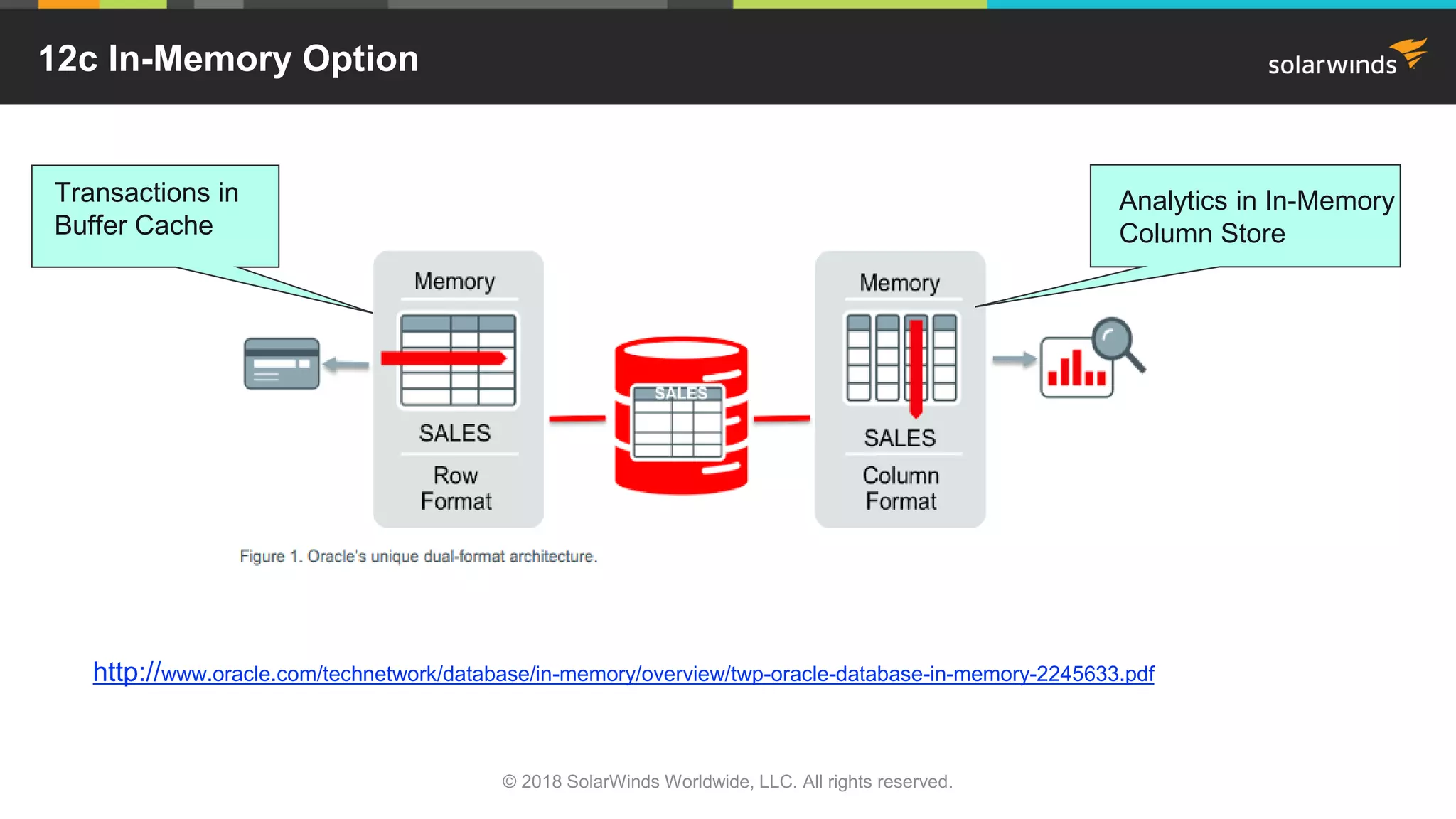
12c In-Memory Option
© 2018 SolarWinds Worldwide, LLC. All rights reserved.
http://www.oracle.com/technetwork/database/in-memory/overview/twp-oracle-database-in-memory-2245633.pdf
Transactions in
Buffer Cache
Analytics in In-Memory
Column Store
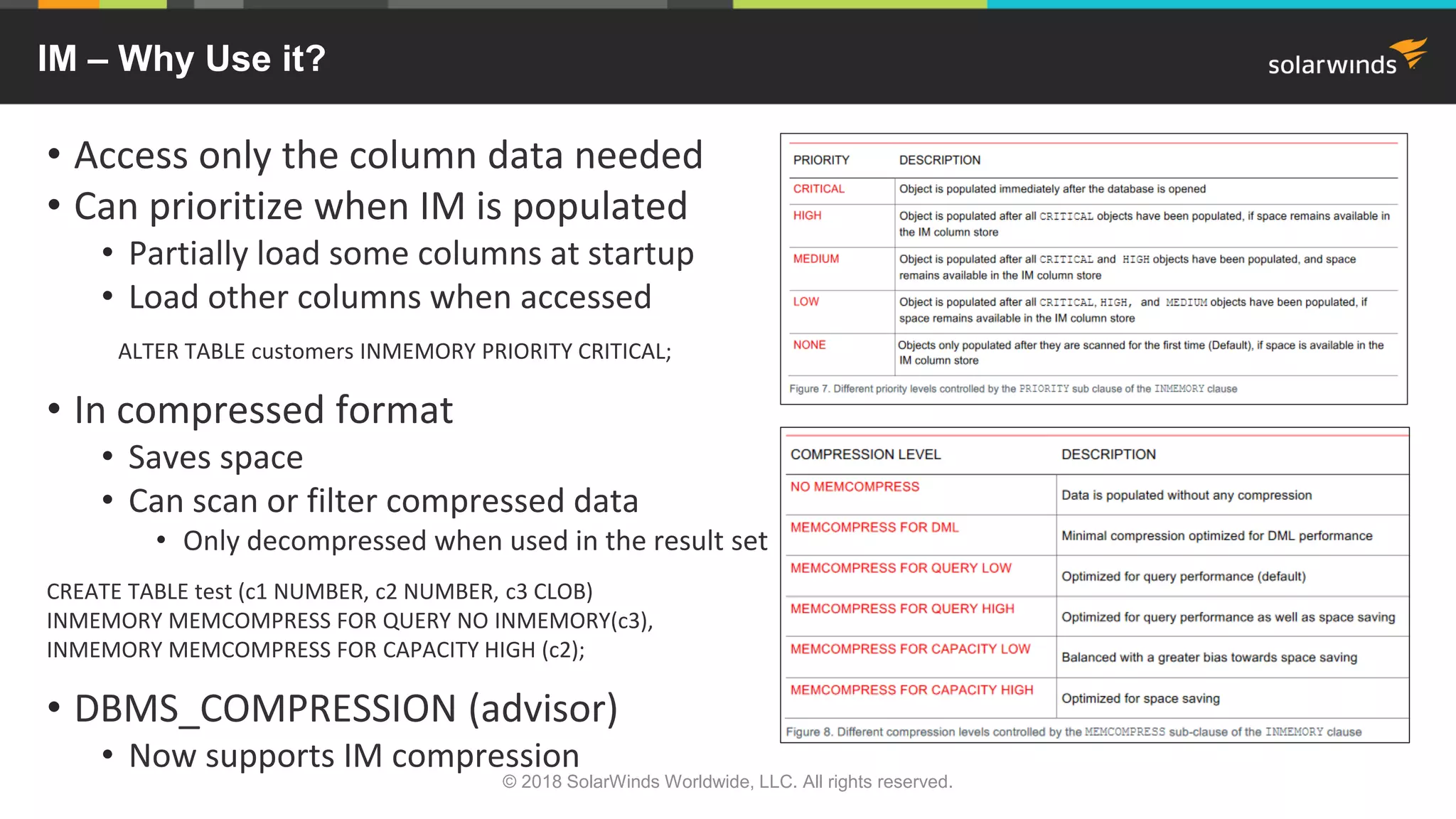
IM – Why Use it?
• Access only the column data needed
• Can prioritize when IM is populated
• Partially load some columns at startup
• Load other columns when accessed
ALTER TABLE customers INMEMORY PRIORITY CRITICAL;
• In compressed format
• Saves space
• Can scan or filter compressed data
• Only decompressed when used in the result set
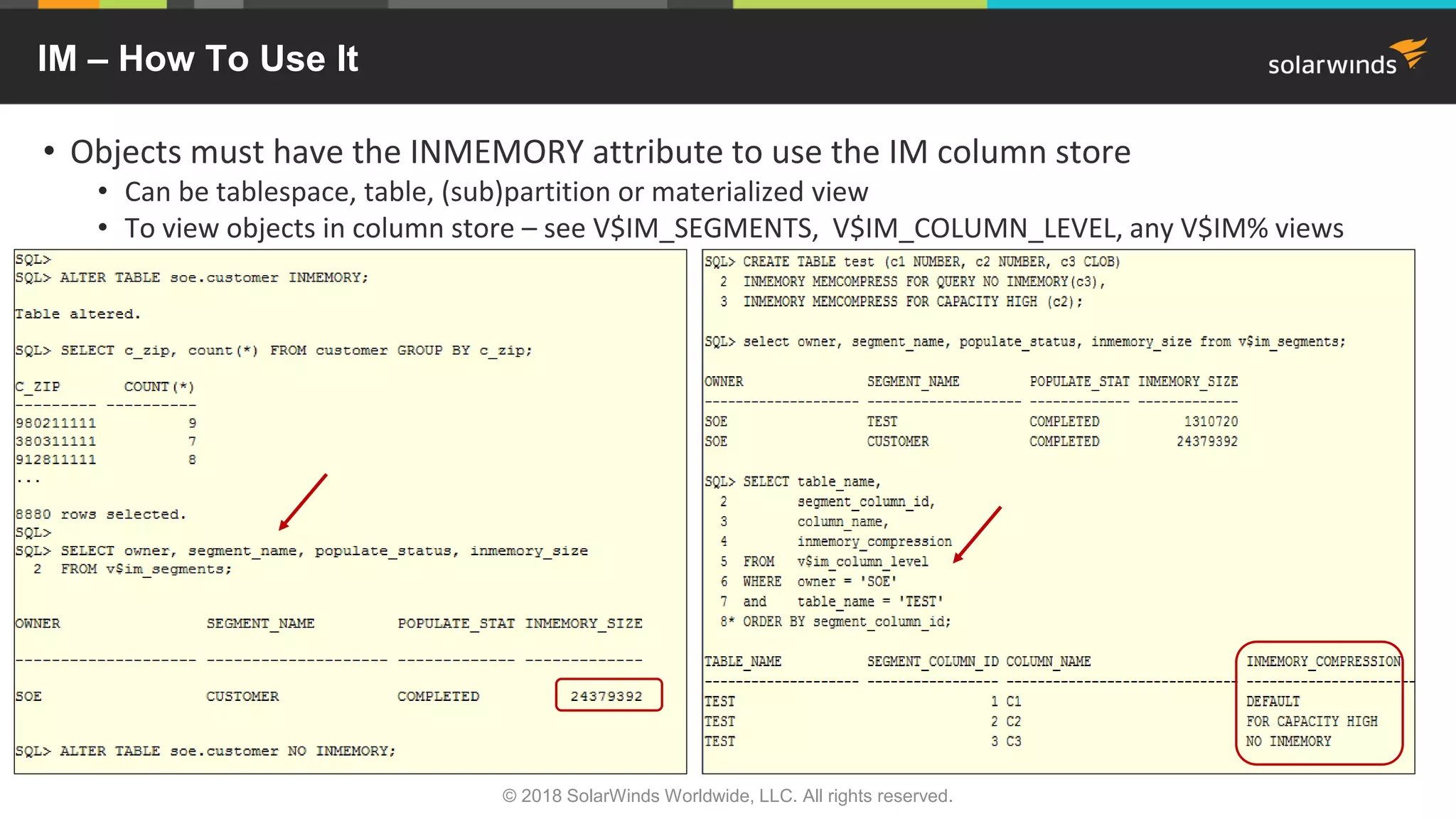
CREATE TABLE test (c1 NUMBER, c2 NUMBER, c3 CLOB)
INMEMORY MEMCOMPRESS FOR QUERY NO INMEMORY(c3),
INMEMORY MEMCOMPRESS FOR CAPACITY HIGH (c2);
• DBMS_COMPRESSION (advisor)
• Now supports IM compression
© 2018 SolarWinds Worldwide, LLC. All rights reserved.
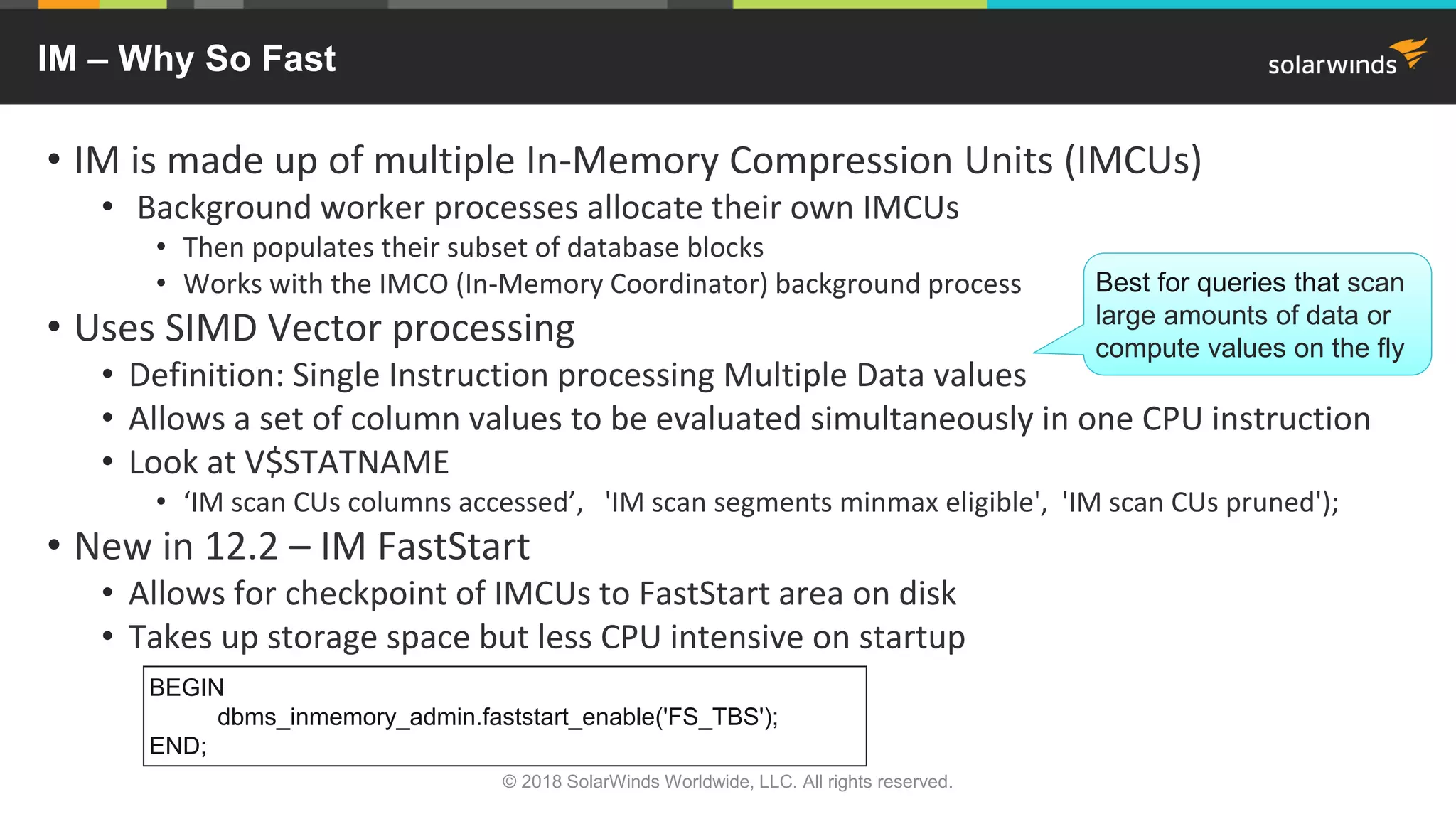
IM – Why So Fast
• IM is made up of multiple In-Memory Compression Units (IMCUs)
• Background worker processes allocate their own IMCUs
• Then populates their subset of database blocks
• Works with the IMCO (In-Memory Coordinator) background process
• Uses SIMD Vector processing
• Definition: Single Instruction processing Multiple Data values
• Allows a set of column values to be evaluated simultaneously in one CPU instruction
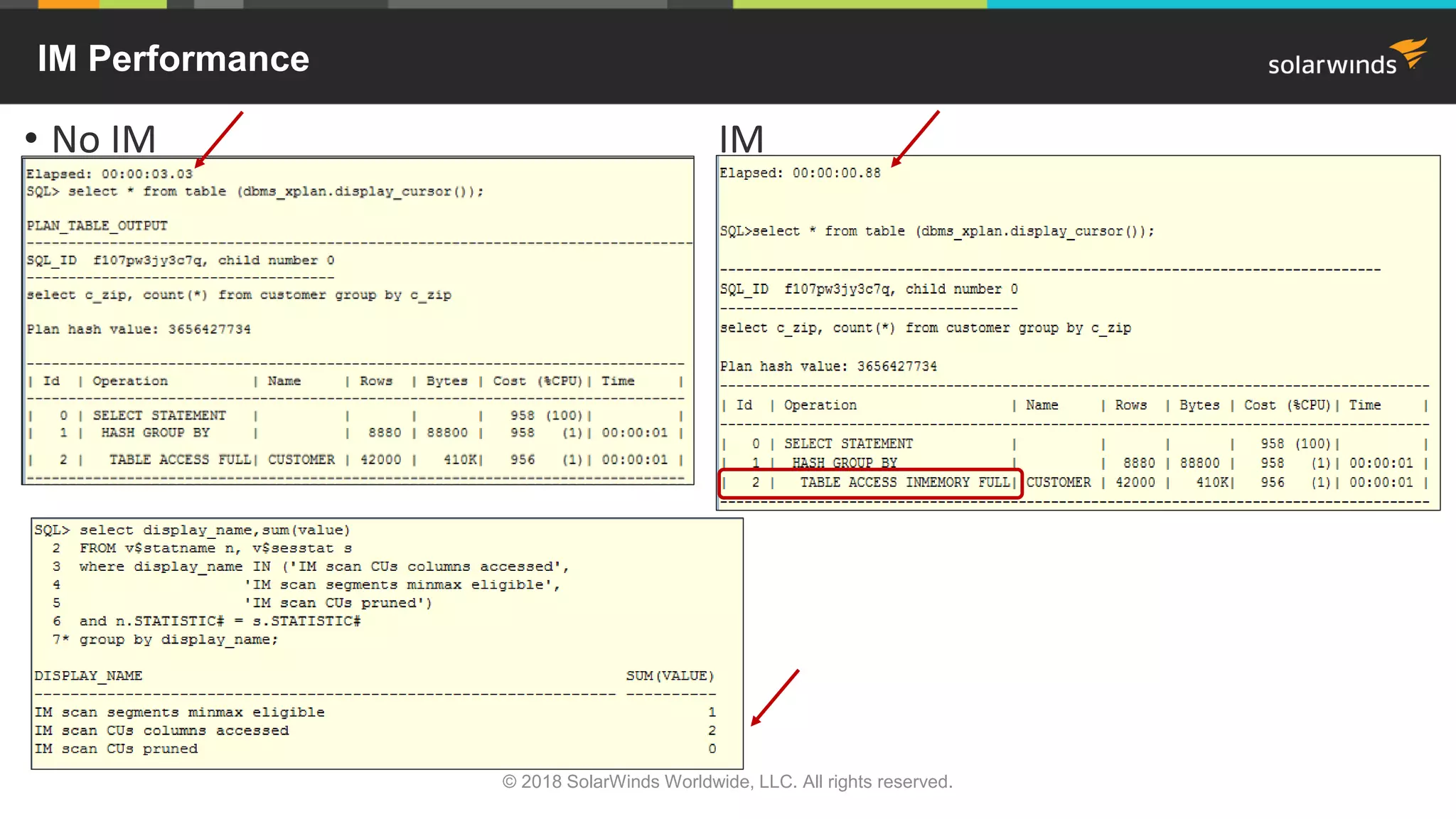
• Look at V$STATNAME
• ‘IM scan CUs columns accessed’, 'IM scan segments minmax eligible', 'IM scan CUs pruned');
• New in 12.2 – IM FastStart
• Allows for checkpoint of IMCUs to FastStart area on disk
• Takes up storage space but less CPU intensive on startup
© 2018 SolarWinds Worldwide, LLC. All rights reserved.
BEGIN
dbms_inmemory_admin.faststart_enable('FS_TBS');
END;
Best for queries that scan
large amounts of data or
compute values on the fly
IM – Why So Fast
• IM Storage Indexes
• Automatically created and maintained on each column in the column store
• Allow pruning to occur based on filter predicates in the query
• Keeps track of min/max values for each column in an IMCU
• Helps to avoid scans of IM column store
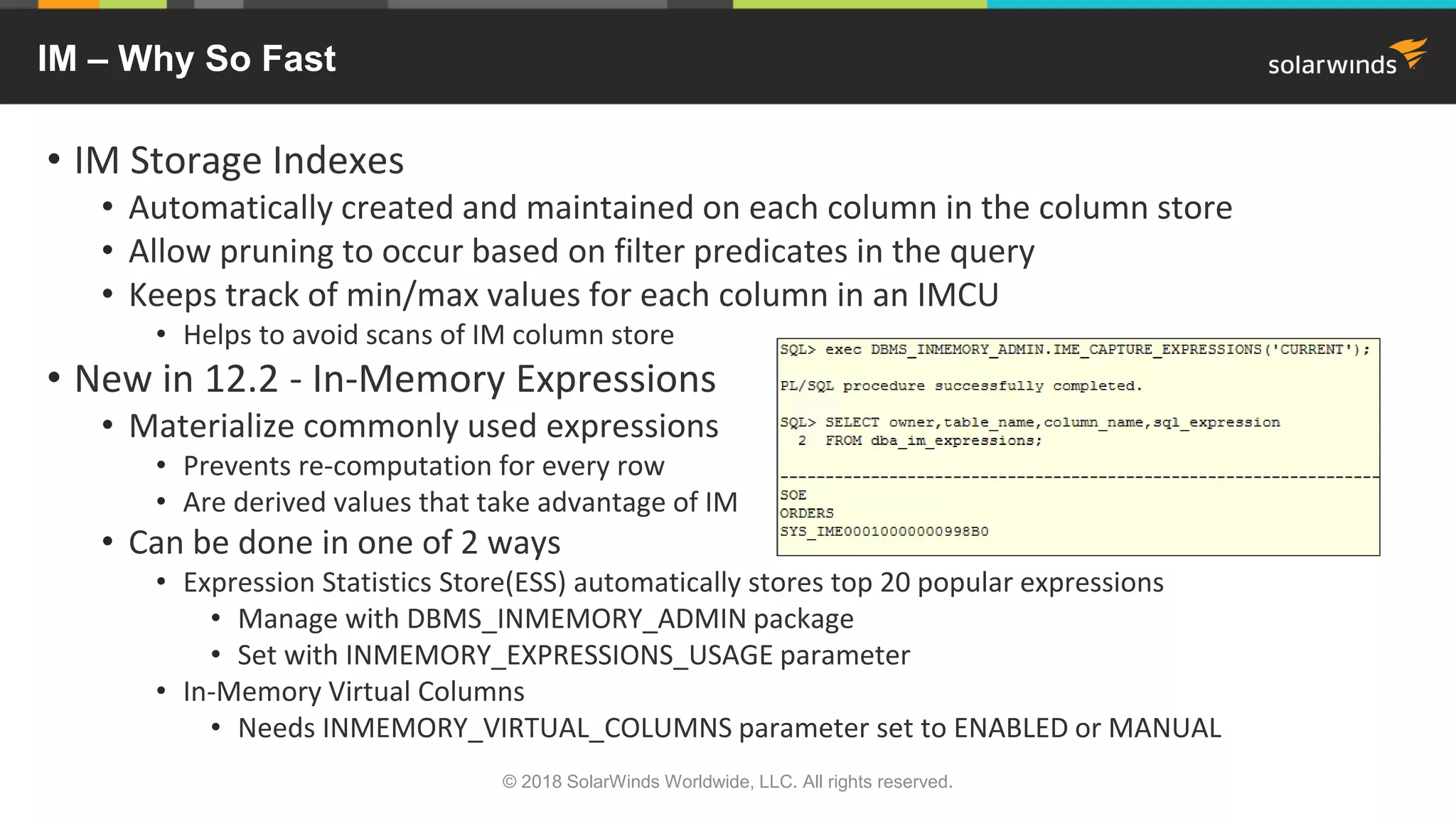
• New in 12.2 - In-Memory Expressions
• Materialize commonly used expressions
• Prevents re-computation for every row
• Are derived values that take advantage of IM
• Can be done in one of 2 ways
• Expression Statistics Store(ESS) automatically stores top 20 popular expressions
• Manage with DBMS_INMEMORY_ADMIN package
• Set with INMEMORY_EXPRESSIONS_USAGE parameter
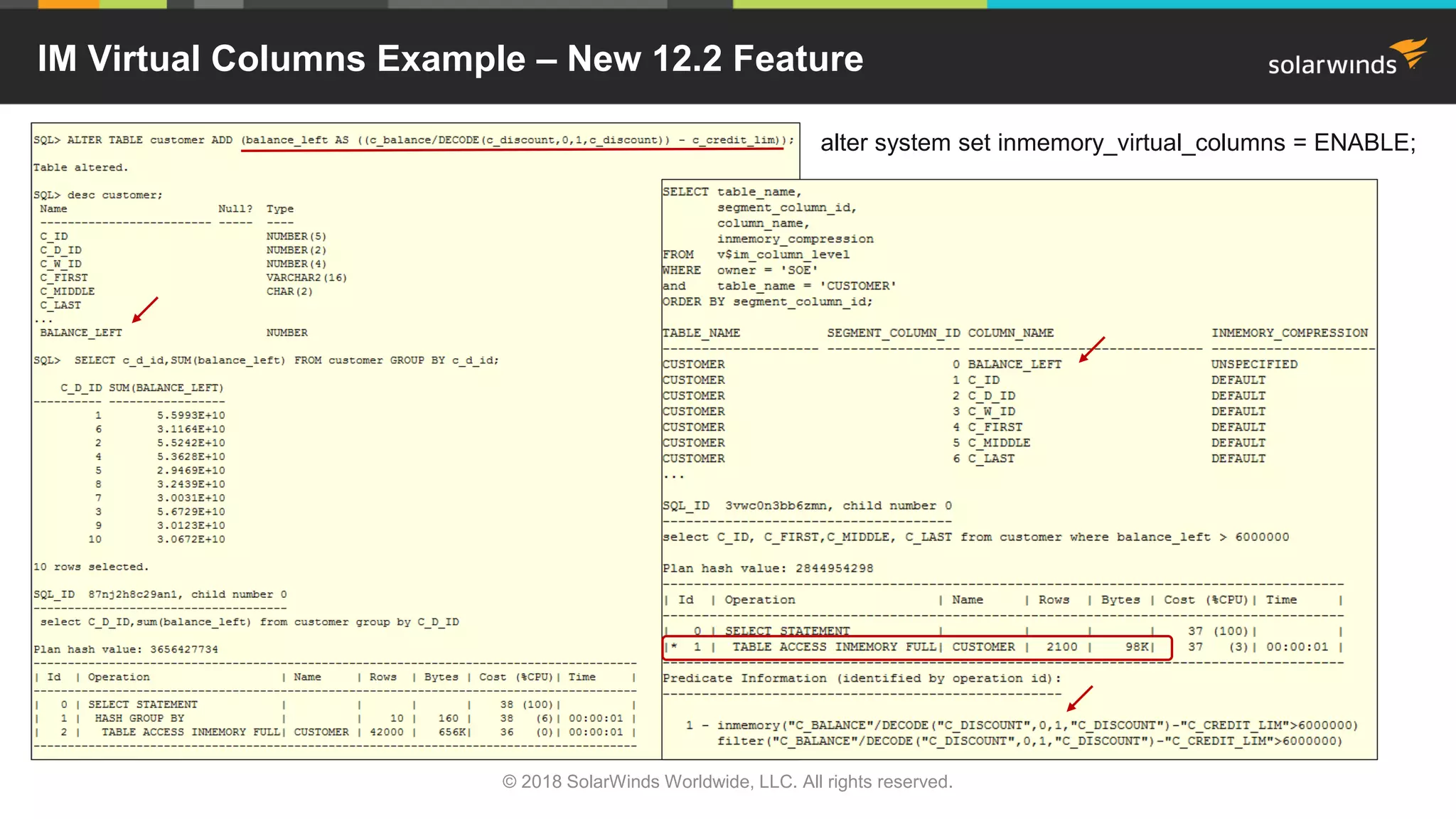
• In-Memory Virtual Columns
• Needs INMEMORY_VIRTUAL_COLUMNS parameter set to ENABLED or MANUAL
© 2018 SolarWinds Worldwide, LLC. All rights reserved.
IM - How To Use It
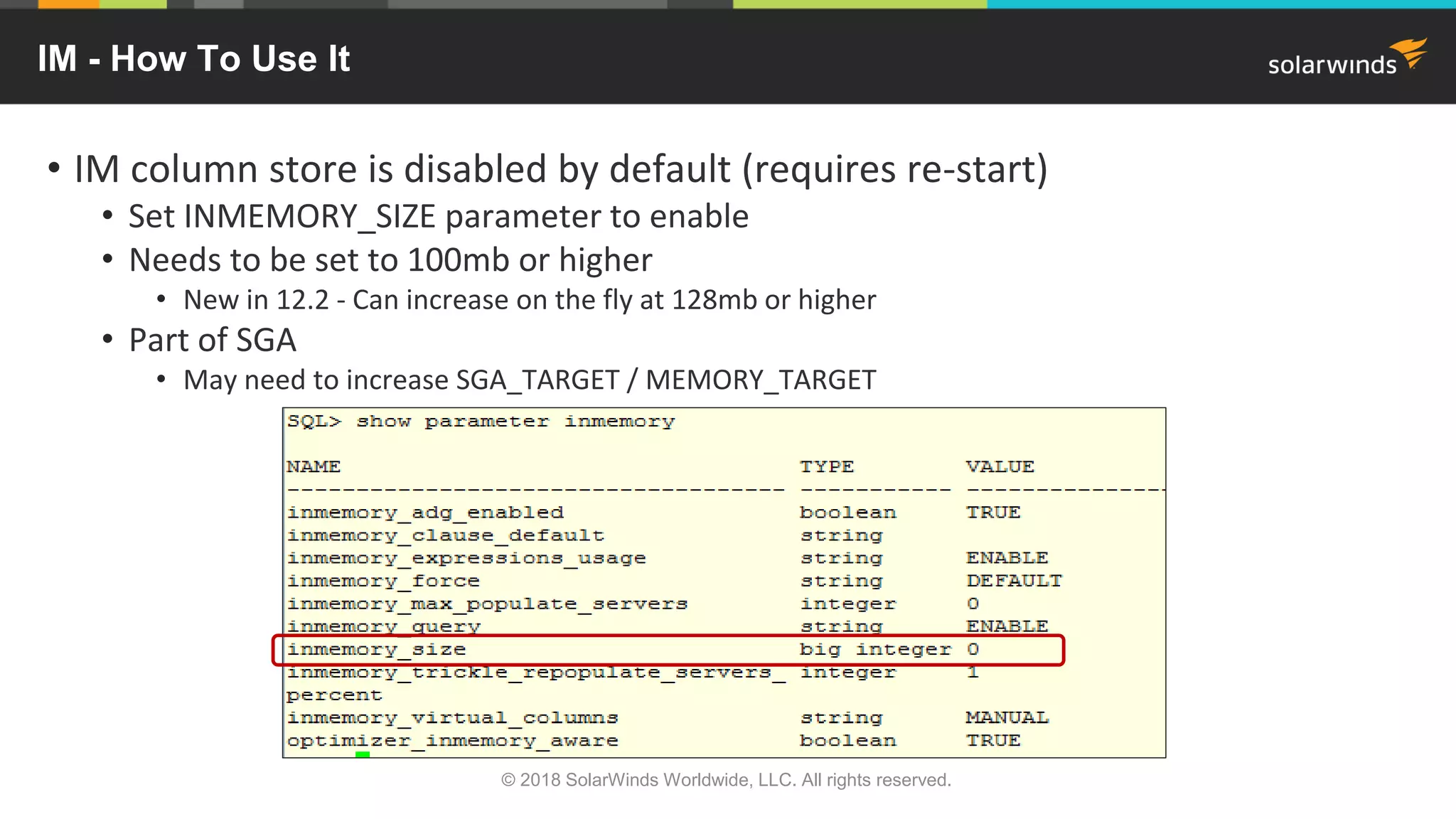
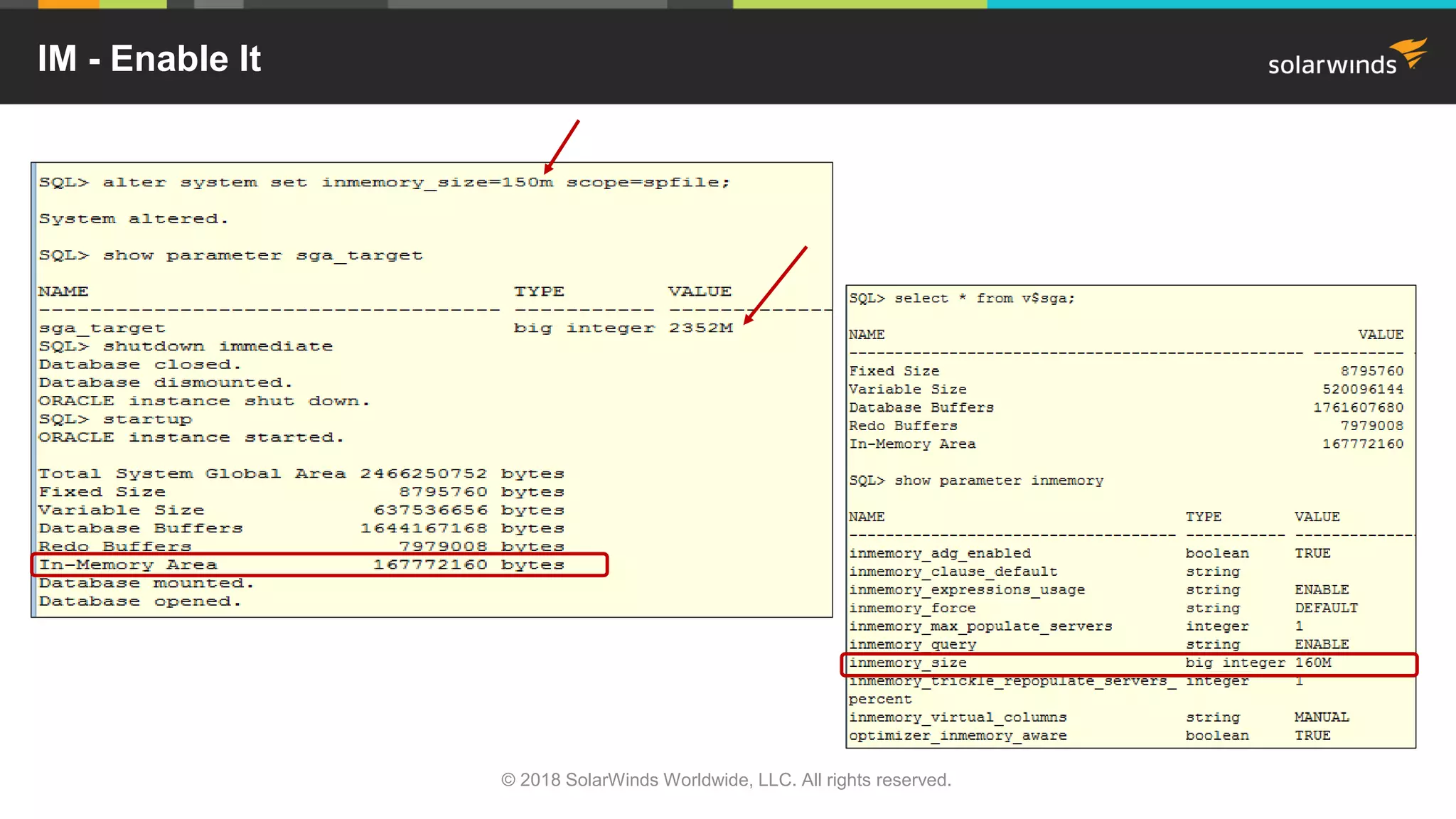
• IM column store is disabled by default (requires re-start)
• Set INMEMORY_SIZE parameter to enable
• Needs to be set to 100mb or higher
• New in 12.2 - Can increase on the fly at 128mb or higher
• Part of SGA
• May need to increase SGA_TARGET / MEMORY_TARGET
© 2018 SolarWinds Worldwide, LLC. All rights reserved.
IM - Enable It
© 2018 SolarWinds Worldwide, LLC. All rights reserved.
IM – How To Use It
• Objects must have the INMEMORY attribute to use the IM column store
• Can be tablespace, table, (sub)partition or materialized view
• To view objects in column store – see V$IM_SEGMENTS, V$IM_COLUMN_LEVEL, any V$IM% views
© 2018 SolarWinds Worldwide, LLC. All rights reserved.
IM Performance
• No IM IM
•
© 2018 SolarWinds Worldwide, LLC. All rights reserved.
IM Virtual Columns Example – New 12.2 Feature
© 2018 SolarWinds Worldwide, LLC. All rights reserved.
alter system set inmemory_virtual_columns = ENABLE;
IM Joins
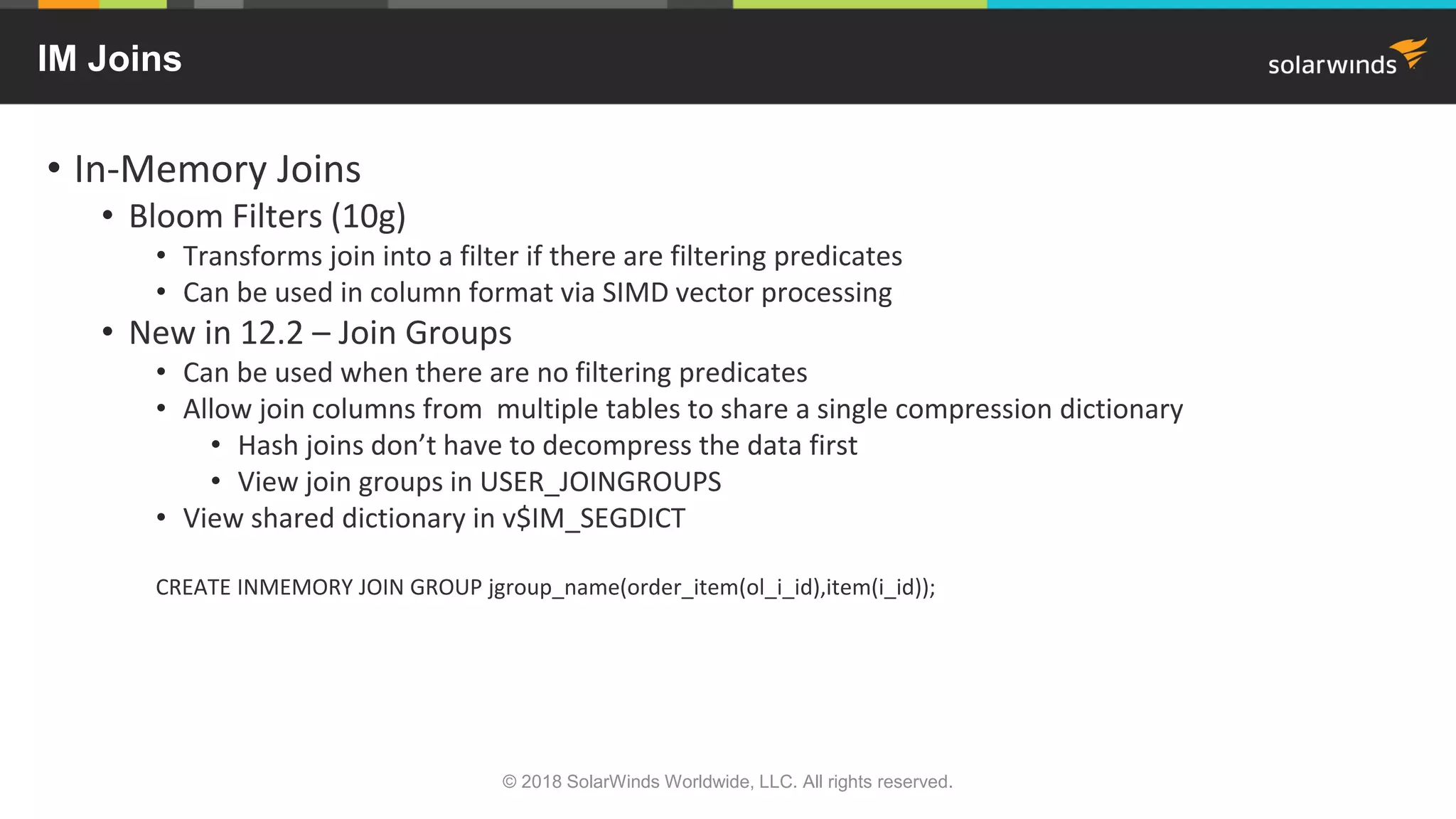
• In-Memory Joins
• Bloom Filters (10g)
• Transforms join into a filter if there are filtering predicates
• Can be used in column format via SIMD vector processing
• New in 12.2 – Join Groups
• Can be used when there are no filtering predicates
• Allow join columns from multiple tables to share a single compression dictionary
• Hash joins don’t have to decompress the data first
• View join groups in USER_JOINGROUPS
• View shared dictionary in v$IM_SEGDICT
CREATE INMEMORY JOIN GROUP jgroup_name(order_item(ol_i_id),item(i_id));
© 2018 SolarWinds Worldwide, LLC. All rights reserved.
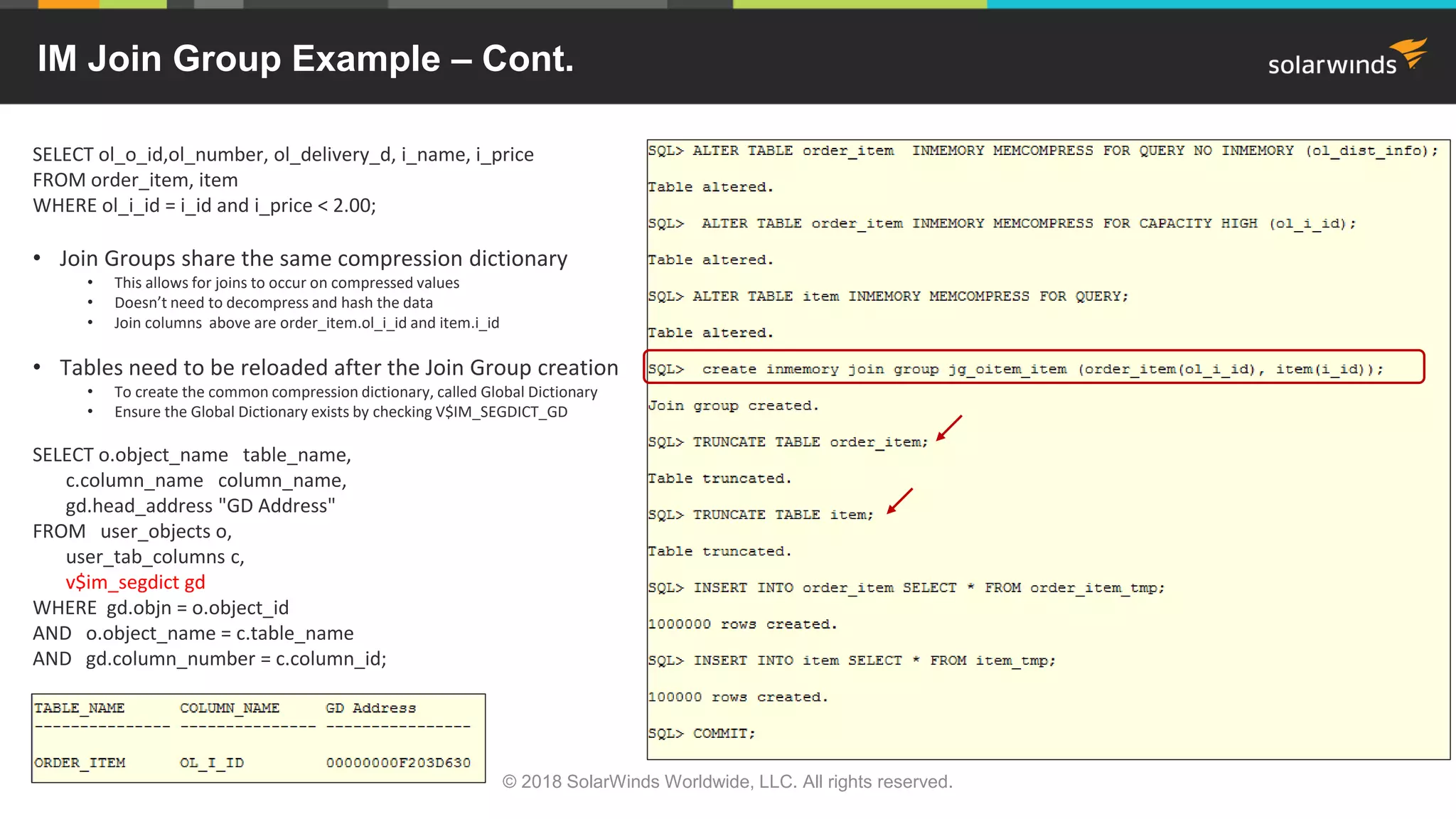
IM Join Group Example – Cont.
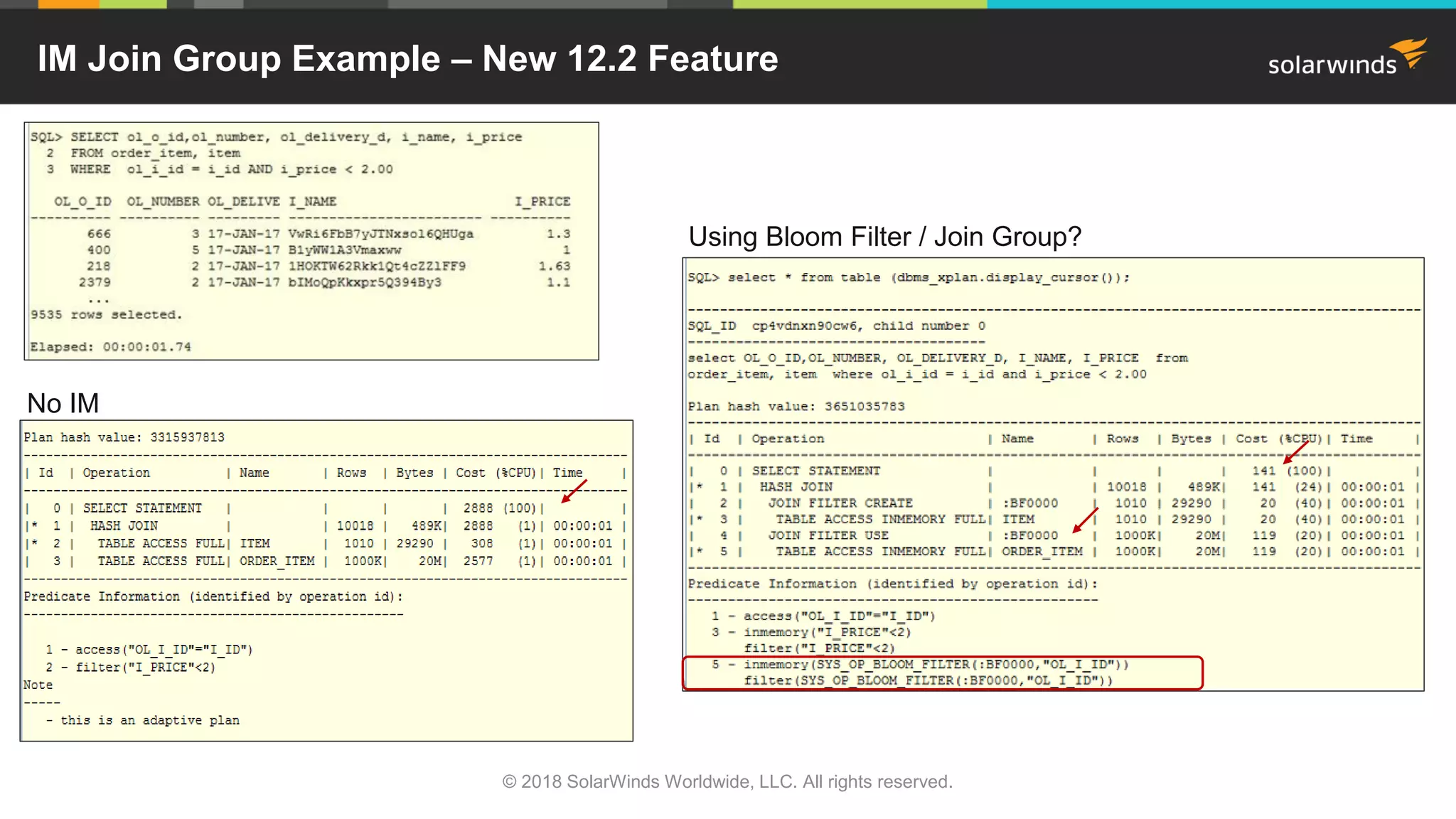
SELECT ol_o_id,ol_number, ol_delivery_d, i_name, i_price
FROM order_item, item
WHERE ol_i_id = i_id and i_price < 2.00;
• Join Groups share the same compression dictionary
• This allows for joins to occur on compressed values
• Doesn’t need to decompress and hash the data
• Join columns above are order_item.ol_i_id and item.i_id
• Tables need to be reloaded after the Join Group creation
• To create the common compression dictionary, called Global Dictionary
• Ensure the Global Dictionary exists by checking V$IM_SEGDICT_GD
SELECT o.object_name table_name,
c.column_name column_name,
gd.head_address "GD Address"
FROM user_objects o,
user_tab_columns c,
v$im_segdict gd
WHERE gd.objn = o.object_id
AND o.object_name = c.table_name
AND gd.column_number = c.column_id;
© 2018 SolarWinds Worldwide, LLC. All rights reserved.
IM Join Group Example – New 12.2 Feature
© 2018 SolarWinds Worldwide, LLC. All rights reserved.
No IM
Using Bloom Filter / Join Group?
IM Join Group Example
• Finding join group usage
• Need to use SQL_MONITOR - dbms_sqltune.report_sql_monitor_xml or OEM
• Query needs ‘SELECT /*+ MONITOR */’ hint
• Columnar encodings leveraged = 1
© 2018 SolarWinds Worldwide, LLC. All rights reserved.
Columnar Encodings
Leveraged
New SQL
• 12.1
• FETCH FIRST n ROWS ONLY
• Retrieves first rows without scanning everything
• Faster
• OFFSET n ROWS FETCH FIRST n ROWS ONLY
• Skip some number of rows
© 2018 SolarWinds Worldwide, LLC. All rights reserved.
New SQL
• 12.2 Approximate Query Processing
• Used for approximate ‘count distinct’ values and adds percentile aggregation
• Allows for faster processing of large data sets
• Not exact but usually within 95%+ range
• Three new parameters – alter system/session
• approx_for_aggregation Default=FALSE
• Can be overridden by the next 2 parameters
• If true, sets approx_for_percentile=ALL
• approx_for_count_distinct Default=FALSE
• Overrides exact COUNT DISTINCT clause
• approx_for_percentile Default=NONE
• Overrides MEDIAN clause (PERCENTILE_CONT)
• Values can be PERCENTILE_CONT, PERCENTILE_DISC, and ALL
• Can be used without any changes to existing code
• Replaces exact functions with SQL functions (next page) that return approximate results
© 2018 SolarWinds Worldwide, LLC. All rights reserved.
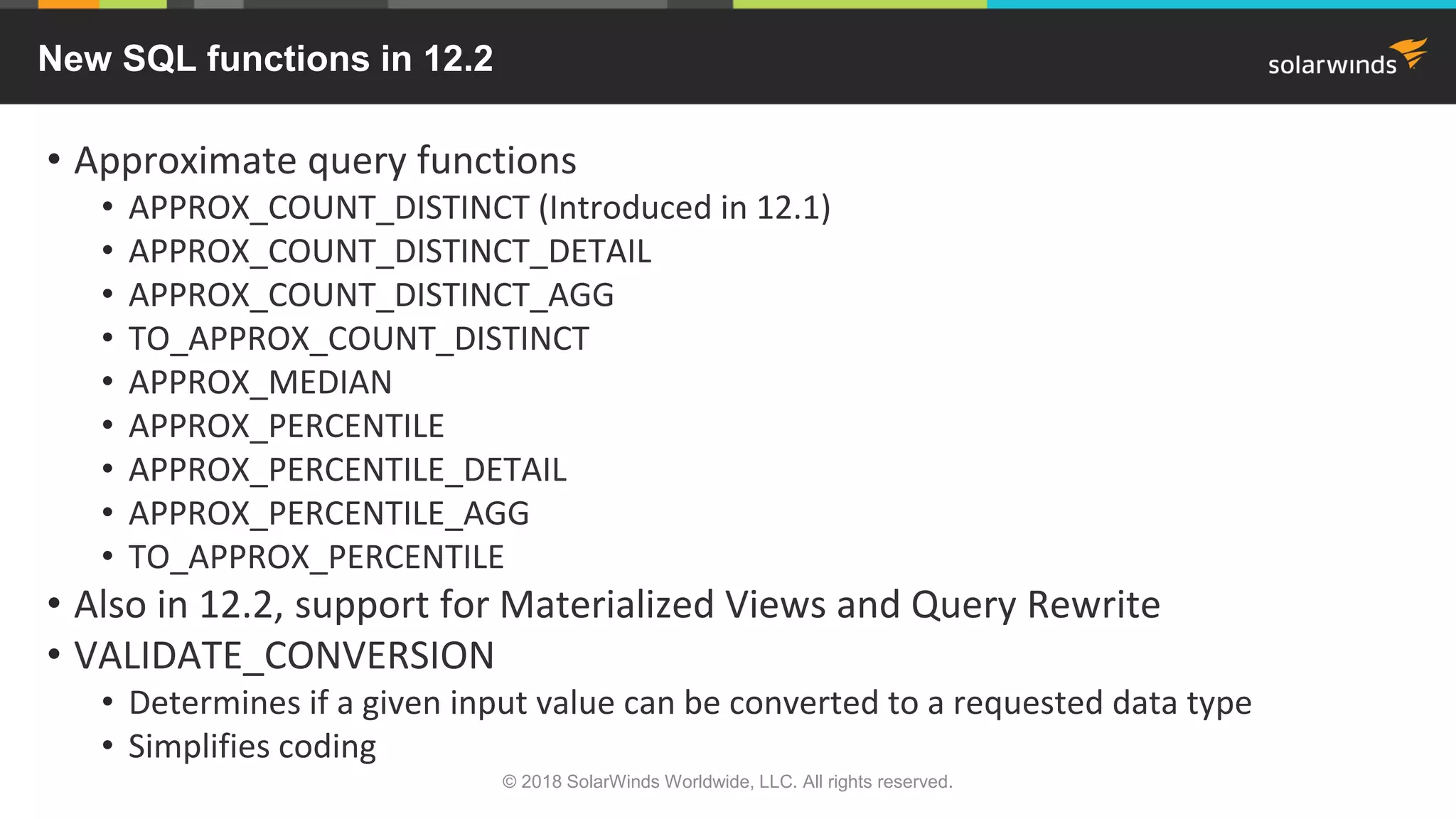
New SQL functions in 12.2
• Approximate query functions
• APPROX_COUNT_DISTINCT (Introduced in 12.1)
• APPROX_COUNT_DISTINCT_DETAIL
• APPROX_COUNT_DISTINCT_AGG
• TO_APPROX_COUNT_DISTINCT
• APPROX_MEDIAN
• APPROX_PERCENTILE
• APPROX_PERCENTILE_DETAIL
• APPROX_PERCENTILE_AGG
• TO_APPROX_PERCENTILE
• Also in 12.2, support for Materialized Views and Query Rewrite
• VALIDATE_CONVERSION
• Determines if a given input value can be converted to a requested data type
• Simplifies coding
© 2018 SolarWinds Worldwide, LLC. All rights reserved.
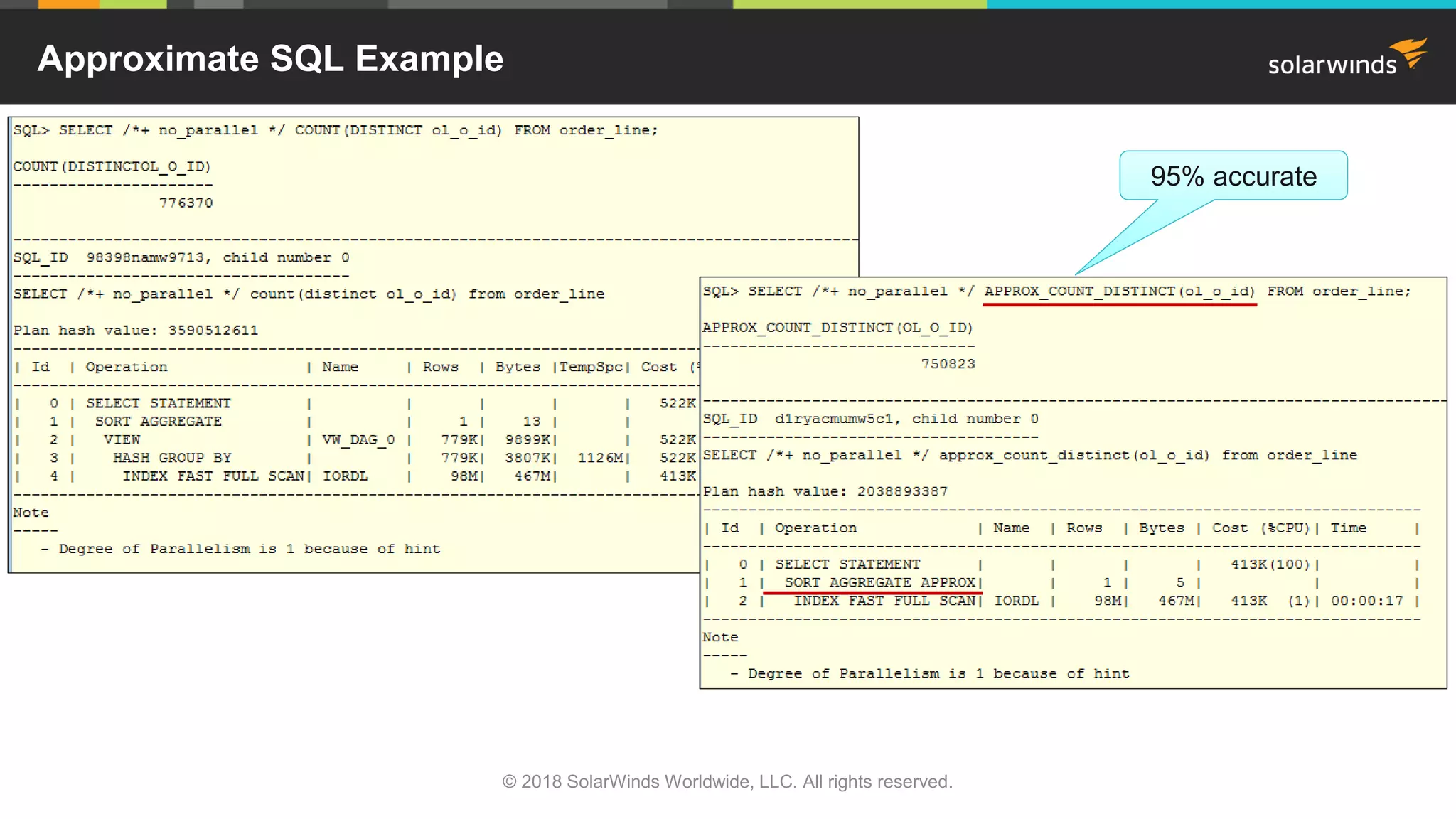
Approximate SQL Example
© 2018 SolarWinds Worldwide, LLC. All rights reserved.
95% accurate
Approximate SQL Example With Changing Code
© 2018 SolarWinds Worldwide, LLC. All rights reserved.
Why is it exact?
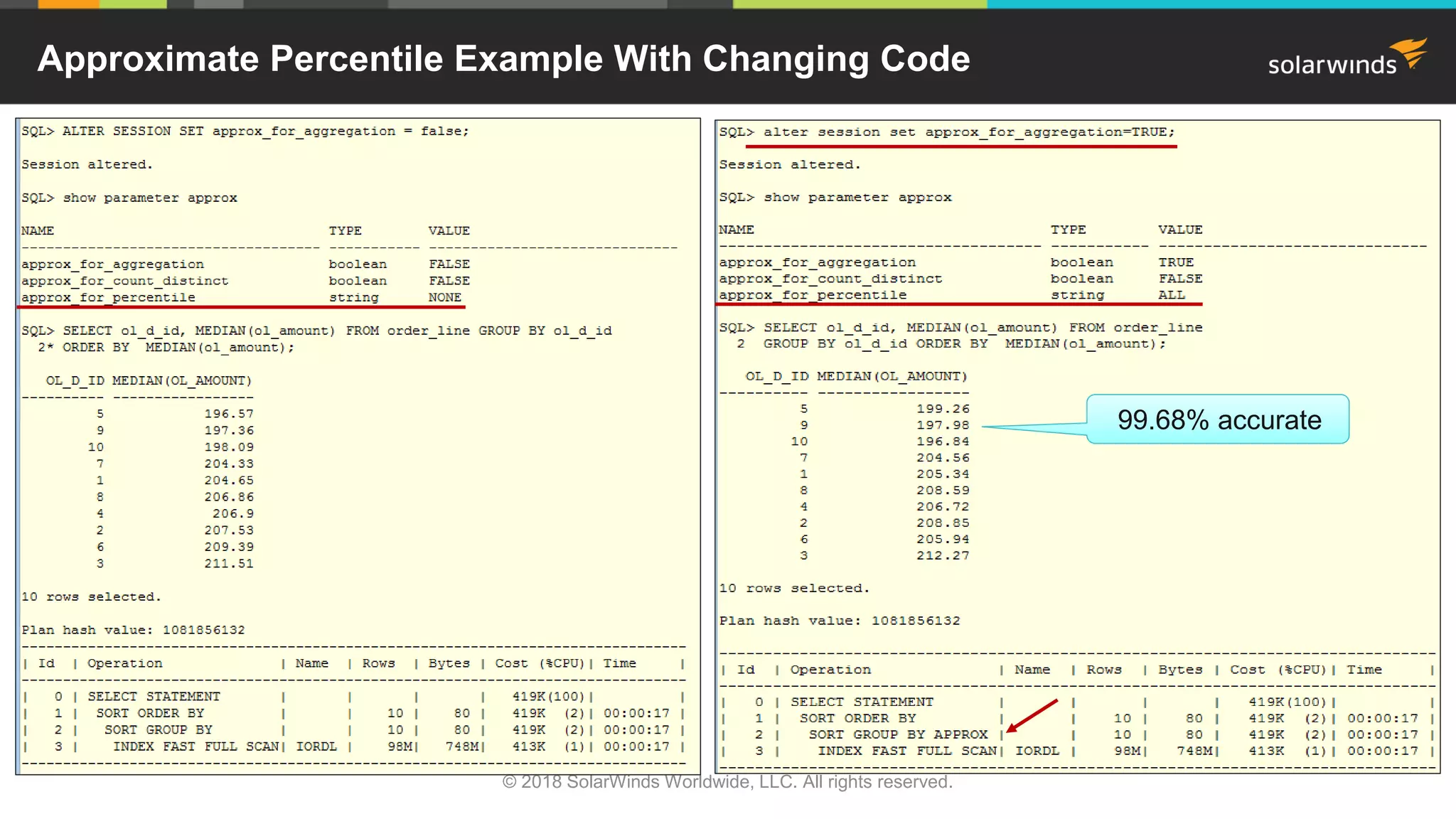
Need to
set both
Approximate Percentile Example With Changing Code
© 2018 SolarWinds Worldwide, LLC. All rights reserved.
99.68% accurate
12.2 Dictionary Improvements and Other New Stuff
© 2018 SolarWinds Worldwide, LLC. All rights reserved.
• Object identifiers have increased from 30 bytes to 128 bytes
• Such as users, roles, tables, columns, indexes, constraints, etc…
• Changed in dictionary views - instead of VARCHAR2(30), now VARCHAR2(128)
• May affect your reporting
• Exceptions:
• Disk groups, pluggable databases (PDBs), rollback segments, and tablespaces still 30 bytes
• Names of databases are still limited to 8 bytes
• SQLPlus Improvements
• HISTORY
• SET HIST[ORY] {ON | OFF | n}
• SHOW HISTORY
• RUN n
• SET ROWPREFETCH {1 | n} / SET LOBPREFETCH {0 | n}
• SET STATEMENTC[ACHE] {0 | n}
12.2 Optimizer Changes
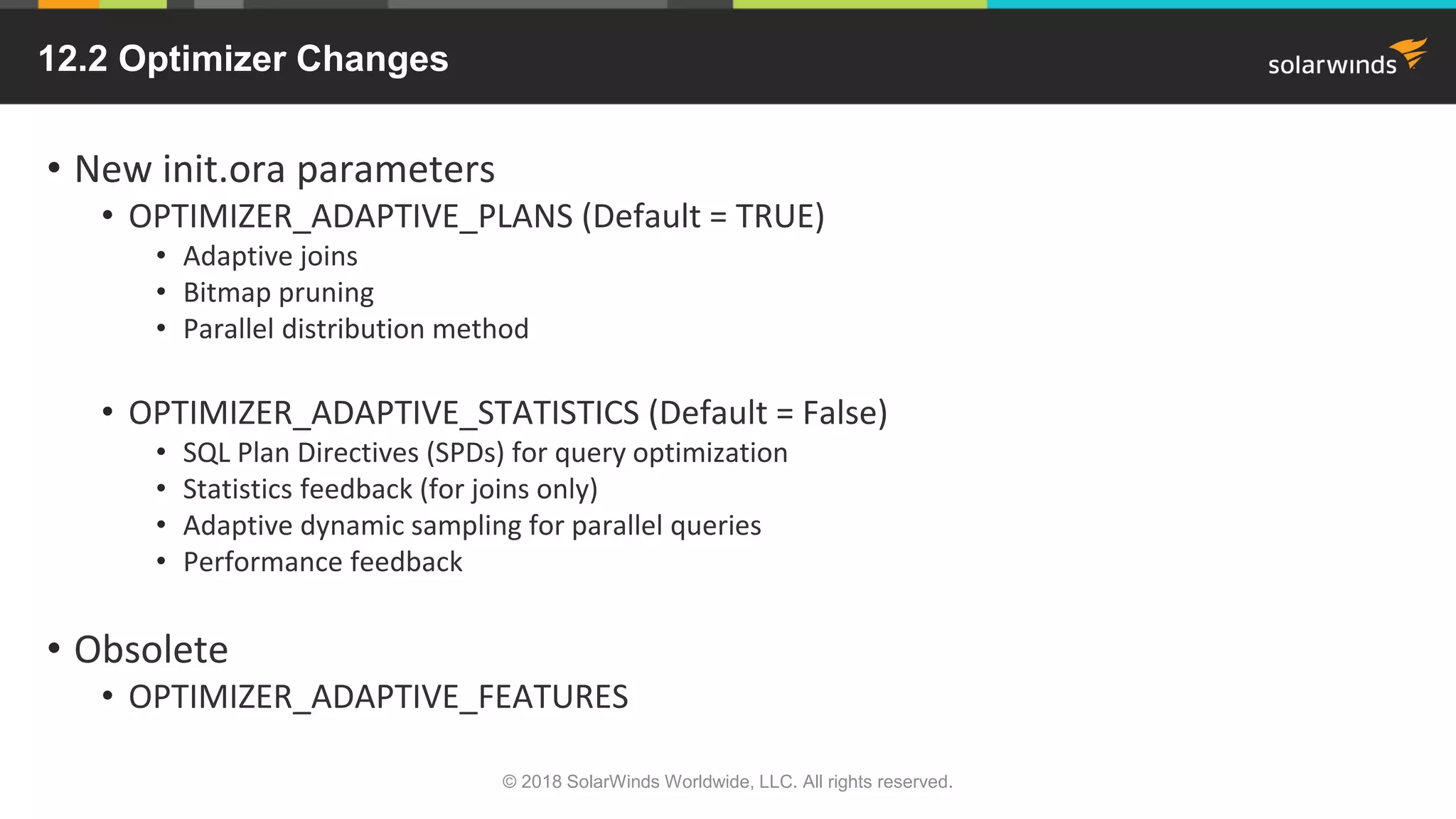
• New init.ora parameters
• OPTIMIZER_ADAPTIVE_PLANS (Default = TRUE)
• Adaptive joins
• Bitmap pruning
• Parallel distribution method
• OPTIMIZER_ADAPTIVE_STATISTICS (Default = False)
• SQL Plan Directives (SPDs) for query optimization
• Statistics feedback (for joins only)
• Adaptive dynamic sampling for parallel queries
• Performance feedback
• Obsolete
• OPTIMIZER_ADAPTIVE_FEATURES
© 2018 SolarWinds Worldwide, LLC. All rights reserved.
12.2 Optimizer Changes
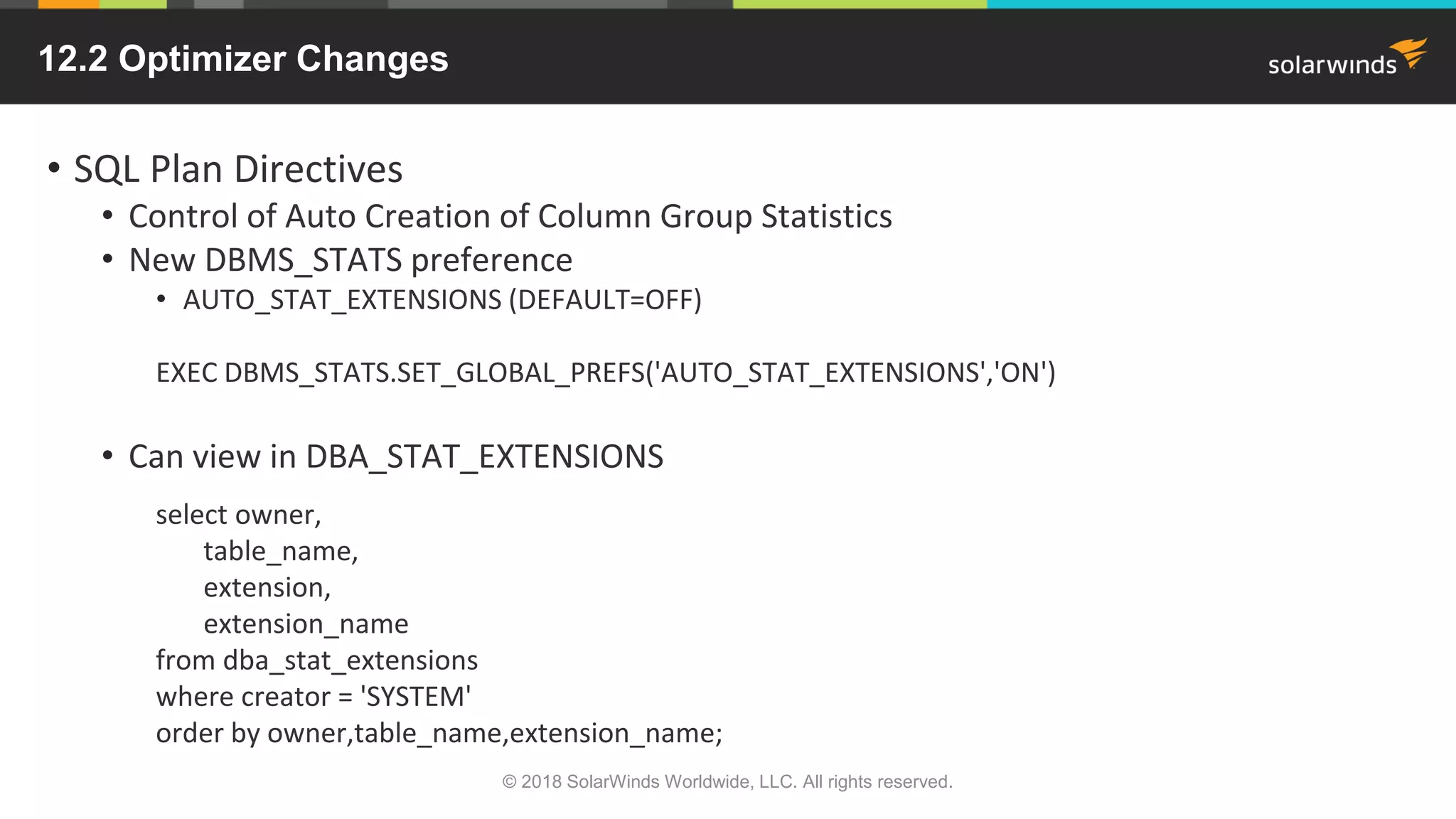
• SQL Plan Directives
• Control of Auto Creation of Column Group Statistics
• New DBMS_STATS preference
• AUTO_STAT_EXTENSIONS (DEFAULT=OFF)
EXEC DBMS_STATS.SET_GLOBAL_PREFS('AUTO_STAT_EXTENSIONS','ON')
• Can view in DBA_STAT_EXTENSIONS
select owner,
table_name,
extension,
extension_name
from dba_stat_extensions
where creator = 'SYSTEM'
order by owner,table_name,extension_name;
© 2018 SolarWinds Worldwide, LLC. All rights reserved.
Multitenant Changes in 12.2
• Can create a hot clone of PDB
• No downtime for PDB being cloned
• Uses redo then undo for all committed / uncommitted transactions
• Local undo required
• Undo can now exist in PDB
• Archive logging must be enabled
• Can create a refreshable PDB (for VLDBs)
• Built on top of hot clone
• Golden master for snapshot clones
• Automatically or manually refreshed from redo
• Opened in read-only mode
• Can relocate PDBs to different CDBs online
• Built on top of Refreshable PDB
• Great way to load-balance
© 2018 SolarWinds Worldwide, LLC. All rights reserved.
Can help maintain SLAs for
performance and availability
Multitenant Changes in 12.2
• Can have 4096 PDBs per CDB
• Instead of original 252
• Can flashback a single PDB
• Doesn’t have to use local undo but easier than shared undo
• Can use SCN, restore point, clean restore point or guarantee restore point
• View SCNs in V$FLASHBACK_DATABASE_LOG
• https://oracle-base.com/articles/12c/multitenant-flashback-pdb-12cr2
FLASHBACK PLUGGABLE DATABASE pdb1 TO TIMESTAMP some_date;
• Data Guard now supports individual PDB-level failover
• Used to be all PDBs or none
• Now can set parameter ENABLED_PDBS_ON_STANDBY on standby database
• Examples – ‘*’, ‘PDB?’, ‘PDB*’, ‘-PDB1’
© 2018 SolarWinds Worldwide, LLC. All rights reserved.
New Memory Settings At PDB Level
• If using Database Smart Flash Cache
• Can set CDB resource plan to allocate memory between PDBs
• MEMORY_LIMIT – percentage that limits PDB memory usage
• MEMORY_MIN – percentage guaranteed for PDB memory usage
• http://docs.oracle.com/cd/E80920_01/SAGUG/exadata-storage-server-iorm.htm#SAGUG20421
• Can set INMEMORY_SIZE at PDB
• Can be over-subscribed
© 2018 SolarWinds Worldwide, LLC. All rights reserved.
12.2 Partitioning Features
• Read-only partitions
• Useful for old partitions
• Use READ ONLY
• READ WRITE (default)
• Can use CTAS or ALTER
© 2018 SolarWinds Worldwide, LLC. All rights reserved.
12.2 Partitioning Features
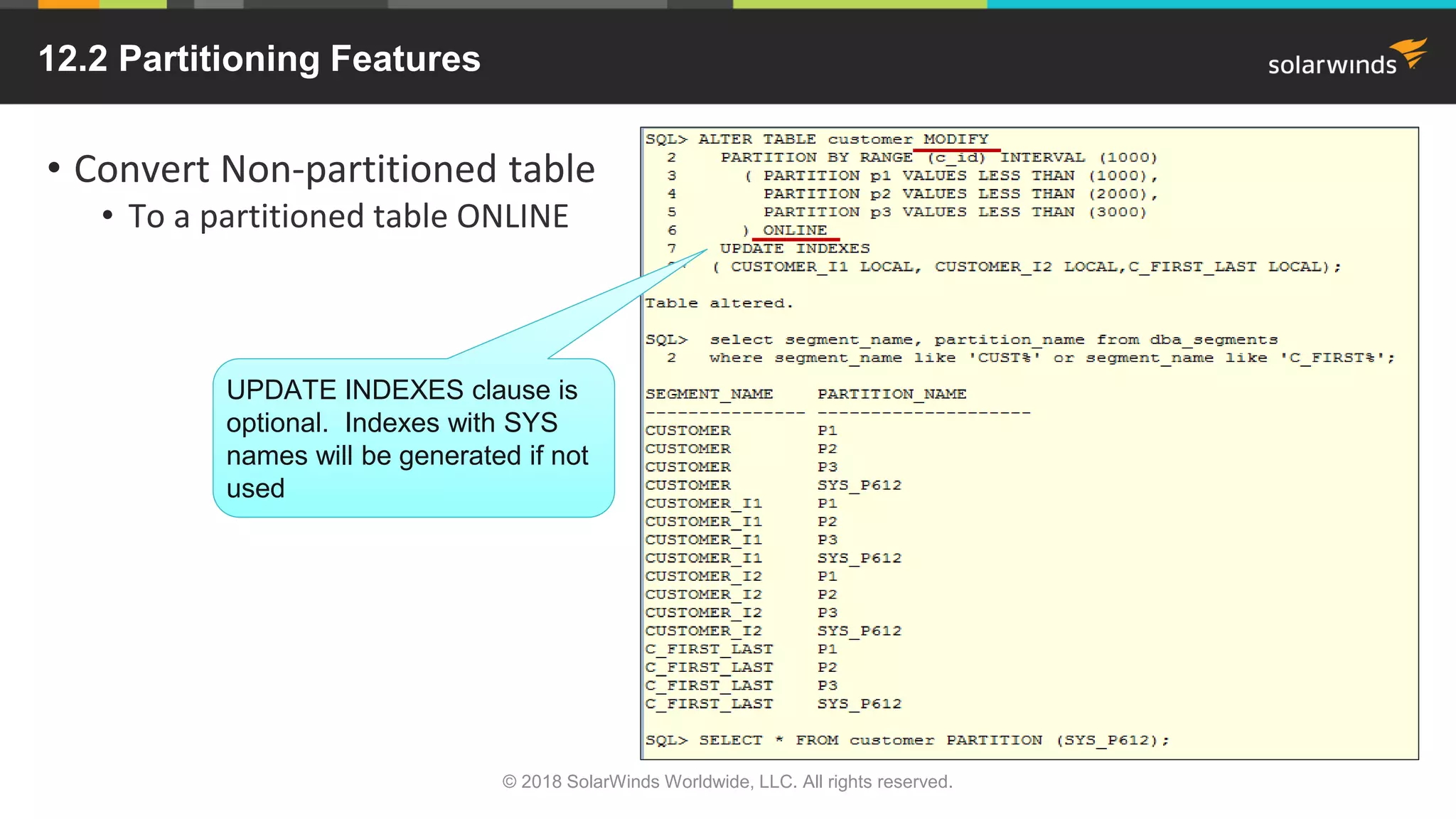
• Convert Non-partitioned table
• To a partitioned table ONLINE
© 2018 SolarWinds Worldwide, LLC. All rights reserved.
UPDATE INDEXES clause is
optional. Indexes with SYS
names will be generated if not
used
12.2 Partitioning Features
• Automatic List Partitions
• Requires creation of first partition
• No default partitions
© 2018 SolarWinds Worldwide, LLC. All rights reserved.
Multi-column List Partitions
Can only have one default partition
12.2 Partitioning Features
• Filtered Partitions for Maintenance Operations
• Helps with partition pruning and data cleanup
• MOVE PARTITION
• MERGE PARTITION
• SPLIT PARTITION
• Can do ONLINE
• Other New Features
• ‘For exchange with’ clause
• Partitioned external tables
• 12.2-partition-create-tables
© 2018 SolarWinds Worldwide, LLC. All rights reserved.
12.2 Sharding Feature
• Sharding horizontally partitions data across independent databases
• A ‘share nothing’ architecture – CPU, memory, disk
• Each database is known as a shard
• All shards together make up a logical database
• Called sharded database (SDB)
• Intended for custom OLTP applications that:
• Have a well-defined data model
• Have a data distribution strategy
• (consistent hash, range, list, or composite)
• Primarily access data using a sharding key
• e.g., customer_id, account_no, or country_id
© 2018 SolarWinds Worldwide, LLC. All rights reserved.
https://docs.oracle.com/database/122/ADMIN/sharding-overview
12.2 Sharding Feature
• Benefits of Sharding
• Linear scalability for performance and capacity
• Eliminates single points of failure
• Nothing is shared
• Geographical distribution of data
• Data is closer to consumers (e.g. Facebook)
• Satisfies regulatory requirements
• Simplifies Cloud Deployment
• Easy to do rolling upgrades
• Examples of Companies
• Online payment systems
• Regulatory requirements
• Airline ticketing systems
• Social media companies
© 2018 SolarWinds Worldwide, LLC. All rights reserved.
http://www.oracle.com/technetwork/database/availability/oraclesharding-whitepaper
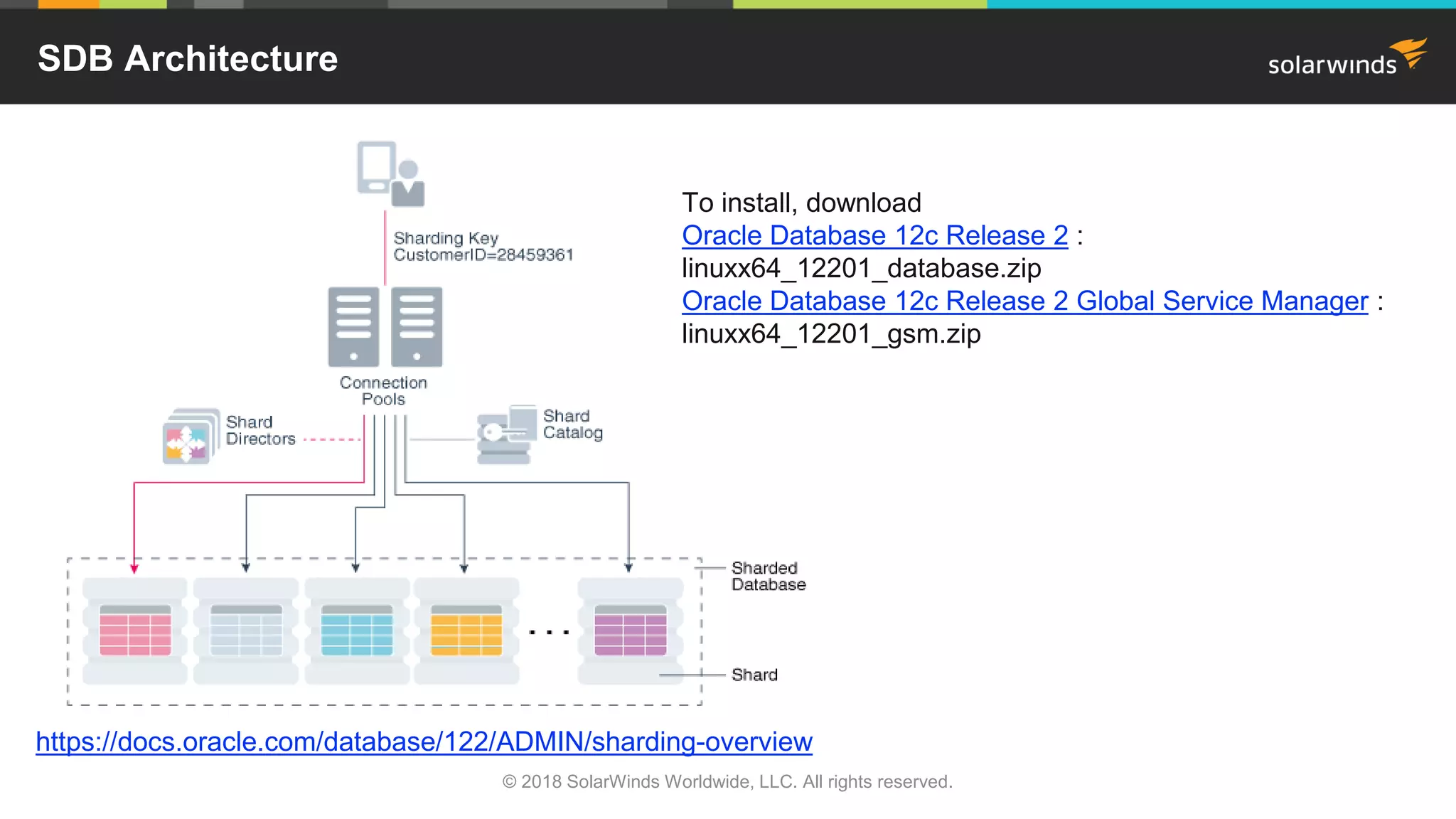
Other SDB Components
• Shard Catalog
• An Oracle database that centralizes management of a SDB
• Supports automated shard deployment
• Handles multi-shard queries
• Holds master copy of duplicated table
• Shard Directors
• Network listeners which route connections based on a sharding key
• Connection pools can act as shard directors for pooled connections
• Global service
• An extension of database services for the SDB
• Management Interfaces
• GDSCTL (command-line utility) and OEM
© 2018 SolarWinds Worldwide, LLC. All rights reserved.
SDB Architecture
© 2018 SolarWinds Worldwide, LLC. All rights reserved.
https://docs.oracle.com/database/122/ADMIN/sharding-overview
To install, download
Oracle Database 12c Release 2 :
linuxx64_12201_database.zip
Oracle Database 12c Release 2 Global Service Manager :
linuxx64_12201_gsm.zip
Summary
• Oracle 12.2 provides a lot of new features and enhancements
• This presentation only touches on a few
• In-Memory virtual columns
• Helps speed up analytical queries
• New approximate functions
• Great if you don’t need exact answers
• PDB hot cloning
• Online partitioning
• Sharded database (SDB) or the ‘Horizontal database’
• Good news – it’s been around in the Cloud for quite sometime
• Became available for on-premise in March 2017
• Hopefully many of the bugs have been worked out
• Try it out and tell me which new feature you like best
• Email me at janis.griffin@solarwinds.com
© 2018 SolarWinds Worldwide, LLC. All rights reserved.
www.solarwinds.com/dpa-download/
Resolve Performance Issues quickly—Free Trial
• Try Database Performance Analyzer FREE for 14 days
• Improve root cause of slow performance
o Quickly identify root cause of issues that impact end-user
response time
o See historical trends over days, months, and years
o Understand impact of VMware® performance
o Agentless architecture with no dependence on Oracle Packs,
installs in minutes
© 2018 SolarWinds Worldwide, LLC. All rights reserved.
The SolarWinds, SolarWinds & Design, Orion, and THWACK trademarks are the exclusive
property of SolarWinds Worldwide, LLC or its affiliates, are registered with the U.S.
Patent and Trademark Office, and may be registered or pending registration in other
countries. All other SolarWinds trademarks, service marks, and logos may be common
law marks or are registered or pending registration. All other trademarks mentioned
herein are used for identification purposes only and are trademarks of (and may be
registered trademarks) of their respective companies.
Thank You!!!

Oracle 12.2 - My Favorite Top 5 New or Improved Features

  • 1.
    Oracle 12.2 –My Favorite Top Five New or Improved Features Janis Griffin Senior DBA / Performance Evangelist
  • 2.
    © 2018 SolarWindsWorldwide, LLC. All rights reserved. Who Am I • Senior DBA / Performance Evangelist for SolarWinds • Janis.Griffin@solarwindscom • Twitter® - @DoBoutAnything • Current – 25+ Years in Oracle®, SQL Server®, ASE, MySQL® • DBA and Developer • Specialize in Performance Tuning • Review Database Performance for Customers and Prospects • Common Question – How do I tune it?
  • 3.
    © 2018 SolarWindsWorldwide, LLC. All rights reserved. Agenda • In-Memory Option • How it works • Virtual Columns, join groups • SQL, Dictionary, and Optimizer Enhancements • New Functions and Syntax • Approximate and First n Rows • SQLPlus Improvements • PDB Improvements • Hot Clone • Memory Management • New Partitioning Features • Sharding Capabilities • The ‘Horizontal’ Database
  • 4.
    © 2018 SolarWindsWorldwide, LLC. All rights reserved. Memory – In The Beginning… • 9i - SGA_MAX_SIZE • Memory could grow/shrink • DB_CACHE_SIZE • No more DB_BLOCK_BUFFERS • 10g - Automatic Shared Memory Management (ASMM) • SGA_TARGET • Set minimum values for • Data Cache, Large Pool • Shared Pool, Java Pool • 11g - MEMORY_TARGET (AMM) • Sets SGA + PGA size together • Can still control minimum sizes - e.g., PGA_AGGREGATE_LIMIT (new in 12c) • 12c - INMEMORY_SIZE • Set the size of IN-MEMORY Column Store
  • 5.
    12c In-Memory Option •Designed for mixed workloads • Can combine OLAP with OLTP queries • No more Data Warehouse (maybe) • Dual-format architecture doesn’t double memory requirements • Approximately less than a 20% additional memory overhead • No additional storage costs or synchronization issues • No changes to application code • Optimizer is fully aware of the column format • Routes analytic queries to the column format • OLTP operations to the row format • Only objects with the INMEMORY attribute • Can be in the IN-Memory Column Store (IM) • Works on tablespaces, tables, partitions, sub-partitions or materialized views © 2018 SolarWinds Worldwide, LLC. All rights reserved.
  • 6.
    12c In-Memory Option ©2018 SolarWinds Worldwide, LLC. All rights reserved. http://www.oracle.com/technetwork/database/in-memory/overview/twp-oracle-database-in-memory-2245633.pdf Transactions in Buffer Cache Analytics in In-Memory Column Store
  • 7.
    IM – WhyUse it? • Access only the column data needed • Can prioritize when IM is populated • Partially load some columns at startup • Load other columns when accessed ALTER TABLE customers INMEMORY PRIORITY CRITICAL; • In compressed format • Saves space • Can scan or filter compressed data • Only decompressed when used in the result set CREATE TABLE test (c1 NUMBER, c2 NUMBER, c3 CLOB) INMEMORY MEMCOMPRESS FOR QUERY NO INMEMORY(c3), INMEMORY MEMCOMPRESS FOR CAPACITY HIGH (c2); • DBMS_COMPRESSION (advisor) • Now supports IM compression © 2018 SolarWinds Worldwide, LLC. All rights reserved.
  • 8.
    IM – WhySo Fast • IM is made up of multiple In-Memory Compression Units (IMCUs) • Background worker processes allocate their own IMCUs • Then populates their subset of database blocks • Works with the IMCO (In-Memory Coordinator) background process • Uses SIMD Vector processing • Definition: Single Instruction processing Multiple Data values • Allows a set of column values to be evaluated simultaneously in one CPU instruction • Look at V$STATNAME • ‘IM scan CUs columns accessed’, 'IM scan segments minmax eligible', 'IM scan CUs pruned'); • New in 12.2 – IM FastStart • Allows for checkpoint of IMCUs to FastStart area on disk • Takes up storage space but less CPU intensive on startup © 2018 SolarWinds Worldwide, LLC. All rights reserved. BEGIN dbms_inmemory_admin.faststart_enable('FS_TBS'); END; Best for queries that scan large amounts of data or compute values on the fly
  • 9.
    IM – WhySo Fast • IM Storage Indexes • Automatically created and maintained on each column in the column store • Allow pruning to occur based on filter predicates in the query • Keeps track of min/max values for each column in an IMCU • Helps to avoid scans of IM column store • New in 12.2 - In-Memory Expressions • Materialize commonly used expressions • Prevents re-computation for every row • Are derived values that take advantage of IM • Can be done in one of 2 ways • Expression Statistics Store(ESS) automatically stores top 20 popular expressions • Manage with DBMS_INMEMORY_ADMIN package • Set with INMEMORY_EXPRESSIONS_USAGE parameter • In-Memory Virtual Columns • Needs INMEMORY_VIRTUAL_COLUMNS parameter set to ENABLED or MANUAL © 2018 SolarWinds Worldwide, LLC. All rights reserved.
  • 10.
    IM - HowTo Use It • IM column store is disabled by default (requires re-start) • Set INMEMORY_SIZE parameter to enable • Needs to be set to 100mb or higher • New in 12.2 - Can increase on the fly at 128mb or higher • Part of SGA • May need to increase SGA_TARGET / MEMORY_TARGET © 2018 SolarWinds Worldwide, LLC. All rights reserved.
  • 11.
    IM - EnableIt © 2018 SolarWinds Worldwide, LLC. All rights reserved.
  • 12.
    IM – HowTo Use It • Objects must have the INMEMORY attribute to use the IM column store • Can be tablespace, table, (sub)partition or materialized view • To view objects in column store – see V$IM_SEGMENTS, V$IM_COLUMN_LEVEL, any V$IM% views © 2018 SolarWinds Worldwide, LLC. All rights reserved.
  • 13.
    IM Performance • NoIM IM • © 2018 SolarWinds Worldwide, LLC. All rights reserved.
  • 14.
    IM Virtual ColumnsExample – New 12.2 Feature © 2018 SolarWinds Worldwide, LLC. All rights reserved. alter system set inmemory_virtual_columns = ENABLE;
  • 15.
    IM Joins • In-MemoryJoins • Bloom Filters (10g) • Transforms join into a filter if there are filtering predicates • Can be used in column format via SIMD vector processing • New in 12.2 – Join Groups • Can be used when there are no filtering predicates • Allow join columns from multiple tables to share a single compression dictionary • Hash joins don’t have to decompress the data first • View join groups in USER_JOINGROUPS • View shared dictionary in v$IM_SEGDICT CREATE INMEMORY JOIN GROUP jgroup_name(order_item(ol_i_id),item(i_id)); © 2018 SolarWinds Worldwide, LLC. All rights reserved.
  • 16.
    IM Join GroupExample – Cont. SELECT ol_o_id,ol_number, ol_delivery_d, i_name, i_price FROM order_item, item WHERE ol_i_id = i_id and i_price < 2.00; • Join Groups share the same compression dictionary • This allows for joins to occur on compressed values • Doesn’t need to decompress and hash the data • Join columns above are order_item.ol_i_id and item.i_id • Tables need to be reloaded after the Join Group creation • To create the common compression dictionary, called Global Dictionary • Ensure the Global Dictionary exists by checking V$IM_SEGDICT_GD SELECT o.object_name table_name, c.column_name column_name, gd.head_address "GD Address" FROM user_objects o, user_tab_columns c, v$im_segdict gd WHERE gd.objn = o.object_id AND o.object_name = c.table_name AND gd.column_number = c.column_id; © 2018 SolarWinds Worldwide, LLC. All rights reserved.
  • 17.
    IM Join GroupExample – New 12.2 Feature © 2018 SolarWinds Worldwide, LLC. All rights reserved. No IM Using Bloom Filter / Join Group?
  • 18.
    IM Join GroupExample • Finding join group usage • Need to use SQL_MONITOR - dbms_sqltune.report_sql_monitor_xml or OEM • Query needs ‘SELECT /*+ MONITOR */’ hint • Columnar encodings leveraged = 1 © 2018 SolarWinds Worldwide, LLC. All rights reserved. Columnar Encodings Leveraged
  • 19.
    New SQL • 12.1 •FETCH FIRST n ROWS ONLY • Retrieves first rows without scanning everything • Faster • OFFSET n ROWS FETCH FIRST n ROWS ONLY • Skip some number of rows © 2018 SolarWinds Worldwide, LLC. All rights reserved.
  • 20.
    New SQL • 12.2Approximate Query Processing • Used for approximate ‘count distinct’ values and adds percentile aggregation • Allows for faster processing of large data sets • Not exact but usually within 95%+ range • Three new parameters – alter system/session • approx_for_aggregation Default=FALSE • Can be overridden by the next 2 parameters • If true, sets approx_for_percentile=ALL • approx_for_count_distinct Default=FALSE • Overrides exact COUNT DISTINCT clause • approx_for_percentile Default=NONE • Overrides MEDIAN clause (PERCENTILE_CONT) • Values can be PERCENTILE_CONT, PERCENTILE_DISC, and ALL • Can be used without any changes to existing code • Replaces exact functions with SQL functions (next page) that return approximate results © 2018 SolarWinds Worldwide, LLC. All rights reserved.
  • 21.
    New SQL functionsin 12.2 • Approximate query functions • APPROX_COUNT_DISTINCT (Introduced in 12.1) • APPROX_COUNT_DISTINCT_DETAIL • APPROX_COUNT_DISTINCT_AGG • TO_APPROX_COUNT_DISTINCT • APPROX_MEDIAN • APPROX_PERCENTILE • APPROX_PERCENTILE_DETAIL • APPROX_PERCENTILE_AGG • TO_APPROX_PERCENTILE • Also in 12.2, support for Materialized Views and Query Rewrite • VALIDATE_CONVERSION • Determines if a given input value can be converted to a requested data type • Simplifies coding © 2018 SolarWinds Worldwide, LLC. All rights reserved.
  • 22.
    Approximate SQL Example ©2018 SolarWinds Worldwide, LLC. All rights reserved. 95% accurate
  • 23.
    Approximate SQL ExampleWith Changing Code © 2018 SolarWinds Worldwide, LLC. All rights reserved. Why is it exact? Need to set both
  • 24.
    Approximate Percentile ExampleWith Changing Code © 2018 SolarWinds Worldwide, LLC. All rights reserved. 99.68% accurate
  • 25.
    12.2 Dictionary Improvementsand Other New Stuff © 2018 SolarWinds Worldwide, LLC. All rights reserved. • Object identifiers have increased from 30 bytes to 128 bytes • Such as users, roles, tables, columns, indexes, constraints, etc… • Changed in dictionary views - instead of VARCHAR2(30), now VARCHAR2(128) • May affect your reporting • Exceptions: • Disk groups, pluggable databases (PDBs), rollback segments, and tablespaces still 30 bytes • Names of databases are still limited to 8 bytes • SQLPlus Improvements • HISTORY • SET HIST[ORY] {ON | OFF | n} • SHOW HISTORY • RUN n • SET ROWPREFETCH {1 | n} / SET LOBPREFETCH {0 | n} • SET STATEMENTC[ACHE] {0 | n}
  • 26.
    12.2 Optimizer Changes •New init.ora parameters • OPTIMIZER_ADAPTIVE_PLANS (Default = TRUE) • Adaptive joins • Bitmap pruning • Parallel distribution method • OPTIMIZER_ADAPTIVE_STATISTICS (Default = False) • SQL Plan Directives (SPDs) for query optimization • Statistics feedback (for joins only) • Adaptive dynamic sampling for parallel queries • Performance feedback • Obsolete • OPTIMIZER_ADAPTIVE_FEATURES © 2018 SolarWinds Worldwide, LLC. All rights reserved.
  • 27.
    12.2 Optimizer Changes •SQL Plan Directives • Control of Auto Creation of Column Group Statistics • New DBMS_STATS preference • AUTO_STAT_EXTENSIONS (DEFAULT=OFF) EXEC DBMS_STATS.SET_GLOBAL_PREFS('AUTO_STAT_EXTENSIONS','ON') • Can view in DBA_STAT_EXTENSIONS select owner, table_name, extension, extension_name from dba_stat_extensions where creator = 'SYSTEM' order by owner,table_name,extension_name; © 2018 SolarWinds Worldwide, LLC. All rights reserved.
  • 28.
    Multitenant Changes in12.2 • Can create a hot clone of PDB • No downtime for PDB being cloned • Uses redo then undo for all committed / uncommitted transactions • Local undo required • Undo can now exist in PDB • Archive logging must be enabled • Can create a refreshable PDB (for VLDBs) • Built on top of hot clone • Golden master for snapshot clones • Automatically or manually refreshed from redo • Opened in read-only mode • Can relocate PDBs to different CDBs online • Built on top of Refreshable PDB • Great way to load-balance © 2018 SolarWinds Worldwide, LLC. All rights reserved. Can help maintain SLAs for performance and availability
  • 29.
    Multitenant Changes in12.2 • Can have 4096 PDBs per CDB • Instead of original 252 • Can flashback a single PDB • Doesn’t have to use local undo but easier than shared undo • Can use SCN, restore point, clean restore point or guarantee restore point • View SCNs in V$FLASHBACK_DATABASE_LOG • https://oracle-base.com/articles/12c/multitenant-flashback-pdb-12cr2 FLASHBACK PLUGGABLE DATABASE pdb1 TO TIMESTAMP some_date; • Data Guard now supports individual PDB-level failover • Used to be all PDBs or none • Now can set parameter ENABLED_PDBS_ON_STANDBY on standby database • Examples – ‘*’, ‘PDB?’, ‘PDB*’, ‘-PDB1’ © 2018 SolarWinds Worldwide, LLC. All rights reserved.
  • 30.
    New Memory SettingsAt PDB Level • If using Database Smart Flash Cache • Can set CDB resource plan to allocate memory between PDBs • MEMORY_LIMIT – percentage that limits PDB memory usage • MEMORY_MIN – percentage guaranteed for PDB memory usage • http://docs.oracle.com/cd/E80920_01/SAGUG/exadata-storage-server-iorm.htm#SAGUG20421 • Can set INMEMORY_SIZE at PDB • Can be over-subscribed © 2018 SolarWinds Worldwide, LLC. All rights reserved.
  • 31.
    12.2 Partitioning Features •Read-only partitions • Useful for old partitions • Use READ ONLY • READ WRITE (default) • Can use CTAS or ALTER © 2018 SolarWinds Worldwide, LLC. All rights reserved.
  • 32.
    12.2 Partitioning Features •Convert Non-partitioned table • To a partitioned table ONLINE © 2018 SolarWinds Worldwide, LLC. All rights reserved. UPDATE INDEXES clause is optional. Indexes with SYS names will be generated if not used
  • 33.
    12.2 Partitioning Features •Automatic List Partitions • Requires creation of first partition • No default partitions © 2018 SolarWinds Worldwide, LLC. All rights reserved. Multi-column List Partitions Can only have one default partition
  • 34.
    12.2 Partitioning Features •Filtered Partitions for Maintenance Operations • Helps with partition pruning and data cleanup • MOVE PARTITION • MERGE PARTITION • SPLIT PARTITION • Can do ONLINE • Other New Features • ‘For exchange with’ clause • Partitioned external tables • 12.2-partition-create-tables © 2018 SolarWinds Worldwide, LLC. All rights reserved.
  • 35.
    12.2 Sharding Feature •Sharding horizontally partitions data across independent databases • A ‘share nothing’ architecture – CPU, memory, disk • Each database is known as a shard • All shards together make up a logical database • Called sharded database (SDB) • Intended for custom OLTP applications that: • Have a well-defined data model • Have a data distribution strategy • (consistent hash, range, list, or composite) • Primarily access data using a sharding key • e.g., customer_id, account_no, or country_id © 2018 SolarWinds Worldwide, LLC. All rights reserved. https://docs.oracle.com/database/122/ADMIN/sharding-overview
  • 36.
    12.2 Sharding Feature •Benefits of Sharding • Linear scalability for performance and capacity • Eliminates single points of failure • Nothing is shared • Geographical distribution of data • Data is closer to consumers (e.g. Facebook) • Satisfies regulatory requirements • Simplifies Cloud Deployment • Easy to do rolling upgrades • Examples of Companies • Online payment systems • Regulatory requirements • Airline ticketing systems • Social media companies © 2018 SolarWinds Worldwide, LLC. All rights reserved. http://www.oracle.com/technetwork/database/availability/oraclesharding-whitepaper
  • 37.
    Other SDB Components •Shard Catalog • An Oracle database that centralizes management of a SDB • Supports automated shard deployment • Handles multi-shard queries • Holds master copy of duplicated table • Shard Directors • Network listeners which route connections based on a sharding key • Connection pools can act as shard directors for pooled connections • Global service • An extension of database services for the SDB • Management Interfaces • GDSCTL (command-line utility) and OEM © 2018 SolarWinds Worldwide, LLC. All rights reserved.
  • 38.
    SDB Architecture © 2018SolarWinds Worldwide, LLC. All rights reserved. https://docs.oracle.com/database/122/ADMIN/sharding-overview To install, download Oracle Database 12c Release 2 : linuxx64_12201_database.zip Oracle Database 12c Release 2 Global Service Manager : linuxx64_12201_gsm.zip
  • 39.
    Summary • Oracle 12.2provides a lot of new features and enhancements • This presentation only touches on a few • In-Memory virtual columns • Helps speed up analytical queries • New approximate functions • Great if you don’t need exact answers • PDB hot cloning • Online partitioning • Sharded database (SDB) or the ‘Horizontal database’ • Good news – it’s been around in the Cloud for quite sometime • Became available for on-premise in March 2017 • Hopefully many of the bugs have been worked out • Try it out and tell me which new feature you like best • Email me at janis.griffin@solarwinds.com © 2018 SolarWinds Worldwide, LLC. All rights reserved.
  • 40.
    www.solarwinds.com/dpa-download/ Resolve Performance Issuesquickly—Free Trial • Try Database Performance Analyzer FREE for 14 days • Improve root cause of slow performance o Quickly identify root cause of issues that impact end-user response time o See historical trends over days, months, and years o Understand impact of VMware® performance o Agentless architecture with no dependence on Oracle Packs, installs in minutes © 2018 SolarWinds Worldwide, LLC. All rights reserved.
  • 41.
    The SolarWinds, SolarWinds& Design, Orion, and THWACK trademarks are the exclusive property of SolarWinds Worldwide, LLC or its affiliates, are registered with the U.S. Patent and Trademark Office, and may be registered or pending registration in other countries. All other SolarWinds trademarks, service marks, and logos may be common law marks or are registered or pending registration. All other trademarks mentioned herein are used for identification purposes only and are trademarks of (and may be registered trademarks) of their respective companies. Thank You!!!