Integrating Technology into Water Trail
Management Practices
Presentation by:
Walter Opuszynski
Northern Forest Canoe Trail
Trail Director
walter@northernforestcanoetrail.org
(802)496-2285 ext.2
Major Themes
• Using technology to understand your
resource
• Using technology to communicate
to land managers/landowners and
permit specialists
• Using technology to understand
usage
• Using technology to manage your
trail
Topics to Cover:
• NFCT Overview
• Compiling and Managing Trail Data
• Defining Trail Standards and Staging
Development: Implementing a Water
Recreation Opportunity Spectrum that fits
your trail
• Using technology to communicate with
various target audiences
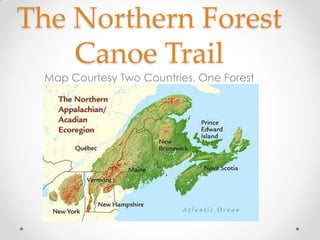
The Northern Forest
Canoe Trail
Map Courtesy Two Countries, One Forest
Brief NFCT Description
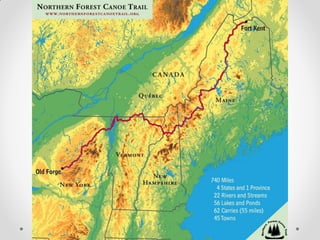
• Incorporated in 2000 after a company called Native Trails
mapped traditional Native American Travel corridors and realized
you could use these routes to connect Old Forge, NY to Fort Kent,
ME.
• Current Staff and Support:
o Kate Williams, Executive Director
o Sandy Tarburton, Membership Outreach
o Kevin Mack, Director of Partnerships and Marketing
o Roger Poor, Director of the Youth Program
o Walter Opuszynski, Trail Director
o Seasonal Regional Field Coordinators
o World Renowned Stewardship and Youth Program Interns
o Dedicated volunteer Trail Maintainers
o Dedicated Board of Directors
• Headquarters located in Waitsfield, VT
• Major Program Areas:
o Stewardship
o Youth Program
o Rural Economic Development
Our Mission
• The Northern Forest Canoe Trail is a 740
mile inland paddling trail tracing historic
travel routes across New York, Vermont,
Quebec, New Hampshire, and Maine.
• NFCT connects people to the Trail’s natural
environment, human heritage, and
contemporary communities by stewarding,
promoting, and providing access to canoe
and kayak experiences along this route.
Trail Facts
 740-miles: longest inland water trail in
Northeastern United States
 454 campsites
 182 access points
 26 sign-in boxes
 25 interpretive panels
 22 rivers and streams, 56 lakes and ponds
 3 National Wildlife Refuges
 13 sectional maps
 63 portages, totaling 55 miles
 45 communities, 1.5 million people in region
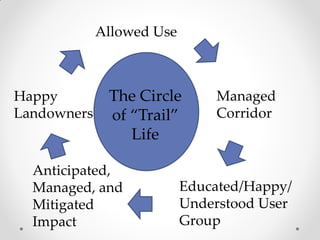
Infrastructure
Knowing the
Resource
Happy
Landowners
Allowed Use
Educated/Happy/
Understood User
Group
Managed
Corridor
Anticipated,
Managed, and
Mitigated
Impact
The Circle
of “Trail”
Life
It can be hard to see the big
picture:
http://youtu.be/IGQmdoK_ZfY
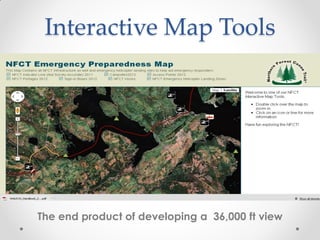
Interactive Map Tools
The end product of developing a 36,000 ft view
Earn a Candy:
• What data do you have to
manage across a water trail?
• Who are the audiences that you
will have to share this data with?
Use Technology and Data Compilation to
Know Your Resource
• Determine the spatial data already available for
your trail and understand the accuracy
• GPS Infrastructure to produce field verified
information
• Identify a mapping software program that will allow
you to manage your collected field data by
associating text data with spatial data
• Develop a field survey that matches the attribute
table you will be using
Land Manager Survey
• Determine what information is available from any
land managers across your trail (towns, state
agencies, federal agencies)
• Determine what degree of accuracy the
information is in (has it been lifted from satellite
imagery? Has it been field verified? If it has been
field verified, to what precision of delusion, what
was the collection procedure?)
• What is the most commonly used mapping
program? (NYDEC, VTFPR, USFWS, MDPPL all use
ArcMap but the Maine Warden Service uses
Delorme X-Map)
Sample Attribute Data Fields
Campsites Layer – Attribute Table [Draft]
 FID – assigned by ArcGIS based on the order the points were entered
 Shape – ‘Point’
 Id – unique ID #
 Name
 Town
 State
 NFCTMap
 Type –
 campsite
 campground
 LandType –
 public
 private
 OwnrLstNme – Landowner Last Name
 OwnrFstNme – Landowner First Name
 Org – Organization represented by landowner
 SiteMntnr – Site Maintainer: NFCT, NYDEC, etc
 NoOfSites – 1, 2, 3, etc
 Lean_to – Y [yes] or N [no]
 LeantoCond – Lean-to Condition
 Poor[YYYY]
 Good[YYYY]
 Excellent[YYYY]
 New[YYYY]
 Toilet –
 Wet willy
 Moldering
 Pit
 Beyond the bin
 ToiletCond – Toilet Condition
 Poor[YYYY]
 Good[YYYY]
 Excellent[YYYY]
 New[YYYY]
 PicnicTable – Y or N
 PTCond –
 Poor[YYYY]
 Good[YYYY]
 Excellent[YYYY]
 New[YYYY]
 FireRing – Y or N
 AccesNotes – Access Notes
 AccessCond – Access Condition
 Poor[YYYY]
Word Write Up
Attribute Table
GPS Infrastructure
• If you determine that data needs
to be field collected shop around
for a GPS unit that will serve your
needs.
• Develop a standardized process
that will ensure a similar degree of
accuracy for all trail infrastructure.
Choosing a Proper
Mapping Program
• We have found ArcMap to be the
standard mapping program amongst a
majority of the landmanagers across the
NFCT. It has many higher degree
functions that can aid in trail
management
• There are a number of other mapping
programs available that are not as
expensive that will allow you to make
maps to communicate with the variety of
audiences you will have.
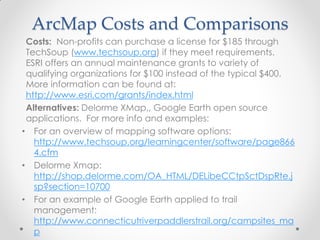
ArcMap Costs and Comparisons
Costs: Non-profits can purchase a license for $185 through
TechSoup (www.techsoup.org) if they meet requirements.
ESRI offers an annual maintenance grants to variety of
qualifying organizations for $100 instead of the typical $400.
More information can be found at:
http://www.esri.com/grants/index.html
Alternatives: Delorme XMap,, Google Earth open source
applications. For more info and examples:
• For an overview of mapping software options:
http://www.techsoup.org/learningcenter/software/page866
4.cfm
• Delorme Xmap:
http://shop.delorme.com/OA_HTML/DELibeCCtpSctDspRte.j
sp?section=10700
• For an example of Google Earth applied to trail
management:
http://www.connecticutriverpaddlerstrail.org/campsites_ma
p
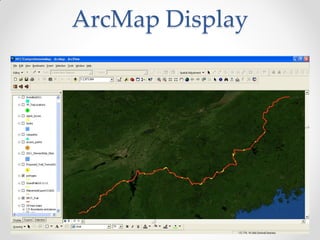
ArcMap Display
Know Your
Usage
• Identify short trips and gateways
• Create ways to capture usage
numbers
• Choose a data management system
to process collected information
(Excel, Survey Monkey)
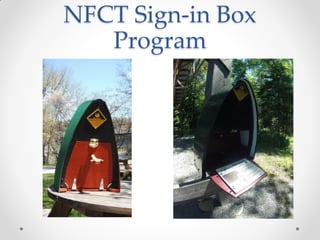
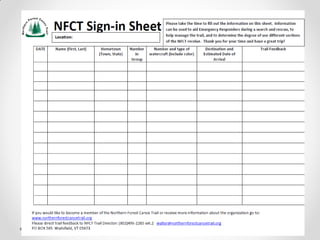
NFCT Sign-in Box
Program
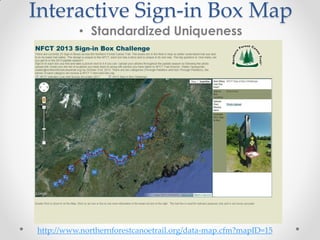
Interactive Sign-in Box Map
• Standardized Uniqueness
http://www.northernforestcanoetrail.org/data-map.cfm?mapID=15
Have a plan to manage
your resource in
response to usage
• How can you monitor use data?
• Once you have an understanding of the
infrastructure and an understanding of
current use a plan can be shaped based on
the Water Recreation Opportunity Spectrum
or similar management plan structures that
links degree of infrastructure to use and
environmental conditions.
NFCT WROS Scale
• Primitive Use:
o Primarily used by Through Paddlers (Less than 50 people per year)
o Limited infrastructure
• Fire ring
• Tent Site
• Cat Holes or Wet Willie Privy
• Moderate Use:
o Varied Use: Between 50 and 200 visitors per season
o Increased infrastructure
• Fire Ring
• Picnic Table
• Hardened surface access
• Tent site
• Moldering Privy (removable or stationary) or Pit Privy
• High Use:
o 200 visitors plus per season
o Maximum infrastructure
• Fire Ring
• Picnic Table
• Hardened Surface Access
• Double Chamber Moldering Privy, pit privy, or port-a-potty
• Tent Site
• Hardened Treadways
• Physical perimeters establishing use area
http://www.usbr.gov/recreation/publications/WALROS_Handbook_2011.pdf
Using Technology to
design standards that
accommodate use
Apparently Google is
taking over the world.
Google Sketch-up
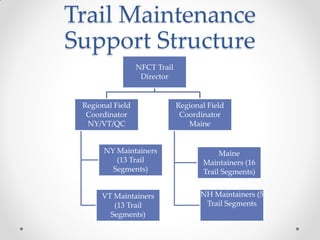
Trail Maintenance
Support Structure
NFCT Trail
Director
Regional Field
Coordinator
NY/VT/QC
NY Maintainers
(13 Trail
Segments)
VT Maintainers
(13 Trail
Segments)
Regional Field
Coordinator
Maine
Maine
Maintainers (16
Trail Segments)
NH Maintainers (5
Trail Segments
Using Technology to
Manage Your Trail
Create the most user-
friendly platform possible.
If it is not easy to use,
people will not use it, and
your efforts will be futile.
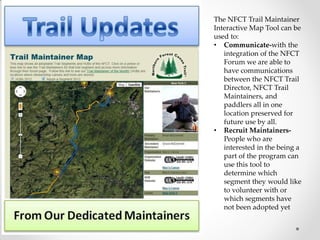
The NFCT Trail Maintainer
Interactive Map Tool can be
used to:
• Communicate-with the
integration of the NFCT
Forum we are able to
have communications
between the NFCT Trail
Director, NFCT Trail
Maintainers, and
paddlers all in one
location preserved for
future use by all.
• Recruit Maintainers-
People who are
interested in the being a
part of the program can
use this tool to
determine which
segment they would like
to volunteer with or
which segments have
not been adopted yet
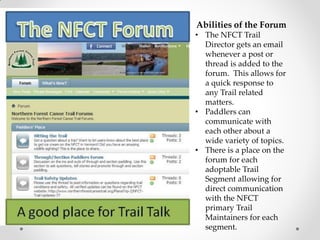
Abilities of the Forum
• The NFCT Trail
Director gets an email
whenever a post or
thread is added to the
forum. This allows for
a quick response to
any Trail related
matters.
• Paddlers can
communicate with
each other about a
wide variety of topics.
• There is a place on the
forum for each
adoptable Trail
Segment allowing for
direct communication
with the NFCT
primary Trail
Maintainers for each
segment.
Safety First-Safety Always
• There are many stretches of the Northern Forest
Canoe Trail that do not have cell service. We have
groups working in these areas every season. We
have been looking for ways to communicate about
project needs and to have open communications
in case of emergency.
• There are technologies that are coming out based
on satellite communications that solve the
communication issue we used to experience: the
SPOT devise and the Delorme InReach.
Delorme InReach
http://youtu.be/erhN6Ep-hnk
Interactive Map Tool
Overview
To transfer the data stored in ArcMap (Shapefile) to a format
that can be used in Google Maps (KML) it is necessary to go
through a few steps:
1. Open a layout with the shapefile you would like to convert
2. Hide all attribute layers you would not like to export and name
field alias as you would like them to appear in Google Maps
3. Open the ArcMap Toolbox and click on “Conversion Tools”
choose “To KML”
4. Enter the appropriate data and click “OK”. A compressed zip file
(KMZ) will be produced and exported to the desired location.
5. Open this zipped file with WinZip or 7-Zip or other compressed file
management software. You will know have a KML.
6. Certain script will need to be changed to allow recognition by
Google Maps. We currently open the KML in Notepad and find
and replace all of the “&lt;” with “<“ and all of the “&gt;” with “>”
7. The KML is now ready for use with Google Maps or Google Earth
platforms and will contain the desired attribute information for
display.
Google Earth Resources
• For Google Earth beginner tutorials:
o http://www.google.com/earth/outreach/tutorials/index.html#tab=annotate-
google-earth
• Using Google Sites to host your KML:
o https://developers.google.com/kml/articles/pagesforkml
o This link will explain how to take KML files and turn them into hyperlinks allowing
easier sharing
• Google Earth Network Links
o http://www.gelib.com/google-earth-network-links.htm
o Creating Network Links will help you share information on your website
• Google Earth Support and Outreach:
o http://support.google.com/earth/bin/answer.py?hl=en&answer=1241796&topi
c=2376759&ctx=topic
o Google offers various types of support for non-profits and other organizations
• Google Embed Gadget
o http://www.google.com/earth/outreach/tutorials/kmlembed.html
o An easy way to embed your Google Earth project on your website

Integrating Technology into Water Trail Managemetnt Practices - Walter Opuszynski,, Northern Forest Canoe Trail

  • 1.
    Integrating Technology intoWater Trail Management Practices Presentation by: Walter Opuszynski Northern Forest Canoe Trail Trail Director walter@northernforestcanoetrail.org (802)496-2285 ext.2
  • 2.
    Major Themes • Usingtechnology to understand your resource • Using technology to communicate to land managers/landowners and permit specialists • Using technology to understand usage • Using technology to manage your trail
  • 3.
    Topics to Cover: •NFCT Overview • Compiling and Managing Trail Data • Defining Trail Standards and Staging Development: Implementing a Water Recreation Opportunity Spectrum that fits your trail • Using technology to communicate with various target audiences
  • 4.
    The Northern Forest CanoeTrail Map Courtesy Two Countries, One Forest
  • 6.
    Brief NFCT Description •Incorporated in 2000 after a company called Native Trails mapped traditional Native American Travel corridors and realized you could use these routes to connect Old Forge, NY to Fort Kent, ME. • Current Staff and Support: o Kate Williams, Executive Director o Sandy Tarburton, Membership Outreach o Kevin Mack, Director of Partnerships and Marketing o Roger Poor, Director of the Youth Program o Walter Opuszynski, Trail Director o Seasonal Regional Field Coordinators o World Renowned Stewardship and Youth Program Interns o Dedicated volunteer Trail Maintainers o Dedicated Board of Directors • Headquarters located in Waitsfield, VT • Major Program Areas: o Stewardship o Youth Program o Rural Economic Development
  • 7.
    Our Mission • TheNorthern Forest Canoe Trail is a 740 mile inland paddling trail tracing historic travel routes across New York, Vermont, Quebec, New Hampshire, and Maine. • NFCT connects people to the Trail’s natural environment, human heritage, and contemporary communities by stewarding, promoting, and providing access to canoe and kayak experiences along this route.
  • 8.
    Trail Facts  740-miles:longest inland water trail in Northeastern United States  454 campsites  182 access points  26 sign-in boxes  25 interpretive panels  22 rivers and streams, 56 lakes and ponds  3 National Wildlife Refuges  13 sectional maps  63 portages, totaling 55 miles  45 communities, 1.5 million people in region
  • 9.
  • 10.
  • 11.
    It can behard to see the big picture: http://youtu.be/IGQmdoK_ZfY
  • 12.
    Interactive Map Tools Theend product of developing a 36,000 ft view
  • 13.
    Earn a Candy: •What data do you have to manage across a water trail? • Who are the audiences that you will have to share this data with?
  • 14.
    Use Technology andData Compilation to Know Your Resource • Determine the spatial data already available for your trail and understand the accuracy • GPS Infrastructure to produce field verified information • Identify a mapping software program that will allow you to manage your collected field data by associating text data with spatial data • Develop a field survey that matches the attribute table you will be using
  • 15.
    Land Manager Survey •Determine what information is available from any land managers across your trail (towns, state agencies, federal agencies) • Determine what degree of accuracy the information is in (has it been lifted from satellite imagery? Has it been field verified? If it has been field verified, to what precision of delusion, what was the collection procedure?) • What is the most commonly used mapping program? (NYDEC, VTFPR, USFWS, MDPPL all use ArcMap but the Maine Warden Service uses Delorme X-Map)
  • 16.
    Sample Attribute DataFields Campsites Layer – Attribute Table [Draft]  FID – assigned by ArcGIS based on the order the points were entered  Shape – ‘Point’  Id – unique ID #  Name  Town  State  NFCTMap  Type –  campsite  campground  LandType –  public  private  OwnrLstNme – Landowner Last Name  OwnrFstNme – Landowner First Name  Org – Organization represented by landowner  SiteMntnr – Site Maintainer: NFCT, NYDEC, etc  NoOfSites – 1, 2, 3, etc  Lean_to – Y [yes] or N [no]  LeantoCond – Lean-to Condition  Poor[YYYY]  Good[YYYY]  Excellent[YYYY]  New[YYYY]  Toilet –  Wet willy  Moldering  Pit  Beyond the bin  ToiletCond – Toilet Condition  Poor[YYYY]  Good[YYYY]  Excellent[YYYY]  New[YYYY]  PicnicTable – Y or N  PTCond –  Poor[YYYY]  Good[YYYY]  Excellent[YYYY]  New[YYYY]  FireRing – Y or N  AccesNotes – Access Notes  AccessCond – Access Condition  Poor[YYYY] Word Write Up Attribute Table
  • 17.
    GPS Infrastructure • Ifyou determine that data needs to be field collected shop around for a GPS unit that will serve your needs. • Develop a standardized process that will ensure a similar degree of accuracy for all trail infrastructure.
  • 18.
    Choosing a Proper MappingProgram • We have found ArcMap to be the standard mapping program amongst a majority of the landmanagers across the NFCT. It has many higher degree functions that can aid in trail management • There are a number of other mapping programs available that are not as expensive that will allow you to make maps to communicate with the variety of audiences you will have.
  • 19.
    ArcMap Costs andComparisons Costs: Non-profits can purchase a license for $185 through TechSoup (www.techsoup.org) if they meet requirements. ESRI offers an annual maintenance grants to variety of qualifying organizations for $100 instead of the typical $400. More information can be found at: http://www.esri.com/grants/index.html Alternatives: Delorme XMap,, Google Earth open source applications. For more info and examples: • For an overview of mapping software options: http://www.techsoup.org/learningcenter/software/page866 4.cfm • Delorme Xmap: http://shop.delorme.com/OA_HTML/DELibeCCtpSctDspRte.j sp?section=10700 • For an example of Google Earth applied to trail management: http://www.connecticutriverpaddlerstrail.org/campsites_ma p
  • 20.
  • 21.
    Know Your Usage • Identifyshort trips and gateways • Create ways to capture usage numbers • Choose a data management system to process collected information (Excel, Survey Monkey)
  • 22.
  • 24.
    Interactive Sign-in BoxMap • Standardized Uniqueness http://www.northernforestcanoetrail.org/data-map.cfm?mapID=15
  • 25.
    Have a planto manage your resource in response to usage • How can you monitor use data? • Once you have an understanding of the infrastructure and an understanding of current use a plan can be shaped based on the Water Recreation Opportunity Spectrum or similar management plan structures that links degree of infrastructure to use and environmental conditions.
  • 26.
    NFCT WROS Scale •Primitive Use: o Primarily used by Through Paddlers (Less than 50 people per year) o Limited infrastructure • Fire ring • Tent Site • Cat Holes or Wet Willie Privy • Moderate Use: o Varied Use: Between 50 and 200 visitors per season o Increased infrastructure • Fire Ring • Picnic Table • Hardened surface access • Tent site • Moldering Privy (removable or stationary) or Pit Privy • High Use: o 200 visitors plus per season o Maximum infrastructure • Fire Ring • Picnic Table • Hardened Surface Access • Double Chamber Moldering Privy, pit privy, or port-a-potty • Tent Site • Hardened Treadways • Physical perimeters establishing use area http://www.usbr.gov/recreation/publications/WALROS_Handbook_2011.pdf
  • 27.
    Using Technology to designstandards that accommodate use Apparently Google is taking over the world.
  • 28.
  • 30.
    Trail Maintenance Support Structure NFCTTrail Director Regional Field Coordinator NY/VT/QC NY Maintainers (13 Trail Segments) VT Maintainers (13 Trail Segments) Regional Field Coordinator Maine Maine Maintainers (16 Trail Segments) NH Maintainers (5 Trail Segments
  • 31.
    Using Technology to ManageYour Trail Create the most user- friendly platform possible. If it is not easy to use, people will not use it, and your efforts will be futile.
  • 32.
    The NFCT TrailMaintainer Interactive Map Tool can be used to: • Communicate-with the integration of the NFCT Forum we are able to have communications between the NFCT Trail Director, NFCT Trail Maintainers, and paddlers all in one location preserved for future use by all. • Recruit Maintainers- People who are interested in the being a part of the program can use this tool to determine which segment they would like to volunteer with or which segments have not been adopted yet
  • 33.
    Abilities of theForum • The NFCT Trail Director gets an email whenever a post or thread is added to the forum. This allows for a quick response to any Trail related matters. • Paddlers can communicate with each other about a wide variety of topics. • There is a place on the forum for each adoptable Trail Segment allowing for direct communication with the NFCT primary Trail Maintainers for each segment.
  • 34.
    Safety First-Safety Always •There are many stretches of the Northern Forest Canoe Trail that do not have cell service. We have groups working in these areas every season. We have been looking for ways to communicate about project needs and to have open communications in case of emergency. • There are technologies that are coming out based on satellite communications that solve the communication issue we used to experience: the SPOT devise and the Delorme InReach.
  • 35.
  • 36.
    Interactive Map Tool Overview Totransfer the data stored in ArcMap (Shapefile) to a format that can be used in Google Maps (KML) it is necessary to go through a few steps: 1. Open a layout with the shapefile you would like to convert 2. Hide all attribute layers you would not like to export and name field alias as you would like them to appear in Google Maps 3. Open the ArcMap Toolbox and click on “Conversion Tools” choose “To KML” 4. Enter the appropriate data and click “OK”. A compressed zip file (KMZ) will be produced and exported to the desired location. 5. Open this zipped file with WinZip or 7-Zip or other compressed file management software. You will know have a KML. 6. Certain script will need to be changed to allow recognition by Google Maps. We currently open the KML in Notepad and find and replace all of the “&lt;” with “<“ and all of the “&gt;” with “>” 7. The KML is now ready for use with Google Maps or Google Earth platforms and will contain the desired attribute information for display.
  • 37.
    Google Earth Resources •For Google Earth beginner tutorials: o http://www.google.com/earth/outreach/tutorials/index.html#tab=annotate- google-earth • Using Google Sites to host your KML: o https://developers.google.com/kml/articles/pagesforkml o This link will explain how to take KML files and turn them into hyperlinks allowing easier sharing • Google Earth Network Links o http://www.gelib.com/google-earth-network-links.htm o Creating Network Links will help you share information on your website • Google Earth Support and Outreach: o http://support.google.com/earth/bin/answer.py?hl=en&answer=1241796&topi c=2376759&ctx=topic o Google offers various types of support for non-profits and other organizations • Google Embed Gadget o http://www.google.com/earth/outreach/tutorials/kmlembed.html o An easy way to embed your Google Earth project on your website