Honey, I shrunk
the screen
1
Optimizing for
Mobile-First Index
@jammer_volts
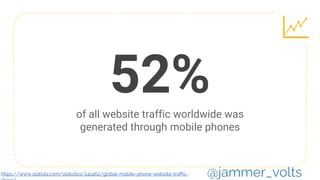
52%of all website traffic worldwide was
generated through mobile phones
@jammer_voltshttps://www.statista.com/statistics/241462/global-mobile-phone-website-traffic-
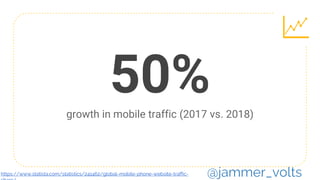
50%growth in mobile traffic (2017 vs. 2018)
@jammer_voltshttps://www.statista.com/statistics/241462/global-mobile-phone-website-traffic-
Mobile is the new
default experience
@jammer_volts
@jammer_volts
@jammer_volts
@jammer_volts
Mobile-
First
Index
Principles 9
@jammer_volts
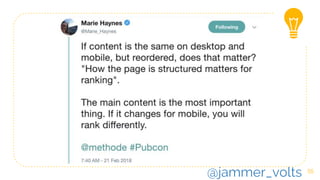
How the page is
structured matters
for ranking.
10
I
@jammer_volts
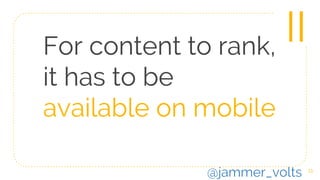
For content to rank,
it has to be
available on mobile
11
II
@jammer_volts
A poor searcher
experience can
hurt your rankings
12
III
@jammer_volts
How to
Perform a
Content
Inventory
13
@jammer_volts
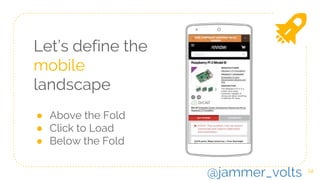
Let’s define the
mobile
landscape
● Above the Fold
● Click to Load
● Below the Fold
14
@jammer_volts
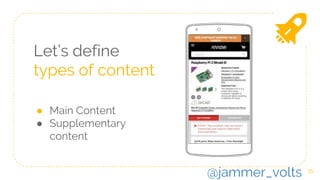
Let’s define
types of content
● Main Content
● Supplementary
content
15
@jammer_volts
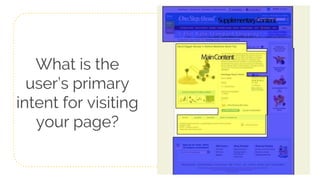
What is the
user’s primary
intent for visiting
your page?
Content Inventory
Above the Fold
@jammer_volts
Hazmat Alert
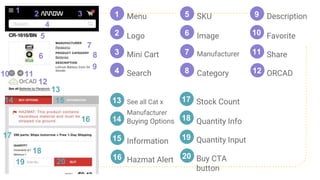
Menu1
2
3
4
1 2 3
4
5
6
7
8
9
10 11
12
13
Logo
Mini Cart
Search
SKU5
6
7
8
Image
Manufacturer
Category
Description9
10 Favorite
Share
ORCAD
11
12
14 15
16
17
18
19 20
See all Cat x
Manufacturer
14 Buying Options
Information15
16
13
Buy CTA
button
Stock Count
18 Quantity Info
Quantity Input19
20
17
Content Inventory
Main Content
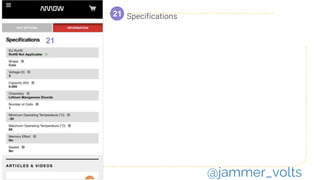
Click to Load
@jammer_volts
Specifications21
21
@jammer_volts
Content Inventory
Main Content
Below the Fold
@jammer_volts
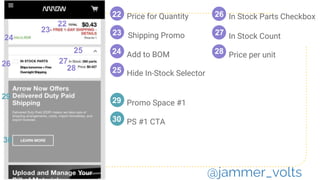
Price for Quantity
22
Shipping Promo
Add to BOM
Hide In-Stock Selector
In Stock Parts Checkbox
In Stock Count
Price per unit
29
30 PS #1 CTA
29
22
25
23
24
26
27
28
23
24
25
26 27
28
Promo Space #1
30
@jammer_volts
Content Inventory
Supplementary
Content
Below the Fold
@jammer_volts
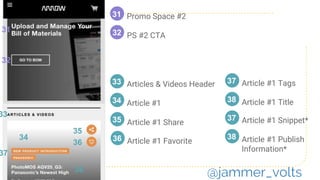
Article #1 Favorite
Promo Space #2
PS #2 CTA
33
34 Article #1
Article #1 Share35
36
33
31
3231
32
Articles & Videos Header
34
35
36
37
38
38 Article #1 Title
37 Article #1 Tags
38 Article #1 Publish
Information*
37 Article #1 Snippet*
@jammer_volts
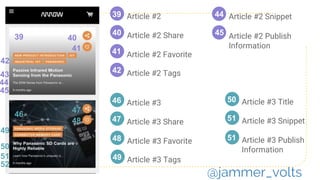
Article #3 Tags
46
47 Article #3 Share
Article #3 Favorite48
49
46 Article #3
49
47
48
50
Article #239
Article #2 Share40
39
41
52
51
51 Article #3 Snippet
50 Article #3 Title
51 Article #3 Publish
Information
42
43
45
44
Article #2 Favorite
Article #2 Tags42
41
40
Article #2 Snippet
Article #2 Publish
Information
44
45
@jammer_volts
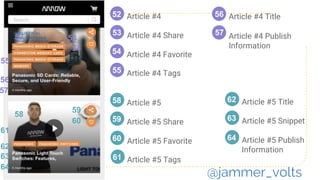
Article #5 Tags
58
59 Article #5 Share
Article #5 Favorite60
61
`
58 Article #5
61
59
60
62
Article #452
Article #4 Share53
52
54
64
63
63 Article #5 Snippet
62 Article #5 Title
64 Article #5 Publish
Information
55
56
57
Article #4 Favorite
Article #4 Tags55
54
53
Article #4 Title56
Article #4 Publish
Information
57
@jammer_volts
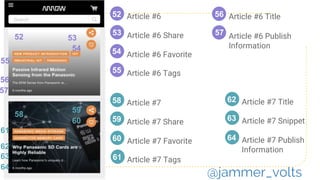
Article #7 Tags
58
59 Article #7 Share
Article #7 Favorite60
61
`
58 Article #7
61
59
60
62
Article #652
Article #6 Share53
52
54
64
63
63 Article #7 Snippet
62 Article #7 Title
64 Article #7 Publish
Information
55
56
57
Article #6 Favorite
Article #6 Tags55
54
53
Article #6 Title56
Article #6 Publish
Information
57
@jammer_volts
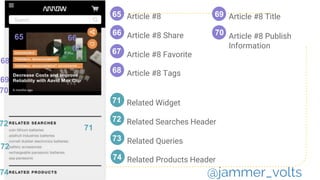
Related Products Header
72 Related Searches Header
Related Queries73
74
`
71 Related Widget
71
72
Article #865
2
Article #8 Share66
65
67
74
68
69
70
Article #8 Favorite
Article #8 Tags68
67
66
Article #8 Title69
Article #8 Publish
Information
70
72
@jammer_volts
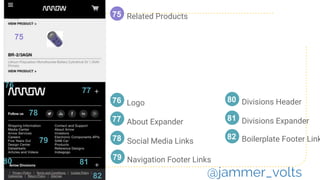
Related Products
Navigation Footer Links
77 About Expander
Social Media Links78
79
`
76 Logo
75
2
75
76
81 Divisions Expander
80 Divisions Header
82 Boilerplate Footer Link
77
78
79
80 81
82 @jammer_volts
“Data parity happens the critical data is the
same on your desktop and mobile site.
If you want to rank for something and
it's not on your mobile page, that's not
going to happen with mobile-first.
@jammer_volts
Does our mobile inventory
match desktop?
@jammer_volts
Optimizing
Mobile
Page
Structure
32
@jammer_volts
How do we
prioritize elements?
33
@jammer_volts
This prioritization is import because it
tells us in what order we should
request and display content.
By the relationship
to user intent
34
@jammer_volts
@jammer_volts
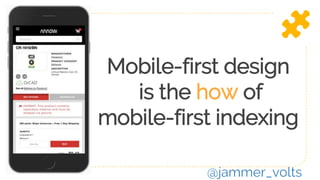
Mobile-first design
is the how of
mobile-first indexing
@jammer_volts
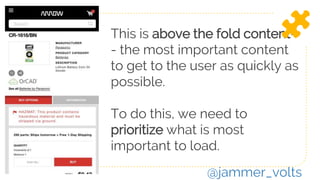
This is above the fold content-
- the most important content
to get to the user as quickly as
possible.
To do this, we need to
prioritize what is most
important to load.
@jammer_volts
SKU5
6
7
8
Image
Manufacturer
Category
Description9 Buy CTA
button
18 Quantity Info
Quantity Input19
20
Price for Quantity22
Site Branding
Stock Count Specifications21
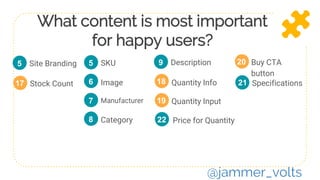
What content is most important
for happy users?
5
17
@jammer_volts
Sounds simple,
right?
39
@jammer_volts
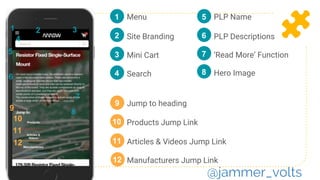
Manufacturers Jump Link
Menu1
2
3
46
Site Branding
Mini Cart
Search
PLP Name5
6 PLP Descriptions
9
Jump to heading
10 Products Jump Link
Articles & Videos Jump Link11
12
9
1 2 3
4
5
10
11
12
‘Read More’ Function7
8
7
8 Hero Image
@jammer_volts
Defining
Mobile-First
Success
41
@jammer_volts
Content Parity
@jammer_volts
Performance Matters
Learn and love Lighthouse an
automated tool and a part of
Chrome Developer Tools for
auditing the quality (performance,
accessibility, and more) of web
pages
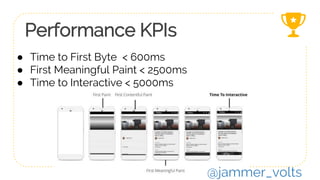
Performance KPIs
● Time to First Byte < 600ms
● First Meaningful Paint < 2500ms
● Time to Interactive < 5000ms
@jammer_volts
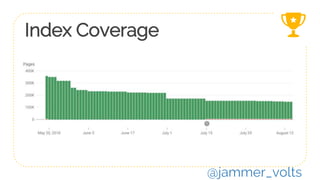
Index Coverage
@jammer_volts
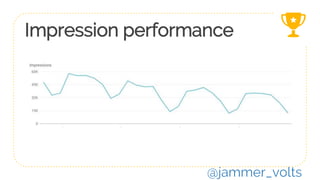
Impression performance
@jammer_volts
Mobile-First
Index Survival
Guide
47
@jammer_volts
If you haven’t been
switched yet, keep
an eye on
server logs
48
1
@jammer_volts
49
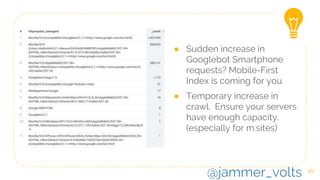
● Sudden increase in
Googlebot Smartphone
requests? Mobile-First
Index is coming for you.
● Temporary increase in
crawl. Ensure your servers
have enough capacity.
(especially for m.sites)
@jammer_volts
Parity
Parity
Parity
50
2
@jammer_volts
51
@jammer_volts
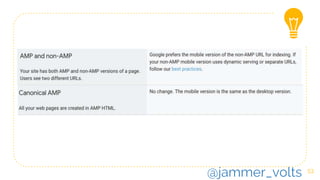
Help me
AMP is not
inherently the
same as
Mobile-First
52
3
@jammer_volts
53
@jammer_volts
54
Prioritize your
page load
4
@jammer_volts
55
@jammer_volts
Use inline styles
For above the fold
content
56
4
@jammer_volts
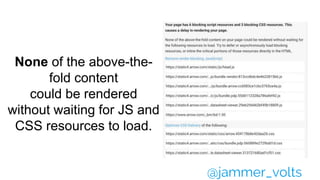
None of the above-the-
fold content
could be rendered
without waiting for JS and
CSS resources to load.
@jammer_volts
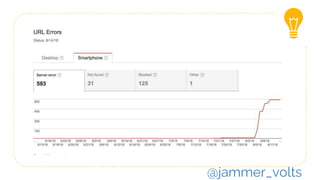
58
Check smartphone
errors in Search
Console
5
@jammer_volts
@jammer_volts
Ditch
the Flash
60
6
@jammer_volts
62
Use
toggle CSS visibility
for ‘Tap to Load’
content
7
@jammer_volts
Place your screenshot
here
63
Accordions,
Tabs, Load
More
Oh My!
@jammer_volts
64
Thanks!
Any questions?
Find me at @Jammer_Volts
@jammer_volts

Optimizing for Mobile First Index

Editor's Notes

  • #4 https://www.statista.com/statistics/241462/global-mobile-phone-website-traffic-share/ As of February 2017, mobile accounts for 65.1 percent of all web traffic in Asia and for 59.5 percent of all web traffic in Africa. 91% of traffic in Singapore
  • #5 https://www.statista.com/statistics/241462/global-mobile-phone-website-traffic-share/
  • #6 When Googlers talk about interactions, they now say ‘tap’ instead of ‘click’.
  • #7 When users change, Google adapts. They’re moving to a mobile-first index to meet the needs of their users. This isn’t a personal vendetta.
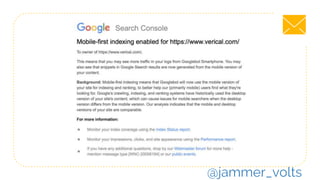
  • #8 Mobile-first indexing means Google will predominantly use the mobile version of the content for indexing and ranking. Historically, the index primarily used the desktop version of a page's content when evaluating the relevance of a page to a user's query. Since the majority of users now access Google via a mobile device, the index will primarily use the mobile version of a page's content going forward. We aren't creating a separate mobile-first index. We continue to use only one index. With mobile-first indexing, Googlebot primarily crawls and indexes pages with the smartphone agent. We will continue to show the URL that is the most appropriate to users (whether it's a desktop or mobile URL) in Search results. Google Developer’s Documentation for Mobile-First Indexing
  • #11 Make sure the the content you want to rank stays the same or moves up the page Gary Illyes Pubcon - https://twitter.com/Marie_Haynes/status/966321720259940353
  • #12 https://twitter.com/googlewmc/status/1007235830543519744
  • #13 Avoid common mistakes that frustrate mobile visitors. Mobile pages that provide a poor searcher experience can be demoted in rankings or displayed with a warning in mobile search results. http://googlewebmastercentral.blogspot.com/2013/06/changes-in-rankings-of-smartphone_11.html
  • #16 Main Content is any part of the page that directly helps the page achieve its purpose. Supplementary Content contributes to a good user experience on the page, but does not directly help the page achieve its purpose. Webmasters directly control the MC of the page (except for user-generated content). MC can be text, images, videos, page features (e.g., calculators, games), or it can be user-generated content such as videos, reviews, articles, etc. that users have added or uploaded to the page. Note that tabs on some pages lead to even more information (e.g., customer reviews) and can sometimes be considered part of the MC of the page. The MC also includes the title at the top of the page (example). Descriptive MC titles allow users to make informed decisions about what pages to visit. Helpful titles summarize the MC on the page. 2.4.1 Identifying the Main Content (MC) SC is controlled by webmasters and is an important part of the user experience. One common type of SC is navigation links that allow users to visit other parts of the website. Note that in some cases, content behind tabs may be considered part of the SC of the page. 2.4.2 Identifying the Supplementary Content (SC)
  • #17 Per Google Webmaster Trends Analyst, Gary Illyes, content that is most directly related to the user’s primary intent for visiting a page (Main Content) should be prioritized to load before related resources (Supplementary Content). https://static.googleusercontent.com/media/www.google.com/en//insidesearch/howsearchworks/assets/GG/PQ.2.2.4all.jpg
  • #18 Above the fold is your most valuable real estate. Allot as much as possible for main content.
  • #21 This is main content.
  • #23 More main content. It’s not in our highest value real estate, but it’s close.
  • #31 Your mobile site should contain the same content as your desktop site.
  • #32 Go in every nook and cranny. If your mobile site has less content than your desktop site, you should consider updating your mobile site so that its primary content is equivalent with your desktop site. This includes text, images (with alt-attributes), and videos – in the usual crawlable and indexable formats.
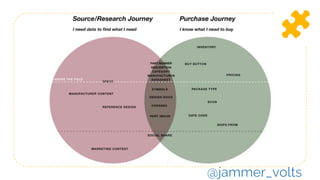
  • #36 By their relationship to the user’s intent. For our PDP example, we have two types of user journeys on a single page.
  • #37 It is a way of prioritizing UX elements and the loading of resources (performance) to serve a page that performs well-- especially on mobile devices with 3G connections. The goal is for UX, developers, and SEOs to work together.
  • #41 Check each one of your templates. Don’t take anything for granted. You’re going to have make compromises and clearly define mutual objectives.
  • #42 If your site needs development work to be ready for mobile first index, you’re going to have to come to the table with the business value and KPIs
  • #43 Mobile-first design performance metrics divert from the standard performance metrics. These are focused on mobile experience in accordance with best practices for mobile-first indexing. KPIs for mobile-first design are measured using Lighthouse, the tool recommended by Google for measuring mobile-first index performance. https://webmasters.googleblog.com/2018/01/using-page-speed-in-mobile-search.html
  • #44 KPIs for mobile-first design are measured using Lighthouse, the tool recommended by Google for measuring mobile-first index performance. Lighthouse is an automated tool and a part of Chrome Developer Tools for auditing the quality (performance, accessibility, and more) of web pages
  • #45 Mobile-first design performance metrics divert from the standard performance metrics. These are focused on mobile experience in accordance with best practices for mobile-first indexing. https://webmasters.googleblog.com/2018/01/using-page-speed-in-mobile-search.html
  • #46 Don’t measure success as more pages indexed. Up and down trends are relative to how many pages you want indexed.
  • #47 This one isn’t relative. It it goes down, we all get sad.

  • #49 You’ll see a sudden spike in requests from Smartphone Googlebot when your site is going to mobile-first index. Ensure your servers have enough capacity to a handle potential increase in crawl rate on the mobile version of your site. Site owners will see significantly increased crawl rate from the Smartphone Googlebot. https://webmasters.googleblog.com/2018/03/rolling-out-mobile-first-indexing.html Ensure the servers hosting the site have enough capacity to handle potentially increased crawl rate. This doesn't affect sites that use responsive web design and dynamic serving, only sites where the mobile version is on a separate host, such as m.example.com. https://webmasters.googleblog.com/2017/12/getting-your-site-ready-for-mobile.html https://twitter.com/googlewmc/status/1007235822532341760
  • #50 User agents: https://support.google.com/webmasters/answer/1061943
  • #52 User agents: https://support.google.com/webmasters/answer/1061943
  • #54 User agents: https://support.google.com/webmasters/answer/1061943
  • #55 Per Google Webmaster Trends Analyst, Gary Illyes, content that is most directly related to the user’s primary intent for visiting a page (Main Content) should be prioritized to load before related resources (Supplementary Content).
  • #59 You’ll see a sudden spike in requests from Smartphone Googlebot when your site is going to mobile-first index. Ensure your servers have enough capacity to a handle potential increase in crawl rate on the mobile version of your site. Site owners will see significantly increased crawl rate from the Smartphone Googlebot. https://webmasters.googleblog.com/2018/03/rolling-out-mobile-first-indexing.html Ensure the servers hosting the site have enough capacity to handle potentially increased crawl rate. This doesn't affect sites that use responsive web design and dynamic serving, only sites where the mobile version is on a separate host, such as m.example.com. https://webmasters.googleblog.com/2017/12/getting-your-site-ready-for-mobile.html
  • #60 User agents: https://support.google.com/webmasters/answer/1061943
  • #61 “Click to load” content such as infinite scroll, tap to load more, and tabbed navigation must load with either: Preload (toggle CSS visibility) or Link to unique URLs/pages
  • #63 “Click to load” content such as infinite scroll, tap to load more, and tabbed navigation must load with either: Preload (toggle CSS visibility) or Link to unique URLs/pages