Vijesh Nair
Operating-System Structures
2
Vijesh Nair
Operating System Structure
 General-purpose OS is very large program
 Various ways to structure ones
 Simple structure – MS-DOS
 More complex -- UNIX
 Layered – an abstrcation
 Microkernel -Mach
3
Vijesh Nair
Simple Structure -- MS-DOS
 MS-DOS – written to provide the
most functionality in the least
space
 Not divided into modules
 Although MS-DOS has some
structure, its interfaces and
levels of functionality are not
well separated
4
Vijesh Nair
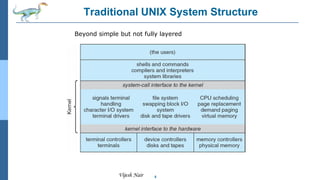
Non Simple Structure -- UNIX
UNIX – limited by hardware functionality, the original UNIX
operating system had limited structuring. The UNIX OS
consists of two separable parts
 Systems programs
 Systems programs are provided to define the user
interface.
 The kernel
 Consists of everything below the system-call interface
and above the physical hardware
 Provides the file system, CPU scheduling, memory
management, and other operating-system functions; a
large number of functions for one level
 OS may provide smaller modules for much greater control
of computer resources, incorporating changes in the
separate modules easily to enhance functionality and hide
information in different components
5
Vijesh Nair
Traditional UNIX System Structure
Beyond simple but not fully layered
6
Vijesh Nair
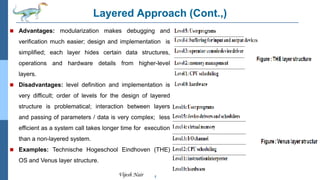
Layered Approach
 The operating system is divided into a number of layers (levels), each
built on top of lower layers. The bottom layer (layer 0), is the
hardware; the highest (layer N) is the user interface.
 With modularity, layers are selected such that each uses functions
(operations) and services of only lower-level layers
 OS has a greater control over the computer resources and
applications that make use of it.
 Provides more freedom to the implementers to make changes in the
inner workings of the system.
 Provides information hiding by allowing the programmers to
implement the low-level routines using top-down modular
programming approach.
 Layered approach is used for modularization of the OS.
 Higher-level layers can invoke lower-level layers.
 Less number of layers provide more functionality at each level while
reducing the problems.
7
Vijesh Nair
Layered Approach (Cont.,)
 Advantages: modularization makes debugging and
verification much easier; design and implementation is
simplified; each layer hides certain data structures,
operations and hardware details from higher-level
layers.
 Disadvantages: level definition and implementation is
very difficult; order of levels for the design of layered
structure is problematical; interaction between layers
and passing of parameters / data is very complex; less
efficient as a system call takes longer time for execution
than a non-layered system.
 Examples: Technische Hogeschool Eindhoven (THE)
OS and Venus layer structure.
8
Vijesh Nair
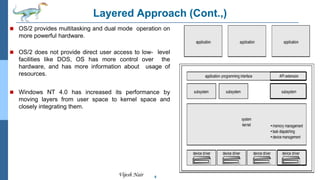
Layered Approach (Cont.,)
 OS/2 provides multitasking and dual mode operation on
more powerful hardware.
 OS/2 does not provide direct user access to low- level
facilities like DOS, OS has more control over the
hardware, and has more information about usage of
resources.
 Windows NT 4.0 has increased its performance by
moving layers from user space to kernel space and
closely integrating them.
9
Vijesh Nair
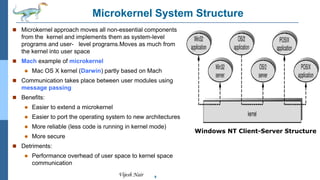
Microkernel System Structure
 Microkernel approach moves all non-essential components
from the kernel and implements them as system-level
programs and user- level programs.Moves as much from
the kernel into user space
 Mach example of microkernel
 Mac OS X kernel (Darwin) partly based on Mach
 Communication takes place between user modules using
message passing
 Benefits:
 Easier to extend a microkernel
 Easier to port the operating system to new architectures
 More reliable (less code is running in kernel mode)
 More secure
 Detriments:
 Performance overhead of user space to kernel space
communication
Windows NT Client-Server Structure
10
Vijesh Nair
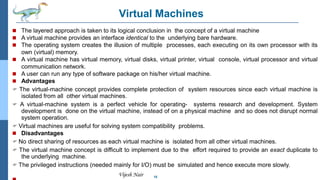
Virtual Machines
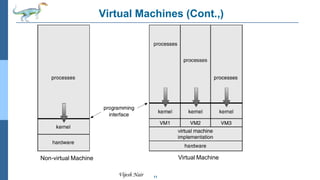
 The layered approach is taken to its logical conclusion in the concept of a virtual machine
 A virtual machine provides an interface identical to the underlying bare hardware.
 The operating system creates the illusion of multiple processes, each executing on its own processor with its
own (virtual) memory.
 A virtual machine has virtual memory, virtual disks, virtual printer, virtual console, virtual processor and virtual
communication network.
 A user can run any type of software package on his/her virtual machine.
 Advantages
 The virtual-machine concept provides complete protection of system resources since each virtual machine is
isolated from all other virtual machines.
 A virtual-machine system is a perfect vehicle for operating- systems research and development. System
development is done on the virtual machine, instead of on a physical machine and so does not disrupt normal
system operation.
 Virtual machines are useful for solving system compatibility problems.
 Disadvantages
 No direct sharing of resources as each virtual machine is isolated from all other virtual machines.
 The virtual machine concept is difficult to implement due to the effort required to provide an exact duplicate to
the underlying machine.
 The privileged instructions (needed mainly for I/O) must be simulated and hence execute more slowly.
11
Vijesh Nair
Virtual Machines (Cont.,)
Non-virtual Machine Virtual Machine
12
Vijesh Nair
Java Virtual Machines
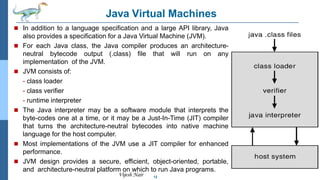
 In addition to a language specification and a large API library, Java
also provides a specification for a Java Virtual Machine (JVM).
 For each Java class, the Java compiler produces an architecture-
neutral bytecode output (.class) file that will run on any
implementation of the JVM.
 JVM consists of:
- class loader
- class verifier
- runtime interpreter
 The Java interpreter may be a software module that interprets the
byte-codes one at a time, or it may be a Just-In-Time (JIT) compiler
that turns the architecture-neutral bytecodes into native machine
language for the host computer.
 Most implementations of the JVM use a JIT compiler for enhanced
performance.
 JVM design provides a secure, efficient, object-oriented, portable,
and architecture-neutral platform on which to run Java programs.
13
Vijesh Nair
Modules
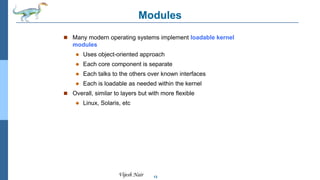
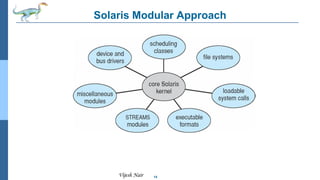
 Many modern operating systems implement loadable kernel
modules
 Uses object-oriented approach
 Each core component is separate
 Each talks to the others over known interfaces
 Each is loadable as needed within the kernel
 Overall, similar to layers but with more flexible
 Linux, Solaris, etc
14
Vijesh Nair
Solaris Modular Approach
15
Vijesh Nair
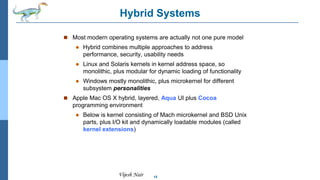
Hybrid Systems
 Most modern operating systems are actually not one pure model
 Hybrid combines multiple approaches to address
performance, security, usability needs
 Linux and Solaris kernels in kernel address space, so
monolithic, plus modular for dynamic loading of functionality
 Windows mostly monolithic, plus microkernel for different
subsystem personalities
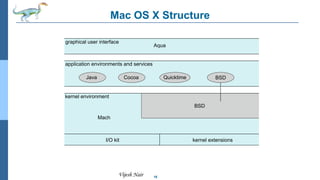
 Apple Mac OS X hybrid, layered, Aqua UI plus Cocoa
programming environment
 Below is kernel consisting of Mach microkernel and BSD Unix
parts, plus I/O kit and dynamically loadable modules (called
kernel extensions)
16
Vijesh Nair
Mac OS X Structure
graphical user interface
Aqua
application environments and services
kernel environment
Java Cocoa Quicktime BSD
Mach
I/O kit kernel extensions
BSD
17
Vijesh Nair
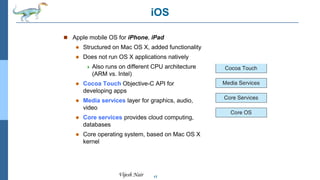
iOS
 Apple mobile OS for iPhone, iPad
 Structured on Mac OS X, added functionality
 Does not run OS X applications natively
 Also runs on different CPU architecture
(ARM vs. Intel)
 Cocoa Touch Objective-C API for
developing apps
 Media services layer for graphics, audio,
video
 Core services provides cloud computing,
databases
 Core operating system, based on Mac OS X
kernel
18
Vijesh Nair
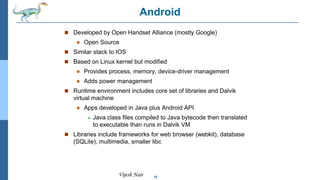
Android
 Developed by Open Handset Alliance (mostly Google)
 Open Source
 Similar stack to IOS
 Based on Linux kernel but modified
 Provides process, memory, device-driver management
 Adds power management
 Runtime environment includes core set of libraries and Dalvik
virtual machine
 Apps developed in Java plus Android API
 Java class files compiled to Java bytecode then translated
to executable than runs in Dalvik VM
 Libraries include frameworks for web browser (webkit), database
(SQLite), multimedia, smaller libc
19
Vijesh Nair
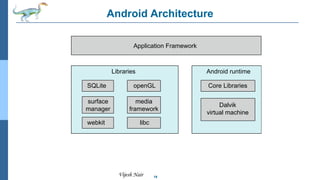
Android Architecture
Applications
Application Framework
Android runtime
Core Libraries
Dalvik
virtual machine
Libraries
Linux kernel
SQLite openGL
surface
manager
webkit libc
media
framework
20
Vijesh Nair
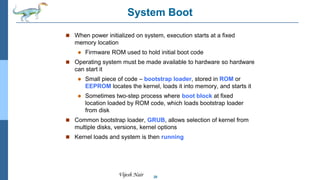
System Boot
 When power initialized on system, execution starts at a fixed
memory location
 Firmware ROM used to hold initial boot code
 Operating system must be made available to hardware so hardware
can start it
 Small piece of code – bootstrap loader, stored in ROM or
EEPROM locates the kernel, loads it into memory, and starts it
 Sometimes two-step process where boot block at fixed
location loaded by ROM code, which loads bootstrap loader
from disk
 Common bootstrap loader, GRUB, allows selection of kernel from
multiple disks, versions, kernel options
 Kernel loads and system is then running
Vijesh Nair
End of Chapter 2

Operating system Definition Structures

  • 1.
  • 2.
    2 Vijesh Nair Operating SystemStructure  General-purpose OS is very large program  Various ways to structure ones  Simple structure – MS-DOS  More complex -- UNIX  Layered – an abstrcation  Microkernel -Mach
  • 3.
    3 Vijesh Nair Simple Structure-- MS-DOS  MS-DOS – written to provide the most functionality in the least space  Not divided into modules  Although MS-DOS has some structure, its interfaces and levels of functionality are not well separated
  • 4.
    4 Vijesh Nair Non SimpleStructure -- UNIX UNIX – limited by hardware functionality, the original UNIX operating system had limited structuring. The UNIX OS consists of two separable parts  Systems programs  Systems programs are provided to define the user interface.  The kernel  Consists of everything below the system-call interface and above the physical hardware  Provides the file system, CPU scheduling, memory management, and other operating-system functions; a large number of functions for one level  OS may provide smaller modules for much greater control of computer resources, incorporating changes in the separate modules easily to enhance functionality and hide information in different components
  • 5.
    5 Vijesh Nair Traditional UNIXSystem Structure Beyond simple but not fully layered
  • 6.
    6 Vijesh Nair Layered Approach The operating system is divided into a number of layers (levels), each built on top of lower layers. The bottom layer (layer 0), is the hardware; the highest (layer N) is the user interface.  With modularity, layers are selected such that each uses functions (operations) and services of only lower-level layers  OS has a greater control over the computer resources and applications that make use of it.  Provides more freedom to the implementers to make changes in the inner workings of the system.  Provides information hiding by allowing the programmers to implement the low-level routines using top-down modular programming approach.  Layered approach is used for modularization of the OS.  Higher-level layers can invoke lower-level layers.  Less number of layers provide more functionality at each level while reducing the problems.
  • 7.
    7 Vijesh Nair Layered Approach(Cont.,)  Advantages: modularization makes debugging and verification much easier; design and implementation is simplified; each layer hides certain data structures, operations and hardware details from higher-level layers.  Disadvantages: level definition and implementation is very difficult; order of levels for the design of layered structure is problematical; interaction between layers and passing of parameters / data is very complex; less efficient as a system call takes longer time for execution than a non-layered system.  Examples: Technische Hogeschool Eindhoven (THE) OS and Venus layer structure.
  • 8.
    8 Vijesh Nair Layered Approach(Cont.,)  OS/2 provides multitasking and dual mode operation on more powerful hardware.  OS/2 does not provide direct user access to low- level facilities like DOS, OS has more control over the hardware, and has more information about usage of resources.  Windows NT 4.0 has increased its performance by moving layers from user space to kernel space and closely integrating them.
  • 9.
    9 Vijesh Nair Microkernel SystemStructure  Microkernel approach moves all non-essential components from the kernel and implements them as system-level programs and user- level programs.Moves as much from the kernel into user space  Mach example of microkernel  Mac OS X kernel (Darwin) partly based on Mach  Communication takes place between user modules using message passing  Benefits:  Easier to extend a microkernel  Easier to port the operating system to new architectures  More reliable (less code is running in kernel mode)  More secure  Detriments:  Performance overhead of user space to kernel space communication Windows NT Client-Server Structure
  • 10.
    10 Vijesh Nair Virtual Machines The layered approach is taken to its logical conclusion in the concept of a virtual machine  A virtual machine provides an interface identical to the underlying bare hardware.  The operating system creates the illusion of multiple processes, each executing on its own processor with its own (virtual) memory.  A virtual machine has virtual memory, virtual disks, virtual printer, virtual console, virtual processor and virtual communication network.  A user can run any type of software package on his/her virtual machine.  Advantages  The virtual-machine concept provides complete protection of system resources since each virtual machine is isolated from all other virtual machines.  A virtual-machine system is a perfect vehicle for operating- systems research and development. System development is done on the virtual machine, instead of on a physical machine and so does not disrupt normal system operation.  Virtual machines are useful for solving system compatibility problems.  Disadvantages  No direct sharing of resources as each virtual machine is isolated from all other virtual machines.  The virtual machine concept is difficult to implement due to the effort required to provide an exact duplicate to the underlying machine.  The privileged instructions (needed mainly for I/O) must be simulated and hence execute more slowly.
  • 11.
    11 Vijesh Nair Virtual Machines(Cont.,) Non-virtual Machine Virtual Machine
  • 12.
    12 Vijesh Nair Java VirtualMachines  In addition to a language specification and a large API library, Java also provides a specification for a Java Virtual Machine (JVM).  For each Java class, the Java compiler produces an architecture- neutral bytecode output (.class) file that will run on any implementation of the JVM.  JVM consists of: - class loader - class verifier - runtime interpreter  The Java interpreter may be a software module that interprets the byte-codes one at a time, or it may be a Just-In-Time (JIT) compiler that turns the architecture-neutral bytecodes into native machine language for the host computer.  Most implementations of the JVM use a JIT compiler for enhanced performance.  JVM design provides a secure, efficient, object-oriented, portable, and architecture-neutral platform on which to run Java programs.
  • 13.
    13 Vijesh Nair Modules  Manymodern operating systems implement loadable kernel modules  Uses object-oriented approach  Each core component is separate  Each talks to the others over known interfaces  Each is loadable as needed within the kernel  Overall, similar to layers but with more flexible  Linux, Solaris, etc
  • 14.
  • 15.
    15 Vijesh Nair Hybrid Systems Most modern operating systems are actually not one pure model  Hybrid combines multiple approaches to address performance, security, usability needs  Linux and Solaris kernels in kernel address space, so monolithic, plus modular for dynamic loading of functionality  Windows mostly monolithic, plus microkernel for different subsystem personalities  Apple Mac OS X hybrid, layered, Aqua UI plus Cocoa programming environment  Below is kernel consisting of Mach microkernel and BSD Unix parts, plus I/O kit and dynamically loadable modules (called kernel extensions)
  • 16.
    16 Vijesh Nair Mac OSX Structure graphical user interface Aqua application environments and services kernel environment Java Cocoa Quicktime BSD Mach I/O kit kernel extensions BSD
  • 17.
    17 Vijesh Nair iOS  Applemobile OS for iPhone, iPad  Structured on Mac OS X, added functionality  Does not run OS X applications natively  Also runs on different CPU architecture (ARM vs. Intel)  Cocoa Touch Objective-C API for developing apps  Media services layer for graphics, audio, video  Core services provides cloud computing, databases  Core operating system, based on Mac OS X kernel
  • 18.
    18 Vijesh Nair Android  Developedby Open Handset Alliance (mostly Google)  Open Source  Similar stack to IOS  Based on Linux kernel but modified  Provides process, memory, device-driver management  Adds power management  Runtime environment includes core set of libraries and Dalvik virtual machine  Apps developed in Java plus Android API  Java class files compiled to Java bytecode then translated to executable than runs in Dalvik VM  Libraries include frameworks for web browser (webkit), database (SQLite), multimedia, smaller libc
  • 19.
    19 Vijesh Nair Android Architecture Applications ApplicationFramework Android runtime Core Libraries Dalvik virtual machine Libraries Linux kernel SQLite openGL surface manager webkit libc media framework
  • 20.
    20 Vijesh Nair System Boot When power initialized on system, execution starts at a fixed memory location  Firmware ROM used to hold initial boot code  Operating system must be made available to hardware so hardware can start it  Small piece of code – bootstrap loader, stored in ROM or EEPROM locates the kernel, loads it into memory, and starts it  Sometimes two-step process where boot block at fixed location loaded by ROM code, which loads bootstrap loader from disk  Common bootstrap loader, GRUB, allows selection of kernel from multiple disks, versions, kernel options  Kernel loads and system is then running
  • 21.