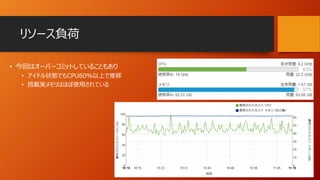
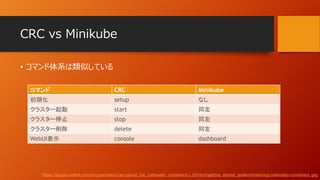
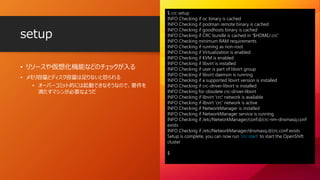
• リソースや仮想化機能などのチェックが入る
• メモリ容量とディスク容量は足りないと怒られる
•オーバーコミット的には起動できなそうなので、要件を
満たすマシンが必要なようだ
setup
$ crc setup
INFO Checking if oc binary is cached
INFO Checking if podman remote binary is cached
INFO Checking if goodhosts binary is cached
INFO Checking if CRC bundle is cached in '$HOME/.crc'
INFO Checking minimum RAM requirements
INFO Checking if running as non-root
INFO Checking if Virtualization is enabled
INFO Checking if KVM is enabled
INFO Checking if libvirt is installed
INFO Checking if user is part of libvirt group
INFO Checking if libvirt daemon is running
INFO Checking if a supported libvirt version is installed
INFO Checking if crc-driver-libvirt is installed
INFO Checking for obsolete crc-driver-libvirt
INFO Checking if libvirt 'crc' network is available
INFO Checking if libvirt 'crc' network is active
INFO Checking if NetworkManager is installed
INFO Checking if NetworkManager service is running
INFO Checking if /etc/NetworkManager/conf.d/crc-nm-dnsmasq.conf
exists
INFO Checking if /etc/NetworkManager/dnsmasq.d/crc.conf exists
Setup is complete, you can now run 'crc start' to start the OpenShift
cluster
$
13.
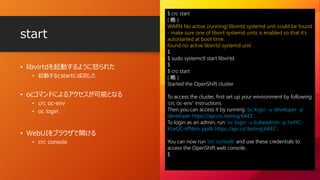
• libvirtdを起動するように怒られた
• 起動するとstartに成功した
•ocコマンドによるアクセスが可能となる
• crc oc-env
• oc login
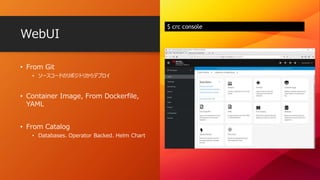
• WebUIをブラウザで開ける
• crc console
start
$ crc start
( 略 )
WARN No active (running) libvirtd systemd unit could be found
- make sure one of libvirt systemd units is enabled so that it's
autostarted at boot time.
found no active libvirtd systemd unit
$
$ sudo systemctl start libvirtd
$
$ crc start
( 略 )
Started the OpenShift cluster
To access the cluster, first set up your environment by following
'crc oc-env' instructions.
Then you can access it by running 'oc login -u developer -p
developer https://api.crc.testing:6443'.
To login as an admin, run 'oc login -u kubeadmin -p hxYtC-
KLeQC-kfNkm-ppi8i https://api.crc.testing:6443'.
You can now run 'crc console' and use these credentials to
access the OpenShift web console.
$
Quick Starts
• QuickStart ( チュートリアル )もついている
• CRCは、わずか数回のコマンド実行で
OpenShiftを使い始められるようになっている
[loft@rhel8 ~]$ oc login -u kubeadmin -p **********
https://api.crc.testing:6443
Login successful.
You have access to 59 projects, the list has been suppressed. You can list all projects with '
projects'
Using project "default".
[loft@rhel8 ~]$ oc get po
NAME READY STATUS RESTARTS AGE
nodejs-sample-1-build 0/1 Completed 0 15m
nodejs-sample-8578969d46-qhkzp 1/1 Running 0 14m
[loft@rhel8 ~]$
UPI install onbare metal
the Hard?
Way
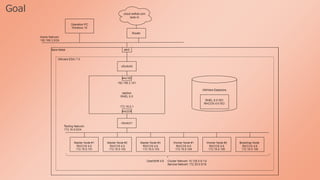
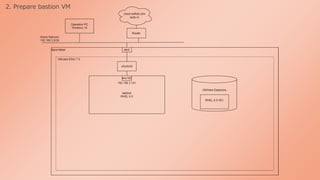
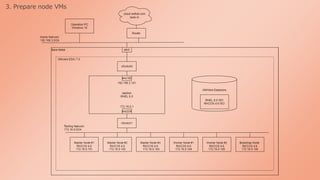
• 今回は UPI install on bare metal を選択
• IPI install on bare metal は 4.6 で新規追加されているようです https://cloud.redhat.com/openshift/install/metal
まとめ
Red Hat CodeReadyContainers ( CRC )
• わずか数コマンドでOpenShiftクラスタを構築したいあなたにおすすめ
UPI install on bare metal
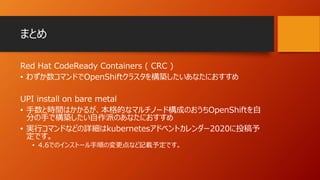
• 手数と時間はかかるが、本格的なマルチノード構成のおうちOpenShiftを自
分の手で構築したい自作派のあなたにおすすめ
• 実行コマンドなどの詳細はkubernetesアドベントカレンダー2020に投稿予
定です。
• 4.6でのインストール手順の変更点など記載予定です。
#2 OpenShift the Easy Way からのHard? Way というタイトルで発表いたします
よろしくおねがいたします
#3 自己紹介させていただきます、ロフトくんという名前で活動しております。
日本IBMでエンジニアをしております。
Cloud Native Days Fukuoka 2020 の 実行委員をしておりました。
昨今の状況でそのイベントは流れてしまいましたが、オンラインのイベントもありますので、
引き続きイベントやコミュニティを盛り上げることに貢献していきたいと思っております。
OSS活動としてMinikubeにコントリビュートしています、
OpenShiftは、OpenShift Administration という Red Hatさん提供のラーニングがありまして、
そちらを受講していて、資格の方も受験したいと思っています。
#4 アジェンダです
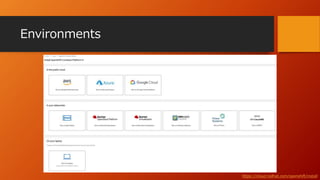
OpenShiftの構築方法がいくつかりましてそちらをご紹介しまして
その中から、
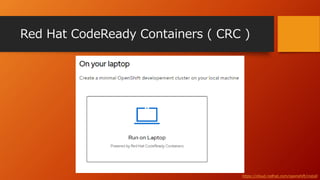
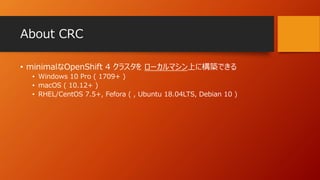
比較的手数が少なく構築できる Easyな方法としまして、 Red Hat CodeReady Containas CRC を紹介します、
また、少し手数が多くて時間がかかるので少しHard? かもしれない方法として、UPI install on bare metal という方法をご紹介します。
10分間の少し駆け足でのご紹介となるかと思いますがよろしくお願いいたします。
#29 まとめです
おうちOpenShiftクラスタを簡単に構築できる方法として、
Red Hat CodeReady Containers ( CRC ) をご紹介しました、
わずかなコマンドでOpenShiftクラスタを構築したい方におすすめです
また、ちょっとHard?かもしれない方法として、UPI install on bare metalをご消化しました
手数と時間はかかるが、本格的なマルチノード構成のおうちOpenShiftを自分の手で構築したい自作派の方におすすめ
実行コマンドなどの詳細はkubernetesアドベントカレンダー2020に投稿予定です。
ぜひご覧いただきましたら幸いです。





![Spec
https://access.redhat.com/documentation/en-us/red_hat_codeready_containers/1.20/html/getting_started_guide/installation_gsg#minimum-system-requirements_gsg
Requirements ( v1.20 ) my bare metal
vCPU 4 12 ( core i7-8700K)
RAM [GB] 9 64
Storage [GB] 35 512
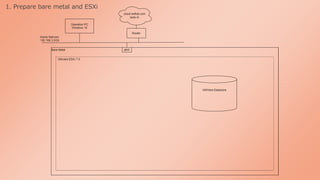
• 今回は、ベアメタル上のRHEL8.0にCRCを導入して
OpenShiftクラスタを構築してみました](https://image.slidesharecdn.com/openshift-run-winter-lt-loftkun-1210-01-201211145746/85/OpenShift-from-Easy-way-to-Hard-Way-11-320.jpg)
![Quick Starts
• Quick Start ( チュートリアル )もついている
• CRCは、わずか数回のコマンド実行で
OpenShiftを使い始められるようになっている
[loft@rhel8 ~]$ oc login -u kubeadmin -p **********
https://api.crc.testing:6443
Login successful.
You have access to 59 projects, the list has been suppressed. You can list all projects with '
projects'
Using project "default".
[loft@rhel8 ~]$ oc get po
NAME READY STATUS RESTARTS AGE
nodejs-sample-1-build 0/1 Completed 0 15m
nodejs-sample-8578969d46-qhkzp 1/1 Running 0 14m
[loft@rhel8 ~]$](https://image.slidesharecdn.com/openshift-run-winter-lt-loftkun-1210-01-201211145746/85/OpenShift-from-Easy-way-to-Hard-Way-15-320.jpg)


![Requirements ( v4.6 )
https://docs.openshift.com/container-platform/4.6/installing/installing_bare_metal/installing-bare-metal.html#minimum-resource-requirements_installing-bare-metal
ノード OS vCPU RAM [GB] STORAGE
[GB]
台数
ブートストラップ RHCOS 4 16 120 1
コントロール RHCOS 4 16 120 3
コンピュート RHCOS 2 8 120 2
合計 - 20 80 720 6](https://image.slidesharecdn.com/openshift-run-winter-lt-loftkun-1210-01-201211145746/85/OpenShift-from-Easy-way-to-Hard-Way-18-320.jpg)
![検証環境
https://access.redhat.com/documentation/ja-jp/openshift_container_platform/4.6/html/installing_on_bare_metal/installing-on-bare-metal#prerequisites
ノード OS vCPU RAM [GB] STORAGE
[GB]
台数
ブートストラップ RHCOS 4 16 120 1
コントロール RHCOS 4 16 120 3
コンピュート RHCOS 2 8 120 2
踏み台サーバー RHEL8.0 2 4 50 1
合計 - 22 84 770 7
My bare metal ESXi 12 64 2000 1
追加
DNS/DHCP/Loa
dBalancer用
オーバーコミット
core i7-8700K ( 6core/12thread ) / RAM 64GB / HDD 2TB](https://image.slidesharecdn.com/openshift-run-winter-lt-loftkun-1210-01-201211145746/85/OpenShift-from-Easy-way-to-Hard-Way-19-320.jpg)