


Agenda
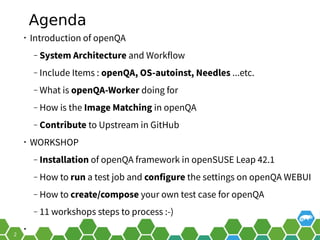
• Introduction of openQA
‒ System Architecture and Workflow
‒ Include Items : openQA, OS-autoinst, Needles ...etc.
‒ What is openQA-Worker doing for
‒ How is the Image Matching in openQA
‒ Contribute to Upstream in GitHub
• WORKSHOP
‒ Installation of openQA framework in openSUSE Leap 42.1
‒ How to run a test job and configure the settings on openQA WEBUI
‒ How to create/compose your own test case for openQA
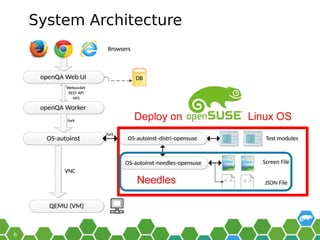
System Architecture
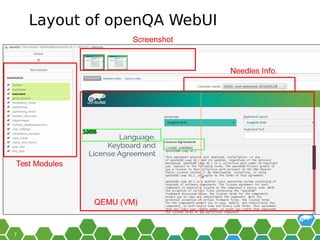
Layout of openQA WebUI
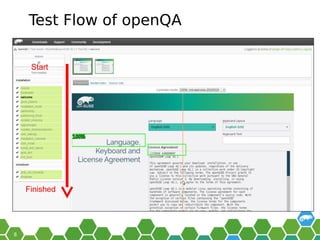
Test Flow of openQA
os-autoinst backends
• QEMU/KVM (default)
• IPMI (real HW)
• X86_64,PowerPC, s390, PowerVM...etc.
• Refer to backend docs
‒ (https://github.com/os-autoinst/os-
autoinst/blob/master/doc/backend_vars.asciidoc)
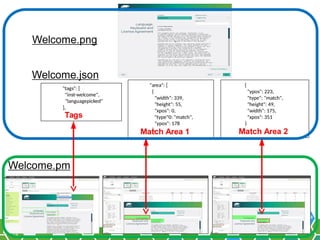
"tags": [
"inst-welcome",
"languagepicked"
],
"area": [
{
"width": 339,
"height": 55,
"xpos": 0,
"type"0: "match",
"ypos": 178
},
{
"ypos": 223,
"type": "match",
"height": 49,
"width": 175,
"xpos": 351
}
Welcome.png
Welcome.json
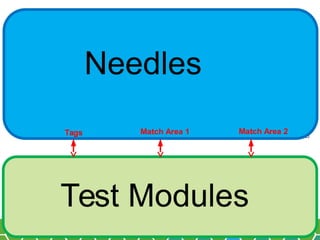
Tags
Match Area 1 Match Area 2
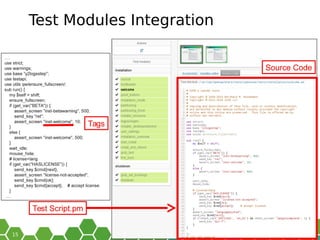
Test Modules Integration
OpenQA-Worker
• Workers are processes running virtual machines to
perform the actual testing. They are distributed as a
separate package and can be installed on multiple
machines but still using only one WebUI.
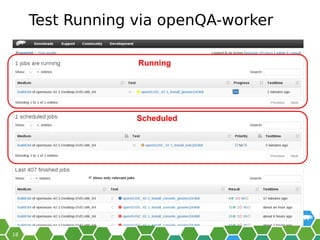
Test Running via openQA-worker
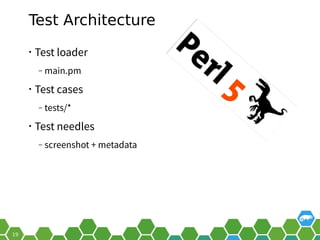
Test Architecture
• Test loader
‒ main.pm
• Test cases
‒ tests/*
• Test needles
‒ screenshot + metadata
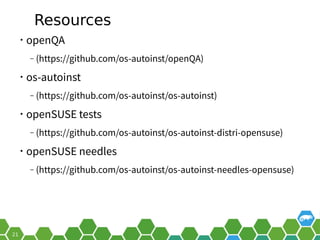
Resources
• openQA
‒ (https://github.com/os-autoinst/openQA)
• os-autoinst
‒ (https://github.com/os-autoinst/os-autoinst)
• openSUSE tests
‒ (https://github.com/os-autoinst/os-autoinst-distri-opensuse)
• openSUSE needles
‒ (https://github.com/os-autoinst/os-autoinst-needles-opensuse)
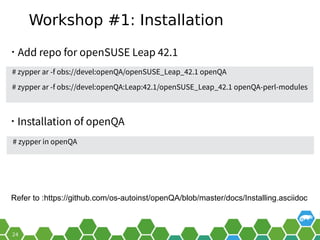
Workshop #1: Installation
• Add repo for openSUSE Leap 42.1
# zypper in openQA
• Installation of openQA
# zypper ar -f obs://devel:openQA/openSUSE_Leap_42.1 openQA
# zypper ar -f obs://devel:openQA:Leap:42.1/openSUSE_Leap_42.1 openQA-perl-modules
Refer to :https://github.com/os-autoinst/openQA/blob/master/docs/Installing.asciidoc
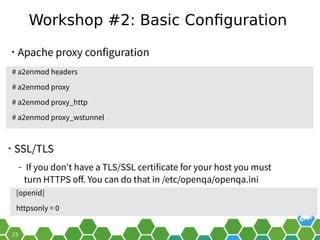
Workshop #2: Basic Configuration
• Apache proxy configuration
• SSL/TLS
‒ If you don’t have a TLS/SSL certificate for your host you must
turn HTTPS off. You can do that in /etc/openqa/openqa.ini
# a2enmod headers
# a2enmod proxy
# a2enmod proxy_http
# a2enmod proxy_wstunnel
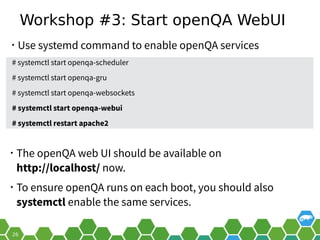
Workshop #3: Start openQA WebUI
• Use systemd command to enable openQA services
• The openQA web UI should be available on
http://localhost/ now.
• To ensure openQA runs on each boot, you should also
systemctl enable the same services.
# systemctl start openqa-scheduler
# systemctl start openqa-gru
# systemctl start openqa-websockets
# systemctl start openqa-webui
# systemctl restart apache2
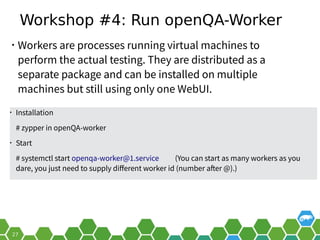
Workshop #4: Run openQA-Worker
• Workers are processes running virtual machines to
perform the actual testing. They are distributed as a
separate package and can be installed on multiple
machines but still using only one WebUI.
• Installation
# zypper in openQA-worker
• Start
# systemctl start openqa-worker@1.service (You can start as many workers as you
dare, you just need to supply different worker id (number after @).)
Workshop #5: Manage API Key
• To allow workers to access your instance, you need to log
into openQA as operator and create a pair of API key and
secret.
• OpenQA WEBUI → Manage API keys → CREATE
‒ Use the API and fill in your installed worker machine
• Modify /etc/openqa/client.conf
[localhost]
key = 0123456789ABCDEF (replace into your key)
secret = 0123456789ABCDEF (replace into your key)
Workshop #6: User Authentication
• OpenQA supports three different authentication
methods - OpenID (default), iChain and Fake. See auth
section in /etc/openqa/openqa.ini
[auth]
• # method name is case sensitive!
• method = OpenID|iChain|Fake
• For Testing purposes only! Fake authentication bypass
any authentication and automatically allow any login
requests as Demo user with administrator privileges and
without password.
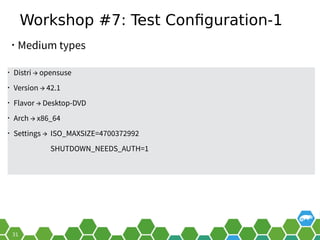
Workshop #7: Test Configuration-1
• Medium types
• Distri → opensuse
• Version → 42.1
• Flavor → Desktop-DVD
• Arch → x86_64
• Settings → ISO_MAXSIZE=4700372992
SHUTDOWN_NEEDS_AUTH=1
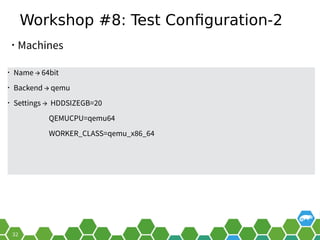
Workshop #8: Test Configuration-2
• Machines
• Name → 64bit
• Backend → qemu
• Settings → HDDSIZEGB=20
QEMUCPU=qemu64
WORKER_CLASS=qemu_x86_64
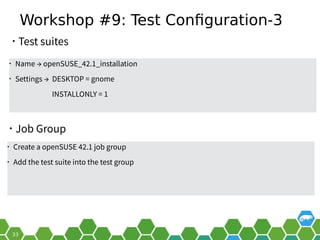
Workshop #9: Test Configuration-3
• Job Group
• Name → openSUSE_42.1_installation
• Settings → DESKTOP = gnome
INSTALLONLY = 1
• Test suites
• Create a openSUSE 42.1 job group
• Add the test suite into the test group
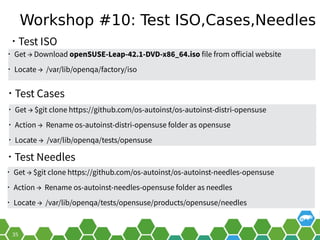
Workshop #10: Test ISO,Cases,Needles
• Test Needles
• Get → Download openSUSE-Leap-42.1-DVD-x86_64.iso file from official website
• Locate → /var/lib/openqa/factory/iso
• Test ISO
• Get → $git clone https://github.com/os-autoinst/os-autoinst-distri-opensuse
• Action → Rename os-autoinst-distri-opensuse folder as opensuse
• Locate → /var/lib/openqa/tests/opensuse
• Test Cases
• Get → $git clone https://github.com/os-autoinst/os-autoinst-needles-opensuse
• Action → Rename os-autoinst-needles-opensuse folder as needles
• Locate → /var/lib/openqa/tests/opensuse/products/opensuse/needles
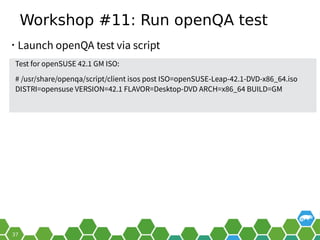
Workshop #11: Run openQA test
Test for openSUSE 42.1 GM ISO:
# /usr/share/openqa/script/client isos post ISO=openSUSE-Leap-42.1-DVD-x86_64.iso
DISTRI=opensuse VERSION=42.1 FLAVOR=Desktop-DVD ARCH=x86_64 BUILD=GM
• Launch openQA test via script
Have a Lot of Fun, and Join
Us At:
openQA hands on with openSUSE Leap 42.1 - openSUSE.Asia Summit ID 2016

openQA hands on with openSUSE Leap 42.1 - openSUSE.Asia Summit ID 2016

  • 2.
    Agenda • Introduction ofopenQA ‒ System Architecture and Workflow ‒ Include Items : openQA, OS-autoinst, Needles ...etc. ‒ What is openQA-Worker doing for ‒ How is the Image Matching in openQA ‒ Contribute to Upstream in GitHub • WORKSHOP ‒ Installation of openQA framework in openSUSE Leap 42.1 ‒ How to run a test job and configure the settings on openQA WEBUI ‒ How to create/compose your own test case for openQA
  • 6.
  • 7.
  • 8.
  • 10.
    os-autoinst backends • QEMU/KVM(default) • IPMI (real HW) • X86_64,PowerPC, s390, PowerVM...etc. • Refer to backend docs ‒ (https://github.com/os-autoinst/os- autoinst/blob/master/doc/backend_vars.asciidoc)
  • 13.
    "tags": [ "inst-welcome", "languagepicked" ], "area": [ { "width":339, "height": 55, "xpos": 0, "type"0: "match", "ypos": 178 }, { "ypos": 223, "type": "match", "height": 49, "width": 175, "xpos": 351 } Welcome.png Welcome.json Tags Match Area 1 Match Area 2
  • 15.
  • 17.
    OpenQA-Worker • Workers areprocesses running virtual machines to perform the actual testing. They are distributed as a separate package and can be installed on multiple machines but still using only one WebUI.
  • 18.
    Test Running viaopenQA-worker
  • 19.
    Test Architecture • Testloader ‒ main.pm • Test cases ‒ tests/* • Test needles ‒ screenshot + metadata
  • 21.
    Resources • openQA ‒ (https://github.com/os-autoinst/openQA) •os-autoinst ‒ (https://github.com/os-autoinst/os-autoinst) • openSUSE tests ‒ (https://github.com/os-autoinst/os-autoinst-distri-opensuse) • openSUSE needles ‒ (https://github.com/os-autoinst/os-autoinst-needles-opensuse)
  • 24.
    Workshop #1: Installation •Add repo for openSUSE Leap 42.1 # zypper in openQA • Installation of openQA # zypper ar -f obs://devel:openQA/openSUSE_Leap_42.1 openQA # zypper ar -f obs://devel:openQA:Leap:42.1/openSUSE_Leap_42.1 openQA-perl-modules Refer to :https://github.com/os-autoinst/openQA/blob/master/docs/Installing.asciidoc
  • 25.
    Workshop #2: BasicConfiguration • Apache proxy configuration • SSL/TLS ‒ If you don’t have a TLS/SSL certificate for your host you must turn HTTPS off. You can do that in /etc/openqa/openqa.ini # a2enmod headers # a2enmod proxy # a2enmod proxy_http # a2enmod proxy_wstunnel
  • 26.
    Workshop #3: StartopenQA WebUI • Use systemd command to enable openQA services • The openQA web UI should be available on http://localhost/ now. • To ensure openQA runs on each boot, you should also systemctl enable the same services. # systemctl start openqa-scheduler # systemctl start openqa-gru # systemctl start openqa-websockets # systemctl start openqa-webui # systemctl restart apache2
  • 27.
    Workshop #4: RunopenQA-Worker • Workers are processes running virtual machines to perform the actual testing. They are distributed as a separate package and can be installed on multiple machines but still using only one WebUI. • Installation # zypper in openQA-worker • Start # systemctl start openqa-worker@1.service (You can start as many workers as you dare, you just need to supply different worker id (number after @).)
  • 28.
    Workshop #5: ManageAPI Key • To allow workers to access your instance, you need to log into openQA as operator and create a pair of API key and secret. • OpenQA WEBUI → Manage API keys → CREATE ‒ Use the API and fill in your installed worker machine • Modify /etc/openqa/client.conf [localhost] key = 0123456789ABCDEF (replace into your key) secret = 0123456789ABCDEF (replace into your key)
  • 29.
    Workshop #6: UserAuthentication • OpenQA supports three different authentication methods - OpenID (default), iChain and Fake. See auth section in /etc/openqa/openqa.ini [auth] • # method name is case sensitive! • method = OpenID|iChain|Fake • For Testing purposes only! Fake authentication bypass any authentication and automatically allow any login requests as Demo user with administrator privileges and without password.
  • 31.
    Workshop #7: TestConfiguration-1 • Medium types • Distri → opensuse • Version → 42.1 • Flavor → Desktop-DVD • Arch → x86_64 • Settings → ISO_MAXSIZE=4700372992 SHUTDOWN_NEEDS_AUTH=1
  • 32.
    Workshop #8: TestConfiguration-2 • Machines • Name → 64bit • Backend → qemu • Settings → HDDSIZEGB=20 QEMUCPU=qemu64 WORKER_CLASS=qemu_x86_64
  • 33.
    Workshop #9: TestConfiguration-3 • Job Group • Name → openSUSE_42.1_installation • Settings → DESKTOP = gnome INSTALLONLY = 1 • Test suites • Create a openSUSE 42.1 job group • Add the test suite into the test group
  • 35.
    Workshop #10: TestISO,Cases,Needles • Test Needles • Get → Download openSUSE-Leap-42.1-DVD-x86_64.iso file from official website • Locate → /var/lib/openqa/factory/iso • Test ISO • Get → $git clone https://github.com/os-autoinst/os-autoinst-distri-opensuse • Action → Rename os-autoinst-distri-opensuse folder as opensuse • Locate → /var/lib/openqa/tests/opensuse • Test Cases • Get → $git clone https://github.com/os-autoinst/os-autoinst-needles-opensuse • Action → Rename os-autoinst-needles-opensuse folder as needles • Locate → /var/lib/openqa/tests/opensuse/products/opensuse/needles
  • 37.
    Workshop #11: RunopenQA test Test for openSUSE 42.1 GM ISO: # /usr/share/openqa/script/client isos post ISO=openSUSE-Leap-42.1-DVD-x86_64.iso DISTRI=opensuse VERSION=42.1 FLAVOR=Desktop-DVD ARCH=x86_64 BUILD=GM • Launch openQA test via script
  • 39.
    Have a Lotof Fun, and Join Us At: