OpenERP
                  Feedback from our useability team.


                          - Fabien Pinckaers, CEO -

                                      April 12th, 2012

Nom du fichier – à compléter   Management Presentation
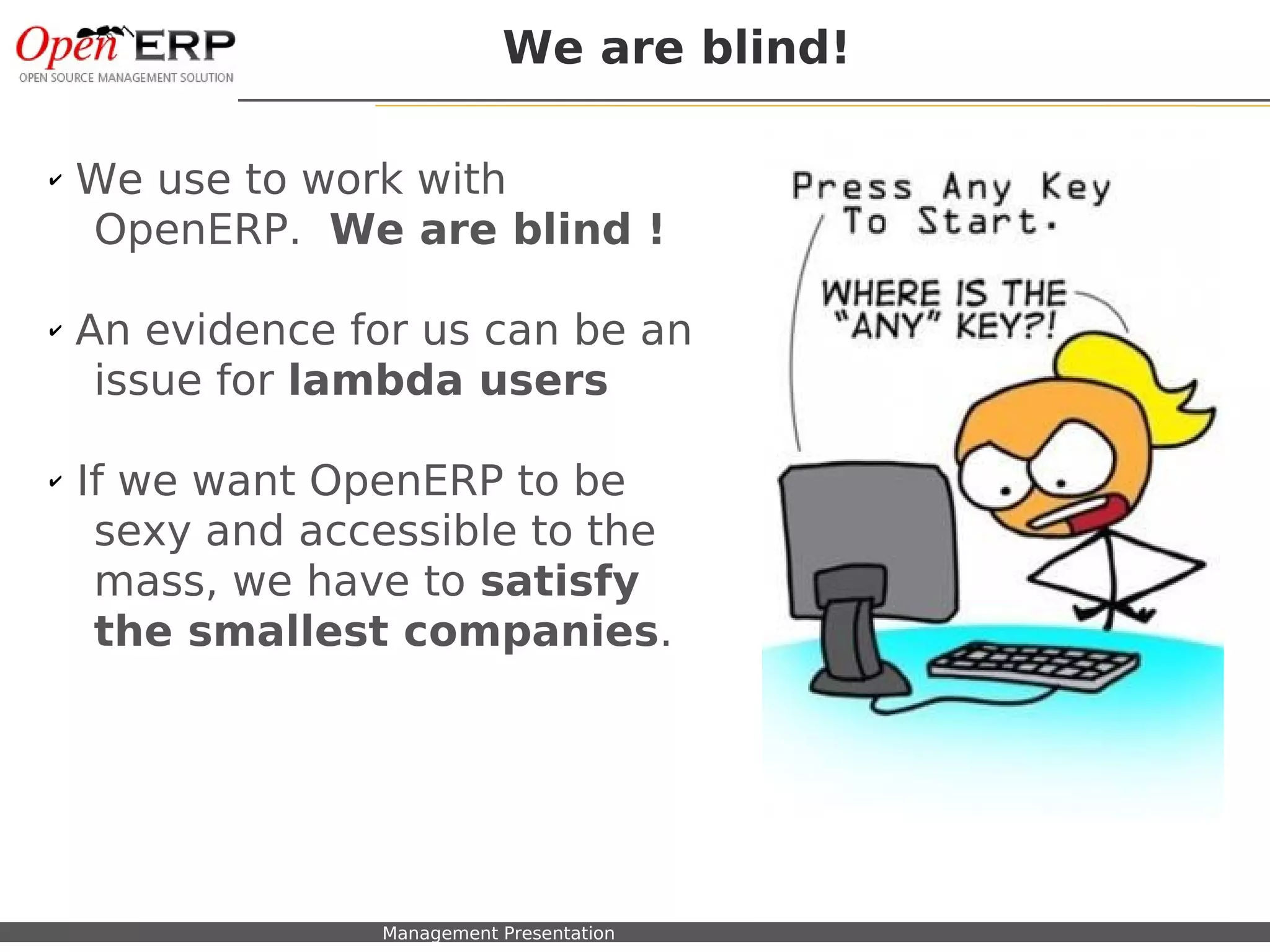
We are blind!

✔   We use to work with
    OpenERP. We are blind !

✔   An evidence for us can be an
     issue for lambda users

✔   If we want OpenERP to be
     sexy and accessible to the
     mass, we have to satisfy
     the smallest companies.


    Nom du fichier – à compléter   Management Presentation
Example: Search View


Nom du fichier – à compléter   Management Presentation
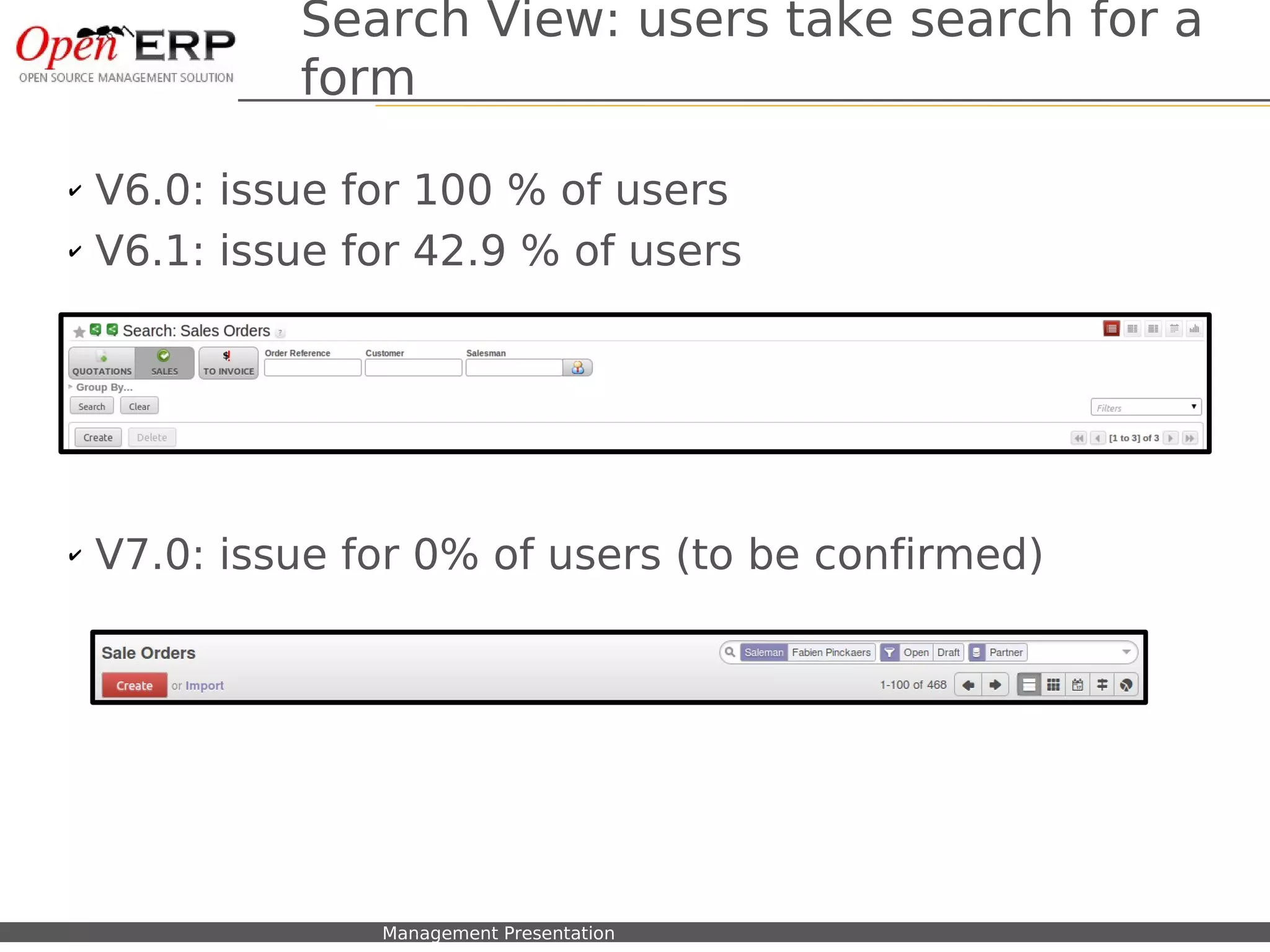
Search View: users take search for a
                          form

✔   V6.0: issue for 100 % of users
✔   V6.1: issue for 42.9 % of users


✔   V7.0: issue for 0% of users (to be confirmed)


    Nom du fichier – à compléter   Management Presentation
Useability Statistics


Nom du fichier – à compléter   Management Presentation
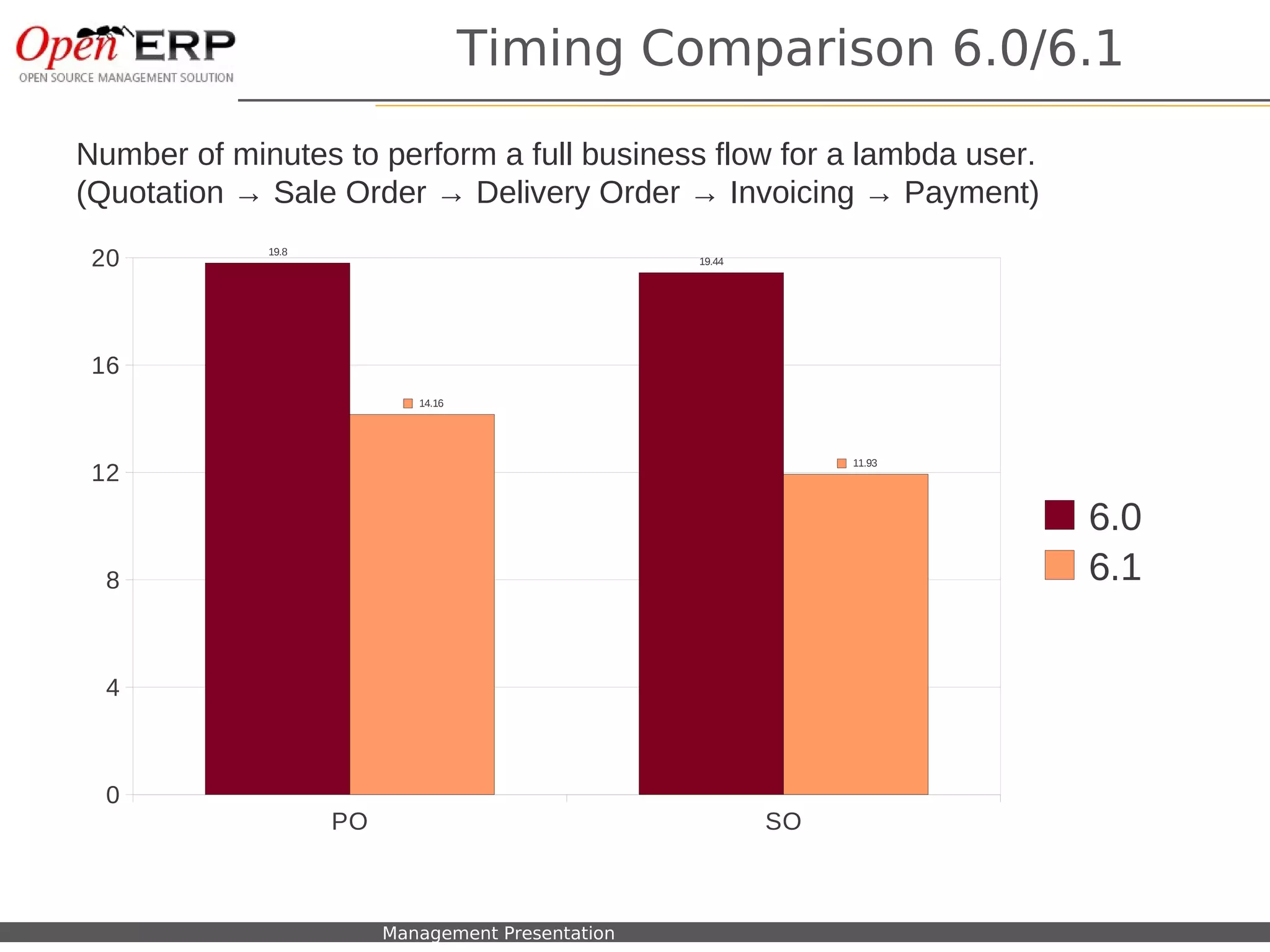
Timing Comparison 6.0/6.1

Number of minutes to perform a full business flow for a lambda user.
(Quotation → Sale Order → Delivery Order → Invoicing → Payment)

 20                 19.8
                                                          19.44


 16
                                   14.16


                                                                       11.93
 12
                                                                               6.0
  8                                                                            6.1

  4


  0
                           PO                                     SO


 Nom du fichier – à compléter   Management Presentation
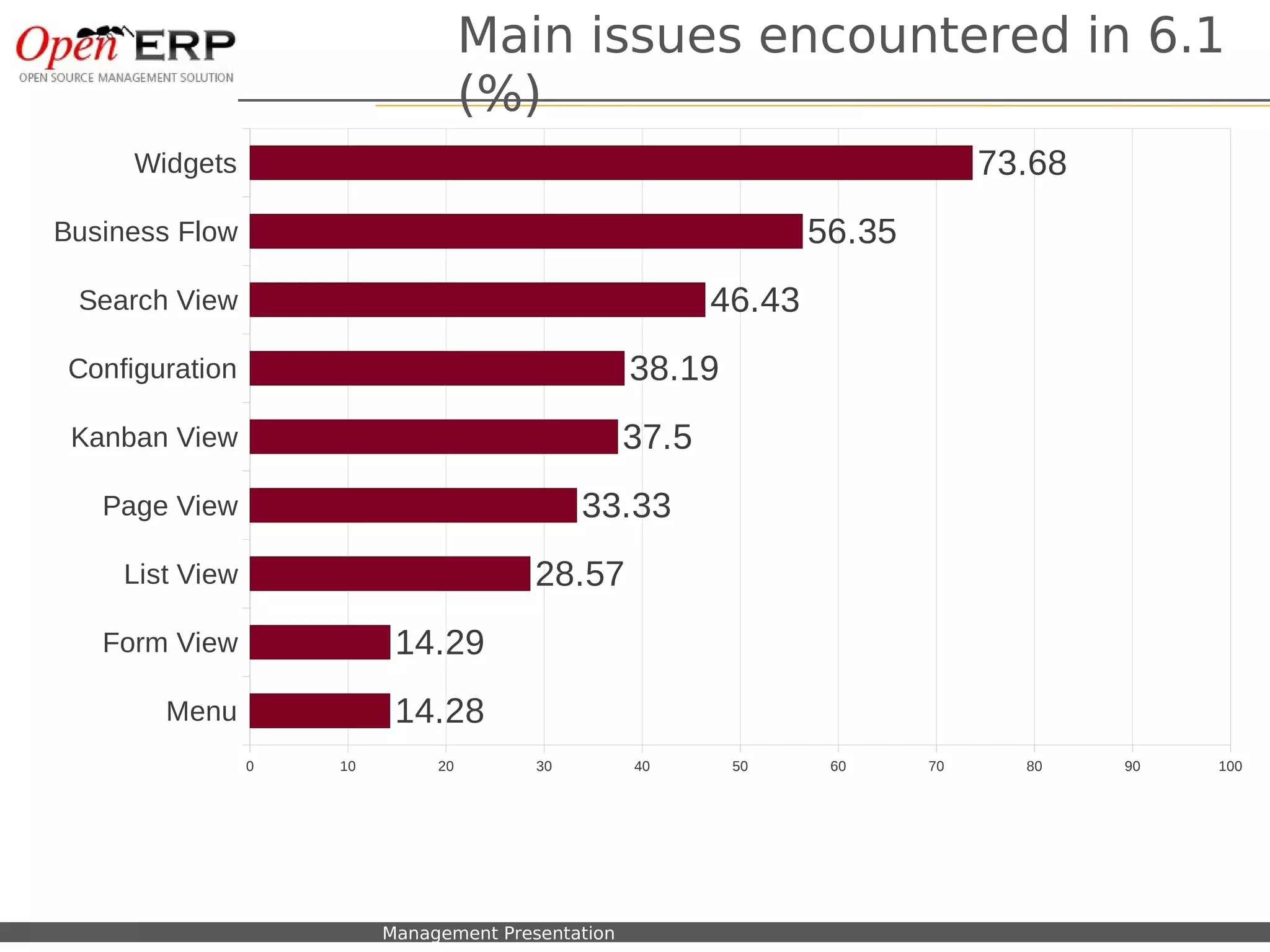
Main issues encountered in 6.1
                                            (%)
      Widgets                                                                           73.68
Business Flow                                                              56.35
 Search View                                                       46.43
 Configuration                                              38.19
 Kanban View                                                37.5
   Page View                                          33.33
     List View                                   28.57
   Form View                       14.29
          Menu                     14.28
                  0          10        20        30         40      50      60     70     80    90   100


  Nom du fichier – à compléter    Management Presentation
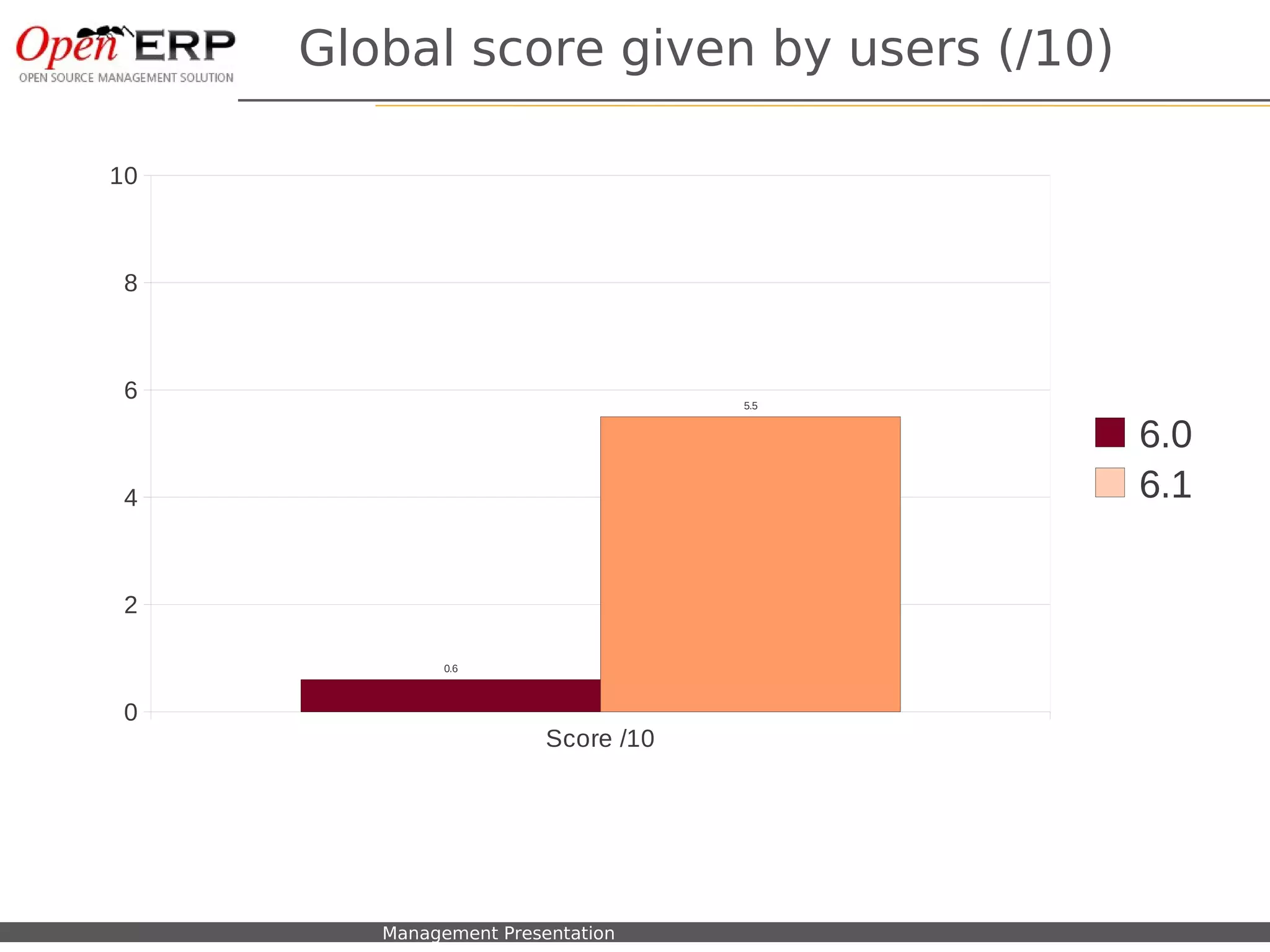
Global score given by users (/10)

 10


   8


   6                                                       5.5


                                                                 6.0
   4                                                             6.1

   2

                                     0.6


   0
                                               Score /10


Nom du fichier – à compléter   Management Presentation
Useability Examples
                         V7.0 – demo new design


Nom du fichier – à compléter   Management Presentation
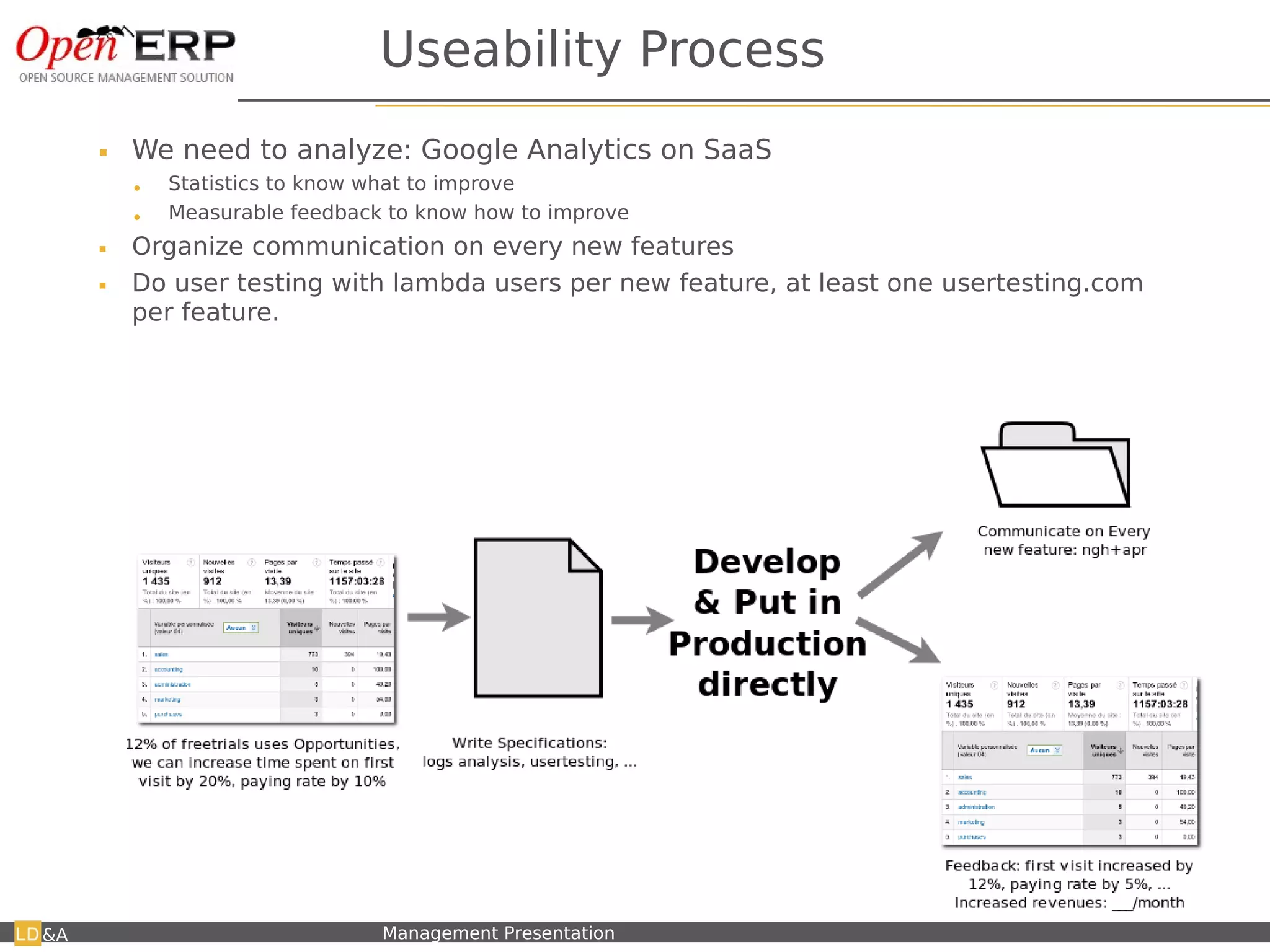
Useability Process
        We need to analyze: Google Analytics on SaaS
         •   Statistics to know what to improve
         •   Measurable feedback to know how to improve
        Organize communication on every new features
        Do user testing with lambda users per new feature, at least one usertesting.com
         per feature.


&A   Nom du fichier – à compléter   Management Presentation
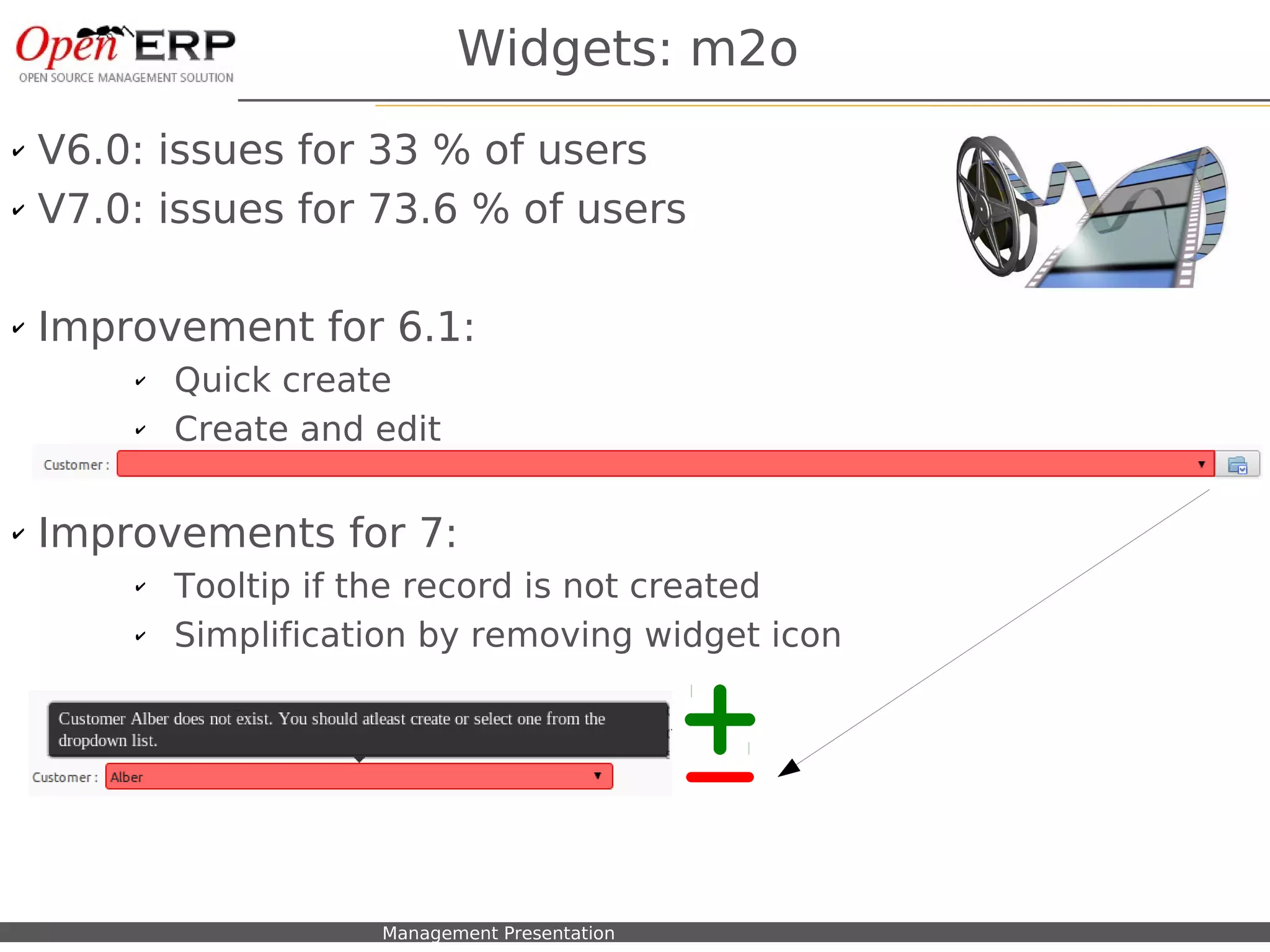
Widgets: m2o
✔   V6.0: issues for 33 % of users
✔   V7.0: issues for 73.6 % of users

✔   Improvement for 6.1:
          ✔    Quick create
          ✔    Create and edit

✔   Improvements for 7:
          ✔    Tooltip if the record is not created
          ✔    Simplification by removing widget icon


      Nom du fichier – à compléter   Management Presentation
Simplification → Remove Elements
            Simplification → Remove Elements


&A   Nom du fichier – à compléter   Management Presentation   12
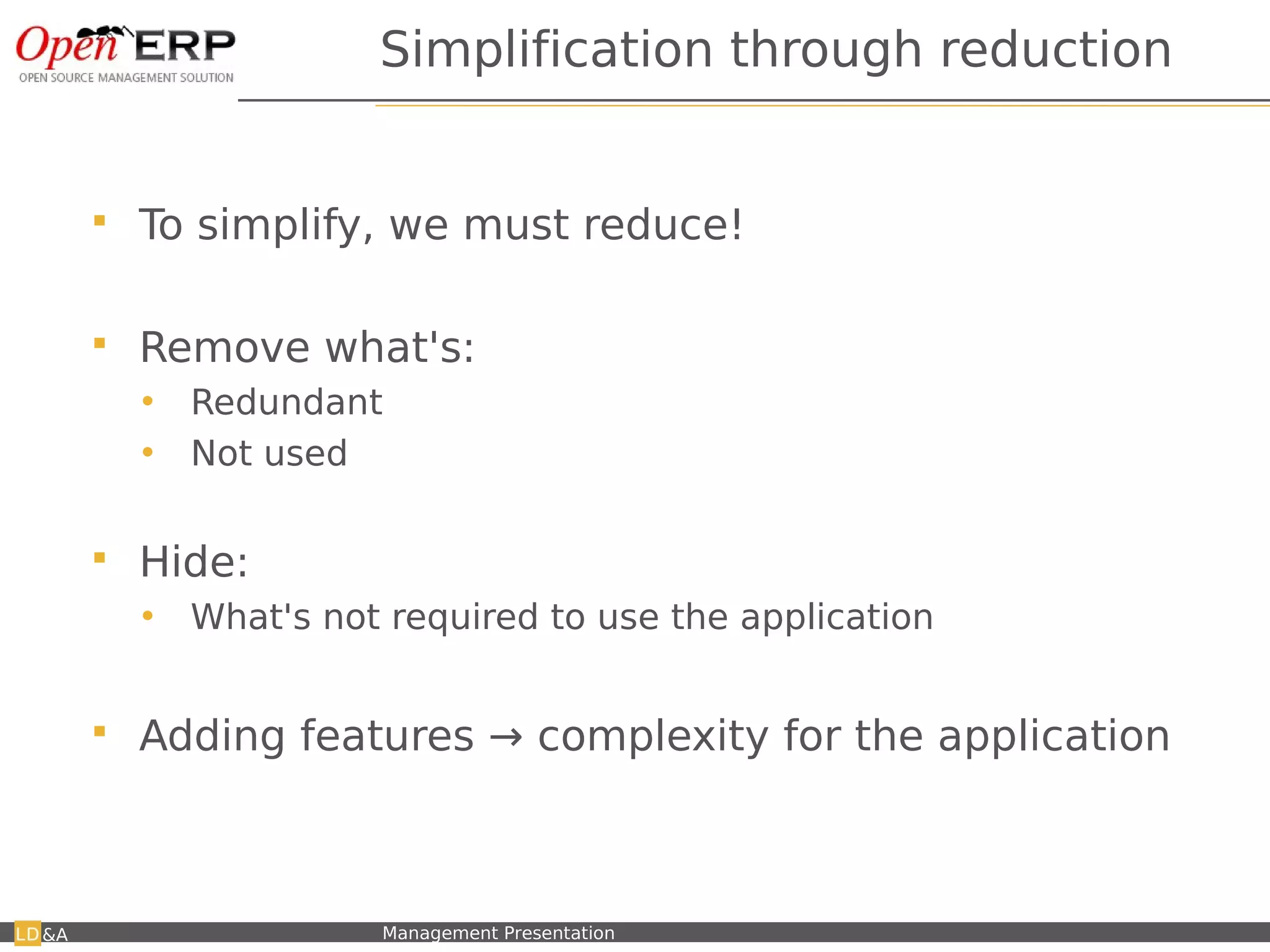
Simplification through reduction


         To simplify, we must reduce!

         Remove what's:
          •    Redundant
          •    Not used

         Hide:
          •    What's not required to use the application


         Adding features → complexity for the application


&A   Nom du fichier – à compléter   Management Presentation
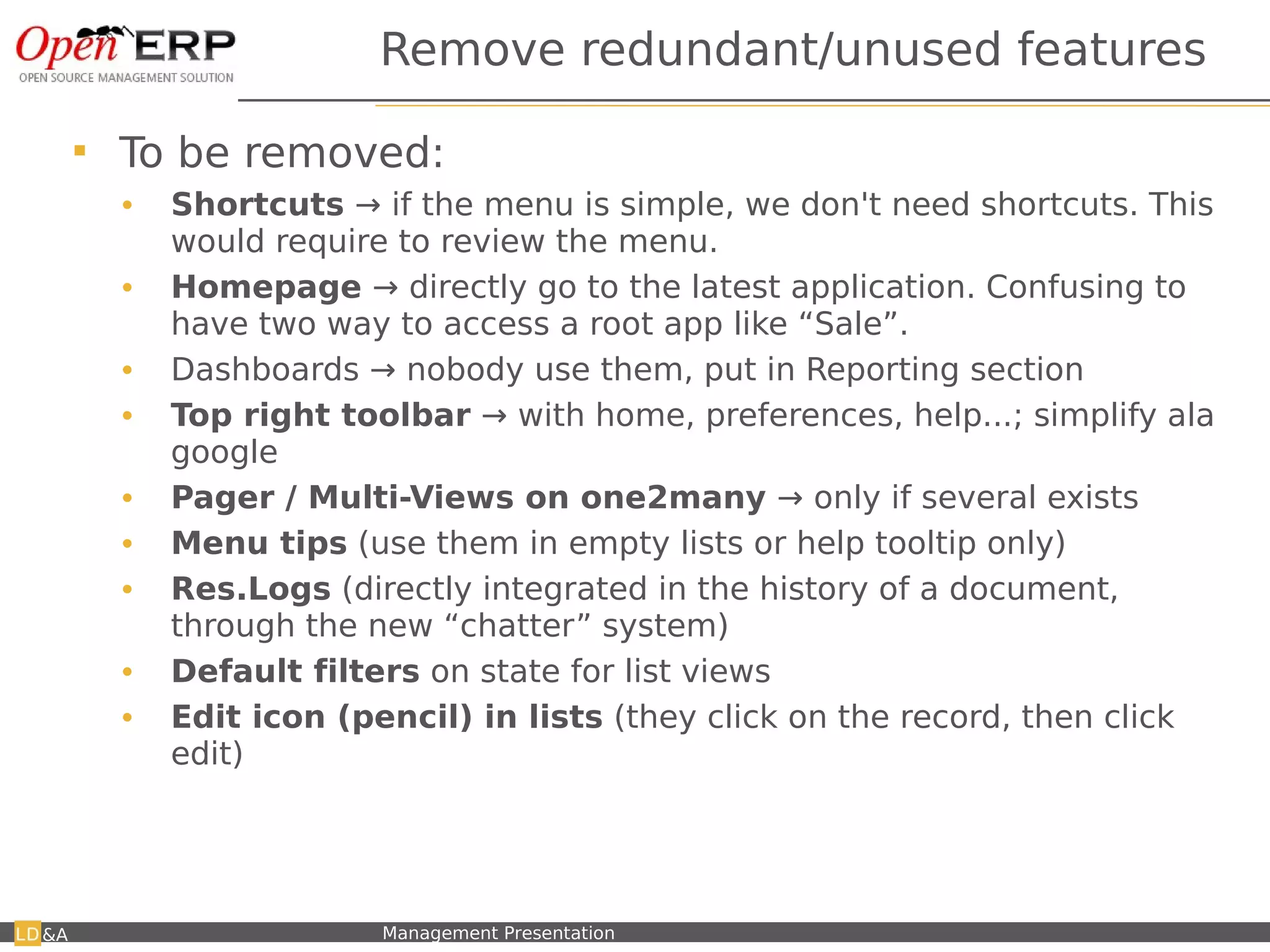
Remove redundant/unused features

           To be removed:
            •    Shortcuts → if the menu is simple, we don't need shortcuts. This
                 would require to review the menu.
            •    Homepage → directly go to the latest application. Confusing to
                 have two way to access a root app like “Sale”.
            •    Dashboards → nobody use them, put in Reporting section
            •    Top right toolbar → with home, preferences, help...; simplify ala
                 google
            •    Pager / Multi-Views on one2many → only if several exists
            •    Menu tips (use them in empty lists or help tooltip only)
            •    Res.Logs (directly integrated in the history of a document,
                 through the new “chatter” system)
            •    Default filters on state for list views
            •    Edit icon (pencil) in lists (they click on the record, then click
                 edit)


&A       Nom du fichier – à compléter   Management Presentation
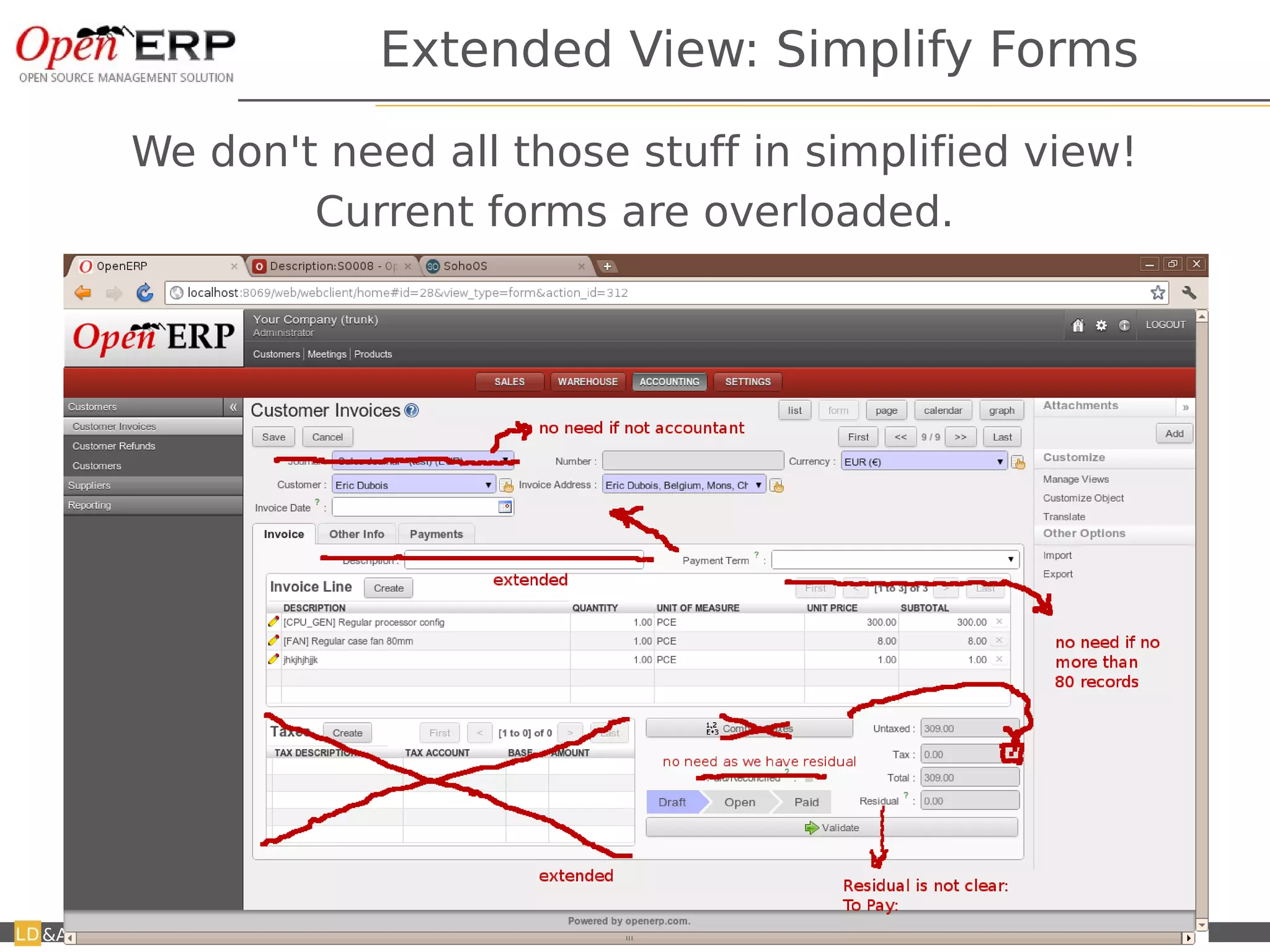
Extended View: Simplify Forms

         We don't need all those stuff in simplified view!
                 Current forms are overloaded.


&A   Nom du fichier – à compléter   Management Presentation
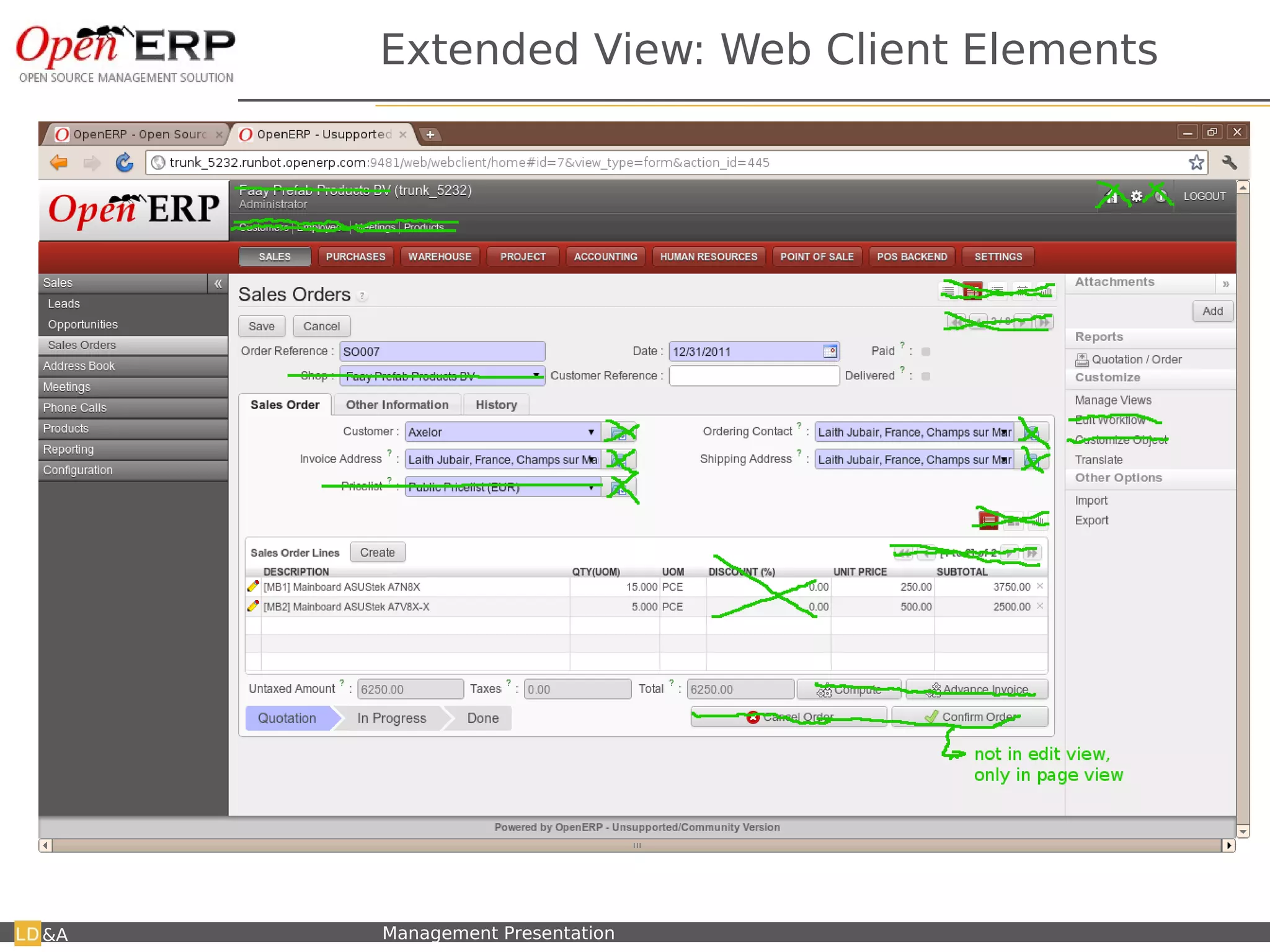
Extended View: Web Client Elements


&A   Nom du fichier – à compléter   Management Presentation
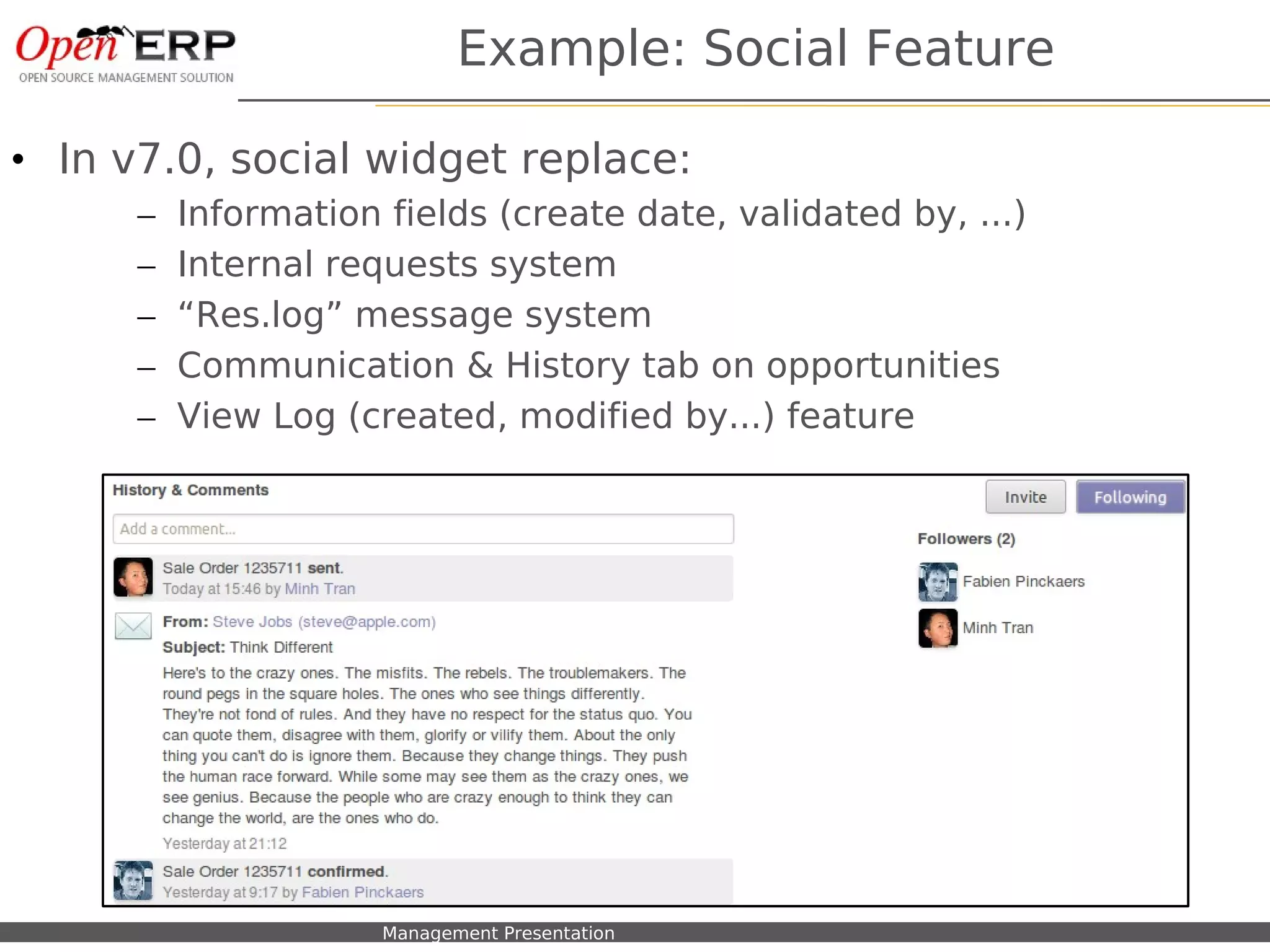
Example: Social Feature

• In v7.0, social widget replace:
        –   Information fields (create date, validated by, ...)
        –   Internal requests system
        –   “Res.log” message system
        –   Communication & History tab on opportunities
        –   View Log (created, modified by...) feature


   Nom du fichier – à compléter   Management Presentation
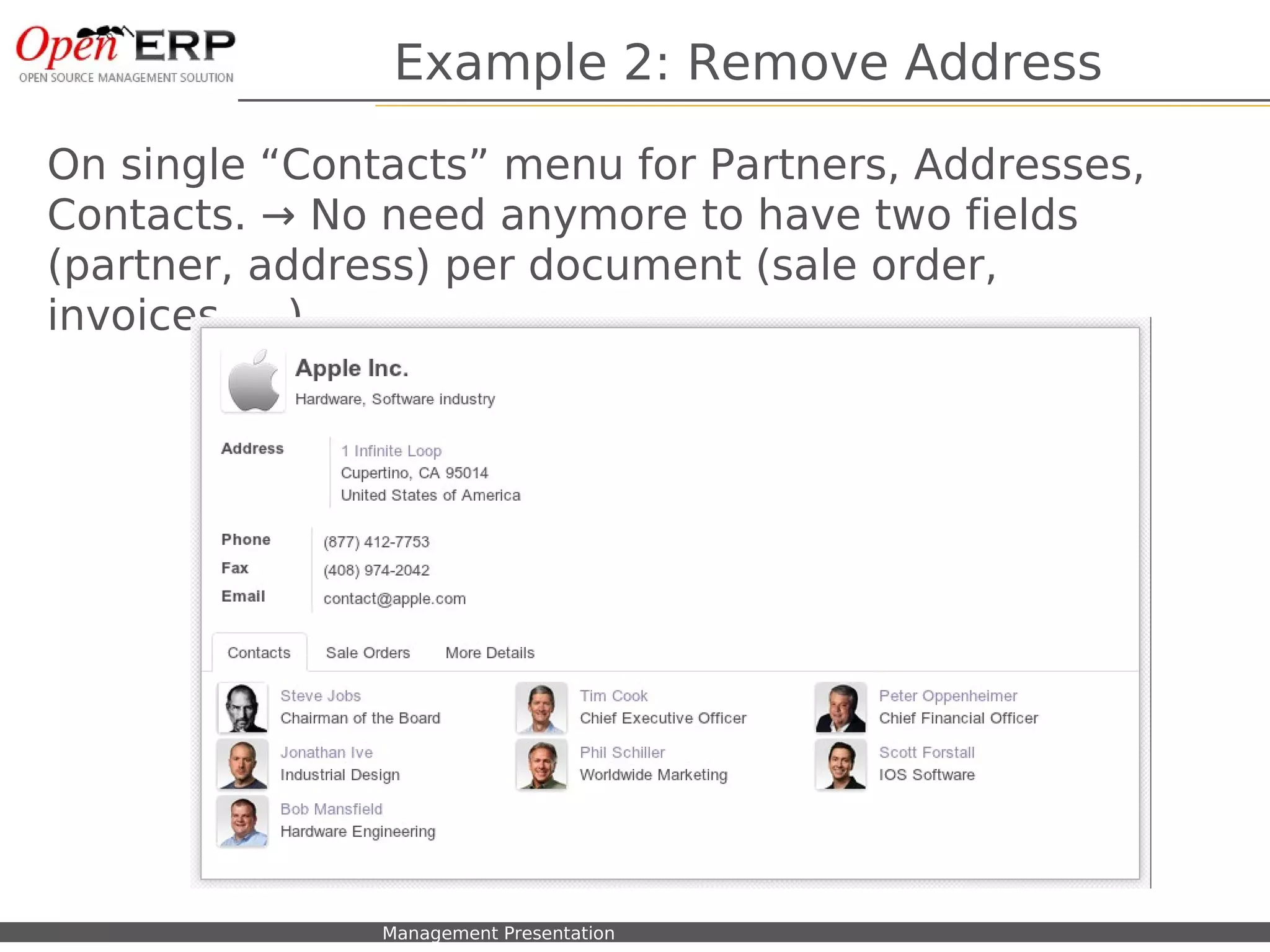
Example 2: Remove Address

On single “Contacts” menu for Partners, Addresses,
Contacts. → No need anymore to have two fields
(partner, address) per document (sale order,
invoices, ...)


  Nom du fichier – à compléter   Management Presentation
Page view of documents
                           Page view of documents
                           An invoice should look like an invoice.
                           An invoice should look like an invoice.


&A   Nom du fichier – à compléter   Management Presentation          19
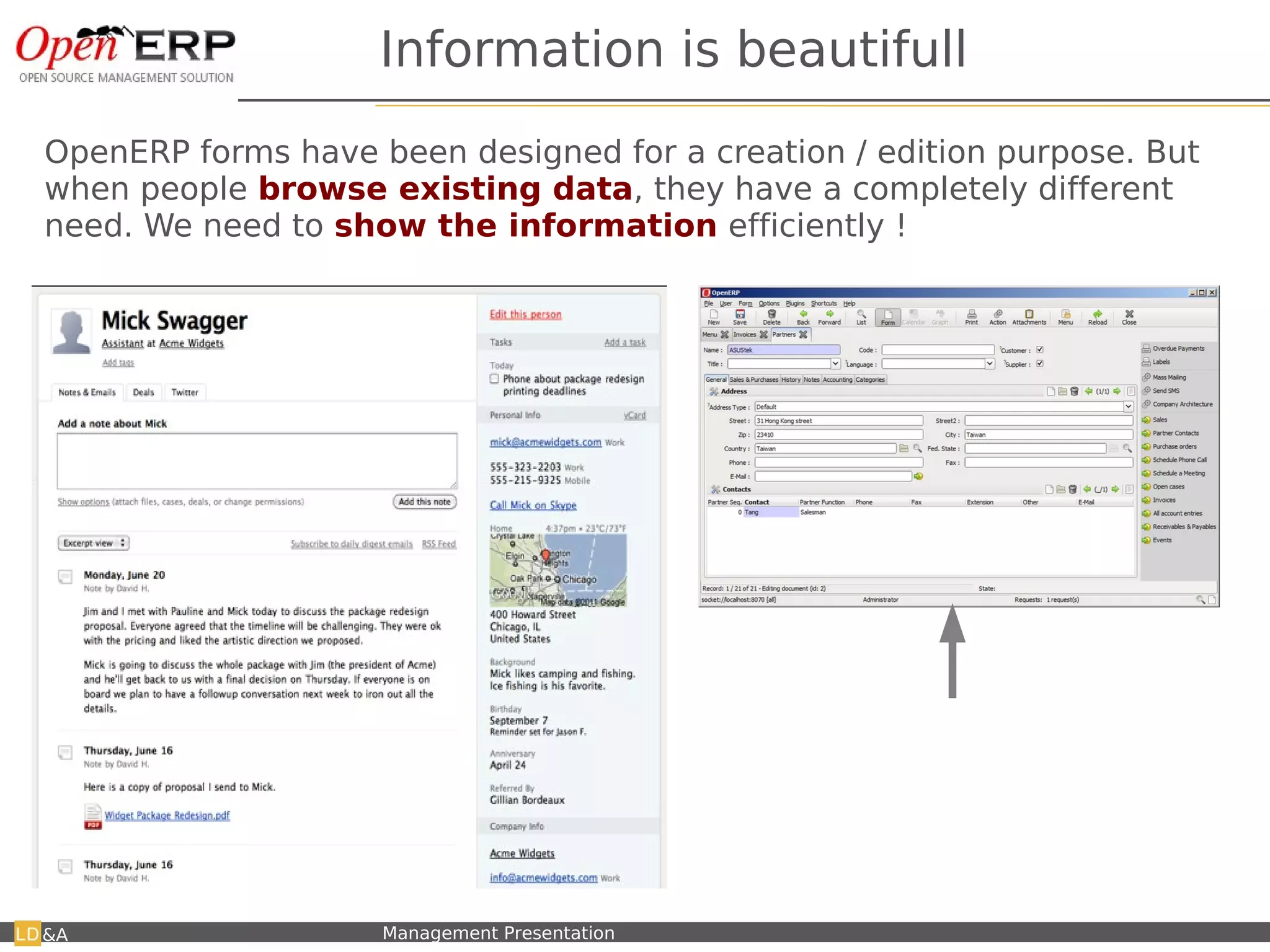
Information is beautifull
OpenERP forms have been designed for a creation / edition purpose. But
when people browse existing data, they have a completely different
need. We need to show the information efficiently !


                                                              Not usefull when browsing or using
                                                              customers, but good for creation !
                                                              I propose to create a PAGE view, which
                                                              is the current readonly form → example
                                                              on partners.

&A   Nom du fichier – à compléter   Management Presentation
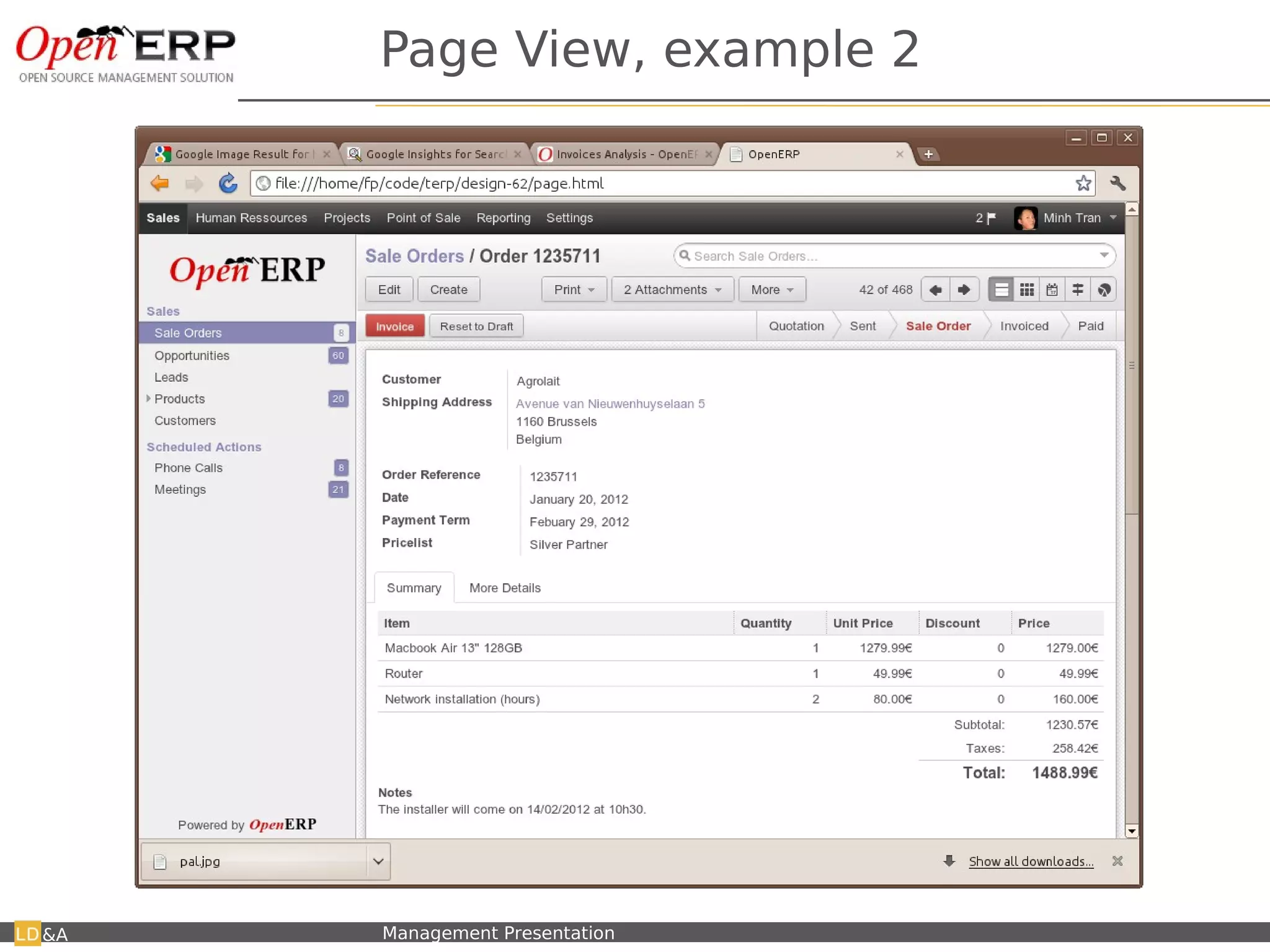
Page View, example 2


&A   Nom du fichier – à compléter   Management Presentation
Don't make me think.
             We should better guide the user to the next step


&A   Nom du fichier – à compléter   Management Presentation
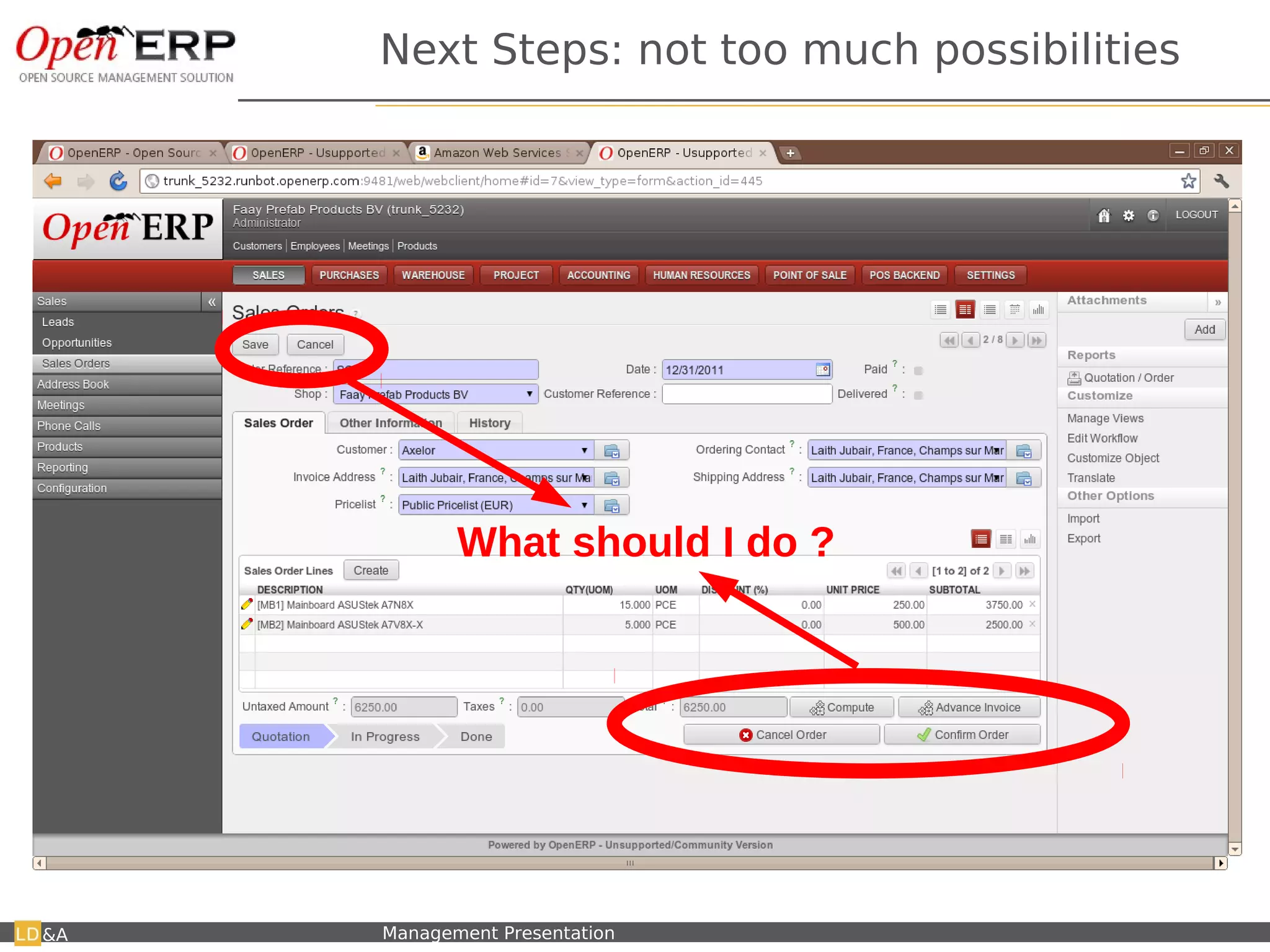
Next Steps: not too much possibilities


                                           What should I do ?


&A   Nom du fichier – à compléter   Management Presentation
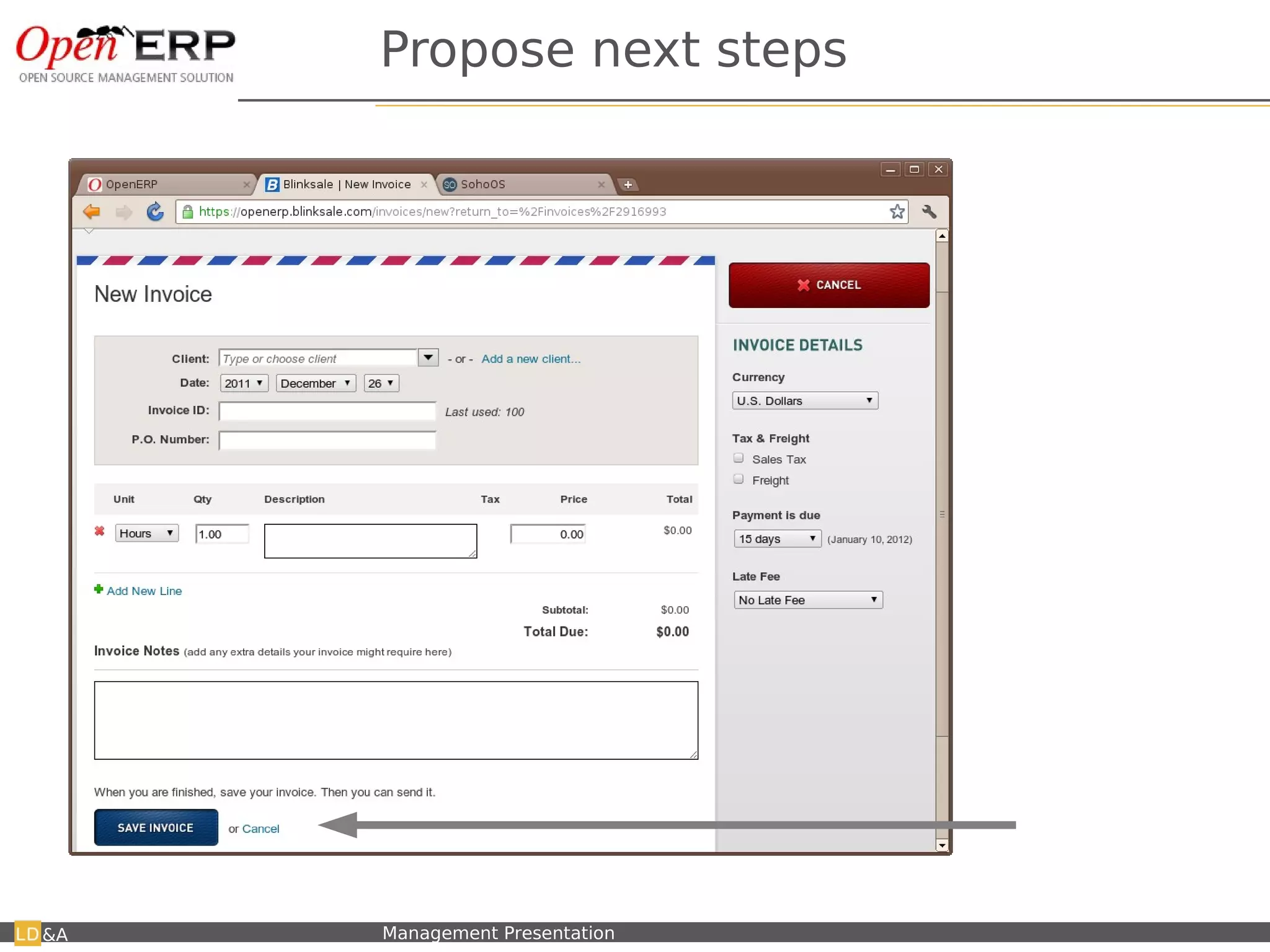
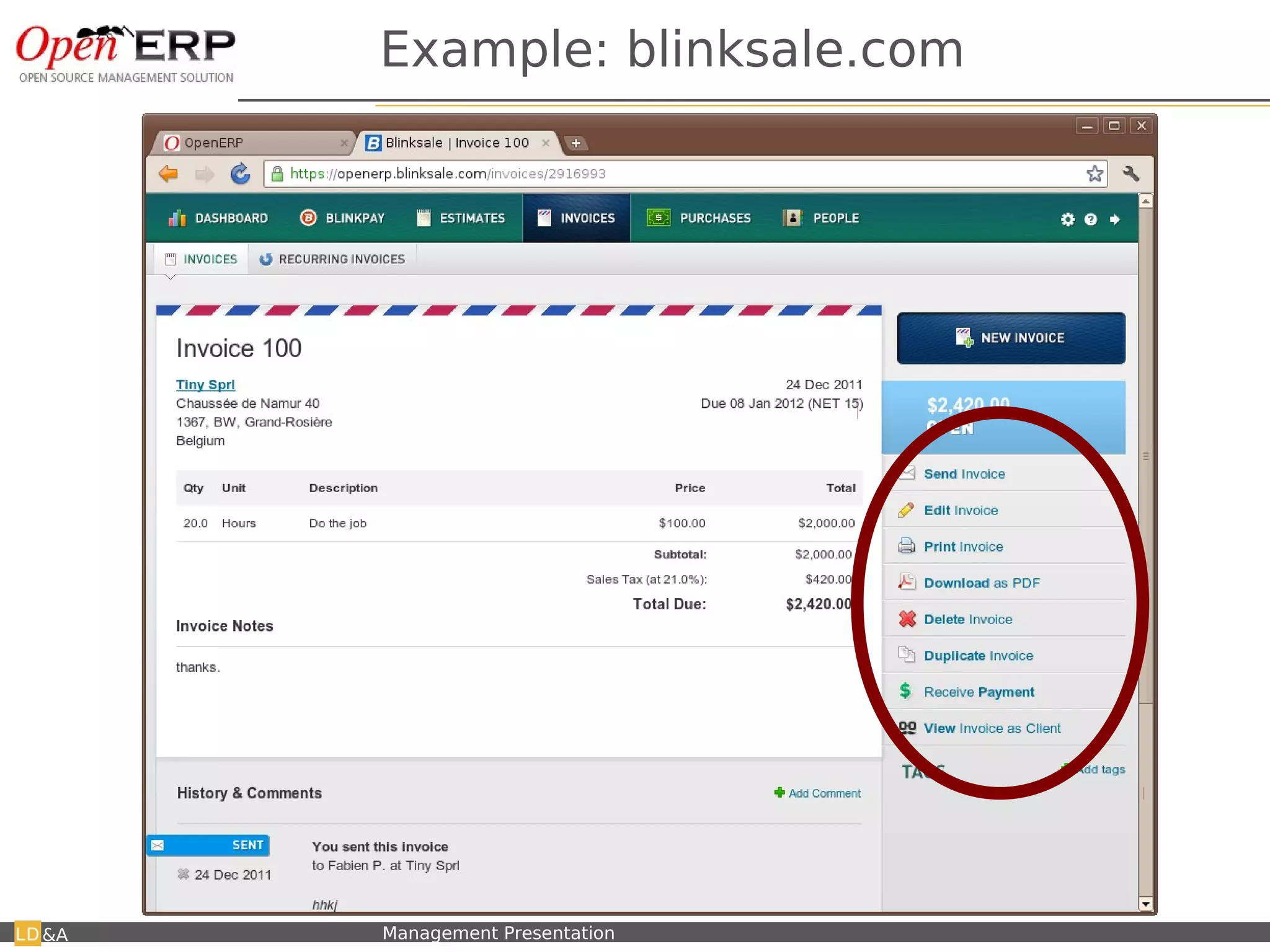
Propose next steps


                                                              Only one main
                                                              button/option

&A   Nom du fichier – à compléter   Management Presentation
Example: blinksale.com


&A   Nom du fichier – à compléter   Management Presentation
Easy to use / configure
                             Easy to use / configure
                                      Explain complex features
                                      Explain complex features


&A   Nom du fichier – à compléter   Management Presentation      26
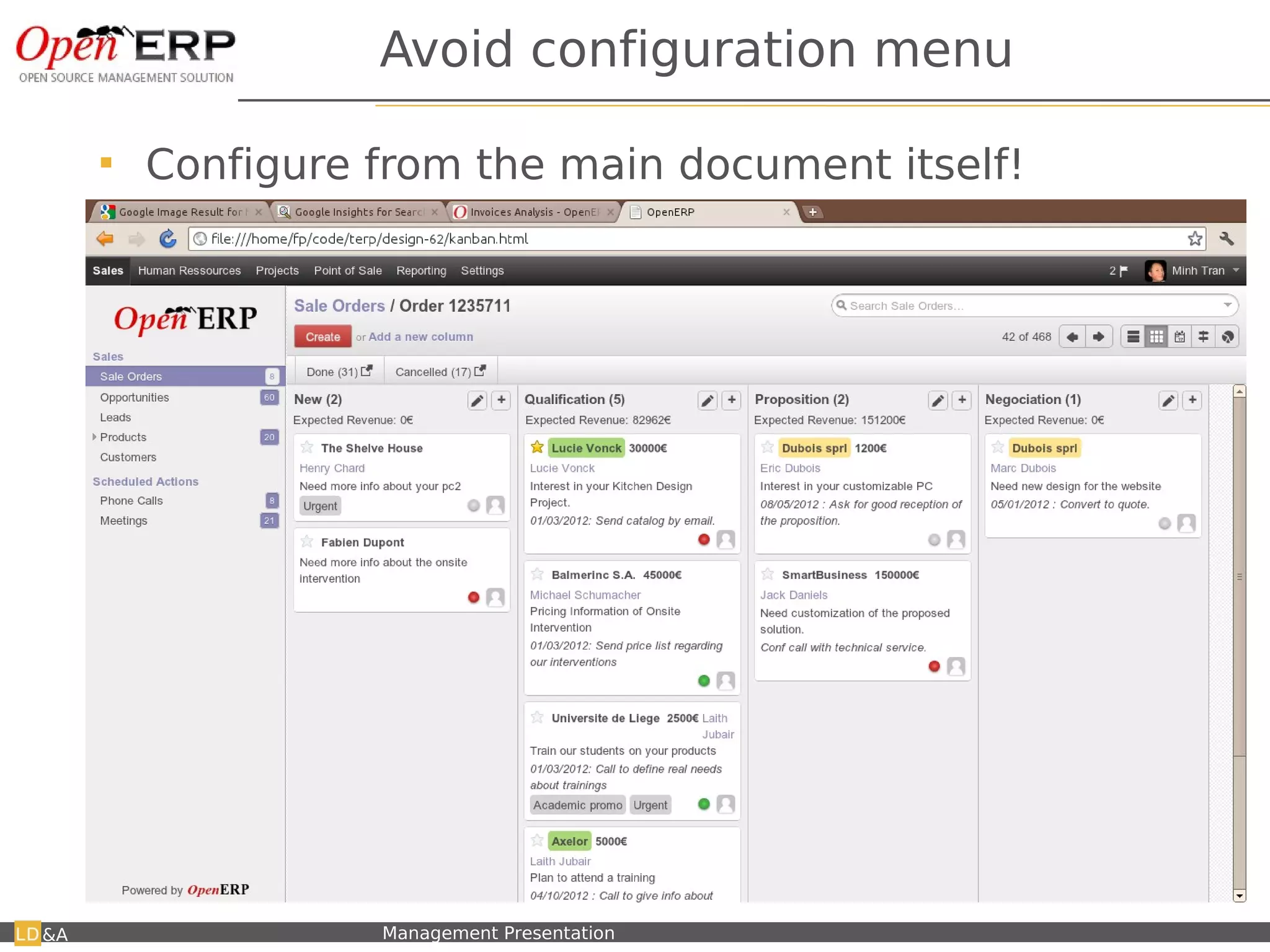
Avoid configuration menu

         Configure from the main document itself!


&A   Nom du fichier – à compléter   Management Presentation
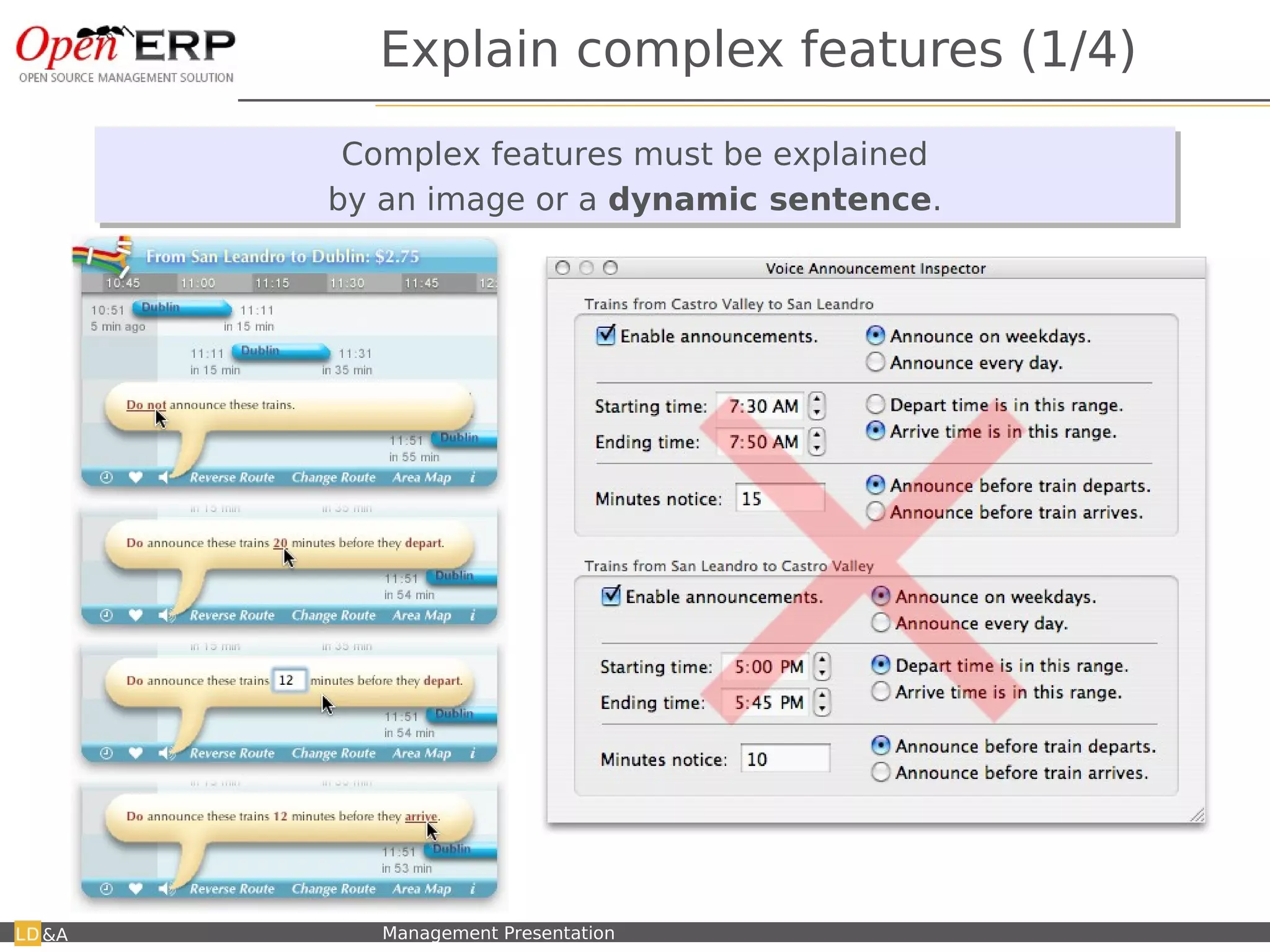
Explain complex features (1/4)
                               Complex features must be explained
                               Complex features must be explained
                              by an image or a dynamic sentence.
                              by an image or a dynamic sentence.


                                                    ← Javascript Tangle lib
&A   Nom du fichier – à compléter   Management Presentation
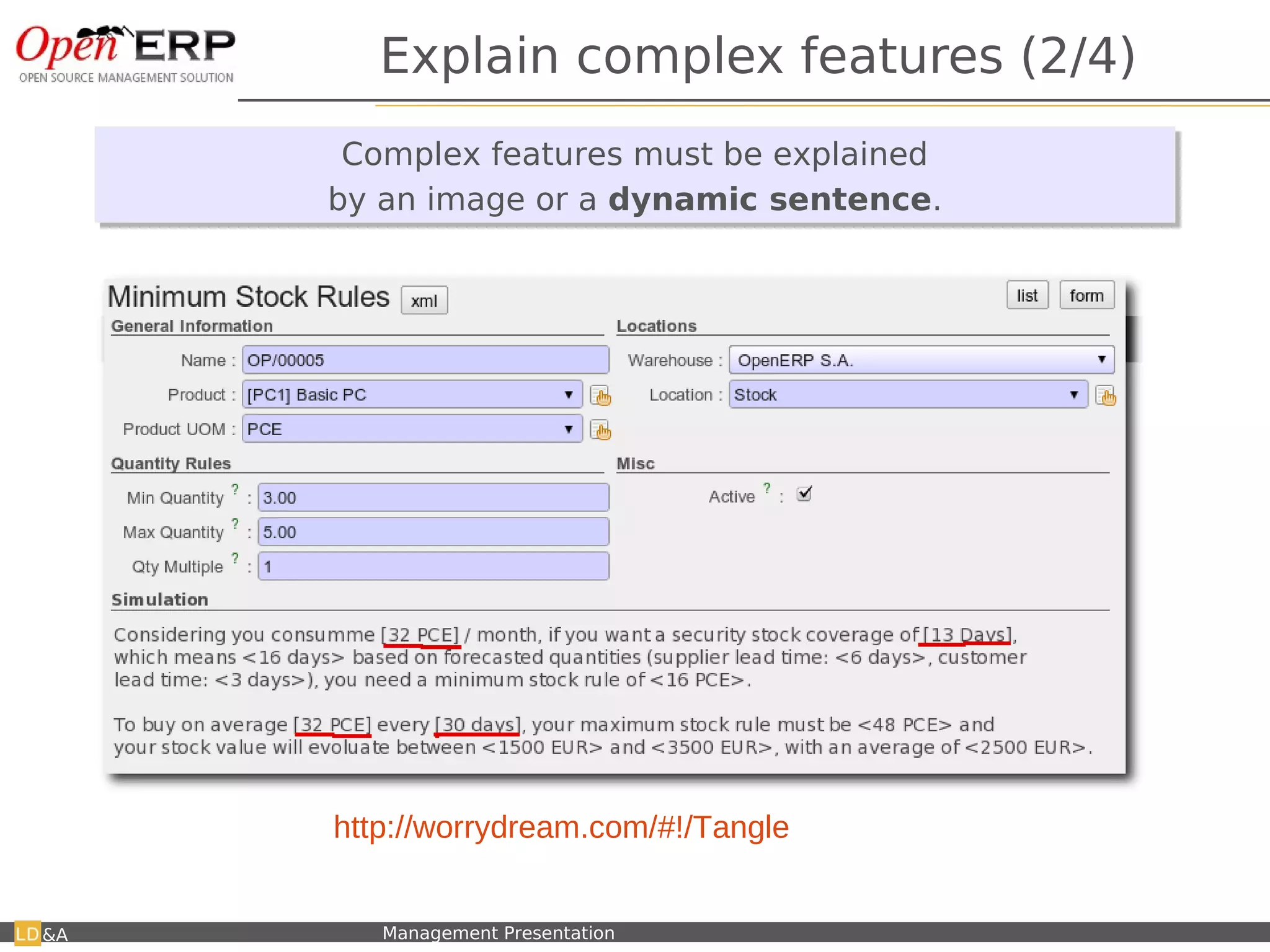
Explain complex features (2/4)
                                Complex features must be explained
                                Complex features must be explained
                               by an image or a dynamic sentence.
                               by an image or a dynamic sentence.


     Test Tangle here: http://worrydream.com/#!/Tangle
     It's impossible to compute good mini/maxi without complex computations !

&A    Nom du fichier – à compléter   Management Presentation
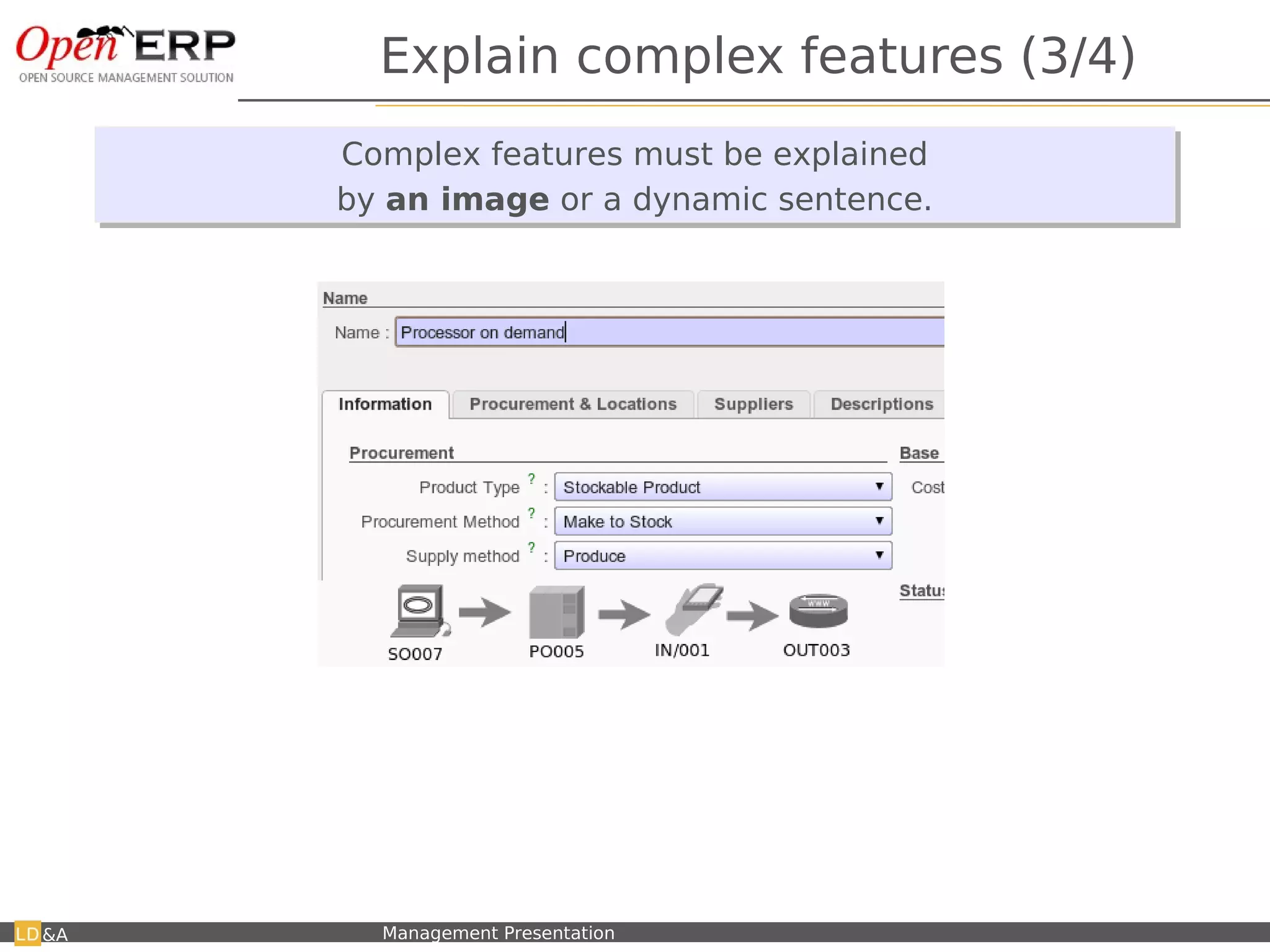
Explain complex features (3/4)
                               Complex features must be explained
                                Complex features must be explained
                               by an image or a dynamic sentence.
                               by an image or a dynamic sentence.


      When changing a value, it updates the flow schema.


&A   Nom du fichier – à compléter   Management Presentation
Misc Improvements


&A   Nom du fichier – à compléter   Management Presentation
Many2Many


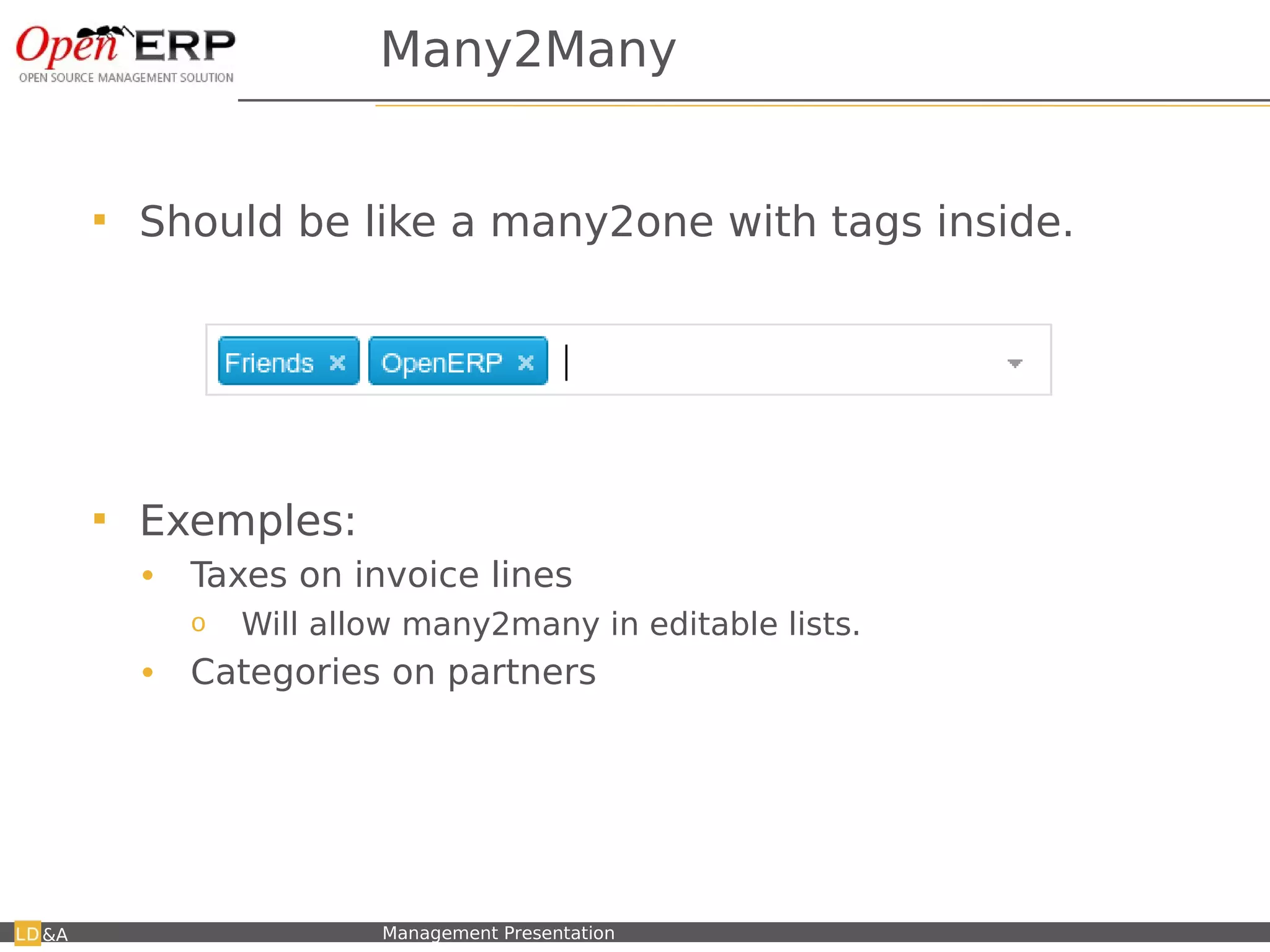
         Should be like a many2one with tags inside.


         Exemples:
          •    Taxes on invoice lines
               o     Will allow many2many in editable lists.
          •    Categories on partners


&A   Nom du fichier – à compléter   Management Presentation
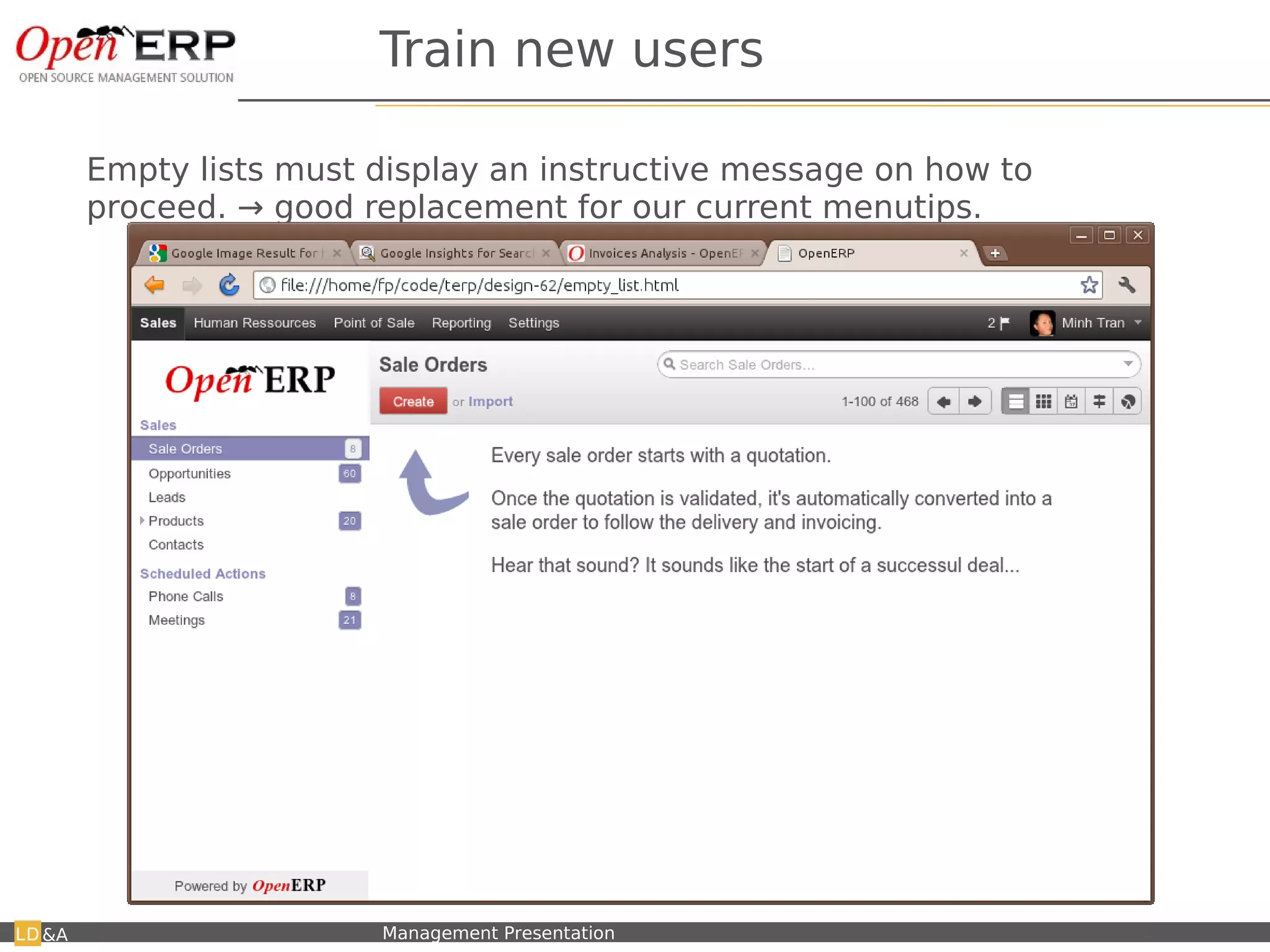
Train new users

     Empty lists must display an instructive message on how to
     proceed. → good replacement for our current menutips.


&A   Nom du fichier – à compléter   Management Presentation
Better Workflow


&A   Nom du fichier – à compléter   Management Presentation
Review main flows: SO

         More business oriented:
          •  You do not want to print a quotation → you want to send it to
             the customer (you may need to print it to do so, or email)
          • Sending a quotation to customer IS a step in the process
          • Done is not clear → Paid is better
         ONE (and only one) button must mark clearly the NEXT action to
          avoid the user to think (what should I do now?)


&A   Nom du fichier – à compléter   Management Presentation

OpenERP - Usability

  • 1.
    OpenERP Feedback from our useability team. - Fabien Pinckaers, CEO - April 12th, 2012 Nom du fichier – à compléter Management Presentation
  • 2.
    We are blind! ✔ We use to work with OpenERP. We are blind ! ✔ An evidence for us can be an issue for lambda users ✔ If we want OpenERP to be sexy and accessible to the mass, we have to satisfy the smallest companies. Nom du fichier – à compléter Management Presentation
  • 3.
    Example: Search View Nomdu fichier – à compléter Management Presentation
  • 4.
    Search View: userstake search for a form ✔ V6.0: issue for 100 % of users ✔ V6.1: issue for 42.9 % of users ✔ V7.0: issue for 0% of users (to be confirmed) Nom du fichier – à compléter Management Presentation
  • 5.
    Useability Statistics Nom dufichier – à compléter Management Presentation
  • 6.
    Timing Comparison 6.0/6.1 Numberof minutes to perform a full business flow for a lambda user. (Quotation → Sale Order → Delivery Order → Invoicing → Payment) 20 19.8 19.44 16 14.16 11.93 12 6.0 8 6.1 4 0 PO SO Nom du fichier – à compléter Management Presentation
  • 7.
    Main issues encounteredin 6.1 (%) Widgets 73.68 Business Flow 56.35 Search View 46.43 Configuration 38.19 Kanban View 37.5 Page View 33.33 List View 28.57 Form View 14.29 Menu 14.28 0 10 20 30 40 50 60 70 80 90 100 Nom du fichier – à compléter Management Presentation
  • 8.
    Global score givenby users (/10) 10 8 6 5.5 6.0 4 6.1 2 0.6 0 Score /10 Nom du fichier – à compléter Management Presentation
  • 9.
    Useability Examples V7.0 – demo new design Nom du fichier – à compléter Management Presentation
  • 10.
    Useability Process  We need to analyze: Google Analytics on SaaS • Statistics to know what to improve • Measurable feedback to know how to improve  Organize communication on every new features  Do user testing with lambda users per new feature, at least one usertesting.com per feature. &A Nom du fichier – à compléter Management Presentation
  • 11.
    Widgets: m2o ✔ V6.0: issues for 33 % of users ✔ V7.0: issues for 73.6 % of users ✔ Improvement for 6.1: ✔ Quick create ✔ Create and edit ✔ Improvements for 7: ✔ Tooltip if the record is not created ✔ Simplification by removing widget icon Nom du fichier – à compléter Management Presentation
  • 12.
    Simplification → RemoveElements Simplification → Remove Elements &A Nom du fichier – à compléter Management Presentation 12
  • 13.
    Simplification through reduction  To simplify, we must reduce!  Remove what's: • Redundant • Not used  Hide: • What's not required to use the application  Adding features → complexity for the application &A Nom du fichier – à compléter Management Presentation
  • 14.
    Remove redundant/unused features  To be removed: • Shortcuts → if the menu is simple, we don't need shortcuts. This would require to review the menu. • Homepage → directly go to the latest application. Confusing to have two way to access a root app like “Sale”. • Dashboards → nobody use them, put in Reporting section • Top right toolbar → with home, preferences, help...; simplify ala google • Pager / Multi-Views on one2many → only if several exists • Menu tips (use them in empty lists or help tooltip only) • Res.Logs (directly integrated in the history of a document, through the new “chatter” system) • Default filters on state for list views • Edit icon (pencil) in lists (they click on the record, then click edit) &A Nom du fichier – à compléter Management Presentation
  • 15.
    Extended View: SimplifyForms We don't need all those stuff in simplified view! Current forms are overloaded. &A Nom du fichier – à compléter Management Presentation
  • 16.
    Extended View: WebClient Elements &A Nom du fichier – à compléter Management Presentation
  • 17.
    Example: Social Feature •In v7.0, social widget replace: – Information fields (create date, validated by, ...) – Internal requests system – “Res.log” message system – Communication & History tab on opportunities – View Log (created, modified by...) feature Nom du fichier – à compléter Management Presentation
  • 18.
    Example 2: RemoveAddress On single “Contacts” menu for Partners, Addresses, Contacts. → No need anymore to have two fields (partner, address) per document (sale order, invoices, ...) Nom du fichier – à compléter Management Presentation
  • 19.
    Page view ofdocuments Page view of documents An invoice should look like an invoice. An invoice should look like an invoice. &A Nom du fichier – à compléter Management Presentation 19
  • 20.
    Information is beautifull OpenERPforms have been designed for a creation / edition purpose. But when people browse existing data, they have a completely different need. We need to show the information efficiently ! Not usefull when browsing or using customers, but good for creation ! I propose to create a PAGE view, which is the current readonly form → example on partners. &A Nom du fichier – à compléter Management Presentation
  • 21.
    Page View, example2 &A Nom du fichier – à compléter Management Presentation
  • 22.
    Don't make methink. We should better guide the user to the next step &A Nom du fichier – à compléter Management Presentation
  • 23.
    Next Steps: nottoo much possibilities What should I do ? &A Nom du fichier – à compléter Management Presentation
  • 24.
    Propose next steps Only one main button/option &A Nom du fichier – à compléter Management Presentation
  • 25.
    Example: blinksale.com &A Nom du fichier – à compléter Management Presentation
  • 26.
    Easy to use/ configure Easy to use / configure Explain complex features Explain complex features &A Nom du fichier – à compléter Management Presentation 26
  • 27.
    Avoid configuration menu  Configure from the main document itself! &A Nom du fichier – à compléter Management Presentation
  • 28.
    Explain complex features(1/4) Complex features must be explained Complex features must be explained by an image or a dynamic sentence. by an image or a dynamic sentence. ← Javascript Tangle lib &A Nom du fichier – à compléter Management Presentation
  • 29.
    Explain complex features(2/4) Complex features must be explained Complex features must be explained by an image or a dynamic sentence. by an image or a dynamic sentence. Test Tangle here: http://worrydream.com/#!/Tangle It's impossible to compute good mini/maxi without complex computations ! &A Nom du fichier – à compléter Management Presentation
  • 30.
    Explain complex features(3/4) Complex features must be explained Complex features must be explained by an image or a dynamic sentence. by an image or a dynamic sentence. When changing a value, it updates the flow schema. &A Nom du fichier – à compléter Management Presentation
  • 31.
    Misc Improvements &A Nom du fichier – à compléter Management Presentation
  • 32.
    Many2Many  Should be like a many2one with tags inside.  Exemples: • Taxes on invoice lines o Will allow many2many in editable lists. • Categories on partners &A Nom du fichier – à compléter Management Presentation
  • 33.
    Train new users Empty lists must display an instructive message on how to proceed. → good replacement for our current menutips. &A Nom du fichier – à compléter Management Presentation
  • 34.
    Better Workflow &A Nom du fichier – à compléter Management Presentation
  • 35.
    Review main flows:SO  More business oriented: • You do not want to print a quotation → you want to send it to the customer (you may need to print it to do so, or email) • Sending a quotation to customer IS a step in the process • Done is not clear → Paid is better  ONE (and only one) button must mark clearly the NEXT action to avoid the user to think (what should I do now?) &A Nom du fichier – à compléter Management Presentation