OpenAir Company and Product Overview
About OpenAir


•  Focused exclusively on Professional
   Services Automation since 1999

•  World leader in resource management
   applications and processes

•  Successful track record deploying and
   supporting enterprise organizations

•  SAS 70 type II Certified, 4 years

•  Subsidiary of NetSuite (NYSE:N)
    –  $140M Rev and $130M in Cash
Where Are We?

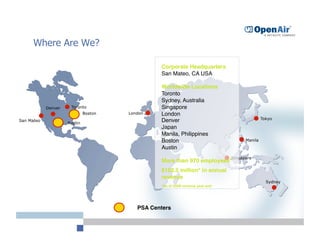
                                                  Corporate Headquarters
                                                  San Mateo, CA USA 


                                                  Worldwide Locations
                                                  Toronto
                                                  Sydney, Australia
            Denver    Toronto                     Singapore
                              Boston   London     London               

                                                                                                  Tokyo
San Mateo
                     Austin
                                                  Denver               

                                                  Japan                

                                                  Manila, Philippines
                                                  Boston               

                Manila
                                                  Austin
                                                                                   Singapore
                                                  More than 970 employees* 
                                                  $152.5 million* in annual
                                                  revenue
                                                                                                    Sydney
                                                  *As of 2008 revenue year end 


                                          PSA Centers
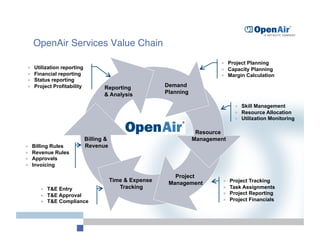
OpenAir Services Value Chain
                                                                                   Project Planning
     Utilization reporting                                                        Capacity Planning
     Financial reporting                                                          Margin Calculation
     Status reporting
     Project Profitability          Reporting             Demand
                                     & Analysis            Planning

                                                                                          Skill Management
                                                                                          Resource Allocation
                                                                                          Utilization Monitoring

                                                                       Resource
                              Billing &                               Management
     Billing Rules           Revenue
     Revenue Rules
     Approvals
     Invoicing

                                                              Project
                                          Time & Expense                           Project Tracking
                                                            Management
            T&E Entry                       Tracking                              Task Assignments
            T&E Approval                                                          Project Reporting
            T&E Compliance                                                        Project Financials
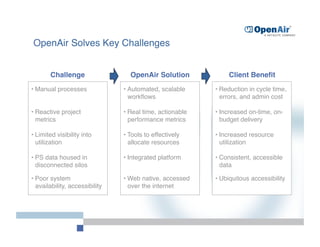
OpenAir Solves Key Challenges


        Challenge
                  OpenAir Solution
             Client Benefit
•  Manual processes
              •  Automated, scalable     •  Reduction in cycle time,
                                     workflows
                  errors, and admin cost

•  Reactive project               •  Real time, actionable   •  Increased on-time, on-
   metrics
                          performance metrics
       budget delivery

•  Limited visibility into        •  Tools to effectively    •  Increased resource
   utilization
                      allocate resources
        utilization

•  PS data housed in              •  Integrated platform 
   •  Consistent, accessible
   disconnected silos
                                          data

•  Poor system                    •  Web native, accessed    •  Ubiquitous accessibility
   availability, accessibility
      over the internet
Select OpenAir Clients
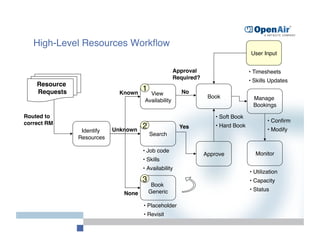
High-Level Resources Workflow
                                                                                           User Input


                                                         Approval                         •  Timesheets
                                                         Required?
                                                                                          •  Skills Updates
    Resource
    Requests
                   Known
                                         1
                 No
                                            View
                                                                       Book
                                                                          
                 Manage
                                          Availability
                                                     
                                                                                            Bookings
                                                                                                   

Routed to                                                                 •  Soft Book
correct RM
                                                                                        •  Confirm
                              Unknown
                                         2
                 Yes
          •  Hard Book
                                                                                                   •  Modify
                 Identify
                                            Search
                Resources 

                                         •  Job code
                                                                      Approve
               Monitor
                                                                                                   
                                         •  Skills 
                                         •  Availability
                                                                                          •  Utilization
                                         3
                                               •  Capacity
                                             Book
                                            Generic
                                                  
                                       •  Status
                                 None

                                         •  Placeholder
                                         •  Revisit
OpenAir Adapts to Your Company

OpenAir is highly configurable to meet your needs
    •    Custom detail fields and calculated fields
    •    Default form fields
    •    Project templates
    •    Invoice templates
    •    Company specific terminology
    •    Configurable reports
    •    Customizable electronic approval processes


Limit the scope of each user through a variety of features
    •    Roles
    •    Filter sets
    •    Role based form permissions
    •    Module access
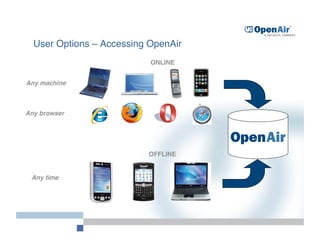
User Options – Accessing OpenAir
                           ONLINE


Any machine


Any browser


                           OFFLINE


 Any time
We Have Happy Customers
“OpenAir has been the single most customer responsive company I have ever worked with…I
     have never experienced a customer support situation like this in my career, not ever.”
    
- Jodi Cicci, Former Director of US Project Management Office, Software AG


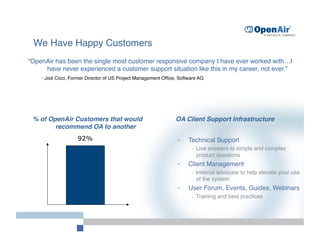
 % of OpenAir Customers that would                               OA Client Support Infrastructure
        recommend OA to another
                     92%                                          -    Technical Support
                                                                         -    Live answers to simple and complex
                                                                              product questions
                                                                  -    Client Management
                                                                         -    Internal advocate to help elevate your use
                                                                              of the system
                                                                  -    User Forum, Events, Guides, Webinars
                                                                         -    Training and best practices
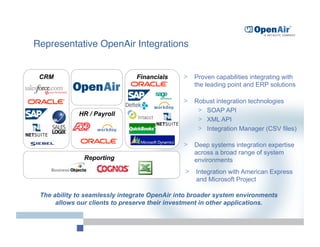
Representative OpenAir Integrations


 CRM                           Financials     >  Proven capabilities integrating with
                                                  the leading point and ERP solutions

                                              >  Robust integration technologies
                                                  >  SOAP API
             HR / Payroll
                                                  >  XML API
                                                  >  Integration Manager (CSV files)

                                              >  Deep systems integration expertise
                                                  across a broad range of system
               Reporting                          environments
                                               >  Integration with American Express
                                                  and Microsoft Project

 The ability to seamlessly integrate OpenAir into broader system environments
      allows our clients to preserve their investment in other applications.
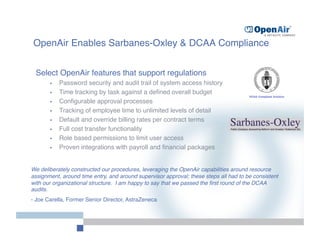
OpenAir Enables Sarbanes-Oxley & DCAA Compliance


 Select OpenAir features that support regulations
       •    Password security and audit trail of system access history
       •    Time tracking by task against a defined overall budget
       •    Configurable approval processes
       •    Tracking of employee time to unlimited levels of detail
       •    Default and override billing rates per contract terms
       •    Full cost transfer functionality
       •    Role based permissions to limit user access
       •    Proven integrations with payroll and financial packages


We deliberately constructed our procedures, leveraging the OpenAir capabilities around resource
assignment, around time entry, and around supervisor approval; these steps all had to be consistent
with our organizational structure. I am happy to say that we passed the first round of the DCAA
audits.
- Joe Carella, Former Senior Director, AstraZeneca
Security and Performance
     
Data Entry & Migration:

     128 bit SSL encryption

     Three tiered login process 

     VeriSign (http://www.verisign.com) secured


     On-Site Security and Integrity:

     Savvis Communications (http://www.savvis.com) 


     SAS 70 certified

     Cisco load balancing technology

     Partitioned database for each customer

     Escrow account option with respect to source codes


     Backup – Four Tier Stategy:

     Real time backup – Rackspace Hosting (http://www.rackspace.com)   


     Daily local backup

     Daily remote backup

     Remote offsite backup with five week retention period


     LAMP Architecture:

     Linux OS

     Apache

     MySQL

     Perl
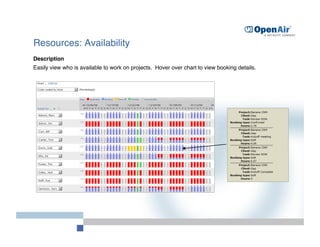
Resources: Availability
Description
Easily view who is available to work on projects. Hover over chart to view booking details.
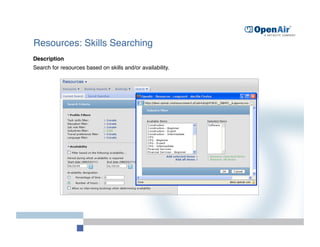
Resources: Skills Searching
Description
Search for resources based on skills and/or availability.
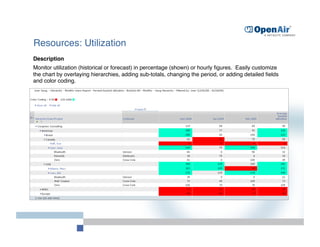
Resources: Utilization 
Description
Monitor utilization (historical or forecast) in percentage (shown) or hourly figures. Easily customize
the chart by overlaying hierarchies, adding sub-totals, changing the period, or adding detailed fields
and color coding.
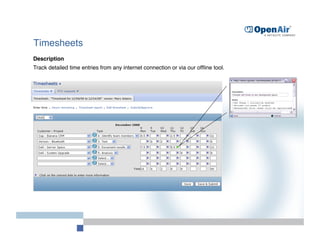
Timesheets
Description
Track detailed time entries from any internet connection or via our offline tool.
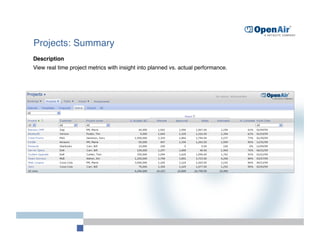
Projects: Summary
Description
View real time project metrics with insight into planned vs. actual performance.
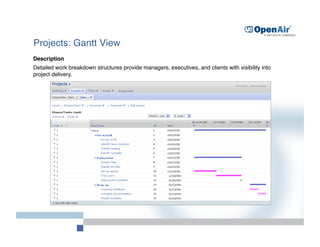
Projects: Gantt View
Description
Detailed work breakdown structures provide managers, executives, and clients with visibility into
project delivery.
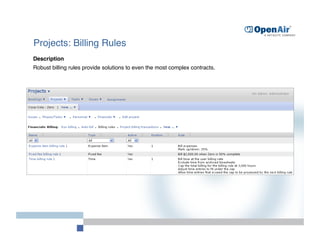
Projects: Billing Rules
Description
Robust billing rules provide solutions to even the most complex contracts.
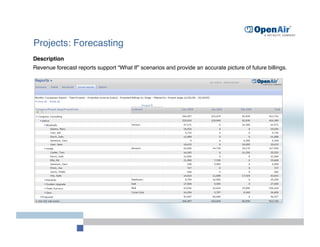
Projects: Forecasting
Description
Revenue forecast reports support “What If” scenarios and provide an accurate picture of future billings.
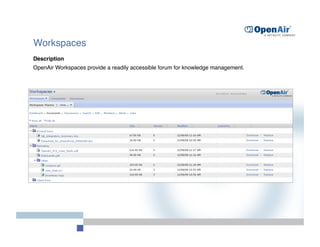
Workspaces
Description
OpenAir Workspaces provide a readily accessible forum for knowledge management.

Open Air Corporate Overview

  • 1.
    OpenAir Company andProduct Overview
  • 2.
    About OpenAir •  Focusedexclusively on Professional Services Automation since 1999 •  World leader in resource management applications and processes •  Successful track record deploying and supporting enterprise organizations •  SAS 70 type II Certified, 4 years •  Subsidiary of NetSuite (NYSE:N) –  $140M Rev and $130M in Cash
  • 3.
    Where Are We? Corporate Headquarters San Mateo, CA USA Worldwide Locations Toronto Sydney, Australia Denver Toronto Singapore Boston London London Tokyo San Mateo Austin Denver Japan Manila, Philippines Boston Manila Austin Singapore More than 970 employees* $152.5 million* in annual revenue Sydney *As of 2008 revenue year end PSA Centers
  • 4.
    OpenAir Services ValueChain   Project Planning   Utilization reporting   Capacity Planning   Financial reporting   Margin Calculation   Status reporting   Project Profitability Reporting Demand & Analysis Planning   Skill Management   Resource Allocation   Utilization Monitoring Resource Billing & Management   Billing Rules Revenue   Revenue Rules   Approvals   Invoicing Project Time & Expense   Project Tracking Management   T&E Entry Tracking   Task Assignments   T&E Approval   Project Reporting   T&E Compliance   Project Financials
  • 5.
    OpenAir Solves KeyChallenges Challenge OpenAir Solution Client Benefit •  Manual processes •  Automated, scalable •  Reduction in cycle time, workflows errors, and admin cost •  Reactive project •  Real time, actionable •  Increased on-time, on- metrics performance metrics budget delivery •  Limited visibility into •  Tools to effectively •  Increased resource utilization allocate resources utilization •  PS data housed in •  Integrated platform •  Consistent, accessible disconnected silos data •  Poor system •  Web native, accessed •  Ubiquitous accessibility availability, accessibility over the internet
  • 6.
  • 7.
    High-Level Resources Workflow User Input Approval •  Timesheets Required? •  Skills Updates Resource Requests Known 1 No View Book Manage Availability Bookings Routed to •  Soft Book correct RM •  Confirm Unknown 2 Yes •  Hard Book •  Modify Identify Search Resources •  Job code Approve Monitor •  Skills •  Availability •  Utilization 3 •  Capacity Book Generic •  Status None •  Placeholder •  Revisit
  • 8.
    OpenAir Adapts toYour Company OpenAir is highly configurable to meet your needs •  Custom detail fields and calculated fields •  Default form fields •  Project templates •  Invoice templates •  Company specific terminology •  Configurable reports •  Customizable electronic approval processes Limit the scope of each user through a variety of features •  Roles •  Filter sets •  Role based form permissions •  Module access
  • 9.
    User Options –Accessing OpenAir ONLINE Any machine Any browser OFFLINE Any time
  • 10.
    We Have HappyCustomers “OpenAir has been the single most customer responsive company I have ever worked with…I have never experienced a customer support situation like this in my career, not ever.” - Jodi Cicci, Former Director of US Project Management Office, Software AG % of OpenAir Customers that would OA Client Support Infrastructure recommend OA to another 92% -  Technical Support -  Live answers to simple and complex product questions -  Client Management -  Internal advocate to help elevate your use of the system -  User Forum, Events, Guides, Webinars -  Training and best practices
  • 11.
    Representative OpenAir Integrations CRM Financials >  Proven capabilities integrating with the leading point and ERP solutions >  Robust integration technologies >  SOAP API HR / Payroll >  XML API >  Integration Manager (CSV files) >  Deep systems integration expertise across a broad range of system Reporting environments >  Integration with American Express and Microsoft Project The ability to seamlessly integrate OpenAir into broader system environments allows our clients to preserve their investment in other applications.
  • 12.
    OpenAir Enables Sarbanes-Oxley& DCAA Compliance Select OpenAir features that support regulations •  Password security and audit trail of system access history •  Time tracking by task against a defined overall budget •  Configurable approval processes •  Tracking of employee time to unlimited levels of detail •  Default and override billing rates per contract terms •  Full cost transfer functionality •  Role based permissions to limit user access •  Proven integrations with payroll and financial packages We deliberately constructed our procedures, leveraging the OpenAir capabilities around resource assignment, around time entry, and around supervisor approval; these steps all had to be consistent with our organizational structure. I am happy to say that we passed the first round of the DCAA audits. - Joe Carella, Former Senior Director, AstraZeneca
  • 13.
    Security and Performance Data Entry & Migration:
 128 bit SSL encryption
 Three tiered login process 
 VeriSign (http://www.verisign.com) secured
 On-Site Security and Integrity:
 Savvis Communications (http://www.savvis.com) 
 SAS 70 certified
 Cisco load balancing technology
 Partitioned database for each customer
 Escrow account option with respect to source codes
 Backup – Four Tier Stategy:
 Real time backup – Rackspace Hosting (http://www.rackspace.com) 
 Daily local backup
 Daily remote backup
 Remote offsite backup with five week retention period
 LAMP Architecture:
 Linux OS
 Apache
 MySQL
 Perl
  • 14.
    Resources: Availability Description Easily viewwho is available to work on projects. Hover over chart to view booking details.
  • 15.
    Resources: Skills Searching Description Searchfor resources based on skills and/or availability.
  • 16.
    Resources: Utilization Description Monitorutilization (historical or forecast) in percentage (shown) or hourly figures. Easily customize the chart by overlaying hierarchies, adding sub-totals, changing the period, or adding detailed fields and color coding.
  • 17.
    Timesheets Description Track detailed timeentries from any internet connection or via our offline tool.
  • 18.
    Projects: Summary Description View realtime project metrics with insight into planned vs. actual performance.
  • 19.
    Projects: Gantt View Description Detailedwork breakdown structures provide managers, executives, and clients with visibility into project delivery.
  • 20.
    Projects: Billing Rules Description Robustbilling rules provide solutions to even the most complex contracts.
  • 21.
    Projects: Forecasting Description Revenue forecastreports support “What If” scenarios and provide an accurate picture of future billings.
  • 22.
    Workspaces Description OpenAir Workspaces providea readily accessible forum for knowledge management.