17/09/2019
1
An assassins guide to Oracle sessions
Connor McDonald
Database Advocate
Copyright © 2019 Oracle and/or its affiliates.
2
Connor McDonald
1
2
17/09/2019
2
3 3
4 4
3
4
17/09/2019
3
6
Stuff
youtube bit.ly/youtube-connor
blog bit.ly/blog-connor
twitter bit.ly/twitter-connor
400+ posts mainly on database & development
250 technical videos, new uploads every week
rants and raves on tech and the world :-)
5
6
17/09/2019
4
7
etc...
facebook bit.ly/facebook-connor
linkedin bit.ly/linkedin-connor
instagram bit.ly/instagram-connor
slideshare bit.ly/slideshare-connor
8 https://asktom.oracle.com
7
8
17/09/2019
5
The following is intended to outline our general product direction. It is intended for information purposes only,
and may not be incorporated into any contract. It is not a commitment to deliver any material, code, or
functionality, and should not be relied upon in making purchasing decisions. The development, release,
timing, and pricing of any features or functionality described for Oracle’s products may change and remains at
the sole discretion of Oracle Corporation.
Statements in this presentation relating to Oracle’s future plans, expectations, beliefs, intentions and prospects
are “forward-looking statements” and are subject to material risks and uncertainties. A detailed discussion of
these factors and other risks that affect our business is contained in Oracle’s Securities and Exchange
Commission (SEC) filings, including our most recent reports on Form 10-K and Form 10-Q under the heading
“Risk Factors.” These filings are available on the SEC’s website or on Oracle’s website
at http://www.oracle.com/investor. All information in this presentation is current as of September 2019 and
Oracle undertakes no duty to update any statement in light of new information or future events.
Safe Harbor
10
if it's not in the documentation
- contact Support
- clarify usage before proceeding
9
10
17/09/2019
6
11
let's be honest
12
this is all about ...
11
12
17/09/2019
7
14
Apology:
gratuitous insertion
of family album pictures
into a presentation
13
14
17/09/2019
8
15
1990's
15
16
17/09/2019
9
idiot in database
18
times have changed...
17
18
17/09/2019
10
idiot in database
20
rogue session
19
20
17/09/2019
11
SQL> select sid, last_call_et, status,
3 from v$session s;
SID LAST_CALL_ET STATUS
---------- ------------ ----------
39 7376 ACTIVE
40 412 INACTIVE
44 421 INACTIVE
...
...
22
what most of us do
21
22
17/09/2019
12
23
SQL> alter system kill session ...
23
24
17/09/2019
13
25
is that our only option?
26
is that our best option?
25
26
17/09/2019
14
27
issues with "kill session"
28
issue #1 - it doesn't kill !
27
28
17/09/2019
15
SQL> alter system kill session '89,1781';
*
ERROR at line 1:
ORA-00031: session marked for kill
?
29
30
17/09/2019
16
32
the immediate solution ... isn't
31
32
17/09/2019
17
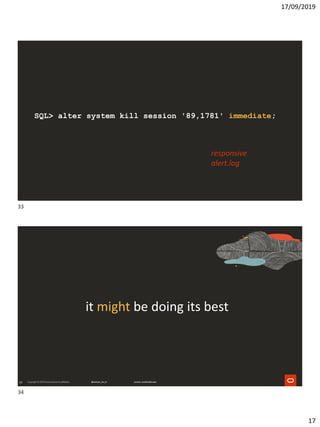
SQL> alter system kill session '89,1781' immediate;
responsive
alert.log
34
it might be doing its best
33
34
17/09/2019
18
SQL> select SES_ADDR, USED_UREC
2 from V$TRANSACTION;
SES_ADDR USED_UREC
---------------- ----------
000000008A841258 1421
SQL> /
SES_ADDR USED_UREC
---------------- ----------
000000008A841258 377
SQL> /
no rows selected.
36
it might be ghosting you
35
36
17/09/2019
19
hello?
are you there?
why wont you talk?
SQL> select s.username, p.pid, p.spid
2 from v$session s, v$process p
3 where s.paddr = p.addr
4 and s.sid = 39;
USERNAME PID SPID
-------------------- ---------- ----------
SCOTT 51 3865
37
38
17/09/2019
20
39
# kill -9 pid
40
C:> orakill MYDB pid
39
40
17/09/2019
21
42
"I have no OS access !!!"
41
42
17/09/2019
22
43
SQL> oradebug event immediate crash;
44
it still might ghost you
43
44
17/09/2019
23
SQL> select program, pid
2 from v$process
3 where upper(program) like '%PMON%';
PROGRAM PID
---------------------------------------- ----------
oracle@db192.localdomain (PMON) 2
SQL> oradebug wakeup 2
Statement processed.
46
issue #2 - you killed the session
45
46
17/09/2019
24
47
48
rogue session
47
48
17/09/2019
25
49
alternatives to kill session
50
18c
49
50
17/09/2019
26
51
aka, #1 reason to upgrade to 18c
52
SQL> alter system cancel sql '123,456';
51
52
17/09/2019
27
Upgrade
from 8.1.6
54
# kill -URG pid
53
54
17/09/2019
28
55
sys.dbms_system.set_ev(sid,serial#,10237,1,'');
sys.dbms_system.set_ev(sid,serial#,10237,0,'');
56
other supported alternatives
55
56
17/09/2019
29
SQL> begin
2 DBMS_RESOURCE_MANAGER.SWITCH_CONSUMER_GROUP_FOR_SESS
3 (
4 session_id =>sid#,
5 session_serial =>serial#,
6 consumer_group =>'CANCEL_SQL'
7 );
8 end;
58
maybe ...
57
58
17/09/2019
30
59
... you don't want to even cancel
ORA-01013: user requested cancel of current operation
59
60
17/09/2019
31
61
SQL> select sid, last_call_et, status,
3 from v$session s;
SID LAST_CALL_ET STATUS
---------- ------------ ----------
39 7376 ACTIVE
40 412 INACTIVE
44 421 INACTIVE
46 12 ACTIVE
51 9 ACTIVE
53 15 ACTIVE
58 8 ACTIVE
69 22 ACTIVE
...
80 453 INACTIVE
61
62
17/09/2019
32
SQL> oradebug setorapid nnn
SQL> oradebug suspend
SID LAST_CALL_ET STATUS
---------- ------------ ----------
39 7376 ACTIVE
40 412 INACTIVE
44 421 INACTIVE
46 12 ACTIVE
51 9 ACTIVE
53 15 ACTIVE
58 8 ACTIVE
SQL> oradebug resume
back to bad SQL
63
78
17/09/2019
33
maybe killing won't help
80
BAD
SQL
79
80
17/09/2019
34
81
bad SQL just keeps coming back...
82
19c
81
82
17/09/2019
35
83
aka, #1 reason for upgrading to 19c
84
quarantine of bad SQL
elapsed time
resource consumption
83
84
17/09/2019
36
85
error on subsequent execution
86
manually
85
86
17/09/2019
37
SQL> set feedback on sql_id
SQL> set timing on
SQL> select count(*) from scott.emp, scott.emp, scott.emp,
2 ( select 1 from dual connect by level <= 100000 );
COUNT(*)
----------
274400000
1 row selected.
SQL_ID: dcrqdagwxagth
Elapsed: 00:00:15.72
SQL> declare
2 q varchar2(30);
3 begin
4 q := dbms_sqlq.create_quarantine_by_sql_id(sql_id => 'dcrqdagwxagth');
5 end;
6 /
PL/SQL procedure successfully completed.
SQL> select count(*) from scott.emp, scott.emp, scott.emp,
2 ( select 1 from dual connect by level <= 100000 );
*
ERROR at line 1:
ORA-56955: quarantined plan used
87
88
17/09/2019
38
89
automatic via resource manager
SQL> begin
2 dbms_resource_manager.create_pending_area();
3
4 -- switch into this group before running a possibly
5 -- long running SQL statement
6
7 dbms_resource_manager.create_consumer_group(
8 CONSUMER_GROUP=>'CG_EXEC_TIME_LIMIT_CANCEL',
9 COMMENT=>'Limited execution time per statement'
10 );
11
12 -- and we need a resource plan
13
14 dbms_resource_manager.create_plan(
15 PLAN=> 'EXEC_TIME_LIMIT',
16 COMMENT=>'Kill statement after exceeding total execution time'
17 );
18
[cont]
89
90
17/09/2019
39
19 -- now create a plan directive for that special user group
20 -- to cancel current SQL if it runs for more than 'n' sec
21
22 dbms_resource_manager.create_plan_directive(
23 PLAN=> 'EXEC_TIME_LIMIT',
24 GROUP_OR_SUBPLAN=>'CG_EXEC_TIME_LIMIT_CANCEL',
25 COMMENT=>'Kill statement after exceeding total execution time',
36 SWITCH_GROUP=>'CANCEL_SQL',
37 SWITCH_TIME=>10,
38 SWITCH_ESTIMATE=>false,
39 SWITCH_FOR_CALL=> TRUE
40 );
41
42 DBMS_RESOURCE_MANAGER.VALIDATE_PENDING_AREA;
43
44 DBMS_RESOURCE_MANAGER.SUBMIT_PENDING_AREA();
45
46 end;
47 /
PL/SQL procedure successfully completed.
SQL> select count(*) from emp, emp, emp,
2 ( select 1 from dual connect by level <= 50000 );
COUNT(*)
----------
27440000
Elapsed: 00:00:04.11
SQL> select count(*) from emp, emp, emp,
2 ( select 1 from dual connect by level <= 1000000 );
ERROR at line 1:
ORA-00040: active time limit exceeded - call aborted
Elapsed: 00:00:12.00
91
92
17/09/2019
40
SQL> select count(*) from scott.emp, scott.emp, scott.emp,
2 ( select 1 from dual connect by level <= 100000 );
*
ERROR at line 1:
ORA-56955: quarantined plan used
94
wrap up
93
94
17/09/2019
41
95
start with aiming for better SQL
96
but if you have to kill ...
95
96
17/09/2019
42
97
... be gentle :-)
98
Ten Amazing SQL Features
Monday, September 16, 02:30 PM - 03:15 PM, Moscone South - Room 203
Proven Ways to Make Applications Slower and Less Secure [THT4796]
Tuesday, September 17, 04:30 PM - 04:50 PM, The Exchange - Theater 3
The Best Oracle Database Feature Ever Invented [THT4798]
Wednesday, September 18, 10:15 AM - 10:35 AM, The Exchange - Theater 3
Flashback - Not Just for DBAs
Wednesday, September 18, 04:00 PM - 04:45 PM, Moscone South - Room 306
PL/SQL: Still the Best Data Access Language
Thursday, September 19, 12:15 PM - 01:00 PM, Moscone South - Room 155A
97
98
17/09/2019
43
99
Have a great OpenWorld !
youtube youtube.com/c/ConnorMcDonaldOracle
blog connor-mcdonald.com
twitter @connor_mc_d
99

OOW19 - Killing database sessions

  • 1.
    17/09/2019 1 An assassins guideto Oracle sessions Connor McDonald Database Advocate Copyright © 2019 Oracle and/or its affiliates. 2 Connor McDonald 1 2
  • 2.
  • 3.
    17/09/2019 3 6 Stuff youtube bit.ly/youtube-connor blog bit.ly/blog-connor twitterbit.ly/twitter-connor 400+ posts mainly on database & development 250 technical videos, new uploads every week rants and raves on tech and the world :-) 5 6
  • 4.
    17/09/2019 4 7 etc... facebook bit.ly/facebook-connor linkedin bit.ly/linkedin-connor instagrambit.ly/instagram-connor slideshare bit.ly/slideshare-connor 8 https://asktom.oracle.com 7 8
  • 5.
    17/09/2019 5 The following isintended to outline our general product direction. It is intended for information purposes only, and may not be incorporated into any contract. It is not a commitment to deliver any material, code, or functionality, and should not be relied upon in making purchasing decisions. The development, release, timing, and pricing of any features or functionality described for Oracle’s products may change and remains at the sole discretion of Oracle Corporation. Statements in this presentation relating to Oracle’s future plans, expectations, beliefs, intentions and prospects are “forward-looking statements” and are subject to material risks and uncertainties. A detailed discussion of these factors and other risks that affect our business is contained in Oracle’s Securities and Exchange Commission (SEC) filings, including our most recent reports on Form 10-K and Form 10-Q under the heading “Risk Factors.” These filings are available on the SEC’s website or on Oracle’s website at http://www.oracle.com/investor. All information in this presentation is current as of September 2019 and Oracle undertakes no duty to update any statement in light of new information or future events. Safe Harbor 10 if it's not in the documentation - contact Support - clarify usage before proceeding 9 10
  • 6.
  • 7.
    17/09/2019 7 14 Apology: gratuitous insertion of familyalbum pictures into a presentation 13 14
  • 8.
  • 9.
  • 10.
  • 11.
    17/09/2019 11 SQL> select sid,last_call_et, status, 3 from v$session s; SID LAST_CALL_ET STATUS ---------- ------------ ---------- 39 7376 ACTIVE 40 412 INACTIVE 44 421 INACTIVE ... ... 22 what most of us do 21 22
  • 12.
    17/09/2019 12 23 SQL> alter systemkill session ... 23 24
  • 13.
    17/09/2019 13 25 is that ouronly option? 26 is that our best option? 25 26
  • 14.
    17/09/2019 14 27 issues with "killsession" 28 issue #1 - it doesn't kill ! 27 28
  • 15.
    17/09/2019 15 SQL> alter systemkill session '89,1781'; * ERROR at line 1: ORA-00031: session marked for kill ? 29 30
  • 16.
  • 17.
    17/09/2019 17 SQL> alter systemkill session '89,1781' immediate; responsive alert.log 34 it might be doing its best 33 34
  • 18.
    17/09/2019 18 SQL> select SES_ADDR,USED_UREC 2 from V$TRANSACTION; SES_ADDR USED_UREC ---------------- ---------- 000000008A841258 1421 SQL> / SES_ADDR USED_UREC ---------------- ---------- 000000008A841258 377 SQL> / no rows selected. 36 it might be ghosting you 35 36
  • 19.
    17/09/2019 19 hello? are you there? whywont you talk? SQL> select s.username, p.pid, p.spid 2 from v$session s, v$process p 3 where s.paddr = p.addr 4 and s.sid = 39; USERNAME PID SPID -------------------- ---------- ---------- SCOTT 51 3865 37 38
  • 20.
    17/09/2019 20 39 # kill -9pid 40 C:> orakill MYDB pid 39 40
  • 21.
    17/09/2019 21 42 "I have noOS access !!!" 41 42
  • 22.
    17/09/2019 22 43 SQL> oradebug eventimmediate crash; 44 it still might ghost you 43 44
  • 23.
    17/09/2019 23 SQL> select program,pid 2 from v$process 3 where upper(program) like '%PMON%'; PROGRAM PID ---------------------------------------- ---------- oracle@db192.localdomain (PMON) 2 SQL> oradebug wakeup 2 Statement processed. 46 issue #2 - you killed the session 45 46
  • 24.
  • 25.
  • 26.
    17/09/2019 26 51 aka, #1 reasonto upgrade to 18c 52 SQL> alter system cancel sql '123,456'; 51 52
  • 27.
  • 28.
  • 29.
    17/09/2019 29 SQL> begin 2 DBMS_RESOURCE_MANAGER.SWITCH_CONSUMER_GROUP_FOR_SESS 3( 4 session_id =>sid#, 5 session_serial =>serial#, 6 consumer_group =>'CANCEL_SQL' 7 ); 8 end; 58 maybe ... 57 58
  • 30.
    17/09/2019 30 59 ... you don'twant to even cancel ORA-01013: user requested cancel of current operation 59 60
  • 31.
    17/09/2019 31 61 SQL> select sid,last_call_et, status, 3 from v$session s; SID LAST_CALL_ET STATUS ---------- ------------ ---------- 39 7376 ACTIVE 40 412 INACTIVE 44 421 INACTIVE 46 12 ACTIVE 51 9 ACTIVE 53 15 ACTIVE 58 8 ACTIVE 69 22 ACTIVE ... 80 453 INACTIVE 61 62
  • 32.
    17/09/2019 32 SQL> oradebug setorapidnnn SQL> oradebug suspend SID LAST_CALL_ET STATUS ---------- ------------ ---------- 39 7376 ACTIVE 40 412 INACTIVE 44 421 INACTIVE 46 12 ACTIVE 51 9 ACTIVE 53 15 ACTIVE 58 8 ACTIVE SQL> oradebug resume back to bad SQL 63 78
  • 33.
    17/09/2019 33 maybe killing won'thelp 80 BAD SQL 79 80
  • 34.
    17/09/2019 34 81 bad SQL justkeeps coming back... 82 19c 81 82
  • 35.
    17/09/2019 35 83 aka, #1 reasonfor upgrading to 19c 84 quarantine of bad SQL elapsed time resource consumption 83 84
  • 36.
    17/09/2019 36 85 error on subsequentexecution 86 manually 85 86
  • 37.
    17/09/2019 37 SQL> set feedbackon sql_id SQL> set timing on SQL> select count(*) from scott.emp, scott.emp, scott.emp, 2 ( select 1 from dual connect by level <= 100000 ); COUNT(*) ---------- 274400000 1 row selected. SQL_ID: dcrqdagwxagth Elapsed: 00:00:15.72 SQL> declare 2 q varchar2(30); 3 begin 4 q := dbms_sqlq.create_quarantine_by_sql_id(sql_id => 'dcrqdagwxagth'); 5 end; 6 / PL/SQL procedure successfully completed. SQL> select count(*) from scott.emp, scott.emp, scott.emp, 2 ( select 1 from dual connect by level <= 100000 ); * ERROR at line 1: ORA-56955: quarantined plan used 87 88
  • 38.
    17/09/2019 38 89 automatic via resourcemanager SQL> begin 2 dbms_resource_manager.create_pending_area(); 3 4 -- switch into this group before running a possibly 5 -- long running SQL statement 6 7 dbms_resource_manager.create_consumer_group( 8 CONSUMER_GROUP=>'CG_EXEC_TIME_LIMIT_CANCEL', 9 COMMENT=>'Limited execution time per statement' 10 ); 11 12 -- and we need a resource plan 13 14 dbms_resource_manager.create_plan( 15 PLAN=> 'EXEC_TIME_LIMIT', 16 COMMENT=>'Kill statement after exceeding total execution time' 17 ); 18 [cont] 89 90
  • 39.
    17/09/2019 39 19 -- nowcreate a plan directive for that special user group 20 -- to cancel current SQL if it runs for more than 'n' sec 21 22 dbms_resource_manager.create_plan_directive( 23 PLAN=> 'EXEC_TIME_LIMIT', 24 GROUP_OR_SUBPLAN=>'CG_EXEC_TIME_LIMIT_CANCEL', 25 COMMENT=>'Kill statement after exceeding total execution time', 36 SWITCH_GROUP=>'CANCEL_SQL', 37 SWITCH_TIME=>10, 38 SWITCH_ESTIMATE=>false, 39 SWITCH_FOR_CALL=> TRUE 40 ); 41 42 DBMS_RESOURCE_MANAGER.VALIDATE_PENDING_AREA; 43 44 DBMS_RESOURCE_MANAGER.SUBMIT_PENDING_AREA(); 45 46 end; 47 / PL/SQL procedure successfully completed. SQL> select count(*) from emp, emp, emp, 2 ( select 1 from dual connect by level <= 50000 ); COUNT(*) ---------- 27440000 Elapsed: 00:00:04.11 SQL> select count(*) from emp, emp, emp, 2 ( select 1 from dual connect by level <= 1000000 ); ERROR at line 1: ORA-00040: active time limit exceeded - call aborted Elapsed: 00:00:12.00 91 92
  • 40.
    17/09/2019 40 SQL> select count(*)from scott.emp, scott.emp, scott.emp, 2 ( select 1 from dual connect by level <= 100000 ); * ERROR at line 1: ORA-56955: quarantined plan used 94 wrap up 93 94
  • 41.
    17/09/2019 41 95 start with aimingfor better SQL 96 but if you have to kill ... 95 96
  • 42.
    17/09/2019 42 97 ... be gentle:-) 98 Ten Amazing SQL Features Monday, September 16, 02:30 PM - 03:15 PM, Moscone South - Room 203 Proven Ways to Make Applications Slower and Less Secure [THT4796] Tuesday, September 17, 04:30 PM - 04:50 PM, The Exchange - Theater 3 The Best Oracle Database Feature Ever Invented [THT4798] Wednesday, September 18, 10:15 AM - 10:35 AM, The Exchange - Theater 3 Flashback - Not Just for DBAs Wednesday, September 18, 04:00 PM - 04:45 PM, Moscone South - Room 306 PL/SQL: Still the Best Data Access Language Thursday, September 19, 12:15 PM - 01:00 PM, Moscone South - Room 155A 97 98
  • 43.
    17/09/2019 43 99 Have a greatOpenWorld ! youtube youtube.com/c/ConnorMcDonaldOracle blog connor-mcdonald.com twitter @connor_mc_d 99