1
Course:
Object Oriented Programming
2
Today’s Lecture
• Constructor Overloading – example program
• Constructor with arguments – example
program
• Object as Function Arguments
• Member Functions define outside of the class
3
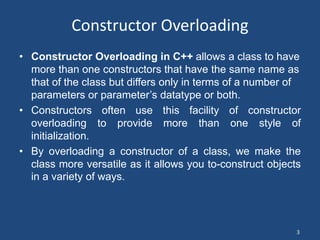
Constructor Overloading
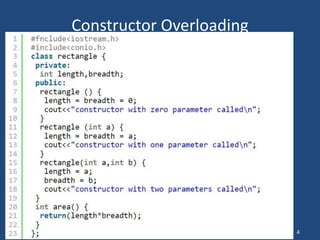
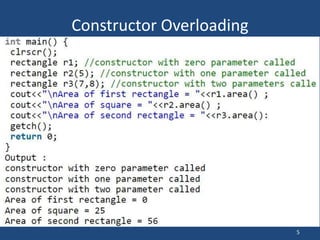
• Constructor Overloading in C++ allows a class to have
more than one constructors that have the same name as
that of the class but differs only in terms of a number of
parameters or parameter’s datatype or both.
• Constructors often use this facility of constructor
overloading to provide more than one style of
initialization.
• By overloading a constructor of a class, we make the
class more versatile as it allows you to-construct objects
in a variety of ways.
4
Constructor Overloading
5
Constructor Overloading
6
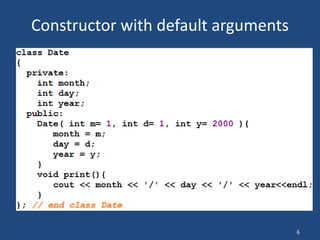
Constructor with default arguments
7
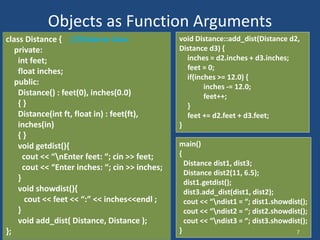
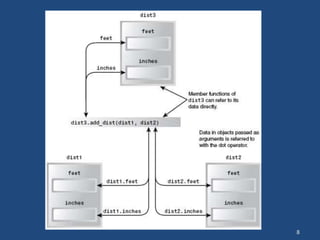
Objects as Function Arguments
class Distance { //Distance class
private:
int feet;
float inches;
public:
Distance() : feet(0), inches(0.0)
{ }
Distance(int ft, float in) : feet(ft),
inches(in)
{ }
void getdist(){
cout << “nEnter feet: “; cin >> feet;
cout << “Enter inches: “; cin >> inches;
}
void showdist(){
cout << feet << “:” << inches<<endl ;
}
void add_dist( Distance, Distance );
};
void Distance::add_dist(Distance d2,
Distance d3) {
inches = d2.inches + d3.inches;
feet = 0;
if(inches >= 12.0) {
inches -= 12.0;
feet++;
}
feet += d2.feet + d3.feet;
}
main()
{
Distance dist1, dist3;
Distance dist2(11, 6.5);
dist1.getdist();
dist3.add_dist(dist1, dist2);
cout << “ndist1 = “; dist1.showdist();
cout << “ndist2 = “; dist2.showdist();
cout << “ndist3 = “; dist3.showdist();
}
8
9
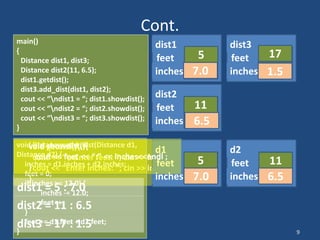
Cont.
main()
{
Distance dist1, dist3;
Distance dist2(11, 6.5);
dist1.getdist();
dist3.add_dist(dist1, dist2);
cout << “ndist1 = “; dist1.showdist();
cout << “ndist2 = “; dist2.showdist();
cout << “ndist3 = “; dist3.showdist();
}
feet
inches
dist1
0
0.0
feet
inches
dist3
0
0.0
feet
inches
dist2
11
6.5
void getdist(){
cout << “nEnter feet: “; cin >> feet;
cout << “Enter inches: “; cin >> inches;
}
5
7.0
void Distance::add_dist(Distance d1,
Distance d2) {
inches = d1.inches + d2.inches;
feet = 0;
if(inches >= 12.0) {
inches -= 12.0;
feet++;
}
feet += d1.feet + d2.feet;
}
feet
inches
d1
feet
inches
d2
5
7.0
11
6.5
13.5
0
1.5
1
17
void showdist(){
cout << feet << “:” << inches<<endl ;
}
dist1 = 5 : 7.0
dist2 = 11 : 6.5
dist3 = 17 : 1.5
10
Overloaded Constructors
• It’s convenient to be able to give variables of type
Distance a value when they are first created
Distance dist2(11, 6.25);
• which defines an object, and initializes it to a value of
11 for feet and 6.25 for inches.
• Distance dist1, dist2; then No-argument constructor
is called/invoked (the default constructor)
• Since there are now two constructors with the
same name, Distance(), we say the constructor is
overloaded
11
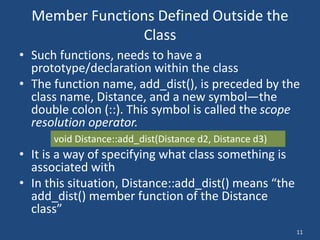
Member Functions Defined Outside the
Class
• Such functions, needs to have a
prototype/declaration within the class
• The function name, add_dist(), is preceded by the
class name, Distance, and a new symbol—the
double colon (::). This symbol is called the scope
resolution operator.
• It is a way of specifying what class something is
associated with
• In this situation, Distance::add_dist() means “the
add_dist() member function of the Distance
class”
void Distance::add_dist(Distance d2, Distance d3)
12
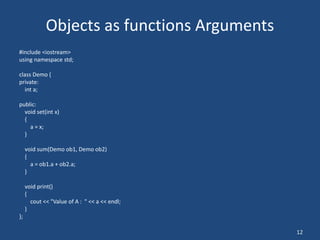
Objects as functions Arguments
#include <iostream>
using namespace std;
class Demo {
private:
int a;
public:
void set(int x)
{
a = x;
}
void sum(Demo ob1, Demo ob2)
{
a = ob1.a + ob2.a;
}
void print()
{
cout << "Value of A : " << a << endl;
}
};
13
Objects as Arguments
int main()
{
//object declarations
Demo d1;
Demo d2;
Demo d3;
//assigning values to the data member of objects
d1.set(10);
d2.set(20);
//passing object d1 and d2
d3.sum(d1, d2);
//printing the values
d1.print();
d2.print();
d3.print();
return 0;
}
14
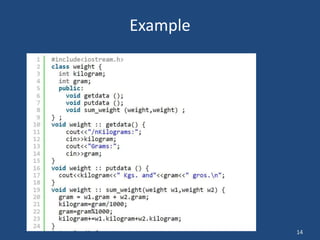
Example
15
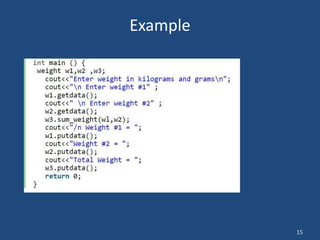
Example

Oop ( operator overloading)

  • 1.
  • 2.
    2 Today’s Lecture • ConstructorOverloading – example program • Constructor with arguments – example program • Object as Function Arguments • Member Functions define outside of the class
  • 3.
    3 Constructor Overloading • ConstructorOverloading in C++ allows a class to have more than one constructors that have the same name as that of the class but differs only in terms of a number of parameters or parameter’s datatype or both. • Constructors often use this facility of constructor overloading to provide more than one style of initialization. • By overloading a constructor of a class, we make the class more versatile as it allows you to-construct objects in a variety of ways.
  • 4.
  • 5.
  • 6.
  • 7.
    7 Objects as FunctionArguments class Distance { //Distance class private: int feet; float inches; public: Distance() : feet(0), inches(0.0) { } Distance(int ft, float in) : feet(ft), inches(in) { } void getdist(){ cout << “nEnter feet: “; cin >> feet; cout << “Enter inches: “; cin >> inches; } void showdist(){ cout << feet << “:” << inches<<endl ; } void add_dist( Distance, Distance ); }; void Distance::add_dist(Distance d2, Distance d3) { inches = d2.inches + d3.inches; feet = 0; if(inches >= 12.0) { inches -= 12.0; feet++; } feet += d2.feet + d3.feet; } main() { Distance dist1, dist3; Distance dist2(11, 6.5); dist1.getdist(); dist3.add_dist(dist1, dist2); cout << “ndist1 = “; dist1.showdist(); cout << “ndist2 = “; dist2.showdist(); cout << “ndist3 = “; dist3.showdist(); }
  • 8.
  • 9.
    9 Cont. main() { Distance dist1, dist3; Distancedist2(11, 6.5); dist1.getdist(); dist3.add_dist(dist1, dist2); cout << “ndist1 = “; dist1.showdist(); cout << “ndist2 = “; dist2.showdist(); cout << “ndist3 = “; dist3.showdist(); } feet inches dist1 0 0.0 feet inches dist3 0 0.0 feet inches dist2 11 6.5 void getdist(){ cout << “nEnter feet: “; cin >> feet; cout << “Enter inches: “; cin >> inches; } 5 7.0 void Distance::add_dist(Distance d1, Distance d2) { inches = d1.inches + d2.inches; feet = 0; if(inches >= 12.0) { inches -= 12.0; feet++; } feet += d1.feet + d2.feet; } feet inches d1 feet inches d2 5 7.0 11 6.5 13.5 0 1.5 1 17 void showdist(){ cout << feet << “:” << inches<<endl ; } dist1 = 5 : 7.0 dist2 = 11 : 6.5 dist3 = 17 : 1.5
  • 10.
    10 Overloaded Constructors • It’sconvenient to be able to give variables of type Distance a value when they are first created Distance dist2(11, 6.25); • which defines an object, and initializes it to a value of 11 for feet and 6.25 for inches. • Distance dist1, dist2; then No-argument constructor is called/invoked (the default constructor) • Since there are now two constructors with the same name, Distance(), we say the constructor is overloaded
  • 11.
    11 Member Functions DefinedOutside the Class • Such functions, needs to have a prototype/declaration within the class • The function name, add_dist(), is preceded by the class name, Distance, and a new symbol—the double colon (::). This symbol is called the scope resolution operator. • It is a way of specifying what class something is associated with • In this situation, Distance::add_dist() means “the add_dist() member function of the Distance class” void Distance::add_dist(Distance d2, Distance d3)
  • 12.
    12 Objects as functionsArguments #include <iostream> using namespace std; class Demo { private: int a; public: void set(int x) { a = x; } void sum(Demo ob1, Demo ob2) { a = ob1.a + ob2.a; } void print() { cout << "Value of A : " << a << endl; } };
  • 13.
    13 Objects as Arguments intmain() { //object declarations Demo d1; Demo d2; Demo d3; //assigning values to the data member of objects d1.set(10); d2.set(20); //passing object d1 and d2 d3.sum(d1, d2); //printing the values d1.print(); d2.print(); d3.print(); return 0; }
  • 14.
  • 15.