Office Web ApplicationsWhat, When and How…
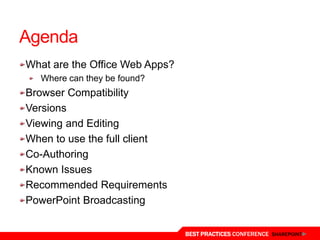
AgendaWhat are the Office Web Apps?Where can they be found?Browser CompatibilityVersionsViewing and EditingWhen to use the full clientCo-AuthoringKnown IssuesRecommended RequirementsPowerPoint Broadcasting
About the SpeakerAlex PearceBlog: www.bfcnetworks.comEmail: apearce@bfcnetworks.com Twitter: @alex_pearcePersonal Interest in SharePoint…EducationLearning Gateways/Learning PlatformsUser AdoptionIntegration
What are Web Apps?
Office Web AppsMicrosoft ExcelMicrosoft WordMicrosoft OneNoteMicrosoft PowerPoint
Where are they?There are 3 versionOffice Web Application in SharePoint 2010Live.comLive WorkspacesSkyDriveOffice 365
Browser Compatibility
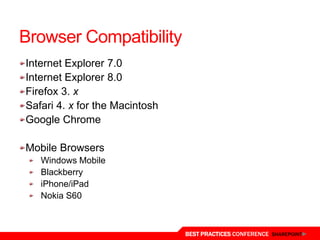
Browser CompatibilityInternet Explorer 7.0Internet Explorer 8.0Firefox 3. xSafari 4. x for the MacintoshGoogle ChromeMobile BrowsersWindows MobileBlackberryiPhone/iPadNokia S60
New - Browser CompatibilityInternet Explorer 9.0Firefox 4.0Google Chrome X.X
VersionsThere are 2 versionOffice Web Application in SharePoint 2010Live.comLive WorkspacesSkyDriveOffice 365
Versions – User ExpectationAdditional Features in live.com, these include:PrintAbility to print the document from the browserEmbedAdd the embeddable code to website, blog, SharePointShareShare with your live.com profile with friends (linkable to Facebook)
Viewing and EditingWhen viewing the file you will see the document as it would in the full clientWhen editing you lose the ability to view complex areas of the documentWatermarksCover Page
When to use full clientInformation Rights ManagementCopying Formatting inside a documentComplex ShapesThesaurusDrawing images by Ink (OneNote)Embedding media or other files into OneNoteTracked changesMacrosUpdating external tables/queriesMobile: View Documents only
Co-authoringWord and PowerPointCan only open the document in the same client applicationOffice 2010 Full Client to Office 2010Office Web Apps to Office Web AppsExcelEnsure no one is editing the document at the same time in the full clientOneNoteCan either use OneNote 2010 or OneNote Web Apps
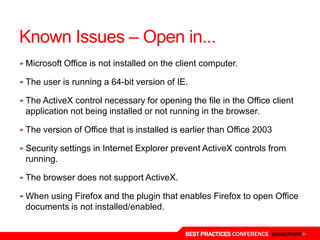
Known Issues – Open in...Microsoft Office is not installed on the client computer.The user is running a 64-bit version of IE.The ActiveX control necessary for opening the file in the Office client application not being installed or not running in the browser.The version of Office that is installed is earlier than Office 2003Security settings in Internet Explorer prevent ActiveX controls from running.The browser does not support ActiveX.When using Firefox and the plugin that enables Firefox to open Office documents is not installed/enabled.
Known Issues…Copy and PasteBetter experience with Silverlight
Recommended RequirementsSilverlightWordFaster Loading PerformanceRending of text and spacingImproving accuracy of search research when using FindPowerPointSmoother animationsScaling of browser window
PowerPoint BroadcastingSecurityKnow who you are broadcasting toDo they have permission to the broadcasting site?Are you sure you want to enable anonymous access?ExpectationDo they have Silverlight?What browser do they use?Will they get a rich/smooth experienceDeliver expectation (run in IE, require speakers, install Silverlight)Adding Broadcast sites into PowerPointAdd up to 10 broadcast sites into PowerPoint 2010 for users to usePermission based
Thanks you

Office web applications when how why

  • 1.
  • 2.
    AgendaWhat are theOffice Web Apps?Where can they be found?Browser CompatibilityVersionsViewing and EditingWhen to use the full clientCo-AuthoringKnown IssuesRecommended RequirementsPowerPoint Broadcasting
  • 3.
    About the SpeakerAlexPearceBlog: www.bfcnetworks.comEmail: apearce@bfcnetworks.com Twitter: @alex_pearcePersonal Interest in SharePoint…EducationLearning Gateways/Learning PlatformsUser AdoptionIntegration
  • 4.
  • 9.
    Office Web AppsMicrosoftExcelMicrosoft WordMicrosoft OneNoteMicrosoft PowerPoint
  • 10.
    Where are they?Thereare 3 versionOffice Web Application in SharePoint 2010Live.comLive WorkspacesSkyDriveOffice 365
  • 11.
  • 12.
    Browser CompatibilityInternet Explorer7.0Internet Explorer 8.0Firefox 3. xSafari 4. x for the MacintoshGoogle ChromeMobile BrowsersWindows MobileBlackberryiPhone/iPadNokia S60
  • 13.
    New - BrowserCompatibilityInternet Explorer 9.0Firefox 4.0Google Chrome X.X
  • 14.
    VersionsThere are 2versionOffice Web Application in SharePoint 2010Live.comLive WorkspacesSkyDriveOffice 365
  • 15.
    Versions – UserExpectationAdditional Features in live.com, these include:PrintAbility to print the document from the browserEmbedAdd the embeddable code to website, blog, SharePointShareShare with your live.com profile with friends (linkable to Facebook)
  • 16.
    Viewing and EditingWhenviewing the file you will see the document as it would in the full clientWhen editing you lose the ability to view complex areas of the documentWatermarksCover Page
  • 17.
    When to usefull clientInformation Rights ManagementCopying Formatting inside a documentComplex ShapesThesaurusDrawing images by Ink (OneNote)Embedding media or other files into OneNoteTracked changesMacrosUpdating external tables/queriesMobile: View Documents only
  • 18.
    Co-authoringWord and PowerPointCanonly open the document in the same client applicationOffice 2010 Full Client to Office 2010Office Web Apps to Office Web AppsExcelEnsure no one is editing the document at the same time in the full clientOneNoteCan either use OneNote 2010 or OneNote Web Apps
  • 19.
    Known Issues –Open in...Microsoft Office is not installed on the client computer.The user is running a 64-bit version of IE.The ActiveX control necessary for opening the file in the Office client application not being installed or not running in the browser.The version of Office that is installed is earlier than Office 2003Security settings in Internet Explorer prevent ActiveX controls from running.The browser does not support ActiveX.When using Firefox and the plugin that enables Firefox to open Office documents is not installed/enabled.
  • 20.
    Known Issues…Copy andPasteBetter experience with Silverlight
  • 21.
    Recommended RequirementsSilverlightWordFaster LoadingPerformanceRending of text and spacingImproving accuracy of search research when using FindPowerPointSmoother animationsScaling of browser window
  • 22.
    PowerPoint BroadcastingSecurityKnow whoyou are broadcasting toDo they have permission to the broadcasting site?Are you sure you want to enable anonymous access?ExpectationDo they have Silverlight?What browser do they use?Will they get a rich/smooth experienceDeliver expectation (run in IE, require speakers, install Silverlight)Adding Broadcast sites into PowerPointAdd up to 10 broadcast sites into PowerPoint 2010 for users to usePermission based
  • 23.

Editor's Notes

  • #9 Microsoft Office 3.0 was the first version of Office for Windows and was released in 1993.Office 4.0 and 4.3 followed in 1994. Office 4.0 contained Word 6.0, Excel 5.0 and PowerPoint 4.0. Word 6.0 of course followed on from Word 2.0, so good to see that we’ve always been good at getting the numbers right…Office 95 – the first copy of Office that was 32-bitOffice 97 – a major milestone release – it included the red and green squiggley underlines for spelling and grammar checking.As we move through the different versions of Office, we also added new Applications and services.SharePoint joined us in 2001, became part of the Office system in 2003.Exchange 4.0 launched in 1996 (We had Microsoft Mail 3.5 before that)Visio joined the Office family in 2000, OneNote in 2003 and Groove in 2007.We have OfficeOnline one of the most visited websites in the world and more recently we’ve had OfficeLive Workspace as a way to extend Office into the cloud to store and share documents.All of that is simply a way of saying that Productivity is part of Microsoft’s DNA, we’ve been doing it a long time, it’s changed a lot and Office 14 is the next step in the evolution.We have performance point server 2007.
  • #19 Real time co-authoring scenarios are different for Office Web Apps:For Word and PowerPoint documents, use the Office 2010 client applications for co-authoring, and be sure that no one is editing the document at the same time in Word Web App or PowerPoint Web App.For Excel workbooks, use the Excel Web App for co-authoring and be sure that no one is editing the document at the same time in the Excel client. For OneNote notebooks, you can use either OneNote 2010 or OneNote Web App for co-authoring.
  • #22 How Does Word Web App Get Better With Silverlight?Faster load performance, since typically fewer bytes need to be downloaded before showing the document. Improved text fidelity at 100% zoom. This includes better text spacing and rendering. Greatly improved text fidelity at other zoom levels not 100%. Text will respect settings set in cleartype tuner, so you’re able to determine how much (if any) cleartype you’d like to see. The cleartype tuner is available on the web for older versions of Windows, and is included in Windows 7. Improved accuracy of hit highlighting in Find. PowerPoint Web App Gets Better With Silverlight TooThere are some automatic benefits to having Silverlight installed when running the PowerPoint Web App. For example, animations smooth out a bit, and the slide will scale with the browser window size. However Silverlight is not required for rendering or animation.If you’d like to get the benefits mentioned above when using the Office Web Apps, install Silverlight. If you’d prefer not to install Silverlight the Office Web Apps will still work well in the browser you choose to use - allowing you to work anywhere, no matter what machine setup you happen to find.