Office Add-ins
Community Call
April 10, 2019
8:00 AM PST
• https://aka.ms/officeaddinscommunitycall
• Next call: Wednesday, May 8, 2019
• Meet the product teams behind Office Add-ins
• What’s new
• Technical deep dives
• Q&A
About the community call
Call agenda
• Office Add-ins overview
• What’s new: Excel JavaScript APIs
• Edge WebView control
• COM:Web add-in bridge
• Microsoft Build 2019
• Q&A
Presenters
Kim Brandl
Sr. Dev Writer
Doug Mahugh
Sr. Dev Writer
Sudheer Maremanda
Sr. Program Manager
Keyur Patel
Sr. Program Manager
Office Add-ins
Overview
Doug Mahugh, Sr. Dev Writer
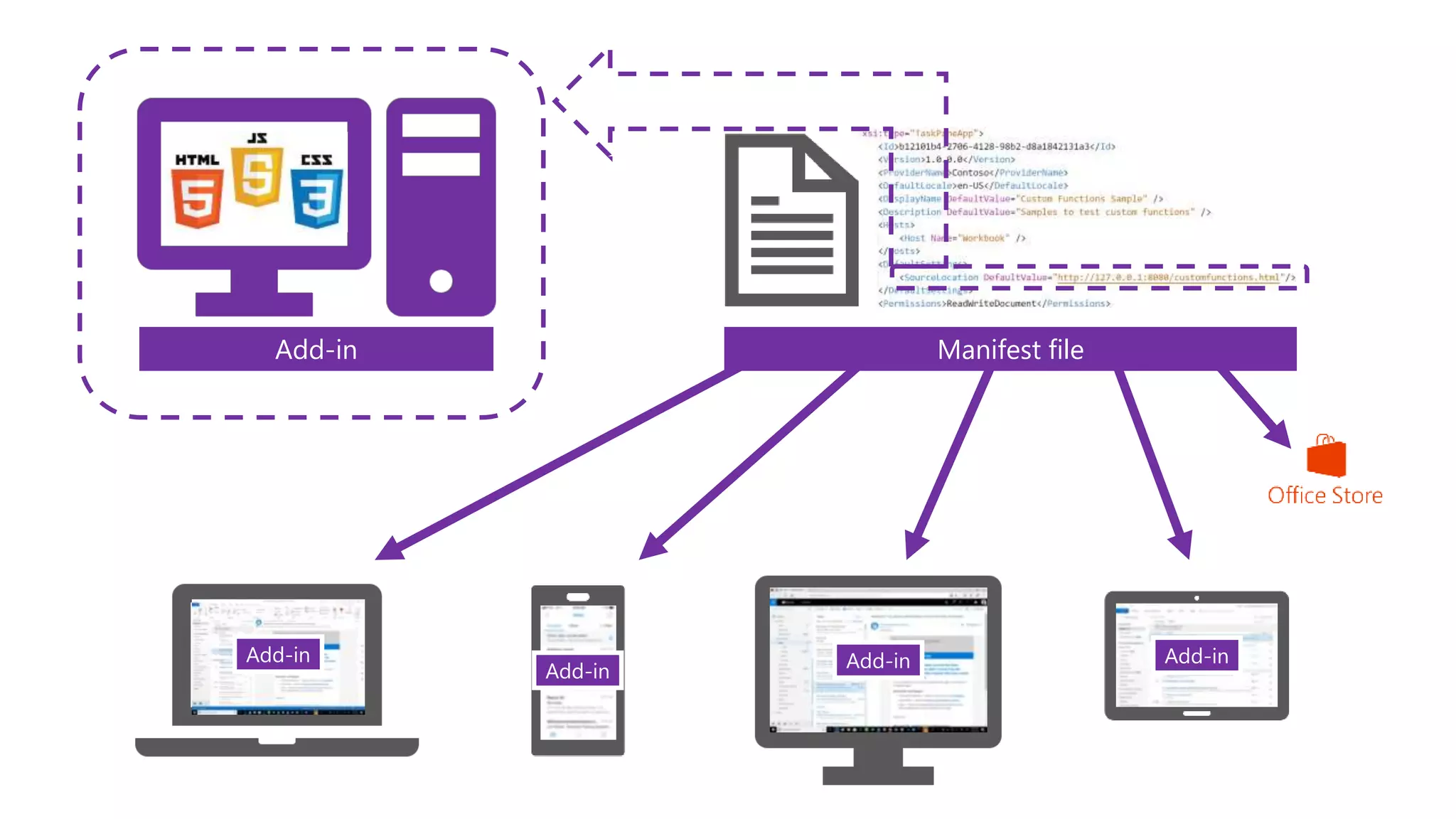
Add-inAdd-in Add-in
Add-in
Web App Manifest fileAdd-in
Add-in
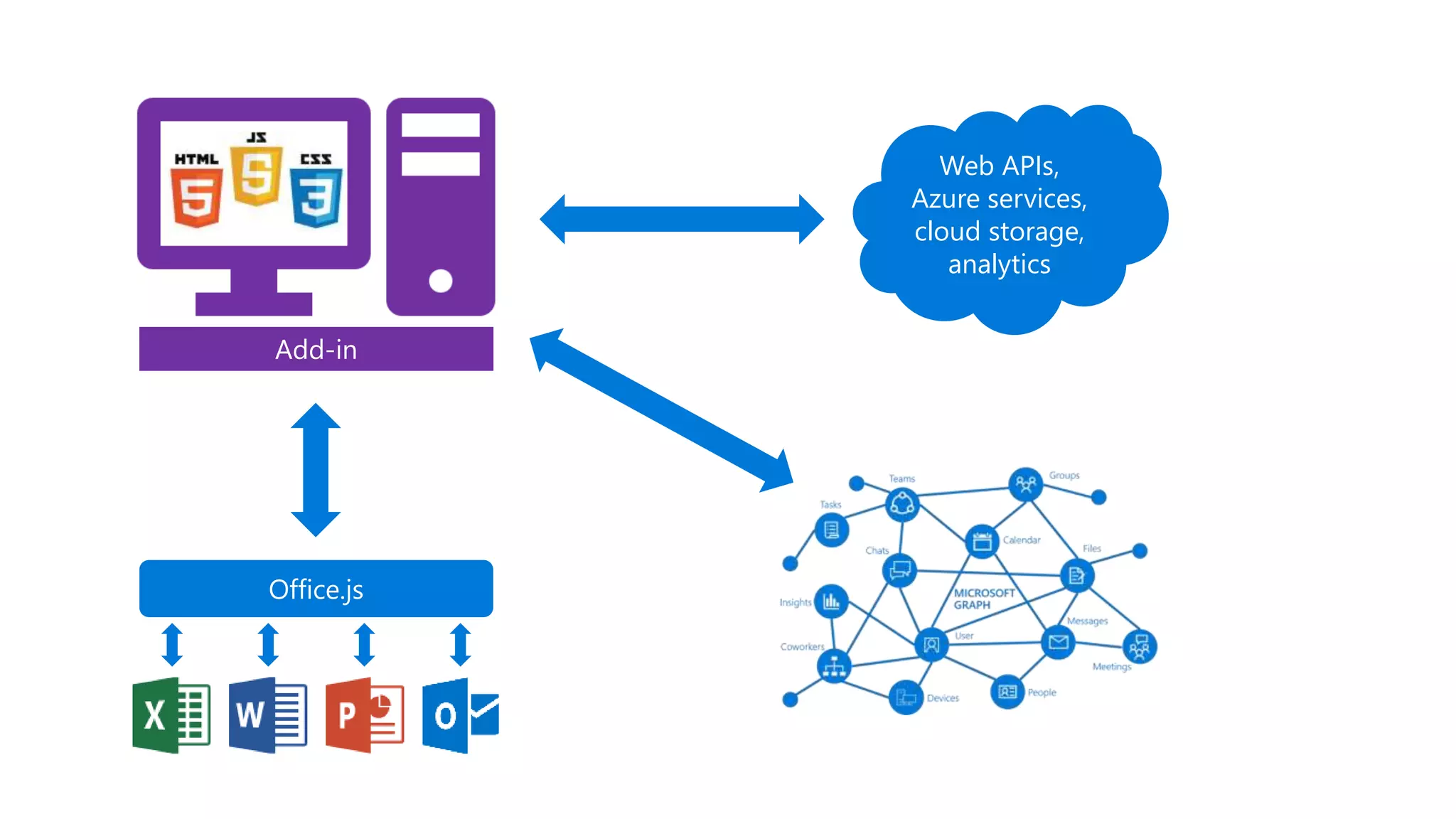
Web APIs,
Azure services,
cloud storage,
analytics
Office.js
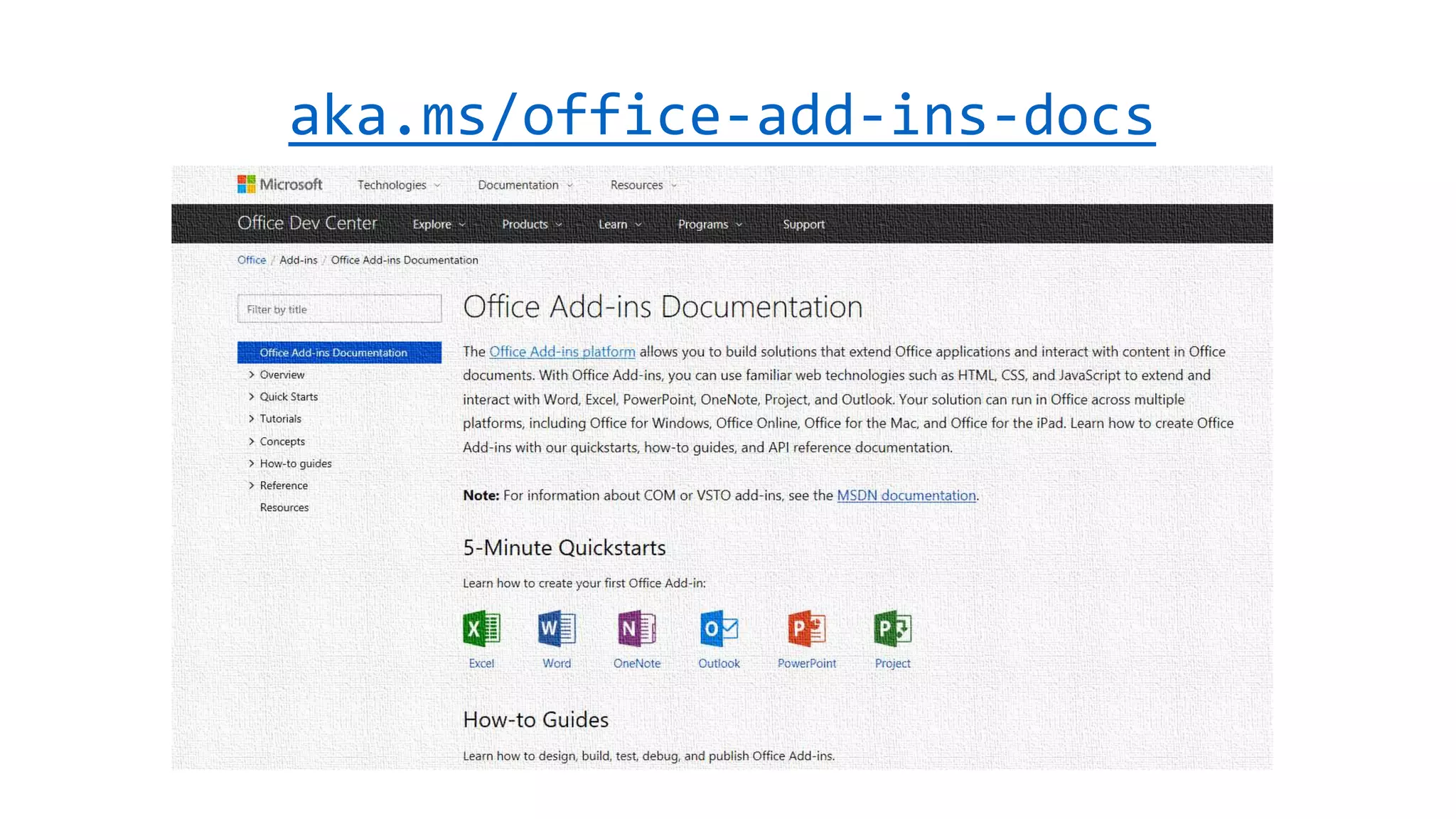
aka.ms/office-add-ins-docs
What’s new:
Excel JavaScript APIs
Raymond Lu, Sr. Program Manager
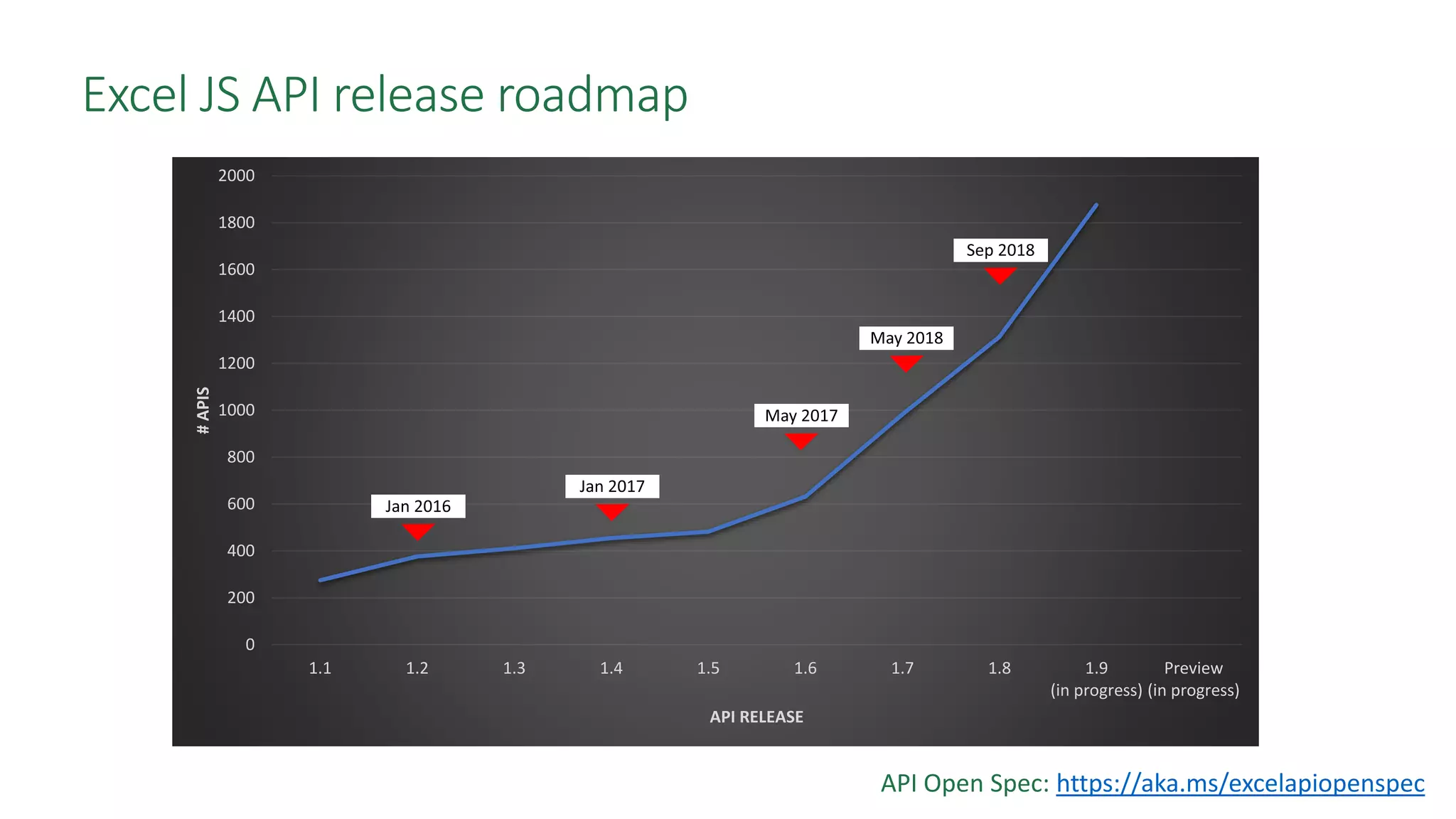
0
200
400
600
800
1000
1200
1400
1600
1800
2000
1.1 1.2 1.3 1.4 1.5 1.6 1.7 1.8 1.9
(in progress)
Preview
(in progress)
#APIS
API RELEASE
Excel JS API release roadmap
API Open Spec: https://aka.ms/excelapiopenspec
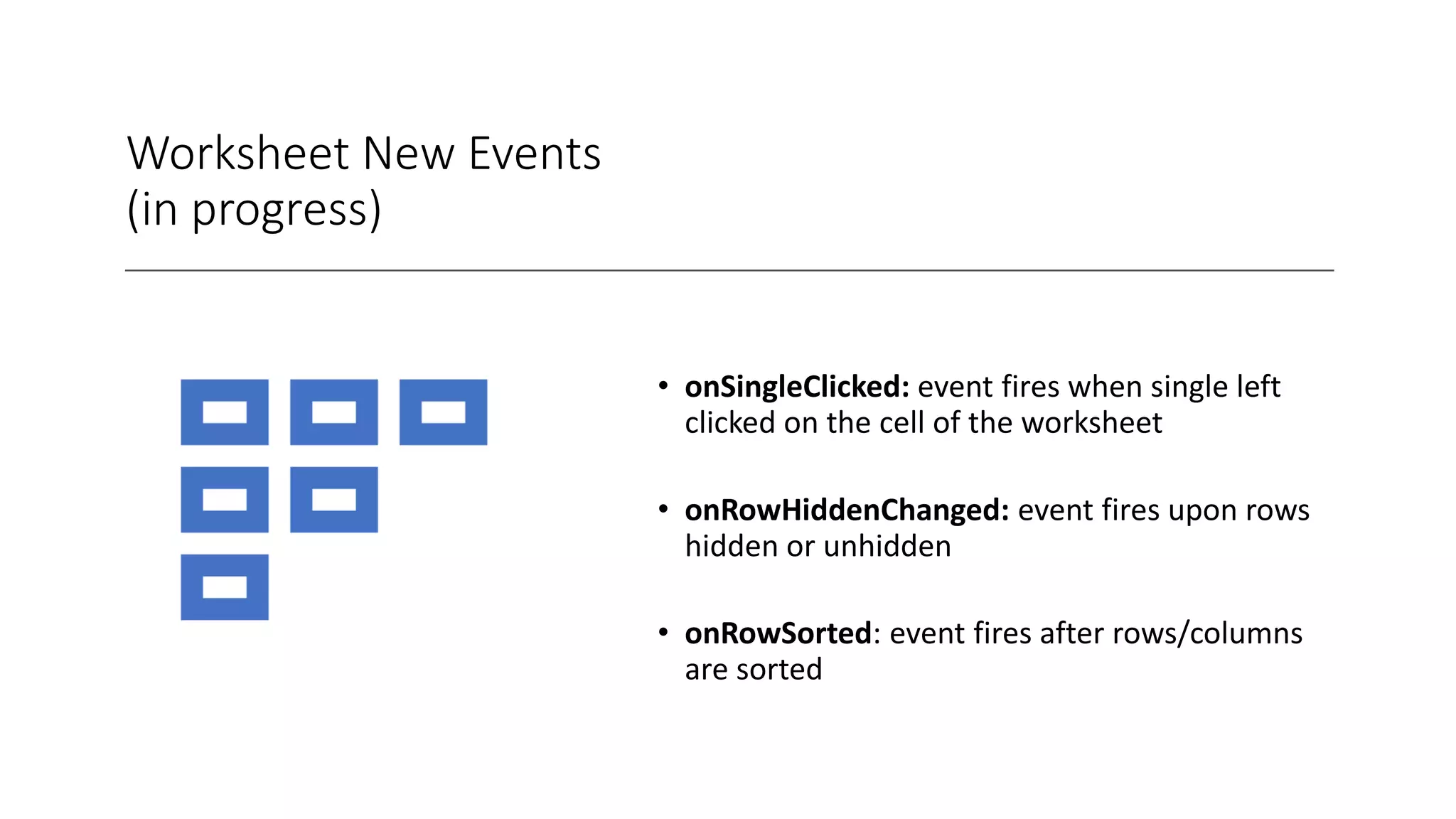
Worksheet New Events
(in progress)
• onSingleClicked: event fires when single left
clicked on the cell of the worksheet
• onRowHiddenChanged: event fires upon rows
hidden or unhidden
• onRowSorted: event fires after rows/columns
are sorted
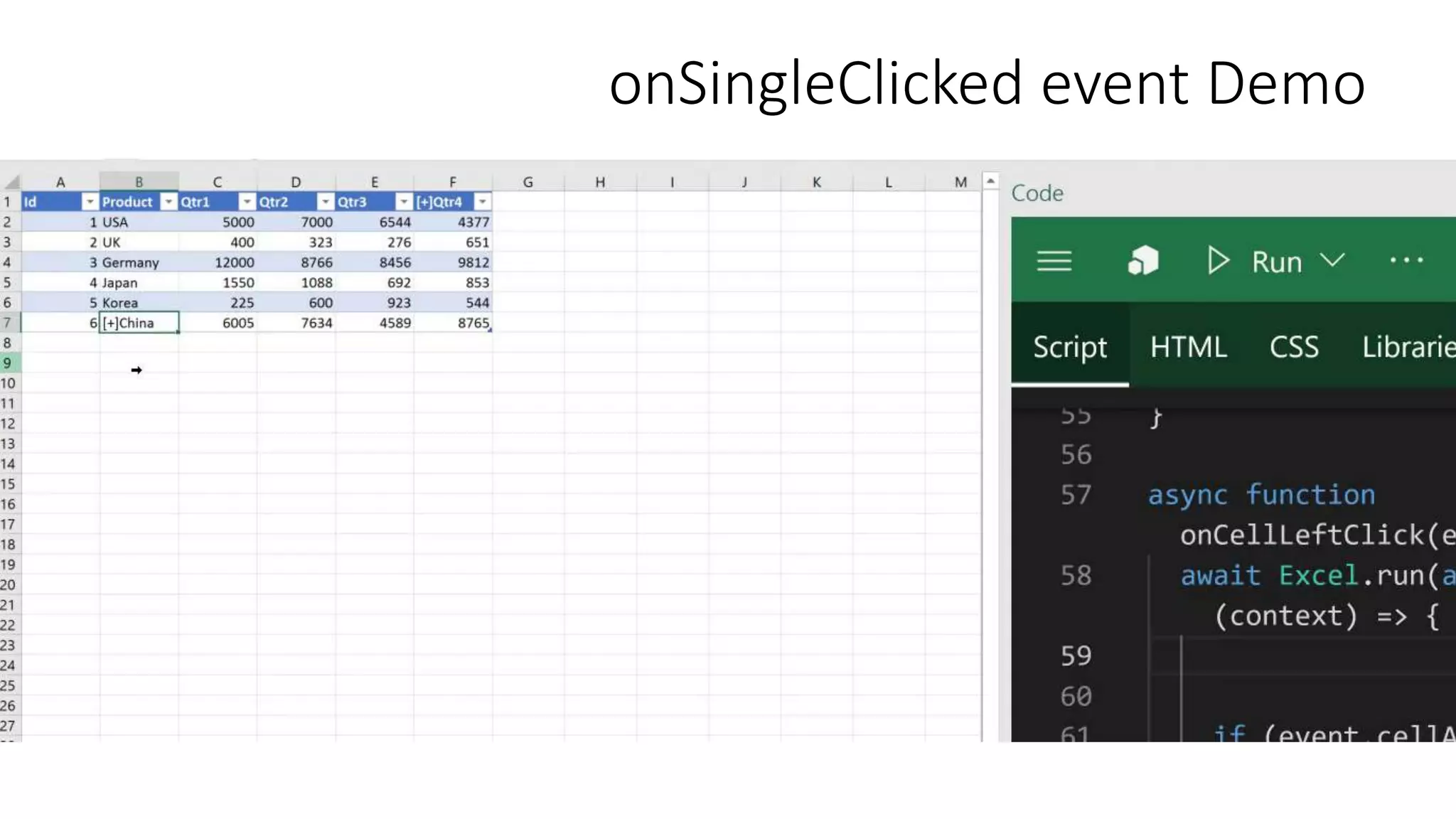
onSingleClicked event Demo
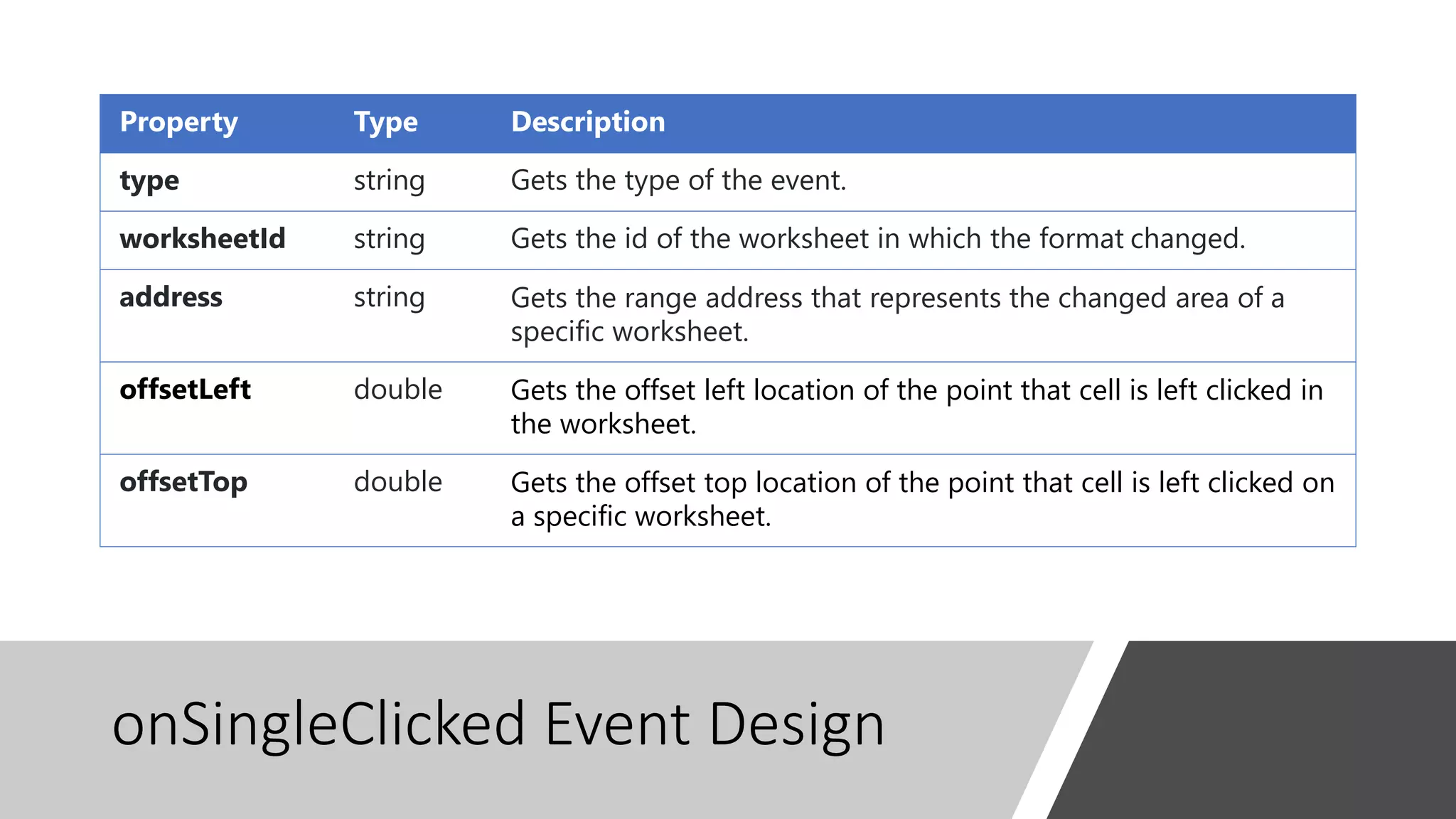
onSingleClicked Event Design
Property Type Description
type string Gets the type of the event.
worksheetId string Gets the id of the worksheet in which the format changed.
address string Gets the range address that represents the changed area of a
specific worksheet.
offsetLeft double Gets the offset left location of the point that cell is left clicked in
the worksheet.
offsetTop double Gets the offset top location of the point that cell is left clicked on
a specific worksheet.
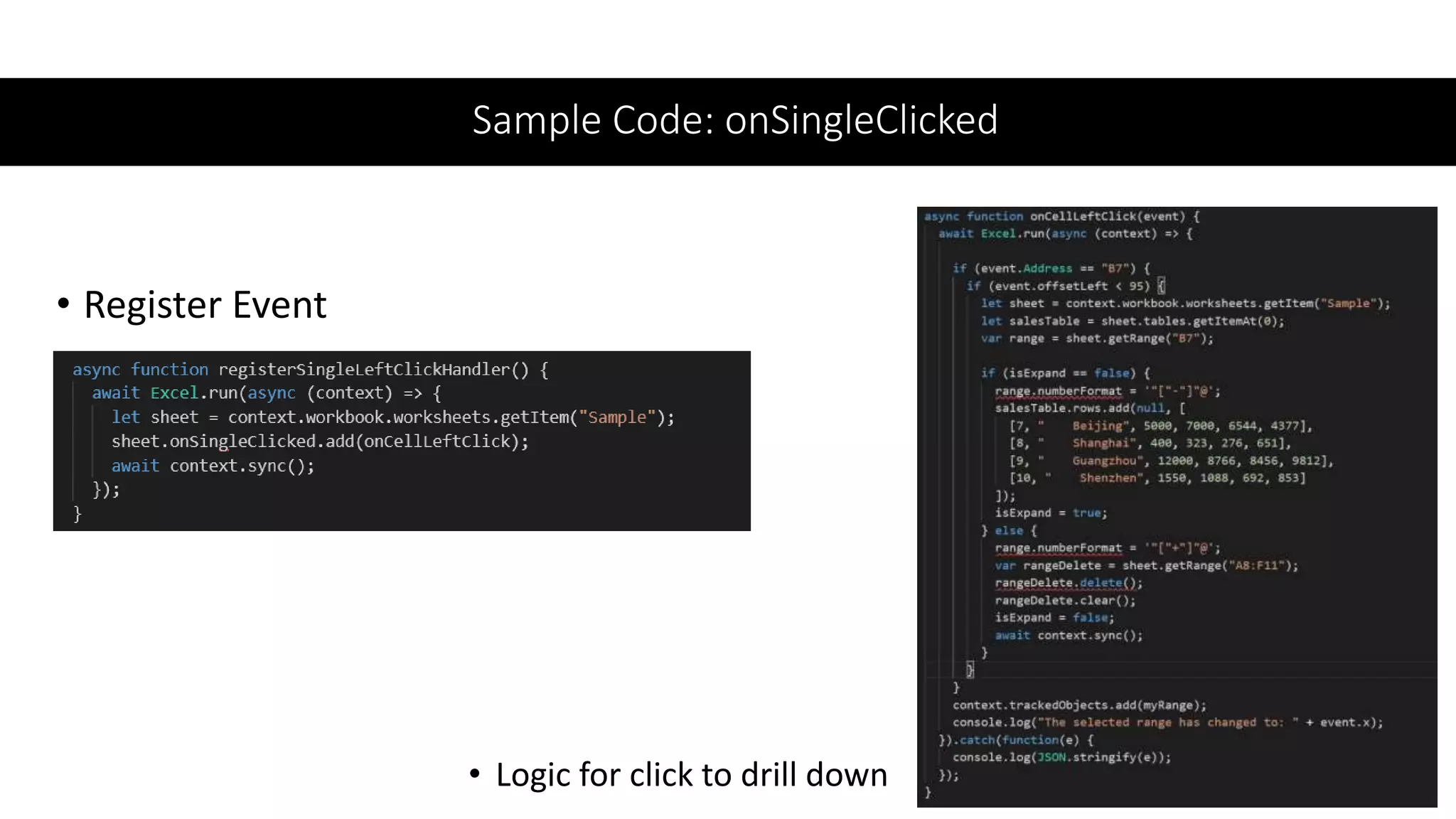
Sample Code: onSingleClicked
• Register Event
• Logic for click to drill down
onRowHiddenChanged Demo
onRowHiddenChanged Event Design
Property Type Description
Address
String; read-only
The comma separated addresses of the rows that were hidden or unhidden
RowHidden
Boolean: True | False;
read-only;
The hidden/unhidden state of the row. When value is “true,” rows are
hidden and, when value is “false,” rows are visible.
Source Enum: “Local” | “Remote”;
read-only
Source of the event, whether it’s local or remote through co-auth
WorksheetId
String;
read-only
The ID of the worksheet within which row(s) were hidden or unhidden
Type
String; read-only
Enum:
“WorksheetRowHidden”
The type of event fired
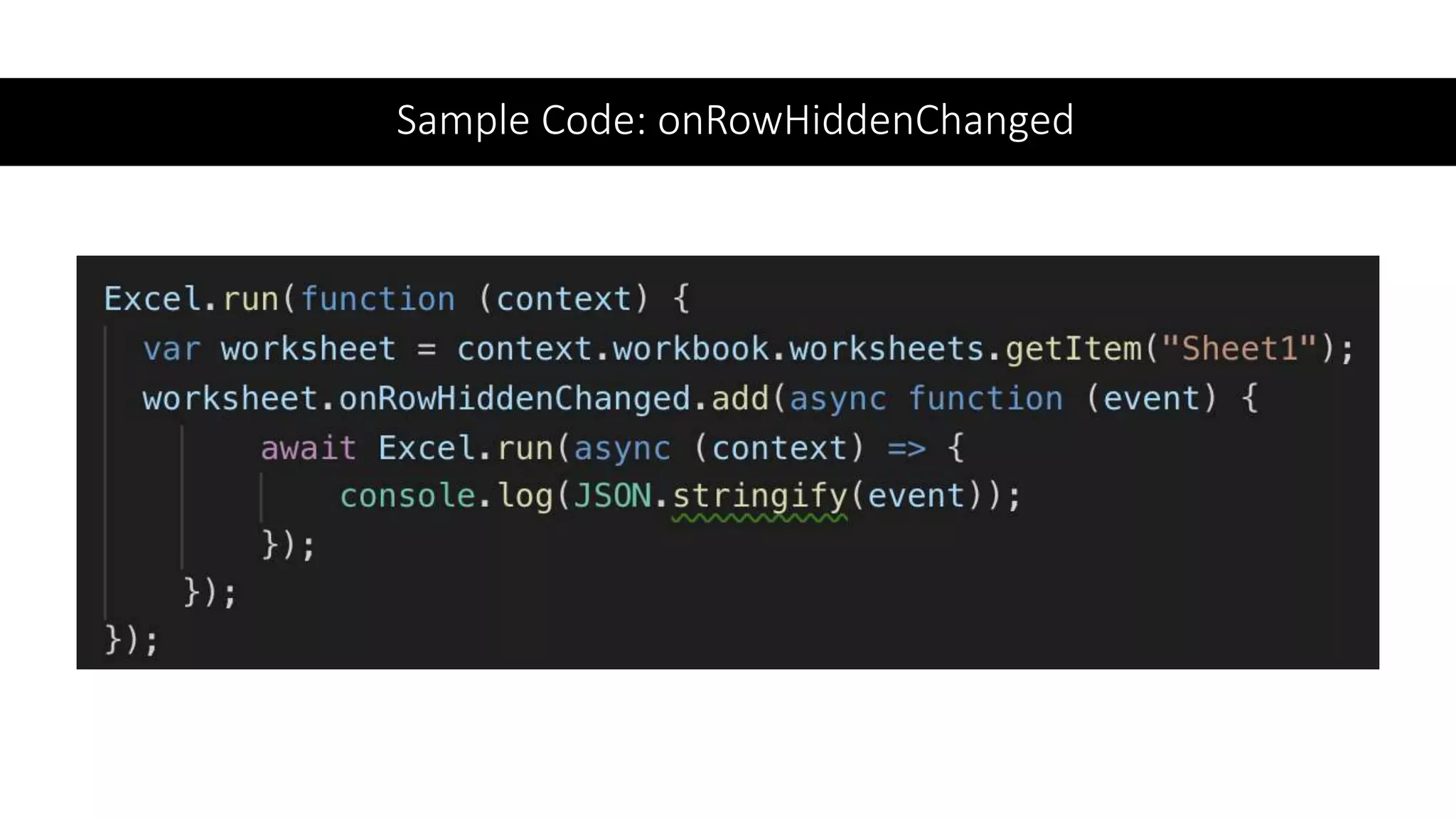
Sample Code: onRowHiddenChanged
OnRowSorted Demo
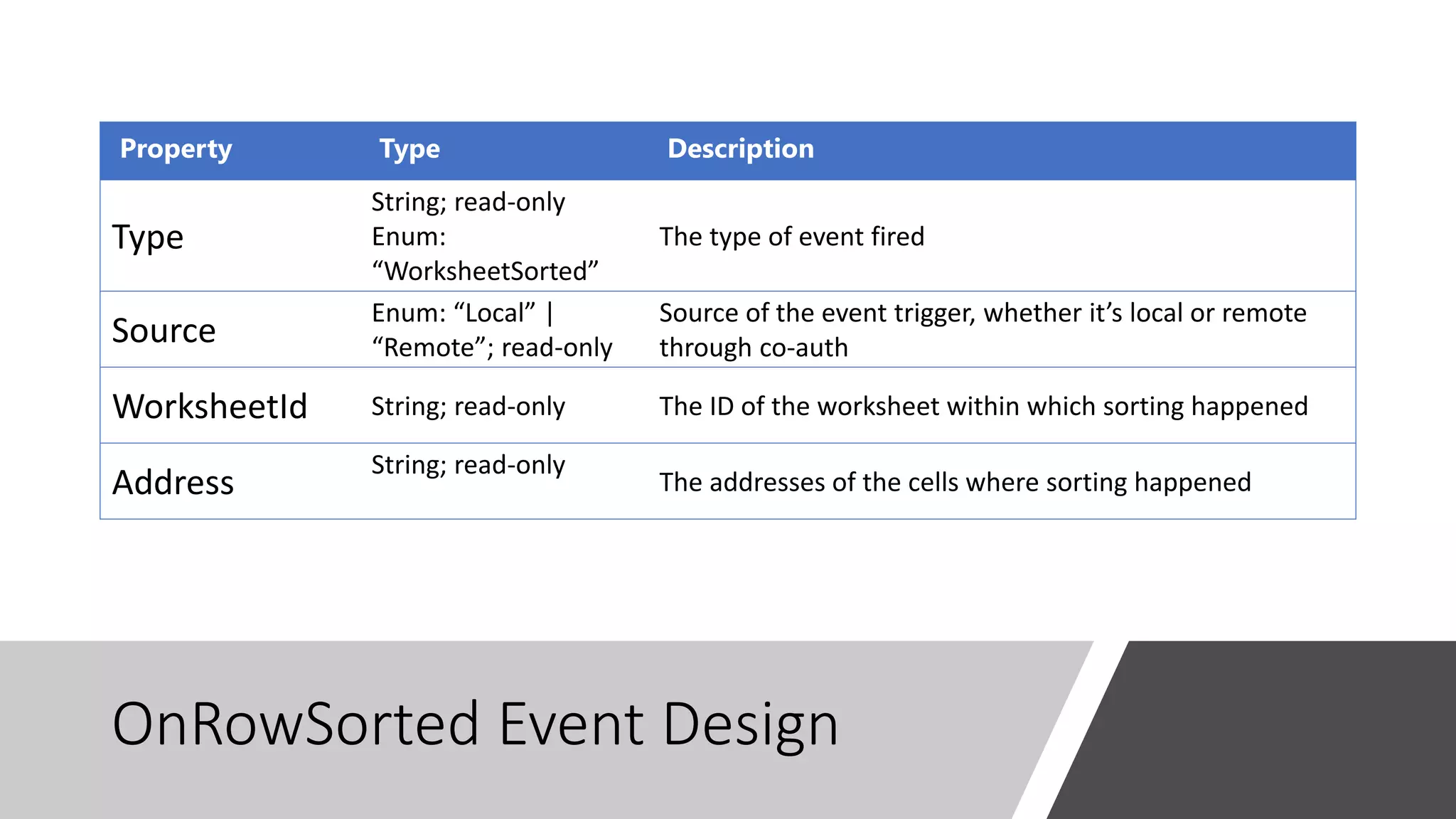
OnRowSorted Event Design
Property Type Description
Type
String; read-only
Enum:
“WorksheetSorted”
The type of event fired
Source
Enum: “Local” |
“Remote”; read-only
Source of the event trigger, whether it’s local or remote
through co-auth
WorksheetId String; read-only The ID of the worksheet within which sorting happened
Address
String; read-only
The addresses of the cells where sorting happened
Sample Code: onRowSorted
Feedback and Questions
You could share your feedback and ask questions via the
following links
• https://github.com/OfficeDev/office-js/issues
• https://stackoverflow.com/questions/tagged/office-js
Edge WebView control
for Office Add-ins
Sudheer Maremanda, Sr. Program Manager
Edge
WebView
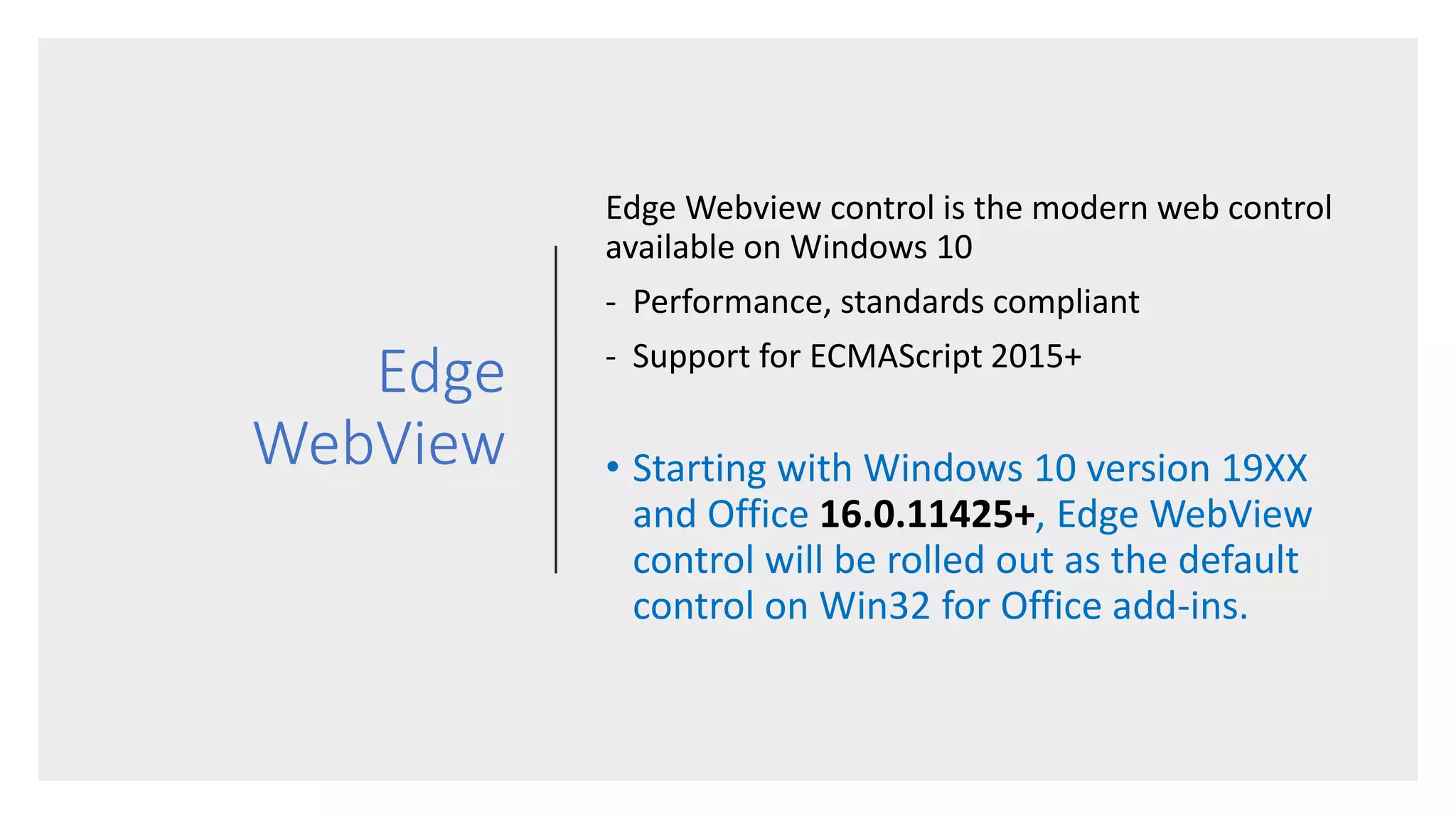
Edge Webview control is the modern web control
available on Windows 10
- Performance, standards compliant
- Support for ECMAScript 2015+
• Starting with Windows 10 version 19XX
and Office 16.0.11425+, Edge WebView
control will be rolled out as the default
control on Win32 for Office add-ins.
Impact of this rollout
• Starting with Office version 16.0.11425+, Edge control will be the default
control where available
• On Windows 18XX and lower builds we will continue to use IE / Trident as the
default web control
• This means – you may have to make a few changes to make your add-in
work on both the IE/Trident as well as the Edge WebView control
• This change does not impact:
• Versions of Office lower than 16.0.11425+. We will continue to use IE /
Trident as the web control there
• Non-Windows Office versions, such as Office on Mac, iOS, Android, and
Office Online
Known Issues
[current]
- Error occurred while trying to reach your add-in from
https://localhost
• When loading an Office add-in from https://localhost or when using Fiddler, you
may see an error stating that a problem occurred while trying to reach your add-
in.
• To fix this, follow either of these steps to add a local loopback exemption to
“Desktop App Web Viewer”:
• Open a command prompt as Administrator and run the following
command: CheckNetIsolation LoopbackExempt -a -
n="microsoft.win32webviewhost_cw5n1h2txyewy"
• Using Fiddler: Select Tools > Win8 Loopback Exemptions and add an
exemption to “Desktop App Web Viewer.”
Call to Action
• Test your add-in[s] with the new Edge control and give us feedback
• Make any changes necessary to your add-in to support both IE/Trident and Edge
WebView
• Report issues on GitHub under OfficeDev/Office-js
• It’s your responsibility to make changes [that may be needed] to your add-in
to support Edge WebView
• Only report issues that you cannot address using standard web
development practices [Eg: Crashes, Scroll issues etc]
To test your add-in
• Get the latest preview versions of Office and Windows
• Min Office version 16.0.11425+
• Min Windows version 19XX
• Note: For debugging use Edge Dev Tools [see details]
COM:Web add-in bridge
• XLL UDFs <-> JS Custom Functions
Keyur Patel, Sr. Program Manager
Com <-> Web add-in bridge
EquivalentAdd-
in Mode
{ProgID}
{filename}
Custom Function XLL compatible notes
XLL user Defined Function XLL compatible custom
functions
Regular JavaScript
Custom Function
Supported Platforms Windows Windows, Mac, Excel
Online
Windows, Mac, Excel
Online
Supported File Formats XLSX, XLSB, XLSM, XLS XLSX, XLSB, XLSM XLSX, XLSB, XLSM
Formula Autocomplete No Yes Yes
Streaming Was possible via xlfRTD
and XLL callback.
Yes Yes
Localization of functions No No. The Name and ID
must match the existing
XLL functions.
Yes
Volatile Functions Yes Yes Yes
Multi-threaded
Recalculation support
Yes Yes Yes
Calculation Behavior No UI, Excel can be
unresponsive during
calculation
Users will see #BUSY! until
a result is returned
Users will see #BUSY!
until a result is returned
Requirement Sets N/A CustomFunctions 1.1 only CustomFunctions 1.1+
Custom Function Behavior for XLL compatible function
An Add-in that is declared as XLL Compatible by having an element of “EquivalentAddin” with a subtype of <Type>XLL</Type>.
Notes:
•This behavior is only supported for COM add-ins and XLL user defined functions. VBA is not supported.
•If an add-in declares their custom functions to be XLL compatible, changing the manifest at a later time could break a user’s workbook as it will change the file format.
Provide feedback
• https://github.com/OfficeDev/Office-js/issues
• On insiders 11425+ on Windows
• Mac custom functions XLL compatibility mode will be turned on by EOW
Build 2019
• There’s still time to register for
Microsoft’s premier developer
conference.
• May 6-8 in Seattle
• Registration and more information:
https://aka.ms/build2019
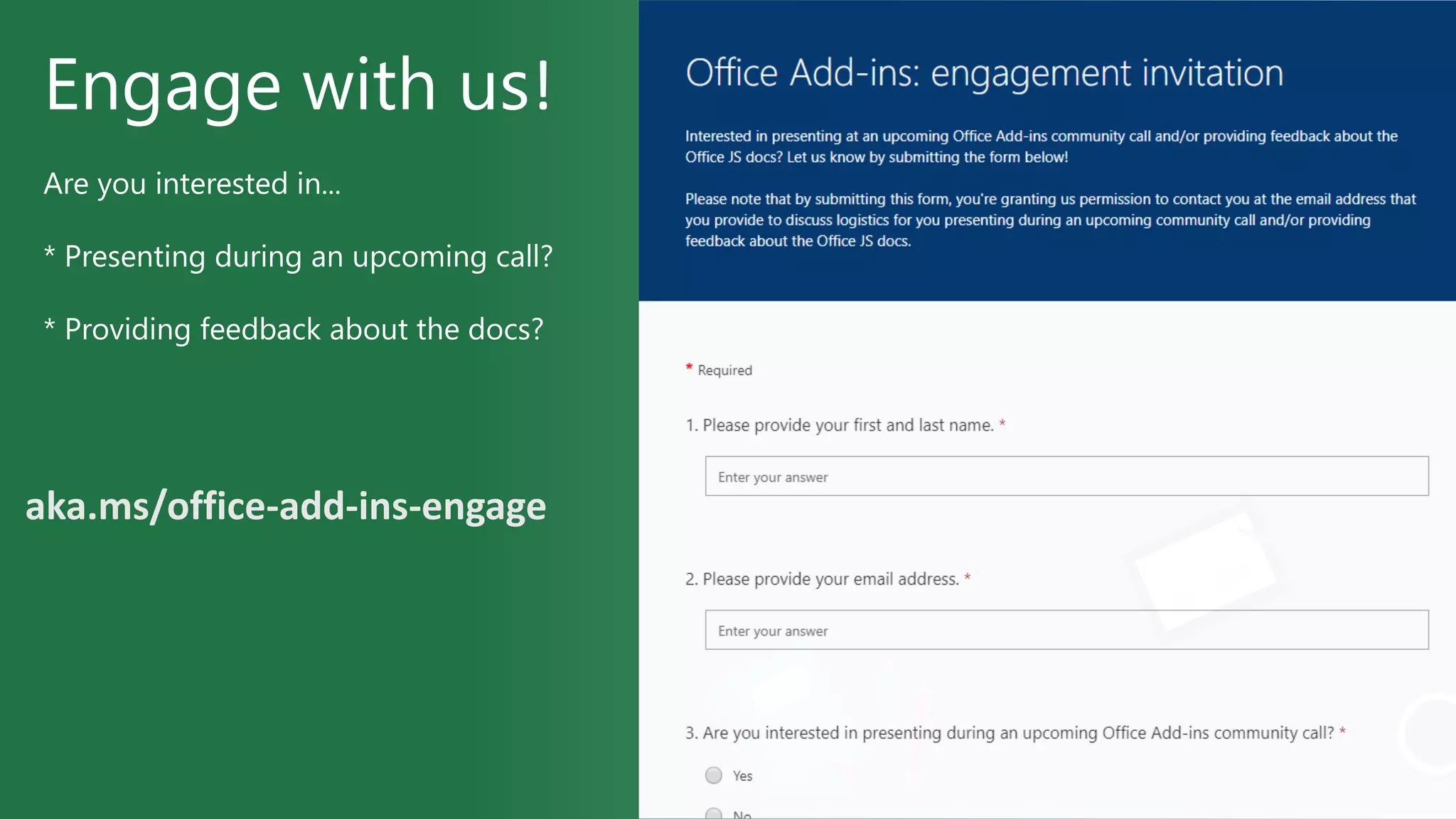
Engage with us!
Are you interested in...
* Presenting during an upcoming call?
* Providing feedback about the docs?
aka.ms/office-add-ins-engage
Q&A (post questions in chat window)
Learn
Engage
Developer resources
What Where
Office 365 Developer Program https://aka.ms/officedevprogram
Script Lab https://aka.ms/getscriptlab
Office Add-ins documentation https://aka.ms/office-add-ins-docs
Excel JS API Open spec https://aka.ms/excel-js-open-spec
Custom Functions https://aka.ms/customfunctions
What Where
Stack Overflow (questions) https://stackoverflow.com
office-js
outlook-web-addins
GitHub (issues) https://github.com/OfficeDev/office-js
UserVoice (feature requests) https://officespdev.uservoice.com
Send a Smile or Frown Inside Office
• Recording will be available soon on Office Developer YouTube
• https://aka.ms/OfficeDevYouTube
• Next call: Wednesday May 8th, 2019
• Submit your questions: https://aka.ms/officeaddinsform
• Add to your calendar: https://aka.ms/officeaddinscommunitycall
Thank you
Office add ins community call - april 2019

Office add ins community call - april 2019

  • 1.
  • 2.
    • https://aka.ms/officeaddinscommunitycall • Nextcall: Wednesday, May 8, 2019 • Meet the product teams behind Office Add-ins • What’s new • Technical deep dives • Q&A About the community call
  • 3.
    Call agenda • OfficeAdd-ins overview • What’s new: Excel JavaScript APIs • Edge WebView control • COM:Web add-in bridge • Microsoft Build 2019 • Q&A
  • 4.
    Presenters Kim Brandl Sr. DevWriter Doug Mahugh Sr. Dev Writer Sudheer Maremanda Sr. Program Manager Keyur Patel Sr. Program Manager
  • 5.
  • 6.
  • 7.
    Add-in Web APIs, Azure services, cloudstorage, analytics Office.js
  • 8.
  • 9.
    What’s new: Excel JavaScriptAPIs Raymond Lu, Sr. Program Manager
  • 10.
    0 200 400 600 800 1000 1200 1400 1600 1800 2000 1.1 1.2 1.31.4 1.5 1.6 1.7 1.8 1.9 (in progress) Preview (in progress) #APIS API RELEASE Excel JS API release roadmap API Open Spec: https://aka.ms/excelapiopenspec
  • 11.
    Worksheet New Events (inprogress) • onSingleClicked: event fires when single left clicked on the cell of the worksheet • onRowHiddenChanged: event fires upon rows hidden or unhidden • onRowSorted: event fires after rows/columns are sorted
  • 12.
  • 13.
    onSingleClicked Event Design PropertyType Description type string Gets the type of the event. worksheetId string Gets the id of the worksheet in which the format changed. address string Gets the range address that represents the changed area of a specific worksheet. offsetLeft double Gets the offset left location of the point that cell is left clicked in the worksheet. offsetTop double Gets the offset top location of the point that cell is left clicked on a specific worksheet.
  • 14.
    Sample Code: onSingleClicked •Register Event • Logic for click to drill down
  • 15.
  • 16.
    onRowHiddenChanged Event Design PropertyType Description Address String; read-only The comma separated addresses of the rows that were hidden or unhidden RowHidden Boolean: True | False; read-only; The hidden/unhidden state of the row. When value is “true,” rows are hidden and, when value is “false,” rows are visible. Source Enum: “Local” | “Remote”; read-only Source of the event, whether it’s local or remote through co-auth WorksheetId String; read-only The ID of the worksheet within which row(s) were hidden or unhidden Type String; read-only Enum: “WorksheetRowHidden” The type of event fired
  • 17.
  • 18.
  • 19.
    OnRowSorted Event Design PropertyType Description Type String; read-only Enum: “WorksheetSorted” The type of event fired Source Enum: “Local” | “Remote”; read-only Source of the event trigger, whether it’s local or remote through co-auth WorksheetId String; read-only The ID of the worksheet within which sorting happened Address String; read-only The addresses of the cells where sorting happened
  • 20.
  • 21.
    Feedback and Questions Youcould share your feedback and ask questions via the following links • https://github.com/OfficeDev/office-js/issues • https://stackoverflow.com/questions/tagged/office-js
  • 22.
    Edge WebView control forOffice Add-ins Sudheer Maremanda, Sr. Program Manager
  • 23.
    Edge WebView Edge Webview controlis the modern web control available on Windows 10 - Performance, standards compliant - Support for ECMAScript 2015+ • Starting with Windows 10 version 19XX and Office 16.0.11425+, Edge WebView control will be rolled out as the default control on Win32 for Office add-ins.
  • 24.
    Impact of thisrollout • Starting with Office version 16.0.11425+, Edge control will be the default control where available • On Windows 18XX and lower builds we will continue to use IE / Trident as the default web control • This means – you may have to make a few changes to make your add-in work on both the IE/Trident as well as the Edge WebView control • This change does not impact: • Versions of Office lower than 16.0.11425+. We will continue to use IE / Trident as the web control there • Non-Windows Office versions, such as Office on Mac, iOS, Android, and Office Online
  • 25.
    Known Issues [current] - Erroroccurred while trying to reach your add-in from https://localhost • When loading an Office add-in from https://localhost or when using Fiddler, you may see an error stating that a problem occurred while trying to reach your add- in. • To fix this, follow either of these steps to add a local loopback exemption to “Desktop App Web Viewer”: • Open a command prompt as Administrator and run the following command: CheckNetIsolation LoopbackExempt -a - n="microsoft.win32webviewhost_cw5n1h2txyewy" • Using Fiddler: Select Tools > Win8 Loopback Exemptions and add an exemption to “Desktop App Web Viewer.”
  • 26.
    Call to Action •Test your add-in[s] with the new Edge control and give us feedback • Make any changes necessary to your add-in to support both IE/Trident and Edge WebView • Report issues on GitHub under OfficeDev/Office-js • It’s your responsibility to make changes [that may be needed] to your add-in to support Edge WebView • Only report issues that you cannot address using standard web development practices [Eg: Crashes, Scroll issues etc] To test your add-in • Get the latest preview versions of Office and Windows • Min Office version 16.0.11425+ • Min Windows version 19XX • Note: For debugging use Edge Dev Tools [see details]
  • 27.
    COM:Web add-in bridge •XLL UDFs <-> JS Custom Functions Keyur Patel, Sr. Program Manager
  • 28.
    Com <-> Webadd-in bridge
  • 29.
  • 31.
    Custom Function XLLcompatible notes XLL user Defined Function XLL compatible custom functions Regular JavaScript Custom Function Supported Platforms Windows Windows, Mac, Excel Online Windows, Mac, Excel Online Supported File Formats XLSX, XLSB, XLSM, XLS XLSX, XLSB, XLSM XLSX, XLSB, XLSM Formula Autocomplete No Yes Yes Streaming Was possible via xlfRTD and XLL callback. Yes Yes Localization of functions No No. The Name and ID must match the existing XLL functions. Yes Volatile Functions Yes Yes Yes Multi-threaded Recalculation support Yes Yes Yes Calculation Behavior No UI, Excel can be unresponsive during calculation Users will see #BUSY! until a result is returned Users will see #BUSY! until a result is returned Requirement Sets N/A CustomFunctions 1.1 only CustomFunctions 1.1+ Custom Function Behavior for XLL compatible function An Add-in that is declared as XLL Compatible by having an element of “EquivalentAddin” with a subtype of <Type>XLL</Type>. Notes: •This behavior is only supported for COM add-ins and XLL user defined functions. VBA is not supported. •If an add-in declares their custom functions to be XLL compatible, changing the manifest at a later time could break a user’s workbook as it will change the file format.
  • 32.
    Provide feedback • https://github.com/OfficeDev/Office-js/issues •On insiders 11425+ on Windows • Mac custom functions XLL compatibility mode will be turned on by EOW
  • 33.
    Build 2019 • There’sstill time to register for Microsoft’s premier developer conference. • May 6-8 in Seattle • Registration and more information: https://aka.ms/build2019
  • 34.
    Engage with us! Areyou interested in... * Presenting during an upcoming call? * Providing feedback about the docs? aka.ms/office-add-ins-engage
  • 35.
    Q&A (post questionsin chat window)
  • 36.
    Learn Engage Developer resources What Where Office365 Developer Program https://aka.ms/officedevprogram Script Lab https://aka.ms/getscriptlab Office Add-ins documentation https://aka.ms/office-add-ins-docs Excel JS API Open spec https://aka.ms/excel-js-open-spec Custom Functions https://aka.ms/customfunctions What Where Stack Overflow (questions) https://stackoverflow.com office-js outlook-web-addins GitHub (issues) https://github.com/OfficeDev/office-js UserVoice (feature requests) https://officespdev.uservoice.com Send a Smile or Frown Inside Office
  • 37.
    • Recording willbe available soon on Office Developer YouTube • https://aka.ms/OfficeDevYouTube • Next call: Wednesday May 8th, 2019 • Submit your questions: https://aka.ms/officeaddinsform • Add to your calendar: https://aka.ms/officeaddinscommunitycall Thank you

Editor's Notes