What are
Building Blocks
aka “Snippets”?
Snippet template
custom_snippets/views/snippets/s_cart_products.xml
<template id="s_cart_products" name="Products in Cart">
<section class="s_cart_products pt24 pb24">
<div class="container">
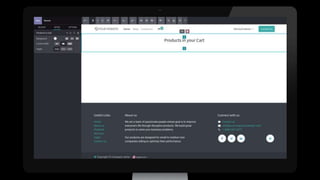
<h3 class="text-center mb32">Products in your Cart</h3>
<div class="dynamic_snippet_template o_not_editable"/>
</div>
</section>
</template>
custom_snippets/views/snippets/snippets.xml
<template id="snippets" inherit_id="website.snippets" name="custom snippets">
<xpath expr="//div[@id='snippet_effect']/div[@class='o_panel_body']" position="inside">
<t t-snippet="custom_snippets.s_cart_products" t-thumbnail="..."/>
</xpath>
</template>
Controller
custom_snippets/controllers/main.py
class CustomSnippets(http.Controller):
@http.route(['/custom_snippets/cart_content'], type='json', auth="public", website=True)
def cart(self):
products = request.website.sale_get_order().order_line.product_id
data = []
for product in products:
fields = product.read(['display_name', 'description_sale', 'list_price', 'website_url'])[0];
fields['image'] = request.env['website'].image_url(product, 'image_512')
data.append(fields)
return request.env['ir.ui.view']._render_template('custom_snippets.s_cart_products_card',
{'products': data})
Snippet template
custom_snippets/views/snippets/s_cart_products.xml
<template id="s_cart_products_card" name="Header Image Footer Card">
<t t-foreach="products" t-as="product">
<div class="card h-100" t-att-data-url="product['website_url']">
<h5 class="card-header" t-esc="product['display_name']"/>
<div class="card-body">
<img class="card-img-top p-3" loading="lazy" t-att-src="product['image']"/>
<div class="card-text">
<t t-esc="product['description_sale']"/>
</div>
</div>
<div class="card-footer d-flex align-items-center">
<div class="card-text">
<t t-raw="product['list_price']"/>
</div>
</div>
</div>
</t>
</template>
Public widget
custom_snippets/static/src/snippets/s_cart_product/000.js
const publicWidget = require('web.public.widget');
const DynamicSnippetCarousel = require('website.s_dynamic_snippet_carousel');
publicWidget.registry.dynamic_snippet_products = DynamicSnippetCarousel.extend({
selector: '.s_cart_products',
_fetchData: async function () {
const cards = await this._rpc({
route: '/custom_snippets/cart_content',
});
this.data = [...$(cards)]
.filter(node => node.nodeType === 1)
.map(el => el.outerHTML);
},
});
<template id="assets_snippet_s_cart_products_js_000" inherit_id="website.assets_frontend">
<xpath expr="//script[last()]" position="after">
<script type="text/javascript" src="/custom_snippets/static/src/snippets/s_cart_products/000.js"/>
</xpath>
</template>
custom_snippets/views/snippets/snippets.xml
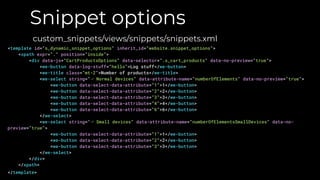
Snippet options
custom_snippets/views/snippets/snippets.xml
<template id="s_dynamic_snippet_options" inherit_id="website.snippet_options">
<xpath expr="." position="inside">
<div data-js="CartProductsOptions" data-selector=".s_cart_products" data-no-preview="true">
<we-button data-log-stuff="hello">Log stuff</we-button>
<we-title class="mt-2">Number of products</we-title>
<we-select string="⌙ Normal devices" data-attribute-name="numberOfElements" data-no-preview="true">
<we-button data-select-data-attribute="1">1</we-button>
<we-button data-select-data-attribute="2">2</we-button>
<we-button data-select-data-attribute="3">3</we-button>
<we-button data-select-data-attribute="4">4</we-button>
<we-button data-select-data-attribute="6">6</we-button>
</we-select>
<we-select string="⌙ Small devices" data-attribute-name="numberOfElementsSmallDevices" data-no-
preview="true">
<we-button data-select-data-attribute="1">1</we-button>
<we-button data-select-data-attribute="2">2</we-button>
<we-button data-select-data-attribute="3">3</we-button>
</we-select>
</div>
</xpath>
</template>
Snippet options
custom_snippets/static/src/snippets/s_cart_product/options.js
const options = require('web_editor.snippets.options');
options.registry.CartProductsOptions = options.Class.extend({
logStuff(previewMode, widgetValue, params) {
console.log(previewMode, widgetValue, params);
}
});
Thank You
Odoo Website - How to Develop Building Blocks

Odoo Website - How to Develop Building Blocks

  • 2.
  • 5.
    Snippet template custom_snippets/views/snippets/s_cart_products.xml <template id="s_cart_products"name="Products in Cart"> <section class="s_cart_products pt24 pb24"> <div class="container"> <h3 class="text-center mb32">Products in your Cart</h3> <div class="dynamic_snippet_template o_not_editable"/> </div> </section> </template> custom_snippets/views/snippets/snippets.xml <template id="snippets" inherit_id="website.snippets" name="custom snippets"> <xpath expr="//div[@id='snippet_effect']/div[@class='o_panel_body']" position="inside"> <t t-snippet="custom_snippets.s_cart_products" t-thumbnail="..."/> </xpath> </template>
  • 8.
    Controller custom_snippets/controllers/main.py class CustomSnippets(http.Controller): @http.route(['/custom_snippets/cart_content'], type='json',auth="public", website=True) def cart(self): products = request.website.sale_get_order().order_line.product_id data = [] for product in products: fields = product.read(['display_name', 'description_sale', 'list_price', 'website_url'])[0]; fields['image'] = request.env['website'].image_url(product, 'image_512') data.append(fields) return request.env['ir.ui.view']._render_template('custom_snippets.s_cart_products_card', {'products': data})
  • 9.
    Snippet template custom_snippets/views/snippets/s_cart_products.xml <template id="s_cart_products_card"name="Header Image Footer Card"> <t t-foreach="products" t-as="product"> <div class="card h-100" t-att-data-url="product['website_url']"> <h5 class="card-header" t-esc="product['display_name']"/> <div class="card-body"> <img class="card-img-top p-3" loading="lazy" t-att-src="product['image']"/> <div class="card-text"> <t t-esc="product['description_sale']"/> </div> </div> <div class="card-footer d-flex align-items-center"> <div class="card-text"> <t t-raw="product['list_price']"/> </div> </div> </div> </t> </template>
  • 10.
    Public widget custom_snippets/static/src/snippets/s_cart_product/000.js const publicWidget= require('web.public.widget'); const DynamicSnippetCarousel = require('website.s_dynamic_snippet_carousel'); publicWidget.registry.dynamic_snippet_products = DynamicSnippetCarousel.extend({ selector: '.s_cart_products', _fetchData: async function () { const cards = await this._rpc({ route: '/custom_snippets/cart_content', }); this.data = [...$(cards)] .filter(node => node.nodeType === 1) .map(el => el.outerHTML); }, }); <template id="assets_snippet_s_cart_products_js_000" inherit_id="website.assets_frontend"> <xpath expr="//script[last()]" position="after"> <script type="text/javascript" src="/custom_snippets/static/src/snippets/s_cart_products/000.js"/> </xpath> </template> custom_snippets/views/snippets/snippets.xml
  • 12.
    Snippet options custom_snippets/views/snippets/snippets.xml <template id="s_dynamic_snippet_options"inherit_id="website.snippet_options"> <xpath expr="." position="inside"> <div data-js="CartProductsOptions" data-selector=".s_cart_products" data-no-preview="true"> <we-button data-log-stuff="hello">Log stuff</we-button> <we-title class="mt-2">Number of products</we-title> <we-select string="⌙ Normal devices" data-attribute-name="numberOfElements" data-no-preview="true"> <we-button data-select-data-attribute="1">1</we-button> <we-button data-select-data-attribute="2">2</we-button> <we-button data-select-data-attribute="3">3</we-button> <we-button data-select-data-attribute="4">4</we-button> <we-button data-select-data-attribute="6">6</we-button> </we-select> <we-select string="⌙ Small devices" data-attribute-name="numberOfElementsSmallDevices" data-no- preview="true"> <we-button data-select-data-attribute="1">1</we-button> <we-button data-select-data-attribute="2">2</we-button> <we-button data-select-data-attribute="3">3</we-button> </we-select> </div> </xpath> </template>
  • 13.
    Snippet options custom_snippets/static/src/snippets/s_cart_product/options.js const options= require('web_editor.snippets.options'); options.registry.CartProductsOptions = options.Class.extend({ logStuff(previewMode, widgetValue, params) { console.log(previewMode, widgetValue, params); } });
  • 15.

Editor's Notes

  • #2 Odoo logo centered w/ tagline
  • #4 Place your own screenshot Select screenshot Click ‘Replace Image’ Select ‘Upload from computer’ from dropdown menu Choose photo Adjust accordingly, without distorting (stretching) photo
  • #5 Finished product
  • #7 Place your own screenshot Select screenshot Click ‘Replace Image’ Select ‘Upload from computer’ from dropdown menu Choose photo Adjust accordingly, without distorting (stretching) photo
  • #8 Place your own screenshot Select screenshot Click ‘Replace Image’ Select ‘Upload from computer’ from dropdown menu Choose photo Adjust accordingly, without distorting (stretching) photo
  • #12 Place your own screenshot Select screenshot Click ‘Replace Image’ Select ‘Upload from computer’ from dropdown menu Choose photo Adjust accordingly, without distorting (stretching) photo
  • #15 Finished product
  • #24 Place your own screenshot Select screenshot Click ‘Replace Image’ Select ‘Upload from computer’ from dropdown menu Choose photo Adjust accordingly, without distorting (stretching) photo
  • #25 Place your own screenshot Select screenshot Click ‘Replace Image’ Select ‘Upload from computer’ from dropdown menu Choose photo Adjust accordingly, without distorting (stretching) photo
  • #26 Place your own screenshot Select screenshot Click ‘Replace Image’ Select ‘Upload from computer’ from dropdown menu Choose photo Adjust accordingly, without distorting (stretching) photo
  • #27 Place your own screenshot Select screenshot Click ‘Replace Image’ Select ‘Upload from computer’ from dropdown menu Choose photo Adjust accordingly, without distorting (stretching) photo
  • #29 And, now, we have 580 employees.