Create Themes for Website
By Fabien Pinckaers - Founder & CEO, Odoo
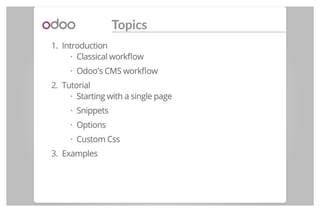
Topics
1. Introduction
Classical workflow
Odoo's CMS workflow
2. Tutorial
Starting with a single page
Snippets
Options
Custom Css
3. Examples
·
·
·
·
·
·
Introduction
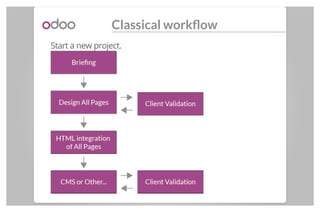
Classical workflow
Start a new project.
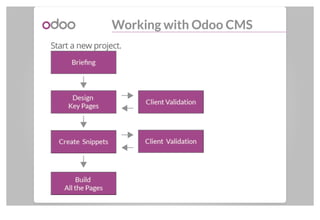
Working with Odoo CMS
Start a new project.
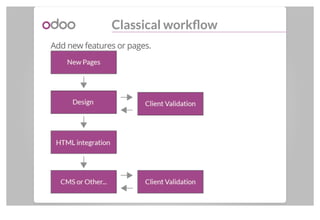
Classical workflow
Add new features or pages.
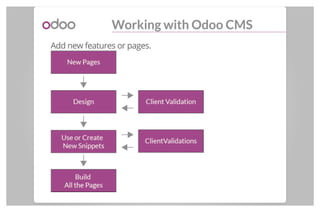
Working with Odoo CMS
Add new features or pages.
Tutorial
A Theme?
A Theme is an Odoo's MODULEA Theme is an Odoo's MODULE
(Without Python Logic)
Structure of a Theme
My Theme
static
src
js, css, font, xml, img
views
my_theme.xml
snippets.xml
options.xml
pages.xml (static pages)
[...]
·
·
·
·
·
·
·
·
·
·
Simple HTML page
Starting with an HTML page
Let's start with the homepage.
views/pages.xml
1
2
3
4
5
6
7
8
9
10
11
12
13
[...]
<template<template id="website.homepage" name="Homepage" page="True">>
<html><html>
<head><head>
<title><title>Title</title></title>
</head></head>
<body><body>
<h1><h1> Hello, World!
</h1></h1>
</body></body>
</html></html>
</template></template>
[...]
Starting with an HTML page
Add the Odoo context : ( with Bootstrap front-end
framework, Edition bar, Snippets, etc. )
views/pages.xml
1
2
3
4
5
6
7
[...]
<template<template id="website.homepage" name="Homepage" page="True">>
<t<t t-call="website.layout">>
<h1><h1> Hello, World!</h1></h1>
</t></t>
</template></template>
[...]
Starting with an HTML page
It's possible to create all the pages like this way.
views/pages.xml
1
2
3
4
5
6
7
8
[...]>
<template<template id="website.homepage" name="Homepage" page="True">>
<t<t t-call="website.layout">>
<div<div id="wrap" class="oe_structure">>
<!-- Your HTML code here -->
</div></div>
</t></t>
[...]
Adding the class "oe_structure" allows you to use this cool
feature: SnippetsSnippets.
Snippets
Build with snippets
But instead of creating all the pages this way, we think
about using "Building Blocks".
We call them "SnippetsSnippets".
Block of html code usable everywhere.
Draggable in your page.
Can contain Javascript or/and Css logics.
·
·
·
A very Simple Snippet
Structure of a snippet.
views/snippets.xml
1
2
3
4
5
6
7
8
9
10
11
12
13
14
15
16
17
18
19
20
21
22
[...]
<template<template id="my_theme_snippets" inherit_id="website.snippets" name="My Theme snippets">>
<xpath<xpath expr="//div[@id='snippet_structure']" position="inside">>
<div><div>
<!-- Thumbnail -->
<div<div class="oe_snippet_thumbnail">>
<img<img class="oe_snippet_thumbnail_img"
src="/my_theme/static/src/img/snippet/snippet_thumbs.png"/>/>
<span<span class="oe_snippet_thumbnail_title">>My Snippet</span></span>
</div></div>
<!-- Snippet Body -->
<section<section class="oe_snippet_body mt_simple_snippet">>
<div<div class="container">>
<hr<hr />/>
<h1<h1 class="text-center mb32 mt32">>This is a simple snippet</h1></h1>
<hr<hr />/>
</div></div>
</section></section>
</div></div>
</xpath></xpath>
</template></template>
[...]
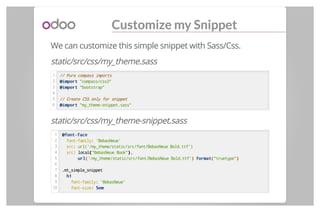
Customize my Snippet
We can customize this simple snippet with Sass/Css.
static/src/css/my_theme.sass
1
2
3
4
5
6
// Pure compass imports
@import@import "compass/css3"
@import@import "bootstrap"
// Create CSS only for snippet
@import@import "my_theme-snippet.sass"
static/src/css/my_theme-snippet.sass
1
2
3
4
5
6
7
8
9
10
@font-face@font-face
font-family:: 'BebasNeue'
src:: url('/my_theme/static/src/font/BebasNeue Bold.ttf')
src:: local(("BebasNeue Book")),,
urlurl(('/my_theme/static/src/font/BebasNeue Bold.ttf')) formatformat(("truetype"))
.mt_simple_snippet
h1h1
font-family:: 'BebasNeue'
font-size:: 55emem
Customize my Snippet
To insert this new Css we need to extend the theme
template and replace the default bootstrap by our new Css.
views/my_theme.xml
1
2
3
4
5
6
7
[...]
<template<template id="theme" inherit_id="website.theme" name="My Theme Assets">>
<xpath<xpath expr="//link[@id='bootstrap_css']" position="replace">>
<link<link rel="stylesheet" type="text/css" href="/my_theme/static/src/css/my_theme.css" />/>
</xpath></xpath>
</template></template>
[...]
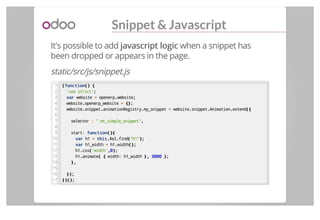
Snippet & Javascript
It's possible to add javascript logicjavascript logic when a snippet has
been dropped or appears in the page.
static/src/js/snippet.js
1
2
3
4
5
6
7
8
9
10
11
12
13
14
15
16
17
((functionfunction()() {{
'use strict';;
varvar website == openerp..website;;
website..openerp_website == {};{};
website..snippet..animationRegistry..my_snippet == website..snippet..Animation..extend({({
selector :: ".mt_simple_snippet",,
start:: functionfunction(){(){
varvar h1 == thisthis..$el..find(("h1"););
varvar h1_width == h1..width();();
h1..css(('width',,00););
h1..animate(( {{ width:: h1_width },}, 30003000 ););
},},
});});
})();})();
Snippet & Javascript
Just inherits from "website.assets_frontend" template to
enable it.
views/my_theme.xml
1
2
3
4
5
6
7
8
[...]
<template<template id="assets_frontend" inherit_id="website.assets_frontend"
name="My Theme Front End Assets">>
<xpath<xpath expr="." position="inside">>
<script<script src="/my_theme/static/src/js/snippet.js"></script>></script>
</xpath></xpath>
</template></template>
[...]
Organize my snippets
You can create a new snippet section or insert your snippet
into an already present section.
New section views/snippet.xml
1
2
3
4
5
6
7
8
9
[...]
<template<template id="snippets" inherit_id="website.snippets" name="My Simple Snippet">>
<xpath<xpath expr="//ul[@class='nav navbar-nav nav-tabs']" position="inside">>
<li><li>
<a<a href="#snippet_my_snippet" data-toggle="tab">>My Snippet</a></a>
</li></li>
</xpath></xpath>
</template></template>
[...]
Insert into "Structure" section.
1
2
3
4
5
6
7
[...]
<template<template id="my_theme_snippets" inherit_id="website.snippets" name="My Theme snippets">>
<xpath<xpath expr="//div[@id='snippet_structure']" position="inside">>
<div><div><!-- Your snippet --></div></div>
</xpath></xpath>
</template></template>
[...]
Options
Add Options
We can add options for every snippets or blocks.
In our case, we add 2 options ( patterns background) for the
snippet created before.
views/options.xml
1
2
3
4
5
6
7
8
9
10
11
12
13
14
15
16
17
[...]
<template<template id="my_theme_snippet_option" name="My Snippet Options"
inherit_id="website.snippet_options">>
<xpath<xpath expr="." position="inside">>
<div<div data-snippet-option-id="my_theme_snippet_option"
data-selector=".mt_simple_snippet"
data-selector-children=".oe_structure">>
<li<li class="dropdown-submenu">>
<a<a tabindex="-1" href="#">>Pattern</a></a>
<ul<ul class="dropdown-menu">>
<li<li data-value="tweed"><a>><a>Tweed</a></li></a></li>
<li<li data-value="sprinkles"><a>><a>Sprinkles</a></li></a></li>
</ul></ul>
</li></li>
</div></div>
</xpath></xpath>
[...]
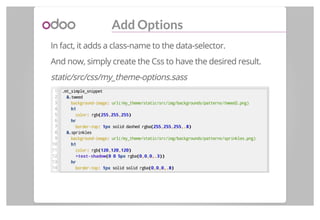
Add Options
In fact, it adds a class-name to the data-selector.
And now, simply create the Css to have the desired result.
static/src/css/my_theme-options.sass
1
2
3
4
5
6
7
8
9
10
11
12
13
14
.mt_simple_snippet
&&.tweed
background-image:: url(/my_theme/static/src/img/backgrounds/patterns/tweed2.png)
h1h1
color:: rgb((255255,,255255,,255255))
hrhr
border-top:: 11pxpx solid dashed rgba((255255,,255255,,255255,.,.88))
&&.sprinkles
background-image:: url(/my_theme/static/src/img/backgrounds/patterns/sprinkles.png)
h1h1
color:: rgb((120120,,120120,,120120))
+text-shadow+text-shadow((00 00 55pxpx rgba((00,,00,,00,.,.33))))
hrhr
border-top:: 11pxpx solid solid rgba((00,,00,,00,.,.88))
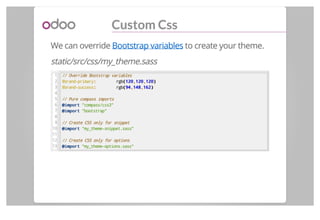
Custom Css
We can override Bootstrap variables to create your theme.
static/src/css/my_theme.sass
1
2
3
4
5
6
7
8
9
10
11
12
13
// Override Bootstrap variables
$brand-primary:: rgb((120120,,120120,,120120))
$brand-success:: rgb((9494,,148148,,162162))
// Pure compass imports
@import@import "compass/css3"
@import@import "bootstrap"
// Create CSS only for snippet
@import@import "my_theme-snippet.sass"
// Create CSS only for options
@import@import "my_theme-options.sass"
Summary
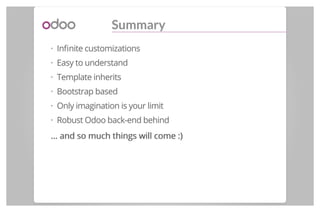
Summary
Infinite customizations
Easy to understand
Template inherits
Bootstrap based
Only imagination is your limit
Robust Odoo back-end behind
... and so much things will come... and so much things will come :):)
·
·
·
·
·
·
Example
Thank you
And we are hiring a webdesigner. Contact
cde@odoo.com for more informations.

Odoo - Create themes for website

  • 1.
    Create Themes forWebsite By Fabien Pinckaers - Founder & CEO, Odoo
  • 2.
    Topics 1. Introduction Classical workflow Odoo'sCMS workflow 2. Tutorial Starting with a single page Snippets Options Custom Css 3. Examples · · · · · ·
  • 3.
  • 4.
  • 5.
    Working with OdooCMS Start a new project.
  • 6.
    Classical workflow Add newfeatures or pages.
  • 7.
    Working with OdooCMS Add new features or pages.
  • 8.
  • 9.
    A Theme? A Themeis an Odoo's MODULEA Theme is an Odoo's MODULE (Without Python Logic)
  • 10.
    Structure of aTheme My Theme static src js, css, font, xml, img views my_theme.xml snippets.xml options.xml pages.xml (static pages) [...] · · · · · · · · · ·
  • 11.
  • 12.
    Starting with anHTML page Let's start with the homepage. views/pages.xml 1 2 3 4 5 6 7 8 9 10 11 12 13 [...] <template<template id="website.homepage" name="Homepage" page="True">> <html><html> <head><head> <title><title>Title</title></title> </head></head> <body><body> <h1><h1> Hello, World! </h1></h1> </body></body> </html></html> </template></template> [...]
  • 13.
    Starting with anHTML page Add the Odoo context : ( with Bootstrap front-end framework, Edition bar, Snippets, etc. ) views/pages.xml 1 2 3 4 5 6 7 [...] <template<template id="website.homepage" name="Homepage" page="True">> <t<t t-call="website.layout">> <h1><h1> Hello, World!</h1></h1> </t></t> </template></template> [...]
  • 14.
    Starting with anHTML page It's possible to create all the pages like this way. views/pages.xml 1 2 3 4 5 6 7 8 [...]> <template<template id="website.homepage" name="Homepage" page="True">> <t<t t-call="website.layout">> <div<div id="wrap" class="oe_structure">> <!-- Your HTML code here --> </div></div> </t></t> [...] Adding the class "oe_structure" allows you to use this cool feature: SnippetsSnippets.
  • 15.
  • 16.
    Build with snippets Butinstead of creating all the pages this way, we think about using "Building Blocks". We call them "SnippetsSnippets". Block of html code usable everywhere. Draggable in your page. Can contain Javascript or/and Css logics. · · ·
  • 19.
    A very SimpleSnippet Structure of a snippet. views/snippets.xml 1 2 3 4 5 6 7 8 9 10 11 12 13 14 15 16 17 18 19 20 21 22 [...] <template<template id="my_theme_snippets" inherit_id="website.snippets" name="My Theme snippets">> <xpath<xpath expr="//div[@id='snippet_structure']" position="inside">> <div><div> <!-- Thumbnail --> <div<div class="oe_snippet_thumbnail">> <img<img class="oe_snippet_thumbnail_img" src="/my_theme/static/src/img/snippet/snippet_thumbs.png"/>/> <span<span class="oe_snippet_thumbnail_title">>My Snippet</span></span> </div></div> <!-- Snippet Body --> <section<section class="oe_snippet_body mt_simple_snippet">> <div<div class="container">> <hr<hr />/> <h1<h1 class="text-center mb32 mt32">>This is a simple snippet</h1></h1> <hr<hr />/> </div></div> </section></section> </div></div> </xpath></xpath> </template></template> [...]
  • 20.
    Customize my Snippet Wecan customize this simple snippet with Sass/Css. static/src/css/my_theme.sass 1 2 3 4 5 6 // Pure compass imports @import@import "compass/css3" @import@import "bootstrap" // Create CSS only for snippet @import@import "my_theme-snippet.sass" static/src/css/my_theme-snippet.sass 1 2 3 4 5 6 7 8 9 10 @font-face@font-face font-family:: 'BebasNeue' src:: url('/my_theme/static/src/font/BebasNeue Bold.ttf') src:: local(("BebasNeue Book")),, urlurl(('/my_theme/static/src/font/BebasNeue Bold.ttf')) formatformat(("truetype")) .mt_simple_snippet h1h1 font-family:: 'BebasNeue' font-size:: 55emem
  • 21.
    Customize my Snippet Toinsert this new Css we need to extend the theme template and replace the default bootstrap by our new Css. views/my_theme.xml 1 2 3 4 5 6 7 [...] <template<template id="theme" inherit_id="website.theme" name="My Theme Assets">> <xpath<xpath expr="//link[@id='bootstrap_css']" position="replace">> <link<link rel="stylesheet" type="text/css" href="/my_theme/static/src/css/my_theme.css" />/> </xpath></xpath> </template></template> [...]
  • 22.
    Snippet & Javascript It'spossible to add javascript logicjavascript logic when a snippet has been dropped or appears in the page. static/src/js/snippet.js 1 2 3 4 5 6 7 8 9 10 11 12 13 14 15 16 17 ((functionfunction()() {{ 'use strict';; varvar website == openerp..website;; website..openerp_website == {};{}; website..snippet..animationRegistry..my_snippet == website..snippet..Animation..extend({({ selector :: ".mt_simple_snippet",, start:: functionfunction(){(){ varvar h1 == thisthis..$el..find(("h1");); varvar h1_width == h1..width();(); h1..css(('width',,00);); h1..animate(( {{ width:: h1_width },}, 30003000 );); },}, });}); })();})();
  • 23.
    Snippet & Javascript Justinherits from "website.assets_frontend" template to enable it. views/my_theme.xml 1 2 3 4 5 6 7 8 [...] <template<template id="assets_frontend" inherit_id="website.assets_frontend" name="My Theme Front End Assets">> <xpath<xpath expr="." position="inside">> <script<script src="/my_theme/static/src/js/snippet.js"></script>></script> </xpath></xpath> </template></template> [...]
  • 24.
    Organize my snippets Youcan create a new snippet section or insert your snippet into an already present section. New section views/snippet.xml 1 2 3 4 5 6 7 8 9 [...] <template<template id="snippets" inherit_id="website.snippets" name="My Simple Snippet">> <xpath<xpath expr="//ul[@class='nav navbar-nav nav-tabs']" position="inside">> <li><li> <a<a href="#snippet_my_snippet" data-toggle="tab">>My Snippet</a></a> </li></li> </xpath></xpath> </template></template> [...] Insert into "Structure" section. 1 2 3 4 5 6 7 [...] <template<template id="my_theme_snippets" inherit_id="website.snippets" name="My Theme snippets">> <xpath<xpath expr="//div[@id='snippet_structure']" position="inside">> <div><div><!-- Your snippet --></div></div> </xpath></xpath> </template></template> [...]
  • 25.
  • 26.
    Add Options We canadd options for every snippets or blocks. In our case, we add 2 options ( patterns background) for the snippet created before. views/options.xml 1 2 3 4 5 6 7 8 9 10 11 12 13 14 15 16 17 [...] <template<template id="my_theme_snippet_option" name="My Snippet Options" inherit_id="website.snippet_options">> <xpath<xpath expr="." position="inside">> <div<div data-snippet-option-id="my_theme_snippet_option" data-selector=".mt_simple_snippet" data-selector-children=".oe_structure">> <li<li class="dropdown-submenu">> <a<a tabindex="-1" href="#">>Pattern</a></a> <ul<ul class="dropdown-menu">> <li<li data-value="tweed"><a>><a>Tweed</a></li></a></li> <li<li data-value="sprinkles"><a>><a>Sprinkles</a></li></a></li> </ul></ul> </li></li> </div></div> </xpath></xpath> [...]
  • 27.
    Add Options In fact,it adds a class-name to the data-selector. And now, simply create the Css to have the desired result. static/src/css/my_theme-options.sass 1 2 3 4 5 6 7 8 9 10 11 12 13 14 .mt_simple_snippet &&.tweed background-image:: url(/my_theme/static/src/img/backgrounds/patterns/tweed2.png) h1h1 color:: rgb((255255,,255255,,255255)) hrhr border-top:: 11pxpx solid dashed rgba((255255,,255255,,255255,.,.88)) &&.sprinkles background-image:: url(/my_theme/static/src/img/backgrounds/patterns/sprinkles.png) h1h1 color:: rgb((120120,,120120,,120120)) +text-shadow+text-shadow((00 00 55pxpx rgba((00,,00,,00,.,.33)))) hrhr border-top:: 11pxpx solid solid rgba((00,,00,,00,.,.88))
  • 28.
    Custom Css We canoverride Bootstrap variables to create your theme. static/src/css/my_theme.sass 1 2 3 4 5 6 7 8 9 10 11 12 13 // Override Bootstrap variables $brand-primary:: rgb((120120,,120120,,120120)) $brand-success:: rgb((9494,,148148,,162162)) // Pure compass imports @import@import "compass/css3" @import@import "bootstrap" // Create CSS only for snippet @import@import "my_theme-snippet.sass" // Create CSS only for options @import@import "my_theme-options.sass"
  • 29.
  • 30.
    Summary Infinite customizations Easy tounderstand Template inherits Bootstrap based Only imagination is your limit Robust Odoo back-end behind ... and so much things will come... and so much things will come :):) · · · · · ·
  • 31.
  • 35.
    Thank you And weare hiring a webdesigner. Contact cde@odoo.com for more informations.