NDATA SCHOOL OF CLIMATE AND EARTH SCIENCES
EARTH SCIENCES DEPARTMENT
Geo-Information Science
Section
Object Oriented Programming: OBOP 210 – Python
Prepared By
Emmanuel Chinkaka
echinkaka@must.ac.mw
Introduction to Python
⚫ Python is a high-level programming language
⚫ Open source and community driven
⚫ “Batteries Included”
– a standard distribution includes many modules
⚫ Dynamic typed
⚫ Source can be compiled or run just-in-time
⚫ Similar to perl, tcl, ruby
Why Python?
⚫ Unlike AML and Avenue, there is a
considerable base of developers already using
the language
⚫ “Tried and true” language that has been in
development since 1991
⚫ Can interface with the Component Object
Model (COM) used by Windows
⚫ Can interface with Open Source GIS toolsets
Why not Visual Basic?
⚫ Visual Basic is still the method of configuring
and customizing ArcMap
⚫ If you have a button on the toolbar, it’s VB
⚫ Python scripts can be placed in ArcToolbox
⚫ Python can be run from the command line
without ArcMap or ArcCatalog being open
⚫ Using just the GIS Engine, lower overhead
⚫ Rapid prototyping, ease of authoring, etc.
Python Interfaces
⚫ IDLE – a cross-platform Python development
environment
⚫ PythonWin – a Windows only interface to
Python
⚫ Python Shell – running 'python' from the
Command Line opens this interactive shell
⚫ For the exercises, we'll use IDLE, but you can
try them all and pick a favorite
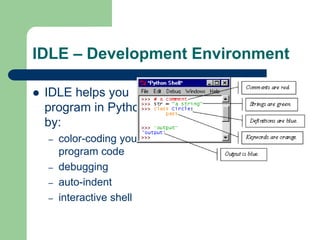
IDLE – Development Environment
⚫ IDLE helps you
program in Python
by:
– color-coding your
program code
– debugging
– auto-indent
– interactive shell
Example Python
⚫ Hello World
print “hello world”
⚫ Prints hello world to
standard out
⚫ Open IDLE and try it
out yourself
⚫ Follow along using
IDLE
Additional Python Resources
⚫ Python Homepage
http://www.python.org/
⚫ Dive Into Python
http://www.diveintopython.org/
⚫ Learning Python, 3rd Edition
http://www.oreilly.com/catalog/9780596513
986/
⚫ Getting Started Writing Geoprocessing Scripts
Available on ESRI's support page

Obop 210 lecture 2 python documentation

  • 1.
    NDATA SCHOOL OFCLIMATE AND EARTH SCIENCES EARTH SCIENCES DEPARTMENT Geo-Information Science Section Object Oriented Programming: OBOP 210 – Python Prepared By Emmanuel Chinkaka echinkaka@must.ac.mw
  • 2.
    Introduction to Python ⚫Python is a high-level programming language ⚫ Open source and community driven ⚫ “Batteries Included” – a standard distribution includes many modules ⚫ Dynamic typed ⚫ Source can be compiled or run just-in-time ⚫ Similar to perl, tcl, ruby
  • 3.
    Why Python? ⚫ UnlikeAML and Avenue, there is a considerable base of developers already using the language ⚫ “Tried and true” language that has been in development since 1991 ⚫ Can interface with the Component Object Model (COM) used by Windows ⚫ Can interface with Open Source GIS toolsets
  • 4.
    Why not VisualBasic? ⚫ Visual Basic is still the method of configuring and customizing ArcMap ⚫ If you have a button on the toolbar, it’s VB ⚫ Python scripts can be placed in ArcToolbox ⚫ Python can be run from the command line without ArcMap or ArcCatalog being open ⚫ Using just the GIS Engine, lower overhead ⚫ Rapid prototyping, ease of authoring, etc.
  • 5.
    Python Interfaces ⚫ IDLE– a cross-platform Python development environment ⚫ PythonWin – a Windows only interface to Python ⚫ Python Shell – running 'python' from the Command Line opens this interactive shell ⚫ For the exercises, we'll use IDLE, but you can try them all and pick a favorite
  • 6.
    IDLE – DevelopmentEnvironment ⚫ IDLE helps you program in Python by: – color-coding your program code – debugging – auto-indent – interactive shell
  • 7.
    Example Python ⚫ HelloWorld print “hello world” ⚫ Prints hello world to standard out ⚫ Open IDLE and try it out yourself ⚫ Follow along using IDLE
  • 8.
    Additional Python Resources ⚫Python Homepage http://www.python.org/ ⚫ Dive Into Python http://www.diveintopython.org/ ⚫ Learning Python, 3rd Edition http://www.oreilly.com/catalog/9780596513 986/ ⚫ Getting Started Writing Geoprocessing Scripts Available on ESRI's support page