Cross platform development
Should I use it? What should I use? When should I use what?
Mikael Stalvik - Evolve Technology
Mikael Stalvik
Evolve Technology
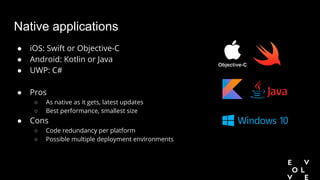
Native applications
● iOS: Swift or Objective-C
● Android: Kotlin or Java
● UWP: C#
● Pros
○ As native as it gets, latest updates
○ Best performance, smallest size
● Cons
○ Code redundancy per platform
○ Possible multiple deployment environments
Cross platform development
● Multiple tools exists; Xamarin, React Native, Ionic
● Reuse code, tests and logic between platforms
● When it can/should be considered?
Overview
● Xamarin: .NET based framework. Two ways, Native vs. Forms
● React Native: JavaScript based (React)
● Ionic: JavaScript/HTML based (Angular with TypeScript)
Performance comparison
● JIT and AOT compilation
● 64-bit requirement
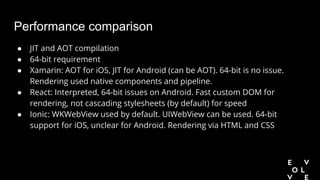
● Xamarin: AOT for iOS, JIT for Android (can be AOT). 64-bit is no issue.
Rendering used native components and pipeline.
● React: Interpreted, 64-bit issues on Android. Fast custom DOM for
rendering, not cascading stylesheets (by default) for speed
● Ionic: WKWebView used by default. UIWebView can be used. 64-bit
support for iOS, unclear for Android. Rendering via HTML and CSS
Performance comparison
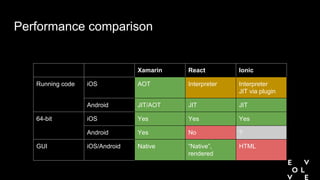
Xamarin React Ionic
Running code iOS AOT Interpreter Interpreter
JIT via plugin
Android JIT/AOT JIT JIT
64-bit iOS Yes Yes Yes
Android Yes No ?
GUI iOS/Android Native “Native”,
rendered
HTML
Development convenience
● Reloading scenarios
● Instant updates (React, Ionic)
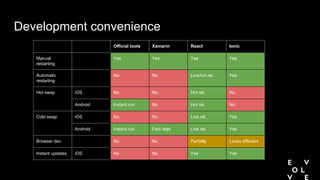
Development convenience
Official tools Xamarin React Ionic
Manual
restarting
Yes Yes Yes Yes
Automatic
restarting
No No Live/hot rel. Yes
Hot swap iOS No No Hot rel. No
Android Instant run No Hot rel. No
Cold swap iOS No No Live rel. Yes
Android Instant run Fast depl. Live rel. Yes
Browser dev. No No Partially Looks different
Instant updates iOS No No Yes Yes
OS integration and existing code
● Standard libraries
● Consuming libraries
● Native integration (Xamarin, React)
● GUI
● Background execution
OS integration and existing code
Xamarin React Ionic
Code binding Use Java, objc and
@objc Swift
Any binary lib. Adaptor required Adaptor required
Use cross-platform
code in native app
Partially Yes No
Standard lib. binding Supported feature
set
Full Partial Partial
Binding type 1-1 Abstraction layer Abstraction layer
GUI All widgets Yes No No
Native look & feel Yes Partial Partial
Background exec. iOS Yes No support Very limited
Android Yes Headless JS Limited
Conclusion
● Xamarin is the fullest cross platform framework...
● ...comes with a cost
● Choose framework depending on project, cost and competence
Appendix - Xamarin
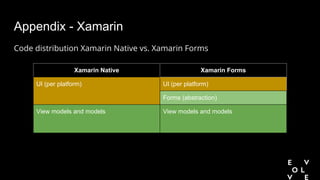
Code distribution Xamarin Native vs. Xamarin Forms
Xamarin Native Xamarin Forms
UI (per platform) UI (per platform)
Forms (abstraction)
View models and models View models and models
Questions & contact
● Questions?
● mikael.stalvik@evolvetechnology.se

Cross platform development

  • 1.
    Cross platform development ShouldI use it? What should I use? When should I use what? Mikael Stalvik - Evolve Technology
  • 2.
  • 3.
    Native applications ● iOS:Swift or Objective-C ● Android: Kotlin or Java ● UWP: C# ● Pros ○ As native as it gets, latest updates ○ Best performance, smallest size ● Cons ○ Code redundancy per platform ○ Possible multiple deployment environments
  • 4.
    Cross platform development ●Multiple tools exists; Xamarin, React Native, Ionic ● Reuse code, tests and logic between platforms ● When it can/should be considered?
  • 5.
    Overview ● Xamarin: .NETbased framework. Two ways, Native vs. Forms ● React Native: JavaScript based (React) ● Ionic: JavaScript/HTML based (Angular with TypeScript)
  • 6.
    Performance comparison ● JITand AOT compilation ● 64-bit requirement ● Xamarin: AOT for iOS, JIT for Android (can be AOT). 64-bit is no issue. Rendering used native components and pipeline. ● React: Interpreted, 64-bit issues on Android. Fast custom DOM for rendering, not cascading stylesheets (by default) for speed ● Ionic: WKWebView used by default. UIWebView can be used. 64-bit support for iOS, unclear for Android. Rendering via HTML and CSS
  • 7.
    Performance comparison Xamarin ReactIonic Running code iOS AOT Interpreter Interpreter JIT via plugin Android JIT/AOT JIT JIT 64-bit iOS Yes Yes Yes Android Yes No ? GUI iOS/Android Native “Native”, rendered HTML
  • 8.
    Development convenience ● Reloadingscenarios ● Instant updates (React, Ionic)
  • 9.
    Development convenience Official toolsXamarin React Ionic Manual restarting Yes Yes Yes Yes Automatic restarting No No Live/hot rel. Yes Hot swap iOS No No Hot rel. No Android Instant run No Hot rel. No Cold swap iOS No No Live rel. Yes Android Instant run Fast depl. Live rel. Yes Browser dev. No No Partially Looks different Instant updates iOS No No Yes Yes
  • 10.
    OS integration andexisting code ● Standard libraries ● Consuming libraries ● Native integration (Xamarin, React) ● GUI ● Background execution
  • 11.
    OS integration andexisting code Xamarin React Ionic Code binding Use Java, objc and @objc Swift Any binary lib. Adaptor required Adaptor required Use cross-platform code in native app Partially Yes No Standard lib. binding Supported feature set Full Partial Partial Binding type 1-1 Abstraction layer Abstraction layer GUI All widgets Yes No No Native look & feel Yes Partial Partial Background exec. iOS Yes No support Very limited Android Yes Headless JS Limited
  • 12.
    Conclusion ● Xamarin isthe fullest cross platform framework... ● ...comes with a cost ● Choose framework depending on project, cost and competence
  • 13.
    Appendix - Xamarin Codedistribution Xamarin Native vs. Xamarin Forms Xamarin Native Xamarin Forms UI (per platform) UI (per platform) Forms (abstraction) View models and models View models and models
  • 14.
    Questions & contact ●Questions? ● mikael.stalvik@evolvetechnology.se