Energy Efficiency in Large Scale SystemsGaurav Dhiman, Raid AyoubProf. Tajana ŠimunićRosingDept. of Computer Science
Large scale systems: ClustersPower consumption is a critical 	design parameter:Operational costsCompute Equipment
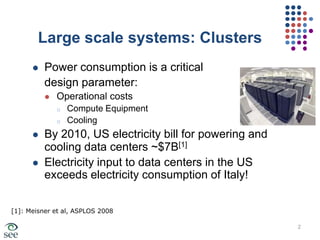
CoolingBy 2010, US electricity bill for powering and cooling data centers ~$7B[1]Electricity input to data centers in the US exceeds electricity consumption of Italy![1]: Meisner et al, ASPLOS 20082
Energy Savings with DVFSReduction in CPU powerExtra system power
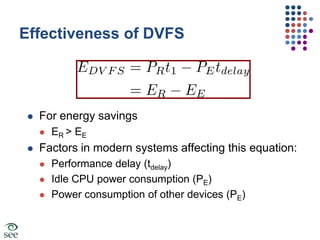
Effectiveness of DVFSFor energy savingsER > EEFactors in modern systems affecting this equation:Performance delay (tdelay)Idle CPU power consumption (PE)Power consumption of other devices (PE)
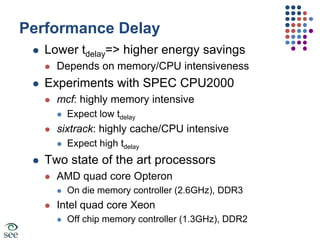
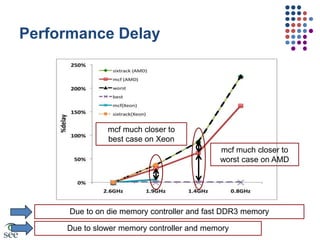
Performance DelayLower tdelay=> higher energy savingsDepends on memory/CPU intensivenessExperiments with SPEC CPU2000mcf: highly memory intensiveExpect low tdelaysixtrack: highly cache/CPU intensiveExpect high tdelayTwo state of the art processorsAMD quad core OpteronOn die memory controller (2.6GHz), DDR3Intel quad core XeonOff chip memory controller (1.3GHz), DDR2
Performance Delaymcf much closer to best case on Xeonmcf much closer to worst case on AMDDue to on die memory controller and fast DDR3 memoryDue to slower memory controller and memory
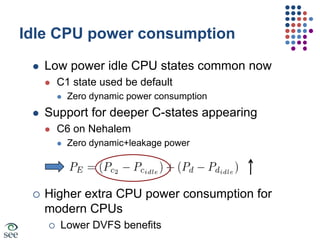
Idle CPU power consumptionLow power idle CPU states common nowC1 state used be defaultZero dynamic power consumptionSupport for deeper C-states appearingC6 on NehalemZero dynamic+leakage powerHigher extra CPU power consumption for modern CPUs
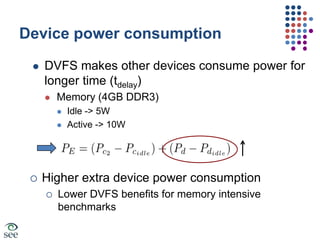
Lower DVFS benefitsDevice power consumptionDVFS makes other devices consume power for longer time (tdelay)Memory (4GB DDR3)Idle -> 5WActive -> 10WHigher extra device power consumption
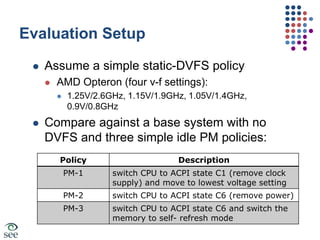
Lower DVFS benefits for memory intensive benchmarksEvaluation SetupAssume a simple static-DVFS policyAMD Opteron (four v-f settings):1.25V/2.6GHz, 1.15V/1.9GHz, 1.05V/1.4GHz, 0.9V/0.8GHzCompare against a base system with no DVFS and three simple idle PM policies:
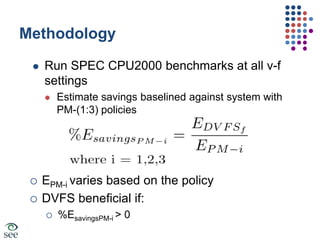
MethodologyRun SPEC CPU2000 benchmarks at all v-f settingsEstimate savings baselined against system with PM-(1:3) policiesEPM-i varies based on the policy
DVFS beneficial if:
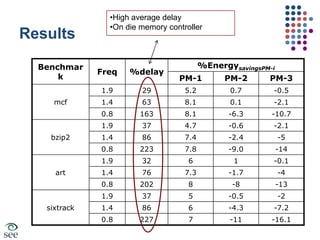
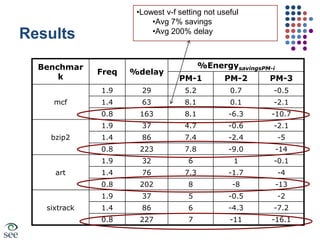
%EsavingsPM-i > 0ResultsHigh average delay
On die memory controllerResultsMax Avg ~7% savings
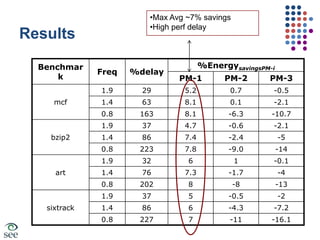
High perf delay ResultsLowest v-f setting not useful
Avg 7% savings
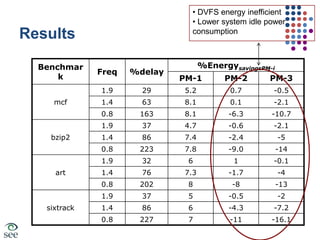
Avg 200% delay Results DVFS energy inefficient
 Lower system idle power consumptionConclusionSimple power management policies provide better energy performance tradeoffsLower v-f setting offer worse e/p tradeoffs due to high performance delayDVFS still useful for:Power reduction: thermal managementSystems with simpler memory controllers and low power system components
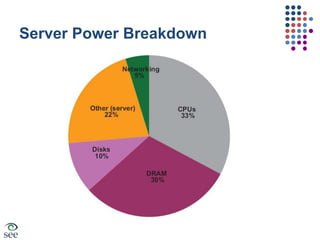
Server Power Breakdown
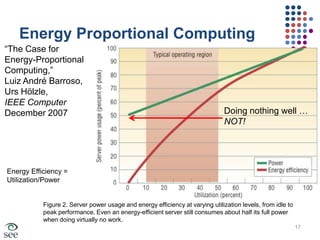
Energy Proportional Computing“The Case for Energy-Proportional Computing,”Luiz André Barroso,Urs Hölzle,IEEE ComputerDecember 2007 Doing nothing well …NOT!Energy Efficiency =Utilization/PowerFigure 2. Server power usage and energy efficiency at varying utilization levels, from idle to peak performance. Even an energy-efficient server still consumes about half its full powerwhen doing virtually no work.17
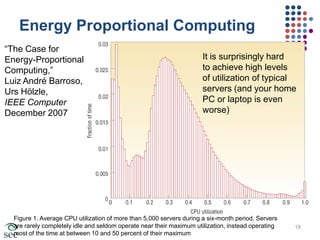
Energy Proportional Computing“The Case for Energy-Proportional Computing,”Luiz André Barroso,Urs Hölzle,IEEE ComputerDecember 2007 It is surprisingly hardto achieve high levelsof utilization of typical servers (and your homePC or laptop is even worse)Figure 1. Average CPU utilization of more than 5,000 servers during a six-month period. Servers are rarely completely idle and seldom operate near their maximum utilization, instead operating most of the time at between 10 and 50 percent of their maximum18
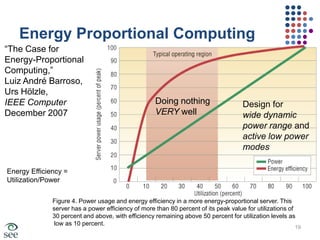
Energy Proportional Computing“The Case for Energy-Proportional Computing,”Luiz André Barroso,Urs Hölzle,IEEE ComputerDecember 2007 Doing nothing VERY wellDesign for wide dynamic power range and active low powermodesEnergy Efficiency =Utilization/PowerFigure 4. Power usage and energy efficiency in a more energy-proportional server. This server has a power efficiency of more than 80 percent of its peak value for utilizations of 30 percent and above, with efficiency remaining above 50 percent for utilization levels as low as 10 percent.19
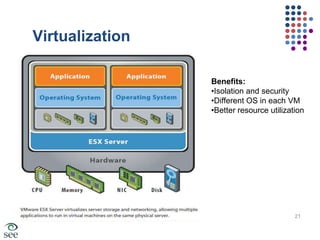
Why not consolidate servers?SecurityIsolationMust use the same OSSolution:Use virtualization!
VirtualizationBenefits:Isolation and security
Different OS in each VM
Better resource utilization21
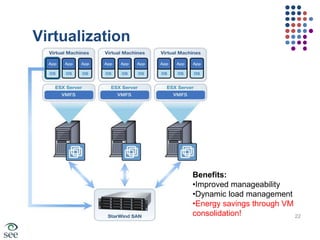
VirtualizationBenefits:Improved manageability
Dynamic load management
Energy savings through VM consolidation!22
How to Save Energy?VM consolidation is a common practice:Increases resource utilizationTurn idle machines into sleep modeActive machines?Active power management: e.g. DVFS less effective in newer line of server processors Leakage, faster memories, low voltage rangeMake the workload run fasterSimilar average power across machinesExploit workload characteristics to share resources efficiently23
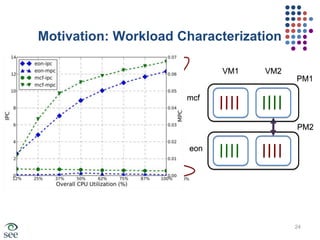
Motivation: Workload CharacterizationVM1VM2PM1mcf60%PM2eon24
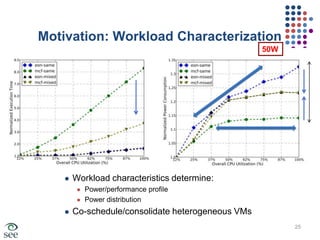
Motivation: Workload Characterization50WWorkload characteristics determine:Power/performance profilePower distributionCo-schedule/consolidate heterogeneous VMs25
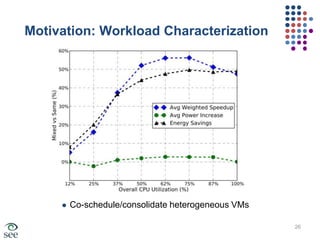
Motivation: Workload CharacterizationCo-schedule/consolidate heterogeneous VMs26
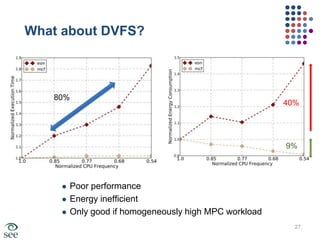
What about DVFS?80%40%9%Poor performance Energy inefficientOnly good if homogeneously high MPC workload27
vGreenA system for VM scheduling across a cluster of physical machinesDynamic VM characterization:Memory accesses
Instruction throughput
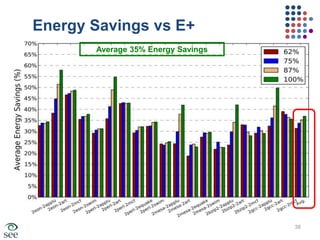
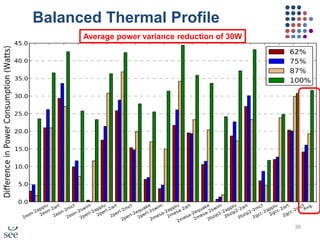
CPU utilizationCo-schedule VMs with heterogeneous characteristics for better: PerformanceEnergy efficiencyBalanced thermal profile28
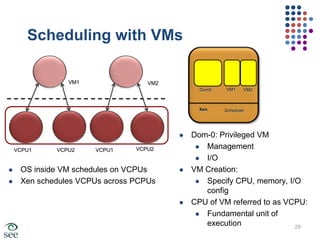
Scheduling with VMsVM1VM2VM1Dom0VM2XenSchedulerDom-0: Privileged VM
Management
I/O
VM Creation:
Specify CPU, memory, I/O config
CPU of VM referred to as VCPU:
Fundamental unit of executionVCPU2VCPU1VCPU2VCPU1OS inside VM schedules on VCPUs
Xen schedules VCPUs across PCPUs29
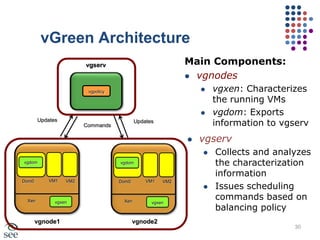
vGreen ArchitectureMain Components:vgnodes
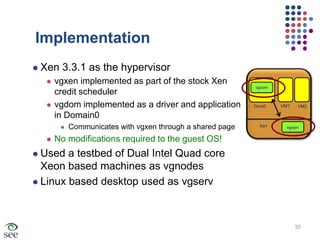
vgxen: Characterizes the running VMs
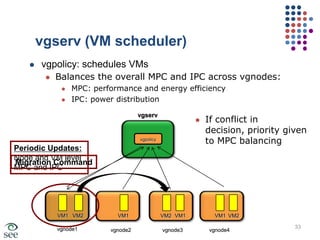
vgdom: Exports information to vgservvgservvgpolicyUpdatesUpdatesCommandsvgserv
Collects and analyzes the characterization information
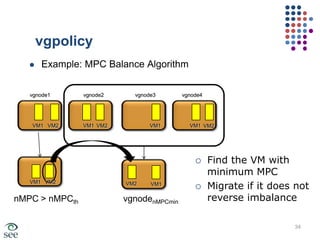
Issues scheduling commands based on balancing policyvgdomvgdomVM1Dom0VM2VM1Dom0VM2XenvgxenXenvgxenvgnode1vgnode230
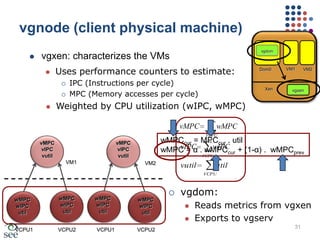
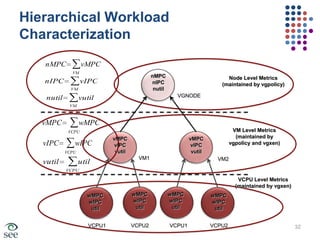
vgnode (client physical machine)vgdomvgxen: characterizes the VMsUses performance counters to estimate:

Energy Efficiency in Large Scale Systems

  • 1.
    Energy Efficiency inLarge Scale SystemsGaurav Dhiman, Raid AyoubProf. Tajana ŠimunićRosingDept. of Computer Science
  • 2.
    Large scale systems:ClustersPower consumption is a critical design parameter:Operational costsCompute Equipment
  • 3.
    CoolingBy 2010, USelectricity bill for powering and cooling data centers ~$7B[1]Electricity input to data centers in the US exceeds electricity consumption of Italy![1]: Meisner et al, ASPLOS 20082
  • 4.
    Energy Savings withDVFSReduction in CPU powerExtra system power
  • 5.
    Effectiveness of DVFSForenergy savingsER > EEFactors in modern systems affecting this equation:Performance delay (tdelay)Idle CPU power consumption (PE)Power consumption of other devices (PE)
  • 6.
    Performance DelayLower tdelay=>higher energy savingsDepends on memory/CPU intensivenessExperiments with SPEC CPU2000mcf: highly memory intensiveExpect low tdelaysixtrack: highly cache/CPU intensiveExpect high tdelayTwo state of the art processorsAMD quad core OpteronOn die memory controller (2.6GHz), DDR3Intel quad core XeonOff chip memory controller (1.3GHz), DDR2
  • 7.
    Performance Delaymcf muchcloser to best case on Xeonmcf much closer to worst case on AMDDue to on die memory controller and fast DDR3 memoryDue to slower memory controller and memory
  • 8.
    Idle CPU powerconsumptionLow power idle CPU states common nowC1 state used be defaultZero dynamic power consumptionSupport for deeper C-states appearingC6 on NehalemZero dynamic+leakage powerHigher extra CPU power consumption for modern CPUs
  • 9.
    Lower DVFS benefitsDevicepower consumptionDVFS makes other devices consume power for longer time (tdelay)Memory (4GB DDR3)Idle -> 5WActive -> 10WHigher extra device power consumption
  • 10.
    Lower DVFS benefitsfor memory intensive benchmarksEvaluation SetupAssume a simple static-DVFS policyAMD Opteron (four v-f settings):1.25V/2.6GHz, 1.15V/1.9GHz, 1.05V/1.4GHz, 0.9V/0.8GHzCompare against a base system with no DVFS and three simple idle PM policies:
  • 11.
    MethodologyRun SPEC CPU2000benchmarks at all v-f settingsEstimate savings baselined against system with PM-(1:3) policiesEPM-i varies based on the policy
  • 12.
  • 13.
  • 14.
    On die memorycontrollerResultsMax Avg ~7% savings
  • 15.
    High perf delayResultsLowest v-f setting not useful
  • 16.
  • 17.
    Avg 200% delayResults DVFS energy inefficient
  • 18.
    Lower systemidle power consumptionConclusionSimple power management policies provide better energy performance tradeoffsLower v-f setting offer worse e/p tradeoffs due to high performance delayDVFS still useful for:Power reduction: thermal managementSystems with simpler memory controllers and low power system components
  • 19.
  • 20.
    Energy Proportional Computing“TheCase for Energy-Proportional Computing,”Luiz André Barroso,Urs Hölzle,IEEE ComputerDecember 2007 Doing nothing well …NOT!Energy Efficiency =Utilization/PowerFigure 2. Server power usage and energy efficiency at varying utilization levels, from idle to peak performance. Even an energy-efficient server still consumes about half its full powerwhen doing virtually no work.17
  • 21.
    Energy Proportional Computing“TheCase for Energy-Proportional Computing,”Luiz André Barroso,Urs Hölzle,IEEE ComputerDecember 2007 It is surprisingly hardto achieve high levelsof utilization of typical servers (and your homePC or laptop is even worse)Figure 1. Average CPU utilization of more than 5,000 servers during a six-month period. Servers are rarely completely idle and seldom operate near their maximum utilization, instead operating most of the time at between 10 and 50 percent of their maximum18
  • 22.
    Energy Proportional Computing“TheCase for Energy-Proportional Computing,”Luiz André Barroso,Urs Hölzle,IEEE ComputerDecember 2007 Doing nothing VERY wellDesign for wide dynamic power range and active low powermodesEnergy Efficiency =Utilization/PowerFigure 4. Power usage and energy efficiency in a more energy-proportional server. This server has a power efficiency of more than 80 percent of its peak value for utilizations of 30 percent and above, with efficiency remaining above 50 percent for utilization levels as low as 10 percent.19
  • 23.
    Why not consolidateservers?SecurityIsolationMust use the same OSSolution:Use virtualization!
  • 24.
  • 25.
  • 26.
  • 27.
  • 28.
  • 29.
    Energy savings throughVM consolidation!22
  • 30.
    How to SaveEnergy?VM consolidation is a common practice:Increases resource utilizationTurn idle machines into sleep modeActive machines?Active power management: e.g. DVFS less effective in newer line of server processors Leakage, faster memories, low voltage rangeMake the workload run fasterSimilar average power across machinesExploit workload characteristics to share resources efficiently23
  • 31.
  • 32.
    Motivation: Workload Characterization50WWorkloadcharacteristics determine:Power/performance profilePower distributionCo-schedule/consolidate heterogeneous VMs25
  • 33.
  • 34.
    What about DVFS?80%40%9%Poorperformance Energy inefficientOnly good if homogeneously high MPC workload27
  • 35.
    vGreenA system forVM scheduling across a cluster of physical machinesDynamic VM characterization:Memory accesses
  • 36.
  • 37.
    CPU utilizationCo-schedule VMswith heterogeneous characteristics for better: PerformanceEnergy efficiencyBalanced thermal profile28
  • 38.
  • 39.
  • 40.
  • 41.
  • 42.
  • 43.
    CPU of VMreferred to as VCPU:
  • 44.
    Fundamental unit ofexecutionVCPU2VCPU1VCPU2VCPU1OS inside VM schedules on VCPUs
  • 45.
    Xen schedules VCPUsacross PCPUs29
  • 46.
  • 47.
  • 48.
    vgdom: Exports informationto vgservvgservvgpolicyUpdatesUpdatesCommandsvgserv
  • 49.
    Collects and analyzesthe characterization information
  • 50.
    Issues scheduling commandsbased on balancing policyvgdomvgdomVM1Dom0VM2VM1Dom0VM2XenvgxenXenvgxenvgnode1vgnode230
  • 51.
    vgnode (client physicalmachine)vgdomvgxen: characterizes the VMsUses performance counters to estimate:

Editor's Notes

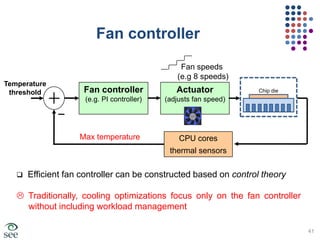
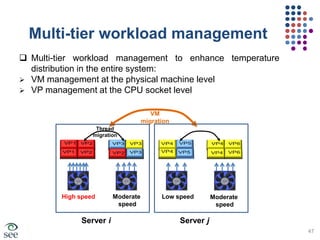
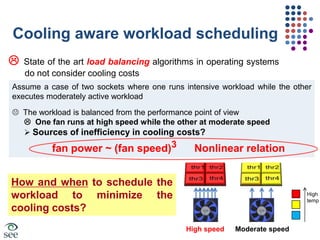
  • #42 This figure shows a typical fan controller that is based on a classical close-loop approach. The fan controller decides the required fan speed. The output of the controller is fed to the actuator to actually adjust the fan speed. The feedback is collected using thermal sensors (each CPU core has a dedicated thermal sensor) where the fan speed is in proportional to the highest temperature <click> The cooling optimizations techniques up until now focused mainly on the fan controller without including workload management which we show later that including workload management can results in a big cooling savings
  • #43  Current load balancing do not consider cooling costs <click> Read the example to the audience (stop when you reach the equation) [The figure is the visual representation of the example]. In this figure we show a case of dual sockets (each socket has 4 cores where each runs 1 (thr=workload thread or job)<click> Thermal imbalance leads to cooling inefficiencies due to “cubic relation between fan speed and power” <click> This indicate that better workload assignment can improve the thermal distribution and lower cooling cost. The question is HOW and WHEN to schedule the workload
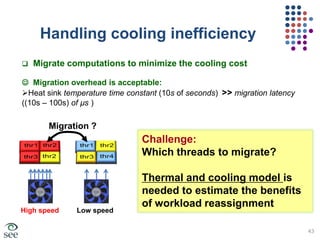
  • #44 We utilize the freedom in migrating the workload around to perform cooling aware workload scheduling to minimize the cooling costs<click> The good news is that the migration overhead of the threads between sockets is minor since the temperature change is quite slow (order of sec) compared to the migration time (order of micro sec)<click> In this example we show a case of thermal imbalance between two sockets (one fan run at high speed while the other at low speed)<click> The challenge is which threads to migrate to get a better thermal and cooling balance. Then read the second bullet in the yellow box
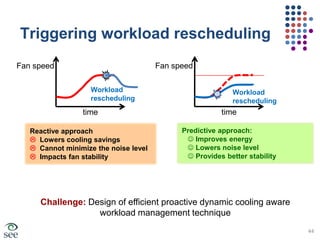
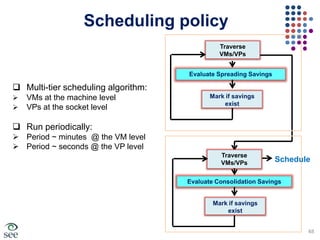
  • #45 The question that we need to answer is “when we should trigger the workload rescheduling”One way is to employ a reactive approach that acts when the system is in cooling inefficiency condition. The problem with this approach is that mitigating the inefficiencies require time (temperature changes slowly) which impacts the cooling savings, noise and may generate instability in the fan system <click> The alternative way is to use proactive researching that predict then avoid cooling inefficiencies at earlier point in time and reschedule accordingly. Read quickly the benefits in the green box<click> Read the challenge sentence
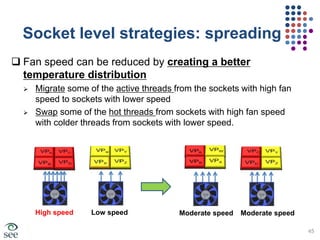
  • #46 In this slide and the following one we illustrate the fundamental ways to deliver cooling savings: This slide explains “spreading the hot threads” concept to obtain cooling savings through creating a better temperature distribution across the CPU sockets. This technique needs to be applied when there is an imbalance in the heat sink temperature across the CPU sockets. To implement job spreading we can employ either job migration or swapping (read the two bullets briefly). <click> The example in the bottom clearly shows how spreading works. In the left side we have a case of big imbalance. To solve the imbalance we swap the hot threads (C,D) with the colder ones (W,X). The two fans now run at a moderate speed (savings is expected due to the cubic relation between fan power and speed)
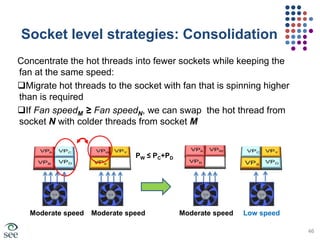
  • #47 Here we illustrate the second way to obtain cooling savings. The motivation is to concentrate more hot threads into fewer sockets while keeping their fan speed in almost the same. We apply this method when the average temperature across sockets is in similar range (it should be noted that consolidation is not opposite to the spreading but it can be applies on top of it)Consolidation can be implemented in two ways:Squeezing more hot jobs to the fan that is running more that what it should be (fan speeds is discrete, e.g 8 or 16 speeds)<click> The other way is to trade a (hot thread) from the socket that have lower fan with (colder threads but have similar total power) from the socket with higher fan speed to maintain temperature balance. This help lowering the fan speed of the socket that receives the cold threads while keeping the higher fan speed almost the same. The example below illustrate this case