What’s so Simple about  Note-Taking? (Part 2)
Let’s Start with the Paper Set-Up 6 – 6 – 12 Right, Left, Middle-Middle
Paper Set-Up: Draw Lines 6-6-12 Count 6 spaces from the top & draw a line across the page. Count 6 spaces from the bottom & draw a line across the page. Count 12 spaces from the left & draw a line from top to bottom of the page. Remember this??
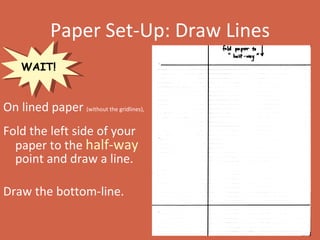
Paper Set-Up: Draw Lines On lined paper  (without the gridlines), Fold the left side of your paper to the  half-way   point and draw a line.  Draw the bottom-line. WAIT!
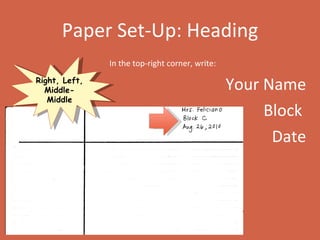
Paper Set-Up: Heading In the top-right corner, write: Your Name Block  Date Right, Left, Middle-Middle
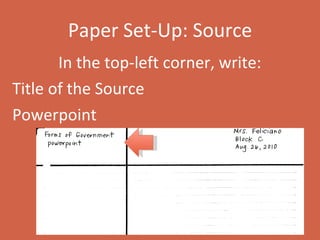
Paper Set-Up: Source In the top-left corner, write: Title of the Source  Powerpoint
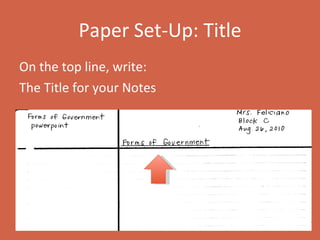
Paper Set-Up: Title On the top line, write: The Title for your Notes
  READ!
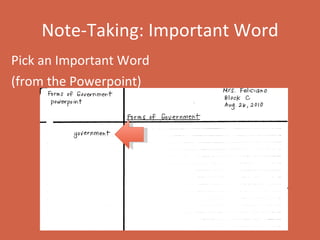
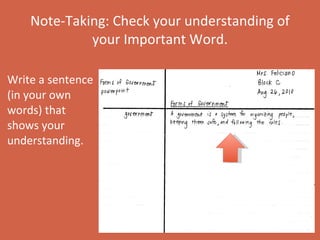
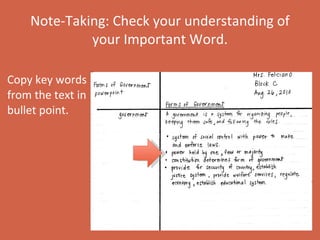
Simple Note-Taking After the Powerpoint: 1.  Pick an Important Word 2. Check your own understanding of it.  3. Write a sentence (in your own words) that shows your understanding. 4. Copy key words from the text in bullet point.
Note-Taking: Important Word Pick an Important Word (from the Powerpoint)
Note-Taking: Check your understanding of your Important Word.   Write a sentence (in your own words) that shows your understanding.
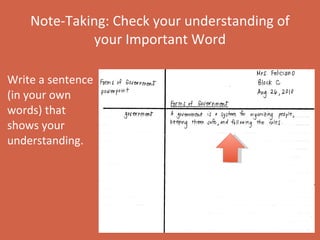
Note-Taking: Check your understanding of your Important Word   Write a sentence (in your own words) that shows your understanding.
Note-Taking: Check your understanding of your Important Word.   Copy key words from the text in bullet point.
Let’s Try it Together!

Note taking (part 2)

  • 1.
    What’s so Simpleabout Note-Taking? (Part 2)
  • 2.
    Let’s Start withthe Paper Set-Up 6 – 6 – 12 Right, Left, Middle-Middle
  • 3.
    Paper Set-Up: DrawLines 6-6-12 Count 6 spaces from the top & draw a line across the page. Count 6 spaces from the bottom & draw a line across the page. Count 12 spaces from the left & draw a line from top to bottom of the page. Remember this??
  • 4.
    Paper Set-Up: DrawLines On lined paper (without the gridlines), Fold the left side of your paper to the half-way point and draw a line. Draw the bottom-line. WAIT!
  • 5.
    Paper Set-Up: HeadingIn the top-right corner, write: Your Name Block Date Right, Left, Middle-Middle
  • 6.
    Paper Set-Up: SourceIn the top-left corner, write: Title of the Source Powerpoint
  • 7.
    Paper Set-Up: TitleOn the top line, write: The Title for your Notes
  • 8.
  • 9.
    Simple Note-Taking Afterthe Powerpoint: 1. Pick an Important Word 2. Check your own understanding of it. 3. Write a sentence (in your own words) that shows your understanding. 4. Copy key words from the text in bullet point.
  • 10.
    Note-Taking: Important WordPick an Important Word (from the Powerpoint)
  • 11.
    Note-Taking: Check yourunderstanding of your Important Word. Write a sentence (in your own words) that shows your understanding.
  • 12.
    Note-Taking: Check yourunderstanding of your Important Word Write a sentence (in your own words) that shows your understanding.
  • 13.
    Note-Taking: Check yourunderstanding of your Important Word. Copy key words from the text in bullet point.
  • 14.