NonStop SQL DBS
explained
Frans Jongma,
NonStop Advanced Technology Center
eBITUG, May 2017
Agenda
– SQL/MX DBS, a cloud component added to SQL/MX
– Based on existing functionality
– What has been added
– Quick provision/deprovision
– User isolation
– Automation
2
Let’s do cloud!?
3
But …. exactly which part of the cloud?
– Looking for the competitive edge for HPE NonStop
– Applications Stateless vs Stateful?
– Applications on-platform or off-platform?
– Killer application?
– Without real application at hand, cloud database is a good start
– Provide cloud capabilities, not cloud-dependent
– Easy provisioning
– Self-service
– Fast
– Multi-tenant
4
a
Let’s do cloud?
NonStop competitive edge
– First, we look at database services on NonStop
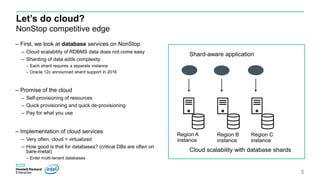
– Cloud scalability of RDBMS data does not come easy
– Sharding of data adds complexity
– Each shard requires a separate instance
– Oracle 12c announced shard support in 2016
– Promise of the cloud
– Self-provisioning of resources
– Quick provisioning and quick de-provisioning
– Pay for what you use
– Implementation of cloud services
– Very often, cloud = virtualized
– How good is that for databases? (critical DBs are often on
bare-metal)
– Enter multi-tenant databases
5
Cloud scalability with database shards
Region A
instance
Region B
instance
Region C
instance
Shard-aware application
Multi-tenant database
– Virtualized database servers lead to database “sprawl”
– Add complexity and management efforts
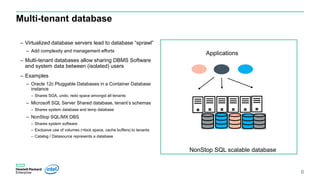
– Multi-tenant databases allow sharing DBMS Software
and system data between (isolated) users
– Examples
– Oracle 12c Pluggable Databases in a Container Database
instance
– Shares SGA, undo, redo space amongst all tenants
– Microsoft SQL Server Shared database, tenant’s schemas
– Shares system database and temp database
– NonStop SQL/MX DBS
– Shares system software
– Exclusive use of volumes (=lock space, cache buffers) to tenants
– Catalog / Datasource represents a database
6
NonStop SQL scalable database
Applications
SQL/MX DBS – Nuts and Bolts
7
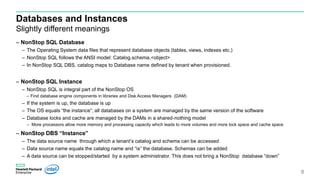
Databases and Instances
Slightly different meanings
– NonStop SQL Database
– The Operating System data files that represent database objects (tables, views, indexes etc.)
– NonStop SQL follows the ANSI model: Catalog.schema.<object>
– In NonStop SQL DBS, catalog maps to Database name defined by tenant when provisioned.
– NonStop SQL Instance
– NonStop SQL is integral part of the NonStop OS
– Find database engine components in libraries and Disk Access Managers (DAM)
– If the system is up, the database is up
– The OS equals “the instance”; all databases on a system are managed by the same version of the software
– Database locks and cache are managed by the DAMs in a shared-nothing model
– More processors allow more memory and processing capacity which leads to more volumes and more lock space and cache space
– NonStop DBS “Instance”
– The data source name through which a tenant’s catalog and schema can be accessed
– Data source name equals the catalog name and “is” the database. Schemas can be added
– A data source can be stopped/started by a system administrator. This does not bring a NonStop database “down”
8
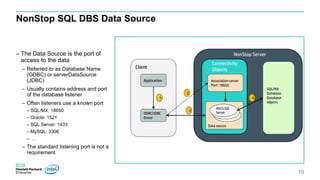
NonStop SQL DBS Data Source
– The Data Source is the port of
access to the data
– Referred to as Database Name
(ODBC) or serverDataSource
(JDBC)
– Usually contains address and port
of the database listener
– Often listeners use a known port
– SQL/MX: 18650
– Oracle: 1521
– SQL Server: 1433
– MySQL: 3306
– …
– The standard listening port is not a
requirement
10
Client
Application
ODBC/JDBC
Driver
SQL/MX
Database
Database
objects
Association server
Port: 18650
Data source
MXCSer
MXCS SQL
Server
1
2
3
4
NonStop Server
Connectivity
Objects
Is that it?
11
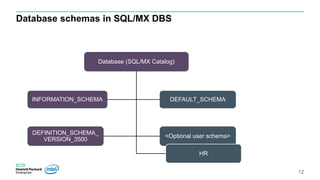
Database schemas in SQL/MX DBS
12
Database (SQL/MX Catalog)
INFORMATION_SCHEMA
DEFINITION_SCHEMA_
VERSION_3500
DEFAULT_SCHEMA
<Optional user schema>
HR
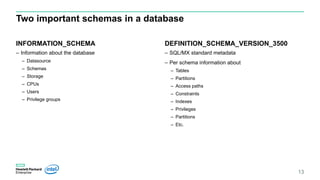
Two important schemas in a database
INFORMATION_SCHEMA
– Information about the database
– Datasource
– Schemas
– Storage
– CPUs
– Users
– Privilege groups
DEFINITION_SCHEMA_VERSION_3500
– SQL/MX standard metadata
– Per schema information about
– Tables
– Partitions
– Access paths
– Constraints
– Indexes
– Privileges
– Partitions
– Etc.
13
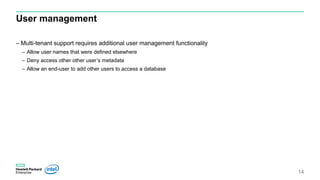
User management
– Multi-tenant support requires additional user management functionality
– Allow user names that were defined elsewhere
– Deny access other other user’s metadata
– Allow an end-user to add other users to access a database
14
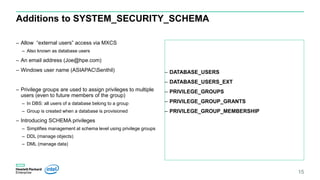
Additions to SYSTEM_SECURITY_SCHEMA
– Allow “external users” access via MXCS
– Also known as database users
– An email address (Joe@hpe.com)
– Windows user name (ASIAPACSenthil)
– Privilege groups are used to assign privileges to multiple
users (even to future members of the group)
– In DBS: all users of a database belong to a group
– Group is created when a database is provisioned
– Introducing SCHEMA privileges
– Simplifies management at schema level using privilege groups
– DDL (manage objects)
– DML (manage data)
– DATABASE_USERS
– DATABASE_USERS_EXT
– PRIVILEGE_GROUPS
– PRIVILEGE_GROUP_GRANTS
– PRIVILEGE_GROUP_MEMBERSHIP
15
Quickly provision
16
SQL/MX 3.5: Database Services
17
DBS thin provisioning interface
mxdbs CLI
Create a database
Share a database
Delete a database
Add more storage
Add additional users
Change user’s access level
Change user’s password
Delete a user
Show databases
usage: mxdbs [-h] [-V]
{ db-create | db-alter-share | db-delete | db-add-user |
db-remove-user | db-add-storage | db-user-change-access |
user-change-password | show-databases } ...
The API should be kept simple, database agnostic
The goal is to cover the life cycle management scope
from long term projects to ad-hoc projects.
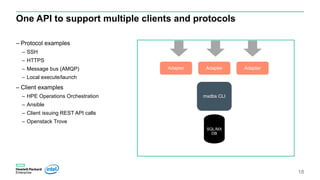
One API to support multiple clients and protocols
– Protocol examples
– SSH
– HTTPS
– Message bus (AMQP)
– Local execute/launch
– Client examples
– HPE Operations Orchestration
– Ansible
– Client issuing REST API calls
– Openstack Trove
18
SQL/MX
DB
mxdbs CLI
Adapter Adapter Adapter
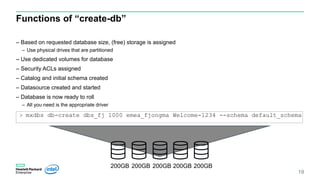
Functions of “create-db”
– Based on requested database size, (free) storage is assigned
– Use physical drives that are partitioned
– Use dedicated volumes for database
– Security ACLs assigned
– Catalog and initial schema created
– Datasource created and started
– Database is now ready to roll
– All you need is the appropriate driver
19
> mxdbs db-create dbs_fj 1000 emea_fjongma Welcome-1234 --schema default_schema
200GB 200GB 200GB 200GB 200GB
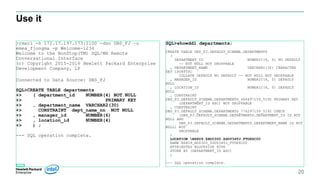
Use it
20
>rmxci -h 172.17.197.173:2100 -dsn DBS_FJ –u
emea_fjongma -p Welcome-1234
Welcome to the NonStop(TM) SQL/MX Remote
Conversational Interface
(c) Copyright 2015-2016 Hewlett Packard Enterprise
Development Company, LP
Connected to Data Source: DBS_FJ
SQL>CREATE TABLE departments
+> ( department_id NUMBER(4) NOT NULL
+> PRIMARY KEY
+> , department_name VARCHAR2(30)
+> CONSTRAINT dept_name_nn NOT NULL
+> , manager_id NUMBER(6)
+> , location_id NUMBER(4)
+> ) ;
--- SQL operation complete.
SQL>showddl departments;
CREATE TABLE DBS_FJ.DEFAULT_SCHEMA.DEPARTMENTS
(
DEPARTMENT_ID NUMERIC(4, 0) NO DEFAULT
-- NOT NULL NOT DROPPABLE
, DEPARTMENT_NAME VARCHAR2(30) CHARACTER
SET ISO88591
COLLATE DEFAULT NO DEFAULT -- NOT NULL NOT DROPPABLE
, MANAGER_ID NUMERIC(6, 0) DEFAULT
NULL
, LOCATION_ID NUMERIC(4, 0) DEFAULT
NULL
, CONSTRAINT
DBS_FJ.DEFAULT_SCHEMA.DEPARTMENTS_486497159_5192 PRIMARY KEY
(DEPARTMENT_ID ASC) NOT DROPPABLE
, CONSTRAINT
DBS_FJ.DEFAULT_SCHEMA.DEPARTMENTS_776297159_5192 CHECK
(DBS_FJ.DEFAULT_SCHEMA.DEPARTMENTS.DEPARTMENT_ID IS NOT
NULL AND
DBS_FJ.DEFAULT_SCHEMA.DEPARTMENTS.DEPARTMENT_NAME IS NOT
NULL) NOT
DROPPABLE
)
LOCATION NSX09.$HD0300.ZSDV34TJ.FTDKSC00
NAME NSX09_HD0300_ZSDV34TJ_FTDKSC00
ATTRIBUTES BLOCKSIZE 4096
STORE BY (DEPARTMENT_ID ASC)
;
--- SQL operation complete.
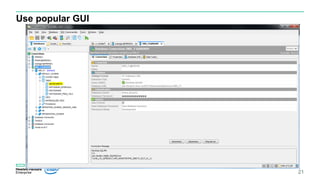
Use popular GUI
21
Conclusion
– SQL/MX DBS provides multi-tenant features with added user isolation
– Simplifies provisioning of databases
– Facilitates automation
– Brings “cloud capabilities” to customers on-premise installations
– Regular NonStop servers
– Virtualized NonStop servers
– Requires L17.02 NonStop SQL/MX 3.5 and onward
22
Thank you
frans.jongma@hpe.com
23

NonStop SQL/MX DBS Explained

  • 1.
    NonStop SQL DBS explained FransJongma, NonStop Advanced Technology Center eBITUG, May 2017
  • 2.
    Agenda – SQL/MX DBS,a cloud component added to SQL/MX – Based on existing functionality – What has been added – Quick provision/deprovision – User isolation – Automation 2
  • 3.
  • 4.
    But …. exactlywhich part of the cloud? – Looking for the competitive edge for HPE NonStop – Applications Stateless vs Stateful? – Applications on-platform or off-platform? – Killer application? – Without real application at hand, cloud database is a good start – Provide cloud capabilities, not cloud-dependent – Easy provisioning – Self-service – Fast – Multi-tenant 4
  • 5.
    a Let’s do cloud? NonStopcompetitive edge – First, we look at database services on NonStop – Cloud scalability of RDBMS data does not come easy – Sharding of data adds complexity – Each shard requires a separate instance – Oracle 12c announced shard support in 2016 – Promise of the cloud – Self-provisioning of resources – Quick provisioning and quick de-provisioning – Pay for what you use – Implementation of cloud services – Very often, cloud = virtualized – How good is that for databases? (critical DBs are often on bare-metal) – Enter multi-tenant databases 5 Cloud scalability with database shards Region A instance Region B instance Region C instance Shard-aware application
  • 6.
    Multi-tenant database – Virtualizeddatabase servers lead to database “sprawl” – Add complexity and management efforts – Multi-tenant databases allow sharing DBMS Software and system data between (isolated) users – Examples – Oracle 12c Pluggable Databases in a Container Database instance – Shares SGA, undo, redo space amongst all tenants – Microsoft SQL Server Shared database, tenant’s schemas – Shares system database and temp database – NonStop SQL/MX DBS – Shares system software – Exclusive use of volumes (=lock space, cache buffers) to tenants – Catalog / Datasource represents a database 6 NonStop SQL scalable database Applications
  • 7.
    SQL/MX DBS –Nuts and Bolts 7
  • 8.
    Databases and Instances Slightlydifferent meanings – NonStop SQL Database – The Operating System data files that represent database objects (tables, views, indexes etc.) – NonStop SQL follows the ANSI model: Catalog.schema.<object> – In NonStop SQL DBS, catalog maps to Database name defined by tenant when provisioned. – NonStop SQL Instance – NonStop SQL is integral part of the NonStop OS – Find database engine components in libraries and Disk Access Managers (DAM) – If the system is up, the database is up – The OS equals “the instance”; all databases on a system are managed by the same version of the software – Database locks and cache are managed by the DAMs in a shared-nothing model – More processors allow more memory and processing capacity which leads to more volumes and more lock space and cache space – NonStop DBS “Instance” – The data source name through which a tenant’s catalog and schema can be accessed – Data source name equals the catalog name and “is” the database. Schemas can be added – A data source can be stopped/started by a system administrator. This does not bring a NonStop database “down” 8
  • 9.
    NonStop SQL DBSData Source – The Data Source is the port of access to the data – Referred to as Database Name (ODBC) or serverDataSource (JDBC) – Usually contains address and port of the database listener – Often listeners use a known port – SQL/MX: 18650 – Oracle: 1521 – SQL Server: 1433 – MySQL: 3306 – … – The standard listening port is not a requirement 10 Client Application ODBC/JDBC Driver SQL/MX Database Database objects Association server Port: 18650 Data source MXCSer MXCS SQL Server 1 2 3 4 NonStop Server Connectivity Objects
  • 10.
  • 11.
    Database schemas inSQL/MX DBS 12 Database (SQL/MX Catalog) INFORMATION_SCHEMA DEFINITION_SCHEMA_ VERSION_3500 DEFAULT_SCHEMA <Optional user schema> HR
  • 12.
    Two important schemasin a database INFORMATION_SCHEMA – Information about the database – Datasource – Schemas – Storage – CPUs – Users – Privilege groups DEFINITION_SCHEMA_VERSION_3500 – SQL/MX standard metadata – Per schema information about – Tables – Partitions – Access paths – Constraints – Indexes – Privileges – Partitions – Etc. 13
  • 13.
    User management – Multi-tenantsupport requires additional user management functionality – Allow user names that were defined elsewhere – Deny access other other user’s metadata – Allow an end-user to add other users to access a database 14
  • 14.
    Additions to SYSTEM_SECURITY_SCHEMA –Allow “external users” access via MXCS – Also known as database users – An email address (Joe@hpe.com) – Windows user name (ASIAPACSenthil) – Privilege groups are used to assign privileges to multiple users (even to future members of the group) – In DBS: all users of a database belong to a group – Group is created when a database is provisioned – Introducing SCHEMA privileges – Simplifies management at schema level using privilege groups – DDL (manage objects) – DML (manage data) – DATABASE_USERS – DATABASE_USERS_EXT – PRIVILEGE_GROUPS – PRIVILEGE_GROUP_GRANTS – PRIVILEGE_GROUP_MEMBERSHIP 15
  • 15.
  • 16.
    SQL/MX 3.5: DatabaseServices 17 DBS thin provisioning interface mxdbs CLI Create a database Share a database Delete a database Add more storage Add additional users Change user’s access level Change user’s password Delete a user Show databases usage: mxdbs [-h] [-V] { db-create | db-alter-share | db-delete | db-add-user | db-remove-user | db-add-storage | db-user-change-access | user-change-password | show-databases } ... The API should be kept simple, database agnostic The goal is to cover the life cycle management scope from long term projects to ad-hoc projects.
  • 17.
    One API tosupport multiple clients and protocols – Protocol examples – SSH – HTTPS – Message bus (AMQP) – Local execute/launch – Client examples – HPE Operations Orchestration – Ansible – Client issuing REST API calls – Openstack Trove 18 SQL/MX DB mxdbs CLI Adapter Adapter Adapter
  • 18.
    Functions of “create-db” –Based on requested database size, (free) storage is assigned – Use physical drives that are partitioned – Use dedicated volumes for database – Security ACLs assigned – Catalog and initial schema created – Datasource created and started – Database is now ready to roll – All you need is the appropriate driver 19 > mxdbs db-create dbs_fj 1000 emea_fjongma Welcome-1234 --schema default_schema 200GB 200GB 200GB 200GB 200GB
  • 19.
    Use it 20 >rmxci -h172.17.197.173:2100 -dsn DBS_FJ –u emea_fjongma -p Welcome-1234 Welcome to the NonStop(TM) SQL/MX Remote Conversational Interface (c) Copyright 2015-2016 Hewlett Packard Enterprise Development Company, LP Connected to Data Source: DBS_FJ SQL>CREATE TABLE departments +> ( department_id NUMBER(4) NOT NULL +> PRIMARY KEY +> , department_name VARCHAR2(30) +> CONSTRAINT dept_name_nn NOT NULL +> , manager_id NUMBER(6) +> , location_id NUMBER(4) +> ) ; --- SQL operation complete. SQL>showddl departments; CREATE TABLE DBS_FJ.DEFAULT_SCHEMA.DEPARTMENTS ( DEPARTMENT_ID NUMERIC(4, 0) NO DEFAULT -- NOT NULL NOT DROPPABLE , DEPARTMENT_NAME VARCHAR2(30) CHARACTER SET ISO88591 COLLATE DEFAULT NO DEFAULT -- NOT NULL NOT DROPPABLE , MANAGER_ID NUMERIC(6, 0) DEFAULT NULL , LOCATION_ID NUMERIC(4, 0) DEFAULT NULL , CONSTRAINT DBS_FJ.DEFAULT_SCHEMA.DEPARTMENTS_486497159_5192 PRIMARY KEY (DEPARTMENT_ID ASC) NOT DROPPABLE , CONSTRAINT DBS_FJ.DEFAULT_SCHEMA.DEPARTMENTS_776297159_5192 CHECK (DBS_FJ.DEFAULT_SCHEMA.DEPARTMENTS.DEPARTMENT_ID IS NOT NULL AND DBS_FJ.DEFAULT_SCHEMA.DEPARTMENTS.DEPARTMENT_NAME IS NOT NULL) NOT DROPPABLE ) LOCATION NSX09.$HD0300.ZSDV34TJ.FTDKSC00 NAME NSX09_HD0300_ZSDV34TJ_FTDKSC00 ATTRIBUTES BLOCKSIZE 4096 STORE BY (DEPARTMENT_ID ASC) ; --- SQL operation complete.
  • 20.
  • 21.
    Conclusion – SQL/MX DBSprovides multi-tenant features with added user isolation – Simplifies provisioning of databases – Facilitates automation – Brings “cloud capabilities” to customers on-premise installations – Regular NonStop servers – Virtualized NonStop servers – Requires L17.02 NonStop SQL/MX 3.5 and onward 22
  • 22.