• Introduction to O365 and SharePoint PnP
• What is PnP?
• Why PnP?
• PnP Resources
• Getting started with PnP Managed Code
• Demo – Managed Code
• Getting started with PnP PowerShell CmdLets
• Demo - PowerShell
• Summary
• Q & A
Supported Environments
 Office 365
 SharePoint Online
 SharePoint Server 2013/2016
What?
The Office 365 Developer and SharePoint Patterns and
Practices (PnP) initiative provides;
 Code Samples
 Documentation
 How-to Videos
 Guides
Why?
 Ease of development
 Simple
 Availability of re-usable
components
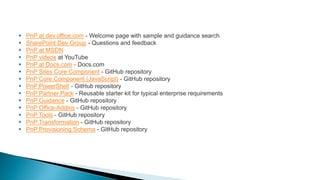
 PnP at dev.office.com - Welcome page with sample and guidance search
 SharePoint Dev Group - Questions and feedback
 PnP at MSDN
 PnP videos at YouTube
 PnP at Docs.com - Docs.com
 PnP Sites Core Component - GitHub repository
 PnP Core Component (JavaScript) - GitHub repository
 PnP PowerShell - GitHub repository
 PnP Partner Pack - Reusable starter kit for typical enterprise requirements
 PnP Guidance - GitHub repository
 PnP Office-Addins - GitHub repository
 PnP Tools - GitHub repository
 PnP Transformation - GitHub repository
 PnP Provisioning Schema - GitHub repository
• Add NuGet Package
• SharePoint PnP Online
• SharePoint PnP 2013
• SharePoint PnP 2016
New extension methods
• Download PnP PowerShell installer
 https://github.com/officedev/pnp-powershell/releases
 https://github.com/SharePoint/PnP-PowerShell
Add-Type -Path 'C:Program FilesCommon FilesMicrosoft SharedWeb Server Extensions16ISAPIMicrosoft.SharePoint.Client.dll'
Add-Type -Path 'C:Program FilesCommon FilesMicrosoft SharedWeb Server Extensions16ISAPIMicrosoft.SharePoint.Client.Runtime.dll'
$url = "https://liyanage.sharepoint.com/sites/developer"
$creds = Get-Credential -Message "Enter Online Credential"
$O365Credential = new-object Microsoft.SharePoint.Client.SharePointOnlineCredentials($creds.UserName,$creds.Password)
$ctx = new-object Microsoft.SharePoint.Client.ClientContext($url)
$ctx.Credentials = $O365Credential
$listCi = new-object Microsoft.SharePoint.Client.ListCreationInformation;
$listCi.Title = "Demo List";
$listCi.TemplateType = [Microsoft.SharePoint.Client.ListTemplateType]::GenericList;
$listCi.Url = "lists/demo";
$list = $ctx.Web.lists.Add($listCi);
# Add the field
$fieldXml = "<Field Type=""Choice"" Name=""SPSLocation"" DisplayName=""Location"" ID=""{ba27f512-27bc-4d07-bdd4-2ee61bc5bcb4}"" Group=""Demo
Group"" Required=""TRUE""><CHOICES><CHOICE>Stockholm</CHOICE><CHOICE>Helsinki</CHOICE><CHOICE>Oslo</CHOICE></CHOICES></Field>"
$field = $list.Fields.AddFieldAsXml($fieldXml, $true, [Microsoft.SharePoint.Client.AddFieldOptions]::AddFieldToDefaultView);
$ctx.Load($list);
$ctx.ExecuteQuery();
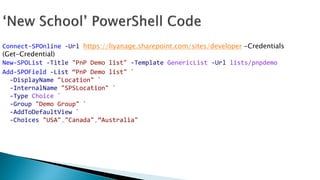
Connect-SPOnline -Url https://liyanage.sharepoint.com/sites/developer -Credentials
(Get-Credential)
New-SPOList -Title "PnP Demo list" -Template GenericList -Url lists/pnpdemo
Add-SPOField -List “PnP Demo list" `
-DisplayName "Location" `
-InternalName "SPSLocation" `
-Type Choice `
-Group "Demo Group" `
-AddToDefaultView `
-Choices "USA","Canada",”Australia"
Add-SPOContentType
Add-SPOContentTypeToDocumentSet
Add-SPOContentTypeToList
Add-SPOCustomAction
Add-SPOEventReceiver
Add-SPOField
Add-SPOFieldFromXml
Add-SPOFieldToContentType
Add-SPOFile
Add-SPOFolder
Add-SPOHtmlPublishingPageLayout
Add-SPOIndexedProperty
Add-SPOJavaScriptBlock
Add-SPOJavaScriptLink
Add-SPOListItem
Add-SPOMasterPage
Add-SPONavigationNode
Add-SPOPublishingPage
Add-SPOPublishingPageLayout
Add-SPOTaxonomyField
Add-SPOUserToGroup
Add-SPOView
Add-SPOWebPartToWebPartPage
Add-SPOWebPartToWikiPage
Add-SPOWikiPage
Add-SPOWorkflowDefinition
Add-SPOWorkflowSubscription
Apply-SPOProvisioningTemplate
Connect-SPOnline
Disable-SPOFeature
Disconnect-SPOnline
Enable-SPOFeature
Execute-SPOQuery
Export-SPOTaxonomy
Export-SPOTermGroupToXml
Find-SPOFile
Get-SPOAppInstance
Get-SPOAuthenticationRealm
Get-SPOAzureADManifestKeyCredentials
Get-SPOContentType
Get-SPOContext
Get-SPOCustomAction
Get-SPODocumentSetTemplate
Get-SPOEventReceiver
Get-SPOFeature
Get-SPOField
Get-SPOFile
Get-SPOGroup
Get-SPOHealthScore
Get-SPOHomePage
Get-SPOIndexedPropertyKeys
Get-SPOJavaScriptLink
Get-SPOList
Get-SPOListItem
Get-SPOMasterPage
Get-SPOProperty
Get-SPOPropertyBag
Get-SPOProvisioningTemplate
Get-SPOSearchConfiguration
Get-SPOSite
Get-SPOSitePolicy
Get-SPOStoredCredential
Get-SPOSubWebs
Get-SPOTaxonomyItem
Get-SPOTaxonomySession
Get-SPOTenantSite
Get-SPOTermGroup
Get-SPOTimeZoneId
Get-SPOUserProfileProperty
Get-SPOView
Get-SPOWeb
Get-SPOWebPart
Get-SPOWebPartProperty
Get-SPOWebPartXml
Get-SPOWebTemplates
Get-SPOWikiPageContent
Get-SPOWorkflowDefinition
Get-SPOWorkflowSubscription
Import-SPOAppPackage
Import-SPOTaxonomy
Import-SPOTermGroupFromXml
Import-SPOTermSet
Install-SPOSolution
New-SPOGroup
New-SPOList
New-SPOPersonalSite
New-SPOTenantSite
New-SPOTermGroup
New-SPOUser
New-SPOWeb
Remove-SPOContentType
Remove-SPOContentTypeFromDocumentSet
Remove-SPOContentTypeFromList
Remove-SPOCustomAction
Remove-SPOEventReceiver
Remove-SPOField
Remove-SPOFile
Remove-SPOGroup
Remove-SPOIndexedProperty
Remove-SPOJavaScriptLink
Remove-SPOList
Remove-SPONavigationNode
Remove-SPOPropertyBagValue
Remove-SPOTenantSite
Remove-SPOUserFromGroup
Remove-SPOView
Remove-SPOWeb
Remove-SPOWebPart
Remove-SPOWikiPage
Remove-SPOWorkflowDefinition
Remove-SPOWorkflowSubscription
Request-SPOReIndexWeb
Resume-SPOWorkflowInstance
Send-SPOMail
Set-SPOAppSideLoading
Set-SPODefaultColumnValues
Set-SPODefaultContentTypeToList
Set-SPODocumentSetField
Set-SPOFileCheckedIn
Set-SPOFileCheckedOut
Set-SPOGroup
Set-SPOHomePage
Set-SPOIndexedProperties
Set-SPOList
Set-SPOListPermission
Set-SPOMasterPage
Set-SPOMinimalDownloadStrategy
Set-SPOPropertyBagValue
Set-SPOSearchConfiguration
Set-SPOSitePolicy
Set-SPOTaxonomyFieldValue
Set-SPOTenantSite
Set-SPOTheme
Set-SPOTraceLog
Set-SPOUserProfileProperty
Set-SPOWeb
Set-SPOWebPartProperty
Set-SPOWikiPageContent
Stop-SPOWorkflowInstance
Uninstall-SPOAppInstance
Uninstall-SPOSolution

Getting started with Office365/SharePoint Patterns and Practices