Part 1: ng-grid and a Simple REST API 
It is a common requirement for any project to display data in 
some kind of tabular format. The easiest way to achieve this is 
by using HTML table. But soon this gets complex as you need a 
way to support pagination (client-side and server-side), sorting 
(single & multi column), resizable columns, inline editing, 
ˉOWHULQJHWF 
Options 
• HTML Table 
• JQuery Grid Plugins (jqGrid, FlexGrid etc.) 
• Angular’s native implementation of Grid 
• ng-grid 
• ng-table 
First Grid Solution 
7KHˉUVWVROXWLRQZHDUHJRLQJWRORRNDWLVng-grid which is built for AngularJS 
and is the most popular Grid solution out there for Angular. 
www.backand.com
Where to Start 
In this Blog post we will build a grid solution using Angular and ng-grid, 
which hooks in to the RESTful end point running locally using NodeJS  
ExpressJS. We will use basic features of Node  Express. Before jumping 
in, you may want to see the working code on Plunker: http://embed.plnkr. 
co/865hnS/preview. 
Assumptions 
1. You already know AngularJS 
2. Know the basics of Grunt, Bower and Bootstrap 
3. Have basic knowledge about REST 
4. You already have node, npm, git and bower installed on your development 
machine 
Project Structure 
We will use the following Angular seed project: 
https://github.com/libertyleap/angular-grunt-seed 
This is the seed project which comes with a default bower and grunt build for 
lint, karma, watch, livereload, express server, etc. 
Steps to setup  run Seed Project: 
1. Clone the project: 
 git clone https://github.com/libertyleap/angular-grunt-seed.git 
2. Rename the project from angular-grunt-seed to ng-grid-demo 
 mv angular-grunt-seed ng-grid-demo 
3. Change the current directory to ng-grid-demo 
 cd ng-grid-demo 
4. Execute npm install so that all the Grunt dependencies are downloaded 
and it also runs bower install 
 npm install 
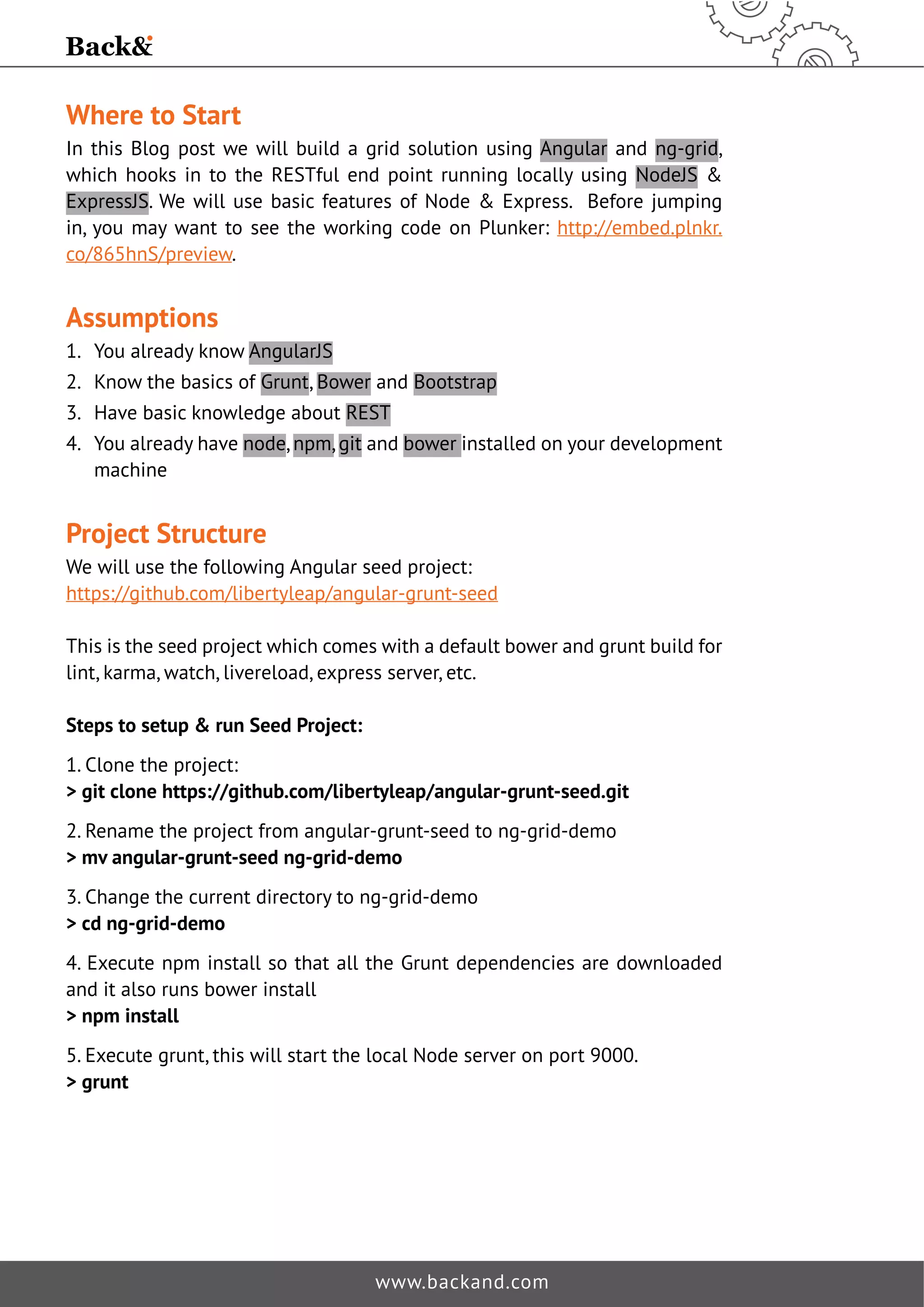
5. Execute grunt, this will start the local Node server on port 9000. 
 grunt 
www.backand.com
6. Open your favorite browser and go to: http://localhost:9000/ 
Adding NG-Grid into Seed Project Using Bower 
The easiest way to add ng-grid to seed project is using Bower and we will 
cover this approach in this blog. If you are not comfortable doing this, you can 
do it manually i.e. go to ng-grid repo: http://angular-ui.github.io/ng-grid/ and 
FRSRYHUWKHUHTXLUHGˉOHVZKLFKDUHFRYHUHGEHORZ 
 bower install ng-grid –save-dev 
Above command updates the ng-grid-demobower.jsonˉOHWRDGGng-grid as 
dependency. 
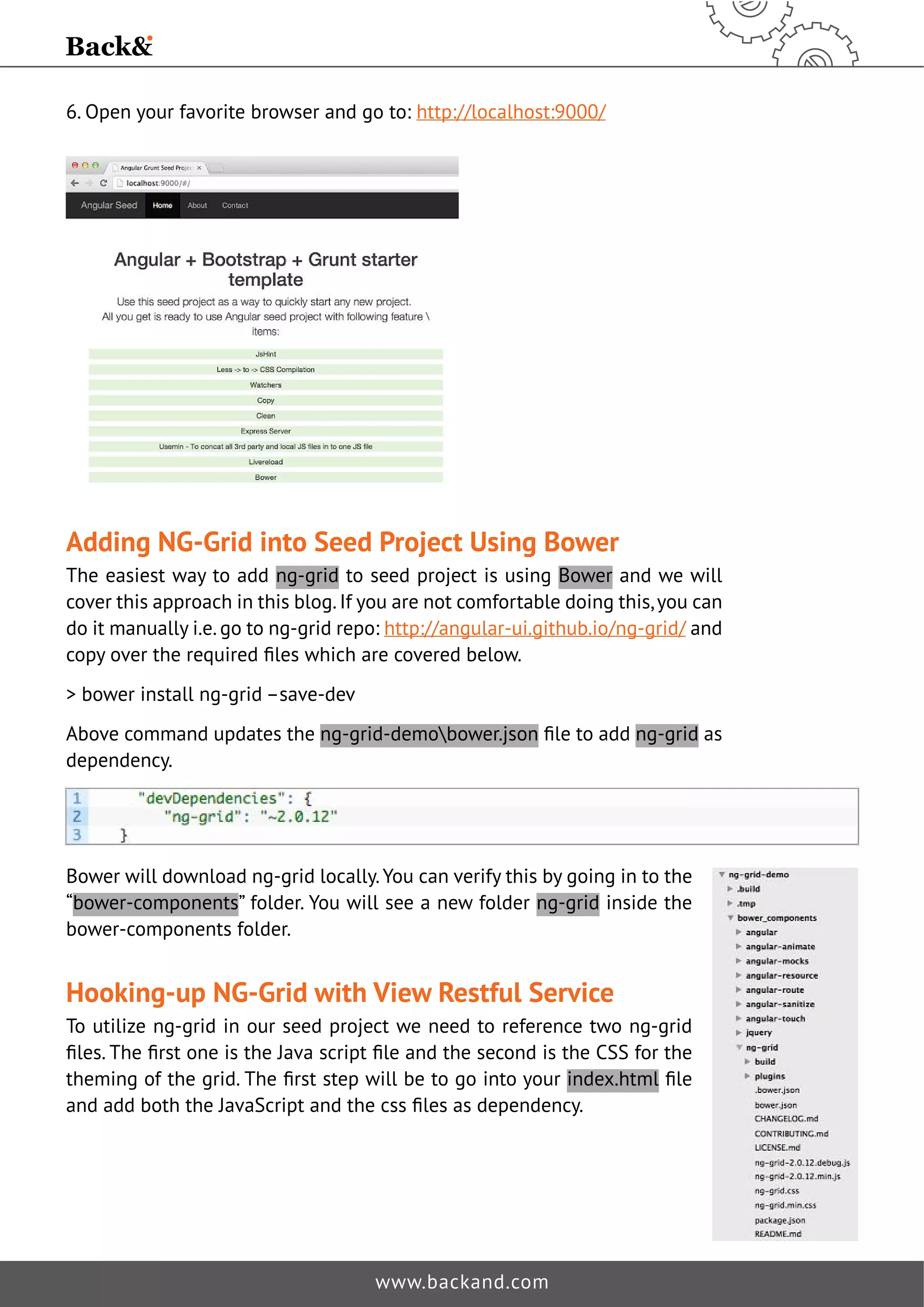
Bower will download ng-grid locally. You can verify this by going in to the 
“bower-components” folder. You will see a new folder ng-grid inside the 
bower-components folder. 
Hooking-up NG-Grid with View Restful Service 
To utilize ng-grid in our seed project we need to reference two ng-grid 
ˉOHV7KHˉUVWRQHLVWKH-DYDVFULSWˉOHDQGWKHVHFRQGLVWKH66IRUWKH 
WKHPLQJRIWKHJULG7KHˉUVWVWHSZLOOEHWRJRLQWRRXUindex.htmlˉOH 
DQGDGGERWKWKH-DYD6FULSWDQGWKHFVVˉOHVDVGHSHQGHQF 
www.backand.com
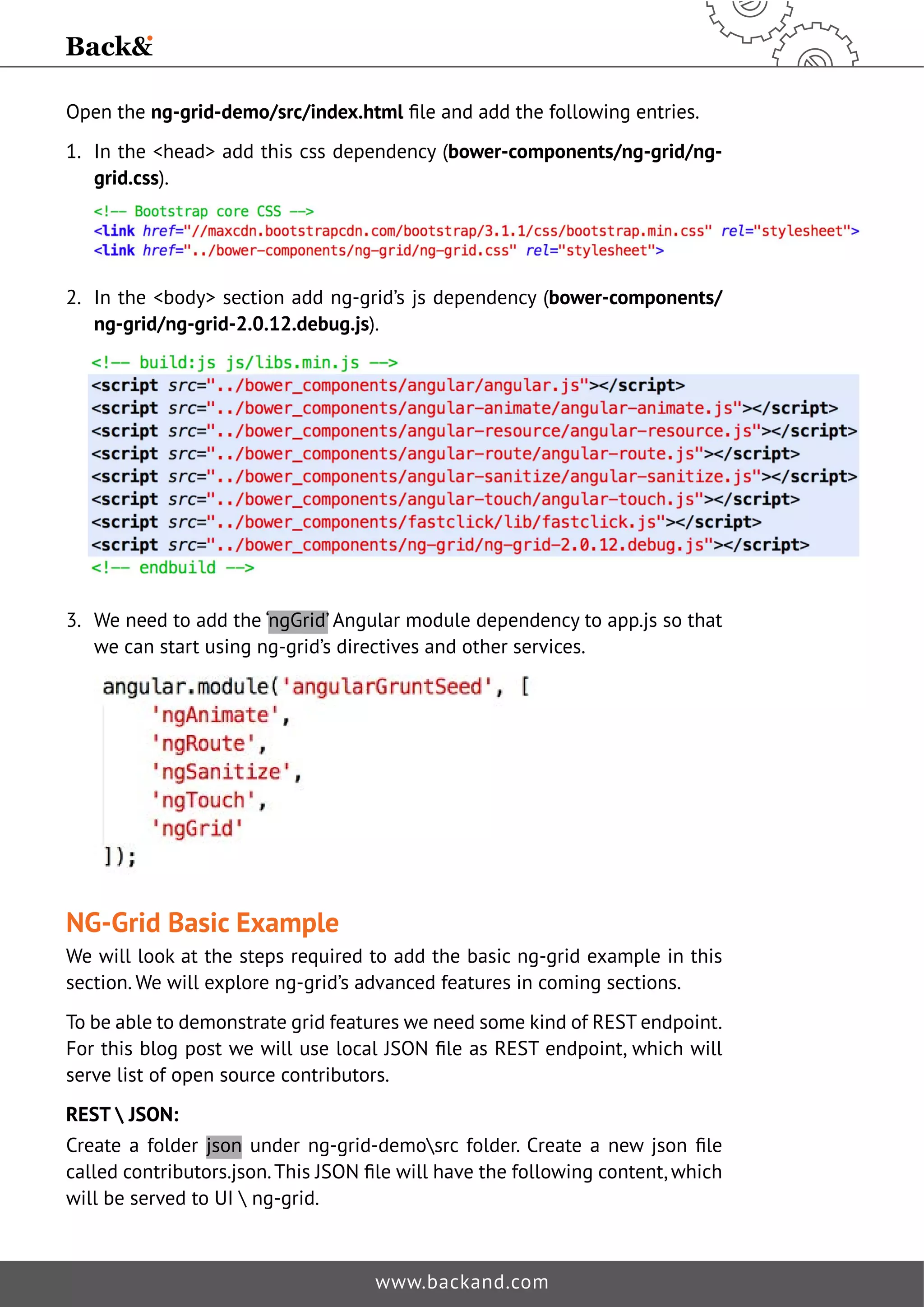
Open the ng-grid-demo/src/index.htmlˉOHDQGDGGWKHIROORZLQJHQWULHV 
1. In the head add this css dependency (bower-components/ng-grid/ng-grid. 
www.backand.com 
css). 
2. In the body section add ng-grid’s js dependency (bower-components/ 
ng-grid/ng-grid-2.0.12.debug.js). 
3. We need to add the ‘ngGrid’ Angular module dependency to app.js so that 
we can start using ng-grid’s directives and other services. 
NG-Grid Basic Example 
We will look at the steps required to add the basic ng-grid example in this 
section. We will explore ng-grid’s advanced features in coming sections. 
To be able to demonstrate grid features we need some kind of REST endpoint. 
)RUWKLVEORJSRVWZHZLOOXVHORFDO-621ˉOHDV5(67HQGSRLQWZKLFKZLOO 
serve list of open source contributors. 
REST  JSON: 
Create a folder json XQGHU QJJULGGHPR?VUF IROGHU UHDWH D QHZ MVRQ ˉOH 
FDOOHGFRQWULEXWRUVMVRQ7KLV-621ˉOHZLOOKDYHWKHIROORZLQJFRQWHQWZKLFK 
will be served to UI  ng-grid.
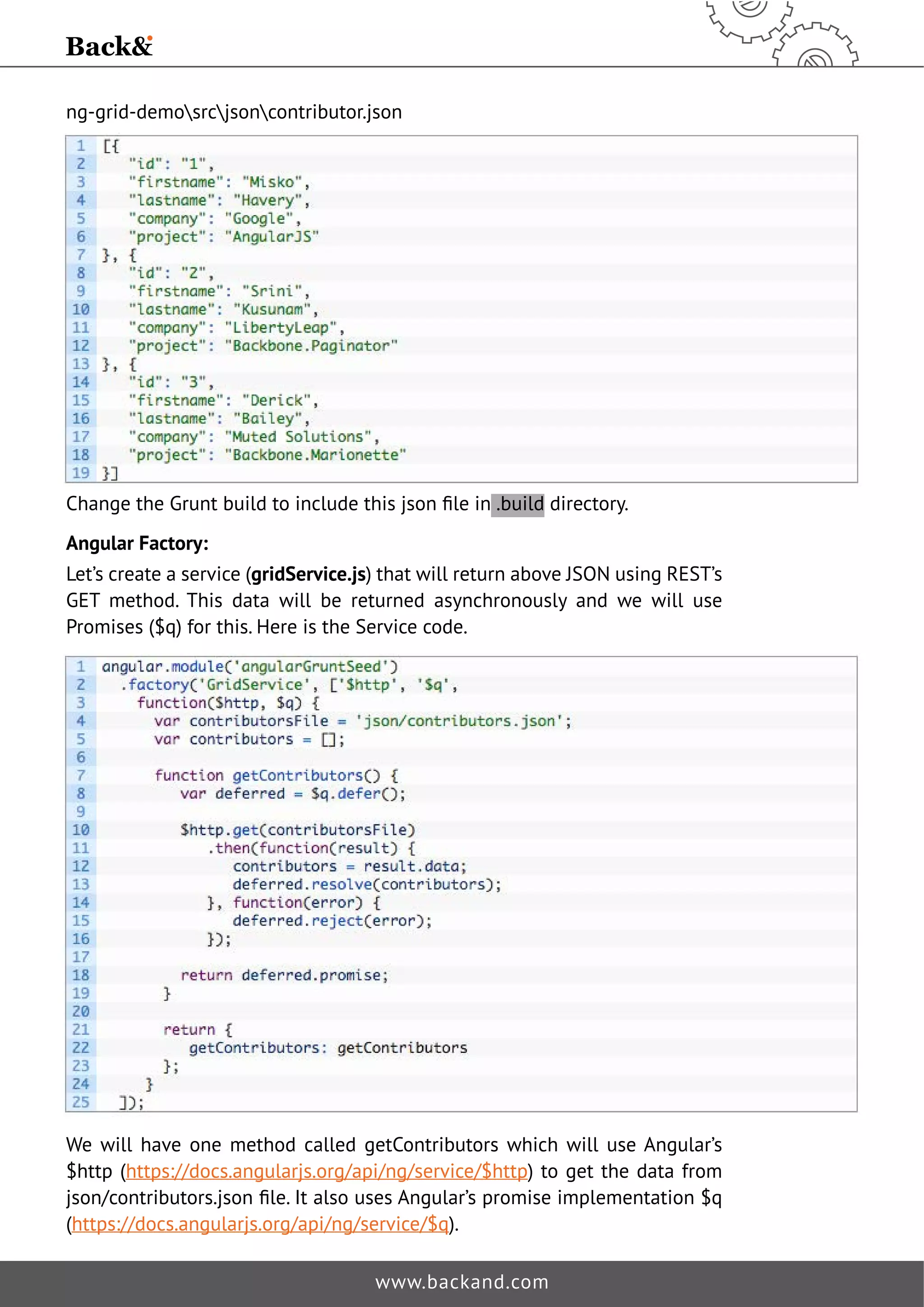
ng-grid-demosrcjsoncontributor.json 
KDQJHWKH*UXQWEXLOGWRLQFOXGHWKLVMVRQˉOHLQ .build directory. 
Angular Factory: 
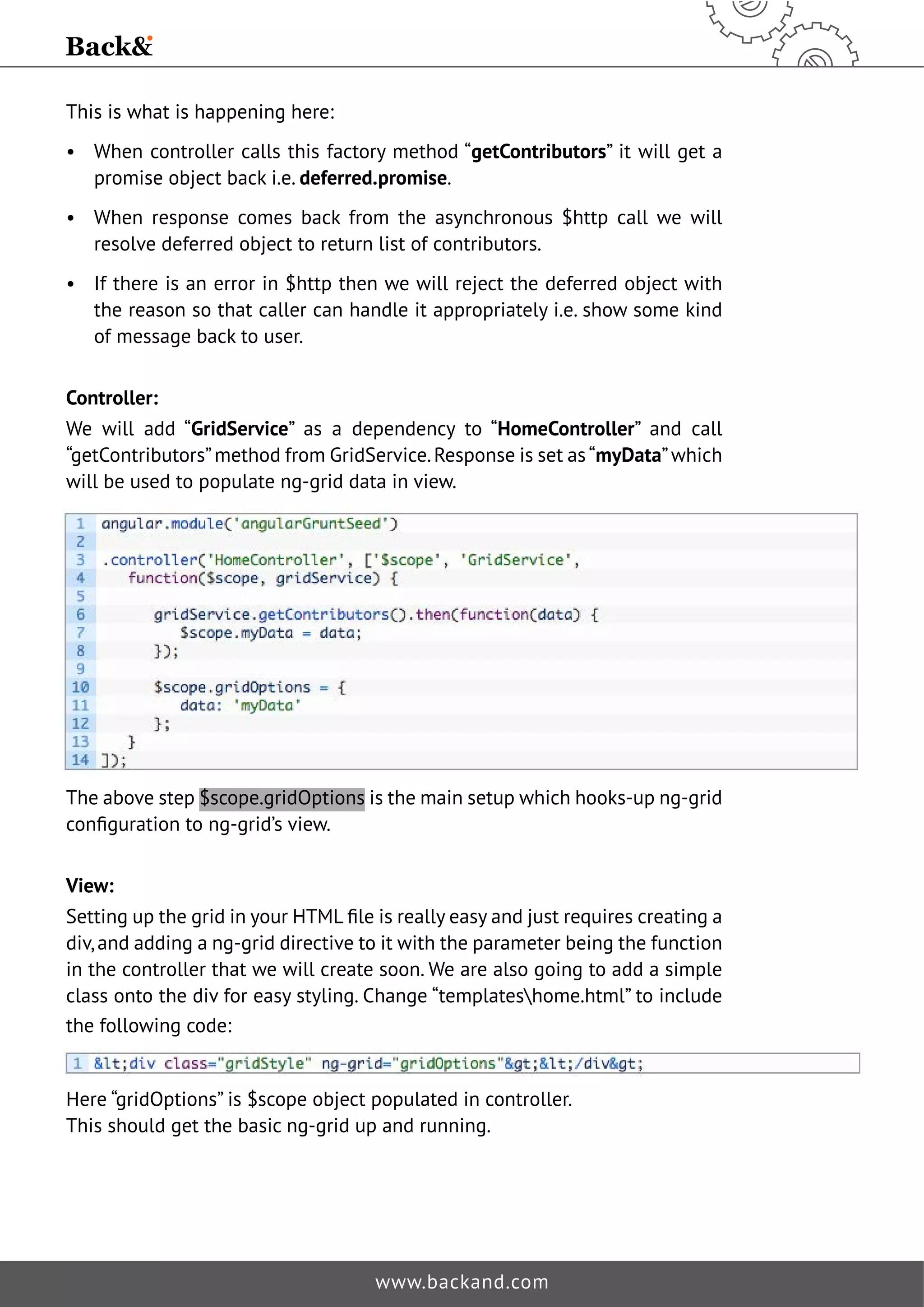
Let’s create a service (gridService.js) that will return above JSON using REST’s 
GET method. This data will be returned asynchronously and we will use 
Promises ($q) for this. Here is the Service code. 
We will have one method called getContributors which will use Angular’s 
$http (https://docs.angularjs.org/api/ng/service/$http) to get the data from 
MVRQFRQWULEXWRUVMVRQˉOH,WDOVRXVHV$QJXODUȠVSURPLVHLPSOHPHQWDWLRQT 
(https://docs.angularjs.org/api/ng/service/$q). 
www.backand.com
This is what is happening here: 
• When controller calls this factory method “getContributors” it will get a 
promise object back i.e. deferred.promise. 
• When response comes back from the asynchronous $http call we will 
resolve deferred object to return list of contributors. 
• If there is an error in $http then we will reject the deferred object with 
the reason so that caller can handle it appropriately i.e. show some kind 
of message back to user. 
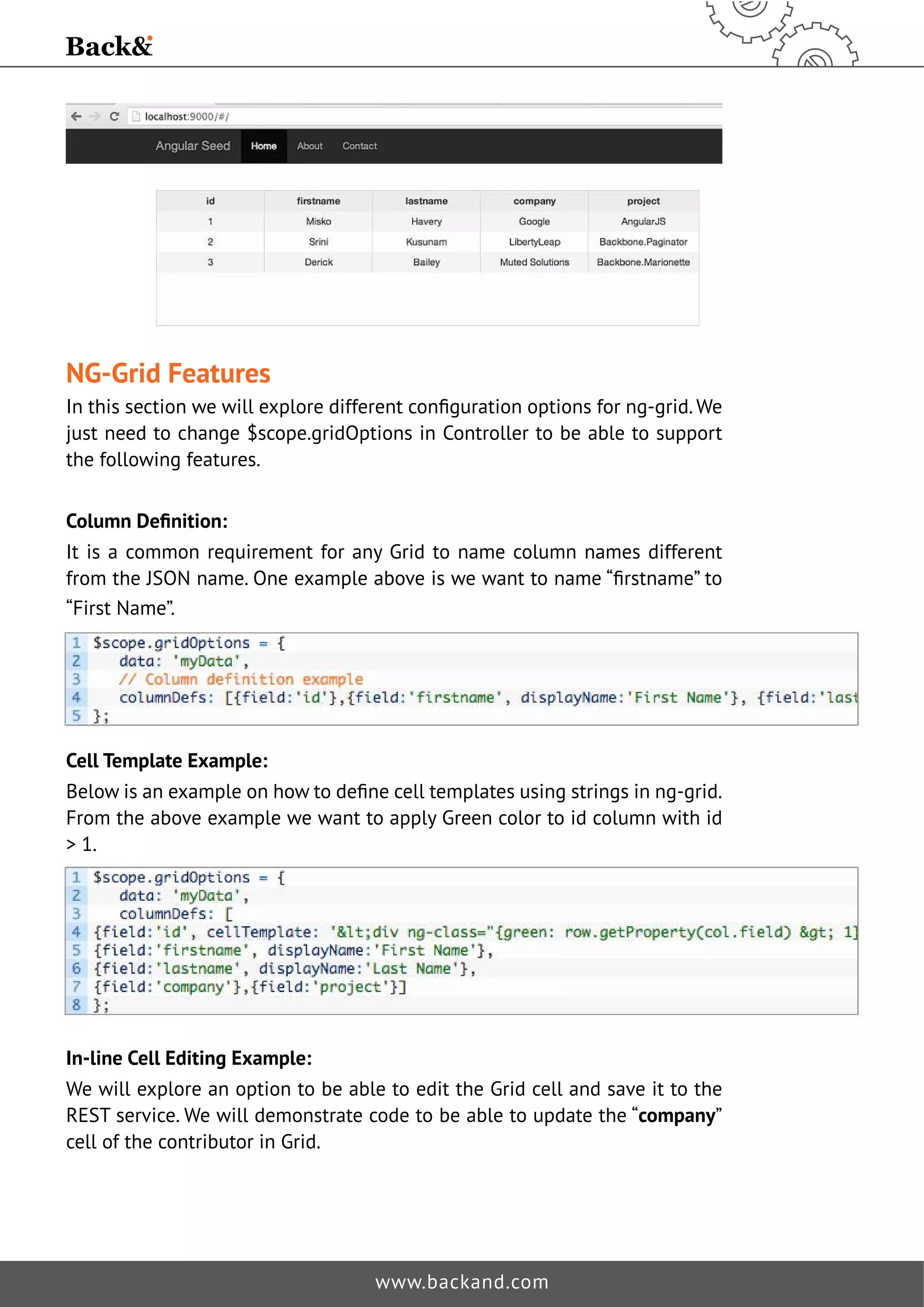
Controller: 
We will add “GridService” as a dependency to “HomeController” and call 
“getContributors” method from GridService. Response is set as “myData” which 
will be used to populate ng-grid data in view. 
The above step $scope.gridOptions is the main setup which hooks-up ng-grid 
FRQˉJXUDWLRQWRQJJULGȠVYLHZ 
View: 
6HWWLQJXSWKHJULGLQRXU+70/ˉOHLVUHDOOHDVDQGMXVWUHTXLUHVFUHDWLQJD 
div, and adding a ng-grid directive to it with the parameter being the function 
in the controller that we will create soon. We are also going to add a simple 
class onto the div for easy styling. Change “templateshome.html” to include 
the following code: 
Here “gridOptions” is $scope object populated in controller. 
This should get the basic ng-grid up and running. 
www.backand.com
NG-Grid Features 
,QWKLVVHFWLRQZHZLOOH[SORUHGLIIHUHQWFRQˉJXUDWLRQRSWLRQVIRUQJJULG:H 
just need to change $scope.gridOptions in Controller to be able to support 
the following features. 
ROXPQ'HˉQLWLRQ 
It is a common requirement for any Grid to name column names different 
IURPWKH-621QDPH2QHH[DPSOHDERYHLVZHZDQWWRQDPHȢˉUVWQDPHȣWR 
“First Name”. 
Cell Template Example: 
%HORZLVDQH[DPSOHRQKRZWRGHˉQHFHOOWHPSODWHVXVLQJVWULQJVLQQJJULG 
From the above example we want to apply Green color to id column with id 
 1. 
In-line Cell Editing Example: 
We will explore an option to be able to edit the Grid cell and save it to the 
REST service. We will demonstrate code to be able to update the “company” 
cell of the contributor in Grid. 
www.backand.com
homeController.js 
We need to set enableCellEditSURSHUWWR758(IRUWKHFROXPQGHˉQLWLRQ 
After setting this if you restart the node server you will see company column 
is editable after double clicking the cell. 
The next step is we want to send this updated cell info to REST backend. For 
this we will use one of ng-grid’s Event (ngGridEventEndCellEdit), which will 
broadcast after cell is edited. You can see all the available ng-grid’s Events 
here: https://github.com/angular-ui/ng-grid/wiki/Grid-Events 
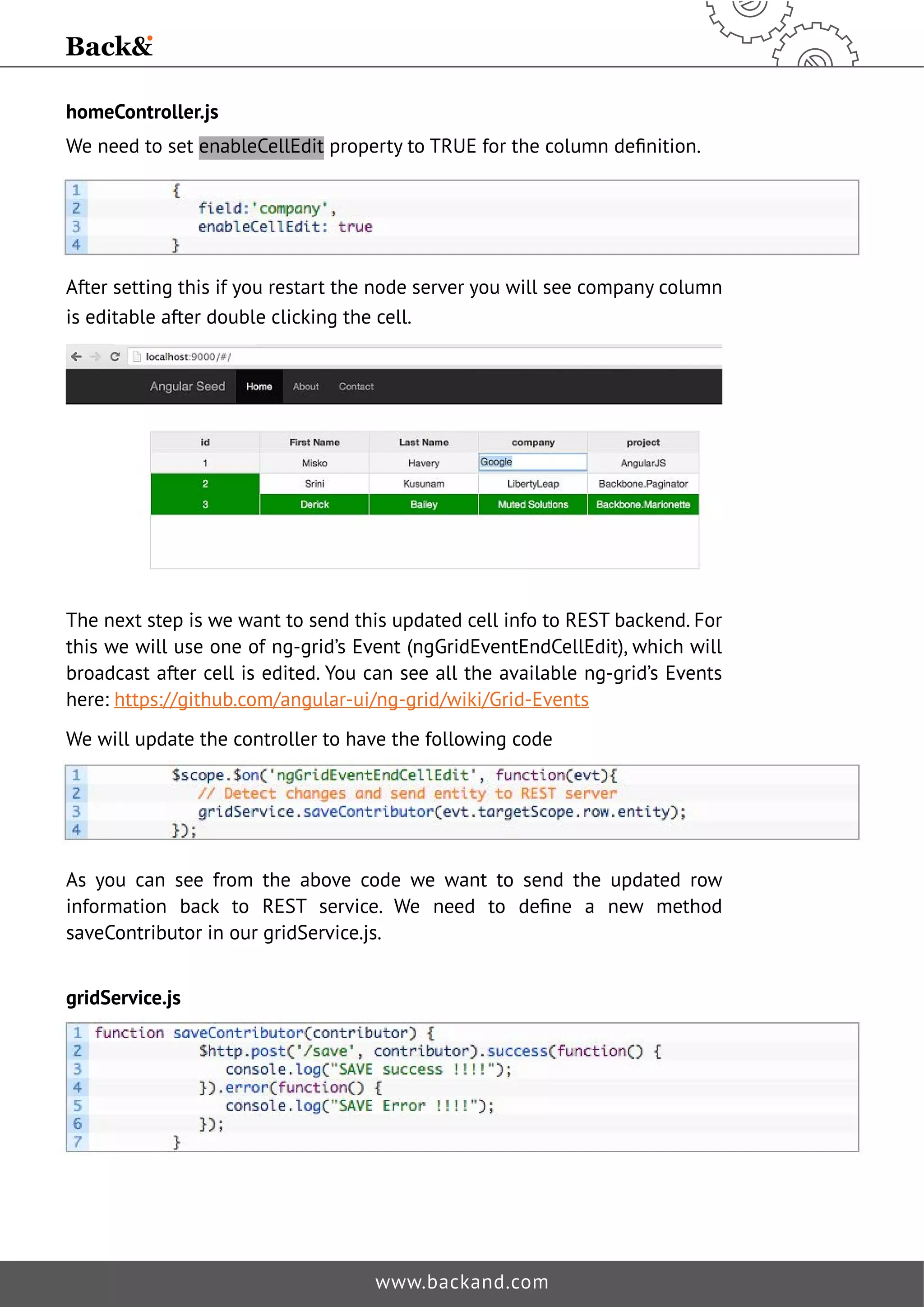
We will update the controller to have the following code 
As you can see from the above code we want to send the updated row 
LQIRUPDWLRQ EDFN WR 5(67 VHUYLFH :H QHHG WR GHˉQH D QHZ PHWKRG 
saveContributor in our gridService.js. 
www.backand.com 
gridService.js
We do not have a real REST service and it is impossible to demo this as we 
need some kind of persistent store. You can open your browser’s developer 
tools and validate above $http post method is called with the right data. 
You can see completed code for this blog here: https://github.com/backand/ 
ng-grid-rest-simple-demo. And stay tuned for Part 2 of this series when we 
cover ng-grid and a real REST API. 
References 
Blog Code: https://github.com/backand/ng-grid-rest-simple-demo 
Plunker: http://embed.plnkr.co/865hnS/preview 
ng-grid documentation: http://angular-ui.github.io/ng-grid/ 
ng-grid code: https://github.com/angular-ui/ng-grid 
www.backand.com 
Contact Information 
Backand Inc. 
info@backand.com 
www.backand.com

Part 1: ng-grid and a Simple REST API

  • 1.
    Part 1: ng-gridand a Simple REST API It is a common requirement for any project to display data in some kind of tabular format. The easiest way to achieve this is by using HTML table. But soon this gets complex as you need a way to support pagination (client-side and server-side), sorting (single & multi column), resizable columns, inline editing, ˉOWHULQJHWF Options • HTML Table • JQuery Grid Plugins (jqGrid, FlexGrid etc.) • Angular’s native implementation of Grid • ng-grid • ng-table First Grid Solution 7KHˉUVWVROXWLRQZHDUHJRLQJWRORRNDWLVng-grid which is built for AngularJS and is the most popular Grid solution out there for Angular. www.backand.com
  • 2.
    Where to Start In this Blog post we will build a grid solution using Angular and ng-grid, which hooks in to the RESTful end point running locally using NodeJS ExpressJS. We will use basic features of Node Express. Before jumping in, you may want to see the working code on Plunker: http://embed.plnkr. co/865hnS/preview. Assumptions 1. You already know AngularJS 2. Know the basics of Grunt, Bower and Bootstrap 3. Have basic knowledge about REST 4. You already have node, npm, git and bower installed on your development machine Project Structure We will use the following Angular seed project: https://github.com/libertyleap/angular-grunt-seed This is the seed project which comes with a default bower and grunt build for lint, karma, watch, livereload, express server, etc. Steps to setup run Seed Project: 1. Clone the project: git clone https://github.com/libertyleap/angular-grunt-seed.git 2. Rename the project from angular-grunt-seed to ng-grid-demo mv angular-grunt-seed ng-grid-demo 3. Change the current directory to ng-grid-demo cd ng-grid-demo 4. Execute npm install so that all the Grunt dependencies are downloaded and it also runs bower install npm install 5. Execute grunt, this will start the local Node server on port 9000. grunt www.backand.com
  • 3.
    6. Open yourfavorite browser and go to: http://localhost:9000/ Adding NG-Grid into Seed Project Using Bower The easiest way to add ng-grid to seed project is using Bower and we will cover this approach in this blog. If you are not comfortable doing this, you can do it manually i.e. go to ng-grid repo: http://angular-ui.github.io/ng-grid/ and FRSRYHUWKHUHTXLUHGˉOHVZKLFKDUHFRYHUHGEHORZ bower install ng-grid –save-dev Above command updates the ng-grid-demobower.jsonˉOHWRDGGng-grid as dependency. Bower will download ng-grid locally. You can verify this by going in to the “bower-components” folder. You will see a new folder ng-grid inside the bower-components folder. Hooking-up NG-Grid with View Restful Service To utilize ng-grid in our seed project we need to reference two ng-grid ˉOHV7KHˉUVWRQHLVWKH-DYDVFULSWˉOHDQGWKHVHFRQGLVWKH66IRUWKH WKHPLQJRIWKHJULG7KHˉUVWVWHSZLOOEHWRJRLQWRRXUindex.htmlˉOH DQGDGGERWKWKH-DYD6FULSWDQGWKHFVVˉOHVDVGHSHQGHQF www.backand.com
  • 4.
    Open the ng-grid-demo/src/index.htmlˉOHDQGDGGWKHIROORZLQJHQWULHV 1. In the head add this css dependency (bower-components/ng-grid/ng-grid. www.backand.com css). 2. In the body section add ng-grid’s js dependency (bower-components/ ng-grid/ng-grid-2.0.12.debug.js). 3. We need to add the ‘ngGrid’ Angular module dependency to app.js so that we can start using ng-grid’s directives and other services. NG-Grid Basic Example We will look at the steps required to add the basic ng-grid example in this section. We will explore ng-grid’s advanced features in coming sections. To be able to demonstrate grid features we need some kind of REST endpoint. )RUWKLVEORJSRVWZHZLOOXVHORFDO-621ˉOHDV5(67HQGSRLQWZKLFKZLOO serve list of open source contributors. REST JSON: Create a folder json XQGHU QJJULGGHPR?VUF IROGHU UHDWH D QHZ MVRQ ˉOH FDOOHGFRQWULEXWRUVMVRQ7KLV-621ˉOHZLOOKDYHWKHIROORZLQJFRQWHQWZKLFK will be served to UI ng-grid.
  • 5.
    ng-grid-demosrcjsoncontributor.json KDQJHWKH*UXQWEXLOGWRLQFOXGHWKLVMVRQˉOHLQ .builddirectory. Angular Factory: Let’s create a service (gridService.js) that will return above JSON using REST’s GET method. This data will be returned asynchronously and we will use Promises ($q) for this. Here is the Service code. We will have one method called getContributors which will use Angular’s $http (https://docs.angularjs.org/api/ng/service/$http) to get the data from MVRQFRQWULEXWRUVMVRQˉOH,WDOVRXVHV$QJXODUȠVSURPLVHLPSOHPHQWDWLRQT (https://docs.angularjs.org/api/ng/service/$q). www.backand.com
  • 6.
    This is whatis happening here: • When controller calls this factory method “getContributors” it will get a promise object back i.e. deferred.promise. • When response comes back from the asynchronous $http call we will resolve deferred object to return list of contributors. • If there is an error in $http then we will reject the deferred object with the reason so that caller can handle it appropriately i.e. show some kind of message back to user. Controller: We will add “GridService” as a dependency to “HomeController” and call “getContributors” method from GridService. Response is set as “myData” which will be used to populate ng-grid data in view. The above step $scope.gridOptions is the main setup which hooks-up ng-grid FRQˉJXUDWLRQWRQJJULGȠVYLHZ View: 6HWWLQJXSWKHJULGLQRXU+70/ˉOHLVUHDOOHDVDQGMXVWUHTXLUHVFUHDWLQJD div, and adding a ng-grid directive to it with the parameter being the function in the controller that we will create soon. We are also going to add a simple class onto the div for easy styling. Change “templateshome.html” to include the following code: Here “gridOptions” is $scope object populated in controller. This should get the basic ng-grid up and running. www.backand.com
  • 7.
    NG-Grid Features ,QWKLVVHFWLRQZHZLOOH[SORUHGLIIHUHQWFRQˉJXUDWLRQRSWLRQVIRUQJJULG:H just need to change $scope.gridOptions in Controller to be able to support the following features. ROXPQ'HˉQLWLRQ It is a common requirement for any Grid to name column names different IURPWKH-621QDPH2QHH[DPSOHDERYHLVZHZDQWWRQDPHȢˉUVWQDPHȣWR “First Name”. Cell Template Example: %HORZLVDQH[DPSOHRQKRZWRGHˉQHFHOOWHPSODWHVXVLQJVWULQJVLQQJJULG From the above example we want to apply Green color to id column with id 1. In-line Cell Editing Example: We will explore an option to be able to edit the Grid cell and save it to the REST service. We will demonstrate code to be able to update the “company” cell of the contributor in Grid. www.backand.com
  • 8.
    homeController.js We needto set enableCellEditSURSHUWWR758(IRUWKHFROXPQGHˉQLWLRQ After setting this if you restart the node server you will see company column is editable after double clicking the cell. The next step is we want to send this updated cell info to REST backend. For this we will use one of ng-grid’s Event (ngGridEventEndCellEdit), which will broadcast after cell is edited. You can see all the available ng-grid’s Events here: https://github.com/angular-ui/ng-grid/wiki/Grid-Events We will update the controller to have the following code As you can see from the above code we want to send the updated row LQIRUPDWLRQ EDFN WR 5(67 VHUYLFH :H QHHG WR GHˉQH D QHZ PHWKRG saveContributor in our gridService.js. www.backand.com gridService.js
  • 9.
    We do nothave a real REST service and it is impossible to demo this as we need some kind of persistent store. You can open your browser’s developer tools and validate above $http post method is called with the right data. You can see completed code for this blog here: https://github.com/backand/ ng-grid-rest-simple-demo. And stay tuned for Part 2 of this series when we cover ng-grid and a real REST API. References Blog Code: https://github.com/backand/ng-grid-rest-simple-demo Plunker: http://embed.plnkr.co/865hnS/preview ng-grid documentation: http://angular-ui.github.io/ng-grid/ ng-grid code: https://github.com/angular-ui/ng-grid www.backand.com Contact Information Backand Inc. info@backand.com www.backand.com