Taking Your GWTApps to Tablets with GXT
4.0
David Chandler
Developer Advocate - GXT
CONFIDENTIAL • Sencha
Inc. ©2015
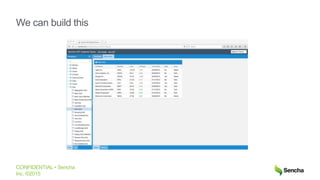
We can build this
CONFIDENTIAL • Sencha
Inc. ©2015
Something has changed
CONFIDENTIAL • Sencha
Inc. ©2015
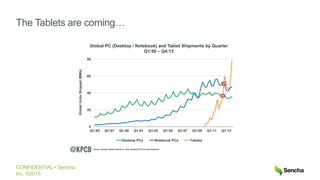
The Tablets are coming…
CONFIDENTIAL • Sencha
Inc. ©2015
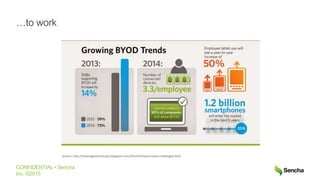
…to work
Source: http://itmanagementstudy.blogspot.com/2014/05/byod-issues-challenges.html
CONFIDENTIAL • Sencha
Inc. ©2015
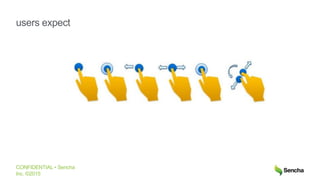
users expect
CONFIDENTIAL • Sencha
Inc. ©2015
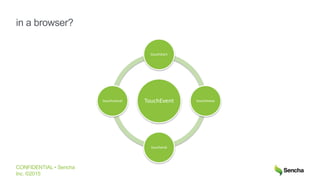
in a browser?
TouchEvent
touchstart
touchmove
touchend
touchcancel
CONFIDENTIAL • Sencha
Inc. ©2015
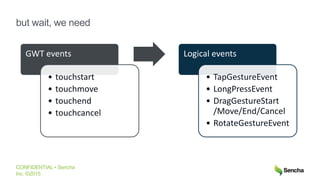
GWT events
• touchstart
• touchmove
• touchend
• touchcancel
Logical events
• TapGestureEvent
• LongPressEvent
• DragGestureStart
/Move/End/Cancel
• RotateGestureEvent
but wait, we need
CONFIDENTIAL • Sencha
Inc. ©2015
gesture
jes-cher
noun
1. a movement of a finger, stylus, or
other pointing device to express an
intended action
CONFIDENTIAL • Sencha
Inc. ©2015
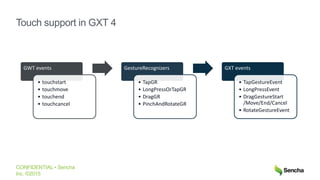
GWT events
• touchstart
• touchmove
• touchend
• touchcancel
GestureRecognizers
• TapGR
• LongPressOrTapGR
• DragGR
• PinchAndRotateGR
GXT events
• TapGestureEvent
• LongPressEvent
• DragGestureStart
/Move/End/Cancel
• RotateGestureEvent
Touch support in GXT 4
CONFIDENTIAL • Sencha
Inc. ©2015
GXT 4 Touch Demo
11
CONFIDENTIAL • Sencha
Inc. ©2015
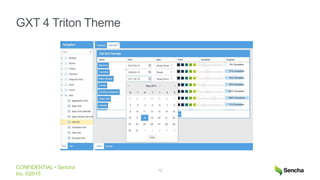
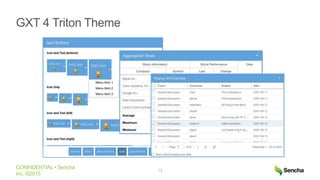
GXT 4 Triton Theme
12
CONFIDENTIAL • Sencha
Inc. ©2015
GXT 4 Triton Theme
13
CONFIDENTIAL • Sencha
Inc. ©2015
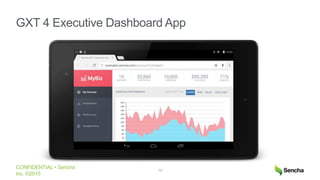
GXT 4 Executive Dashboard App
14
Getting started with touch in GXT 4
CONFIDENTIAL • Sencha
Inc. ©2015
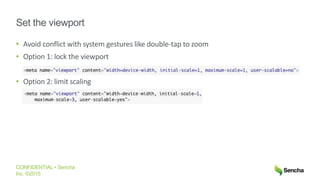
Set the viewport
• Avoid conflict with system gestures like double-tap to zoom
• Option 1: lock the viewport
• Option 2: limit scaling
CONFIDENTIAL • Sencha
Inc. ©2015
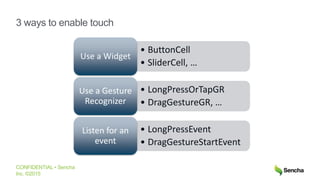
3 ways to enable touch
• ButtonCell
• SliderCell, …
Use a Widget
• LongPressOrTapGR
• DragGestureGR, …
Use a Gesture
Recognizer
• LongPressEvent
• DragGestureStartEvent
Listen for an
event
CONFIDENTIAL • Sencha
Inc. ©2015
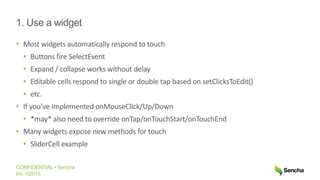
1. Use a widget
• Most widgets automatically respond to touch
• Buttons fire SelectEvent
• Expand / collapse works without delay
• Editable cells respond to single or double tap based on setClicksToEdit()
• etc.
• If you’ve implemented onMouseClick/Up/Down
• *may* also need to override onTap/onTouchStart/onTouchEnd
• Many widgets expose new methods for touch
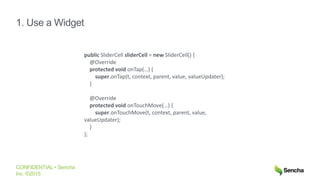
• SliderCell example
CONFIDENTIAL • Sencha
Inc. ©2015
1. Use a Widget
public SliderCell sliderCell = new SliderCell() {
@Override
protected void onTap(…) {
super.onTap(t, context, parent, value, valueUpdater);
}
@Override
protected void onTouchMove(…) {
super.onTouchMove(t, context, parent, value,
valueUpdater);
}
};
CONFIDENTIAL • Sencha
Inc. ©2015
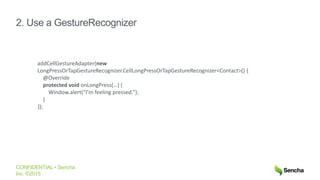
2. Use a GestureRecognizer
addCellGestureAdapter(new
LongPressOrTapGestureRecognizer.CellLongPressOrTapGestureRecognizer<Contact>() {
@Override
protected void onLongPress(…) {
Window.alert(“I’m feeling pressed.”);
}
});
CONFIDENTIAL • Sencha
Inc. ©2015
2. Use a GestureRecognizer
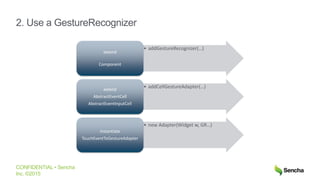
• addGestureRecognizer(…)
extend
Component
• addCellGestureAdapter(…)extend
AbstractEventCell
AbstractEventInputCell
• new Adapter(Widget w, GR…)
instantiate
TouchEventToGestureAdapter
CONFIDENTIAL • Sencha
Inc. ©2015
2. Use a GestureRecognizer
Where to call addGestureRecognizer(…)
1. Widget constructor (if all vars available)
• Example: SliderCell, Tree, …
2. as soon as you can
• Example: LiveGridView.onAfterRenderView()
CONFIDENTIAL • Sencha
Inc. ©2015
2. Use a GestureRecognizer
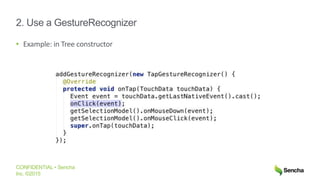
• Example: in Tree constructor
CONFIDENTIAL • Sencha
Inc. ©2015
3. Listen for an event
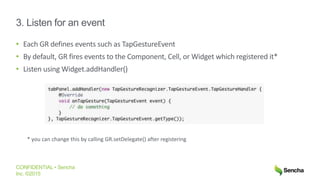
• Each GR defines events such as TapGestureEvent
• By default, GR fires events to the Component, Cell, or Widget which registered it*
• Listen using Widget.addHandler()
* you can change this by calling GR.setDelegate() after registering
CONFIDENTIAL • Sencha
Inc. ©2015
Under the covers
• Two pieces required for GestureRecognizers to work
1. must listen for the raw DOM events
2. forward events to the GestureRecognizer
• We’ve wired this for you in Component and AbstractEventCell
1. addGestureRecognizer() sinks the events
2. onBrowserEvent() => recognizer.handle()
• You only have to call addGestureRecognizer/Adapter()
CONFIDENTIAL • Sencha
Inc. ©2015
Understanding JS touch events
• https://developer.mozilla.org/en-US/docs/Web/Events/touchstart
• touches vs. changedTouches
• gotcha: target property will always be the element where touch began
• events bubble up through the DOM until stopped
• to stop bubbling, call event.stopPropagation()
• at the top level, the browser will handle in its default way
• example: right click shows context menu
• can prevent this using event.preventDefault()
CONFIDENTIAL • Sencha
Inc. ©2015
Eliminating the 300ms delay
• If no touch handlers, mobile browser will fire synthetic mouse click AFTER 300ms
• Your old code will work, but will feel sluggish
• Best answer: implement touchEnd handlers
• GXT 4 has mostly done this for you
• Or you can do it in your custom widgets:
• Use Widget.addDomHandler() or
• onBrowserEvent switch / case
• don’t forget to sink the event(s)
CONFIDENTIAL • Sencha
Inc. ©2015
Pro tips
• KEEP MOUSE AND TOUCH PATHS SEPARATE
• Why not onTouchEnd -> onMouseClick()?
• Because your code might have this hiding in it:
if (mouseDown) {...}
CONFIDENTIAL • Sencha
Inc. ©2015
Pro tips
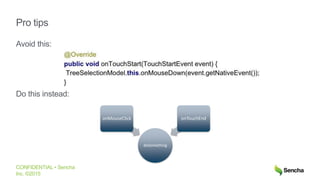
Avoid this:
Do this instead:
doSomething
onMouseClick onTouchEnd
CONFIDENTIAL • Sencha
Inc. ©2015
Pro tips
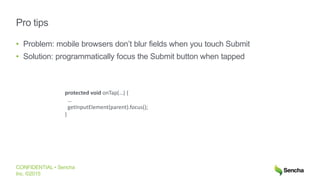
• Problem: mobile browsers don’t blur fields when you touch Submit
• Solution: programmatically focus the Submit button when tapped
protected void onTap(…) {
…
getInputElement(parent).focus();
}
CONFIDENTIAL • Sencha
Inc. ©2015
Pro tips
• handle touchEnd rather than touchStart
• otherwise, you might select things when you really wanted to scroll
• in general, touchEnd is the better method to use in TapGR
• onTouchStart() should also preventDefault()
• otherwise, long press might show browser’s context menu as well as a tool tip
• we solved this in GXT’s PanelTab
CONFIDENTIAL • Sencha
Inc. ©2015
other niceties in GXT 4.0
• property binding: gxt.device=tablet|desktop
• can be used in CSS conditionals
• also GXT.isTablet()
• caveat: it’s pretty basic!
• GestureRecognizers are independent of GXT widgets
• can use with your own widgets
• new TouchEventToGestureAdapter(Widget w, GestureRecognizer gr)
• raw events flow through as normal
Dev tricks
CONFIDENTIAL • Sencha
Inc. ©2015
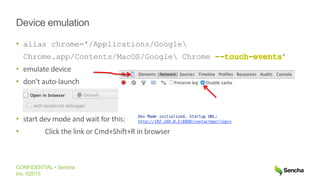
Device emulation
• alias chrome='/Applications/Google
Chrome.app/Contents/MacOS/Google Chrome --touch-events’
• emulate device
• don’t auto-launch
• start dev mode and wait for this:
• Click the link or Cmd+Shift+R in browser
CONFIDENTIAL • Sencha
Inc. ©2015
reduce initial compile time
Typical gwt.xml:
With <collapse-all-properties /> *
* not for prod. Size will increase 15-20%
[INFO] Compiling 12 permutations
[INFO] Compilation succeeded -- 144.760s
[INFO] Compiling 1 permutation
[INFO] Compilation succeeded -- 78.085s
CONFIDENTIAL • Sencha
Inc. ©2015
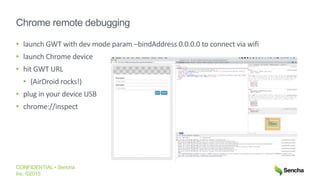
Chrome remote debugging
• launch GWT with dev mode param –bindAddress 0.0.0.0 to connect via wifi
• launch Chrome device
• hit GWT URL
• (AirDroid rocks!)
• plug in your device USB
• chrome://inspect
CONFIDENTIAL • Sencha
Inc. ©2015
Super Dev Mode
Problem:
SDM sometimes doesn’t automatically recompile on mobile
Solution:
1. force save in IDEA (tab switch or Ctrl+S)
2. refresh browser
Upcoming GWT 3.0
CONFIDENTIAL • Sencha
Inc. ©2015
GWT 3.0 is for Modern Browsers
• GWT 2.8 will be a long-lived maintenance branch
• GWT 3 is a complete rewrite of the compiler
• Java to JS transpiler “only”
• Superior JS Interoperability
• New DOM implementation
• No more Widget
• No more GWT-RPC
• No more permutations (use static factory methods instead)
CONFIDENTIAL • Sencha
Inc. ©2015
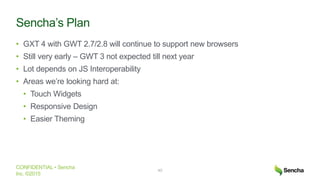
Sencha’s Plan
• GXT 4 with GWT 2.7/2.8 will continue to support new browsers
• Still very early – GWT 3 not expected till next year
• Lot depends on JS Interoperability
• Areas we’re looking hard at:
• Touch Widgets
• Responsive Design
• Easier Theming
40
Q & A
Download GXT 4 Early Access
https://www.sencha.com/blog/announcing-gxt-4-early-access/
Join Sencha GXT community on G+
Bonus: working with touch events in MVP
CONFIDENTIAL • Sencha
Inc. ©2015
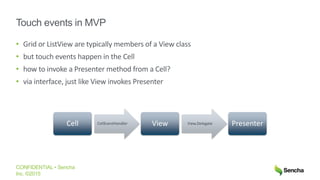
Touch events in MVP
• Grid or ListView are typically members of a View class
• but touch events happen in the Cell
• how to invoke a Presenter method from a Cell?
• via interface, just like View invokes Presenter
Cell CellEventHandler View View.Delegate Presenter
CONFIDENTIAL • Sencha
Inc. ©2015
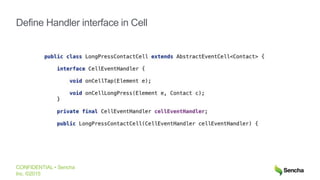
Define Handler interface in Cell
CONFIDENTIAL • Sencha
Inc. ©2015
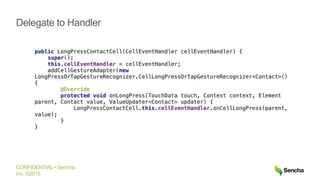
Delegate to Handler
CONFIDENTIAL • Sencha
Inc. ©2015
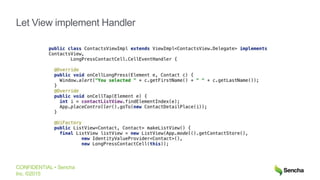
Let View implement Handler

Taking Your GWT App to Tablets with GXT 4.0

  • 1.
    Taking Your GWTAppsto Tablets with GXT 4.0 David Chandler Developer Advocate - GXT
  • 2.
    CONFIDENTIAL • Sencha Inc.©2015 We can build this
  • 3.
    CONFIDENTIAL • Sencha Inc.©2015 Something has changed
  • 4.
    CONFIDENTIAL • Sencha Inc.©2015 The Tablets are coming…
  • 5.
    CONFIDENTIAL • Sencha Inc.©2015 …to work Source: http://itmanagementstudy.blogspot.com/2014/05/byod-issues-challenges.html
  • 6.
    CONFIDENTIAL • Sencha Inc.©2015 users expect
  • 7.
    CONFIDENTIAL • Sencha Inc.©2015 in a browser? TouchEvent touchstart touchmove touchend touchcancel
  • 8.
    CONFIDENTIAL • Sencha Inc.©2015 GWT events • touchstart • touchmove • touchend • touchcancel Logical events • TapGestureEvent • LongPressEvent • DragGestureStart /Move/End/Cancel • RotateGestureEvent but wait, we need
  • 9.
    CONFIDENTIAL • Sencha Inc.©2015 gesture jes-cher noun 1. a movement of a finger, stylus, or other pointing device to express an intended action
  • 10.
    CONFIDENTIAL • Sencha Inc.©2015 GWT events • touchstart • touchmove • touchend • touchcancel GestureRecognizers • TapGR • LongPressOrTapGR • DragGR • PinchAndRotateGR GXT events • TapGestureEvent • LongPressEvent • DragGestureStart /Move/End/Cancel • RotateGestureEvent Touch support in GXT 4
  • 11.
    CONFIDENTIAL • Sencha Inc.©2015 GXT 4 Touch Demo 11
  • 12.
    CONFIDENTIAL • Sencha Inc.©2015 GXT 4 Triton Theme 12
  • 13.
    CONFIDENTIAL • Sencha Inc.©2015 GXT 4 Triton Theme 13
  • 14.
    CONFIDENTIAL • Sencha Inc.©2015 GXT 4 Executive Dashboard App 14
  • 15.
    Getting started withtouch in GXT 4
  • 16.
    CONFIDENTIAL • Sencha Inc.©2015 Set the viewport • Avoid conflict with system gestures like double-tap to zoom • Option 1: lock the viewport • Option 2: limit scaling
  • 17.
    CONFIDENTIAL • Sencha Inc.©2015 3 ways to enable touch • ButtonCell • SliderCell, … Use a Widget • LongPressOrTapGR • DragGestureGR, … Use a Gesture Recognizer • LongPressEvent • DragGestureStartEvent Listen for an event
  • 18.
    CONFIDENTIAL • Sencha Inc.©2015 1. Use a widget • Most widgets automatically respond to touch • Buttons fire SelectEvent • Expand / collapse works without delay • Editable cells respond to single or double tap based on setClicksToEdit() • etc. • If you’ve implemented onMouseClick/Up/Down • *may* also need to override onTap/onTouchStart/onTouchEnd • Many widgets expose new methods for touch • SliderCell example
  • 19.
    CONFIDENTIAL • Sencha Inc.©2015 1. Use a Widget public SliderCell sliderCell = new SliderCell() { @Override protected void onTap(…) { super.onTap(t, context, parent, value, valueUpdater); } @Override protected void onTouchMove(…) { super.onTouchMove(t, context, parent, value, valueUpdater); } };
  • 20.
    CONFIDENTIAL • Sencha Inc.©2015 2. Use a GestureRecognizer addCellGestureAdapter(new LongPressOrTapGestureRecognizer.CellLongPressOrTapGestureRecognizer<Contact>() { @Override protected void onLongPress(…) { Window.alert(“I’m feeling pressed.”); } });
  • 21.
    CONFIDENTIAL • Sencha Inc.©2015 2. Use a GestureRecognizer • addGestureRecognizer(…) extend Component • addCellGestureAdapter(…)extend AbstractEventCell AbstractEventInputCell • new Adapter(Widget w, GR…) instantiate TouchEventToGestureAdapter
  • 22.
    CONFIDENTIAL • Sencha Inc.©2015 2. Use a GestureRecognizer Where to call addGestureRecognizer(…) 1. Widget constructor (if all vars available) • Example: SliderCell, Tree, … 2. as soon as you can • Example: LiveGridView.onAfterRenderView()
  • 23.
    CONFIDENTIAL • Sencha Inc.©2015 2. Use a GestureRecognizer • Example: in Tree constructor
  • 24.
    CONFIDENTIAL • Sencha Inc.©2015 3. Listen for an event • Each GR defines events such as TapGestureEvent • By default, GR fires events to the Component, Cell, or Widget which registered it* • Listen using Widget.addHandler() * you can change this by calling GR.setDelegate() after registering
  • 25.
    CONFIDENTIAL • Sencha Inc.©2015 Under the covers • Two pieces required for GestureRecognizers to work 1. must listen for the raw DOM events 2. forward events to the GestureRecognizer • We’ve wired this for you in Component and AbstractEventCell 1. addGestureRecognizer() sinks the events 2. onBrowserEvent() => recognizer.handle() • You only have to call addGestureRecognizer/Adapter()
  • 26.
    CONFIDENTIAL • Sencha Inc.©2015 Understanding JS touch events • https://developer.mozilla.org/en-US/docs/Web/Events/touchstart • touches vs. changedTouches • gotcha: target property will always be the element where touch began • events bubble up through the DOM until stopped • to stop bubbling, call event.stopPropagation() • at the top level, the browser will handle in its default way • example: right click shows context menu • can prevent this using event.preventDefault()
  • 27.
    CONFIDENTIAL • Sencha Inc.©2015 Eliminating the 300ms delay • If no touch handlers, mobile browser will fire synthetic mouse click AFTER 300ms • Your old code will work, but will feel sluggish • Best answer: implement touchEnd handlers • GXT 4 has mostly done this for you • Or you can do it in your custom widgets: • Use Widget.addDomHandler() or • onBrowserEvent switch / case • don’t forget to sink the event(s)
  • 28.
    CONFIDENTIAL • Sencha Inc.©2015 Pro tips • KEEP MOUSE AND TOUCH PATHS SEPARATE • Why not onTouchEnd -> onMouseClick()? • Because your code might have this hiding in it: if (mouseDown) {...}
  • 29.
    CONFIDENTIAL • Sencha Inc.©2015 Pro tips Avoid this: Do this instead: doSomething onMouseClick onTouchEnd
  • 30.
    CONFIDENTIAL • Sencha Inc.©2015 Pro tips • Problem: mobile browsers don’t blur fields when you touch Submit • Solution: programmatically focus the Submit button when tapped protected void onTap(…) { … getInputElement(parent).focus(); }
  • 31.
    CONFIDENTIAL • Sencha Inc.©2015 Pro tips • handle touchEnd rather than touchStart • otherwise, you might select things when you really wanted to scroll • in general, touchEnd is the better method to use in TapGR • onTouchStart() should also preventDefault() • otherwise, long press might show browser’s context menu as well as a tool tip • we solved this in GXT’s PanelTab
  • 32.
    CONFIDENTIAL • Sencha Inc.©2015 other niceties in GXT 4.0 • property binding: gxt.device=tablet|desktop • can be used in CSS conditionals • also GXT.isTablet() • caveat: it’s pretty basic! • GestureRecognizers are independent of GXT widgets • can use with your own widgets • new TouchEventToGestureAdapter(Widget w, GestureRecognizer gr) • raw events flow through as normal
  • 33.
  • 34.
    CONFIDENTIAL • Sencha Inc.©2015 Device emulation • alias chrome='/Applications/Google Chrome.app/Contents/MacOS/Google Chrome --touch-events’ • emulate device • don’t auto-launch • start dev mode and wait for this: • Click the link or Cmd+Shift+R in browser
  • 35.
    CONFIDENTIAL • Sencha Inc.©2015 reduce initial compile time Typical gwt.xml: With <collapse-all-properties /> * * not for prod. Size will increase 15-20% [INFO] Compiling 12 permutations [INFO] Compilation succeeded -- 144.760s [INFO] Compiling 1 permutation [INFO] Compilation succeeded -- 78.085s
  • 36.
    CONFIDENTIAL • Sencha Inc.©2015 Chrome remote debugging • launch GWT with dev mode param –bindAddress 0.0.0.0 to connect via wifi • launch Chrome device • hit GWT URL • (AirDroid rocks!) • plug in your device USB • chrome://inspect
  • 37.
    CONFIDENTIAL • Sencha Inc.©2015 Super Dev Mode Problem: SDM sometimes doesn’t automatically recompile on mobile Solution: 1. force save in IDEA (tab switch or Ctrl+S) 2. refresh browser
  • 38.
  • 39.
    CONFIDENTIAL • Sencha Inc.©2015 GWT 3.0 is for Modern Browsers • GWT 2.8 will be a long-lived maintenance branch • GWT 3 is a complete rewrite of the compiler • Java to JS transpiler “only” • Superior JS Interoperability • New DOM implementation • No more Widget • No more GWT-RPC • No more permutations (use static factory methods instead)
  • 40.
    CONFIDENTIAL • Sencha Inc.©2015 Sencha’s Plan • GXT 4 with GWT 2.7/2.8 will continue to support new browsers • Still very early – GWT 3 not expected till next year • Lot depends on JS Interoperability • Areas we’re looking hard at: • Touch Widgets • Responsive Design • Easier Theming 40
  • 41.
    Q & A DownloadGXT 4 Early Access https://www.sencha.com/blog/announcing-gxt-4-early-access/ Join Sencha GXT community on G+
  • 42.
    Bonus: working withtouch events in MVP
  • 43.
    CONFIDENTIAL • Sencha Inc.©2015 Touch events in MVP • Grid or ListView are typically members of a View class • but touch events happen in the Cell • how to invoke a Presenter method from a Cell? • via interface, just like View invokes Presenter Cell CellEventHandler View View.Delegate Presenter
  • 44.
    CONFIDENTIAL • Sencha Inc.©2015 Define Handler interface in Cell
  • 45.
    CONFIDENTIAL • Sencha Inc.©2015 Delegate to Handler
  • 46.
    CONFIDENTIAL • Sencha Inc.©2015 Let View implement Handler