New Intelligences for Intelligent Agents
September 2016
Barry Dahl, Sr. Community Manager
Resources for Intelligent Agents
Community wiki: bit.ly/D2Lagents
What’s New with Intelligent Agents?
Definitions of Intelligent Agents
What is an Intelligent Agent?
• An intelligent agent is a software that
assists people and acts on their behalf.
• Intelligent agents work by allowing people to
delegate work that they could have done, to
the agent software.
• Source: Hanh Tran & Thaovy Tran
What is an Intelligent Agent in D2L?
Intelligent Agents can assist instructors,
administrators, and students by providing an
automated notification when defined activity
occurs in a course (or not) or when there is a
lack of login or course entry.
Creating an Intelligent Agent in D2L
I assume that you already know how to
create an agent.
If not, go to this URL to learn how:
bit.ly/D2Lagents
"Not" Release Conditions
Release Conditions
• Definition: Release conditions are conditional
requirements that restrict access or visibility to specific
content, resources or areas within the Brightspace
Learning Environment. Users must satisfy the conditions
before the restrictions are removed.
• New! Additional release conditions have been added
for students who have NOT satisfied certain
restrictions.
Wait. What?
• Starting with the February 2016 release (10.5.6),
the new NOT release conditions are available to
institutions on Continuous Delivery
• Sorry, they won’t be available to users with older versions of
the Learning Environment.
• If you’re on Continuous Delivery (monthly updates), you won’t
see the new conditions until your institution puts 10.5.6 into
production.
• New release conditions are ON by default.
Variables that can trigger the
release of something else
• Awards earned
• Checklist completion
• Checklist item
• Classlist enrollment
• Competencies
• Including Learning Objectives
• Content topics
• Discussion topics
• Dropbox
• Grade items
• Quizzes
• Including score on specific
questions
• Rubric scores
• Surveys
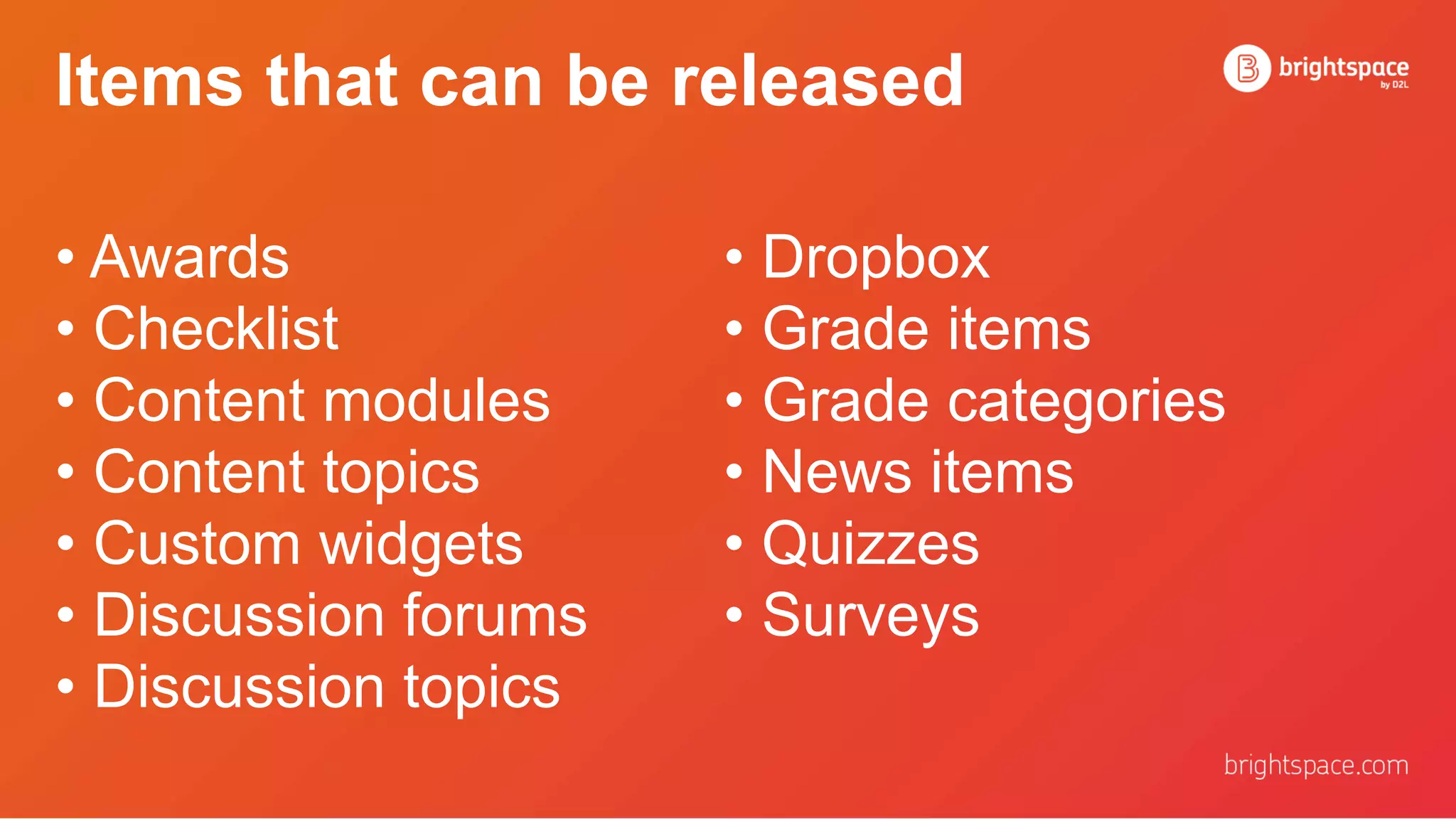
Items that can be released
• Awards
• Checklist
• Content modules
• Content topics
• Custom widgets
• Discussion forums
• Discussion topics
• Dropbox
• Grade items
• Grade categories
• News items
• Quizzes
• Surveys
Examples Using NOT Conditions
in Intelligent Agents
Example 1: Intelligent agent for
missing an assessment deadline
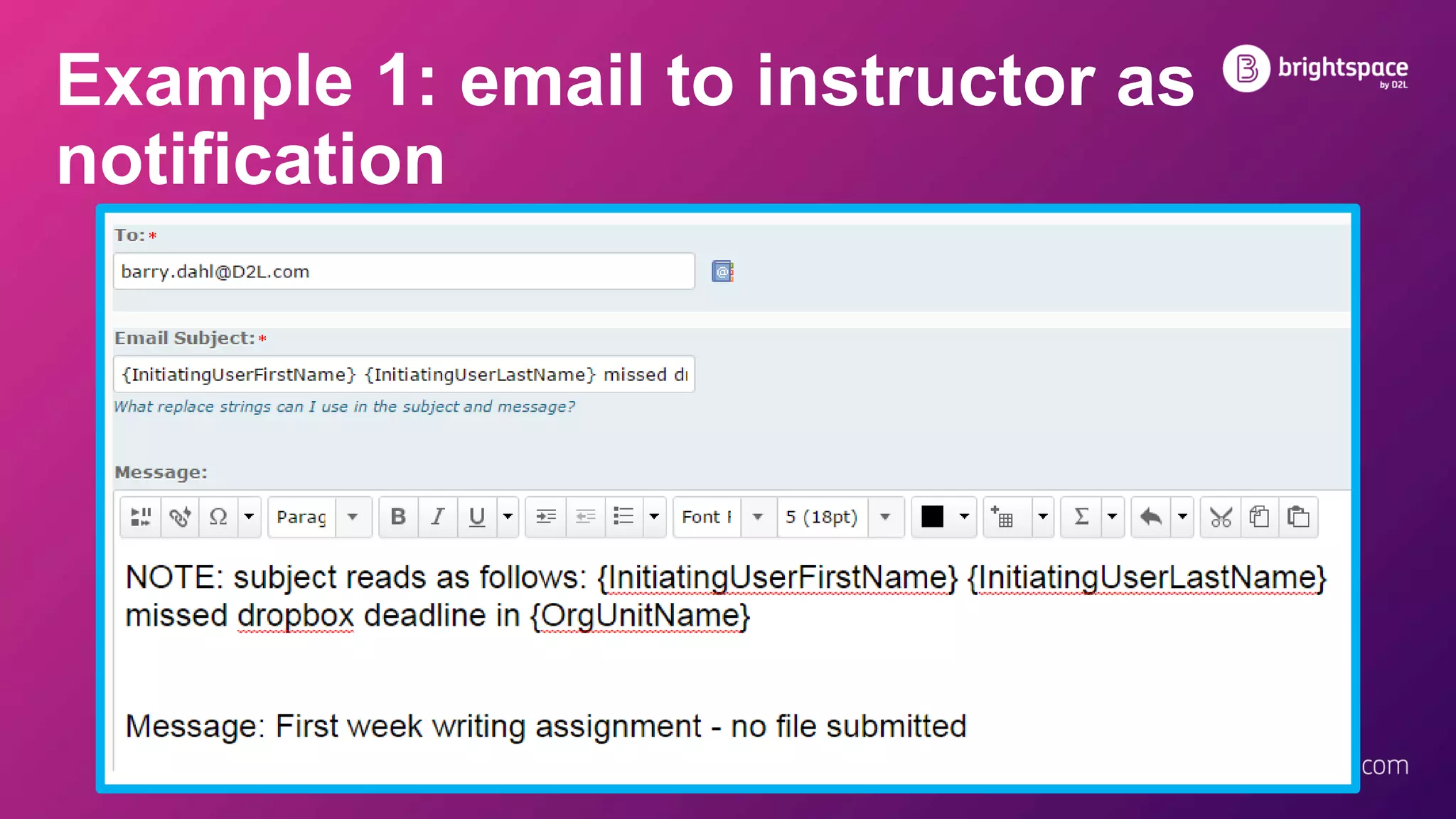
Example 1: email to instructor as
notification
Example 2: Intelligent agent for
doing one thing but not another
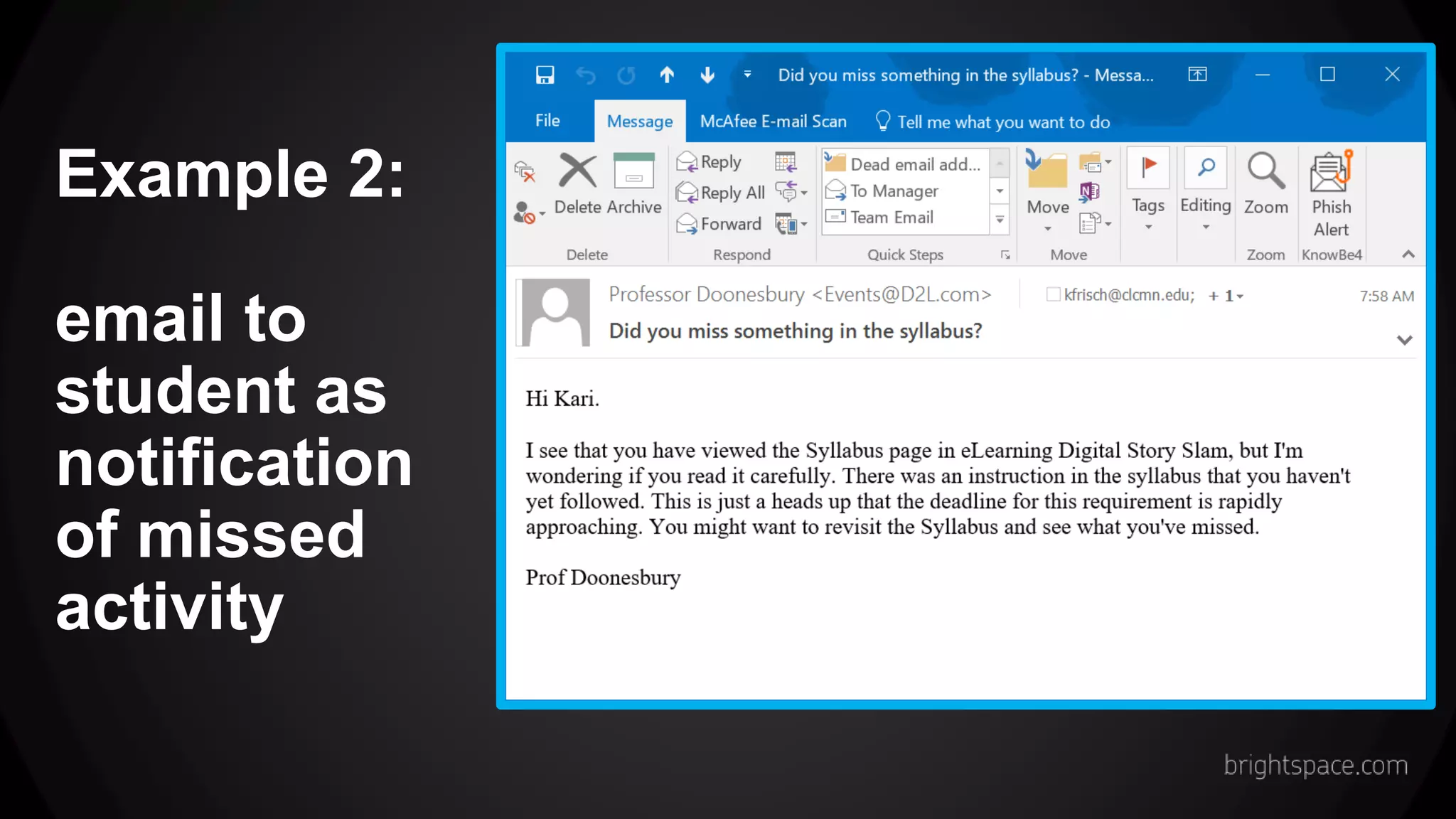
Example 2:
email to
student as
notification
of missed
activity
Example 3: Alert to possible
suspicious activity
Example 3: email to instructor with
student info
Caution: Newly developed Release Conditions
might not include the NOT option
Added in March 2016, Version 10.5.7
• Release conditions related to Awards – Badges and
Certificates
• Example: Release Content, News, etc. for someone
who has earned a particular badge or certificate.
• NOTE!! This does NOT include release conditions for
someone who has NOT earned a particular award.
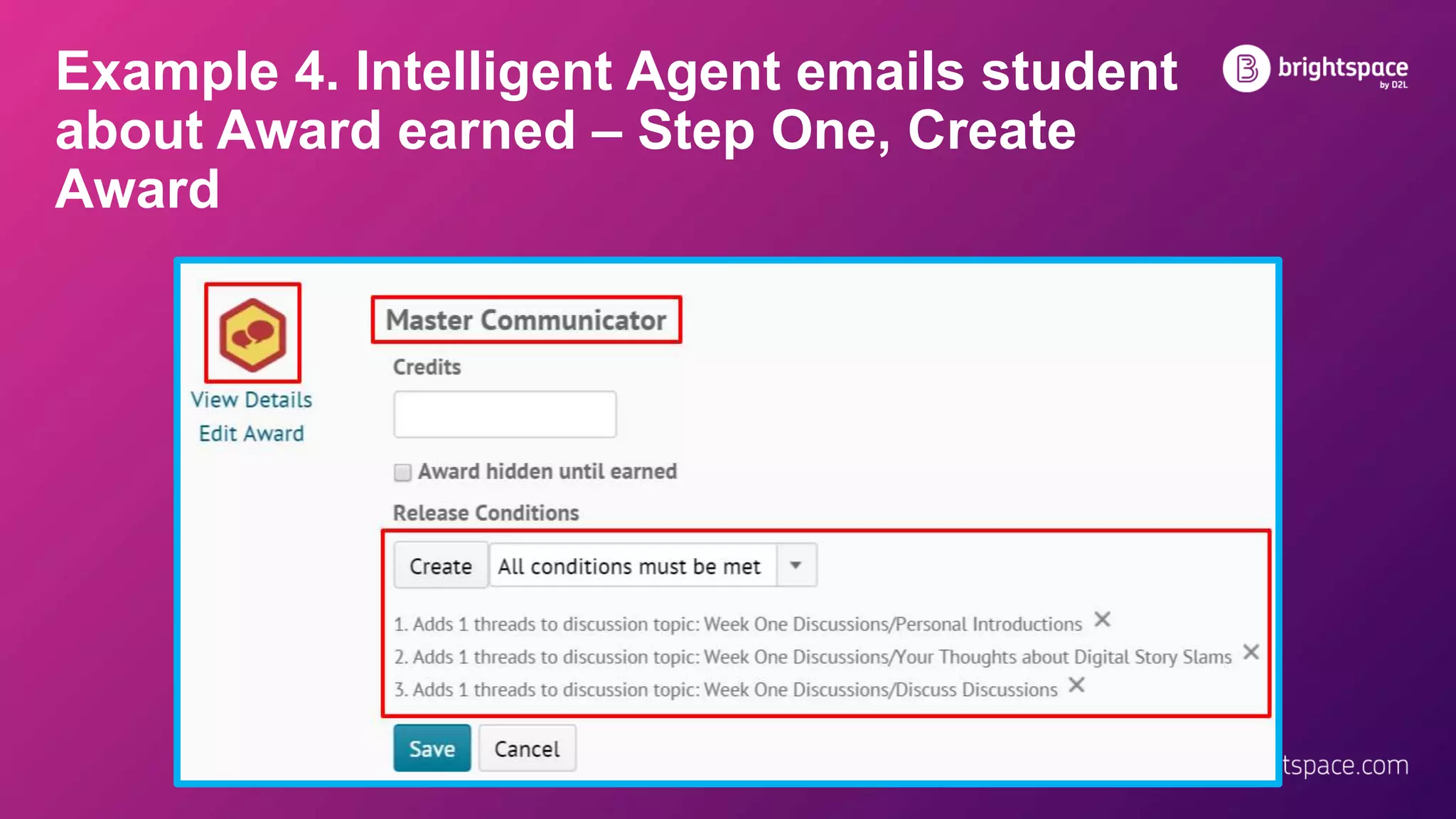
Example 4. Intelligent Agent emails student
about Award earned – Step One, Create
Award
Example 4.
Intelligent Agent
emails student
about Award
earned
Step Two, Attach
Award Release
Conditions
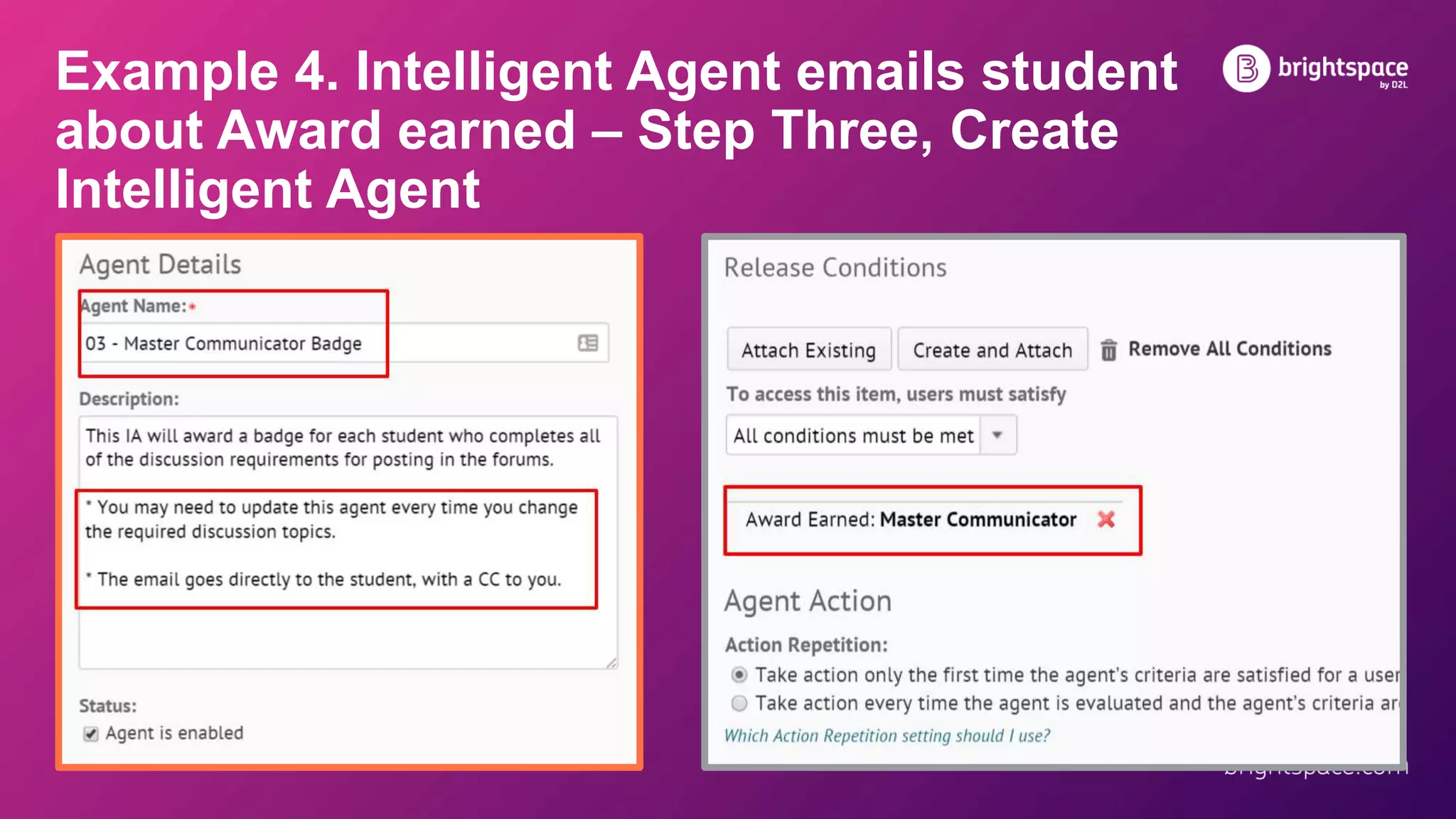
Example 4. Intelligent Agent emails student
about Award earned – Step Three, Create
Intelligent Agent
Example 4.
Intelligent Agent
emails student
about Award
earned – Step
Four, Write
Intelligent Agent
Email
Example 4.
Intelligent Agent
emails student
about Award
earned
Step Five, Run
Intelligent Agent
New Features for Intelligent Agents
“New” is a relative term, so let’s be specific.
These seven features were included in the
August 2016 LE release, or 10.6.4
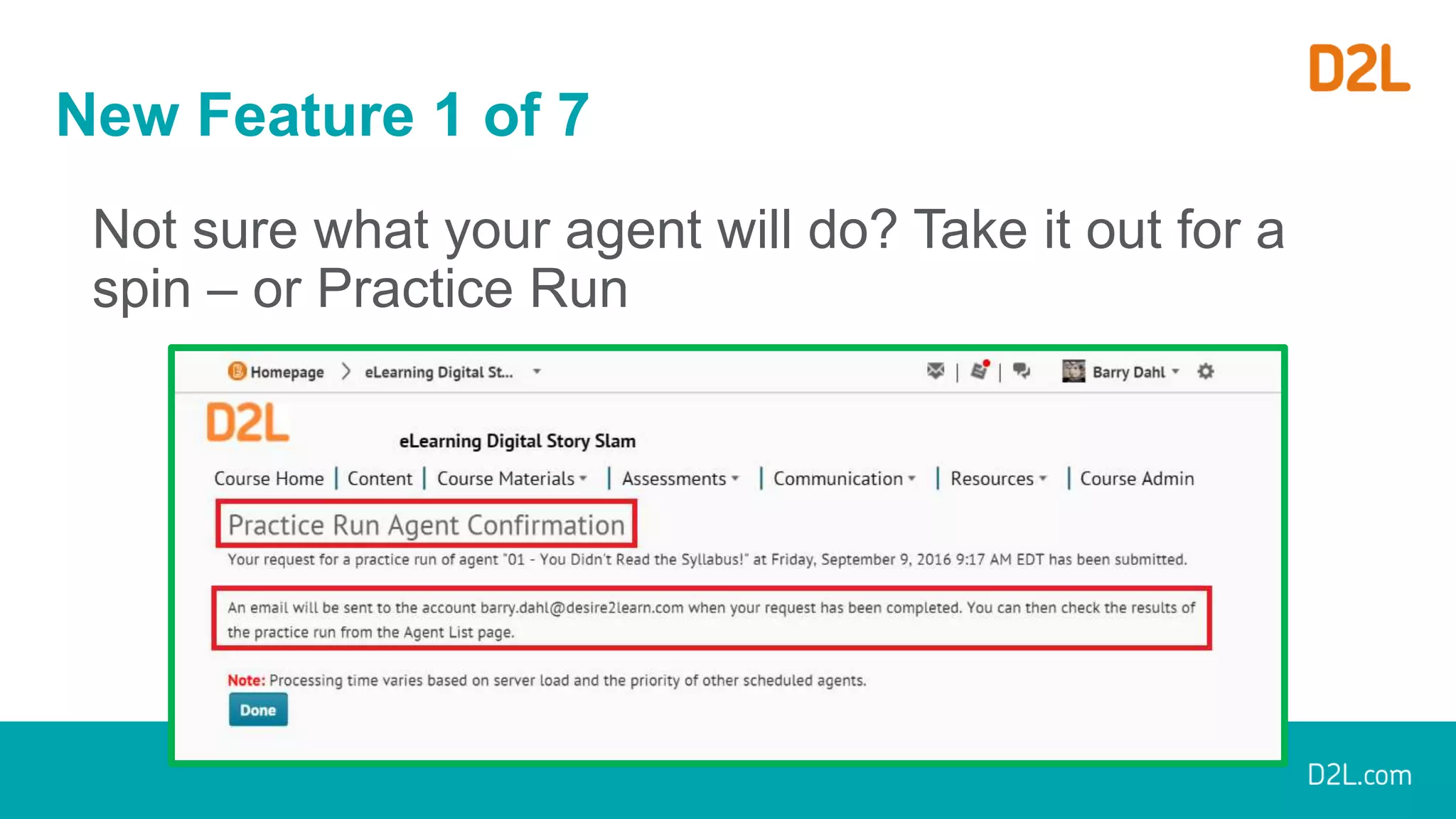
New Feature 1 of 7
Not sure what your agent will do? Take it out for a
spin – or Practice Run
New Feature 2 of 7
Want to see who has triggered it in the past?
Check out the History Page (includes Practice Runs)
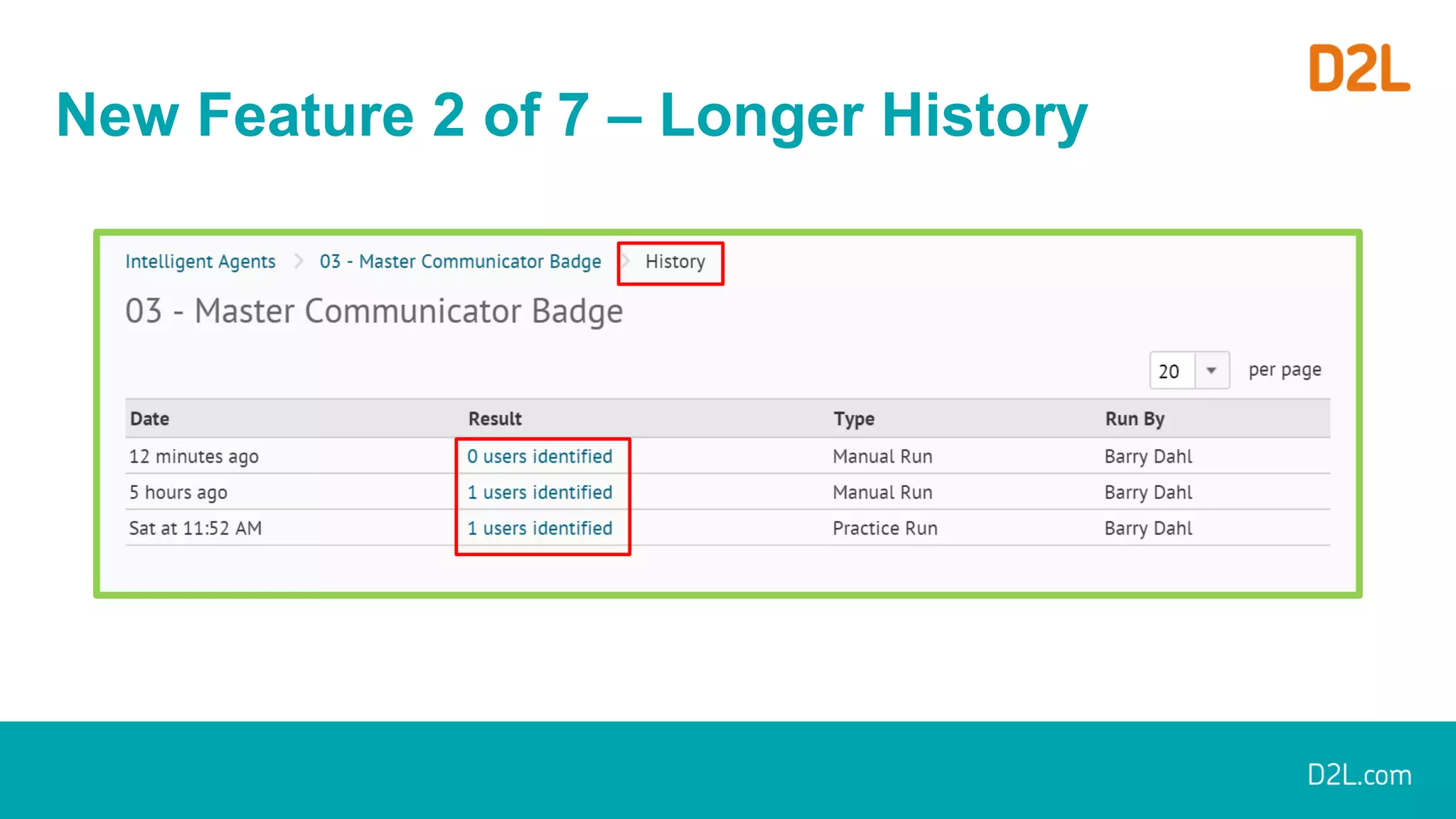
New Feature 2 of 7 – Longer History
New Feature 3 of 7
Results of Last
Run displays on
Agent home page
New Feature 4 of 7
Customizable
From: name
and
Reply-To:
email
addresses
New Feature 5 of 7
• Previously a 4,000-character limit on email text.
• Now unlimited.
No graphic needed – I think you get it.
New Feature 6 of 7
• The Agent
Name field in an
Intelligent Agent
previously truncated
to 50 characters.
• It now has an
available length of
128 characters.
New Feature 7 of 7
Users can now copy
Intelligent Agents
within the same
course from a new
context menu item for
each agent listed in
the Agent List.
These changes implemented at least
ten PIE items
Current PIE Items
• D2835 - Intelligent Agent notifications to include
{MatchingCriteria} as a replacement string (17)
• D858 - "Digest" Email for Intelligent Agent
Completion (for instructors) (16)
Sanity Check – Does it Make Sense?
• Use Intelligent Agents when there isn’t a better
way of communicating:
• Can a D2L Notification work better?
• Can a News Announcement work better?
• Can a personally crafted email work better?
• Would a discussion board posting work better?
The End is Near
Q & A

New Intelligence for Intelligent Agents | D2L

  • 1.
    New Intelligences forIntelligent Agents September 2016 Barry Dahl, Sr. Community Manager
  • 2.
    Resources for IntelligentAgents Community wiki: bit.ly/D2Lagents
  • 3.
    What’s New withIntelligent Agents?
  • 4.
  • 5.
    What is anIntelligent Agent? • An intelligent agent is a software that assists people and acts on their behalf. • Intelligent agents work by allowing people to delegate work that they could have done, to the agent software. • Source: Hanh Tran & Thaovy Tran
  • 6.
    What is anIntelligent Agent in D2L? Intelligent Agents can assist instructors, administrators, and students by providing an automated notification when defined activity occurs in a course (or not) or when there is a lack of login or course entry.
  • 7.
    Creating an IntelligentAgent in D2L I assume that you already know how to create an agent. If not, go to this URL to learn how: bit.ly/D2Lagents
  • 8.
  • 9.
    Release Conditions • Definition:Release conditions are conditional requirements that restrict access or visibility to specific content, resources or areas within the Brightspace Learning Environment. Users must satisfy the conditions before the restrictions are removed. • New! Additional release conditions have been added for students who have NOT satisfied certain restrictions.
  • 10.
    Wait. What? • Startingwith the February 2016 release (10.5.6), the new NOT release conditions are available to institutions on Continuous Delivery • Sorry, they won’t be available to users with older versions of the Learning Environment. • If you’re on Continuous Delivery (monthly updates), you won’t see the new conditions until your institution puts 10.5.6 into production. • New release conditions are ON by default.
  • 11.
    Variables that cantrigger the release of something else • Awards earned • Checklist completion • Checklist item • Classlist enrollment • Competencies • Including Learning Objectives • Content topics • Discussion topics • Dropbox • Grade items • Quizzes • Including score on specific questions • Rubric scores • Surveys
  • 12.
    Items that canbe released • Awards • Checklist • Content modules • Content topics • Custom widgets • Discussion forums • Discussion topics • Dropbox • Grade items • Grade categories • News items • Quizzes • Surveys
  • 13.
    Examples Using NOTConditions in Intelligent Agents
  • 14.
    Example 1: Intelligentagent for missing an assessment deadline
  • 15.
    Example 1: emailto instructor as notification
  • 16.
    Example 2: Intelligentagent for doing one thing but not another
  • 17.
    Example 2: email to studentas notification of missed activity
  • 18.
    Example 3: Alertto possible suspicious activity
  • 19.
    Example 3: emailto instructor with student info
  • 20.
    Caution: Newly developedRelease Conditions might not include the NOT option
  • 21.
    Added in March2016, Version 10.5.7 • Release conditions related to Awards – Badges and Certificates • Example: Release Content, News, etc. for someone who has earned a particular badge or certificate. • NOTE!! This does NOT include release conditions for someone who has NOT earned a particular award.
  • 22.
    Example 4. IntelligentAgent emails student about Award earned – Step One, Create Award
  • 23.
    Example 4. Intelligent Agent emailsstudent about Award earned Step Two, Attach Award Release Conditions
  • 24.
    Example 4. IntelligentAgent emails student about Award earned – Step Three, Create Intelligent Agent
  • 25.
    Example 4. Intelligent Agent emailsstudent about Award earned – Step Four, Write Intelligent Agent Email
  • 26.
    Example 4. Intelligent Agent emailsstudent about Award earned Step Five, Run Intelligent Agent
  • 27.
    New Features forIntelligent Agents “New” is a relative term, so let’s be specific. These seven features were included in the August 2016 LE release, or 10.6.4
  • 28.
    New Feature 1of 7 Not sure what your agent will do? Take it out for a spin – or Practice Run
  • 29.
    New Feature 2of 7 Want to see who has triggered it in the past? Check out the History Page (includes Practice Runs)
  • 30.
    New Feature 2of 7 – Longer History
  • 31.
    New Feature 3of 7 Results of Last Run displays on Agent home page
  • 32.
    New Feature 4of 7 Customizable From: name and Reply-To: email addresses
  • 33.
    New Feature 5of 7 • Previously a 4,000-character limit on email text. • Now unlimited. No graphic needed – I think you get it.
  • 34.
    New Feature 6of 7 • The Agent Name field in an Intelligent Agent previously truncated to 50 characters. • It now has an available length of 128 characters.
  • 35.
    New Feature 7of 7 Users can now copy Intelligent Agents within the same course from a new context menu item for each agent listed in the Agent List.
  • 36.
    These changes implementedat least ten PIE items
  • 37.
    Current PIE Items •D2835 - Intelligent Agent notifications to include {MatchingCriteria} as a replacement string (17) • D858 - "Digest" Email for Intelligent Agent Completion (for instructors) (16)
  • 38.
    Sanity Check –Does it Make Sense? • Use Intelligent Agents when there isn’t a better way of communicating: • Can a D2L Notification work better? • Can a News Announcement work better? • Can a personally crafted email work better? • Would a discussion board posting work better?
  • 39.
    The End isNear Q & A