

WELCOME  TO ALL
New Features in .NET  Framework 4.0
* Visual Studio 2008 may be better than sliced bread, but the development team at Microsoft has already been working on the next release. * They have recently given us Visual Studio 2010 and the .NET Framework 4.0 as a Community Technology Preview (CTP); it boasts several features that would appeal to developers.
* This article will go into features that are the most relevant to .NET developers. * Please note that because this is a CTP, it doesn't mean that the final release will be exactly as you see in the CTP or as is described here.  * I can go over the features roughly as follows :
* Call Hierarchy of methods * A New Quick Search  * Implicit Line Continuations * The dynamic type   * Optional Parameters * Named and Optional Arguments
* In complicated solutions, a single method may be used from several different places, and attempting to follow how a particular method is being called can be difficult.  * In other words, you can look at what calls your method and what your method calls in a treeview format.
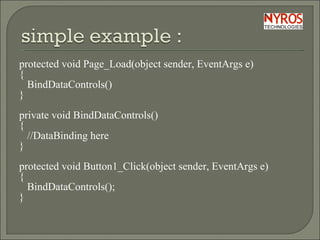
protected void Page_Load(object sender, EventArgs e) { BindDataControls() }   private void BindDataControls() { //DataBinding here }   protected void Button1_Click(object sender, EventArgs e) { BindDataControls(); }
* Now, if you wanted to figure out what calls BindDataControls(), you can right-click on it and choose "View Call Hierarchy.“ * This is a helpful visual cue for very complicated projects that we've all worked on at some point or another. * This gives you a window with a treeview format, as shown below :
 
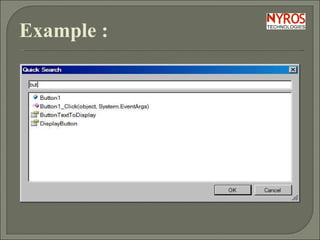
A New Quick Search : * This isn't the same as the Search or Search and Replace window that searches for specific textual strings. * It's different in the sense that it searches across symbols (methods, properties, and class names) across your solution and filters them in the result view for you.
Example :
Implicit Line Continuations : * C# has had this for a long time—long lines of code can be split across several lines for more readability. * VB.NET has had it, but you've always had to add an underscore (_) at the end of each line, which could get a little annoying.  * Certain types of statements can now be split across several lines without the _ required.
Example : Dim breakfast = { New Crumpets With { .CrumpetAge = 221, .CrumpetSmell = "Foul" }, New Crumpets With { .CrumpetSmell = "good", .CrumpetAge = 1 } }
The dynamic type : * C# 4.0 introduces a new static type called dynamic. When you have an object of type dynamic you can “do things to it” that are resolved only at runtime: * dynamic d = GetDynamicObject(…); d.M(7);
* The C# compiler allows you to call a method with any name and any arguments on d because it is of type dynamic. *At runtime the actual object that d refers to will be examined to determine what it means to “call M with an int” on it.
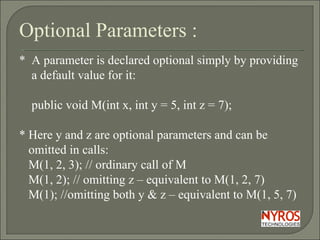
Optional Parameters : *  A parameter is declared optional simply by providing  a default value for it: public void M(int x, int y = 5, int z = 7); * Here y and z are optional parameters and can be  omitted in calls: M(1, 2, 3); // ordinary call of M   M(1, 2); // omitting z – equivalent to M(1, 2, 7)   M(1); //omitting both y & z – equivalent to M(1, 5, 7)
Named and optional arguments : *  C# 4.0 does not permit you to omit arguments between commas as in M(1,,3). * This could lead to highly unreadable comma-counting code. Instead any argument can be passed by name. * Thus if you want to omit only y from a call of M you can write:
M(1, z: 3); // passing z by name Or M(x: 1, z: 3); // passing both x and z by name Or M(z: 3, x: 1); // reversing the order of arguments
Thank You

New Features in .Net Framework 4.0 By Nyros Developer

  • 1.
  • 2.
    New Features in.NET Framework 4.0
  • 3.
    * Visual Studio2008 may be better than sliced bread, but the development team at Microsoft has already been working on the next release. * They have recently given us Visual Studio 2010 and the .NET Framework 4.0 as a Community Technology Preview (CTP); it boasts several features that would appeal to developers.
  • 4.
    * This articlewill go into features that are the most relevant to .NET developers. * Please note that because this is a CTP, it doesn't mean that the final release will be exactly as you see in the CTP or as is described here. * I can go over the features roughly as follows :
  • 5.
    * Call Hierarchyof methods * A New Quick Search * Implicit Line Continuations * The dynamic type * Optional Parameters * Named and Optional Arguments
  • 6.
    * In complicatedsolutions, a single method may be used from several different places, and attempting to follow how a particular method is being called can be difficult. * In other words, you can look at what calls your method and what your method calls in a treeview format.
  • 7.
    protected void Page_Load(objectsender, EventArgs e) { BindDataControls() }   private void BindDataControls() { //DataBinding here }   protected void Button1_Click(object sender, EventArgs e) { BindDataControls(); }
  • 8.
    * Now, ifyou wanted to figure out what calls BindDataControls(), you can right-click on it and choose "View Call Hierarchy.“ * This is a helpful visual cue for very complicated projects that we've all worked on at some point or another. * This gives you a window with a treeview format, as shown below :
  • 9.
  • 10.
    A New QuickSearch : * This isn't the same as the Search or Search and Replace window that searches for specific textual strings. * It's different in the sense that it searches across symbols (methods, properties, and class names) across your solution and filters them in the result view for you.
  • 11.
  • 12.
    Implicit Line Continuations: * C# has had this for a long time—long lines of code can be split across several lines for more readability. * VB.NET has had it, but you've always had to add an underscore (_) at the end of each line, which could get a little annoying. * Certain types of statements can now be split across several lines without the _ required.
  • 13.
    Example : Dimbreakfast = { New Crumpets With { .CrumpetAge = 221, .CrumpetSmell = "Foul" }, New Crumpets With { .CrumpetSmell = "good", .CrumpetAge = 1 } }
  • 14.
    The dynamic type: * C# 4.0 introduces a new static type called dynamic. When you have an object of type dynamic you can “do things to it” that are resolved only at runtime: * dynamic d = GetDynamicObject(…); d.M(7);
  • 15.
    * The C#compiler allows you to call a method with any name and any arguments on d because it is of type dynamic. *At runtime the actual object that d refers to will be examined to determine what it means to “call M with an int” on it.
  • 16.
    Optional Parameters :* A parameter is declared optional simply by providing a default value for it: public void M(int x, int y = 5, int z = 7); * Here y and z are optional parameters and can be omitted in calls: M(1, 2, 3); // ordinary call of M M(1, 2); // omitting z – equivalent to M(1, 2, 7) M(1); //omitting both y & z – equivalent to M(1, 5, 7)
  • 17.
    Named and optionalarguments : * C# 4.0 does not permit you to omit arguments between commas as in M(1,,3). * This could lead to highly unreadable comma-counting code. Instead any argument can be passed by name. * Thus if you want to omit only y from a call of M you can write:
  • 18.
    M(1, z: 3);// passing z by name Or M(x: 1, z: 3); // passing both x and z by name Or M(z: 3, x: 1); // reversing the order of arguments
  • 19.