7 Analyzing Systems Using Data Dictionary
Data Dictionary A reference work of data about data (metadata) Collects and coordinates data terms, and confirms what each term means to different people in the organization.
Need for Understanding the Data Dictionary Provide documentation. Eliminate redundancy. Validate the data flow diagram. Provide a starting point for developing screens and reports. Determine the contents of data stored in files. To develop the logic for DFD processes. Create XML.
The Data Repository A data repository is a large collection of project information. It includes: Information about the data maintained by the system Procedural logic and use cases Screen and report design Data relationships Project requirements and final system deliverables Project management information
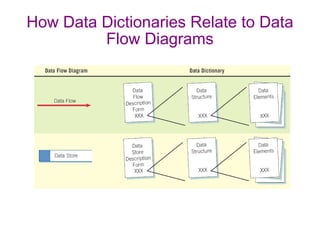
How Data Dictionaries Relate to Data Flow Diagrams
Data Dictionary Categories Data flows Data structures Elements Data stores
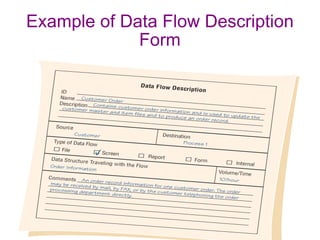
Defining the Data Flow  ID—identification number Unique descriptive name A general description of the data flow The source of the data flow The destination of the data flow Type of data flow The name of the data structure describing the elements The volume per unit time An area for further comments and notations
Example of Data Flow Description Form
Describing Data Structures Data structures are made up of smaller structures and elements. An algebraic notation is used to describe data structures.
Algebraic Notation Equal sign, meaning “is composed of” Plus sign, meaning “and” Braces {} meaning repetitive elements Brackets [] for an either/or situation Parentheses () for an optional element
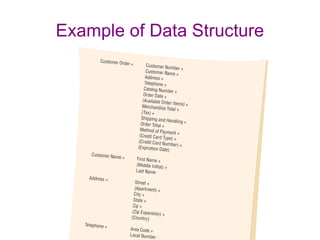
Example of Data Structure
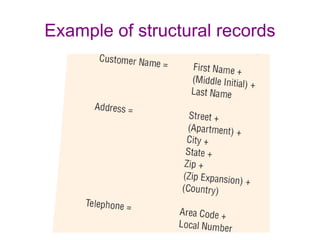
Structural Records A data structure may consist of elements or structural records. Structural records - must be further defined until they are broken down into their component elements.
Example of structural records
Logical and Physical Data Structures Logical - Show what data the business needs for its day-to-day operations. Physical - Include additional elements necessary for implementing the system.
Physical Data Structure Physical Data structures include additional elements necessary for implementing the system, eg: Key fields used to locate records Codes to identify record status Transaction codes to identify different record types Repeating group entries Limits on items in a repeating group Password
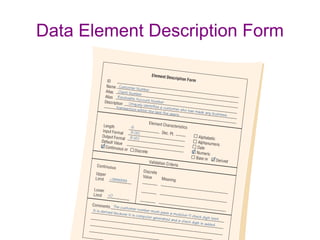
Data Element Each data element should be defined in data dictionary. Common characteristic include : Element ID  The name of the element Aliases A short description of the element Element is base or derived Element length Type of data Input and output formats Validation criteria Default value An additional comment or remark area
Data Element Description Form
Data Element Description Element ID Optional entry Allows the analyst to build automated data dictionary entries
Data Element Description The Name of the Element Should be: Descriptive Unique Based on what the element is commonly called in most programs or by the major user of the element
Data Element Description Aliases Synonyms or other names for the element Names used by different users in different systems A CUSTOMER NUMBER may also be called a RECEIVABLE ACCOUNT NUMBER or a CLIENT NUMBER.
Data Element Description Element Is Base or Derived A base element is one that has been initially keyed into the system. A derived element is one that is created by a process, usually as the result of a calculation or a series of decision-making statements.
Data Element Description Element Length Some elements have standard lengths : country abbreviations, post codes, or telephone numbers. For other elements, the length may vary and the analyst and user community must decide the final length.
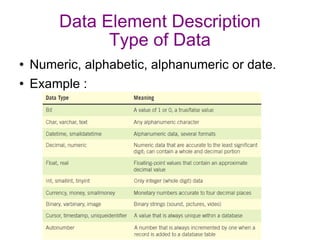
Data Element Description Type of Data Numeric, alphabetic, alphanumeric or date. Example :
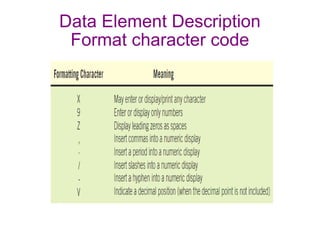
Data Element Description Format character code
Data Element Description Continuous or Discrete Discrete, meaning they have fixed values Continuous, with a smooth range of values
Data Store Data stores are created for each different data entity being stored. When data flow base elements are grouped together to form a structural record, a data store is created for each unique structural record. Because a given data flow may only show part of the collective data that a structural record contains, many different data flow structures may need to be examined to arrive at a complete data store description.
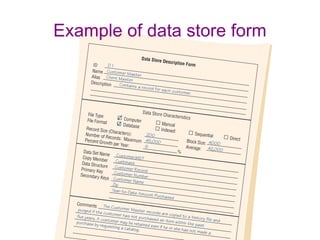
Describing the Data Store The data store ID The data store name  An alias for the table A short description of the data store The file type File format
Describing the Data Store (Continued) The maximum and average number of records on the file as well as the growth per year The file or data set name specifies the file name, if known. The data structure should use a name found in the data dictionary. Primary and secondary keys Comments
Example of data store form
Creating the Data Dictionary Data dictionary entries  Created after the data flow diagram is completed or Created as the data flow diagram is being developed Created using a top-down approach
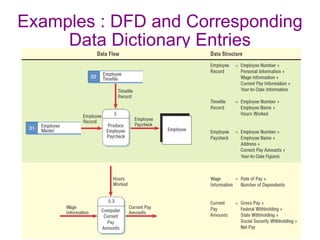
Examples : DFD and Corresponding Data Dictionary Entries
Using the Data Dictionary May be used to Generate computer language source code (e.g : XML) Create screens, reports, and forms Analyze the system design, detecting flaws and areas that need clarification
Create Screens, Reports, and Forms Use the element definition and their lengths. Arrange the elements in a pleasing and functional way using design guidelines and common sense. Repeating groups become columns. Structural records are grouped together on the screen, report, or form.
Analyze the System Design, Detecting Flaws and Areas that Need Clarification All base elements on an output data flow must be present on an input data flow to the process producing the output. A derived element should be created by a process and should be output from at least one process into which it is not input. The elements that are present in a data flow coming into or going out of a data store must be contained in the data store.

New

  • 1.
    7 Analyzing SystemsUsing Data Dictionary
  • 2.
    Data Dictionary Areference work of data about data (metadata) Collects and coordinates data terms, and confirms what each term means to different people in the organization.
  • 3.
    Need for Understandingthe Data Dictionary Provide documentation. Eliminate redundancy. Validate the data flow diagram. Provide a starting point for developing screens and reports. Determine the contents of data stored in files. To develop the logic for DFD processes. Create XML.
  • 4.
    The Data RepositoryA data repository is a large collection of project information. It includes: Information about the data maintained by the system Procedural logic and use cases Screen and report design Data relationships Project requirements and final system deliverables Project management information
  • 5.
    How Data DictionariesRelate to Data Flow Diagrams
  • 6.
    Data Dictionary CategoriesData flows Data structures Elements Data stores
  • 7.
    Defining the DataFlow ID—identification number Unique descriptive name A general description of the data flow The source of the data flow The destination of the data flow Type of data flow The name of the data structure describing the elements The volume per unit time An area for further comments and notations
  • 8.
    Example of DataFlow Description Form
  • 9.
    Describing Data StructuresData structures are made up of smaller structures and elements. An algebraic notation is used to describe data structures.
  • 10.
    Algebraic Notation Equalsign, meaning “is composed of” Plus sign, meaning “and” Braces {} meaning repetitive elements Brackets [] for an either/or situation Parentheses () for an optional element
  • 11.
    Example of DataStructure
  • 12.
    Structural Records Adata structure may consist of elements or structural records. Structural records - must be further defined until they are broken down into their component elements.
  • 13.
  • 14.
    Logical and PhysicalData Structures Logical - Show what data the business needs for its day-to-day operations. Physical - Include additional elements necessary for implementing the system.
  • 15.
    Physical Data StructurePhysical Data structures include additional elements necessary for implementing the system, eg: Key fields used to locate records Codes to identify record status Transaction codes to identify different record types Repeating group entries Limits on items in a repeating group Password
  • 16.
    Data Element Eachdata element should be defined in data dictionary. Common characteristic include : Element ID The name of the element Aliases A short description of the element Element is base or derived Element length Type of data Input and output formats Validation criteria Default value An additional comment or remark area
  • 17.
  • 18.
    Data Element DescriptionElement ID Optional entry Allows the analyst to build automated data dictionary entries
  • 19.
    Data Element DescriptionThe Name of the Element Should be: Descriptive Unique Based on what the element is commonly called in most programs or by the major user of the element
  • 20.
    Data Element DescriptionAliases Synonyms or other names for the element Names used by different users in different systems A CUSTOMER NUMBER may also be called a RECEIVABLE ACCOUNT NUMBER or a CLIENT NUMBER.
  • 21.
    Data Element DescriptionElement Is Base or Derived A base element is one that has been initially keyed into the system. A derived element is one that is created by a process, usually as the result of a calculation or a series of decision-making statements.
  • 22.
    Data Element DescriptionElement Length Some elements have standard lengths : country abbreviations, post codes, or telephone numbers. For other elements, the length may vary and the analyst and user community must decide the final length.
  • 23.
    Data Element DescriptionType of Data Numeric, alphabetic, alphanumeric or date. Example :
  • 24.
    Data Element DescriptionFormat character code
  • 25.
    Data Element DescriptionContinuous or Discrete Discrete, meaning they have fixed values Continuous, with a smooth range of values
  • 26.
    Data Store Datastores are created for each different data entity being stored. When data flow base elements are grouped together to form a structural record, a data store is created for each unique structural record. Because a given data flow may only show part of the collective data that a structural record contains, many different data flow structures may need to be examined to arrive at a complete data store description.
  • 27.
    Describing the DataStore The data store ID The data store name An alias for the table A short description of the data store The file type File format
  • 28.
    Describing the DataStore (Continued) The maximum and average number of records on the file as well as the growth per year The file or data set name specifies the file name, if known. The data structure should use a name found in the data dictionary. Primary and secondary keys Comments
  • 29.
    Example of datastore form
  • 30.
    Creating the DataDictionary Data dictionary entries Created after the data flow diagram is completed or Created as the data flow diagram is being developed Created using a top-down approach
  • 31.
    Examples : DFDand Corresponding Data Dictionary Entries
  • 32.
    Using the DataDictionary May be used to Generate computer language source code (e.g : XML) Create screens, reports, and forms Analyze the system design, detecting flaws and areas that need clarification
  • 33.
    Create Screens, Reports,and Forms Use the element definition and their lengths. Arrange the elements in a pleasing and functional way using design guidelines and common sense. Repeating groups become columns. Structural records are grouped together on the screen, report, or form.
  • 34.
    Analyze the SystemDesign, Detecting Flaws and Areas that Need Clarification All base elements on an output data flow must be present on an input data flow to the process producing the output. A derived element should be created by a process and should be output from at least one process into which it is not input. The elements that are present in a data flow coming into or going out of a data store must be contained in the data store.