LS8 - Analyzing Systems Using Data Dictionaries.pdf
1.
Analyzing Systems UsingData Dictionaries
CSE 4407
Md. Bakhtiar Hasan
Assistant Professor
Department of Computer Science and Engineering
Islamic University of Technology
July 29, 2025
2.
The Data Dictionary
•What
◦ Think of it as a specialized dictionary, but for data
◦ A reference work of metadata
◦ Example: Customer ID, Order Status Code, Product Price, etc.
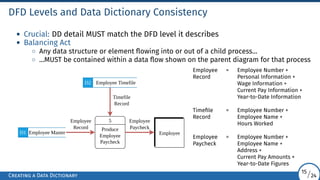
◦ “The system’s official glossary!”
• Core Purpose
◦ Guides analysts during analysis and design
◦ Collects, coordinates, and confirms data term meanings across the organization
◦ Ensures everyone speaks the same “data language”
The Data Dictionary
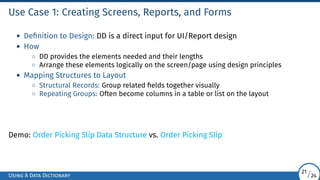
2/24
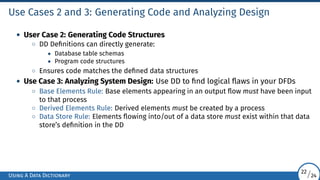
3.
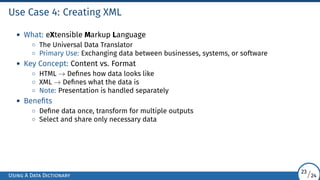
The Need fora Data Dictionary
• Automated Tools?
◦ Many DBMS and CASE tools include automated DDs
◦ They catalog items, provide templates, ensure uniformity
• Crucial Role: Keeping data CLEAN!
◦ Ensures data consistency → Avoids chaos!
◦ Example: External Customer stored as “Ext”, “E”, or “1”? → Bad!
◦ “A DD is like a data ‘style guide’ - keeps things tidy!”
• Vital for Analyst
◦ Even with tools, you need to know:
• What goes into a DD?
• Conventions and structure
• How it’s developed → Often starting from DFDs!
◦ Helps conceptualize the system deeply
The Data Dictionary
3/24
4.
Key Uses ofa Data Dictionary
• Validate DFDs: Ensure completeness and accuracy → Does every flow/store/
process have defined data?
• Develop Screens and Reports: Provides a starting point for fields needed
• Define Data Stores: Determines the exact contents of files/tables
• Develop Process Logic: Helps create detailed logic (mini-specs) for DFD processes
• Create XML: Structures data definitions for data exchange
The Data Dictionary
4/24
5.
Data Repository vs.Data Dictionary
• Data Dictionary: Focuses on data definitions and procedures
• Data Repository: A larger collection of project information → Project Encyclopedia
• Inside a Repository
◦ Procedural Logic and Use Cases
◦ Screen and Report Designs
◦ Data Relationships
◦ Project Requirements and Deliverables
◦ Project Management Info
• Central hub for everything
The Data Repository
5/24
6.
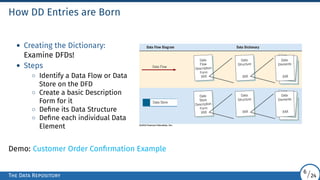
How DD Entriesare Born
• Creating the Dictionary:
Examine DFDs!
• Steps
◦ Identify a Data Flow or Data
Store on the DFD
◦ Create a basic Description
Form for it
◦ Define its Data Structure
◦ Define each individual Data
Element
Demo: Customer Order Confirmation Example
The Data Repository
6/24
7.
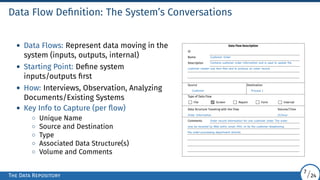
Data Flow Definition:The System’s Conversations
• Data Flows: Represent data moving in the
system (inputs, outputs, internal)
• Starting Point: Define system
inputs/outputs first
• How: Interviews, Observation, Analyzing
Documents/Existing Systems
• Key Info to Capture (per flow)
◦ Unique Name
◦ Source and Destination
◦ Type
◦ Associated Data Structure(s)
◦ Volume and Comments
Data Flow Description
ID
Name Customer Order
Description Contains customer order information and is used to update the
customer master and item files and to produce an order record.
Source Destination
Customer Process 1
Type of Data Flow
File Screen Report Form Internal
Data Structure Traveling with the Flow Volume/Time
Order Information 10/hour
Comments Order record information for one customer order. The order
may be received by Web entry, email, FAX, or by the customer telephoning
the order-processing department directly.
The Data Repository
7/24
8.
Data Structures: TheBlueprint
• Data Structure: Defines what elements make up a data flow or data store
• Method: Algebraic Notation
◦ = means “is composed of”
◦ + means “and”
◦ { } means repetition
◦ [ ] means either/or
◦ ( ) means optional
• Structured Records: Group related elements
• Goal: Break down structures into their basic Data Elements
Demo: Data Structure Description Example
The Data Repository
8/24
9.
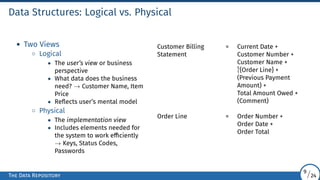
Data Structures: Logicalvs. Physical
• Two Views
◦ Logical
• The user’s view or business
perspective
• What data does the business
need? → Customer Name, Item
Price
• Reflects user’s mental model
◦ Physical
• The implementation view
• Includes elements needed for
the system to work efficiently
→ Keys, Status Codes,
Passwords
Customer Billing = Current Date +
Statement Customer Number +
Customer Name +
5
1 {Order Line} +
(Previous Payment
Amount) +
Total Amount Owed +
(Comment)
Order Line = Order Number +
Order Date +
Order Total
The Data Repository
9/24
10.
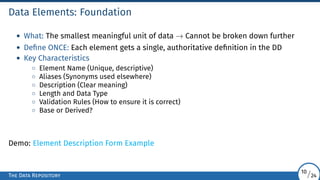
Data Elements: Foundation
•What: The smallest meaningful unit of data → Cannot be broken down further
• Define ONCE: Each element gets a single, authoritative definition in the DD
• Key Characteristics
◦ Element Name (Unique, descriptive)
◦ Aliases (Synonyms used elsewhere)
◦ Description (Clear meaning)
◦ Length and Data Type
◦ Validation Rules (How to ensure it is correct)
◦ Base or Derived?
Demo: Element Description Form Example
The Data Repository
10/24
11.
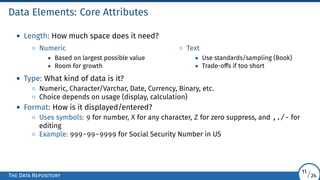
Data Elements: CoreAttributes
• Length: How much space does it need?
◦ Numeric
• Based on largest possible value
• Room for growth
◦ Text
• Use standards/sampling (Book)
• Trade-offs if too short
• Type: What kind of data is it?
◦ Numeric, Character/Varchar, Date, Currency, Binary, etc.
◦ Choice depends on usage (display, calculation)
• Format: How is it displayed/entered?
◦ Uses symbols: 9 for number, X for any character, Z for zero suppress, and ,./- for
editing
◦ Example: 999-99-9999 for Social Security Number in US
The Data Repository
11/24
12.
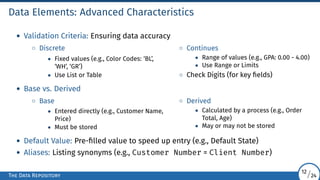
Data Elements: AdvancedCharacteristics
• Validation Criteria: Ensuring data accuracy
◦ Discrete
• Fixed values (e.g., Color Codes: ‘BL’,
‘WH’, ‘GR’)
• Use List or Table
◦ Continues
• Range of values (e.g., GPA: 0.00 - 4.00)
• Use Range or Limits
◦ Check Digits (for key fields)
• Base vs. Derived
◦ Base
• Entered directly (e.g., Customer Name,
Price)
• Must be stored
◦ Derived
• Calculated by a process (e.g., Order
Total, Age)
• May or may not be stored
• Default Value: Pre-filled value to speed up entry (e.g., Default State)
• Aliases: Listing synonyms (e.g., Customer Number = Client Number)
The Data Repository
12/24
13.
Data Stores: WhereData Lives
• What
◦ Where the system’s data resides persistently
◦ Files, databases, tables
◦ Group related elements into structural records (often based on entities like
Customer, Product, Order)
◦ May need to combine info from multiple data flows
• Purpose: Stores collections of base elements (and sometimes derived)
• Key Info
◦ ID and Name
◦ File Type and Format
◦ Size/Growth
◦ Primary and Secondary Keys
Demo: Data Store Description Form Example
The Data Repository
13/24
14.
Creating and DataDictionary: When and How
• Flexible Timing
◦ Option 1: Create after DFDs are finalized
◦ Option 2: Create concurrently with DFDs (Top-Down)
• Top-Down Approach (Recommended)
◦ Initial Interviews → Sketch Diagram 0
◦ Create initial DD entries → High-level Flows and Structures
◦ More Analysis (Interviews, Observations, Docs) → Refine DFDs (Child Diagrams)
◦ Expand DD with detailed Structures and Elements
• Analogy: Like designing a building!
Creating a Data Dictionary
14/24
15.
DFD Levels andData Dictionary Consistency
• Crucial: DD detail MUST match the DFD level it describes
• Balancing Act
◦ Any data structure or element flowing into or out of a child process...
◦ ...MUST be contained within a data flow shown on the parent diagram for that process
Produce
Employee
Paycheck
5
D1 Employee Master
D2 Employee Timefile
Employee
Employee
Record
Employee
Paycheck
Timefile
Record
Employee = Employee Number +
Record Personal Information +
Wage Information +
Current Pay Information +
Year-to-Date Information
Timefile = Employee Number +
Record Employee Name +
Hours Worked
Employee = Employee Number +
Paycheck Employee Name +
Address +
Current Pay Amounts +
Year-to-Date Figures
Creating a Data Dictionary
15/24
16.
Step 1: AnalyzingInputs and Outputs
• Systematically identify and categorize ALL system inputs and outputs
• Why: Often define user interactions and core data requirements
• Tool: Input/Output Analysis Form
• Key Info
◦ Descriptive Name
◦ User Contact
◦ Input or Output?
◦ Format
◦ Sequencing Elements
◦ Element List
Demo: Input and Output Analysis Form Example
Creating a Data Dictionary
16/24
17.
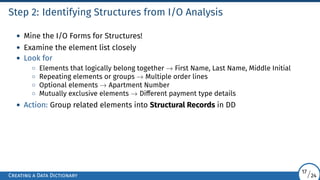
Step 2: IdentifyingStructures from I/O Analysis
• Mine the I/O Forms for Structures!
• Examine the element list closely
• Look for
◦ Elements that logically belong together → First Name, Last Name, Middle Initial
◦ Repeating elements or groups → Multiple order lines
◦ Optional elements → Apartment Number
◦ Mutually exclusive elements → Different payment type details
• Action: Group related elements into Structural Records in DD
Creating a Data Dictionary
17/24
18.
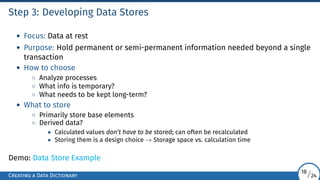
Step 3: DevelopingData Stores
• Focus: Data at rest
• Purpose: Hold permanent or semi-permanent information needed beyond a single
transaction
• How to choose
◦ Analyze processes
◦ What info is temporary?
◦ What needs to be kept long-term?
• What to store
◦ Primarily store base elements
◦ Derived data?
• Calculated values don’t have to be stored; can often be recalculated
• Storing them is a design choice → Storage space vs. calculation time
Demo: Data Store Example
Creating a Data Dictionary
18/24
19.
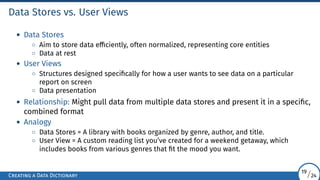
Data Stores vs.User Views
• Data Stores
◦ Aim to store data efficiently, often normalized, representing core entities
◦ Data at rest
• User Views
◦ Structures designed specifically for how a user wants to see data on a particular
report on screen
◦ Data presentation
• Relationship: Might pull data from multiple data stores and present it in a specific,
combined format
• Analogy
◦ Data Stores = A library with books organized by genre, author, and title.
◦ User View = A custom reading list you’ve created for a weekend getaway, which
includes books from various genres that fit the mood you want.
Creating a Data Dictionary
19/24
20.
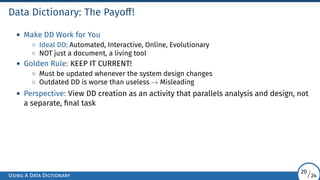
Data Dictionary: ThePayoff!
• Make DD Work for You
◦ Ideal DD: Automated, Interactive, Online, Evolutionary
◦ NOT just a document, a living tool
• Golden Rule: KEEP IT CURRENT!
◦ Must be updated whenever the system design changes
◦ Outdated DD is worse than useless → Misleading
• Perspective: View DD creation as an activity that parallels analysis and design, not
a separate, final task
Using A Data Dictionary
20/24
21.
Use Case 1:Creating Screens, Reports, and Forms
• Definition to Design: DD is a direct input for UI/Report design
• How
◦ DD provides the elements needed and their lengths
◦ Arrange these elements logically on the screen/page using design principles
• Mapping Structures to Layout
◦ Structural Records: Group related fields together visually
◦ Repeating Groups: Often become columns in a table or list on the layout
Demo: Order Picking Slip Data Structure vs. Order Picking Slip
Using A Data Dictionary
21/24
22.
Use Cases 2and 3: Generating Code and Analyzing Design
• User Case 2: Generating Code Structures
◦ DD Definitions can directly generate:
• Database table schemas
• Program code structures
◦ Ensures code matches the defined data structures
• Use Case 3: Analyzing System Design: Use DD to find logical flaws in your DFDs
◦ Base Elements Rule: Base elements appearing in an output flow must have been input
to that process
◦ Derived Elements Rule: Derived elements must be created by a process
◦ Data Store Rule: Elements flowing into/out of a data store must exist within that data
store’s definition in the DD
Using A Data Dictionary
22/24
23.
Use Case 4:Creating XML
• What: eXtensible Markup Language
◦ The Universal Data Translator
◦ Primary Use: Exchanging data between businesses, systems, or software
• Key Concept: Content vs. Format
◦ HTML → Defines how data looks like
◦ XML → Defines what the data is
◦ Note: Presentation is handled separately
• Benefits
◦ Define data once, transform for multiple outputs
◦ Select and share only necessary data
Using A Data Dictionary
23/24
24.
Benefits of aWell-Used Data Dictionary
• Saves Time: Reduces ambiguity and rework, especially if started early
• “Single Source of Truth”: Central repository for all data definitions
• Resolves Disputes: Provides clear, agreed-upon meanings for data terms
• Aids Maintenance: Invaluable reference for understanding unfamiliar or legacy
systems
• Foundation for Automation: Enables automated documentation, code generation,
and validation checks
Using A Data Dictionary
24/24


![Data Structures: The Blueprint
• Data Structure: Defines what elements make up a data flow or data store
• Method: Algebraic Notation
◦ = means “is composed of”
◦ + means “and”
◦ { } means repetition
◦ [ ] means either/or
◦ ( ) means optional
• Structured Records: Group related elements
• Goal: Break down structures into their basic Data Elements
Demo: Data Structure Description Example
The Data Repository
8/24](https://image.slidesharecdn.com/ls8-analyzingsystemsusingdatadictionaries-250925031129-8bf58683/85/LS8-Analyzing-Systems-Using-Data-Dictionaries-pdf-8-320.jpg)