Networking Concepts
By - Jahanvi
Networking
A computer network can be defined as a group of
computers and other peripheral devices that are linked
together for the purpose of sharing data and hardware
resources.
The computer in a network can communicate with each
other. Each computer in a network is called a Node.
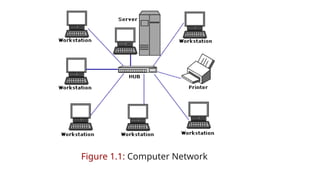
Figure 1.1: Computer Network
Advantages of Networking
● Resource Sharing
● Reduction in Cost
● Increased Storage Capacity
● Fast Data Transfer
● Easy to Take Backup
● Reduces Data Inconsistency
● Reduced Redundancy
● Increases Security
Disadvantages of Networking
● Additional Cost of Networking Equipment
● Management of Large Network
● Server Breakdown
● Security Issues
Networking Components
● Network Card
● Networking Cable
● Modem
● Hub
● Switch
● Router
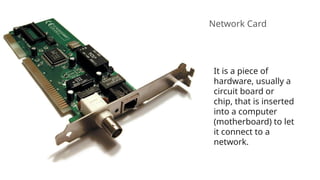
Network Card
It is a piece of
hardware, usually a
circuit board or
chip, that is inserted
into a computer
(motherboard) to let
it connect to a
network.
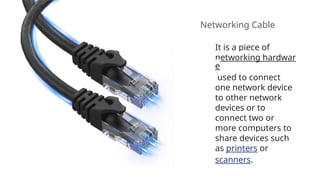
Networking Cable
It is a piece of
networking hardwar
e
used to connect
one network device
to other network
devices or to
connect two or
more computers to
share devices such
as printers or
scanners.
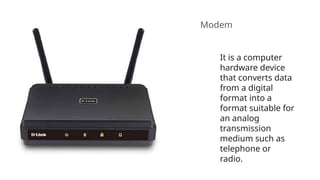
Modem
It is a computer
hardware device
that converts data
from a digital
format into a
format suitable for
an analog
transmission
medium such as
telephone or
radio.
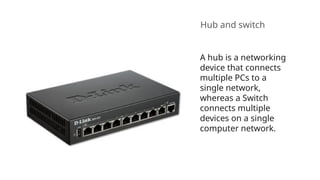
Hub and switch
A hub is a networking
device that connects
multiple PCs to a
single network,
whereas a Switch
connects multiple
devices on a single
computer network.
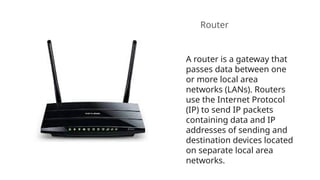
Router
A router is a gateway that
passes data between one
or more local area
networks (LANs). Routers
use the Internet Protocol
(IP) to send IP packets
containing data and IP
addresses of sending and
destination devices located
on separate local area
networks.
Wireless Networking
Wireless Network Cards - They are
used instead of the normal network
card that are used in wired
networks. Most laptop computers
come with inbuilt wireless network
cards. Radio Signal are used for
transferring data, therefore the
Ethernet cable is not required.
Access Points or Routers - They
have a wireless antenna, which
increases the communication range
of the radio signals. They can also
be used to join a wired network,
thus making the network a
combination of wired as well
wireless networks.
Types of Networks
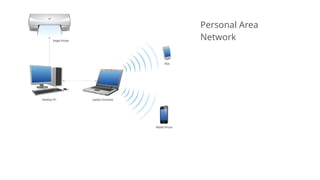
● Personal Area Network (PAN)
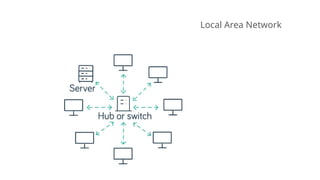
● Local Area Network (LAN)
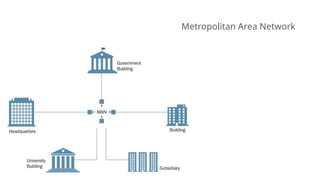
● Metropolitan Area Network (MAN)
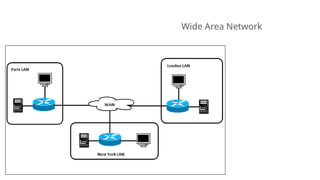
● Wide Area Network (WAN)
Personal Area
Network
Local Area Network
Metropolitan Area Network
Wide Area Network
Network Architecture
A network architecture is an overall design of a computer
network that it describes how a computer network is
configured and what strategies are being used in it.
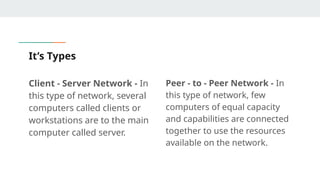
It’s Types
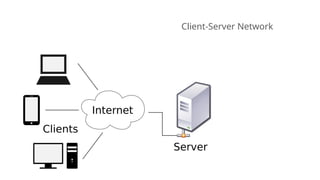
Client - Server Network - In
this type of network, several
computers called clients or
workstations are to the main
computer called server.
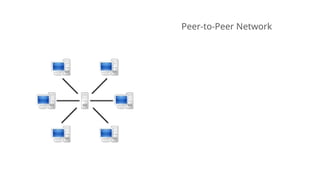
Peer - to - Peer Network - In
this type of network, few
computers of equal capacity
and capabilities are connected
together to use the resources
available on the network.
Client-Server Network
Peer-to-Peer Network
Network Topologies
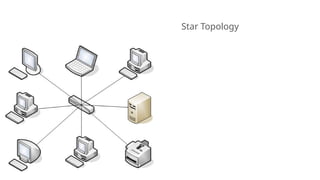
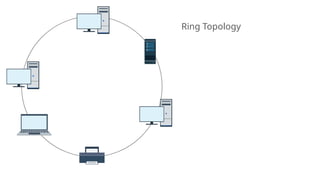
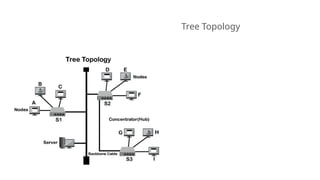
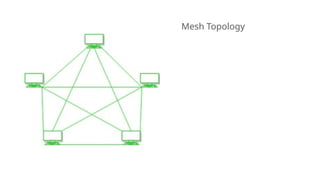
Network topology refers the layout in which the various
components of a network, like nodes, links, peripherals, etc., are
connected and communicate with each other. A topology can either
be physical or logical. A physical topology is the physical layout of
nodes, workstations, cable in the network, whereas logical topology
is the way how information flows between the different components.
It’s Types
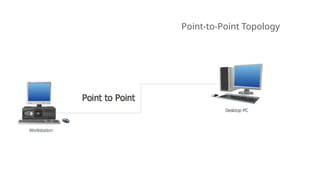
● Point-to-Point
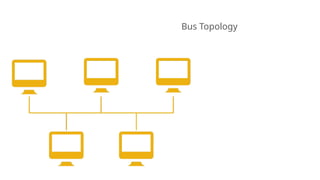
● Bus Topology
● Star Topology
● Ring Topology
● Tree Topology
● Mesh Topology
Point-to-Point Topology
Bus Topology
Star Topology
Ring Topology
Tree Topology
Mesh Topology
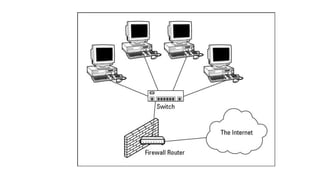
Network Security
Network Security means protecting data and resources from
any unauthorised access. It is the most important aspect in
computer networking. Since many users are accessing the
same data, it is essential that steps be taken to ensure its
proper security.
Networking Concepts  By : Jahanvi  .pptx

Networking Concepts By : Jahanvi .pptx

  • 1.
  • 2.
    Networking A computer networkcan be defined as a group of computers and other peripheral devices that are linked together for the purpose of sharing data and hardware resources. The computer in a network can communicate with each other. Each computer in a network is called a Node.
  • 3.
  • 4.
    Advantages of Networking ●Resource Sharing ● Reduction in Cost ● Increased Storage Capacity ● Fast Data Transfer ● Easy to Take Backup ● Reduces Data Inconsistency ● Reduced Redundancy ● Increases Security
  • 5.
    Disadvantages of Networking ●Additional Cost of Networking Equipment ● Management of Large Network ● Server Breakdown ● Security Issues
  • 6.
    Networking Components ● NetworkCard ● Networking Cable ● Modem ● Hub ● Switch ● Router
  • 7.
    Network Card It isa piece of hardware, usually a circuit board or chip, that is inserted into a computer (motherboard) to let it connect to a network.
  • 8.
    Networking Cable It isa piece of networking hardwar e used to connect one network device to other network devices or to connect two or more computers to share devices such as printers or scanners.
  • 9.
    Modem It is acomputer hardware device that converts data from a digital format into a format suitable for an analog transmission medium such as telephone or radio.
  • 10.
    Hub and switch Ahub is a networking device that connects multiple PCs to a single network, whereas a Switch connects multiple devices on a single computer network.
  • 11.
    Router A router isa gateway that passes data between one or more local area networks (LANs). Routers use the Internet Protocol (IP) to send IP packets containing data and IP addresses of sending and destination devices located on separate local area networks.
  • 12.
    Wireless Networking Wireless NetworkCards - They are used instead of the normal network card that are used in wired networks. Most laptop computers come with inbuilt wireless network cards. Radio Signal are used for transferring data, therefore the Ethernet cable is not required. Access Points or Routers - They have a wireless antenna, which increases the communication range of the radio signals. They can also be used to join a wired network, thus making the network a combination of wired as well wireless networks.
  • 13.
    Types of Networks ●Personal Area Network (PAN) ● Local Area Network (LAN) ● Metropolitan Area Network (MAN) ● Wide Area Network (WAN)
  • 14.
  • 15.
  • 16.
  • 17.
  • 18.
    Network Architecture A networkarchitecture is an overall design of a computer network that it describes how a computer network is configured and what strategies are being used in it.
  • 19.
    It’s Types Client -Server Network - In this type of network, several computers called clients or workstations are to the main computer called server. Peer - to - Peer Network - In this type of network, few computers of equal capacity and capabilities are connected together to use the resources available on the network.
  • 20.
  • 21.
  • 22.
    Network Topologies Network topologyrefers the layout in which the various components of a network, like nodes, links, peripherals, etc., are connected and communicate with each other. A topology can either be physical or logical. A physical topology is the physical layout of nodes, workstations, cable in the network, whereas logical topology is the way how information flows between the different components.
  • 23.
    It’s Types ● Point-to-Point ●Bus Topology ● Star Topology ● Ring Topology ● Tree Topology ● Mesh Topology
  • 24.
  • 25.
  • 26.
  • 27.
  • 28.
  • 29.
  • 30.
    Network Security Network Securitymeans protecting data and resources from any unauthorised access. It is the most important aspect in computer networking. Since many users are accessing the same data, it is essential that steps be taken to ensure its proper security.