Networking 101
by : Eliran Ben-Zikri
Welcome to the amazing world of computer
networking, I hope you’ll find this presentation
informative and interesting.
Networking – A bunch of devices with cool
green LEDs that when combined all together
allows computers to exchange data
Networking 101
History
60,000 Years ago – People started to Speak
5,000 Years ago – People started to Write
600 Years ago – Please started to publish
50 Years ago – The Internet was born
Networking 101
History
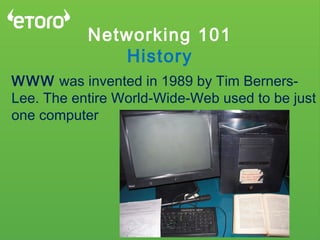
WWW was invented in 1989 by Tim Berners-
Lee. The entire World-Wide-Web used to be just
one computer
Networking 101
Facts
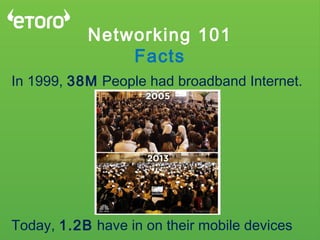
In 1999, 38M People had broadband Internet.
Today, 1.2B have in on their mobile devices
Networking 101
Facts
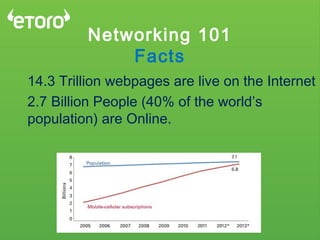
14.3 Trillion webpages are live on the Internet
2.7 Billion People (40% of the world’s
population) are Online.
Internet? Say what?
How did it all start?
Back in the 70’s, many vendors developed
many types of computers, each has it’s own
set of protocols and architecture
an IBM Computer could only talk to an IBM
computer
No standards, No compatibility
TCP/IP & OSI model we’re combined to help
creating the world you know today
OSI Model
The Layers of the Internet
The Open System Interconnect Model
Wait, What?
OSI Model
Key Principles
Divides Networking to 7 Layers
Each layer takes care of a very specific job
Each Job is not too Complicated
Passes the data onto the next layer.
Defines “What”, Not “How”
OSI Model
1 Model To Rule Them All
Application
Presentation
Session
Transport
Network
Data Link
Physical
‫האפליקציה‬ ‫שכבת‬
‫התצוגה‬ ‫שכבת‬
‫השיחה‬ ‫שכבת‬
‫התובלה‬ ‫שכבת‬
‫הרשת‬ ‫שכבת‬
‫הערוץ‬ ‫שכבת‬
‫פיזית‬ ‫שכבה‬
The physical layer does not understand anything but bits:
The signal comes to it in the form of pulses and is
transformed into 0's and 1's.
Examples:
Physical Equipment, Cables, Connectors, NICs
Bit Sync, Work Rate
Hubs, Repeaters, USB, Bluetooth, SDH, DSL
Encoding
Parallel VS. Serial
OSI Model
#1 - Physical Layer
RCVTRS
…110100101110010011101…
Puts some sense to the bits, turning them into Frames,
Bridging between Layer 1 & 3 (LLC & MAC), Connecting
between Hosts in the LAN – No IP’s, Just MAC’s.
Examples:
CRC – Error Handling
ARP Table
Collisions and Broadcasts
MAC Addresses
Switches, LAN, ATM, VLANs
OSI Model
#2 – Data-Link Layer
1
2
3 6
5
4
Responsible for packet forwarding, Routing, Transferring
data from a source to a destination host via one or more
networks, while maintaining Quality-Of-Service functions
Connecting two or more LANs all together
Examples:
Inter-Networking (Internet = Collection of LANs 7 WANs)
IP Protocol (Connectionless), ICMP, IPSec, IPX
QOS, Routing
Packets, WAN
OSI Model
#3 – Network Layer
Provides end-to-end communication services for
applicationswithin a layered architecture of network
components and protocols, Between Ports.
Examples:
Connects between Applications
Reliabile/Unreliable Connection (VoIP vs HTTP)
Flow Control
Multiplexing
TCP, UDP, Segments
OSI Model
#4 – Transport Layer
Provides the mechanism for opening, closing and
managing a session between end-user application
processes
Examples:
Full/Half Duplex
Sync
RPC, SCP
OSI Model
#5 – Session Layer
Responsible for the delivery and formatting of information
to the application layer for further processing or display.
Examples:
Data Conversion
Encryption & Decryption
ASCII, Terminal, Telnet, AFP
OSI Model
#6 – Presentation Layer
Value Code
A 65
B 66
C 67
D 68
E 69
F 70
The user interface, Responsible for displaying data and
images to the user in a human-recognizable format and to
interface with the presentation layer below it.
Examples:
SSH, FTP, HTTP, SSL, DNS
NFS, SIP, SMB, SMTP, RDP
LDAP, POP, IMAP, SNMP
REST, Web Applications
OSI Model
#7 – Application Layer
OSI Model
Encapsulation
Application
Presentation
Session
Transport
Network
Data Link
Physical
Data
Data
Data
DataTransport Header
DataNetwork Header
DataData Link Header
Data
OSI Model
#7 – Application Layer
Application
Presentation
Session
Transport
Network
Data Link
Physical
Application
Presentation
Session
Transport
Network
Data Link
PhysicalPhysical
Data Link
Network
Networking 101
DNS
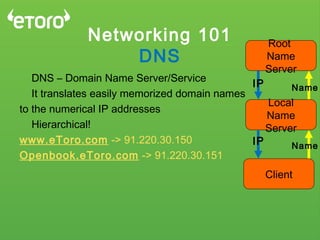
DNS – Domain Name Server/Service
It translates easily memorized domain names 
to the numerical IP addresses
Hierarchical!
www.eToro.com -> 91.220.30.150
Openbook.eToro.com -> 91.220.30.151
Client
Local
Name
Server
Root
Name
Server
IP
IP
Name
Name
Networking 101
DNS
Client
Local
Name
Server
Root
Name
Server
IP
IP
Name
Name
Networking 101
NAT
NAT – Network Address Translation
Private IP’s <-> Public IP’s
One-to-One, One-to-Many
Source NAT: In -> Out
Destination NAT: Out -> In
Networking 101
VLAN
VLAN – Virtual LAN
Partitioning a Switch to several virtual networks
A router is needed for Inter-LAN communication
Software rather than Hardware
Each Packet is tagged with
A VLAN number, and Only
Trunk ports or the same
VLAN ports can accept these
Frames (Layer 2)
Networking 101
Wireless
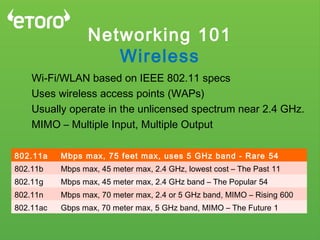
Wi-Fi/WLAN based on IEEE 802.11 specs
Uses wireless access points (WAPs)
Usually operate in the unlicensed spectrum near 2.4 GHz.
MIMO – Multiple Input, Multiple Output
802.11a 54Mbps max, 75 feet max, uses 5 GHz band - Rare
802.11b 11Mbps max, 45 meter max, 2.4 GHz, lowest cost – The Past
802.11g 54Mbps max, 45 meter max, 2.4 GHz band – The Popular
802.11n 600Mbps max, 70 meter max, 2.4 or 5 GHz band, MIMO – Rising
802.11ac 1Gbps max, 70 meter max, 5 GHz band, MIMO – The Future
Networking 101
The END
Thank You for Listening!
Wanna know more? Just ask.
Contact me @
eliranbz@etoro.com

Networking 101 english

  • 1.
    Networking 101 by :Eliran Ben-Zikri Welcome to the amazing world of computer networking, I hope you’ll find this presentation informative and interesting. Networking – A bunch of devices with cool green LEDs that when combined all together allows computers to exchange data
  • 2.
    Networking 101 History 60,000 Yearsago – People started to Speak 5,000 Years ago – People started to Write 600 Years ago – Please started to publish 50 Years ago – The Internet was born
  • 3.
    Networking 101 History WWW wasinvented in 1989 by Tim Berners- Lee. The entire World-Wide-Web used to be just one computer
  • 4.
    Networking 101 Facts In 1999,38M People had broadband Internet. Today, 1.2B have in on their mobile devices
  • 5.
    Networking 101 Facts 14.3 Trillionwebpages are live on the Internet 2.7 Billion People (40% of the world’s population) are Online.
  • 6.
    Internet? Say what? Howdid it all start? Back in the 70’s, many vendors developed many types of computers, each has it’s own set of protocols and architecture an IBM Computer could only talk to an IBM computer No standards, No compatibility TCP/IP & OSI model we’re combined to help creating the world you know today
  • 7.
    OSI Model The Layersof the Internet The Open System Interconnect Model Wait, What?
  • 8.
    OSI Model Key Principles DividesNetworking to 7 Layers Each layer takes care of a very specific job Each Job is not too Complicated Passes the data onto the next layer. Defines “What”, Not “How”
  • 9.
    OSI Model 1 ModelTo Rule Them All Application Presentation Session Transport Network Data Link Physical ‫האפליקציה‬ ‫שכבת‬ ‫התצוגה‬ ‫שכבת‬ ‫השיחה‬ ‫שכבת‬ ‫התובלה‬ ‫שכבת‬ ‫הרשת‬ ‫שכבת‬ ‫הערוץ‬ ‫שכבת‬ ‫פיזית‬ ‫שכבה‬
  • 10.
    The physical layerdoes not understand anything but bits: The signal comes to it in the form of pulses and is transformed into 0's and 1's. Examples: Physical Equipment, Cables, Connectors, NICs Bit Sync, Work Rate Hubs, Repeaters, USB, Bluetooth, SDH, DSL Encoding Parallel VS. Serial OSI Model #1 - Physical Layer RCVTRS …110100101110010011101…
  • 11.
    Puts some senseto the bits, turning them into Frames, Bridging between Layer 1 & 3 (LLC & MAC), Connecting between Hosts in the LAN – No IP’s, Just MAC’s. Examples: CRC – Error Handling ARP Table Collisions and Broadcasts MAC Addresses Switches, LAN, ATM, VLANs OSI Model #2 – Data-Link Layer 1 2 3 6 5 4
  • 12.
    Responsible for packetforwarding, Routing, Transferring data from a source to a destination host via one or more networks, while maintaining Quality-Of-Service functions Connecting two or more LANs all together Examples: Inter-Networking (Internet = Collection of LANs 7 WANs) IP Protocol (Connectionless), ICMP, IPSec, IPX QOS, Routing Packets, WAN OSI Model #3 – Network Layer
  • 13.
    Provides end-to-end communicationservices for applicationswithin a layered architecture of network components and protocols, Between Ports. Examples: Connects between Applications Reliabile/Unreliable Connection (VoIP vs HTTP) Flow Control Multiplexing TCP, UDP, Segments OSI Model #4 – Transport Layer
  • 14.
    Provides the mechanismfor opening, closing and managing a session between end-user application processes Examples: Full/Half Duplex Sync RPC, SCP OSI Model #5 – Session Layer
  • 15.
    Responsible for thedelivery and formatting of information to the application layer for further processing or display. Examples: Data Conversion Encryption & Decryption ASCII, Terminal, Telnet, AFP OSI Model #6 – Presentation Layer Value Code A 65 B 66 C 67 D 68 E 69 F 70
  • 16.
    The user interface,Responsible for displaying data and images to the user in a human-recognizable format and to interface with the presentation layer below it. Examples: SSH, FTP, HTTP, SSL, DNS NFS, SIP, SMB, SMTP, RDP LDAP, POP, IMAP, SNMP REST, Web Applications OSI Model #7 – Application Layer
  • 17.
  • 18.
    OSI Model #7 –Application Layer Application Presentation Session Transport Network Data Link Physical Application Presentation Session Transport Network Data Link PhysicalPhysical Data Link Network
  • 19.
    Networking 101 DNS DNS –Domain Name Server/Service It translates easily memorized domain names  to the numerical IP addresses Hierarchical! www.eToro.com -> 91.220.30.150 Openbook.eToro.com -> 91.220.30.151 Client Local Name Server Root Name Server IP IP Name Name
  • 20.
  • 21.
    Networking 101 NAT NAT –Network Address Translation Private IP’s <-> Public IP’s One-to-One, One-to-Many Source NAT: In -> Out Destination NAT: Out -> In
  • 22.
    Networking 101 VLAN VLAN –Virtual LAN Partitioning a Switch to several virtual networks A router is needed for Inter-LAN communication Software rather than Hardware Each Packet is tagged with A VLAN number, and Only Trunk ports or the same VLAN ports can accept these Frames (Layer 2)
  • 23.
    Networking 101 Wireless Wi-Fi/WLAN basedon IEEE 802.11 specs Uses wireless access points (WAPs) Usually operate in the unlicensed spectrum near 2.4 GHz. MIMO – Multiple Input, Multiple Output 802.11a 54Mbps max, 75 feet max, uses 5 GHz band - Rare 802.11b 11Mbps max, 45 meter max, 2.4 GHz, lowest cost – The Past 802.11g 54Mbps max, 45 meter max, 2.4 GHz band – The Popular 802.11n 600Mbps max, 70 meter max, 2.4 or 5 GHz band, MIMO – Rising 802.11ac 1Gbps max, 70 meter max, 5 GHz band, MIMO – The Future
  • 24.
    Networking 101 The END ThankYou for Listening! Wanna know more? Just ask. Contact me @ eliranbz@etoro.com