Helping Sailors engage their
             Navy Career Tools


   CNP’s Vision for MPTE Applications (Sea Warrior Systems)
“…easy to use, integrated and responsive family of career management,
                   training, and education systems…”
                       A HUGE CHALLENGE!
Who are we and what do we do?

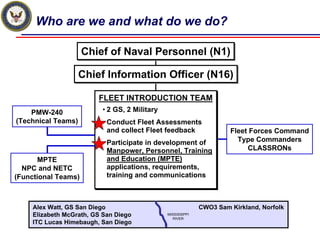
                     Chief of Naval Personnel (N1)

                    Chief Information Officer (N16)

                         FLEET INTRODUCTION TEAM
                         FLEET INTRODUCTION TEAM
    PMW-240               • 2 GS, 2 Military
                          • 2 GS, 2 Military
(Technical Teams)         • Conduct Fleet Assessments
                          • Conduct Fleet Assessments
                            and collect Fleet feedback
                            and collect Fleet feedback                Fleet Forces Command
                          • Participate in development of               Type Commanders
                          • Participate in development of
                            Manpower, Personnel, Training                  CLASSRONs
                            Manpower, Personnel, Training
       MPTE                 and Education (MPTE)
                            and Education (MPTE)
  NPC and NETC              applications, requirements,
                            applications, requirements,
(Functional Teams)          training and communications
                            training and communications


     Alex Watt, GS San Diego                                 CWO3 Sam Kirkland, Norfolk
     Elizabeth McGrath, GS San Diego           MISSISSIPPI
                                                  RIVER
     ITC Lucas Himebaugh, San Diego
Fleet Assessments - Discoveries and Results

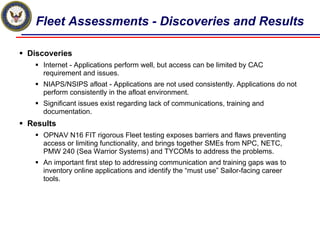
Discoveries
   Internet - Applications perform well, but access can be limited by CAC
   requirement and issues.
   NIAPS/NSIPS afloat - Applications are not used consistently. Applications do not
   perform consistently in the afloat environment.
   Significant issues exist regarding lack of communications, training and
   documentation.
Results
   OPNAV N16 FIT rigorous Fleet testing exposes barriers and flaws preventing
   access or limiting functionality, and brings together SMEs from NPC, NETC,
   PMW 240 (Sea Warrior Systems) and TYCOMs to address the problems.
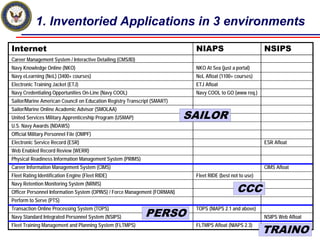
   An important first step to addressing communication and training gaps was to
   inventory online applications and identify the “must use” Sailor-facing career
   tools.
1. Inventoried Applications in 3 environments

Internet                                                                    NIAPS                          NSIPS
Career Management System / Interactive Detailing (CMS/ID)
Navy Knowledge Online (NKO)                                                 NKO At Sea (just a portal)
Navy eLearning (NeL) (3400+ courses)                                        NeL Afloat (1100+ courses)
Electronic Training Jacket (ETJ)                                            ETJ Afloat
Navy Credentialing Opportunities On-Line (Navy COOL)                        Navy COOL to GO (www req.)
Sailor/Marine American Council on Education Registry Transcript (SMART)
Sailor/Marine Online Academic Advisor (SMOLAA)
United Services Military Apprenticeship Program (USMAP)                    SAILOR
U.S. Navy Awards (NDAWS)
Official Military Personnel File (OMPF)
Electronic Service Record (ESR)                                                                            ESR Afloat
Web Enabled Record Review (WERR)
Physical Readiness Information Management System (PRIMS)
Career Information Management System (CIMS)                                                                CIMS Afloat
Fleet Rating Identification Engine (Fleet RIDE)                             Fleet RIDE (best not to use)

                                                                                               CCC
Navy Retention Monitoring System (NRMS)
Officer Personnel Information System (OPINS) / Force Management (FORMAN)
Perform to Serve (PTS)

                                                            PERSO
Transaction Online Processing System (TOPS)                                 TOPS (NIAPS 2.1 and above)
Navy Standard Integrated Personnel System (NSIPS)                                                          NSIPS Web Afloat

                                                                                                           TRAINO
Fleet Training Management and Planning System (FLTMPS)                      FLTMPS Afloat (NIAPS 2.3)
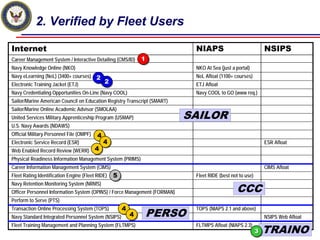
2. Verified by Fleet Users

Internet                                                                    NIAPS                              NSIPS
Career Management System / Interactive Detailing (CMS/ID)     1
                                                              1
Navy Knowledge Online (NKO)                                                 NKO At Sea (just a portal)
Navy eLearning (NeL) (3400+ courses)      2                                 NeL Afloat (1100+ courses)
                                          2 2
Electronic Training Jacket (ETJ)            2                               ETJ Afloat
Navy Credentialing Opportunities On-Line (Navy COOL)                        Navy COOL to GO (www req.)
Sailor/Marine American Council on Education Registry Transcript (SMART)
Sailor/Marine Online Academic Advisor (SMOLAA)
United Services Military Apprenticeship Program (USMAP)                    SAILOR
U.S. Navy Awards (NDAWS)
Official Military Personnel File (OMPF)   4
                                          4
Electronic Service Record (ESR)               4
                                              4                                                                ESR Afloat
Web Enabled Record Review (WERR) 4
                                 4
Physical Readiness Information Management System (PRIMS)
Career Information Management System (CIMS)                                                                    CIMS Afloat
Fleet Rating Identification Engine (Fleet RIDE)   5
                                                  5                         Fleet RIDE (best not to use)

                                                                                               CCC
Navy Retention Monitoring System (NRMS)
Officer Personnel Information System (OPINS) / Force Management (FORMAN)
Perform to Serve (PTS)
                                                      4
                                                      4
                                                              PERSO
Transaction Online Processing System (TOPS)                                 TOPS (NIAPS 2.1 and above)
Navy Standard Integrated Personnel System (NSIPS)         4
                                                          4                                                    NSIPS Web Afloat

                                                                                                               TRAINO
Fleet Training Management and Planning System (FLTMPS)                      FLTMPS Afloat (NIAPS 2.3)
                                                                                                           3
                                                                                                           3
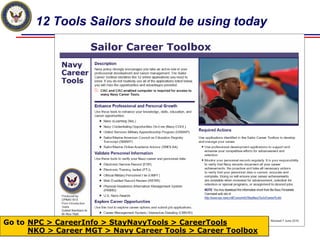
12 Tools Sailors should be using today


Go to NPC > CareerInfo > StayNavyTools > CareerTools
      NKO > Career MGT > Navy Career Tools > Career Toolbox
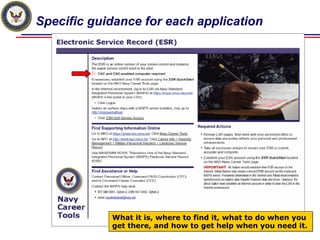
Specific guidance for each application


            What it is, where to find it, what to do when you
            get there, and how to get help when you need it.
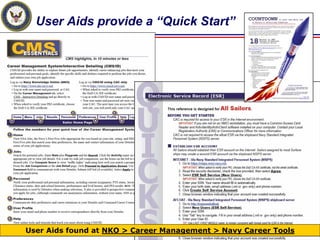
User Aids provide a “Quick Start”


User Aids found at NKO > Career Management > Navy Career Tools
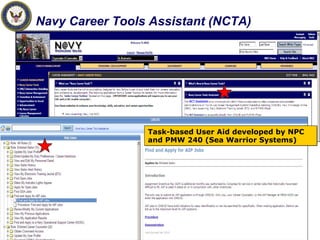
Navy Career Tools Assistant (NCTA)


                 Task-based User Aid developed by NPC
                 and PMW 240 (Sea Warrior Systems)
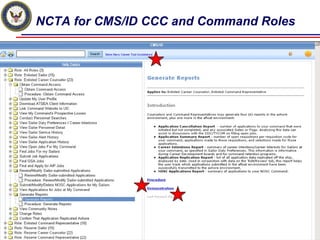
NCTA for CMS/ID CCC and Command Roles
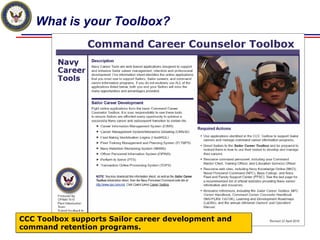
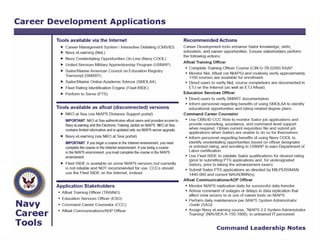
What is your Toolbox?


CCC Toolbox supports Sailor career development and
command retention programs.
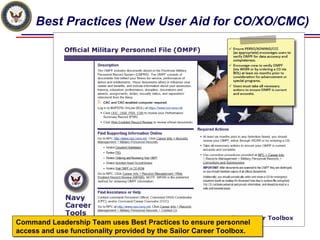
Best Practices (New User Aid for CO/XO/CMC)


Command Leadership Team uses Best Practices to ensure personnel
access and use functionality provided by the Sailor Career Toolbox.
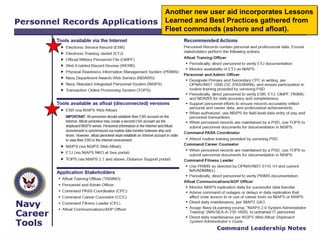
Another new user aid incorporates Lessons
Learned and Best Practices gathered from
Fleet commands (ashore and afloat).
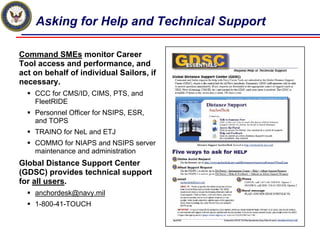
Asking for Help and Technical Support

Command SMEs monitor Career
Tool access and performance, and
act on behalf of individual Sailors, if
necessary.
    CCC for CMS/ID, CIMS, PTS, and
    FleetRIDE
    Personnel Officer for NSIPS, ESR,
    and TOPS
    TRAINO for NeL and ETJ
    COMMO for NIAPS and NSIPS server
    maintenance and administration
Global Distance Support Center
(GDSC) provides technical support
for all users.
    anchordesk@navy.mil
    1-800-41-TOUCH
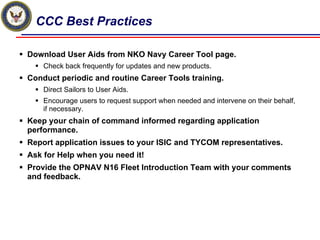
CCC Best Practices

Download User Aids from NKO Navy Career Tool page.
    Check back frequently for updates and new products.
Conduct periodic and routine Career Tools training.
    Direct Sailors to User Aids.
    Encourage users to request support when needed and intervene on their behalf,
    if necessary.
Keep your chain of command informed regarding application
performance.
Report application issues to your ISIC and TYCOM representatives.
Ask for Help when you need it!
Provide the OPNAV N16 Fleet Introduction Team with your comments
and feedback.
OPNAV N16 Fleet Introduction Team

Please feel free to contact
  us at any time!

    Alex Watt
    alexander.watt@navy.mil
    619-556-3193

    Elizabeth McGrath
    elizabeth.mcgrath@navy.mil
    619-556-6250
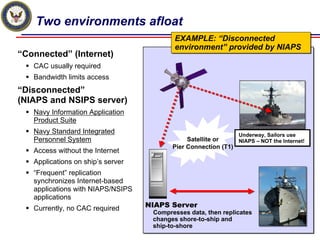
Two environments afloat
                                           EXAMPLE: “Disconnected
                                           EXAMPLE: “Disconnected
                                           environment” provided by NIAPS
                                           environment” provided by NIAPS
“Connected” (Internet)
   CAC usually required
   Bandwidth limits access
“Disconnected”
(NIAPS and NSIPS server)
   Navy Information Application
   Product Suite
   Navy Standard Integrated                                     Underway, Sailors use
   Personnel System                            Satellite or    NIAPS – NOT the Internet!
                                          Pier Connection (T1)
   Access without the Internet
   Applications on ship’s server
   “Frequent” replication
   synchronizes Internet-based
   applications with NIAPS/NSIPS
   applications
   Currently, no CAC required      NIAPS Server
                                    Compresses data, then replicates
                                    changes shore-to-ship and
                                    ship-to-shore
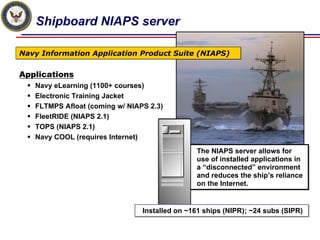
Shipboard NIAPS server

Navy Information Application Product Suite (NIAPS)

Applications
   Navy eLearning (1100+ courses)
   Electronic Training Jacket
   FLTMPS Afloat (coming w/ NIAPS 2.3)
   FleetRIDE (NIAPS 2.1)
   TOPS (NIAPS 2.1)
   Navy COOL (requires Internet)
                                               The NIAPS server allows for
                                               use of installed applications in
                                               a “disconnected” environment
                                               and reduces the ship’s reliance
                                               on the Internet.


                                Installed on ~161 ships (NIPR); ~24 subs (SIPR)
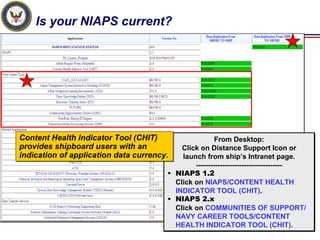
Is your NIAPS current?


Content Health Indicator Tool (CHIT)
Content Health Indicator Tool (CHIT)                  From Desktop:
provides shipboard users with an
provides shipboard users with an           Click on Distance Support Icon or
indication of application data currency.
indication of application data currency.   launch from ship’s Intranet page.
                                               ------------------------------------
                                       • NIAPS 1.2
                                         Click on NIAPS/CONTENT HEALTH
                                         INDICATOR TOOL (CHIT).
                                       • NIAPS 2.x
                                         Click on COMMUNITIES OF SUPPORT/
                                         NAVY CAREER TOOLS/CONTENT
                                         HEALTH INDICATOR TOOL (CHIT).
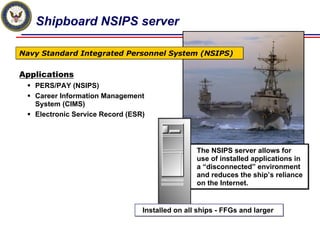
Shipboard NSIPS server

Navy Standard Integrated Personnel System (NSIPS)

Applications
   PERS/PAY (NSIPS)
   Career Information Management
   System (CIMS)
   Electronic Service Record (ESR)


                                                 The NSIPS server allows for
                                                 use of installed applications in
                                                 a “disconnected” environment
                                                 and reduces the ship’s reliance
                                                 on the Internet.


                                 Installed on all ships - FFGs and larger
QUESTION?


www.facebook.com/careerwise

Navy Career Tools CCC Training (Navy Career Wise Training)

  • 1.
    Helping Sailors engagetheir Navy Career Tools CNP’s Vision for MPTE Applications (Sea Warrior Systems) “…easy to use, integrated and responsive family of career management, training, and education systems…” A HUGE CHALLENGE!
  • 2.
    Who are weand what do we do? Chief of Naval Personnel (N1) Chief Information Officer (N16) FLEET INTRODUCTION TEAM FLEET INTRODUCTION TEAM PMW-240 • 2 GS, 2 Military • 2 GS, 2 Military (Technical Teams) • Conduct Fleet Assessments • Conduct Fleet Assessments and collect Fleet feedback and collect Fleet feedback Fleet Forces Command • Participate in development of Type Commanders • Participate in development of Manpower, Personnel, Training CLASSRONs Manpower, Personnel, Training MPTE and Education (MPTE) and Education (MPTE) NPC and NETC applications, requirements, applications, requirements, (Functional Teams) training and communications training and communications Alex Watt, GS San Diego CWO3 Sam Kirkland, Norfolk Elizabeth McGrath, GS San Diego MISSISSIPPI RIVER ITC Lucas Himebaugh, San Diego
  • 3.
    Fleet Assessments -Discoveries and Results Discoveries Internet - Applications perform well, but access can be limited by CAC requirement and issues. NIAPS/NSIPS afloat - Applications are not used consistently. Applications do not perform consistently in the afloat environment. Significant issues exist regarding lack of communications, training and documentation. Results OPNAV N16 FIT rigorous Fleet testing exposes barriers and flaws preventing access or limiting functionality, and brings together SMEs from NPC, NETC, PMW 240 (Sea Warrior Systems) and TYCOMs to address the problems. An important first step to addressing communication and training gaps was to inventory online applications and identify the “must use” Sailor-facing career tools.
  • 4.
    1. Inventoried Applicationsin 3 environments Internet NIAPS NSIPS Career Management System / Interactive Detailing (CMS/ID) Navy Knowledge Online (NKO) NKO At Sea (just a portal) Navy eLearning (NeL) (3400+ courses) NeL Afloat (1100+ courses) Electronic Training Jacket (ETJ) ETJ Afloat Navy Credentialing Opportunities On-Line (Navy COOL) Navy COOL to GO (www req.) Sailor/Marine American Council on Education Registry Transcript (SMART) Sailor/Marine Online Academic Advisor (SMOLAA) United Services Military Apprenticeship Program (USMAP) SAILOR U.S. Navy Awards (NDAWS) Official Military Personnel File (OMPF) Electronic Service Record (ESR) ESR Afloat Web Enabled Record Review (WERR) Physical Readiness Information Management System (PRIMS) Career Information Management System (CIMS) CIMS Afloat Fleet Rating Identification Engine (Fleet RIDE) Fleet RIDE (best not to use) CCC Navy Retention Monitoring System (NRMS) Officer Personnel Information System (OPINS) / Force Management (FORMAN) Perform to Serve (PTS) PERSO Transaction Online Processing System (TOPS) TOPS (NIAPS 2.1 and above) Navy Standard Integrated Personnel System (NSIPS) NSIPS Web Afloat TRAINO Fleet Training Management and Planning System (FLTMPS) FLTMPS Afloat (NIAPS 2.3)
  • 5.
    2. Verified byFleet Users Internet NIAPS NSIPS Career Management System / Interactive Detailing (CMS/ID) 1 1 Navy Knowledge Online (NKO) NKO At Sea (just a portal) Navy eLearning (NeL) (3400+ courses) 2 NeL Afloat (1100+ courses) 2 2 Electronic Training Jacket (ETJ) 2 ETJ Afloat Navy Credentialing Opportunities On-Line (Navy COOL) Navy COOL to GO (www req.) Sailor/Marine American Council on Education Registry Transcript (SMART) Sailor/Marine Online Academic Advisor (SMOLAA) United Services Military Apprenticeship Program (USMAP) SAILOR U.S. Navy Awards (NDAWS) Official Military Personnel File (OMPF) 4 4 Electronic Service Record (ESR) 4 4 ESR Afloat Web Enabled Record Review (WERR) 4 4 Physical Readiness Information Management System (PRIMS) Career Information Management System (CIMS) CIMS Afloat Fleet Rating Identification Engine (Fleet RIDE) 5 5 Fleet RIDE (best not to use) CCC Navy Retention Monitoring System (NRMS) Officer Personnel Information System (OPINS) / Force Management (FORMAN) Perform to Serve (PTS) 4 4 PERSO Transaction Online Processing System (TOPS) TOPS (NIAPS 2.1 and above) Navy Standard Integrated Personnel System (NSIPS) 4 4 NSIPS Web Afloat TRAINO Fleet Training Management and Planning System (FLTMPS) FLTMPS Afloat (NIAPS 2.3) 3 3
  • 6.
    12 Tools Sailorsshould be using today Go to NPC > CareerInfo > StayNavyTools > CareerTools NKO > Career MGT > Navy Career Tools > Career Toolbox
  • 7.
    Specific guidance foreach application What it is, where to find it, what to do when you get there, and how to get help when you need it.
  • 8.
    User Aids providea “Quick Start” User Aids found at NKO > Career Management > Navy Career Tools
  • 9.
    Navy Career ToolsAssistant (NCTA) Task-based User Aid developed by NPC and PMW 240 (Sea Warrior Systems)
  • 10.
    NCTA for CMS/IDCCC and Command Roles
  • 11.
    What is yourToolbox? CCC Toolbox supports Sailor career development and command retention programs.
  • 12.
    Best Practices (NewUser Aid for CO/XO/CMC) Command Leadership Team uses Best Practices to ensure personnel Command Leadership Team uses Best Practices to ensure personnel access and use functionality provided by the Sailor Career Toolbox. access and use functionality provided by the Sailor Career Toolbox.
  • 13.
    Another new useraid incorporates Lessons Another new user aid incorporates Lessons Learned and Best Practices gathered from Learned and Best Practices gathered from Fleet commands (ashore and afloat). Fleet commands (ashore and afloat).
  • 15.
    Asking for Helpand Technical Support Command SMEs monitor Career Tool access and performance, and act on behalf of individual Sailors, if necessary. CCC for CMS/ID, CIMS, PTS, and FleetRIDE Personnel Officer for NSIPS, ESR, and TOPS TRAINO for NeL and ETJ COMMO for NIAPS and NSIPS server maintenance and administration Global Distance Support Center (GDSC) provides technical support for all users. anchordesk@navy.mil 1-800-41-TOUCH
  • 16.
    CCC Best Practices DownloadUser Aids from NKO Navy Career Tool page. Check back frequently for updates and new products. Conduct periodic and routine Career Tools training. Direct Sailors to User Aids. Encourage users to request support when needed and intervene on their behalf, if necessary. Keep your chain of command informed regarding application performance. Report application issues to your ISIC and TYCOM representatives. Ask for Help when you need it! Provide the OPNAV N16 Fleet Introduction Team with your comments and feedback.
  • 17.
    OPNAV N16 FleetIntroduction Team Please feel free to contact us at any time! Alex Watt alexander.watt@navy.mil 619-556-3193 Elizabeth McGrath elizabeth.mcgrath@navy.mil 619-556-6250
  • 19.
    Two environments afloat EXAMPLE: “Disconnected EXAMPLE: “Disconnected environment” provided by NIAPS environment” provided by NIAPS “Connected” (Internet) CAC usually required Bandwidth limits access “Disconnected” (NIAPS and NSIPS server) Navy Information Application Product Suite Navy Standard Integrated Underway, Sailors use Personnel System Satellite or NIAPS – NOT the Internet! Pier Connection (T1) Access without the Internet Applications on ship’s server “Frequent” replication synchronizes Internet-based applications with NIAPS/NSIPS applications Currently, no CAC required NIAPS Server Compresses data, then replicates changes shore-to-ship and ship-to-shore
  • 20.
    Shipboard NIAPS server NavyInformation Application Product Suite (NIAPS) Applications Navy eLearning (1100+ courses) Electronic Training Jacket FLTMPS Afloat (coming w/ NIAPS 2.3) FleetRIDE (NIAPS 2.1) TOPS (NIAPS 2.1) Navy COOL (requires Internet) The NIAPS server allows for use of installed applications in a “disconnected” environment and reduces the ship’s reliance on the Internet. Installed on ~161 ships (NIPR); ~24 subs (SIPR)
  • 21.
    Is your NIAPScurrent? Content Health Indicator Tool (CHIT) Content Health Indicator Tool (CHIT) From Desktop: provides shipboard users with an provides shipboard users with an Click on Distance Support Icon or indication of application data currency. indication of application data currency. launch from ship’s Intranet page. ------------------------------------ • NIAPS 1.2 Click on NIAPS/CONTENT HEALTH INDICATOR TOOL (CHIT). • NIAPS 2.x Click on COMMUNITIES OF SUPPORT/ NAVY CAREER TOOLS/CONTENT HEALTH INDICATOR TOOL (CHIT).
  • 22.
    Shipboard NSIPS server NavyStandard Integrated Personnel System (NSIPS) Applications PERS/PAY (NSIPS) Career Information Management System (CIMS) Electronic Service Record (ESR) The NSIPS server allows for use of installed applications in a “disconnected” environment and reduces the ship’s reliance on the Internet. Installed on all ships - FFGs and larger
  • 23.