naming things
prepared by Jenny Bryan for
Reproducible Science Workshop
Names matter
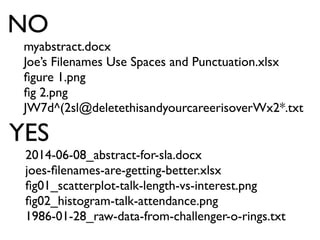
myabstract.docx
Joe’s Filenames Use Spaces and Punctuation.xlsx
figure 1.png
fig 2.png
JW7d^(2sl@deletethisandyourcareerisoverWx2*.txt
NO
2014-06-08_abstract-for-sla.docx
joes-filenames-are-getting-better.xlsx
fig01_scatterplot-talk-length-vs-interest.png
fig02_histogram-talk-attendance.png
1986-01-28_raw-data-from-challenger-o-rings.txt
YES
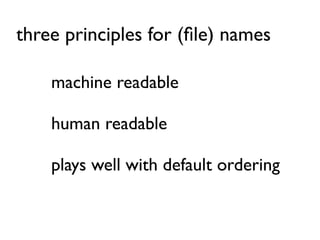
machine readable
human readable
plays well with default ordering
three principles for (file) names
awesome file names :)
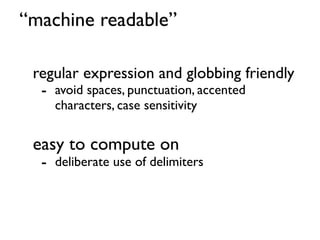
“machine readable”
regular expression and globbing friendly
- avoid spaces, punctuation, accented
characters, case sensitivity
easy to compute on
- deliberate use of delimiters
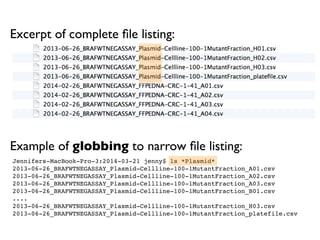
Jennifers-MacBook-Pro-3:2014-03-21 jenny$ ls *Plasmid*
2013-06-26_BRAFWTNEGASSAY_Plasmid-Cellline-100-1MutantFraction_A01.csv
2013-06-26_BRAFWTNEGASSAY_Plasmid-Cellline-100-1MutantFraction_A02.csv
2013-06-26_BRAFWTNEGASSAY_Plasmid-Cellline-100-1MutantFraction_A03.csv
2013-06-26_BRAFWTNEGASSAY_Plasmid-Cellline-100-1MutantFraction_B01.csv
....
2013-06-26_BRAFWTNEGASSAY_Plasmid-Cellline-100-1MutantFraction_H03.csv
2013-06-26_BRAFWTNEGASSAY_Plasmid-Cellline-100-1MutantFraction_platefile.csv
Excerpt of complete file listing:
Example of globbing to narrow file listing:
Same using Mac OS Finder search facilities:
Same using R’s ability to narrow file list by regex:
> list.files(pattern = "Plasmid") %>% head
[1] "2013-06-26_BRAFWTNEGASSAY_Plasmid-Cellline-100-1MutantFraction_A01.csv"
[2] "2013-06-26_BRAFWTNEGASSAY_Plasmid-Cellline-100-1MutantFraction_A02.csv"
[3] "2013-06-26_BRAFWTNEGASSAY_Plasmid-Cellline-100-1MutantFraction_A03.csv"
[4] "2013-06-26_BRAFWTNEGASSAY_Plasmid-Cellline-100-1MutantFraction_B01.csv"
[5] "2013-06-26_BRAFWTNEGASSAY_Plasmid-Cellline-100-1MutantFraction_B02.csv"
[6] "2013-06-26_BRAFWTNEGASSAY_Plasmid-Cellline-100-1MutantFraction_B03.csv"
Deliberate use of “_” and “-” allows us to recover meta-
data from the filenames.
> flist <- list.files(pattern = "Plasmid") %>% head
> stringr::str_split_fixed(flist, "[_.]", 5)
[,1] [,2] [,3] [,4] [,5]
[1,] "2013-06-26" "BRAFWTNEGASSAY" "Plasmid-Cellline-100-1MutantFraction" "A01" "csv"
[2,] "2013-06-26" "BRAFWTNEGASSAY" "Plasmid-Cellline-100-1MutantFraction" "A02" "csv"
[3,] "2013-06-26" "BRAFWTNEGASSAY" "Plasmid-Cellline-100-1MutantFraction" "A03" "csv"
[4,] "2013-06-26" "BRAFWTNEGASSAY" "Plasmid-Cellline-100-1MutantFraction" "B01" "csv"
[5,] "2013-06-26" "BRAFWTNEGASSAY" "Plasmid-Cellline-100-1MutantFraction" "B02" "csv"
[6,] "2013-06-26" "BRAFWTNEGASSAY" "Plasmid-Cellline-100-1MutantFraction" "B03" "csv"
This happens to be R but also possible in the shell, Python, etc.
date assay sample set well
> flist <- list.files(pattern = "Plasmid") %>% head
> stringr::str_split_fixed(flist, "[_.]", 5)
[,1] [,2] [,3] [,4] [,5]
[1,] "2013-06-26" "BRAFWTNEGASSAY" "Plasmid-Cellline-100-1MutantFraction" "A01" "csv"
[2,] "2013-06-26" "BRAFWTNEGASSAY" "Plasmid-Cellline-100-1MutantFraction" "A02" "csv"
[3,] "2013-06-26" "BRAFWTNEGASSAY" "Plasmid-Cellline-100-1MutantFraction" "A03" "csv"
[4,] "2013-06-26" "BRAFWTNEGASSAY" "Plasmid-Cellline-100-1MutantFraction" "B01" "csv"
[5,] "2013-06-26" "BRAFWTNEGASSAY" "Plasmid-Cellline-100-1MutantFraction" "B02" "csv"
[6,] "2013-06-26" "BRAFWTNEGASSAY" "Plasmid-Cellline-100-1MutantFraction" "B03" "csv"
“_” underscore used to delimit units of meta-data I want later
“-” hyphen used to delimit words so my eyes don’t bleed
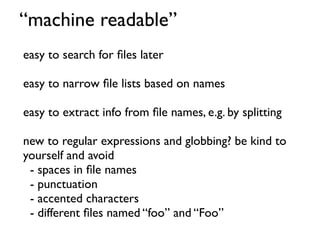
easy to search for files later
easy to narrow file lists based on names
easy to extract info from file names, e.g. by splitting
new to regular expressions and globbing? be kind to
yourself and avoid
- spaces in file names
- punctuation
- accented characters
- different files named “foo” and “Foo”
“machine readable”
“human readable”
name contains info on content
connects to concept of a slug from
semantic URLs
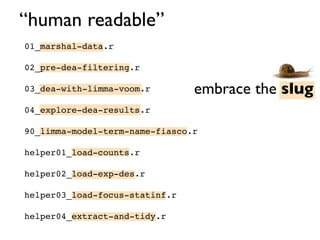
“human readable”
Jennifers-MacBook-Pro-3:analysis jenny$ ls -1
01_marshal-data.md
01_marshal-data.r
02_pre-dea-filtering.md
02_pre-dea-filtering.r
03_dea-with-limma-voom.md
03_dea-with-limma-voom.r
04_explore-dea-results.md
04_explore-dea-results.r
90_limma-model-term-name-fiasco.md
90_limma-model-term-name-fiasco.r
Makefile
figure
helper01_load-counts.r
helper02_load-exp-des.r
helper03_load-focus-statinf.r
helper04_extract-and-tidy.r
tmp.txt
01.md
01.r
02.md
02.r
03.md
03.r
04.md
04.r
90.md
90.r
Makefile
figure
helper01.r
helper02.r
helper03.r
helper04.r
tmp.txt
Which set of file(name)s do you want at 3a.m. before a deadline?
“human readable”
embrace the slug
01_marshal-data.r
02_pre-dea-filtering.r
03_dea-with-limma-voom.r
04_explore-dea-results.r
90_limma-model-term-name-fiasco.r
helper01_load-counts.r
helper02_load-exp-des.r
helper03_load-focus-statinf.r
helper04_extract-and-tidy.r
“human readable”
easy to figure out what the heck
something is, based on its name
“plays well with default ordering”
put something numeric first
use the ISO 8601 standard for dates
left pad other numbers with zeros
“plays well with default ordering”
01_marshal-data.r
02_pre-dea-filtering.r
03_dea-with-limma-voom.r
04_explore-dea-results.r
90_limma-model-term-name-fiasco.r
helper01_load-counts.r
helper02_load-exp-des.r
helper03_load-focus-statinf.r
helper04_extract-and-tidy.r
chronological
order
logical
order
“plays well with default ordering”
01_marshal-data.r
02_pre-dea-filtering.r
03_dea-with-limma-voom.r
04_explore-dea-results.r
90_limma-model-term-name-fiasco.r
helper01_load-counts.r
helper02_load-exp-des.r
helper03_load-focus-statinf.r
helper04_extract-and-tidy.r
put something numeric first
“plays well with default ordering”
use the ISO 8601 standard for dates
YYYY-MM-DD
http://xkcd.com/1179/
Comprehensive map of all countries in the
world that use the MMDDYYYY format
https://twitter.com/donohoe/status/597876118688026624
left pad other numbers with zeros
01_marshal-data.r
02_pre-dea-filtering.r
03_dea-with-limma-voom.r
04_explore-dea-results.r
90_limma-model-term-name-fiasco.r
helper01_load-counts.r
helper02_load-exp-des.r
helper03_load-focus-statinf.r
helper04_extract-and-tidy.r
if you don’t left pad, you get this:
10_final-figs-for-publication.R
1_data-cleaning.R
2_fit-model.R
which is just sad
“plays well with default ordering”
put something numeric first
use the ISO 8601 standard for dates
left pad other numbers with zeros
machine readable
human readable
plays well with default ordering
three principles for (file) names
easy to implement NOW
payoffs accumulate as your skills evolve
and projects get more complex
three principles for (file) names
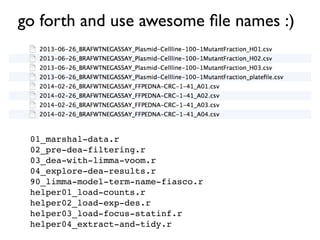
go forth and use awesome file names :)
01_marshal-data.r
02_pre-dea-filtering.r
03_dea-with-limma-voom.r
04_explore-dea-results.r
90_limma-model-term-name-fiasco.r
helper01_load-counts.r
helper02_load-exp-des.r
helper03_load-focus-statinf.r
helper04_extract-and-tidy.r

How to name files

  • 1.
    naming things prepared byJenny Bryan for Reproducible Science Workshop
  • 2.
  • 3.
    myabstract.docx Joe’s Filenames UseSpaces and Punctuation.xlsx figure 1.png fig 2.png JW7d^(2sl@deletethisandyourcareerisoverWx2*.txt NO 2014-06-08_abstract-for-sla.docx joes-filenames-are-getting-better.xlsx fig01_scatterplot-talk-length-vs-interest.png fig02_histogram-talk-attendance.png 1986-01-28_raw-data-from-challenger-o-rings.txt YES
  • 4.
    machine readable human readable playswell with default ordering three principles for (file) names
  • 5.
  • 6.
    “machine readable” regular expressionand globbing friendly - avoid spaces, punctuation, accented characters, case sensitivity easy to compute on - deliberate use of delimiters
  • 7.
    Jennifers-MacBook-Pro-3:2014-03-21 jenny$ ls*Plasmid* 2013-06-26_BRAFWTNEGASSAY_Plasmid-Cellline-100-1MutantFraction_A01.csv 2013-06-26_BRAFWTNEGASSAY_Plasmid-Cellline-100-1MutantFraction_A02.csv 2013-06-26_BRAFWTNEGASSAY_Plasmid-Cellline-100-1MutantFraction_A03.csv 2013-06-26_BRAFWTNEGASSAY_Plasmid-Cellline-100-1MutantFraction_B01.csv .... 2013-06-26_BRAFWTNEGASSAY_Plasmid-Cellline-100-1MutantFraction_H03.csv 2013-06-26_BRAFWTNEGASSAY_Plasmid-Cellline-100-1MutantFraction_platefile.csv Excerpt of complete file listing: Example of globbing to narrow file listing:
  • 8.
    Same using MacOS Finder search facilities:
  • 9.
    Same using R’sability to narrow file list by regex: > list.files(pattern = "Plasmid") %>% head [1] "2013-06-26_BRAFWTNEGASSAY_Plasmid-Cellline-100-1MutantFraction_A01.csv" [2] "2013-06-26_BRAFWTNEGASSAY_Plasmid-Cellline-100-1MutantFraction_A02.csv" [3] "2013-06-26_BRAFWTNEGASSAY_Plasmid-Cellline-100-1MutantFraction_A03.csv" [4] "2013-06-26_BRAFWTNEGASSAY_Plasmid-Cellline-100-1MutantFraction_B01.csv" [5] "2013-06-26_BRAFWTNEGASSAY_Plasmid-Cellline-100-1MutantFraction_B02.csv" [6] "2013-06-26_BRAFWTNEGASSAY_Plasmid-Cellline-100-1MutantFraction_B03.csv"
  • 10.
    Deliberate use of“_” and “-” allows us to recover meta- data from the filenames. > flist <- list.files(pattern = "Plasmid") %>% head > stringr::str_split_fixed(flist, "[_.]", 5) [,1] [,2] [,3] [,4] [,5] [1,] "2013-06-26" "BRAFWTNEGASSAY" "Plasmid-Cellline-100-1MutantFraction" "A01" "csv" [2,] "2013-06-26" "BRAFWTNEGASSAY" "Plasmid-Cellline-100-1MutantFraction" "A02" "csv" [3,] "2013-06-26" "BRAFWTNEGASSAY" "Plasmid-Cellline-100-1MutantFraction" "A03" "csv" [4,] "2013-06-26" "BRAFWTNEGASSAY" "Plasmid-Cellline-100-1MutantFraction" "B01" "csv" [5,] "2013-06-26" "BRAFWTNEGASSAY" "Plasmid-Cellline-100-1MutantFraction" "B02" "csv" [6,] "2013-06-26" "BRAFWTNEGASSAY" "Plasmid-Cellline-100-1MutantFraction" "B03" "csv" This happens to be R but also possible in the shell, Python, etc. date assay sample set well
  • 11.
    > flist <-list.files(pattern = "Plasmid") %>% head > stringr::str_split_fixed(flist, "[_.]", 5) [,1] [,2] [,3] [,4] [,5] [1,] "2013-06-26" "BRAFWTNEGASSAY" "Plasmid-Cellline-100-1MutantFraction" "A01" "csv" [2,] "2013-06-26" "BRAFWTNEGASSAY" "Plasmid-Cellline-100-1MutantFraction" "A02" "csv" [3,] "2013-06-26" "BRAFWTNEGASSAY" "Plasmid-Cellline-100-1MutantFraction" "A03" "csv" [4,] "2013-06-26" "BRAFWTNEGASSAY" "Plasmid-Cellline-100-1MutantFraction" "B01" "csv" [5,] "2013-06-26" "BRAFWTNEGASSAY" "Plasmid-Cellline-100-1MutantFraction" "B02" "csv" [6,] "2013-06-26" "BRAFWTNEGASSAY" "Plasmid-Cellline-100-1MutantFraction" "B03" "csv" “_” underscore used to delimit units of meta-data I want later “-” hyphen used to delimit words so my eyes don’t bleed
  • 12.
    easy to searchfor files later easy to narrow file lists based on names easy to extract info from file names, e.g. by splitting new to regular expressions and globbing? be kind to yourself and avoid - spaces in file names - punctuation - accented characters - different files named “foo” and “Foo” “machine readable”
  • 13.
    “human readable” name containsinfo on content connects to concept of a slug from semantic URLs
  • 14.
    “human readable” Jennifers-MacBook-Pro-3:analysis jenny$ls -1 01_marshal-data.md 01_marshal-data.r 02_pre-dea-filtering.md 02_pre-dea-filtering.r 03_dea-with-limma-voom.md 03_dea-with-limma-voom.r 04_explore-dea-results.md 04_explore-dea-results.r 90_limma-model-term-name-fiasco.md 90_limma-model-term-name-fiasco.r Makefile figure helper01_load-counts.r helper02_load-exp-des.r helper03_load-focus-statinf.r helper04_extract-and-tidy.r tmp.txt 01.md 01.r 02.md 02.r 03.md 03.r 04.md 04.r 90.md 90.r Makefile figure helper01.r helper02.r helper03.r helper04.r tmp.txt Which set of file(name)s do you want at 3a.m. before a deadline?
  • 15.
    “human readable” embrace theslug 01_marshal-data.r 02_pre-dea-filtering.r 03_dea-with-limma-voom.r 04_explore-dea-results.r 90_limma-model-term-name-fiasco.r helper01_load-counts.r helper02_load-exp-des.r helper03_load-focus-statinf.r helper04_extract-and-tidy.r
  • 16.
    “human readable” easy tofigure out what the heck something is, based on its name
  • 17.
    “plays well withdefault ordering” put something numeric first use the ISO 8601 standard for dates left pad other numbers with zeros
  • 18.
    “plays well withdefault ordering” 01_marshal-data.r 02_pre-dea-filtering.r 03_dea-with-limma-voom.r 04_explore-dea-results.r 90_limma-model-term-name-fiasco.r helper01_load-counts.r helper02_load-exp-des.r helper03_load-focus-statinf.r helper04_extract-and-tidy.r chronological order logical order
  • 19.
    “plays well withdefault ordering” 01_marshal-data.r 02_pre-dea-filtering.r 03_dea-with-limma-voom.r 04_explore-dea-results.r 90_limma-model-term-name-fiasco.r helper01_load-counts.r helper02_load-exp-des.r helper03_load-focus-statinf.r helper04_extract-and-tidy.r put something numeric first
  • 20.
    “plays well withdefault ordering” use the ISO 8601 standard for dates YYYY-MM-DD
  • 21.
  • 22.
    Comprehensive map ofall countries in the world that use the MMDDYYYY format https://twitter.com/donohoe/status/597876118688026624
  • 23.
    left pad othernumbers with zeros 01_marshal-data.r 02_pre-dea-filtering.r 03_dea-with-limma-voom.r 04_explore-dea-results.r 90_limma-model-term-name-fiasco.r helper01_load-counts.r helper02_load-exp-des.r helper03_load-focus-statinf.r helper04_extract-and-tidy.r if you don’t left pad, you get this: 10_final-figs-for-publication.R 1_data-cleaning.R 2_fit-model.R which is just sad
  • 24.
    “plays well withdefault ordering” put something numeric first use the ISO 8601 standard for dates left pad other numbers with zeros
  • 25.
    machine readable human readable playswell with default ordering three principles for (file) names
  • 26.
    easy to implementNOW payoffs accumulate as your skills evolve and projects get more complex three principles for (file) names
  • 27.
    go forth anduse awesome file names :) 01_marshal-data.r 02_pre-dea-filtering.r 03_dea-with-limma-voom.r 04_explore-dea-results.r 90_limma-model-term-name-fiasco.r helper01_load-counts.r helper02_load-exp-des.r helper03_load-focus-statinf.r helper04_extract-and-tidy.r