MySQL Performance Schema
Overview and new exciting features
Mayank Prasad
Principal Member Technical Staff
Oracle, MySQL
March 15, 2015
Copyright © 2014, Oracle and/or its affiliates. All rights reserved. |
Safe Harbor Statement
The following is intended to outline our general product direction. It is intended for
information purposes only, and may not be incorporated into any contract. It is not a
commitment to deliver any material, code, or functionality, and should not be relied upon
in making purchasing decisions. The development, release, and timing of any features or
functionality described for Oracle’s products remains at the sole discretion of Oracle.
2
Copyright © 2014, Oracle and/or its affiliates. All rights reserved. |
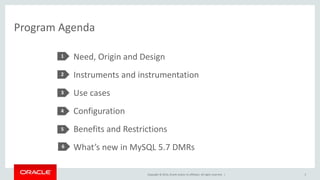
Program Agenda
Need, Origin and Design
Instruments and instrumentation
Use cases
Configuration
Benefits and Restrictions
What’s new in MySQL 5.7 DMRs
1
2
3
4
5
6
3
Copyright © 2014, Oracle and/or its affiliates. All rights reserved. |
Program Agenda
Need, Origin and Design
Instruments and instrumentation
Use cases
Configuration
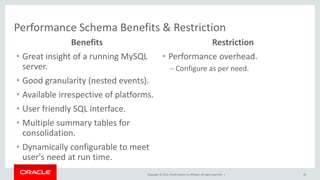
Benefits and Restrictions
What’s new in MySQL 5.7 DMRs
1
2
3
4
5
6
4
Copyright © 2014, Oracle and/or its affiliates. All rights reserved. |
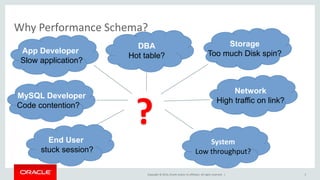
Why Performance Schema?
System
Low throughput?
?
5
DBA
Hot table?
Network
High traffic on link?
Storage
Too much Disk spin?App Developer
Slow application?
MySQL Developer
Code contention?
End User
stuck session?
Copyright © 2014, Oracle and/or its affiliates. All rights reserved. |
History and Origin
“Performance Schema is a mechanism to give user an insight of what is happening
behind the scene when MySQL server is running.”
Development was started by Marc Alff in 2008. He is Chief Architect and Lead of
Performance Schema Team (Christopher Powers and me) in Oracle-MySQL.
Introduced in MySQL 5.5.
• New storage engine : Performance Schema
• New Database : performance_schema
• Statistics stored in tables (hard coded DDLs).
• Non persistent data.
• SQL user interface.
6
Copyright © 2014, Oracle and/or its affiliates. All rights reserved. |
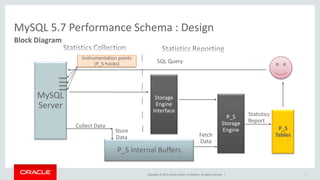
MySQL 5.7 Performance Schema : Design
Block Diagram
MySQL
Server
Instrumentation points
(P_S hooks)
P_S Internal Buffers
P_S
Storage
Engine
Storage
Engine
Interface
Statistics
Report
Fetch
Data
SQL Query
Collect Data
Store
Data
P_S
Tables
7
Copyright © 2014, Oracle and/or its affiliates. All rights reserved. |
Program Agenda
Need, Origin and Design
Instruments and instrumentation
Use cases
Configuration
Benefits and Restrictions
What’s new in MySQL 5.7 DMRs
1
2
3
4
5
6
8
Copyright © 2014, Oracle and/or its affiliates. All rights reserved. |
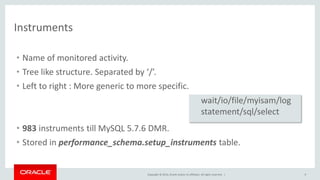
Instruments
9
• Name of monitored activity.
• Tree like structure. Separated by ‘/’.
• Left to right : More generic to more specific.
• 983 instruments till MySQL 5.7.6 DMR.
• Stored in performance_schema.setup_instruments table.
wait/io/file/myisam/log
statement/sql/select
Copyright © 2014, Oracle and/or its affiliates. All rights reserved. |
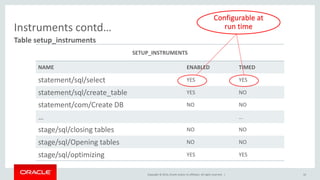
Instruments contd…
Table setup_instruments
10
SETUP_INSTRUMENTS
NAME ENABLED TIMED
statement/sql/select YES YES
statement/sql/create_table YES NO
statement/com/Create DB NO NO
… …
stage/sql/closing tables NO NO
stage/sql/Opening tables NO NO
stage/sql/optimizing YES YES
Configurable at
run time
Copyright © 2014, Oracle and/or its affiliates. All rights reserved. |
Program Agenda
Need, Origin and Design
Instruments and instrumentation
Use cases
Configuration
Benefits and Restrictions
What’s new in MySQL 5.7 DMRs
1
2
3
4
5
6
11
Copyright © 2014, Oracle and/or its affiliates. All rights reserved. |
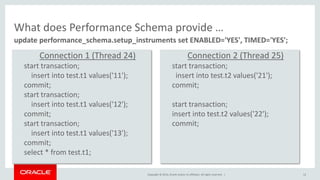
What does Performance Schema provide …
update performance_schema.setup_instruments set ENABLED='YES', TIMED='YES';
12
Connection 1 (Thread 24)
start transaction;
insert into test.t1 values('11');
commit;
start transaction;
insert into test.t1 values('12');
commit;
start transaction;
insert into test.t1 values('13');
commit;
select * from test.t1;
Connection 2 (Thread 25)
start transaction;
insert into test.t2 values('21');
commit;
start transaction;
insert into test.t2 values('22');
commit;
Copyright © 2014, Oracle and/or its affiliates. All rights reserved. |
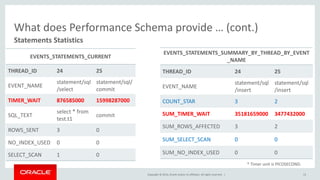
What does Performance Schema provide … (cont.)
Statements Statistics
* Timer unit is PICOSECOND.
EVENTS_STATEMENTS_CURRENT
THREAD_ID 24 25
EVENT_NAME
statement/sql
/select
statement/sql/
commit
TIMER_WAIT 876585000 15998287000
SQL_TEXT
select * from
test.t1
commit
ROWS_SENT 3 0
NO_INDEX_USED 0 0
SELECT_SCAN 1 0
13
EVENTS_STATEMENTS_SUMMARY_BY_THREAD_BY_EVENT
_NAME
THREAD_ID 24 25
EVENT_NAME
statement/sql
/insert
statement/sql
/insert
COUNT_STAR 3 2
SUM_TIMER_WAIT 35181659000 3477432000
SUM_ROWS_AFFECTED 3 2
SUM_SELECT_SCAN 0 0
SUM_NO_INDEX_USED 0 0
Copyright © 2014, Oracle and/or its affiliates. All rights reserved. |
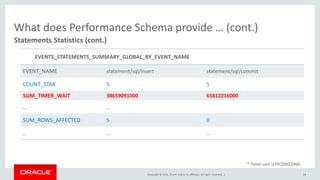
What does Performance Schema provide … (cont.)
Statements Statistics (cont.)
* Timer unit is PICOSECOND.
14
EVENTS_STATEMENTS_SUMMARY_GLOBAL_BY_EVENT_NAME
EVENT_NAME statement/sql/insert statement/sql/commit
COUNT_STAR 5 5
SUM_TIMER_WAIT 38659091000 65812216000
… …
SUM_ROWS_AFFECTED 5 0
… … …
Copyright © 2014, Oracle and/or its affiliates. All rights reserved. |
Use case 1
Revisited
15
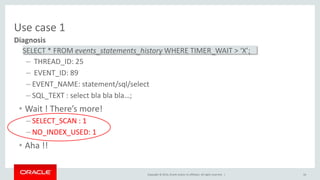
• Multiple queries running for long on MySQL Server
• Few long running query (taking lots of time)
• No idea which one
• No idea why
• What to do ? …
Copyright © 2014, Oracle and/or its affiliates. All rights reserved. |
Use case 1
Diagnosis
16
– THREAD_ID: 25
– EVENT_ID: 89
– EVENT_NAME: statement/sql/select
– SQL_TEXT : select bla bla bla…;
• Wait ! There’s more!
– SELECT_SCAN : 1
– NO_INDEX_USED: 1
• Aha !!
SELECT * FROM events_statements_history WHERE TIMER_WAIT > ‘X’;
Copyright © 2014, Oracle and/or its affiliates. All rights reserved. |
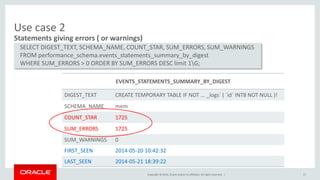
Use case 2
Statements giving errors ( or warnings)
17
SELECT DIGEST_TEXT, SCHEMA_NAME, COUNT_STAR, SUM_ERRORS, SUM_WARNINGS
FROM performance_schema.events_statements_summary_by_digest
WHERE SUM_ERRORS > 0 ORDER BY SUM_ERRORS DESC limit 1G;
EVENTS_STATEMENTS_SUMMARY_BY_DIGEST
DIGEST_TEXT CREATE TEMPORARY TABLE IF NOT ... _logs` ( `id` INT8 NOT NULL )!
SCHEMA_NAME mem
COUNT_STAR 1725
SUM_ERRORS 1725
SUM_WARNINGS 0
FIRST_SEEN 2014-05-20 10:42:32
LAST_SEEN 2014-05-21 18:39:22
Copyright © 2014, Oracle and/or its affiliates. All rights reserved. |
Use case 3
Description
18
• Multithreaded environment
• My session is stuck
• No idea why
• What to do ? …
Copyright © 2014, Oracle and/or its affiliates. All rights reserved. |
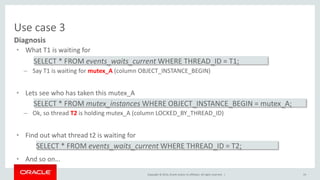
Use case 3
• What T1 is waiting for
– Say T1 is waiting for mutex_A (column OBJECT_INSTANCE_BEGIN)
• Lets see who has taken this mutex_A
– Ok, so thread T2 is holding mutex_A (column LOCKED_BY_THREAD_ID)
• Find out what thread t2 is waiting for
• And so on…
SELECT * FROM mutex_instances WHERE OBJECT_INSTANCE_BEGIN = mutex_A;
SELECT * FROM events_waits_current WHERE THREAD_ID = T2;
Diagnosis
19
SELECT * FROM events_waits_current WHERE THREAD_ID = T1;
Copyright © 2014, Oracle and/or its affiliates. All rights reserved. |
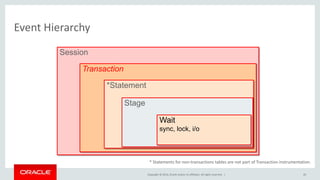
Event Hierarchy
Session
Transaction
*Statement
Stage
Wait
sync, lock, i/o
* Statements for non-transactions tables are not part of Transaction instrumentation.
20
Copyright © 2014, Oracle and/or its affiliates. All rights reserved. |
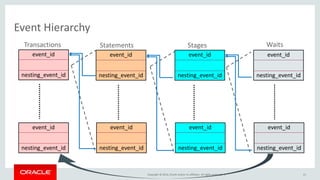
Event Hierarchy
21
event_id
nesting_event_id
event_id
nesting_event_id
event_id
nesting_event_id
event_id
nesting_event_id
event_id
nesting_event_id
event_id
nesting_event_id
event_id
nesting_event_id
event_id
nesting_event_id
Transactions Statements Stages Waits
Copyright © 2014, Oracle and/or its affiliates. All rights reserved. |
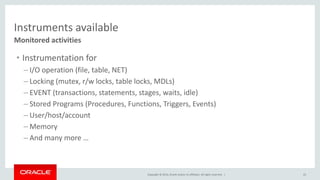
Instruments available
Monitored activities
22
• Instrumentation for
– I/O operation (file, table, NET)
– Locking (mutex, r/w locks, table locks, MDLs)
– EVENT (transactions, statements, stages, waits, idle)
– Stored Programs (Procedures, Functions, Triggers, Events)
– User/host/account
– Memory
– And many more …
Copyright © 2014, Oracle and/or its affiliates. All rights reserved. |
Program Agenda
Need, Origin and Design
Instruments and instrumentation
Use cases
Configuration
Benefits and Restrictions
What’s new in MySQL 5.7 DMRs
1
2
3
4
5
6
23
Copyright © 2014, Oracle and/or its affiliates. All rights reserved. |
Configuration
• Build
• Startup
– Configuration file
– Command line
• Runtime
[mysqld]
performance_schema_consumers_event_waits_history = ON
.
performance_schema_events_waits_history_size = 1000
.
performance_schema_instruments=‘statement/sql/% = COUNTED’
--performance_schema_consumers_event_waits_history = ON
.
--performance_schema_events_waits_history_size = 1000
cmake . -DWITH_PERFSCHEMA_STORAGE_ENGINE=1 -DDISABLE_PSI_MUTEX=1
24
update setup_consumers set ENABLED=‘NO’ where NAME=‘global_instrumentation’;
.
update setup_instruments set ENABLED=‘YES’ where NAME=‘statement/sql/%’;
Copyright © 2014, Oracle and/or its affiliates. All rights reserved. |
Program Agenda
Need, Origin and Design
Instruments and instrumentation
Use cases
Configuration
Benefits and Restrictions
What’s new in MySQL 5.7 DMRs
1
2
3
4
5
6
25
Copyright © 2014, Oracle and/or its affiliates. All rights reserved. |
Performance Schema Benefits & Restriction
26
Benefits
• Great insight of a running MySQL
server.
• Good granularity (nested events).
• Available irrespective of platforms.
• User friendly SQL interface.
• Multiple summary tables for
consolidation.
• Dynamically configurable to meet
user's need at run time.
Restriction
• Performance overhead.
– Configure as per need.
Copyright © 2014, Oracle and/or its affiliates. All rights reserved. |
Program Agenda
Need, Origin and Design
Instruments and instrumentation
Use cases
Configuration
Benefits and Restrictions
What’s new in MySQL 5.7 DMRs
1
2
3
4
5
6
27
Copyright © 2014, Oracle and/or its affiliates. All rights reserved. |
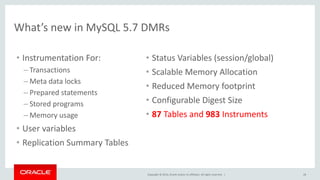
What’s new in MySQL 5.7 DMRs
28
• Instrumentation For:
– Transactions
– Meta data locks
– Prepared statements
– Stored programs
– Memory usage
• User variables
• Replication Summary Tables
• Status Variables (session/global)
• Scalable Memory Allocation
• Reduced Memory footprint
• Configurable Digest Size
• 87 Tables and 983 Instruments
Thank You!
Q&A ?
Copyright © 2014, Oracle and/or its affiliates. All rights reserved. |

MySQL Performance Schema : fossasia

  • 1.
    MySQL Performance Schema Overviewand new exciting features Mayank Prasad Principal Member Technical Staff Oracle, MySQL March 15, 2015 Copyright © 2014, Oracle and/or its affiliates. All rights reserved. |
  • 2.
    Copyright © 2014,Oracle and/or its affiliates. All rights reserved. | Safe Harbor Statement The following is intended to outline our general product direction. It is intended for information purposes only, and may not be incorporated into any contract. It is not a commitment to deliver any material, code, or functionality, and should not be relied upon in making purchasing decisions. The development, release, and timing of any features or functionality described for Oracle’s products remains at the sole discretion of Oracle. 2
  • 3.
    Copyright © 2014,Oracle and/or its affiliates. All rights reserved. | Program Agenda Need, Origin and Design Instruments and instrumentation Use cases Configuration Benefits and Restrictions What’s new in MySQL 5.7 DMRs 1 2 3 4 5 6 3
  • 4.
    Copyright © 2014,Oracle and/or its affiliates. All rights reserved. | Program Agenda Need, Origin and Design Instruments and instrumentation Use cases Configuration Benefits and Restrictions What’s new in MySQL 5.7 DMRs 1 2 3 4 5 6 4
  • 5.
    Copyright © 2014,Oracle and/or its affiliates. All rights reserved. | Why Performance Schema? System Low throughput? ? 5 DBA Hot table? Network High traffic on link? Storage Too much Disk spin?App Developer Slow application? MySQL Developer Code contention? End User stuck session?
  • 6.
    Copyright © 2014,Oracle and/or its affiliates. All rights reserved. | History and Origin “Performance Schema is a mechanism to give user an insight of what is happening behind the scene when MySQL server is running.” Development was started by Marc Alff in 2008. He is Chief Architect and Lead of Performance Schema Team (Christopher Powers and me) in Oracle-MySQL. Introduced in MySQL 5.5. • New storage engine : Performance Schema • New Database : performance_schema • Statistics stored in tables (hard coded DDLs). • Non persistent data. • SQL user interface. 6
  • 7.
    Copyright © 2014,Oracle and/or its affiliates. All rights reserved. | MySQL 5.7 Performance Schema : Design Block Diagram MySQL Server Instrumentation points (P_S hooks) P_S Internal Buffers P_S Storage Engine Storage Engine Interface Statistics Report Fetch Data SQL Query Collect Data Store Data P_S Tables 7
  • 8.
    Copyright © 2014,Oracle and/or its affiliates. All rights reserved. | Program Agenda Need, Origin and Design Instruments and instrumentation Use cases Configuration Benefits and Restrictions What’s new in MySQL 5.7 DMRs 1 2 3 4 5 6 8
  • 9.
    Copyright © 2014,Oracle and/or its affiliates. All rights reserved. | Instruments 9 • Name of monitored activity. • Tree like structure. Separated by ‘/’. • Left to right : More generic to more specific. • 983 instruments till MySQL 5.7.6 DMR. • Stored in performance_schema.setup_instruments table. wait/io/file/myisam/log statement/sql/select
  • 10.
    Copyright © 2014,Oracle and/or its affiliates. All rights reserved. | Instruments contd… Table setup_instruments 10 SETUP_INSTRUMENTS NAME ENABLED TIMED statement/sql/select YES YES statement/sql/create_table YES NO statement/com/Create DB NO NO … … stage/sql/closing tables NO NO stage/sql/Opening tables NO NO stage/sql/optimizing YES YES Configurable at run time
  • 11.
    Copyright © 2014,Oracle and/or its affiliates. All rights reserved. | Program Agenda Need, Origin and Design Instruments and instrumentation Use cases Configuration Benefits and Restrictions What’s new in MySQL 5.7 DMRs 1 2 3 4 5 6 11
  • 12.
    Copyright © 2014,Oracle and/or its affiliates. All rights reserved. | What does Performance Schema provide … update performance_schema.setup_instruments set ENABLED='YES', TIMED='YES'; 12 Connection 1 (Thread 24) start transaction; insert into test.t1 values('11'); commit; start transaction; insert into test.t1 values('12'); commit; start transaction; insert into test.t1 values('13'); commit; select * from test.t1; Connection 2 (Thread 25) start transaction; insert into test.t2 values('21'); commit; start transaction; insert into test.t2 values('22'); commit;
  • 13.
    Copyright © 2014,Oracle and/or its affiliates. All rights reserved. | What does Performance Schema provide … (cont.) Statements Statistics * Timer unit is PICOSECOND. EVENTS_STATEMENTS_CURRENT THREAD_ID 24 25 EVENT_NAME statement/sql /select statement/sql/ commit TIMER_WAIT 876585000 15998287000 SQL_TEXT select * from test.t1 commit ROWS_SENT 3 0 NO_INDEX_USED 0 0 SELECT_SCAN 1 0 13 EVENTS_STATEMENTS_SUMMARY_BY_THREAD_BY_EVENT _NAME THREAD_ID 24 25 EVENT_NAME statement/sql /insert statement/sql /insert COUNT_STAR 3 2 SUM_TIMER_WAIT 35181659000 3477432000 SUM_ROWS_AFFECTED 3 2 SUM_SELECT_SCAN 0 0 SUM_NO_INDEX_USED 0 0
  • 14.
    Copyright © 2014,Oracle and/or its affiliates. All rights reserved. | What does Performance Schema provide … (cont.) Statements Statistics (cont.) * Timer unit is PICOSECOND. 14 EVENTS_STATEMENTS_SUMMARY_GLOBAL_BY_EVENT_NAME EVENT_NAME statement/sql/insert statement/sql/commit COUNT_STAR 5 5 SUM_TIMER_WAIT 38659091000 65812216000 … … SUM_ROWS_AFFECTED 5 0 … … …
  • 15.
    Copyright © 2014,Oracle and/or its affiliates. All rights reserved. | Use case 1 Revisited 15 • Multiple queries running for long on MySQL Server • Few long running query (taking lots of time) • No idea which one • No idea why • What to do ? …
  • 16.
    Copyright © 2014,Oracle and/or its affiliates. All rights reserved. | Use case 1 Diagnosis 16 – THREAD_ID: 25 – EVENT_ID: 89 – EVENT_NAME: statement/sql/select – SQL_TEXT : select bla bla bla…; • Wait ! There’s more! – SELECT_SCAN : 1 – NO_INDEX_USED: 1 • Aha !! SELECT * FROM events_statements_history WHERE TIMER_WAIT > ‘X’;
  • 17.
    Copyright © 2014,Oracle and/or its affiliates. All rights reserved. | Use case 2 Statements giving errors ( or warnings) 17 SELECT DIGEST_TEXT, SCHEMA_NAME, COUNT_STAR, SUM_ERRORS, SUM_WARNINGS FROM performance_schema.events_statements_summary_by_digest WHERE SUM_ERRORS > 0 ORDER BY SUM_ERRORS DESC limit 1G; EVENTS_STATEMENTS_SUMMARY_BY_DIGEST DIGEST_TEXT CREATE TEMPORARY TABLE IF NOT ... _logs` ( `id` INT8 NOT NULL )! SCHEMA_NAME mem COUNT_STAR 1725 SUM_ERRORS 1725 SUM_WARNINGS 0 FIRST_SEEN 2014-05-20 10:42:32 LAST_SEEN 2014-05-21 18:39:22
  • 18.
    Copyright © 2014,Oracle and/or its affiliates. All rights reserved. | Use case 3 Description 18 • Multithreaded environment • My session is stuck • No idea why • What to do ? …
  • 19.
    Copyright © 2014,Oracle and/or its affiliates. All rights reserved. | Use case 3 • What T1 is waiting for – Say T1 is waiting for mutex_A (column OBJECT_INSTANCE_BEGIN) • Lets see who has taken this mutex_A – Ok, so thread T2 is holding mutex_A (column LOCKED_BY_THREAD_ID) • Find out what thread t2 is waiting for • And so on… SELECT * FROM mutex_instances WHERE OBJECT_INSTANCE_BEGIN = mutex_A; SELECT * FROM events_waits_current WHERE THREAD_ID = T2; Diagnosis 19 SELECT * FROM events_waits_current WHERE THREAD_ID = T1;
  • 20.
    Copyright © 2014,Oracle and/or its affiliates. All rights reserved. | Event Hierarchy Session Transaction *Statement Stage Wait sync, lock, i/o * Statements for non-transactions tables are not part of Transaction instrumentation. 20
  • 21.
    Copyright © 2014,Oracle and/or its affiliates. All rights reserved. | Event Hierarchy 21 event_id nesting_event_id event_id nesting_event_id event_id nesting_event_id event_id nesting_event_id event_id nesting_event_id event_id nesting_event_id event_id nesting_event_id event_id nesting_event_id Transactions Statements Stages Waits
  • 22.
    Copyright © 2014,Oracle and/or its affiliates. All rights reserved. | Instruments available Monitored activities 22 • Instrumentation for – I/O operation (file, table, NET) – Locking (mutex, r/w locks, table locks, MDLs) – EVENT (transactions, statements, stages, waits, idle) – Stored Programs (Procedures, Functions, Triggers, Events) – User/host/account – Memory – And many more …
  • 23.
    Copyright © 2014,Oracle and/or its affiliates. All rights reserved. | Program Agenda Need, Origin and Design Instruments and instrumentation Use cases Configuration Benefits and Restrictions What’s new in MySQL 5.7 DMRs 1 2 3 4 5 6 23
  • 24.
    Copyright © 2014,Oracle and/or its affiliates. All rights reserved. | Configuration • Build • Startup – Configuration file – Command line • Runtime [mysqld] performance_schema_consumers_event_waits_history = ON . performance_schema_events_waits_history_size = 1000 . performance_schema_instruments=‘statement/sql/% = COUNTED’ --performance_schema_consumers_event_waits_history = ON . --performance_schema_events_waits_history_size = 1000 cmake . -DWITH_PERFSCHEMA_STORAGE_ENGINE=1 -DDISABLE_PSI_MUTEX=1 24 update setup_consumers set ENABLED=‘NO’ where NAME=‘global_instrumentation’; . update setup_instruments set ENABLED=‘YES’ where NAME=‘statement/sql/%’;
  • 25.
    Copyright © 2014,Oracle and/or its affiliates. All rights reserved. | Program Agenda Need, Origin and Design Instruments and instrumentation Use cases Configuration Benefits and Restrictions What’s new in MySQL 5.7 DMRs 1 2 3 4 5 6 25
  • 26.
    Copyright © 2014,Oracle and/or its affiliates. All rights reserved. | Performance Schema Benefits & Restriction 26 Benefits • Great insight of a running MySQL server. • Good granularity (nested events). • Available irrespective of platforms. • User friendly SQL interface. • Multiple summary tables for consolidation. • Dynamically configurable to meet user's need at run time. Restriction • Performance overhead. – Configure as per need.
  • 27.
    Copyright © 2014,Oracle and/or its affiliates. All rights reserved. | Program Agenda Need, Origin and Design Instruments and instrumentation Use cases Configuration Benefits and Restrictions What’s new in MySQL 5.7 DMRs 1 2 3 4 5 6 27
  • 28.
    Copyright © 2014,Oracle and/or its affiliates. All rights reserved. | What’s new in MySQL 5.7 DMRs 28 • Instrumentation For: – Transactions – Meta data locks – Prepared statements – Stored programs – Memory usage • User variables • Replication Summary Tables • Status Variables (session/global) • Scalable Memory Allocation • Reduced Memory footprint • Configurable Digest Size • 87 Tables and 983 Instruments
  • 29.
    Thank You! Q&A ? Copyright© 2014, Oracle and/or its affiliates. All rights reserved. |

Editor's Notes

  • #2 This is a Title Slide with Picture slide ideal for including a picture with a brief title, subtitle and presenter information. To customize this slide with your own picture: Right-click the slide area and choose Format Background from the pop-up menu. From the Fill menu, click Picture and texture fill. Under Insert from: click File. Locate your new picture and click Insert. To copy the Customized Background from Another Presentation on PC Click New Slide from the Home tab's Slides group and select Reuse Slides. Click Browse in the Reuse Slides panel and select Browse Files. Double-click the PowerPoint presentation that contains the background you wish to copy. Check Keep Source Formatting and click the slide that contains the background you want. Click the left-hand slide preview to which you wish to apply the new master layout. Apply New Layout (Important): Right-click any selected slide, point to Layout, and click the slide containing the desired layout from the layout gallery. Delete any unwanted slides or duplicates. To copy the Customized Background from Another Presentation on Mac Click New Slide from the Home tab's Slides group and select Insert Slides from Other Presentation… Navigate to the PowerPoint presentation file that contains the background you wish to copy. Double-click or press Insert. This prompts the Slide Finder dialogue box. Make sure Keep design of original slides is unchecked and click the slide(s) that contains the background you want. Hold Shift key to select multiple slides. Click the left-hand slide preview to which you wish to apply the new master layout. Apply New Layout (Important): Click Layout from the Home tab's Slides group, and click the slide containing the desired layout from the layout gallery. Delete any unwanted slides or duplicates.
  • #3 This is a Safe Harbor Front slide, one of two Safe Harbor Statement slides included in this template. One of the Safe Harbor slides must be used if your presentation covers material affected by Oracle’s Revenue Recognition Policy To learn more about this policy, e-mail: Revrec-americasiebc_us@oracle.com For internal communication, Safe Harbor Statements are not required. However, there is an applicable disclaimer (Exhibit E) that should be used, found in the Oracle Revenue Recognition Policy for Future Product Communications. Copy and paste this link into a web browser, to find out more information.   http://my.oracle.com/site/fin/gfo/GlobalProcesses/cnt452504.pdf For all external communications such as press release, roadmaps, PowerPoint presentations, Safe Harbor Statements are required. You can refer to the link mentioned above to find out additional information/disclaimers required depending on your audience.
  • #30 This is a Title Slide with Picture slide ideal for including a picture with a brief title, subtitle and presenter information. To customize this slide with your own picture: Right-click the slide area and choose Format Background from the pop-up menu. From the Fill menu, click Picture and texture fill. Under Insert from: click File. Locate your new picture and click Insert. To copy the Customized Background from Another Presentation on PC Click New Slide from the Home tab's Slides group and select Reuse Slides. Click Browse in the Reuse Slides panel and select Browse Files. Double-click the PowerPoint presentation that contains the background you wish to copy. Check Keep Source Formatting and click the slide that contains the background you want. Click the left-hand slide preview to which you wish to apply the new master layout. Apply New Layout (Important): Right-click any selected slide, point to Layout, and click the slide containing the desired layout from the layout gallery. Delete any unwanted slides or duplicates. To copy the Customized Background from Another Presentation on Mac Click New Slide from the Home tab's Slides group and select Insert Slides from Other Presentation… Navigate to the PowerPoint presentation file that contains the background you wish to copy. Double-click or press Insert. This prompts the Slide Finder dialogue box. Make sure Keep design of original slides is unchecked and click the slide(s) that contains the background you want. Hold Shift key to select multiple slides. Click the left-hand slide preview to which you wish to apply the new master layout. Apply New Layout (Important): Click Layout from the Home tab's Slides group, and click the slide containing the desired layout from the layout gallery. Delete any unwanted slides or duplicates.