MySQL Events
11 - Sep - 2015
By,
Vijayakumar G
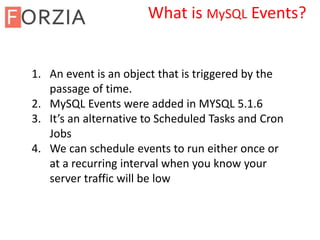
1. An event is an object that is triggered by the
passage of time.
2. MySQL Events were added in MYSQL 5.1.6
3. It’s an alternative to Scheduled Tasks and Cron
Jobs
4. We can schedule events to run either once or
at a recurring interval when you know your
server traffic will be low
What is MySQL Events?
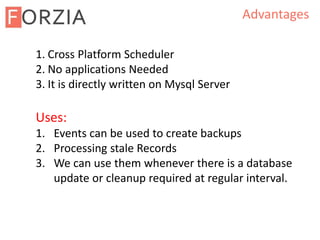
Advantages
1. Cross Platform Scheduler
2. No applications Needed
3. It is directly written on Mysql Server
Uses:
1. Events can be used to create backups
2. Processing stale Records
3. We can use them whenever there is a database
update or cleanup required at regular interval.
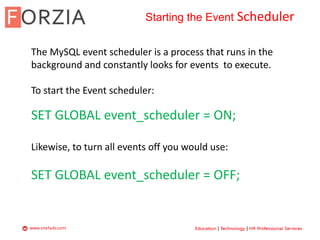
Starting the Event Scheduler
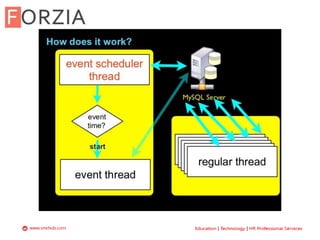
The MySQL event scheduler is a process that runs in the
background and constantly looks for events to execute.
To start the Event scheduler:
SET GLOBAL event_scheduler = ON;
Likewise, to turn all events off you would use:
SET GLOBAL event_scheduler = OFF;
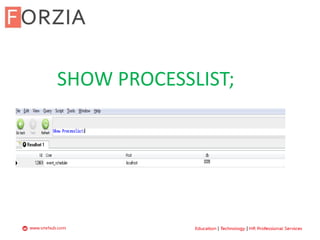
SHOW PROCESSLIST;
Working with Events
It can only perform actions for which the MySQL user that
created the event has privileges to perform
(select * from mysql.user)
Event names are restricted to a length of 64 characters
Events cannot be created, altered, or dropped by another
event.
Unique Event name
Create Event Syntax
CREATE
[DEFINER = { user | CURRENT_USER }]
EVENT
[IF NOT EXISTS]
event_name
ON SCHEDULE schedule
[ON COMPLETION [NOT] PRESERVE]
[ENABLE | DISABLE | DISABLE ON SLAVE]
[COMMENT 'comment']
DO event_body;
schedule:
AT timestamp [+ INTERVAL interval] ...
| EVERY interval
[STARTS timestamp [+ INTERVAL interval] ...]
[ENDS timestamp [+ INTERVAL interval] ...]
interval:
quantity {YEAR | QUARTER | MONTH | DAY | HOUR | MINUTE |
WEEK | SECOND | YEAR_MONTH | DAY_HOUR | DAY_MINUTE |
DAY_SECOND | HOUR_MINUTE | HOUR_SECOND | MINUTE_SECOND}
1. First, you specify the event name after the CREATE
EVENT clause. The event name must be unique within a
database schema.
2. Second, you put a schedule after the ON SCHEDULE clause. If
the event is a one-time event, you use the syntax: AT
timestamp [+ INTERVAL]. If the event is a recurring event, you
use the EVERY clause: EVERY interval STARTS timestamp
[+INTERVAL] ENDS timestamp [+INTERVAL].
3. For “two minutes and ten seconds” can be expressed as +
INTERVAL '2:10' MINUTE_SECOND.
For “three weeks and two days from now” can be expressed
as AT CURRENT_TIMESTAMP + INTERVAL 3 WEEK + INTERVAL 2
DAY
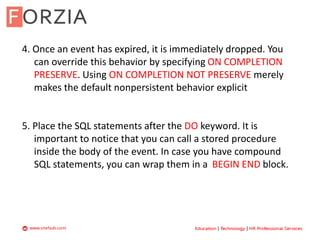
4. Once an event has expired, it is immediately dropped. You
can override this behavior by specifying ON COMPLETION
PRESERVE. Using ON COMPLETION NOT PRESERVE merely
makes the default nonpersistent behavior explicit
5. Place the SQL statements after the DO keyword. It is
important to notice that you can call a stored procedure
inside the body of the event. In case you have compound
SQL statements, you can wrap them in a BEGIN END block.
YSLOW DEMO
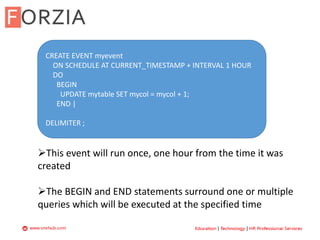
CREATE EVENT myevent
ON SCHEDULE AT CURRENT_TIMESTAMP + INTERVAL 1 HOUR
DO
BEGIN
UPDATE mytable SET mycol = mycol + 1;
END |
DELIMITER ;
This event will run once, one hour from the time it was
created
The BEGIN and END statements surround one or multiple
queries which will be executed at the specified time
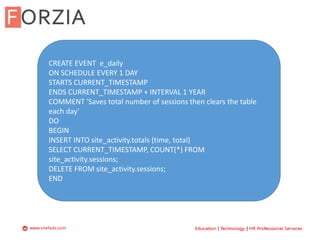
CREATE EVENT e_daily
ON SCHEDULE EVERY 1 DAY
STARTS CURRENT_TIMESTAMP
ENDS CURRENT_TIMESTAMP + INTERVAL 1 YEAR
COMMENT 'Saves total number of sessions then clears the table
each day'
DO
BEGIN
INSERT INTO site_activity.totals (time, total)
SELECT CURRENT_TIMESTAMP, COUNT(*) FROM
site_activity.sessions;
DELETE FROM site_activity.sessions;
END
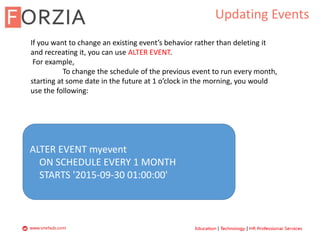
Updating Events
If you want to change an existing event’s behavior rather than deleting it
and recreating it, you can use ALTER EVENT.
For example,
To change the schedule of the previous event to run every month,
starting at some date in the future at 1 o’clock in the morning, you would
use the following:
ALTER EVENT myevent
ON SCHEDULE EVERY 1 MONTH
STARTS '2015-09-30 01:00:00'
Drop Events
SYNTAX:
DROP EVENT [IF EXISTS] event_name;
EXAMPLE:
DROP EVENT IF EXISTS edaily;
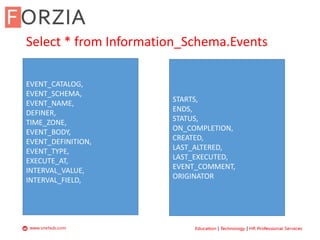
Select * from Information_Schema.Events
EVENT_CATALOG,
EVENT_SCHEMA,
EVENT_NAME,
DEFINER,
TIME_ZONE,
EVENT_BODY,
EVENT_DEFINITION,
EVENT_TYPE,
EXECUTE_AT,
INTERVAL_VALUE,
INTERVAL_FIELD,
STARTS,
ENDS,
STATUS,
ON_COMPLETION,
CREATED,
LAST_ALTERED,
LAST_EXECUTED,
EVENT_COMMENT,
ORIGINATOR
?
THANK YOU

My SQL Events

  • 1.
    MySQL Events 11 -Sep - 2015 By, Vijayakumar G
  • 2.
    1. An eventis an object that is triggered by the passage of time. 2. MySQL Events were added in MYSQL 5.1.6 3. It’s an alternative to Scheduled Tasks and Cron Jobs 4. We can schedule events to run either once or at a recurring interval when you know your server traffic will be low What is MySQL Events?
  • 3.
    Advantages 1. Cross PlatformScheduler 2. No applications Needed 3. It is directly written on Mysql Server Uses: 1. Events can be used to create backups 2. Processing stale Records 3. We can use them whenever there is a database update or cleanup required at regular interval.
  • 5.
    Starting the EventScheduler The MySQL event scheduler is a process that runs in the background and constantly looks for events to execute. To start the Event scheduler: SET GLOBAL event_scheduler = ON; Likewise, to turn all events off you would use: SET GLOBAL event_scheduler = OFF;
  • 6.
  • 7.
    Working with Events Itcan only perform actions for which the MySQL user that created the event has privileges to perform (select * from mysql.user) Event names are restricted to a length of 64 characters Events cannot be created, altered, or dropped by another event. Unique Event name
  • 8.
    Create Event Syntax CREATE [DEFINER= { user | CURRENT_USER }] EVENT [IF NOT EXISTS] event_name ON SCHEDULE schedule [ON COMPLETION [NOT] PRESERVE] [ENABLE | DISABLE | DISABLE ON SLAVE] [COMMENT 'comment'] DO event_body; schedule: AT timestamp [+ INTERVAL interval] ... | EVERY interval [STARTS timestamp [+ INTERVAL interval] ...] [ENDS timestamp [+ INTERVAL interval] ...] interval: quantity {YEAR | QUARTER | MONTH | DAY | HOUR | MINUTE | WEEK | SECOND | YEAR_MONTH | DAY_HOUR | DAY_MINUTE | DAY_SECOND | HOUR_MINUTE | HOUR_SECOND | MINUTE_SECOND}
  • 9.
    1. First, youspecify the event name after the CREATE EVENT clause. The event name must be unique within a database schema. 2. Second, you put a schedule after the ON SCHEDULE clause. If the event is a one-time event, you use the syntax: AT timestamp [+ INTERVAL]. If the event is a recurring event, you use the EVERY clause: EVERY interval STARTS timestamp [+INTERVAL] ENDS timestamp [+INTERVAL]. 3. For “two minutes and ten seconds” can be expressed as + INTERVAL '2:10' MINUTE_SECOND. For “three weeks and two days from now” can be expressed as AT CURRENT_TIMESTAMP + INTERVAL 3 WEEK + INTERVAL 2 DAY
  • 10.
    4. Once anevent has expired, it is immediately dropped. You can override this behavior by specifying ON COMPLETION PRESERVE. Using ON COMPLETION NOT PRESERVE merely makes the default nonpersistent behavior explicit 5. Place the SQL statements after the DO keyword. It is important to notice that you can call a stored procedure inside the body of the event. In case you have compound SQL statements, you can wrap them in a BEGIN END block.
  • 11.
    YSLOW DEMO CREATE EVENTmyevent ON SCHEDULE AT CURRENT_TIMESTAMP + INTERVAL 1 HOUR DO BEGIN UPDATE mytable SET mycol = mycol + 1; END | DELIMITER ; This event will run once, one hour from the time it was created The BEGIN and END statements surround one or multiple queries which will be executed at the specified time
  • 12.
    CREATE EVENT e_daily ONSCHEDULE EVERY 1 DAY STARTS CURRENT_TIMESTAMP ENDS CURRENT_TIMESTAMP + INTERVAL 1 YEAR COMMENT 'Saves total number of sessions then clears the table each day' DO BEGIN INSERT INTO site_activity.totals (time, total) SELECT CURRENT_TIMESTAMP, COUNT(*) FROM site_activity.sessions; DELETE FROM site_activity.sessions; END
  • 13.
    Updating Events If youwant to change an existing event’s behavior rather than deleting it and recreating it, you can use ALTER EVENT. For example, To change the schedule of the previous event to run every month, starting at some date in the future at 1 o’clock in the morning, you would use the following: ALTER EVENT myevent ON SCHEDULE EVERY 1 MONTH STARTS '2015-09-30 01:00:00'
  • 14.
    Drop Events SYNTAX: DROP EVENT[IF EXISTS] event_name; EXAMPLE: DROP EVENT IF EXISTS edaily;
  • 15.
    Select * fromInformation_Schema.Events EVENT_CATALOG, EVENT_SCHEMA, EVENT_NAME, DEFINER, TIME_ZONE, EVENT_BODY, EVENT_DEFINITION, EVENT_TYPE, EXECUTE_AT, INTERVAL_VALUE, INTERVAL_FIELD, STARTS, ENDS, STATUS, ON_COMPLETION, CREATED, LAST_ALTERED, LAST_EXECUTED, EVENT_COMMENT, ORIGINATOR
  • 16.
  • 17.