MULTITHREADING AND
DEADLOCK
Presented by:
22. GOURI CHATTERJEE
23. SWARNALI CHATTERJEE
24. SAGAR CHAUDHARY
25. AINDRILA CHOWDHURY
26. AKASH DAS
27. RITABAN DAS
28. SOUMIK DAS
29. DEBAPRIYA DAS GUPTA
30. ROMIT DAS GUPTA
31. ARGHYA DE
32. SOURADEEP DE
33. PRITAM DEB
INDEX
• Introduction to Multithreading (Roll 22)
• The main thread (Roll 25)
• Life cycle of a Thread (Roll 24)
• Thread Priorities (Roll 23)
• Thread Class (Roll 27)
• Creating a thread (Roll 29)
• Joining threads(Roll 30)
• Synchronization (Roll 31)
• Deadlock (Roll 33)
• Inter-thread communication (Roll 32)
• Interrupting a Thread (Roll 28)
• Conclusion (Roll 26)
INTRODUCTION TO MULTITHREADING
• Multithreaded programs contain two or more threads that can run concurrently and each
thread defines a separate path of execution.
• A single program can perform two or more tasks simultaneously.
• Multiprocessing
• Multitasking
• Multiprogramming
Roll 22
THE MAIN THREAD
• The program begins to execute its code starting from the main method.
• Therefore, the JVM creates a thread to start executing the code present
in main method. This thread is called as main thread.
• It is the thread from which other threads will be produced.
• main thread must be always the last thread to finish execution.
Roll 25
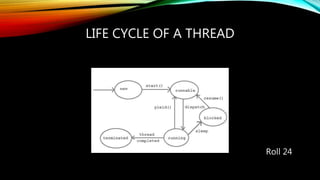
LIFE CYCLE OF A THREAD
Roll 24
THREAD PRIORITIES
Every thread has a priority that helps the operating system determine the order in
which threads are scheduled for execution. In java thread priority ranges between 1 to
10
• MIN-PRIORITY (a constant of 1)
• MAX-PRIORITY (a constant of 10)
By default every thread is given a NORM-PRIORITY(5). The main thread always have
NORM-PRIORITY.
Roll 23
THREAD CLASS
Thread class will be used to create and run threads for utilizing Multithreading feature
of Java.
Constructors of Thread class
• Thread ( )
• Thread ( String str )
• Thread ( Runnable r )
• Thread ( Runnable r, String str)
Roll 27
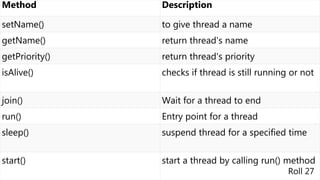
Method Description
setName() to give thread a name
getName() return thread's name
getPriority() return thread's priority
isAlive() checks if thread is still running or not
join() Wait for a thread to end
run() Entry point for a thread
sleep() suspend thread for a specified time
start() start a thread by calling run() method
Roll 27
CREATING A THREAD
Java defines two ways by which a thread can be created.
• By implementing the Runnable interface.
• By extending the Thread class.
If Runnable interface is implemented in the class, then we need to explicitly create a
Thread class object and need to pass the Runnable interface implemented class
object as a parameter in its constructor.
When subclass object is created, Thread class constructor will also be invoked, as it
is the super class, hence subclass object acts as Thread class object.
Roll 29
JOINING THREADS
• Sometimes one thread needs to know when other thread is terminating.
• In Java, isAlive() and join()are two different methods that are used to check
whether a thread has finished its execution or not.
• The isAlive() method returns true if the thread upon which it is called is still
running otherwise it returns false.
• Using join() method, we tell our thread to wait until the specified thread
completes its execution.
Roll 30
SYNCHRONIZATION
At times when more than one thread try to access a shared resource, we need to
ensure that resource will be used by only one thread at a time. The process by which
this is achieved is called synchronization.
Why we use Synchronization ?
If we do not use synchronization, and let two or more threads access a shared
resource at the same time, it will lead to distorted results.
Roll 31
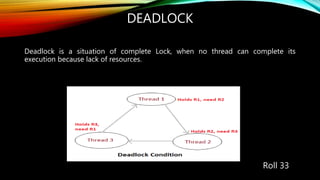
DEADLOCK
Deadlock is a situation of complete Lock, when no thread can complete its
execution because lack of resources.
Roll 33
INTER-THREAD COMMUNICATION
Inter-thread communication is allowing synchronized threads to communicate with
each other.
It is a mechanism in which a thread is paused running in its critical section and
another thread is allowed to enter (or lock) in the same critical section to be executed
. It is implemented by following methods of Object class:
• wait()
• notify()
• notifyAll()
Roll 32
INTERRUPTING A THREAD
• Any thread in sleeping or waiting state calling the interrupt() method on the thread, breaks
out the sleeping or waiting state throwing InterruptedException.
• Thread is not in the sleeping or waiting state, calling the interrupt() method performs normal
behaviour and doesn't interrupt the thread but sets the interrupt flag to true.
Methods provided by the Thread class for interrupting a thread
• public void interrupt()
• public static boolean interrupted()
• public boolean isInterrupted()
Roll 28
CONCLUSION
• Mutithreading doesn't block the user because threads are independent and you
can perform multiple operations at the same time.
• We can perform many operations together, so it saves time.
• Threads are independent, so it doesn't affect other threads if an exception occurs
in a single thread.
Roll 26

Multithreading and deadlock

  • 1.
    MULTITHREADING AND DEADLOCK Presented by: 22.GOURI CHATTERJEE 23. SWARNALI CHATTERJEE 24. SAGAR CHAUDHARY 25. AINDRILA CHOWDHURY 26. AKASH DAS 27. RITABAN DAS 28. SOUMIK DAS 29. DEBAPRIYA DAS GUPTA 30. ROMIT DAS GUPTA 31. ARGHYA DE 32. SOURADEEP DE 33. PRITAM DEB
  • 2.
    INDEX • Introduction toMultithreading (Roll 22) • The main thread (Roll 25) • Life cycle of a Thread (Roll 24) • Thread Priorities (Roll 23) • Thread Class (Roll 27) • Creating a thread (Roll 29) • Joining threads(Roll 30) • Synchronization (Roll 31) • Deadlock (Roll 33) • Inter-thread communication (Roll 32) • Interrupting a Thread (Roll 28) • Conclusion (Roll 26)
  • 3.
    INTRODUCTION TO MULTITHREADING •Multithreaded programs contain two or more threads that can run concurrently and each thread defines a separate path of execution. • A single program can perform two or more tasks simultaneously. • Multiprocessing • Multitasking • Multiprogramming Roll 22
  • 4.
    THE MAIN THREAD •The program begins to execute its code starting from the main method. • Therefore, the JVM creates a thread to start executing the code present in main method. This thread is called as main thread. • It is the thread from which other threads will be produced. • main thread must be always the last thread to finish execution. Roll 25
  • 5.
    LIFE CYCLE OFA THREAD Roll 24
  • 6.
    THREAD PRIORITIES Every threadhas a priority that helps the operating system determine the order in which threads are scheduled for execution. In java thread priority ranges between 1 to 10 • MIN-PRIORITY (a constant of 1) • MAX-PRIORITY (a constant of 10) By default every thread is given a NORM-PRIORITY(5). The main thread always have NORM-PRIORITY. Roll 23
  • 7.
    THREAD CLASS Thread classwill be used to create and run threads for utilizing Multithreading feature of Java. Constructors of Thread class • Thread ( ) • Thread ( String str ) • Thread ( Runnable r ) • Thread ( Runnable r, String str) Roll 27
  • 8.
    Method Description setName() togive thread a name getName() return thread's name getPriority() return thread's priority isAlive() checks if thread is still running or not join() Wait for a thread to end run() Entry point for a thread sleep() suspend thread for a specified time start() start a thread by calling run() method Roll 27
  • 9.
    CREATING A THREAD Javadefines two ways by which a thread can be created. • By implementing the Runnable interface. • By extending the Thread class. If Runnable interface is implemented in the class, then we need to explicitly create a Thread class object and need to pass the Runnable interface implemented class object as a parameter in its constructor. When subclass object is created, Thread class constructor will also be invoked, as it is the super class, hence subclass object acts as Thread class object. Roll 29
  • 10.
    JOINING THREADS • Sometimesone thread needs to know when other thread is terminating. • In Java, isAlive() and join()are two different methods that are used to check whether a thread has finished its execution or not. • The isAlive() method returns true if the thread upon which it is called is still running otherwise it returns false. • Using join() method, we tell our thread to wait until the specified thread completes its execution. Roll 30
  • 11.
    SYNCHRONIZATION At times whenmore than one thread try to access a shared resource, we need to ensure that resource will be used by only one thread at a time. The process by which this is achieved is called synchronization. Why we use Synchronization ? If we do not use synchronization, and let two or more threads access a shared resource at the same time, it will lead to distorted results. Roll 31
  • 12.
    DEADLOCK Deadlock is asituation of complete Lock, when no thread can complete its execution because lack of resources. Roll 33
  • 13.
    INTER-THREAD COMMUNICATION Inter-thread communicationis allowing synchronized threads to communicate with each other. It is a mechanism in which a thread is paused running in its critical section and another thread is allowed to enter (or lock) in the same critical section to be executed . It is implemented by following methods of Object class: • wait() • notify() • notifyAll() Roll 32
  • 14.
    INTERRUPTING A THREAD •Any thread in sleeping or waiting state calling the interrupt() method on the thread, breaks out the sleeping or waiting state throwing InterruptedException. • Thread is not in the sleeping or waiting state, calling the interrupt() method performs normal behaviour and doesn't interrupt the thread but sets the interrupt flag to true. Methods provided by the Thread class for interrupting a thread • public void interrupt() • public static boolean interrupted() • public boolean isInterrupted() Roll 28
  • 15.
    CONCLUSION • Mutithreading doesn'tblock the user because threads are independent and you can perform multiple operations at the same time. • We can perform many operations together, so it saves time. • Threads are independent, so it doesn't affect other threads if an exception occurs in a single thread. Roll 26