Multi container applications
with Docker Compose
ContainerDay 2019 – Bologna, Italy
Who am I?
2
Paolo Ferretti
Developer Advocate @MailUpGroup
Twitter: @paoferretti
What is Docker Compose?
3
Docker Compose is a tool for defining
and running multi-container Docker
applications.
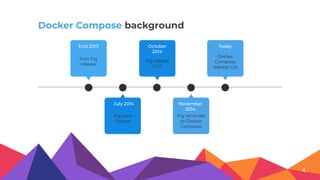
Docker Compose background
First Fig
release
End 2013
Fig release
1.0.0
October
2014
Docker
Compose
release 1.24
Today
Fig joins
Docker
July 2014
Fig renames
to Docker
Compose
November
2014
4
5
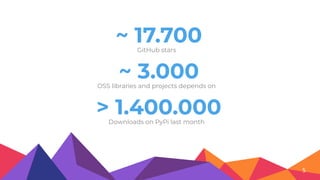
~ 17.700GitHub stars
~ 3.000OSS libraries and projects depends on
> 1.400.000Downloads on PyPi last month
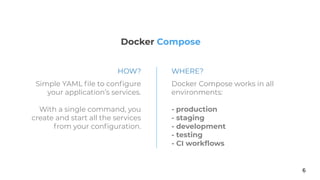
Docker Compose
6
Simple YAML file to configure
your application’s services.
With a single command, you
create and start all the services
from your configuration.
Docker Compose works in all
environments:
- production
- staging
- development
- testing
- CI workflows
HOW? WHERE?
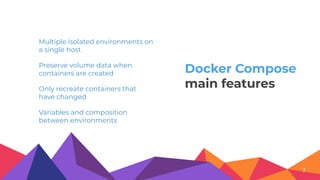
Multiple isolated environments on
a single host
Preserve volume data when
containers are created
Variables and composition
between environments
Only recreate containers that
have changed
7
Docker Compose
main features
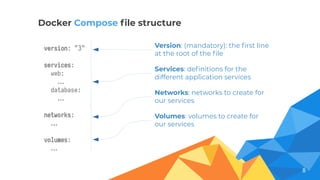
Version: (mandatory): the first line
at the root of the file
Services: definitions for the
different application services
Volumes: volumes to create for
our services
Networks: networks to create for
our services
8
version: "3"
services:
web:
…
database:
…
networks:
…
volumes:
…
Docker Compose file structure
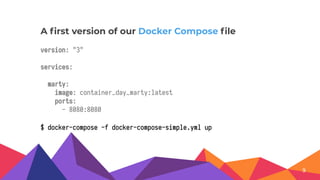
version: "3"
services:
marty:
image: container_day_marty:latest
ports:
- 8080:8080
A first version of our Docker Compose file
9
$ docker-compose -f docker-compose-simple.yml up
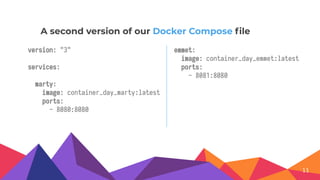
version: "3"
services:
marty:
image: container_day_marty:latest
ports:
- 8080:8080
A second version of our Docker Compose file
11
emmet:
image: container_day_emmet:latest
ports:
- 8081:8080
13
version: "3"
services:
lorraine:
…
depends_on: [database]
database:
image: postgres:12.0-alpine
volumes:
- ./postgres:/docker-entrypoint-initdb.d
An example with a database
15
version: "3"
services:
lorraine:
image: ...:latest
ports:
- 8080:8080
depends_on: [database]
Let’s compose with Docker Compose
version: "3"
services:
database:
image: postgres:12.0-alpine
volumes:
- ./postgres:/docker-entrypoint-initdb.d
docker-compose-app.yml docker-compose-services.yml
$ docker-compose -f docker-compose-app.yml -f docker-compose-services.yml up
17
version: "3"
services:
database:
ports:
- 5432:5432
Compose for local and containerized execution
version: "3"
services:
database:
image: postgres:12.0-alpine
volumes:
- ...
docker-compose-services.yml
$ docker-compose -f docker-compose-app.yml -f docker-compose-services.yml up
docker-compose-services-local.yml
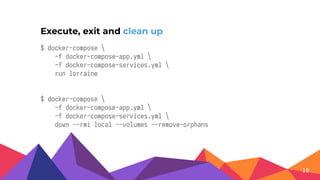
$ docker-compose 
-f docker-compose-app.yml 
-f docker-compose-services.yml 
run lorraine
$ docker-compose 
-f docker-compose-app.yml 
-f docker-compose-services.yml 
down --rmi local --volumes --remove-orphans
Execute, exit and clean up
19
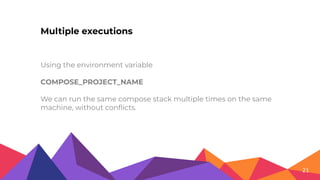
Using the environment variable
COMPOSE_PROJECT_NAME
We can run the same compose stack multiple times on the same
machine, without conflicts.
Multiple executions
21
Thanks!
@paoferretti
paolo.ferretti@fastmail.com
https://joind.in/talk/4d86a
https://github.com/pferretti/container_day_2019
Credits
◂ Presentation template by Slidesgo
◂ Icons by Flaticon
◂ Images & infographics by Freepik
◂ Photos created by Freepik - Freepik.com

Multi container applications with docker