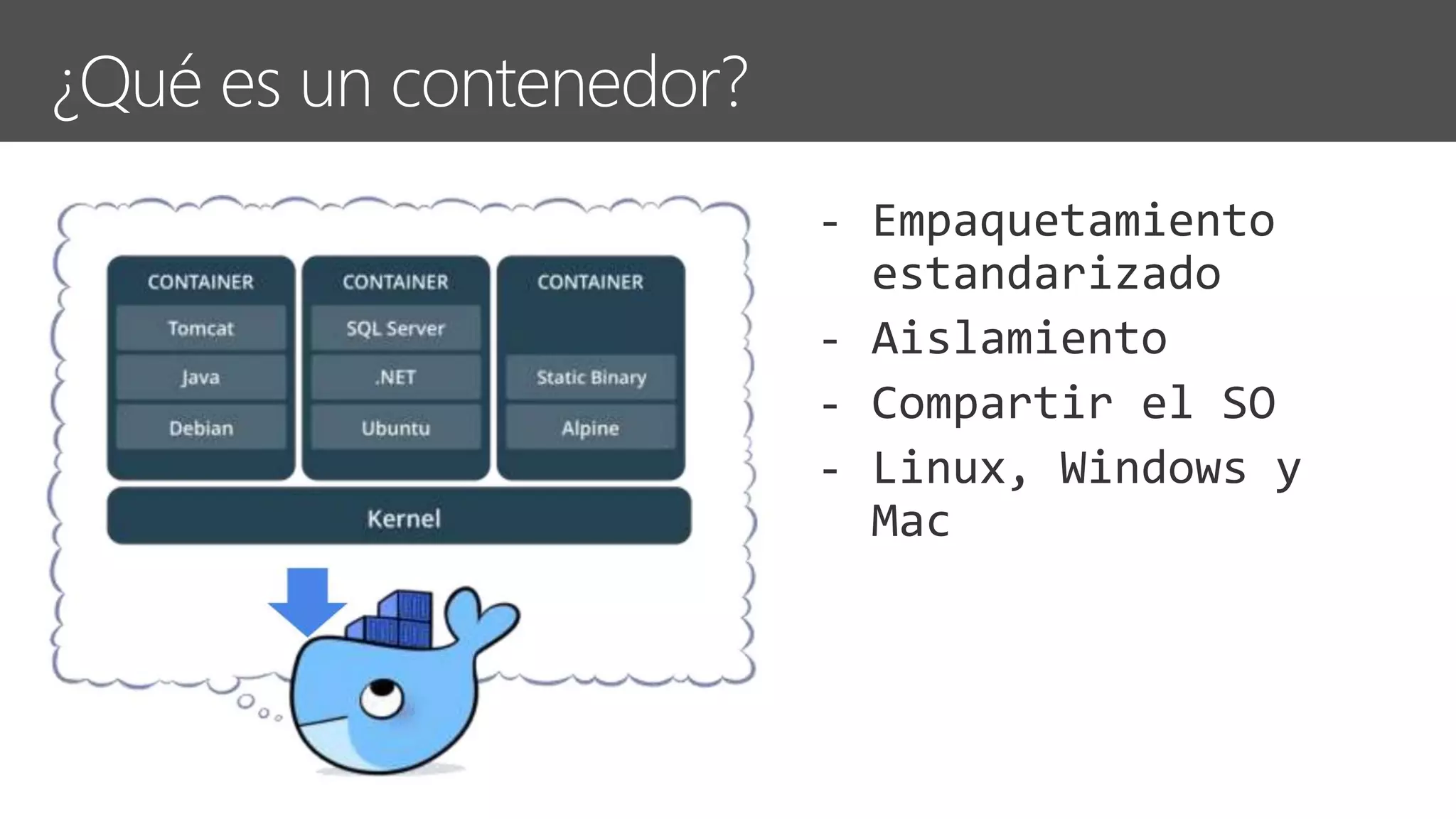
Docker Image
Docker Container
Docker Engine
Registry Service (Docker Store o Docker Trusted Registry)
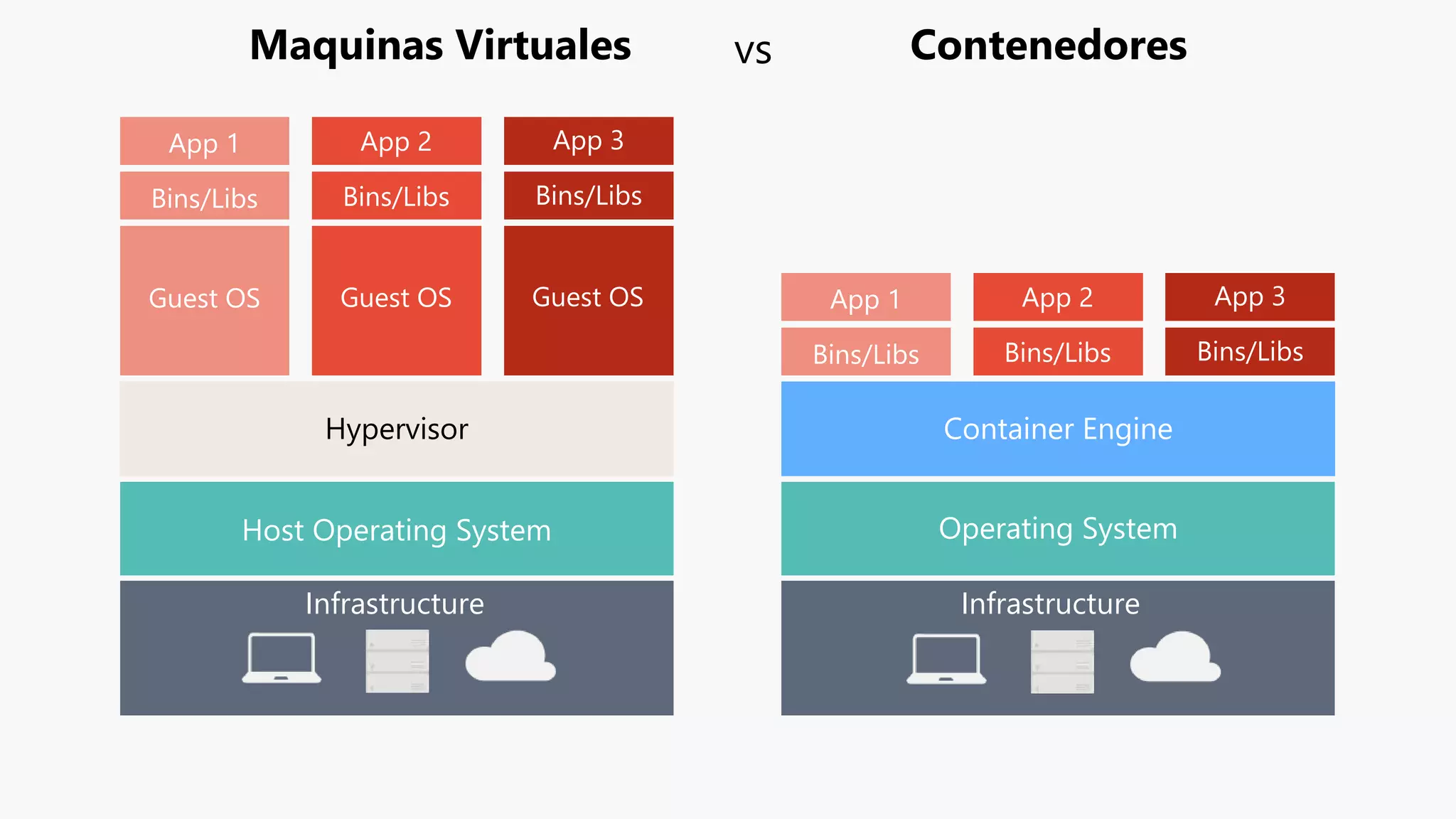
Infrastructure Infrastructure
Host Operating System
Hypervisor
Guest OS
Bins/Libs
App 1
Guest OS
Bins/Libs
App 2
Guest OS
Bins/Libs
App 3
Bins/Libs
App 1
Bins/Libs
App 2
Bins/Libs
App 3
Container Engine
Operating System
Maquinas Virtuales Contenedoresvs
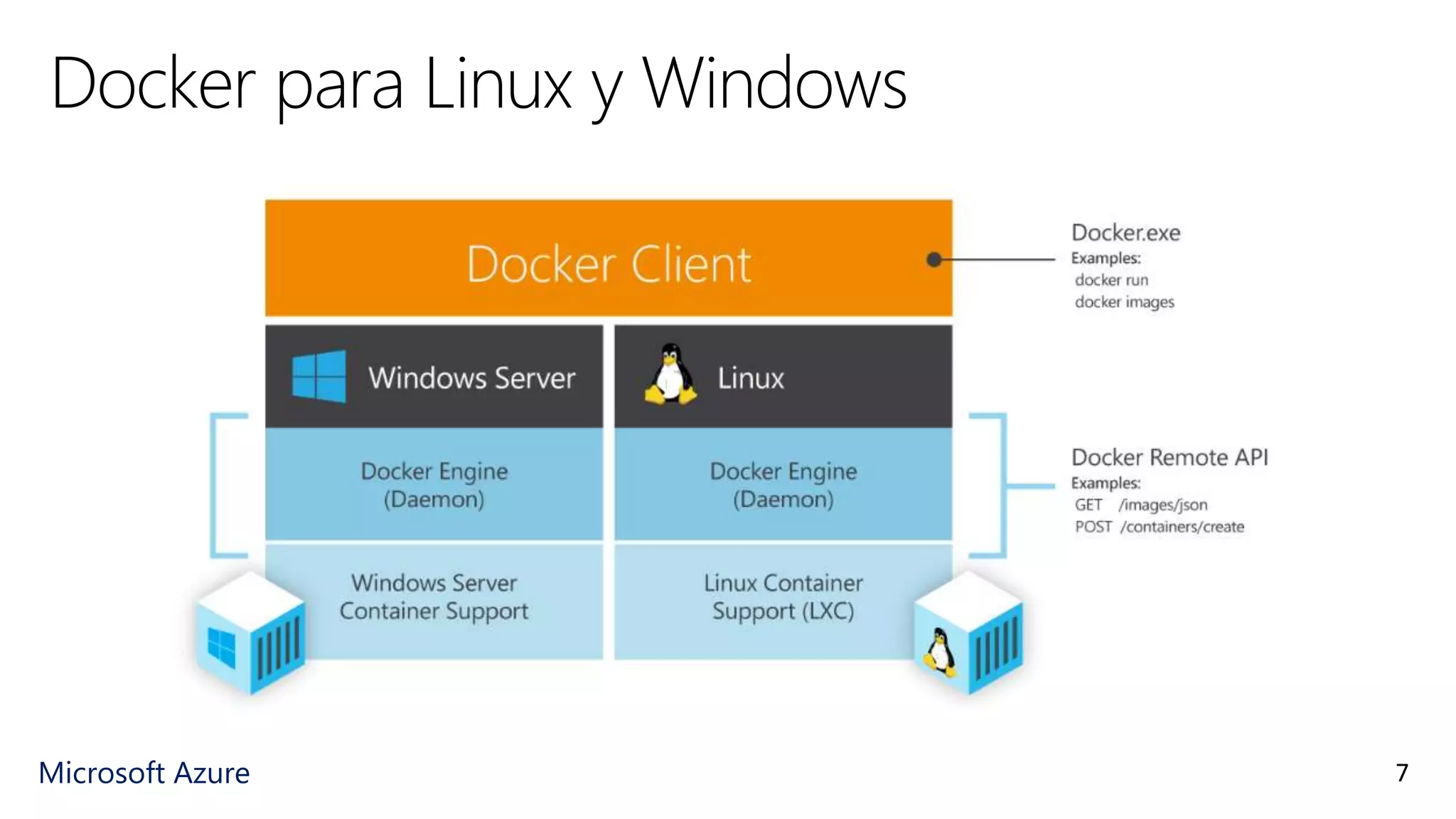
Microsoft Azure
Docker para Linux y Windows
7
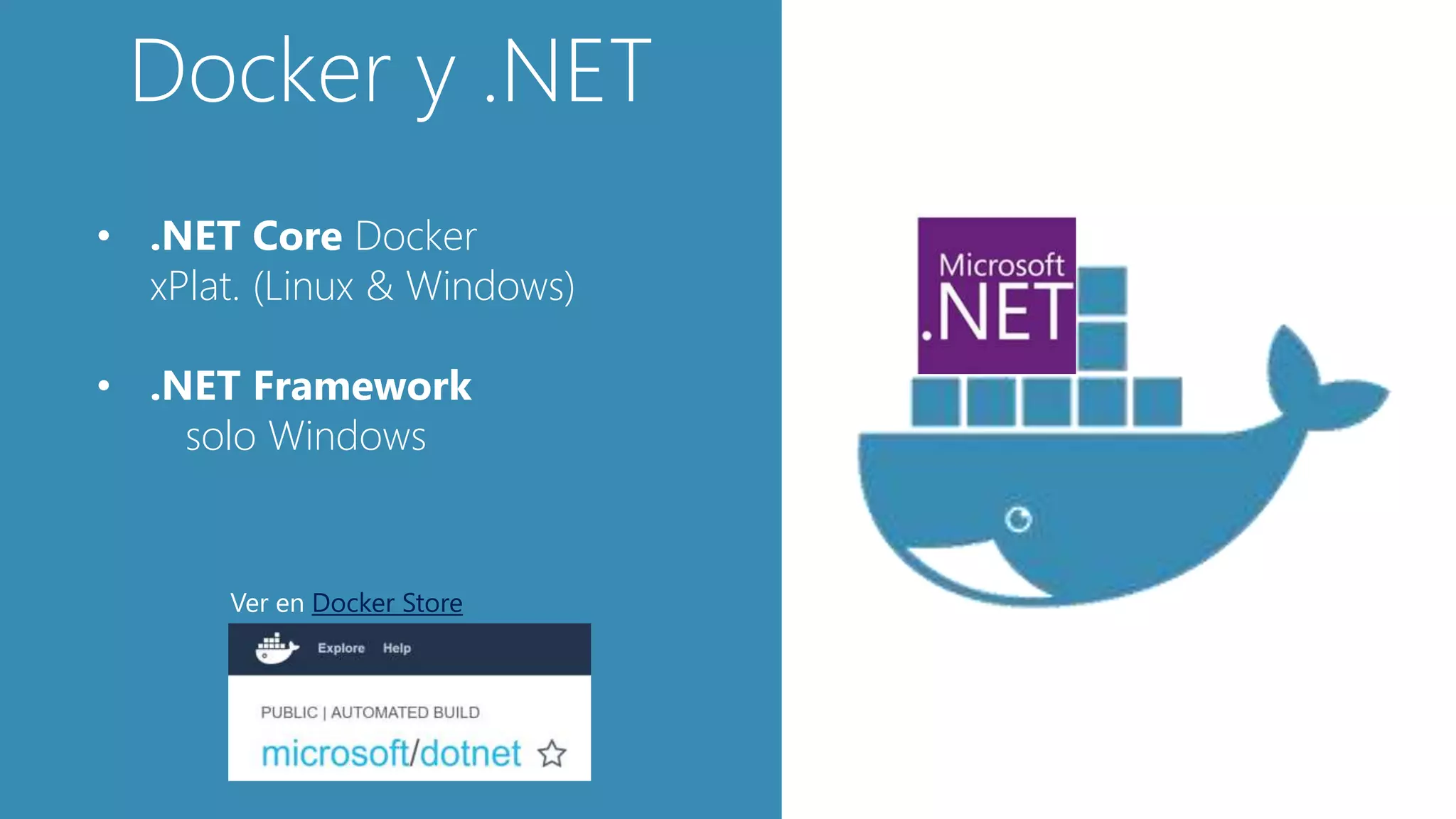
Docker y .NET
• .NET Core Docker
xPlat. (Linux & Windows)
• .NET Framework
solo Windows
Ver en Docker Store
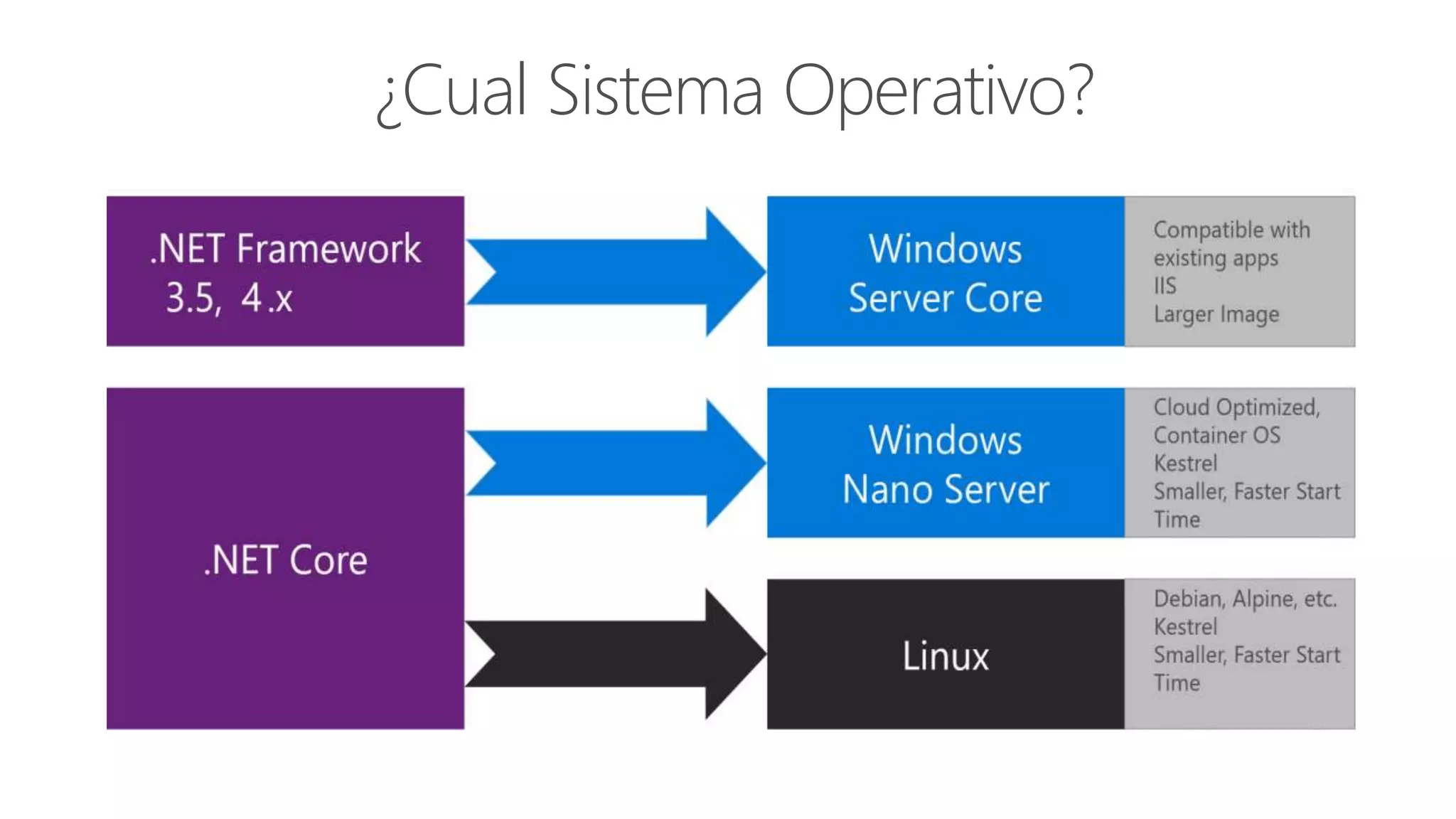
¿Cual Sistema Operativo?
Ciclo de Desarrollo con Docker
Write
Dockerfile/s
Remote
Docker Registry
(i.e. Docker Hub)
1. 2.
Code
your app
Create Images
defined at
Dockerfile/s
3.
Run
Containers /
Compose app
5.
docker run /
Docker-compose up
http
access…
Local
Docker
Repos
VM
6.
Test
your app or
microservices
git push
My
Containers
My
Containers
Base
Images
My
Images
My
Images
1 2
Define apps
by writing
4. (opt)
docker-compose.yml
docker build
7.
Push or
Continue
developing
docker push
to private
registry
(*) If not using
CI/CD
Build/CI,
Integrate,
Test
3.
1. Monitor and Diagnose
Outer-Loop
Push
Code
Production
environments
Run, Manage
5.
6.
Container Service
Service Fabric
App Services
Azure
Container
Registry
Code
Run
Validate
Debug
Inner-Loop
Azure Key
Vault
CD, Deploy
4.
Visual Studio Team Services
Source Code
Control
(SCC)
2.
Se enfoca en:
- Docker-compose.yml &
Debugging Multi-Containers App
- Simple CRUD microservice
vs
DDD & CQRS microservice
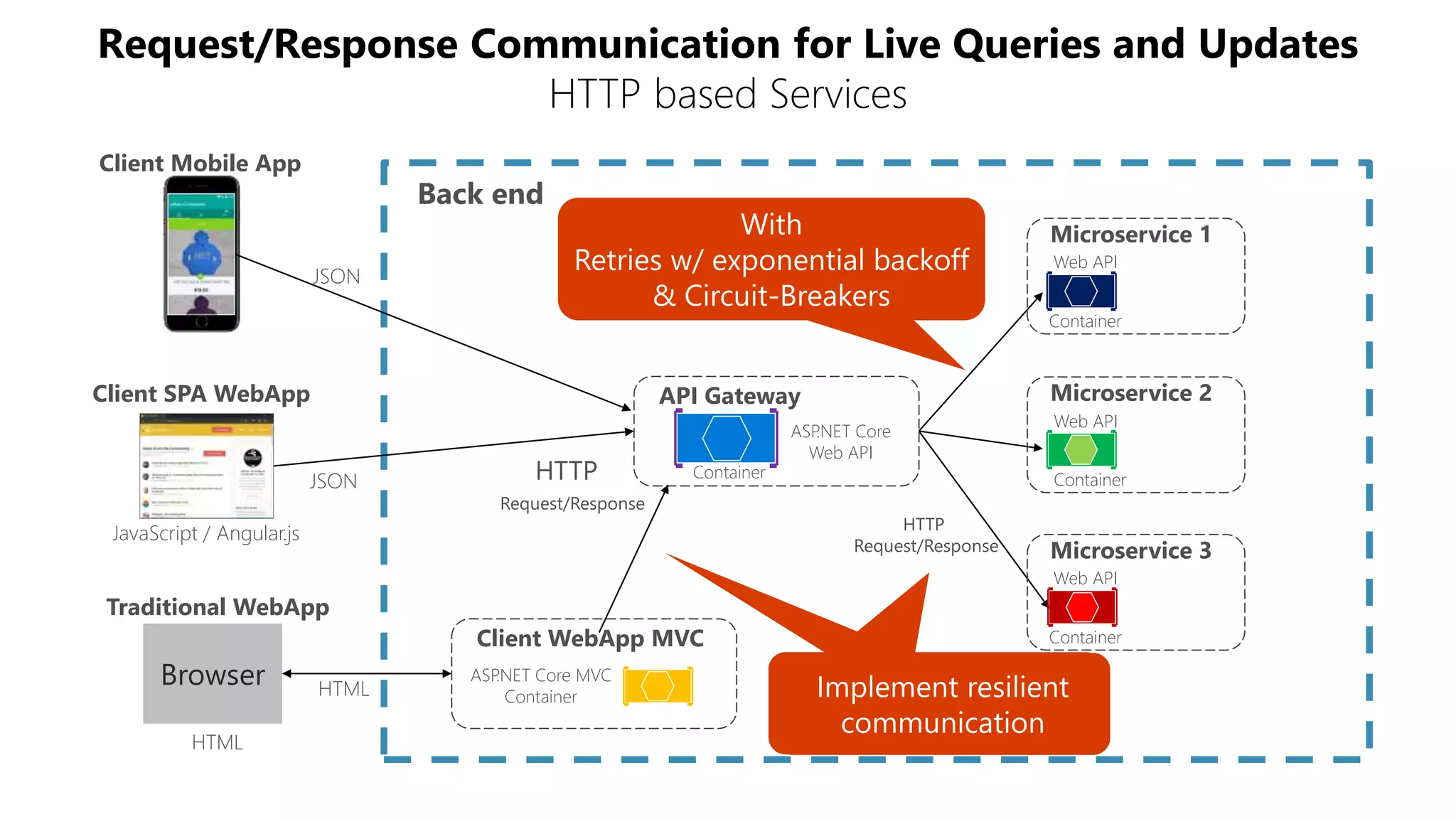
- Reintentos y Circuit breakers
- Health Checks
Microservice 2
Microservice 1
Client WebApp MVC
Container
Container
Web API
Web API
ASP.NET Core MVC
Container
Microservice 3
Container
Web API
Client SPA WebApp
JavaScript / Angular.js
Client Mobile App
API Gateway
ASP.NET Core
Web API
Container
Back end
Traditional WebApp
Browser
HTML
HTML
JSON
JSON
Request/Response Communication for Live Queries and Updates
HTTP based Services
HTTP
Request/Response
HTTP
Request/Response
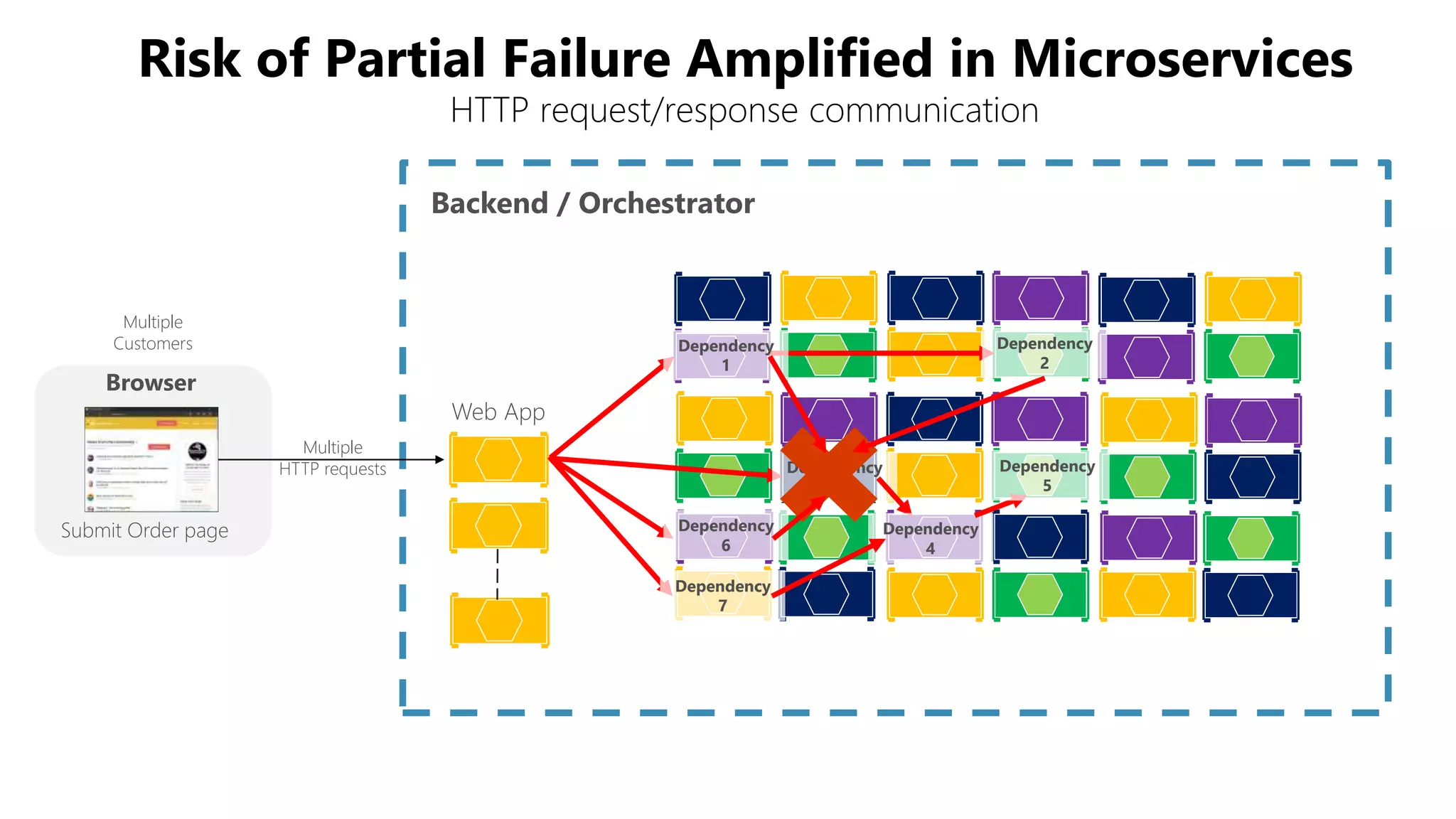
Multiple
HTTP requests
Browser
Submit Order page
Backend / Orchestrator
Web App
Multiple
Customers Dependency
1
Dependency
2
Dependency
3
Dependency
6
Dependency
7
Dependency
4
Dependency
5
Risk of Partial Failure Amplified in Microservices
HTTP request/response communication
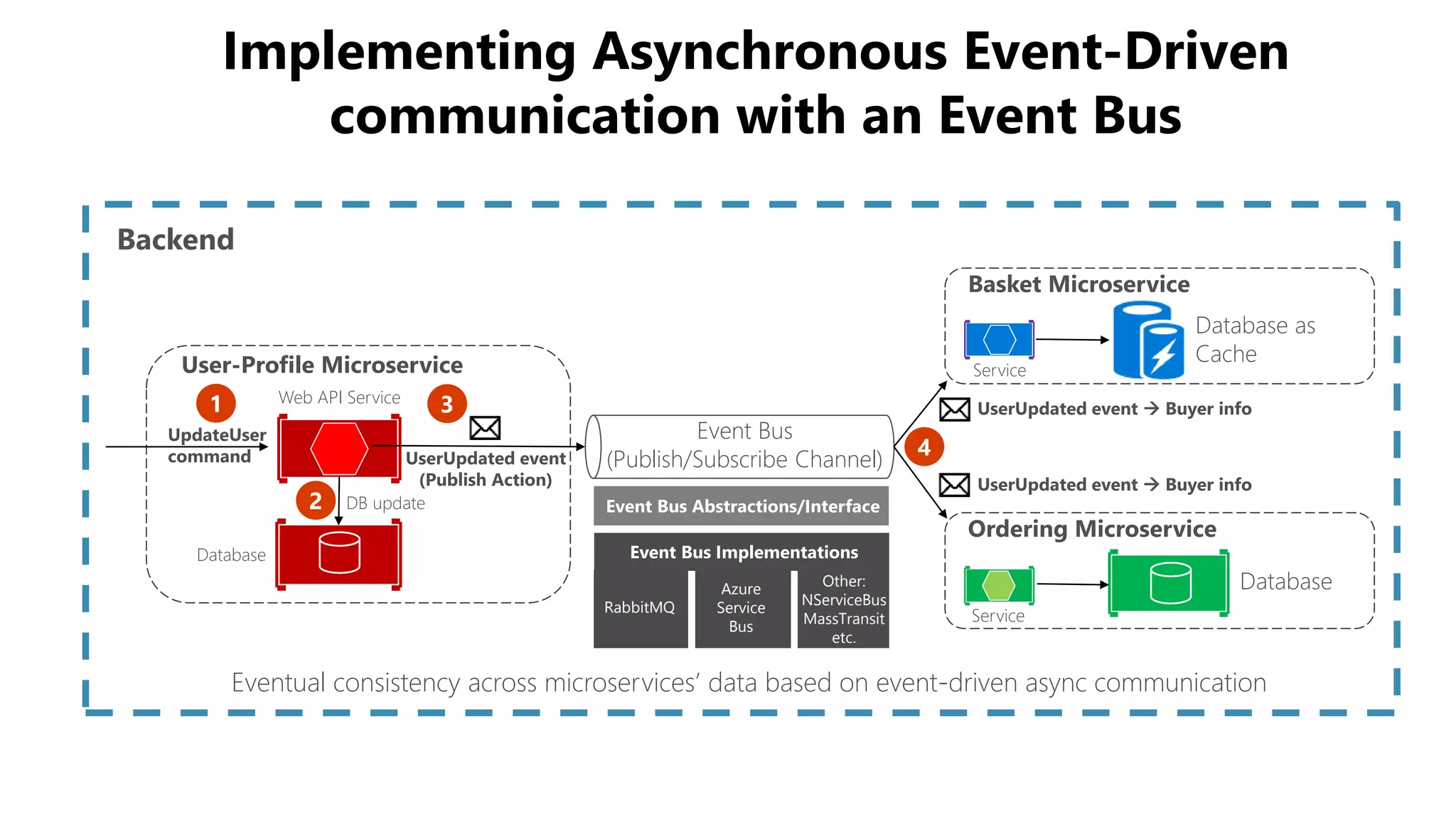
Implementing Asynchronous Event-Driven
communication with an Event Bus
Database
Ordering Microservice
Basket Microservice
Database as
Cache
Service
ServiceUser-Profile Microservice
Web API Service
Database
Backend
UserUpdated event
(Publish Action)
Event Bus
(Publish/Subscribe Channel)
UpdateUser
command
UserUpdated event  Buyer info
Eventual consistency across microservices’ data based on event-driven async communication
DB update Event Bus Abstractions/Interface
Event Bus Implementations
RabbitMQ
Azure
Service
Bus
Other:
NServiceBus
MassTransit
etc.
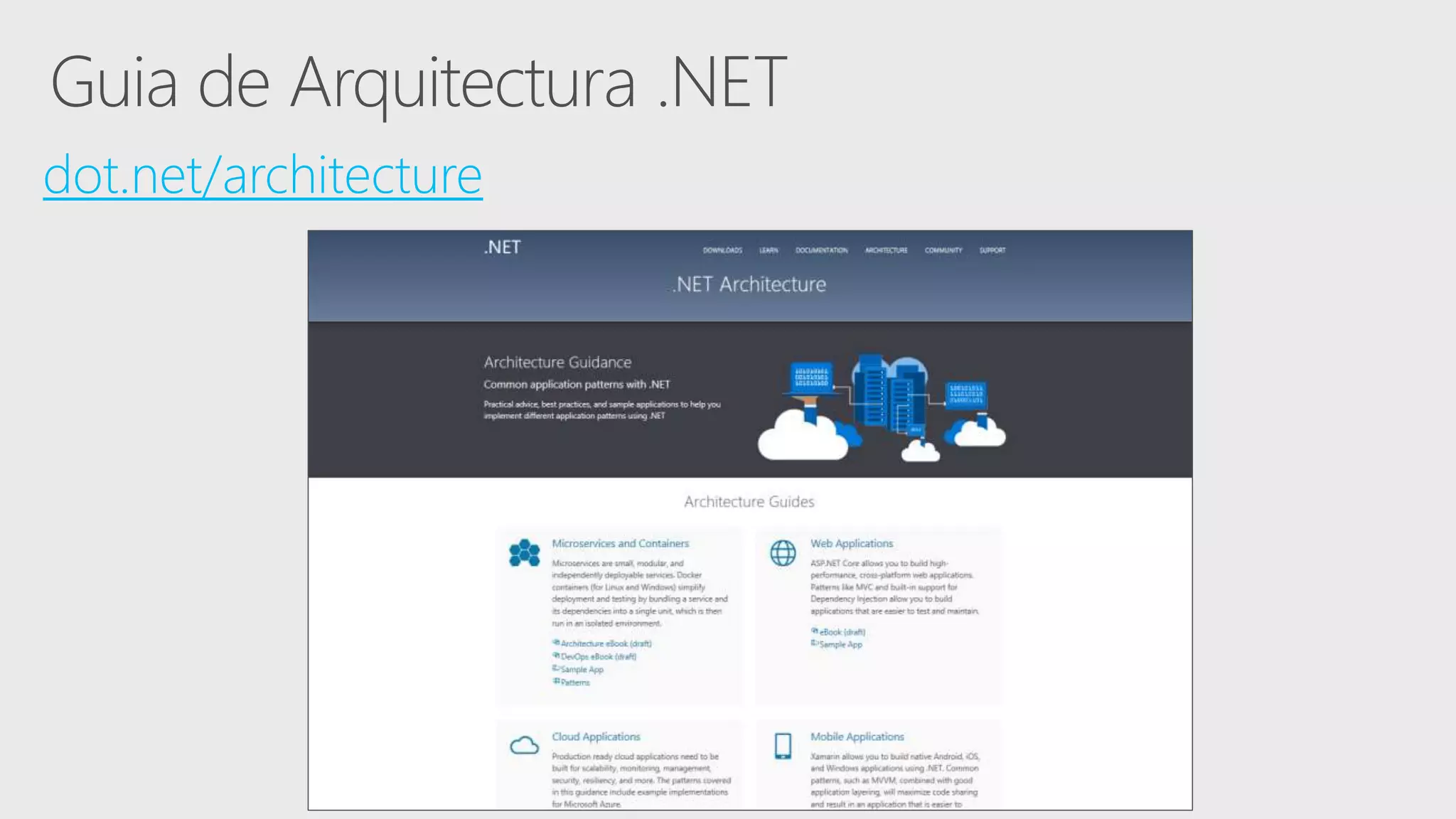
dot.net/architecture
Twitter: @Christianhxc
Blog: cmelendeztech.com

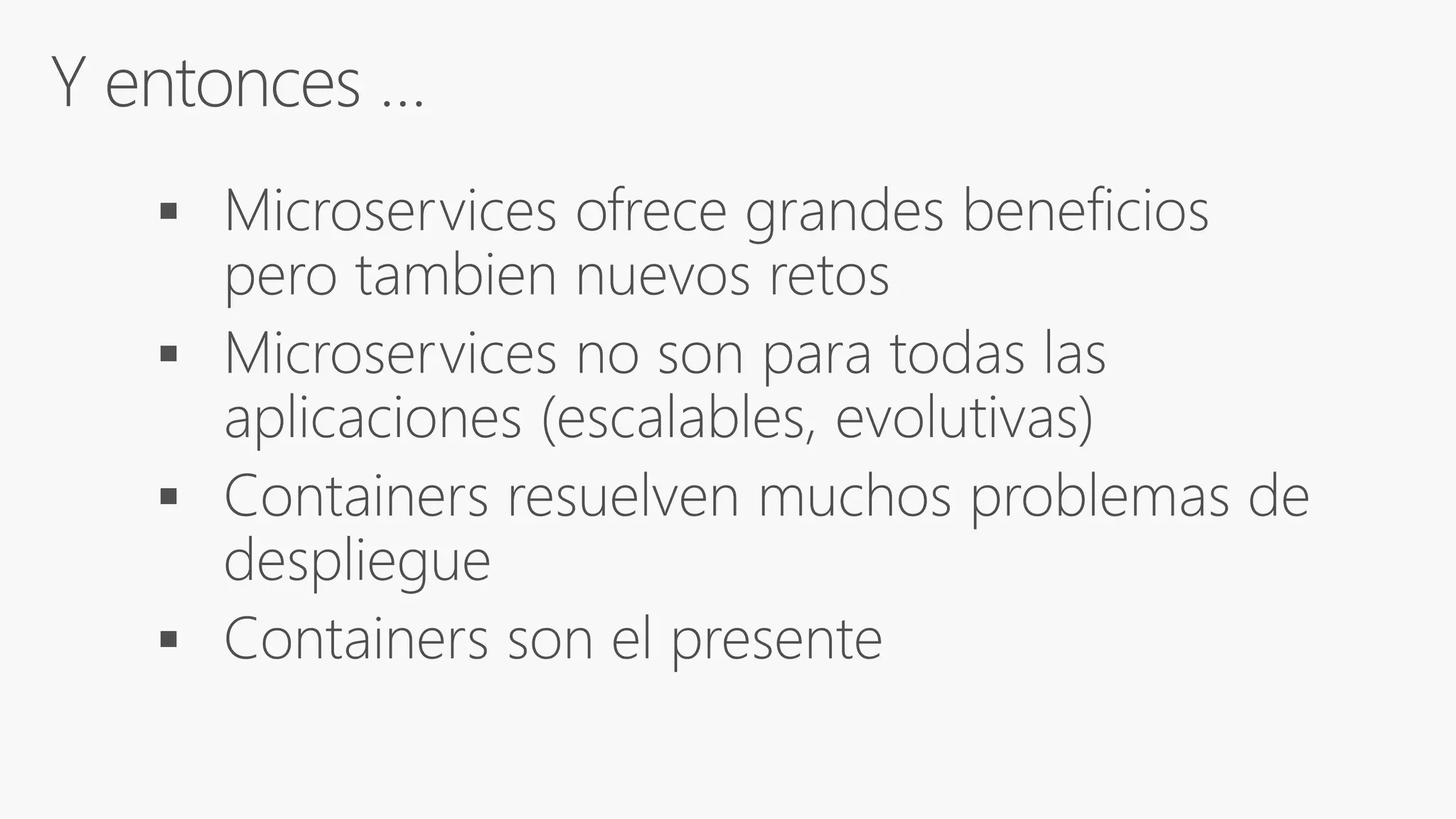
Arquitectura de Microservicios con .NET Core y Contenedores

  • 5.
    Docker Image Docker Container DockerEngine Registry Service (Docker Store o Docker Trusted Registry)
  • 6.
    Infrastructure Infrastructure Host OperatingSystem Hypervisor Guest OS Bins/Libs App 1 Guest OS Bins/Libs App 2 Guest OS Bins/Libs App 3 Bins/Libs App 1 Bins/Libs App 2 Bins/Libs App 3 Container Engine Operating System Maquinas Virtuales Contenedoresvs
  • 7.
    Microsoft Azure Docker paraLinux y Windows 7
  • 9.
    Docker y .NET •.NET Core Docker xPlat. (Linux & Windows) • .NET Framework solo Windows Ver en Docker Store
  • 10.
  • 13.
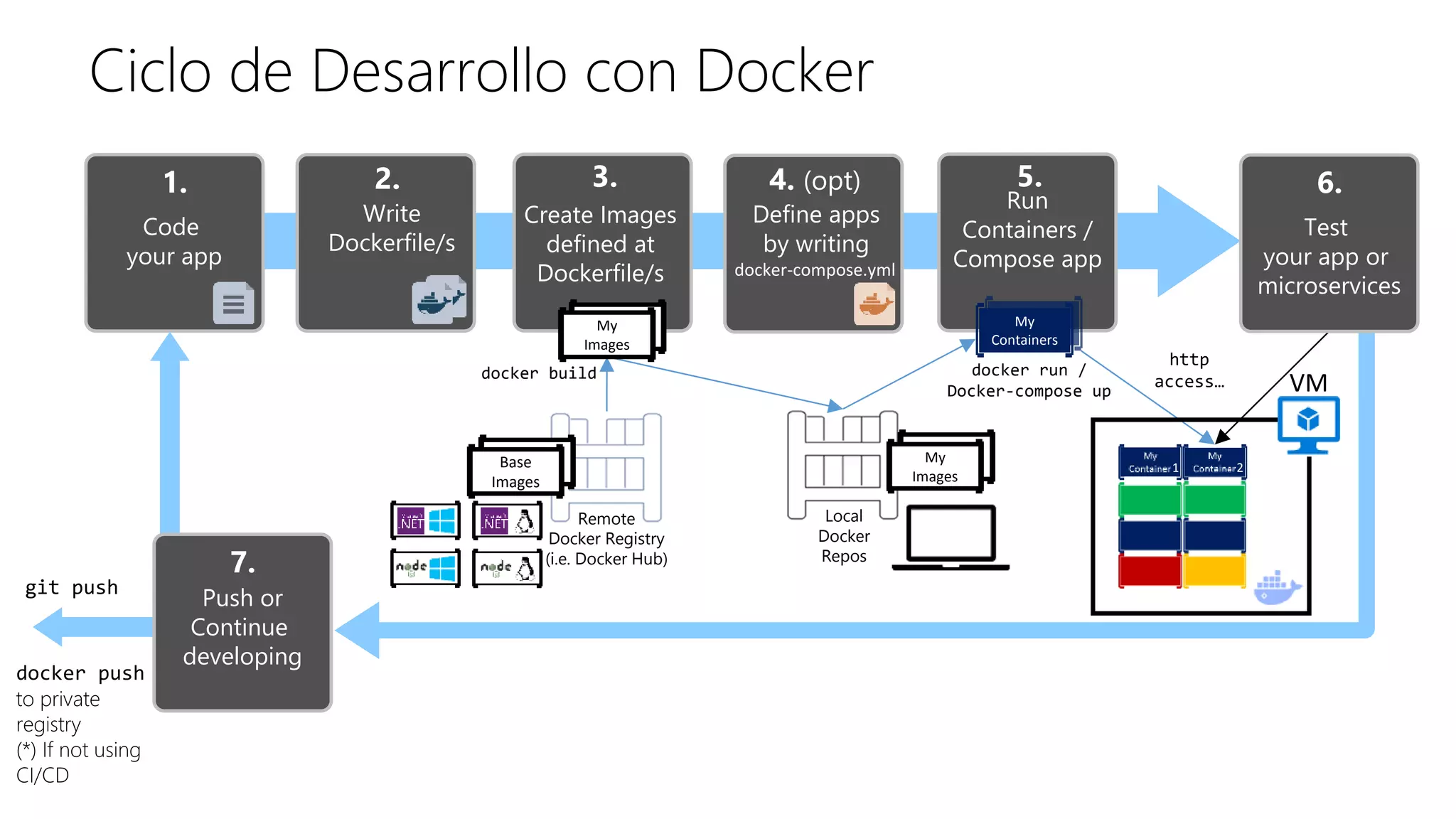
    Ciclo de Desarrollocon Docker Write Dockerfile/s Remote Docker Registry (i.e. Docker Hub) 1. 2. Code your app Create Images defined at Dockerfile/s 3. Run Containers / Compose app 5. docker run / Docker-compose up http access… Local Docker Repos VM 6. Test your app or microservices git push My Containers My Containers Base Images My Images My Images 1 2 Define apps by writing 4. (opt) docker-compose.yml docker build 7. Push or Continue developing docker push to private registry (*) If not using CI/CD
  • 14.
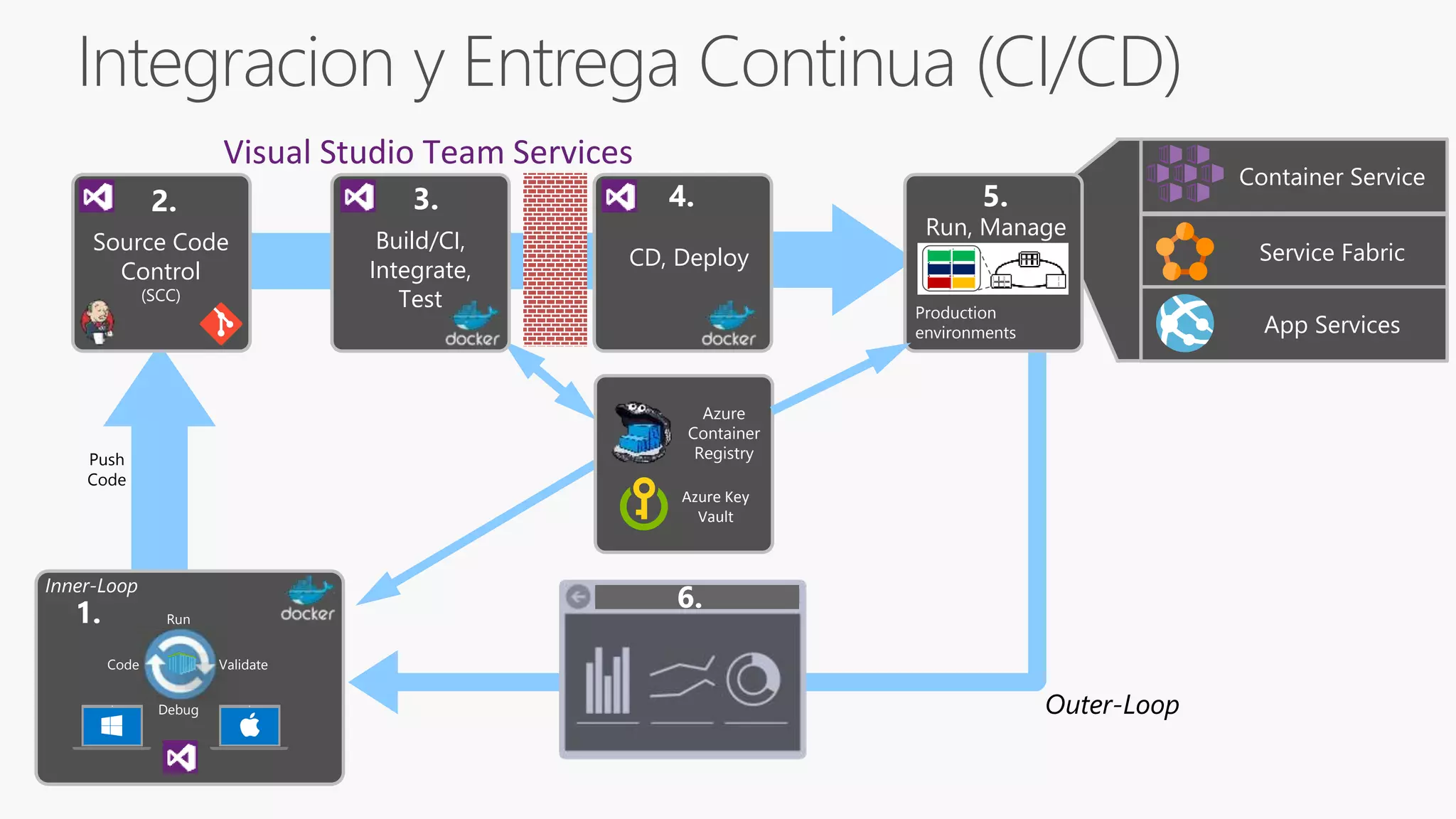
    Build/CI, Integrate, Test 3. 1. Monitor andDiagnose Outer-Loop Push Code Production environments Run, Manage 5. 6. Container Service Service Fabric App Services Azure Container Registry Code Run Validate Debug Inner-Loop Azure Key Vault CD, Deploy 4. Visual Studio Team Services Source Code Control (SCC) 2.
  • 24.
    Se enfoca en: -Docker-compose.yml & Debugging Multi-Containers App - Simple CRUD microservice vs DDD & CQRS microservice - Reintentos y Circuit breakers - Health Checks
  • 25.
    Microservice 2 Microservice 1 ClientWebApp MVC Container Container Web API Web API ASP.NET Core MVC Container Microservice 3 Container Web API Client SPA WebApp JavaScript / Angular.js Client Mobile App API Gateway ASP.NET Core Web API Container Back end Traditional WebApp Browser HTML HTML JSON JSON Request/Response Communication for Live Queries and Updates HTTP based Services HTTP Request/Response HTTP Request/Response
  • 26.
    Multiple HTTP requests Browser Submit Orderpage Backend / Orchestrator Web App Multiple Customers Dependency 1 Dependency 2 Dependency 3 Dependency 6 Dependency 7 Dependency 4 Dependency 5 Risk of Partial Failure Amplified in Microservices HTTP request/response communication
  • 27.
    Implementing Asynchronous Event-Driven communicationwith an Event Bus Database Ordering Microservice Basket Microservice Database as Cache Service ServiceUser-Profile Microservice Web API Service Database Backend UserUpdated event (Publish Action) Event Bus (Publish/Subscribe Channel) UpdateUser command UserUpdated event  Buyer info UserUpdated event  Buyer info Eventual consistency across microservices’ data based on event-driven async communication DB update Event Bus Abstractions/Interface Event Bus Implementations RabbitMQ Azure Service Bus Other: NServiceBus MassTransit etc.
  • 29.
  • 31.

Editor's Notes

  • #8 We’ve been making significant progress towards enabling multi-container, distributed applications in the past few months. Composing multi-Docker container applications will become significantly easier as we integrate Fig into Docker.  We’ve also been making progress on other critical capabilities for orchestration including provisioning and managing Docker hosts, creating clusters of Docker hosts, and inter-Docker container networking, all of which will be previewed this quarter. Microsoft’s endorsement and early work with our orchestration APIs is hugely exciting.  Microsoft and Docker share a common vision that multi-container applications should be assembled using both Dockerized Windows and Dockerized Linux components.  The two companies will work with emergent infrastructure tools for multi-container applications like Kubernetes, Mesos, Helios etc. to provide a uniform Docker interface that provides developers with multi-platform orchestration capabilities leveraging Dockerized content from these two ecosystems.
  • #15 Steve Lasker
  • #31 This slide is required. Do NOT delete. This should be the first slide after your Title Slide. This is an important year and we need to arm our attendees with the information they can use to Grow Share! Please ensure that your objectives are SMART (defined below) and that they will enable them to go in and win against the competition to grow share. If you have questions, please contact your Track PM for guidance. We have also posted guidance on writing good objectives, out on the Speaker Portal (https://www.mytechready.com).   This slide should introduce the session by identifying how this information helps the attendee, partners and customers be more successful. Why is this content important? This slide should call out what’s important about the session (sort of the why should we care, why is this important and how will it help our customers/partners be successful) as well as the key takeaways/objectives associated with the session. Call out what attendees will be able to execute on using the information gained in this session. What will they be able to walk away from this session and execute on with their customers. Good Objectives should be SMART (specific, measurable, achievable, realistic, time-bound). Focus on the key takeaways and why this information is important to the attendee, our partners and our customers. Each session has objectives defined and published on www.mytechready.com, please work with your Track PM to call these out here in the slide deck. If you have questions, please contact your Track PM. See slide 5 in this template for a complete list of Tracks and TPMs.