January 23rd, 2019
Warsaw Group
All contents © MuleSoft Inc.
Our Partners
2
All contents © MuleSoft Inc.
Share
3
• Share the Meetup
• Use Hashtags
– #MuleMeetup
– #WarsawMuleMeetup
Agenda
All contents © MuleSoft Inc.
Agenda
5
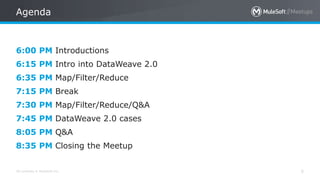
6:00 PM Introductions
6:15 PM Intro into DataWeave 2.0
6:35 PM Map/Filter/Reduce
7:15 PM Break
7:30 PM Map/Filter/Reduce/Q&A
7:45 PM DataWeave 2.0 cases
8:05 PM Q&A
8:35 PM Closing the Meetup
Introduction
All contents © MuleSoft Inc.
Speaker
7
• Joshua Erney
• Mountain State Software Solutions
• @mulemadeeasy
• www.jerney.io / @jerney_io
• Brief work history...
All contents © MuleSoft Inc.
Organiser & Speaker
8
• Senior Integration Developer at PwC Poland
• MuleSoft Meetup Leader for Warsaw, Poland
• Recognized by MuleSoft as one of the top
contributors in the MuleSoft Community
• Mule blogger https://profit-online.pl/blog
• Doing Mule for over 7 years now
November + December 2018
Community Success Months:
Get trained and become MuleSoft-Certified
Data Weave 2.0
Mule 4
All contents © MuleSoft Inc.
Introduction
DataWeave
11
• Entirely replaces everything that MEL does
• Default language
• Syntax changes
• Modularization
• And many more …
MEL
MEL stands for Mule
Expression Language
What's new
By example
A Deep Dive
DataWeave 2.0:
map/filter/reduce
All contents © MuleSoft Inc.
Agenda
20
• About me
• What are map/filter/reduce?
• Filter (overview, graphic, examples)
• Map (overview, graphic, examples)
• Reduce (overview, graphic, examples)
• Reusable functions with map/filter/reduce
All contents © MuleSoft Inc.
What are map, filter, and reduce?
21
• Functions that transform arrays
• As input: an array, and a function
– Higher order functions (a function taking another function as an argument, OR a
function that returns another function)
– The input function for map/filter/reduce define the implementation details of the
transformation
• Output: array (map/filter), any (reduce)
• Declarative - implementation of iteration is hidden from the client
• Transformations are non-destructive (they do not modify any input)
All contents © MuleSoft Inc.
Why do a talk on them?
22
• They form the core functionality that you’ll need for data
transformations (removing records, modifying records, general-
purpose transformation tool)
• A mastery of map/filter/reduce is essential to writing clear and
efficient transformations.
• A lot of other functions that work on transforming arrays are just
flavors of map/filter/reduce.
• Gives you a great base to build off of because you need to
understand two key concepts: immutability, and higher-order
functions
filter
Removing elements from arrays
23
All contents © MuleSoft Inc.
filter
24
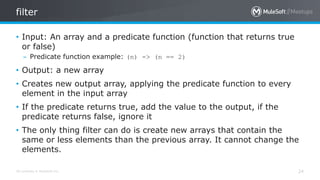
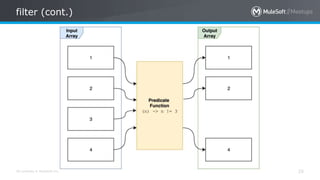
• Input: An array and a predicate function (function that returns true
or false)
– Predicate function example: (n) -> (n == 2)
• Output: a new array
• Creates new output array, applying the predicate function to every
element in the input array
• If the predicate returns true, add the value to the output, if the
predicate returns false, ignore it
• The only thing filter can do is create new arrays that contain the
same or less elements than the previous array. It cannot change the
elements.
All contents © MuleSoft Inc.
filter (cont.)
25
All contents © MuleSoft Inc.
filter (examples)
26
// Filter by content
[1,2,3,4,5] filter (mod($, 2) == 0)
// -> [2, 4]
// Filter by index
[2,4,6,8,10] filter ($$ == 4)
// -> [10]
// Filter by nested content (popular use case)
var arr = [{“name”:”Josh”}, {“name”:”Patryk”}, {“name”:”Max The Mule”}]
---
arr filter $.name == “Patryk”
// -> [{”name”:”Patryk”}]
map
Transforming elements in an array
27
All contents © MuleSoft Inc.
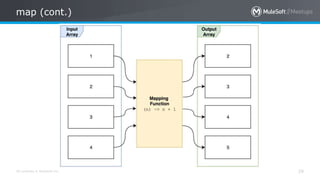
map
28
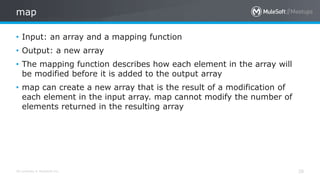
• Input: an array and a mapping function
• Output: a new array
• The mapping function describes how each element in the array will
be modified before it is added to the output array
• map can create a new array that is the result of a modification of
each element in the input array. map cannot modify the number of
elements returned in the resulting array
All contents © MuleSoft Inc.
map (cont.)
29
All contents © MuleSoft Inc.
map (examples)
30
// Map using each element
[1,2,3] map ($ + 1)
// -> [2,3,4]
// Map using index
[1,2,3] map ({loc: $$, n: $})
// -> [{loc: 0, n: 1},{loc: 1, n: 2}, {loc: 2, n: 3}]
// Map nested values down to single-item array (great for list of IDs)
[{id: 123}, {id: 456}, {id: 789}] map $.id
// -> [123, 456, 789]
reduce
... pretty much anything else you’d want to do with an array
All contents © MuleSoft Inc.
reduce
32
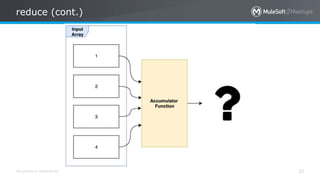
• Takes in an array and an accumulator function
• returns a new Any (object, string, Boolean, null, array, etc.) we will
call this the result
• The accumulator function defines how each element in the input
array will be folded into the result
– The value returned from the accumulator function will be passed to the next
iteration
• Reduce is the most general-purpose of the three core functions
• Can implement both map and filter in terms of reduce, so map and
filter are just specialized reduce functions
– Keep this in mind as you write your transformations. Don’t use reduce when a
map or filter would work instead
All contents © MuleSoft Inc.
reduce (cont.)
33
All contents © MuleSoft Inc.
reduce (examples)
34
// Classic example: Adding numbers
[1,2,3] reduce ((n, acc) -> acc + n)
// -> 6
// A simple joinBy functionality
[“1”,”2”,”3”] reduce ((str, out) -> out ++ “, ” ++ str
// “1, 2, 3”
// The same thing wrapped in a helpful function (I wrap most non-trivial reduce
// code in a simple function so that the client does not need to pass a lambda)
fun myJoinBy(arr, delim) =
arr reduce ((str, out) -> out ++ delim ++ str
All contents © MuleSoft Inc.
reduce (examples cont.)
35
// Flattening an array into a object (common use case)
var arr = [
{dev: "c6824476-b7e2-4e8a-9281-bdc40663bb93"},
{prod: "7f44b450-18ff-45fa-85f3-8ef5c82b4989"}
]
---
arr reduce ((env, obj) -> obj ++ env)
// -> { ”dev”: “c6824476-b7e2-4e8a-9281-bdc40663bb93”,
// “prod”: “7f44b450-18ff-45fa-85f3-8ef5c82b4989” }
// You could also do this ($$ defaults to the first value in the array):
arr reduce ($$ ++ $)
All contents © MuleSoft Inc.
reduce (examples cont.)
36
// Make map/filter code more efficient. This loops twice:
[1,2,3,4,5] filter (mod($, 2) == 0) map ($ + 2)
// -> [4,6]
// This loops once and accomplishes the same job
[1,2,3,4,5] reduce ((n, acc=[]) ->
if (mod(n, 2) == 0) // Filter replacement
acc + (n + 2) // Map replacement
else
acc)
All contents © MuleSoft Inc.
reduce (examples cont.)
37
// Implement map:
fun myMap(arr, transformFn) =
arr reduce ((e, acc=[]) ->
acc + transformFn(e)
// Implement filter:
fun myFilter(arr, predicateFn) =
arr reduce ((e, acc=[]) ->
if (predicateFn(e))
acc + e
else
acc
Reusable functions w/
map/filter/reduce
All contents © MuleSoft Inc.
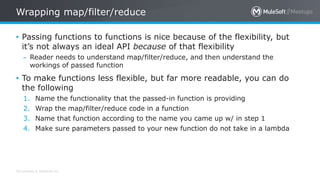
Wrapping map/filter/reduce
• Passing functions to functions is nice because of the flexibility, but
it’s not always an ideal API because of that flexibility
– Reader needs to understand map/filter/reduce, and then understand the
workings of passed function
• To make functions less flexible, but far more readable, you can do
the following
1. Name the functionality that the passed-in function is providing
2. Wrap the map/filter/reduce code in a function
3. Name that function according to the name you came up w/ in step 1
4. Make sure parameters passed to your new function do not take in a lambda
All contents © MuleSoft Inc.
Example
40
• Let’s take a reduce example from earlier. We start with this:
var arr = [{dev: ”123"}, {prod: ”456"}]
---
arr reduce ((env, obj={}) -> obj ++ env)
// -> {dev: “123”, prod: “456}
All contents © MuleSoft Inc.
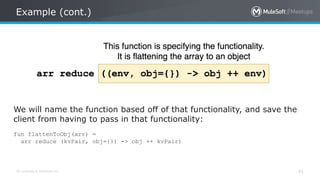
Example (cont.)
41
We will name the function based off of that functionality, and save the
client from having to pass in that functionality:
fun flattenToObj(arr) =
arr reduce (kvPair, obj={}) -> obj ++ kvPair)
All contents © MuleSoft Inc.
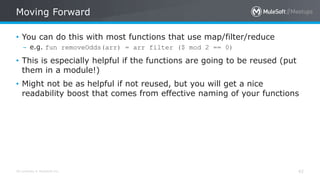
Moving Forward
42
• You can do this with most functions that use map/filter/reduce
– e.g. fun removeOdds(arr) = arr filter ($ mod 2 == 0)
• This is especially helpful if the functions are going to be reused (put
them in a module!)
• Might not be as helpful if not reused, but you will get a nice
readability boost that comes from effective naming of your functions
Closing Thoughts
All contents © MuleSoft Inc.
Conclusion
44
• map/filter/reduce are a trio of higher-order functions that form the
core of array transformations
– Filter is used to remove elements from an array
– Map is used to modify elements from an array
– Reduce is used to do all the of the above, as well as transform arrays to any
other type. Very general-purpose. Reach for this last.
• Map and filter tend to be pretty easy to learn, reduce typically
requires more practice to master
• Master these functions first, then learn mapObject, filterObject,
groupBy, pluck
All contents © MuleSoft Inc.
More Info
45
• MuleSoft documentation:
– Map: https://docs.mulesoft.com/mule-runtime/4.1/dw-core-functions-map
– Filter: https://docs.mulesoft.com/mule-runtime/4.1/dw-core-functions-filter
– Reduce: https://docs.mulesoft.com/mule-runtime/4.1/dw-core-functions-reduce
• You can find more detailed information on my blog:
– Map post: www.jerney.io/dataweave-the-map-function/
– Filter post: On It’s Way 
– Reduce post 1: www.jerney.io/dataweave-when-to-use-reduce/
– Reduce post 2: www.jerney.io/dataweave-mapping-an-array-to-an-object/
– Practice exercises (map/filter/reduce and others):
www.jerney.io/dataweave-practice-exercises/
Questions?
46
All contents © MuleSoft Inc.
DataWeave question
47
Which one is not a valid condition in Choice component
1. #[payload.type == 'Mule Meetup']
2. ${file:complexCondition.dwl}
3. payload.type == 'Mule Meetup'
4. All options are valid :)
All contents © MuleSoft Inc.
DataWeave question
48
Which one is not a valid condition in Choice component
1. #[payload.type == 'Mule Meetup']
2. ${file:complexCondition.dwl}
3. payload.type == 'Mule Meetup'
4. All options are valid :)
Correct syntax is:
${file::complexCondition.dwl}
DataWeave 2.0 DEMO
Sample cases
What’s next
All contents © MuleSoft Inc.
What’s next
51
• Feedback:
– Contact your organizer Patryk Bandurski to suggest topics
– Contact MuleSoft at meetup@mulesoft.com for ways to improve the program
• Our next meetup:
– Date: March/April 2019
– Location: PwC Poland
– Topic: …
All contents © MuleSoft Inc.
What’s next
52
Invite your network to join
– https://meetups.mulesoft.com/warsaw/
See you next time
Please send topic suggestions to the organizer
MuleSoft Meetup Warsaw Group DataWeave 2.0

MuleSoft Meetup Warsaw Group DataWeave 2.0

  • 1.
  • 2.
    All contents ©MuleSoft Inc. Our Partners 2
  • 3.
    All contents ©MuleSoft Inc. Share 3 • Share the Meetup • Use Hashtags – #MuleMeetup – #WarsawMuleMeetup
  • 4.
  • 5.
    All contents ©MuleSoft Inc. Agenda 5 6:00 PM Introductions 6:15 PM Intro into DataWeave 2.0 6:35 PM Map/Filter/Reduce 7:15 PM Break 7:30 PM Map/Filter/Reduce/Q&A 7:45 PM DataWeave 2.0 cases 8:05 PM Q&A 8:35 PM Closing the Meetup
  • 6.
  • 7.
    All contents ©MuleSoft Inc. Speaker 7 • Joshua Erney • Mountain State Software Solutions • @mulemadeeasy • www.jerney.io / @jerney_io • Brief work history...
  • 8.
    All contents ©MuleSoft Inc. Organiser & Speaker 8 • Senior Integration Developer at PwC Poland • MuleSoft Meetup Leader for Warsaw, Poland • Recognized by MuleSoft as one of the top contributors in the MuleSoft Community • Mule blogger https://profit-online.pl/blog • Doing Mule for over 7 years now
  • 9.
    November + December2018 Community Success Months: Get trained and become MuleSoft-Certified
  • 10.
  • 11.
    All contents ©MuleSoft Inc. Introduction DataWeave 11 • Entirely replaces everything that MEL does • Default language • Syntax changes • Modularization • And many more … MEL MEL stands for Mule Expression Language
  • 12.
  • 13.
    A Deep Dive DataWeave2.0: map/filter/reduce
  • 14.
    All contents ©MuleSoft Inc. Agenda 20 • About me • What are map/filter/reduce? • Filter (overview, graphic, examples) • Map (overview, graphic, examples) • Reduce (overview, graphic, examples) • Reusable functions with map/filter/reduce
  • 15.
    All contents ©MuleSoft Inc. What are map, filter, and reduce? 21 • Functions that transform arrays • As input: an array, and a function – Higher order functions (a function taking another function as an argument, OR a function that returns another function) – The input function for map/filter/reduce define the implementation details of the transformation • Output: array (map/filter), any (reduce) • Declarative - implementation of iteration is hidden from the client • Transformations are non-destructive (they do not modify any input)
  • 16.
    All contents ©MuleSoft Inc. Why do a talk on them? 22 • They form the core functionality that you’ll need for data transformations (removing records, modifying records, general- purpose transformation tool) • A mastery of map/filter/reduce is essential to writing clear and efficient transformations. • A lot of other functions that work on transforming arrays are just flavors of map/filter/reduce. • Gives you a great base to build off of because you need to understand two key concepts: immutability, and higher-order functions
  • 17.
  • 18.
    All contents ©MuleSoft Inc. filter 24 • Input: An array and a predicate function (function that returns true or false) – Predicate function example: (n) -> (n == 2) • Output: a new array • Creates new output array, applying the predicate function to every element in the input array • If the predicate returns true, add the value to the output, if the predicate returns false, ignore it • The only thing filter can do is create new arrays that contain the same or less elements than the previous array. It cannot change the elements.
  • 19.
    All contents ©MuleSoft Inc. filter (cont.) 25
  • 20.
    All contents ©MuleSoft Inc. filter (examples) 26 // Filter by content [1,2,3,4,5] filter (mod($, 2) == 0) // -> [2, 4] // Filter by index [2,4,6,8,10] filter ($$ == 4) // -> [10] // Filter by nested content (popular use case) var arr = [{“name”:”Josh”}, {“name”:”Patryk”}, {“name”:”Max The Mule”}] --- arr filter $.name == “Patryk” // -> [{”name”:”Patryk”}]
  • 21.
  • 22.
    All contents ©MuleSoft Inc. map 28 • Input: an array and a mapping function • Output: a new array • The mapping function describes how each element in the array will be modified before it is added to the output array • map can create a new array that is the result of a modification of each element in the input array. map cannot modify the number of elements returned in the resulting array
  • 23.
    All contents ©MuleSoft Inc. map (cont.) 29
  • 24.
    All contents ©MuleSoft Inc. map (examples) 30 // Map using each element [1,2,3] map ($ + 1) // -> [2,3,4] // Map using index [1,2,3] map ({loc: $$, n: $}) // -> [{loc: 0, n: 1},{loc: 1, n: 2}, {loc: 2, n: 3}] // Map nested values down to single-item array (great for list of IDs) [{id: 123}, {id: 456}, {id: 789}] map $.id // -> [123, 456, 789]
  • 25.
    reduce ... pretty muchanything else you’d want to do with an array
  • 26.
    All contents ©MuleSoft Inc. reduce 32 • Takes in an array and an accumulator function • returns a new Any (object, string, Boolean, null, array, etc.) we will call this the result • The accumulator function defines how each element in the input array will be folded into the result – The value returned from the accumulator function will be passed to the next iteration • Reduce is the most general-purpose of the three core functions • Can implement both map and filter in terms of reduce, so map and filter are just specialized reduce functions – Keep this in mind as you write your transformations. Don’t use reduce when a map or filter would work instead
  • 27.
    All contents ©MuleSoft Inc. reduce (cont.) 33
  • 28.
    All contents ©MuleSoft Inc. reduce (examples) 34 // Classic example: Adding numbers [1,2,3] reduce ((n, acc) -> acc + n) // -> 6 // A simple joinBy functionality [“1”,”2”,”3”] reduce ((str, out) -> out ++ “, ” ++ str // “1, 2, 3” // The same thing wrapped in a helpful function (I wrap most non-trivial reduce // code in a simple function so that the client does not need to pass a lambda) fun myJoinBy(arr, delim) = arr reduce ((str, out) -> out ++ delim ++ str
  • 29.
    All contents ©MuleSoft Inc. reduce (examples cont.) 35 // Flattening an array into a object (common use case) var arr = [ {dev: "c6824476-b7e2-4e8a-9281-bdc40663bb93"}, {prod: "7f44b450-18ff-45fa-85f3-8ef5c82b4989"} ] --- arr reduce ((env, obj) -> obj ++ env) // -> { ”dev”: “c6824476-b7e2-4e8a-9281-bdc40663bb93”, // “prod”: “7f44b450-18ff-45fa-85f3-8ef5c82b4989” } // You could also do this ($$ defaults to the first value in the array): arr reduce ($$ ++ $)
  • 30.
    All contents ©MuleSoft Inc. reduce (examples cont.) 36 // Make map/filter code more efficient. This loops twice: [1,2,3,4,5] filter (mod($, 2) == 0) map ($ + 2) // -> [4,6] // This loops once and accomplishes the same job [1,2,3,4,5] reduce ((n, acc=[]) -> if (mod(n, 2) == 0) // Filter replacement acc + (n + 2) // Map replacement else acc)
  • 31.
    All contents ©MuleSoft Inc. reduce (examples cont.) 37 // Implement map: fun myMap(arr, transformFn) = arr reduce ((e, acc=[]) -> acc + transformFn(e) // Implement filter: fun myFilter(arr, predicateFn) = arr reduce ((e, acc=[]) -> if (predicateFn(e)) acc + e else acc
  • 32.
  • 33.
    All contents ©MuleSoft Inc. Wrapping map/filter/reduce • Passing functions to functions is nice because of the flexibility, but it’s not always an ideal API because of that flexibility – Reader needs to understand map/filter/reduce, and then understand the workings of passed function • To make functions less flexible, but far more readable, you can do the following 1. Name the functionality that the passed-in function is providing 2. Wrap the map/filter/reduce code in a function 3. Name that function according to the name you came up w/ in step 1 4. Make sure parameters passed to your new function do not take in a lambda
  • 34.
    All contents ©MuleSoft Inc. Example 40 • Let’s take a reduce example from earlier. We start with this: var arr = [{dev: ”123"}, {prod: ”456"}] --- arr reduce ((env, obj={}) -> obj ++ env) // -> {dev: “123”, prod: “456}
  • 35.
    All contents ©MuleSoft Inc. Example (cont.) 41 We will name the function based off of that functionality, and save the client from having to pass in that functionality: fun flattenToObj(arr) = arr reduce (kvPair, obj={}) -> obj ++ kvPair)
  • 36.
    All contents ©MuleSoft Inc. Moving Forward 42 • You can do this with most functions that use map/filter/reduce – e.g. fun removeOdds(arr) = arr filter ($ mod 2 == 0) • This is especially helpful if the functions are going to be reused (put them in a module!) • Might not be as helpful if not reused, but you will get a nice readability boost that comes from effective naming of your functions
  • 37.
  • 38.
    All contents ©MuleSoft Inc. Conclusion 44 • map/filter/reduce are a trio of higher-order functions that form the core of array transformations – Filter is used to remove elements from an array – Map is used to modify elements from an array – Reduce is used to do all the of the above, as well as transform arrays to any other type. Very general-purpose. Reach for this last. • Map and filter tend to be pretty easy to learn, reduce typically requires more practice to master • Master these functions first, then learn mapObject, filterObject, groupBy, pluck
  • 39.
    All contents ©MuleSoft Inc. More Info 45 • MuleSoft documentation: – Map: https://docs.mulesoft.com/mule-runtime/4.1/dw-core-functions-map – Filter: https://docs.mulesoft.com/mule-runtime/4.1/dw-core-functions-filter – Reduce: https://docs.mulesoft.com/mule-runtime/4.1/dw-core-functions-reduce • You can find more detailed information on my blog: – Map post: www.jerney.io/dataweave-the-map-function/ – Filter post: On It’s Way  – Reduce post 1: www.jerney.io/dataweave-when-to-use-reduce/ – Reduce post 2: www.jerney.io/dataweave-mapping-an-array-to-an-object/ – Practice exercises (map/filter/reduce and others): www.jerney.io/dataweave-practice-exercises/
  • 40.
  • 41.
    All contents ©MuleSoft Inc. DataWeave question 47 Which one is not a valid condition in Choice component 1. #[payload.type == 'Mule Meetup'] 2. ${file:complexCondition.dwl} 3. payload.type == 'Mule Meetup' 4. All options are valid :)
  • 42.
    All contents ©MuleSoft Inc. DataWeave question 48 Which one is not a valid condition in Choice component 1. #[payload.type == 'Mule Meetup'] 2. ${file:complexCondition.dwl} 3. payload.type == 'Mule Meetup' 4. All options are valid :) Correct syntax is: ${file::complexCondition.dwl}
  • 43.
  • 44.
  • 45.
    All contents ©MuleSoft Inc. What’s next 51 • Feedback: – Contact your organizer Patryk Bandurski to suggest topics – Contact MuleSoft at meetup@mulesoft.com for ways to improve the program • Our next meetup: – Date: March/April 2019 – Location: PwC Poland – Topic: …
  • 46.
    All contents ©MuleSoft Inc. What’s next 52 Invite your network to join – https://meetups.mulesoft.com/warsaw/
  • 47.
    See you nexttime Please send topic suggestions to the organizer

Editor's Notes

  • #10 Hi everyone, thanks for being here today. Today we are going to have talks about XXX, XXX and a special presentation about the various ways to learn about MuleSoft, grow your skills and become certified. Being MuleSoft-certified is clearly a huge asset in the marketplace today, and the Community team at MuleSoft wants to make it easier for all of us to pass a certification exam. Until the end of the year, all Meetup attendees (meaning all of you here today) will receive a free exam for the certification of your choice. Make sure to get your name checked with myself or my co-leader(s), and you’ll receive your voucher via email within 10 days. Without further ado, let’s get started.