MuleSoft RTF & Flex
Gateway on AKS:
Insights, Setup,
Administration, and
Useful tips
Warsaw MuleSoft Meetup
April 16th, 2025
AGENDA
● Introduction
● MuleSoft RTF & Flex Gateway on
AKS: Insights, Setup,
Administration, and Useful tips
● Q&A
● Quiz
● Networking
● Senior Integration Architect and Developer in PwC
● Over 9 years in IT
● Working with MuleSoft since 2022
● Knowledge of other cloud and integration technologies
▪ TIBCO
▪ Salesforce
▪ AWS
● Traveller, Football fan, Tennis player
LinkedIn: https://www.linkedin.com/in/paulina-uhman-87076282/
3
Paulina Uhman
Speaker
Patryk Bandurski
Integration Architect | MuleSoft Meetup Leader
● Blog ambassadorpatryk.com
● Blog integrationtrails.io/articles
Event Partners
Your support makes this Meetup possible!
Runtime Fabric and
Flex Gateway on AKS
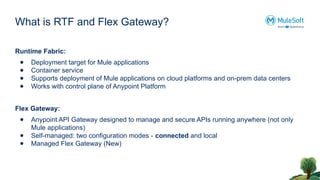
What is RTF and Flex Gateway?
Runtime Fabric:
● Deployment target for Mule applications
● Container service
● Supports deployment of Mule applications on cloud platforms and on-prem data centers
● Works with control plane of Anypoint Platform
Flex Gateway:
● Anypoint API Gateway designed to manage and secure APIs running anywhere (not only
Mule applications)
● Self-managed: two configuration modes - connected and local
● Managed Flex Gateway (New)
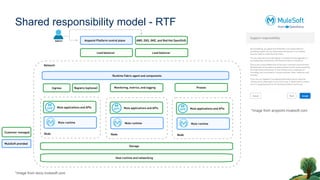
Shared responsibility model - RTF
*Image from docs.mulesoft.com
*Image from anypoint.mulesoft.com
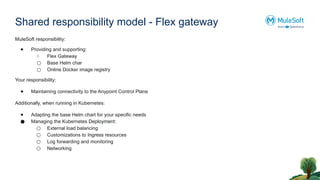
Shared responsibility model - Flex gateway
MuleSoft responsibility:
● Providing and supporting:
○ Flex Gateway
○ Base Helm char
○ Online Docker image registry
Your responsibility:
● Maintaining connectivity to the Anypoint Control Plane
Additionally, when running in Kubernetes:
● Adapting the base Helm chart for your specific needs
● Managing the Kubernetes Deployment:
○ External load balancing
○ Customizations to Ingress resources
○ Log forwarding and monitoring
○ Networking
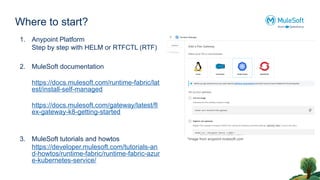
Where to start?
1. Anypoint Platform
Step by step with HELM or RTFCTL (RTF)
2. MuleSoft documentation
https://docs.mulesoft.com/runtime-fabric/lat
est/install-self-managed
https://docs.mulesoft.com/gateway/latest/fl
ex-gateway-k8-getting-started
3. MuleSoft tutorials and howtos
https://developer.mulesoft.com/tutorials-an
d-howtos/runtime-fabric/runtime-fabric-azur
e-kubernetes-service/
*Image from anypoint.mulesoft.com
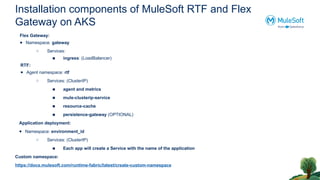
Installation components of MuleSoft RTF and Flex
Gateway on AKS
Flex Gateway:
● Namespace: gateway
○ Services:
■ ingress: (LoadBalancer)
RTF:
● Agent namespace: rtf
○ Services: (ClusterIP)
■ agent and metrics
■ mule-clusterip-service
■ resource-cache
■ persistence-gateway (OPTIONAL)
Application deployment:
● Namespace: environment_id
○ Services: (ClusterIP)
■ Each app will create a Service with the name of the application
Custom namespace:
https://docs.mulesoft.com/runtime-fabric/latest/create-custom-namespace
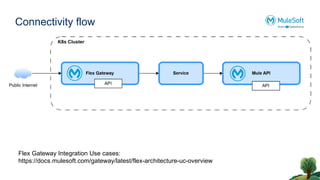
Connectivity flow
Flex Gateway Integration Use cases:
https://docs.mulesoft.com/gateway/latest/flex-architecture-uc-overview
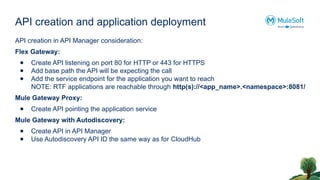
API creation and application deployment
API creation in API Manager consideration:
Flex Gateway:
● Create API listening on port 80 for HTTP or 443 for HTTPS
● Add base path the API will be expecting the call
● Add the service endpoint for the application you want to reach
NOTE: RTF applications are reachable through http(s)://<app_name>.<namespace>:8081/
Mule Gateway Proxy:
● Create API pointing the application service
Mule Gateway with Autodiscovery:
● Create API in API Manager
● Use Autodiscovery API ID the same way as for CloudHub
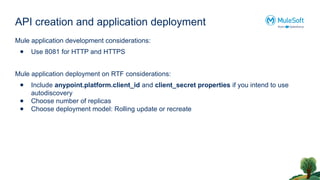
API creation and application deployment
Mule application development considerations:
● Use 8081 for HTTP and HTTPS
Mule application deployment on RTF considerations:
● Include anypoint.platform.client_id and client_secret properties if you intend to use
autodiscovery
● Choose number of replicas
● Choose deployment model: Rolling update or recreate
Logs and troubleshooting
● Console logs
● kubectl log command
● Bash to app container
● Anypoint Monitoring (Titanium subscription)
Useful commands
Container shell:
kubectl -n <namespace> exec -it <podname> -- /bin/sh
Logs:
kubectl logs -n <namespace> <podname>
specify container
kubectl logs -n <namespace> <podname> -c app
file logs
kubectl logs -f <pod name>
List objects:
services
kubectl get services --all-namespaces
kubectl get services -n <namespace>
nodes
kubectl get nodes
Questions?
🎉 Thank You, Online Attendees!
We appreciate your participation and hope
you enjoyed the session.
See you next time! 👋
Wrap up
Trivia Quiz
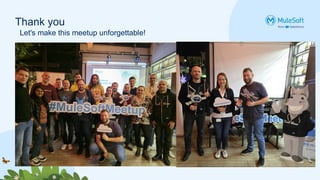
Thank you
Let's make this meetup unforgettable!
Thank You

MuleSoft RTF & Flex Gateway on AKS – Setup, Insights & Real-World Tips

  • 1.
    MuleSoft RTF &Flex Gateway on AKS: Insights, Setup, Administration, and Useful tips Warsaw MuleSoft Meetup April 16th, 2025
  • 2.
    AGENDA ● Introduction ● MuleSoftRTF & Flex Gateway on AKS: Insights, Setup, Administration, and Useful tips ● Q&A ● Quiz ● Networking
  • 3.
    ● Senior IntegrationArchitect and Developer in PwC ● Over 9 years in IT ● Working with MuleSoft since 2022 ● Knowledge of other cloud and integration technologies ▪ TIBCO ▪ Salesforce ▪ AWS ● Traveller, Football fan, Tennis player LinkedIn: https://www.linkedin.com/in/paulina-uhman-87076282/ 3 Paulina Uhman Speaker
  • 4.
    Patryk Bandurski Integration Architect| MuleSoft Meetup Leader ● Blog ambassadorpatryk.com ● Blog integrationtrails.io/articles
  • 8.
    Event Partners Your supportmakes this Meetup possible!
  • 9.
  • 10.
    What is RTFand Flex Gateway? Runtime Fabric: ● Deployment target for Mule applications ● Container service ● Supports deployment of Mule applications on cloud platforms and on-prem data centers ● Works with control plane of Anypoint Platform Flex Gateway: ● Anypoint API Gateway designed to manage and secure APIs running anywhere (not only Mule applications) ● Self-managed: two configuration modes - connected and local ● Managed Flex Gateway (New)
  • 11.
    Shared responsibility model- RTF *Image from docs.mulesoft.com *Image from anypoint.mulesoft.com
  • 12.
    Shared responsibility model- Flex gateway MuleSoft responsibility: ● Providing and supporting: ○ Flex Gateway ○ Base Helm char ○ Online Docker image registry Your responsibility: ● Maintaining connectivity to the Anypoint Control Plane Additionally, when running in Kubernetes: ● Adapting the base Helm chart for your specific needs ● Managing the Kubernetes Deployment: ○ External load balancing ○ Customizations to Ingress resources ○ Log forwarding and monitoring ○ Networking
  • 13.
    Where to start? 1.Anypoint Platform Step by step with HELM or RTFCTL (RTF) 2. MuleSoft documentation https://docs.mulesoft.com/runtime-fabric/lat est/install-self-managed https://docs.mulesoft.com/gateway/latest/fl ex-gateway-k8-getting-started 3. MuleSoft tutorials and howtos https://developer.mulesoft.com/tutorials-an d-howtos/runtime-fabric/runtime-fabric-azur e-kubernetes-service/ *Image from anypoint.mulesoft.com
  • 14.
    Installation components ofMuleSoft RTF and Flex Gateway on AKS Flex Gateway: ● Namespace: gateway ○ Services: ■ ingress: (LoadBalancer) RTF: ● Agent namespace: rtf ○ Services: (ClusterIP) ■ agent and metrics ■ mule-clusterip-service ■ resource-cache ■ persistence-gateway (OPTIONAL) Application deployment: ● Namespace: environment_id ○ Services: (ClusterIP) ■ Each app will create a Service with the name of the application Custom namespace: https://docs.mulesoft.com/runtime-fabric/latest/create-custom-namespace
  • 15.
    Connectivity flow Flex GatewayIntegration Use cases: https://docs.mulesoft.com/gateway/latest/flex-architecture-uc-overview
  • 16.
    API creation andapplication deployment API creation in API Manager consideration: Flex Gateway: ● Create API listening on port 80 for HTTP or 443 for HTTPS ● Add base path the API will be expecting the call ● Add the service endpoint for the application you want to reach NOTE: RTF applications are reachable through http(s)://<app_name>.<namespace>:8081/ Mule Gateway Proxy: ● Create API pointing the application service Mule Gateway with Autodiscovery: ● Create API in API Manager ● Use Autodiscovery API ID the same way as for CloudHub
  • 17.
    API creation andapplication deployment Mule application development considerations: ● Use 8081 for HTTP and HTTPS Mule application deployment on RTF considerations: ● Include anypoint.platform.client_id and client_secret properties if you intend to use autodiscovery ● Choose number of replicas ● Choose deployment model: Rolling update or recreate
  • 18.
    Logs and troubleshooting ●Console logs ● kubectl log command ● Bash to app container ● Anypoint Monitoring (Titanium subscription)
  • 19.
    Useful commands Container shell: kubectl-n <namespace> exec -it <podname> -- /bin/sh Logs: kubectl logs -n <namespace> <podname> specify container kubectl logs -n <namespace> <podname> -c app file logs kubectl logs -f <pod name> List objects: services kubectl get services --all-namespaces kubectl get services -n <namespace> nodes kubectl get nodes
  • 20.
  • 21.
    🎉 Thank You,Online Attendees! We appreciate your participation and hope you enjoyed the session. See you next time! 👋
  • 22.
  • 23.
  • 24.
    Thank you Let's makethis meetup unforgettable!
  • 25.

Editor's Notes

  • #10 Who has any experience with RTF or Flex Gateway?
  • #11 Who has K8s basic concepts understanding?
  • #12 Who has K8s basic concepts understanding?