

copyright 2015 Trainologic LTD
Micro Services
2 copyright 2015 Trainologic LTD
• Architectural style for designing software applications.
• Revolves around independently deployable services.
• This is in contradiction to the common monolith, single
unit applications.
• E.g., an uber-process (WebSphere) managing the
complete business logic of the banking web application.
• In the micro-services approach, there will be many
small and independent services (processes).
Micro Services
2
Micro Services
3 copyright 2015 Trainologic LTD
• The monolithic approach has some drawbacks:
• Change cycles are bound together.
• Harder modularity (crossing the bounds is easy).
• Scaling is harder.
• Separation is hard.
Problems with the Monoliths
3
Micro Services
4 copyright 2015 Trainologic LTD
• Characteristics:
• Componentization is achieved via services
(processes) and not by libraries (makes them
independently deployable and upgradable).
• Teams are grouped by business capabilities (cross-
functional teams) as opposed to technology
specialization teams.
Micro Services
4
Micro Services
5 copyright 2015 Trainologic LTD
• Instead of “project” approach, a team “owns” a
product. A “you build, you run it” approach.
This should be backed by a proper organizational
process.
• Smart endpoints – dump pipes. Avoid using
sophisticated tools (with lots of smart logic) and
favor simple REST protocols.
Micro Services
5
Micro Services
6 copyright 2015 Trainologic LTD
• Automation – CI, CD and Continuous Deployment.
• Design for Failure.
• Evolutionary Design – separate evolution between
services.
• Decentralized Governance.
• Decentralized Data Management.
Micro Services
6
Micro Services
7 copyright 2015 Trainologic LTD
• One of the questions is how big or small a micro-service
should be.
• First rule, don’t measure in lines of code!
• Introducing: Bounded Context.
• Coined in Domain-Driven-Design.
Design
7
Micro Services
8 copyright 2015 Trainologic LTD
• Ubiquitous Language.
• Does your model have the same meaning in different
micro-services?
Design
8
Micro Services
9 copyright 2015 Trainologic LTD
• The Twelve-Factor App is a document written by Adam
Wiggins of Heroku which summarizes huge experience
with SaaS applications regarding correct architectural
style.
• It is tool and language agnostic.
The Twelve-Factor App
9
Micro Services
1
0
copyright 2015 Trainologic LTD
• Each app has a single code-base.
• There are (typically) many deploys for a single code-
base (dev, stage, prod).
• A clear violation is many apps sharing the same code-
base.
One Codebase per App
10
Micro Services
1
1
copyright 2015 Trainologic LTD
• You should use a dependency distribution packaging
tool.
• Available for almost any language.
• I.e., Maven for Java.
• Apps should not rely on any external dependency.
• Simplifies developer work (just checkout the code).
Explicit and Isolated Dependencies
11
Micro Services
1
2
copyright 2015 Trainologic LTD
• Configuration should never be in code.
• Configuration that may vary between deployments
should be defined as environment properties.
• Not even in config files or config groups (they don’t
scale well).
Configuration is in the Environment
12
Micro Services
1
3
copyright 2015 Trainologic LTD
• Backing services should be treated as attached
resources.
• You should be able to attach/detach at will.
• There is no distinction between local and third party
services.
• Migration from one to the other should be seamless to
the deployment.
Backing Services
13
Micro Services
1
4
copyright 2015 Trainologic LTD
• Strict separation between the 3 stages.
• Build: from code (SCM) to binaries (Binary Repository).
• Release: Combination of binary (previous step) and
configuration.
• Run: Running the application in the execution env.
Build, Release, Run
14
Micro Services
1
5
copyright 2015 Trainologic LTD
• An application is executed as one or more processes.
• The processes share nothing between them (neither
disk or memory).
• They are also stateless.
• All stateful data should be stored in backing services.
• I.e., sticky sessions are a clear violation of this principle.
Processes
15
Micro Services
1
6
copyright 2015 Trainologic LTD
• A twelve-factor app does not run on a web server, it
provides an HTTP service.
• I.e., embedding the server in the application’s user
space and binding a port.
• This is true for more than HTTP.
• Port-binding also allows for one app to become the
backing service of another app.
Port Binding
16
Micro Services
1
7
copyright 2015 Trainologic LTD
• In a twelve-factor app, processes are first-class citizens
(and not threads).
• There can be several process-types.
• The share-nothing and stateless model allows for easy
scaling.
• Do not rely on self daemonizing techniques. Use your
OS’s process manager.
Concurrency
17
Micro Services
1
8
copyright 2015 Trainologic LTD
• Each process should be made disposable.
• I.e., it can be stopped, started or restarted at any time.
• You processes should:
• Have minimum startup delay.
• Graceful shutdown on a SIGTERM.
• Robustness against fatal case (Let-it-crash model).
Disposability
18
Micro Services
1
9
copyright 2015 Trainologic LTD
• A twelve-factor app should minimize the difference
between development, staging an production process.
• This include personnel, time and tools.
• Usually this is achieved by a continuous delivery
process.
• Developers should not use ‘lite’ versions of the
production tools.
• Modern CM tools allow for easily setting up a
production-like env for development.
Dev/Prod Parity
19
Micro Services
2
0
copyright 2015 Trainologic LTD
• Logs should be treated as streams.
• Each process should write its log to the stdout.
• In dev, it is watchable on the terminal.
• In staging and prod, it should be indexed in a dedicated
storage (e.g., ElasticSearch).
Logs
20
Micro Services
2
1
copyright 2015 Trainologic LTD
• Management and admin operations should be run as
one-off processes in the same environment as the
application.
• Admin code should be shipped with the application code
and use all the previous factors discussed.
Admin Processes
21
Micro Services
2
2
copyright 2015 Trainologic LTD
• Aim for eventual consistency and not strong
consistency.
• Each micro-service should have it’s own DB/Schema.
Data
22
Micro Services
2
3
copyright 2015 Trainologic LTD
• Design for scalability (do not block).
• Logging:
• Try to use the “entrypoint” stdout as much as you
can.
• For other logging, connect to ELK.
• Use MDC!
• Favor REST API based on JSON representation.
• Always provide liveness and readiness endpoints.
Implementation
23
Micro Services
2
4
copyright 2015 Trainologic LTD
• Always consider resources.
• Apply back-pressure always!
• Use Circuit Breakers.
Implementation
24
Micro Services
2
5
copyright 2015 Trainologic LTD
• Micro-services ease the task of building a proper CD
pipeline.
• Do it!
The Process
25
Micro Services
2
6
copyright 2015 Trainologic LTD
• Some drawbacks for micro-services:
• Complexity is shifted to the network.
• Incur barriers between services.
• Complexity in message formats.
• Load balancing and fault-tolerance may become
more complex.
• Micro services are not suited for extremely low-latency
applications.
Beware
26
Micro Services
copyright 2011 Trainologic LTD
Akka
2
8
copyright 2011 Trainologic LTD
Akka
• Akka is an open source framework for building highly
concurrent, distributed and fault-tolerant applications.
• Let’s review some of the high level features of Akka…
Introduction
28
2
9
copyright 2011 Trainologic LTD
Akka
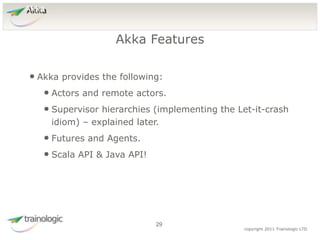
• Akka provides the following:
• Actors and remote actors.
• Supervisor hierarchies (implementing the Let-it-crash
idiom) – explained later.
• Futures and Agents.
• Scala API & Java API!
Akka Features
29
3
0
copyright 2011 Trainologic LTD
Akka
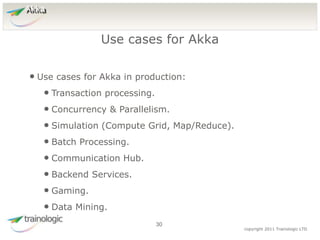
• Use cases for Akka in production:
• Transaction processing.
• Concurrency & Parallelism.
• Simulation (Compute Grid, Map/Reduce).
• Batch Processing.
• Communication Hub.
• Backend Services.
• Gaming.
• Data Mining.
Use cases for Akka
30
3
1
copyright 2011 Trainologic LTD
Akka
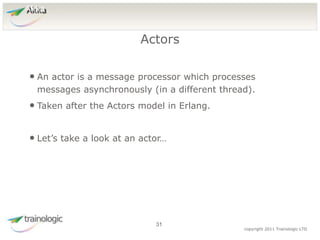
• An actor is a message processor which processes
messages asynchronously (in a different thread).
• Taken after the Actors model in Erlang.
• Let’s take a look at an actor…
Actors
31
3
2
copyright 2011 Trainologic LTD
Akka
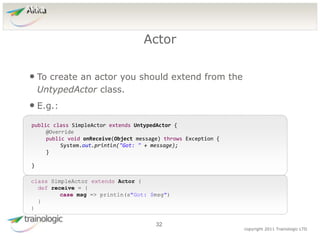
• To create an actor you should extend from the
UntypedActor class.
• E.g.:
Actor
32
public class SimpleActor extends UntypedActor {
@Override
public void onReceive(Object message) throws Exception {
System.out.println("Got: " + message);
}
}
class SimpleActor extends Actor {
def receive = {
case msg => println(s"Got: $msg")
}
}
3
3
copyright 2011 Trainologic LTD
Akka
• You should never instantiate actors yourself.
• You can never hold the direct reference of an actor.
• Only Akka does.
• This will ensure that mutable members inside the actor
are fully encapsulated and unshared.
• In order to create our first actor we need to work with
the ActorSystem.
Creating Actors
33
3
4
copyright 2011 Trainologic LTD
Akka
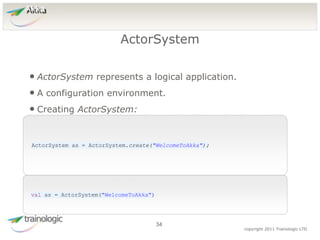
• ActorSystem represents a logical application.
• A configuration environment.
• Creating ActorSystem:
ActorSystem
34
ActorSystem as = ActorSystem.create("WelcomeToAkka");
val as = ActorSystem("WelcomeToAkka")
3
5
copyright 2011 Trainologic LTD
Akka
• The actorOf method will create an actor:
actorOf
35
ActorRef ref = as.actorOf(Props.create(SimpleActor.class),
"simpleActor");
val ref = as.actorOf(Props[SimpleActor], "simpleActor")
• We will discuss the Props later.
• And also the naming.
• For now, let’s discuss the ActorRef.
3
6
copyright 2011 Trainologic LTD
Akka
• Represents a reference to an actor.
• It is immutable and can be sent around inside
messages.
• Location transparent – can be obtained for remote
actors.
• Its most useful API: sending a message.
ActorRef
36
3
7
copyright 2011 Trainologic LTD
Akka
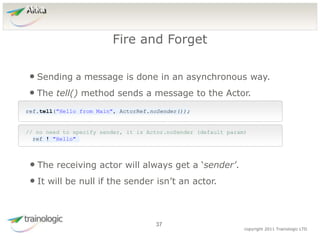
• Sending a message is done in an asynchronous way.
• The tell() method sends a message to the Actor.
Fire and Forget
37
ref.tell("Hello from Main", ActorRef.noSender());
// no need to specify sender, it is Actor.noSender (default param)
ref ! "Hello"
• The receiving actor will always get a ‘sender’.
• It will be null if the sender isn’t an actor.
3
8
copyright 2011 Trainologic LTD
Akka
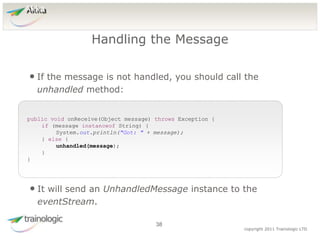
• If the message is not handled, you should call the
unhandled method:
Handling the Message
38
public void onReceive(Object message) throws Exception {
if (message instanceof String) {
System.out.println("Got: " + message);
} else {
unhandled(message);
}
}
• It will send an UnhandledMessage instance to the
eventStream.
3
9
copyright 2011 Trainologic LTD
Akka
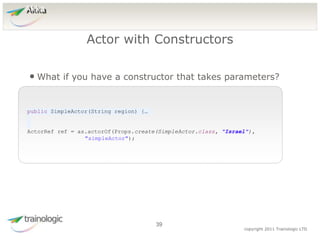
• What if you have a constructor that takes parameters?
Actor with Constructors
39
public SimpleActor(String region) {…
ActorRef ref = as.actorOf(Props.create(SimpleActor.class, "Israel"),
"simpleActor");
4
0
copyright 2011 Trainologic LTD
Akka
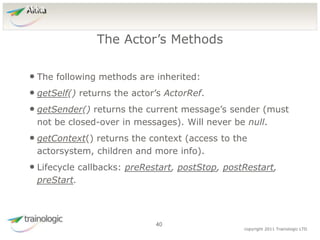
• The following methods are inherited:
• getSelf() returns the actor’s ActorRef.
• getSender() returns the current message’s sender (must
not be closed-over in messages). Will never be null.
• getContext() returns the context (access to the
actorsystem, children and more info).
• Lifecycle callbacks: preRestart, postStop, postRestart,
preStart.
The Actor’s Methods
40
4
1
copyright 2011 Trainologic LTD
Akka
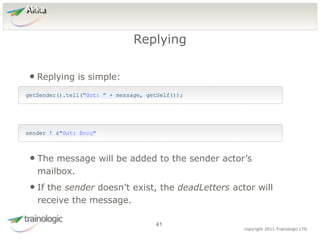
• Replying is simple:
Replying
41
getSender().tell("Got: " + message, getSelf());
sender ! s"Got: $msg"
• The message will be added to the sender actor’s
mailbox.
• If the sender doesn’t exist, the deadLetters actor will
receive the message.
4
2
copyright 2011 Trainologic LTD
Akka
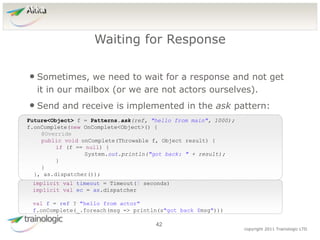
• Sometimes, we need to wait for a response and not get
it in our mailbox (or we are not actors ourselves).
• Send and receive is implemented in the ask pattern:
Waiting for Response
42
Future<Object> f = Patterns.ask(ref, "hello from main", 1000);
f.onComplete(new OnComplete<Object>() {
@Override
public void onComplete(Throwable f, Object result) {
if (f == null) {
System.out.println("got back: " + result);
}
}
}, as.dispatcher());
implicit val timeout = Timeout(5 seconds)
implicit val ec = as.dispatcher
val f = ref ? "hello from actor"
f.onComplete(_.foreach(msg => println(s"got back $msg")))
4
3
copyright 2011 Trainologic LTD
Akka
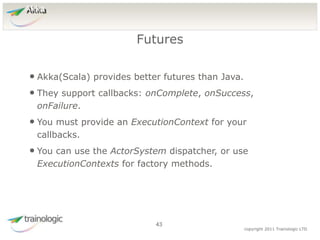
• Akka(Scala) provides better futures than Java.
• They support callbacks: onComplete, onSuccess,
onFailure.
• You must provide an ExecutionContext for your
callbacks.
• You can use the ActorSystem dispatcher, or use
ExecutionContexts for factory methods.
Futures
43
4
4
copyright 2011 Trainologic LTD
Akka
• Sometimes you’ll want to work with futures directly.
• The Promise class is a container for futures.
• You can get futures from it and ‘complete’ the promise
that will complete the futures. E.g.:
Promise
44
Promise<Integer> p = Futures.<Integer> promise();
Future<Integer> fi = p.future();
p.success(42);
val p = Promise[Int]()
val f2 = p.future
p.success(42)
4
5
copyright 2011 Trainologic LTD
Akka
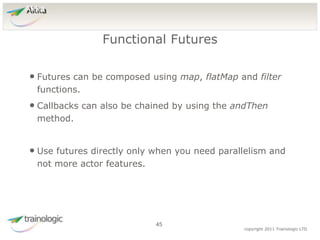
• Futures can be composed using map, flatMap and filter
functions.
• Callbacks can also be chained by using the andThen
method.
• Use futures directly only when you need parallelism and
not more actor features.
Functional Futures
45
4
6
copyright 2011 Trainologic LTD
Akka
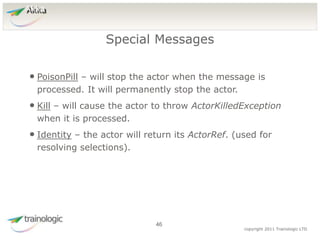
• PoisonPill – will stop the actor when the message is
processed. It will permanently stop the actor.
• Kill – will cause the actor to throw ActorKilledException
when it is processed.
• Identity – the actor will return its ActorRef. (used for
resolving selections).
Special Messages
46
4
7
copyright 2011 Trainologic LTD
Akka
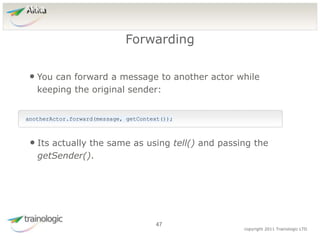
• You can forward a message to another actor while
keeping the original sender:
Forwarding
47
anotherActor.forward(message, getContext());
• Its actually the same as using tell() and passing the
getSender().
4
8
copyright 2011 Trainologic LTD
Akka
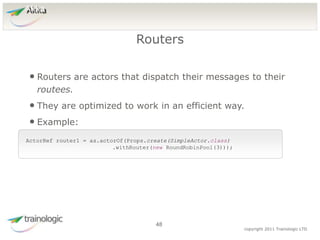
• Routers are actors that dispatch their messages to their
routees.
• They are optimized to work in an efficient way.
• Example:
Routers
48
ActorRef router1 = as.actorOf(Props.create(SimpleActor.class)
.withRouter(new RoundRobinPool(3)));
4
9
copyright 2011 Trainologic LTD
Akka
• You can provide the ActorRefs directly to the router
constructor (use Props.empty() for the actor class).
• The router creates the routees, it will have its routees
as children.
• So, whenever a routee will need to access the router
(e.g., when replying) it will just get it from
getContext().parent(). (only if the routee is a child of
the router).
Routers
49
5
0
copyright 2015 Trainologic LTD
Docker
• You want to deploy many services/apps/micro-services.
• And you’d like the following features:
• Isolation (e.g.: OS, resources, networking).
• Scalability (distributed systems).
• Evolution (upgrades/downgrades).
• So want are your options?
• What about classic VMs?
The Problem Domain
50
5
1
copyright 2015 Trainologic LTD
Docker
• A VM provides:
• Full isolation.
• Evolution.
• Distribution.
• But, the downside:
• Heavy on resources.
• Takes time to start.
Classic VMs
51
5
2
copyright 2015 Trainologic LTD
Docker
• Docker provides:
• Decent isolation.
• Evolution.
• Distribution (via Docker Swarm/ Kubernetes).
• Fast start time.
• Share resources (for similar images).
• The downside:
• Only Linux.
Docker
52
5
3
copyright 2015 Trainologic LTD
Docker
• Docker is a lightweight container.
• Useful for deploying and running an
application/service/micro-service with its environment.
• You can run your packaged application on production
server, staging server, development machine or even a
laptop.
• How does Docker works?
Docker
53
5
4
copyright 2015 Trainologic LTD
Docker
• Docker leverages the Linux namespaces feature.
• Linux namespaces that Docker uses:
• pid – process id numbering.
• net – the network stack (including loopback).
• ipc – Inter-Procces-Communication (shared memory,
semaphores).
• mnt – mounting.
• uts – hostname.
Linux Namespaces
54
5
5
copyright 2015 Trainologic LTD
Docker
• Docker also leverages the cgroups technology which
allows to share and limit resources between containers.
• And because Linux kernel API is backward compatible,
you can run any Linux on any Linux with Docker!
Linux cgroups
55
5
6
copyright 2015 Trainologic LTD
Docker
• Docker uses Union FS which is layered.
• This means that a Docker image will only contain the
difference from the parent image.
• You can deploy thousands of containers from the same
image without “almost” any additional cost.
The Filesystem
56
5
7
copyright 2015 Trainologic LTD
Docker
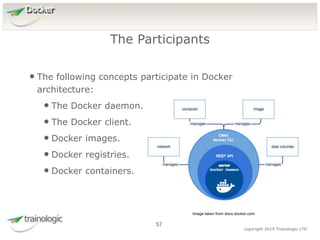
• The following concepts participate in Docker
architecture:
• The Docker daemon.
• The Docker client.
• Docker images.
• Docker registries.
• Docker containers.
The Participants
57
Image taken from docs.docker.com
5
8
copyright 2015 Trainologic LTD
Docker
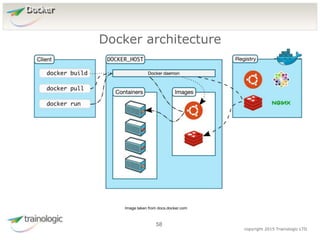
Docker architecture
58
Image taken from docs.docker.com
5
9
copyright 2015 Trainologic LTD
Docker
• The host process of Docker.
• Users interact with the daemon through the Docker
client binary.
• The client can connect from a remote machine.
• The daemon manages the images and the containers.
Docker Daemon and Client
59
6
0
copyright 2015 Trainologic LTD
Docker
• Based on a “Dockerfile” file
• “Dockerfile” contains instructions on how to build the
image.
• The image itself should reside in a Docker registry.
• Read only template that is used to instantiate containers
• Composed of layers – Each “Dockerfile” instruction is a
new layer
• Based on the UFS – Union File System
Docker Image
60
6
1
copyright 2015 Trainologic LTD
Docker
• Manages Docker images.
• The main public one is: Docker Hub.
• You can create your own private registry.
• Main point of distribution.
Docker Registry
61
6
2
copyright 2015 Trainologic LTD
Docker
• A runnable instance of the Docker image
• Can be ran, start, stopped, moved or deleted
• Secure and isolated application platform
• Can be given access to resources on other hosts
Docker Container
62
6
3
copyright 2015 Trainologic LTD
Docker
• docker run [options] image [command] [args]
• More than 80 options! The most useful:
• --name – gives the container a name
• --rm – removes the container at the end of the
• -d – run container in the background
• -it – interactive mode
• -p [host port:container port]
• -v [volume definition] – will be discussed later on
• --network will also be discussed later on
Running Containers
63
6
4
copyright 2015 Trainologic LTD
Docker
• You can list the current containers with the following
instruction: docker ps
• Will list the running instances.
• Use the –a argument to list all the containers
(including stopped ones).
• To stop/start a container :
• docker start/stop [container name]
• To remove a container: docker rm [container name]
Managing Containers
64
6
5
copyright 2015 Trainologic LTD
Docker
• Connect to a running container:
• docker attach container – connects to a running
container
• docker exec –it container /bin/bash – opens bash
shell on the specified container
Debugging Containers
65
6
6
copyright 2015 Trainologic LTD
Docker
• A Docker image is built from a Dockerfile.
• Should reside at SCM
• Syntax:
• Comments are lines starting with ‘#’.
• Every other line is in the format: ‘instruction
arguments’.
• Let’s see the available instructions…
Dockerfile
66
6
7
copyright 2015 Trainologic LTD
Docker
• FROM – the first instruction in the file which specifies
the base image to build upon.
• MAINTAINER – the author of the image.
• RUN <command> -- runs a command in shell form.
• RUN [“exec”, “arg1”, …] – runs a command in exec
form.
• CMD – discussed later.
• LABEL key=value key=value – adds metadata to the
image.
Instructions
67
6
8
copyright 2015 Trainologic LTD
Docker
• ADD – adds file(s) from the context to the image. You
can use regex and even urls.
• COPY – same as ADD but without URL and tar handling.
• ENTRYPOINT – discussed later.
• VOLUME “/dir” – creates a mount point for externally
mounted volumes.
• USER – sets the user for the next instructions.
• WORKDIR – sets the working directory for the next
instructions.
Instructions
68
6
9
copyright 2015 Trainologic LTD
Docker
• Will define an executable to run when running the
container.
• Any arguments to the ‘docker run’ command will be
appended to the entrypoint.
• There can be only one entrypoint in the dockerfile.
• You can use CMD once in your dockerfile to provide
default arguments for the entrypoint.
ENTRYPOINT / CMD
69
7
0
copyright 2015 Trainologic LTD
Docker
• A specially designed directory that bypasses the UFS
• Meaning changes are written directly
• Used for persistent data (DB, files) or to share data
between containers
• docker run/create –v [[host path]:][docker path]
[image name]
• docker run –v /dbdata postgresql
• docker run –v /host_path:/docker_path postgresql
Volumes
70
7
1
copyright 2015 Trainologic LTD
Docker
• To view all the available volumes use :
docker volume ls
• To remove unnecessary volumes use:
docker volume rm [volume name]
• More useful to remove volumes that belong to a specific
container:
docker rm –v [container id or alias]
Managing Volumes
71
7
2
copyright 2015 Trainologic LTD
Docker
• To share data between containers use data container
• Creating data container:
• docker create -v /dbdata --name dbstore
training/postgres /bin/true
• Using it in other containers:
• docker run -d --volumes-from dbstore --name
db1 training/postgres
• Loads all the volumes from the dbstore container
Data Containers
72
7
3
copyright 2015 Trainologic LTD
Docker
• docker build [options] PATH | URL
• Builds the Docker image from a “Dockerfile” and a the files
located in the path/URL
• Searches for “Dockerfile” file by default or use –f [other
docker file] option to specify the Dockerfile
• The URL can point to:
• GIT repository
• Plaintext file
• Tarball context
Building Images
73
7
4
copyright 2015 Trainologic LTD
Docker
• Every image has a unique id given during the build
• It can also be tagged: [Repository[:tag]
• Repository is used to group similar images together
• Tag is used to differ images in the same repository,
usually used for versioning
• Repository != Registry
• docker build –t repo:tag1 repo:latest .
Tagging Images
74
7
5
copyright 2015 Trainologic LTD
Docker
• You can create private or bridge networks between
containers.
• By default all the containers are on the same bridge
network – can access each over by ip
• You can also use the legacy --link to make containers
aware of their peer hostname.
• Use ‘docker create network’ command to create
networks
Managing Networks
75
7
6
copyright 2015 Trainologic LTD
Docker
• User-defined networks can be either:
• bridge – single host network, every container sees
the other containers by host name
• overlay – similar to bridge but across multiple hosts
in docker swarm
Managing Networks
76
7
7
copyright 2015 Trainologic LTD
Docker
• docker-compose is a tool for managing a group of
containers on a single host.
• You can use it with docker swarm for multi-node
environments.
• docker-comose revolves around the docker-
compose.yml.
Docker Compose
77
7
8
copyright 2015 Trainologic LTD
Docker
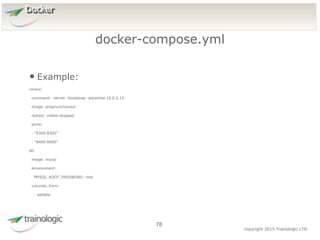
• Example:
consul:
command: -server -bootstrap -advertise 10.0.2.15
image: progrium/consul
restart: unless-stopped
ports:
- "8300:8300"
- "8400:8400"
db:
image: mysql
environment:
MYSQL_ROOT_PASSWORD: root
volumes_from:
- sqldata
docker-compose.yml
78
7
9
copyright 2015 Trainologic LTD
Docker
• In the docker-compose yml folder:
• up – creates and starts the containers
• stop – stops the containers
• kill – kills the containers
• use docker-compose –-help for more commands
Docker Compose Commands
79
8
0
copyright 2015 Trainologic LTD
Docker
• The first tool to provide support was Google Kubernetes.
• Hard to set up and does not re-user the docker API and
tools.
• Now we have Docker Swarm which is native support for
clustering by Docker.
Clustering
80
8
1
copyright 2015 Trainologic LTD
Docker
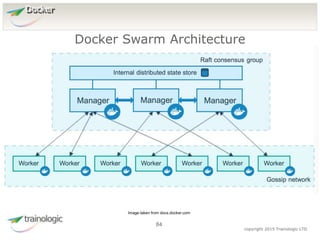
• A cluster of Docker engines where you deploy services
• Docker engines in the cluster are nodes
• Worker node execute tasks
• Manager node
• is responsible for distributing the work
• Serving swarm mode
• Maintaining cluster state
Docker Swarm
81
8
2
copyright 2015 Trainologic LTD
Docker
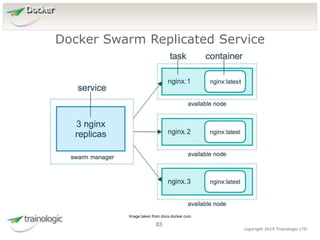
• Service is a definition of tasks to be executed by the
worker nodes
• Replicated services – the swarm manager distributes
number of replica tasks based on the scale
configuration
• Global services – the swarm run one task of the
service on every node
• Task – the atomic scheduling unit – execution of a single
container
Docker Swarm
82
8
3
copyright 2015 Trainologic LTD
Docker
Docker Swarm Replicated Service
83
Image taken from docs.docker.com
8
4
copyright 2015 Trainologic LTD
Docker
Docker Swarm Architecture
84
Image taken from docs.docker.com
8
5
copyright 2015 Trainologic LTD
Docker
• Supports high availability with several managers.
• Let’s see a demo…
Docker Swarm
85

Reactive Micro Services with Java seminar

  • 1.
    copyright 2015 TrainologicLTD Micro Services
  • 2.
    2 copyright 2015Trainologic LTD • Architectural style for designing software applications. • Revolves around independently deployable services. • This is in contradiction to the common monolith, single unit applications. • E.g., an uber-process (WebSphere) managing the complete business logic of the banking web application. • In the micro-services approach, there will be many small and independent services (processes). Micro Services 2 Micro Services
  • 3.
    3 copyright 2015Trainologic LTD • The monolithic approach has some drawbacks: • Change cycles are bound together. • Harder modularity (crossing the bounds is easy). • Scaling is harder. • Separation is hard. Problems with the Monoliths 3 Micro Services
  • 4.
    4 copyright 2015Trainologic LTD • Characteristics: • Componentization is achieved via services (processes) and not by libraries (makes them independently deployable and upgradable). • Teams are grouped by business capabilities (cross- functional teams) as opposed to technology specialization teams. Micro Services 4 Micro Services
  • 5.
    5 copyright 2015Trainologic LTD • Instead of “project” approach, a team “owns” a product. A “you build, you run it” approach. This should be backed by a proper organizational process. • Smart endpoints – dump pipes. Avoid using sophisticated tools (with lots of smart logic) and favor simple REST protocols. Micro Services 5 Micro Services
  • 6.
    6 copyright 2015Trainologic LTD • Automation – CI, CD and Continuous Deployment. • Design for Failure. • Evolutionary Design – separate evolution between services. • Decentralized Governance. • Decentralized Data Management. Micro Services 6 Micro Services
  • 7.
    7 copyright 2015Trainologic LTD • One of the questions is how big or small a micro-service should be. • First rule, don’t measure in lines of code! • Introducing: Bounded Context. • Coined in Domain-Driven-Design. Design 7 Micro Services
  • 8.
    8 copyright 2015Trainologic LTD • Ubiquitous Language. • Does your model have the same meaning in different micro-services? Design 8 Micro Services
  • 9.
    9 copyright 2015Trainologic LTD • The Twelve-Factor App is a document written by Adam Wiggins of Heroku which summarizes huge experience with SaaS applications regarding correct architectural style. • It is tool and language agnostic. The Twelve-Factor App 9 Micro Services
  • 10.
    1 0 copyright 2015 TrainologicLTD • Each app has a single code-base. • There are (typically) many deploys for a single code- base (dev, stage, prod). • A clear violation is many apps sharing the same code- base. One Codebase per App 10 Micro Services
  • 11.
    1 1 copyright 2015 TrainologicLTD • You should use a dependency distribution packaging tool. • Available for almost any language. • I.e., Maven for Java. • Apps should not rely on any external dependency. • Simplifies developer work (just checkout the code). Explicit and Isolated Dependencies 11 Micro Services
  • 12.
    1 2 copyright 2015 TrainologicLTD • Configuration should never be in code. • Configuration that may vary between deployments should be defined as environment properties. • Not even in config files or config groups (they don’t scale well). Configuration is in the Environment 12 Micro Services
  • 13.
    1 3 copyright 2015 TrainologicLTD • Backing services should be treated as attached resources. • You should be able to attach/detach at will. • There is no distinction between local and third party services. • Migration from one to the other should be seamless to the deployment. Backing Services 13 Micro Services
  • 14.
    1 4 copyright 2015 TrainologicLTD • Strict separation between the 3 stages. • Build: from code (SCM) to binaries (Binary Repository). • Release: Combination of binary (previous step) and configuration. • Run: Running the application in the execution env. Build, Release, Run 14 Micro Services
  • 15.
    1 5 copyright 2015 TrainologicLTD • An application is executed as one or more processes. • The processes share nothing between them (neither disk or memory). • They are also stateless. • All stateful data should be stored in backing services. • I.e., sticky sessions are a clear violation of this principle. Processes 15 Micro Services
  • 16.
    1 6 copyright 2015 TrainologicLTD • A twelve-factor app does not run on a web server, it provides an HTTP service. • I.e., embedding the server in the application’s user space and binding a port. • This is true for more than HTTP. • Port-binding also allows for one app to become the backing service of another app. Port Binding 16 Micro Services
  • 17.
    1 7 copyright 2015 TrainologicLTD • In a twelve-factor app, processes are first-class citizens (and not threads). • There can be several process-types. • The share-nothing and stateless model allows for easy scaling. • Do not rely on self daemonizing techniques. Use your OS’s process manager. Concurrency 17 Micro Services
  • 18.
    1 8 copyright 2015 TrainologicLTD • Each process should be made disposable. • I.e., it can be stopped, started or restarted at any time. • You processes should: • Have minimum startup delay. • Graceful shutdown on a SIGTERM. • Robustness against fatal case (Let-it-crash model). Disposability 18 Micro Services
  • 19.
    1 9 copyright 2015 TrainologicLTD • A twelve-factor app should minimize the difference between development, staging an production process. • This include personnel, time and tools. • Usually this is achieved by a continuous delivery process. • Developers should not use ‘lite’ versions of the production tools. • Modern CM tools allow for easily setting up a production-like env for development. Dev/Prod Parity 19 Micro Services
  • 20.
    2 0 copyright 2015 TrainologicLTD • Logs should be treated as streams. • Each process should write its log to the stdout. • In dev, it is watchable on the terminal. • In staging and prod, it should be indexed in a dedicated storage (e.g., ElasticSearch). Logs 20 Micro Services
  • 21.
    2 1 copyright 2015 TrainologicLTD • Management and admin operations should be run as one-off processes in the same environment as the application. • Admin code should be shipped with the application code and use all the previous factors discussed. Admin Processes 21 Micro Services
  • 22.
    2 2 copyright 2015 TrainologicLTD • Aim for eventual consistency and not strong consistency. • Each micro-service should have it’s own DB/Schema. Data 22 Micro Services
  • 23.
    2 3 copyright 2015 TrainologicLTD • Design for scalability (do not block). • Logging: • Try to use the “entrypoint” stdout as much as you can. • For other logging, connect to ELK. • Use MDC! • Favor REST API based on JSON representation. • Always provide liveness and readiness endpoints. Implementation 23 Micro Services
  • 24.
    2 4 copyright 2015 TrainologicLTD • Always consider resources. • Apply back-pressure always! • Use Circuit Breakers. Implementation 24 Micro Services
  • 25.
    2 5 copyright 2015 TrainologicLTD • Micro-services ease the task of building a proper CD pipeline. • Do it! The Process 25 Micro Services
  • 26.
    2 6 copyright 2015 TrainologicLTD • Some drawbacks for micro-services: • Complexity is shifted to the network. • Incur barriers between services. • Complexity in message formats. • Load balancing and fault-tolerance may become more complex. • Micro services are not suited for extremely low-latency applications. Beware 26 Micro Services
  • 27.
  • 28.
    2 8 copyright 2011 TrainologicLTD Akka • Akka is an open source framework for building highly concurrent, distributed and fault-tolerant applications. • Let’s review some of the high level features of Akka… Introduction 28
  • 29.
    2 9 copyright 2011 TrainologicLTD Akka • Akka provides the following: • Actors and remote actors. • Supervisor hierarchies (implementing the Let-it-crash idiom) – explained later. • Futures and Agents. • Scala API & Java API! Akka Features 29
  • 30.
    3 0 copyright 2011 TrainologicLTD Akka • Use cases for Akka in production: • Transaction processing. • Concurrency & Parallelism. • Simulation (Compute Grid, Map/Reduce). • Batch Processing. • Communication Hub. • Backend Services. • Gaming. • Data Mining. Use cases for Akka 30
  • 31.
    3 1 copyright 2011 TrainologicLTD Akka • An actor is a message processor which processes messages asynchronously (in a different thread). • Taken after the Actors model in Erlang. • Let’s take a look at an actor… Actors 31
  • 32.
    3 2 copyright 2011 TrainologicLTD Akka • To create an actor you should extend from the UntypedActor class. • E.g.: Actor 32 public class SimpleActor extends UntypedActor { @Override public void onReceive(Object message) throws Exception { System.out.println("Got: " + message); } } class SimpleActor extends Actor { def receive = { case msg => println(s"Got: $msg") } }
  • 33.
    3 3 copyright 2011 TrainologicLTD Akka • You should never instantiate actors yourself. • You can never hold the direct reference of an actor. • Only Akka does. • This will ensure that mutable members inside the actor are fully encapsulated and unshared. • In order to create our first actor we need to work with the ActorSystem. Creating Actors 33
  • 34.
    3 4 copyright 2011 TrainologicLTD Akka • ActorSystem represents a logical application. • A configuration environment. • Creating ActorSystem: ActorSystem 34 ActorSystem as = ActorSystem.create("WelcomeToAkka"); val as = ActorSystem("WelcomeToAkka")
  • 35.
    3 5 copyright 2011 TrainologicLTD Akka • The actorOf method will create an actor: actorOf 35 ActorRef ref = as.actorOf(Props.create(SimpleActor.class), "simpleActor"); val ref = as.actorOf(Props[SimpleActor], "simpleActor") • We will discuss the Props later. • And also the naming. • For now, let’s discuss the ActorRef.
  • 36.
    3 6 copyright 2011 TrainologicLTD Akka • Represents a reference to an actor. • It is immutable and can be sent around inside messages. • Location transparent – can be obtained for remote actors. • Its most useful API: sending a message. ActorRef 36
  • 37.
    3 7 copyright 2011 TrainologicLTD Akka • Sending a message is done in an asynchronous way. • The tell() method sends a message to the Actor. Fire and Forget 37 ref.tell("Hello from Main", ActorRef.noSender()); // no need to specify sender, it is Actor.noSender (default param) ref ! "Hello" • The receiving actor will always get a ‘sender’. • It will be null if the sender isn’t an actor.
  • 38.
    3 8 copyright 2011 TrainologicLTD Akka • If the message is not handled, you should call the unhandled method: Handling the Message 38 public void onReceive(Object message) throws Exception { if (message instanceof String) { System.out.println("Got: " + message); } else { unhandled(message); } } • It will send an UnhandledMessage instance to the eventStream.
  • 39.
    3 9 copyright 2011 TrainologicLTD Akka • What if you have a constructor that takes parameters? Actor with Constructors 39 public SimpleActor(String region) {… ActorRef ref = as.actorOf(Props.create(SimpleActor.class, "Israel"), "simpleActor");
  • 40.
    4 0 copyright 2011 TrainologicLTD Akka • The following methods are inherited: • getSelf() returns the actor’s ActorRef. • getSender() returns the current message’s sender (must not be closed-over in messages). Will never be null. • getContext() returns the context (access to the actorsystem, children and more info). • Lifecycle callbacks: preRestart, postStop, postRestart, preStart. The Actor’s Methods 40
  • 41.
    4 1 copyright 2011 TrainologicLTD Akka • Replying is simple: Replying 41 getSender().tell("Got: " + message, getSelf()); sender ! s"Got: $msg" • The message will be added to the sender actor’s mailbox. • If the sender doesn’t exist, the deadLetters actor will receive the message.
  • 42.
    4 2 copyright 2011 TrainologicLTD Akka • Sometimes, we need to wait for a response and not get it in our mailbox (or we are not actors ourselves). • Send and receive is implemented in the ask pattern: Waiting for Response 42 Future<Object> f = Patterns.ask(ref, "hello from main", 1000); f.onComplete(new OnComplete<Object>() { @Override public void onComplete(Throwable f, Object result) { if (f == null) { System.out.println("got back: " + result); } } }, as.dispatcher()); implicit val timeout = Timeout(5 seconds) implicit val ec = as.dispatcher val f = ref ? "hello from actor" f.onComplete(_.foreach(msg => println(s"got back $msg")))
  • 43.
    4 3 copyright 2011 TrainologicLTD Akka • Akka(Scala) provides better futures than Java. • They support callbacks: onComplete, onSuccess, onFailure. • You must provide an ExecutionContext for your callbacks. • You can use the ActorSystem dispatcher, or use ExecutionContexts for factory methods. Futures 43
  • 44.
    4 4 copyright 2011 TrainologicLTD Akka • Sometimes you’ll want to work with futures directly. • The Promise class is a container for futures. • You can get futures from it and ‘complete’ the promise that will complete the futures. E.g.: Promise 44 Promise<Integer> p = Futures.<Integer> promise(); Future<Integer> fi = p.future(); p.success(42); val p = Promise[Int]() val f2 = p.future p.success(42)
  • 45.
    4 5 copyright 2011 TrainologicLTD Akka • Futures can be composed using map, flatMap and filter functions. • Callbacks can also be chained by using the andThen method. • Use futures directly only when you need parallelism and not more actor features. Functional Futures 45
  • 46.
    4 6 copyright 2011 TrainologicLTD Akka • PoisonPill – will stop the actor when the message is processed. It will permanently stop the actor. • Kill – will cause the actor to throw ActorKilledException when it is processed. • Identity – the actor will return its ActorRef. (used for resolving selections). Special Messages 46
  • 47.
    4 7 copyright 2011 TrainologicLTD Akka • You can forward a message to another actor while keeping the original sender: Forwarding 47 anotherActor.forward(message, getContext()); • Its actually the same as using tell() and passing the getSender().
  • 48.
    4 8 copyright 2011 TrainologicLTD Akka • Routers are actors that dispatch their messages to their routees. • They are optimized to work in an efficient way. • Example: Routers 48 ActorRef router1 = as.actorOf(Props.create(SimpleActor.class) .withRouter(new RoundRobinPool(3)));
  • 49.
    4 9 copyright 2011 TrainologicLTD Akka • You can provide the ActorRefs directly to the router constructor (use Props.empty() for the actor class). • The router creates the routees, it will have its routees as children. • So, whenever a routee will need to access the router (e.g., when replying) it will just get it from getContext().parent(). (only if the routee is a child of the router). Routers 49
  • 50.
    5 0 copyright 2015 TrainologicLTD Docker • You want to deploy many services/apps/micro-services. • And you’d like the following features: • Isolation (e.g.: OS, resources, networking). • Scalability (distributed systems). • Evolution (upgrades/downgrades). • So want are your options? • What about classic VMs? The Problem Domain 50
  • 51.
    5 1 copyright 2015 TrainologicLTD Docker • A VM provides: • Full isolation. • Evolution. • Distribution. • But, the downside: • Heavy on resources. • Takes time to start. Classic VMs 51
  • 52.
    5 2 copyright 2015 TrainologicLTD Docker • Docker provides: • Decent isolation. • Evolution. • Distribution (via Docker Swarm/ Kubernetes). • Fast start time. • Share resources (for similar images). • The downside: • Only Linux. Docker 52
  • 53.
    5 3 copyright 2015 TrainologicLTD Docker • Docker is a lightweight container. • Useful for deploying and running an application/service/micro-service with its environment. • You can run your packaged application on production server, staging server, development machine or even a laptop. • How does Docker works? Docker 53
  • 54.
    5 4 copyright 2015 TrainologicLTD Docker • Docker leverages the Linux namespaces feature. • Linux namespaces that Docker uses: • pid – process id numbering. • net – the network stack (including loopback). • ipc – Inter-Procces-Communication (shared memory, semaphores). • mnt – mounting. • uts – hostname. Linux Namespaces 54
  • 55.
    5 5 copyright 2015 TrainologicLTD Docker • Docker also leverages the cgroups technology which allows to share and limit resources between containers. • And because Linux kernel API is backward compatible, you can run any Linux on any Linux with Docker! Linux cgroups 55
  • 56.
    5 6 copyright 2015 TrainologicLTD Docker • Docker uses Union FS which is layered. • This means that a Docker image will only contain the difference from the parent image. • You can deploy thousands of containers from the same image without “almost” any additional cost. The Filesystem 56
  • 57.
    5 7 copyright 2015 TrainologicLTD Docker • The following concepts participate in Docker architecture: • The Docker daemon. • The Docker client. • Docker images. • Docker registries. • Docker containers. The Participants 57 Image taken from docs.docker.com
  • 58.
    5 8 copyright 2015 TrainologicLTD Docker Docker architecture 58 Image taken from docs.docker.com
  • 59.
    5 9 copyright 2015 TrainologicLTD Docker • The host process of Docker. • Users interact with the daemon through the Docker client binary. • The client can connect from a remote machine. • The daemon manages the images and the containers. Docker Daemon and Client 59
  • 60.
    6 0 copyright 2015 TrainologicLTD Docker • Based on a “Dockerfile” file • “Dockerfile” contains instructions on how to build the image. • The image itself should reside in a Docker registry. • Read only template that is used to instantiate containers • Composed of layers – Each “Dockerfile” instruction is a new layer • Based on the UFS – Union File System Docker Image 60
  • 61.
    6 1 copyright 2015 TrainologicLTD Docker • Manages Docker images. • The main public one is: Docker Hub. • You can create your own private registry. • Main point of distribution. Docker Registry 61
  • 62.
    6 2 copyright 2015 TrainologicLTD Docker • A runnable instance of the Docker image • Can be ran, start, stopped, moved or deleted • Secure and isolated application platform • Can be given access to resources on other hosts Docker Container 62
  • 63.
    6 3 copyright 2015 TrainologicLTD Docker • docker run [options] image [command] [args] • More than 80 options! The most useful: • --name – gives the container a name • --rm – removes the container at the end of the • -d – run container in the background • -it – interactive mode • -p [host port:container port] • -v [volume definition] – will be discussed later on • --network will also be discussed later on Running Containers 63
  • 64.
    6 4 copyright 2015 TrainologicLTD Docker • You can list the current containers with the following instruction: docker ps • Will list the running instances. • Use the –a argument to list all the containers (including stopped ones). • To stop/start a container : • docker start/stop [container name] • To remove a container: docker rm [container name] Managing Containers 64
  • 65.
    6 5 copyright 2015 TrainologicLTD Docker • Connect to a running container: • docker attach container – connects to a running container • docker exec –it container /bin/bash – opens bash shell on the specified container Debugging Containers 65
  • 66.
    6 6 copyright 2015 TrainologicLTD Docker • A Docker image is built from a Dockerfile. • Should reside at SCM • Syntax: • Comments are lines starting with ‘#’. • Every other line is in the format: ‘instruction arguments’. • Let’s see the available instructions… Dockerfile 66
  • 67.
    6 7 copyright 2015 TrainologicLTD Docker • FROM – the first instruction in the file which specifies the base image to build upon. • MAINTAINER – the author of the image. • RUN <command> -- runs a command in shell form. • RUN [“exec”, “arg1”, …] – runs a command in exec form. • CMD – discussed later. • LABEL key=value key=value – adds metadata to the image. Instructions 67
  • 68.
    6 8 copyright 2015 TrainologicLTD Docker • ADD – adds file(s) from the context to the image. You can use regex and even urls. • COPY – same as ADD but without URL and tar handling. • ENTRYPOINT – discussed later. • VOLUME “/dir” – creates a mount point for externally mounted volumes. • USER – sets the user for the next instructions. • WORKDIR – sets the working directory for the next instructions. Instructions 68
  • 69.
    6 9 copyright 2015 TrainologicLTD Docker • Will define an executable to run when running the container. • Any arguments to the ‘docker run’ command will be appended to the entrypoint. • There can be only one entrypoint in the dockerfile. • You can use CMD once in your dockerfile to provide default arguments for the entrypoint. ENTRYPOINT / CMD 69
  • 70.
    7 0 copyright 2015 TrainologicLTD Docker • A specially designed directory that bypasses the UFS • Meaning changes are written directly • Used for persistent data (DB, files) or to share data between containers • docker run/create –v [[host path]:][docker path] [image name] • docker run –v /dbdata postgresql • docker run –v /host_path:/docker_path postgresql Volumes 70
  • 71.
    7 1 copyright 2015 TrainologicLTD Docker • To view all the available volumes use : docker volume ls • To remove unnecessary volumes use: docker volume rm [volume name] • More useful to remove volumes that belong to a specific container: docker rm –v [container id or alias] Managing Volumes 71
  • 72.
    7 2 copyright 2015 TrainologicLTD Docker • To share data between containers use data container • Creating data container: • docker create -v /dbdata --name dbstore training/postgres /bin/true • Using it in other containers: • docker run -d --volumes-from dbstore --name db1 training/postgres • Loads all the volumes from the dbstore container Data Containers 72
  • 73.
    7 3 copyright 2015 TrainologicLTD Docker • docker build [options] PATH | URL • Builds the Docker image from a “Dockerfile” and a the files located in the path/URL • Searches for “Dockerfile” file by default or use –f [other docker file] option to specify the Dockerfile • The URL can point to: • GIT repository • Plaintext file • Tarball context Building Images 73
  • 74.
    7 4 copyright 2015 TrainologicLTD Docker • Every image has a unique id given during the build • It can also be tagged: [Repository[:tag] • Repository is used to group similar images together • Tag is used to differ images in the same repository, usually used for versioning • Repository != Registry • docker build –t repo:tag1 repo:latest . Tagging Images 74
  • 75.
    7 5 copyright 2015 TrainologicLTD Docker • You can create private or bridge networks between containers. • By default all the containers are on the same bridge network – can access each over by ip • You can also use the legacy --link to make containers aware of their peer hostname. • Use ‘docker create network’ command to create networks Managing Networks 75
  • 76.
    7 6 copyright 2015 TrainologicLTD Docker • User-defined networks can be either: • bridge – single host network, every container sees the other containers by host name • overlay – similar to bridge but across multiple hosts in docker swarm Managing Networks 76
  • 77.
    7 7 copyright 2015 TrainologicLTD Docker • docker-compose is a tool for managing a group of containers on a single host. • You can use it with docker swarm for multi-node environments. • docker-comose revolves around the docker- compose.yml. Docker Compose 77
  • 78.
    7 8 copyright 2015 TrainologicLTD Docker • Example: consul: command: -server -bootstrap -advertise 10.0.2.15 image: progrium/consul restart: unless-stopped ports: - "8300:8300" - "8400:8400" db: image: mysql environment: MYSQL_ROOT_PASSWORD: root volumes_from: - sqldata docker-compose.yml 78
  • 79.
    7 9 copyright 2015 TrainologicLTD Docker • In the docker-compose yml folder: • up – creates and starts the containers • stop – stops the containers • kill – kills the containers • use docker-compose –-help for more commands Docker Compose Commands 79
  • 80.
    8 0 copyright 2015 TrainologicLTD Docker • The first tool to provide support was Google Kubernetes. • Hard to set up and does not re-user the docker API and tools. • Now we have Docker Swarm which is native support for clustering by Docker. Clustering 80
  • 81.
    8 1 copyright 2015 TrainologicLTD Docker • A cluster of Docker engines where you deploy services • Docker engines in the cluster are nodes • Worker node execute tasks • Manager node • is responsible for distributing the work • Serving swarm mode • Maintaining cluster state Docker Swarm 81
  • 82.
    8 2 copyright 2015 TrainologicLTD Docker • Service is a definition of tasks to be executed by the worker nodes • Replicated services – the swarm manager distributes number of replica tasks based on the scale configuration • Global services – the swarm run one task of the service on every node • Task – the atomic scheduling unit – execution of a single container Docker Swarm 82
  • 83.
    8 3 copyright 2015 TrainologicLTD Docker Docker Swarm Replicated Service 83 Image taken from docs.docker.com
  • 84.
    8 4 copyright 2015 TrainologicLTD Docker Docker Swarm Architecture 84 Image taken from docs.docker.com
  • 85.
    8 5 copyright 2015 TrainologicLTD Docker • Supports high availability with several managers. • Let’s see a demo… Docker Swarm 85

Editor's Notes

  • #63 Running our first container docker run
  • #71 Can mount a file as well
  • #72 Can mount a file as well
  • #73 Can mount a file as well
  • #74 Talk about the caching