Academy
Building Better Nerds™
www.codergv.com
All Rights Reserved
http://goo.gl/qkU4nc
Join the presentation
Academy
Building Better Nerds™
www.codergv.com
All Rights Reserved
Intro. to Git/GitHub
by Olmo Maldonado
GMG Agency, LLC
February 5th, 2015
Academy www.codergv.com • All Rights Reserved
Instructor: Olmo Maldonado
➔Over 10 years of experience as Software Engineer
➔Masters in Electrical Engineering from UCLA
➔Founder Tech Tuesdays, Code#RGV
➔MooTools Developer
➔Ex-Googler with Google Photos Team, circa 2009
➔Fluent in JavaScript, PHP, and many more web
tech
Contact & Follow
{facebook, twitter, github}.com/ibolmo
Academy www.codergv.com • All Rights Reserved
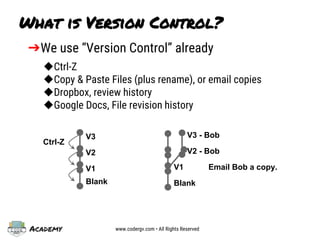
What is Version Control?
➔We use “Version Control” already
◆Ctrl-Z
◆Copy & Paste Files (plus rename), or email copies
◆Dropbox, review history
◆Google Docs, File revision history
V1
Blank
V2
V3
Ctrl-Z
Blank
V1
V2 - Bob
V3 - Bob
Email Bob a copy.
Academy www.codergv.com • All Rights Reserved
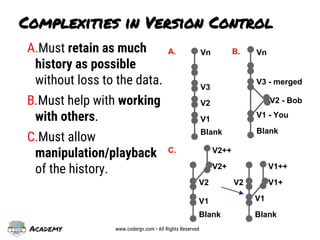
Complexities in Version Control
A.Must retain as much
history as possible
without loss to the data.
B.Must help with working
with others.
C.Must allow
manipulation/playback
of the history.
V1
Blank
V3
Vn
V2
A.
Blank
V1 - You
V2 - Bob
V3 - merged
VnB.
Blank
V2
V2+
V2++
Blank
V1
V2
V1++
C.
V1
V1+
Academy www.codergv.com • All Rights Reserved
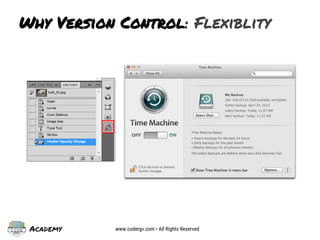
Why Version Control: Flexiblity
Academy www.codergv.com • All Rights Reserved
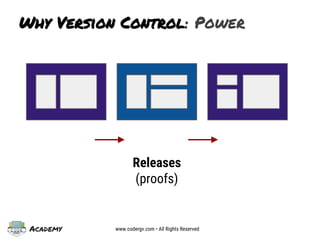
Why Version Control: Power
Releases
(proofs)
Academy www.codergv.com • All Rights Reserved
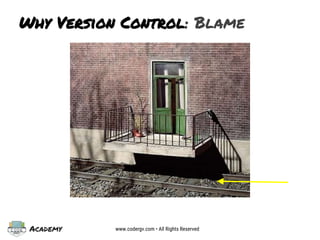
Why Version Control: Blame
Academy www.codergv.com • All Rights Reserved
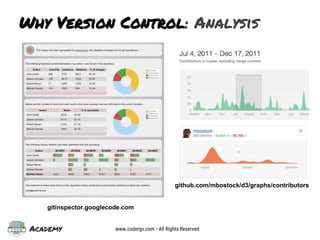
Why Version Control: Analysis
gitinspector.googlecode.com
github.com/mbostock/d3/graphs/contributors
Academy www.codergv.com • All Rights Reserved
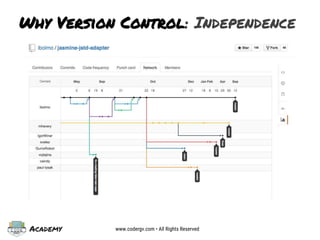
Why Version Control: Independence
Academy www.codergv.com • All Rights Reserved
industries that should/uses V.C.
➔Medical: Treatment plans and med. history
➔Architecture: Multiple designers, one goal
➔Graphic Design: For those pesky clients
➔Accounting: For auditing
➔Software Dev. (of course): For collab.
➔Government: who was involved, what changed
➔Bottom line: Anyone/Everyone
https://github.com/unitedstates/congress
govtrack.us
Academy www.codergv.com • All Rights Reserved
What is Git?
It’s a version control system. Sorry, this is a fundamentals class.
For now, you can read for technical details:
http://git-scm.com/book/en/v2/Getting-Started-Git-Basics
Simply:
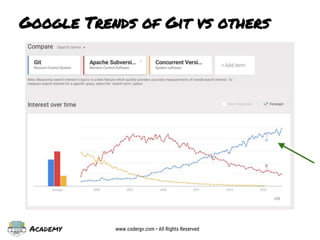
➔most adopted
➔fast … extremely fast
➔simple(r) to use compared to previous art
➔you can run Git on any platform
➔you don’t need GitHub, or any other service, to
benefit from Git
Academy www.codergv.com • All Rights Reserved
Google Trends of Git vs others
Academy www.codergv.com • All Rights Reserved
What is GitHub?
➔a hosted service on top of Git
➔simplifies collaboration
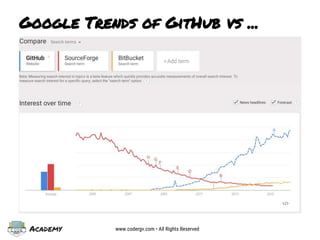
➔most popular; used by Google, Facebook,
Microsoft, and most startups (including
Code#RGV: github.com/codergv)
➔Free for Open Source projects (public)
➔Reasonable costs ($7/mo) for private projects
Academy www.codergv.com • All Rights Reserved
Google Trends of GitHub vs ...
Academy www.codergv.com • All Rights Reserved
Let’s get working
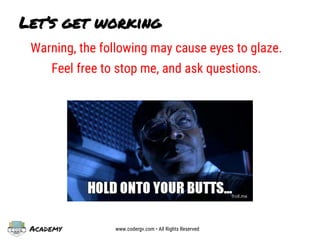
Warning, the following may cause eyes to glaze.
Feel free to stop me, and ask questions.
Academy www.codergv.com • All Rights Reserved
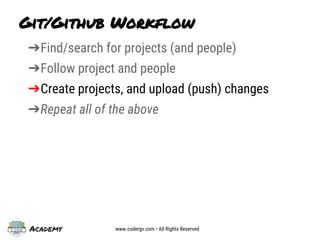
Git/Github Workflow
➔Find/search for projects (and people)
➔Follow project and people
➔Create projects, and upload (push) changes
➔Repeat all of the above
Academy www.codergv.com • All Rights Reserved
Find/search for Projects
➔Use keywords/search terms
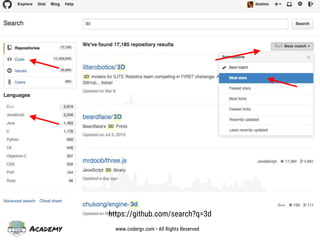
➔Lookup most popular/trending projects by
language
➔Don’t forget to evaluate the project
◆Number of stars (bookmarks)
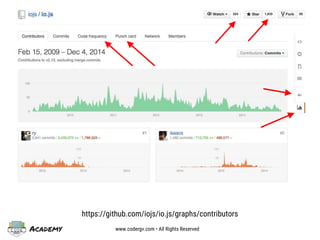
◆Number of people watching (usually contributors)
◆Look at graphs and see if they’re consistent
➔Adv. Search Operators
◆https://github.com/search/advanced
Academy www.codergv.com • All Rights Reserved
https://github.com/search?q=3d
Academy www.codergv.com • All Rights Reserved
https://github.com/iojs/io.js/graphs/contributors
Academy www.codergv.com • All Rights Reserved
Git/Github Workflow
➔Find/search for projects (and people)
➔Follow project and people
➔Create projects, and upload (push) changes
➔Repeat all of the above
Academy www.codergv.com • All Rights Reserved
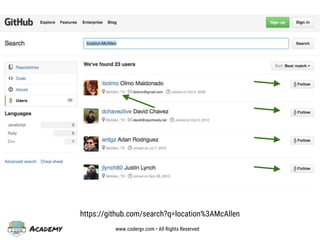
https://github.com/search?q=location%3AMcAllen
Academy www.codergv.com • All Rights Reserved
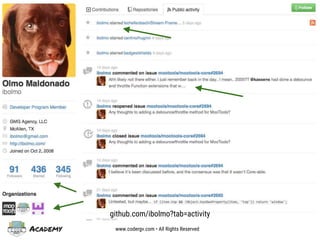
github.com/ibolmo?tab=activity
Academy www.codergv.com • All Rights Reserved
➔Follow people
➔Star (bookmark/like) projects
➔Watch projects get notifications on issues,
changes, or comments
➔Go to github.com/explore everyday, or sign-up
for newsletter
Encouraged to
Academy www.codergv.com • All Rights Reserved
Git/Github Workflow
➔Find/search for projects (and people)
➔Follow project and people
➔Create projects, and upload (push) changes
➔Repeat all of the above
Academy www.codergv.com • All Rights Reserved
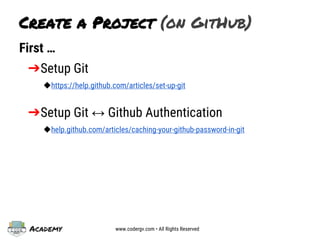
First …
➔Setup Git
◆https://help.github.com/articles/set-up-git
➔Setup Git ↔ Github Authentication
◆help.github.com/articles/caching-your-github-password-in-git
Create a Project (on GitHub)
Academy www.codergv.com • All Rights Reserved
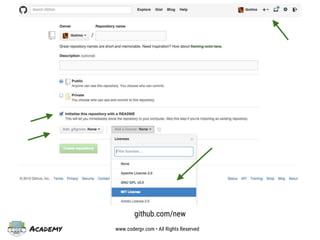
github.com/new
Academy www.codergv.com • All Rights Reserved
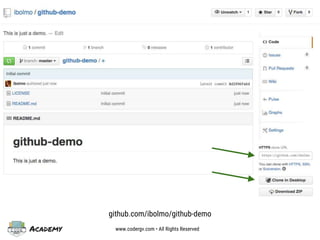
github.com/ibolmo/github-demo
Academy www.codergv.com • All Rights Reserved
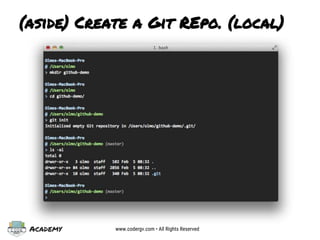
(aside) Create a Git REpo. (local)
Academy www.codergv.com • All Rights Reserved
Git Commands Explained
Sorry, see presentation for additional explanation or
learn more about git init, status, add, commit, etc.
➔See: http://git-scm.com/docs
➔man git (in a command prompt or terminal)
Academy www.codergv.com • All Rights Reserved
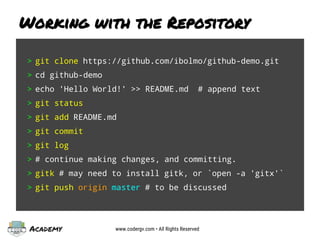
Working with the Repository
> git clone https://github.com/ibolmo/github-demo.git
> cd github-demo
> echo 'Hello World!' >> README.md # append text
> git status
> git add README.md
> git commit
> git log
> # continue making changes, and committing.
> gitk # may need to install gitk, or `open -a 'gitx'`
> git push origin master # to be discussed
Academy www.codergv.com • All Rights Reserved
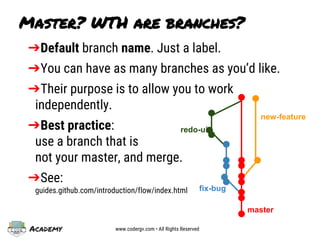
➔Default branch name. Just a label.
➔You can have as many branches as you’d like.
➔Their purpose is to allow you to work
independently.
➔Best practice:
use a branch that is
not your master, and merge.
➔See:
guides.github.com/introduction/flow/index.html
Master? WTH are branches?
master
new-feature
fix-bug
redo-ui
Academy www.codergv.com • All Rights Reserved
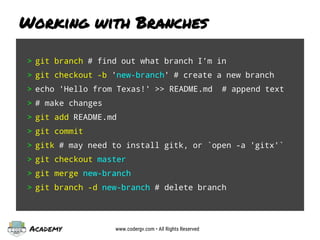
Working with Branches
> git branch # find out what branch I’m in
> git checkout -b 'new-branch' # create a new branch
> echo 'Hello from Texas!' >> README.md # append text
> # make changes
> git add README.md
> git commit
> gitk # may need to install gitk, or `open -a 'gitx'`
> git checkout master
> git merge new-branch
> git branch -d new-branch # delete branch
Academy www.codergv.com • All Rights Reserved
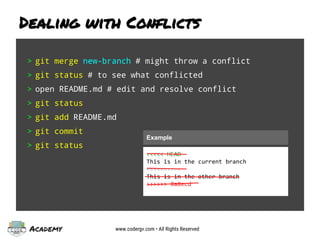
> git merge new-branch # might throw a conflict
> git status # to see what conflicted
> open README.md # edit and resolve conflict
> git status
> git add README.md
> git commit
> git status
Dealing with Conflicts
<<<<< HEAD
This is in the current branch
==========
This is in the other branch
>>>>>> 8a8ecd
Example
Academy www.codergv.com • All Rights Reserved
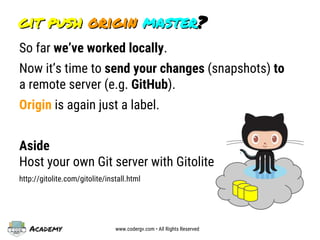
git push origin master?git push origin master?
So far we’ve worked locally.
Now it’s time to send your changes (snapshots) to
a remote server (e.g. GitHub).
Origin is again just a label.
Aside
Host your own Git server with Gitolite
http://gitolite.com/gitolite/install.html
Academy www.codergv.com • All Rights Reserved
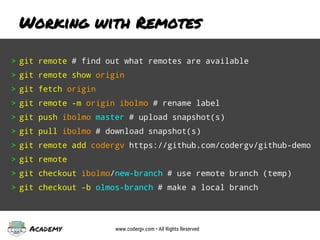
Working with Remotes
> git remote # find out what remotes are available
> git remote show origin
> git fetch origin
> git remote -m origin ibolmo # rename label
> git push ibolmo master # upload snapshot(s)
> git pull ibolmo # download snapshot(s)
> git remote add codergv https://github.com/codergv/github-demo
> git remote
> git checkout ibolmo/new-branch # use remote branch (temp)
> git checkout -b olmos-branch # make a local branch
Academy www.codergv.com • All Rights Reserved
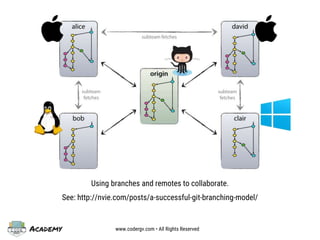
Using branches and remotes to collaborate.
See: http://nvie.com/posts/a-successful-git-branching-model/
Academy www.codergv.com • All Rights Reserved
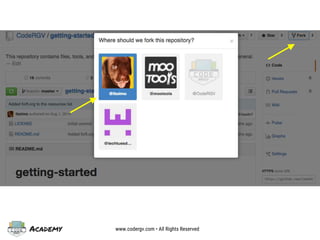
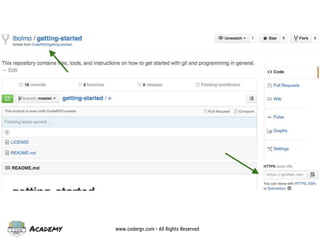
➔Find a project, and fork it.
➔It’s cool. Everyone’s doing it.
➔Get your own copy of the repo.
➔You have complete control.
➔When ready, you will create a Pull
Request to contribute back.
➔Follow style guide and contributing
guidelines.
Working with Others on GitHub
Academy www.codergv.com • All Rights Reserved
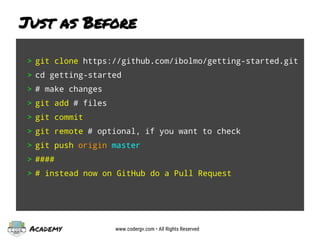
Just as Before
> git clone https://github.com/ibolmo/getting-started.git
> cd getting-started
> # make changes
> git add # files
> git commit
> git remote # optional, if you want to check
> git push origin master
> ####
> # instead now on GitHub do a Pull Request
Academy www.codergv.com • All Rights Reserved
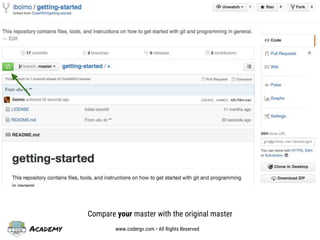
Compare your master with the original master
Academy www.codergv.com • All Rights Reserved
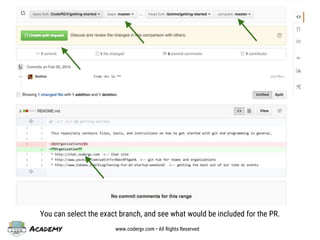
You can select the exact branch, and see what would be included for the PR.
Academy www.codergv.com • All Rights Reserved
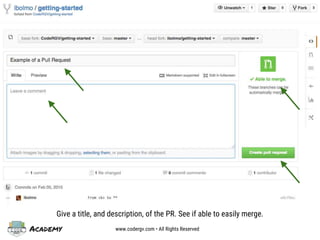
Give a title, and description, of the PR. See if able to easily merge.
Academy www.codergv.com • All Rights Reserved
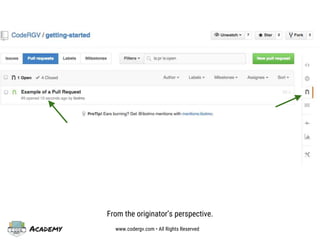
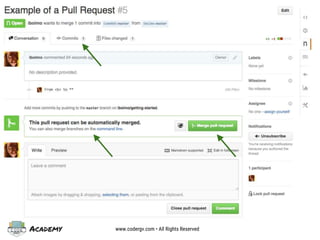
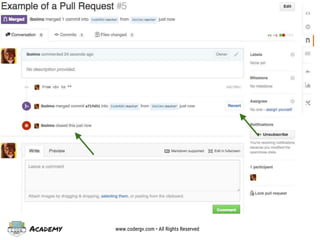
From the originator’s perspective.
Academy www.codergv.com • All Rights Reserved
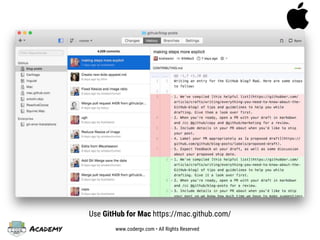
Use GitHub for Mac https://mac.github.com/
Academy www.codergv.com • All Rights Reserved
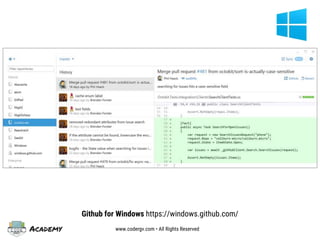
Github for Windows https://windows.github.com/
Academy www.codergv.com • All Rights Reserved
Homework
Post updates/questions to Code#RGV Forum, or use
#codergv #academy #hw in tweets and posts
1. Fork github.com/codergv/getting-started
2. Add a useful tip for those getting started
3. Send a Pull Request
Academy
Building Better Nerds™
www.codergv.com
All Rights Reserved
Thank You!
#codergv
#academy
Evaluation
http://goo.gl/3VWq9u
lowercase L

Intro. to Git and Github

  • 1.
    Academy Building Better Nerds™ www.codergv.com AllRights Reserved http://goo.gl/qkU4nc Join the presentation
  • 2.
    Academy Building Better Nerds™ www.codergv.com AllRights Reserved Intro. to Git/GitHub by Olmo Maldonado GMG Agency, LLC February 5th, 2015
  • 3.
    Academy www.codergv.com •All Rights Reserved Instructor: Olmo Maldonado ➔Over 10 years of experience as Software Engineer ➔Masters in Electrical Engineering from UCLA ➔Founder Tech Tuesdays, Code#RGV ➔MooTools Developer ➔Ex-Googler with Google Photos Team, circa 2009 ➔Fluent in JavaScript, PHP, and many more web tech Contact & Follow {facebook, twitter, github}.com/ibolmo
  • 4.
    Academy www.codergv.com •All Rights Reserved What is Version Control? ➔We use “Version Control” already ◆Ctrl-Z ◆Copy & Paste Files (plus rename), or email copies ◆Dropbox, review history ◆Google Docs, File revision history V1 Blank V2 V3 Ctrl-Z Blank V1 V2 - Bob V3 - Bob Email Bob a copy.
  • 5.
    Academy www.codergv.com •All Rights Reserved Complexities in Version Control A.Must retain as much history as possible without loss to the data. B.Must help with working with others. C.Must allow manipulation/playback of the history. V1 Blank V3 Vn V2 A. Blank V1 - You V2 - Bob V3 - merged VnB. Blank V2 V2+ V2++ Blank V1 V2 V1++ C. V1 V1+
  • 6.
    Academy www.codergv.com •All Rights Reserved Why Version Control: Flexiblity
  • 7.
    Academy www.codergv.com •All Rights Reserved Why Version Control: Power Releases (proofs)
  • 8.
    Academy www.codergv.com •All Rights Reserved Why Version Control: Blame
  • 9.
    Academy www.codergv.com •All Rights Reserved Why Version Control: Analysis gitinspector.googlecode.com github.com/mbostock/d3/graphs/contributors
  • 10.
    Academy www.codergv.com •All Rights Reserved Why Version Control: Independence
  • 11.
    Academy www.codergv.com •All Rights Reserved industries that should/uses V.C. ➔Medical: Treatment plans and med. history ➔Architecture: Multiple designers, one goal ➔Graphic Design: For those pesky clients ➔Accounting: For auditing ➔Software Dev. (of course): For collab. ➔Government: who was involved, what changed ➔Bottom line: Anyone/Everyone https://github.com/unitedstates/congress govtrack.us
  • 12.
    Academy www.codergv.com •All Rights Reserved What is Git? It’s a version control system. Sorry, this is a fundamentals class. For now, you can read for technical details: http://git-scm.com/book/en/v2/Getting-Started-Git-Basics Simply: ➔most adopted ➔fast … extremely fast ➔simple(r) to use compared to previous art ➔you can run Git on any platform ➔you don’t need GitHub, or any other service, to benefit from Git
  • 13.
    Academy www.codergv.com •All Rights Reserved Google Trends of Git vs others
  • 14.
    Academy www.codergv.com •All Rights Reserved What is GitHub? ➔a hosted service on top of Git ➔simplifies collaboration ➔most popular; used by Google, Facebook, Microsoft, and most startups (including Code#RGV: github.com/codergv) ➔Free for Open Source projects (public) ➔Reasonable costs ($7/mo) for private projects
  • 15.
    Academy www.codergv.com •All Rights Reserved Google Trends of GitHub vs ...
  • 16.
    Academy www.codergv.com •All Rights Reserved Let’s get working Warning, the following may cause eyes to glaze. Feel free to stop me, and ask questions.
  • 17.
    Academy www.codergv.com •All Rights Reserved Git/Github Workflow ➔Find/search for projects (and people) ➔Follow project and people ➔Create projects, and upload (push) changes ➔Repeat all of the above
  • 18.
    Academy www.codergv.com •All Rights Reserved Find/search for Projects ➔Use keywords/search terms ➔Lookup most popular/trending projects by language ➔Don’t forget to evaluate the project ◆Number of stars (bookmarks) ◆Number of people watching (usually contributors) ◆Look at graphs and see if they’re consistent ➔Adv. Search Operators ◆https://github.com/search/advanced
  • 19.
    Academy www.codergv.com •All Rights Reserved https://github.com/search?q=3d
  • 20.
    Academy www.codergv.com •All Rights Reserved https://github.com/iojs/io.js/graphs/contributors
  • 21.
    Academy www.codergv.com •All Rights Reserved Git/Github Workflow ➔Find/search for projects (and people) ➔Follow project and people ➔Create projects, and upload (push) changes ➔Repeat all of the above
  • 22.
    Academy www.codergv.com •All Rights Reserved https://github.com/search?q=location%3AMcAllen
  • 23.
    Academy www.codergv.com •All Rights Reserved github.com/ibolmo?tab=activity
  • 24.
    Academy www.codergv.com •All Rights Reserved ➔Follow people ➔Star (bookmark/like) projects ➔Watch projects get notifications on issues, changes, or comments ➔Go to github.com/explore everyday, or sign-up for newsletter Encouraged to
  • 25.
    Academy www.codergv.com •All Rights Reserved Git/Github Workflow ➔Find/search for projects (and people) ➔Follow project and people ➔Create projects, and upload (push) changes ➔Repeat all of the above
  • 26.
    Academy www.codergv.com •All Rights Reserved First … ➔Setup Git ◆https://help.github.com/articles/set-up-git ➔Setup Git ↔ Github Authentication ◆help.github.com/articles/caching-your-github-password-in-git Create a Project (on GitHub)
  • 27.
    Academy www.codergv.com •All Rights Reserved github.com/new
  • 28.
    Academy www.codergv.com •All Rights Reserved github.com/ibolmo/github-demo
  • 29.
    Academy www.codergv.com •All Rights Reserved (aside) Create a Git REpo. (local)
  • 30.
    Academy www.codergv.com •All Rights Reserved Git Commands Explained Sorry, see presentation for additional explanation or learn more about git init, status, add, commit, etc. ➔See: http://git-scm.com/docs ➔man git (in a command prompt or terminal)
  • 31.
    Academy www.codergv.com •All Rights Reserved Working with the Repository > git clone https://github.com/ibolmo/github-demo.git > cd github-demo > echo 'Hello World!' >> README.md # append text > git status > git add README.md > git commit > git log > # continue making changes, and committing. > gitk # may need to install gitk, or `open -a 'gitx'` > git push origin master # to be discussed
  • 32.
    Academy www.codergv.com •All Rights Reserved ➔Default branch name. Just a label. ➔You can have as many branches as you’d like. ➔Their purpose is to allow you to work independently. ➔Best practice: use a branch that is not your master, and merge. ➔See: guides.github.com/introduction/flow/index.html Master? WTH are branches? master new-feature fix-bug redo-ui
  • 33.
    Academy www.codergv.com •All Rights Reserved Working with Branches > git branch # find out what branch I’m in > git checkout -b 'new-branch' # create a new branch > echo 'Hello from Texas!' >> README.md # append text > # make changes > git add README.md > git commit > gitk # may need to install gitk, or `open -a 'gitx'` > git checkout master > git merge new-branch > git branch -d new-branch # delete branch
  • 34.
    Academy www.codergv.com •All Rights Reserved > git merge new-branch # might throw a conflict > git status # to see what conflicted > open README.md # edit and resolve conflict > git status > git add README.md > git commit > git status Dealing with Conflicts <<<<< HEAD This is in the current branch ========== This is in the other branch >>>>>> 8a8ecd Example
  • 35.
    Academy www.codergv.com •All Rights Reserved git push origin master?git push origin master? So far we’ve worked locally. Now it’s time to send your changes (snapshots) to a remote server (e.g. GitHub). Origin is again just a label. Aside Host your own Git server with Gitolite http://gitolite.com/gitolite/install.html
  • 36.
    Academy www.codergv.com •All Rights Reserved Working with Remotes > git remote # find out what remotes are available > git remote show origin > git fetch origin > git remote -m origin ibolmo # rename label > git push ibolmo master # upload snapshot(s) > git pull ibolmo # download snapshot(s) > git remote add codergv https://github.com/codergv/github-demo > git remote > git checkout ibolmo/new-branch # use remote branch (temp) > git checkout -b olmos-branch # make a local branch
  • 37.
    Academy www.codergv.com •All Rights Reserved Using branches and remotes to collaborate. See: http://nvie.com/posts/a-successful-git-branching-model/
  • 38.
    Academy www.codergv.com •All Rights Reserved ➔Find a project, and fork it. ➔It’s cool. Everyone’s doing it. ➔Get your own copy of the repo. ➔You have complete control. ➔When ready, you will create a Pull Request to contribute back. ➔Follow style guide and contributing guidelines. Working with Others on GitHub
  • 39.
    Academy www.codergv.com •All Rights Reserved
  • 40.
    Academy www.codergv.com •All Rights Reserved
  • 41.
    Academy www.codergv.com •All Rights Reserved Just as Before > git clone https://github.com/ibolmo/getting-started.git > cd getting-started > # make changes > git add # files > git commit > git remote # optional, if you want to check > git push origin master > #### > # instead now on GitHub do a Pull Request
  • 42.
    Academy www.codergv.com •All Rights Reserved Compare your master with the original master
  • 43.
    Academy www.codergv.com •All Rights Reserved You can select the exact branch, and see what would be included for the PR.
  • 44.
    Academy www.codergv.com •All Rights Reserved Give a title, and description, of the PR. See if able to easily merge.
  • 45.
    Academy www.codergv.com •All Rights Reserved From the originator’s perspective.
  • 46.
    Academy www.codergv.com •All Rights Reserved
  • 47.
    Academy www.codergv.com •All Rights Reserved
  • 48.
    Academy www.codergv.com •All Rights Reserved Use GitHub for Mac https://mac.github.com/
  • 49.
    Academy www.codergv.com •All Rights Reserved Github for Windows https://windows.github.com/
  • 50.
    Academy www.codergv.com •All Rights Reserved Homework Post updates/questions to Code#RGV Forum, or use #codergv #academy #hw in tweets and posts 1. Fork github.com/codergv/getting-started 2. Add a useful tip for those getting started 3. Send a Pull Request
  • 51.
    Academy Building Better Nerds™ www.codergv.com AllRights Reserved Thank You! #codergv #academy Evaluation http://goo.gl/3VWq9u lowercase L