Data Analytics with MongoDB
for fun and profit
Michael Gordon
CFO, MongoDB
Dr. Grigori Melnik
VP, Products, MongoDB
@gmelnik
Safe Harbor Statement
The development, release, and timing of any features or functionality
described for our products remains at our sole discretion. This
information is merely intended to outline our general product direction
and it should not be relied on in making a purchasing decision nor is
this a commitment, promise or legal obligation to deliver any material,
code, or functionality.
data is a new oil
data is a new soil
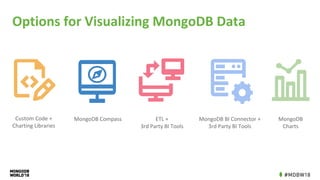
Options for Visualizing MongoDB Data
Custom Code +
Charting Libraries
ETL +
3rd Party BI Tools
MongoDB BI Connector +
3rd Party BI Tools
MongoDB
Charts
MongoDB Compass
Things to Think About
• Use the correct architecture
• Determine what your needs are
• Multiple heterogeneous data sources?
• Huge amounts of complex data?
• Sophisticated aggregations?
• Quick self-service?
• Need to interact? share? collaborate?
• Choose the right tools for you
Architectural
Considerations
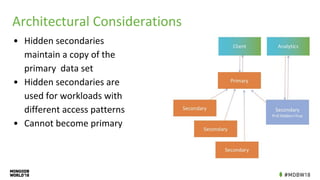
Architectural Considerations
• Hidden secondaries
maintain a copy of the
primary data set
• Hidden secondaries are
used for workloads with
different access patterns
• Cannot become primary
Build Your Own
Custom Code with Some Reuse
• Powerful Aggregation Framework
• Rich collection of drivers (incl. Python and R)
• 3rd party charting libraries (d3, Vega, Vega.lite etc)
• Pros:
• Custom tailored solution: fits exactly as required!
• Idiomatic to your development language
• High degree of expressiveness
• Cons:
• High investment
• Maintenance
• Deep understanding of the underlying tech and its language(s)
Exploratory Analysis with
MongoDB Compass
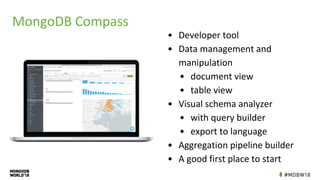
MongoDB Compass
• Developer tool
• Data management and
manipulation
• document view
• table view
• Visual schema analyzer
• with query builder
• export to language
• Aggregation pipeline builder
• A good first place to start
MongoDB Compass - When to Use
• Exploratory data analysis
• Data preparation & basic manipulation
• Data ingestion via JSON or CSV import
• Day-to-day development/operations
• Adding and understanding indexes
• Adding validation rules
• Authoring & troubleshooting aggregation pipelines
• Viewing real-time server stats
• 10,000 → 1ft view of data
Demo:
Exploratory Analysis with
Compass
MongoDB
BI Connector
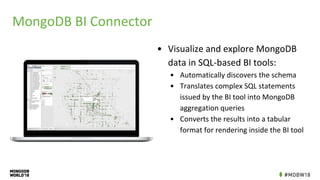
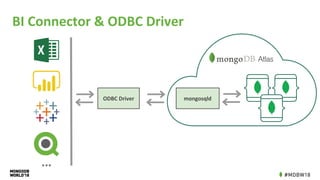
MongoDB BI Connector
• Visualize and explore MongoDB
data in SQL-based BI tools:
• Automatically discovers the schema
• Translates complex SQL statements
issued by the BI tool into MongoDB
aggregation queries
• Converts the results into a tabular
format for rendering inside the BI tool
BI Connector & ODBC Driver
ODBC Driver mongosqld
...
MongoDB BI Connector - When to Use
• Want to speak SQL to MongoDB
• Multi data sources (not just MongoDB)
• Business analysts
• Reporting only
• Powerful but you lose the benefits of the Document Model
Demo:
Data Analysis with
Microsoft Excel and
BI Connector
MongoDB
Charts
Wouldn’t it be lovely if...
You could visualize your MongoDB data natively…
• without needing to write custom code
• without needing to move your data into a different repository or
• without needing to wrangle with flaky ETL pipelines
• without needing to purchase and configure third-party tools
• without losing the richness of the Document Model
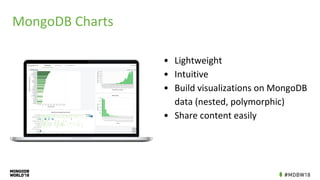
MongoDB Charts
• Lightweight
• Intuitive
• Build visualizations on MongoDB
data (nested, polymorphic)
• Share content easily
MongoDB Charts - When to Use
• The fastest way to build visualizations over your MongoDB data
• Ad hoc analyses
• Benefit from the Document Model
• No need to flatten /ETL your mongodb data
• Type handling
• Polymorphic collections
• Nested documents
• Array reductions
• Prebuilt dashboards for collab
• Self-service
• Intuitive enough for domain experts, non-devs to use!
Demo:
Data Viz with Charts
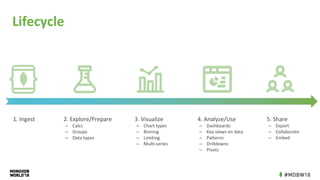
Lifecycle
1. Ingest 2. Explore/Prepare
‒ Calcs
‒ Groups
‒ Data types
3. Visualize
‒ Chart types
‒ Binning
‒ Limiting
‒ Multi-series
4. Analyze/Use
‒ Dashboards
‒ Key views on data
‒ Patterns
‒ Drilldowns
‒ Pivots
5. Share
‒ Export
‒ Collaborate
‒ Embed
Final Thoughts
To think clearly about the relationship between evidence and conclusion,
the relevant question is How do I know that? Answering this question
requires self-awareness about the quality and integrity of information,
and particularly how that information arrived to one’s own world.
Similarly, to ask others, How do you know that? How do they know that?
These questions are among the best you can ask analytically.
~ Edward Tufte
you
How do I know that?
they
{ }
Other Recommended Sessions
Thank you
MongoDB World 2018: Data Analytics with MongoDB

MongoDB World 2018: Data Analytics with MongoDB

  • 1.
    Data Analytics withMongoDB for fun and profit Michael Gordon CFO, MongoDB Dr. Grigori Melnik VP, Products, MongoDB @gmelnik
  • 2.
    Safe Harbor Statement Thedevelopment, release, and timing of any features or functionality described for our products remains at our sole discretion. This information is merely intended to outline our general product direction and it should not be relied on in making a purchasing decision nor is this a commitment, promise or legal obligation to deliver any material, code, or functionality.
  • 3.
    data is anew oil
  • 4.
    data is anew soil
  • 6.
    Options for VisualizingMongoDB Data Custom Code + Charting Libraries ETL + 3rd Party BI Tools MongoDB BI Connector + 3rd Party BI Tools MongoDB Charts MongoDB Compass
  • 7.
    Things to ThinkAbout • Use the correct architecture • Determine what your needs are • Multiple heterogeneous data sources? • Huge amounts of complex data? • Sophisticated aggregations? • Quick self-service? • Need to interact? share? collaborate? • Choose the right tools for you
  • 9.
  • 10.
    Architectural Considerations • Hiddensecondaries maintain a copy of the primary data set • Hidden secondaries are used for workloads with different access patterns • Cannot become primary
  • 11.
  • 12.
    Custom Code withSome Reuse • Powerful Aggregation Framework • Rich collection of drivers (incl. Python and R) • 3rd party charting libraries (d3, Vega, Vega.lite etc) • Pros: • Custom tailored solution: fits exactly as required! • Idiomatic to your development language • High degree of expressiveness • Cons: • High investment • Maintenance • Deep understanding of the underlying tech and its language(s)
  • 13.
  • 14.
    MongoDB Compass • Developertool • Data management and manipulation • document view • table view • Visual schema analyzer • with query builder • export to language • Aggregation pipeline builder • A good first place to start
  • 15.
    MongoDB Compass -When to Use • Exploratory data analysis • Data preparation & basic manipulation • Data ingestion via JSON or CSV import • Day-to-day development/operations • Adding and understanding indexes • Adding validation rules • Authoring & troubleshooting aggregation pipelines • Viewing real-time server stats • 10,000 → 1ft view of data
  • 16.
  • 17.
  • 18.
    MongoDB BI Connector •Visualize and explore MongoDB data in SQL-based BI tools: • Automatically discovers the schema • Translates complex SQL statements issued by the BI tool into MongoDB aggregation queries • Converts the results into a tabular format for rendering inside the BI tool
  • 19.
    BI Connector &ODBC Driver ODBC Driver mongosqld ...
  • 20.
    MongoDB BI Connector- When to Use • Want to speak SQL to MongoDB • Multi data sources (not just MongoDB) • Business analysts • Reporting only • Powerful but you lose the benefits of the Document Model
  • 21.
    Demo: Data Analysis with MicrosoftExcel and BI Connector
  • 22.
  • 23.
    Wouldn’t it belovely if... You could visualize your MongoDB data natively… • without needing to write custom code • without needing to move your data into a different repository or • without needing to wrangle with flaky ETL pipelines • without needing to purchase and configure third-party tools • without losing the richness of the Document Model
  • 24.
    MongoDB Charts • Lightweight •Intuitive • Build visualizations on MongoDB data (nested, polymorphic) • Share content easily
  • 25.
    MongoDB Charts -When to Use • The fastest way to build visualizations over your MongoDB data • Ad hoc analyses • Benefit from the Document Model • No need to flatten /ETL your mongodb data • Type handling • Polymorphic collections • Nested documents • Array reductions • Prebuilt dashboards for collab • Self-service • Intuitive enough for domain experts, non-devs to use!
  • 26.
  • 27.
    Lifecycle 1. Ingest 2.Explore/Prepare ‒ Calcs ‒ Groups ‒ Data types 3. Visualize ‒ Chart types ‒ Binning ‒ Limiting ‒ Multi-series 4. Analyze/Use ‒ Dashboards ‒ Key views on data ‒ Patterns ‒ Drilldowns ‒ Pivots 5. Share ‒ Export ‒ Collaborate ‒ Embed
  • 28.
    Final Thoughts To thinkclearly about the relationship between evidence and conclusion, the relevant question is How do I know that? Answering this question requires self-awareness about the quality and integrity of information, and particularly how that information arrived to one’s own world. Similarly, to ask others, How do you know that? How do they know that? These questions are among the best you can ask analytically. ~ Edward Tufte you How do I know that? they { }
  • 29.
  • 30.