
System Architecture
      using Maven Modularity
Tibor Digaňa
Github repository
https://github.com/Tibor17/maven/tree/master/architecture/modularity
Goal
• To split product modularity to 3 logical parts
• Dependencies Management
• Run out of the hell of duplicate and
  conflicting versions
Agenda
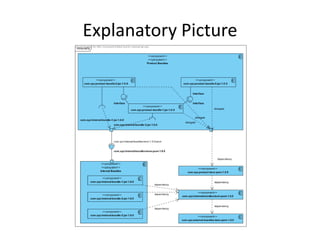
•   Explanatory picture
•   Dependency Management in Maven
•   Product’s projects (Maven)
•   Internal projects (Maven)
•   External artifacts (Maven)
Three Parts of Architecture
• Maven projects of a product
• Maven artifacts of internal projects
• Maven external artifacts - repository
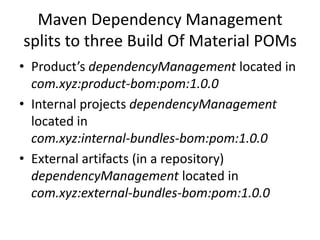
Maven Dependency Management
splits to three Build Of Material POMs
• Product’s dependencyManagement located in
  com.xyz:product-bom:pom:1.0.0
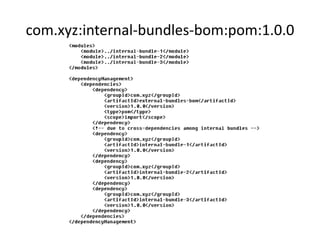
• Internal projects dependencyManagement
  located in
  com.xyz:internal-bundles-bom:pom:1.0.0
• External artifacts (in a repository)
  dependencyManagement located in
  com.xyz:external-bundles-bom:pom:1.0.0
Explanatory Picture
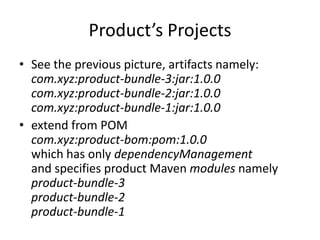
Product’s Projects
• See the previous picture, artifacts namely:
  com.xyz:product-bundle-3:jar:1.0.0
  com.xyz:product-bundle-2:jar:1.0.0
  com.xyz:product-bundle-1:jar:1.0.0
• extend from POM
  com.xyz:product-bom:pom:1.0.0
  which has only dependencyManagement
  and specifies product Maven modules namely
  product-bundle-3
  product-bundle-2
  product-bundle-1
Internal Projects
• See the previous picture, artifacts namely:
  com.xyz:internal-bundle-1:jar:1.0.0
  com.xyz:internal-bundle-2:jar:1.0.0
  com.xyz:internal-bundle-3:jar:1.0.0
• extend from POM
  com.xyz:internal-bundles-bom:pom:1.0.0
  which has only dependencyManagement
  and specifies product Maven modules namely
  internal-bundle-1
  internal-bundle-2
  internal-bundle-3
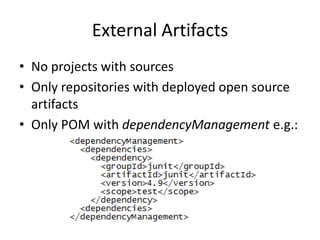
External Artifacts
• No projects with sources
• Only repositories with deployed open source
  artifacts
• Only POM with dependencyManagement e.g.:
Common BOM’s parent
All three BOM projects have common parent; e.g.:
<parent>
     <groupId>com.xyz</groupId>
     <artifactId>modularity</artifactId>
     <version>1.0.0</version>
</parent>
The parent is important to compile all from scratch.
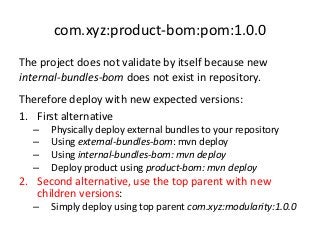
com.xyz:product-bom:pom:1.0.0
The project does not validate by itself because new
internal-bundles-bom does not exist in repository.
Therefore deploy with new expected versions:
1. First alternative
  –   Physically deploy external bundles to your repository
  –   Using external-bundles-bom: mvn deploy
  –   Using internal-bundles-bom: mvn deploy
  –   Deploy product using product-bom: mvn deploy
2. Second alternative, use the top parent with new
   children versions:
  –   Simply deploy using top parent com.xyz:modularity:1.0.0
com.xyz:internal-bundles-bom:pom:1.0.0

In order to deploy internal bundles:
• Prepare repository with external artifacts
• Resolve conflicts on external artifacts
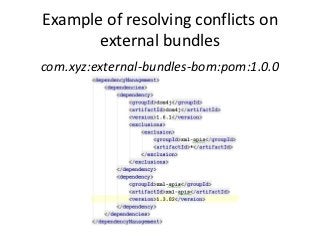
Resolve conflicting versions
• Exclusions applied only to external artifacts.
• Conflicts are resolved by increased version
  (except for major version)
Example of resolving conflicts on
       external bundles
com.xyz:external-bundles-bom:pom:1.0.0
Dependency Management Violation
• </dependencyManagement> declares
  dependencies by POM packaging project
• </dependencies> uses artifacts in children
• Properties specifying artifacts versions violate
  the whole idea of dependencyManagement

See the link (project with <artifactId>bom</artifactId>)
http://maven.apache.org/guides/introduction/introduction-to-
   dependency-mechanism.html#Importing_Dependencies
Thank you!


                    Download Sources
https://github.com/Tibor17/maven/tree/master/architecture/modularity

System Architecture using Maven Modularity

  • 1.
    System Architecture using Maven Modularity Tibor Digaňa Github repository https://github.com/Tibor17/maven/tree/master/architecture/modularity
  • 2.
    Goal • To splitproduct modularity to 3 logical parts • Dependencies Management • Run out of the hell of duplicate and conflicting versions
  • 3.
    Agenda • Explanatory picture • Dependency Management in Maven • Product’s projects (Maven) • Internal projects (Maven) • External artifacts (Maven)
  • 4.
    Three Parts ofArchitecture • Maven projects of a product • Maven artifacts of internal projects • Maven external artifacts - repository
  • 5.
    Maven Dependency Management splitsto three Build Of Material POMs • Product’s dependencyManagement located in com.xyz:product-bom:pom:1.0.0 • Internal projects dependencyManagement located in com.xyz:internal-bundles-bom:pom:1.0.0 • External artifacts (in a repository) dependencyManagement located in com.xyz:external-bundles-bom:pom:1.0.0
  • 6.
  • 7.
    Product’s Projects • Seethe previous picture, artifacts namely: com.xyz:product-bundle-3:jar:1.0.0 com.xyz:product-bundle-2:jar:1.0.0 com.xyz:product-bundle-1:jar:1.0.0 • extend from POM com.xyz:product-bom:pom:1.0.0 which has only dependencyManagement and specifies product Maven modules namely product-bundle-3 product-bundle-2 product-bundle-1
  • 8.
    Internal Projects • Seethe previous picture, artifacts namely: com.xyz:internal-bundle-1:jar:1.0.0 com.xyz:internal-bundle-2:jar:1.0.0 com.xyz:internal-bundle-3:jar:1.0.0 • extend from POM com.xyz:internal-bundles-bom:pom:1.0.0 which has only dependencyManagement and specifies product Maven modules namely internal-bundle-1 internal-bundle-2 internal-bundle-3
  • 9.
    External Artifacts • Noprojects with sources • Only repositories with deployed open source artifacts • Only POM with dependencyManagement e.g.:
  • 10.
    Common BOM’s parent Allthree BOM projects have common parent; e.g.: <parent> <groupId>com.xyz</groupId> <artifactId>modularity</artifactId> <version>1.0.0</version> </parent> The parent is important to compile all from scratch.
  • 11.
  • 12.
    com.xyz:product-bom:pom:1.0.0 The project doesnot validate by itself because new internal-bundles-bom does not exist in repository. Therefore deploy with new expected versions: 1. First alternative – Physically deploy external bundles to your repository – Using external-bundles-bom: mvn deploy – Using internal-bundles-bom: mvn deploy – Deploy product using product-bom: mvn deploy 2. Second alternative, use the top parent with new children versions: – Simply deploy using top parent com.xyz:modularity:1.0.0
  • 13.
  • 14.
    com.xyz:internal-bundles-bom:pom:1.0.0 In order todeploy internal bundles: • Prepare repository with external artifacts • Resolve conflicts on external artifacts
  • 15.
    Resolve conflicting versions •Exclusions applied only to external artifacts. • Conflicts are resolved by increased version (except for major version)
  • 16.
    Example of resolvingconflicts on external bundles com.xyz:external-bundles-bom:pom:1.0.0
  • 17.
    Dependency Management Violation •</dependencyManagement> declares dependencies by POM packaging project • </dependencies> uses artifacts in children • Properties specifying artifacts versions violate the whole idea of dependencyManagement See the link (project with <artifactId>bom</artifactId>) http://maven.apache.org/guides/introduction/introduction-to- dependency-mechanism.html#Importing_Dependencies
  • 18.
    Thank you! Download Sources https://github.com/Tibor17/maven/tree/master/architecture/modularity