Modern JavaScript:
Essential ES6+ Features
Monique Dingding
Agent Portal
@gloriamaris
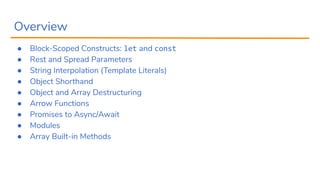
Overview
● Block-Scoped Constructs: let and const
● Rest and Spread Parameters
● String Interpolation (Template Literals)
● Object Shorthand
● Object and Array Destructuring
● Arrow Functions
● Promises to Async/Await
● Modules
● Array Built-in Methods
Essential ES6+ Features
You Need to Know
Block-Scoped Constructs: let and const
Using let
function retrieveClients (isAdmin = false) {
let clients = ['Dani', 'Ian']
if (isAdmin) {
let clients = ['Stak', 'Mike', 'James']
}
clients.push('Roland')
return clients
}
Block-Scoped Constructs: let and const
Using let
function retrieveClients (isAdmin = false) {
let clients = ['Dani', 'Ian']
if (isAdmin) {
let clients = ['Stak', 'Mike', 'James']
}
clients.push('Roland')
return clients
}
// [‘Dani’, ‘Ian’, ‘Roland’] :--)
Block-Scoped Constructs: let and const
Using const
function retrieveClients (isAdmin = false) {
const clients = ['Dzani', 'Ian']
if (isAdmin) {
const clients = ['Stak', 'Mike', 'James']
}
const clients = ['Ezra', 'MJ']
clients.push('Roland')
return clients
}
Block-Scoped Constructs: let and const
Using const
function retrieveClients (isAdmin = false) {
const clients = ['Dzani', 'Ian']
if (isAdmin) {
const clients = ['Stak', 'Mike', 'James']
}
const clients = ['Ezra', 'MJ']
clients.push('Roland')
return clients
}
error: unknown: Identifier 'clients' has already been declared :--(
Rest and Spread Parameters
Rest operator
function getRemaining (isAgent, agentId, ...remaining) {
return isAgent ? remaining[3] : agentId
}
const result = getRemaining(true, 5, 'Stevie', 'Adam', false, 4)
console.log(result)
Rest and Spread Parameters
Rest operator
function getRemaining (isAgent, agentId, ...remaining) {
return isAgent ? remaining[3] : agentId
}
const result = getRemaining(true, 5, 'Stevie', 'Adam', false, 4)
console.log(result)
// 4 :--)
Rest and Spread Parameters
Spread operator
const blues = ['BB King', 'Buddy Guy']
const jazz = ['Chet Baker', 'Paul Desmond', 'Tom Ibarra']
console.log([...blues, ...jazz, 'Shanti Dope'])
Rest and Spread Parameters
Spread operator
const blues = ['BB King', 'Buddy Guy']
const jazz = ['Chet Baker', 'Paul Desmond', 'Tom Ibarra']
console.log([...blues, ...jazz, 'Shanti Dope'])
// [ "BB King", "Buddy Guy", "Chet Baker", "Paul Desmond", "Tom Ibarra", "Shanti Dope"] :--)
Rest and Spread Parameters
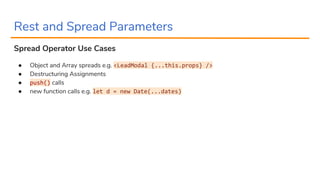
Spread Operator Use Cases
● Object and Array spreads e.g. <LeadModal {...this.props} />
● Destructuring Assignments
● push() calls
● new function calls e.g. let d = new Date(...dates)
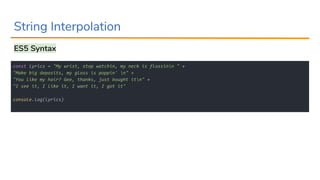
String Interpolation
ES5 Syntax
const lyrics = "My wrist, stop watchin, my neck is flossinn " +
"Make big deposits, my gloss is poppin' n" +
"You like my hair? Gee, thanks, just bought itn" +
"I see it, I like it, I want it, I got it"
console.log(lyrics)
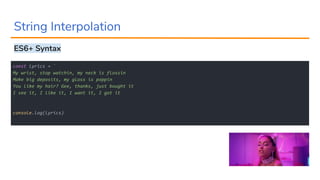
String Interpolation
ES6+ Syntax
const lyrics = `
My wrist, stop watchin, my neck is flossin
Make big deposits, my gloss is poppin
You like my hair? Gee, thanks, just bought it
I see it, I like it, I want it, I got it
`
console.log(lyrics)
String Interpolation
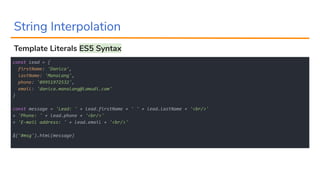
Template Literals ES5 Syntax
const lead = {
firstName: 'Danica',
lastName: 'Manalang',
phone: '09951972532',
email: 'danica.manalang@lamudi.com'
}
const message = 'Lead: ' + lead.firstName + ' ' + lead.lastName + '<br/>'
+ 'Phone: ' + lead.phone + '<br/>'
+ 'E-mail address: ' + lead.email + '<br/>'
$('#msg').html(message)
String Interpolation
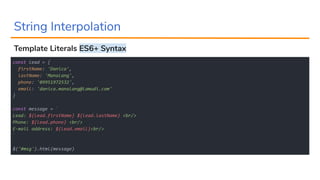
Template Literals ES6+ Syntax
const lead = {
firstName: 'Danica',
lastName: 'Manalang',
phone: '09951972532',
email: 'danica.manalang@lamudi.com'
}
const message = `
Lead: ${lead.firstName} ${lead.lastName} <br/>
Phone: ${lead.phone} <br/>
E-mail address: ${lead.email}<br/>
`
$('#msg').html(message)
Object Shorthand
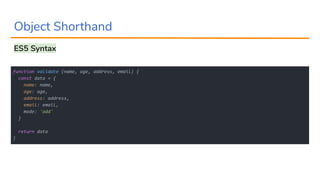
ES5 Syntax
function validate (name, age, address, email) {
const data = {
name: name,
age: age,
address: address,
email: email,
mode: 'add'
}
return data
}
Object Shorthand
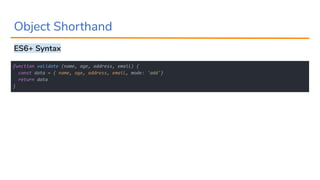
ES6+ Syntax
function validate (name, age, address, email) {
const data = { name, age, address, email, mode: 'add'}
return data
}
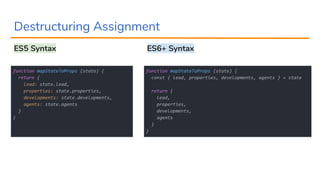
Destructuring Assignment
ES5 Syntax
function mapStateToProps (state) {
return {
lead: state.lead,
properties: state.properties,
developments: state.developments,
agents: state.agents
}
}
function mapStateToProps (state) {
const { lead, properties, developments, agents } = state
return {
lead,
properties,
developments,
agents
}
}
ES6+ Syntax
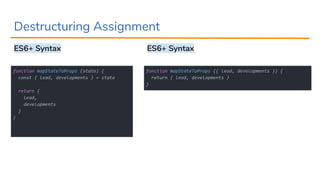
Destructuring Assignment
ES6+ Syntax
function mapStateToProps (state) {
const { lead, developments } = state
return {
lead,
developments
}
}
function mapStateToProps ({ lead, developments }) {
return { lead, developments }
}
ES6+ Syntax
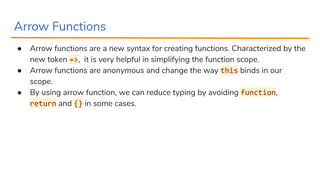
Arrow Functions
● Arrow functions are a new syntax for creating functions. Characterized by the
new token =>, it is very helpful in simplifying the function scope.
● Arrow functions are anonymous and change the way this binds in our
scope.
● By using arrow function, we can reduce typing by avoiding function,
return and {} in some cases.
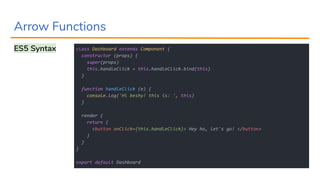
Arrow Functions
ES5 Syntax class Dashboard extends Component {
constructor (props) {
super(props)
this.handleClick = this.handleClick.bind(this)
}
function handleClick (e) {
console.log('Hi beshy! this is: ', this)
}
render {
return (
<button onClick={this.handleClick}> Hey ho, let's go! </button>
)
}
}
export default Dashboard
Arrow Functions
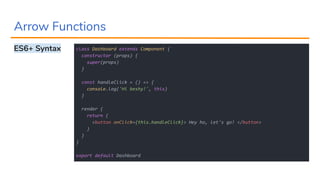
ES6+ Syntax class Dashboard extends Component {
constructor (props) {
super(props)
}
const handleClick = () => {
console.log('Hi beshy!', this)
}
render {
return (
<button onClick={this.handleClick}> Hey ho, let's go! </button>
)
}
}
export default Dashboard
Arrow Functions
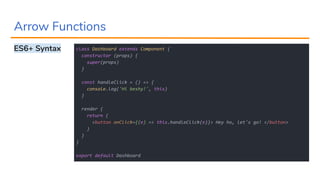
ES6+ Syntax class Dashboard extends Component {
constructor (props) {
super(props)
}
const handleClick = () => {
console.log('Hi beshy!', this)
}
render {
return (
<button onClick={(e) => this.handleClick(e)}> Hey ho, let's go! </button>
)
}
}
export default Dashboard
Arrow Functions
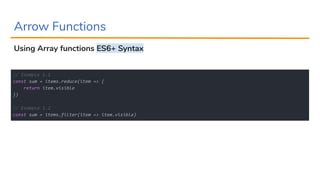
Using Array functions ES6+ Syntax
// Example 1.1
const sum = items.reduce(item => {
return item.visible
})
// Example 1.2
const sum = items.filter(item => item.visible)
Arrow Functions
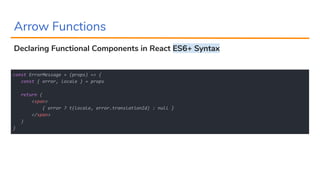
Declaring Functional Components in React ES6+ Syntax
const ErrorMessage = (props) => {
const { error, locale } = props
return (
<span>
{ error ? t(locale, error.translationId) : null }
</span>
)
}
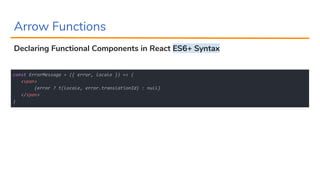
Arrow Functions
Declaring Functional Components in React ES6+ Syntax
const ErrorMessage = ({ error, locale }) => (
<span>
{error ? t(locale, error.translationId) : null}
</span>
)
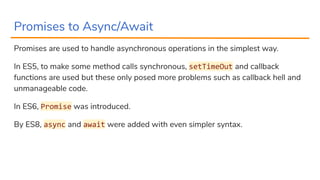
Promises to Async/Await
Promises are used to handle asynchronous operations in the simplest way.
In ES5, to make some method calls synchronous, setTimeOut and callback
functions are used but these only posed more problems such as callback hell and
unmanageable code.
In ES6, Promise was introduced.
By ES8, async and await were added with even simpler syntax.
Promises to Async/Await
Promises ES6+ Syntax
const promises = []
// Assuming these operations have to be called synchronously
promises.push(dispatch(retrieveTasks()))
promises.push(dispatch(retrieveCurrencies()))
promises.push(dispatch(retrieveConfigs()))
Promise.all(promises)
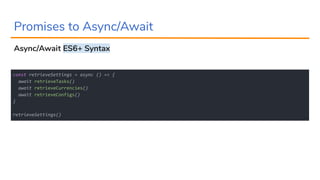
Promises to Async/Await
Async/Await ES6+ Syntax
const retrieveSettings = async () => {
await retrieveTasks()
await retrieveCurrencies()
await retrieveConfigs()
}
retrieveSettings()
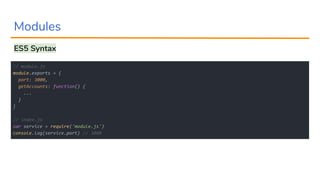
Modules
ES5 Syntax
// module.js
module.exports = {
port: 3000,
getAccounts: function() {
...
}
}
// index.js
var service = require('module.js')
console.log(service.port) // 3000
Modules
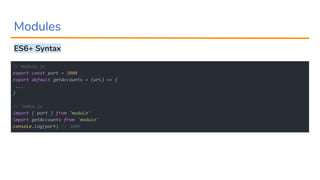
ES6+ Syntax
// module.js
export const port = 3000
export default getAccounts = (url) => {
...
}
// index.js
import { port } from 'module'
import getAccounts from 'module'
console.log(port) // 3000
Array Built-in Methods
● find()
● findIndex()
● some()
● includes()
const cats = ['Lemon', 'Simon', 'Olaf', 'Primrose', 'Sunshine', 'Angie', 'Complex']
cats.find(cat => cat === 'Complex') // Complex
cats.findIndex(cat => cat === 'Lemon') // 0
cats.some(cat => cat.length >= 4) // true
cats.includes(cat => cat.substr('rose')) // false
Thank you :-)
@gloriamaris

Modern JavaScript - Modern ES6+ Features

  • 1.
    Modern JavaScript: Essential ES6+Features Monique Dingding Agent Portal @gloriamaris
  • 2.
    Overview ● Block-Scoped Constructs:let and const ● Rest and Spread Parameters ● String Interpolation (Template Literals) ● Object Shorthand ● Object and Array Destructuring ● Arrow Functions ● Promises to Async/Await ● Modules ● Array Built-in Methods
  • 3.
  • 4.
    Block-Scoped Constructs: letand const Using let function retrieveClients (isAdmin = false) { let clients = ['Dani', 'Ian'] if (isAdmin) { let clients = ['Stak', 'Mike', 'James'] } clients.push('Roland') return clients }
  • 5.
    Block-Scoped Constructs: letand const Using let function retrieveClients (isAdmin = false) { let clients = ['Dani', 'Ian'] if (isAdmin) { let clients = ['Stak', 'Mike', 'James'] } clients.push('Roland') return clients } // [‘Dani’, ‘Ian’, ‘Roland’] :--)
  • 6.
    Block-Scoped Constructs: letand const Using const function retrieveClients (isAdmin = false) { const clients = ['Dzani', 'Ian'] if (isAdmin) { const clients = ['Stak', 'Mike', 'James'] } const clients = ['Ezra', 'MJ'] clients.push('Roland') return clients }
  • 7.
    Block-Scoped Constructs: letand const Using const function retrieveClients (isAdmin = false) { const clients = ['Dzani', 'Ian'] if (isAdmin) { const clients = ['Stak', 'Mike', 'James'] } const clients = ['Ezra', 'MJ'] clients.push('Roland') return clients } error: unknown: Identifier 'clients' has already been declared :--(
  • 8.
    Rest and SpreadParameters Rest operator function getRemaining (isAgent, agentId, ...remaining) { return isAgent ? remaining[3] : agentId } const result = getRemaining(true, 5, 'Stevie', 'Adam', false, 4) console.log(result)
  • 9.
    Rest and SpreadParameters Rest operator function getRemaining (isAgent, agentId, ...remaining) { return isAgent ? remaining[3] : agentId } const result = getRemaining(true, 5, 'Stevie', 'Adam', false, 4) console.log(result) // 4 :--)
  • 10.
    Rest and SpreadParameters Spread operator const blues = ['BB King', 'Buddy Guy'] const jazz = ['Chet Baker', 'Paul Desmond', 'Tom Ibarra'] console.log([...blues, ...jazz, 'Shanti Dope'])
  • 11.
    Rest and SpreadParameters Spread operator const blues = ['BB King', 'Buddy Guy'] const jazz = ['Chet Baker', 'Paul Desmond', 'Tom Ibarra'] console.log([...blues, ...jazz, 'Shanti Dope']) // [ "BB King", "Buddy Guy", "Chet Baker", "Paul Desmond", "Tom Ibarra", "Shanti Dope"] :--)
  • 12.
    Rest and SpreadParameters Spread Operator Use Cases ● Object and Array spreads e.g. <LeadModal {...this.props} /> ● Destructuring Assignments ● push() calls ● new function calls e.g. let d = new Date(...dates)
  • 13.
    String Interpolation ES5 Syntax constlyrics = "My wrist, stop watchin, my neck is flossinn " + "Make big deposits, my gloss is poppin' n" + "You like my hair? Gee, thanks, just bought itn" + "I see it, I like it, I want it, I got it" console.log(lyrics)
  • 14.
    String Interpolation ES6+ Syntax constlyrics = ` My wrist, stop watchin, my neck is flossin Make big deposits, my gloss is poppin You like my hair? Gee, thanks, just bought it I see it, I like it, I want it, I got it ` console.log(lyrics)
  • 15.
    String Interpolation Template LiteralsES5 Syntax const lead = { firstName: 'Danica', lastName: 'Manalang', phone: '09951972532', email: 'danica.manalang@lamudi.com' } const message = 'Lead: ' + lead.firstName + ' ' + lead.lastName + '<br/>' + 'Phone: ' + lead.phone + '<br/>' + 'E-mail address: ' + lead.email + '<br/>' $('#msg').html(message)
  • 16.
    String Interpolation Template LiteralsES6+ Syntax const lead = { firstName: 'Danica', lastName: 'Manalang', phone: '09951972532', email: 'danica.manalang@lamudi.com' } const message = ` Lead: ${lead.firstName} ${lead.lastName} <br/> Phone: ${lead.phone} <br/> E-mail address: ${lead.email}<br/> ` $('#msg').html(message)
  • 17.
    Object Shorthand ES5 Syntax functionvalidate (name, age, address, email) { const data = { name: name, age: age, address: address, email: email, mode: 'add' } return data }
  • 18.
    Object Shorthand ES6+ Syntax functionvalidate (name, age, address, email) { const data = { name, age, address, email, mode: 'add'} return data }
  • 19.
    Destructuring Assignment ES5 Syntax functionmapStateToProps (state) { return { lead: state.lead, properties: state.properties, developments: state.developments, agents: state.agents } } function mapStateToProps (state) { const { lead, properties, developments, agents } = state return { lead, properties, developments, agents } } ES6+ Syntax
  • 20.
    Destructuring Assignment ES6+ Syntax functionmapStateToProps (state) { const { lead, developments } = state return { lead, developments } } function mapStateToProps ({ lead, developments }) { return { lead, developments } } ES6+ Syntax
  • 21.
    Arrow Functions ● Arrowfunctions are a new syntax for creating functions. Characterized by the new token =>, it is very helpful in simplifying the function scope. ● Arrow functions are anonymous and change the way this binds in our scope. ● By using arrow function, we can reduce typing by avoiding function, return and {} in some cases.
  • 22.
    Arrow Functions ES5 Syntaxclass Dashboard extends Component { constructor (props) { super(props) this.handleClick = this.handleClick.bind(this) } function handleClick (e) { console.log('Hi beshy! this is: ', this) } render { return ( <button onClick={this.handleClick}> Hey ho, let's go! </button> ) } } export default Dashboard
  • 23.
    Arrow Functions ES6+ Syntaxclass Dashboard extends Component { constructor (props) { super(props) } const handleClick = () => { console.log('Hi beshy!', this) } render { return ( <button onClick={this.handleClick}> Hey ho, let's go! </button> ) } } export default Dashboard
  • 24.
    Arrow Functions ES6+ Syntaxclass Dashboard extends Component { constructor (props) { super(props) } const handleClick = () => { console.log('Hi beshy!', this) } render { return ( <button onClick={(e) => this.handleClick(e)}> Hey ho, let's go! </button> ) } } export default Dashboard
  • 25.
    Arrow Functions Using Arrayfunctions ES6+ Syntax // Example 1.1 const sum = items.reduce(item => { return item.visible }) // Example 1.2 const sum = items.filter(item => item.visible)
  • 26.
    Arrow Functions Declaring FunctionalComponents in React ES6+ Syntax const ErrorMessage = (props) => { const { error, locale } = props return ( <span> { error ? t(locale, error.translationId) : null } </span> ) }
  • 27.
    Arrow Functions Declaring FunctionalComponents in React ES6+ Syntax const ErrorMessage = ({ error, locale }) => ( <span> {error ? t(locale, error.translationId) : null} </span> )
  • 28.
    Promises to Async/Await Promisesare used to handle asynchronous operations in the simplest way. In ES5, to make some method calls synchronous, setTimeOut and callback functions are used but these only posed more problems such as callback hell and unmanageable code. In ES6, Promise was introduced. By ES8, async and await were added with even simpler syntax.
  • 29.
    Promises to Async/Await PromisesES6+ Syntax const promises = [] // Assuming these operations have to be called synchronously promises.push(dispatch(retrieveTasks())) promises.push(dispatch(retrieveCurrencies())) promises.push(dispatch(retrieveConfigs())) Promise.all(promises)
  • 30.
    Promises to Async/Await Async/AwaitES6+ Syntax const retrieveSettings = async () => { await retrieveTasks() await retrieveCurrencies() await retrieveConfigs() } retrieveSettings()
  • 31.
    Modules ES5 Syntax // module.js module.exports= { port: 3000, getAccounts: function() { ... } } // index.js var service = require('module.js') console.log(service.port) // 3000
  • 32.
    Modules ES6+ Syntax // module.js exportconst port = 3000 export default getAccounts = (url) => { ... } // index.js import { port } from 'module' import getAccounts from 'module' console.log(port) // 3000
  • 33.
    Array Built-in Methods ●find() ● findIndex() ● some() ● includes() const cats = ['Lemon', 'Simon', 'Olaf', 'Primrose', 'Sunshine', 'Angie', 'Complex'] cats.find(cat => cat === 'Complex') // Complex cats.findIndex(cat => cat === 'Lemon') // 0 cats.some(cat => cat.length >= 4) // true cats.includes(cat => cat.substr('rose')) // false
  • 34.