


“Crossing the Lakshman Rekha”

   Mobile Workplace Risks
      Enterprise Mobility Summit
       9th May 2012, Bengaluru
             Parag Deodhar
            Chief Risk Officer
circa 5000 BC – Treta Yuga
            One of the first recorded
         Social Engineering & Spoofing
               Attack takes place…


9 May 2012           Parag Deodhar       2
Raavan = RA.One


                                            Sita = Data


Lakshman Rekha = CorporateDeodhar
 9 May 2012            Parag Firewall & Security Measures
                                                       3
Crossing the Lakshman Rekha
      • Mobility is reshaping business worldwide.
        It's also reshaping how IT operates…
      • As a CIO / CISO, you like to be in control.
      • But mobile and wireless devices are
        bringing an element of lawlessness to your
        carefully designed architecture.
      • Data goes outside the walls of the
        enterprise, and the “Lakshman Rekha” you
        have drawn – i.e. all the security measures
        you have designed for your network.

9 May 2012                Parag Deodhar               4
Information Security
      • Concerns are still the same
             – Confidentiality
             – Integrity
             – Availability
      • But the context has changed…


9 May 2012                       Parag Deodhar   5
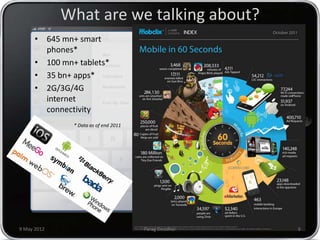
What are we talking about?
      • 645 mn+ smart
        phones*
      • 100 mn+ tablets*
      • 35 bn+ apps*
      • 2G/3G/4G
        internet
        connectivity
               * Data as of end 2011


9 May 2012                             Parag Deodhar   6
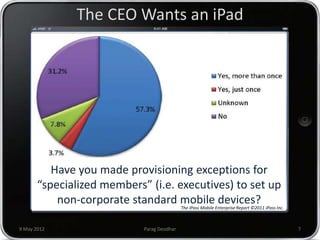
The CEO Wants an iPad


          Have you made provisioning exceptions for
       “specialized members” (i.e. executives) to set up
           non-corporate standard mobile devices?
                                            The iPass Mobile Enterprise Report ©2011 iPass Inc.


9 May 2012                  Parag Deodhar                                                         7
Sounds familiar?
      • CEO comes to the CIO with an “request” to
        support his shiny new device.
      • If the CIO chooses not to support the
        device, well… (is that really a scenario?)
      • If the CIO chooses to support the device
             – He opens the floodgates to chaos:
               COO, CFO, VPs, GMs, are in queue to use the same
               device for personal use and work too.
             – One strategy could be to isolate the CEO and his
               device into a "test group" in order to buy time to
               create a BYOD strategy and policy.
             – But ideal strategy would be to bring to notice of
               CEO - the impact and risks associated with allowing
               a new device on the network.


9 May 2012                        Parag Deodhar                      8
Once the floodgates are open…
      • There’s no controlling the demand for these
        gadgets.
             – Everyone wants a Wi-Fi-enabled laptop or
               handheld so they can e-mail their colleagues
               while sitting in the airport lounge or access
               critical sales applications on their network
               while meeting with customers.
             – Everyone wants a smart phone, a converged
               device that combines cell phone and handheld
               functions.
             – At worst, these gadgets are status symbols. At
               best, they increase your workforce’s agility and
               improve productivity.
             – Can you say no?

9 May 2012                       Parag Deodhar                    9
New challenges…
      • Consumerisation raises new and
        significant challenges:
             – How do we support these devices if we
               don’t know what they are?
             – How can we secure our networks and
               data, if we can’t control the devices?
             – How do we differentiate between corporate
               and personal data on employee-owned
               devices that are accessing the network?


9 May 2012                    Parag Deodhar                10
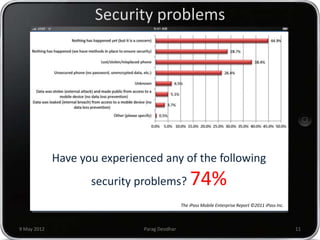
Security problems


             Have you experienced any of the following
                    security problems?            74%
                                              The iPass Mobile Enterprise Report ©2011 iPass Inc.


9 May 2012                    Parag Deodhar                                                         11
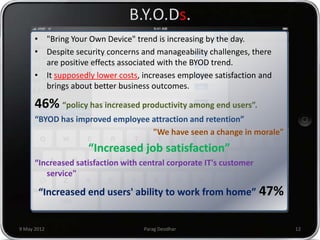
B.Y.O.Ds.
      • "Bring Your Own Device" trend is increasing by the day.
      • Despite security concerns and manageability challenges, there
        are positive effects associated with the BYOD trend.
      • It supposedly lower costs, increases employee satisfaction and
        brings about better business outcomes.

      46% “policy has increased productivity among end users”.
      “BYOD has improved employee attraction and retention”
                                  "We have seen a change in morale"
                    “Increased job satisfaction”
      “Increased satisfaction with central corporate IT's customer
         service"

       “Increased end users' ability to work from home” 47%


9 May 2012                         Parag Deodhar                         12
B.Y.O.D. Challenge
      • BYOD blurs the lines between work life and
        personal life. Context changes throughout the
        day and sometimes during a single session on
        Facebook.
      • Compliance mandates such as PCI
        DSS, HIPAA, or GLBA have certain requirements
        related to information security and safeguarding
        specific data. Those rules still must be followed
        even if the data is on a laptop owned by an
        employee.
      • In the event that a worker is let go, or leaves the
        company of their own accord, segregating and
        retrieving company data can be a problem.

9 May 2012                   Parag Deodhar                    13
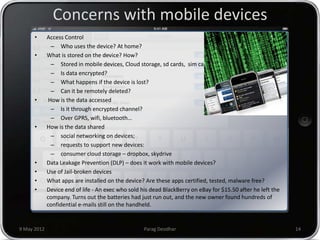
Concerns with mobile devices
      •      Access Control
               – Who uses the device? At home?
      •      What is stored on the device? How?
               – Stored in mobile devices, Cloud storage, sd cards, sim cards
               – Is data encrypted?
               – What happens if the device is lost?
               – Can it be remotely deleted?
      •       How is the data accessed
               – Is it through encrypted channel?
               – Over GPRS, wifi, bluetooth…
      •      How is the data shared
               – social networking on devices;
               – requests to support new devices:
               – consumer cloud storage – dropbox, skydrive
      •      Data Leakage Prevention (DLP) – does it work with mobile devices?
      •      Use of Jail-broken devices
      •      What apps are installed on the device? Are these apps certified, tested, malware free?
      •      Device end of life - An exec who sold his dead BlackBerry on eBay for $15.50 after he left the
             company. Turns out the batteries had just run out, and the new owner found hundreds of
             confidential e-mails still on the handheld.


9 May 2012                                          Parag Deodhar                                             14
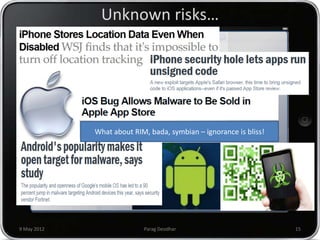
Unknown risks…


             What about RIM, bada, symbian – ignorance is bliss!


9 May 2012                 Parag Deodhar                           15
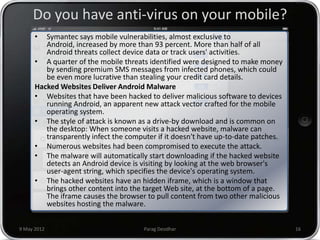
Do you have anti-virus on your mobile?
      •  Symantec says mobile vulnerabilities, almost exclusive to
         Android, increased by more than 93 percent. More than half of all
         Android threats collect device data or track users' activities.
      • A quarter of the mobile threats identified were designed to make money
         by sending premium SMS messages from infected phones, which could
         be even more lucrative than stealing your credit card details.
      Hacked Websites Deliver Android Malware
      • Websites that have been hacked to deliver malicious software to devices
         running Android, an apparent new attack vector crafted for the mobile
         operating system.
      • The style of attack is known as a drive-by download and is common on
         the desktop: When someone visits a hacked website, malware can
         transparently infect the computer if it doesn't have up-to-date patches.
      • Numerous websites had been compromised to execute the attack.
      • The malware will automatically start downloading if the hacked website
         detects an Android device is visiting by looking at the web browser's
         user-agent string, which specifies the device's operating system.
      • The hacked websites have an hidden iframe, which is a window that
         brings other content into the target Web site, at the bottom of a page.
         The iframe causes the browser to pull content from two other malicious
         websites hosting the malware.


9 May 2012                             Parag Deodhar                                16
We have content filtering!!!
      • Religious Sites Carry More Malware Than Porn
        Sites
             – Religious and ideological websites can carry three
               times more malware threats than pornography
               sites, according to research from security firm
               Symantec.
      • Symantec found that the average number of
        security threats on religious sites was around
        115, while adult sites only carried around 25
        threats per site
             – a particularly notable discrepancy considering that
               there are vastly more pornographic sites than
               religious ones. Also, only 2.4 percent of adult sites
               were found to be infected with malware, compared
               to 20 percent of blogs.

9 May 2012                         Parag Deodhar                       17
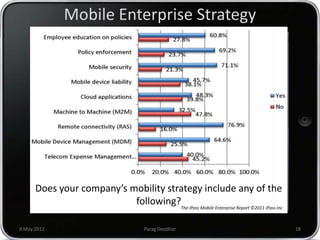
Mobile Enterprise Strategy


      Does your company’s mobility strategy include any of the
                           following?The iPass Mobile Enterprise Report ©2011 iPass Inc.

9 May 2012                               Parag Deodhar                                     18
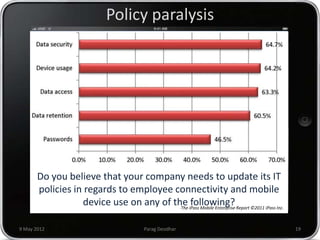
Policy paralysis


       Do you believe that your company needs to update its IT
       policies in regards to employee connectivity and mobile
                  device use on any of the iPass Mobile Enterprise Report ©2011 iPass Inc.
                                         The
                                             following?

9 May 2012                                Parag Deodhar                                      19
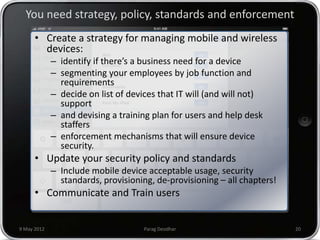
You need strategy, policy, standards and enforcement
      • Create a strategy for managing mobile and wireless
        devices:
             – identify if there’s a business need for a device
             – segmenting your employees by job function and
               requirements
             – decide on list of devices that IT will (and will not)
               support
             – and devising a training plan for users and help desk
               staffers
             – enforcement mechanisms that will ensure device
               security.
      • Update your security policy and standards
             – Include mobile device acceptable usage, security
               standards, provisioning, de-provisioning – all chapters!
      • Communicate and Train users


9 May 2012                           Parag Deodhar                        20
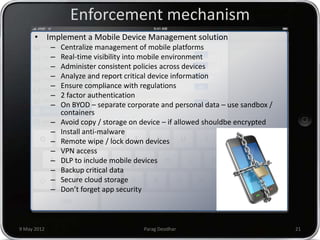
Enforcement mechanism
      • Implement a Mobile Device Management solution
             –   Centralize management of mobile platforms
             –   Real-time visibility into mobile environment
             –   Administer consistent policies across devices
             –   Analyze and report critical device information
             –   Ensure compliance with regulations
             –   2 factor authentication
             –   On BYOD – separate corporate and personal data – use sandbox /
                 containers
             –   Avoid copy / storage on device – if allowed shouldbe encrypted
             –   Install anti-malware
             –   Remote wipe / lock down devices
             –   VPN access
             –   DLP to include mobile devices
             –   Backup critical data
             –   Secure cloud storage
             –   Don’t forget app security


9 May 2012                               Parag Deodhar                            21
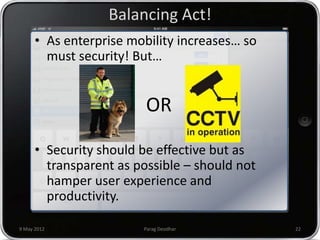
Balancing Act!
      • As enterprise mobility increases… so
        must security! But…


                         OR

      • Security should be effective but as
        transparent as possible – should not
        hamper user experience and
        productivity.

9 May 2012              Parag Deodhar          22
THANK YOU

Mobile Workplace Risks

  • 1.
    “Crossing the LakshmanRekha” Mobile Workplace Risks Enterprise Mobility Summit 9th May 2012, Bengaluru Parag Deodhar Chief Risk Officer
  • 2.
    circa 5000 BC– Treta Yuga One of the first recorded Social Engineering & Spoofing Attack takes place… 9 May 2012 Parag Deodhar 2
  • 3.
    Raavan = RA.One Sita = Data Lakshman Rekha = CorporateDeodhar 9 May 2012 Parag Firewall & Security Measures 3
  • 4.
    Crossing the LakshmanRekha • Mobility is reshaping business worldwide. It's also reshaping how IT operates… • As a CIO / CISO, you like to be in control. • But mobile and wireless devices are bringing an element of lawlessness to your carefully designed architecture. • Data goes outside the walls of the enterprise, and the “Lakshman Rekha” you have drawn – i.e. all the security measures you have designed for your network. 9 May 2012 Parag Deodhar 4
  • 5.
    Information Security • Concerns are still the same – Confidentiality – Integrity – Availability • But the context has changed… 9 May 2012 Parag Deodhar 5
  • 6.
    What are wetalking about? • 645 mn+ smart phones* • 100 mn+ tablets* • 35 bn+ apps* • 2G/3G/4G internet connectivity * Data as of end 2011 9 May 2012 Parag Deodhar 6
  • 7.
    The CEO Wantsan iPad Have you made provisioning exceptions for “specialized members” (i.e. executives) to set up non-corporate standard mobile devices? The iPass Mobile Enterprise Report ©2011 iPass Inc. 9 May 2012 Parag Deodhar 7
  • 8.
    Sounds familiar? • CEO comes to the CIO with an “request” to support his shiny new device. • If the CIO chooses not to support the device, well… (is that really a scenario?) • If the CIO chooses to support the device – He opens the floodgates to chaos: COO, CFO, VPs, GMs, are in queue to use the same device for personal use and work too. – One strategy could be to isolate the CEO and his device into a "test group" in order to buy time to create a BYOD strategy and policy. – But ideal strategy would be to bring to notice of CEO - the impact and risks associated with allowing a new device on the network. 9 May 2012 Parag Deodhar 8
  • 9.
    Once the floodgatesare open… • There’s no controlling the demand for these gadgets. – Everyone wants a Wi-Fi-enabled laptop or handheld so they can e-mail their colleagues while sitting in the airport lounge or access critical sales applications on their network while meeting with customers. – Everyone wants a smart phone, a converged device that combines cell phone and handheld functions. – At worst, these gadgets are status symbols. At best, they increase your workforce’s agility and improve productivity. – Can you say no? 9 May 2012 Parag Deodhar 9
  • 10.
    New challenges… • Consumerisation raises new and significant challenges: – How do we support these devices if we don’t know what they are? – How can we secure our networks and data, if we can’t control the devices? – How do we differentiate between corporate and personal data on employee-owned devices that are accessing the network? 9 May 2012 Parag Deodhar 10
  • 11.
    Security problems Have you experienced any of the following security problems? 74% The iPass Mobile Enterprise Report ©2011 iPass Inc. 9 May 2012 Parag Deodhar 11
  • 12.
    B.Y.O.Ds. • "Bring Your Own Device" trend is increasing by the day. • Despite security concerns and manageability challenges, there are positive effects associated with the BYOD trend. • It supposedly lower costs, increases employee satisfaction and brings about better business outcomes. 46% “policy has increased productivity among end users”. “BYOD has improved employee attraction and retention” "We have seen a change in morale" “Increased job satisfaction” “Increased satisfaction with central corporate IT's customer service" “Increased end users' ability to work from home” 47% 9 May 2012 Parag Deodhar 12
  • 13.
    B.Y.O.D. Challenge • BYOD blurs the lines between work life and personal life. Context changes throughout the day and sometimes during a single session on Facebook. • Compliance mandates such as PCI DSS, HIPAA, or GLBA have certain requirements related to information security and safeguarding specific data. Those rules still must be followed even if the data is on a laptop owned by an employee. • In the event that a worker is let go, or leaves the company of their own accord, segregating and retrieving company data can be a problem. 9 May 2012 Parag Deodhar 13
  • 14.
    Concerns with mobiledevices • Access Control – Who uses the device? At home? • What is stored on the device? How? – Stored in mobile devices, Cloud storage, sd cards, sim cards – Is data encrypted? – What happens if the device is lost? – Can it be remotely deleted? • How is the data accessed – Is it through encrypted channel? – Over GPRS, wifi, bluetooth… • How is the data shared – social networking on devices; – requests to support new devices: – consumer cloud storage – dropbox, skydrive • Data Leakage Prevention (DLP) – does it work with mobile devices? • Use of Jail-broken devices • What apps are installed on the device? Are these apps certified, tested, malware free? • Device end of life - An exec who sold his dead BlackBerry on eBay for $15.50 after he left the company. Turns out the batteries had just run out, and the new owner found hundreds of confidential e-mails still on the handheld. 9 May 2012 Parag Deodhar 14
  • 15.
    Unknown risks… What about RIM, bada, symbian – ignorance is bliss! 9 May 2012 Parag Deodhar 15
  • 16.
    Do you haveanti-virus on your mobile? • Symantec says mobile vulnerabilities, almost exclusive to Android, increased by more than 93 percent. More than half of all Android threats collect device data or track users' activities. • A quarter of the mobile threats identified were designed to make money by sending premium SMS messages from infected phones, which could be even more lucrative than stealing your credit card details. Hacked Websites Deliver Android Malware • Websites that have been hacked to deliver malicious software to devices running Android, an apparent new attack vector crafted for the mobile operating system. • The style of attack is known as a drive-by download and is common on the desktop: When someone visits a hacked website, malware can transparently infect the computer if it doesn't have up-to-date patches. • Numerous websites had been compromised to execute the attack. • The malware will automatically start downloading if the hacked website detects an Android device is visiting by looking at the web browser's user-agent string, which specifies the device's operating system. • The hacked websites have an hidden iframe, which is a window that brings other content into the target Web site, at the bottom of a page. The iframe causes the browser to pull content from two other malicious websites hosting the malware. 9 May 2012 Parag Deodhar 16
  • 17.
    We have contentfiltering!!! • Religious Sites Carry More Malware Than Porn Sites – Religious and ideological websites can carry three times more malware threats than pornography sites, according to research from security firm Symantec. • Symantec found that the average number of security threats on religious sites was around 115, while adult sites only carried around 25 threats per site – a particularly notable discrepancy considering that there are vastly more pornographic sites than religious ones. Also, only 2.4 percent of adult sites were found to be infected with malware, compared to 20 percent of blogs. 9 May 2012 Parag Deodhar 17
  • 18.
    Mobile Enterprise Strategy Does your company’s mobility strategy include any of the following?The iPass Mobile Enterprise Report ©2011 iPass Inc. 9 May 2012 Parag Deodhar 18
  • 19.
    Policy paralysis Do you believe that your company needs to update its IT policies in regards to employee connectivity and mobile device use on any of the iPass Mobile Enterprise Report ©2011 iPass Inc. The following? 9 May 2012 Parag Deodhar 19
  • 20.
    You need strategy,policy, standards and enforcement • Create a strategy for managing mobile and wireless devices: – identify if there’s a business need for a device – segmenting your employees by job function and requirements – decide on list of devices that IT will (and will not) support – and devising a training plan for users and help desk staffers – enforcement mechanisms that will ensure device security. • Update your security policy and standards – Include mobile device acceptable usage, security standards, provisioning, de-provisioning – all chapters! • Communicate and Train users 9 May 2012 Parag Deodhar 20
  • 21.
    Enforcement mechanism • Implement a Mobile Device Management solution – Centralize management of mobile platforms – Real-time visibility into mobile environment – Administer consistent policies across devices – Analyze and report critical device information – Ensure compliance with regulations – 2 factor authentication – On BYOD – separate corporate and personal data – use sandbox / containers – Avoid copy / storage on device – if allowed shouldbe encrypted – Install anti-malware – Remote wipe / lock down devices – VPN access – DLP to include mobile devices – Backup critical data – Secure cloud storage – Don’t forget app security 9 May 2012 Parag Deodhar 21
  • 22.
    Balancing Act! • As enterprise mobility increases… so must security! But… OR • Security should be effective but as transparent as possible – should not hamper user experience and productivity. 9 May 2012 Parag Deodhar 22
  • 23.