Mobile Tools for Teaching and Learning Presented by Jym Brittain Director of the Center for Teaching and Learning Northeastern State University Based upon a presentation (with permission) titled  TWITTER and Other Mobile-izing Tools for Teaching and Learning by Biray Alsac of Mesa Community College
Cell Phone Use (Statistics) 255.4 million wireless subscribers in US 1 84% of total U.S. population 1 96% of NSU students use mobile phones 35% of cell phone owners send and receive text messages 2  75% of NSU survey respondents use text messages 48.1 billion text-messages sent per month 1 1   http://www.ctia.org/advocacy/research/index.cfm/AID/10323 2   http://www.pewinternet.org/pdfs/PIP_Cell_phone_study.pdf
Available Tools Text/Multimedia Messaging Textmarks Text based polls and surveys Twitter Winksite Wirenode
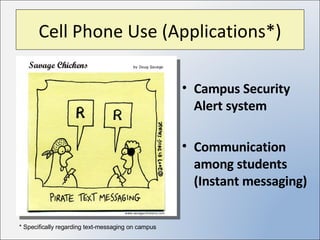
Cell Phone Use (Applications*) Campus Security Alert system Communication among students (Instant messaging) * Specifically regarding text-messaging on campus
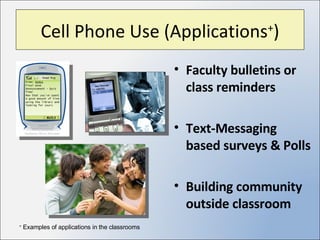
Cell Phone Use (Applications + ) Faculty bulletins or class reminders Text-Messaging based surveys & Polls Building community outside classroom +  Examples of applications in the classrooms
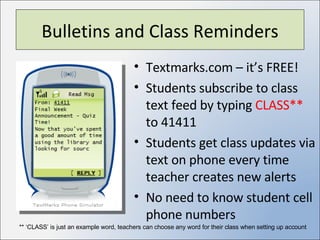
Bulletins and Class Reminders Textmarks.com – it’s FREE! Students subscribe to class text feed by typing  CLASS**  to 41411 Students get class updates via text on phone every time teacher creates new alerts No need to know student cell phone numbers ** ‘CLASS’ is just an example word, teachers can choose any word for their class when setting up account
TM-based Surveys & Polls PollEverywhere.com * Create live polls Survey students Gain instant feedback from class Similar to using clickers in classroom No need to know student cell phone numbers * Free and paid subscriptions available – see website for feature details
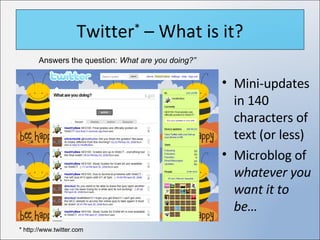
Twitter *  – What is it? Mini-updates in 140 characters of text (or less) Microblog of  whatever you want it to be… Answers the question:  What are you doing?” * http://www.twitter.com
Twitter – Teaching & Learning Create bulletins or class reminders Build student connection beyond classroom Students become part of a global community No need to know student cell phone numbers* * Students must update Twitter setting to link incoming messages to phone.
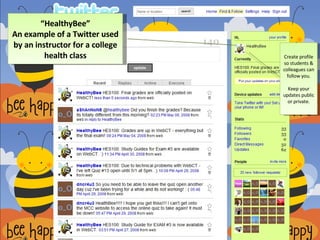
“ HealthyBee” An example of a Twitter used by an instructor for a college health class Create profile so students & colleagues can follow you. Keep your updates public or private.
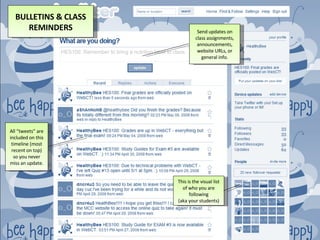
This is the visual list of who you are following (aka your students) All “tweets” are included on this timeline (most recent on top) so you never miss an update. HES100: Remember to bring a nutrition label to class. Send updates on class assignments, announcements, website URLs, or general info. BULLETINS & CLASS REMINDERS
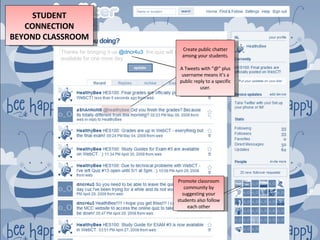
Thanks for bringing it up  @dncr4u3 , the quiz will stay available for one more day Create public chatter among your students. A Tweets with “@” plus username means it’s a public reply to a specific user. STUDENT CONNECTION BEYOND CLASSROOM Promote classroom community by suggesting your students also follow each other
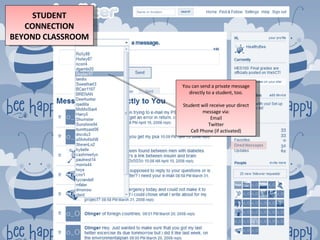
You can send a private message directly to a student, too. Student will receive your direct message via: Email Twitter Cell Phone (if activated) STUDENT CONNECTION BEYOND CLASSROOM
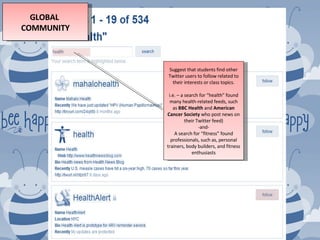
GLOBAL  COMMUNITY Suggest that students find other Twitter users to follow related to their interests or class topics. i.e. – a search for “health” found many health-related feeds, such as  BBC Health  and  American Cancer Society  who post news on their Twitter feed) -and- A search for “fitness” found professionals, such as, personal trainers, body builders, and fitness enthusiasts
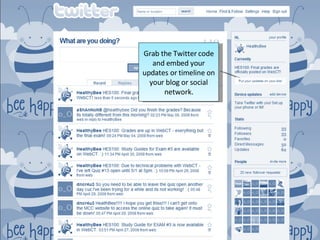
Grab the Twitter code and embed your updates or timeline on your blog or social network.
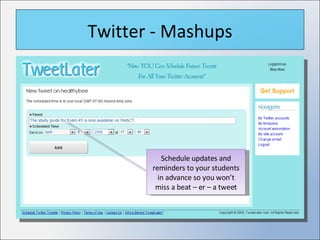
Twitter - Mashups Schedule updates and reminders to your students in advance so you won’t miss a beat – er – a tweet
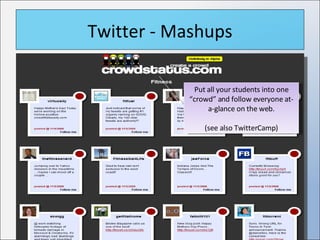
Twitter - Mashups Put all your students into one “crowd” and follow everyone at-a-glance on the web. (see also TwitterCamp)
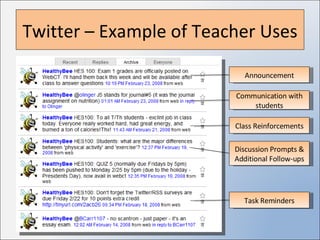
Twitter – Example of Teacher Uses Announcement Communication with students Class Reinforcements Discussion Prompts & Additional Follow-ups Task Reminders
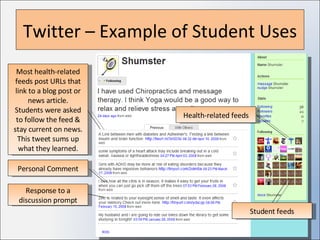
Twitter – Example of Student Uses Health-related feeds Most health-related feeds post URLs that link to a blog post or news article. Students were asked to follow the feed & stay current on news. This tweet sums up what they learned. Response to a discussion prompt Personal Comment Student feeds
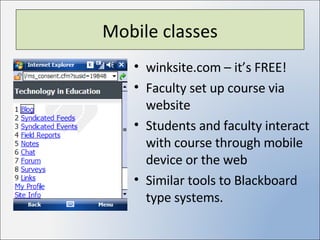
Mobile classes winksite.com – it’s FREE! Faculty set up course via website Students and faculty interact with course through mobile device or the web Similar tools to Blackboard type systems.
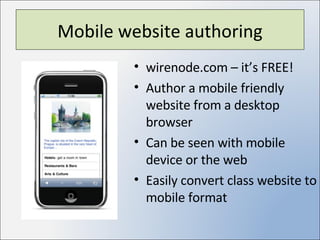
Mobile website authoring wirenode.com – it’s FREE! Author a mobile friendly website from a desktop browser Can be seen with mobile device or the web Easily convert class website to mobile format
References http://www.problogger.net/archives/2007/10/23/why-twitter-isnt-a-waste-of-time/ http://crowdstatus.com http://tweetlater.com http://Tweetstats.com http://Tweetscan.com  or    http://metweets.com Check out the wiki for ‘all-things’ Twitter  http://twitter.pbwiki.com http://academhack.outsidethetext.com/home/2008/twitter-for-academia/

Mobile Tools For Teaching And Learning

  • 1.
    Mobile Tools forTeaching and Learning Presented by Jym Brittain Director of the Center for Teaching and Learning Northeastern State University Based upon a presentation (with permission) titled TWITTER and Other Mobile-izing Tools for Teaching and Learning by Biray Alsac of Mesa Community College
  • 2.
    Cell Phone Use(Statistics) 255.4 million wireless subscribers in US 1 84% of total U.S. population 1 96% of NSU students use mobile phones 35% of cell phone owners send and receive text messages 2 75% of NSU survey respondents use text messages 48.1 billion text-messages sent per month 1 1 http://www.ctia.org/advocacy/research/index.cfm/AID/10323 2 http://www.pewinternet.org/pdfs/PIP_Cell_phone_study.pdf
  • 3.
    Available Tools Text/MultimediaMessaging Textmarks Text based polls and surveys Twitter Winksite Wirenode
  • 4.
    Cell Phone Use(Applications*) Campus Security Alert system Communication among students (Instant messaging) * Specifically regarding text-messaging on campus
  • 5.
    Cell Phone Use(Applications + ) Faculty bulletins or class reminders Text-Messaging based surveys & Polls Building community outside classroom + Examples of applications in the classrooms
  • 6.
    Bulletins and ClassReminders Textmarks.com – it’s FREE! Students subscribe to class text feed by typing CLASS** to 41411 Students get class updates via text on phone every time teacher creates new alerts No need to know student cell phone numbers ** ‘CLASS’ is just an example word, teachers can choose any word for their class when setting up account
  • 7.
    TM-based Surveys &Polls PollEverywhere.com * Create live polls Survey students Gain instant feedback from class Similar to using clickers in classroom No need to know student cell phone numbers * Free and paid subscriptions available – see website for feature details
  • 8.
    Twitter * – What is it? Mini-updates in 140 characters of text (or less) Microblog of whatever you want it to be… Answers the question: What are you doing?” * http://www.twitter.com
  • 9.
    Twitter – Teaching& Learning Create bulletins or class reminders Build student connection beyond classroom Students become part of a global community No need to know student cell phone numbers* * Students must update Twitter setting to link incoming messages to phone.
  • 10.
    “ HealthyBee” Anexample of a Twitter used by an instructor for a college health class Create profile so students & colleagues can follow you. Keep your updates public or private.
  • 11.
    This is thevisual list of who you are following (aka your students) All “tweets” are included on this timeline (most recent on top) so you never miss an update. HES100: Remember to bring a nutrition label to class. Send updates on class assignments, announcements, website URLs, or general info. BULLETINS & CLASS REMINDERS
  • 12.
    Thanks for bringingit up @dncr4u3 , the quiz will stay available for one more day Create public chatter among your students. A Tweets with “@” plus username means it’s a public reply to a specific user. STUDENT CONNECTION BEYOND CLASSROOM Promote classroom community by suggesting your students also follow each other
  • 13.
    You can senda private message directly to a student, too. Student will receive your direct message via: Email Twitter Cell Phone (if activated) STUDENT CONNECTION BEYOND CLASSROOM
  • 14.
    GLOBAL COMMUNITYSuggest that students find other Twitter users to follow related to their interests or class topics. i.e. – a search for “health” found many health-related feeds, such as BBC Health and American Cancer Society who post news on their Twitter feed) -and- A search for “fitness” found professionals, such as, personal trainers, body builders, and fitness enthusiasts
  • 15.
    Grab the Twittercode and embed your updates or timeline on your blog or social network.
  • 16.
    Twitter - MashupsSchedule updates and reminders to your students in advance so you won’t miss a beat – er – a tweet
  • 17.
    Twitter - MashupsPut all your students into one “crowd” and follow everyone at-a-glance on the web. (see also TwitterCamp)
  • 18.
    Twitter – Exampleof Teacher Uses Announcement Communication with students Class Reinforcements Discussion Prompts & Additional Follow-ups Task Reminders
  • 19.
    Twitter – Exampleof Student Uses Health-related feeds Most health-related feeds post URLs that link to a blog post or news article. Students were asked to follow the feed & stay current on news. This tweet sums up what they learned. Response to a discussion prompt Personal Comment Student feeds
  • 20.
    Mobile classes winksite.com– it’s FREE! Faculty set up course via website Students and faculty interact with course through mobile device or the web Similar tools to Blackboard type systems.
  • 21.
    Mobile website authoringwirenode.com – it’s FREE! Author a mobile friendly website from a desktop browser Can be seen with mobile device or the web Easily convert class website to mobile format
  • 22.
    References http://www.problogger.net/archives/2007/10/23/why-twitter-isnt-a-waste-of-time/ http://crowdstatus.comhttp://tweetlater.com http://Tweetstats.com http://Tweetscan.com or http://metweets.com Check out the wiki for ‘all-things’ Twitter http://twitter.pbwiki.com http://academhack.outsidethetext.com/home/2008/twitter-for-academia/