© 2018 Mobile Labs l Confidential and Proprietary I All Rights Reserved
Supercharge Mobile App
Testing: It’s All About Speed
1
Dan McFall
President & CEO
November 14th, 2018
© 2018 Mobile Labs l Confidential and Proprietary I All Rights Reserved 2
Agenda
• The need for speed
• How “bad work” is slowing you down
• Supercharge! - your device cloud & your manual testing
• Supercharge! - your Appium automation
• About Mobile Labs
• Q&A
© 2018 Mobile Labs l Confidential and Proprietary I All Rights Reserved 3
The Need for App Testing Speed
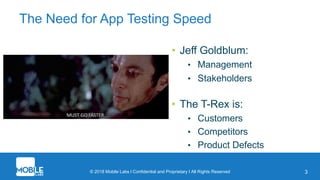
• Jeff Goldblum:
• Management
• Stakeholders
• The T-Rex is:
• Customers
• Competitors
• Product Defects
© 2018 Mobile Labs l Confidential and Proprietary I All Rights Reserved 4
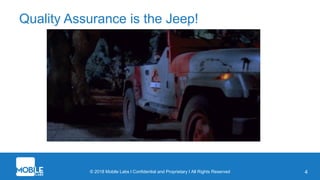
Quality Assurance is the Jeep!
© 2018 Mobile Labs l Confidential and Proprietary I All Rights Reserved 5
”Bad Work” - The Thing Keeping You From Your Job
• “Good Work” – aka Your Day Job
• Designing test cases
• Executing test cases
• Creating automation frameworks
• Executing automation
• Collaboration
• “Bad Work” – Stuff That Gets in the Way
• Constantly setting up environments
• Managing hardware
• Waiting around
• Rework caused by bad information
• Constant interruptions to “report”
© 2018 Mobile Labs l Confidential and Proprietary I All Rights Reserved 6
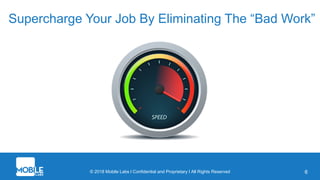
Supercharge Your Job By Eliminating The “Bad Work”
© 2018 Mobile Labs l Confidential and Proprietary I All Rights Reserved
Supercharge!
Your Device Cloud &
Manual Testing
7
© 2018 Mobile Labs l Confidential and Proprietary I All Rights Reserved 8
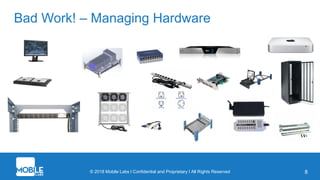
Bad Work! – Managing Hardware
© 2018 Mobile Labs l Confidential and Proprietary I All Rights Reserved 9
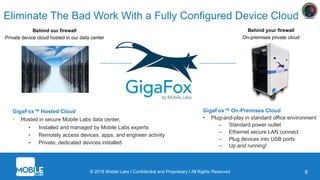
Eliminate The Bad Work With a Fully Configured Device Cloud
Behind our firewall
Private device cloud hosted in our data center
Behind your firewall
On-premises private cloud
GigaFox™ Hosted Cloud
• Hosted in secure Mobile Labs data center,
• Installed and managed by Mobile Labs experts
• Remotely access devices, apps, and engineer activity
• Private, dedicated devices installed
GigaFox™ On-Premises Cloud
• Plug-and-play in standard office environment
– Standard power outlet
– Ethernet secure LAN connect
– Plug devices into USB ports
– Up and running!
© 2018 Mobile Labs l Confidential and Proprietary I All Rights Reserved 10
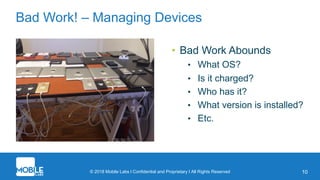
Bad Work! – Managing Devices
• Bad Work Abounds
• What OS?
• Is it charged?
• Who has it?
• What version is installed?
• Etc.
© 2018 Mobile Labs l Confidential and Proprietary I All Rights Reserved 11
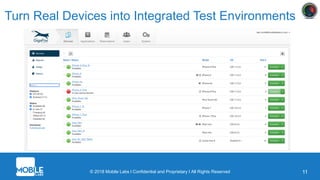
Turn Real Devices into Integrated Test Environments
© 2018 Mobile Labs l Confidential and Proprietary I All Rights Reserved 12
Bad Work! – Poor Cloud Device User Experience
• Poor screen quality
• Poor responsiveness
• Poor sound quality
• Limited gesture support
© 2018 Mobile Labs l Confidential and Proprietary I All Rights Reserved 13
Interact with Devices in Real Time, Really
© 2018 Mobile Labs l Confidential and Proprietary I All Rights Reserved
Supercharge!
Your Automation with Appium
14
© 2018 Mobile Labs l Confidential and Proprietary I All Rights Reserved 15
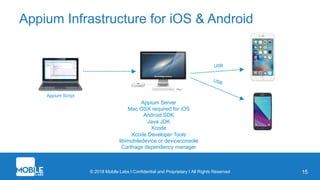
Appium Infrastructure for iOS & Android
Appium Server
Mac OSX required for iOS
Android SDK
Java JDK
Xcode
Xcode Developer Tools
libimobiledevice or deviceconsole
Carthage dependency manager
USB
Appium Script
USB
© 2018 Mobile Labs l Confidential and Proprietary I All Rights Reserved 16
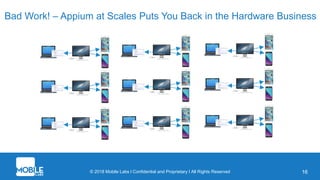
Bad Work! – Appium at Scales Puts You Back in the Hardware Business
Don’t Worry!
At least execution will be really slow…
17
18
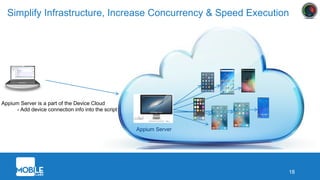
Simplify Infrastructure, Increase Concurrency & Speed Execution
Appium Server
Appium Server is a part of the Device Cloud
- Add device connection info into the script
© 2018 Mobile Labs l Confidential and Proprietary I All Rights Reserved 19
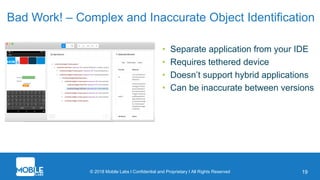
Bad Work! – Complex and Inaccurate Object Identification
• Separate application from your IDE
• Requires tethered device
• Doesn’t support hybrid applications
• Can be inaccurate between versions
© 2018 Mobile Labs l Confidential and Proprietary I All Rights Reserved 20
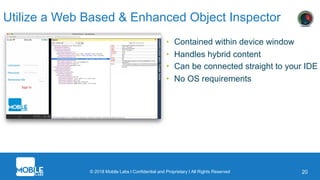
Utilize a Web Based & Enhanced Object Inspector
• Contained within device window
• Handles hybrid content
• Can be connected straight to your IDE
• No OS requirements
© 2018 Mobile Labs l Confidential and Proprietary I All Rights Reserved
MASTER
SLAVE
21
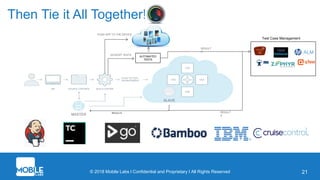
Then Tie it All Together!
PUSH APP TO THE DEVICE
AUTOMATED
TESTS
KICKOFF TESTS
RESULT
S
Test Case Management
RESULT
S
© 2018 Mobile Labs l Confidential and Proprietary I All Rights Reserved
About Mobile Labs
22
© 2018 Mobile Labs l Confidential and Proprietary I All Rights Reserved 9
What is GigaFox?
• The mobile device cloud completely reimagined to accelerate development and
continuous testing
• Unparalleled performance for any network state
• Real-time display of the device screen
• Give testers more power to use the cloud instead of an in-hand device
• Completely reengineered the physical components for easier
management and greater reliability
© 2018 Mobile Labs l Confidential and Proprietary I All Rights Reserved 24
No More Choppy Graphics
• Achieves new levels of smooth, responsive and real-time graphics
performance
• Overcomes performance problems caused by remote, limited
bandwidth
• Game changer for apps involving video and audio, like gaming, content
streaming, etc.
© 2018 Mobile Labs l Confidential and Proprietary I All Rights Reserved 25
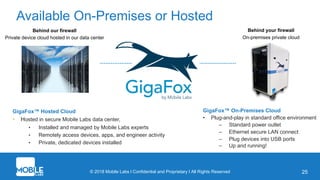
Available On-Premises or Hosted
Behind our firewall
Private device cloud hosted in our data center
Behind your firewall
On-premises private cloud
GigaFox™ Hosted Cloud
• Hosted in secure Mobile Labs data center,
• Installed and managed by Mobile Labs experts
• Remotely access devices, apps, and engineer activity
• Private, dedicated devices installed
GigaFox™ On-Premises Cloud
• Plug-and-play in standard office environment
– Standard power outlet
– Ethernet secure LAN connect
– Plug devices into USB ports
– Up and running!
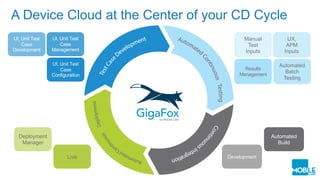
A Device Cloud at the Center of your CD Cycle
UI, Unit Test
Case
Development
UI, Unit Test
Case
Management
UI, Unit Test
Case
Configuration
Automated
Batch
Testing
UX,
APM
Inputs
Manual
Test
Inputs
Results
Management
Live
Deployment
Manager
Automated
Build
Development
Blue Chip Customers
27
© 2018 Mobile Labs l Confidential and Proprietary I All Rights Reserved
Thank You!
28
Mobile Labs
Phone: 1 (404) 214-5804
Email: info@mobilelabsinc.com
Web: www.mobilelabsinc.com

Mobile Labs: Supercharge Mobile App Testing - All About Speed

  • 1.
    © 2018 MobileLabs l Confidential and Proprietary I All Rights Reserved Supercharge Mobile App Testing: It’s All About Speed 1 Dan McFall President & CEO November 14th, 2018
  • 2.
    © 2018 MobileLabs l Confidential and Proprietary I All Rights Reserved 2 Agenda • The need for speed • How “bad work” is slowing you down • Supercharge! - your device cloud & your manual testing • Supercharge! - your Appium automation • About Mobile Labs • Q&A
  • 3.
    © 2018 MobileLabs l Confidential and Proprietary I All Rights Reserved 3 The Need for App Testing Speed • Jeff Goldblum: • Management • Stakeholders • The T-Rex is: • Customers • Competitors • Product Defects
  • 4.
    © 2018 MobileLabs l Confidential and Proprietary I All Rights Reserved 4 Quality Assurance is the Jeep!
  • 5.
    © 2018 MobileLabs l Confidential and Proprietary I All Rights Reserved 5 ”Bad Work” - The Thing Keeping You From Your Job • “Good Work” – aka Your Day Job • Designing test cases • Executing test cases • Creating automation frameworks • Executing automation • Collaboration • “Bad Work” – Stuff That Gets in the Way • Constantly setting up environments • Managing hardware • Waiting around • Rework caused by bad information • Constant interruptions to “report”
  • 6.
    © 2018 MobileLabs l Confidential and Proprietary I All Rights Reserved 6 Supercharge Your Job By Eliminating The “Bad Work”
  • 7.
    © 2018 MobileLabs l Confidential and Proprietary I All Rights Reserved Supercharge! Your Device Cloud & Manual Testing 7
  • 8.
    © 2018 MobileLabs l Confidential and Proprietary I All Rights Reserved 8 Bad Work! – Managing Hardware
  • 9.
    © 2018 MobileLabs l Confidential and Proprietary I All Rights Reserved 9 Eliminate The Bad Work With a Fully Configured Device Cloud Behind our firewall Private device cloud hosted in our data center Behind your firewall On-premises private cloud GigaFox™ Hosted Cloud • Hosted in secure Mobile Labs data center, • Installed and managed by Mobile Labs experts • Remotely access devices, apps, and engineer activity • Private, dedicated devices installed GigaFox™ On-Premises Cloud • Plug-and-play in standard office environment – Standard power outlet – Ethernet secure LAN connect – Plug devices into USB ports – Up and running!
  • 10.
    © 2018 MobileLabs l Confidential and Proprietary I All Rights Reserved 10 Bad Work! – Managing Devices • Bad Work Abounds • What OS? • Is it charged? • Who has it? • What version is installed? • Etc.
  • 11.
    © 2018 MobileLabs l Confidential and Proprietary I All Rights Reserved 11 Turn Real Devices into Integrated Test Environments
  • 12.
    © 2018 MobileLabs l Confidential and Proprietary I All Rights Reserved 12 Bad Work! – Poor Cloud Device User Experience • Poor screen quality • Poor responsiveness • Poor sound quality • Limited gesture support
  • 13.
    © 2018 MobileLabs l Confidential and Proprietary I All Rights Reserved 13 Interact with Devices in Real Time, Really
  • 14.
    © 2018 MobileLabs l Confidential and Proprietary I All Rights Reserved Supercharge! Your Automation with Appium 14
  • 15.
    © 2018 MobileLabs l Confidential and Proprietary I All Rights Reserved 15 Appium Infrastructure for iOS & Android Appium Server Mac OSX required for iOS Android SDK Java JDK Xcode Xcode Developer Tools libimobiledevice or deviceconsole Carthage dependency manager USB Appium Script USB
  • 16.
    © 2018 MobileLabs l Confidential and Proprietary I All Rights Reserved 16 Bad Work! – Appium at Scales Puts You Back in the Hardware Business
  • 17.
    Don’t Worry! At leastexecution will be really slow… 17
  • 18.
    18 Simplify Infrastructure, IncreaseConcurrency & Speed Execution Appium Server Appium Server is a part of the Device Cloud - Add device connection info into the script
  • 19.
    © 2018 MobileLabs l Confidential and Proprietary I All Rights Reserved 19 Bad Work! – Complex and Inaccurate Object Identification • Separate application from your IDE • Requires tethered device • Doesn’t support hybrid applications • Can be inaccurate between versions
  • 20.
    © 2018 MobileLabs l Confidential and Proprietary I All Rights Reserved 20 Utilize a Web Based & Enhanced Object Inspector • Contained within device window • Handles hybrid content • Can be connected straight to your IDE • No OS requirements
  • 21.
    © 2018 MobileLabs l Confidential and Proprietary I All Rights Reserved MASTER SLAVE 21 Then Tie it All Together! PUSH APP TO THE DEVICE AUTOMATED TESTS KICKOFF TESTS RESULT S Test Case Management RESULT S
  • 22.
    © 2018 MobileLabs l Confidential and Proprietary I All Rights Reserved About Mobile Labs 22
  • 23.
    © 2018 MobileLabs l Confidential and Proprietary I All Rights Reserved 9 What is GigaFox? • The mobile device cloud completely reimagined to accelerate development and continuous testing • Unparalleled performance for any network state • Real-time display of the device screen • Give testers more power to use the cloud instead of an in-hand device • Completely reengineered the physical components for easier management and greater reliability
  • 24.
    © 2018 MobileLabs l Confidential and Proprietary I All Rights Reserved 24 No More Choppy Graphics • Achieves new levels of smooth, responsive and real-time graphics performance • Overcomes performance problems caused by remote, limited bandwidth • Game changer for apps involving video and audio, like gaming, content streaming, etc.
  • 25.
    © 2018 MobileLabs l Confidential and Proprietary I All Rights Reserved 25 Available On-Premises or Hosted Behind our firewall Private device cloud hosted in our data center Behind your firewall On-premises private cloud GigaFox™ Hosted Cloud • Hosted in secure Mobile Labs data center, • Installed and managed by Mobile Labs experts • Remotely access devices, apps, and engineer activity • Private, dedicated devices installed GigaFox™ On-Premises Cloud • Plug-and-play in standard office environment – Standard power outlet – Ethernet secure LAN connect – Plug devices into USB ports – Up and running!
  • 26.
    A Device Cloudat the Center of your CD Cycle UI, Unit Test Case Development UI, Unit Test Case Management UI, Unit Test Case Configuration Automated Batch Testing UX, APM Inputs Manual Test Inputs Results Management Live Deployment Manager Automated Build Development
  • 27.
  • 28.
    © 2018 MobileLabs l Confidential and Proprietary I All Rights Reserved Thank You! 28 Mobile Labs Phone: 1 (404) 214-5804 Email: info@mobilelabsinc.com Web: www.mobilelabsinc.com