MAKE YOUR PROJECT
GREAT AGAIN
Oleksii Lyzenko 2018
WHAT WE ARE GONNA COVER
• Look at app loading process
• Application start time measurements
• Discuss basic virtual memory principles
• Speak about static and dynamic libraries
• Look at Xcode compilation flags
WHAT YOU SHOULD EXPECT
• Decrease application start time
• Improve Xcode responsiveness
• ???
• Get smarter !(also not bad)
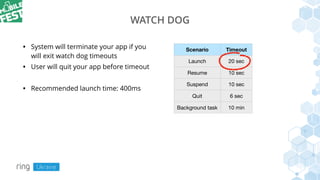
WATCH DOG
• System will terminate your app if you
will exit watch dog timeouts
• User will quit your app before timeout
• Recommended launch time: 400ms
Scenario Timeout
Launch 20 sec
Resume 10 sec
Suspend 10 sec
Quit 6 sec
Background task 10 min
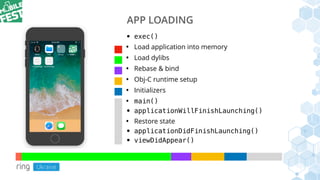
APP LOADING
• exec()
• Load application into memory
• Load dylibs
• Rebase & bind
• Obj-C runtime setup
• Initializers
• main()
• applicationWillFinishLaunching()
• Restore state
• applicationDidFinishLaunching()
• viewDidAppear()
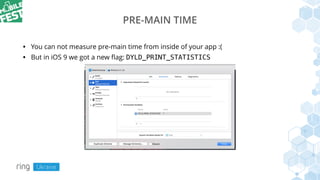
PRE-MAIN TIME
• You can not measure pre-main time from inside of your app :(
• But in iOS 9 we got a new flag: DYLD_PRINT_STATISTICS
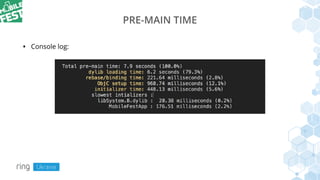
PRE-MAIN TIME
• Console log:
PRE-MAIN TIME
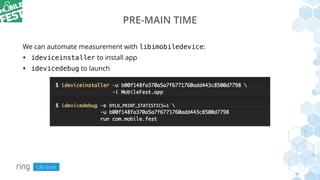
We can automate measurement with libimobiledevice:
• ideviceinstaller to install app
• idevicedebug to launch
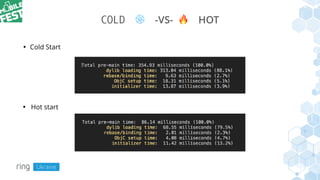
COLD ❄ -VS- 🔥 HOT
• Hot start
• Cold Start
SWIFT
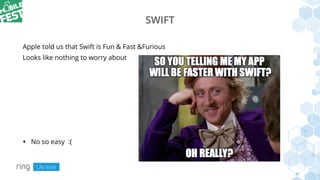
Apple told us that Swift is Fun & Fast &Furious
Looks like nothing to worry about
• No so easy :(
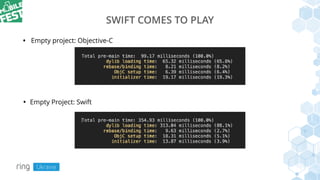
SWIFT COMES TO PLAY
• Empty project: Objective-C
• Empty Project: Swift
SWIFT COMES TO PLAY
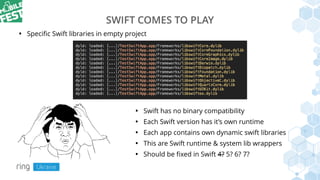
• Swift has no binary compatibility
• Each Swift version has it’s own runtime
• Each app contains own dynamic swift libraries
• This are Swift runtime & system lib wrappers
• Should be fixed in Swift 4? 5? 6? 7?
• Specific Swift libraries in empty project
App
Dyld
ZERO_PAGE
APPLICATION LOADING
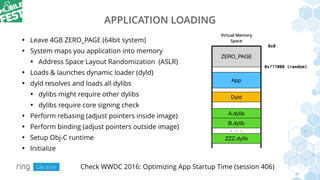
• Leave 4GB ZERO_PAGE (64bit system)
• System maps you application into memory
• Address Space Layout Randomization (ASLR)
• Loads & launches dynamic loader (dyld)
• dyld resolves and loads all dylibs
• dylibs might require other dylibs
• dylibs require core signing check
• Perform rebasing (adjust pointers inside image)
• Perform binding (adjust pointers outside image)
• Setup Obj-C runtime
• Initialize
Virtual Memory
Space
0x0
0x???000 (random)
A.dylib
B.dylib
ZZZ.dylib
. . .
Check WWDC 2016: Optimizing App Startup Time (session 406)
APPLICATION LOADING
• Usually app “contains” up to 400+ dylibs
• Empty app will “contains” 150+ dylibs
• How just 12 Swift libraries dropped performance so dramatically?
VIRTUAL MEMORY
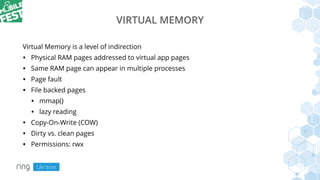
Virtual Memory is a level of indirection
• Physical RAM pages addressed to virtual app pages
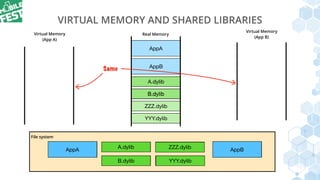
• Same RAM page can appear in multiple processes
• Page fault
• File backed pages
• mmap()
• lazy reading
• Copy-On-Write (COW)
• Dirty vs. clean pages
• Permissions: rwx
AppA AppBA.dylib
B.dylib YYY.dylib
ZZZ.dylib
AppA
A.dylib
B.dylib YYY.dylib
ZZZ.dylib
VIRTUAL MEMORY AND SHARED LIBRARIES
Virtual Memory
(App A)
Virtual Memory
(App B)
AppB
Real Memory
File system
AppB
YYY.dylib
AppA
A.dylib
B.dylib
ZZZ.dylib
A.dylib
B.dylib
Same
LIBRARIES FLAVOROUS
We should distinguish next libraries:
• System dynamic libraries (very optimized, stored in shared library caches)
• Third-party dynamic libraries
• Static libraries
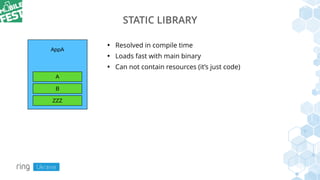
STATIC LIBRARY
• Resolved in compile time
• Loads fast with main binary
• Can not contain resources (it’s just code)
AppA
A
B

ZZZ
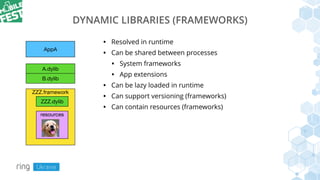
DYNAMIC LIBRARIES (FRAMEWORKS)
• Resolved in runtime
• Can be shared between processes
• System frameworks
• App extensions
• Can be lazy loaded in runtime
• Can support versioning (frameworks)
• Can contain resources (frameworks)
AppA
A.dylib
B.dylib
ZZZ.framework
ZZZ.dylib
resources
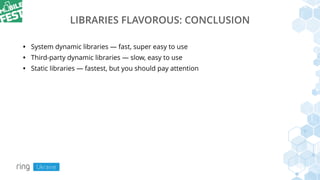
LIBRARIES FLAVOROUS: CONCLUSION
• System dynamic libraries — fast, super easy to use
• Third-party dynamic libraries — slow, easy to use
• Static libraries — fastest, but you should pay attention
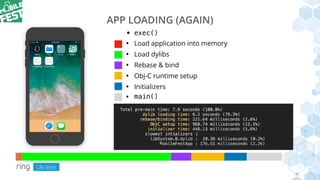
APP LOADING (AGAIN)
• exec()
• Load application into memory
• Load dylibs
• Rebase & bind
• Obj-C runtime setup
• Initializers
• main()
APP LOADING IMPROVEMENTS
• Reduce dynamic libraries count
• Reduce Obj-C usage (if Obj-C runtime phase is a problem)
• Avoid initializations on start:
• use + initialize instead of +load
• refactor static C++ objects
• FYI: Swift’s `static let` is lazy (Cool!)
REDUCE DYNAMIC LIBRARIES COUNT
• Cleanup codebase and remove duplicated libraries
• Avoid “one file” libraries (plenty of them in cocoapods)
• Use lazy loading with dlopen()
• Put library as sources
• Switch to static libraries…
STATIC LIBRARIES
• Static libraries are not allowed in Swift!!!
• Static libraries are allowed in Swift starting from Xcode 9.0
(stable work from Xcode 9.4)
DEPENDENCY MANAGERS
• Cocoapods
• Carthage
• Swift Package Manager
• Submodules and your own hands 🤲
• All of them have (basic) static libraries support
STATIC LIBRARIES: CONCLUSION
• We able to reduce app start time in several times
• Requires dependency manager support (and framework podspec update)
• Minor code changes (relative to other approaches)
• If framework contains resources you should move them to bundle by yourself
XCODE
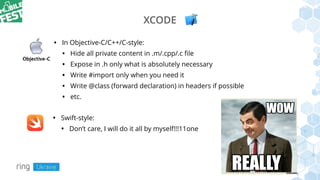
• In Objective-C/C++/C-style:
• Hide all private content in .m/.cpp/.c file
• Expose in .h only what is absolutely necessary
• Write #import only when you need it
• Write @class (forward declaration) in headers if possible
• etc.
• Swift-style:
• Don’t care, I will do it all by myself!!!11one
SWIFT COMPILATION MODES
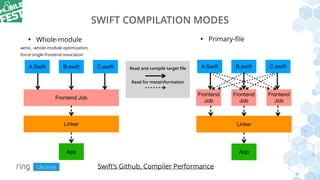
• Whole-module
-wmo, -whole-module-optimization,
-force-single-frontend-invocation
A.Swift
App
B.swift
Frontend Job
C.swift A.Swift B.swift
Frontend
Job
C.swift
Frontend
Job
Frontend
Job
• Primary-file
Linker
App
Linker
Read and compile target file
Read for metainformation
Swift’s Github, Compiler Performance
XCODE MODULES
• Apple recommends to use Modules
• Now it’s possible to use Modules as static or dynamic libraries
• Good Modules breakdown can:
• Improve code decoupling
• Give some hints to compiler
• Give great performance boost for primary-file mode
ACTION POINTS
• Check you app start time
• Automate this process (CI) and collect statistic
• Determine bottlenecks and fix them
• Check your project’s dependencies, remove what possible
• You can move some libraries to static one
• Breakdown your project to modules
FURTHER READING
• WWDC 2016: Optimizing App Startup Time (session 406)
• WWDC 2012: iOS App Performance: Responsiveness (session 235)
• Jonathan Levin, Mac OSX® And iOS Internals, John Wiley & Sons, Inc, 2013 (this one is
sooooo goooood! And it’s available for free)
• Apple’s Dynamic Library Programming Topics
• Apple’s Memory Usage Performance Guidelines (About the Virtual Memory System)
• Xcode 9 Release Notes
• Swift’s Github, Compiler Performance
• https://github.com/libimobiledevice/libimobiledevice
Q&A
Oleksii Lyzenko 2018

Mobile Fest 2018. Алексей Лизенко. Make your project great again

  • 1.
    MAKE YOUR PROJECT GREATAGAIN Oleksii Lyzenko 2018
  • 2.
    WHAT WE AREGONNA COVER • Look at app loading process • Application start time measurements • Discuss basic virtual memory principles • Speak about static and dynamic libraries • Look at Xcode compilation flags
  • 3.
    WHAT YOU SHOULDEXPECT • Decrease application start time • Improve Xcode responsiveness • ??? • Get smarter !(also not bad)
  • 4.
    WATCH DOG • Systemwill terminate your app if you will exit watch dog timeouts • User will quit your app before timeout • Recommended launch time: 400ms Scenario Timeout Launch 20 sec Resume 10 sec Suspend 10 sec Quit 6 sec Background task 10 min
  • 5.
    APP LOADING • exec() •Load application into memory • Load dylibs • Rebase & bind • Obj-C runtime setup • Initializers • main() • applicationWillFinishLaunching() • Restore state • applicationDidFinishLaunching() • viewDidAppear()
  • 6.
    PRE-MAIN TIME • Youcan not measure pre-main time from inside of your app :( • But in iOS 9 we got a new flag: DYLD_PRINT_STATISTICS
  • 7.
  • 8.
    PRE-MAIN TIME We canautomate measurement with libimobiledevice: • ideviceinstaller to install app • idevicedebug to launch
  • 9.
    COLD ❄ -VS-🔥 HOT • Hot start • Cold Start
  • 10.
    SWIFT Apple told usthat Swift is Fun & Fast &Furious Looks like nothing to worry about • No so easy :(
  • 11.
    SWIFT COMES TOPLAY • Empty project: Objective-C • Empty Project: Swift
  • 12.
    SWIFT COMES TOPLAY • Swift has no binary compatibility • Each Swift version has it’s own runtime • Each app contains own dynamic swift libraries • This are Swift runtime & system lib wrappers • Should be fixed in Swift 4? 5? 6? 7? • Specific Swift libraries in empty project
  • 13.
    App Dyld ZERO_PAGE APPLICATION LOADING • Leave4GB ZERO_PAGE (64bit system) • System maps you application into memory • Address Space Layout Randomization (ASLR) • Loads & launches dynamic loader (dyld) • dyld resolves and loads all dylibs • dylibs might require other dylibs • dylibs require core signing check • Perform rebasing (adjust pointers inside image) • Perform binding (adjust pointers outside image) • Setup Obj-C runtime • Initialize Virtual Memory Space 0x0 0x???000 (random) A.dylib B.dylib ZZZ.dylib . . . Check WWDC 2016: Optimizing App Startup Time (session 406)
  • 14.
    APPLICATION LOADING • Usuallyapp “contains” up to 400+ dylibs • Empty app will “contains” 150+ dylibs • How just 12 Swift libraries dropped performance so dramatically?
  • 15.
    VIRTUAL MEMORY Virtual Memoryis a level of indirection • Physical RAM pages addressed to virtual app pages • Same RAM page can appear in multiple processes • Page fault • File backed pages • mmap() • lazy reading • Copy-On-Write (COW) • Dirty vs. clean pages • Permissions: rwx
  • 16.
    AppA AppBA.dylib B.dylib YYY.dylib ZZZ.dylib AppA A.dylib B.dylibYYY.dylib ZZZ.dylib VIRTUAL MEMORY AND SHARED LIBRARIES Virtual Memory (App A) Virtual Memory (App B) AppB Real Memory File system AppB YYY.dylib AppA A.dylib B.dylib ZZZ.dylib A.dylib B.dylib Same
  • 17.
    LIBRARIES FLAVOROUS We shoulddistinguish next libraries: • System dynamic libraries (very optimized, stored in shared library caches) • Third-party dynamic libraries • Static libraries
  • 18.
    STATIC LIBRARY • Resolvedin compile time • Loads fast with main binary • Can not contain resources (it’s just code) AppA A B ZZZ
  • 19.
    DYNAMIC LIBRARIES (FRAMEWORKS) •Resolved in runtime • Can be shared between processes • System frameworks • App extensions • Can be lazy loaded in runtime • Can support versioning (frameworks) • Can contain resources (frameworks) AppA A.dylib B.dylib ZZZ.framework ZZZ.dylib resources
  • 20.
    LIBRARIES FLAVOROUS: CONCLUSION •System dynamic libraries — fast, super easy to use • Third-party dynamic libraries — slow, easy to use • Static libraries — fastest, but you should pay attention
  • 21.
    APP LOADING (AGAIN) •exec() • Load application into memory • Load dylibs • Rebase & bind • Obj-C runtime setup • Initializers • main()
  • 22.
    APP LOADING IMPROVEMENTS •Reduce dynamic libraries count • Reduce Obj-C usage (if Obj-C runtime phase is a problem) • Avoid initializations on start: • use + initialize instead of +load • refactor static C++ objects • FYI: Swift’s `static let` is lazy (Cool!)
  • 23.
    REDUCE DYNAMIC LIBRARIESCOUNT • Cleanup codebase and remove duplicated libraries • Avoid “one file” libraries (plenty of them in cocoapods) • Use lazy loading with dlopen() • Put library as sources • Switch to static libraries…
  • 24.
    STATIC LIBRARIES • Staticlibraries are not allowed in Swift!!! • Static libraries are allowed in Swift starting from Xcode 9.0 (stable work from Xcode 9.4)
  • 25.
    DEPENDENCY MANAGERS • Cocoapods •Carthage • Swift Package Manager • Submodules and your own hands 🤲 • All of them have (basic) static libraries support
  • 26.
    STATIC LIBRARIES: CONCLUSION •We able to reduce app start time in several times • Requires dependency manager support (and framework podspec update) • Minor code changes (relative to other approaches) • If framework contains resources you should move them to bundle by yourself
  • 27.
    XCODE • In Objective-C/C++/C-style: •Hide all private content in .m/.cpp/.c file • Expose in .h only what is absolutely necessary • Write #import only when you need it • Write @class (forward declaration) in headers if possible • etc. • Swift-style: • Don’t care, I will do it all by myself!!!11one
  • 28.
    SWIFT COMPILATION MODES •Whole-module -wmo, -whole-module-optimization, -force-single-frontend-invocation A.Swift App B.swift Frontend Job C.swift A.Swift B.swift Frontend Job C.swift Frontend Job Frontend Job • Primary-file Linker App Linker Read and compile target file Read for metainformation Swift’s Github, Compiler Performance
  • 29.
    XCODE MODULES • Applerecommends to use Modules • Now it’s possible to use Modules as static or dynamic libraries • Good Modules breakdown can: • Improve code decoupling • Give some hints to compiler • Give great performance boost for primary-file mode
  • 30.
    ACTION POINTS • Checkyou app start time • Automate this process (CI) and collect statistic • Determine bottlenecks and fix them • Check your project’s dependencies, remove what possible • You can move some libraries to static one • Breakdown your project to modules
  • 31.
    FURTHER READING • WWDC2016: Optimizing App Startup Time (session 406) • WWDC 2012: iOS App Performance: Responsiveness (session 235) • Jonathan Levin, Mac OSX® And iOS Internals, John Wiley & Sons, Inc, 2013 (this one is sooooo goooood! And it’s available for free) • Apple’s Dynamic Library Programming Topics • Apple’s Memory Usage Performance Guidelines (About the Virtual Memory System) • Xcode 9 Release Notes • Swift’s Github, Compiler Performance • https://github.com/libimobiledevice/libimobiledevice
  • 32.