Breakfast Briefing
Windows Server 2016___
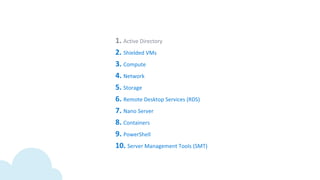
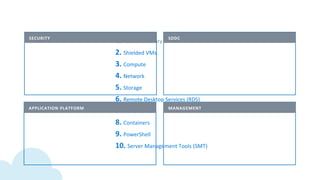
Agenda
2
07:35 –
08:00
Übersicht Server 2016
Stefan Wallimann
Microsoft Schweiz
Thomas Kuhn
Baggenstos AG
Eckhard Neuhaus / Michael Kistler
Baggenstos AG
08:00 –
08:05
Lizenzierung
08:05 –
08:30
Server 2016 – «Use Cases»
08:30 –
09:00
Fragen & Antworten
Kafi & Gipfeli
Übersicht Server 2016
Stefan Wallimann____
September 28, 2016
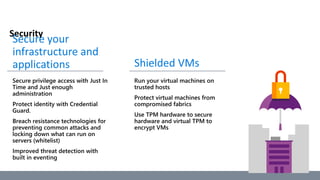
Security
Typical administrator
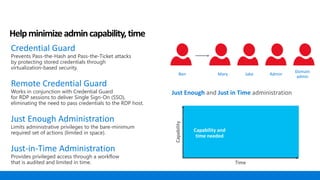
Helpminimizeadmincapability,time
Ben Mary Jake Admin
Domain
admin
Just Enough and Just in Time administration
Capability
Time
Credential Guard
Prevents Pass-the-Hash and Pass-the-Ticket attacks
by protecting stored credentials through
virtualization-based security.
Remote Credential Guard
Works in conjunction with Credential Guard
for RDP sessions to deliver Single Sign-On (SSO),
eliminating the need to pass credentials to the RDP host.
Just Enough Administration
Limits administrative privileges to the bare-minimum
required set of actions (limited in space).
Just-in-Time Administration
Provides privileged access through a workflow
that is audited and limited in time.
Capability and
time needed
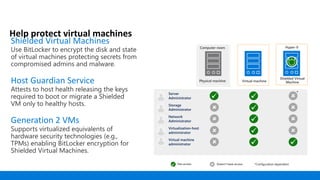
Help protect virtual machines
Shielded Virtual Machines
Use BitLocker to encrypt the disk and state
of virtual machines protecting secrets from
compromised admins and malware.
Host Guardian Service
Attests to host health releasing the keys
required to boot or migrate a Shielded
VM only to healthy hosts.
Generation 2 VMs
Supports virtualized equivalents of
hardware security technologies (e.g.,
TPMs) enabling BitLocker encryption for
Shielded Virtual Machines.
Virtual machine
Computer room
Physical machine
 
*

 
 
 
 
 
Hyper-V
Shielded Virtual
Machine
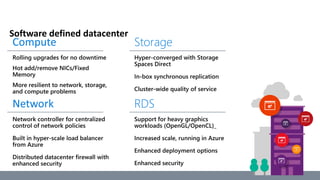
Software defined datacenter
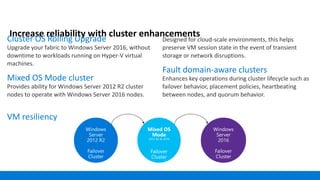
Increase reliability with cluster enhancements
Cluster OS Rolling Upgrade
Upgrade your fabric to Windows Server 2016, without
downtime to workloads running on Hyper-V virtual
machines.
Mixed OS Mode cluster
Provides ability for Windows Server 2012 R2 cluster
nodes to operate with Windows Server 2016 nodes.
VM resiliency
Designed for cloud-scale environments, this helps
preserve VM session state in the event of transient
storage or network disruptions.
Fault domain-aware clusters
Enhances key operations during cluster lifecycle such as
failover behavior, placement policies, heartbeating
between nodes, and quorum behavior.
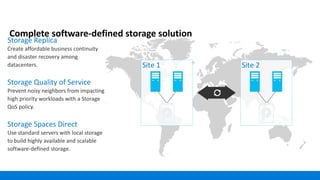
Complete software-defined storage solution
Storage Replica
Create affordable business continuity
and disaster recovery among
datacenters.
Storage Quality of Service
Prevent noisy neighbors from impacting
high priority workloads with a Storage
QoS policy.
Storage Spaces Direct
Use standard servers with local storage
to build highly available and scalable
software-defined storage.
Site 1 Site 2
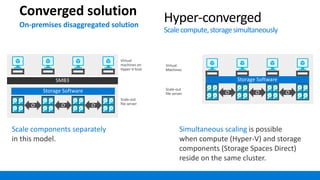
Converged solution
On-premises disaggregated solution
Scale components separately
in this model.
Simultaneous scaling is possible
when compute (Hyper-V) and storage
components (Storage Spaces Direct)
reside on the same cluster.
Hyper-converged
Scalecompute,storagesimultaneously
Storage Software
SMB3
Virtual
machines on
Hyper-V host
Scale-out
file server
Storage Software
Virtual
Machines
Scale-out
file server
Storage Software
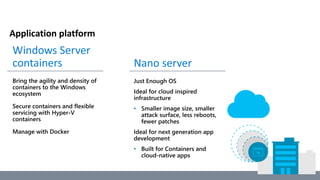
Application platform
•
•
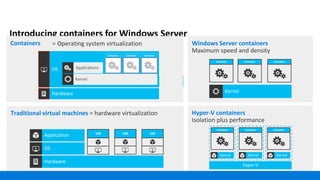
Introducing containers for Windows Server
Containers
Hyper-V containers
Isolation plus performance
Container Container Container
Traditional virtual machines = hardware virtualization
VM VM VM
Applications
Kernel
= Operating system virtualization
Container Container Container
Windows Server containers
Maximum speed and density
Container Container Container
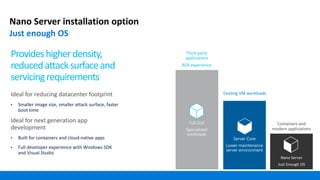
Nano Server installation option
Just enough OS
Third-party
applications
RDS experience
Existing VM workloads
Provideshigherdensity,
reducedattacksurfaceand
servicingrequirements
Ideal for reducing datacenter footprint
•
Ideal for next generation app
development
•
•
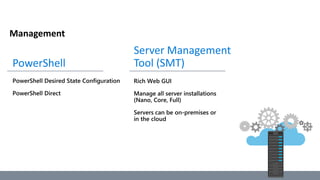
Management
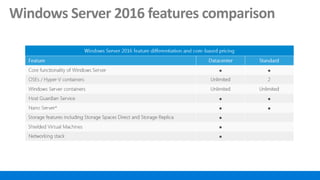
Windows Server 2016 features comparison
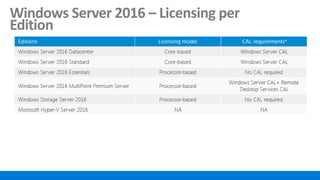
Windows Server 2016 – Licensing per
Edition
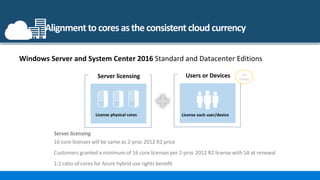
Alignment tocoresastheconsistent cloudcurrency
License physical cores License each user/device
Server licensing
16 core licenses will be same as 2-proc 2012 R2 price
Customers granted a minimum of 16 core licenses per 2-proc 2012 R2 license with SA at renewal
1:1 ratio of cores for Azure hybrid use rights benefit
No
change
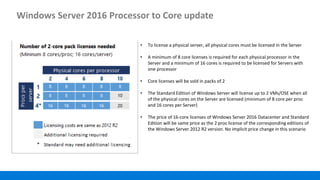
Windows Server 2016 Processor to Core update
• To license a physical server, all physical cores must be licensed in the Server
• A minimum of 8 core licenses is required for each physical processor in the
Server and a minimum of 16 cores is required to be licensed for Servers with
one processor
• Core licenses will be sold in packs of 2
• The Standard Edition of Windows Server will license up to 2 VMs/OSE when all
of the physical cores on the Server are licensed (minimum of 8 core per proc
and 16 cores per Server)
• The price of 16-core licenses of Windows Server 2016 Datacenter and Standard
Edition will be same price as the 2 proc license of the corresponding editions of
the Windows Server 2012 R2 version. No implicit price change in this scenario
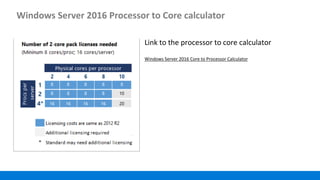
Windows Server 2016 Processor to Core calculator
Windows Server 2016 Core to Processor Calculator
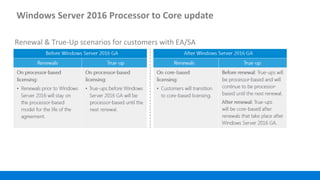
Windows Server 2016 Processor to Core update
Renewal & True-Up scenarios for customers with EA/SA
Lizenzierung
Thomas Kuhn____
27
Server
___Windows Server 2016 Lizenzierung
«Wechsel von Prozessoren zu Cores»
28
• Server werden anhand der Anzahl physikalischer
“Cores” lizenziert
• Um einen physikalischen Server korrekt zu
lizenzieren, müssen alle “Cores” berücksichtigt
werden
• Es muss das Minimum von 16 “Cores” lizenziert
werden
• Pro physikalischem Prozessor sind mindestens 8
“Cores” zu lizenzieren.
• Der Preis von 16 “Cores” des Windows Server 2016
entspricht dem Preis eines Windows Server 2012 R2
• Bestehende Lizenzen mit Software Assurance (SA)
werden beim Renewal mit tatsächlicher Anzahl
“Cores” Lizenzen wie benötigt (SA only, mit
Dokumentation vor Ablauf)
Lizenzierung der
physikalischen Cores
Lizenz pro user/device
Server
Lizenzierung
(Wechsel von Prozessor
zu Cores)
User oder Device
(Keine Veränderung bei
CALs)
Keine
Veränderung
Windows Server Standard und
Datacenter Edition
___Windows Server 2016
«Berechnung der Cores»
29
Physikalische Cores pro
Prozessor
Anzahl der benötigten
2-Core Pack Lizenzen
mit Windows Server
2016
2 4 108
8 8 8 12
• Mindestens 16 Core Lizenzen benötigt für einen Server
• Lizenzen sind in 2-Core–Packs verfügbar
• Der Preis von 8 x 2-Core Pack Lizenzen des Windows Server 2016 ist äquivalent zum Preis einer 2-Prozessor
Lizenz des Windows Server 2012 R2
12 14 16
14 1610
___Windows Server 2016
«Virtualisierungsrechte»
30
Windows Server 2016
Datacenter
Windows Server 2016
Standard
Windows Server 2016 Datacenter
Beliebig viele Betriebssystemumgebungen (OSE’s)
und Hyper-V Container
Erweiterte Storage Features
Windows Server 2016 Standard
Zwei OSE’s oder Hyper-V Container
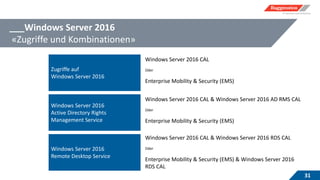
___Windows Server 2016
«Zugriffe und Kombinationen»
31
Zugriffe auf
Windows Server 2016
Windows Server 2016 CAL
Oder
Enterprise Mobility & Security (EMS)
Windows Server 2016
Active Directory Rights
Management Service
Windows Server 2016 CAL & Windows Server 2016 AD RMS CAL
Oder
Enterprise Mobility & Security (EMS)
Windows Server 2016
Remote Desktop Service
Windows Server 2016 CAL & Windows Server 2016 RDS CAL
Oder
Enterprise Mobility & Security (EMS) & Windows Server 2016
RDS CAL
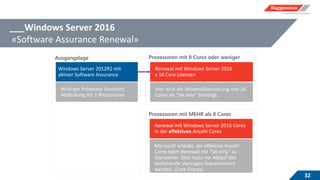
___Windows Server 2016
«Software Assurance Renewal»
32
Prozessoren mit 8 Cores oder wenigerAusgangslage
Prozessoren mit MEHR als 8 Cores
Server 2016 – «use cases»
Eckhard Neuhaus
Michael Kistler
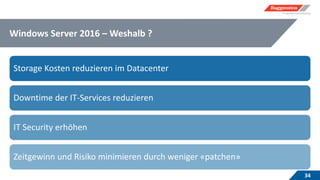
Windows Server 2016 – Weshalb ?
34
Storage Kosten reduzieren im Datacenter
Downtime der IT-Services reduzieren
IT Security erhöhen
Zeitgewinn und Risiko minimieren durch weniger «patchen»
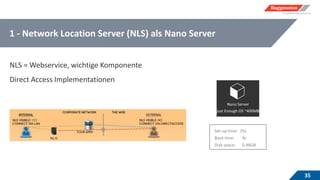
1 - Network Location Server (NLS) als Nano Server
35
NLS = Webservice, wichtige Komponente
Direct Access Implementationen
36
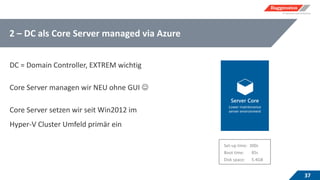
2 – DC als Core Server managed via Azure
37
DC = Domain Controller, EXTREM wichtig
Core Server managen wir NEU ohne GUI 
Core Server setzen wir seit Win2012 im
Hyper-V Cluster Umfeld primär ein
38
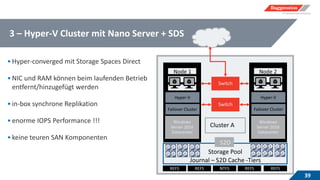
3 – Hyper-V Cluster mit Nano Server + SDS
39
•Hyper-converged mit Storage Spaces Direct
•NIC und RAM können beim laufenden Betrieb
entfernt/hinzugefügt werden
•in-box synchrone Replikation
•enorme IOPS Performance !!!
•keine teuren SAN Komponenten
Windows
Server 2016
Datacenter
Windows
Server 2016
Datacenter
Switch
Switch
Failover Cluster
Hyper-V
Failover Cluster
Hyper-V
S2D
NTFSREFS REFS REFS REFS
40
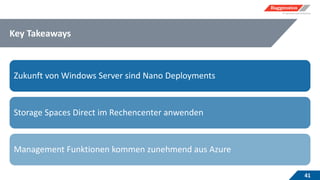
Key Takeaways
41
Zukunft von Windows Server sind Nano Deployments
Storage Spaces Direct im Rechencenter anwenden
Management Funktionen kommen zunehmend aus Azure
Mit Windows Server 2016 fit für die Cloud

Mit Windows Server 2016 fit für die Cloud

  • 1.
  • 2.
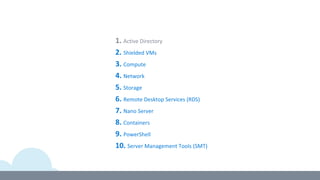
    Agenda 2 07:35 – 08:00 Übersicht Server2016 Stefan Wallimann Microsoft Schweiz Thomas Kuhn Baggenstos AG Eckhard Neuhaus / Michael Kistler Baggenstos AG 08:00 – 08:05 Lizenzierung 08:05 – 08:30 Server 2016 – «Use Cases» 08:30 – 09:00 Fragen & Antworten Kafi & Gipfeli
  • 3.
  • 4.
  • 7.
  • 8.
    Typical administrator Helpminimizeadmincapability,time Ben MaryJake Admin Domain admin Just Enough and Just in Time administration Capability Time Credential Guard Prevents Pass-the-Hash and Pass-the-Ticket attacks by protecting stored credentials through virtualization-based security. Remote Credential Guard Works in conjunction with Credential Guard for RDP sessions to deliver Single Sign-On (SSO), eliminating the need to pass credentials to the RDP host. Just Enough Administration Limits administrative privileges to the bare-minimum required set of actions (limited in space). Just-in-Time Administration Provides privileged access through a workflow that is audited and limited in time. Capability and time needed
  • 9.
    Help protect virtualmachines Shielded Virtual Machines Use BitLocker to encrypt the disk and state of virtual machines protecting secrets from compromised admins and malware. Host Guardian Service Attests to host health releasing the keys required to boot or migrate a Shielded VM only to healthy hosts. Generation 2 VMs Supports virtualized equivalents of hardware security technologies (e.g., TPMs) enabling BitLocker encryption for Shielded Virtual Machines. Virtual machine Computer room Physical machine   *            Hyper-V Shielded Virtual Machine
  • 10.
  • 11.
    Increase reliability withcluster enhancements Cluster OS Rolling Upgrade Upgrade your fabric to Windows Server 2016, without downtime to workloads running on Hyper-V virtual machines. Mixed OS Mode cluster Provides ability for Windows Server 2012 R2 cluster nodes to operate with Windows Server 2016 nodes. VM resiliency Designed for cloud-scale environments, this helps preserve VM session state in the event of transient storage or network disruptions. Fault domain-aware clusters Enhances key operations during cluster lifecycle such as failover behavior, placement policies, heartbeating between nodes, and quorum behavior.
  • 12.
    Complete software-defined storagesolution Storage Replica Create affordable business continuity and disaster recovery among datacenters. Storage Quality of Service Prevent noisy neighbors from impacting high priority workloads with a Storage QoS policy. Storage Spaces Direct Use standard servers with local storage to build highly available and scalable software-defined storage. Site 1 Site 2
  • 13.
    Converged solution On-premises disaggregatedsolution Scale components separately in this model. Simultaneous scaling is possible when compute (Hyper-V) and storage components (Storage Spaces Direct) reside on the same cluster. Hyper-converged Scalecompute,storagesimultaneously Storage Software SMB3 Virtual machines on Hyper-V host Scale-out file server Storage Software Virtual Machines Scale-out file server Storage Software
  • 14.
  • 15.
    Introducing containers forWindows Server Containers Hyper-V containers Isolation plus performance Container Container Container Traditional virtual machines = hardware virtualization VM VM VM Applications Kernel = Operating system virtualization Container Container Container Windows Server containers Maximum speed and density Container Container Container
  • 16.
    Nano Server installationoption Just enough OS Third-party applications RDS experience Existing VM workloads Provideshigherdensity, reducedattacksurfaceand servicingrequirements Ideal for reducing datacenter footprint • Ideal for next generation app development • •
  • 17.
  • 19.
    Windows Server 2016features comparison
  • 20.
    Windows Server 2016– Licensing per Edition
  • 21.
    Alignment tocoresastheconsistent cloudcurrency Licensephysical cores License each user/device Server licensing 16 core licenses will be same as 2-proc 2012 R2 price Customers granted a minimum of 16 core licenses per 2-proc 2012 R2 license with SA at renewal 1:1 ratio of cores for Azure hybrid use rights benefit No change
  • 22.
    Windows Server 2016Processor to Core update • To license a physical server, all physical cores must be licensed in the Server • A minimum of 8 core licenses is required for each physical processor in the Server and a minimum of 16 cores is required to be licensed for Servers with one processor • Core licenses will be sold in packs of 2 • The Standard Edition of Windows Server will license up to 2 VMs/OSE when all of the physical cores on the Server are licensed (minimum of 8 core per proc and 16 cores per Server) • The price of 16-core licenses of Windows Server 2016 Datacenter and Standard Edition will be same price as the 2 proc license of the corresponding editions of the Windows Server 2012 R2 version. No implicit price change in this scenario
  • 23.
    Windows Server 2016Processor to Core calculator Windows Server 2016 Core to Processor Calculator
  • 24.
    Windows Server 2016Processor to Core update Renewal & True-Up scenarios for customers with EA/SA
  • 26.
  • 27.
  • 28.
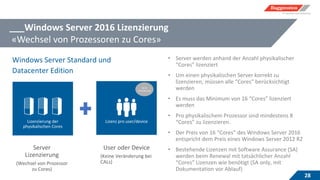
    ___Windows Server 2016Lizenzierung «Wechsel von Prozessoren zu Cores» 28 • Server werden anhand der Anzahl physikalischer “Cores” lizenziert • Um einen physikalischen Server korrekt zu lizenzieren, müssen alle “Cores” berücksichtigt werden • Es muss das Minimum von 16 “Cores” lizenziert werden • Pro physikalischem Prozessor sind mindestens 8 “Cores” zu lizenzieren. • Der Preis von 16 “Cores” des Windows Server 2016 entspricht dem Preis eines Windows Server 2012 R2 • Bestehende Lizenzen mit Software Assurance (SA) werden beim Renewal mit tatsächlicher Anzahl “Cores” Lizenzen wie benötigt (SA only, mit Dokumentation vor Ablauf) Lizenzierung der physikalischen Cores Lizenz pro user/device Server Lizenzierung (Wechsel von Prozessor zu Cores) User oder Device (Keine Veränderung bei CALs) Keine Veränderung Windows Server Standard und Datacenter Edition
  • 29.
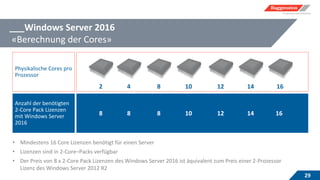
    ___Windows Server 2016 «Berechnungder Cores» 29 Physikalische Cores pro Prozessor Anzahl der benötigten 2-Core Pack Lizenzen mit Windows Server 2016 2 4 108 8 8 8 12 • Mindestens 16 Core Lizenzen benötigt für einen Server • Lizenzen sind in 2-Core–Packs verfügbar • Der Preis von 8 x 2-Core Pack Lizenzen des Windows Server 2016 ist äquivalent zum Preis einer 2-Prozessor Lizenz des Windows Server 2012 R2 12 14 16 14 1610
  • 30.
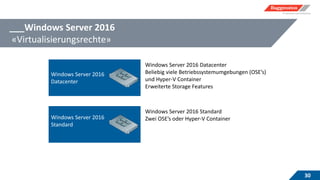
    ___Windows Server 2016 «Virtualisierungsrechte» 30 WindowsServer 2016 Datacenter Windows Server 2016 Standard Windows Server 2016 Datacenter Beliebig viele Betriebssystemumgebungen (OSE’s) und Hyper-V Container Erweiterte Storage Features Windows Server 2016 Standard Zwei OSE’s oder Hyper-V Container
  • 31.
    ___Windows Server 2016 «Zugriffeund Kombinationen» 31 Zugriffe auf Windows Server 2016 Windows Server 2016 CAL Oder Enterprise Mobility & Security (EMS) Windows Server 2016 Active Directory Rights Management Service Windows Server 2016 CAL & Windows Server 2016 AD RMS CAL Oder Enterprise Mobility & Security (EMS) Windows Server 2016 Remote Desktop Service Windows Server 2016 CAL & Windows Server 2016 RDS CAL Oder Enterprise Mobility & Security (EMS) & Windows Server 2016 RDS CAL
  • 32.
    ___Windows Server 2016 «SoftwareAssurance Renewal» 32 Prozessoren mit 8 Cores oder wenigerAusgangslage Prozessoren mit MEHR als 8 Cores
  • 33.
    Server 2016 –«use cases» Eckhard Neuhaus Michael Kistler
  • 34.
    Windows Server 2016– Weshalb ? 34 Storage Kosten reduzieren im Datacenter Downtime der IT-Services reduzieren IT Security erhöhen Zeitgewinn und Risiko minimieren durch weniger «patchen»
  • 35.
    1 - NetworkLocation Server (NLS) als Nano Server 35 NLS = Webservice, wichtige Komponente Direct Access Implementationen
  • 36.
  • 37.
    2 – DCals Core Server managed via Azure 37 DC = Domain Controller, EXTREM wichtig Core Server managen wir NEU ohne GUI  Core Server setzen wir seit Win2012 im Hyper-V Cluster Umfeld primär ein
  • 38.
  • 39.
    3 – Hyper-VCluster mit Nano Server + SDS 39 •Hyper-converged mit Storage Spaces Direct •NIC und RAM können beim laufenden Betrieb entfernt/hinzugefügt werden •in-box synchrone Replikation •enorme IOPS Performance !!! •keine teuren SAN Komponenten Windows Server 2016 Datacenter Windows Server 2016 Datacenter Switch Switch Failover Cluster Hyper-V Failover Cluster Hyper-V S2D NTFSREFS REFS REFS REFS
  • 40.
  • 41.
    Key Takeaways 41 Zukunft vonWindows Server sind Nano Deployments Storage Spaces Direct im Rechencenter anwenden Management Funktionen kommen zunehmend aus Azure