Windows 2016
Agenda
• Licensing
• Nano Server
• Containers/Docker
• Hands on Labs
• Active Directory Recovery Feature
• Deploy a Container
2
L
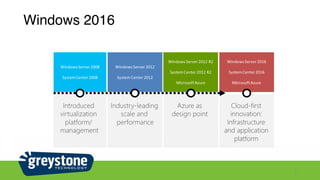
Windows 2016
3
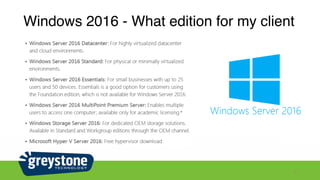
Windows 2016 - What edition for my client
4
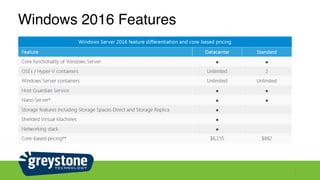
Windows 2016 Features
5
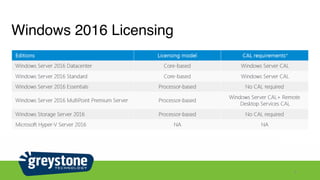
Windows 2016 Licensing
6
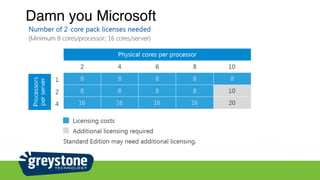
Damn you Microsoft
7
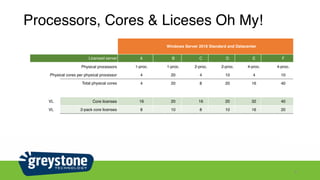
Processors, Cores & Liceses Oh My!
8
Windows Server 2016 Standard and Datacenter
Licensed server A B C D E F
Physical processors 1-proc. 1-proc. 2-proc. 2-proc. 4-proc. 4-proc.
Physical cores per physical processor 4 20 4 10 4 10
Total physical cores 4 20 8 20 16 40
VL Core licenses 16 20 16 20 32 40
VL 2-pack core licenses 8 10 8 10 16 20
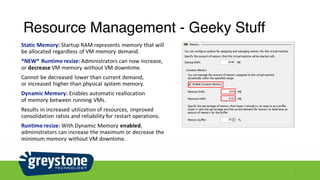
Resource Management - Geeky Stuff
9
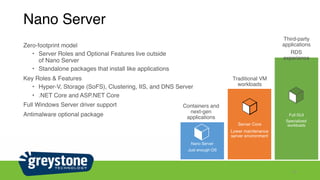
Nano Server
Zero-footprint model
• Server Roles and Optional Features live outside 

of Nano Server
• Standalone packages that install like applications
Key Roles & Features
• Hyper-V, Storage (SoFS), Clustering, IIS, and DNS Server
• .NET Core and ASP.NET Core
Full Windows Server driver support
Antimalware optional package
10
Nano Server
Just enough
OS
Containers and
next-gen
applications
Full GUI
Specialized
workloads
Third-party
applications
RDS
experience
Server Core
Lower maintenance
server environment
Traditional VM
workloads
Nano Server
Just enough OS
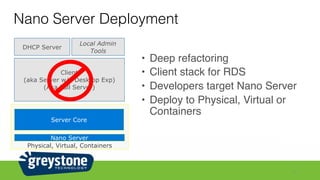
Nano Server Deployment
11
• Deep refactoring
• Client stack for RDS
• Developers target Nano Server
• Deploy to Physical, Virtual or
Containers
Physical, Virtual, Containers
Nano Server
Server Core
Client
(aka Server w/a Desktop Exp)
(Aka Full Server)
Local Admin
Tools
DHCP Server
0
8
15
23
30
23
8
2
Nano Server Server Core
Full Server
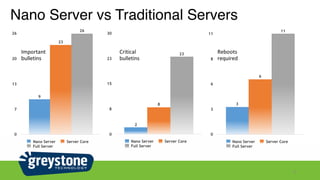
Nano Server vs Traditional Servers
12
0
7
13
20
26
26
23
9
Nano Server Server Core
Full Server
0
3
6
8
11
11
6
3
Nano Server Server Core
Full Server
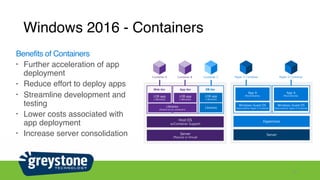
Windows 2016 - Containers
13
Benefits of Containers
• Further acceleration of app
deployment
• Reduce effort to deploy apps
• Streamline development and
testing
• Lower costs associated with
app deployment
• Increase server consolidation

Greystone Technology - Introduction to Windowns Server 2016

  • 1.
  • 2.
    Agenda • Licensing • NanoServer • Containers/Docker • Hands on Labs • Active Directory Recovery Feature • Deploy a Container 2
  • 3.
  • 4.
    Windows 2016 -What edition for my client 4
  • 5.
  • 6.
  • 7.
  • 8.
    Processors, Cores &Liceses Oh My! 8 Windows Server 2016 Standard and Datacenter Licensed server A B C D E F Physical processors 1-proc. 1-proc. 2-proc. 2-proc. 4-proc. 4-proc. Physical cores per physical processor 4 20 4 10 4 10 Total physical cores 4 20 8 20 16 40 VL Core licenses 16 20 16 20 32 40 VL 2-pack core licenses 8 10 8 10 16 20
  • 9.
    Resource Management -Geeky Stuff 9
  • 10.
    Nano Server Zero-footprint model •Server Roles and Optional Features live outside 
 of Nano Server • Standalone packages that install like applications Key Roles & Features • Hyper-V, Storage (SoFS), Clustering, IIS, and DNS Server • .NET Core and ASP.NET Core Full Windows Server driver support Antimalware optional package 10 Nano Server Just enough OS Containers and next-gen applications Full GUI Specialized workloads Third-party applications RDS experience Server Core Lower maintenance server environment Traditional VM workloads Nano Server Just enough OS
  • 11.
    Nano Server Deployment 11 •Deep refactoring • Client stack for RDS • Developers target Nano Server • Deploy to Physical, Virtual or Containers Physical, Virtual, Containers Nano Server Server Core Client (aka Server w/a Desktop Exp) (Aka Full Server) Local Admin Tools DHCP Server
  • 12.
    0 8 15 23 30 23 8 2 Nano Server ServerCore Full Server Nano Server vs Traditional Servers 12 0 7 13 20 26 26 23 9 Nano Server Server Core Full Server 0 3 6 8 11 11 6 3 Nano Server Server Core Full Server
  • 13.
    Windows 2016 -Containers 13 Benefits of Containers • Further acceleration of app deployment • Reduce effort to deploy apps • Streamline development and testing • Lower costs associated with app deployment • Increase server consolidation