Introduction to .NET 
www.ssdntech.com
What is .NET? 
• Microsoft’s vision of the future of 
applications in the Internet age 
– Increased robustness over classic Windows 
apps 
– New programming platform 
– Built for the web 
• .NET is a platform that runs on the 
operating system
.NET 
• Sits on top on the OS (currently all the Windows; 
Linux/Unix subset also available – Mono Project) 
– About 20MB download 
• Provides language interoperability across 
platforms 
• Strong emphasis on Web connectivity, using XML 
web services to connect and share data between 
smart client devices, servers, and developers/users 
• Platform/language independent
History 
• Development began in 1998 
• Beta 1 released Oct, 2000 
• Beta 2 released July, 2001 
• Finalized in Dec, shipping in Feb 2002 
• Vista ships with .NET Framework 3.0 
(Runtime)
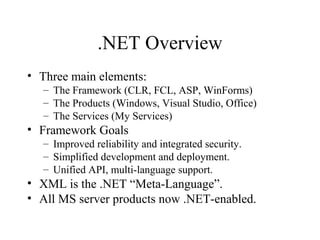
.NET Overview 
• Three main elements: 
– The Framework (CLR, FCL, ASP, WinForms) 
– The Products (Windows, Visual Studio, Office) 
– The Services (My Services) 
• Framework Goals 
– Improved reliability and integrated security. 
– Simplified development and deployment. 
– Unified API, multi-language support. 
• XML is the .NET “Meta-Language”. 
• All MS server products now .NET-enabled.
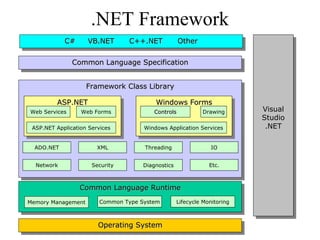
.NET Framework 
CCCC#### V VVBBBB..N.NNEEEETTTT C CC++++++++..N.NNEEEETTTT O OOttththhheeeerrrr 
FFFFrrraraaammmmeeeewwwwoooorrrkrkkk C CCllaallaassssssss L LLiibbiibbrrraraaarrryryyy 
ADO.NET 
Network 
Web Forms CCoonnttrroollss Drawing 
XML 
Security 
Threading 
Diagnostics 
IO 
Etc. 
CCCCoooommmmmmmmoooonnnn L LLaaaannnngggguuuuaaaaggggeeee R RRuuuunnnntttitimmiimmeeee 
Memory Management Common Type System Lifecycle Monitoring 
OOOOppppeeeerrrraaaatttitinniinngggg S SSyyyyssssttteteeemmmm 
VViissuuaall 
SSttuuddiioo 
..NNEETT 
VViissuuaall 
SSttuuddiioo 
..NNEETT 
CCCCoooommmmmmmmoooonnnn L LLaaaannnngggguuuuaaaaggggeeee S SSppppeeeecccciiffiiififcciiccaaaatttitiooiioonnnn 
AAAASSSSPPPP..N.NNEEEETTTT WWWWiinniinnddddoooowwwwssss F FFoooorrrrmmmmssss 
Web Services 
ASP.NET Application Services 
Windows Application Services
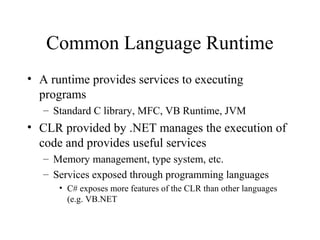
Common Language Runtime 
• A runtime provides services to executing 
programs 
– Standard C library, MFC, VB Runtime, JVM 
• CLR provided by .NET manages the execution of 
code and provides useful services 
– Memory management, type system, etc. 
– Services exposed through programming languages 
• C# exposes more features of the CLR than other languages 
(e.g. VB.NET
.NET Framework Class Library 
• Framework – you can call it and it can call 
you 
• Large class library 
– Over 2500 classes 
– Major components 
• Base Class: Networking, security, I/O, files, etc. 
• Data and XML Classes 
• Web Services/UI 
• Windows UI
Framework Libraries 
• Web Services 
– Expose application functionalities across the Internet, in the same 
way as a class expose services to other classes. 
– Each Web service can function as an independent entity, and can 
cooperate with one another. 
– Data described by XML. 
• ASP.NET 
– Replacement for the Active Server Technology. 
– Web Forms provide an easy way to write interactive Web 
applications, much in the same way as “normal” Windows 
applications.
Framework Libraries 
• Provides facilities to generate Windows 
GUI-based client applications easily 
• Form-oriented 
• Standard GUI components 
– buttons, textboxes, menus, scrollbars, etc. 
• Event-handling
Common Language Specification 
• CLS is a set of rules that specifies features that all 
languages should support 
– Goal: have the .NET framework support multiple 
languages 
– CLS is an agreement among language designers and 
class library designers about the features and usage 
conventions that can be relied upon 
• Example: public names should not rely on case for uniqueness 
since some languages are not case sensitive 
• This does not mean all languages are not case sensitive above 
the CLR!
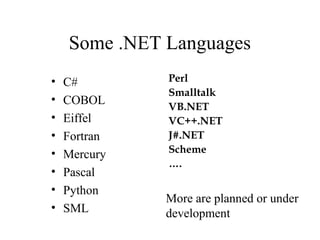
Some .NET Languages 
• C# 
• COBOL 
• Eiffel 
• Fortran 
• Mercury 
• Pascal 
• Python 
• SML 
Perl 
Smalltalk 
VB.NET 
VC++.NET 
J#.NET 
Scheme 
…. 
More are planned or under 
development
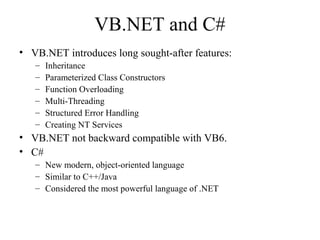
VB.NET and C# 
• VB.NET introduces long sought-after features: 
– Inheritance 
– Parameterized Class Constructors 
– Function Overloading 
– Multi-Threading 
– Structured Error Handling 
– Creating NT Services 
• VB.NET not backward compatible with VB6. 
• C# 
– New modern, object-oriented language 
– Similar to C++/Java 
– Considered the most powerful language of .NET
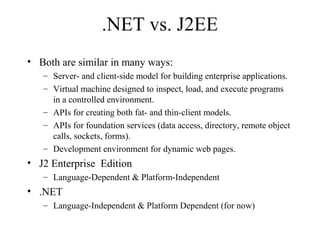
.NET vs. J2EE 
• Both are similar in many ways: 
– Server- and client-side model for building enterprise applications. 
– Virtual machine designed to inspect, load, and execute programs 
in a controlled environment. 
– APIs for creating both fat- and thin-client models. 
– APIs for foundation services (data access, directory, remote object 
calls, sockets, forms). 
– Development environment for dynamic web pages. 
• J2 Enterprise Edition 
– Language-Dependent & Platform-Independent 
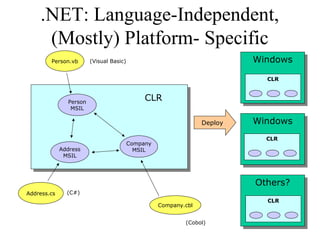
• .NET 
– Language-Independent & Platform Dependent (for now)
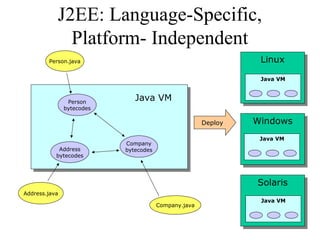
J2EE: Language-Specific, 
Platform- Independent 
Person.java 
Address.java 
Java VM Person 
bytecodes 
Company.java 
Company 
Address bytecodes 
bytecodes 
LLininuuxx 
Java VM 
WWininddoowwss 
Java VM 
SSoolalarrisis 
Java VM 
Deploy
.NET: Language-Independent, 
(Mostly) Platform- Specific 
Person.vb 
Address.cs 
CLR Person 
MSIL 
Company.cbl 
Company 
Address MSIL 
MSIL 
WWininddoowwss 
CLR 
WWininddoowwss 
CLR 
OOtthheerrss?? 
CLR 
Deploy 
(Visual Basic) 
(C#) 
(Cobol)
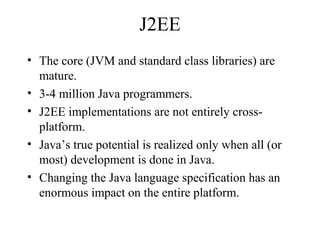
J2EE 
• The core (JVM and standard class libraries) are 
mature. 
• 3-4 million Java programmers. 
• J2EE implementations are not entirely cross-platform. 
• Java’s true potential is realized only when all (or 
most) development is done in Java. 
• Changing the Java language specification has an 
enormous impact on the entire platform.
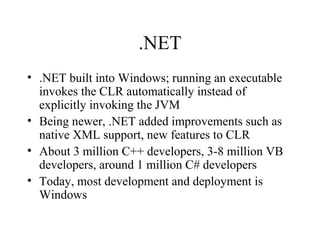
.NET 
• .NET built into Windows; running an executable 
invokes the CLR automatically instead of 
explicitly invoking the JVM 
• Being newer, .NET added improvements such as 
native XML support, new features to CLR 
• About 3 million C++ developers, 3-8 million VB 
developers, around 1 million C# developers 
• Today, most development and deployment is 
Windows
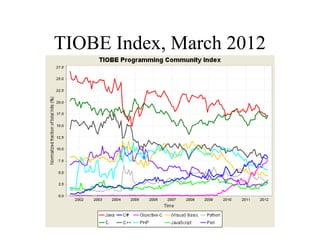
TIOBE Index, March 2012
Do you have to use Windows? 
• Open source implementations of .NET 
• Today there exists Ximian/Novell’s Mono, Corel's Rotor 
and the Free Software Foundation's Portable .NET projects 
• Rotor: the Shared Source Common Language 
Infrastructure (SSCLI) 
– Started as “Project 7” with Academic Microsoft Research 
– With universities and programming language researchers, 
developed several languages for the CLR 
• Mono 
– Implementation of ECMA C# and CLI for Linux 
– http://www.mono-project.com
SSCLI aka Rotor 
• Implements a subset of .NET 
– The CLR and ECMA Standards 
• Shared Source License 
• Download from 
http://msdn.microsoft.com/net/sscli 
• 12 MB tar of src, 4 MB tar of docs 
– Complete source, intended for researchers, students, programming 
language designers 
– 1.9 million lines of source code 
• 1.1 million lines of C++ 
• 600k lines of C# 
• 125k IL Assembler 
• Assembler 
– 5,900 source files 
– 9700 files in total 
• Compiles and run on FreeBSD, Windows XP, Max OS/X
Mono 
• http://www.mono-project.com/Main_Page 
• Mono provides the necessary software to develop 
and run .NET client and server applications on 
Linux, Solaris, Mac OS X, Windows, and Unix. 
• Sponsored by Novell 
• Mono allows your existing binaries to run on 
Linux with copy-deployment. 
• As of 2/15/09 Mono API coverage is limited to the 
.NET 2.0 API, with some support for .NET 3.5
Mono 
• Core: mscorlib, System, System.Security and System.XML 
assemblies. 
– ADO.NET: System.Data and various other database providers. 
– ASP.NET: WebForms and Web Services are supported. Work on 
WSE1/WSE2 has also started. 
– Compilers: C#, VB.NET and various command line tools that are part of 
the SDK. 
– Open Source, Unix and Gnome specific libraries. 
• Other components like Windows.Forms, Directory.Services, 
Enterprise Services and JScript are partially covered 
• Some other smaller and less used components do not have yet a 
Mono equivalent
Common Language Runtime 
• The CLR is at the core of the .NET platform - the 
execution engine 
• The CLR provides a “Managed Execution Environment”. 
Manages the execution of code and provides services that 
make development easier (like the JVM) 
• Code that relies on COM and the Win32 API is “Un- 
Managed Code” (e.g. built with Visual Studio 6.0, VB6) 
• Code developed for a compiler that targets this platform is 
referred to as “Managed Code” (e.g. code developed in 
VB.NET … C# allows Managed and Unmanaged)
Simple Application Deployment 
• Unlike COM, no “plumbing” code needed to 
connect separate components 
– Components can be developed in different 
programming languages 
• 2500 classes to reuse 
• Automatic garbage collection 
• Memory is managed 
– Common bugs like memory leaks, buffer overruns are 
not possible (if using 100% managed code)
Multiple Languages 
• Common Type System makes interoperability 
seamless between languages 
• Class in one language can inherit from a class in 
another language 
• Exceptions can be thrown across languages 
• Makes it easier to learn a new .NET language 
since the same tools and classes are in place 
• Can debug across languages
The Common Type System 
• At the core of the Framework is a universal type system called the 
.NET Common Type System (CTS). 
• Everything is an object - but efficient 
– Boxing and Unboxing 
• All types fall into two categories - Value types and Reference types. 
– Value types contain actual data (cannot be null). Stored on the stack. 
Always initialized. 
– Three kinds of value types: Primitives, structures, and enumerations. 
• Language compilers map keywords to the primitive types. For 
example, a C# “int” is mapped to System.Int32.
The Common Type System 
• Reference types are type-safe object pointers. Allocated in the 
“managed heap” 
• Four kinds of reference types: Classes, arrays, delegates, and 
interfaces. 
– When instances of value types go out of scope, they are instantly 
destroyed and memory is reclaimed. 
– When instances of reference types go out of scope, they are garbage 
collected. 
• Boxing = converting an instance of a value type to a reference type. 
Usually done implicitly through parameter passing or variable 
assignments. 
• UnBoxing = casting a reference type back into a value type variable.
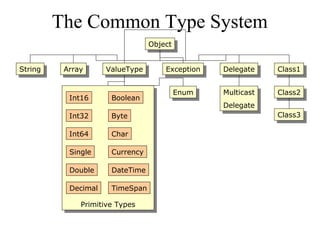
The Common Type System 
Int16 
Int32 
Int64 
Single 
Double 
Decimal 
VVaalulueeTTyyppee EExxcceeppttioionn DDeeleleggaattee 
Boolean 
Byte 
Char 
Currency 
DateTime 
TimeSpan 
PPrrimimititivivee T Tyyppeess 
OObbjejecctt 
SSttrriningg AArrrraayy 
EEnnuumm 
Multicast 
Delegate 
Multicast 
Delegate 
CClalassss11 
CClalassss22 
CClalassss33
MSIL and JIT Compilation 
• Source code is compiled into MSIL (Microsoft Intermediate 
Language). Similar to Java bytecodes - CPU-independent instructions 
• MSIL allows for runtime type-safety and security, as well as portable 
execution platforms. 
• The MSIL architecture results in apps that run in one address space - 
thus much less OS overhead. 
• Compilers also produce “metadata” or glue that binds the code with 
debuggers, browsers, etc. 
– Definitions of each type in your code. 
– Signatures of each type’s members. 
– Members that your code references. 
– Other runtime data for the CLR.
MSIL and JIT Compilation 
• Metadata in the load file along with the MSIL enables 
code to be self-describing - no need for separate type 
libraries, IDL, or registry entries. 
• When code is executed by the CLR, a JIT compilation step 
occurs. 
– Code is compiled method-by-method to native machine code as 
methods are invoked 
– Results in performance slowdown when a program is first 
executed, but can be efficient for code that is never executed 
– Subsequent invocations reuse compiled code, so no slowdown
Delegates 
• A new concept that is central to the programming model of 
the CLR. 
• Delegates are like function pointers, but are actually type-safe, 
secure, managed CLR objects. 
• The CLR guarantees that a delegate points to a valid 
method. 
• You get the benefits of function pointers without the 
dangers. 
• Each delegate is based on a single method signature. 
• Commonly used for callbacks. 
• Delegates are basis of event handlers.
Packaging: Modules, Types, 
Assemblies, and the Manifest 
• A “module” refers to a managed binary, such as an EXE or 
DLL. 
• Modules contain definitions of managed types, such as 
classes, interfaces, structures, and enumerations. 
• An assembly can be defined as one or more modules that 
make up a unit of functionality. Assemblies also can 
“contain” other files that make up an application, such as 
bitmaps and resource files. 
• An assembly is the the fundamental unit of deployment, 
version control, activation scoping, and security 
permissions.
Packaging: Modules, Types, 
Assemblies, and the Manifest 
• An assembly is a set of boundaries: 
– A security boundary - the unit to which 
permissions are requested and granted. 
– A type boundary - the scope of an assembly 
uniquely qualifies the types contained within. 
– A reference scope boundary - specifies the 
types that are exposed outside the assembly. 
– A version boundary - all types in an assembly 
are versioned together as a unit. 
• Avoid multiple version problem for DLL’s
Packaging: Modules, Types, 
Assemblies, and the Manifest 
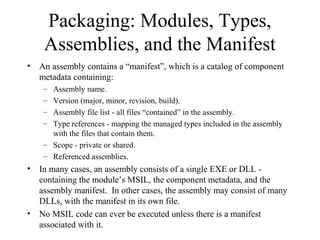
• An assembly contains a “manifest”, which is a catalog of component 
metadata containing: 
– Assembly name. 
– Version (major, minor, revision, build). 
– Assembly file list - all files “contained” in the assembly. 
– Type references - mapping the managed types included in the assembly 
with the files that contain them. 
– Scope - private or shared. 
– Referenced assemblies. 
• In many cases, an assembly consists of a single EXE or DLL - 
containing the module’s MSIL, the component metadata, and the 
assembly manifest. In other cases, the assembly may consist of many 
DLLs, with the manifest in its own file. 
• No MSIL code can ever be executed unless there is a manifest 
associated with it.
Differences from JVM (prior to 1.5) 
• 220 instructions in the CLR’s instruction set 
• JVM provides no way of encoding type-unsafe 
features of typical programming languages, such 
as pointers 
– E.g., JVM has no way to access the address of local 
variables for use in things like a Swap method, passing 
primitive variables by reference 
• Arithmetic 
– Separate instructions for adding to generate overflow 
vs. no overflow 
– JVM never generates overflow on integer types
Differences from JVM (prior to 1.5) 
• Branches 
– Limited to 64K in JVM 
• Structures and Unions 
– No support for these in JVM 
– Union supports Variant Records 
• When a field in the structure is selected from 
multiple possible types e.g., Struct.X could be an 
int or a boolean 
• Automatic Boxing and Unboxing
Differences from JVM (prior to 1.5) 
• Support for Tail Recursion 
– Discards previous stack frame, so tail recursion 
can result in an infinite loop instead of stack 
overflow 
– Faster as well (for non-infinite loop) 
• Supports “unmanaged” code 
– Java has JNI, Java Native (code) Interface, as a 
way to do the same thing but not as directly
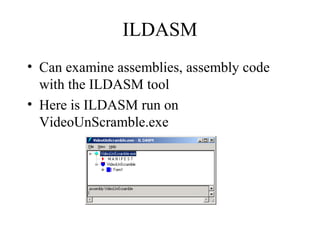
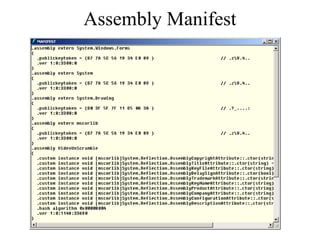
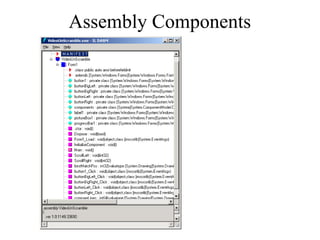
ILDASM 
• Can examine assemblies, assembly code 
with the ILDASM tool 
• Here is ILDASM run on 
VideoUnScramble.exe
Assembly Manifest
Assembly Components
MSIL Sample Code 
IL_006e: ldloc.s V_4 
IL_0070: ldloc.1 
IL_0071: ldelema [System.Drawing]System.Drawing.Color 
IL_0076: ldloc.0 
IL_0077: ldloc.1 
IL_0078: ldarg.1 
IL_0079: sub 
IL_007a: ldloc.2 
IL_007b: callvirt instance valuetype [System.Drawing]System.Drawing.Color 
[System.Drawing]System.Drawing.Bitmap::GetPixel(int32, int32) 
IL_0080: stobj [System.Drawing]System.Drawing.Color 
IL_0085: ldloc.1 
IL_0086: ldc.i4.1 
IL_0087: sub 
IL_0088: stloc.1 
IL_0089: ldloc.1 
IL_008a: ldarg.1 
IL_008b: bge.s IL_006e 
IL_008d: ldc.i4.0 
IL_008e: stloc.1 
IL_008f: br.s IL_00aa
Summary 
• Next we will study C# 
• C# does not exist in isolation but has a close 
connection with the .NET framework 
• .NET 
– CLR a relatively new, Java-like platform, but 
multi-language 
– SrcMSILJITNative Code 
– .NET framework includes many class libraries

Best DotNet Training in Delhi

  • 1.
    Introduction to .NET www.ssdntech.com
  • 2.
    What is .NET? • Microsoft’s vision of the future of applications in the Internet age – Increased robustness over classic Windows apps – New programming platform – Built for the web • .NET is a platform that runs on the operating system
  • 3.
    .NET • Sitson top on the OS (currently all the Windows; Linux/Unix subset also available – Mono Project) – About 20MB download • Provides language interoperability across platforms • Strong emphasis on Web connectivity, using XML web services to connect and share data between smart client devices, servers, and developers/users • Platform/language independent
  • 4.
    History • Developmentbegan in 1998 • Beta 1 released Oct, 2000 • Beta 2 released July, 2001 • Finalized in Dec, shipping in Feb 2002 • Vista ships with .NET Framework 3.0 (Runtime)
  • 5.
    .NET Overview •Three main elements: – The Framework (CLR, FCL, ASP, WinForms) – The Products (Windows, Visual Studio, Office) – The Services (My Services) • Framework Goals – Improved reliability and integrated security. – Simplified development and deployment. – Unified API, multi-language support. • XML is the .NET “Meta-Language”. • All MS server products now .NET-enabled.
  • 6.
    .NET Framework CCCC####V VVBBBB..N.NNEEEETTTT C CC++++++++..N.NNEEEETTTT O OOttththhheeeerrrr FFFFrrraraaammmmeeeewwwwoooorrrkrkkk C CCllaallaassssssss L LLiibbiibbrrraraaarrryryyy ADO.NET Network Web Forms CCoonnttrroollss Drawing XML Security Threading Diagnostics IO Etc. CCCCoooommmmmmmmoooonnnn L LLaaaannnngggguuuuaaaaggggeeee R RRuuuunnnntttitimmiimmeeee Memory Management Common Type System Lifecycle Monitoring OOOOppppeeeerrrraaaatttitinniinngggg S SSyyyyssssttteteeemmmm VViissuuaall SSttuuddiioo ..NNEETT VViissuuaall SSttuuddiioo ..NNEETT CCCCoooommmmmmmmoooonnnn L LLaaaannnngggguuuuaaaaggggeeee S SSppppeeeecccciiffiiififcciiccaaaatttitiooiioonnnn AAAASSSSPPPP..N.NNEEEETTTT WWWWiinniinnddddoooowwwwssss F FFoooorrrrmmmmssss Web Services ASP.NET Application Services Windows Application Services
  • 7.
    Common Language Runtime • A runtime provides services to executing programs – Standard C library, MFC, VB Runtime, JVM • CLR provided by .NET manages the execution of code and provides useful services – Memory management, type system, etc. – Services exposed through programming languages • C# exposes more features of the CLR than other languages (e.g. VB.NET
  • 8.
    .NET Framework ClassLibrary • Framework – you can call it and it can call you • Large class library – Over 2500 classes – Major components • Base Class: Networking, security, I/O, files, etc. • Data and XML Classes • Web Services/UI • Windows UI
  • 9.
    Framework Libraries •Web Services – Expose application functionalities across the Internet, in the same way as a class expose services to other classes. – Each Web service can function as an independent entity, and can cooperate with one another. – Data described by XML. • ASP.NET – Replacement for the Active Server Technology. – Web Forms provide an easy way to write interactive Web applications, much in the same way as “normal” Windows applications.
  • 10.
    Framework Libraries •Provides facilities to generate Windows GUI-based client applications easily • Form-oriented • Standard GUI components – buttons, textboxes, menus, scrollbars, etc. • Event-handling
  • 11.
    Common Language Specification • CLS is a set of rules that specifies features that all languages should support – Goal: have the .NET framework support multiple languages – CLS is an agreement among language designers and class library designers about the features and usage conventions that can be relied upon • Example: public names should not rely on case for uniqueness since some languages are not case sensitive • This does not mean all languages are not case sensitive above the CLR!
  • 12.
    Some .NET Languages • C# • COBOL • Eiffel • Fortran • Mercury • Pascal • Python • SML Perl Smalltalk VB.NET VC++.NET J#.NET Scheme …. More are planned or under development
  • 13.
    VB.NET and C# • VB.NET introduces long sought-after features: – Inheritance – Parameterized Class Constructors – Function Overloading – Multi-Threading – Structured Error Handling – Creating NT Services • VB.NET not backward compatible with VB6. • C# – New modern, object-oriented language – Similar to C++/Java – Considered the most powerful language of .NET
  • 14.
    .NET vs. J2EE • Both are similar in many ways: – Server- and client-side model for building enterprise applications. – Virtual machine designed to inspect, load, and execute programs in a controlled environment. – APIs for creating both fat- and thin-client models. – APIs for foundation services (data access, directory, remote object calls, sockets, forms). – Development environment for dynamic web pages. • J2 Enterprise Edition – Language-Dependent & Platform-Independent • .NET – Language-Independent & Platform Dependent (for now)
  • 15.
    J2EE: Language-Specific, Platform-Independent Person.java Address.java Java VM Person bytecodes Company.java Company Address bytecodes bytecodes LLininuuxx Java VM WWininddoowwss Java VM SSoolalarrisis Java VM Deploy
  • 16.
    .NET: Language-Independent, (Mostly)Platform- Specific Person.vb Address.cs CLR Person MSIL Company.cbl Company Address MSIL MSIL WWininddoowwss CLR WWininddoowwss CLR OOtthheerrss?? CLR Deploy (Visual Basic) (C#) (Cobol)
  • 17.
    J2EE • Thecore (JVM and standard class libraries) are mature. • 3-4 million Java programmers. • J2EE implementations are not entirely cross-platform. • Java’s true potential is realized only when all (or most) development is done in Java. • Changing the Java language specification has an enormous impact on the entire platform.
  • 18.
    .NET • .NETbuilt into Windows; running an executable invokes the CLR automatically instead of explicitly invoking the JVM • Being newer, .NET added improvements such as native XML support, new features to CLR • About 3 million C++ developers, 3-8 million VB developers, around 1 million C# developers • Today, most development and deployment is Windows
  • 19.
  • 20.
    Do you haveto use Windows? • Open source implementations of .NET • Today there exists Ximian/Novell’s Mono, Corel's Rotor and the Free Software Foundation's Portable .NET projects • Rotor: the Shared Source Common Language Infrastructure (SSCLI) – Started as “Project 7” with Academic Microsoft Research – With universities and programming language researchers, developed several languages for the CLR • Mono – Implementation of ECMA C# and CLI for Linux – http://www.mono-project.com
  • 21.
    SSCLI aka Rotor • Implements a subset of .NET – The CLR and ECMA Standards • Shared Source License • Download from http://msdn.microsoft.com/net/sscli • 12 MB tar of src, 4 MB tar of docs – Complete source, intended for researchers, students, programming language designers – 1.9 million lines of source code • 1.1 million lines of C++ • 600k lines of C# • 125k IL Assembler • Assembler – 5,900 source files – 9700 files in total • Compiles and run on FreeBSD, Windows XP, Max OS/X
  • 22.
    Mono • http://www.mono-project.com/Main_Page • Mono provides the necessary software to develop and run .NET client and server applications on Linux, Solaris, Mac OS X, Windows, and Unix. • Sponsored by Novell • Mono allows your existing binaries to run on Linux with copy-deployment. • As of 2/15/09 Mono API coverage is limited to the .NET 2.0 API, with some support for .NET 3.5
  • 23.
    Mono • Core:mscorlib, System, System.Security and System.XML assemblies. – ADO.NET: System.Data and various other database providers. – ASP.NET: WebForms and Web Services are supported. Work on WSE1/WSE2 has also started. – Compilers: C#, VB.NET and various command line tools that are part of the SDK. – Open Source, Unix and Gnome specific libraries. • Other components like Windows.Forms, Directory.Services, Enterprise Services and JScript are partially covered • Some other smaller and less used components do not have yet a Mono equivalent
  • 24.
    Common Language Runtime • The CLR is at the core of the .NET platform - the execution engine • The CLR provides a “Managed Execution Environment”. Manages the execution of code and provides services that make development easier (like the JVM) • Code that relies on COM and the Win32 API is “Un- Managed Code” (e.g. built with Visual Studio 6.0, VB6) • Code developed for a compiler that targets this platform is referred to as “Managed Code” (e.g. code developed in VB.NET … C# allows Managed and Unmanaged)
  • 25.
    Simple Application Deployment • Unlike COM, no “plumbing” code needed to connect separate components – Components can be developed in different programming languages • 2500 classes to reuse • Automatic garbage collection • Memory is managed – Common bugs like memory leaks, buffer overruns are not possible (if using 100% managed code)
  • 26.
    Multiple Languages •Common Type System makes interoperability seamless between languages • Class in one language can inherit from a class in another language • Exceptions can be thrown across languages • Makes it easier to learn a new .NET language since the same tools and classes are in place • Can debug across languages
  • 27.
    The Common TypeSystem • At the core of the Framework is a universal type system called the .NET Common Type System (CTS). • Everything is an object - but efficient – Boxing and Unboxing • All types fall into two categories - Value types and Reference types. – Value types contain actual data (cannot be null). Stored on the stack. Always initialized. – Three kinds of value types: Primitives, structures, and enumerations. • Language compilers map keywords to the primitive types. For example, a C# “int” is mapped to System.Int32.
  • 28.
    The Common TypeSystem • Reference types are type-safe object pointers. Allocated in the “managed heap” • Four kinds of reference types: Classes, arrays, delegates, and interfaces. – When instances of value types go out of scope, they are instantly destroyed and memory is reclaimed. – When instances of reference types go out of scope, they are garbage collected. • Boxing = converting an instance of a value type to a reference type. Usually done implicitly through parameter passing or variable assignments. • UnBoxing = casting a reference type back into a value type variable.
  • 29.
    The Common TypeSystem Int16 Int32 Int64 Single Double Decimal VVaalulueeTTyyppee EExxcceeppttioionn DDeeleleggaattee Boolean Byte Char Currency DateTime TimeSpan PPrrimimititivivee T Tyyppeess OObbjejecctt SSttrriningg AArrrraayy EEnnuumm Multicast Delegate Multicast Delegate CClalassss11 CClalassss22 CClalassss33
  • 30.
    MSIL and JITCompilation • Source code is compiled into MSIL (Microsoft Intermediate Language). Similar to Java bytecodes - CPU-independent instructions • MSIL allows for runtime type-safety and security, as well as portable execution platforms. • The MSIL architecture results in apps that run in one address space - thus much less OS overhead. • Compilers also produce “metadata” or glue that binds the code with debuggers, browsers, etc. – Definitions of each type in your code. – Signatures of each type’s members. – Members that your code references. – Other runtime data for the CLR.
  • 31.
    MSIL and JITCompilation • Metadata in the load file along with the MSIL enables code to be self-describing - no need for separate type libraries, IDL, or registry entries. • When code is executed by the CLR, a JIT compilation step occurs. – Code is compiled method-by-method to native machine code as methods are invoked – Results in performance slowdown when a program is first executed, but can be efficient for code that is never executed – Subsequent invocations reuse compiled code, so no slowdown
  • 32.
    Delegates • Anew concept that is central to the programming model of the CLR. • Delegates are like function pointers, but are actually type-safe, secure, managed CLR objects. • The CLR guarantees that a delegate points to a valid method. • You get the benefits of function pointers without the dangers. • Each delegate is based on a single method signature. • Commonly used for callbacks. • Delegates are basis of event handlers.
  • 33.
    Packaging: Modules, Types, Assemblies, and the Manifest • A “module” refers to a managed binary, such as an EXE or DLL. • Modules contain definitions of managed types, such as classes, interfaces, structures, and enumerations. • An assembly can be defined as one or more modules that make up a unit of functionality. Assemblies also can “contain” other files that make up an application, such as bitmaps and resource files. • An assembly is the the fundamental unit of deployment, version control, activation scoping, and security permissions.
  • 34.
    Packaging: Modules, Types, Assemblies, and the Manifest • An assembly is a set of boundaries: – A security boundary - the unit to which permissions are requested and granted. – A type boundary - the scope of an assembly uniquely qualifies the types contained within. – A reference scope boundary - specifies the types that are exposed outside the assembly. – A version boundary - all types in an assembly are versioned together as a unit. • Avoid multiple version problem for DLL’s
  • 35.
    Packaging: Modules, Types, Assemblies, and the Manifest • An assembly contains a “manifest”, which is a catalog of component metadata containing: – Assembly name. – Version (major, minor, revision, build). – Assembly file list - all files “contained” in the assembly. – Type references - mapping the managed types included in the assembly with the files that contain them. – Scope - private or shared. – Referenced assemblies. • In many cases, an assembly consists of a single EXE or DLL - containing the module’s MSIL, the component metadata, and the assembly manifest. In other cases, the assembly may consist of many DLLs, with the manifest in its own file. • No MSIL code can ever be executed unless there is a manifest associated with it.
  • 36.
    Differences from JVM(prior to 1.5) • 220 instructions in the CLR’s instruction set • JVM provides no way of encoding type-unsafe features of typical programming languages, such as pointers – E.g., JVM has no way to access the address of local variables for use in things like a Swap method, passing primitive variables by reference • Arithmetic – Separate instructions for adding to generate overflow vs. no overflow – JVM never generates overflow on integer types
  • 37.
    Differences from JVM(prior to 1.5) • Branches – Limited to 64K in JVM • Structures and Unions – No support for these in JVM – Union supports Variant Records • When a field in the structure is selected from multiple possible types e.g., Struct.X could be an int or a boolean • Automatic Boxing and Unboxing
  • 38.
    Differences from JVM(prior to 1.5) • Support for Tail Recursion – Discards previous stack frame, so tail recursion can result in an infinite loop instead of stack overflow – Faster as well (for non-infinite loop) • Supports “unmanaged” code – Java has JNI, Java Native (code) Interface, as a way to do the same thing but not as directly
  • 39.
    ILDASM • Canexamine assemblies, assembly code with the ILDASM tool • Here is ILDASM run on VideoUnScramble.exe
  • 40.
  • 41.
  • 42.
    MSIL Sample Code IL_006e: ldloc.s V_4 IL_0070: ldloc.1 IL_0071: ldelema [System.Drawing]System.Drawing.Color IL_0076: ldloc.0 IL_0077: ldloc.1 IL_0078: ldarg.1 IL_0079: sub IL_007a: ldloc.2 IL_007b: callvirt instance valuetype [System.Drawing]System.Drawing.Color [System.Drawing]System.Drawing.Bitmap::GetPixel(int32, int32) IL_0080: stobj [System.Drawing]System.Drawing.Color IL_0085: ldloc.1 IL_0086: ldc.i4.1 IL_0087: sub IL_0088: stloc.1 IL_0089: ldloc.1 IL_008a: ldarg.1 IL_008b: bge.s IL_006e IL_008d: ldc.i4.0 IL_008e: stloc.1 IL_008f: br.s IL_00aa
  • 43.
    Summary • Nextwe will study C# • C# does not exist in isolation but has a close connection with the .NET framework • .NET – CLR a relatively new, Java-like platform, but multi-language – SrcMSILJITNative Code – .NET framework includes many class libraries